ECO mode FORD FIESTA 2016 6.G User Guide
[x] Cancel search | Manufacturer: FORD, Model Year: 2016, Model line: FIESTA, Model: FORD FIESTA 2016 6.GPages: 363, PDF Size: 5.38 MB
Page 130 of 363
WARNINGS
You must move the transmission
selector lever to position P and fully
apply the parking brake before you
leave your vehicle. Failure to leave your
vehicle securely parked may lead to an
accident or injury. Your vehicle will not move while the
transmission selector lever is in P. You can
start the engine with the transmission
selector lever in this position.
Note:
An audible warning will sound if you
open the driver's door and you have not
moved the transmission selector lever to
park.
R (Reverse) WARNING
You must only select
R when your
vehicle is stationary and the engine
is at idle speed. Selecting
R when
your vehicle is moving or at a high engine
speed will damage the transmission or
lead to an accident or injury. With the transmission selector lever in
R,
power is transmitted to the drive wheels
to allow your vehicle to move backward.
You cannot start the engine with the
transmission selector lever in this position.
Note: Always come to a complete stop
before shifting the transmission selector
lever out of reverse.
N (Neutral)
With the transmission selector lever in
N,
power is not transmitted to the drive
wheels and the transmission is not locked,
it is possible your vehicle will move if the
brakes are not applied. You can start the
engine with the transmission selector lever
in this position. D (Drive)
With the transmission selector lever in
D,
your vehicle will shift automatically
through the forward gears. You cannot
start the engine with the transmission
selector lever in this position.
The transmission will select the
appropriate gear for optimum vehicle
performance and economy based on
ambient temperature, road gradient,
vehicle load, speed and your driving style.
When you use Drive mode it provides a
downshift function. See Downshift in this
section.
Note: A shift will occur only when your
vehicle and engine speeds are appropriate.
Sport Mode and Manual Shifting
Sport Mode
With the transmission selector lever in
S,
gears are selected quicker and at higher
engine speeds. You cannot start the engine
with the transmission selector lever in this
position.
Sport mode will remain on until you either
shift manually up or down the gears using
the
+ or - buttons on the side of the
transmission selector lever or you move
the transmission selector lever to drive.
When you use Sport mode it provides a
downshift function. See Downshift in this
section.
Manual Shifting WARNING
Do not permanently hold the
+ or -
buttons in. This may damage the
transmission and may lead to an
accident or injury. Press the
+ button to shift up and the -
button to shift down.
127
Fiesta (CCT) Canada/United States of America, enUSA, First Printing Transmission
Page 131 of 363
Gears may be skipped by pressing the + or
- buttons repeatedly at short intervals.
We recommend you upshift according to
the following guide to achieve the best fuel
economy for your vehicle. Recommended
Speed
Shift From
15 mph (24 km/h)
1 - 2
25 mph (40 km/h)
2 - 3
40 mph (64 km/h)
3 - 4
45 mph (72 km/h)
4 - 5
50 mph (80 km/h)
5 - 6
Manual mode also provides a downshift
function. See
Downshift in this section.
Note: The transmission will automatically
upshift if the engine speed is too high or
downshift if the engine speed is too low.
Hints on Driving with an Automatic
Transmission WARNINGS
Do not apply the brake and
accelerator pedals simultaneously
for more than three seconds as this
limits engine rpm and labors the
transmission. This may make it difficult to
maintain speeds in traffic and lead to an
accident or injury. Do not idle the engine for long
periods of time in
D with the brakes
applied. This could damage the
transmission and may lead to an accident
or injury. Note:
The system carries out a series of
checks when you switch the ignition on and
off. You may hear clicking sounds. This is
normal. Moving off
1. Press the brake pedal to apply the
brakes.
2. Move the transmission selector lever to
R,D or S.
3. Release the parking brake.
4. Release the brake pedal and press the
accelerator pedal.
Stopping
1. Release the accelerator pedal and press the brake pedal.
2. Apply the parking brake.
3. Move the transmission selector lever to
N or P.
Downshift
Press the accelerator pedal fully with the
transmission selector lever in either
D, S
mode or manual shifting position to select
a lower gear for optimum performance.
Release the accelerator pedal when you
no longer require downshift.
If Your Vehicle Gets Stuck In Mud or
Snow
If your vehicle gets stuck in mud or snow,
it may be rocked out by shifting between
D
and R, stopping between shifts in a
steady pattern. Press the accelerator
lightly in each gear.
Note: Do not rock your vehicle if the engine
is not at normal operating temperature as
this can damage the transmission.
Note: Do not rock your vehicle for more
than a minute as this can damage the
transmission or the tires and the engine may
overheat.
128
Fiesta (CCT) Canada/United States of America, enUSA, First Printing Transmission
Page 138 of 363
USING STABILITY CONTROL -
1.0L ECOBOOST™/1.6L
DURATEC-16V TI-VCT (SIGMA)
Note:
The system automatically turns on
each time you switch the ignition on.
You can switch the traction control system
off and on . See Using Traction Control
(page 133).
USING STABILITY CONTROL -
1.6L ECOBOOST™ Note:
The system will switch on
automatically every time you switch the
ignition on.
Note: You can also switch the system off
and on using the information display. See
Information Displays
(page 84).
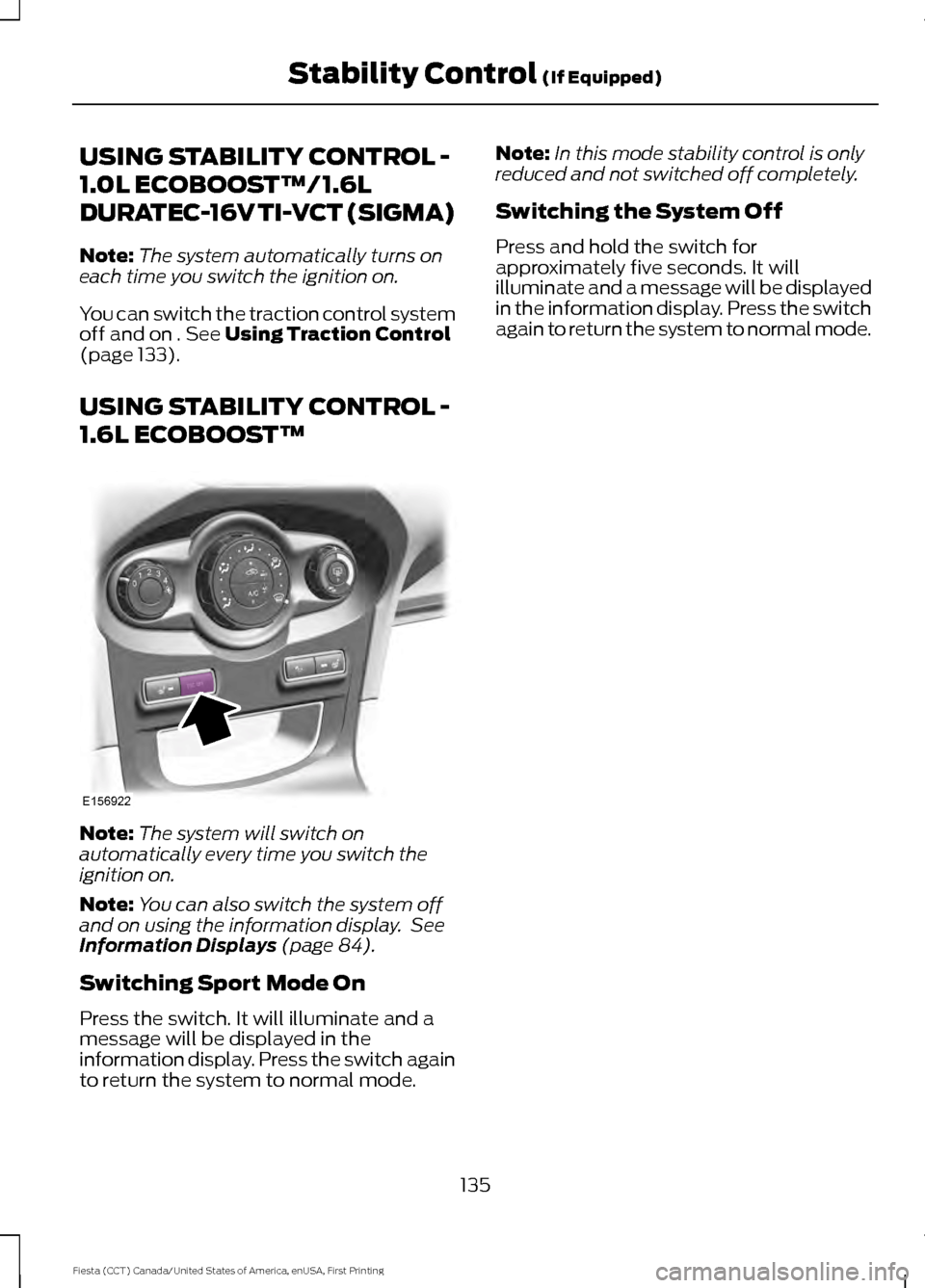
Switching Sport Mode On
Press the switch. It will illuminate and a
message will be displayed in the
information display. Press the switch again
to return the system to normal mode. Note:
In this mode stability control is only
reduced and not switched off completely.
Switching the System Off
Press and hold the switch for
approximately five seconds. It will
illuminate and a message will be displayed
in the information display. Press the switch
again to return the system to normal mode.
135
Fiesta (CCT) Canada/United States of America, enUSA, First Printing Stability Control
(If Equipped)E156922
Page 155 of 363
•
Maximum speed is 35 mph (56 km/h).
• Maximum distance is 50 miles (80
kilometers).
Recreational Towing
Note: Put your climate control system in
recirculated air mode to prevent exhaust
fumes from entering the vehicle.
Follow these guidelines if you have a need
for recreational (RV) towing. An example
of recreational towing would be towing
your vehicle behind a motorhome. These
guidelines are designed to ensure that your
transmission is not damaged.
Vehicles with a Manual Transmission
Your vehicle can be towed with all four
wheels on the ground or with the front
wheels off the ground by using a tow dolly.
If you are using a tow dolly follow the
instructions specified by the equipment
provider. If you tow your vehicle with all
wheels on the ground, follow these
instructions:
1. Tow only with your vehicle in the forward direction. Release the parking
brake.
2. Place the transmission in neutral.
Note: Do not exceed 70 mph (113 km/h)
when towing your vehicle.
Vehicles with an Automatic
Transmission - with Ignition Switch
Note: There must be battery power to
properly move the transmission ’s internal
components to neutral in step 3. Also,
moving the gearshift to the neutral position
without first turning the ignition to the on II
position limits the towing capability to 35
mph (56 km/h) and 50 miles (80
kilometers).
1. Release the parking brake.
2. Switch the ignition to the on (II)
position. 3. Press the brake pedal, then move the
gearshift to the neutral position.
4. Wait for a message indicating that the transmission is ready in the information
and entertainment display, then switch
the ignition off and release the brake
pedal.
5. Disconnect the negative (black) cable from the battery. The anti-theft system
is disabled until the battery cable is
reconnected. See
Changing the 12V
Battery (page 186).
Note: The maximum towing speed is 70
mph (113 km/h).
Note: There is no limit on towing distance.
After towing, start the engine within 15
minutes of reconnecting the battery cable.
See
Changing the 12V Battery (page 186).
Vehicles with an Automatic
Transmission - with Keyless Starting
Note: There must be battery power to
properly move the transmission ’s internal
components to neutral in step 3. Also,
moving the gearshift to the neutral position
without first turning the ignition to the on II
position limits the towing capability to 35
mph (56 km/h) and 50 miles (80
kilometers).
1. Release the parking brake.
2. Switch the ignition on by pressing the keyless start button, but do not apply
the brake pedal.
3. Press the brake pedal, then move the gearshift to the neutral position.
Release the brake pedal.
4. Wait for a message indicating that the transmission is ready in the information
and entertainment display, then switch
the ignition off by pressing the keyless
start button.
152
Fiesta (CCT) Canada/United States of America, enUSA, First Printing Towing
Page 157 of 363
BREAKING-IN
You need to break in new tires for
approximately 300 miles (480
kilometers). During this time, your vehicle
may exhibit some unusual driving
characteristics.
Avoid driving too fast during the first 1000
miles (1600 kilometers). Vary your speed
frequently and change up through the
gears early. Do not labor the engine.
Do not tow during the first 1000 miles
(1600 kilometers).
ECONOMICAL DRIVING
Fuel economy is affected by several things
such as how you drive, the conditions you
drive under and how you maintain your
vehicle.
There are some things to keep in mind that
may improve your fuel economy:
•
Accelerate and slow down in a smooth,
moderate fashion.
• Drive at steady speeds.
• Anticipate stops; slowing down may
eliminate the need to stop.
• Combine errands and minimize
stop-and-go driving(When running
errands, go to the furthest destination
first and then work your way back
home).
• Close the windows for high-speed
driving.
• Drive at reasonable speeds.
• Keep the tires properly inflated and use
only the recommended size.
• Use the recommended engine oil.
• Perform all regularly scheduled
maintenance. There are also some things you may want
to avoid doing because they reduce your
fuel economy:
•
Avoid sudden or hard accelerations.
• Avoid revving the engine before turning
off the car.
• Avoid long idle periods.
• Do not warm up your vehicle on cold
mornings.
• Reduce the use of air conditioning and
heat.
• Avoid using speed control in hilly
terrain.
• Do not rest your foot on the brake
pedal while driving.
• Avoid carrying unnecessary weight.
• Avoid adding particular accessories to
your vehicle (e.g. bug deflectors,
rollbars/light bars, running boards, ski
racks).
• Avoid driving with the wheels out of
alignment.
DRIVING THROUGH WATER WARNING
Do not drive through flowing or deep
water as you may lose control of your
vehicle.
Note:
Driving through standing water can
cause vehicle damage.
Note: Engine damage can occur if water
enters the air filter.
Before driving through standing water,
check the depth. Never drive through water
that is higher than the bottom of the front
rocker area of your vehicle.
154
Fiesta (CCT) Canada/United States of America, enUSA, First Printing Driving Hints
Page 161 of 363
Canadian roadside coverage and benefits
may differ from the U.S. coverage. If you
require more information, please refer to
the coverage section of your warranty
guide, call us in Canada at
1-800-665-2006, or visit our website at
www.ford.ca.
Sykes Assistance Services Corporation
administers the Roadside Assistance
program. You must receive covered
services in Canada or the continental
United States. Coverage extends to
vehicles that use public, non-seasonal,
annually traveled roadways. Roadside
Assistance coverage does not extend to
vehicles involved in cross-country driving,
logging, autocross and any other form of
off-road use. Well maintained roads and
surfaces help ensure safe travel for the
supplier, and allow their representatives
to perform service as per the standard
operating procedures.
In Remote Locations
If our supplier cannot take your vehicle by
road to the nearest authorized dealership,
transportation by rail or water may be
necessary. The program covers a tow to
the dock or rail terminal and also to the
dealership at the end of the trip.
For rail or water transportation, however,
contact your authorized dealer to confirm
if you are eligible for additional coverage
before you authorize or pay for the service.
Call Ford Roadside Assistance at
1-800-665-2006 for additional
information.
HAZARD WARNING FLASHERS
Note:
If used when the vehicle is not
running, the battery will lose charge. There
may be insufficient power to restart your
vehicle. The hazard warning button is
located on the instrument panel.
Use it when your vehicle is
creating a safety hazard for other
motorists.
• Press the button to turn on the hazard
warning function, and the front and
rear direction indicators will flash.
• Press the button again to turn them
off.
FUEL SHUTOFF WARNING
Failure to inspect and, if necessary,
repair fuel leaks after a collision may
increase the risk of fire and serious
injury. Ford Motor Company recommends
that the fuel system be inspected by an
authorized dealer after any collision. In the event of a moderate to severe
collision, this vehicle includes a fuel pump
shutoff feature that stops the flow of fuel
to the engine. Not every impact will cause
a shutoff.
Should your vehicle shut off after a
collision, you may restart your vehicle. For
vehicles equipped with a key system:
1. Switch off the ignition.
2. Switch on the ignition.
3. Repeat Steps 1 and 2 to re-enable the
fuel pump.
For vehicles equipped with a push button
start system:
1. Press the START/STOP button to
switch off the ignition.
2. Press the brake pedal and press the START/STOP
button to switch on the
ignition.
158
Fiesta (CCT) Canada/United States of America, enUSA, First Printing Roadside Emergencies
Page 251 of 363
GENERAL INFORMATION
Radio Frequencies and Reception Factors
Radio reception factors
The further you travel away from an FM station, the weaker
the signal and the weaker the reception.
Distance and Strength
Hills, mountains, tall buildings, bridges, tunnels, freeway
overpasses, parking garages, dense tree foliage and
thunderstorms can interfere with the reception.
Terrain
When you pass near a radio transmission tower, a stronger
signal can override a weaker signal and can cause interfer-
ence in the audio system.
Station overload
CD and CD Player Information
Note: CD units play commercially pressed
4.75-inch (12 centimeter) audio compact
discs only. Due to technical incompatibility,
certain recordable and re-recordable
compact discs may not function correctly
when used in Ford CD players.
Note: Do not insert CDs with homemade
paper (adhesive) labels into the CD player
as the label may peel and cause the CD to
become jammed. You should use a
permanent felt tip marker rather than
adhesive labels on your homemade CDs.
Ballpoint pens may damage CDs. Please
contact an authorized dealer for further
information.
Note: Do not use any irregularly shaped
discs or discs with a scratch protection film
attached.
Always handle discs by their edges only.
Clean the disc with an approved CD
cleaner only. Wipe it from the center of the
disc toward the edge. Do not clean in a
circular motion.
Do not expose discs to direct sunlight or
heat sources for extended periods. MP3 and WMA Track and Folder
Structure
Audio systems capable of recognizing and
playing MP3 and WMA individual tracks
and folder structures work as follows:
•
There are two different modes for MP3
and WMA disc playback: MP3 and
WMA track mode (system default) and
MP3 and WMA folder mode.
• MP3 and WMA track mode ignores any
folder structure on the MP3 and WMA
disc. The player numbers each MP3
and WMA track on the disc (noted by
the MP3 or WMA file extension) from
T001 to a maximum of T255. The
maximum number of playable MP3 and
WMA files may be less depending on
the structure of the CD and exact
model of radio present.
248
Fiesta (CCT) Canada/United States of America, enUSA, First Printing Audio System
Page 252 of 363
•
MP3 and WMA folder mode represents
a folder structure consisting of one
level of folders. The CD player numbers
all MP3 and WMA tracks on the disc
(noted by the MP3 or WMA file
extension) and all folders containing
MP3 and WMA files, from F001 (folder)
T001 (track) to F253 T255.
• Creating discs with only one level of
folders helps with navigation through
the disc files.
If you are burning your own MP3 and WMA
discs, it is important to understand how
the system reads the structures you create.
While various files may be present, (files
with extensions other than MP3 and
WMA), only files with the MP3 and WMA
extension are played; other files are
ignored by the system. This enables you to
use the same MP3 and WMA disc for a
variety of tasks on your work computer,
home computer and your in-vehicle
system. In track mode, the system displays and
plays the structure as if it were only one
level deep (all MP3 and WMA files play,
regardless of being in a specific folder). In
folder mode, the system only plays the
MP3 and WMA files in the current folder.
AUDIO UNIT - VEHICLES WITH:
AM/FM/CD WARNING
Driving while distracted can result in
loss of vehicle control, crash and
injury. We strongly recommend that
you use extreme caution when using any
device that may take your focus off the
road. Your primary responsibility is the safe
operation of your vehicle. We recommend
against the use of any hand-held device
while driving and encourage the use of
voice-operated systems when possible.
Make sure you are aware of all applicable
local laws that may affect the use of
electronic devices while driving. 249
Fiesta (CCT) Canada/United States of America, enUSA, First Printing Audio System
Page 254 of 363
On, Off and Volume: Press the button to switch the audio system on or off.
Turn the dial to adjust the volume.
I
Seek down: Press the button to go to the next station down the radio frequency
band or the previous track on a CD.
J
MENU:
Press the button to access different audio system features.
K
INFO:
Press the button to access radio or CD information.
L
SOUND:
Press the button to adjust the sound settings for bass, treble, middle,
balance and fade.
M
MEDIA:
Press the button to access the AUX and SYNC features, it will also
cancel the menu or list browsing.
N
RADIO:
Press the button to select different radio bands, it will also cancel the
menu or list browsing.
O
Sound Button
This will allow you to adjust the sound
settings (for example bass, middle and
treble).
1. Press the
SOUND button.
2. Use the up and down arrow buttons to
select the required setting.
3. Use the left and right arrow buttons to
make the necessary adjustment. The
display indicates the level selected.
4. Press the
OK button to confirm the
new settings.
Waveband Button
Press the
RADIO button to select from the
wavebands available.
You can use the selector to return to radio
reception when you have been listening to
another source.
Alternatively, press the left arrow button
to display the available wavebands. Scroll
to the required waveband and press
OK. Station Tuning Control
Seek Tuning
Select a waveband and briefly press one
of the seek buttons. The unit will stop at
the first station it finds in the direction you
have chosen.
Manual Tuning
1. Press the
MENU button.
2. Select RADIO mode and then Manual.
3. Use the left and right arrow buttons to
tune down or up the waveband in small
increments or press and hold to
increment quickly, until you find a
station you want to listen to.
4. Press
OK to continue listening to a
station.
Scan Tuning
Scan allows you to listen to a few seconds
of each station detected.
1. Press the
MENU button.
2. Select
RADIO mode and then Scan.
3. Use the seek buttons to scan up or down the selected waveband.
251
Fiesta (CCT) Canada/United States of America, enUSA, First Printing Audio System
Page 258 of 363
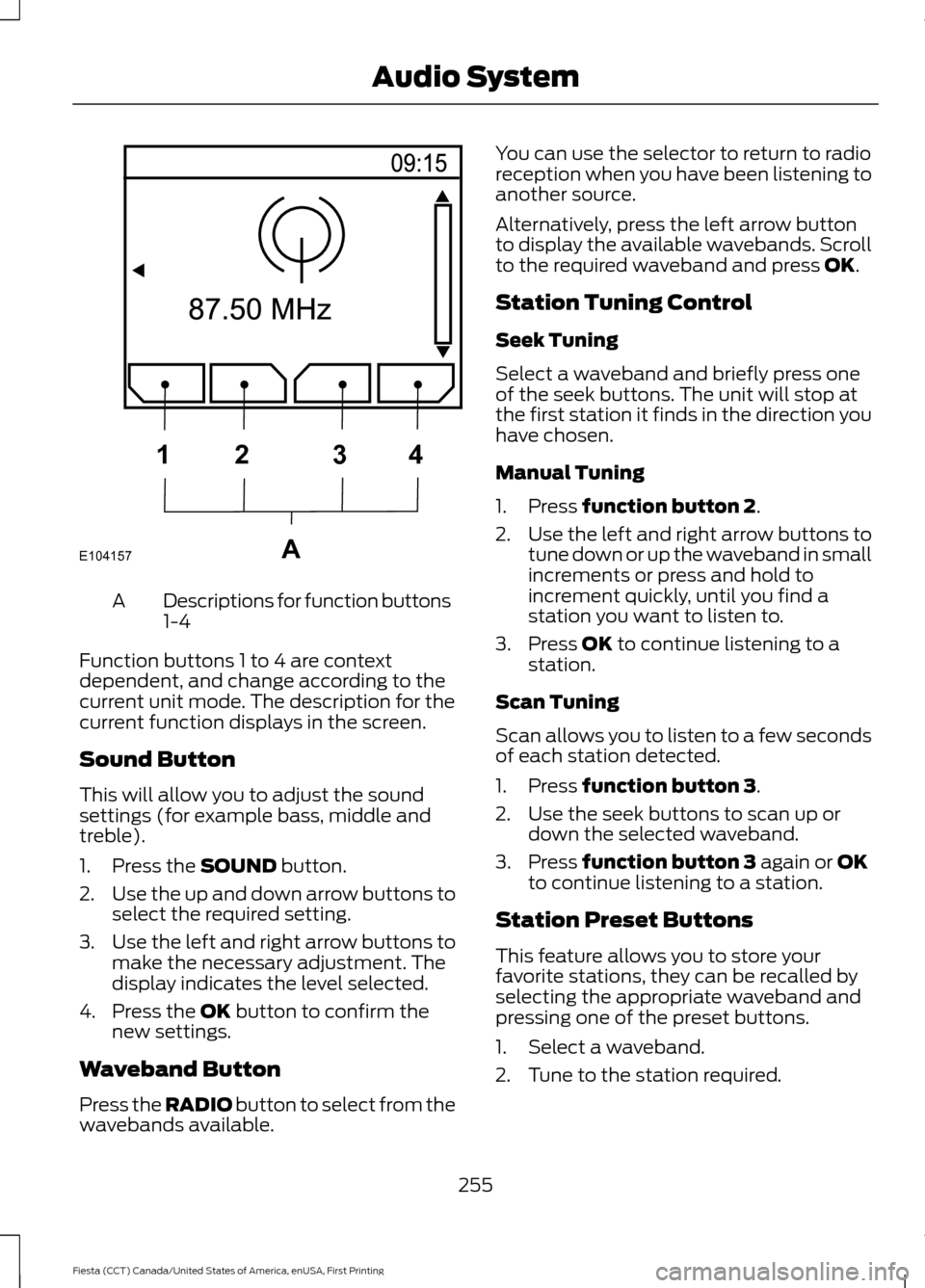
Descriptions for function buttons
1-4
A
Function buttons 1 to 4 are context
dependent, and change according to the
current unit mode. The description for the
current function displays in the screen.
Sound Button
This will allow you to adjust the sound
settings (for example bass, middle and
treble).
1. Press the SOUND button.
2. Use the up and down arrow buttons to
select the required setting.
3. Use the left and right arrow buttons to
make the necessary adjustment. The
display indicates the level selected.
4. Press the
OK button to confirm the
new settings.
Waveband Button
Press the
RADIO button to select from the
wavebands available. You can use the selector to return to radio
reception when you have been listening to
another source.
Alternatively, press the left arrow button
to display the available wavebands. Scroll
to the required waveband and press
OK.
Station Tuning Control
Seek Tuning
Select a waveband and briefly press one
of the seek buttons. The unit will stop at
the first station it finds in the direction you
have chosen.
Manual Tuning
1. Press
function button 2.
2. Use the left and right arrow buttons to
tune down or up the waveband in small
increments or press and hold to
increment quickly, until you find a
station you want to listen to.
3. Press
OK to continue listening to a
station.
Scan Tuning
Scan allows you to listen to a few seconds
of each station detected.
1. Press
function button 3.
2. Use the seek buttons to scan up or down the selected waveband.
3. Press
function button 3 again or OK
to continue listening to a station.
Station Preset Buttons
This feature allows you to store your
favorite stations, they can be recalled by
selecting the appropriate waveband and
pressing one of the preset buttons.
1. Select a waveband.
2. Tune to the station required.
255
Fiesta (CCT) Canada/United States of America, enUSA, First Printing Audio SystemE104157A
1
2 34