remote start FORD FIESTA 2016 User Guide
[x] Cancel search | Manufacturer: FORD, Model Year: 2016, Model line: FIESTA, Model: FORD FIESTA 2016Pages: 363, PDF Size: 5.9 MB
Page 66 of 363
PASSIVE ANTI-THEFT
SYSTEM
Note:
The system is not compatible with
non-Ford aftermarket remote start systems.
Use of these systems may result in vehicle
starting problems and a loss of security
protection.
Note: Metallic objects, electronic devices
or a second coded key on the same key
chain may cause vehicle starting problems
if they are too close to the key when starting
the engine. Prevent these objects from
touching the coded key while starting the
engine. Switch the ignition off, move all
objects on the key chain away from the
coded key and restart the engine if a
problem occurs.
Note: Do not leave a duplicate coded key
in the vehicle. Always take your keys and
lock all doors when leaving the vehicle.
SecuriLock®
The system is an engine immobilization
system. It is designed to help prevent the
engine from being started unless a coded
key programmed to your vehicle is used.
Using the wrong key may prevent the
engine from starting. A message may
appear in the information display.
If you are unable to start the engine with a
correctly coded key, a malfunction has
happened and a message may appear in
the information display.
Automatic Arming
The vehicle arms immediately after you
switch the ignition off.
Automatic Disarming
Switching the ignition on with a coded key
disarms the vehicle. Replacement Keys
Note:
Your vehicle comes equipped with
two integrated keyhead transmitters or two
intelligent access keys.
The integrated keyhead transmitter
functions as a programmed ignition key
that operates all the locks and starts the
vehicle, as well as a remote control.
The intelligent access key functions as a
programmed key that operates the driver
door lock and activates the intelligent
access with push button start system, as
well as a remote control.
If your programmed transmitters or
standard SecuriLock coded keys
(integrated keyhead transmitters only) are
lost or stolen and you do not have an extra
coded key, you will need to have your
vehicle towed to an authorized dealer. You
need to erase the key codes from your
vehicle and program new coded keys.
Store an extra programmed key away from
the vehicle in a safe place to help prevent
any inconveniences. See your authorized
dealer to purchase additional spare or
replacement keys.
Programming a Spare Integrated
Keyhead Transmitter
Note: You can program a maximum of eight
coded keys to your vehicle. All eight can be
integrated keyhead transmitters.
You can program your own integrated
keyhead transmitter or standard
SecuriLock coded keys to your vehicle. This
procedure only programs the engine
immobilizer keycode to your vehicle.
Note: You can also program the remote
entry portion of the integrated keyhead
transmitter to your vehicle. See Remote
Control (page 45).
Only use integrated keyhead transmitters
or standard SecuriLock keys.
63
Fiesta (CCT) Canada/United States of America, enUSA, First Printing Security
ProCarManuals.com
Page 67 of 363
You must have two previously
programmed coded keys and the new
unprogrammed key readily accessible. See
your authorized dealer to have the spare
key programmed if two previously
programmed coded keys are not available.
Read and understand the entire procedure
before you begin.
1.
Insert the first previously programmed
coded key into the ignition.
2. Switch the ignition from off to on. Keep
the ignition on for at least three
seconds, but no more than 10 seconds.
3. Switch the ignition off and remove the
first coded key from the ignition.
4. After three seconds but within 10 seconds of switching the ignition off,
insert the second previously coded key
into the ignition.
5. Switch the ignition from off to on. Keep
the ignition on for at least three
seconds, but no more than 10 seconds.
6. Switch the ignition off and remove the
second previously programmed coded
key from the ignition.
7. After three seconds but within 10 seconds of switching the ignition off
and removing the previously
programmed coded key, insert the new
unprogrammed key into the ignition.
8. Switch the ignition from off to on. Keep
the ignition on for at least six seconds.
9. Remove the newly programmed coded
key from the ignition.
If the key has been successfully
programmed it will start the engine and
operate the remote entry system (if the
new key is an integrated keyhead
transmitter).
If programming was not successful, wait
10 seconds and repeat Steps 1 through 8.
If you are still unsuccessful, take your
vehicle to your authorized dealer. Programming a Spare Intelligent
Access Key
See your authorized dealer to have
additional keys programmed to your
vehicle.
ANTI-THEFT ALARM
Alarm System
The perimeter alarm is a deterrent against
unauthorized access to your vehicle
through the doors and the hood. It also
protects the audio unit.
Triggering the Alarm
Once armed, the alarm is triggered in any
of the following ways:
•
If someone opens a door, the liftgate
or the hood without a valid key or
remote control.
• If someone removes the audio or
navigation system.
• If you switch the ignition on without a
valid key.
If the alarm is triggered, the alarm horn will
sound for 30 seconds and the hazard
warning flasher will flash for five minutes.
Any further attempts to perform one of the
above will trigger the alarm again.
Arming the Alarm
To arm the alarm, lock your vehicle. See
Locks (page 55).
Disarming the Alarm
Vehicles Without Keyless Entry
Disarm and silence the alarm by unlocking
the doors with the key and switching the
ignition on with a correctly coded key or
unlocking the doors with the remote
control.
64
Fiesta (CCT) Canada/United States of America, enUSA, First Printing Security
ProCarManuals.com
Page 93 of 363
Action
Message
indicator
Message
Vehicle not moving. Close.
Amber
Passenger side rear door open
Vehicle not moving. Close.
Amber
Trunk open
Vehicle not moving. Close. See
Opening and Closing the Hood
(page 177).
Amber
Hood open
Engine Immobilizer Action
Message
indicator
Message
Have the system checked by an
authorized dealer as soon as
possible.
Red
Immobilizer malfunction Service
now
Hill Start Assist Action
Message
indicator
Message
See
Hill Start Assist (page 129).
Amber
Hill start assist not available
Keyless System Action
Message
indicator
Message
See
Keyless Entry (page 59).
Amber
Key not detected
See
Keyless Entry (page 59).
Amber
Key outside car
See
Remote Control (page 45).
Amber
Key Battery low Replace battery
See
Keyless Starting (page 111).
Amber
Switch ign. off Press ENGINE Start/
Stop button
See
Keyless Starting (page 111).
-
Press brake to start
See
Keyless Starting (page 111).
-
Press clutch to start
See
Keyless Entry (page 59).
-
Close trunk or use spare key
90
Fiesta (CCT) Canada/United States of America, enUSA, First Printing Information Displays
ProCarManuals.com
Page 161 of 363
Canadian roadside coverage and benefits
may differ from the U.S. coverage. If you
require more information, please refer to
the coverage section of your warranty
guide, call us in Canada at
1-800-665-2006, or visit our website at
www.ford.ca.
Sykes Assistance Services Corporation
administers the Roadside Assistance
program. You must receive covered
services in Canada or the continental
United States. Coverage extends to
vehicles that use public, non-seasonal,
annually traveled roadways. Roadside
Assistance coverage does not extend to
vehicles involved in cross-country driving,
logging, autocross and any other form of
off-road use. Well maintained roads and
surfaces help ensure safe travel for the
supplier, and allow their representatives
to perform service as per the standard
operating procedures.
In Remote Locations
If our supplier cannot take your vehicle by
road to the nearest authorized dealership,
transportation by rail or water may be
necessary. The program covers a tow to
the dock or rail terminal and also to the
dealership at the end of the trip.
For rail or water transportation, however,
contact your authorized dealer to confirm
if you are eligible for additional coverage
before you authorize or pay for the service.
Call Ford Roadside Assistance at
1-800-665-2006 for additional
information.
HAZARD WARNING FLASHERS
Note:
If used when the vehicle is not
running, the battery will lose charge. There
may be insufficient power to restart your
vehicle. The hazard warning button is
located on the instrument panel.
Use it when your vehicle is
creating a safety hazard for other
motorists.
• Press the button to turn on the hazard
warning function, and the front and
rear direction indicators will flash.
• Press the button again to turn them
off.
FUEL SHUTOFF WARNING
Failure to inspect and, if necessary,
repair fuel leaks after a collision may
increase the risk of fire and serious
injury. Ford Motor Company recommends
that the fuel system be inspected by an
authorized dealer after any collision. In the event of a moderate to severe
collision, this vehicle includes a fuel pump
shutoff feature that stops the flow of fuel
to the engine. Not every impact will cause
a shutoff.
Should your vehicle shut off after a
collision, you may restart your vehicle. For
vehicles equipped with a key system:
1. Switch off the ignition.
2. Switch on the ignition.
3. Repeat Steps 1 and 2 to re-enable the
fuel pump.
For vehicles equipped with a push button
start system:
1. Press the START/STOP button to
switch off the ignition.
2. Press the brake pedal and press the START/STOP
button to switch on the
ignition.
158
Fiesta (CCT) Canada/United States of America, enUSA, First Printing Roadside Emergencies
ProCarManuals.com
Page 177 of 363
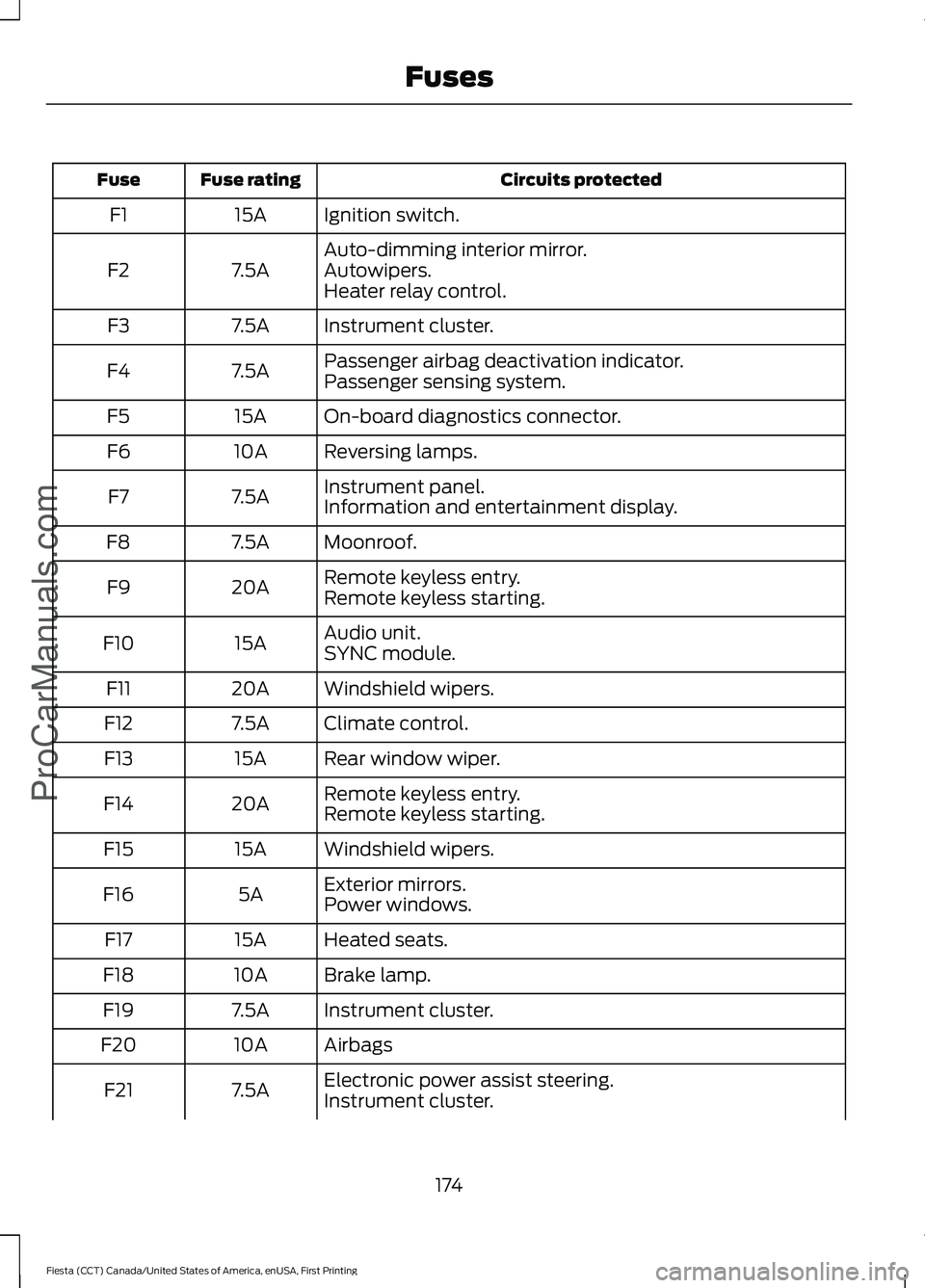
Circuits protected
Fuse rating
Fuse
Ignition switch.
15A
F1
Auto-dimming interior mirror.
7.5A
F2 Autowipers.
Heater relay control.
Instrument cluster.
7.5A
F3
Passenger airbag deactivation indicator.
7.5A
F4
Passenger sensing system.
On-board diagnostics connector.
15A
F5
Reversing lamps.
10A
F6
Instrument panel.
7.5A
F7
Information and entertainment display.
Moonroof.
7.5A
F8
Remote keyless entry.
20A
F9
Remote keyless starting.
Audio unit.
15A
F10
SYNC module.
Windshield wipers.
20A
F11
Climate control.
7.5A
F12
Rear window wiper.
15A
F13
Remote keyless entry.
20A
F14
Remote keyless starting.
Windshield wipers.
15A
F15
Exterior mirrors.
5A
F16
Power windows.
Heated seats.
15A
F17
Brake lamp.
10A
F18
Instrument cluster.
7.5A
F19
Airbags
10A
F20
Electronic power assist steering.
7.5A
F21
Instrument cluster.
174
Fiesta (CCT) Canada/United States of America, enUSA, First Printing FusesProCarManuals.com
Page 178 of 363
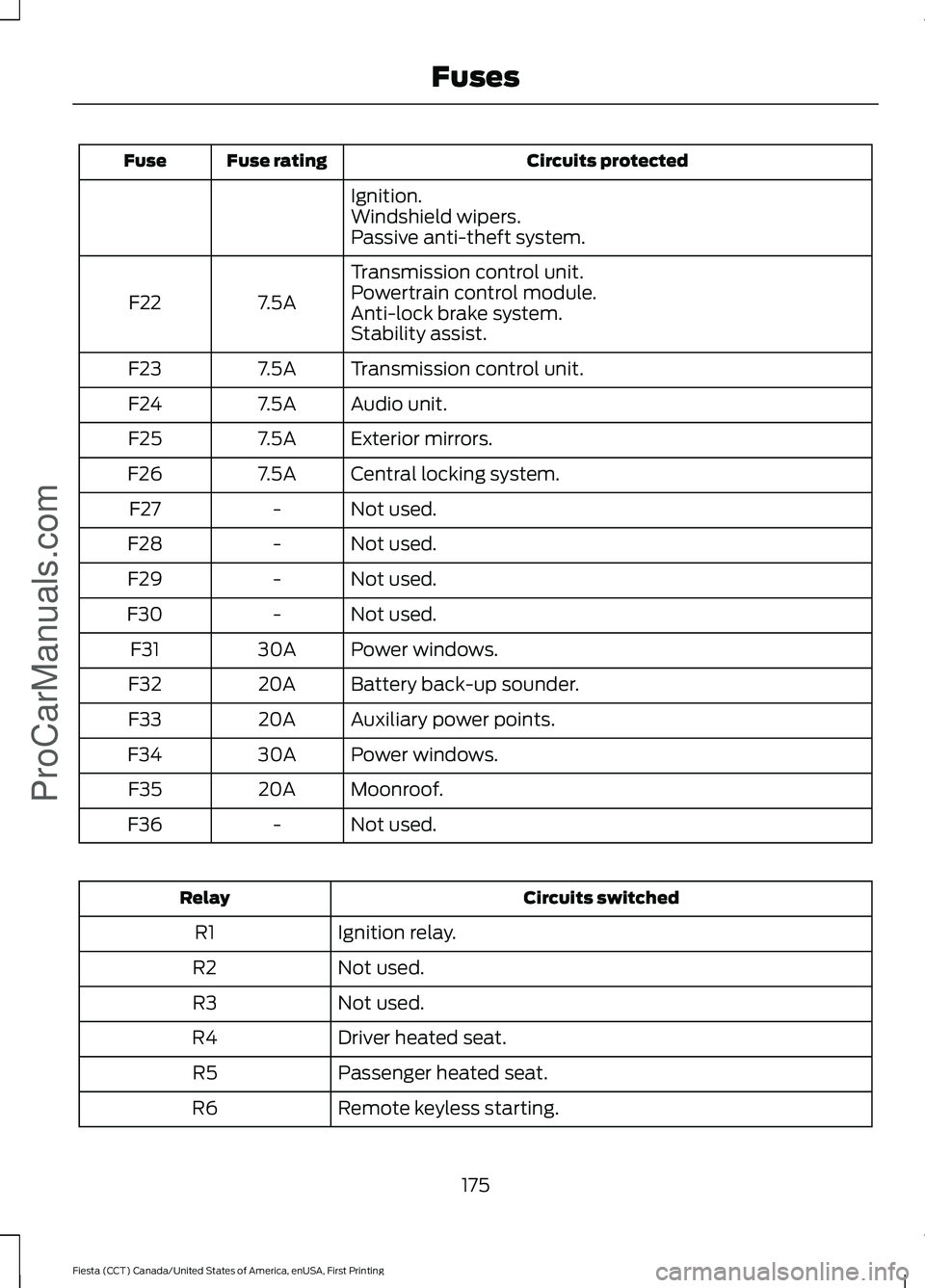
Circuits protected
Fuse rating
Fuse
Ignition.
Windshield wipers.
Passive anti-theft system.
Transmission control unit.
7.5A
F22 Powertrain control module.
Anti-lock brake system.
Stability assist.
Transmission control unit.
7.5A
F23
Audio unit.
7.5A
F24
Exterior mirrors.
7.5A
F25
Central locking system.
7.5A
F26
Not used.
-
F27
Not used.
-
F28
Not used.
-
F29
Not used.
-
F30
Power windows.
30A
F31
Battery back-up sounder.
20A
F32
Auxiliary power points.
20A
F33
Power windows.
30A
F34
Moonroof.
20A
F35
Not used.
-
F36 Circuits switched
Relay
Ignition relay.
R1
Not used.
R2
Not used.
R3
Driver heated seat.
R4
Passenger heated seat.
R5
Remote keyless starting.
R6
175
Fiesta (CCT) Canada/United States of America, enUSA, First Printing FusesProCarManuals.com
Page 179 of 363
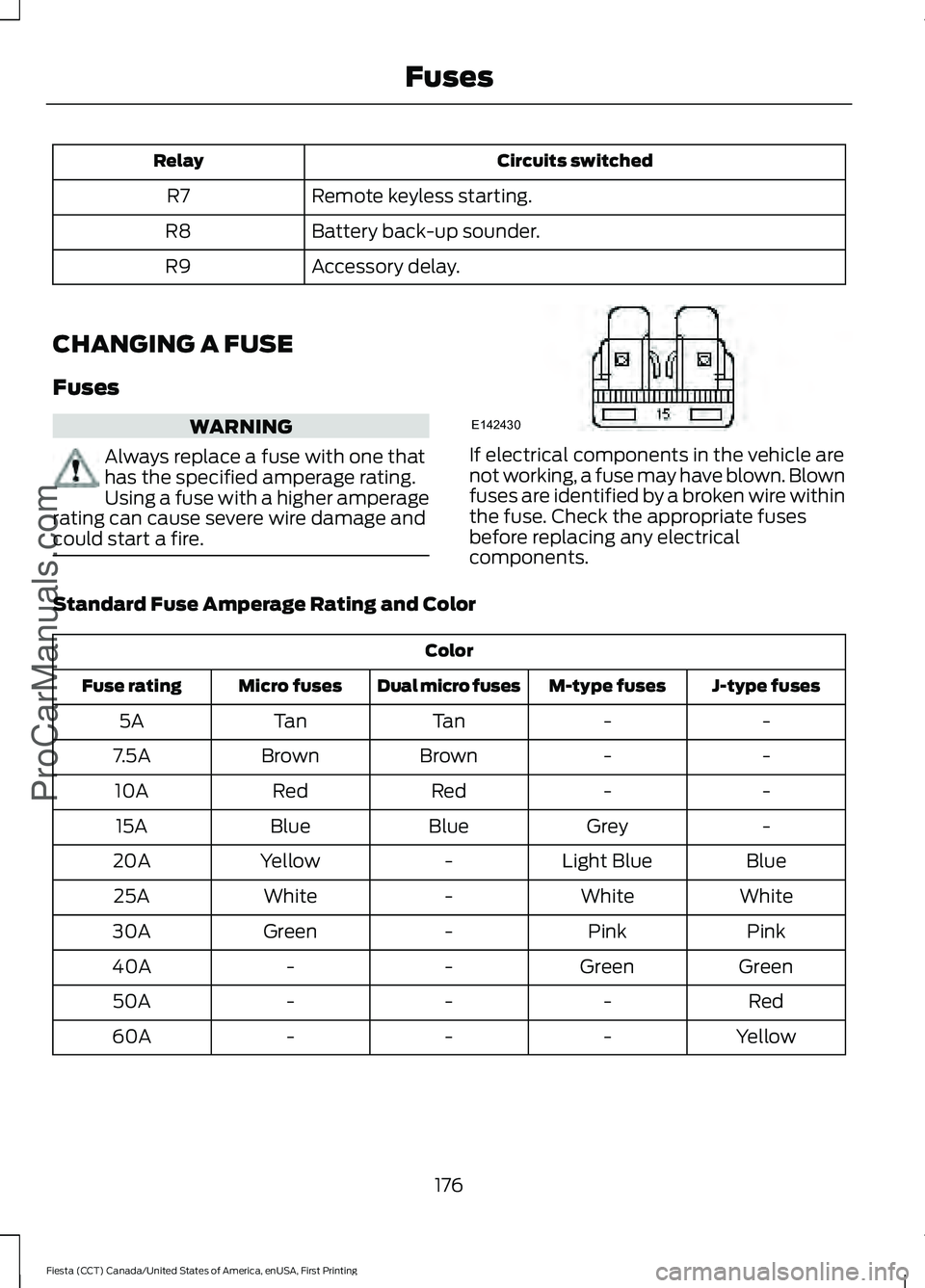
Circuits switched
Relay
Remote keyless starting.
R7
Battery back-up sounder.
R8
Accessory delay.
R9
CHANGING A FUSE
Fuses WARNING
Always replace a fuse with one that
has the specified amperage rating.
Using a fuse with a higher amperage
rating can cause severe wire damage and
could start a fire. If electrical components in the vehicle are
not working, a fuse may have blown. Blown
fuses are identified by a broken wire within
the fuse. Check the appropriate fuses
before replacing any electrical
components.
Standard Fuse Amperage Rating and Color Color
J-type fuses
M-type fuses
Dual micro fuses
Micro fuses
Fuse rating
-
-
Tan
Tan
5A
-
-
Brown
Brown
7.5A
-
-
Red
Red
10A
-
Grey
Blue
Blue
15A
Blue
Light Blue
-
Yellow
20A
White
White
-
White
25A
Pink
Pink
-
Green
30A
Green
Green
-
-
40A
Red
-
-
-
50A
Yellow
-
-
-
60A
176
Fiesta (CCT) Canada/United States of America, enUSA, First Printing FusesProCarManuals.comE142430
Page 315 of 363
For a complete listing of the accessories
that are available for your vehicle, please
contact your authorized dealer or visit the
online store web site:
Web Address (United States)
www.Accessories.Ford.com Web Address (Canada)
www.Accessories.Ford.ca
Ford Accessories are available for your
vehicle through an authorized Ford dealer.
Ford Motor Company will repair or replace
any properly authorized dealer-installed
Ford Original Accessory found to be
defective in factory-supplied materials or
workmanship during the warranty period,
as well as any component damaged by the
defective accessories.
Ford Motor Company will warrant your
accessory through the warranty that
provides the greatest benefit:
• 24 months, unlimited miles.
• The remainder of your new vehicle
limited warranty.
Contact an authorized dealer for details
and a copy of the warranty.
Exterior style
• Bumper protectors.
• Graphics kit.
• Rear spoiler.
• Side window deflectors.
• Splash guards.
• Vehicle covers.
• Wheels. Interior style
•
All-weather floor mats.
• Ambient lighting.
• Gear shift knob.
• Lighted door sill plates.
• Premium carpeted floor mats.
• Rear seat entertainment*.
Lifestyle
• Ash cup and smokers packages.
• Cargo organization.
• Roof racks and carriers*.
Peace of mind
• Bumper-mounted parking sensor*.
• Keyless entry keypad.
• Locking fuel plug.
• Remote start.
• Vehicle security systems.
• Wheel locks.
*Ford Licensed Accessory. The accessory
manufacturer designs, develops and
therefore warrants Ford Licensed
Accessories, and does not design or test
these accessories to Ford Motor Company
engineering requirements. Contact an
authorized Ford dealer for the
manufacturer's limited warranty details,
and request a copy of the Ford Licensed
Accessories product limited warranty from
the accessory manufacturer.
For maximum vehicle performance, keep
the following information in mind when
adding accessories, equipment,
passengers and luggage to your vehicle:
312
Fiesta (CCT) Canada/United States of America, enUSA, First Printing AccessoriesProCarManuals.com
Page 358 of 363
J
Jump Starting the Vehicle.........................159
Connecting the Jumper Cables..................... 159
Jump Starting...................................................... 160
Preparing Your Vehicle..................................... 159
Removing the Jumper Cables....................... 160
K
Keyless Entry....................................................59
Disabled Keys........................................................ 60
General Information............................................ 59
Locking and Unlocking the Doors With the Key Blade............................................................. 61
Locking Your Vehicle........................................... 59
Passive Key............................................................. 59
Unlocking Your Vehicle...................................... 60
Keyless Starting
...............................................111
Failure to Start...................................................... 112
Ignition On.............................................................. 112
Starting with Automatic Transmission..................................................... 112
Starting with Manual Transmission..............112
Stopping the Engine When Your Vehicle is Moving................................................................. 113
Stopping the Engine with Your Vehicle Stationary.......................................................... 113
Keys and Remote Controls.........................45
L
Lighting Control..............................................70 Headlamp Flasher................................................. 71
High Beams.............................................................. 71
Lighting Control Positions................................. 70
Parking Lamps....................................................... 70
Lighting..............................................................70 General Information............................................ 70
Load Carrying
.................................................143
Load Limit.......................................................144
Vehicle Loading - with and without a
Trailer................................................................. 144Locking and Unlocking.................................55
Auto Lock Feature................................................ 56
Auto Unlock Feature............................................ 57
Emergency Locking With the Key................... 57
Locking and Unlocking the Doors From Inside.................................................................... 55
Locking and Unlocking the Doors With the Key........................................................................\
55
Remote Control.................................................... 55
Smart Unlocks for Integrated Keyhead Transmitter........................................................ 56
Smart Unlocks for Intelligent Access Keys...................................................................... 56
Unlocking the Doors With the Interior Door Handles............................................................... 56
Locks...................................................................55
Luggage Covers
.............................................143
Removing the Cover.......................................... 144
Lug Nuts See: Changing a Road Wheel........................ 229
M
Maintenance
...................................................177
General Information........................................... 177
Manual Climate Control..............................96
Manual Liftgate..............................................58 Opening and Closing the Liftgate.................. 58
Manual Seats
.................................................105
Adjusting the Height of the Driver
Seat.................................................................... 105
Adjusting the Lumbar Support..................... 105
Moving the Seat Backward and Forward............................................................. 105
Recline Adjustment........................................... 106
Manual Transmission - 1.0L EcoBoost™/ 1.6L Duratec-16V Ti-VCT
(Sigma).........................................................123
Parking Your Vehicle.......................................... 124
Recommended Shift Speeds......................... 123
Reverse................................................................... 124
Using the Clutch.................................................. 123
Manual Transmission - 1.6L EcoBoost™..................................................124
Parking Your Vehicle.......................................... 125
Recommended Shift Speeds......................... 125
Reverse................................................................... 125
Using the Clutch.................................................. 124
355
Fiesta (CCT) Canada/United States of America, enUSA, First Printing Index
ProCarManuals.com
Page 360 of 363
Remote Control..............................................45
Car Finder................................................................ 49
Integrated Keyhead Transmitter.................... 45
Intelligent Access Transmitter........................ 46
Programming a New Integrated Keyhead Transmitter........................................................ 46
Replacing the Battery......................................... 47
Reprogramming the Unlocking Function .............................................................. 46
Sounding a Panic Alarm.................................... 49
Removing a Headlamp..............................189
Repairing Minor Paint Damage...............207
Replacement Parts Recommendation.........................................11
Collision Repairs..................................................... 11
Scheduled Maintenance and Mechanical Repairs................................................................... 11
Warranty on Replacement Parts..................... 12
Replacing a Lost Key or Remote Control............................................................49
Reporting Safety Defects (Canada Only)...............................................................167
Reporting Safety Defects (U.S. Only)..............................................................166
Roadside Assistance
...................................157
Vehicles Sold in Canada: Getting Roadside
Assistance......................................................... 157
Vehicles Sold in Canada: Using Roadside Assistance......................................................... 157
Vehicles Sold in the United States: Getting Roadside Assistance..................................... 157
Vehicles Sold in the United States: Using Roadside Assistance..................................... 157
Roadside Emergencies...............................157
Running-In See: Breaking-In.................................................. 154
Running Out of Fuel
......................................117
Refilling With a Portable Fuel
Container........................................................... 118
S
Safety Belt Height Adjustment..................31
Safety Belt Minder.........................................32 Belt-Minder™........................................................ 32
Safety Belts......................................................28 Principle of Operation........................................ 28Safety Belt Warning Lamp and Indicator
Chime...............................................................32
Conditions of operation..................................... 32
Safety Precautions
.......................................116
Satellite Radio..............................................262 Satellite Radio Electronic Serial Number
(ESN)................................................................ 263
Satellite Radio Reception Factors...............263
SIRIUS® Satellite Radio Service.................. 263
Troubleshooting................................................. 264
Scheduled Maintenance Record...........324
Scheduled Maintenance............................316
Seats
.................................................................103
Security..............................................................63
Side Airbags
.....................................................40
Side Curtain Airbags.....................................42
Sitting in the Correct Position..................103
Snow Chains See: Using Snow Chains................................. 225
Special Notices................................................12 New Vehicle Limited Warranty......................... 12
On-board Diagnostics (OBD-II)....................... 12
Special Instructions.............................................. 12
Special Operating Conditions Scheduled Maintenance...............................................322
Exceptions............................................................ 323
Speed Control See: Cruise Control............................................ 140
Stability Control
............................................134
Principle of Operation....................................... 134
Starter Switch See: Ignition Switch............................................. 111
Starting a Gasoline Engine.........................113 Cold or Hot Engine............................................... 113
Engine Idle Speed after Starting.................... 114
Failure to Start...................................................... 114
Flooded Engine..................................................... 114
Starting and Stopping the Engine............111 General Information............................................ 111
Steering............................................................142 Electric Power Steering.................................... 142
Steering Wheel...............................................66
Storage Compartments
..............................110
Sunroof See: Moonroof....................................................... 78
Supplementary Restraints System.........36 Principle of Operation........................................ 36
357
Fiesta (CCT) Canada/United States of America, enUSA, First Printing Index
ProCarManuals.com