ECO mode FORD FIESTA 2016 Owner's Manual
[x] Cancel search | Manufacturer: FORD, Model Year: 2016, Model line: FIESTA, Model: FORD FIESTA 2016Pages: 363, PDF Size: 5.9 MB
Page 260 of 363
AUDIO UNIT - VEHICLES WITH:
TOUCHSCREEN DISPLAY WARNING
Driving while distracted can result in
loss of vehicle control, crash and
injury. We strongly recommend that
you use extreme caution when using any
device that may take your focus off the
road. Your primary responsibility is the safe
operation of your vehicle. We recommend
against the use of any hand-held device
while driving and encourage the use of
voice-operated systems when possible.
Make sure you are aware of all applicable
local laws that may affect the use of
electronic devices while driving. Note:
The touchscreen controls most of
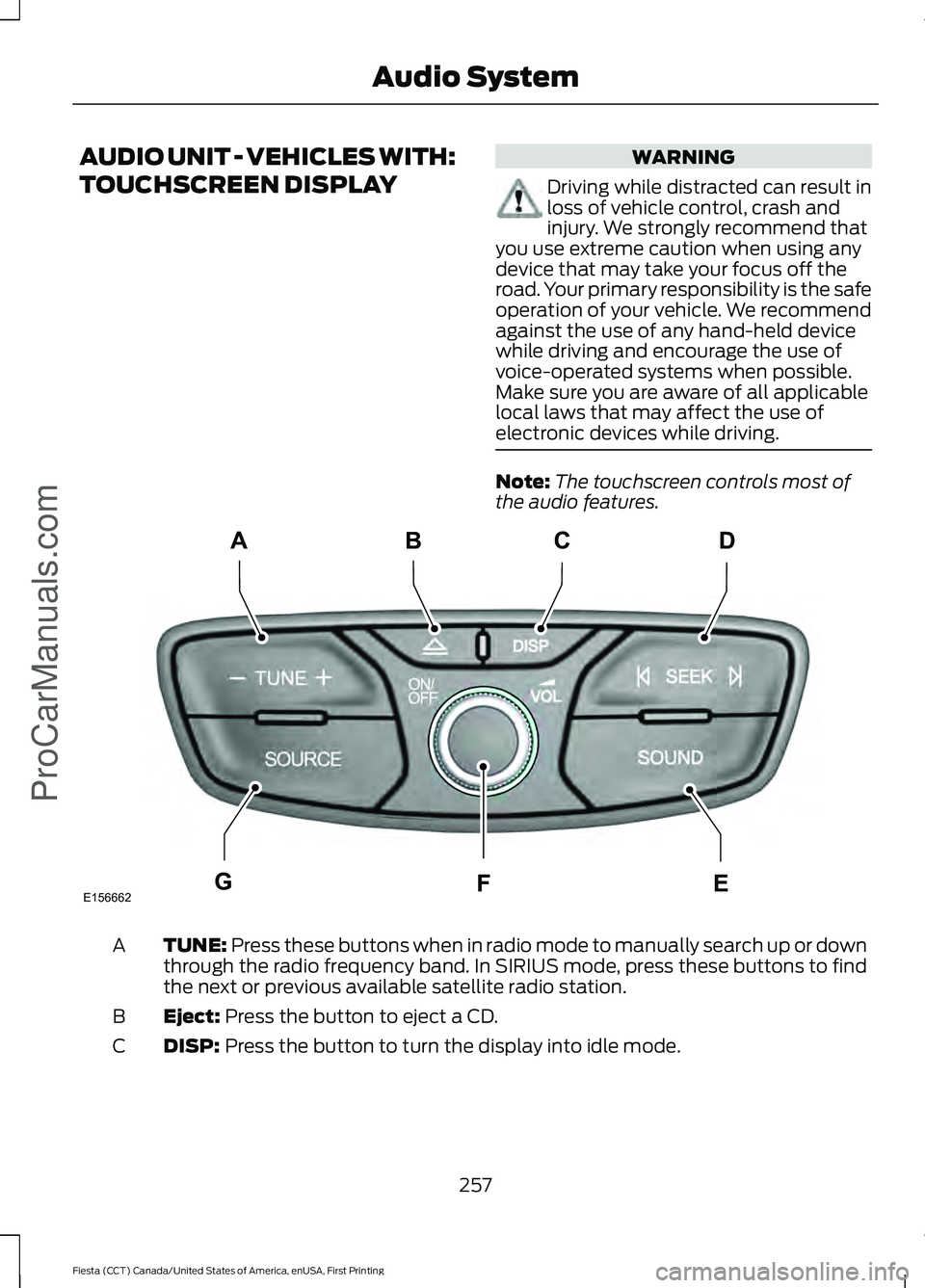
the audio features. TUNE: Press these buttons when in radio mode to manually search up or down
through the radio frequency band. In SIRIUS mode, press these buttons to find
the next or previous available satellite radio station.
A
Eject:
Press the button to eject a CD.
B
DISP:
Press the button to turn the display into idle mode.
C
257
Fiesta (CCT) Canada/United States of America, enUSA, First Printing Audio System
ProCarManuals.comE156662
CD
GEF
B
A
Page 261 of 363
SEEK: Press these buttons when you are in radio mode to go to the next station
up or down the radio frequency band, or to go to the next or previous track on
a CD. In SIRIUS mode, press these buttons to select the next or previous channel.
If a specific category is selected (for example Jazz, Rock or News), use these
buttons to find the next or previous channel in the selected category.
D
SOUND:
Press the button to adjust the sound settings for bass, treble, middle,
balance and fade.
E
On, Off and Volume:
Press the button to switch the audio system on or off.
Turn the dial to adjust the volume.
F
SOURCE:
Press the button to access different audio modes, for example AM,
FM, Satellite radio and A/V input.
G
AUDIO UNIT - VEHICLES WITH:
SONY AUDIO SYSTEM/
TOUCHSCREEN DISPLAY WARNING
Driving while distracted can result in
loss of vehicle control, crash and
injury. We strongly recommend that
you use extreme caution when using any
device that may take your focus off the
road. Your primary responsibility is the safe
operation of your vehicle. We recommend
against the use of any hand-held device
while driving and encourage the use of
voice-operated systems when possible.
Make sure you are aware of all applicable
local laws that may affect the use of
electronic devices while driving. Note:
The touchscreen controls most of
the audio features.
258
Fiesta (CCT) Canada/United States of America, enUSA, First Printing Audio System
ProCarManuals.com
Page 266 of 363
Note:
This receiver includes the eCos
real-time operating system. eCos is
published under the eCos License.
Satellite Radio Reception Factors Potential satellite radio reception issues
For optimal reception performance, keep the antenna
clear of snow and ice build-up and keep luggage and other
material as far away from the antenna as possible.
Antenna obstructions
Hills, mountains, tall buildings, bridges, tunnels, freeway
overpasses, parking garages, dense tree foliage and
thunderstorms can interfere with your reception.
Terrain
When you pass a ground-based broadcast-repeating
tower, a stronger signal may overtake a weaker one and
the audio system may mute.
Station overload
Your display may show ACQUIRING . . . to indicate the
interference and the audio system may mute.
Satellite radio signal interfer-
ence
SIRIUS® Satellite Radio Service
Note: SIRIUS reserves the unrestricted right
to change, rearrange, add or delete
programming including canceling, moving
or adding particular channels, and its prices,
at any time, with or without notice to you.
Ford Motor Company shall not be
responsible for any such programming
changes. SIRIUS satellite radio is a
subscription-based satellite radio service
that broadcasts a variety of music, sports,
news, weather, traffic and entertainment
programming. Your factory-installed
SIRIUS satellite radio system includes
hardware and a limited subscription term,
which begins on the date of sale or lease
of your vehicle. See an authorized dealer
for availability.
For more information on extended
subscription terms (a service fee is
required), the online media player and a
complete list of SIRIUS satellite radio
channels, and other features, please visit
www.siriusxm.com in the United States,
www.siriusxm.ca in Canada, or call SIRIUS
at 1-888-539-7474.
Satellite Radio Electronic Serial
Number (ESN)
You need your ESN to activate, modify or
track your satellite radio account. When in
satellite radio mode, tune to channel 0.
263
Fiesta (CCT) Canada/United States of America, enUSA, First Printing Audio SystemProCarManuals.comE142593
Page 273 of 363
If you want the system to carry out the following
Voice command
Adjust the level of voice interaction and feedback.
Voice Settings | Voice
Preferences
Hear a list of voice commands available in the current mode.
Help
You can say any of the voice commands that appear within open and close brackets that
are separated by |. For example, where (cancel | stop | exit) appears you say; cancel or
stop or exit.
You must say any of the voice commands that appear outside of open and close brackets.
For example, where mobile (apps | applications) appears, you must say mobile followed
by either apps or applications.
You do not need to say words that appear within square brackets. For example, for where
(USB [stick] | iPOD | MP3 [player]) appears, you can say USB or USB stick.
Note: SYNC Services and Vehicle health report are only available in the United States of
America.
System Interaction and Feedback
The system provides feedback through
audible tones, prompts, questions and
spoken confirmations depending on the
situation and the chosen level of
interaction (voice settings). You can
customize the voice recognition system to
provide more or less instruction and
feedback. The default setting is to a higher level of
interaction in order to help you learn to use
the system. You can change these settings
at any time.
Adjusting the Interaction Level Initiate a voice session by
pressing the voice button on the
steering wheel controls. See
Voice Control (page 67).
When prompted say the following: If you want the system to carry out the following
Voice command
Voice Settings | Voice Preferences
Followed by either of the following: Provide more detailed interaction and guidance.
Interaction Mode
Standard
Provide less audible interaction and more tone prompts.
Interaction Mode
Advanced
The system defaults to the standard interaction mode.
270
Fiesta (CCT) Canada/United States of America, enUSA, First Printing SYNC™
ProCarManuals.comE142599
Page 303 of 363
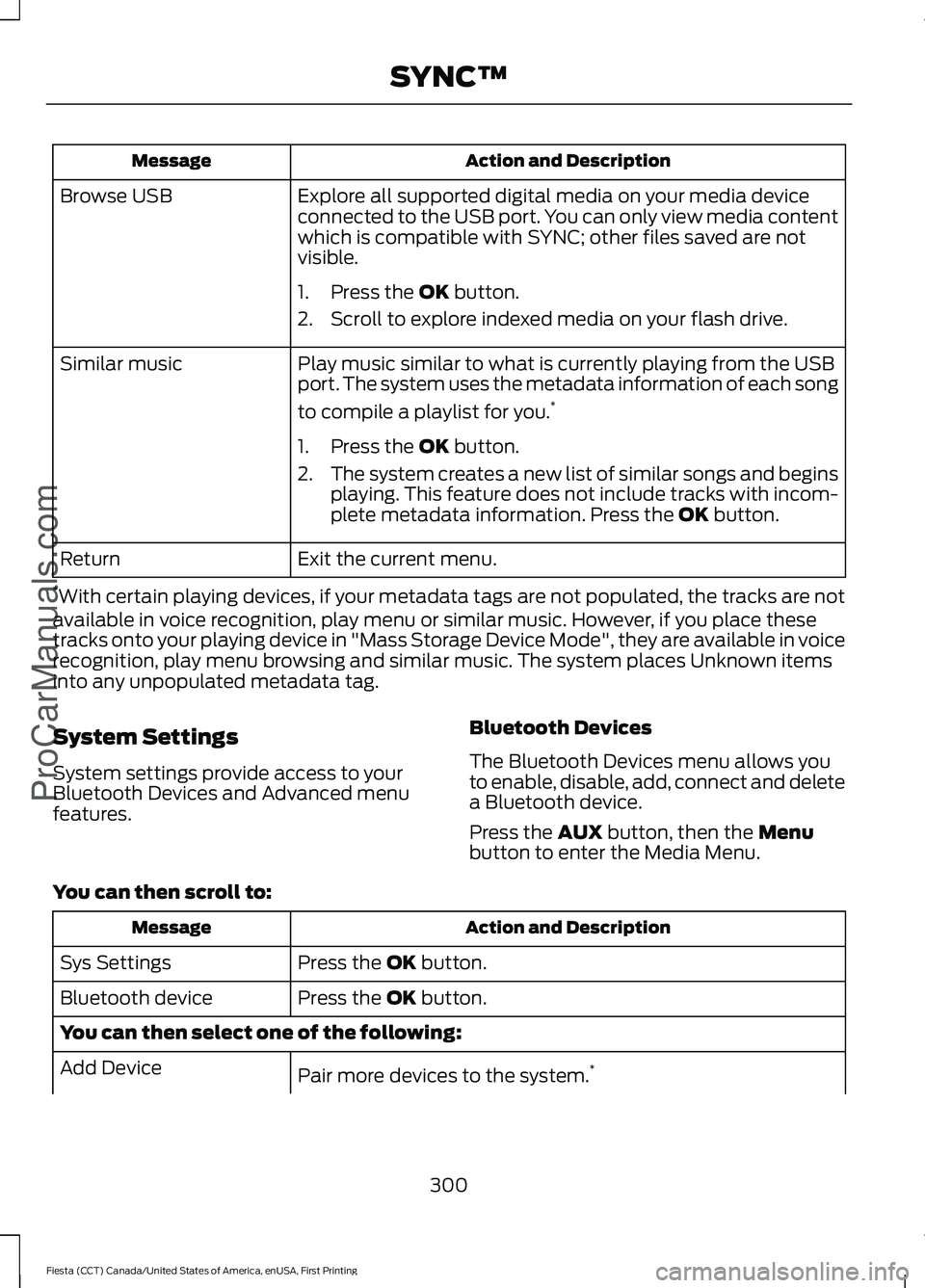
Action and Description
Message
Explore all supported digital media on your media device
connected to the USB port. You can only view media content
which is compatible with SYNC; other files saved are not
visible.
Browse USB
1. Press the OK button.
2. Scroll to explore indexed media on your flash drive.
Play music similar to what is currently playing from the USB
port. The system uses the metadata information of each song
to compile a playlist for you. *
Similar music
1. Press the
OK button.
2. The system creates a new list of similar songs and begins
playing. This feature does not include tracks with incom-
plete metadata information. Press the
OK button.
Exit the current menu.
Return
* With certain playing devices, if your metadata tags are not populated, the tracks are not
available in voice recognition, play menu or similar music. However, if you place these
tracks onto your playing device in "Mass Storage Device Mode", they are available in voice
recognition, play menu browsing and similar music. The system places Unknown items
into any unpopulated metadata tag.
System Settings
System settings provide access to your
Bluetooth Devices and Advanced menu
features. Bluetooth Devices
The Bluetooth Devices menu allows you
to enable, disable, add, connect and delete
a Bluetooth device.
Press the
AUX button, then the Menu
button to enter the Media Menu.
You can then scroll to: Action and Description
Message
Press the
OK button.
Sys Settings
Press the
OK button.
Bluetooth device
You can then select one of the following:
Pair more devices to the system. *
Add Device
300
Fiesta (CCT) Canada/United States of America, enUSA, First Printing SYNC™
ProCarManuals.com
Page 354 of 363
A
A/C
See: Climate Control.......................................... 96
About This Manual...........................................7
ABS See: Brakes............................................................. 131
ABS driving hints See: Hints on Driving With Anti-Lock
Brakes.................................................................. 131
Accessories.....................................................312 Exterior style......................................................... 312
Interior style.......................................................... 312
Lifestyle.................................................................. 312
Peace of mind...................................................... 312
Accessories See: Replacement Parts
Recommendation............................................. 11
Adjusting the Headlamps..........................187 Horizontal Aim Adjustment............................ 189
Vertical Aim Adjustment.................................. 187
Adjusting the Steering Wheel...................66
Airbag Disposal...............................................44
Air Conditioning See: Climate Control.......................................... 96
Air Filter See: Changing the Engine Air Filter.............201
Alarm See: Anti-Theft Alarm........................................ 64
Ambient Lighting............................................74
Anti-Theft Alarm
............................................64
Alarm System........................................................ 64
Arming the Alarm................................................. 64
Disarming the Alarm........................................... 64
Triggering the Alarm........................................... 64
Appendices....................................................334
Audible Warnings and Indicators.............83 Exterior Lamps On............................................... 83
Gearshift Lever Not in Park (P)....................... 83
Key in Ignition......................................................... 83
Key Outside Vehicle - Vehicles With Keyless System................................................................ 83
Parking Brake On.................................................. 83
Safety Belt Minder............................................... 83
Audio Control
..................................................66
Audio Input Jack...........................................265
Audio System................................................248 General Information......................................... 248Audio Unit - Vehicles With: AM/FM/CD/
SYNC.............................................................253
Alternative Frequencies.................................. 256
Automatic Volume Control............................ 256
Autostore Control.............................................. 256
Sound Button...................................................... 255
Station Preset Buttons.................................... 255
Station Tuning Control..................................... 255
Waveband Button............................................. 255
Audio Unit - Vehicles With: AM/FM/ CD...................................................................249
Alternative Frequencies................................... 252
Automatic Volume Control............................ 252
Autostore Control.............................................. 252
Sound Button....................................................... 251
Station Preset Buttons.................................... 252
Station Tuning Control...................................... 251
Waveband Button.............................................. 251
Audio Unit - Vehicles With: Sony Audio System/Touchscreen Display
..............258
Audio Unit - Vehicles With: Touchscreen Display...........................................................257
Autolamps..........................................................71 Windshield Wiper Activated
Headlamps.......................................................... 71
Automatic Climate Control........................97 Temperature Control.......................................... 98
Automatic Transmission
............................126
Emergency Park Position Release
Lever................................................................... 129
Hints on Driving with an Automatic Transmission................................................... 128
Selector Lever Positions................................... 126
Sport Mode and Manual Shifting.................. 127
Automatic Transmission Fluid Check.............................................................186
Auxiliary Power Points
...............................109
12 Volt DC Power Point..................................... 109
Location................................................................. 109
B
Battery See: Changing the 12V Battery...................... 186
Bonnet Lock See: Opening and Closing the Hood............177
Booster Seats
..................................................22
Types of Booster Seats...................................... 23
351
Fiesta (CCT) Canada/United States of America, enUSA, First Printing Index
ProCarManuals.com
Page 356 of 363
Creating a MyKey.............................................51
Programming/Changing Configurable
Settings................................................................ 51
Cruise Control..................................................67 Principle of Operation...................................... 140
Cruise control See: Using Cruise Control................................ 140
Customer Assistance..................................162
D
Data Recording..................................................9
Event Data Recording........................................... 9
Service Data Recording........................................ 9
Daytime Running Lamps.............................72
Digital Radio
..................................................260
HD Radio Reception and Station
Troubleshooting............................................. 261
Direction Indicators
........................................73
Driver and Passenger Airbags....................37 Children and Airbags........................................... 37
Proper Driver and Front Passenger Seating Adjustment........................................................ 37
Driver Knee Airbag
..........................................41
Driving Aids.....................................................142
Driving Hints...................................................154
Driving Through Water................................154
DRL See: Daytime Running Lamps.......................... 72
E
Economical Driving......................................154
Emission Control System..........................120 On-Board Diagnostics (OBD-II)..................... 121
Readiness for Inspection/Maintenance (I/M) Testing..................................................... 121
End User License Agreement
..................334
VEHICLE SOFTWARE END USER LICENSE
AGREEMENT (EULA) ................................. 334
Engine Block Heater
.....................................114
Using the Engine Block Heater....................... 115
Engine Coolant Check................................184 Adding Engine Coolant.................................... 184
Checking the Engine Coolant........................ 184
Recycled Engine Coolant................................. 185
Severe Climates.................................................. 185Engine Immobilizer
See: Passive Anti-Theft System..................... 63
Engine Oil Check...........................................182 Adding Engine Oil............................................... 183
Engine Oil Dipstick - 1.0L EcoBoost™..................................................182
Engine Oil Dipstick - 1.6L Duratec-16V Ti-VCT (Sigma)
..........................................182
Engine Oil Dipstick - 1.6L EcoBoost™..................................................182
Engine Specifications
................................234
Drivebelt Routing............................................... 234
Environment......................................................14
Event Data Recording See: Data Recording.............................................. 9
Export Unique Options..................................13
Extended Service Plan (ESP)
..................314
SERVICE PLANS (CANADA ONLY).............315
SERVICE PLANS (U.S. Only).......................... 314
Exterior Mirrors
................................................76
Fold-Away Exterior Mirrors................................ 77
Integrated Blind Spot Mirrors........................... 77
Power Exterior Mirrors......................................... 76
F
Fastening the Safety Belts..........................29 Safety Belt Extension Assembly...................... 31
Safety Belt Locking Modes............................... 30
Using Safety Belts During Pregnancy...........29
Floor Mats
........................................................155
Fog Lamps - Front See: Front Fog Lamps......................................... 73
Ford Credit
..........................................................11
(U.S. Only)................................................................. 11
Front Fog Lamps.............................................73
Front Passenger Sensing System
............38
Fuel and Refueling........................................116
Fuel Consumption.........................................119 Calculating Fuel Economy.............................. 120
Filling the Tank..................................................... 119
Fuel Filter.........................................................186
Fuel Quality - Gasoline
.................................117
Choosing the Right Fuel.................................... 117
Fuel Shutoff
....................................................158
Fuses.................................................................168
353
Fiesta (CCT) Canada/United States of America, enUSA, First Printing Index
ProCarManuals.com
Page 361 of 363
Switching Off the Engine............................114
Vehicles With a Turbocharger......................... 114
Symbols Glossary.............................................7
SYNC™ Applications and Services........................................................284
911 Assist............................................................... 284
SYNC Services: Traffic, Directions & Information (TDI) (If Equipped, United
States Only)................................................... 288
Vehicle Health Report (If Equipped, United States Only)................................................... 286
SYNC™ AppLink ™
......................................292
SYNC Mobile Apps............................................ 292
SYNC™............................................................267 General Information.......................................... 267
SYNC™ Troubleshooting
.........................303
T
Tailgate See: Manual Liftgate........................................... 58
Technical Specifications See: Capacities and Specifications............234
The Better Business Bureau (BBB) Auto Line Program (U.S. Only)
.......................164
Tire Care...........................................................210 Glossary of Tire Terminology.......................... 212
Important information for 205/40R17 low-profile tires and wheels...................... 210
Information About Uniform Tire Quality Grading.............................................................. 210
Information Contained on the Tire Sidewall............................................................. 213
Temperature A B C.............................................. 211
Traction AA A B C................................................. 211
Treadwear............................................................... 211
Tire Pressure Monitoring System...........225 Changing Tires With a Tire Pressure
Monitoring System....................................... 226
Understanding Your Tire Pressure Monitoring System ....................................... 227
Tires See: Wheels and Tires...................................... 210
Towing a Trailer
..............................................151
Towing the Vehicle on Four Wheels.......151 Emergency Towing.............................................. 151
Recreational Towing.......................................... 152
Towing................................................................151 Traction Control
............................................133
Principle of Operation....................................... 133
Transmission Code Designation.............237
Transmission..................................................123
Transmission See: Transmission............................................... 123
Transporting the Vehicle.............................151
Trip Computer
..................................................87
U
Under Hood Overview - 1.0L EcoBoost™..................................................179
Under Hood Overview - 1.6L Duratec-16V Ti-VCT (Sigma).........................................180
Under Hood Overview - 1.6L EcoBoost™...................................................181
USB Port.........................................................266
Using Cruise Control
...................................140
Switching Cruise Control Off........................... 141
Switching Cruise Control On.......................... 140
Using MyKey With Remote Start Systems..........................................................53
Using Snow Chains.....................................225
Using Stability Control - 1.0L EcoBoost™/1.6L Duratec-16V Ti-VCT
(Sigma)
.........................................................135
Using Stability Control - 1.6L EcoBoost™..................................................135
Switching Sport Mode On............................... 135
Switching the System Off............................... 135
Using Summer Tires...................................225
Using SYNC™ With Your Media Player............................................................293
Accessing Your Play Menu............................. 298
Connecting Your Digital Media Player to the USB Port........................................................... 293
Media Menu Features...................................... 296
Media Voice Commands................................ 295
System Settings................................................ 300
What's Playing?................................................. 295
358
Fiesta (CCT) Canada/United States of America, enUSA, First Printing Index
ProCarManuals.com