transmission FORD FIESTA 2016 Owner's Manual
[x] Cancel search | Manufacturer: FORD, Model Year: 2016, Model line: FIESTA, Model: FORD FIESTA 2016Pages: 363, PDF Size: 5.9 MB
Page 130 of 363
WARNINGS
You must move the transmission
selector lever to position P and fully
apply the parking brake before you
leave your vehicle. Failure to leave your
vehicle securely parked may lead to an
accident or injury. Your vehicle will not move while the
transmission selector lever is in P. You can
start the engine with the transmission
selector lever in this position.
Note:
An audible warning will sound if you
open the driver's door and you have not
moved the transmission selector lever to
park.
R (Reverse) WARNING
You must only select
R when your
vehicle is stationary and the engine
is at idle speed. Selecting
R when
your vehicle is moving or at a high engine
speed will damage the transmission or
lead to an accident or injury. With the transmission selector lever in
R,
power is transmitted to the drive wheels
to allow your vehicle to move backward.
You cannot start the engine with the
transmission selector lever in this position.
Note: Always come to a complete stop
before shifting the transmission selector
lever out of reverse.
N (Neutral)
With the transmission selector lever in
N,
power is not transmitted to the drive
wheels and the transmission is not locked,
it is possible your vehicle will move if the
brakes are not applied. You can start the
engine with the transmission selector lever
in this position. D (Drive)
With the transmission selector lever in
D,
your vehicle will shift automatically
through the forward gears. You cannot
start the engine with the transmission
selector lever in this position.
The transmission will select the
appropriate gear for optimum vehicle
performance and economy based on
ambient temperature, road gradient,
vehicle load, speed and your driving style.
When you use Drive mode it provides a
downshift function. See Downshift in this
section.
Note: A shift will occur only when your
vehicle and engine speeds are appropriate.
Sport Mode and Manual Shifting
Sport Mode
With the transmission selector lever in
S,
gears are selected quicker and at higher
engine speeds. You cannot start the engine
with the transmission selector lever in this
position.
Sport mode will remain on until you either
shift manually up or down the gears using
the
+ or - buttons on the side of the
transmission selector lever or you move
the transmission selector lever to drive.
When you use Sport mode it provides a
downshift function. See Downshift in this
section.
Manual Shifting WARNING
Do not permanently hold the
+ or -
buttons in. This may damage the
transmission and may lead to an
accident or injury. Press the
+ button to shift up and the -
button to shift down.
127
Fiesta (CCT) Canada/United States of America, enUSA, First Printing Transmission
ProCarManuals.com
Page 131 of 363
Gears may be skipped by pressing the + or
- buttons repeatedly at short intervals.
We recommend you upshift according to
the following guide to achieve the best fuel
economy for your vehicle. Recommended
Speed
Shift From
15 mph (24 km/h)
1 - 2
25 mph (40 km/h)
2 - 3
40 mph (64 km/h)
3 - 4
45 mph (72 km/h)
4 - 5
50 mph (80 km/h)
5 - 6
Manual mode also provides a downshift
function. See
Downshift in this section.
Note: The transmission will automatically
upshift if the engine speed is too high or
downshift if the engine speed is too low.
Hints on Driving with an Automatic
Transmission WARNINGS
Do not apply the brake and
accelerator pedals simultaneously
for more than three seconds as this
limits engine rpm and labors the
transmission. This may make it difficult to
maintain speeds in traffic and lead to an
accident or injury. Do not idle the engine for long
periods of time in
D with the brakes
applied. This could damage the
transmission and may lead to an accident
or injury. Note:
The system carries out a series of
checks when you switch the ignition on and
off. You may hear clicking sounds. This is
normal. Moving off
1. Press the brake pedal to apply the
brakes.
2. Move the transmission selector lever to
R,D or S.
3. Release the parking brake.
4. Release the brake pedal and press the
accelerator pedal.
Stopping
1. Release the accelerator pedal and press the brake pedal.
2. Apply the parking brake.
3. Move the transmission selector lever to
N or P.
Downshift
Press the accelerator pedal fully with the
transmission selector lever in either
D, S
mode or manual shifting position to select
a lower gear for optimum performance.
Release the accelerator pedal when you
no longer require downshift.
If Your Vehicle Gets Stuck In Mud or
Snow
If your vehicle gets stuck in mud or snow,
it may be rocked out by shifting between
D
and R, stopping between shifts in a
steady pattern. Press the accelerator
lightly in each gear.
Note: Do not rock your vehicle if the engine
is not at normal operating temperature as
this can damage the transmission.
Note: Do not rock your vehicle for more
than a minute as this can damage the
transmission or the tires and the engine may
overheat.
128
Fiesta (CCT) Canada/United States of America, enUSA, First Printing Transmission
ProCarManuals.com
Page 132 of 363
Emergency Park Position Release
Lever
WARNINGS
Do not drive your vehicle until you
verify that the brake lamps are
working. Failure to adhere to warning
indicators may lead to an accident or injury. If you release the parking brake and
the brake warning lamp remains
illuminated the brakes may not be
working correctly. Have your vehicle
checked by an authorized dealer as soon
as possible. Failure to adhere to warning
lamps and indicators may lead to an
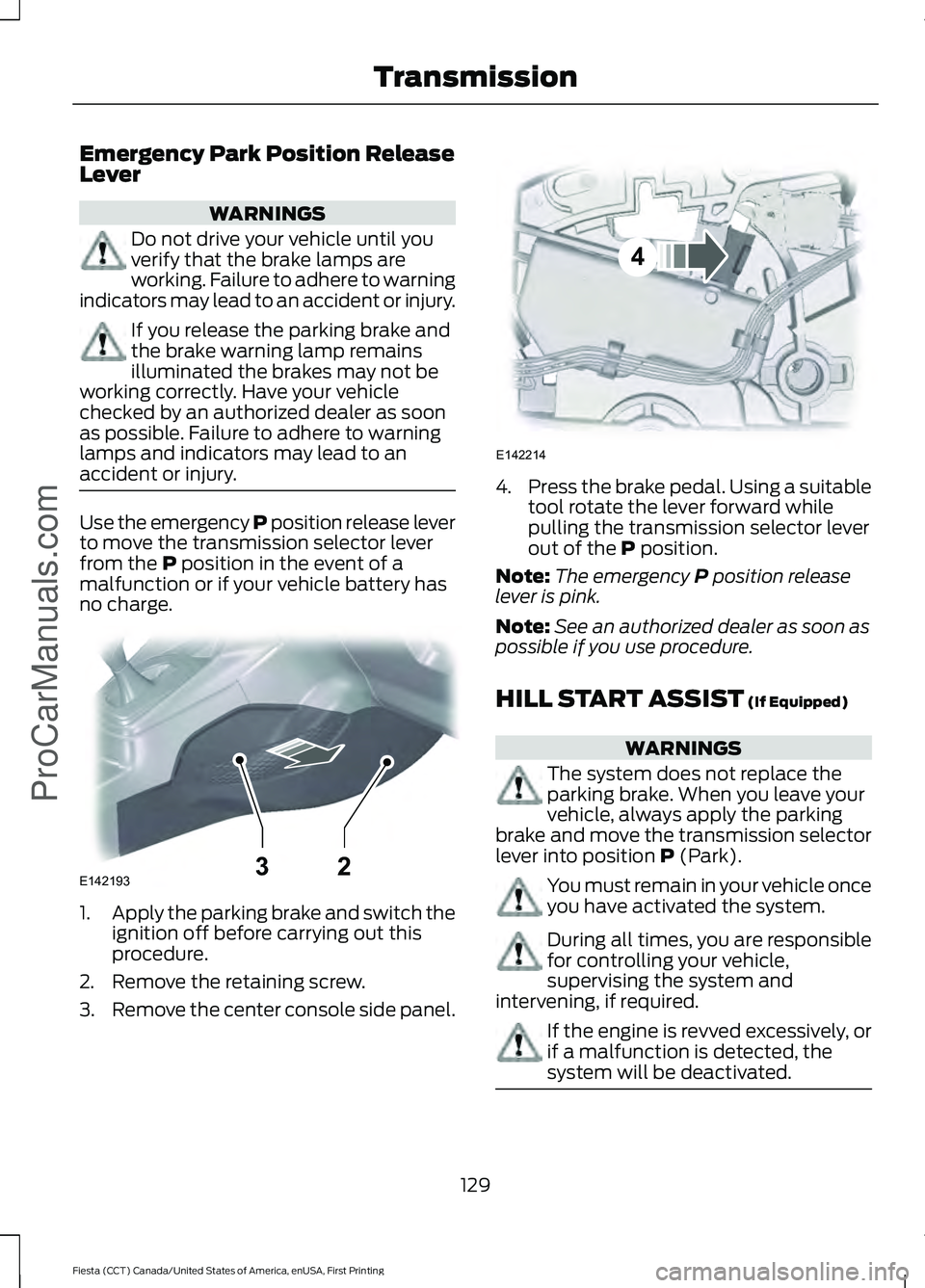
accident or injury. Use the emergency P position release lever
to move the transmission selector lever
from the P position in the event of a
malfunction or if your vehicle battery has
no charge. 1.
Apply the parking brake and switch the
ignition off before carrying out this
procedure.
2. Remove the retaining screw.
3. Remove the center console side panel. 4.
Press the brake pedal. Using a suitable
tool rotate the lever forward while
pulling the transmission selector lever
out of the P position.
Note: The emergency
P position release
lever is pink.
Note: See an authorized dealer as soon as
possible if you use procedure.
HILL START ASSIST
(If Equipped) WARNINGS
The system does not replace the
parking brake. When you leave your
vehicle, always apply the parking
brake and move the transmission selector
lever into position
P (Park). You must remain in your vehicle once
you have activated the system.
During all times, you are responsible
for controlling your vehicle,
supervising the system and
intervening, if required. If the engine is revved excessively, or
if a malfunction is detected, the
system will be deactivated.
129
Fiesta (CCT) Canada/United States of America, enUSA, First Printing Transmission
ProCarManuals.comE14219332 E142214
4
Page 133 of 363
The system makes it easier to pull away
when your vehicle is on a slope without the
need to use the parking brake.
When the system is active, your vehicle will
remain stationary on the slope for two to
three seconds after you release the brake
pedal. This allows you time to move your
foot from the brake to the accelerator
pedal. The brakes release automatically
when the engine has sufficient torque to
prevent your vehicle from rolling down the
grade. This is an advantage when pulling
away on a slope, (for example from a car
park ramp, traffic lights or when reversing
uphill into a parking space).
The system will activate automatically on
any slope which can result in significant
vehicle rollback.
Using Hill Start Assist
1. Press the brake pedal to bring your
vehicle to a complete standstill. Keep
the brake pedal pressed.
2. If the sensors detect that your vehicle is on a slope, the system will be
activated automatically.
3. When you remove your foot from the brake pedal, your vehicle will remain
on the slope without rolling away for
approximately two or three seconds.
This hold time will automatically be
extended if you are in the process of
driving off.
4. Drive off in the normal manner. The brakes will be released automatically.
Note: Do not drive with your foot resting on
the clutch pedal or use the clutch pedal to
hold your vehicle at a standstill while
waiting on a hill. These actions will reduce
the life of the clutch.
Note: Do not use the accelerator to hold
your vehicle at a standstill while waiting on
a hill. This will overheat the transmission. Switching the System On and Off
Note:
The system can only be switched on
and off for manual transmissions.
Note: Once you have switched off the
system, it will remain off until you switch it
on again.
Your vehicle comes with the system
already enabled. If desired, you can disable
the feature: See (page 84).
130
Fiesta (CCT) Canada/United States of America, enUSA, First Printing Transmission
ProCarManuals.com
Page 134 of 363
GENERAL INFORMATION
WARNING
The system does not relieve you of
your responsibility to drive with due
care and attention.
Note:
Occasional brake noise is normal. If
a metal-to-metal, continuous grinding or
continuous squeal sound is present, the
brake linings may be worn-out. If the vehicle
has continuous vibration or shudder in the
steering wheel while braking, have your
vehicle checked by an authorized dealer.
Note: Brake dust may accumulate on the
wheels, even under normal driving
conditions. Some dust is inevitable as the
brakes wear. See Cleaning the Alloy
Wheels (page 207).
Wet brakes result in reduced braking
efficiency. Gently press the brake pedal a
few times when driving from a car wash or
standing water to dry the brakes.
Brake Over Accelerator
In the event that the accelerator pedal
becomes stuck or entrapped, apply firm
pressure to the brake pedal to slow your
vehicle and reduce engine power. If you
experience this condition, apply the brakes
and bring your vehicle to a safe stop. Move
the transmission to park (P), switch the
engine off and apply the parking brake.
Inspect the accelerator pedal for any
interference. If none are found and the
condition persists, have your vehicle towed
to the nearest authorized dealer. Emergency Brake Assist
Brake assist detects when you rapidly
brake by measuring the rate at which you
press the brake pedal. It provides
maximum braking efficiency as long as you
press the pedal. Emergency brake assist
can reduce stopping distances in critical
situations.
Anti-lock Brake System
This system helps you maintain steering
control and vehicle stability during
emergency stops by keeping the brakes
from locking.
This lamp momentarily
illuminates when you switch the
ignition on. If the light does not
illuminate during start up, remains on or
flashes, the system may be disabled. Have
the system checked by an authorized
dealer. If the anti-lock brake system is
disabled, normal braking is still effective. If the brake warning lamp
illuminates when you release the
parking brake, have the system
checked by an authorized dealer.
HINTS ON DRIVING WITH
ANTI-LOCK BRAKES
Note: When the system is operating, the
brake pedal will pulse and may travel
further. Maintain pressure on the brake
pedal. You may also hear a noise from the
system. This is normal.
The anti-lock braking system will not
eliminate the risks when:
• You drive too closely to the vehicle in
front of you.
• Your vehicle is hydroplaning.
• You take corners too fast.
• The road surface is poor.
131
Fiesta (CCT) Canada/United States of America, enUSA, First Printing Brakes
ProCarManuals.com E144522
Page 135 of 363
PARKING BRAKE
Vehicles With Automatic
Transmission
WARNING
Always set the parking brake fully
and leave your vehicle with the
transmission selector lever in
position P. Note:
If you park your vehicle on a hill and
facing uphill move the transmission selector
lever to position P and turn the steering
wheel away from the curb.
Note: If you park your vehicle on a hill and
facing downhill move the transmission
selector lever to position P and turn the
steering wheel toward the curb.
Vehicles With Manual
Transmission WARNING
Always set the parking brake fully.
Note:
If you park your vehicle on a hill and
facing uphill select first gear and turn the
steering wheel away from the curb.
Note: If you park your vehicle on a hill and
facing downhill select reverse gear and turn
the steering wheel toward the curb.
All Vehicles
Note: Do not press the release button while
pulling the lever up.
To apply the parking brake:
1. Press the foot brake pedal firmly.
2. Pull the parking brake lever up to its fullest extent.
To release the parking brake: 1. Press the brake pedal firmly.
2. Pull the lever up slightly.
3. Press the release button and push the
lever down.
132
Fiesta (CCT) Canada/United States of America, enUSA, First Printing BrakesProCarManuals.com
Page 140 of 363
Note:
If your vehicle sustains damage to
the bumper or fascia, leaving it misaligned
or bent, the sensing zone may be altered
causing inaccurate measurement of
obstacles or false alarms.
The system warns you of obstacles within
a certain range of the bumper area.
When receiving a detection warning, the
radio volume is reduced to a
predetermined level. After the warning
goes away, the radio volume returns to the
previous level.
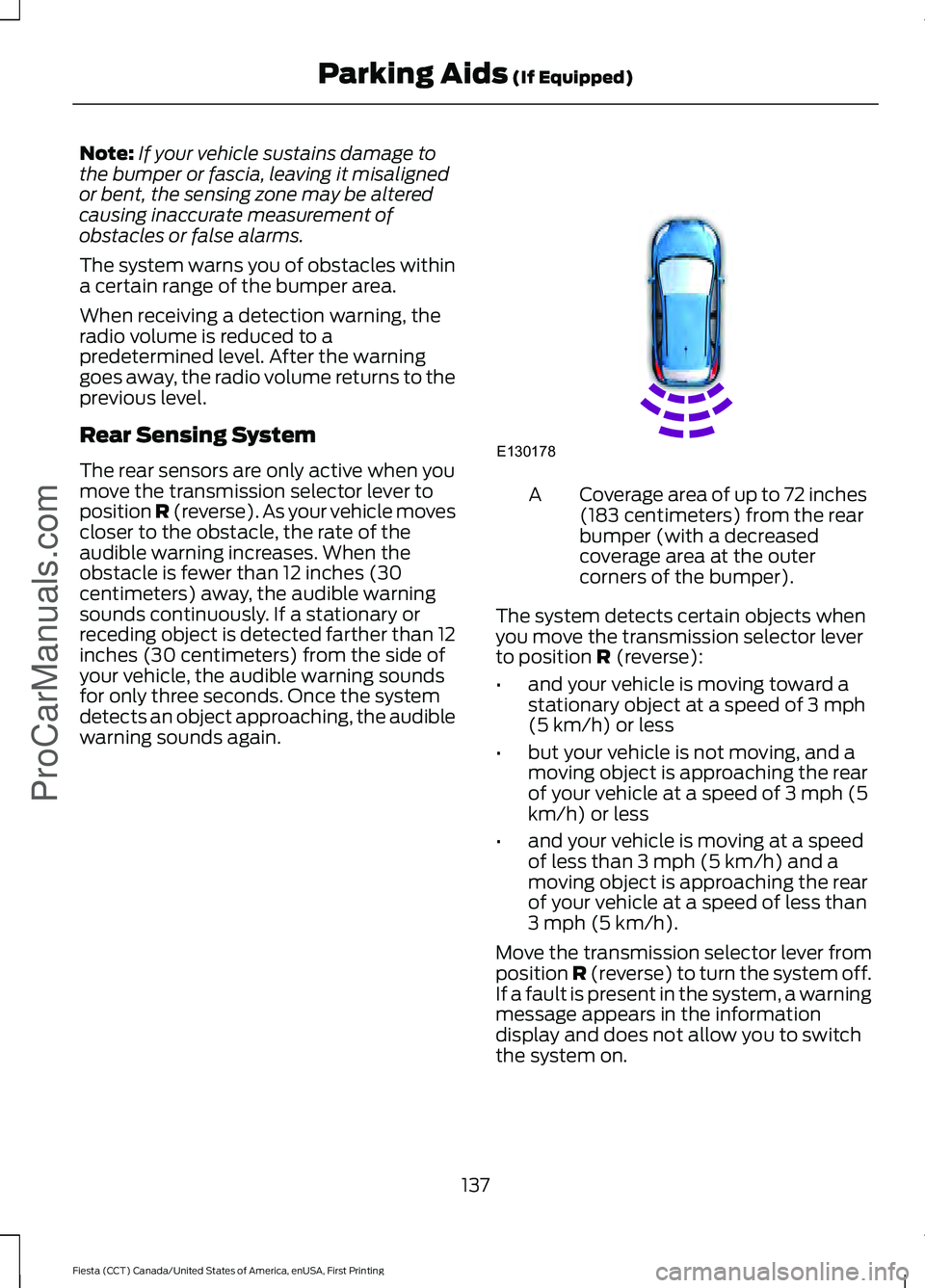
Rear Sensing System
The rear sensors are only active when you
move the transmission selector lever to
position R (reverse). As your vehicle moves
closer to the obstacle, the rate of the
audible warning increases. When the
obstacle is fewer than 12 inches (30
centimeters) away, the audible warning
sounds continuously. If a stationary or
receding object is detected farther than 12
inches (30 centimeters) from the side of
your vehicle, the audible warning sounds
for only three seconds. Once the system
detects an object approaching, the audible
warning sounds again. Coverage area of up to 72 inches
(183 centimeters) from the rear
bumper (with a decreased
coverage area at the outer
corners of the bumper).
A
The system detects certain objects when
you move the transmission selector lever
to position R (reverse):
• and your vehicle is moving toward a
stationary object at a speed of 3 mph
(5 km/h) or less
• but your vehicle is not moving, and a
moving object is approaching the rear
of your vehicle at a speed of 3 mph (5
km/h) or less
• and your vehicle is moving at a speed
of less than 3 mph (5 km/h) and a
moving object is approaching the rear
of your vehicle at a speed of less than
3 mph (5 km/h).
Move the transmission selector lever from
position
R (reverse) to turn the system off.
If a fault is present in the system, a warning
message appears in the information
display and does not allow you to switch
the system on.
137
Fiesta (CCT) Canada/United States of America, enUSA, First Printing Parking Aids
(If Equipped)
ProCarManuals.comE130178
Page 141 of 363
REAR VIEW CAMERA (If Equipped)
WARNINGS
The operation of the camera may
vary depending on the ambient
temperature, vehicle and road
conditions. Objects in the display are closer than
they appear.
Do not place objects in front of the
camera.
The rear view camera system is a
reverse aid supplement device that
still requires the driver to use it in
conjunction with the interior and exterior
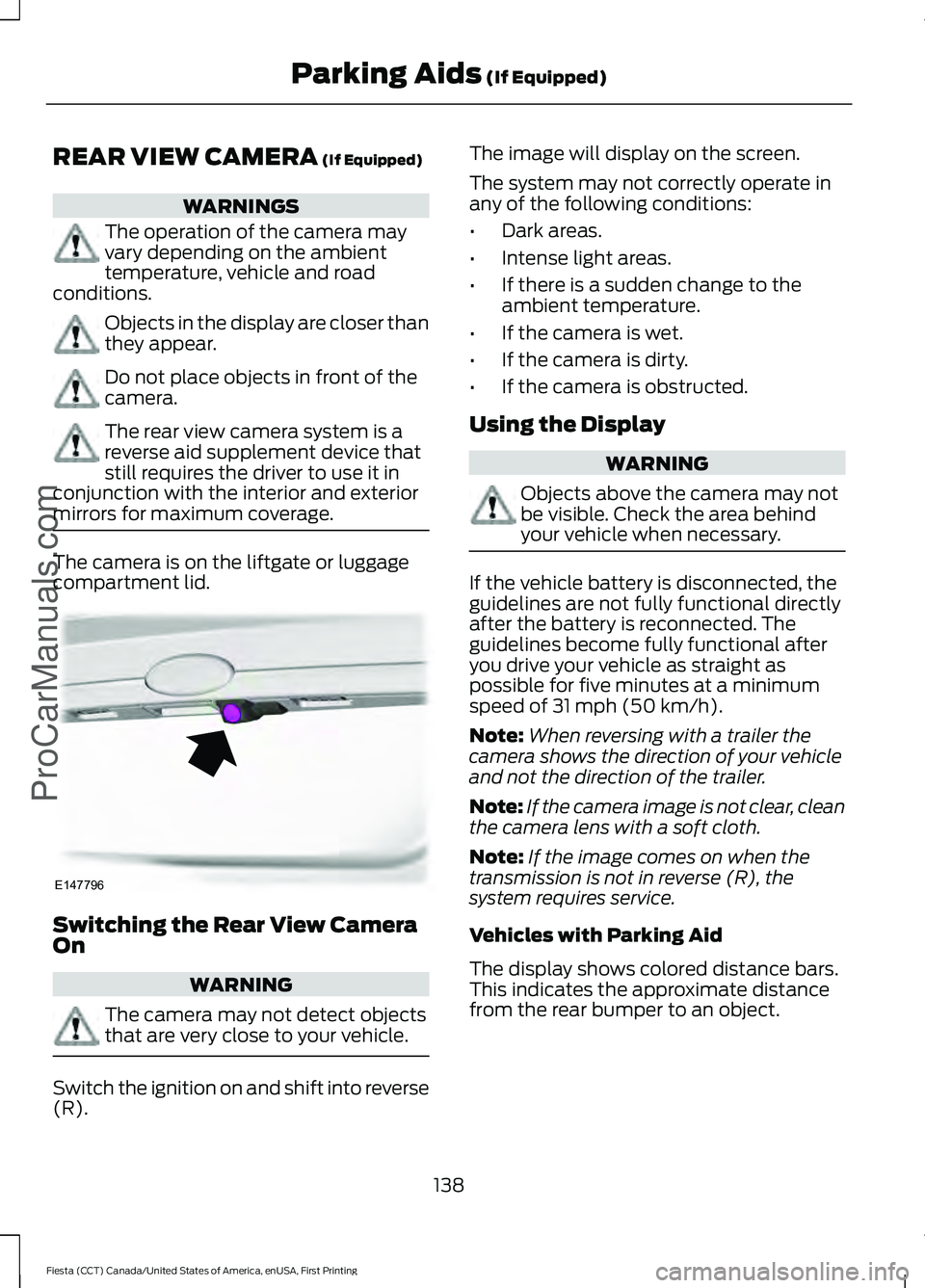
mirrors for maximum coverage. The camera is on the liftgate or luggage
compartment lid.
Switching the Rear View Camera
On
WARNING
The camera may not detect objects
that are very close to your vehicle.
Switch the ignition on and shift into reverse
(R). The image will display on the screen.
The system may not correctly operate in
any of the following conditions:
•
Dark areas.
• Intense light areas.
• If there is a sudden change to the
ambient temperature.
• If the camera is wet.
• If the camera is dirty.
• If the camera is obstructed.
Using the Display WARNING
Objects above the camera may not
be visible. Check the area behind
your vehicle when necessary.
If the vehicle battery is disconnected, the
guidelines are not fully functional directly
after the battery is reconnected. The
guidelines become fully functional after
you drive your vehicle as straight as
possible for five minutes at a minimum
speed of
31 mph (50 km/h).
Note: When reversing with a trailer the
camera shows the direction of your vehicle
and not the direction of the trailer.
Note: If the camera image is not clear, clean
the camera lens with a soft cloth.
Note: If the image comes on when the
transmission is not in reverse (R), the
system requires service.
Vehicles with Parking Aid
The display shows colored distance bars.
This indicates the approximate distance
from the rear bumper to an object.
138
Fiesta (CCT) Canada/United States of America, enUSA, First Printing Parking Aids
(If Equipped)
ProCarManuals.comE147796
Page 143 of 363
PRINCIPLE OF OPERATION
WARNING
The system does not relieve you of
your responsibility to drive with due
care and attention.
Cruise control allows you to control your
speed using the switches on the steering
wheel. You can use cruise control when
you exceed approximately 20 mph (30
km/h).
USING CRUISE CONTROL
WARNINGS
Do not use cruise control on winding
roads, in heavy traffic or when the
road surface is slippery. This could
result in loss of vehicle control, serious
injury or death. When you are going downhill, your
speed may increase above the set
speed. The system will not apply the
brakes. Change down a gear to assist the
system in maintaining the set speed.
Failure to do so could result in loss of
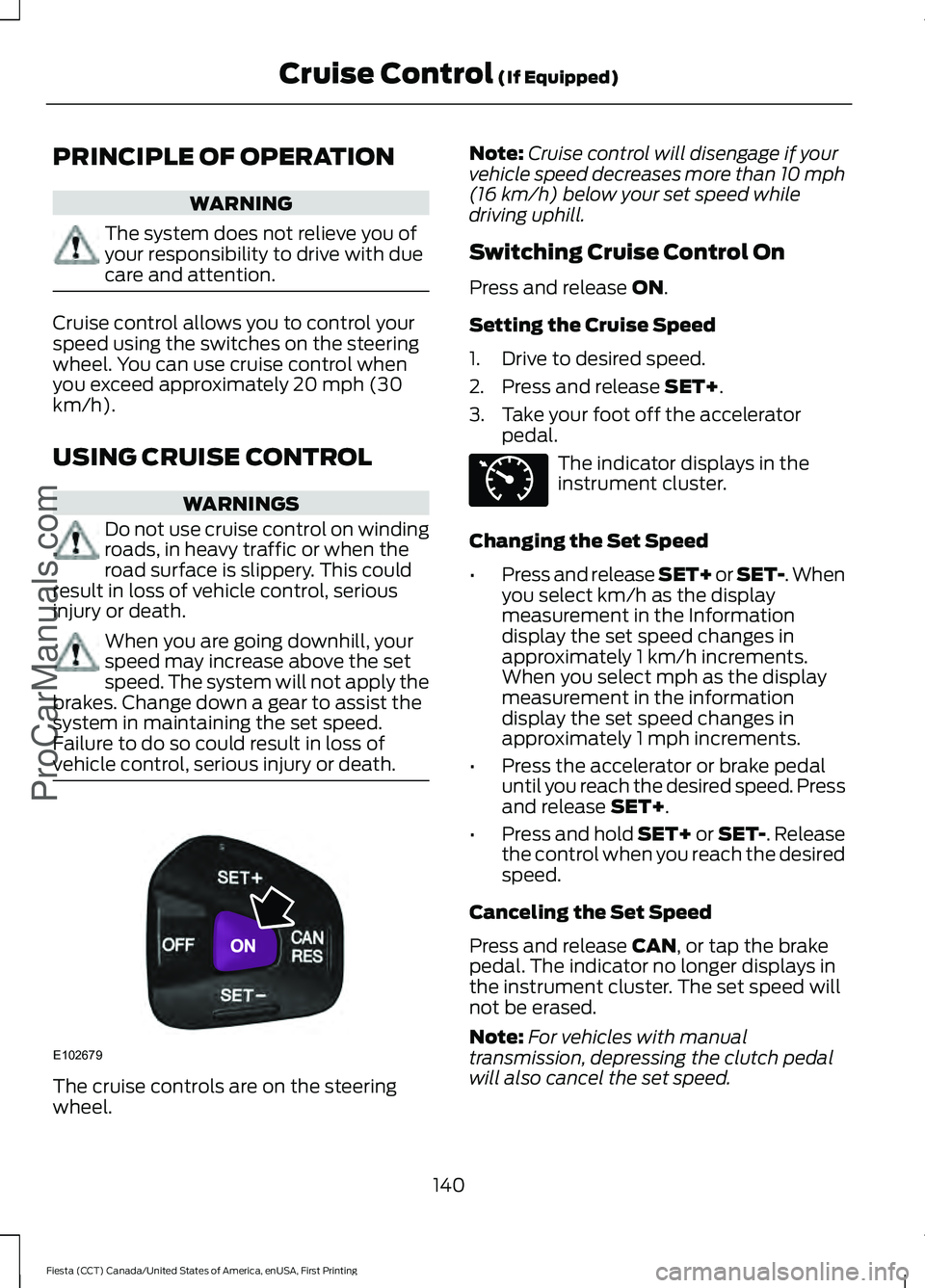
vehicle control, serious injury or death. The cruise controls are on the steering
wheel. Note:
Cruise control will disengage if your
vehicle speed decreases more than 10 mph
(16 km/h) below your set speed while
driving uphill.
Switching Cruise Control On
Press and release
ON.
Setting the Cruise Speed
1. Drive to desired speed.
2. Press and release
SET+.
3. Take your foot off the accelerator pedal. The indicator displays in the
instrument cluster.
Changing the Set Speed
• Press and release SET+ or SET-. When
you select km/h as the display
measurement in the Information
display the set speed changes in
approximately 1 km/h increments.
When you select mph as the display
measurement in the information
display the set speed changes in
approximately 1 mph increments.
• Press the accelerator or brake pedal
until you reach the desired speed. Press
and release
SET+.
• Press and hold SET+ or SET-. Release
the control when you reach the desired
speed.
Canceling the Set Speed
Press and release
CAN, or tap the brake
pedal. The indicator no longer displays in
the instrument cluster. The set speed will
not be erased.
Note: For vehicles with manual
transmission, depressing the clutch pedal
will also cancel the set speed.
140
Fiesta (CCT) Canada/United States of America, enUSA, First Printing Cruise Control
(If Equipped)
ProCarManuals.comE102679 E71340
Page 150 of 363
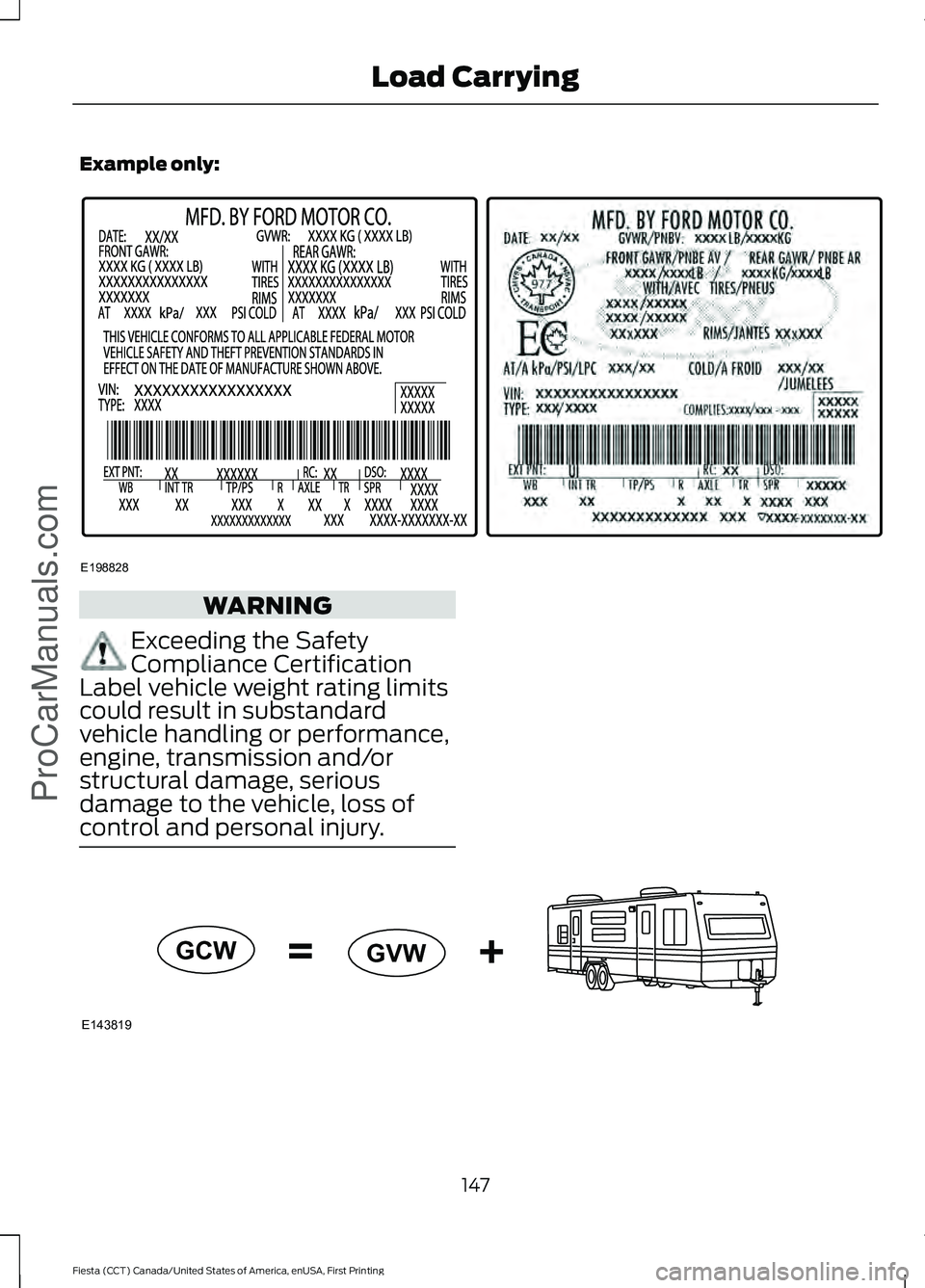
Example only:
WARNING
Exceeding the Safety
Compliance Certification
Label vehicle weight rating limits
could result in substandard
vehicle handling or performance,
engine, transmission and/or
structural damage, serious
damage to the vehicle, loss of
control and personal injury. 147
Fiesta (CCT) Canada/United States of America, enUSA, First Printing Load CarryingProCarManuals.comE198828 E143819GCW
GVW