warning light FORD FIESTA 2016 Owner's Manual
[x] Cancel search | Manufacturer: FORD, Model Year: 2016, Model line: FIESTA, Model: FORD FIESTA 2016Pages: 363, PDF Size: 5.9 MB
Page 106 of 363
SITTING IN THE CORRECT
POSITION
WARNINGS
Do not recline the seat backrest too
far as this can cause the occupant
to slide under the safety belt,
resulting in serious injury in the event of a
crash. Sitting improperly, out of position or
with the seat backrest reclined too
far, can result in serious injury or
death in the event of a crash. Always sit
upright against your seat backrest, with
your feet on the floor. Do not place objects higher than the
seat backrest to reduce the risk of
serious injury in the event of a crash
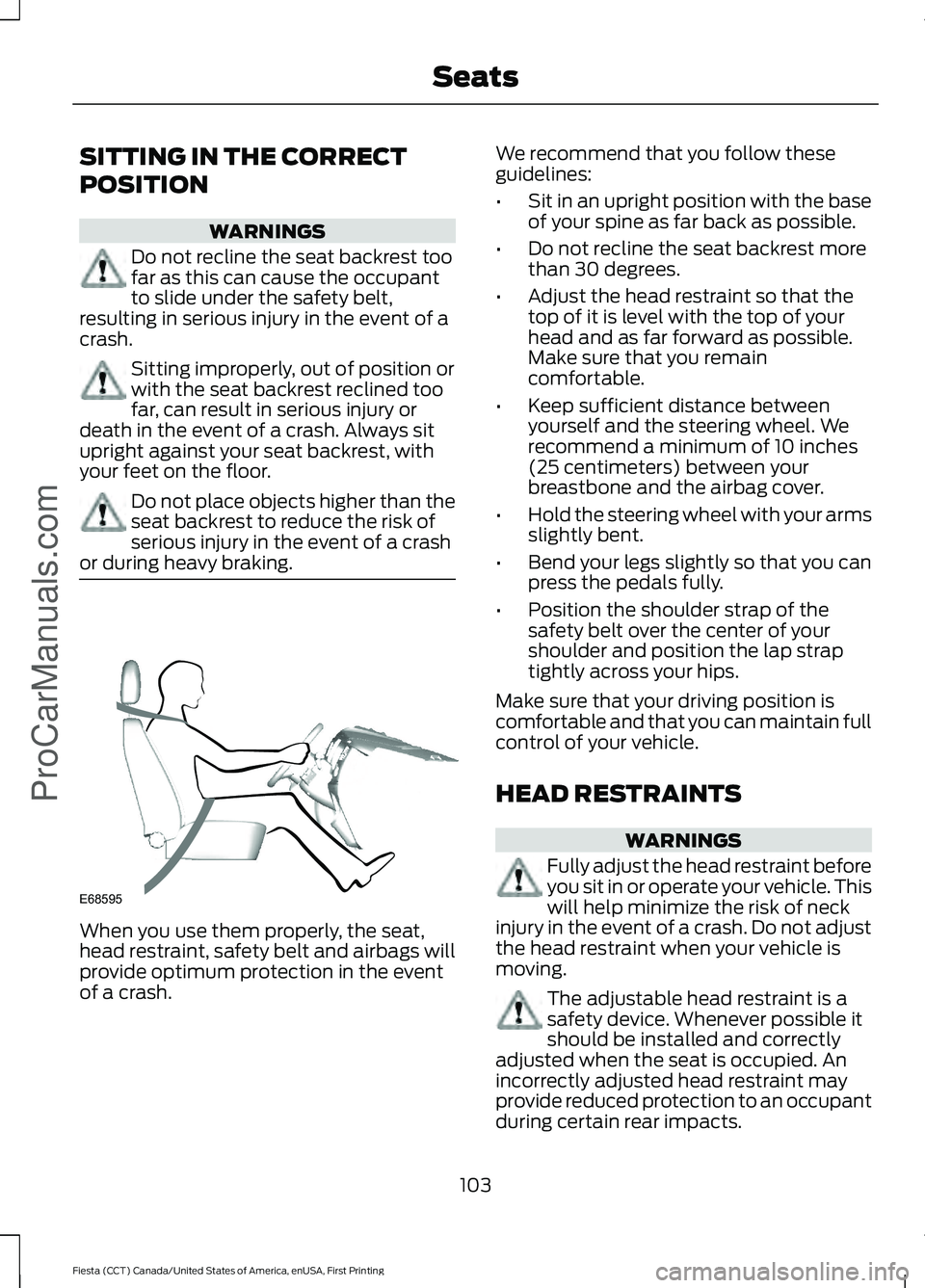
or during heavy braking. When you use them properly, the seat,
head restraint, safety belt and airbags will
provide optimum protection in the event
of a crash. We recommend that you follow these
guidelines:
•
Sit in an upright position with the base
of your spine as far back as possible.
• Do not recline the seat backrest more
than 30 degrees.
• Adjust the head restraint so that the
top of it is level with the top of your
head and as far forward as possible.
Make sure that you remain
comfortable.
• Keep sufficient distance between
yourself and the steering wheel. We
recommend a minimum of 10 inches
(25 centimeters) between your
breastbone and the airbag cover.
• Hold the steering wheel with your arms
slightly bent.
• Bend your legs slightly so that you can
press the pedals fully.
• Position the shoulder strap of the
safety belt over the center of your
shoulder and position the lap strap
tightly across your hips.
Make sure that your driving position is
comfortable and that you can maintain full
control of your vehicle.
HEAD RESTRAINTS WARNINGS
Fully adjust the head restraint before
you sit in or operate your vehicle. This
will help minimize the risk of neck
injury in the event of a crash. Do not adjust
the head restraint when your vehicle is
moving. The adjustable head restraint is a
safety device. Whenever possible it
should be installed and correctly
adjusted when the seat is occupied. An
incorrectly adjusted head restraint may
provide reduced protection to an occupant
during certain rear impacts.
103
Fiesta (CCT) Canada/United States of America, enUSA, First Printing SeatsProCarManuals.comE68595
Page 112 of 363
12 Volt DC Power Point
WARNINGS
Do not plug optional electrical
accessories into the cigar lighter
socket. Incorrect use of the cigar
lighter can cause damage not covered by
the vehicle warranty, and can result in fire
or serious injury. Incorrect use of the power points can
cause damage not covered by the
vehicle warranty, and can result in
fire or serious injury. Note:
When you switch the ignition on, you
can use the socket to power 12 volt
appliances with a maximum current rating
of 15 amps.
If the power supply does not work after you
switch the ignition off, switch the ignition
on.
Note: Do not insert objects other than an
accessory plug into the power point. This
will damage the outlet and blow the fuse.
Note: Do not hang any accessory from the
accessory plug.
Note: Do not use the power point over the
vehicle capacity of 12 volt DC 180 watts or
a fuse may blow.
Note: Do not use a power point for
operating a cigar lighter.
Note: Always keep the power point caps
closed when not in use.
Run the vehicle for full capacity use of the
power point.
To prevent the battery from running out of
charge:
• Do not use the power point longer than
necessary when the vehicle is not
running.
• Do not leave devices plugged in
overnight or when you park your vehicle
for extended periods. Location
Power points may be in the following
locations:
•
On the center console.
• On the rear of the center console.
CIGAR LIGHTER (If Equipped)
Note: Do not hold the cigar lighter element
pressed in.
Note: If the power supply does not work
after you switch the ignition off, switch the
ignition on.
Note: If you use the socket when the engine
is not running, the battery may lose charge.
Note: When you switch the ignition on, you
can use the socket to power 12 volt
appliances with a maximum current rating
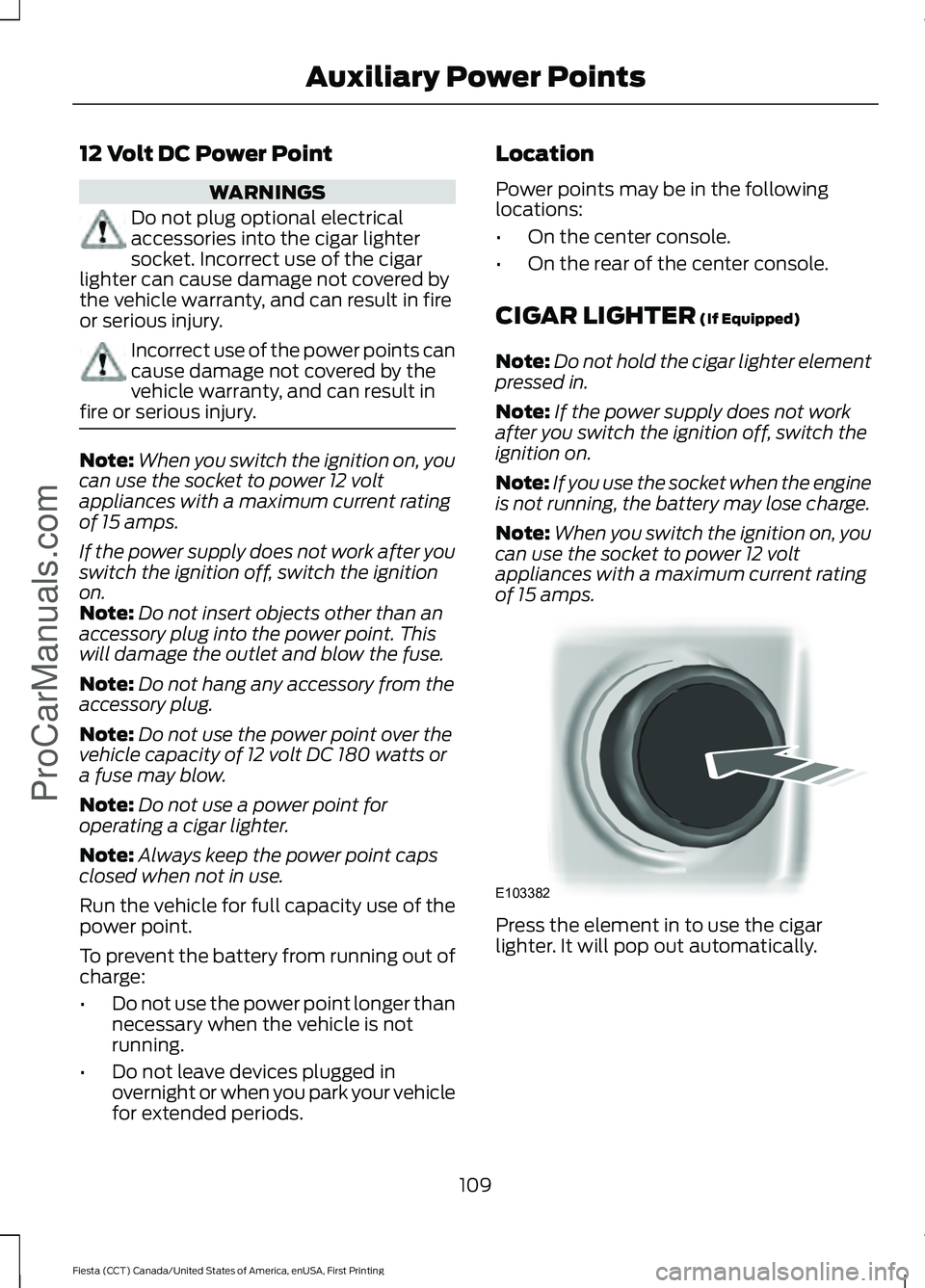
of 15 amps. Press the element in to use the cigar
lighter. It will pop out automatically.
109
Fiesta (CCT) Canada/United States of America, enUSA, First Printing Auxiliary Power Points
ProCarManuals.comE103382
Page 124 of 363
Illumination of the service engine soon
indicator, charging system warning light or
the temperature warning light, fluid leaks,
strange odors, smoke or loss of engine
power could indicate that the emission
control system is not working properly.
An improperly operating or damaged
exhaust system may allow exhaust to
enter the vehicle. Have a damaged or
improperly operating exhaust system
inspected and repaired immediately.
Do not make any unauthorized changes to
your vehicle or engine. By law, vehicle
owners and anyone who manufactures,
repairs, services, sells, leases, trades
vehicles, or supervises a fleet of vehicles
are not permitted to intentionally remove
an emission control device or prevent it
from working. Information about your
vehicle
’s emission system is on the Vehicle
Emission Control Information Decal
located on or near the engine. This decal
also lists engine displacement
Please consult your warranty information
for complete details.
On-Board Diagnostics (OBD-II)
Your vehicle has a computer known as the
on-board diagnostics system (OBD-II) that
monitors the engine ’s emission control
system. The system protects the
environment by making sure that your
vehicle continues to meet government
emission standards. The OBD-II system
also assists a service technician in properly
servicing your vehicle. When the service engine soon
indicator illuminates, the OBD-II
system has detected a
malfunction. Temporary malfunctions may
cause the service engine soon indicator to
illuminate.
Examples of temporary malfunctions are: •
the vehicle has run out of fuel —the
engine may misfire or run poorly
• poor fuel quality or water in the
fuel —the engine may misfire or run
poorly
• the fuel fill inlet may not have closed
properly. See Refueling (page 118).
• driving through deep water —the
electrical system may be wet.
You can correct these temporary
malfunctions by filling the fuel tank with
good quality fuel, properly closing the fuel
fill inlet or letting the electrical system dry
out. After three driving cycles without these
or any other temporary malfunctions
present, the service engine soon indicator
should stay off the next time you start the
engine. A driving cycle consists of a cold
engine startup followed by mixed
city/highway driving. No additional vehicle
service is required.
If the service engine soon indicator remains
on, have your vehicle serviced at the first
available opportunity. Although some
malfunctions detected by the OBD-II may
not have symptoms that are apparent,
continued driving with the service engine
soon indicator on can result in increased
emissions, lower fuel economy, reduced
engine and transmission smoothness, and
lead to more costly repairs.
Readiness for
Inspection/Maintenance (I/M)
Testing
Some state/provincial and local
governments may have
Inspection/Maintenance (I/M) programs
to inspect the emission control equipment
on your vehicle. Failure to pass this
inspection could prevent you from getting
a vehicle registration.
121
Fiesta (CCT) Canada/United States of America, enUSA, First Printing Fuel and Refueling
ProCarManuals.com
Page 129 of 363
AUTOMATIC TRANSMISSION
WARNINGS
Always set the parking brake fully
and make sure the gearshift is
latched in P (Park). Turn the ignition
to the off position and remove the key
whenever you leave your vehicle. Do not apply the brake and
accelerator pedals simultaneously
for more than three seconds as this
limits engine rpm and labors the
transmission. This may result in difficulty
maintaining speed in traffic and could lead
to serious injury. Note:
When you switch the ignition off, the
transmission will carry out a series of checks.
You may hear slight clicking sounds. This is
normal.
We have designed your vehicle to improve
fuel economy by reducing fuel usage
compared to a traditional torque converter
automatic transmission. When you take
your foot off the accelerator pedal and
your vehicle begins to slow down, this can
feel like a light to medium braking
sensation.
Selector Lever Positions WARNING
You must press the brake pedal to
apply the brakes before moving the
transmission selector lever. Failure
to keep the brakes applied until you are
ready to move off may lead to an accident
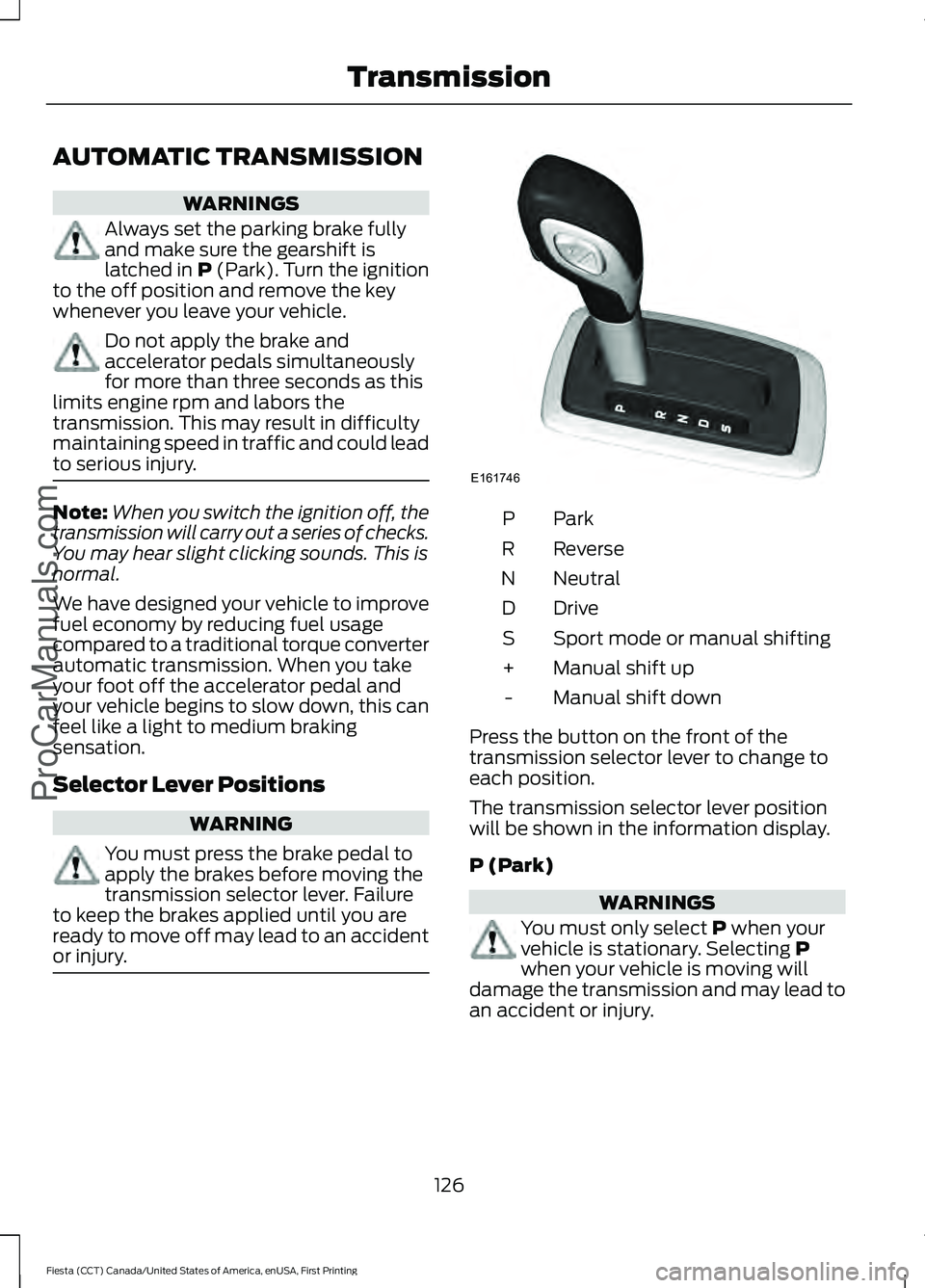
or injury. ParkP
Reverse
R
Neutral
N
Drive
D
Sport mode or manual shifting
S
Manual shift up
+
Manual shift down
-
Press the button on the front of the
transmission selector lever to change to
each position.
The transmission selector lever position
will be shown in the information display.
P (Park) WARNINGS
You must only select
P when your
vehicle is stationary. Selecting P
when your vehicle is moving will
damage the transmission and may lead to
an accident or injury.
126
Fiesta (CCT) Canada/United States of America, enUSA, First Printing Transmission
ProCarManuals.comE161746
Page 131 of 363
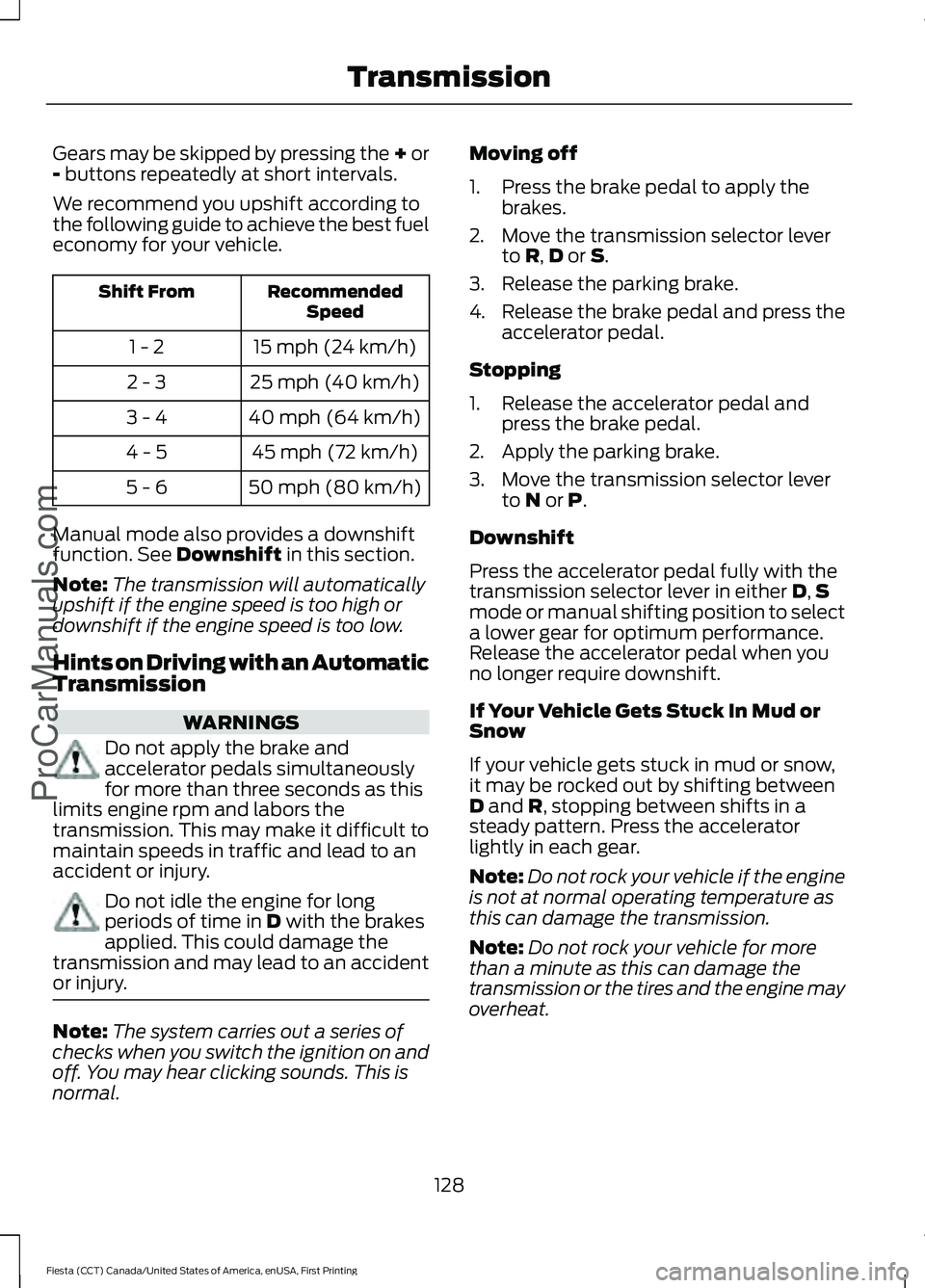
Gears may be skipped by pressing the + or
- buttons repeatedly at short intervals.
We recommend you upshift according to
the following guide to achieve the best fuel
economy for your vehicle. Recommended
Speed
Shift From
15 mph (24 km/h)
1 - 2
25 mph (40 km/h)
2 - 3
40 mph (64 km/h)
3 - 4
45 mph (72 km/h)
4 - 5
50 mph (80 km/h)
5 - 6
Manual mode also provides a downshift
function. See
Downshift in this section.
Note: The transmission will automatically
upshift if the engine speed is too high or
downshift if the engine speed is too low.
Hints on Driving with an Automatic
Transmission WARNINGS
Do not apply the brake and
accelerator pedals simultaneously
for more than three seconds as this
limits engine rpm and labors the
transmission. This may make it difficult to
maintain speeds in traffic and lead to an
accident or injury. Do not idle the engine for long
periods of time in
D with the brakes
applied. This could damage the
transmission and may lead to an accident
or injury. Note:
The system carries out a series of
checks when you switch the ignition on and
off. You may hear clicking sounds. This is
normal. Moving off
1. Press the brake pedal to apply the
brakes.
2. Move the transmission selector lever to
R,D or S.
3. Release the parking brake.
4. Release the brake pedal and press the
accelerator pedal.
Stopping
1. Release the accelerator pedal and press the brake pedal.
2. Apply the parking brake.
3. Move the transmission selector lever to
N or P.
Downshift
Press the accelerator pedal fully with the
transmission selector lever in either
D, S
mode or manual shifting position to select
a lower gear for optimum performance.
Release the accelerator pedal when you
no longer require downshift.
If Your Vehicle Gets Stuck In Mud or
Snow
If your vehicle gets stuck in mud or snow,
it may be rocked out by shifting between
D
and R, stopping between shifts in a
steady pattern. Press the accelerator
lightly in each gear.
Note: Do not rock your vehicle if the engine
is not at normal operating temperature as
this can damage the transmission.
Note: Do not rock your vehicle for more
than a minute as this can damage the
transmission or the tires and the engine may
overheat.
128
Fiesta (CCT) Canada/United States of America, enUSA, First Printing Transmission
ProCarManuals.com
Page 134 of 363
GENERAL INFORMATION
WARNING
The system does not relieve you of
your responsibility to drive with due
care and attention.
Note:
Occasional brake noise is normal. If
a metal-to-metal, continuous grinding or
continuous squeal sound is present, the
brake linings may be worn-out. If the vehicle
has continuous vibration or shudder in the
steering wheel while braking, have your
vehicle checked by an authorized dealer.
Note: Brake dust may accumulate on the
wheels, even under normal driving
conditions. Some dust is inevitable as the
brakes wear. See Cleaning the Alloy
Wheels (page 207).
Wet brakes result in reduced braking
efficiency. Gently press the brake pedal a
few times when driving from a car wash or
standing water to dry the brakes.
Brake Over Accelerator
In the event that the accelerator pedal
becomes stuck or entrapped, apply firm
pressure to the brake pedal to slow your
vehicle and reduce engine power. If you
experience this condition, apply the brakes
and bring your vehicle to a safe stop. Move
the transmission to park (P), switch the
engine off and apply the parking brake.
Inspect the accelerator pedal for any
interference. If none are found and the
condition persists, have your vehicle towed
to the nearest authorized dealer. Emergency Brake Assist
Brake assist detects when you rapidly
brake by measuring the rate at which you
press the brake pedal. It provides
maximum braking efficiency as long as you
press the pedal. Emergency brake assist
can reduce stopping distances in critical
situations.
Anti-lock Brake System
This system helps you maintain steering
control and vehicle stability during
emergency stops by keeping the brakes
from locking.
This lamp momentarily
illuminates when you switch the
ignition on. If the light does not
illuminate during start up, remains on or
flashes, the system may be disabled. Have
the system checked by an authorized
dealer. If the anti-lock brake system is
disabled, normal braking is still effective. If the brake warning lamp
illuminates when you release the
parking brake, have the system
checked by an authorized dealer.
HINTS ON DRIVING WITH
ANTI-LOCK BRAKES
Note: When the system is operating, the
brake pedal will pulse and may travel
further. Maintain pressure on the brake
pedal. You may also hear a noise from the
system. This is normal.
The anti-lock braking system will not
eliminate the risks when:
• You drive too closely to the vehicle in
front of you.
• Your vehicle is hydroplaning.
• You take corners too fast.
• The road surface is poor.
131
Fiesta (CCT) Canada/United States of America, enUSA, First Printing Brakes
ProCarManuals.com E144522
Page 135 of 363
PARKING BRAKE
Vehicles With Automatic
Transmission
WARNING
Always set the parking brake fully
and leave your vehicle with the
transmission selector lever in
position P. Note:
If you park your vehicle on a hill and
facing uphill move the transmission selector
lever to position P and turn the steering
wheel away from the curb.
Note: If you park your vehicle on a hill and
facing downhill move the transmission
selector lever to position P and turn the
steering wheel toward the curb.
Vehicles With Manual
Transmission WARNING
Always set the parking brake fully.
Note:
If you park your vehicle on a hill and
facing uphill select first gear and turn the
steering wheel away from the curb.
Note: If you park your vehicle on a hill and
facing downhill select reverse gear and turn
the steering wheel toward the curb.
All Vehicles
Note: Do not press the release button while
pulling the lever up.
To apply the parking brake:
1. Press the foot brake pedal firmly.
2. Pull the parking brake lever up to its fullest extent.
To release the parking brake: 1. Press the brake pedal firmly.
2. Pull the lever up slightly.
3. Press the release button and push the
lever down.
132
Fiesta (CCT) Canada/United States of America, enUSA, First Printing BrakesProCarManuals.com
Page 136 of 363
PRINCIPLE OF OPERATION
The traction control system helps avoid
drive wheel spin and loss of traction.
If your vehicle begins to slide, the system
applies the brakes to individual wheels
and, when needed, reduces engine power
at the same time. If the wheels spin when
accelerating on slippery or loose surfaces,
the system reduces engine power in order
to increase traction.
USING TRACTION CONTROL
WARNING
The stability and traction control
light illuminates steadily if the
system detects a failure. Make sure
you did not manually disable the traction
control system using the information
display controls or the switch. If the
stability control and traction control light
is still illuminating steadily, have the
system serviced by an authorized dealer
immediately. Operating your vehicle with
the traction control disabled could lead to
an increased risk of loss of vehicle control,
vehicle rollover, personal injury and death. The system automatically turns on each
time you switch the ignition on.
If your vehicle is stuck in mud or snow,
switching traction control off may be
beneficial as this allows the wheels to spin.
Note:
When you switch traction control off,
stability control remains fully active.
Switching the System Off
When you switch the system off or on, a
message appears in the information
display showing system status.
You can switch the system off by either
using the information display controls or
the switch. Using the Information Display
Controls
You can switch this feature off or on in the
information display. See General
Information (page 84).
Using a Switch
(If Equipped)
Use the traction control switch on the
instrument panel to switch the system off
or on.
The switch illuminates when traction
control is off.
System Indicator Lights and
Messages The stability and traction control
light:
• Temporarily illuminates on engine
start-up.
• Flashes when a driving condition
activates either of the systems.
• Illuminates if a problem occurs in either
of the systems. The stability and traction control
off light temporarily illuminates
on engine start-up and stays on
when you switch the traction control
system off.
133
Fiesta (CCT) Canada/United States of America, enUSA, First Printing Traction Control
ProCarManuals.comE138639
Page 139 of 363
PRINCIPLE OF OPERATION
WARNINGS
The system does not relieve you of
your responsibility to drive with due
care and attention.
If your vehicles has a non-Ford
approved trailer tow module the
system may not correctly detect
objects. The sensors may not detect objects
in heavy rain or other conditions that
cause disruptive reflections.
The sensors may not detect objects
with surfaces that absorb ultrasonic
waves.
The system does not detect objects
that are moving away from your
vehicle. They will only be detected
shortly after they start to move toward
your vehicle. Take particular care when reversing
with a tow ball arm or a rear fitted
accessory. For example, a bicycle
carrier. The rear parking aid will only
indicate the approximate distance from
the rear bumper to an object. Note:
If you use a high pressure spray to
wash your vehicle, only spray the sensors
briefly from a distance not less than 8 in
(20 cm).
Note: If your vehicle has a tow ball arm, the
system is turned off automatically when
trailer lamps (or lighting boards) are
connected to the 13-pin socket through a
Ford approved trailer tow module.
Note: Keep the sensors free from dirt, ice
or snow. Do not clean with sharp objects.
Note: The system may emit false alerts if
it detects a signal using the same frequency
as the sensors or if your vehicle is fully
loaded. Note:
The outer sensors may detect the
side walls of a garage. If the distance
between the outer sensors and the side wall
remains constant for three seconds, the
alert will turn off. As you continue the inner
sensors will detect objects directly behind
your vehicle.
PARKING AID WARNINGS
To help avoid personal injury, read
and understand the limitations of the
system as contained in this section.
Sensing is only an aid for some (generally
large and fixed) objects when moving in
reverse on a flat surface at parking speeds.
Traffic control systems, inclement
weather, air brakes and external motors
and fans may also affect the function of
the sensing system. This may include
reduced performance or a false activation. To help avoid personal injury, always
use caution when moving in reverse
and when using the sensing system.
This system is not designed to
prevent contact with small or moving
objects. The system is designed to
provide a warning to assist the driver in
detecting large stationary objects to avoid
damaging the vehicle. The system may not
detect smaller objects, particularly those
close to the ground. Certain add-on devices such as large
trailer hitches, bike or surfboard racks
and any device that may block the
normal detection zone of the system, may
create false audible warnings. Note:
Keep the sensors located on the
bumper or fascia free from snow, ice and
large accumulations of dirt. If the sensors
are covered, the system ’s accuracy can be
affected. Do not clean the sensors with
sharp objects.
136
Fiesta (CCT) Canada/United States of America, enUSA, First Printing Parking Aids
(If Equipped)
ProCarManuals.com
Page 141 of 363
REAR VIEW CAMERA (If Equipped)
WARNINGS
The operation of the camera may
vary depending on the ambient
temperature, vehicle and road
conditions. Objects in the display are closer than
they appear.
Do not place objects in front of the
camera.
The rear view camera system is a
reverse aid supplement device that
still requires the driver to use it in
conjunction with the interior and exterior
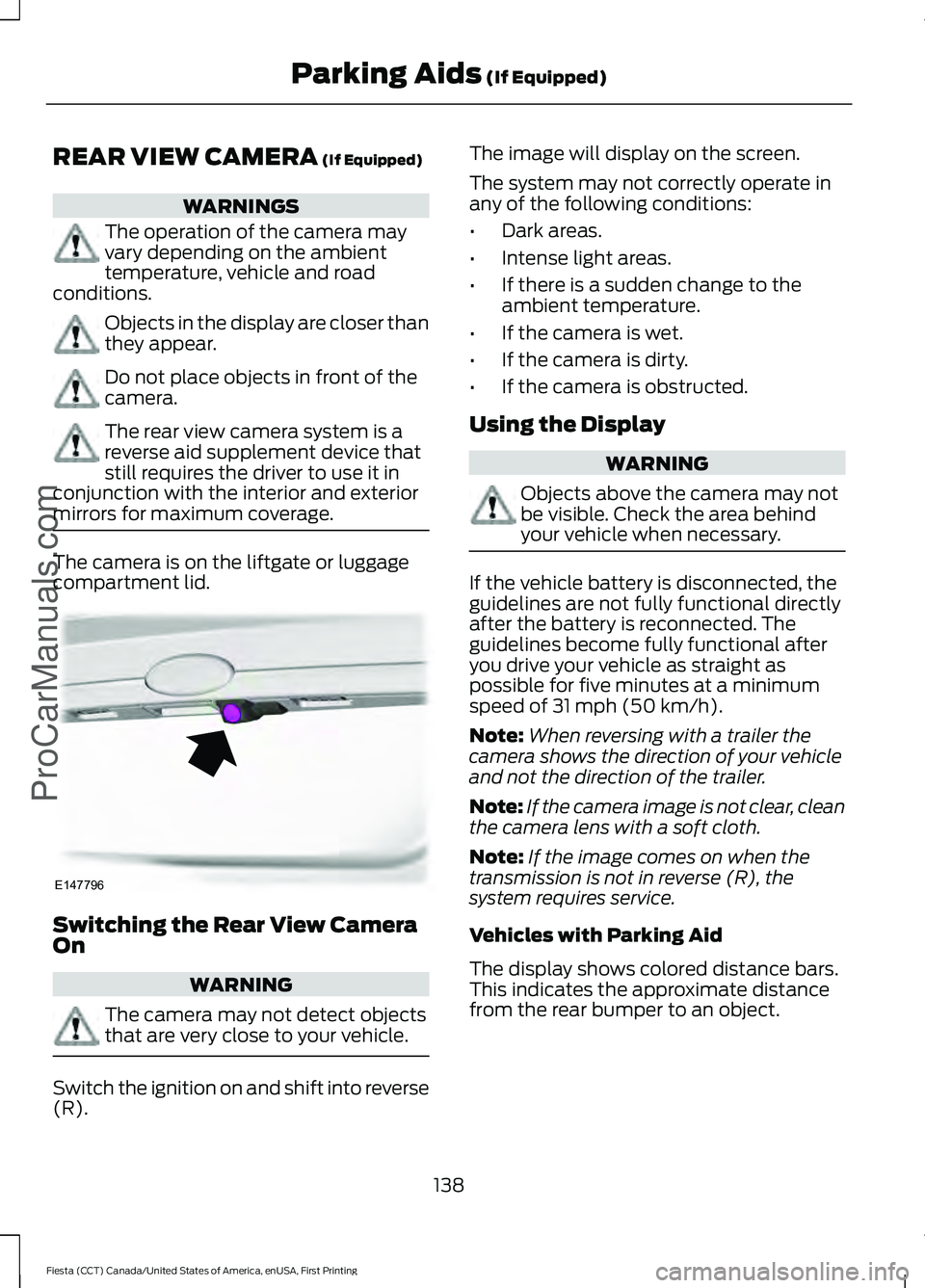
mirrors for maximum coverage. The camera is on the liftgate or luggage
compartment lid.
Switching the Rear View Camera
On
WARNING
The camera may not detect objects
that are very close to your vehicle.
Switch the ignition on and shift into reverse
(R). The image will display on the screen.
The system may not correctly operate in
any of the following conditions:
•
Dark areas.
• Intense light areas.
• If there is a sudden change to the
ambient temperature.
• If the camera is wet.
• If the camera is dirty.
• If the camera is obstructed.
Using the Display WARNING
Objects above the camera may not
be visible. Check the area behind
your vehicle when necessary.
If the vehicle battery is disconnected, the
guidelines are not fully functional directly
after the battery is reconnected. The
guidelines become fully functional after
you drive your vehicle as straight as
possible for five minutes at a minimum
speed of
31 mph (50 km/h).
Note: When reversing with a trailer the
camera shows the direction of your vehicle
and not the direction of the trailer.
Note: If the camera image is not clear, clean
the camera lens with a soft cloth.
Note: If the image comes on when the
transmission is not in reverse (R), the
system requires service.
Vehicles with Parking Aid
The display shows colored distance bars.
This indicates the approximate distance
from the rear bumper to an object.
138
Fiesta (CCT) Canada/United States of America, enUSA, First Printing Parking Aids
(If Equipped)
ProCarManuals.comE147796