wheel FORD FIESTA 2016 Workshop Manual
[x] Cancel search | Manufacturer: FORD, Model Year: 2016, Model line: FIESTA, Model: FORD FIESTA 2016Pages: 363, PDF Size: 5.9 MB
Page 273 of 363
If you want the system to carry out the following
Voice command
Adjust the level of voice interaction and feedback.
Voice Settings | Voice
Preferences
Hear a list of voice commands available in the current mode.
Help
You can say any of the voice commands that appear within open and close brackets that
are separated by |. For example, where (cancel | stop | exit) appears you say; cancel or
stop or exit.
You must say any of the voice commands that appear outside of open and close brackets.
For example, where mobile (apps | applications) appears, you must say mobile followed
by either apps or applications.
You do not need to say words that appear within square brackets. For example, for where
(USB [stick] | iPOD | MP3 [player]) appears, you can say USB or USB stick.
Note: SYNC Services and Vehicle health report are only available in the United States of
America.
System Interaction and Feedback
The system provides feedback through
audible tones, prompts, questions and
spoken confirmations depending on the
situation and the chosen level of
interaction (voice settings). You can
customize the voice recognition system to
provide more or less instruction and
feedback. The default setting is to a higher level of
interaction in order to help you learn to use
the system. You can change these settings
at any time.
Adjusting the Interaction Level Initiate a voice session by
pressing the voice button on the
steering wheel controls. See
Voice Control (page 67).
When prompted say the following: If you want the system to carry out the following
Voice command
Voice Settings | Voice Preferences
Followed by either of the following: Provide more detailed interaction and guidance.
Interaction Mode
Standard
Provide less audible interaction and more tone prompts.
Interaction Mode
Advanced
The system defaults to the standard interaction mode.
270
Fiesta (CCT) Canada/United States of America, enUSA, First Printing SYNC™
ProCarManuals.comE142599
Page 289 of 363
In the Event of a Crash
Not all crashes will deploy an airbag or
activate the fuel pump shut-off (the
triggers for 911 Assist). If a connected cell
phone sustains damage or loses its
connection to SYNC during a crash, SYNC
will search for and try to connect to a
previously paired cell phone; SYNC will
then attempt to call the emergency
services.
Before making the call:
•
SYNC provides a short window of time
(about 10 seconds) to cancel the call.
If you fail to cancel the call, SYNC
attempts to dial 911.
• SYNC says the following, or a similar
message: "SYNC will attempt to call
911, to cancel the call, press Cancel on
your screen or press and hold the
phone button on your steering wheel."
If you do not cancel the call, and SYNC
makes a successful call, a pre-recorded
message plays for the 911 operator, and
then the occupant(s) in your vehicle is able
to talk with the operator. Be prepared to
provide your name, phone number and
location immediately, because not all 911
systems are capable of receiving this
information electronically.
911 Assist May Not Work If
• Your cellular phone or 911 Assist
hardware sustains damage in a crash.
• The vehicle's battery or the SYNC
system has no power.
• The phone(s) thrown from your vehicle
are the ones paired and connected to
the system. 911 Assist Privacy Notice
When you turn on 911 Assist, it may
disclose to emergency services that your
vehicle has been in a crash involving the
deployment of an airbag or activation of
the fuel pump shut-off. Certain versions or
updates to 911 Assist may also be capable
of electronically or verbally disclosing to
911 operators your vehicle location or other
details about your vehicle or crash to assist
911 operators to provide the most
appropriate emergency services. If you do
not want to disclose this information, do
not turn the feature on.
Vehicle Health Report (If
Equipped, United States Only)
WARNING
Always follow scheduled
maintenance instructions, regularly
inspect your vehicle, and seek repair
for any damage or problem you suspect.
Vehicle Health Report supplements, but
cannot replace, normal maintenance and
vehicle inspection. Vehicle Health Report
only monitors certain systems
electronically monitored by your vehicle
and will not monitor or report the status
of any other system, (such as brake lining
wear). Failure to perform scheduled
maintenance and regularly inspect your
vehicle may result in vehicle damage and
serious injury. Note:
This feature is only available in the
United States.
Note: Your Vehicle Health Report feature
requires activation before use. Visit
www.SYNCMyRide.com to register. There
is no fee or subscription associated with
Vehicle Health Report, but you must register
to use this feature.
286
Fiesta (CCT) Canada/United States of America, enUSA, First Printing SYNC™ProCarManuals.com
Page 294 of 363
Action and Description
Voice command
The live operator can assist you by searching for businesses
by name or by category, residential addresses by street
address or by name or specific street intersections.
The system may prompt you to speak with an operator when
it has difficulty matching your voice request. Operator Assist
is a feature of your SYNC Services subscription. For more
information on Operator Assist, visit www.SYNCMyRide.com/
support.
If you miss a turn, SYNC automatically asks if you want the
route updated. Say yes when prompted and the system sends
a new route to your vehicle.
Yes
*
* During an active route.
Disconnecting from SYNC Services
To disconnect from SYNC services, say: Action and Description
Voice command
From the SYNC Services main menu, or press and hold the
phone button on the steering wheel.
Goodbye
SYNC Services quick tips SYNC Services quick tips
You can personalize your Services feature to provide quicker
access to your most used or favorite information. You can
save address points, for example work or home. You can also
save favorite information like sports teams or a news
category. You can learn more about personalization by logging
onto www.SYNCMyRide.com.
Personalizing
Press the voice button at any time while connected to SYNC
Services to interrupt a voice prompt or an audio clip and say
your voice command.
Push to interrupt
Your subscription is associated with your Bluetooth-enabled
cellular phone number, not your VIN (Vehicle Identification
Number). You can pair and connect your phone to any vehicle
equipped with SYNC Services and continue enjoying your
personalized services.
Portable
291
Fiesta (CCT) Canada/United States of America, enUSA, First Printing SYNC™ProCarManuals.com
Page 295 of 363
SYNC Services quick tips
You can even access your account outside your vehicle. Just
use the number on your phone's call history. Traffic and
Directions features do not function properly but information
services and the 411 connect and text message features are
available.
SYNC™ APPLINK ™
SYNC Mobile Apps
Note: You must pair and connect your
smartphone to SYNC to access AppLink.
Note: iPhone users need to connect the
phone to the USB port in order to start the
application.
Note: The AppLink feature is not available
if your vehicle is equipped with the MyFord
Touch system.
Note: Depending on your display type, you
can access AppLink from the media menu,
the phone menu, or by using voice
commands. Once an app is running through
AppLink, you can control main features of
the app through voice commands and
steering wheel controls.
To Access Using the Phone Menu
Press the phone button to access the
SYNC phone menu on-screen. You can
then scroll to: Menu item
Press OK to access a list
of available applications.
Mobile Apps Menu item
Scroll through the list of
available applications and
press OK to select a
particular app. Once an
app is running through
SYNC, you can access an
app ’s menu by pressing the
MENU
button to first
access the SYNC menu.
Scroll until the app name followed by
"Menu", is displayed (such as, sticher
Menu), then press
OK. From here, you can
access an application's features, such as
Thumbs up and Thumbs down.
For more information, please visit: Website
www.SYNCMyRide.com
To Access Using the Media Menu
Press the
AUX button on the center
console.
292
Fiesta (CCT) Canada/United States of America, enUSA, First Printing SYNC™
ProCarManuals.com
Page 315 of 363
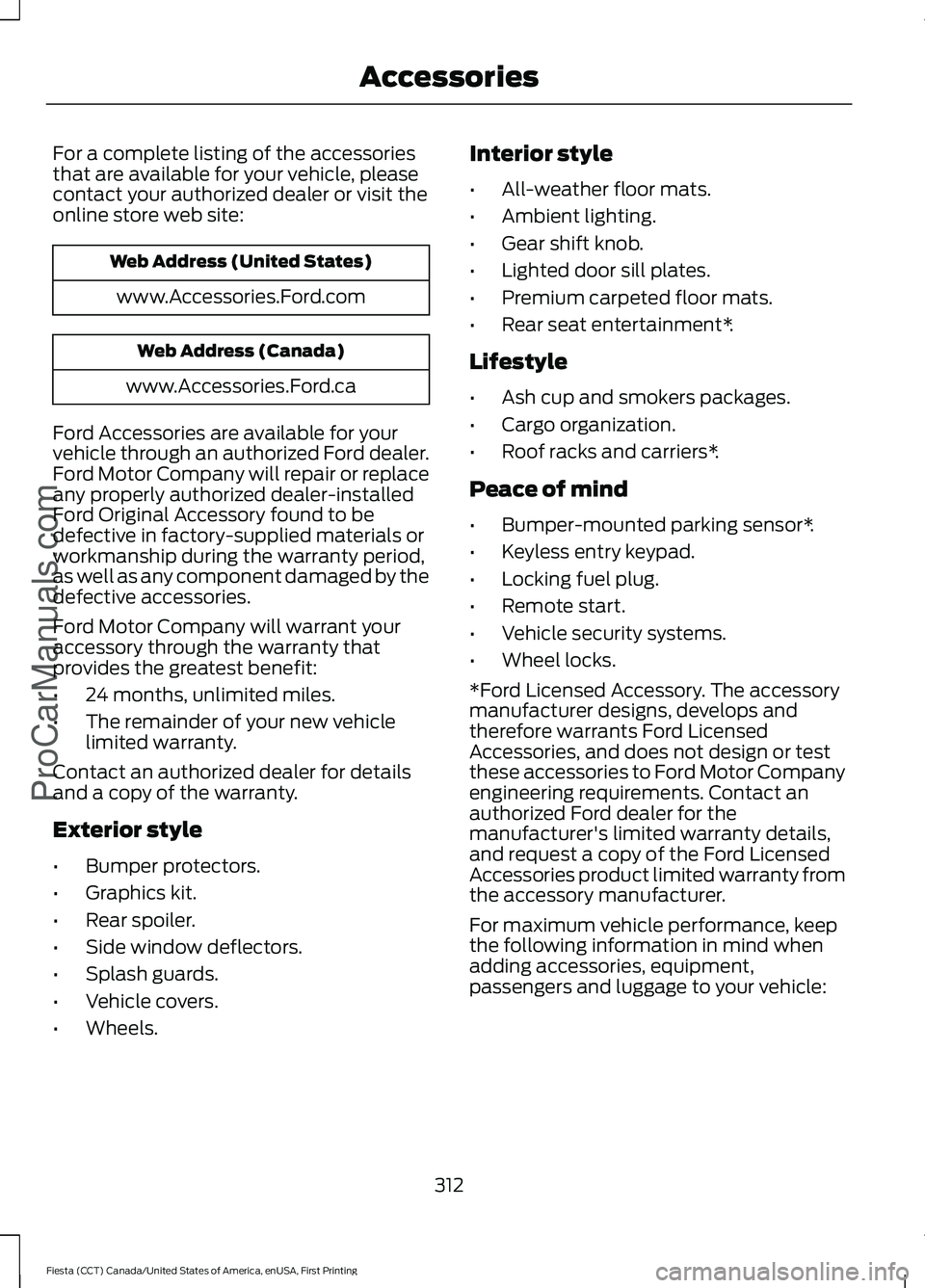
For a complete listing of the accessories
that are available for your vehicle, please
contact your authorized dealer or visit the
online store web site:
Web Address (United States)
www.Accessories.Ford.com Web Address (Canada)
www.Accessories.Ford.ca
Ford Accessories are available for your
vehicle through an authorized Ford dealer.
Ford Motor Company will repair or replace
any properly authorized dealer-installed
Ford Original Accessory found to be
defective in factory-supplied materials or
workmanship during the warranty period,
as well as any component damaged by the
defective accessories.
Ford Motor Company will warrant your
accessory through the warranty that
provides the greatest benefit:
• 24 months, unlimited miles.
• The remainder of your new vehicle
limited warranty.
Contact an authorized dealer for details
and a copy of the warranty.
Exterior style
• Bumper protectors.
• Graphics kit.
• Rear spoiler.
• Side window deflectors.
• Splash guards.
• Vehicle covers.
• Wheels. Interior style
•
All-weather floor mats.
• Ambient lighting.
• Gear shift knob.
• Lighted door sill plates.
• Premium carpeted floor mats.
• Rear seat entertainment*.
Lifestyle
• Ash cup and smokers packages.
• Cargo organization.
• Roof racks and carriers*.
Peace of mind
• Bumper-mounted parking sensor*.
• Keyless entry keypad.
• Locking fuel plug.
• Remote start.
• Vehicle security systems.
• Wheel locks.
*Ford Licensed Accessory. The accessory
manufacturer designs, develops and
therefore warrants Ford Licensed
Accessories, and does not design or test
these accessories to Ford Motor Company
engineering requirements. Contact an
authorized Ford dealer for the
manufacturer's limited warranty details,
and request a copy of the Ford Licensed
Accessories product limited warranty from
the accessory manufacturer.
For maximum vehicle performance, keep
the following information in mind when
adding accessories, equipment,
passengers and luggage to your vehicle:
312
Fiesta (CCT) Canada/United States of America, enUSA, First Printing AccessoriesProCarManuals.com
Page 323 of 363
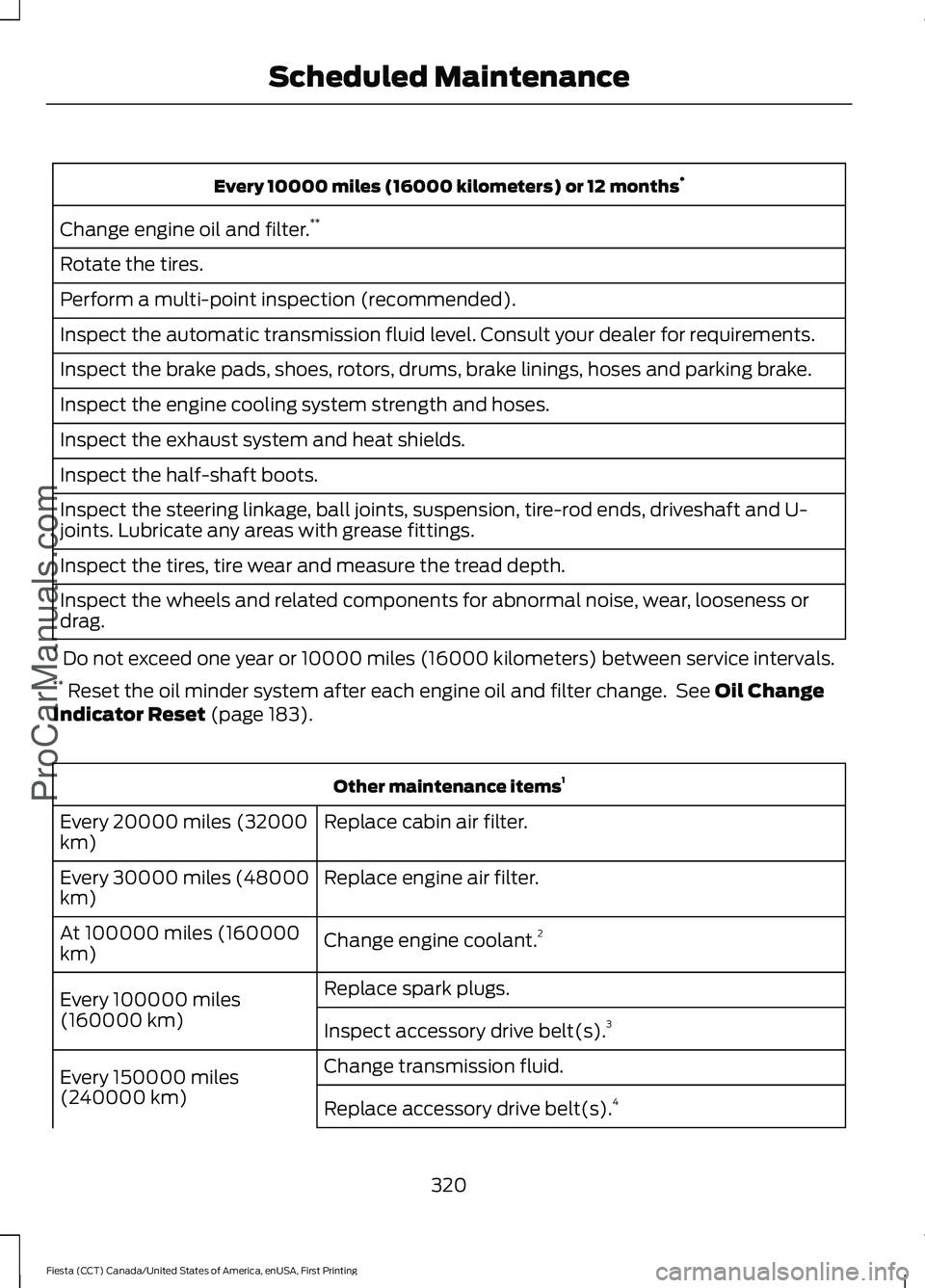
Every 10000 miles (16000 kilometers) or 12 months
*
Change engine oil and filter. **
Rotate the tires.
Perform a multi-point inspection (recommended).
Inspect the automatic transmission fluid level. Consult your dealer for requirements.
Inspect the brake pads, shoes, rotors, drums, brake linings, hoses and parking brake.
Inspect the engine cooling system strength and hoses.
Inspect the exhaust system and heat shields.
Inspect the half-shaft boots.
Inspect the steering linkage, ball joints, suspension, tire-rod ends, driveshaft and U-
joints. Lubricate any areas with grease fittings.
Inspect the tires, tire wear and measure the tread depth.
Inspect the wheels and related components for abnormal noise, wear, looseness or
drag.
* Do not exceed one year or 10000 miles (16000 kilometers) between service intervals.
** Reset the oil minder system after each engine oil and filter change. See Oil Change
Indicator Reset (page 183). Other maintenance items
1
Replace cabin air filter.
Every 20000 miles (32000
km)
Replace engine air filter.
Every 30000 miles (48000
km)
Change engine coolant.2
At 100000 miles (160000
km)
Replace spark plugs.
Every 100000 miles
(160000 km) Inspect accessory drive belt(s). 3
Change transmission fluid.
Every 150000 miles
(240000 km) Replace accessory drive belt(s). 4
320
Fiesta (CCT) Canada/United States of America, enUSA, First Printing Scheduled Maintenance
ProCarManuals.com
Page 325 of 363
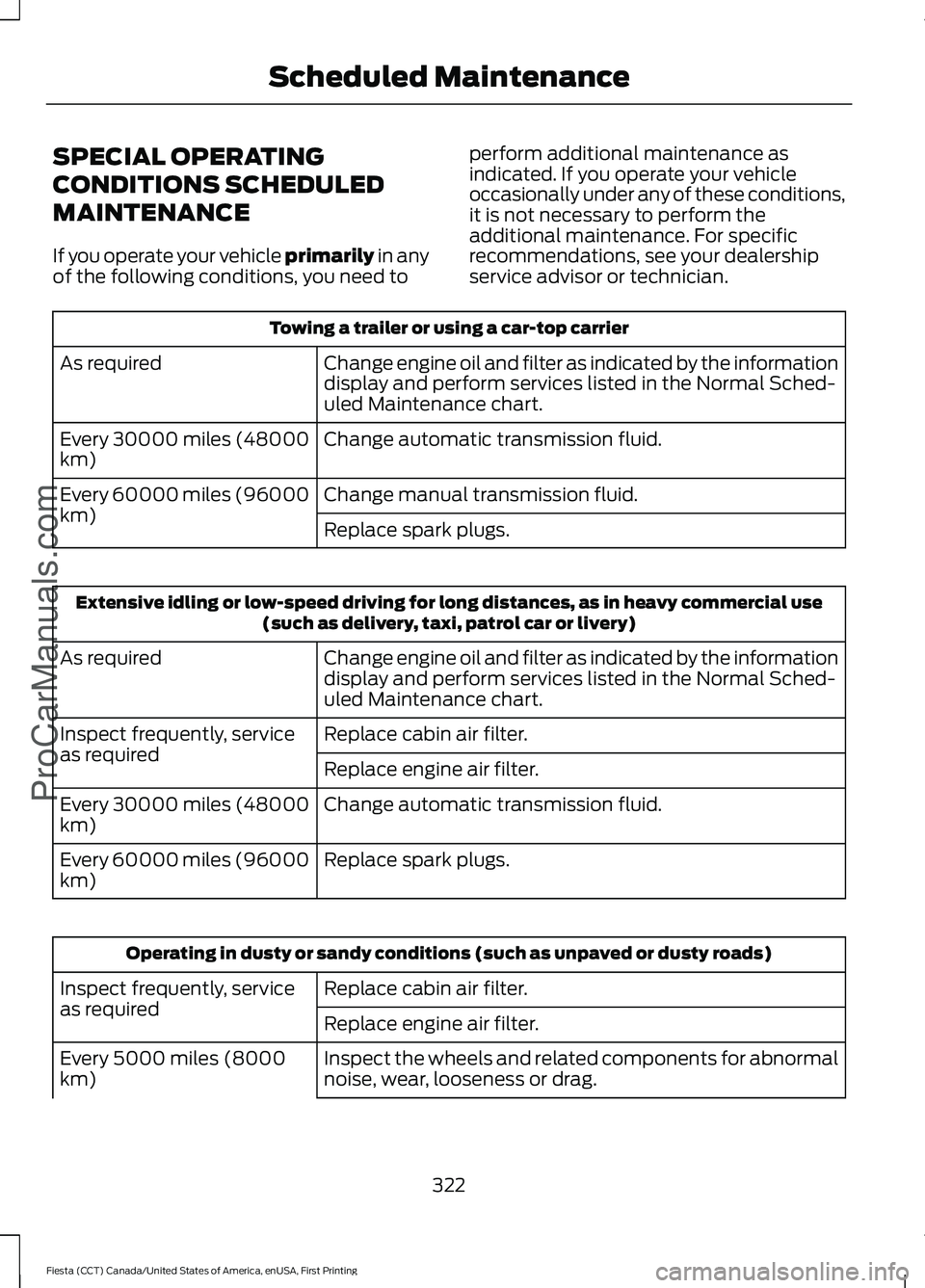
SPECIAL OPERATING
CONDITIONS SCHEDULED
MAINTENANCE
If you operate your vehicle primarily in any
of the following conditions, you need to perform additional maintenance as
indicated. If you operate your vehicle
occasionally under any of these conditions,
it is not necessary to perform the
additional maintenance. For specific
recommendations, see your dealership
service advisor or technician.Towing a trailer or using a car-top carrier
Change engine oil and filter as indicated by the information
display and perform services listed in the Normal Sched-
uled Maintenance chart.
As required
Change automatic transmission fluid.
Every 30000 miles (48000
km)
Change manual transmission fluid.
Every 60000 miles (96000
km)
Replace spark plugs.Extensive idling or low-speed driving for long distances, as in heavy commercial use
(such as delivery, taxi, patrol car or livery)
Change engine oil and filter as indicated by the information
display and perform services listed in the Normal Sched-
uled Maintenance chart.
As required
Replace cabin air filter.
Inspect frequently, service
as required
Replace engine air filter.
Change automatic transmission fluid.
Every 30000 miles (48000
km)
Replace spark plugs.
Every 60000 miles (96000
km) Operating in dusty or sandy conditions (such as unpaved or dusty roads)
Replace cabin air filter.
Inspect frequently, service
as required
Replace engine air filter.
Inspect the wheels and related components for abnormal
noise, wear, looseness or drag.
Every 5000 miles (8000
km)
322
Fiesta (CCT) Canada/United States of America, enUSA, First Printing Scheduled Maintenance
ProCarManuals.com
Page 340 of 363
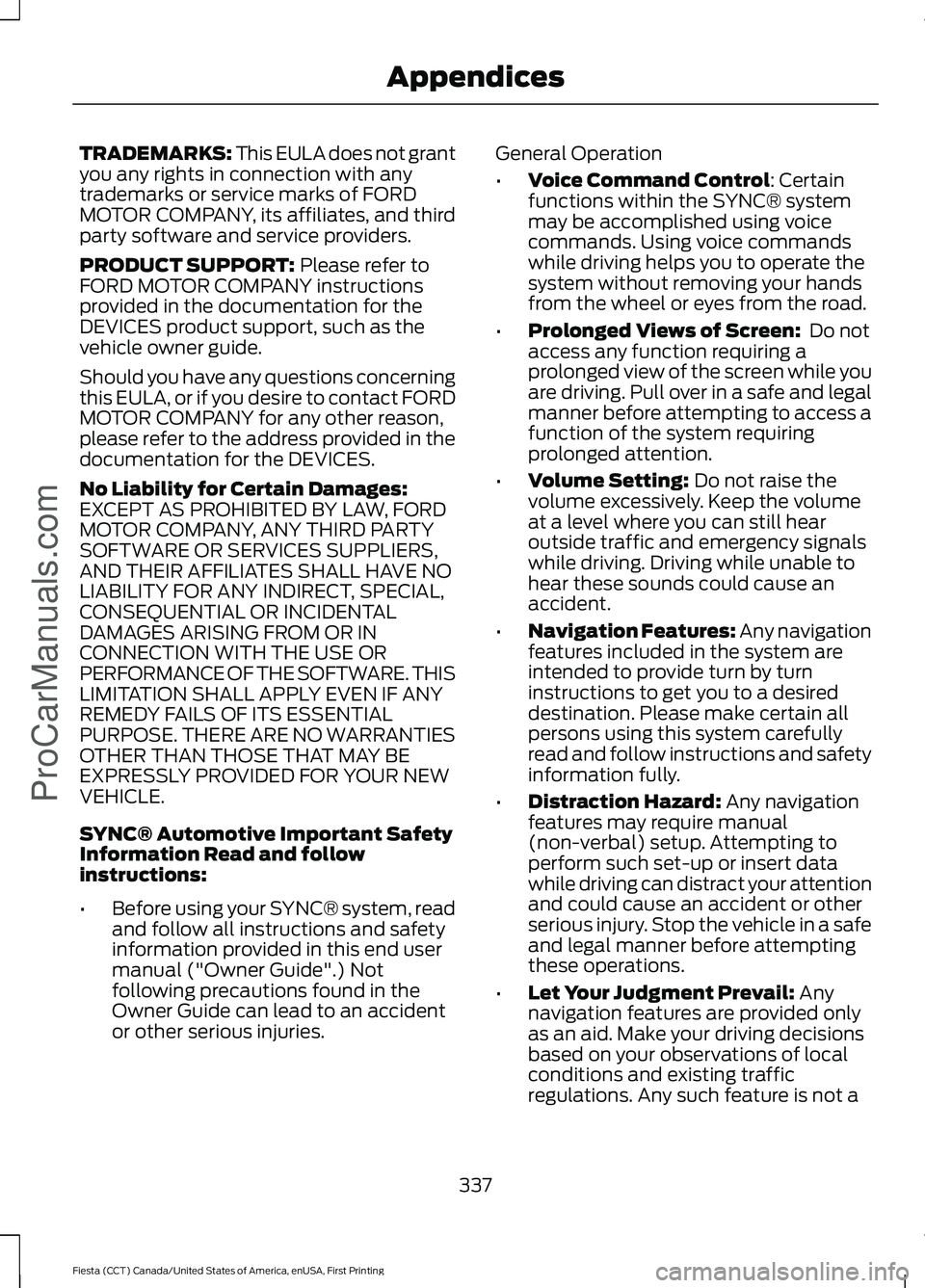
TRADEMARKS: This EULA does not grant
you any rights in connection with any
trademarks or service marks of FORD
MOTOR COMPANY, its affiliates, and third
party software and service providers.
PRODUCT SUPPORT: Please refer to
FORD MOTOR COMPANY instructions
provided in the documentation for the
DEVICES product support, such as the
vehicle owner guide.
Should you have any questions concerning
this EULA, or if you desire to contact FORD
MOTOR COMPANY for any other reason,
please refer to the address provided in the
documentation for the DEVICES.
No Liability for Certain Damages:
EXCEPT AS PROHIBITED BY LAW, FORD
MOTOR COMPANY, ANY THIRD PARTY
SOFTWARE OR SERVICES SUPPLIERS,
AND THEIR AFFILIATES SHALL HAVE NO
LIABILITY FOR ANY INDIRECT, SPECIAL,
CONSEQUENTIAL OR INCIDENTAL
DAMAGES ARISING FROM OR IN
CONNECTION WITH THE USE OR
PERFORMANCE OF THE SOFTWARE. THIS
LIMITATION SHALL APPLY EVEN IF ANY
REMEDY FAILS OF ITS ESSENTIAL
PURPOSE. THERE ARE NO WARRANTIES
OTHER THAN THOSE THAT MAY BE
EXPRESSLY PROVIDED FOR YOUR NEW
VEHICLE.
SYNC® Automotive Important Safety
Information Read and follow
instructions:
• Before using your SYNC® system, read
and follow all instructions and safety
information provided in this end user
manual ("Owner Guide".) Not
following precautions found in the
Owner Guide can lead to an accident
or other serious injuries. General Operation
•
Voice Command Control
: Certain
functions within the SYNC® system
may be accomplished using voice
commands. Using voice commands
while driving helps you to operate the
system without removing your hands
from the wheel or eyes from the road.
• Prolonged Views of Screen:
Do not
access any function requiring a
prolonged view of the screen while you
are driving. Pull over in a safe and legal
manner before attempting to access a
function of the system requiring
prolonged attention.
• Volume Setting:
Do not raise the
volume excessively. Keep the volume
at a level where you can still hear
outside traffic and emergency signals
while driving. Driving while unable to
hear these sounds could cause an
accident.
• Navigation Features:
Any navigation
features included in the system are
intended to provide turn by turn
instructions to get you to a desired
destination. Please make certain all
persons using this system carefully
read and follow instructions and safety
information fully.
• Distraction Hazard:
Any navigation
features may require manual
(non-verbal) setup. Attempting to
perform such set-up or insert data
while driving can distract your attention
and could cause an accident or other
serious injury. Stop the vehicle in a safe
and legal manner before attempting
these operations.
• Let Your Judgment Prevail:
Any
navigation features are provided only
as an aid. Make your driving decisions
based on your observations of local
conditions and existing traffic
regulations. Any such feature is not a
337
Fiesta (CCT) Canada/United States of America, enUSA, First Printing Appendices
ProCarManuals.com
Page 354 of 363
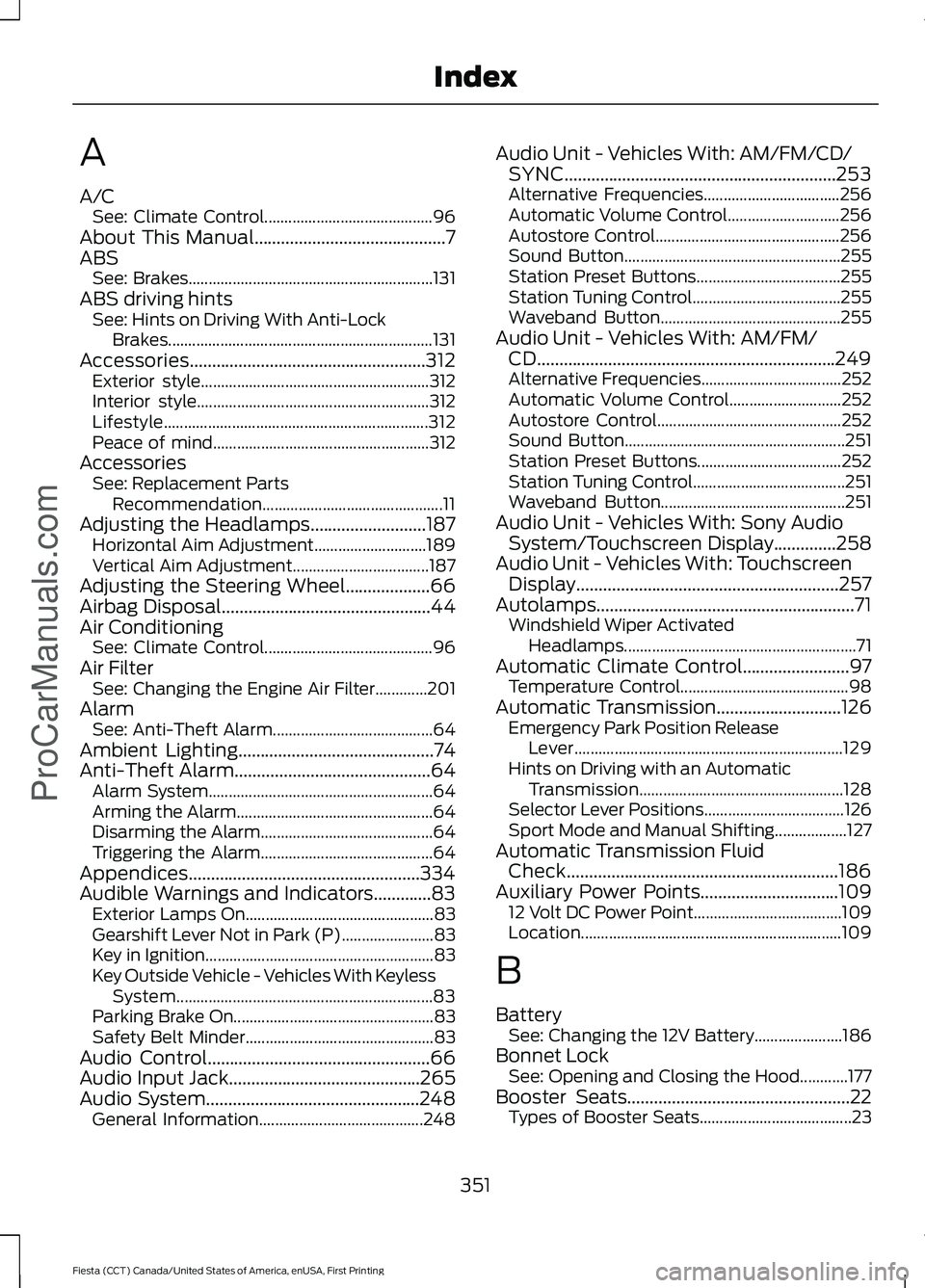
A
A/C
See: Climate Control.......................................... 96
About This Manual...........................................7
ABS See: Brakes............................................................. 131
ABS driving hints See: Hints on Driving With Anti-Lock
Brakes.................................................................. 131
Accessories.....................................................312 Exterior style......................................................... 312
Interior style.......................................................... 312
Lifestyle.................................................................. 312
Peace of mind...................................................... 312
Accessories See: Replacement Parts
Recommendation............................................. 11
Adjusting the Headlamps..........................187 Horizontal Aim Adjustment............................ 189
Vertical Aim Adjustment.................................. 187
Adjusting the Steering Wheel...................66
Airbag Disposal...............................................44
Air Conditioning See: Climate Control.......................................... 96
Air Filter See: Changing the Engine Air Filter.............201
Alarm See: Anti-Theft Alarm........................................ 64
Ambient Lighting............................................74
Anti-Theft Alarm
............................................64
Alarm System........................................................ 64
Arming the Alarm................................................. 64
Disarming the Alarm........................................... 64
Triggering the Alarm........................................... 64
Appendices....................................................334
Audible Warnings and Indicators.............83 Exterior Lamps On............................................... 83
Gearshift Lever Not in Park (P)....................... 83
Key in Ignition......................................................... 83
Key Outside Vehicle - Vehicles With Keyless System................................................................ 83
Parking Brake On.................................................. 83
Safety Belt Minder............................................... 83
Audio Control
..................................................66
Audio Input Jack...........................................265
Audio System................................................248 General Information......................................... 248Audio Unit - Vehicles With: AM/FM/CD/
SYNC.............................................................253
Alternative Frequencies.................................. 256
Automatic Volume Control............................ 256
Autostore Control.............................................. 256
Sound Button...................................................... 255
Station Preset Buttons.................................... 255
Station Tuning Control..................................... 255
Waveband Button............................................. 255
Audio Unit - Vehicles With: AM/FM/ CD...................................................................249
Alternative Frequencies................................... 252
Automatic Volume Control............................ 252
Autostore Control.............................................. 252
Sound Button....................................................... 251
Station Preset Buttons.................................... 252
Station Tuning Control...................................... 251
Waveband Button.............................................. 251
Audio Unit - Vehicles With: Sony Audio System/Touchscreen Display
..............258
Audio Unit - Vehicles With: Touchscreen Display...........................................................257
Autolamps..........................................................71 Windshield Wiper Activated
Headlamps.......................................................... 71
Automatic Climate Control........................97 Temperature Control.......................................... 98
Automatic Transmission
............................126
Emergency Park Position Release
Lever................................................................... 129
Hints on Driving with an Automatic Transmission................................................... 128
Selector Lever Positions................................... 126
Sport Mode and Manual Shifting.................. 127
Automatic Transmission Fluid Check.............................................................186
Auxiliary Power Points
...............................109
12 Volt DC Power Point..................................... 109
Location................................................................. 109
B
Battery See: Changing the 12V Battery...................... 186
Bonnet Lock See: Opening and Closing the Hood............177
Booster Seats
..................................................22
Types of Booster Seats...................................... 23
351
Fiesta (CCT) Canada/United States of America, enUSA, First Printing Index
ProCarManuals.com
Page 355 of 363
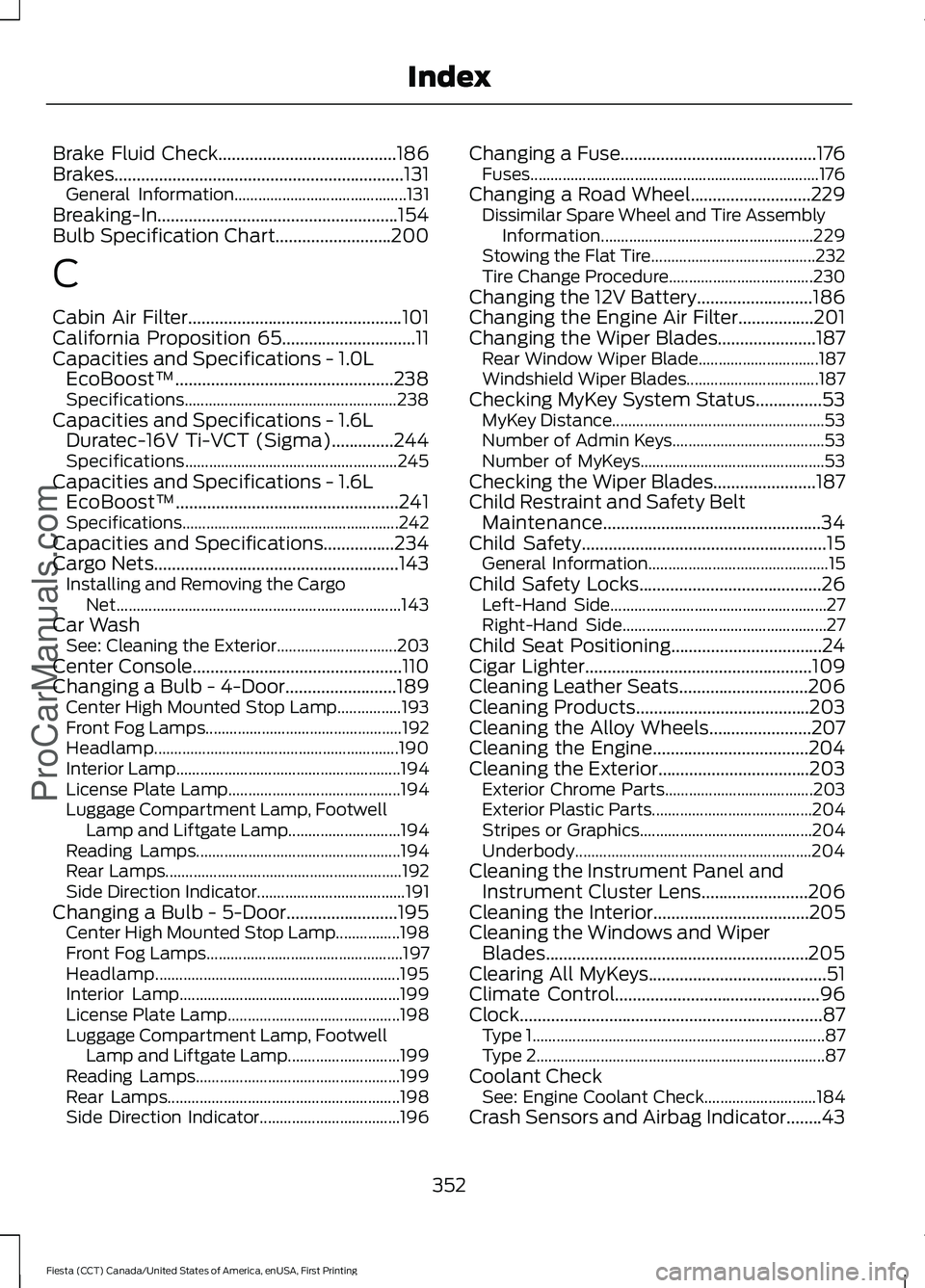
Brake Fluid Check........................................186
Brakes.................................................................131
General Information........................................... 131
Breaking-In......................................................154
Bulb Specification Chart..........................200
C
Cabin Air Filter
................................................101
California Proposition 65..............................11
Capacities and Specifications - 1.0L EcoBoost™.................................................238
Specifications..................................................... 238
Capacities and Specifications - 1.6L Duratec-16V Ti-VCT (Sigma)
..............244
Specifications..................................................... 245
Capacities and Specifications - 1.6L EcoBoost™..................................................241
Specifications...................................................... 242
Capacities and Specifications................234
Cargo Nets
.......................................................143
Installing and Removing the Cargo
Net....................................................................... 143
Car Wash See: Cleaning the Exterior.............................. 203
Center Console
...............................................110
Changing a Bulb - 4-Door.........................189
Center High Mounted Stop Lamp................193
Front Fog Lamps................................................. 192
Headlamp............................................................. 190
Interior Lamp........................................................ 194
License Plate Lamp........................................... 194
Luggage Compartment Lamp, Footwell Lamp and Liftgate Lamp............................ 194
Reading Lamps................................................... 194
Rear Lamps........................................................... 192
Side Direction Indicator..................................... 191
Changing a Bulb - 5-Door.........................195 Center High Mounted Stop Lamp................198
Front Fog Lamps................................................. 197
Headlamp............................................................. 195
Interior Lamp....................................................... 199
License Plate Lamp........................................... 198
Luggage Compartment Lamp, Footwell Lamp and Liftgate Lamp............................ 199
Reading Lamps................................................... 199
Rear Lamps.......................................................... 198
Side Direction Indicator................................... 196Changing a Fuse
............................................176
Fuses........................................................................\
176
Changing a Road Wheel
...........................229
Dissimilar Spare Wheel and Tire Assembly
Information..................................................... 229
Stowing the Flat Tire......................................... 232
Tire Change Procedure.................................... 230
Changing the 12V Battery..........................186
Changing the Engine Air Filter.................201
Changing the Wiper Blades......................187 Rear Window Wiper Blade.............................. 187
Windshield Wiper Blades................................. 187
Checking MyKey System Status...............53 MyKey Distance..................................................... 53
Number of Admin Keys...................................... 53
Number of MyKeys.............................................. 53
Checking the Wiper Blades.......................187
Child Restraint and Safety Belt Maintenance.................................................34
Child Safety
.......................................................15
General Information............................................. 15
Child Safety Locks.........................................26 Left-Hand Side...................................................... 27
Right-Hand Side................................................... 27
Child Seat Positioning..................................24
Cigar Lighter
...................................................109
Cleaning Leather Seats.............................206
Cleaning Products.......................................203
Cleaning the Alloy Wheels.......................207
Cleaning the Engine...................................204
Cleaning the Exterior..................................203 Exterior Chrome Parts..................................... 203
Exterior Plastic Parts........................................ 204
Stripes or Graphics........................................... 204
Underbody........................................................... 204
Cleaning the Instrument Panel and Instrument Cluster Lens........................206
Cleaning the Interior
...................................205
Cleaning the Windows and Wiper Blades...........................................................205
Clearing All MyKeys
........................................51
Climate Control..............................................96
Clock....................................................................87 Type 1........................................................................\
. 87
Type 2........................................................................\
87
Coolant Check See: Engine Coolant Check............................ 184
Crash Sensors and Airbag Indicator........43
352
Fiesta (CCT) Canada/United States of America, enUSA, First Printing Index
ProCarManuals.com