language FORD FIESTA 2016 Owners Manual
[x] Cancel search | Manufacturer: FORD, Model Year: 2016, Model line: FIESTA, Model: FORD FIESTA 2016Pages: 363, PDF Size: 5.9 MB
Page 2 of 363
The information contained in this publication was correct at the time of going to print. In the interest of
continuous development, we reserve the right to change specifications, design or equipment at any time
without notice or obligation. No part of this publication may be reproduced, transmitted, stored in a
retrieval system or translated into any language in any form by any means without our written permission.
Errors and omissions excepted.
© Ford Motor Company 2015
All rights reserved.
Part Number: 20150504145621ProCarManuals.com
Page 89 of 363
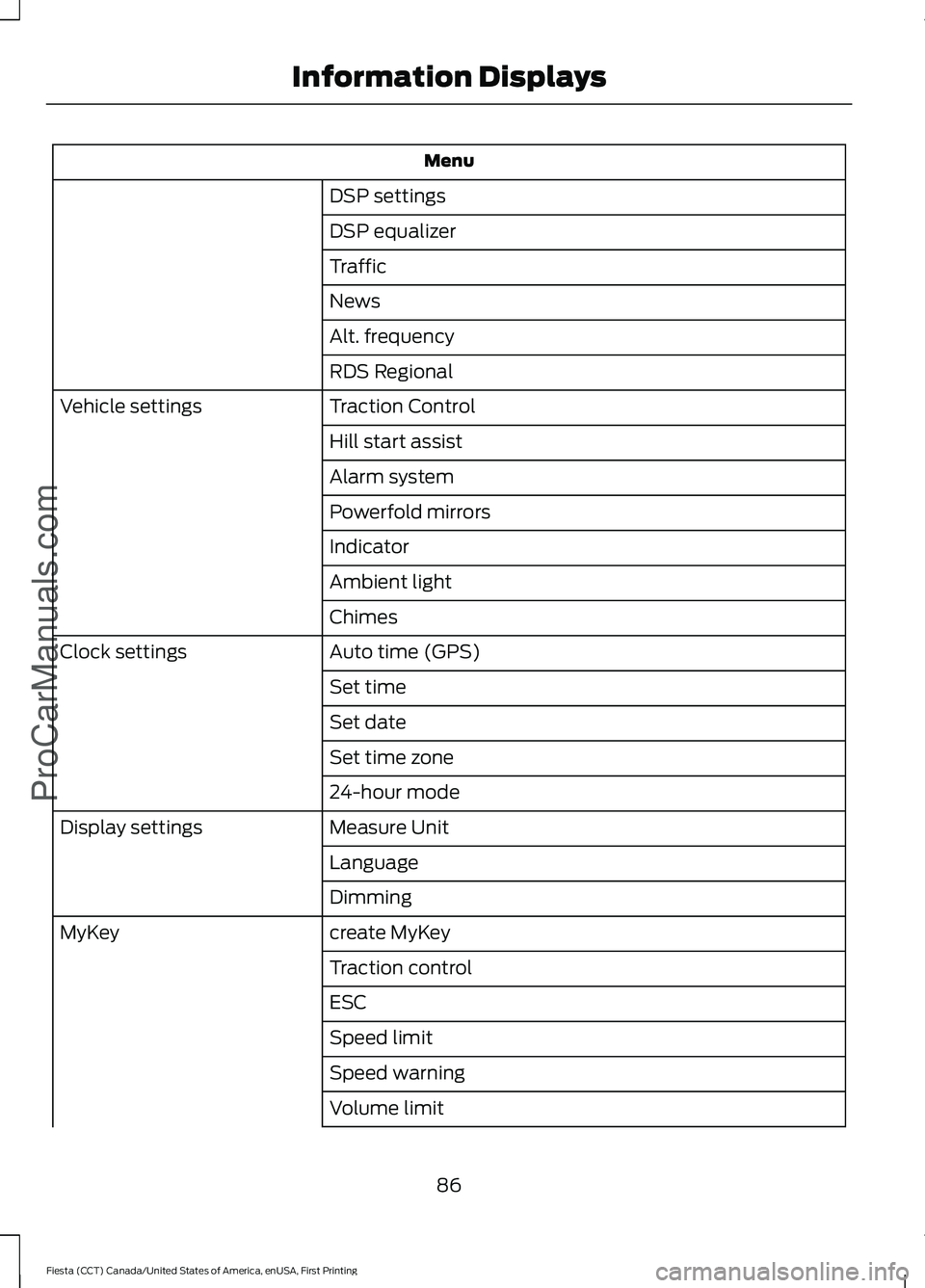
Menu
DSP settings
DSP equalizer
Traffic
News
Alt. frequency
RDS Regional
Traction Control
Vehicle settings
Hill start assist
Alarm system
Powerfold mirrors
Indicator
Ambient light
Chimes
Auto time (GPS)
Clock settings
Set time
Set date
Set time zone
24-hour mode
Measure Unit
Display settings
Language
Dimming
create MyKey
MyKey
Traction control
ESC
Speed limit
Speed warning
Volume limit
86
Fiesta (CCT) Canada/United States of America, enUSA, First Printing Information DisplaysProCarManuals.com
Page 286 of 363
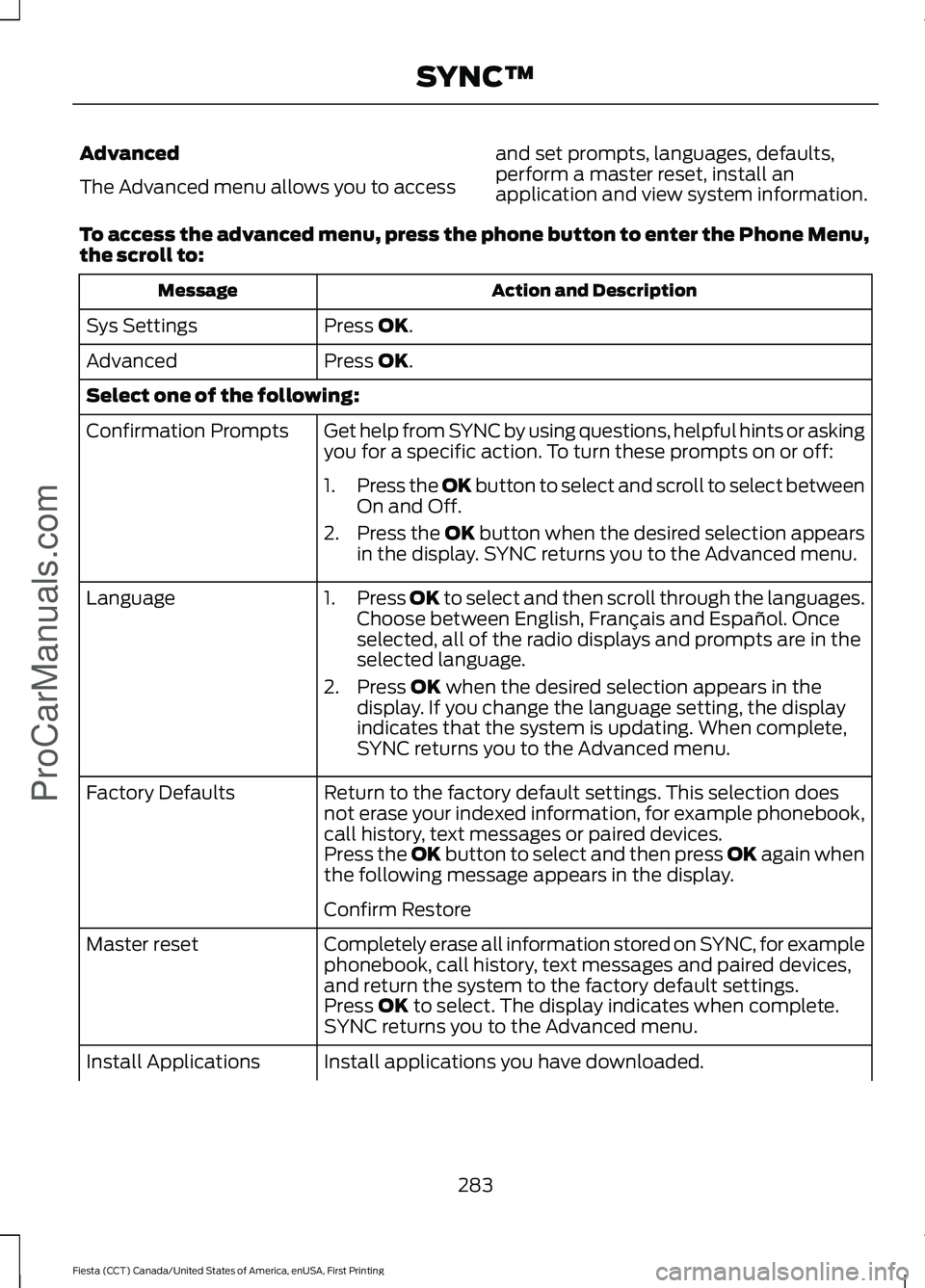
Advanced
The Advanced menu allows you to access
and set prompts, languages, defaults,
perform a master reset, install an
application and view system information.
To access the advanced menu, press the phone button to enter the Phone Menu,
the scroll to: Action and Description
Message
Press OK.
Sys Settings
Press
OK.
Advanced
Select one of the following:
Get help from SYNC by using questions, helpful hints or asking
you for a specific action. To turn these prompts on or off:
Confirmation Prompts
1.Press the
OK button to select and scroll to select between
On and Off.
2. Press the
OK button when the desired selection appears
in the display. SYNC returns you to the Advanced menu.
1. Press
OK to select and then scroll through the languages.
Choose between English, Français and Español. Once
selected, all of the radio displays and prompts are in the
selected language.
2. Press
OK when the desired selection appears in the
display. If you change the language setting, the display
indicates that the system is updating. When complete,
SYNC returns you to the Advanced menu.
Language
Return to the factory default settings. This selection does
not erase your indexed information, for example phonebook,
call history, text messages or paired devices.
Factory Defaults
Press the OK button to select and then press OK again when
the following message appears in the display.
Confirm Restore
Completely erase all information stored on SYNC, for example
phonebook, call history, text messages and paired devices,
and return the system to the factory default settings.
Master reset
Press
OK to select. The display indicates when complete.
SYNC returns you to the Advanced menu.
Install applications you have downloaded.
Install Applications
283
Fiesta (CCT) Canada/United States of America, enUSA, First Printing SYNC™
ProCarManuals.com
Page 304 of 363
Action and Description
Message
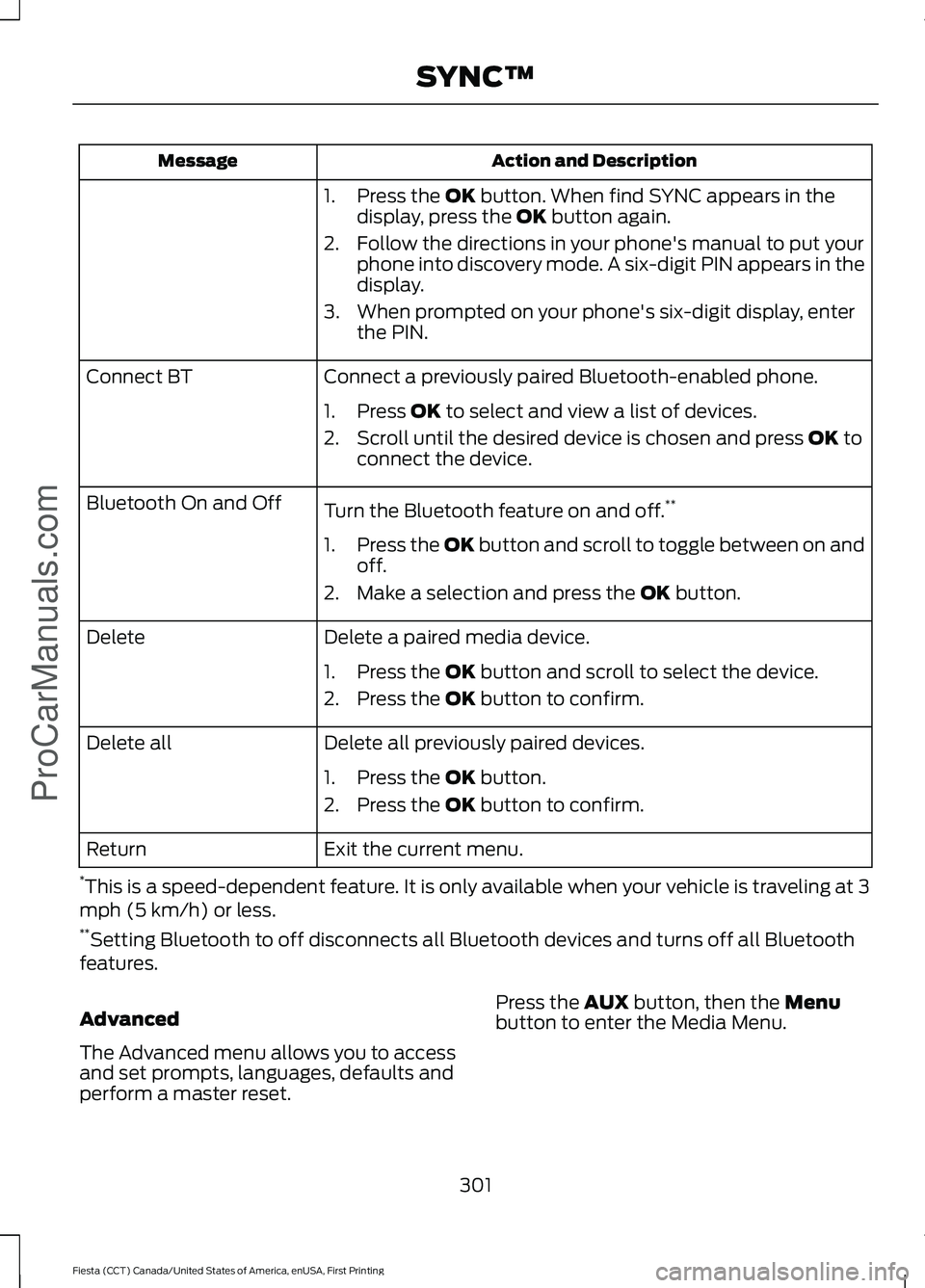
1. Press the OK button. When find SYNC appears in the
display, press the OK button again.
2. Follow the directions in your phone's manual to put your phone into discovery mode. A six-digit PIN appears in the
display.
3. When prompted on your phone's six-digit display, enter the PIN.
Connect a previously paired Bluetooth-enabled phone.
Connect BT
1. Press
OK to select and view a list of devices.
2. Scroll until the desired device is chosen and press
OK to
connect the device.
Turn the Bluetooth feature on and off. **
Bluetooth On and Off
1.Press the OK button and scroll to toggle between on and
off.
2. Make a selection and press the
OK button.
Delete a paired media device.
Delete
1. Press the
OK button and scroll to select the device.
2. Press the
OK button to confirm.
Delete all previously paired devices.
Delete all
1. Press the
OK button.
2. Press the
OK button to confirm.
Exit the current menu.
Return
* This is a speed-dependent feature. It is only available when your vehicle is traveling at 3
mph (5 km/h) or less.
** Setting Bluetooth to off disconnects all Bluetooth devices and turns off all Bluetooth
features.
Advanced
The Advanced menu allows you to access
and set prompts, languages, defaults and
perform a master reset. Press the
AUX button, then the Menu
button to enter the Media Menu.
301
Fiesta (CCT) Canada/United States of America, enUSA, First Printing SYNC™
ProCarManuals.com
Page 305 of 363
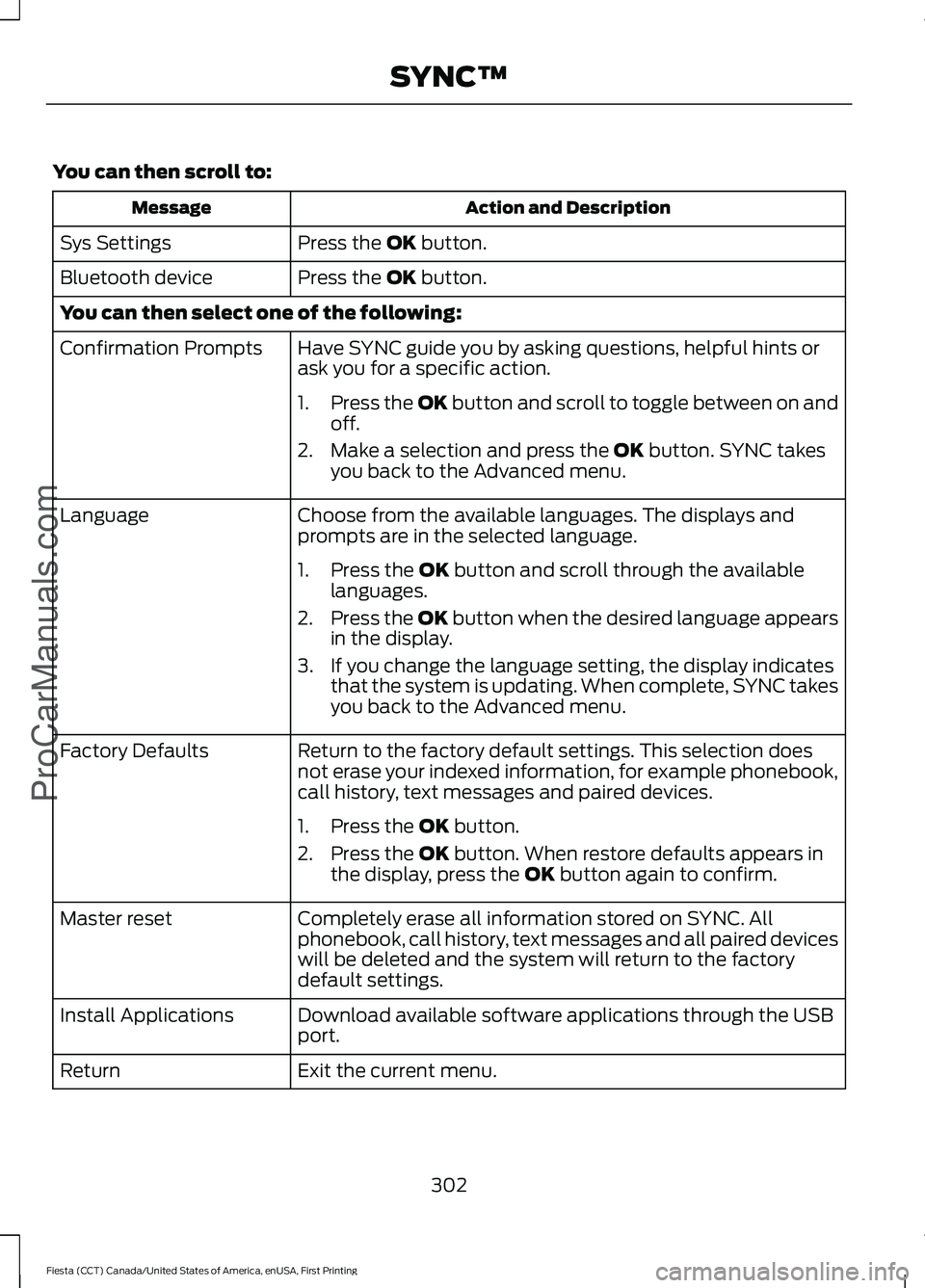
You can then scroll to:
Action and Description
Message
Press the OK button.
Sys Settings
Press the
OK button.
Bluetooth device
You can then select one of the following:
Have SYNC guide you by asking questions, helpful hints or
ask you for a specific action.
Confirmation Prompts
1.Press the OK button and scroll to toggle between on and
off.
2. Make a selection and press the
OK button. SYNC takes
you back to the Advanced menu.
Choose from the available languages. The displays and
prompts are in the selected language.
Language
1. Press the
OK button and scroll through the available
languages.
2. Press the OK button when the desired language appears
in the display.
3. If you change the language setting, the display indicates that the system is updating. When complete, SYNC takes
you back to the Advanced menu.
Return to the factory default settings. This selection does
not erase your indexed information, for example phonebook,
call history, text messages and paired devices.
Factory Defaults
1. Press the
OK button.
2. Press the
OK button. When restore defaults appears in
the display, press the OK button again to confirm.
Completely erase all information stored on SYNC. All
phonebook, call history, text messages and all paired devices
will be deleted and the system will return to the factory
default settings.
Master reset
Download available software applications through the USB
port.
Install Applications
Exit the current menu.
Return
302
Fiesta (CCT) Canada/United States of America, enUSA, First Printing SYNC™
ProCarManuals.com