remote start FORD FIESTA 2017 6.G User Guide
[x] Cancel search | Manufacturer: FORD, Model Year: 2017, Model line: FIESTA, Model: FORD FIESTA 2017 6.GPages: 450, PDF Size: 6.05 MB
Page 67 of 450
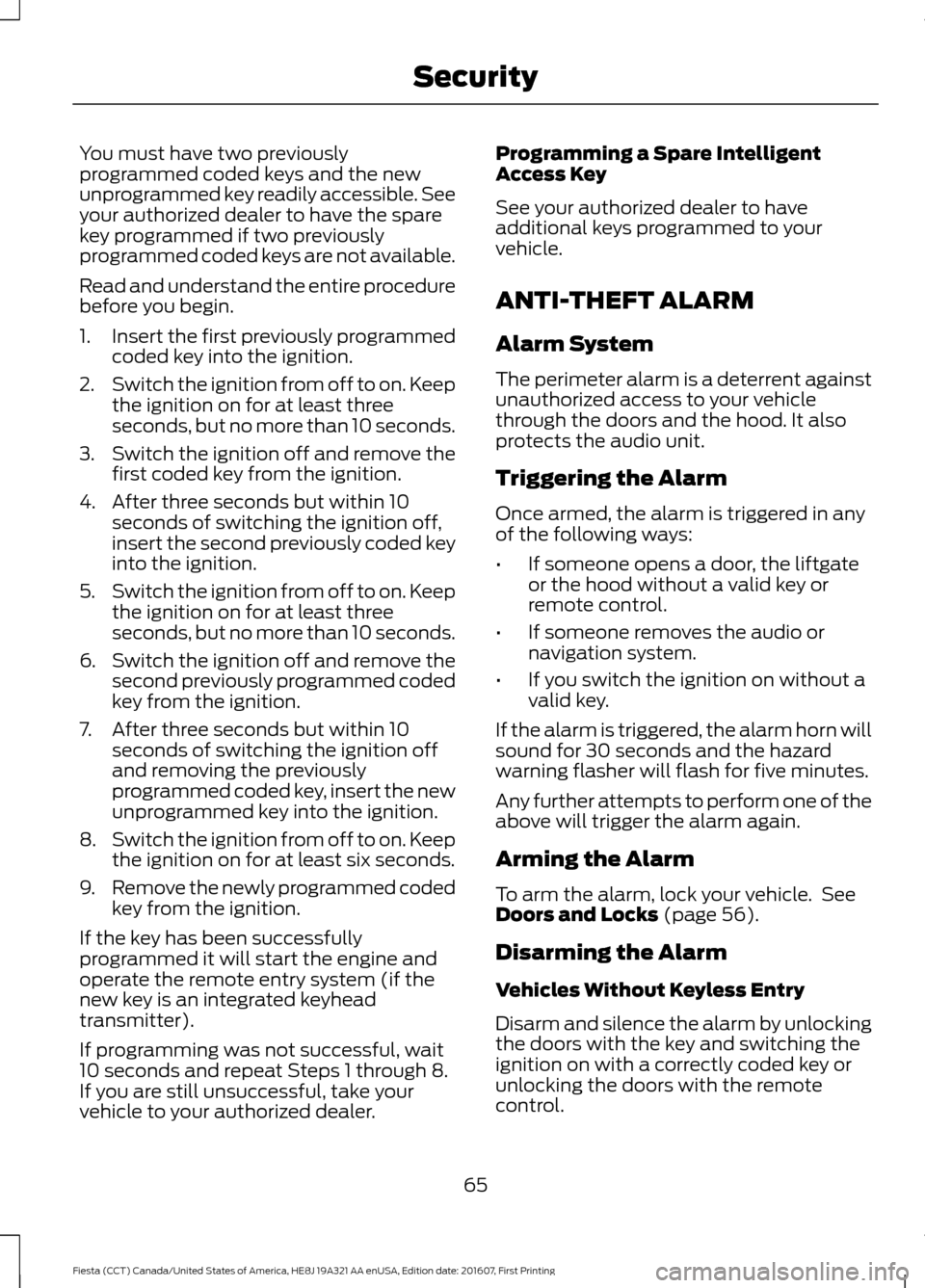
You must have two previously
programmed coded keys and the new
unprogrammed key readily accessible. See
your authorized dealer to have the spare
key programmed if two previously
programmed coded keys are not available.
Read and understand the entire procedure
before you begin.
1.
Insert the first previously programmed
coded key into the ignition.
2. Switch the ignition from off to on. Keep
the ignition on for at least three
seconds, but no more than 10 seconds.
3. Switch the ignition off and remove the
first coded key from the ignition.
4. After three seconds but within 10 seconds of switching the ignition off,
insert the second previously coded key
into the ignition.
5. Switch the ignition from off to on. Keep
the ignition on for at least three
seconds, but no more than 10 seconds.
6. Switch the ignition off and remove the
second previously programmed coded
key from the ignition.
7. After three seconds but within 10 seconds of switching the ignition off
and removing the previously
programmed coded key, insert the new
unprogrammed key into the ignition.
8. Switch the ignition from off to on. Keep
the ignition on for at least six seconds.
9. Remove the newly programmed coded
key from the ignition.
If the key has been successfully
programmed it will start the engine and
operate the remote entry system (if the
new key is an integrated keyhead
transmitter).
If programming was not successful, wait
10 seconds and repeat Steps 1 through 8.
If you are still unsuccessful, take your
vehicle to your authorized dealer. Programming a Spare Intelligent
Access Key
See your authorized dealer to have
additional keys programmed to your
vehicle.
ANTI-THEFT ALARM
Alarm System
The perimeter alarm is a deterrent against
unauthorized access to your vehicle
through the doors and the hood. It also
protects the audio unit.
Triggering the Alarm
Once armed, the alarm is triggered in any
of the following ways:
•
If someone opens a door, the liftgate
or the hood without a valid key or
remote control.
• If someone removes the audio or
navigation system.
• If you switch the ignition on without a
valid key.
If the alarm is triggered, the alarm horn will
sound for 30 seconds and the hazard
warning flasher will flash for five minutes.
Any further attempts to perform one of the
above will trigger the alarm again.
Arming the Alarm
To arm the alarm, lock your vehicle. See
Doors and Locks (page 56).
Disarming the Alarm
Vehicles Without Keyless Entry
Disarm and silence the alarm by unlocking
the doors with the key and switching the
ignition on with a correctly coded key or
unlocking the doors with the remote
control.
65
Fiesta (CCT) Canada/United States of America, HE8J 19A321 AA enUSA, Edition date: 201607, First Printing Security
Page 91 of 450
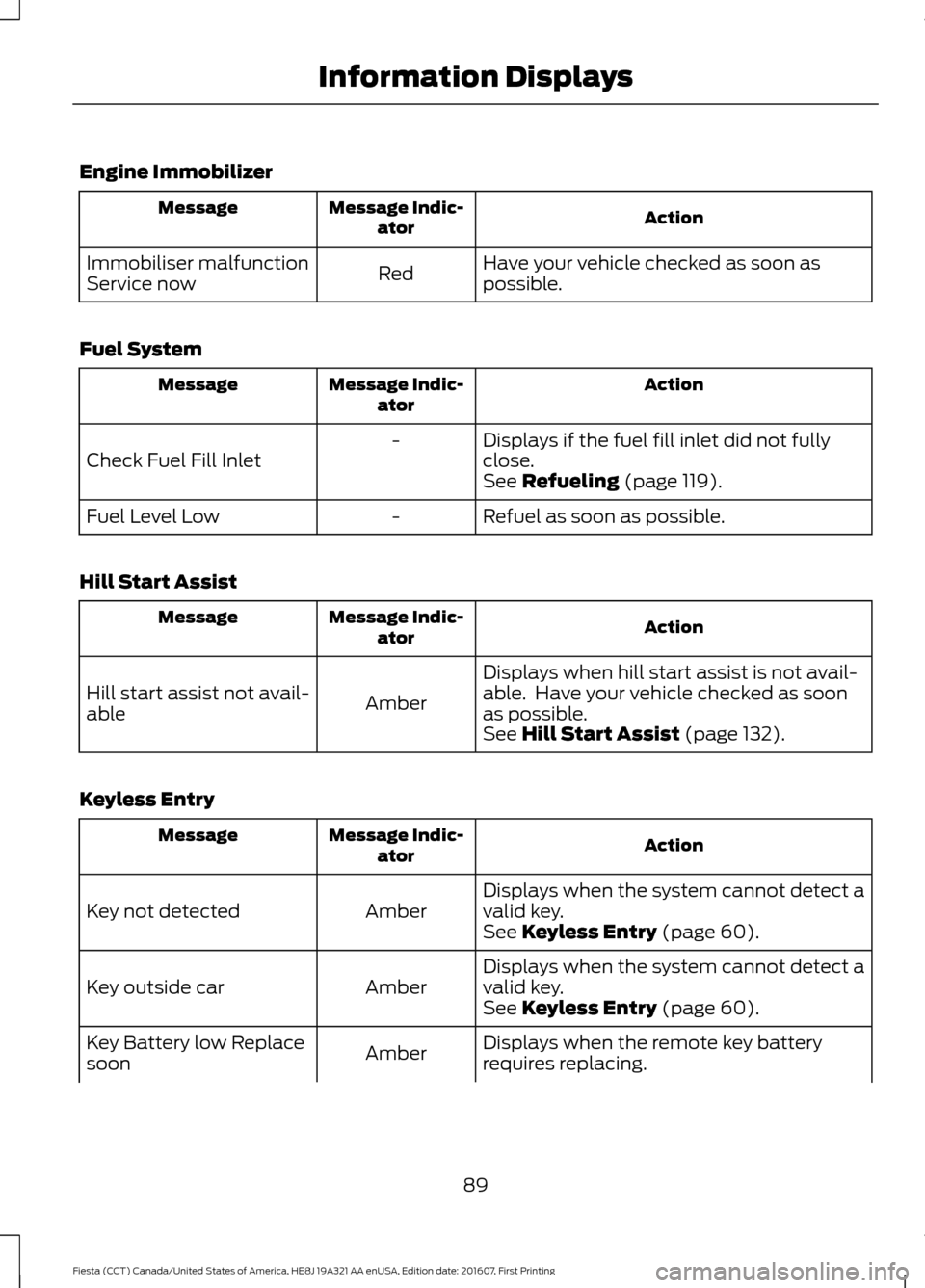
Engine Immobilizer
Action
Message Indic-
ator
Message
Have your vehicle checked as soon as
possible.
Red
Immobiliser malfunction
Service now
Fuel System Action
Message Indic-
ator
Message
Displays if the fuel fill inlet did not fully
close.
-
Check Fuel Fill Inlet See Refueling (page 119).
Refuel as soon as possible.
-
Fuel Level Low
Hill Start Assist Action
Message Indic-
ator
Message
Displays when hill start assist is not avail-
able. Have your vehicle checked as soon
as possible.
Amber
Hill start assist not avail-
able
See
Hill Start Assist (page 132).
Keyless Entry Action
Message Indic-
ator
Message
Displays when the system cannot detect a
valid key.
Amber
Key not detected
See
Keyless Entry (page 60).
Displays when the system cannot detect a
valid key.
Amber
Key outside car
See
Keyless Entry (page 60).
Displays when the remote key battery
requires replacing.
Amber
Key Battery low Replace
soon
89
Fiesta (CCT) Canada/United States of America, HE8J 19A321 AA enUSA, Edition date: 201607, First Printing Information Displays
Page 92 of 450
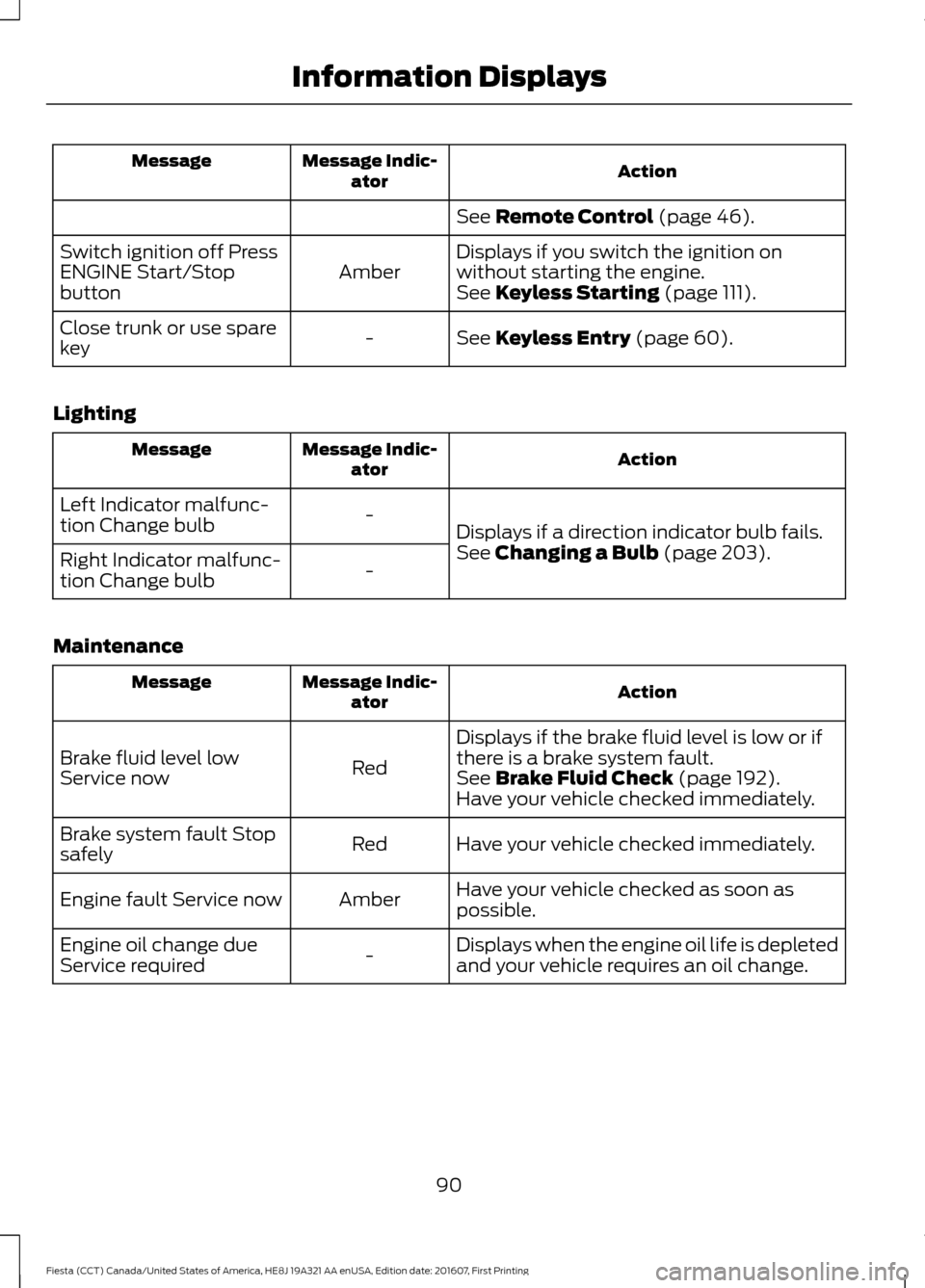
Action
Message Indic-
ator
Message
See Remote Control (page 46).
Displays if you switch the ignition on
without starting the engine.
Amber
Switch ignition off Press
ENGINE Start/Stop
button
See
Keyless Starting (page 111).
See
Keyless Entry (page 60).
-
Close trunk or use spare
key
Lighting Action
Message Indic-
ator
Message
Displays if a direction indicator bulb fails.
-
Left Indicator malfunc-
tion Change bulb
See
Changing a Bulb (page 203).
-
Right Indicator malfunc-
tion Change bulb
Maintenance Action
Message Indic-
ator
Message
Displays if the brake fluid level is low or if
there is a brake system fault.
Red
Brake fluid level low
Service now
See
Brake Fluid Check (page 192).
Have your vehicle checked immediately.
Have your vehicle checked immediately.
Red
Brake system fault Stop
safely
Have your vehicle checked as soon as
possible.
Amber
Engine fault Service now
Displays when the engine oil life is depleted
and your vehicle requires an oil change.
-
Engine oil change due
Service required
90
Fiesta (CCT) Canada/United States of America, HE8J 19A321 AA enUSA, Edition date: 201607, First Printing Information Displays
Page 180 of 450
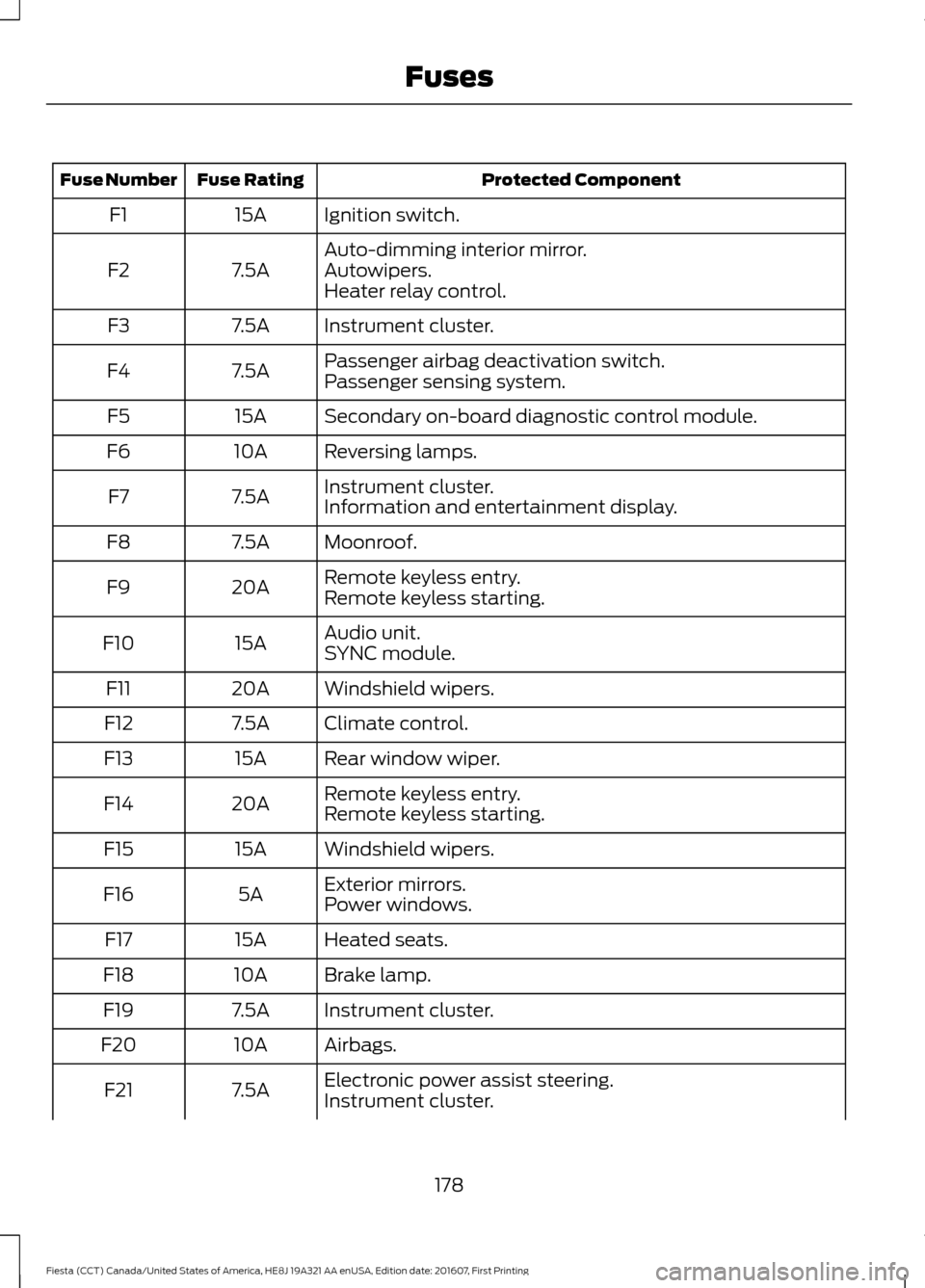
Protected Component
Fuse Rating
Fuse Number
Ignition switch.
15A
F1
Auto-dimming interior mirror.
7.5A
F2 Autowipers.
Heater relay control.
Instrument cluster.
7.5A
F3
Passenger airbag deactivation switch.
7.5A
F4
Passenger sensing system.
Secondary on-board diagnostic control module.
15A
F5
Reversing lamps.
10A
F6
Instrument cluster.
7.5A
F7
Information and entertainment display.
Moonroof.
7.5A
F8
Remote keyless entry.
20A
F9
Remote keyless starting.
Audio unit.
15A
F10
SYNC module.
Windshield wipers.
20A
F11
Climate control.
7.5A
F12
Rear window wiper.
15A
F13
Remote keyless entry.
20A
F14
Remote keyless starting.
Windshield wipers.
15A
F15
Exterior mirrors.
5A
F16
Power windows.
Heated seats.
15A
F17
Brake lamp.
10A
F18
Instrument cluster.
7.5A
F19
Airbags.
10A
F20
Electronic power assist steering.
7.5A
F21
Instrument cluster.
178
Fiesta (CCT) Canada/United States of America, HE8J 19A321 AA enUSA, Edition date: 201607, First Printing Fuses
Page 182 of 450
Protected Component
Relay Number
Accessory mode remote keyless starting.
R6
Ignition mode remote keyless starting.
R7
Battery back-up sounder.
R8 Battery saver.
Accessory delay.
R9
CHANGING A FUSE
Fuses WARNING
Always replace a fuse with one that
has the specified amperage rating.
Using a fuse with a higher amperage
rating can cause severe wire damage and
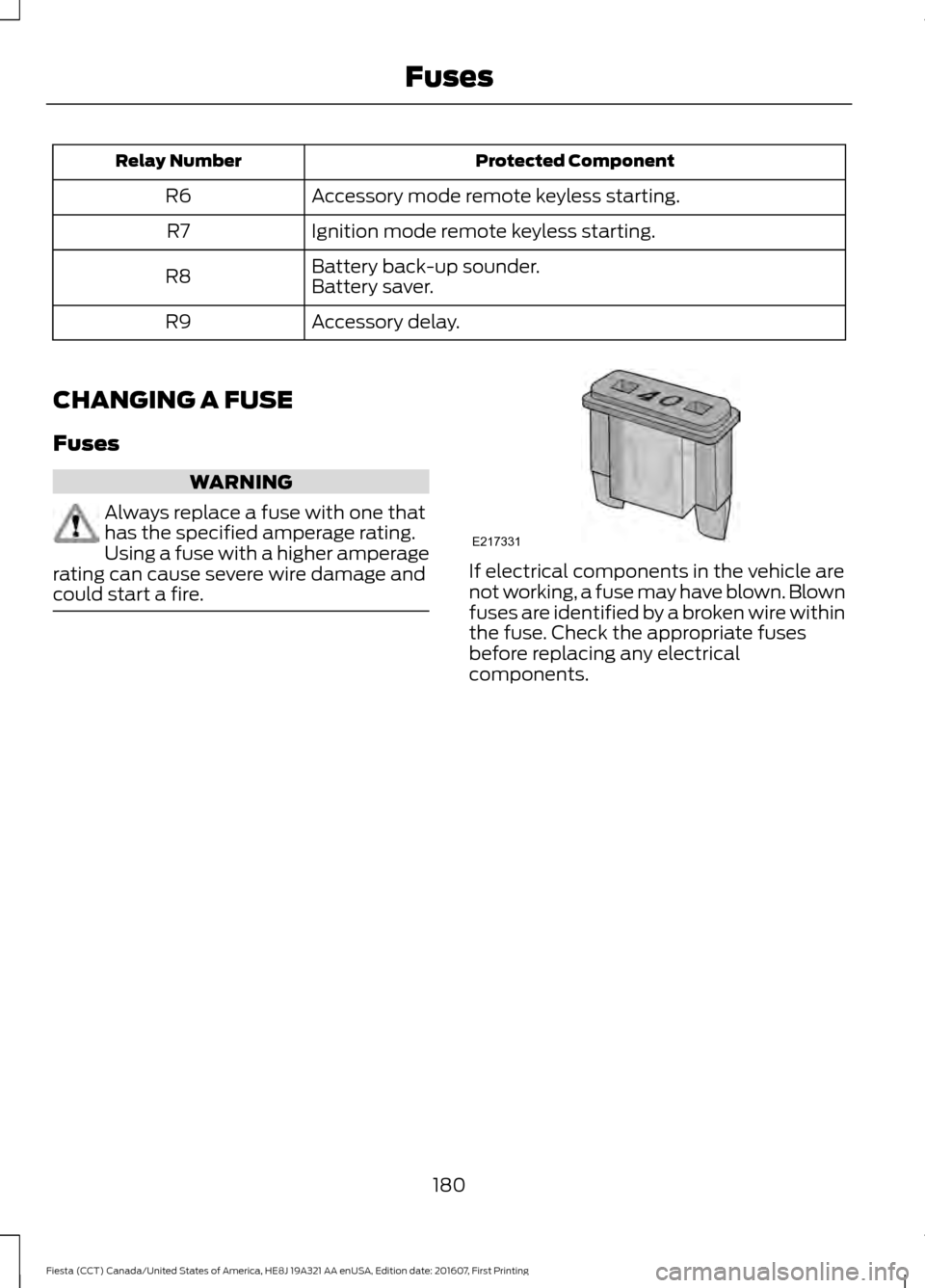
could start a fire. If electrical components in the vehicle are
not working, a fuse may have blown. Blown
fuses are identified by a broken wire within
the fuse. Check the appropriate fuses
before replacing any electrical
components.
180
Fiesta (CCT) Canada/United States of America, HE8J 19A321 AA enUSA, Edition date: 201607, First Printing FusesE217331
Page 333 of 450
Restricted features
Editing Wi-Fi settings.
Wi-Fi
Editing the list of wireless networks.
Connecting to a new Wi-Fi network.
Viewing received text messages.
Text Messages
Using the keyboard to enter a destination.
Navigation
Adding or editing Navigation Favorites entries or Avoid
Areas.
Creating an Owner Account
Why do I need an owner account?
• Essential for keeping up with the latest
software and connected features.
• Access to customer support for any
questions you may have.
• Maintain account permissions.
Visit the website to sign up and register. Website
www.owner.ford.com
www.syncmyride.ca
www.syncmaroute.ca
SYNC Connect (If Equipped)
With a SYNC® Connect-equipped vehicle,
you can use FordPass® to track your
vehicle ’s location and remotely access
vehicle features such as start, lock and
unlock and vehicle status including fuel
level and approximate mileage. You can
also schedule specific times to remotely
start your vehicle so it’ s ready to hit the
road as soon as you are. SYNC Connect is an optional feature on select 2017 MY
vehicles. FordPass® is available through
a free download via the Apple App Store®
or Google Play
™. Message and data rates
may apply. Services may be limited by
mobile phone network coverage area.
• FCC: LHJ-FAN
• IC: 2807E-FAN
Updating Your System
You can choose to download the update
onto a USB drive or use Wi-Fi to deliver
automatic updates.
USB Updates
To use the USB update you need to log
into your owner account and visit the SYNC
software update page. Website
www.owner.ford.com
www.syncmyride.ca
www.syncmaroute.ca
The website notifies you if an update is
available. You can then select to download
the update.
331
Fiesta (CCT) Canada/United States of America, HE8J 19A321 AA enUSA, Edition date: 201607, First Printing SYNC™ 3
Page 394 of 450
For a complete listing of the accessories
that are available for your vehicle, please
contact your authorized dealer or visit the
online store web site:
Web Address (United States)
www.Accessories.Ford.com Web Address (Canada)
www.Accessories.Ford.ca
Ford Accessories are available for your
vehicle through an authorized Ford dealer.
Ford Motor Company will repair or replace
any properly authorized dealer-installed
Ford Original Accessory found to be
defective in factory-supplied materials or
workmanship during the warranty period,
as well as any component damaged by the
defective accessories.
Ford Motor Company will warrant your
accessory through the warranty that
provides the greatest benefit:
• 24 months, unlimited miles.
• The remainder of your new vehicle
limited warranty.
Contact an authorized dealer for details
and a copy of the warranty.
Exterior style
• Bumper protectors.
• Graphics kit.
• Rear spoiler.
• Side window deflectors.
• Splash guards.
• Vehicle covers.
• Wheels.
• Trim kits*.
• Hood protector*. Interior style
•
All-weather floor mats.
• Ambient lighting.
• Gear shift knob.
• Lighted door sill plates.
• Premium carpeted floor mats.
• Rear seat entertainment*.
• Arm rest*.
Lifestyle
• Ash cup and smokers packages.
• Cargo organization.
• Roof racks and carriers*.
• Tablet cradle*.
Peace of mind
• Bumper-mounted parking sensor*.
• Keyless entry keypad.
• Locking fuel plug.
• Remote start.
• Vehicle security systems.
• Wheel locks.
• Roadside Assistance kits*.
*Ford Licensed Accessory. The accessory
manufacturer designs, develops and
therefore warrants Ford Licensed
Accessories, and does not design or test
these accessories to Ford Motor Company
engineering requirements. Contact an
authorized Ford dealer for the
manufacturer's limited warranty details,
and request a copy of the Ford Licensed
Accessories product limited warranty from
the accessory manufacturer.
For maximum vehicle performance, keep
the following information in mind when
adding accessories, equipment,
passengers and luggage to your vehicle:
392
Fiesta (CCT) Canada/United States of America, HE8J 19A321 AA enUSA, Edition date: 201607, First Printing Accessories
Page 445 of 450
Maximum Cooling Performance in
Instrument Panel or Instrument Panel
and Footwell Positions............................... 100
Recommended Settings for Cooling ...........99
Recommended Settings for Heating...........98
Side Window Defogging in Cold Weather............................................................ 100
Vehicle Stationary for Extended Periods During Extreme High Ambient
Temperatures................................................... 99
Hints on Driving With Anti-Lock Brakes..............................................................131
Home Screen................................................334
Hood Lock See: Opening and Closing the Hood...........182
I
Ignition Switch.................................................111
In California (U.S. Only).............................166
Information Displays.....................................85 General Information............................................ 85
Information Messages
..................................87
Installing Child Restraints.............................17 Child Seats............................................................... 17
Using Lap and Shoulder Belts.......................... 18
Using Lower Anchors and Tethers for Children (LATCH)............................................ 20
Using Tether Straps............................................. 22
Instrument Cluster
........................................80
Instrument Lighting Dimmer......................73
Interior Lamps..................................................74
Front Interior Lamps............................................ 74
Rear Interior Lamps............................................. 75
Interior Luggage Compartment Release............................................................62
Interior Mirror
....................................................78
Auto-Dimming Mirror.......................................... 79
Introduction.........................................................7
J
Jump Starting the Vehicle.........................162 Connecting the Jumper Cables..................... 162
Jump Starting....................................................... 163
Preparing Your Vehicle...................................... 162
Removing the Jumper Cables........................ 163K
Keyless Entry
...................................................60
Disabled Keys......................................................... 61
General Information........................................... 60
Locking and Unlocking the Doors With the Key Blade............................................................ 62
Locking Your Vehicle........................................... 60
Passive Key............................................................ 60
Unlocking Your Vehicle....................................... 61
Keyless Starting
...............................................111
Failure to Start...................................................... 112
Ignition On.............................................................. 112
Starting with Automatic Transmission..................................................... 112
Starting with Manual Transmission..............112
Stopping the Engine When Your Vehicle is Moving................................................................. 113
Stopping the Engine with Your Vehicle Stationary.......................................................... 113
Keys and Remote Controls........................46
L
Lighting Control................................................71 Headlamp Flasher................................................ 72
High Beams............................................................. 72
Lighting Control Positions.................................. 71
Parking Lamps........................................................ 71
Lighting................................................................71 General Information............................................. 71
Load Carrying
.................................................147
Load Limit.......................................................148 Special Loading Instructions for Owners of
Pick-up Trucks and Utility-type
Vehicles............................................................. 153
Vehicle Loading - with and without a Trailer................................................................. 148
Locking and Unlocking
.................................56
Auto Lock Feature................................................ 57
Auto Unlock Feature........................................... 58
Emergency Locking With the Key.................. 58
Locking and Unlocking the Doors From Inside.................................................................... 56
Locking and Unlocking the Doors With the Key........................................................................\
56
Remote Control.................................................... 56
443
Fiesta (CCT) Canada/United States of America, HE8J 19A321 AA enUSA, Edition date: 201607, First Printing Index
Page 449 of 450
Information Contained on the Tire
Sidewall............................................................ 222
Temperature A B C............................................ 220
Traction AA A B C.............................................. 220
Treadwear............................................................ 220
Tire Pressure Monitoring System...........234 Changing Tires With a Tire Pressure
Monitoring System....................................... 235
Understanding Your Tire Pressure Monitoring System ...................................... 236
Tires See: Wheels and Tires...................................... 219
Towing a Trailer.............................................154
Towing the Vehicle on Four Wheels...........................................................154
Emergency Towing............................................. 154
Recreational Towing.......................................... 155
Towing..............................................................154
Traction Control............................................134 Principle of Operation....................................... 134
Transmission Code Designation............249
Transmission Specifications - 1.0L EcoBoost™, Automatic
Transmission..............................................243
Transmission Specifications - 1.6L Duratec-16V Ti-VCT (Sigma),
Automatic Transmission
........................244
Transmission Specifications - 5-Speed Manual Transmission
..............................245
Transmission..................................................125
Transmission See: Transmission............................................... 125
Transporting the Vehicle............................154
Trip Computer
.................................................86
U
Under Hood Overview - 1.0L EcoBoost™..................................................184
Under Hood Overview - 1.6L Duratec-16V Ti-VCT (Sigma)
.........................................185
USB Port..........................................................275
Using Cruise Control
....................................143
Switching Cruise Control Off......................... 144
Switching Cruise Control On.......................... 143
Using MyKey With Remote Start Systems..........................................................54
Using Snow Chains.....................................234 Using Stability Control...............................136
Using Summer Tires
...................................234
Using SYNC™ With Your Media Player............................................................304
Accessing Your Play Menu............................. 309
Connecting Your Digital Media Player to the USB Port.......................................................... 304
Media Menu Features....................................... 307
Media Voice Commands................................ 306
System Settings................................................... 311
What's Playing?................................................. 305
Using SYNC™ With Your Phone.............281 Accessing Features Through the Phone
Menu.................................................................. 285
Accessing Your Phone Settings................... 290
Making a Call....................................................... 284
Pairing a Cell Phone for the First Time.................................................................... 281
Pairing Subsequent Cell Phones.................282
Phone Options during an Active Call.........284
Phone Voice Commands................................ 282
Receiving Calls................................................... 284
System Settings.................................................. 291
Text Messaging.................................................. 288
Using Traction Control................................134 Switching the System Off............................... 134
System Indicator Lights and Messages.......................................................... 134
Using a Switch..................................................... 134
Using the Information Display Controls............................................................. 134
Using Voice Recognition............................278 Audio Voice Commands................................. 336
Initiating a Voice Session................................ 278
Mobile App Voice Commands...................... 339
Navigation Voice Commands....................... 338
Phone Voice Commands................................ 337
SiriusXM Traffic and Travel Link Voice Commands..................................................... 340
System Interaction and Feedback..............279
Voice Settings Commands............................ 340
Using Winter Tires.......................................234
Utilizing the Mediation/Arbitration Program (Canada Only).........................168
V
Vehicle Care
.....................................................211
447
Fiesta (CCT) Canada/United States of America, HE8J 19A321 AA enUSA, Edition date: 201607, First Printing Index