belt FORD FIESTA 2017 6.G Owner's Guide
[x] Cancel search | Manufacturer: FORD, Model Year: 2017, Model line: FIESTA, Model: FORD FIESTA 2017 6.GPages: 450, PDF Size: 6.05 MB
Page 53 of 450
PRINCIPLE OF OPERATION
MyKey allows you to program keys with
restricted driving modes to promote good
driving habits. All but one of the keys
programmed to the vehicle can be
activated with these restricted modes.
Any keys that have not been programmed
are referred to as administrator keys or
admin keys. These can be used to:
•
Create a MyKey.
• Program configurable MyKey settings.
• Clear all MyKey features.
When you have created a MyKey, you can
access the following information using the
information display:
• How many admin keys and MyKeys are
programmed to your vehicle.
• The total distance your vehicle has
traveled using any MyKey.
Note: All MyKeys are programmed to the
same settings. You cannot program them
individually.
Note: For vehicles with keyless start, when
both a MyKey transmitter and an admin
transmitter are present, the admin
transmitter will be recognized by the vehicle
to start the engine.
Non-configurable Settings
The following settings cannot be changed:
• Belt-Minder™. You cannot disable this
feature. The audio system will mute
when the driver and front seat
passengers’ safety belts are not
fastened.
• Early low-fuel warning. The low-fuel
warning activates earlier, giving the
MyKey user more time to refuel.
• Driver assist features, if equipped on
your vehicle, are forced on: parking aid. Configurable Settings
You can configure certain MyKey settings
when you first create a MyKey. You can
also change the settings afterward with
an admin key.
The following settings can be configured
using an admin key:
•
A vehicle speed limit can be set.
Warnings will be shown in the display
followed by an audible tone when your
vehicle reaches the set speed. You
cannot override the set speed by fully
depressing the accelerator pedal or by
setting the cruise control. WARNING
Do not set MyKey maximum speed
limit to a limit that will prevent the
driver from maintaining a safe speed
considering posted speed limits and
prevailing road conditions. The driver is
always responsible to drive in accordance
with local laws and prevailing conditions.
Failure to do so could result in accident or
injury. •
Vehicle speed minders can be set.
Once you select a speed, a visual
warning will be shown in the display
followed by an audible tone when the
set vehicle speed is exceeded.
• Audio system maximum volume of
45%. A message will be shown in the
display when you attempt to exceed
the limited volume. Also, the speed
sensitive compensated volume
(automatic volume control) feature
will be disabled.
• Always on setting. When this is
selected you will not be able to disable
AdvanceTrac, 911 Assist or the do not
disturb feature (if your vehicle is
equipped with these features).
51
Fiesta (CCT) Canada/United States of America, HE8J 19A321 AA enUSA, Edition date: 201607, First Printing MyKey
™ (If Equipped)
Page 61 of 450
MANUAL LIFTGATE
WARNINGS
It is extremely dangerous to ride in a
cargo area, inside or outside of a
vehicle. In a crash, people riding in
these areas are more likely to be seriously
injured or killed. Do not allow people to ride
in any area of your vehicle that is not
equipped with seats and seatbelts. Make
sure everyone in your vehicle is in a seat
and properly using a seatbelt. Failure to
follow this warning could result in serious
personal injury or death. Make sure to close and latch the
liftgate to prevent drawing exhaust
fumes into your vehicle. This will also
prevent passengers and cargo from falling
out. If you must drive with the liftgate open,
keep the vents or windows open so outside
air comes into your vehicle. Failure to
follow this warning could result in serious
personal injury. Note:
Be careful when opening or closing
the liftgate in a garage or other enclosed
area to avoid damaging the liftgate.
Note: Do not hang anything, for example
a bike rack, from the glass or liftgate. This
could damage the liftgate and its
components.
Note: Do not leave the liftgate open when
you are driving. This could damage the
liftgate and its components. Opening and Closing the Liftgate
To Open the Liftgate Press the button located in the top of the
liftgate pull cup handle to unlatch the
liftgate, then pull on the outside handle.
Opening With the Remote Control
Press the button twice within
three seconds.
To Close the Liftgate A handle is inside the liftgate to help with
closing.
59
Fiesta (CCT) Canada/United States of America, HE8J 19A321 AA enUSA, Edition date: 201607, First Printing Doors and LocksE138632 E89132
Page 84 of 450
It illuminates when you engage
the parking brake and the
ignition is on.
If it illuminates when your vehicle is
moving, make sure the parking brake is
disengaged. If the parking brake is
disengaged, this indicates low brake fluid
level or a brake system fault. Have your
vehicle checked immediately.
Cruise Control Indicator It illuminates when you switch
the system on.
See Using Cruise Control
(page 143).
Direction Indicator Illuminates when the left or right
direction indicator or the hazard
warning flasher is turned on.
Flashes during operation. An increase in
the rate of flashing warns of a failed
indicator bulb.
Door Ajar Warning Lamp It illuminates when you switch
the ignition on and remains on if
any door or the hood is open.
Engine Coolant Temperature
Warning Lamp If it illuminates when your vehicle
is moving, this indicates that the
engine is overheating. Stop your
vehicle as soon as it is safe to do so and
switch the engine off. Have your vehicle
checked as soon as possible.
Engine Warning Lamps Powertrain Warning Lamp If it illuminates when the engine is running
this indicates a malfunction. Drive in a
moderate fashion (avoid heavy
acceleration and deceleration). Continuing
to drive your vehicle may cause reduced
power or the engine to stop. Switch the
ignition off and attempt to restart the
engine. Have your vehicle checked as soon
as possible.
Service Engine Soon
If it illuminates when the engine is running
this indicates a malfunction. The On Board
Diagnostics system has detected a
malfunction of the vehicle emission control
system.
If it flashes, engine misfire may be
occurring. Increased exhaust gas
temperatures could damage the catalytic
converter or other vehicle components.
Drive in a moderate fashion (avoid heavy
acceleration and deceleration) and have
your vehicle immediately serviced.
It illuminates when you switch the ignition
on prior to engine start to check the bulb
and to indicate whether your vehicle is
ready for Inspection and Maintenance
(I/M) testing.
Normally, it illuminates until the engine is
cranked and automatically turns off if no
malfunctions are present. However, if after
15 seconds it flashes eight times, this
indicates that your vehicle is not ready for
Inspection and Maintenance (I/M) testing.
See
Emission Control System (page 122).
Fasten Seatbelt Warning Lamp It illuminates and a chime
sounds until you fasten the
seatbelts.
82
Fiesta (CCT) Canada/United States of America, HE8J 19A321 AA enUSA, Edition date: 201607, First Printing Instrument ClusterE138644 E71340 E71880
Page 86 of 450
AUDIBLE WARNINGS AND
INDICATORS
Exterior Lamps On
Sounds when you remove the key from the
ignition and open the driver door, and you
have left the headlamps or parking lamps
on.
Gearshift Lever Not in Park (P)
Sounds when the driver door is open, the
key is in the ignition and the gearshift lever
is not in park (P).
Key in Ignition
Sounds when the driver door is open and
the key is in the ignition.
Key Outside Vehicle - Vehicles
With Keyless System
Sounds when you close the driver door, the
key is outside your vehicle and the engine
is running. The system does not detect a
passive key inside your vehicle.
Parking Brake On
Sounds when the parking brake is on and
your vehicle is moving. If the warning chime
continues to sound when you release the
parking brake, have the system checked
by an authorized dealer.
Safety Belt Minder
WARNINGS
The safety belt minder remains in
stand-by mode when the front safety
belts have been fastened. It will
sound if either safety belt is unfastened. WARNINGS
Do not sit on top of a fastened safety
belt to prevent the safety belt minder
from coming on. The occupant
protection system will only provide
optimum protection when you use the
safety belt correctly. Sounds when your vehicle speed exceeds
the pre-determined limit and the front
safety belts are unfastened. The chime will
stop after a period of time.
84
Fiesta (CCT) Canada/United States of America, HE8J 19A321 AA enUSA, Edition date: 201607, First Printing Instrument Cluster
Page 93 of 450
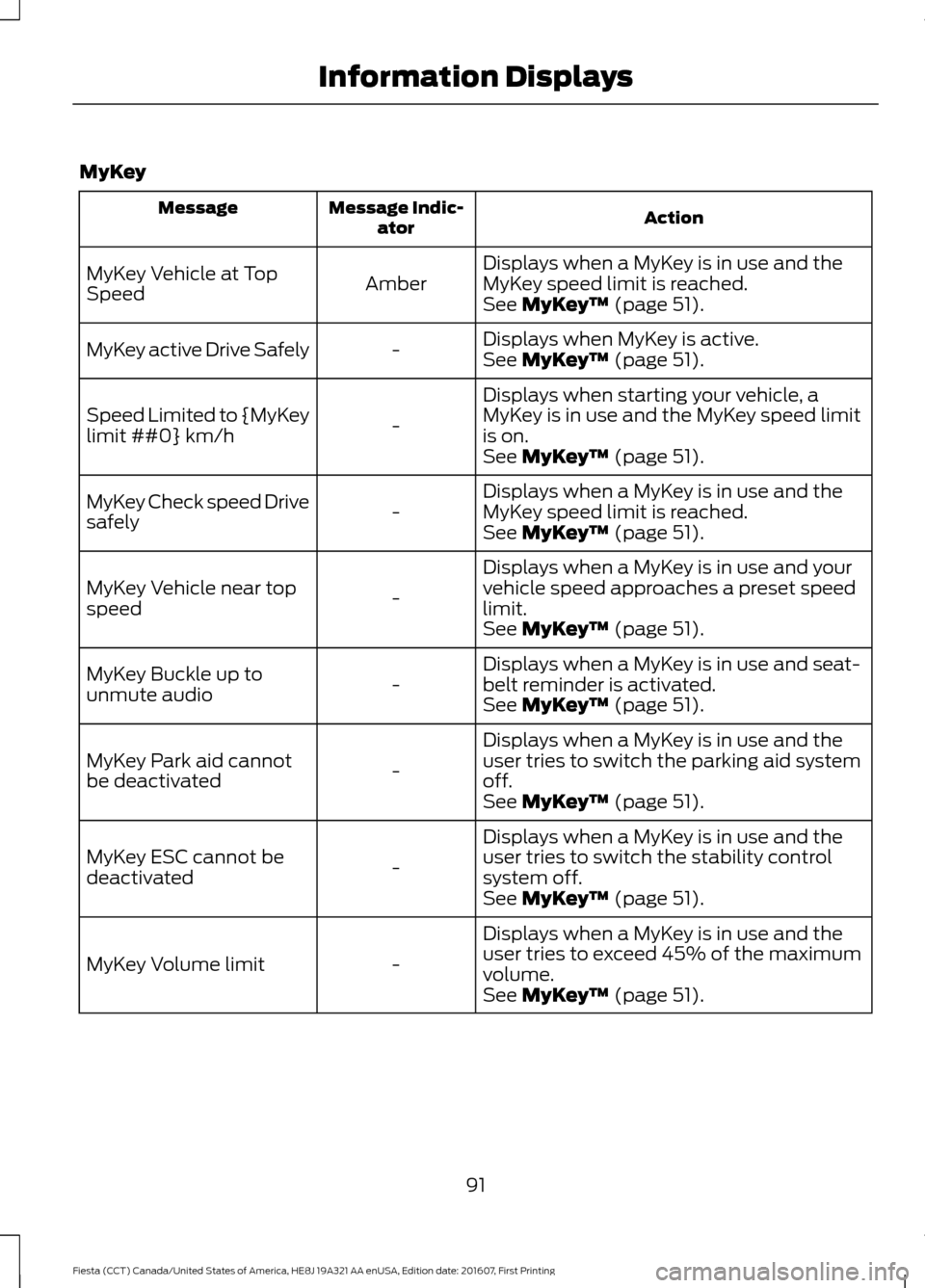
MyKey
Action
Message Indic-
ator
Message
Displays when a MyKey is in use and the
MyKey speed limit is reached.
Amber
MyKey Vehicle at Top
Speed
See MyKey™ (page 51).
Displays when MyKey is active.
-
MyKey active Drive Safely
See
MyKey™ (page 51).
Displays when starting your vehicle, a
MyKey is in use and the MyKey speed limit
is on.
-
Speed Limited to {MyKey
limit ##0} km/h
See
MyKey™ (page 51).
Displays when a MyKey is in use and the
MyKey speed limit is reached.
-
MyKey Check speed Drive
safely
See
MyKey™ (page 51).
Displays when a MyKey is in use and your
vehicle speed approaches a preset speed
limit.
-
MyKey Vehicle near top
speed
See
MyKey™ (page 51).
Displays when a MyKey is in use and seat-
belt reminder is activated.
-
MyKey Buckle up to
unmute audio
See
MyKey™ (page 51).
Displays when a MyKey is in use and the
user tries to switch the parking aid system
off.
-
MyKey Park aid cannot
be deactivated
See
MyKey™ (page 51).
Displays when a MyKey is in use and the
user tries to switch the stability control
system off.
-
MyKey ESC cannot be
deactivated
See
MyKey™ (page 51).
Displays when a MyKey is in use and the
user tries to exceed 45% of the maximum
volume.
-
MyKey Volume limit
See
MyKey™ (page 51).
91
Fiesta (CCT) Canada/United States of America, HE8J 19A321 AA enUSA, Edition date: 201607, First Printing Information Displays
Page 104 of 450
SITTING IN THE CORRECT
POSITION
WARNINGS
Do not recline the seat backrest too
far as this can cause the occupant
to slide under the safety belt,
resulting in serious injury in the event of a
crash. Sitting improperly, out of position or
with the seat backrest reclined too
far, can result in serious injury or
death in the event of a crash. Always sit
upright against your seat backrest, with
your feet on the floor. Do not place objects higher than the
seat backrest to reduce the risk of
serious injury in the event of a crash
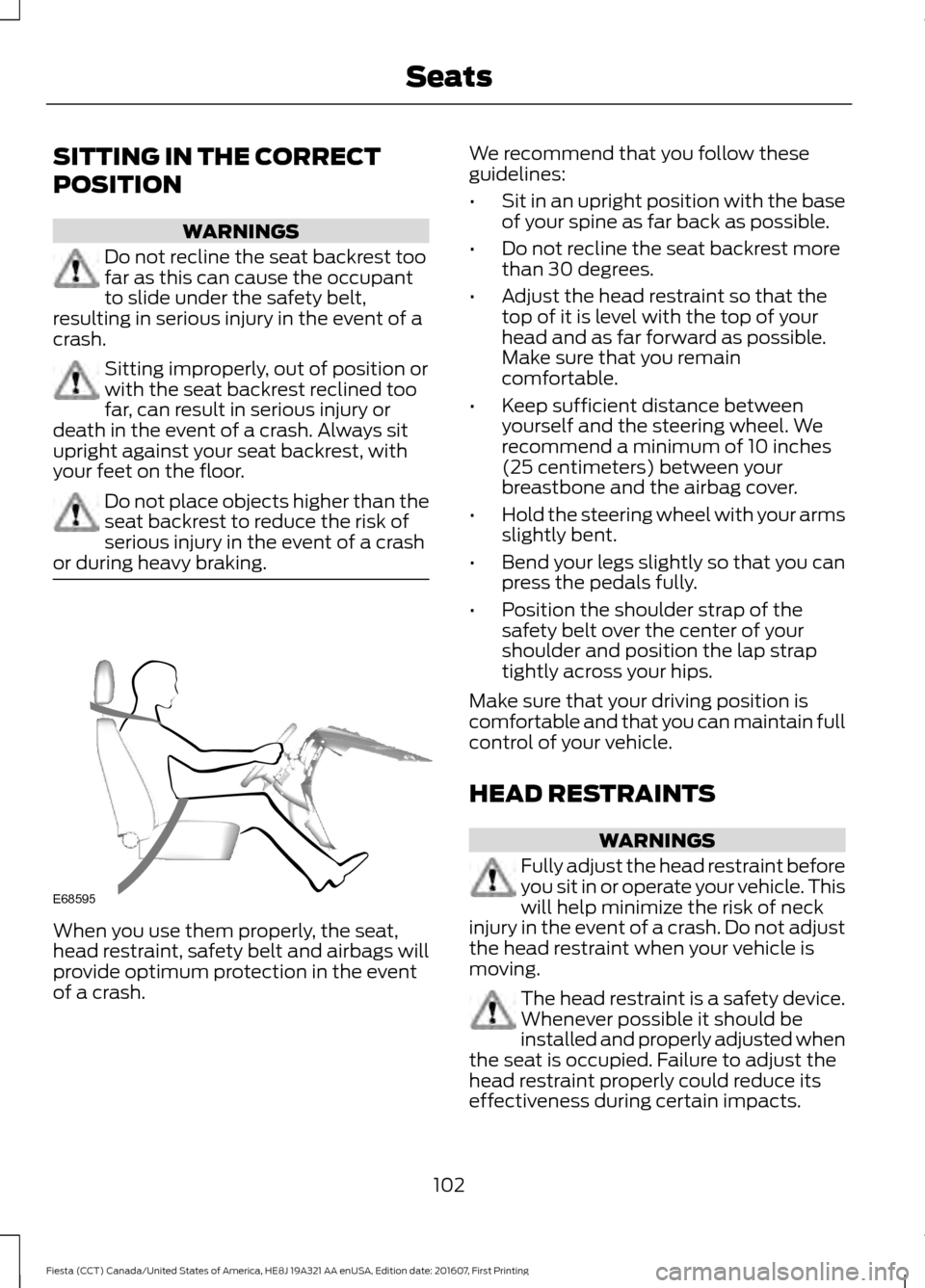
or during heavy braking. When you use them properly, the seat,
head restraint, safety belt and airbags will
provide optimum protection in the event
of a crash. We recommend that you follow these
guidelines:
•
Sit in an upright position with the base
of your spine as far back as possible.
• Do not recline the seat backrest more
than 30 degrees.
• Adjust the head restraint so that the
top of it is level with the top of your
head and as far forward as possible.
Make sure that you remain
comfortable.
• Keep sufficient distance between
yourself and the steering wheel. We
recommend a minimum of 10 inches
(25 centimeters) between your
breastbone and the airbag cover.
• Hold the steering wheel with your arms
slightly bent.
• Bend your legs slightly so that you can
press the pedals fully.
• Position the shoulder strap of the
safety belt over the center of your
shoulder and position the lap strap
tightly across your hips.
Make sure that your driving position is
comfortable and that you can maintain full
control of your vehicle.
HEAD RESTRAINTS WARNINGS
Fully adjust the head restraint before
you sit in or operate your vehicle. This
will help minimize the risk of neck
injury in the event of a crash. Do not adjust
the head restraint when your vehicle is
moving. The head restraint is a safety device.
Whenever possible it should be
installed and properly adjusted when
the seat is occupied. Failure to adjust the
head restraint properly could reduce its
effectiveness during certain impacts.
102
Fiesta (CCT) Canada/United States of America, HE8J 19A321 AA enUSA, Edition date: 201607, First Printing SeatsE68595
Page 108 of 450
3. Stow the safety belt in the belt
stowage clip. This prevents the safety
belt from getting caught in the seat
latch.
Note: Do not attempt to fold the rear seat
cushion forward.
Unfolding the Seatback WARNINGS
When unfolding the seatback up,
take care not to get your hands
caught between the seatback and
the frame, catches or mechanism. Failure
to take care may result in personal injury. Make sure that any cargo or objects
are not trapped behind the seatback.
Make sure the safety belts are not
trapped in any way when unfolding the
seatback up. Failure of an occupant to be
able to use a trapped safety belt increases
the risk of serious personal injury or death. Make sure that the seatback is fully
engaged in its catch. A seatback
which is not fully engaged in its catch
could move in the event of an accident.
This may result in serious personal injury
or death. HEATED SEATS
WARNINGS
People who are unable to feel pain
to their skin because of advanced
age, chronic illness, diabetes, spinal
cord injury, medication, alcohol or drug use,
exhaustion or other physical conditions,
must exercise extreme care when using
the heated seat. The heated seat may
cause burns even at low temperatures,
especially if used for long periods of time.
An overheated seat may cause serious
personal injury. WARNINGS
Do not place anything on the seat
that insulates against heat, for
example; blankets or cushions. This
may cause the heated seat to overheat.
An overheated seat may cause serious
personal injury. Do not puncture the seat with any
sharp objects. This may damage the
heating element which may cause
the heated seat to overheat. An
overheated seat may cause serious
personal injury. Do not place heavy objects on the
seat. This may damage the heating
element which may cause the
heated seat to overheat. An overheated
seat may cause serious personal injury. Do not use the seat heater if any
liquid is spilled on the seat. This may
damage the heating element which
may cause the heated seat to overheat.
Allow the seat to dry thoroughly before
reusing the seat heater. An overheated
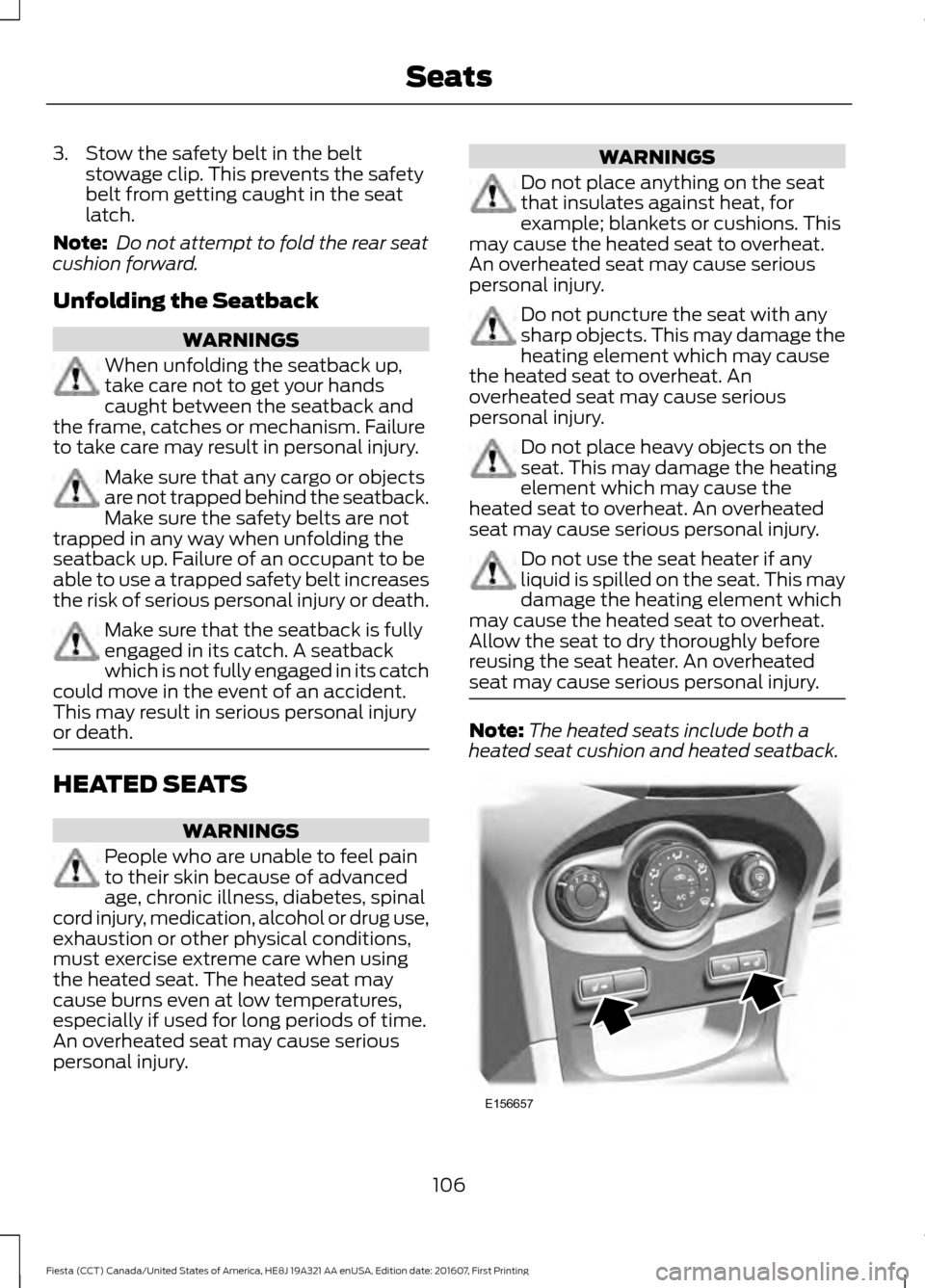
seat may cause serious personal injury. Note:
The heated seats include both a
heated seat cushion and heated seatback. 106
Fiesta (CCT) Canada/United States of America, HE8J 19A321 AA enUSA, Edition date: 201607, First Printing SeatsE156657
Page 115 of 450
If the engine does not crank when the
clutch pedal has been fully depressed and
the button is pressed:
1.
Fully depress both the clutch and brake
pedals.
2. Press the button until the engine starts.
Stopping the Engine with Your
Vehicle Stationary
Note: The ignition, all electrical circuits
warning lamps and indicators will be
switched off.
Manual Transmission
Briefly press the button.
Automatic Transmission
1. Move the transmission selector lever to position P.
2. Press the button.
Stopping the Engine When Your
Vehicle is Moving WARNING
Switching off the engine when the
vehicle is still moving will result in a
loss of brake and steering assistance.
The steering will not lock, but higher effort
will be required. With the ignition switched
off some electrical circuits, warning lamps
and indicators may also be off. 1. Press and hold the button for at least
one second or press it three times
within two seconds.
2. Move the transmission selector lever to position N and use the brakes to
bring your vehicle to a safe stop.
3. When your vehicle has stopped, move the transmission selector lever to
position P or N and switch the ignition
off. STARTING A GASOLINE
ENGINE
Note:
You can only operate the starter for
a limited period, for example 10 seconds.
The number of start attempts is limited to
approximately six. If you exceed this limit,
the system does not allow you to try again
until some time has elapsed, for example
30 minutes.
When you start the engine, the idle speed
increases, this helps to warm up the
engine. If the engine idle speed does not
slow down automatically, have your
vehicle checked by an authorized dealer.
Before starting the engine, check the
following:
• Make sure all occupants have fastened
their safety belts.
• Make sure the headlamps and
electrical accessories are off.
• Make sure to set the parking brake.
• Move the transmission selector lever
to position P (automatic transmission)
or neutral (manual transmission).
• Turn the ignition key to position C. If
your vehicle is equipped with a keyless
ignition, see the following instructions.
Cold or Hot Engine
Vehicles with Manual Transmission
Note: Do not touch the accelerator pedal.
Note: Releasing the clutch pedal while the
engine is starting stops the engine cranking
and returns the ignition to on.
1. Fully depress the clutch pedal.
2. Start the engine.
Vehicles with Automatic Transmission
Note: Do not touch the accelerator pedal.
113
Fiesta (CCT) Canada/United States of America, HE8J 19A321 AA enUSA, Edition date: 201607, First Printing Starting and Stopping the Engine
Page 156 of 450
TOWING A TRAILER
WARNING
Your vehicle is not approved
for trailer towing.
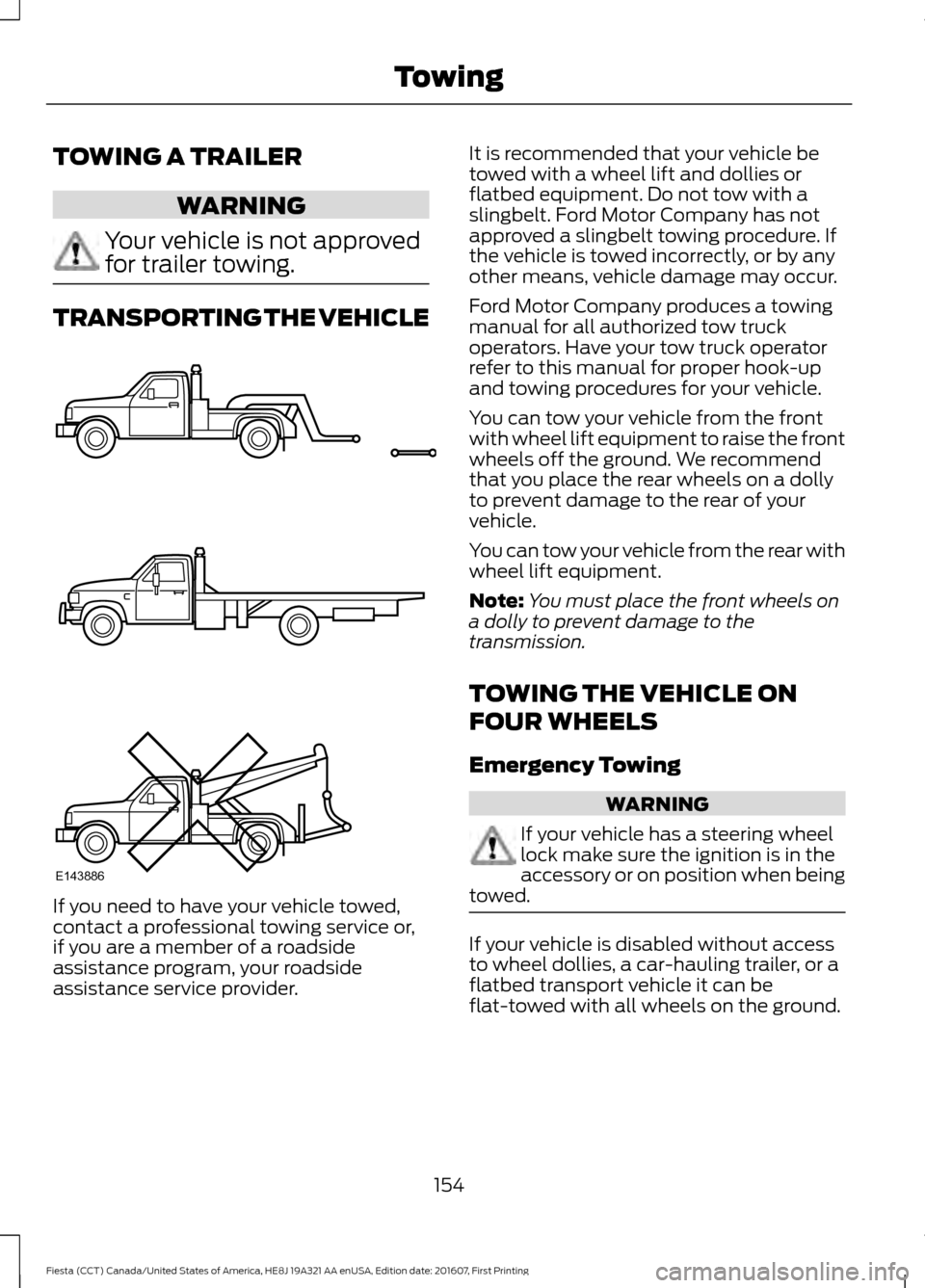
TRANSPORTING THE VEHICLE
If you need to have your vehicle towed,
contact a professional towing service or,
if you are a member of a roadside
assistance program, your roadside
assistance service provider. It is recommended that your vehicle be
towed with a wheel lift and dollies or
flatbed equipment. Do not tow with a
slingbelt. Ford Motor Company has not
approved a slingbelt towing procedure. If
the vehicle is towed incorrectly, or by any
other means, vehicle damage may occur.
Ford Motor Company produces a towing
manual for all authorized tow truck
operators. Have your tow truck operator
refer to this manual for proper hook-up
and towing procedures for your vehicle.
You can tow your vehicle from the front
with wheel lift equipment to raise the front
wheels off the ground. We recommend
that you place the rear wheels on a dolly
to prevent damage to the rear of your
vehicle.
You can tow your vehicle from the rear with
wheel lift equipment.
Note:
You must place the front wheels on
a dolly to prevent damage to the
transmission.
TOWING THE VEHICLE ON
FOUR WHEELS
Emergency Towing WARNING
If your vehicle has a steering wheel
lock make sure the ignition is in the
accessory or on position when being
towed. If your vehicle is disabled without access
to wheel dollies, a car-hauling trailer, or a
flatbed transport vehicle it can be
flat-towed with all wheels on the ground.
154
Fiesta (CCT) Canada/United States of America, HE8J 19A321 AA enUSA, Edition date: 201607, First Printing TowingE143886
Page 212 of 450
5. Install a new air filter element. Be
careful not to crimp the filter element
edges between the air filter housing
and cover. This could cause filter
damage and allow unfiltered air to
enter the engine if not correctly seated.
6. Install the air filter housing cover.
7. Install the retaining screws to secure the air filter housing cover to the air
filter housing.
DRIVE BELT ROUTING - 1.0L
ECOBOOST™ DRIVE BELT ROUTING - 1.6L
DURATEC-16V TI-VCT (SIGMA)
210
Fiesta (CCT) Canada/United States of America, HE8J 19A321 AA enUSA, Edition date: 201607, First Printing MaintenanceE163197 E163198