reset FORD FIESTA 2017 6.G Workshop Manual
[x] Cancel search | Manufacturer: FORD, Model Year: 2017, Model line: FIESTA, Model: FORD FIESTA 2017 6.GPages: 450, PDF Size: 6.05 MB
Page 383 of 450
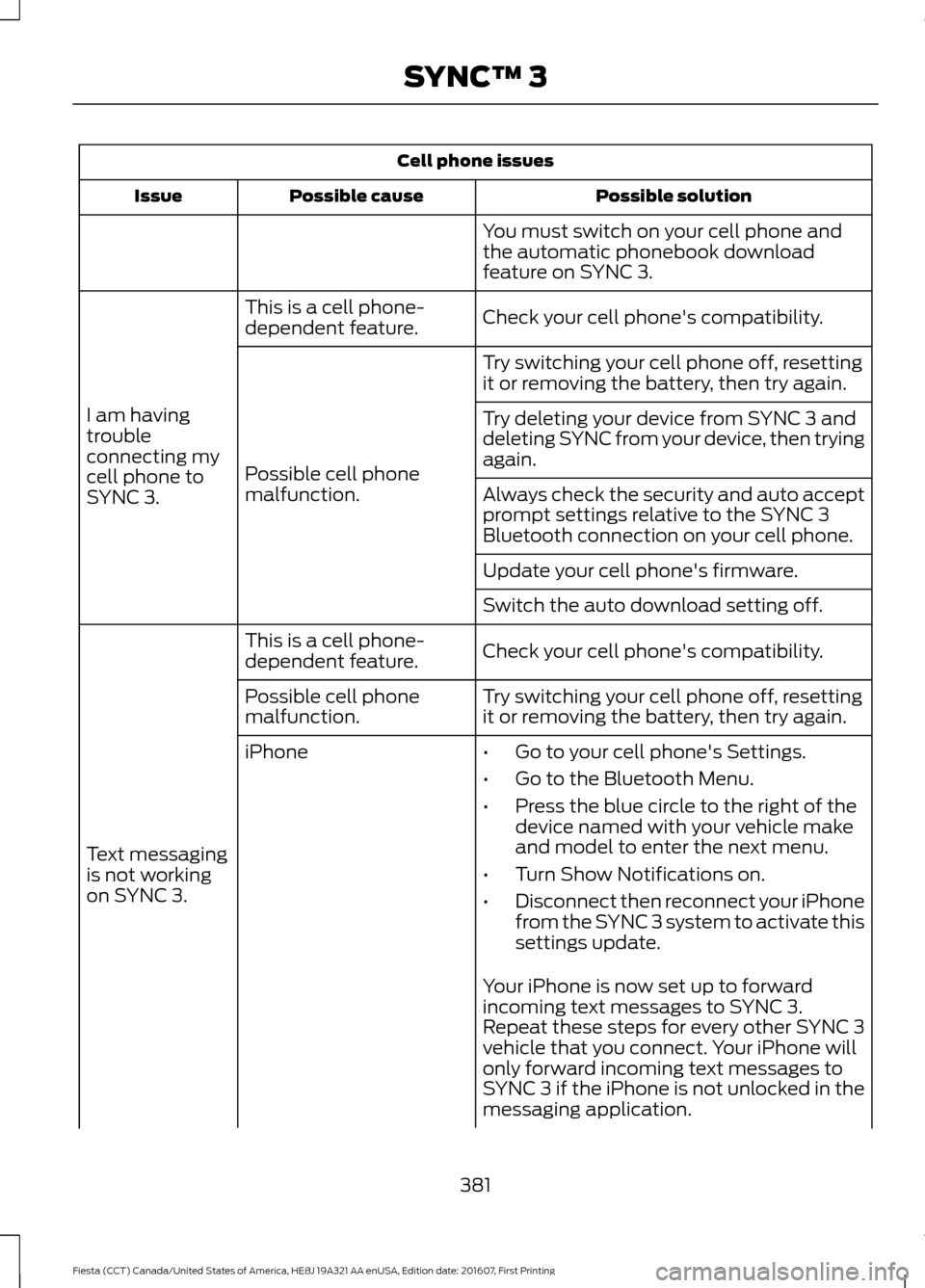
Cell phone issues
Possible solution
Possible cause
Issue
You must switch on your cell phone and
the automatic phonebook download
feature on SYNC 3.
Check your cell phone's compatibility.
This is a cell phone-
dependent feature.
I am having
trouble
connecting my
cell phone to
SYNC 3. Try switching your cell phone off, resetting
it or removing the battery, then try again.
Possible cell phone
malfunction. Try deleting your device from SYNC 3 and
deleting SYNC from your device, then trying
again.
Always check the security and auto accept
prompt settings relative to the SYNC 3
Bluetooth connection on your cell phone.
Update your cell phone's firmware.
Switch the auto download setting off.
Check your cell phone's compatibility.
This is a cell phone-
dependent feature.
Text messaging
is not working
on SYNC 3. Try switching your cell phone off, resetting
it or removing the battery, then try again.
Possible cell phone
malfunction.
iPhone
•Go to your cell phone's Settings.
• Go to the Bluetooth Menu.
• Press the blue circle to the right of the
device named with your vehicle make
and model to enter the next menu.
• Turn Show Notifications on.
• Disconnect then reconnect your iPhone
from the SYNC 3 system to activate this
settings update.
Your iPhone is now set up to forward
incoming text messages to SYNC 3.
Repeat these steps for every other SYNC 3
vehicle that you connect. Your iPhone will
only forward incoming text messages to
SYNC 3 if the iPhone is not unlocked in the
messaging application.
381
Fiesta (CCT) Canada/United States of America, HE8J 19A321 AA enUSA, Edition date: 201607, First Printing SYNC™ 3
Page 384 of 450
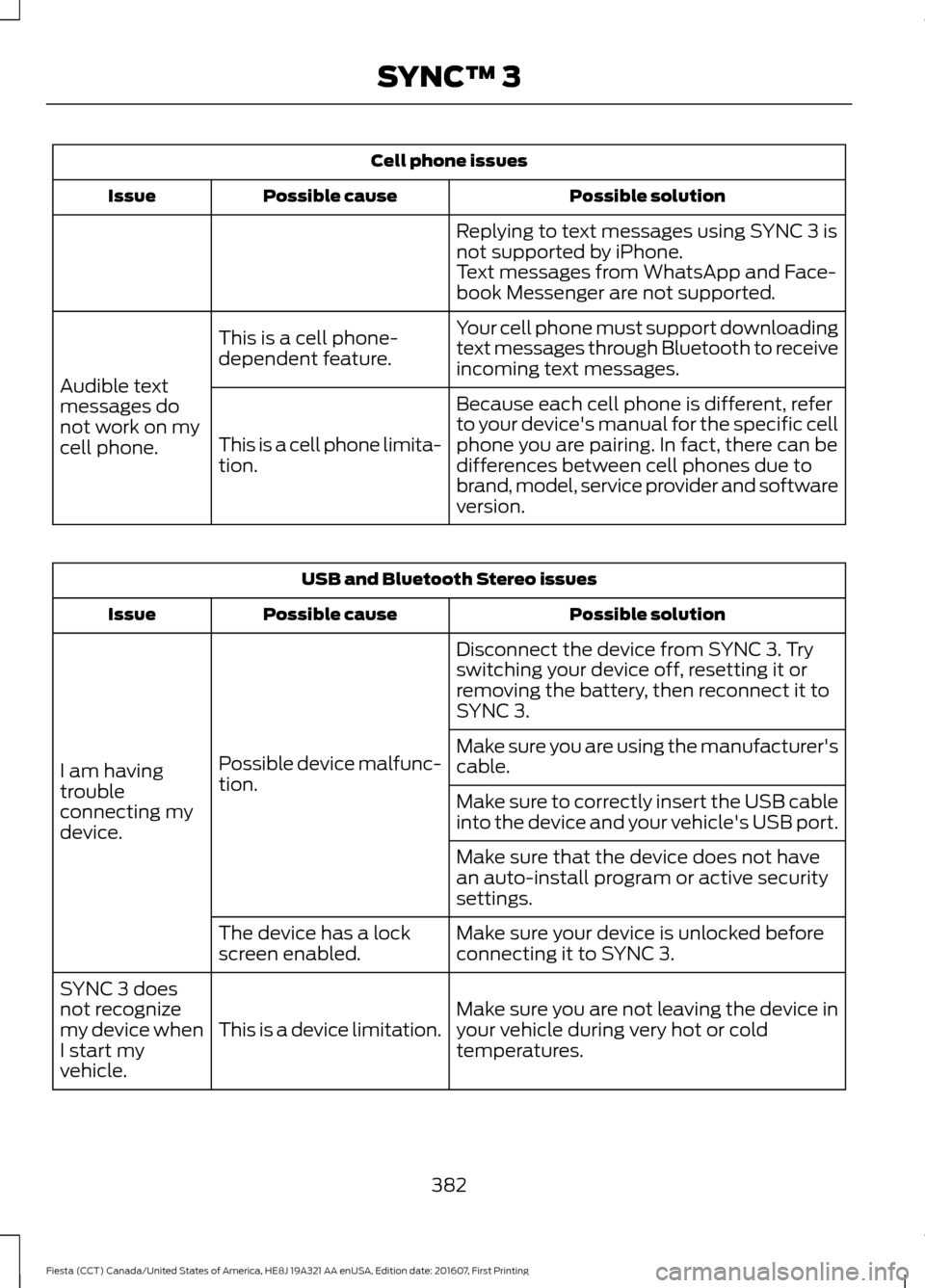
Cell phone issues
Possible solution
Possible cause
Issue
Replying to text messages using SYNC 3 is
not supported by iPhone.
Text messages from WhatsApp and Face-
book Messenger are not supported.
Your cell phone must support downloading
text messages through Bluetooth to receive
incoming text messages.
This is a cell phone-
dependent feature.
Audible text
messages do
not work on my
cell phone. Because each cell phone is different, refer
to your device's manual for the specific cell
phone you are pairing. In fact, there can be
differences between cell phones due to
brand, model, service provider and software
version.
This is a cell phone limita-
tion. USB and Bluetooth Stereo issues
Possible solution
Possible cause
Issue
Disconnect the device from SYNC 3. Try
switching your device off, resetting it or
removing the battery, then reconnect it to
SYNC 3.
Possible device malfunc-
tion.
I am having
trouble
connecting my
device. Make sure you are using the manufacturer's
cable.
Make sure to correctly insert the USB cable
into the device and your vehicle's USB port.
Make sure that the device does not have
an auto-install program or active security
settings.
Make sure your device is unlocked before
connecting it to SYNC 3.
The device has a lock
screen enabled.
Make sure you are not leaving the device in
your vehicle during very hot or cold
temperatures.
This is a device limitation.
SYNC 3 does
not recognize
my device when
I start my
vehicle.
382
Fiesta (CCT) Canada/United States of America, HE8J 19A321 AA enUSA, Edition date: 201607, First Printing SYNC™ 3
Page 385 of 450
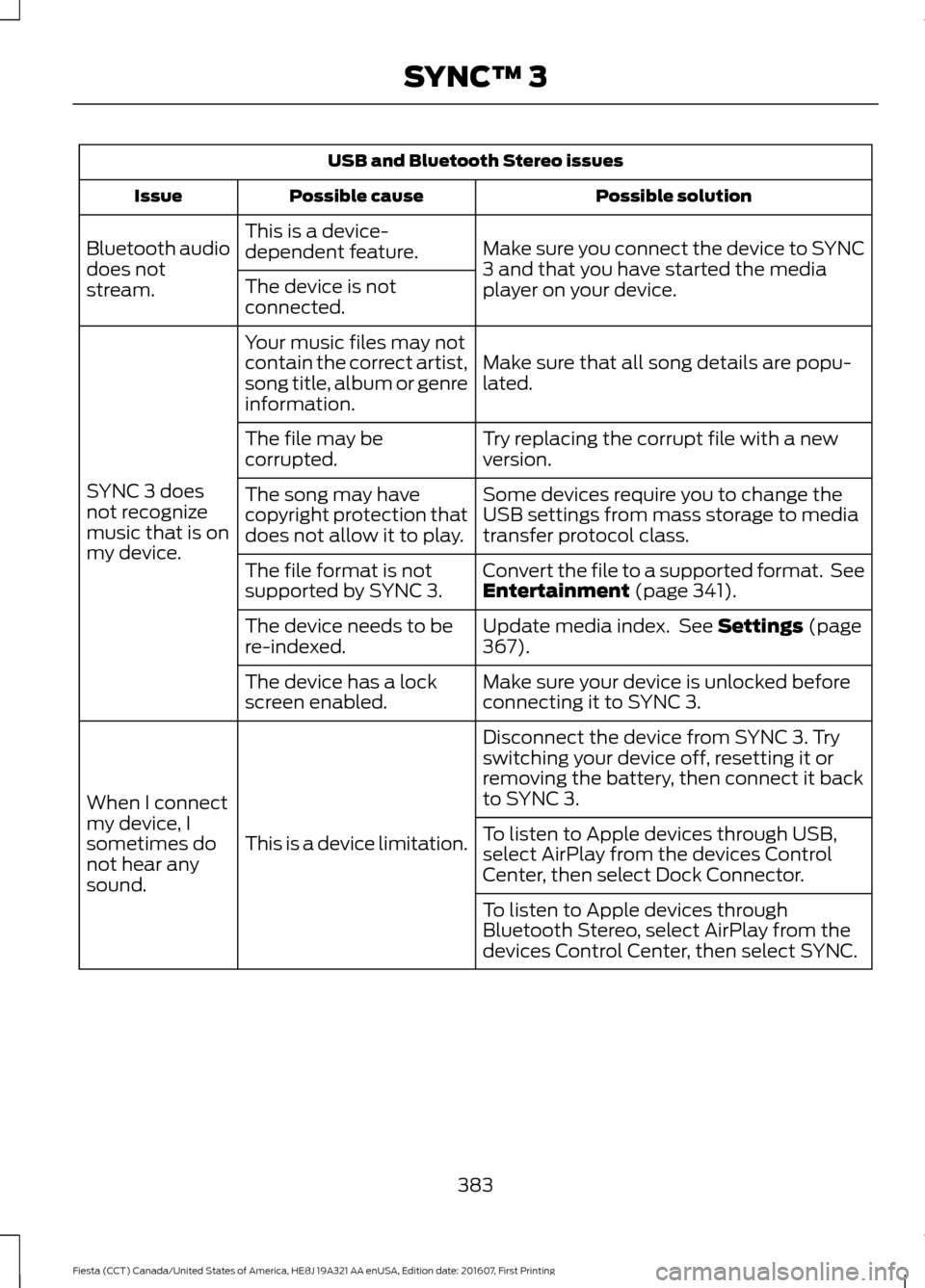
USB and Bluetooth Stereo issues
Possible solution
Possible cause
Issue
Make sure you connect the device to SYNC
3 and that you have started the media
player on your device.
This is a device-
dependent feature.
Bluetooth audio
does not
stream. The device is not
connected.
Make sure that all song details are popu-
lated.
Your music files may not
contain the correct artist,
song title, album or genre
information.
SYNC 3 does
not recognize
music that is on
my device. Try replacing the corrupt file with a new
version.
The file may be
corrupted.
Some devices require you to change the
USB settings from mass storage to media
transfer protocol class.
The song may have
copyright protection that
does not allow it to play.
Convert the file to a supported format. See
Entertainment (page 341).
The file format is not
supported by SYNC 3.
Update media index. See
Settings (page
367).
The device needs to be
re-indexed.
Make sure your device is unlocked before
connecting it to SYNC 3.
The device has a lock
screen enabled.
Disconnect the device from SYNC 3. Try
switching your device off, resetting it or
removing the battery, then connect it back
to SYNC 3.
This is a device limitation.
When I connect
my device, I
sometimes do
not hear any
sound. To listen to Apple devices through USB,
select AirPlay from the devices Control
Center, then select Dock Connector.
To listen to Apple devices through
Bluetooth Stereo, select AirPlay from the
devices Control Center, then select SYNC.
383
Fiesta (CCT) Canada/United States of America, HE8J 19A321 AA enUSA, Edition date: 201607, First Printing SYNC™ 3
Page 389 of 450
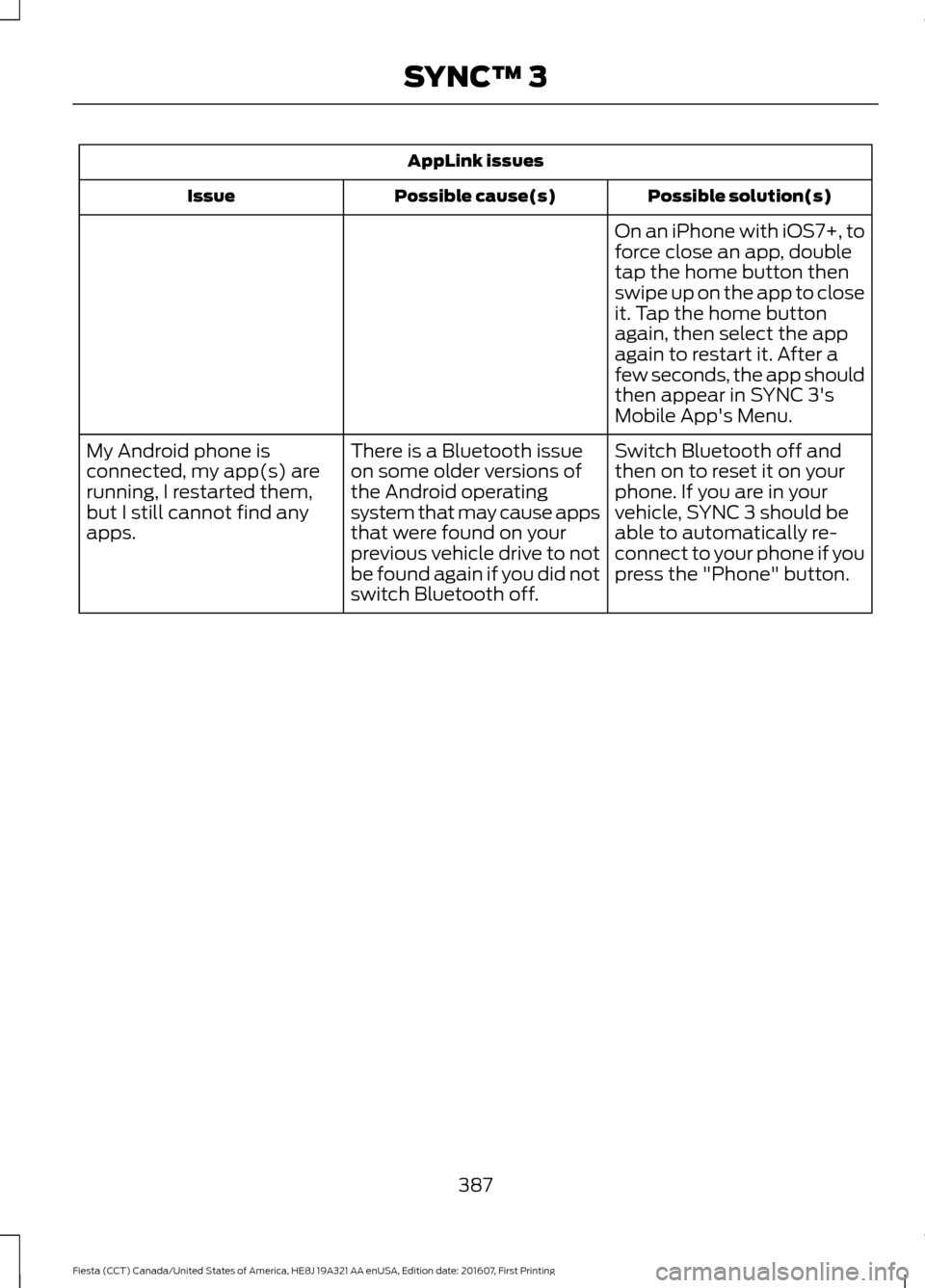
AppLink issues
Possible solution(s)
Possible cause(s)
Issue
On an iPhone with iOS7+, to
force close an app, double
tap the home button then
swipe up on the app to close
it. Tap the home button
again, then select the app
again to restart it. After a
few seconds, the app should
then appear in SYNC 3's
Mobile App's Menu.
Switch Bluetooth off and
then on to reset it on your
phone. If you are in your
vehicle, SYNC 3 should be
able to automatically re-
connect to your phone if you
press the "Phone" button.
There is a Bluetooth issue
on some older versions of
the Android operating
system that may cause apps
that were found on your
previous vehicle drive to not
be found again if you did not
switch Bluetooth off.
My Android phone is
connected, my app(s) are
running, I restarted them,
but I still cannot find any
apps.
387
Fiesta (CCT) Canada/United States of America, HE8J 19A321 AA enUSA, Edition date: 201607, First Printing SYNC™ 3
Page 390 of 450
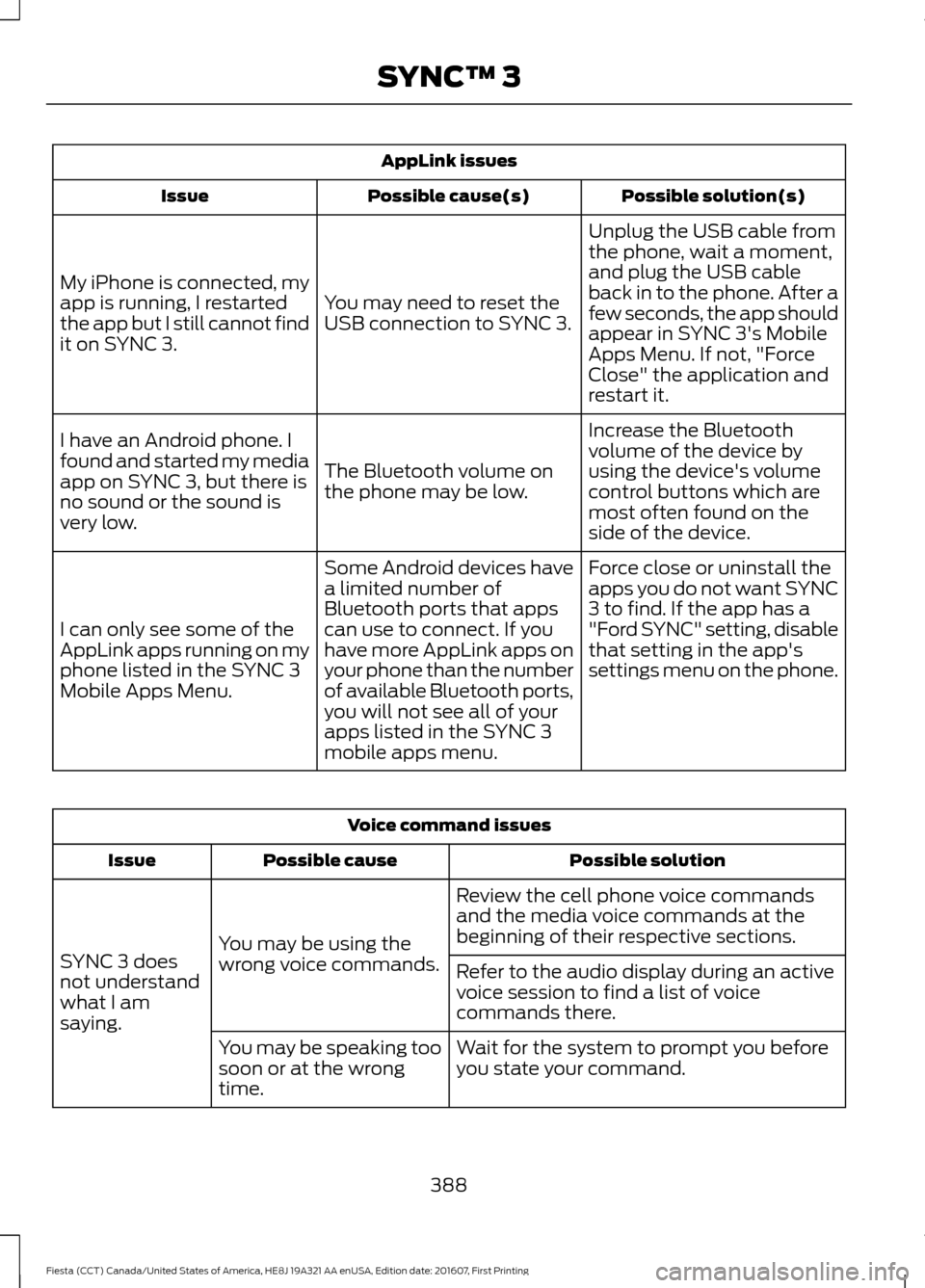
AppLink issues
Possible solution(s)
Possible cause(s)
Issue
Unplug the USB cable from
the phone, wait a moment,
and plug the USB cable
back in to the phone. After a
few seconds, the app should
appear in SYNC 3's Mobile
Apps Menu. If not, "Force
Close" the application and
restart it.
You may need to reset the
USB connection to SYNC 3.
My iPhone is connected, my
app is running, I restarted
the app but I still cannot find
it on SYNC 3.
Increase the Bluetooth
volume of the device by
using the device's volume
control buttons which are
most often found on the
side of the device.
The Bluetooth volume on
the phone may be low.
I have an Android phone. I
found and started my media
app on SYNC 3, but there is
no sound or the sound is
very low.
Force close or uninstall the
apps you do not want SYNC
3 to find. If the app has a
"Ford SYNC" setting, disable
that setting in the app's
settings menu on the phone.
Some Android devices have
a limited number of
Bluetooth ports that apps
can use to connect. If you
have more AppLink apps on
your phone than the number
of available Bluetooth ports,
you will not see all of your
apps listed in the SYNC 3
mobile apps menu.
I can only see some of the
AppLink apps running on my
phone listed in the SYNC 3
Mobile Apps Menu. Voice command issues
Possible solution
Possible cause
Issue
Review the cell phone voice commands
and the media voice commands at the
beginning of their respective sections.
You may be using the
wrong voice commands.
SYNC 3 does
not understand
what I am
saying. Refer to the audio display during an active
voice session to find a list of voice
commands there.
Wait for the system to prompt you before
you state your command.
You may be speaking too
soon or at the wrong
time.
388
Fiesta (CCT) Canada/United States of America, HE8J 19A321 AA enUSA, Edition date: 201607, First Printing SYNC™ 3
Page 393 of 450
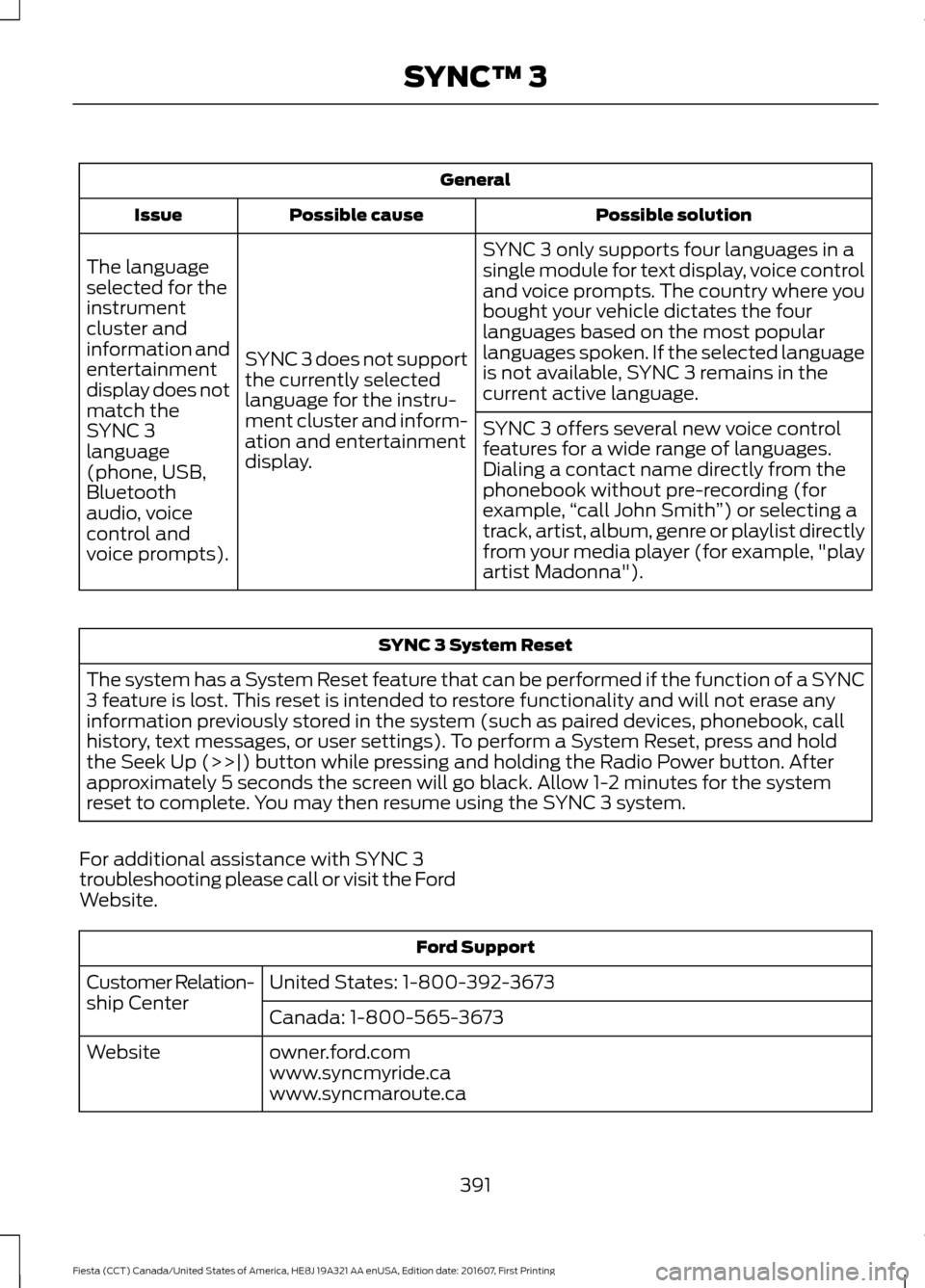
General
Possible solution
Possible cause
Issue
SYNC 3 only supports four languages in a
single module for text display, voice control
and voice prompts. The country where you
bought your vehicle dictates the four
languages based on the most popular
languages spoken. If the selected language
is not available, SYNC 3 remains in the
current active language.
SYNC 3 does not support
the currently selected
language for the instru-
ment cluster and inform-
ation and entertainment
display.
The language
selected for the
instrument
cluster and
information and
entertainment
display does not
match the
SYNC 3
SYNC 3 offers several new voice control
features for a wide range of languages.
Dialing a contact name directly from the
phonebook without pre-recording (for
example,
“call John Smith ”) or selecting a
track, artist, album, genre or playlist directly
from your media player (for example, "play
artist Madonna").
language
(phone, USB,
Bluetooth
audio, voice
control and
voice prompts). SYNC 3 System Reset
The system has a System Reset feature that can be performed if the function of a SYNC
3 feature is lost. This reset is intended to restore functionality and will not erase any
information previously stored in the system (such as paired devices, phonebook, call
history, text messages, or user settings). To perform a System Reset, press and hold
the Seek Up (>>|) button while pressing and holding the Radio Power button. After
approximately 5 seconds the screen will go black. Allow 1-2 minutes for the system
reset to complete. You may then resume using the SYNC 3 system.
For additional assistance with SYNC 3
troubleshooting please call or visit the Ford
Website. Ford Support
United States: 1-800-392-3673
Customer Relation-
ship Center
Canada: 1-800-565-3673
owner.ford.com
Website
www.syncmyride.ca
www.syncmaroute.ca
391
Fiesta (CCT) Canada/United States of America, HE8J 19A321 AA enUSA, Edition date: 201607, First Printing SYNC™ 3
Page 399 of 450
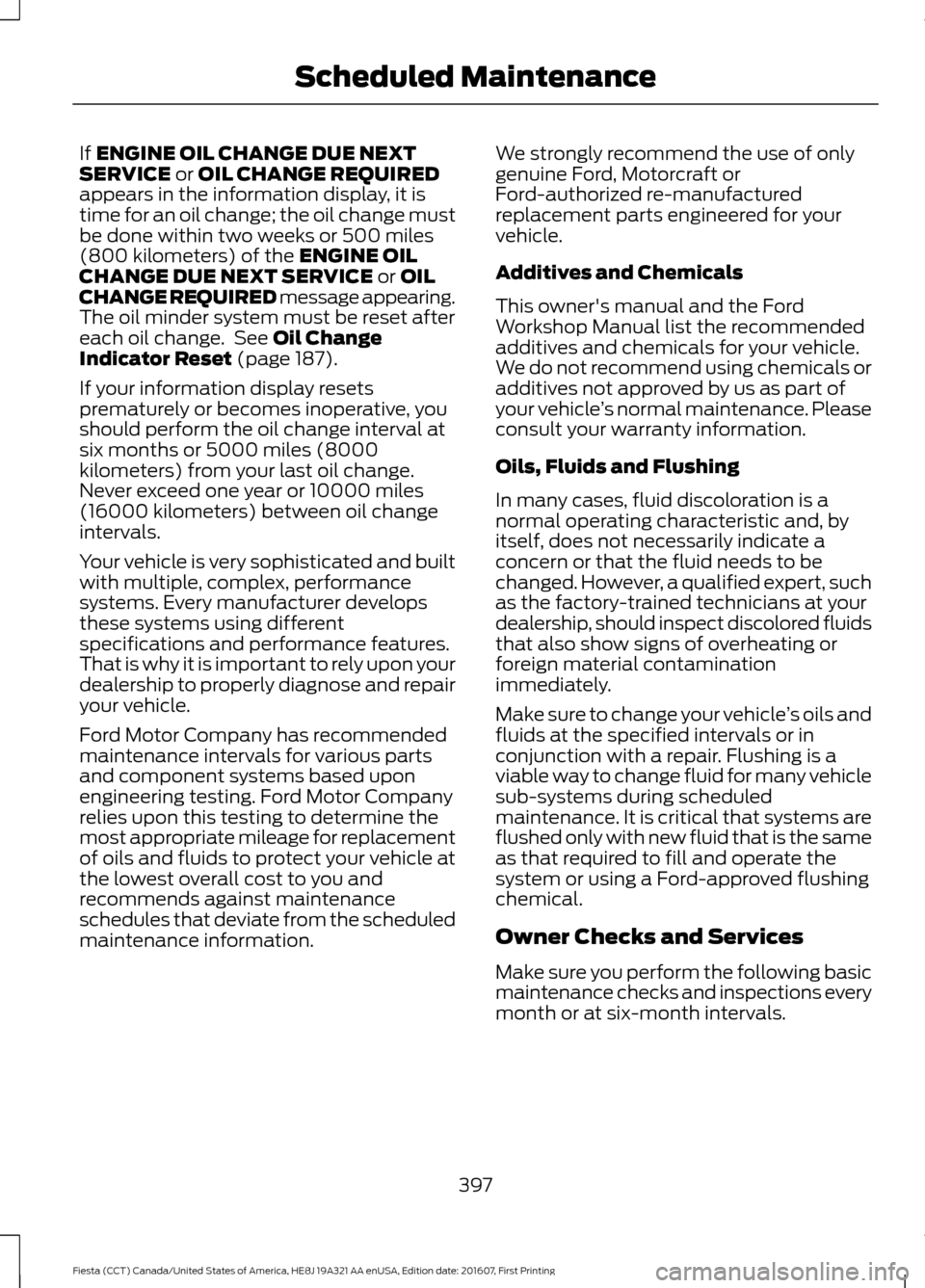
If ENGINE OIL CHANGE DUE NEXT
SERVICE or OIL CHANGE REQUIRED
appears in the information display, it is
time for an oil change; the oil change must
be done within two weeks or 500 miles
(800 kilometers) of the
ENGINE OIL
CHANGE DUE NEXT SERVICE or OIL
CHANGE REQUIRED message appearing.
The oil minder system must be reset after
each oil change. See
Oil Change
Indicator Reset (page 187).
If your information display resets
prematurely or becomes inoperative, you
should perform the oil change interval at
six months or 5000 miles (8000
kilometers) from your last oil change.
Never exceed one year or 10000 miles
(16000 kilometers) between oil change
intervals.
Your vehicle is very sophisticated and built
with multiple, complex, performance
systems. Every manufacturer develops
these systems using different
specifications and performance features.
That is why it is important to rely upon your
dealership to properly diagnose and repair
your vehicle.
Ford Motor Company has recommended
maintenance intervals for various parts
and component systems based upon
engineering testing. Ford Motor Company
relies upon this testing to determine the
most appropriate mileage for replacement
of oils and fluids to protect your vehicle at
the lowest overall cost to you and
recommends against maintenance
schedules that deviate from the scheduled
maintenance information. We strongly recommend the use of only
genuine Ford, Motorcraft or
Ford-authorized re-manufactured
replacement parts engineered for your
vehicle.
Additives and Chemicals
This owner's manual and the Ford
Workshop Manual list the recommended
additives and chemicals for your vehicle.
We do not recommend using chemicals or
additives not approved by us as part of
your vehicle
’s normal maintenance. Please
consult your warranty information.
Oils, Fluids and Flushing
In many cases, fluid discoloration is a
normal operating characteristic and, by
itself, does not necessarily indicate a
concern or that the fluid needs to be
changed. However, a qualified expert, such
as the factory-trained technicians at your
dealership, should inspect discolored fluids
that also show signs of overheating or
foreign material contamination
immediately.
Make sure to change your vehicle ’s oils and
fluids at the specified intervals or in
conjunction with a repair. Flushing is a
viable way to change fluid for many vehicle
sub-systems during scheduled
maintenance. It is critical that systems are
flushed only with new fluid that is the same
as that required to fill and operate the
system or using a Ford-approved flushing
chemical.
Owner Checks and Services
Make sure you perform the following basic
maintenance checks and inspections every
month or at six-month intervals.
397
Fiesta (CCT) Canada/United States of America, HE8J 19A321 AA enUSA, Edition date: 201607, First Printing Scheduled Maintenance
Page 402 of 450
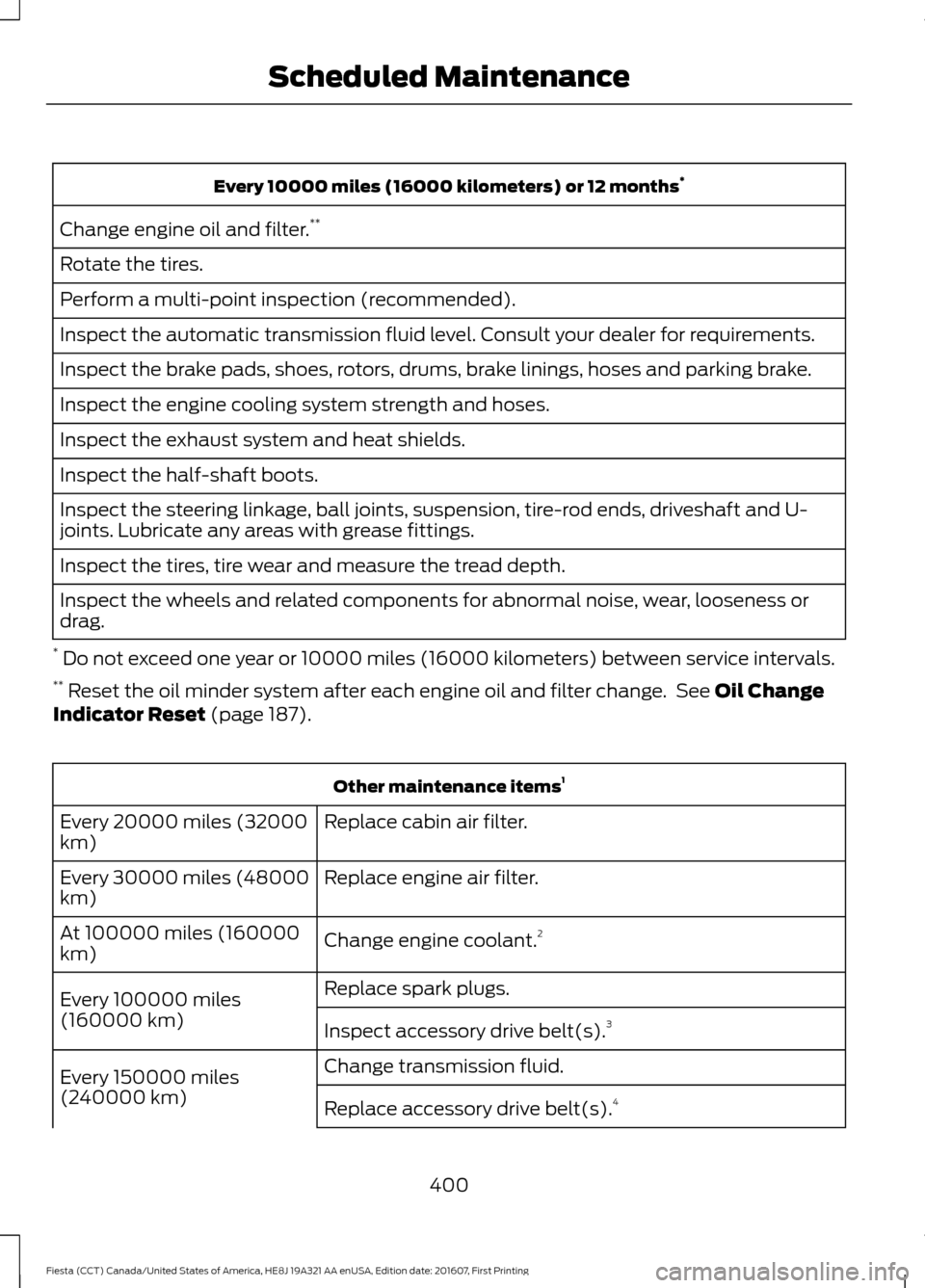
Every 10000 miles (16000 kilometers) or 12 months
*
Change engine oil and filter. **
Rotate the tires.
Perform a multi-point inspection (recommended).
Inspect the automatic transmission fluid level. Consult your dealer for requirements.
Inspect the brake pads, shoes, rotors, drums, brake linings, hoses and parking brake.
Inspect the engine cooling system strength and hoses.
Inspect the exhaust system and heat shields.
Inspect the half-shaft boots.
Inspect the steering linkage, ball joints, suspension, tire-rod ends, driveshaft and U-
joints. Lubricate any areas with grease fittings.
Inspect the tires, tire wear and measure the tread depth.
Inspect the wheels and related components for abnormal noise, wear, looseness or
drag.
* Do not exceed one year or 10000 miles (16000 kilometers) between service intervals.
** Reset the oil minder system after each engine oil and filter change. See Oil Change
Indicator Reset (page 187). Other maintenance items
1
Replace cabin air filter.
Every 20000 miles (32000
km)
Replace engine air filter.
Every 30000 miles (48000
km)
Change engine coolant.2
At 100000 miles (160000
km)
Replace spark plugs.
Every 100000 miles
(160000 km) Inspect accessory drive belt(s). 3
Change transmission fluid.
Every 150000 miles
(240000 km) Replace accessory drive belt(s). 4
400
Fiesta (CCT) Canada/United States of America, HE8J 19A321 AA enUSA, Edition date: 201607, First Printing Scheduled Maintenance
Page 405 of 450
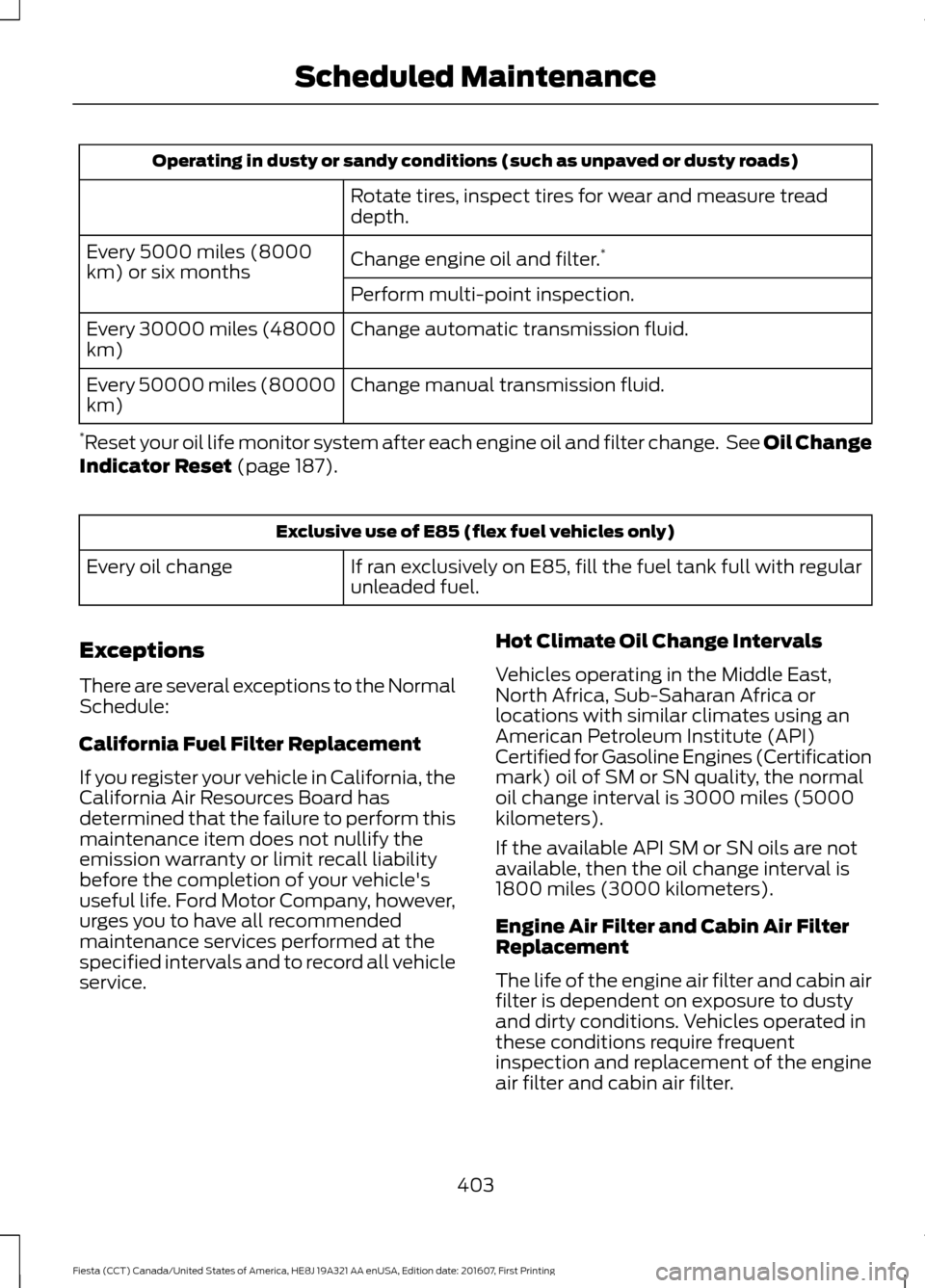
Operating in dusty or sandy conditions (such as unpaved or dusty roads)
Rotate tires, inspect tires for wear and measure tread
depth.
Change engine oil and filter. *
Every 5000 miles (8000
km) or six months
Perform multi-point inspection.
Change automatic transmission fluid.
Every 30000 miles (48000
km)
Change manual transmission fluid.
Every 50000 miles (80000
km)
* Reset your oil life monitor system after each engine oil and filter change. See Oil Change
Indicator Reset (page 187). Exclusive use of E85 (flex fuel vehicles only)
If ran exclusively on E85, fill the fuel tank full with regular
unleaded fuel.
Every oil change
Exceptions
There are several exceptions to the Normal
Schedule:
California Fuel Filter Replacement
If you register your vehicle in California, the
California Air Resources Board has
determined that the failure to perform this
maintenance item does not nullify the
emission warranty or limit recall liability
before the completion of your vehicle's
useful life. Ford Motor Company, however,
urges you to have all recommended
maintenance services performed at the
specified intervals and to record all vehicle
service. Hot Climate Oil Change Intervals
Vehicles operating in the Middle East,
North Africa, Sub-Saharan Africa or
locations with similar climates using an
American Petroleum Institute (API)
Certified for Gasoline Engines (Certification
mark) oil of SM or SN quality, the normal
oil change interval is 3000 miles (5000
kilometers).
If the available API SM or SN oils are not
available, then the oil change interval is
1800 miles (3000 kilometers).
Engine Air Filter and Cabin Air Filter
Replacement
The life of the engine air filter and cabin air
filter is dependent on exposure to dusty
and dirty conditions. Vehicles operated in
these conditions require frequent
inspection and replacement of the engine
air filter and cabin air filter.
403
Fiesta (CCT) Canada/United States of America, HE8J 19A321 AA enUSA, Edition date: 201607, First Printing Scheduled Maintenance
Page 441 of 450
A
A/C
See: Climate Control........................................... 95
About This Manual...........................................7
ABS See: Brakes............................................................. 131
ABS driving hints See: Hints on Driving With Anti-Lock
Brakes.................................................................. 131
Accessories
....................................................392
Exterior style........................................................ 392
Interior style......................................................... 392
Lifestyle................................................................. 392
Peace of mind..................................................... 392
Accessories See: Replacement Parts
Recommendation............................................ 12
Adjusting the Headlamps.........................195 Horizontal Aim Adjustment............................ 197
Vertical Aim Adjustment................................. 195
Adjusting the Steering Wheel
....................67
Airbag Disposal...............................................45
Air Conditioning See: Climate Control........................................... 95
Air Filter See: Changing the Engine Air Filter............209
Alarm See: Anti-Theft Alarm........................................ 65
Ambient Lighting
............................................75
Anti-Theft Alarm............................................65
Alarm System........................................................ 65
Arming the Alarm................................................. 65
Disarming the Alarm........................................... 65
Triggering the Alarm............................................65
Appendices
.....................................................414
Apps.................................................................364
........................................................................\
.......... 364
SiriusXM Traffic and Travel Link.................. 366
Audible Warnings and Indicators.............84 Exterior Lamps On............................................... 84
Gearshift Lever Not in Park (P)...................... 84
Key in Ignition........................................................ 84
Key Outside Vehicle - Vehicles With Keyless System................................................................ 84
Parking Brake On..................................................84
Safety Belt Minder............................................... 84
Audio Control...................................................67 Audio Input Jack...........................................274
Audio System
................................................257
General Information.......................................... 257
Audio Unit - Vehicles With: AM/FM/CD/ SYNC.............................................................262
Alternative Frequencies.................................. 265
Automatic Volume Control............................ 265
Autostore Control.............................................. 265
Sound Button...................................................... 264
Station Preset Buttons.................................... 264
Station Tuning Control.................................... 264
Waveband Button............................................. 264
Audio Unit - Vehicles With: AM/FM/ CD...................................................................258
Alternative Frequencies................................... 261
Automatic Volume Control............................. 261
Autostore Control............................................... 261
Sound Button..................................................... 260
Station Preset Buttons..................................... 261
Station Tuning Control.................................... 260
Waveband Button............................................. 260
Audio Unit - Vehicles With: Sony Audio System/Touchscreen Display..............266
Audio Unit - Vehicles With: Touchscreen Display..........................................................268
Autolamps.........................................................72 Windshield Wiper Activated
Headlamps......................................................... 72
Automatic Climate Control........................96 Temperature Control........................................... 97
Automatic Transmission
............................126
Emergency Park Position Release
Lever................................................................... 129
Hints on Driving with an Automatic Transmission................................................... 128
Selector Lever Positions................................... 126
Sport Mode and Manual Shifting.................128
Automatic Transmission Fluid Check
..............................................................192
Auxiliary Power Points...............................108 12 Volt DC Power Point..................................... 108
Location................................................................. 108
B
Battery See: Changing the 12V Battery...................... 193
439
Fiesta (CCT) Canada/United States of America, HE8J 19A321 AA enUSA, Edition date: 201607, First Printing Index