fuel FORD FIESTA 2017 6.G Owners Manual
[x] Cancel search | Manufacturer: FORD, Model Year: 2017, Model line: FIESTA, Model: FORD FIESTA 2017 6.GPages: 450, PDF Size: 6.05 MB
Page 4 of 450
Audio Control...................................................67
Voice Control
...................................................68
Cruise Control.................................................68
Wipers and Washers
Windshield Wipers
........................................69
Windshield Washers.....................................69
Rear Window Wiper and Washers...........70
Lighting
General Information.......................................71
Lighting Control................................................71
Autolamps.........................................................72
Instrument Lighting Dimmer......................73
Headlamp Exit Delay.....................................73
Daytime Running Lamps
.............................73
Front Fog Lamps
............................................74
Direction Indicators
........................................74
Interior Lamps..................................................74
Ambient Lighting
............................................75
Windows and Mirrors
Power Windows
..............................................76
Exterior Mirrors
.................................................77
Interior Mirror
....................................................78
Moonroof...........................................................79
Instrument Cluster
Gauges...............................................................80
Warning Lamps and Indicators..................81
Audible Warnings and Indicators.............84
Information Displays
General Information
.....................................85
Clock...................................................................86
Trip Computer
.................................................86
Personalized Settings
...................................87
Information Messages
..................................87 Climate Control
Manual Climate Control..............................95
Automatic Climate Control........................96
Hints on Controlling the Interior
Climate...........................................................97
Heated Windows and Mirrors.................100
Cabin Air Filter...............................................100
Seats
Sitting in the Correct Position..................102
Head Restraints
............................................102
Manual Seats
.................................................104
Rear Seats
.......................................................105
Heated Seats.................................................106
Auxiliary Power Points
Auxiliary Power Points...............................108
Cigar Lighter
...................................................108
Storage Compartments
Center Console
...............................................110
Overhead Console
........................................110
Starting and Stopping the Engine
General Information
......................................111
Ignition Switch
.................................................111
Keyless Starting
...............................................111
Starting a Gasoline Engine.........................113
Switching Off the Engine
............................114
Engine Block Heater.....................................114
Fuel and Refueling
Safety Precautions
.......................................116
Fuel Quality
......................................................117
Fuel Filler Funnel Location
.........................117
Running Out of Fuel
......................................117
Catalytic Converter
.......................................119
Refueling...........................................................119
2
Fiesta (CCT) Canada/United States of America, HE8J 19A321 AA enUSA, Edition date: 201607, First Printing Table of Contents
Page 5 of 450
Fuel Consumption.........................................121
Emission Control System...........................122
Transmission
Manual Transmission..................................125
Automatic Transmission............................126
Brakes
General Information.....................................131
Hints on Driving With Anti-Lock Brakes............................................................131
Parking Brake..................................................132
Hill Start Assist..............................................132
Traction Control
Principle of Operation.................................134
Using Traction Control................................134
Stability Control
Principle of Operation
.................................135
Using Stability Control...............................136
Parking Aids
Principle of Operation.................................137
Rear Parking Aid
............................................137
Front Parking Aid..........................................139
Rear View Camera.......................................140
Cruise Control
Principle of Operation.................................143
Using Cruise Control
....................................143
Driving Aids
Eco Mode.........................................................145
Steering............................................................145
Load Carrying
Rear Under Floor Storage..........................147
Cargo Nets.......................................................147
Luggage Covers.............................................147 Load Limit
.......................................................148
Towing
Towing a Trailer
.............................................154
Transporting the Vehicle............................154
Towing the Vehicle on Four Wheels
......154
Driving Hints
Breaking-In......................................................157
Economical Driving
......................................157
Driving Through Water
................................157
Floor Mats
.......................................................158
Roadside Emergencies
Roadside Assistance
..................................160
Hazard Warning Flashers
...........................161
Fuel Shutoff
.....................................................161
Jump Starting the Vehicle.........................162
Customer Assistance
Getting the Services You Need
...............165
In California (U.S. Only).............................166
The Better Business Bureau (BBB) Auto Line Program (U.S. Only).......................167
Utilizing the Mediation/Arbitration Program (Canada Only)........................168
Getting Assistance Outside the U.S. and Canada........................................................168
Ordering Additional Owner's Literature.....................................................169
Reporting Safety Defects (U.S. Only)..............................................................170
Reporting Safety Defects (Canada Only)..............................................................170
Fuses
Fuse Specification Chart............................172
Changing a Fuse
...........................................180
Maintenance
General Information
....................................182
3
Fiesta (CCT) Canada/United States of America, HE8J 19A321 AA enUSA, Edition date: 201607, First Printing Table of Contents
Page 10 of 450
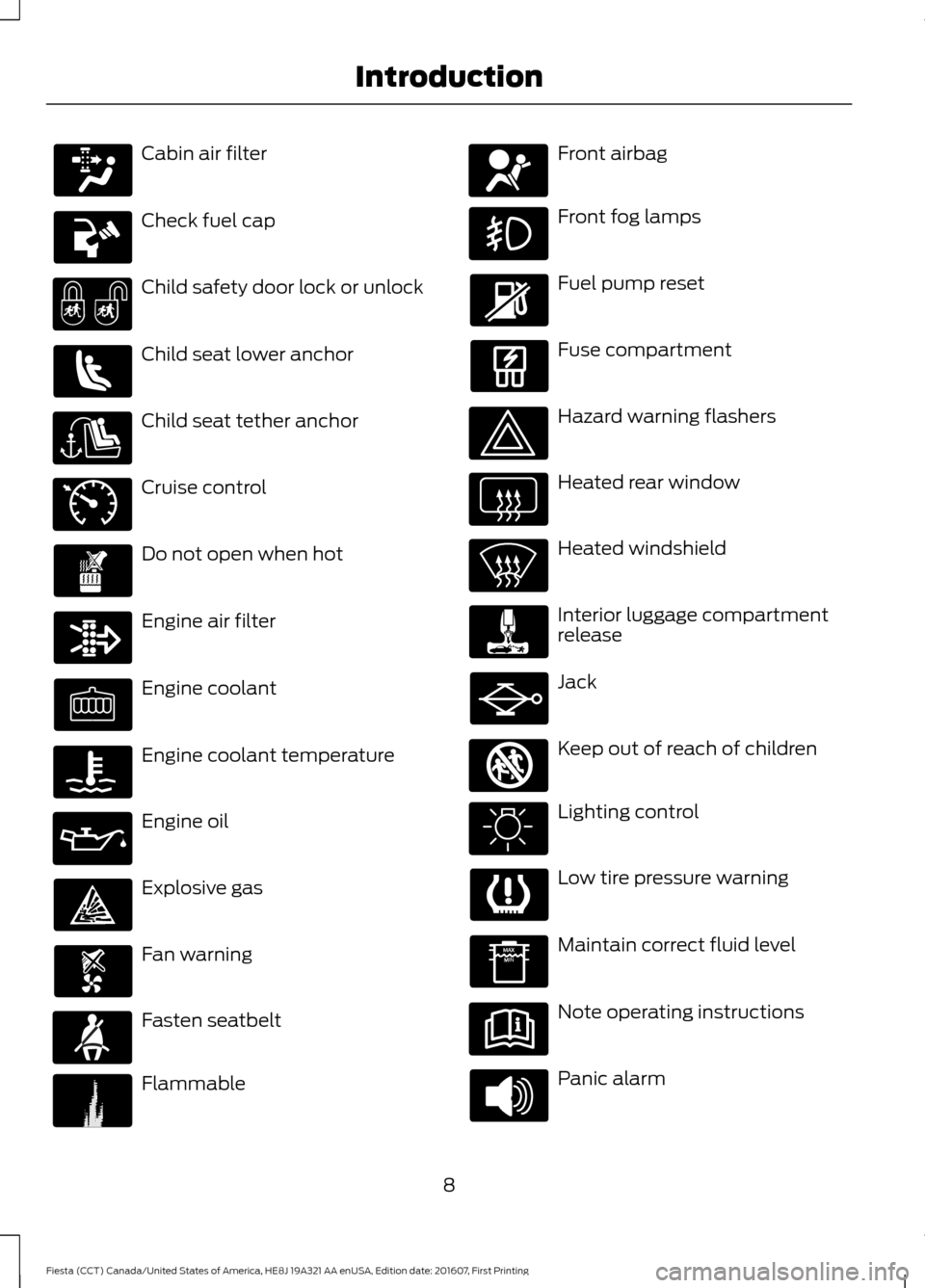
Cabin air filter
Check fuel cap
Child safety door lock or unlock
Child seat lower anchor
Child seat tether anchor
Cruise control
Do not open when hot
Engine air filter
Engine coolant
Engine coolant temperature
Engine oil
Explosive gas
Fan warning
Fasten seatbelt
Flammable Front airbag
Front fog lamps
Fuel pump reset
Fuse compartment
Hazard warning flashers
Heated rear window
Heated windshield
Interior luggage compartment
release
Jack
Keep out of reach of children
Lighting control
Low tire pressure warning
Maintain correct fluid level
Note operating instructions
Panic alarm
8
Fiesta (CCT) Canada/United States of America, HE8J 19A321 AA enUSA, Edition date: 201607, First Printing Introduction E71340 E71880 E231160 E67017 E161353
Page 13 of 450
Note:
Including to the extent that any
law pertaining to Event Data Recorders
applies to SYNC or its features, please
note the following: Once 911 Assist (if
equipped) is enabled (set ON), 911 Assist
may, through any paired and connected
cell phone, disclose to emergency
services that the vehicle has been in a
crash involving the deployment of an
airbag or, in certain vehicles, the
activation of the fuel pump shut-off.
Certain versions or updates to 911 Assist
may also be capable of being used to
electronically or verbally provide to 911
operators the vehicle location (such as
latitude and longitude), and/or other
details about the vehicle or crash or
personal information about the
occupants to assist 911 operators to
provide the most appropriate emergency
services. If you do not want to disclose
this information, do not activate the 911
Assist feature. See SYNC™ (page 276).
Additionally, when you connect to
Traffic, Directions and Information (if
equipped, U.S. only), the service uses
GPS technology and advanced vehicle
sensors to collect the vehicle ’s current
location, travel direction, and speed
(“ vehicle travel information ”), only to
help provide you with the directions,
traffic reports, or business searches
that you request. If you do not want
Ford or its vendors to receive this
information, do not activate the
service. For more information, see
Traffic, Directions and Information,
Terms and Conditions. See
SYNC™
(page 276). CALIFORNIA PROPOSITION 65 WARNINGS
Some constituents of engine
exhaust, certain vehicle components,
certain fluids contained in vehicles
and certain products of component wear
contain or emit chemicals known to the
State of California to cause cancer and
birth defects or other reproductive harm. Battery posts, terminals and related
accessories contain lead and lead
compounds, chemicals known to the
State of California to cause cancer and
reproductive harm. Batteries also contain
other chemicals known to the State of
California to cause cancer. Wash your
hands after handling. PERCHLORATE
Certain components in your vehicle such
as airbag modules, seatbelt pretensioners
and remote control batteries may contain
perchlorate material. Special handling
may apply for service or vehicle end of life
disposal.
For more information visit:
Web Address
www.dtsc.ca.gov/hazard- ouswaste/perchlorate
FORD CREDIT
US Only
Ford Credit offers a full range of financing
and lease plans to help you acquire your
vehicle. If you have financed or leased your
vehicle through Ford Credit, thank you for
your business.
11
Fiesta (CCT) Canada/United States of America, HE8J 19A321 AA enUSA, Edition date: 201607, First Printing Introduction
Page 53 of 450
PRINCIPLE OF OPERATION
MyKey allows you to program keys with
restricted driving modes to promote good
driving habits. All but one of the keys
programmed to the vehicle can be
activated with these restricted modes.
Any keys that have not been programmed
are referred to as administrator keys or
admin keys. These can be used to:
•
Create a MyKey.
• Program configurable MyKey settings.
• Clear all MyKey features.
When you have created a MyKey, you can
access the following information using the
information display:
• How many admin keys and MyKeys are
programmed to your vehicle.
• The total distance your vehicle has
traveled using any MyKey.
Note: All MyKeys are programmed to the
same settings. You cannot program them
individually.
Note: For vehicles with keyless start, when
both a MyKey transmitter and an admin
transmitter are present, the admin
transmitter will be recognized by the vehicle
to start the engine.
Non-configurable Settings
The following settings cannot be changed:
• Belt-Minder™. You cannot disable this
feature. The audio system will mute
when the driver and front seat
passengers’ safety belts are not
fastened.
• Early low-fuel warning. The low-fuel
warning activates earlier, giving the
MyKey user more time to refuel.
• Driver assist features, if equipped on
your vehicle, are forced on: parking aid. Configurable Settings
You can configure certain MyKey settings
when you first create a MyKey. You can
also change the settings afterward with
an admin key.
The following settings can be configured
using an admin key:
•
A vehicle speed limit can be set.
Warnings will be shown in the display
followed by an audible tone when your
vehicle reaches the set speed. You
cannot override the set speed by fully
depressing the accelerator pedal or by
setting the cruise control. WARNING
Do not set MyKey maximum speed
limit to a limit that will prevent the
driver from maintaining a safe speed
considering posted speed limits and
prevailing road conditions. The driver is
always responsible to drive in accordance
with local laws and prevailing conditions.
Failure to do so could result in accident or
injury. •
Vehicle speed minders can be set.
Once you select a speed, a visual
warning will be shown in the display
followed by an audible tone when the
set vehicle speed is exceeded.
• Audio system maximum volume of
45%. A message will be shown in the
display when you attempt to exceed
the limited volume. Also, the speed
sensitive compensated volume
(automatic volume control) feature
will be disabled.
• Always on setting. When this is
selected you will not be able to disable
AdvanceTrac, 911 Assist or the do not
disturb feature (if your vehicle is
equipped with these features).
51
Fiesta (CCT) Canada/United States of America, HE8J 19A321 AA enUSA, Edition date: 201607, First Printing MyKey
™ (If Equipped)
Page 81 of 450
Note:
Do not clean the housing or glass of
any mirror with harsh abrasives, fuel or other
petroleum or ammonia-based cleaning
products.
You can adjust the interior mirror to your
preference. Some mirrors also have a
second pivot point. This lets you move the
mirror head up or down and from side to
side.
Pull the tab below the mirror toward you
to reduce glare at night.
Auto-Dimming Mirror (If Equipped)
Note: Do not block the sensors on the front
and back of the mirror. Mirror performance
may be affected. A rear center passenger or
raised rear center head restraint may also
block light from reaching the sensor.
The mirror will dim automatically to reduce
glare when bright lights are detected from
behind your vehicle. It will automatically
return to normal reflection when you select
reverse gear to make sure you have a clear
view when backing up.
MOONROOF
(If Equipped) WARNINGS
Do not let children play with the
moonroof or leave them unattended
in the vehicle. They may seriously
hurt themselves. When closing the moonroof, you
should verify that it is free of
obstructions and make sure that
children and pets are not in the proximity
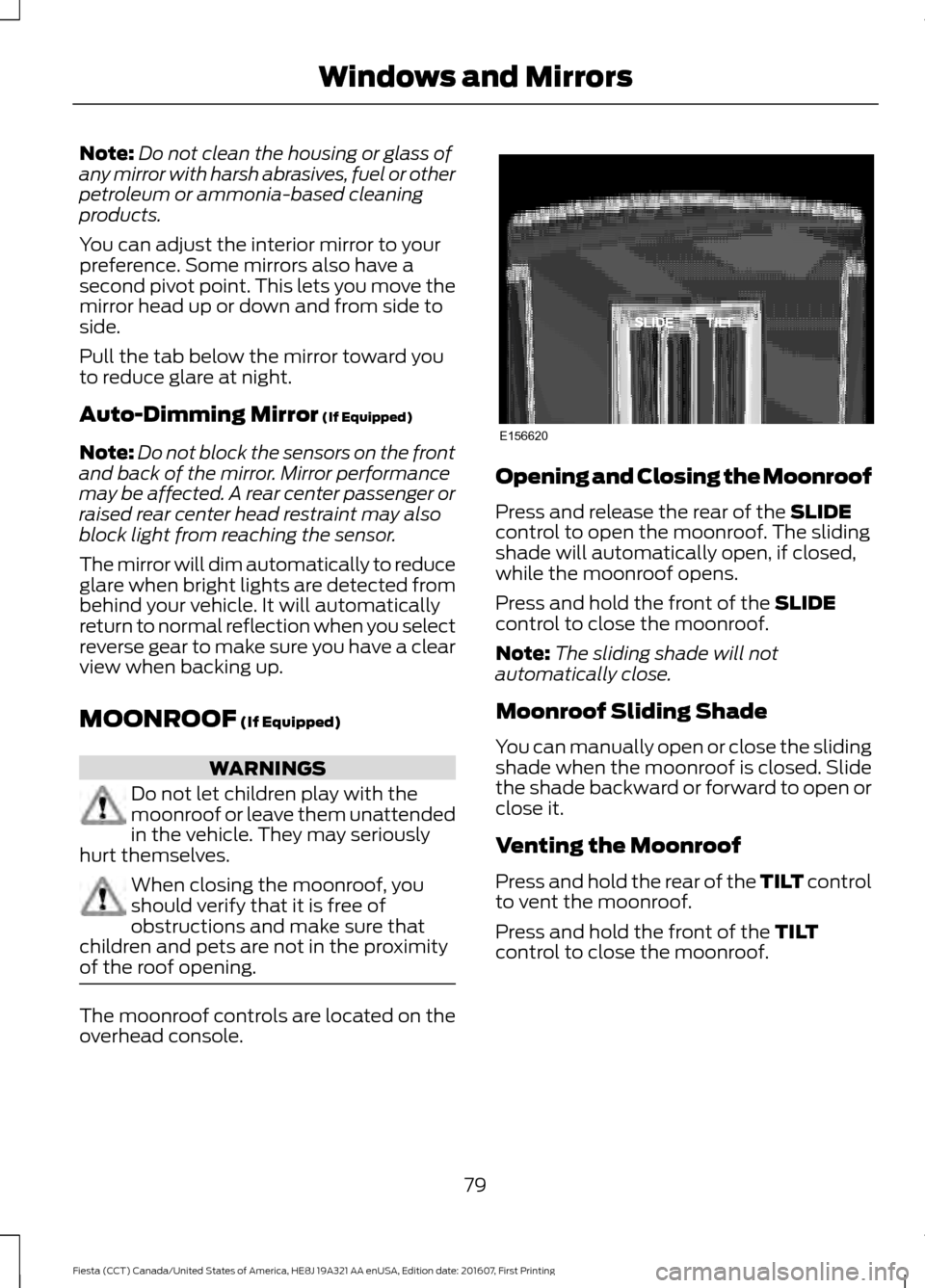
of the roof opening. The moonroof controls are located on the
overhead console. Opening and Closing the Moonroof
Press and release the rear of the
SLIDE
control to open the moonroof. The sliding
shade will automatically open, if closed,
while the moonroof opens.
Press and hold the front of the
SLIDE
control to close the moonroof.
Note: The sliding shade will not
automatically close.
Moonroof Sliding Shade
You can manually open or close the sliding
shade when the moonroof is closed. Slide
the shade backward or forward to open or
close it.
Venting the Moonroof
Press and hold the rear of the TILT control
to vent the moonroof.
Press and hold the front of the
TILT
control to close the moonroof.
79
Fiesta (CCT) Canada/United States of America, HE8J 19A321 AA enUSA, Edition date: 201607, First Printing Windows and MirrorsE156620
Page 82 of 450
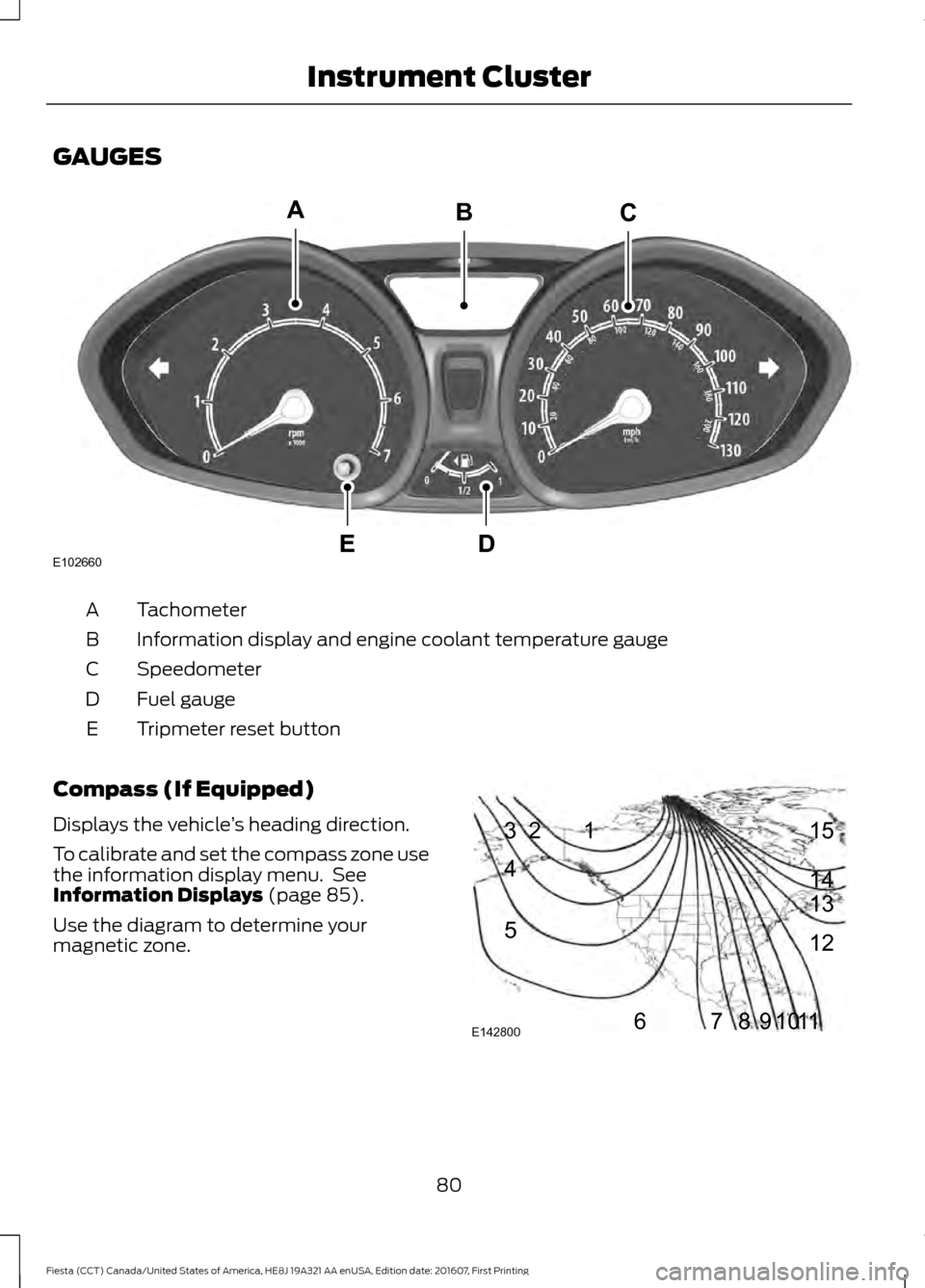
GAUGES
Tachometer
A
Information display and engine coolant temperature gauge
B
Speedometer
C
Fuel gauge
D
Tripmeter reset button
E
Compass (If Equipped)
Displays the vehicle ’s heading direction.
To calibrate and set the compass zone use
the information display menu. See
Information Displays (page 85).
Use the diagram to determine your
magnetic zone. 80
Fiesta (CCT) Canada/United States of America, HE8J 19A321 AA enUSA, Edition date: 201607, First Printing Instrument ClusterE102660
CA
DE
B 1
2
3
4
5
678910 1112 13 14 15
E142800
Page 83 of 450
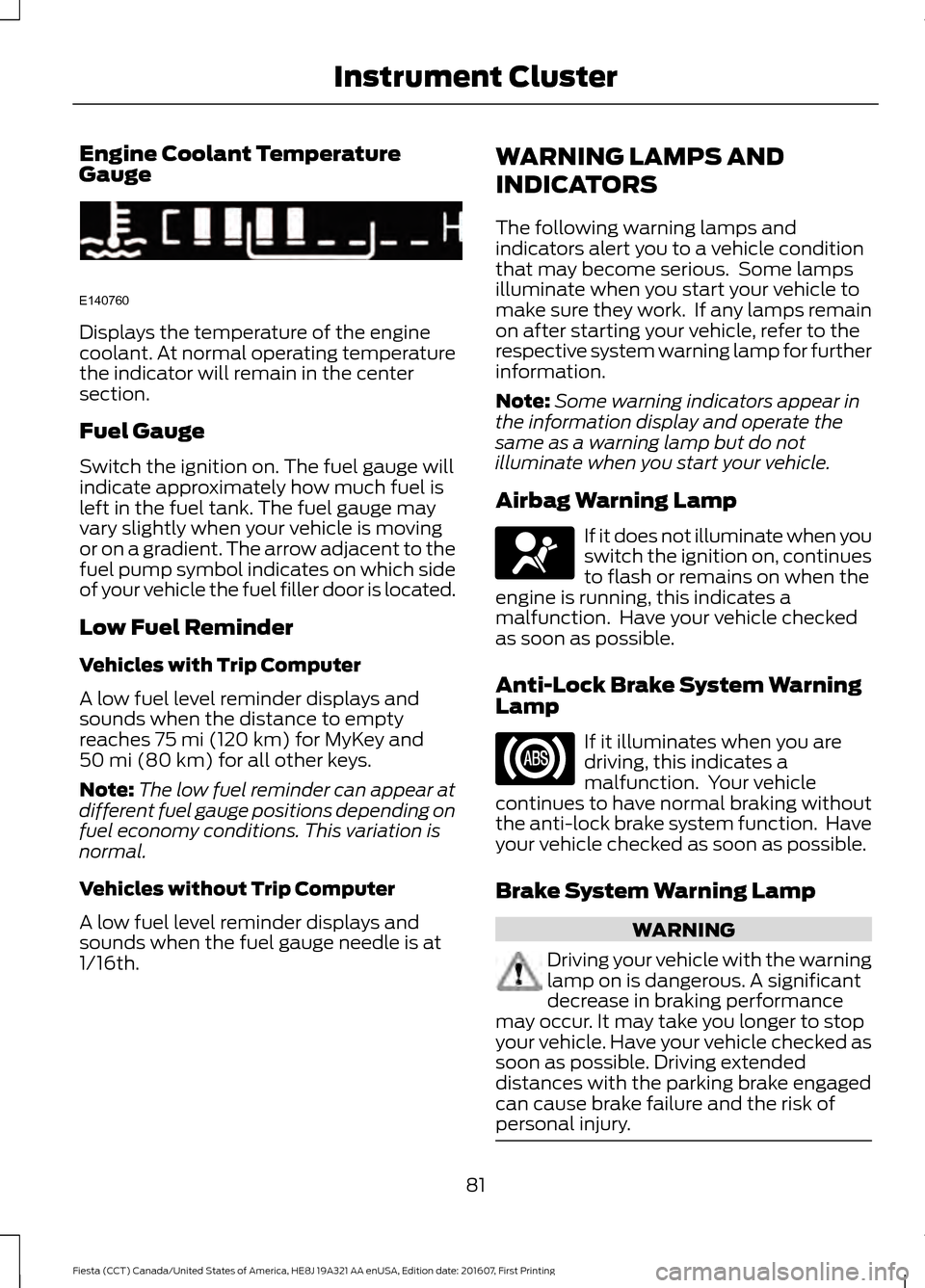
Engine Coolant Temperature
Gauge
Displays the temperature of the engine
coolant. At normal operating temperature
the indicator will remain in the center
section.
Fuel Gauge
Switch the ignition on. The fuel gauge will
indicate approximately how much fuel is
left in the fuel tank. The fuel gauge may
vary slightly when your vehicle is moving
or on a gradient. The arrow adjacent to the
fuel pump symbol indicates on which side
of your vehicle the fuel filler door is located.
Low Fuel Reminder
Vehicles with Trip Computer
A low fuel level reminder displays and
sounds when the distance to empty
reaches 75 mi (120 km) for MyKey and
50 mi (80 km) for all other keys.
Note: The low fuel reminder can appear at
different fuel gauge positions depending on
fuel economy conditions. This variation is
normal.
Vehicles without Trip Computer
A low fuel level reminder displays and
sounds when the fuel gauge needle is at
1/16th. WARNING LAMPS AND
INDICATORS
The following warning lamps and
indicators alert you to a vehicle condition
that may become serious. Some lamps
illuminate when you start your vehicle to
make sure they work. If any lamps remain
on after starting your vehicle, refer to the
respective system warning lamp for further
information.
Note:
Some warning indicators appear in
the information display and operate the
same as a warning lamp but do not
illuminate when you start your vehicle.
Airbag Warning Lamp If it does not illuminate when you
switch the ignition on, continues
to flash or remains on when the
engine is running, this indicates a
malfunction. Have your vehicle checked
as soon as possible.
Anti-Lock Brake System Warning
Lamp If it illuminates when you are
driving, this indicates a
malfunction. Your vehicle
continues to have normal braking without
the anti-lock brake system function. Have
your vehicle checked as soon as possible.
Brake System Warning Lamp WARNING
Driving your vehicle with the warning
lamp on is dangerous. A significant
decrease in braking performance
may occur. It may take you longer to stop
your vehicle. Have your vehicle checked as
soon as possible. Driving extended
distances with the parking brake engaged
can cause brake failure and the risk of
personal injury. 81
Fiesta (CCT) Canada/United States of America, HE8J 19A321 AA enUSA, Edition date: 201607, First Printing Instrument ClusterE140760 E67017
Page 85 of 450
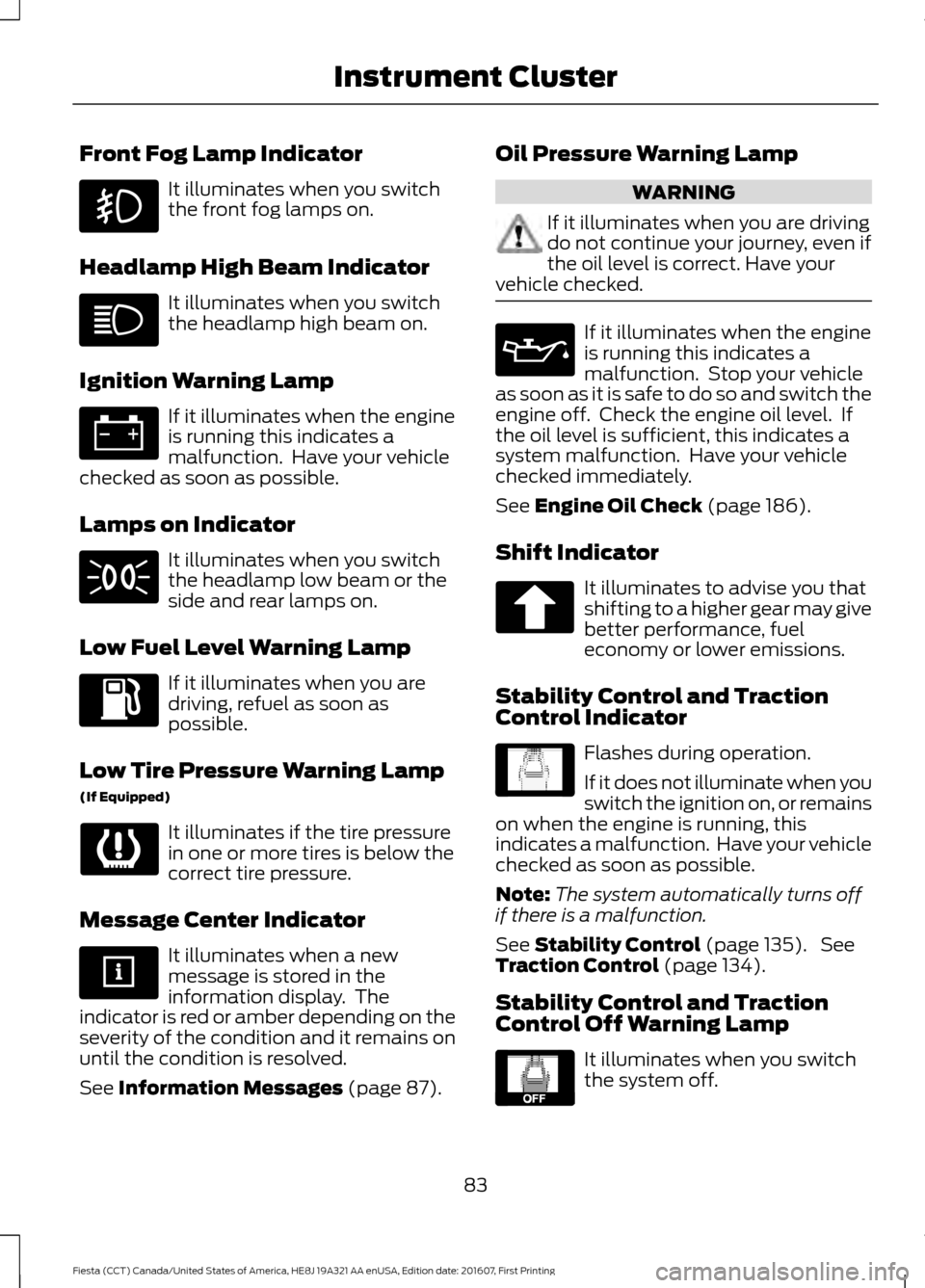
Front Fog Lamp Indicator
It illuminates when you switch
the front fog lamps on.
Headlamp High Beam Indicator It illuminates when you switch
the headlamp high beam on.
Ignition Warning Lamp If it illuminates when the engine
is running this indicates a
malfunction. Have your vehicle
checked as soon as possible.
Lamps on Indicator It illuminates when you switch
the headlamp low beam or the
side and rear lamps on.
Low Fuel Level Warning Lamp If it illuminates when you are
driving, refuel as soon as
possible.
Low Tire Pressure Warning Lamp
(If Equipped) It illuminates if the tire pressure
in one or more tires is below the
correct tire pressure.
Message Center Indicator It illuminates when a new
message is stored in the
information display. The
indicator is red or amber depending on the
severity of the condition and it remains on
until the condition is resolved.
See Information Messages (page 87). Oil Pressure Warning Lamp WARNING
If it illuminates when you are driving
do not continue your journey, even if
the oil level is correct. Have your
vehicle checked. If it illuminates when the engine
is running this indicates a
malfunction. Stop your vehicle
as soon as it is safe to do so and switch the
engine off. Check the engine oil level. If
the oil level is sufficient, this indicates a
system malfunction. Have your vehicle
checked immediately.
See
Engine Oil Check (page 186).
Shift Indicator It illuminates to advise you that
shifting to a higher gear may give
better performance, fuel
economy or lower emissions.
Stability Control and Traction
Control Indicator Flashes during operation.
If it does not illuminate when you
switch the ignition on, or remains
on when the engine is running, this
indicates a malfunction. Have your vehicle
checked as soon as possible.
Note: The system automatically turns off
if there is a malfunction.
See
Stability Control (page 135). See
Traction Control (page 134).
Stability Control and Traction
Control Off Warning Lamp It illuminates when you switch
the system off.
83
Fiesta (CCT) Canada/United States of America, HE8J 19A321 AA enUSA, Edition date: 201607, First Printing Instrument Cluster E138639 E130458
Page 88 of 450
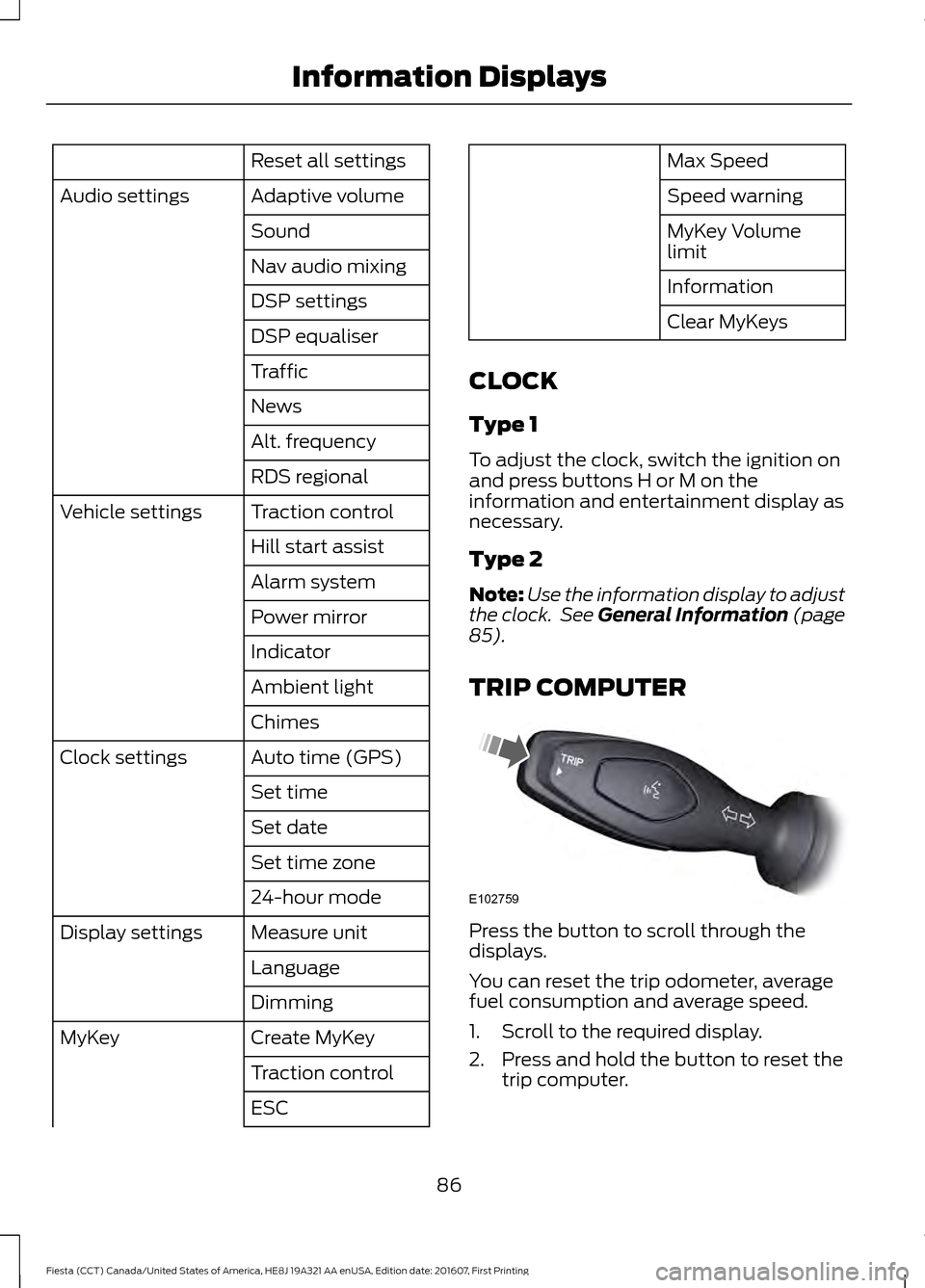
Reset all settings
Adaptive volume
Audio settings
Sound
Nav audio mixing
DSP settings
DSP equaliser
Traffic
News
Alt. frequency
RDS regional
Traction control
Vehicle settings
Hill start assist
Alarm system
Power mirror
Indicator
Ambient light
Chimes
Auto time (GPS)
Clock settings
Set time
Set date
Set time zone
24-hour mode
Measure unit
Display settings
Language
Dimming
Create MyKey
MyKey
Traction control
ESC Max Speed
Speed warning
MyKey Volume
limit
Information
Clear MyKeys
CLOCK
Type 1
To adjust the clock, switch the ignition on
and press buttons H or M on the
information and entertainment display as
necessary.
Type 2
Note: Use the information display to adjust
the clock. See General Information (page
85).
TRIP COMPUTER Press the button to scroll through the
displays.
You can reset the trip odometer, average
fuel consumption and average speed.
1. Scroll to the required display.
2. Press and hold the button to reset the
trip computer.
86
Fiesta (CCT) Canada/United States of America, HE8J 19A321 AA enUSA, Edition date: 201607, First Printing Information DisplaysE102759