wheel FORD FIESTA 2018 User Guide
[x] Cancel search | Manufacturer: FORD, Model Year: 2018, Model line: FIESTA, Model: FORD FIESTA 2018Pages: 449, PDF Size: 6.8 MB
Page 114 of 449
KEYLESS STARTING (If Equipped)
WARNING:
The system may not
function if the key is close to metal objects
or electronic devices such as cell phones.
Note: The ignition will automatically switch
off when you leave your vehicle unattended.
This is to prevent your vehicle battery
running out of charge.
Note: A valid key must be located inside
your vehicle to switch the ignition on and
start the engine.
Ignition On
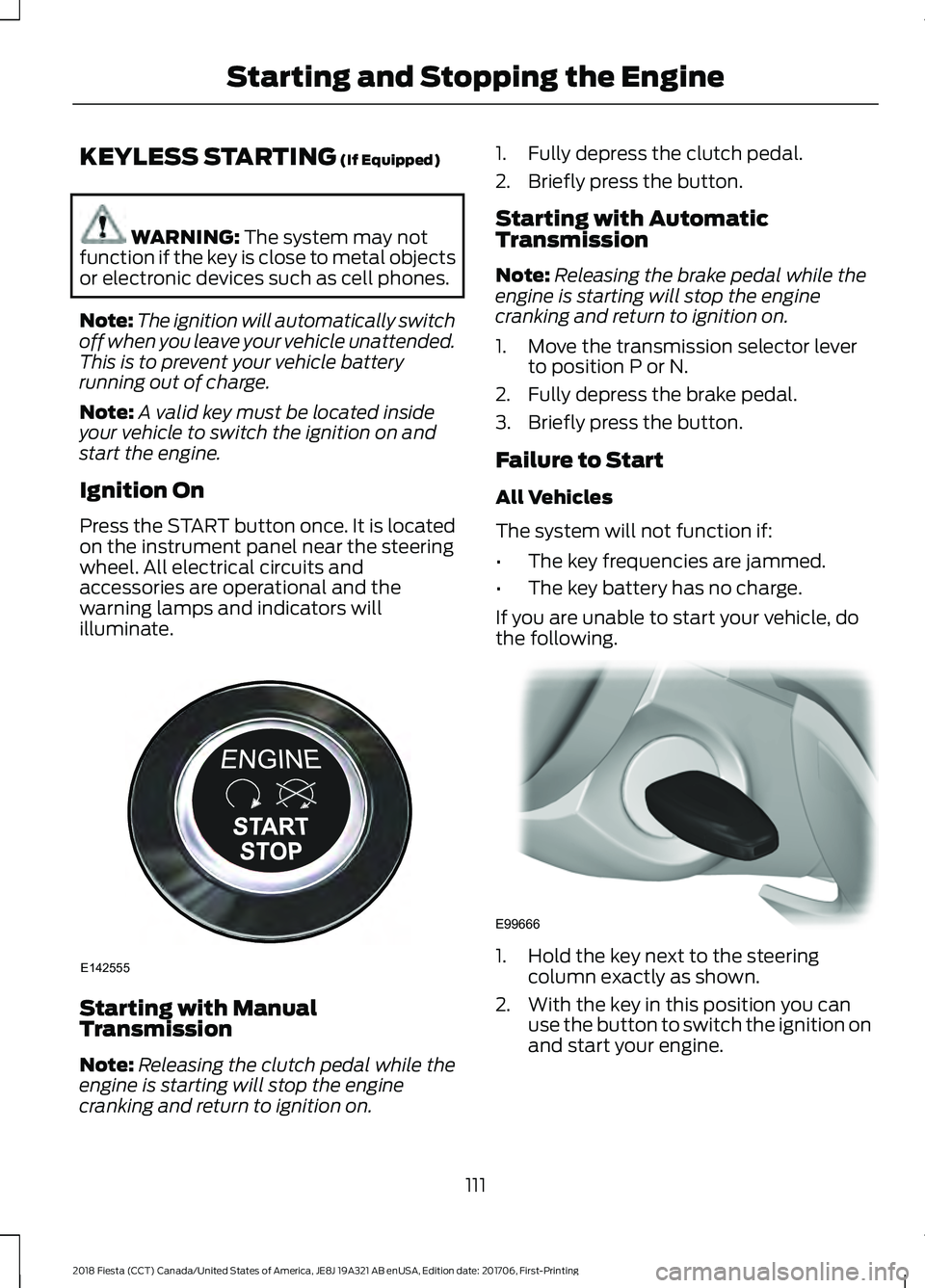
Press the START button once. It is located
on the instrument panel near the steering
wheel. All electrical circuits and
accessories are operational and the
warning lamps and indicators will
illuminate. Starting with Manual
Transmission
Note:
Releasing the clutch pedal while the
engine is starting will stop the engine
cranking and return to ignition on. 1. Fully depress the clutch pedal.
2. Briefly press the button.
Starting with Automatic
Transmission
Note:
Releasing the brake pedal while the
engine is starting will stop the engine
cranking and return to ignition on.
1. Move the transmission selector lever to position P or N.
2. Fully depress the brake pedal.
3. Briefly press the button.
Failure to Start
All Vehicles
The system will not function if:
• The key frequencies are jammed.
• The key battery has no charge.
If you are unable to start your vehicle, do
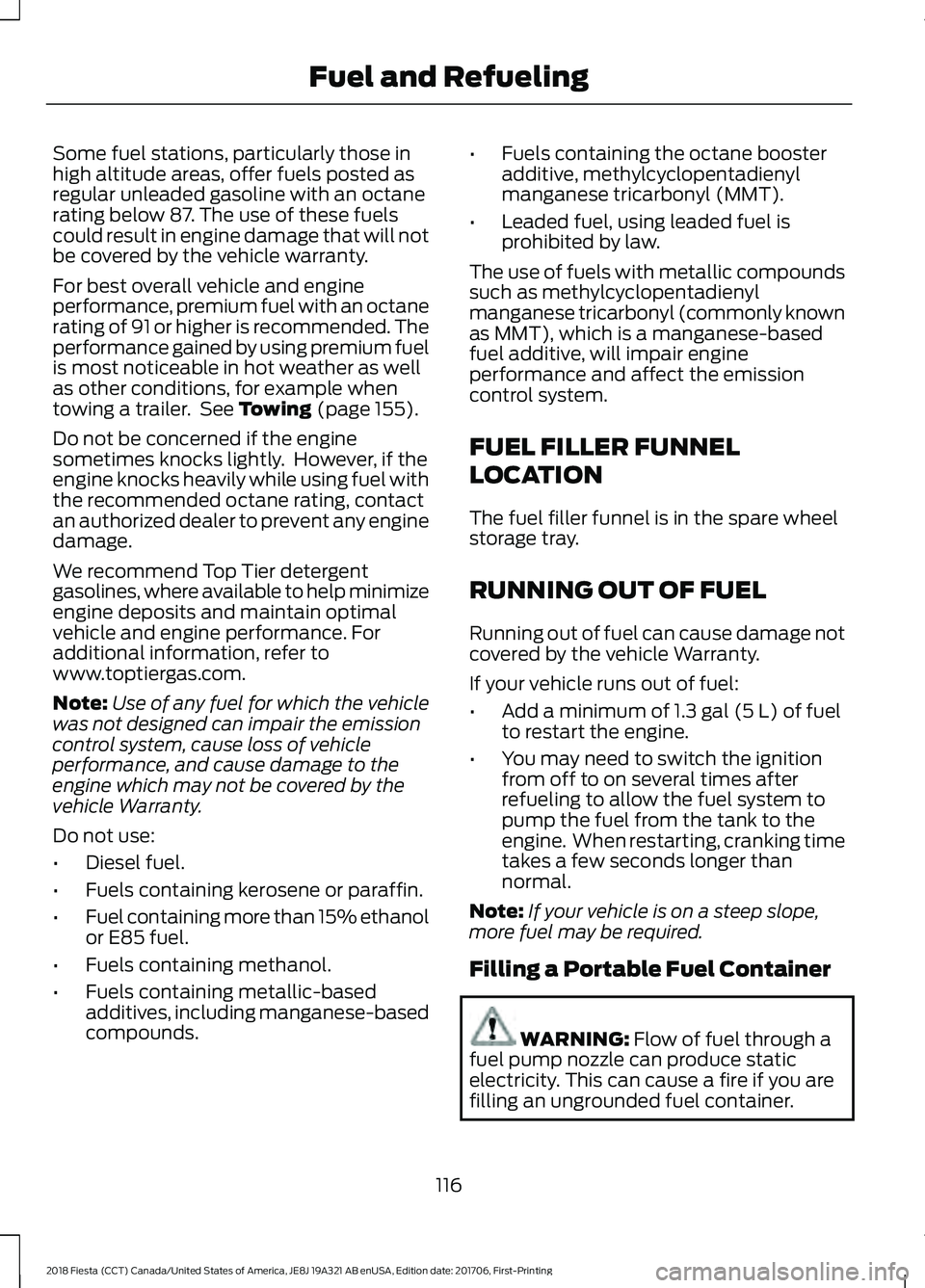
the following. 1. Hold the key next to the steering
column exactly as shown.
2. With the key in this position you can use the button to switch the ignition on
and start your engine.
111
2018 Fiesta (CCT) Canada/United States of America, JE8J 19A321 AB enUSA, Edition date: 201706, First-Printing Starting and Stopping the EngineE142555 E99666
Page 119 of 449
Some fuel stations, particularly those in
high altitude areas, offer fuels posted as
regular unleaded gasoline with an octane
rating below 87. The use of these fuels
could result in engine damage that will not
be covered by the vehicle warranty.
For best overall vehicle and engine
performance, premium fuel with an octane
rating of 91 or higher is recommended. The
performance gained by using premium fuel
is most noticeable in hot weather as well
as other conditions, for example when
towing a trailer. See Towing (page 155).
Do not be concerned if the engine
sometimes knocks lightly. However, if the
engine knocks heavily while using fuel with
the recommended octane rating, contact
an authorized dealer to prevent any engine
damage.
We recommend Top Tier detergent
gasolines, where available to help minimize
engine deposits and maintain optimal
vehicle and engine performance. For
additional information, refer to
www.toptiergas.com.
Note: Use of any fuel for which the vehicle
was not designed can impair the emission
control system, cause loss of vehicle
performance, and cause damage to the
engine which may not be covered by the
vehicle Warranty.
Do not use:
• Diesel fuel.
• Fuels containing kerosene or paraffin.
• Fuel containing more than 15% ethanol
or E85 fuel.
• Fuels containing methanol.
• Fuels containing metallic-based
additives, including manganese-based
compounds. •
Fuels containing the octane booster
additive, methylcyclopentadienyl
manganese tricarbonyl (MMT).
• Leaded fuel, using leaded fuel is
prohibited by law.
The use of fuels with metallic compounds
such as methylcyclopentadienyl
manganese tricarbonyl (commonly known
as MMT), which is a manganese-based
fuel additive, will impair engine
performance and affect the emission
control system.
FUEL FILLER FUNNEL
LOCATION
The fuel filler funnel is in the spare wheel
storage tray.
RUNNING OUT OF FUEL
Running out of fuel can cause damage not
covered by the vehicle Warranty.
If your vehicle runs out of fuel:
• Add a minimum of
1.3 gal (5 L) of fuel
to restart the engine.
• You may need to switch the ignition
from off to on several times after
refueling to allow the fuel system to
pump the fuel from the tank to the
engine. When restarting, cranking time
takes a few seconds longer than
normal.
Note: If your vehicle is on a steep slope,
more fuel may be required.
Filling a Portable Fuel Container WARNING:
Flow of fuel through a
fuel pump nozzle can produce static
electricity. This can cause a fire if you are
filling an ungrounded fuel container.
116
2018 Fiesta (CCT) Canada/United States of America, JE8J 19A321 AB enUSA, Edition date: 201706, First-Printing Fuel and Refueling
Page 131 of 449
We have designed your vehicle to improve
fuel economy by reducing fuel usage
compared to a traditional torque converter
automatic transmission. When you take
your foot off the accelerator pedal and
your vehicle begins to slow down, this can
feel like a light to medium braking
sensation.
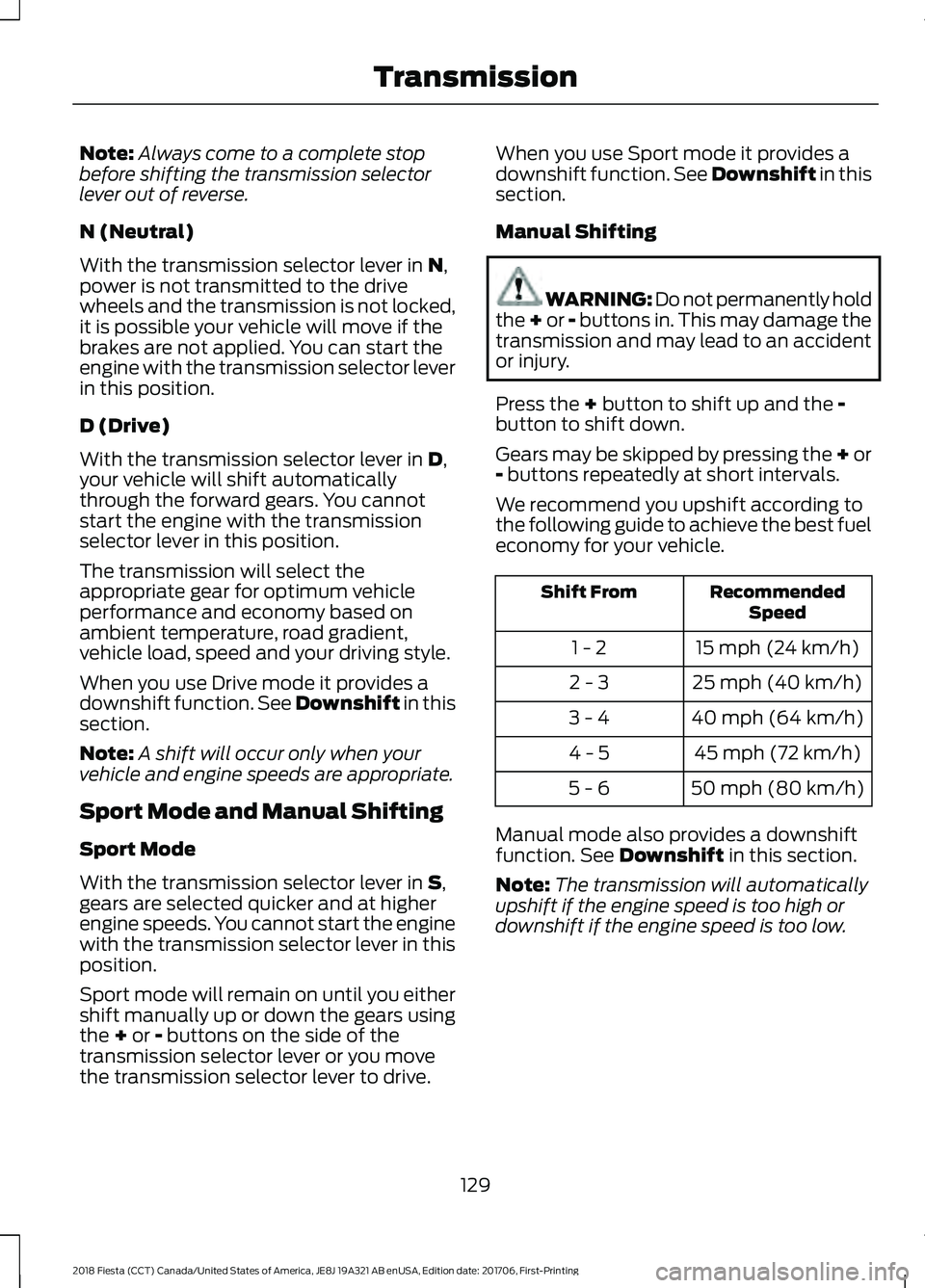
Selector Lever Positions
WARNING: You must press the
brake pedal to apply the brakes before
moving the transmission selector lever.
Failure to keep the brakes applied until you
are ready to move off may lead to an
accident or injury. ParkP
Reverse
R
Neutral
N
Drive
D
Sport mode or manual shifting
S
Manual shift up
+
Manual shift down
- Press the button on the front of the
transmission selector lever to change to
each position.
The transmission selector lever position
will be shown in the information display.
P (Park)
WARNING:
You must only select P
when your vehicle is stationary. Selecting
P
when your vehicle is moving will damage
the transmission and may lead to an
accident or injury. WARNING:
You must move the
transmission selector lever to position P
and fully apply the parking brake before
you leave your vehicle. Failure to leave your
vehicle securely parked may lead to an
accident or injury.
Your vehicle will not move while the
transmission selector lever is in P. You can
start the engine with the transmission
selector lever in this position.
Note: An audible warning will sound if you
open the driver's door and you have not
moved the transmission selector lever to
park.
R (Reverse) WARNING:
You must only select R
when your vehicle is stationary and the
engine is at idle speed. Selecting
R when
your vehicle is moving or at a high engine
speed will damage the transmission or
lead to an accident or injury.
With the transmission selector lever in
R,
power is transmitted to the drive wheels
to allow your vehicle to move backward.
You cannot start the engine with the
transmission selector lever in this position.
128
2018 Fiesta (CCT) Canada/United States of America, JE8J 19A321 AB enUSA, Edition date: 201706, First-Printing TransmissionE161746
Page 132 of 449
Note:
Always come to a complete stop
before shifting the transmission selector
lever out of reverse.
N (Neutral)
With the transmission selector lever in N,
power is not transmitted to the drive
wheels and the transmission is not locked,
it is possible your vehicle will move if the
brakes are not applied. You can start the
engine with the transmission selector lever
in this position.
D (Drive)
With the transmission selector lever in
D,
your vehicle will shift automatically
through the forward gears. You cannot
start the engine with the transmission
selector lever in this position.
The transmission will select the
appropriate gear for optimum vehicle
performance and economy based on
ambient temperature, road gradient,
vehicle load, speed and your driving style.
When you use Drive mode it provides a
downshift function. See Downshift in this
section.
Note: A shift will occur only when your
vehicle and engine speeds are appropriate.
Sport Mode and Manual Shifting
Sport Mode
With the transmission selector lever in
S,
gears are selected quicker and at higher
engine speeds. You cannot start the engine
with the transmission selector lever in this
position.
Sport mode will remain on until you either
shift manually up or down the gears using
the
+ or - buttons on the side of the
transmission selector lever or you move
the transmission selector lever to drive. When you use Sport mode it provides a
downshift function. See Downshift in this
section.
Manual Shifting WARNING: Do not permanently hold
the
+ or - buttons in. This may damage the
transmission and may lead to an accident
or injury.
Press the
+ button to shift up and the -
button to shift down.
Gears may be skipped by pressing the + or
-
buttons repeatedly at short intervals.
We recommend you upshift according to
the following guide to achieve the best fuel
economy for your vehicle. Recommended
Speed
Shift From
15 mph (24 km/h)
1 - 2
25 mph (40 km/h)
2 - 3
40 mph (64 km/h)
3 - 4
45 mph (72 km/h)
4 - 5
50 mph (80 km/h)
5 - 6
Manual mode also provides a downshift
function. See
Downshift in this section.
Note: The transmission will automatically
upshift if the engine speed is too high or
downshift if the engine speed is too low.
129
2018 Fiesta (CCT) Canada/United States of America, JE8J 19A321 AB enUSA, Edition date: 201706, First-Printing Transmission
Page 135 of 449
GENERAL INFORMATION
Wet brakes result in reduced braking
efficiency. Gently press the brake pedal a
few times when driving from a car wash or
standing water to dry the brakes.
Note:
Occasional brake noise is normal. If
a metal-to-metal, continuous grinding or
continuous squeal sound is present, the
brake linings may be worn-out. Have the
system checked by an authorized dealer. If
your vehicle has continuous vibration or
shudder in the steering wheel while braking,
have it checked by an authorized dealer.
Note: Brake dust may accumulate on the
wheels, even under normal driving
conditions. Some dust is inevitable as the
brakes wear and does not contribute to
brake noise. See Cleaning the Wheels
(page 217).
Note: Depending on applicable laws and
regulations in the country for which your
vehicle was originally built, the brake lamps
could flash during heavy braking. Following
this, the hazard lights could also flash when
your vehicle comes to a stop.
Brake Over Accelerator
In the event that the accelerator pedal
becomes stuck or entrapped, apply steady
and firm pressure to the brake pedal to
slow your vehicle and reduce engine
power. If you experience this condition,
apply the brakes and bring your vehicle to
a safe stop. Move the transmission to park
(P), switch the engine off and apply the
parking brake. Inspect the accelerator
pedal for any interference. If none are
found and the condition persists, have your
vehicle towed to the nearest authorized
dealer. Brake Assist
Brake assist detects when you rapidly
brake by measuring the rate at which you
press the brake pedal. It provides
maximum braking efficiency as long as you
press the pedal, and can reduce stopping
distances in critical situations
Anti-Lock Brake System
This system helps you maintain steering
control during emergency stops by keeping
the brakes from locking.
If it illuminates when you are
driving, this indicates a
malfunction. Your vehicle
continues to have normal braking without
the anti-lock brake system function. Have
your vehicle checked as soon as possible.
It also momentarily illuminates when you
switch the ignition on to confirm the lamp
is functional. If it does not illuminate when
you switch the ignition on, or begins to
flash at any time, have the system checked
by an authorized dealer. It illuminates when you engage
the parking brake and the
ignition is on.
If it illuminates when your vehicle is
moving, make sure the parking brake is
disengaged. If the parking brake is
disengaged, this indicates low brake fluid
level or a brake system fault. Have your
vehicle immediately checked.
It also momentarily illuminates when you
switch the ignition on to confirm the lamp
is functional. If it does not illuminate when
you switch the ignition on, or begins to
flash at any time, have the system checked
by an authorized dealer.
132
2018 Fiesta (CCT) Canada/United States of America, JE8J 19A321 AB enUSA, Edition date: 201706, First-Printing Brakes E138644
Page 136 of 449
HINTS ON DRIVING WITH
ANTI-LOCK BRAKES
The anti-lock braking system does not
eliminate the risks when:
•
You drive too closely to the vehicle in
front of you.
• Your vehicle is hydroplaning.
• You take corners too fast.
• The road surface is poor.
Note: If the system activates, the brake
pedal may pulse and may travel further.
Maintain pressure on the brake pedal. You
may also hear a noise from the system. This
is normal.
PARKING BRAKE
Vehicles With Automatic
Transmission WARNING: Always set the parking
brake fully and leave your vehicle with the
transmission selector lever in position P.
Note: If you park your vehicle on a hill and
facing uphill move the transmission selector
lever to position P and turn the steering
wheel away from the curb.
Note: If you park your vehicle on a hill and
facing downhill move the transmission
selector lever to position P and turn the
steering wheel toward the curb.
Vehicles With Manual
Transmission WARNING:
Always set the parking
brake fully. Note:
If you park your vehicle on a hill and
facing uphill select first gear and turn the
steering wheel away from the curb.
Note: If you park your vehicle on a hill and
facing downhill select reverse gear and turn
the steering wheel toward the curb.
All Vehicles
Note: Do not press the release button while
pulling the lever up.
To apply the parking brake:
1. Press the foot brake pedal firmly.
2. Pull the parking brake lever up to its fullest extent.
To release the parking brake:
1. Press the brake pedal firmly.
2. Pull the lever up slightly.
3. Press the release button and push the lever down.
HILL START ASSIST
(If Equipped) WARNING:
The system does not
replace the parking brake. When you leave
your vehicle, always apply the parking
brake and shift the transmission into park
(P) for automatic transmission or first gear
for manual transmission. WARNING:
You must remain in your
vehicle when the system turns on. At all
times, you are responsible for controlling
your vehicle, supervising the system and
intervening, if required. Failure to take care
may result in the loss of control of your
vehicle, serious personal injury or death. WARNING:
The system turns off if
there is a malfunction or if you excessively
rev the engine.
133
2018 Fiesta (CCT) Canada/United States of America, JE8J 19A321 AB enUSA, Edition date: 201706, First-Printing Brakes
Page 138 of 449
PRINCIPLE OF OPERATION
The traction control system helps avoid
drive wheel spin and loss of traction.
If your vehicle begins to slide, the system
applies the brakes to individual wheels
and, when needed, reduces engine power
at the same time. If the wheels spin when
accelerating on slippery or loose surfaces,
the system reduces engine power in order
to increase traction.
USING TRACTION CONTROL
WARNING: The stability and traction
control light illuminates steadily if the
system detects a failure. Make sure you
did not manually disable the traction
control system using the information
display controls or the switch. If the
stability control and traction control light
is still illuminating steadily, have the
system serviced by an authorized dealer
immediately. Operating your vehicle with
the traction control disabled could lead to
an increased risk of loss of vehicle control,
vehicle rollover, personal injury and death.
The system automatically turns on each
time you switch the ignition on.
If your vehicle is stuck in mud or snow,
switching traction control off may be
beneficial as this allows the wheels to spin.
Note: When you switch traction control off,
stability control remains fully active.
Switching the System Off
When you switch the system off or on, a
message appears in the information
display showing system status.
You can switch the system off by either
using the information display controls or
the switch. Using the Information Display
Controls
You can switch this feature off or on in the
information display. See General
Information (page 84).
Using a Switch
(If Equipped)
Use the traction control switch on the
instrument panel to switch the system off
or on.
System Indicator Lights and
Messages The stability and traction control
light:
• Temporarily illuminates on engine
start-up.
• Flashes when a driving condition
activates either of the systems.
• Illuminates if a problem occurs in either
of the systems. The stability and traction control
off light temporarily illuminates
on engine start-up and stays on
when you switch the traction control
system off.
135
2018 Fiesta (CCT) Canada/United States of America, JE8J 19A321 AB enUSA, Edition date: 201706, First-Printing Traction ControlE138639 E130458
Page 139 of 449
PRINCIPLE OF OPERATION
Electronic Stability Program
WARNING: The system does not
relieve you of your responsibility to drive
with due care and attention. Failure to drive
with due care and attention could lead to
loss of vehicle control. WARNING:
Vehicle modifications
involving braking system, aftermarket roof
racks, suspension, steering system, tire
construction and wheel and tire size may
change the handling characteristics of the
vehicle and may adversely affect the
performance of the AdvanceTrac system.
In addition, installing any stereo
loudspeakers may interfere with and
adversely affect the AdvanceTrac system.
Install any aftermarket stereo loudspeaker
as far as possible from the front center
console, the tunnel, and the front seats in
order to minimize the risk of interfering with
the AdvanceTrac sensors. Reducing the
effectiveness of the AdvanceTrac system
could lead to an increased risk of loss of
vehicle control, vehicle rollover, personal
injury and death. WARNING:
Remember that even
advanced technology cannot defy the laws
of physics. It’ s always possible to lose
control of a vehicle due to inappropriate
driver input for the conditions. Aggressive
driving on any road condition can cause
you to lose control of your vehicle
increasing the risk of personal injury or
property damage. Activation of the
AdvanceTrac system is an indication that
at least some of the tires have exceeded their ability to grip the road; this could
reduce the operator
’s ability to control the
vehicle potentially resulting in a loss of
vehicle control, vehicle rollover, personal
injury and death. If your AdvanceTrac
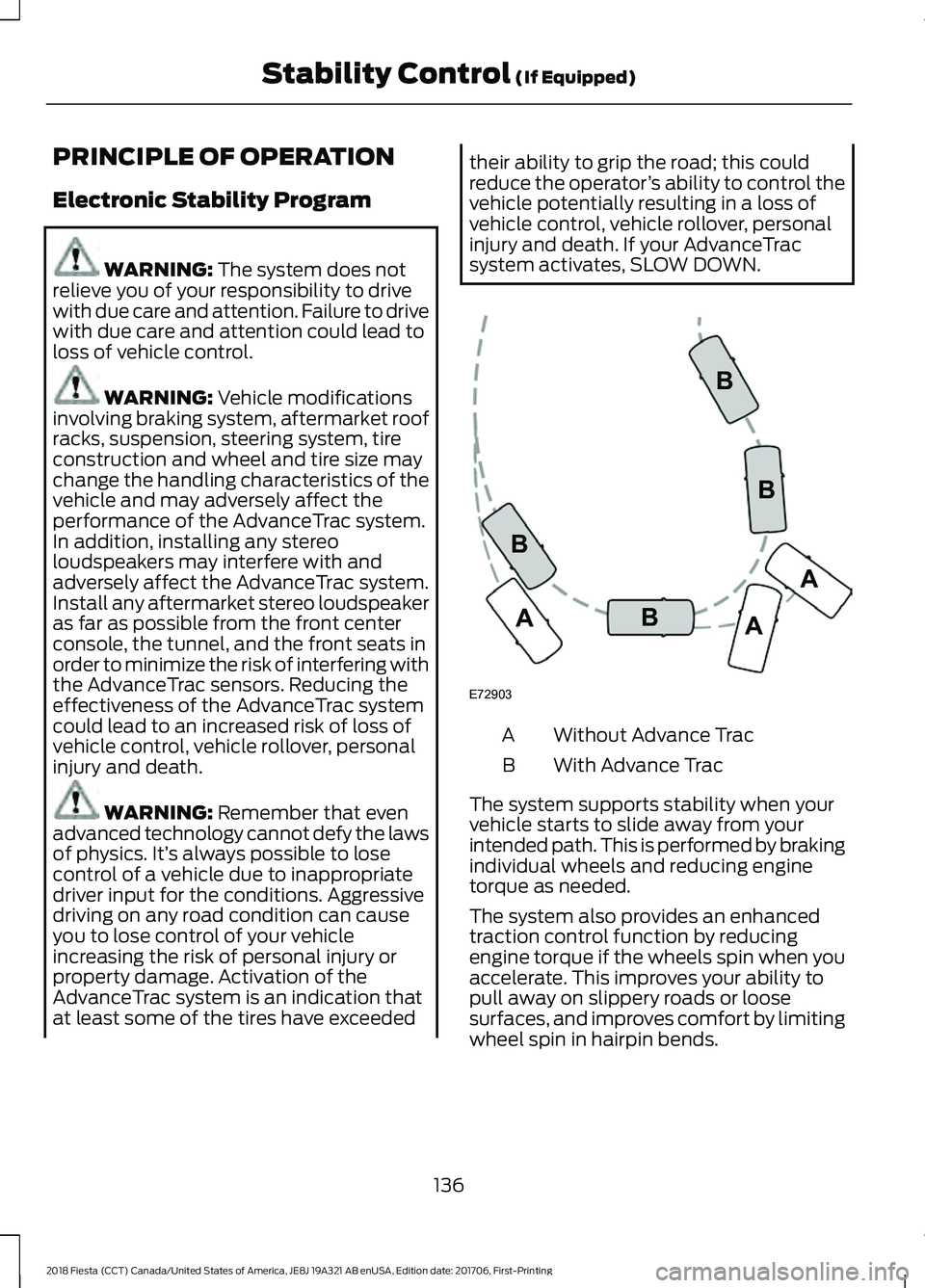
system activates, SLOW DOWN. Without Advance Trac
A
With Advance Trac
B
The system supports stability when your
vehicle starts to slide away from your
intended path. This is performed by braking
individual wheels and reducing engine
torque as needed.
The system also provides an enhanced
traction control function by reducing
engine torque if the wheels spin when you
accelerate. This improves your ability to
pull away on slippery roads or loose
surfaces, and improves comfort by limiting
wheel spin in hairpin bends.
136
2018 Fiesta (CCT) Canada/United States of America, JE8J 19A321 AB enUSA, Edition date: 201706, First-Printing Stability Control
(If Equipped)E72903A
AA
B
BB
B
Page 146 of 449
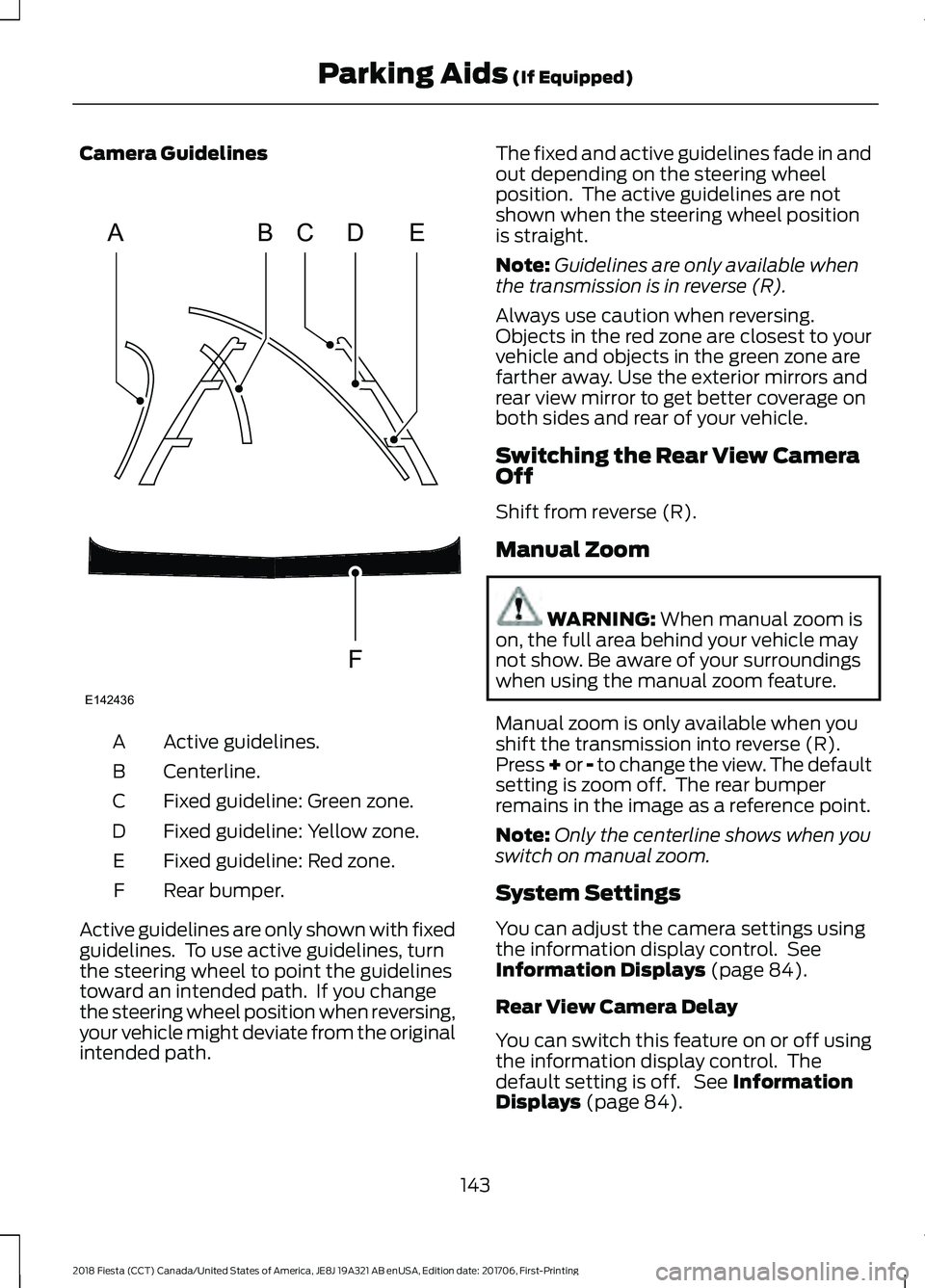
Camera Guidelines
Active guidelines.
A
Centerline.
B
Fixed guideline: Green zone.
C
Fixed guideline: Yellow zone.
D
Fixed guideline: Red zone.
E
Rear bumper.
F
Active guidelines are only shown with fixed
guidelines. To use active guidelines, turn
the steering wheel to point the guidelines
toward an intended path. If you change
the steering wheel position when reversing,
your vehicle might deviate from the original
intended path. The fixed and active guidelines fade in and
out depending on the steering wheel
position. The active guidelines are not
shown when the steering wheel position
is straight.
Note:
Guidelines are only available when
the transmission is in reverse (R).
Always use caution when reversing.
Objects in the red zone are closest to your
vehicle and objects in the green zone are
farther away. Use the exterior mirrors and
rear view mirror to get better coverage on
both sides and rear of your vehicle.
Switching the Rear View Camera
Off
Shift from reverse (R).
Manual Zoom WARNING: When manual zoom is
on, the full area behind your vehicle may
not show. Be aware of your surroundings
when using the manual zoom feature.
Manual zoom is only available when you
shift the transmission into reverse (R).
Press + or - to change the view. The default
setting is zoom off. The rear bumper
remains in the image as a reference point.
Note: Only the centerline shows when you
switch on manual zoom.
System Settings
You can adjust the camera settings using
the information display control. See
Information Displays
(page 84).
Rear View Camera Delay
You can switch this feature on or off using
the information display control. The
default setting is off. See
Information
Displays (page 84).
143
2018 Fiesta (CCT) Canada/United States of America, JE8J 19A321 AB enUSA, Edition date: 201706, First-Printing Parking Aids
(If Equipped)ABCD
F
E
E142436
Page 148 of 449
PRINCIPLE OF OPERATION
Cruise control lets you maintain a set
speed without keeping your foot on the
accelerator pedal. You can use cruise
control when your vehicle speed is greater
than 20 mph (30 km/h).
USING CRUISE CONTROL WARNING: Do not use cruise control
on winding roads, in heavy traffic or when
the road surface is slippery. This could
result in loss of vehicle control, serious
injury or death. WARNING:
When you are going
downhill, your vehicle speed could increase
above the set speed. The system does not
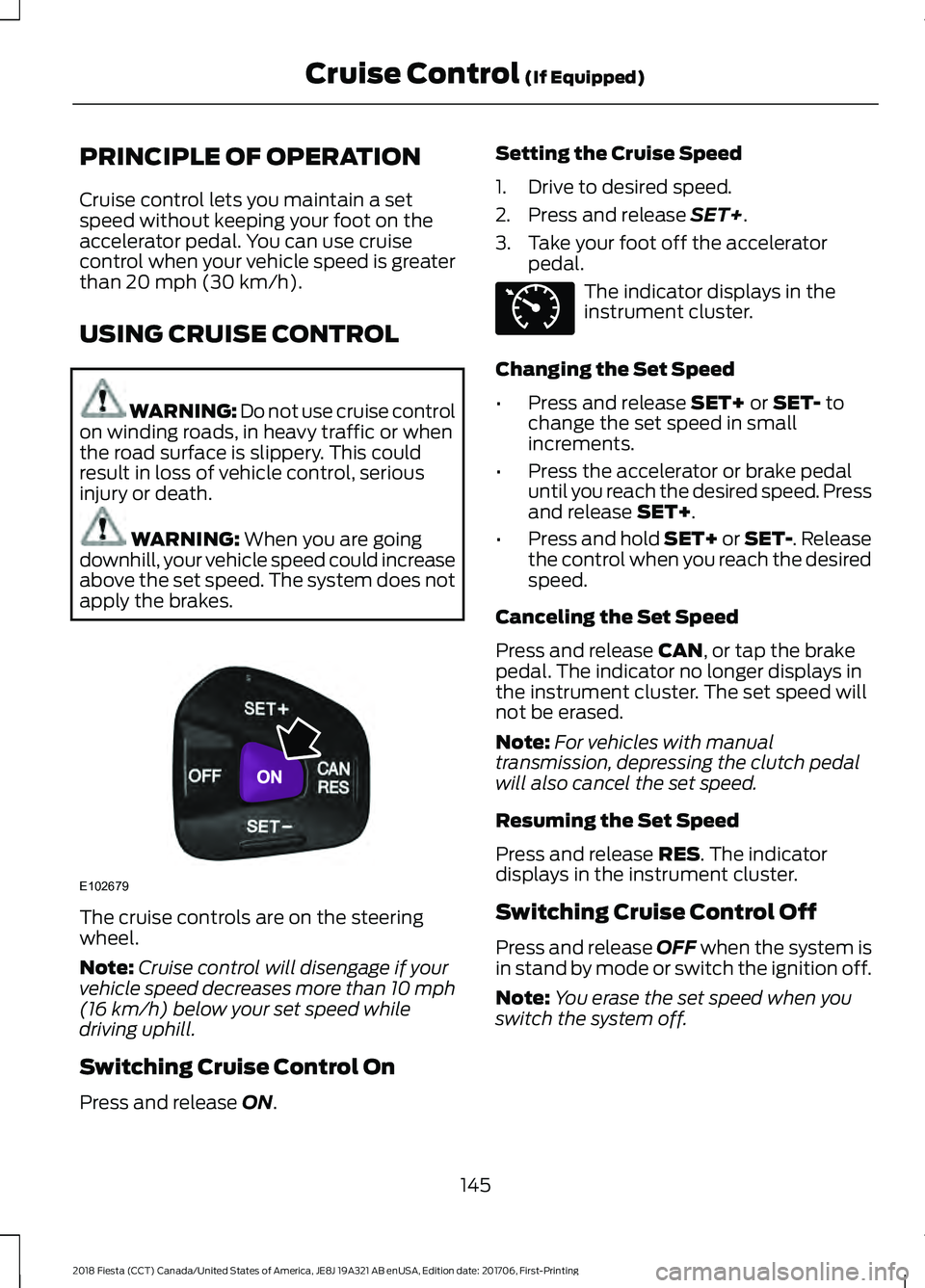
apply the brakes. The cruise controls are on the steering
wheel.
Note:
Cruise control will disengage if your
vehicle speed decreases more than 10 mph
(16 km/h)
below your set speed while
driving uphill.
Switching Cruise Control On
Press and release
ON. Setting the Cruise Speed
1. Drive to desired speed.
2. Press and release
SET+.
3. Take your foot off the accelerator pedal. The indicator displays in the
instrument cluster.
Changing the Set Speed
• Press and release
SET+ or SET- to
change the set speed in small
increments.
• Press the accelerator or brake pedal
until you reach the desired speed. Press
and release
SET+.
• Press and hold SET+ or SET-. Release
the control when you reach the desired
speed.
Canceling the Set Speed
Press and release
CAN, or tap the brake
pedal. The indicator no longer displays in
the instrument cluster. The set speed will
not be erased.
Note: For vehicles with manual
transmission, depressing the clutch pedal
will also cancel the set speed.
Resuming the Set Speed
Press and release
RES. The indicator
displays in the instrument cluster.
Switching Cruise Control Off
Press and release
OFF when the system is
in stand by mode or switch the ignition off.
Note: You erase the set speed when you
switch the system off.
145
2018 Fiesta (CCT) Canada/United States of America, JE8J 19A321 AB enUSA, Edition date: 201706, First-Printing Cruise Control
(If Equipped)E102679 E71340