stop start FORD FIESTA 2018 Owner's Manual
[x] Cancel search | Manufacturer: FORD, Model Year: 2018, Model line: FIESTA, Model: FORD FIESTA 2018Pages: 449, PDF Size: 6.8 MB
Page 236 of 449
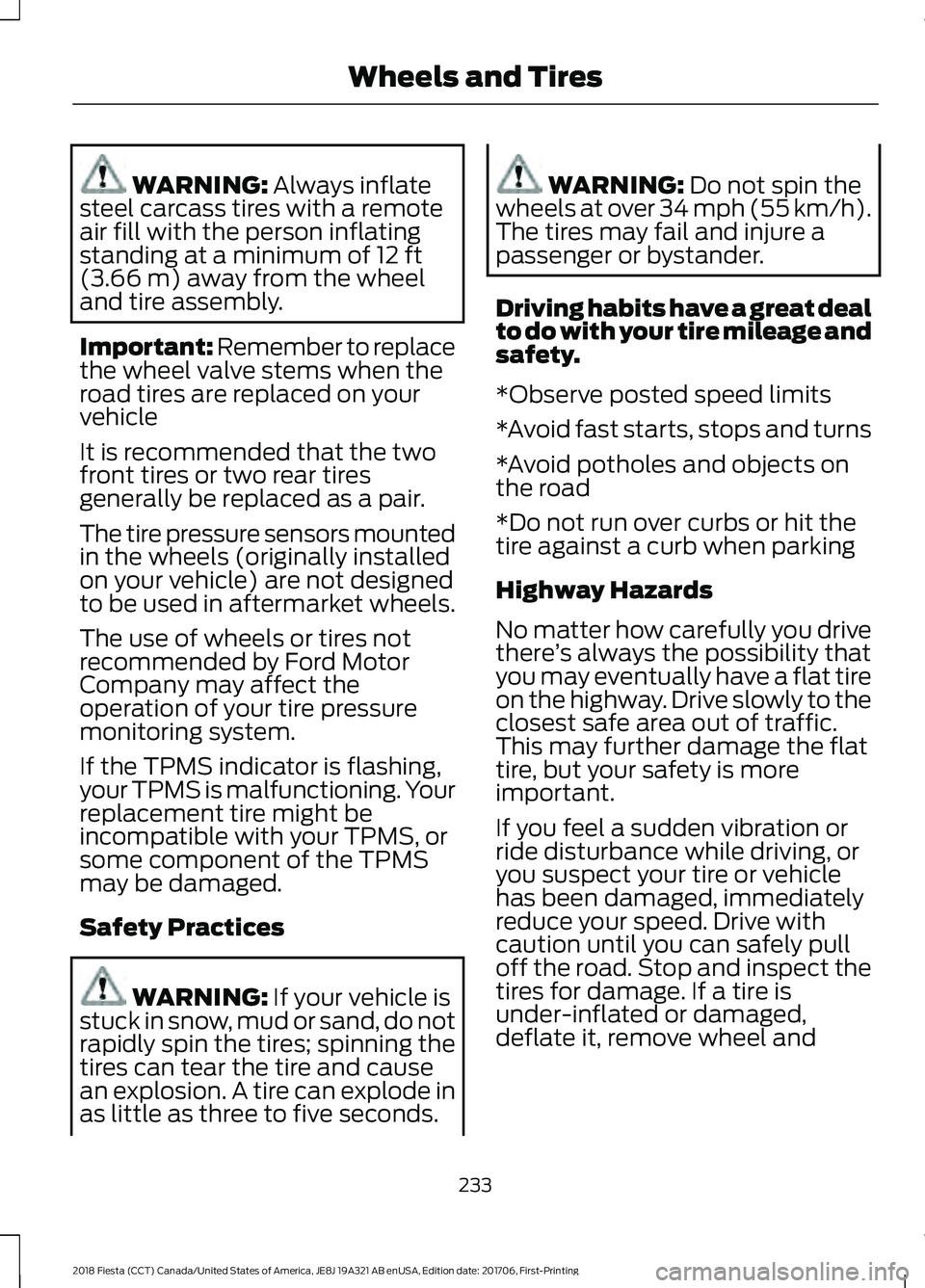
WARNING: Always inflate
steel carcass tires with a remote
air fill with the person inflating
standing at a minimum of
12 ft
(3.66 m) away from the wheel
and tire assembly.
Important: Remember to replace
the wheel valve stems when the
road tires are replaced on your
vehicle
It is recommended that the two
front tires or two rear tires
generally be replaced as a pair.
The tire pressure sensors mounted
in the wheels (originally installed
on your vehicle) are not designed
to be used in aftermarket wheels.
The use of wheels or tires not
recommended by Ford Motor
Company may affect the
operation of your tire pressure
monitoring system.
If the TPMS indicator is flashing,
your TPMS is malfunctioning. Your
replacement tire might be
incompatible with your TPMS, or
some component of the TPMS
may be damaged.
Safety Practices WARNING:
If your vehicle is
stuck in snow, mud or sand, do not
rapidly spin the tires; spinning the
tires can tear the tire and cause
an explosion. A tire can explode in
as little as three to five seconds. WARNING:
Do not spin the
wheels at over 34 mph (55 km/h).
The tires may fail and injure a
passenger or bystander.
Driving habits have a great deal
to do with your tire mileage and
safety.
*Observe posted speed limits
*Avoid fast starts, stops and turns
*Avoid potholes and objects on
the road
*Do not run over curbs or hit the
tire against a curb when parking
Highway Hazards
No matter how carefully you drive
there ’s always the possibility that
you may eventually have a flat tire
on the highway. Drive slowly to the
closest safe area out of traffic.
This may further damage the flat
tire, but your safety is more
important.
If you feel a sudden vibration or
ride disturbance while driving, or
you suspect your tire or vehicle
has been damaged, immediately
reduce your speed. Drive with
caution until you can safely pull
off the road. Stop and inspect the
tires for damage. If a tire is
under-inflated or damaged,
deflate it, remove wheel and
233
2018 Fiesta (CCT) Canada/United States of America, JE8J 19A321 AB enUSA, Edition date: 201706, First-Printing Wheels and Tires
Page 239 of 449
Each tire, including the spare, if
provided, should be checked
monthly when cold and inflated
to the inflation pressure recommended by
the vehicle manufacturer on the vehicle
placard or tire inflation pressure label.
Installation of any tires that are not the
original equipment tire size can cause the
speedometer to display incorrect vehicle
speed.
As an added safety feature, your vehicle
has been equipped with a Tire Pressure
Monitoring System (TPMS) that
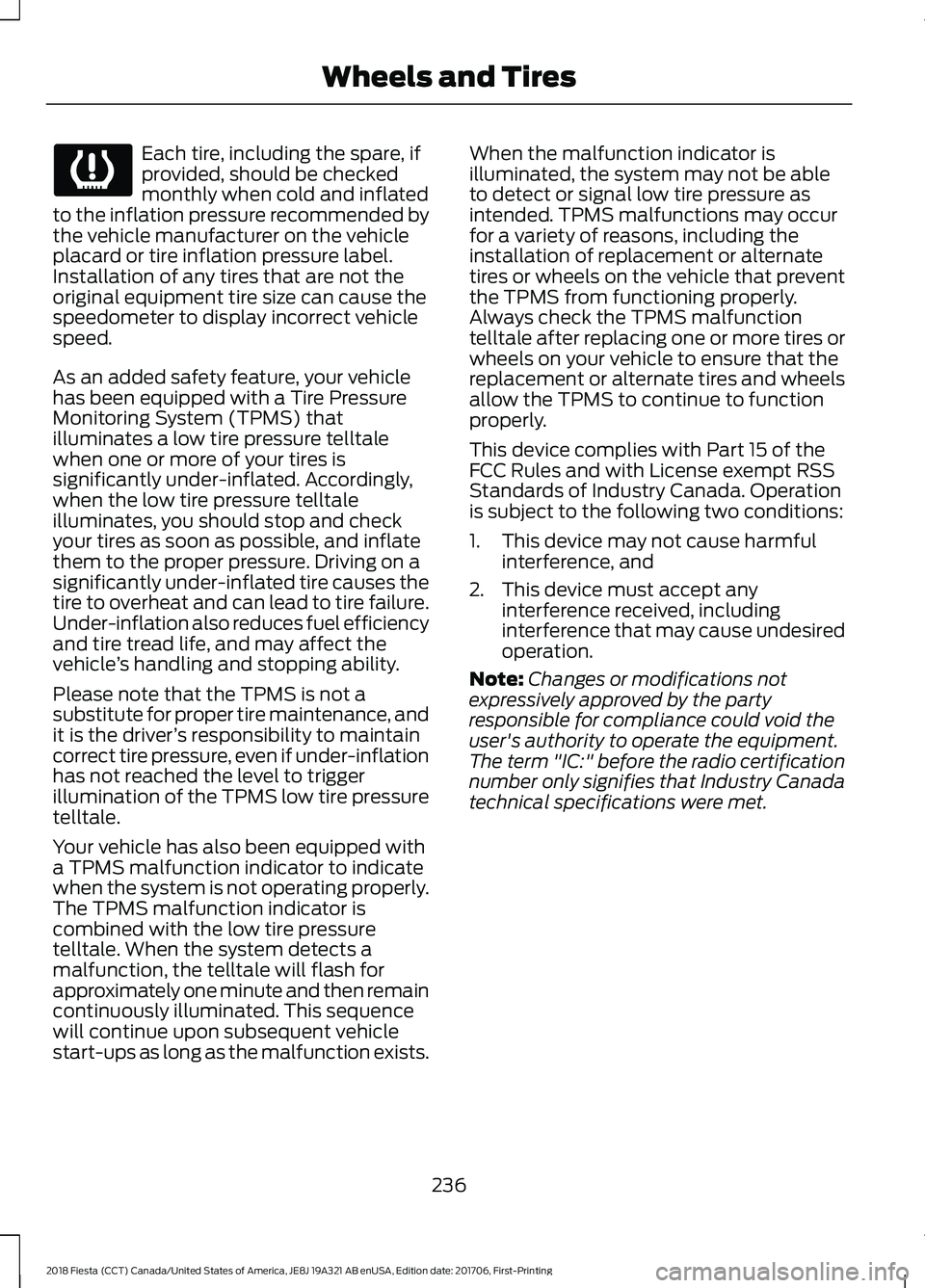
illuminates a low tire pressure telltale
when one or more of your tires is
significantly under-inflated. Accordingly,
when the low tire pressure telltale
illuminates, you should stop and check
your tires as soon as possible, and inflate
them to the proper pressure. Driving on a
significantly under-inflated tire causes the
tire to overheat and can lead to tire failure.
Under-inflation also reduces fuel efficiency
and tire tread life, and may affect the
vehicle ’s handling and stopping ability.
Please note that the TPMS is not a
substitute for proper tire maintenance, and
it is the driver ’s responsibility to maintain
correct tire pressure, even if under-inflation
has not reached the level to trigger
illumination of the TPMS low tire pressure
telltale.
Your vehicle has also been equipped with
a TPMS malfunction indicator to indicate
when the system is not operating properly.
The TPMS malfunction indicator is
combined with the low tire pressure
telltale. When the system detects a
malfunction, the telltale will flash for
approximately one minute and then remain
continuously illuminated. This sequence
will continue upon subsequent vehicle
start-ups as long as the malfunction exists. When the malfunction indicator is
illuminated, the system may not be able
to detect or signal low tire pressure as
intended. TPMS malfunctions may occur
for a variety of reasons, including the
installation of replacement or alternate
tires or wheels on the vehicle that prevent
the TPMS from functioning properly.
Always check the TPMS malfunction
telltale after replacing one or more tires or
wheels on your vehicle to ensure that the
replacement or alternate tires and wheels
allow the TPMS to continue to function
properly.
This device complies with Part 15 of the
FCC Rules and with License exempt RSS
Standards of Industry Canada. Operation
is subject to the following two conditions:
1. This device may not cause harmful
interference, and
2. This device must accept any interference received, including
interference that may cause undesired
operation.
Note: Changes or modifications not
expressively approved by the party
responsible for compliance could void the
user's authority to operate the equipment.
The term "IC:" before the radio certification
number only signifies that Industry Canada
technical specifications were met.
236
2018 Fiesta (CCT) Canada/United States of America, JE8J 19A321 AB enUSA, Edition date: 201706, First-Printing Wheels and Tires
Page 316 of 449
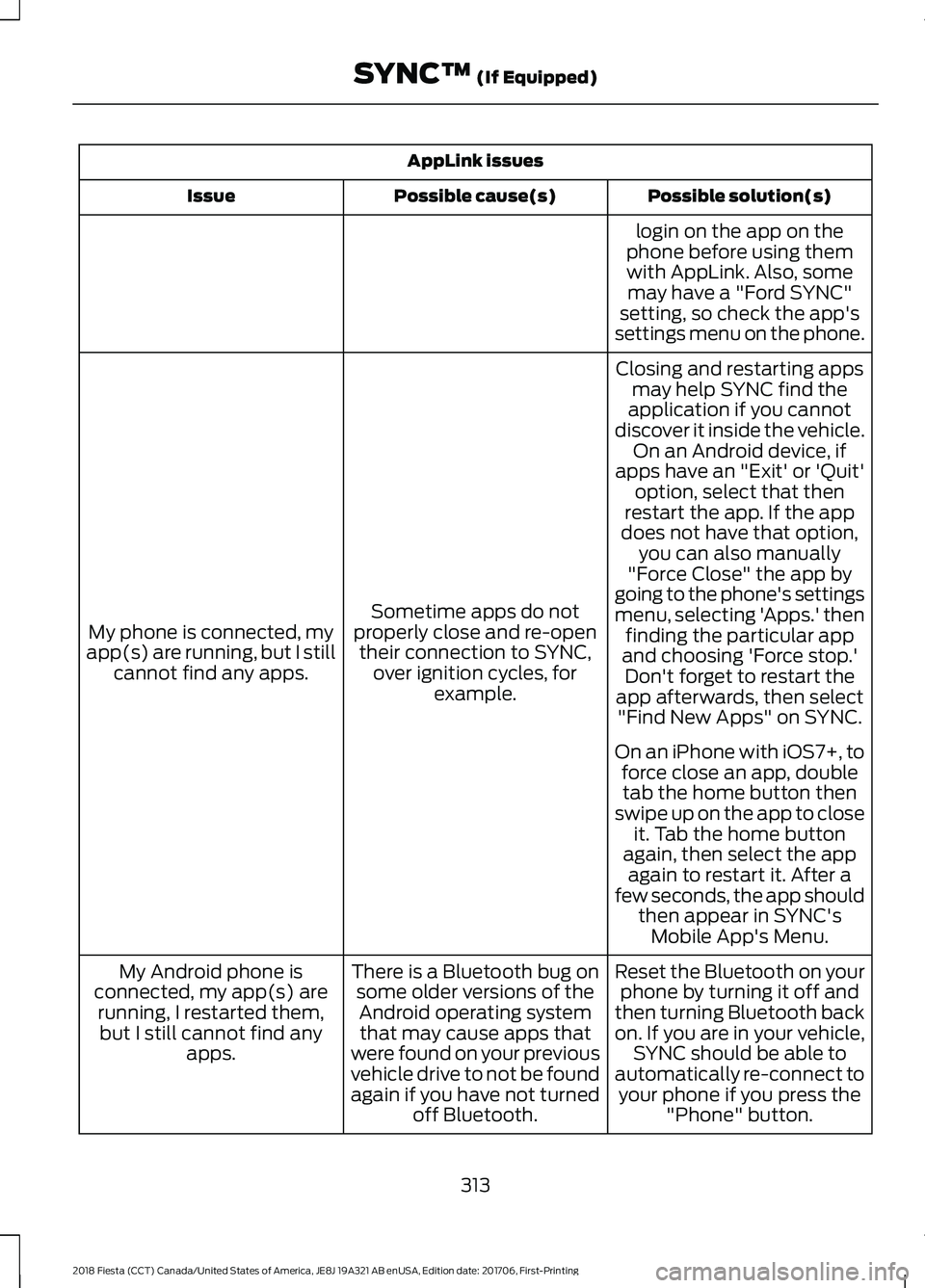
AppLink issues
Possible solution(s)
Possible cause(s)
Issue
login on the app on the
phone before using them with AppLink. Also, some may have a "Ford SYNC"
setting, so check the app's
settings menu on the phone.
Closing and restarting apps may help SYNC find the
application if you cannot
discover it inside the vehicle. On an Android device, if
apps have an "Exit' or 'Quit'
Sometime apps do not
properly close and re-open their connection to SYNC, over ignition cycles, for example.
My phone is connected, my
app(s) are running, but I still cannot find any apps. option, select that then
restart the app. If the app
does not have that option, you can also manually
"Force Close" the app by
going to the phone's settings
menu, selecting 'Apps.' then finding the particular app
and choosing 'Force stop.' Don't forget to restart the
app afterwards, then select "Find New Apps" on SYNC.
On an iPhone with iOS7+, to force close an app, doubletab the home button then
swipe up on the app to close it. Tab the home button
again, then select the app again to restart it. After a
few seconds, the app should then appear in SYNC'sMobile App's Menu.
Reset the Bluetooth on your phone by turning it off and
then turning Bluetooth back
on. If you are in your vehicle, SYNC should be able to
automatically re-connect to your phone if you press the "Phone" button.
There is a Bluetooth bug on
some older versions of theAndroid operating systemthat may cause apps that
were found on your previous
vehicle drive to not be found
again if you have not turned off Bluetooth.
My Android phone is
connected, my app(s) are running, I restarted them,but I still cannot find any apps.
313
2018 Fiesta (CCT) Canada/United States of America, JE8J 19A321 AB enUSA, Edition date: 201706, First-Printing SYNC™ (If Equipped)
Page 322 of 449
Cleaning the Touchscreen
You can remove fingerprints with a dry,
clean, soft cloth.
If dirt or fingerprints are still on the screen,
apply a small amount of alcohol to the
cloth and try to clean it again.
Note:
Do not use detergent or any type of
solvent to clean the touchscreen.
Note: Do not pour or spray alcohol onto the
touchscreen.
Using Voice Recognition
Using voice commands allows you to keep
your hands on the wheel and eyes on the
road. The system provides feedback
through audible tones, prompts, questions
and spoken confirmations depending on
the situation and the chosen level of
interaction (voice settings).
The system also asks short questions
(confirmation prompts) when it is not sure
of your request or when there are multiple
possible responses to your request.
When using voice commands, words and
icons may appear in the status bar
indicating the status of the voice command
session. See Using Voice Recognition
(page 327).
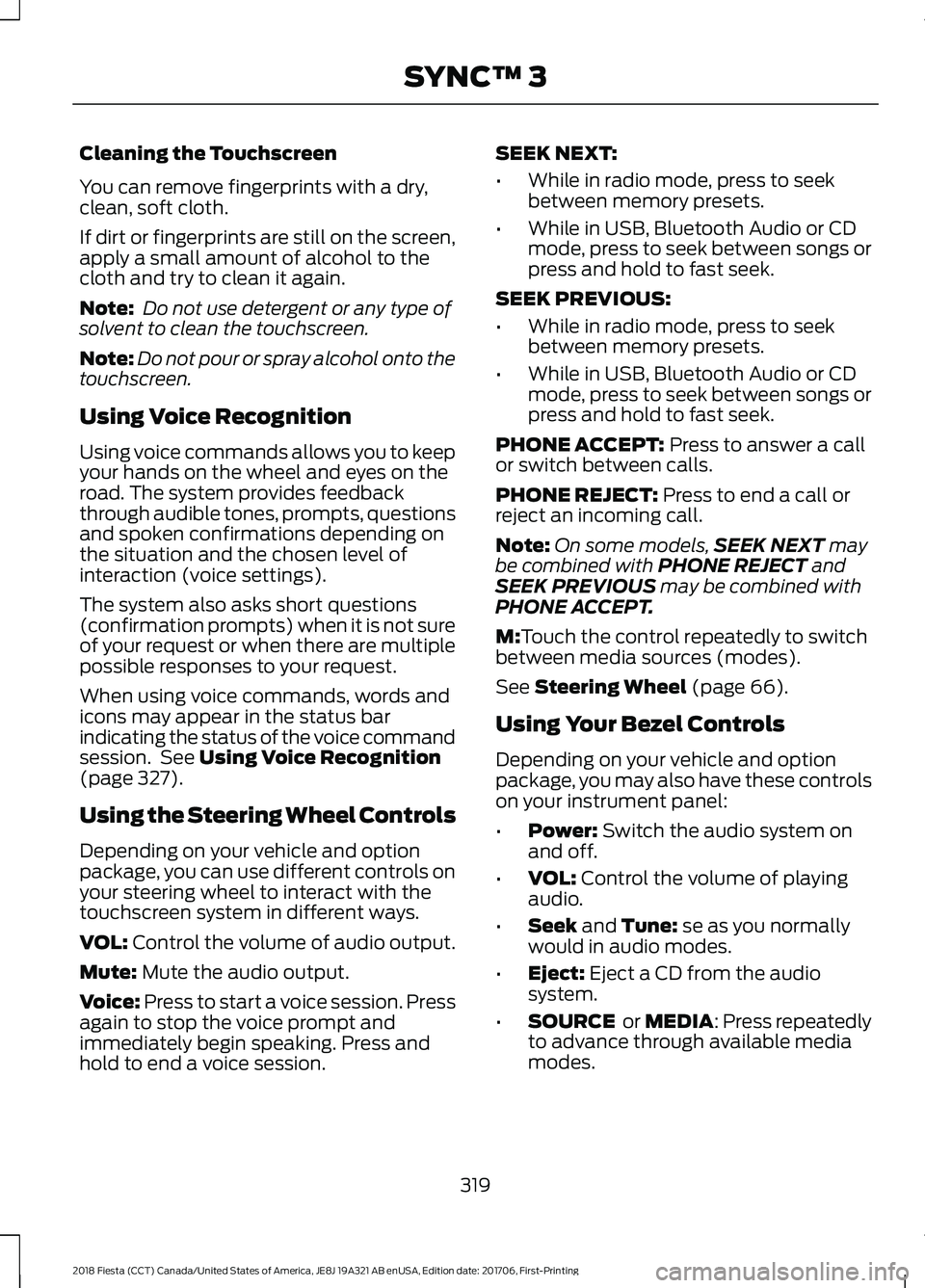
Using the Steering Wheel Controls
Depending on your vehicle and option
package, you can use different controls on
your steering wheel to interact with the
touchscreen system in different ways.
VOL:
Control the volume of audio output.
Mute:
Mute the audio output.
Voice:
Press to start a voice session. Press
again to stop the voice prompt and
immediately begin speaking. Press and
hold to end a voice session. SEEK NEXT:
•
While in radio mode, press to seek
between memory presets.
• While in USB, Bluetooth Audio or CD
mode, press to seek between songs or
press and hold to fast seek.
SEEK PREVIOUS:
• While in radio mode, press to seek
between memory presets.
• While in USB, Bluetooth Audio or CD
mode, press to seek between songs or
press and hold to fast seek.
PHONE ACCEPT:
Press to answer a call
or switch between calls.
PHONE REJECT:
Press to end a call or
reject an incoming call.
Note: On some models, SEEK NEXT
may
be combined with PHONE REJECT and
SEEK PREVIOUS may be combined with
PHONE ACCEPT.
M:
Touch the control repeatedly to switch
between media sources (modes).
See
Steering Wheel (page 66).
Using Your Bezel Controls
Depending on your vehicle and option
package, you may also have these controls
on your instrument panel:
• Power:
Switch the audio system on
and off.
• VOL:
Control the volume of playing
audio.
• Seek
and Tune: se as you normally
would in audio modes.
• Eject:
Eject a CD from the audio
system.
• SOURCE
or MEDIA: Press repeatedly
to advance through available media
modes.
319
2018 Fiesta (CCT) Canada/United States of America, JE8J 19A321 AB enUSA, Edition date: 201706, First-Printing SYNC™ 3
Page 353 of 449
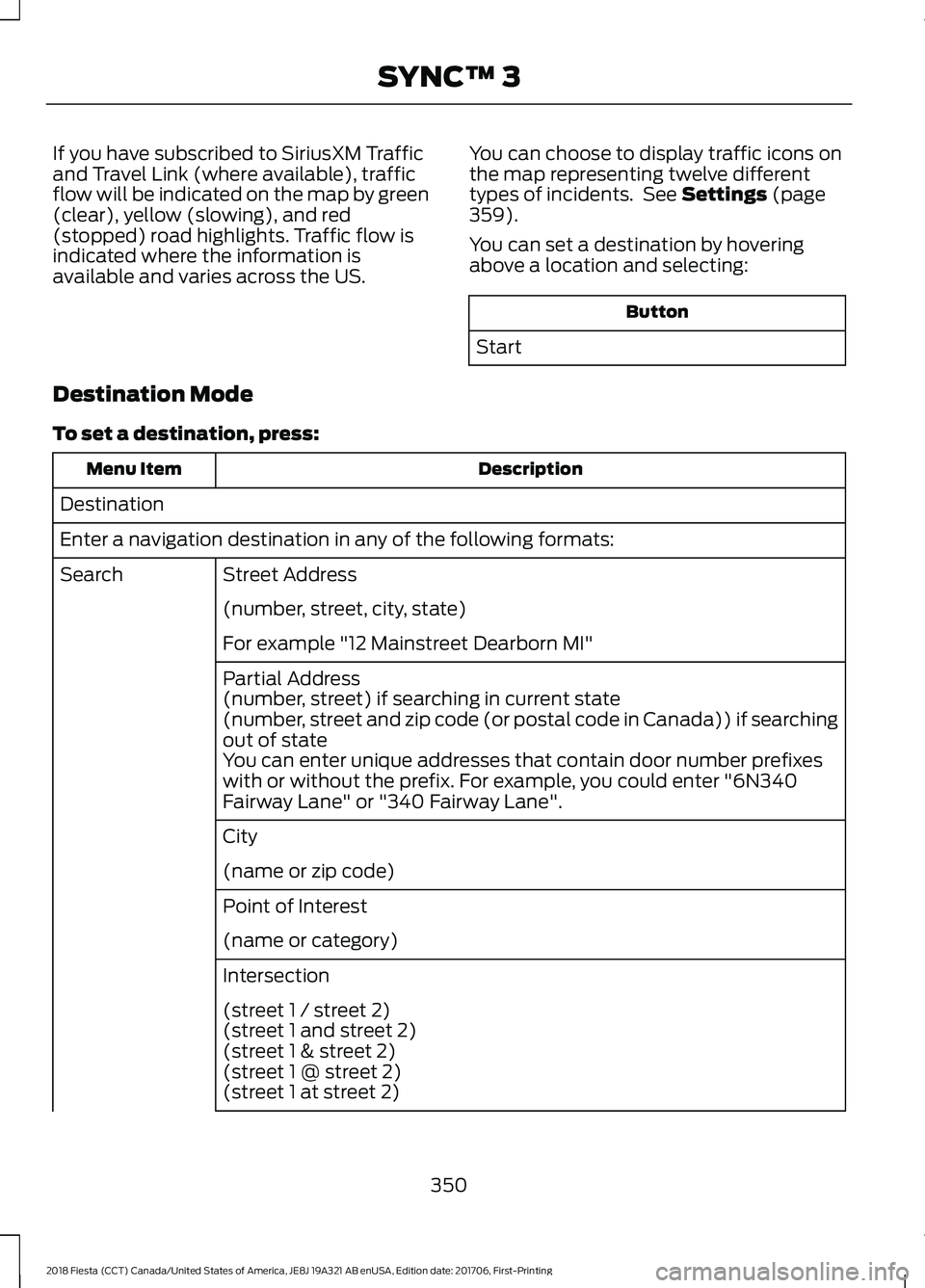
If you have subscribed to SiriusXM Traffic
and Travel Link (where available), traffic
flow will be indicated on the map by green
(clear), yellow (slowing), and red
(stopped) road highlights. Traffic flow is
indicated where the information is
available and varies across the US.
You can choose to display traffic icons on
the map representing twelve different
types of incidents. See Settings (page
359).
You can set a destination by hovering
above a location and selecting: Button
Start
Destination Mode
To set a destination, press: Description
Menu Item
Destination
Enter a navigation destination in any of the following formats: Street Address
Search
(number, street, city, state)
For example "12 Mainstreet Dearborn MI"
Partial Address
(number, street) if searching in current state
(number, street and zip code (or postal code in Canada)) if searching
out of state
You can enter unique addresses that contain door number prefixes
with or without the prefix. For example, you could enter "6N340
Fairway Lane" or "340 Fairway Lane".
City
(name or zip code)
Point of Interest
(name or category)
Intersection
(street 1 / street 2)
(street 1 and street 2)
(street 1 & street 2)
(street 1 @ street 2)
(street 1 at street 2)
350
2018 Fiesta (CCT) Canada/United States of America, JE8J 19A321 AB enUSA, Edition date: 201706, First-Printing SYNC™ 3
Page 383 of 449
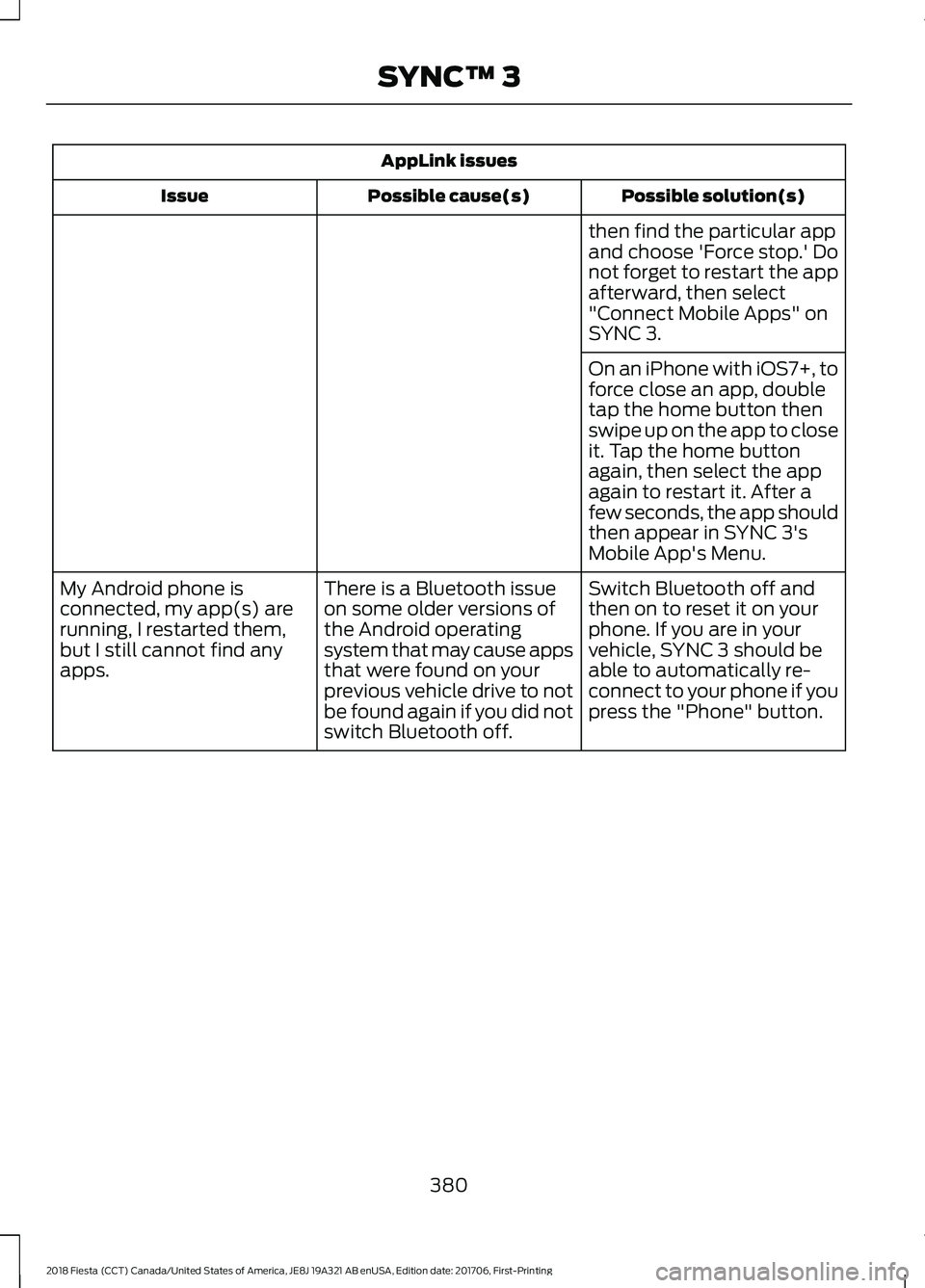
AppLink issues
Possible solution(s)
Possible cause(s)
Issue
then find the particular app
and choose 'Force stop.' Do
not forget to restart the app
afterward, then select
"Connect Mobile Apps" on
SYNC 3.
On an iPhone with iOS7+, to
force close an app, double
tap the home button then
swipe up on the app to close
it. Tap the home button
again, then select the app
again to restart it. After a
few seconds, the app should
then appear in SYNC 3's
Mobile App's Menu.
Switch Bluetooth off and
then on to reset it on your
phone. If you are in your
vehicle, SYNC 3 should be
able to automatically re-
connect to your phone if you
press the "Phone" button.
There is a Bluetooth issue
on some older versions of
the Android operating
system that may cause apps
that were found on your
previous vehicle drive to not
be found again if you did not
switch Bluetooth off.
My Android phone is
connected, my app(s) are
running, I restarted them,
but I still cannot find any
apps.
380
2018 Fiesta (CCT) Canada/United States of America, JE8J 19A321 AB enUSA, Edition date: 201706, First-Printing SYNC™ 3
Page 442 of 449
Hill Start Assist..............................................133
Switching the System On and Off...............134
Using Hill Start Assist....................................... 134
Hints on Controlling the Interior Climate...........................................................96
Cooling the Interior Quickly.............................. 98
General Hints......................................................... 96
Heating the Interior Quickly.............................. 97
Maximum Cooling Performance in Instrument Panel or Instrument Panel
and Footwell Positions................................. 99
Recommended Settings for Cooling ...........98
Recommended Settings for Heating...........98
Side Window Defogging in Cold Weather.............................................................. 99
Vehicle Stationary for Extended Periods During Extreme High Ambient
Temperatures................................................... 99
Hints on Driving With Anti-Lock Brakes.............................................................133
Home Screen.................................................325
Hood Lock See: Opening and Closing the Hood...........182
I
Ignition Switch................................................110
In California (U.S. Only).............................166
Information Displays
....................................84
General Information........................................... 84
Information Messages
.................................86
Installing Child Restraints............................16
Child Restraints...................................................... 16
Using Lap and Shoulder Belts.......................... 17
Using Lower Anchors and Tethers for Children (LATCH)............................................. 19
Using Tether Straps.............................................. 21
Instrument Cluster
.........................................79
Instrument Lighting Dimmer......................72
Interior Lamps
..................................................73
Front Interior Lamps............................................ 73
Rear Interior Lamps............................................. 73
Interior Luggage Compartment Release.............................................................61
Interior Mirror....................................................77 Automatic Dimming Mirror................................ 77
Manual Dimming Mirror...................................... 77
Introduction.........................................................7 J
Jump Starting the Vehicle.........................162
Connecting the Jumper Cables..................... 162
Jump Starting....................................................... 163
Preparing Your Vehicle...................................... 162
Removing the Jumper Cables........................ 163
K
Keyless Entry
....................................................59
Disabled Keys........................................................ 60
General Information............................................ 59
Locking and Unlocking the Doors With the Key Blade............................................................. 61
Locking Your Vehicle........................................... 59
Passive Key............................................................. 59
Unlocking Your Vehicle...................................... 60
Keyless Starting
...............................................111
Failure to Start....................................................... 111
Ignition On............................................................... 111
Starting with Automatic Transmission.........111
Starting with Manual Transmission...............111
Stopping the Engine When Your Vehicle is Moving................................................................. 112
Stopping the Engine with Your Vehicle Stationary.......................................................... 112
Keys and Remote Controls.........................45
L
Lighting Control..............................................70 Headlamp Flasher................................................. 71
High Beams.............................................................. 71
Lighting Control Positions................................. 70
Parking Lamps....................................................... 70
Lighting..............................................................70 General Information............................................ 70
Load Carrying
.................................................148
Load Limit.......................................................149
Special Loading Instructions for Owners of
Pick-up Trucks and Utility-type
Vehicles............................................................. 154
Vehicle Loading - with and without a Trailer................................................................. 149
Locking and Unlocking.................................55 Auto Lock Feature................................................ 56
Automatic Re-locking......................................... 55
439
2018 Fiesta (CCT) Canada/United States of America, JE8J 19A321 AB enUSA, Edition date: 201706, First-Printing Index
Page 445 of 449
Running-In
See: Breaking-In.................................................. 158
Running Out of Fuel.....................................116
Adding Fuel From a Portable Fuel
Container............................................................ 117
Filling a Portable Fuel Container................... 116
S
Safety Canopy ™
.............................................42
Safety Precautions........................................115
Satellite Radio
...............................................272
Satellite Radio Electronic Serial Number
(ESN)................................................................. 273
Satellite Radio Reception Factors...............273
SIRIUS® Satellite Radio Service.................. 273
Troubleshooting.................................................. 274
Scheduled Maintenance Record...........395
Scheduled Maintenance..........................389
Seatbelt Extension
........................................34
Seatbelt Height Adjustment.......................31
Seatbelt Reminder.........................................32 Belt-Minder™........................................................ 32
Seatbelts...........................................................28 Principle of Operation........................................ 28
Seatbelt Warning Lamp and Indicator Chime................................................................31
Conditions of operation..................................... 32
Seats..................................................................101
Security..............................................................63
Settings...........................................................359 911 Assist............................................................... 364
Ambient Lighting................................................. 371
Bluetooth............................................................... 361
Clock........................................................................\
361
Display.................................................................... 372
General.................................................................. 369
Media Player....................................................... 360
Mobile Apps......................................................... 367
Navigation............................................................ 365
Phone...................................................................... 361
Radio...................................................................... 364
Sound..................................................................... 359
Valet Mode............................................................ 373
Vehicle..................................................................... 371
Voice Control........................................................ 372
Wi-Fi & Hotspot................................................. 369
Side Airbags
......................................................41 Sitting in the Correct Position...................101
Snow Chains
See: Using Snow Chains................................. 235
Spare Wheel See: Changing a Road Wheel....................... 239
Special Notices................................................12 New Vehicle Limited Warranty......................... 12
On Board Diagnostics Data Link Connector............................................................ 13
Special Instructions.............................................. 12
Special Operating Conditions Scheduled Maintenance..............................................394
Exceptions............................................................ 395
Speed Control See: Cruise Control............................................ 145
Stability Control
............................................136
Principle of Operation....................................... 136
Starter Switch See: Ignition Switch............................................ 110
Starting a Gasoline Engine.........................112 Cold or Hot Engine............................................... 112
Engine Idle Speed after Starting.................... 113
Failure to Start...................................................... 113
Flooded Engine..................................................... 113
Starting and Stopping the Engine..........110 General Information........................................... 110
Steering
............................................................146
Electric Power Steering.................................... 146
Steering Wheel...............................................66
Storage Compartments............................109
Sunroof See: Moonroof........................................................ 77
Supplementary Restraints System.........36 Principle of Operation........................................ 36
Switching Off the Engine............................113 Vehicles With a Turbocharger......................... 113
Symbols Glossary
.............................................7
SYNC™ 3.........................................................315
General Information.......................................... 315
SYNC™ 3 Troubleshooting
......................373
SYNC™ Applications and Services........................................................293
911 Assist............................................................... 293
SYNC Mobile Apps............................................ 295
SYNC™.............................................................277 General Information.......................................... 277
SYNC™ Troubleshooting..........................307
442
2018 Fiesta (CCT) Canada/United States of America, JE8J 19A321 AB enUSA, Edition date: 201706, First-Printing Index