manual radio set FORD FIESTA 2018 Owners Manual
[x] Cancel search | Manufacturer: FORD, Model Year: 2018, Model line: FIESTA, Model: FORD FIESTA 2018Pages: 449, PDF Size: 6.8 MB
Page 263 of 449
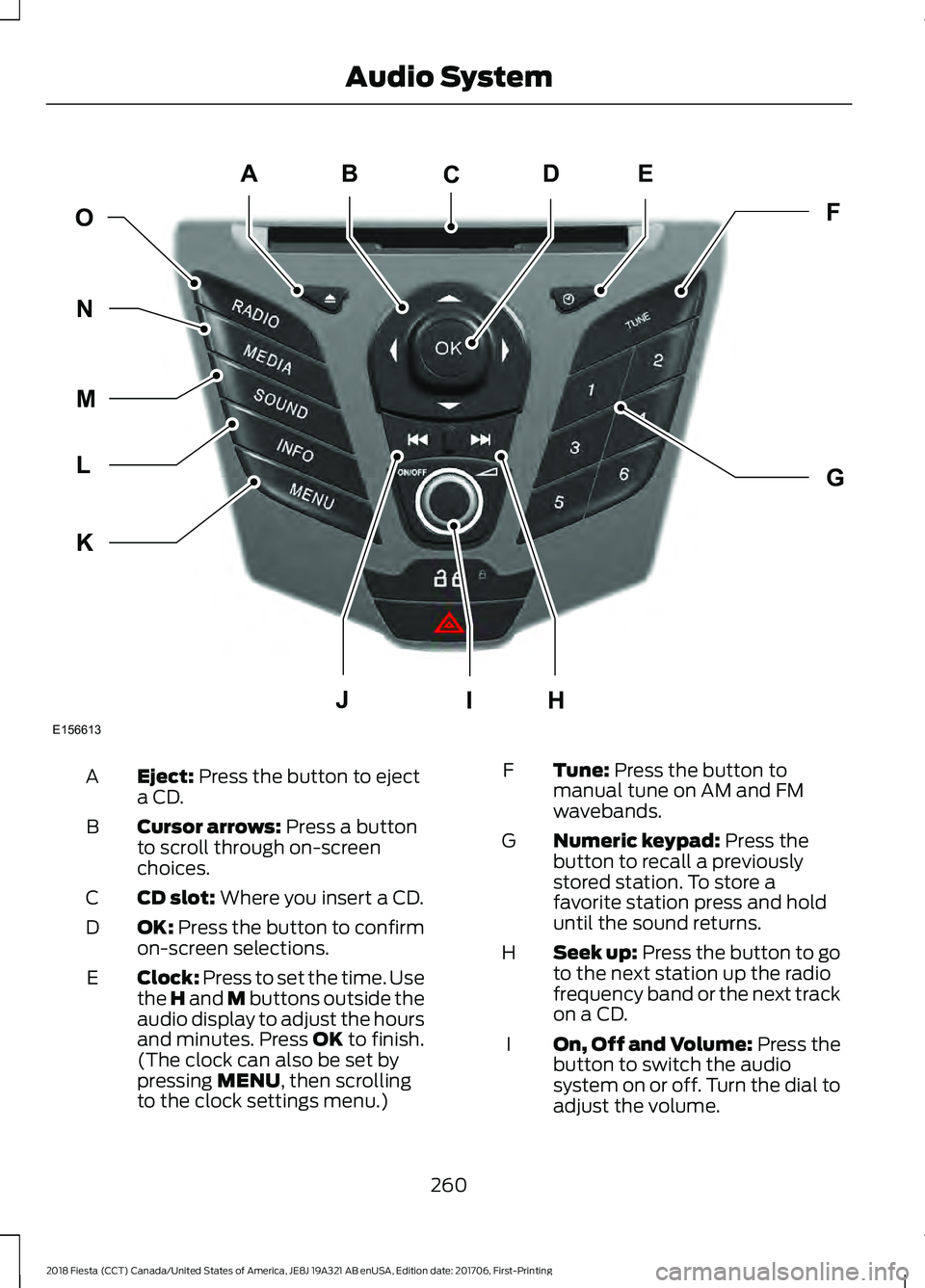
Eject: Press the button to eject
a CD.
A
Cursor arrows:
Press a button
to scroll through on-screen
choices.
B
CD slot:
Where you insert a CD.
C
OK:
Press the button to confirm
on-screen selections.
D
Clock:
Press to set the time. Use
the H and M buttons outside the
audio display to adjust the hours
and minutes. Press
OK to finish.
(The clock can also be set by
pressing
MENU, then scrolling
to the clock settings menu.)
E Tune:
Press the button to
manual tune on AM and FM
wavebands.
F
Numeric keypad:
Press the
button to recall a previously
stored station. To store a
favorite station press and hold
until the sound returns.
G
Seek up:
Press the button to go
to the next station up the radio
frequency band or the next track
on a CD.
H
On, Off and Volume:
Press the
button to switch the audio
system on or off. Turn the dial to
adjust the volume.
I
260
2018 Fiesta (CCT) Canada/United States of America, JE8J 19A321 AB enUSA, Edition date: 201706, First-Printing Audio SystemE156613
ED
OF
G
K
L
M
N
JHI
C
A
B
Page 264 of 449
Seek down: Press the button to
go to the next station down the
radio frequency band or the
previous track on a CD.
J
MENU: Press the button to
access different audio system
features.
K
INFO:
Press the button to
access radio or CD information.
L
SOUND:
Press the button to
adjust the sound settings for
bass, treble, middle, balance and
fade.
M
MEDIA:
Press the button to
access the AUX and SYNC
features, it will also cancel the
menu or list browsing.
N
RADIO:
Press the button to
select different radio bands, it
will also cancel the menu or list
browsing.
O
Sound Button
This will allow you to adjust the sound
settings (for example bass, middle and
treble).
1. Press the
SOUND button.
2. Use the up and down arrow buttons to
select the required setting.
3. Use the left and right arrow buttons to
make the necessary adjustment. The
display indicates the level selected.
4. Press the
OK button to confirm the
new settings.
Waveband Button
Press the
RADIO button to select from the
wavebands available.
You can use the selector to return to radio
reception when you have been listening to
another source. Alternatively, press the left arrow button
to display the available wavebands. Scroll
to the required waveband and press
OK.
Station Tuning Control
Seek Tuning
Select a waveband and briefly press one
of the seek buttons. The unit will stop at
the first station it finds in the direction you
have chosen.
Manual Tuning
1. Press the
MENU button.
2. Select RADIO mode and then Manual.
3. Use the left and right arrow buttons to
tune down or up the waveband in small
increments or press and hold to
increment quickly, until you find a
station you want to listen to.
4. Press
OK to continue listening to a
station.
Scan Tuning
Scan allows you to listen to a few seconds
of each station detected.
1. Press the
MENU button.
2. Select
RADIO mode and then Scan.
3. Use the seek buttons to scan up or down the selected waveband.
4. Press
OK to continue listening to a
station.
Station Preset Buttons
This feature allows you to store your
favorite stations, they can be recalled by
selecting the appropriate waveband and
pressing one of the preset buttons.
1. Select a waveband.
2. Tune to the station required.
261
2018 Fiesta (CCT) Canada/United States of America, JE8J 19A321 AB enUSA, Edition date: 201706, First-Printing Audio System
Page 265 of 449
3. Press and hold one of the preset
buttons. A progress bar and message
will appear. When the progress bar
completes the station has been stored.
The audio unit will also mute
momentarily as confirmation.
You can repeat this on each waveband and
for each preset button.
Note: When you drive to another part of the
country, stations that broadcast on
alternative frequencies and are stored on
preset buttons, may be updated with the
correct frequency and station name for that
area.
Autostore Control
Note: This will store up to a maximum of
the six strongest signals available, either
from the AM or the FM waveband and
overwrite the previously stored stations. You
can also store stations manually in the same
way as other wavebands.
• Press and hold the RADIO button.
• When the search is complete, sound is
restored and the strongest signals are
stored on the autostore presets.
Automatic Volume Control
When available, automatic volume control
adjusts the volume level to compensate
for engine noise and road speed noise.
1. Press the
MENU button and select
Audio Settings.
2. Select
Spd. Comp. Vol.
3. Use the left or right arrow button to adjust the setting.
4. Press the
OK button to confirm your
selection.
5. Press the
MENU button to return. Alternative Frequencies
The majority of programs that broadcast
on the FM waveband have a program
identification code that can be recognized
by audio units.
When your vehicle moves from one
transmission area to another with the
alternative frequencies tuning switched
on, this function will search for the
strongest station signal.
Under certain conditions, alternative
frequencies tuning may temporarily disrupt
normal reception.
When selected, the unit continually
evaluates signal strength and if a better
signal becomes available, the unit will
switch to that alternative. It mutes while
it checks a list of alternative frequencies
and if necessary, it will search once across
the selected waveband for a genuine
alternative frequency.
It will restore radio reception when it finds
one or if one is not found, the unit will
return to the original stored frequency.
When selected,
AF
will be shown in the
display.
1. Press the
MENU button.
2. Select
Audio Settings.
3. Scroll to
Alternat. freq. or Alt.
Frequency and turn on or off with the
OK button.
4. Press the
MENU button to return.
262
2018 Fiesta (CCT) Canada/United States of America, JE8J 19A321 AB enUSA, Edition date: 201706, First-Printing Audio System
Page 267 of 449
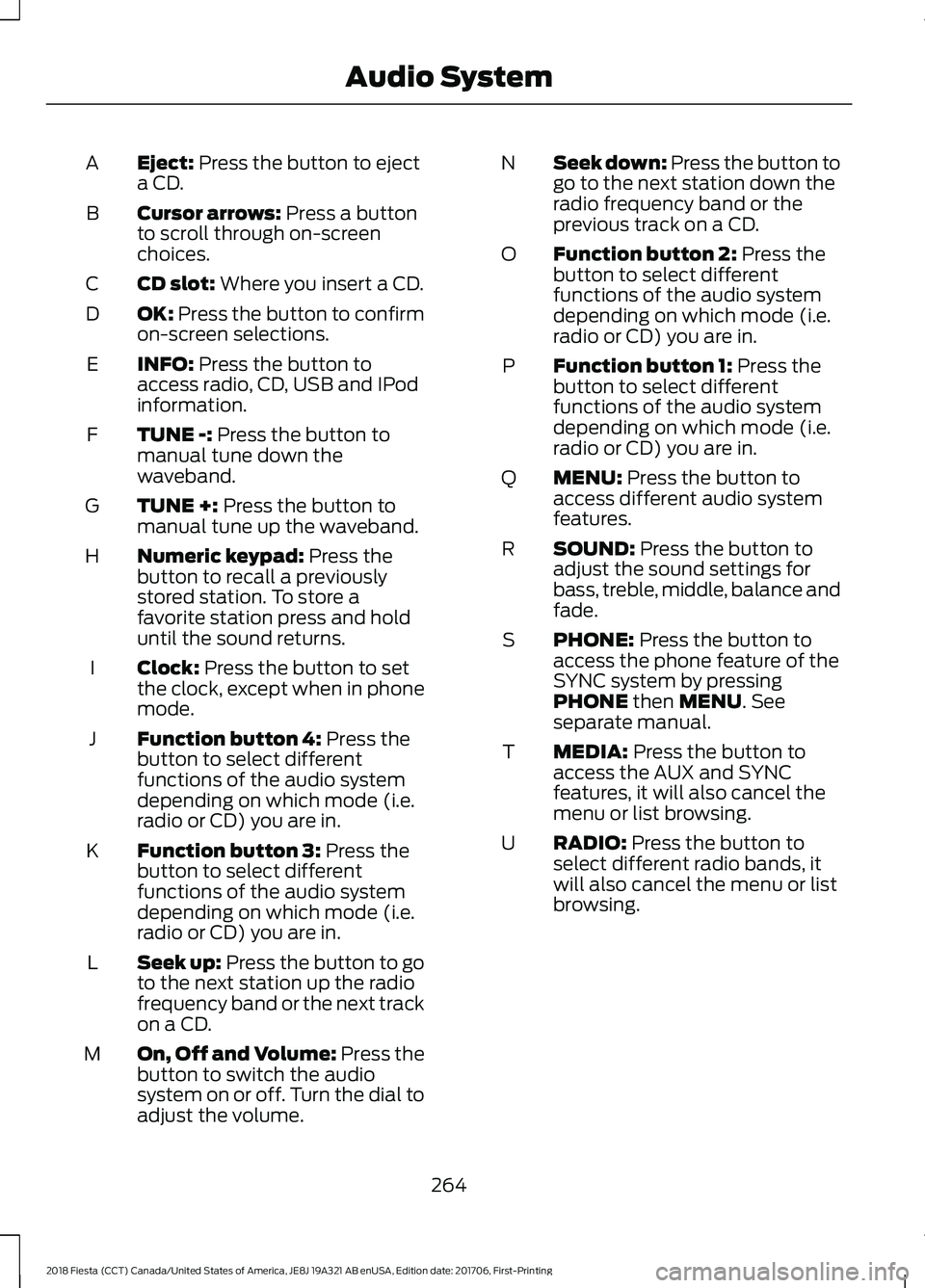
Eject: Press the button to eject
a CD.
A
Cursor arrows:
Press a button
to scroll through on-screen
choices.
B
CD slot:
Where you insert a CD.
C
OK:
Press the button to confirm
on-screen selections.
D
INFO:
Press the button to
access radio, CD, USB and IPod
information.
E
TUNE -:
Press the button to
manual tune down the
waveband.
F
TUNE +:
Press the button to
manual tune up the waveband.
G
Numeric keypad:
Press the
button to recall a previously
stored station. To store a
favorite station press and hold
until the sound returns.
H
Clock:
Press the button to set
the clock, except when in phone
mode.
I
Function button 4:
Press the
button to select different
functions of the audio system
depending on which mode (i.e.
radio or CD) you are in.
J
Function button 3:
Press the
button to select different
functions of the audio system
depending on which mode (i.e.
radio or CD) you are in.
K
Seek up:
Press the button to go
to the next station up the radio
frequency band or the next track
on a CD.
L
On, Off and Volume:
Press the
button to switch the audio
system on or off. Turn the dial to
adjust the volume.
M Seek down: Press the button to
go to the next station down the
radio frequency band or the
previous track on a CD.
N
Function button 2:
Press the
button to select different
functions of the audio system
depending on which mode (i.e.
radio or CD) you are in.
O
Function button 1:
Press the
button to select different
functions of the audio system
depending on which mode (i.e.
radio or CD) you are in.
P
MENU:
Press the button to
access different audio system
features.
Q
SOUND:
Press the button to
adjust the sound settings for
bass, treble, middle, balance and
fade.
R
PHONE:
Press the button to
access the phone feature of the
SYNC system by pressing
PHONE
then MENU. See
separate manual.
S
MEDIA:
Press the button to
access the AUX and SYNC
features, it will also cancel the
menu or list browsing.
T
RADIO:
Press the button to
select different radio bands, it
will also cancel the menu or list
browsing.
U
264
2018 Fiesta (CCT) Canada/United States of America, JE8J 19A321 AB enUSA, Edition date: 201706, First-Printing Audio System
Page 268 of 449
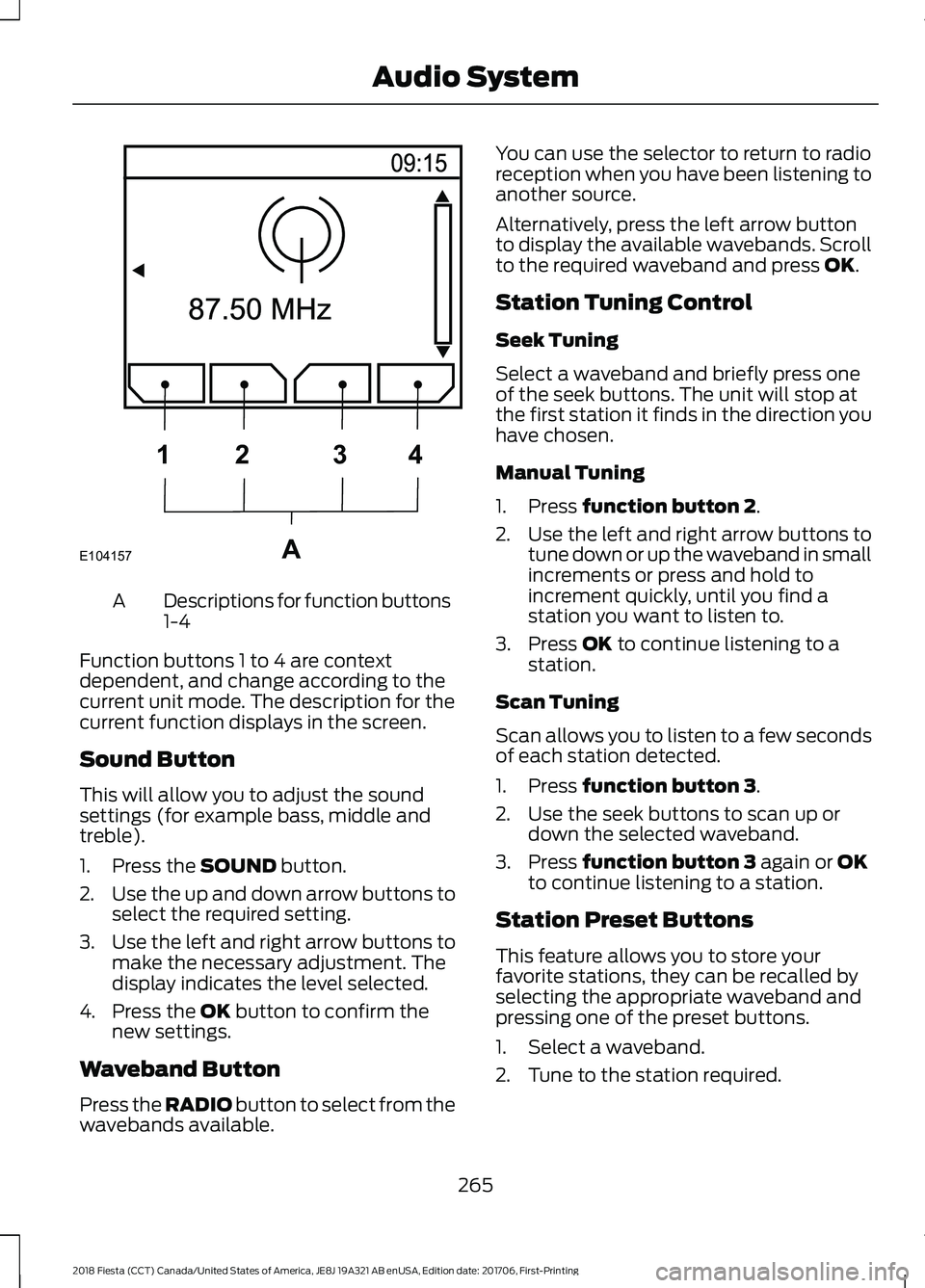
Descriptions for function buttons
1-4
A
Function buttons 1 to 4 are context
dependent, and change according to the
current unit mode. The description for the
current function displays in the screen.
Sound Button
This will allow you to adjust the sound
settings (for example bass, middle and
treble).
1. Press the SOUND button.
2. Use the up and down arrow buttons to
select the required setting.
3. Use the left and right arrow buttons to
make the necessary adjustment. The
display indicates the level selected.
4. Press the
OK button to confirm the
new settings.
Waveband Button
Press the
RADIO button to select from the
wavebands available. You can use the selector to return to radio
reception when you have been listening to
another source.
Alternatively, press the left arrow button
to display the available wavebands. Scroll
to the required waveband and press
OK.
Station Tuning Control
Seek Tuning
Select a waveband and briefly press one
of the seek buttons. The unit will stop at
the first station it finds in the direction you
have chosen.
Manual Tuning
1. Press
function button 2.
2. Use the left and right arrow buttons to
tune down or up the waveband in small
increments or press and hold to
increment quickly, until you find a
station you want to listen to.
3. Press
OK to continue listening to a
station.
Scan Tuning
Scan allows you to listen to a few seconds
of each station detected.
1. Press
function button 3.
2. Use the seek buttons to scan up or down the selected waveband.
3. Press
function button 3 again or OK
to continue listening to a station.
Station Preset Buttons
This feature allows you to store your
favorite stations, they can be recalled by
selecting the appropriate waveband and
pressing one of the preset buttons.
1. Select a waveband.
2. Tune to the station required.
265
2018 Fiesta (CCT) Canada/United States of America, JE8J 19A321 AB enUSA, Edition date: 201706, First-Printing Audio SystemE104157A
1
2 34
Page 269 of 449
3. Press and hold one of the preset
buttons. A progress bar and message
will appear. When the progress bar
completes the station has been stored.
The audio unit will also mute
momentarily as confirmation.
You can repeat this on each waveband and
for each preset button.
Note: When you drive to another part of the
country, stations that broadcast on
alternative frequencies, and are stored on
preset buttons, may be updated with the
correct frequency and station name for that
area.
Autostore Control
Note: This will store up to a maximum of
the 10 strongest signals available, either
from the AM or the FM waveband, and
overwrite the previously stored stations. You
can also store stations manually in the same
way as other wavebands.
• Press and hold the RADIO button.
• When the search is complete, sound is
restored and the strongest signals are
stored on the autostore presets.
Automatic Volume Control
When available, automatic volume control
adjusts the volume level to compensate
for engine noise and road speed noise.
1. Press the
MENU button and
selectAudio Settings.
2. Select
Spd. Comp. Vol.
3. Use the left or right arrow button to adjust the setting.
4. Press the
OK button to confirm your
selection.
5. Press the
MENU button to return. Alternative Frequencies
The majority of programs that broadcast
on the FM waveband have a program
identification code, it can be recognized by
audio units.
When your vehicle moves from one
transmission area to another with the
alternative frequencies tuning switched
on, this function will search for the
strongest station signal.
Under certain conditions, alternative
frequencies tuning may temporarily disrupt
normal reception.
When selected, the unit continually
evaluates signal strength and, if a better
signal becomes available, the unit will
switch to that alternative. It mutes while
it checks a list of alternative frequencies
and if necessary, it will search once across
the selected waveband for a genuine
alternative frequency.
It will restore radio reception when it finds
one or if one is not found, the unit will
return to the original stored frequency.
When selected,
AF
will be shown in the
display.
1. Press the
MENU button.
2. Select
Audio Settings.
3. Scroll to
Alternat. freq. or Alt.
Frequency. and turn on or off with the
OK button.
4. Press the
MENU button to return.
266
2018 Fiesta (CCT) Canada/United States of America, JE8J 19A321 AB enUSA, Edition date: 201706, First-Printing Audio System
Page 273 of 449
SOUND: Press the button to
adjust the sound settings for
bass, treble, middle, balance and
fade.
F
Volume
Turn the dial to adjust
the volume.
G
TUNE -:
In radio mode, press this
button to manually search
backward through the radio
frequency band. In SIRIUS mode,
press this button to find the
previous available satellite radio
station.
H
Seek down In radio mode, press
this button to go to the next
station down the radio frequency
band. Press to go to the previous
track on a CD. In SIRIUS mode,
press this button to select the
I
previous channel. If a specific
category is selected (for
example Jazz, Rock or News),
use this button to find the
previous channel in the selected
category.
SOURCE:
Press the button to
access different audio modes,
for example AM, FM, Satellite
radio and A/V input.
J
DIGITAL RADIO
Note: HD Radio broadcasts are not
available in all markets.
HD Radio technology is the digital
evolution of analog AM/FM radio. Your
system has a special receiver that allows
it to receive digital broadcasts (where
available) in addition to the analog
broadcasts, it already receives. Digital
broadcasts provide a better sound quality than analog broadcasts with free,
crystal-clear audio and no static or
distortion. For more information, and a
guide to available stations and
programming, please visit
www.hdradio.com.
When HD Radio is on and you tune to a
station broadcasting HD Radio technology,
you may notice the HD Radio logo on your
screen. When this logo is available, you
may also see Title and Artist fields
on-screen.
The multicast indicator appears in FM
mode (only) if the current station is
broadcasting multiple digital broadcasts.
The highlighted numbers signify available
digital channels where new or different
content is available. HD1 signifies the main
programming status and is available in
analog and digital broadcasts. Other
multicast stations (HD2 through HD7) are
only available digitally.
When HD Radio broadcasts are active, you
can access the following functions:
•
Scan
allows you to hear a brief
sampling of all available stations. This
feature still works when HD Radio
reception is on, although it does not
scan for HD2-HD7 channels. You may
see the HD logo appear if the station
has a digital broadcast.
• Memory presets
allow you to save an
active channel as a memory preset.
Touch and hold a memory preset slot
until the sound returns. There is a brief
mute while the radio saves the station.
Sound returns when finished. When
switching to an HD2 or HD3 memory
preset, the sound mutes before the
digital audio plays, because the system
has to reacquire the digital signal.
Note: As with any saved radio station, you
cannot access the saved station if your
vehicle is outside the station ’s reception
area.
270
2018 Fiesta (CCT) Canada/United States of America, JE8J 19A321 AB enUSA, Edition date: 201706, First-Printing Audio System
Page 285 of 449
Other features, such as text messaging
using Bluetooth and automatic phonebook
download, are phone-dependent features.
To check your phone's compatibility, see
your phone's manual and visit
www.SYNCMyRide.com,
www.SYNCMyRide.ca or
www.syncmaroute.ca.
Pairing a Phone for the First Time
Wirelessly pairing your phone with SYNC
allows you to make and receive hands-free
calls.
Note:
SYNC can support downloading up
to approximately 4000 entries per
Bluetooth-enabled cellular phone.
Note: Make sure to switch on the ignition
and the radio. Shift the transmission into
park (P) for automatic transmission or first
gear for manual transmission.
Using the Audio System
Note: To scroll through the menus, press
the up and down arrows on your audio
system.
1. Make sure to switch on your phone's Bluetooth feature before starting the
search. See your device's manual if
necessary.
2. Press the PHONE button. When the
audio display indicates there is no
paired phone, select the option to add.
3. When a message to begin pairing appears in the audio display, search for
SYNC on your phone to start the pairing
process. 4. When prompted on your cell phone
’s
display, confirm that the PIN provided
by SYNC matches the PIN displayed
on your cell phone. Your phone is now
paired and the display indicates that
the pairing was successful. If you are
prompted to enter a PIN on your device,
enter the PIN displayed on the screen.
The display indicates when the pairing
is successful.
Depending on your phone's capability and
your market, the system may prompt you
with questions, such as setting the current
phone as the primary phone (the phone
SYNC automatically tries to connect with
first upon vehicle start-up) and
downloading your phonebook.
Using Voice Commands Make sure to switch on your
phone's Bluetooth feature
before starting the search. See
your device's manual if necessary.
Press the voice and when prompted
say: Action and Descrip-
tion
Voice Command
Follow the instruc-
tions on the audio
display.
(pair ([Bluetooth]
device | phone |
Bluetooth audio) |
add phone)
You can say any of the voice commands
that appear within open and close brackets
that are separated by |. For example,
where; (what's | what is) appears you say;
what's or what is.
The commands that have [ ] around the
word means that the word is optional.
282
2018 Fiesta (CCT) Canada/United States of America, JE8J 19A321 AB enUSA, Edition date: 201706, First-Printing SYNC™
(If Equipped)E142599
Page 286 of 449
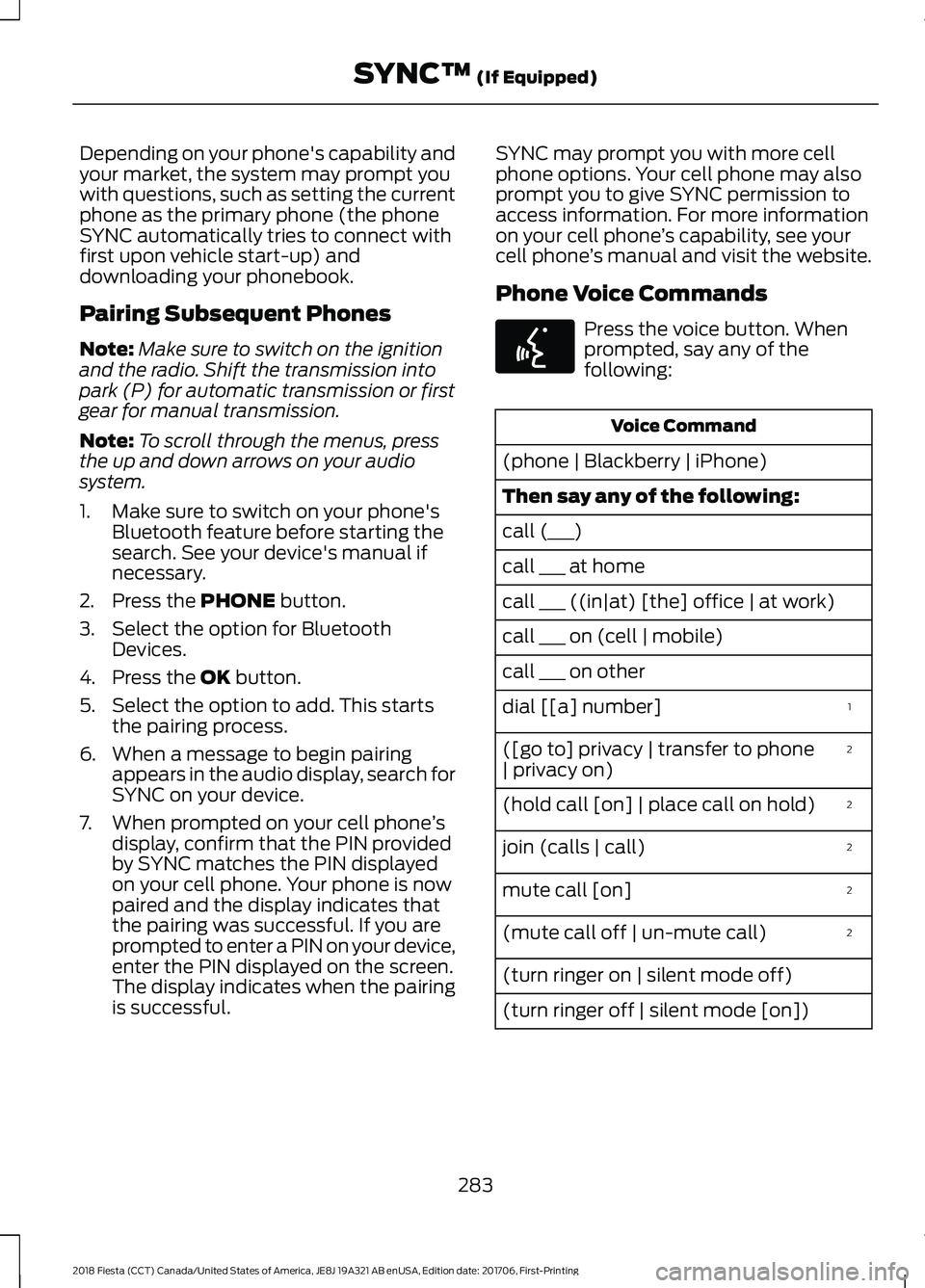
Depending on your phone's capability and
your market, the system may prompt you
with questions, such as setting the current
phone as the primary phone (the phone
SYNC automatically tries to connect with
first upon vehicle start-up) and
downloading your phonebook.
Pairing Subsequent Phones
Note:
Make sure to switch on the ignition
and the radio. Shift the transmission into
park (P) for automatic transmission or first
gear for manual transmission.
Note: To scroll through the menus, press
the up and down arrows on your audio
system.
1. Make sure to switch on your phone's Bluetooth feature before starting the
search. See your device's manual if
necessary.
2. Press the PHONE button.
3. Select the option for Bluetooth Devices.
4. Press the
OK button.
5. Select the option to add. This starts the pairing process.
6. When a message to begin pairing appears in the audio display, search for
SYNC on your device.
7. When prompted on your cell phone ’s
display, confirm that the PIN provided
by SYNC matches the PIN displayed
on your cell phone. Your phone is now
paired and the display indicates that
the pairing was successful. If you are
prompted to enter a PIN on your device,
enter the PIN displayed on the screen.
The display indicates when the pairing
is successful. SYNC may prompt you with more cell
phone options. Your cell phone may also
prompt you to give SYNC permission to
access information. For more information
on your cell phone
’s capability, see your
cell phone ’s manual and visit the website.
Phone Voice Commands Press the voice button. When
prompted, say any of the
following:
Voice Command
(phone | Blackberry | iPhone)
Then say any of the following:
call (___)
call ___ at home
call ___ ((in|at) [the] office | at work)
call ___ on (cell | mobile)
call ___ on other 1
dial [[a] number]
2
([go to] privacy | transfer to phone
| privacy on)
2
(hold call [on] | place call on hold)
2
join (calls | call)
2
mute call [on]
2
(mute call off | un-mute call)
(turn ringer on | silent mode off)
(turn ringer off | silent mode [on])
283
2018 Fiesta (CCT) Canada/United States of America, JE8J 19A321 AB enUSA, Edition date: 201706, First-Printing SYNC™
(If Equipped)E142599
Page 440 of 449
Cleaning the Instrument Panel and
Instrument Cluster Lens..........................216
Cleaning the Interior....................................215
Cleaning the Wheels....................................217
Cleaning the Windows and Wiper Blades............................................................215
Clearing All MyKeys.......................................52
Climate Control
..............................................94
Clock...................................................................85 Type 1........................................................................\
85
Type 2....................................................................... 85
Clutch Fluid Check - Manual Transmission
...............................................193
Coolant Check See: Engine Coolant Check............................ 188
Crash Sensors and Airbag Indicator........43
Creating a MyKey.............................................51 Programming/Changing Configurable
Settings................................................................ 51
Cruise Control..................................................67 Principle of Operation....................................... 145
Cruise control See: Using Cruise Control................................ 145
Customer Assistance
..................................165
D
Data Recording
..................................................9
Event Data Recording.......................................... 10
Service Data Recording........................................ 9
Digital Radio..................................................270 HD Radio Reception and Station
Troubleshooting.............................................. 271
Direction Indicators........................................72
Doors and Locks.............................................55
Drive Belt Routing - 1.0L EcoBoost™...................................................211
Drive Belt Routing - 1.6L Duratec-16V Ti-VCT (Sigma)
...........................................211
Driver and Passenger Airbags....................37 Children and Airbags.......................................... 38
Proper Driver and Front Passenger Seating Adjustment........................................................ 37
Driver Knee Airbag.........................................42
Driving Aids.....................................................146
Driving Hints
...................................................158
Driving Through Water................................158 E
Eco Mode
.........................................................146
Resetting Eco Mode.......................................... 146
Type 1...................................................................... 146
Economical Driving......................................158
Electromagnetic Compatibility.............406
Emission Law
..................................................122
Noise Emissions Warranty, Prohibited
Tampering Acts and Maintenance..........123
Tampering With a Noise Control System............................................................... 122
End User License Agreement.................408 VEHICLE SOFTWARE END USER LICENSE
AGREEMENT (EULA) ................................ 408
Engine Block Heater.....................................113 Using the Engine Block Heater....................... 114
Engine Coolant Check................................188 Adding Coolant................................................... 188
Coolant Change.................................................. 190
Engine Coolant Temperature Management.................................................... 191
Fail-Safe Cooling................................................ 190
Recycled Coolant............................................... 190
Severe Climates.................................................. 190
Engine Cooling Fan
......................................187
Engine Emission Control............................122
Engine Immobilizer See: Passive Anti-Theft System..................... 63
Engine Oil Check..........................................186 Adding Engine Oil............................................... 186
Engine Oil Dipstick - 1.0L EcoBoost™.................................................186
Engine Oil Dipstick - 1.6L Duratec-16V Ti-VCT (Sigma)
.........................................186
Engine Specifications - 1.0L EcoBoost™.................................................244
Engine Specifications - 1.6L Duratec-16V Ti-VCT (Sigma)
........................................244
Entertainment...............................................333 AM/FM Radio...................................................... 334
Apps........................................................................\
342
Bluetooth Stereo or USB................................. 341
CD ........................................................................\
.... 340
HD Radio ™ Information (If
Available)......................................................... 337
SiriusXM® Satellite Radio (If Activated)........................................................ 335
437
2018 Fiesta (CCT) Canada/United States of America, JE8J 19A321 AB enUSA, Edition date: 201706, First-Printing Index