Can FORD FIESTA 2019 Owners Manual
[x] Cancel search | Manufacturer: FORD, Model Year: 2019, Model line: FIESTA, Model: FORD FIESTA 2019Pages: 443, PDF Size: 31.51 MB
Page 323 of 443
accessed without special equipment and
access to your vehicle's SYNC 3 module.
Ford Motor Company and Ford of Canada
do not access the system data for any
purpose other than as described absent
consent, a court order, or where required
by law enforcement, other government
authorities, or other third parties acting
with lawful authority. Other parties may
seek to access the information
independently of Ford Motor Company and
Ford of Canada.
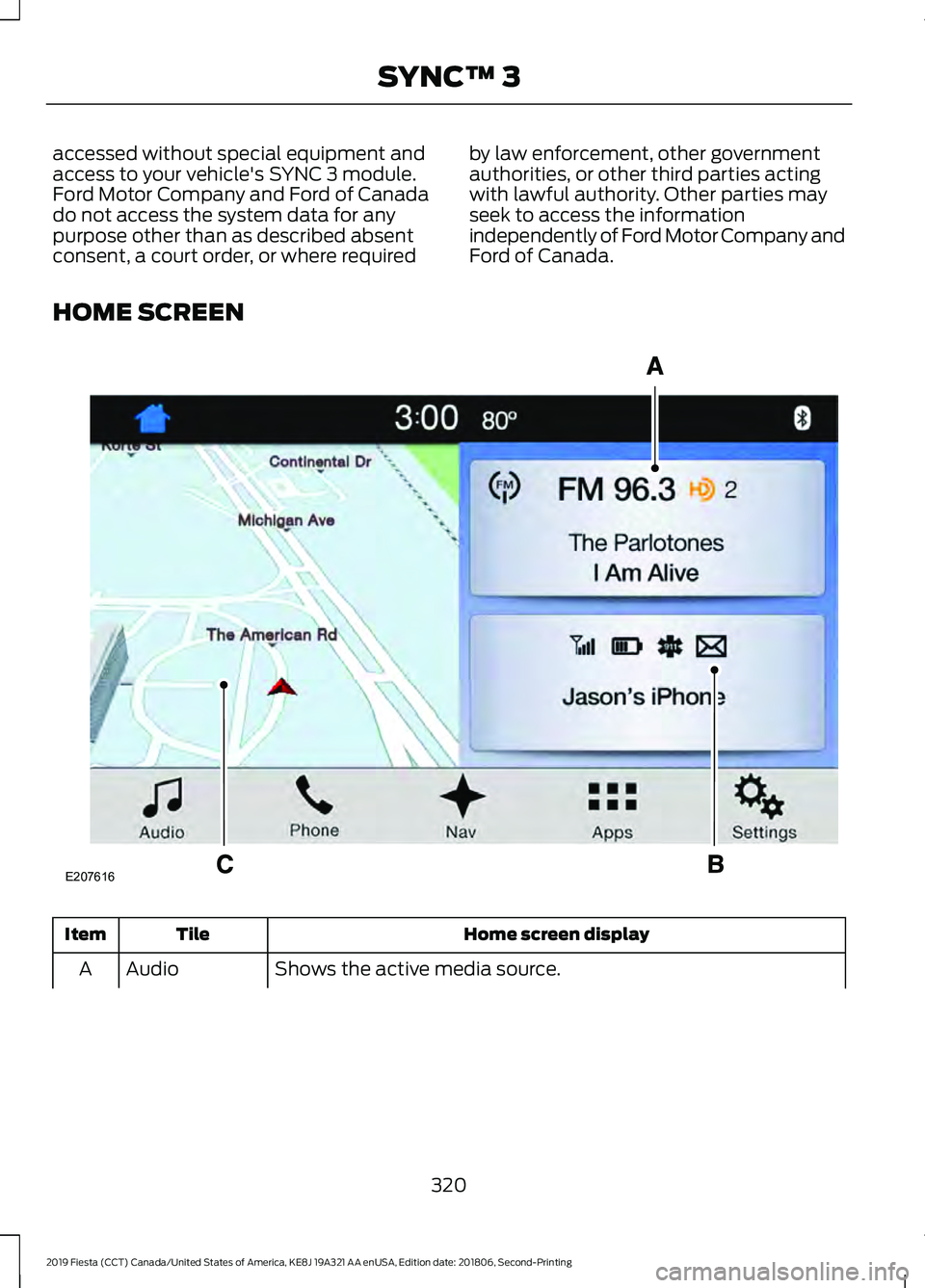
HOME SCREEN Home screen display
Tile
Item
Shows the active media source.
Audio
A
320
2019 Fiesta (CCT) Canada/United States of America, KE8J 19A321 AA enUSA, Edition date: 201806, Second-Printing SYNC™ 3E207616
Page 324 of 443
Home screen display
Tile
Item
If your vehicle does not have navigation, this space contains the
compass.
The name of the connected phone appears on the screen. The
status of the phone features also appear. This includes signal
strength, battery charge, 911 assist setting state (On or Off),
text messaging and roaming.
Phone
B
This map displays your current location or current route in real
time.
*
Navigation
C
When you have navigation active, you also see the next turn
and the length of time and distance to your destination.
If your vehicle does not have navigation, this space contains the
audio information.
* If equipped.
You can touch any of the feature displays
to access that feature.
Anytime you select the home button, the
system returns you to this screen.
USING VOICE RECOGNITION
The system allows you to interact with the
entertainment, information and
communication systems on your vehicle
using voice commands. This allows you
to keep your hands on the steering wheel
and focus on what is in front of you. Press the voice control button
on the steering wheel and wait
for the voice prompt.
Note:
Press the voice control button again
to interrupt a voice prompt and begin
speaking.
Note: Turn the volume control when a voice
prompt plays to adjust the volume.
Note: Press and hold the voice control
button on the steering wheel to use Siri on
your iOS device.
The following voice commands are
designed to help you from any screen:
• List of Commands
• Help
The following tables list some of the more
frequently used voice commands. For a
complete list of voice commands, refer to
the local Ford website.
General Description
Voice Command
Get a list of voice commands for a specific feature. 1
___ List of Commands
Cancel an active voice session.
Cancel
Get a list of voice commands for a specific feature. 1
___ Help
321
2019 Fiesta (CCT) Canada/United States of America, KE8J 19A321 AA enUSA, Edition date: 201806, Second-Printing SYNC™ 3E142599
Page 325 of 443
Description
Voice Command
Return to the previous screen.
Go back
Go to the main menu.
Main Menu
Go to the next page.
Next Page
Go to the previous page.
Previous Page
1 Add the name of the feature to the command.
Entertainment
Audio Source Description
Voice Command
Use the radio.
Radio
Use the CD player.
CD Player
Use a Bluetooth device.
Bluetooth Stereo
Use a USB or media player.
USB
Radio Description
Voice Command
Listen to AM radio.
AM
Tune to a specific AM frequency.1
AM ___
Listen to SiriusXM satellite radio.
Sirius
Listen to FM radio.
FM
Tune to a specific FM frequency.1
FM ___
1 Add the radio frequency to two decimal places to the command.
322
2019 Fiesta (CCT) Canada/United States of America, KE8J 19A321 AA enUSA, Edition date: 201806, Second-Printing SYNC™ 3
Page 326 of 443
USB and Media Player
Description
Voice Command
Play your music by category. 1
Play Album ___
Play Artist ___
Play Genre ___
Play Playlist ___
Play Song ___
Browse music on a USB device.
Browse All Albums
Browse All Artists
Browse All Audiobooks
Browse All Genres
Browse All Playlists
Browse All Podcasts
Browse All Songs
Browse your music by category on a USB device. 1
Browse Album ___
Browse Artist ___
Browse Audiobook ___
Browse Genre ___
Browse Playlist ___
Browse Podcast ___
1 Add an album name, artist name, audiobook name, genre name, playlist name, podcast
name or track name to the command. Say the name exactly as it appears on your device.
Climate Control
Note: Not available through the system on
all models.
323
2019 Fiesta (CCT) Canada/United States of America, KE8J 19A321 AA enUSA, Edition date: 201806, Second-Printing SYNC™ 3
Page 327 of 443
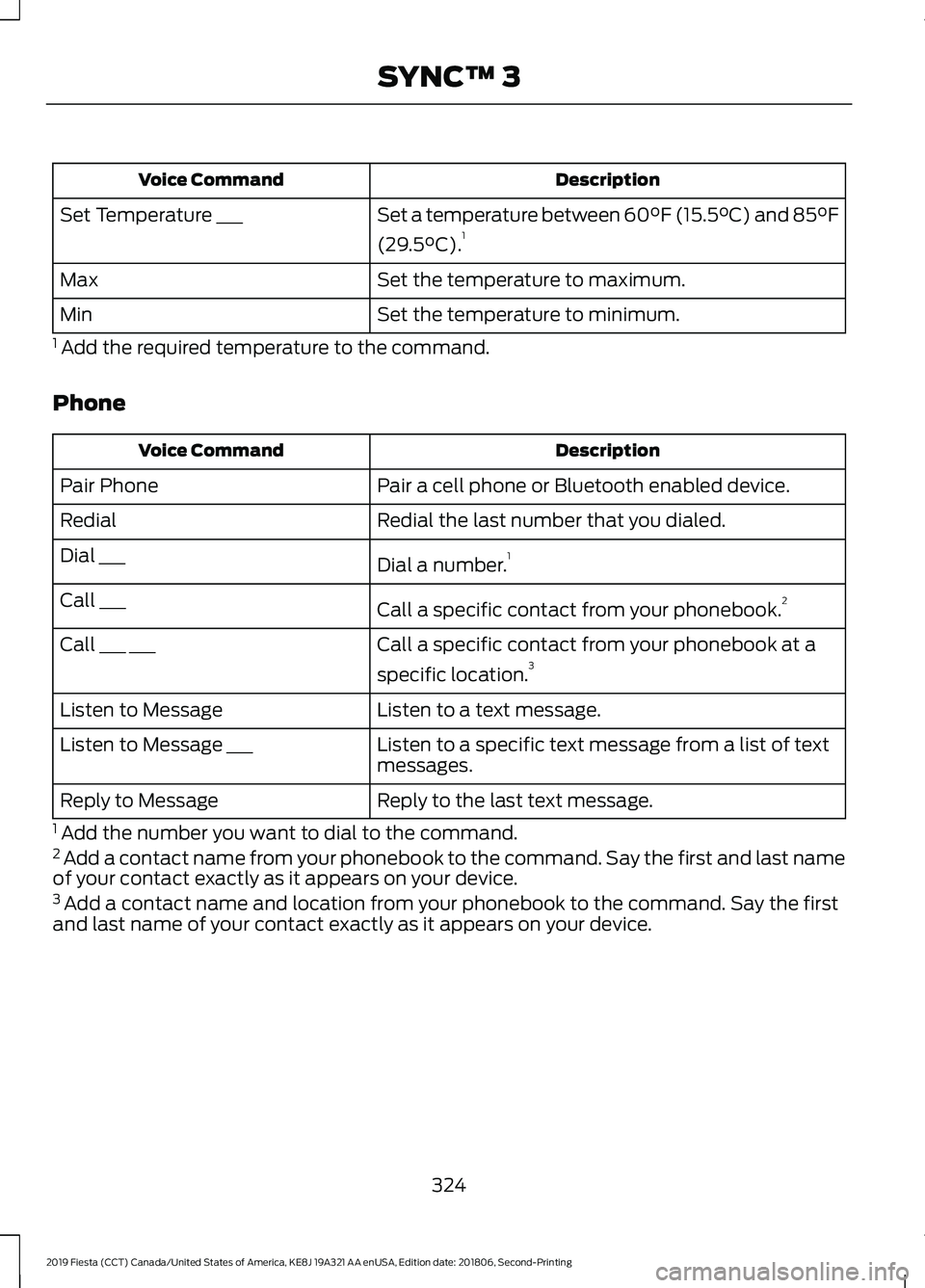
Description
Voice Command
Set a temperature between 60°F (15.5°C) and 85°F
(29.5°C).1
Set Temperature ___
Set the temperature to maximum.
Max
Set the temperature to minimum.
Min
1 Add the required temperature to the command.
Phone Description
Voice Command
Pair a cell phone or Bluetooth enabled device.
Pair Phone
Redial the last number that you dialed.
Redial
Dial a number.1
Dial ___
Call a specific contact from your phonebook. 2
Call ___
Call a specific contact from your phonebook at a
specific location.3
Call ___ ___
Listen to a text message.
Listen to Message
Listen to a specific text message from a list of text
messages.
Listen to Message ___
Reply to the last text message.
Reply to Message
1 Add the number you want to dial to the command.
2 Add a contact name from your phonebook to the command. Say the first and last name
of your contact exactly as it appears on your device.
3 Add a contact name and location from your phonebook to the command. Say the first
and last name of your contact exactly as it appears on your device.
324
2019 Fiesta (CCT) Canada/United States of America, KE8J 19A321 AA enUSA, Edition date: 201806, Second-Printing SYNC™ 3
Page 328 of 443
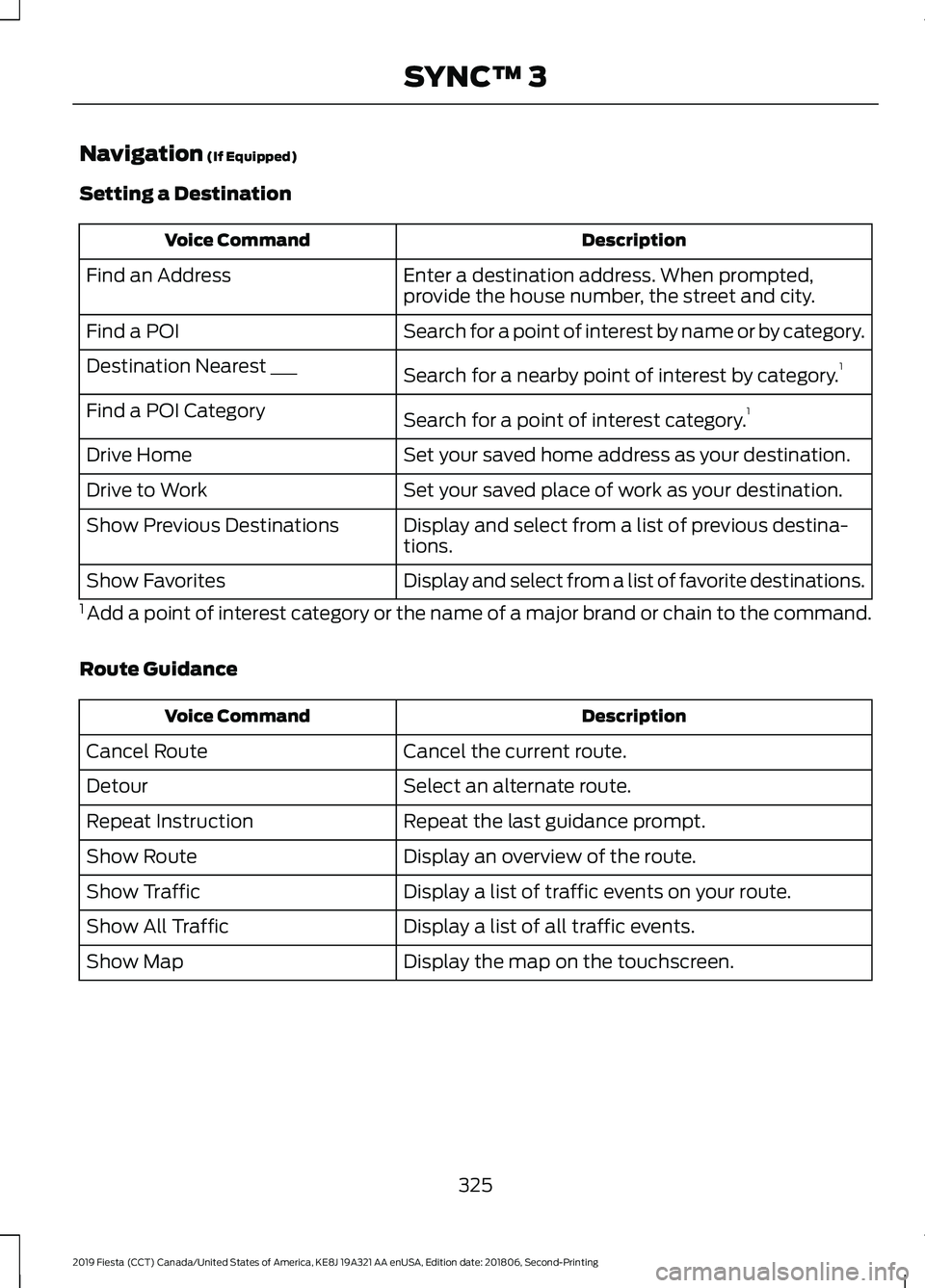
Navigation (If Equipped)
Setting a Destination Description
Voice Command
Enter a destination address. When prompted,
provide the house number, the street and city.
Find an Address
Search for a point of interest by name or by category.
Find a POI
Search for a nearby point of interest by category. 1
Destination Nearest ___
Search for a point of interest category. 1
Find a POI Category
Set your saved home address as your destination.
Drive Home
Set your saved place of work as your destination.
Drive to Work
Display and select from a list of previous destina-
tions.
Show Previous Destinations
Display and select from a list of favorite destinations.
Show Favorites
1 Add a point of interest category or the name of a major brand or chain to the command.
Route Guidance Description
Voice Command
Cancel the current route.
Cancel Route
Select an alternate route.
Detour
Repeat the last guidance prompt.
Repeat Instruction
Display an overview of the route.
Show Route
Display a list of traffic events on your route.
Show Traffic
Display a list of all traffic events.
Show All Traffic
Display the map on the touchscreen.
Show Map
325
2019 Fiesta (CCT) Canada/United States of America, KE8J 19A321 AA enUSA, Edition date: 201806, Second-Printing SYNC™ 3
Page 329 of 443
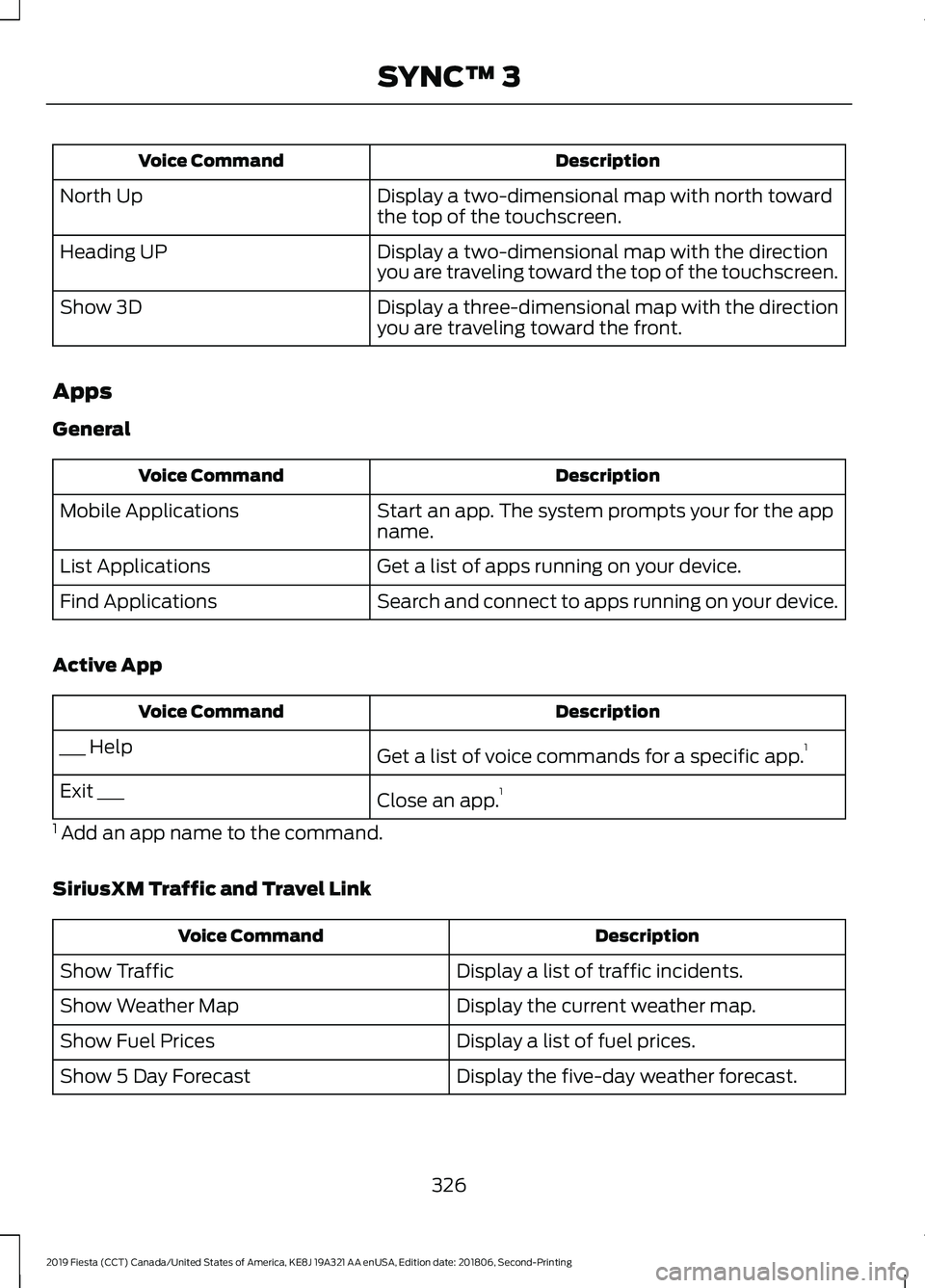
Description
Voice Command
Display a two-dimensional map with north toward
the top of the touchscreen.
North Up
Display a two-dimensional map with the direction
you are traveling toward the top of the touchscreen.
Heading UP
Display a three-dimensional map with the direction
you are traveling toward the front.
Show 3D
Apps
General Description
Voice Command
Start an app. The system prompts your for the app
name.
Mobile Applications
Get a list of apps running on your device.
List Applications
Search and connect to apps running on your device.
Find Applications
Active App Description
Voice Command
Get a list of voice commands for a specific app. 1
___ Help
Close an app.1
Exit ___
1 Add an app name to the command.
SiriusXM Traffic and Travel Link Description
Voice Command
Display a list of traffic incidents.
Show Traffic
Display the current weather map.
Show Weather Map
Display a list of fuel prices.
Show Fuel Prices
Display the five-day weather forecast.
Show 5 Day Forecast
326
2019 Fiesta (CCT) Canada/United States of America, KE8J 19A321 AA enUSA, Edition date: 201806, Second-Printing SYNC™ 3
Page 330 of 443

Voice Settings
Description
Voice Command
Go to the voice settings menu.
Voice Settings
Switch long voice prompts on.
Interaction Mode Novice
Switch short voice prompts on.
Interaction Mode Advanced
Switch call confirmation on. The system prompts
you to confirm before making a call.
Phone Confirmation On
Switch call confirmation off. The system does not
prompt you to confirm before making a call.
Phone Confirmation Off
Switch the display of voice commands on.
Voice Command Lists On
Switch the display of voice commands off.
Voice Command Lists Off
Automatic Blower Motor Speed
Reduction
If necessary, the system decreases the
blower motor speed when you are using
voice commands to reduce the amount of
background noise in your vehicle. It returns
to normal when you are finished.
Switching Automatic Blower Motor
Speed Reduction Off
Simultaneously press the A/C and
recirculated air buttons. ENTERTAINMENT Message and description
Message
Sources
A
Direct Tune
B
Presets
C
You can access these options using the
touchscreen or voice commands.
327
2019 Fiesta (CCT) Canada/United States of America, KE8J 19A321 AA enUSA, Edition date: 201806, Second-Printing SYNC™ 3E279740
Page 331 of 443
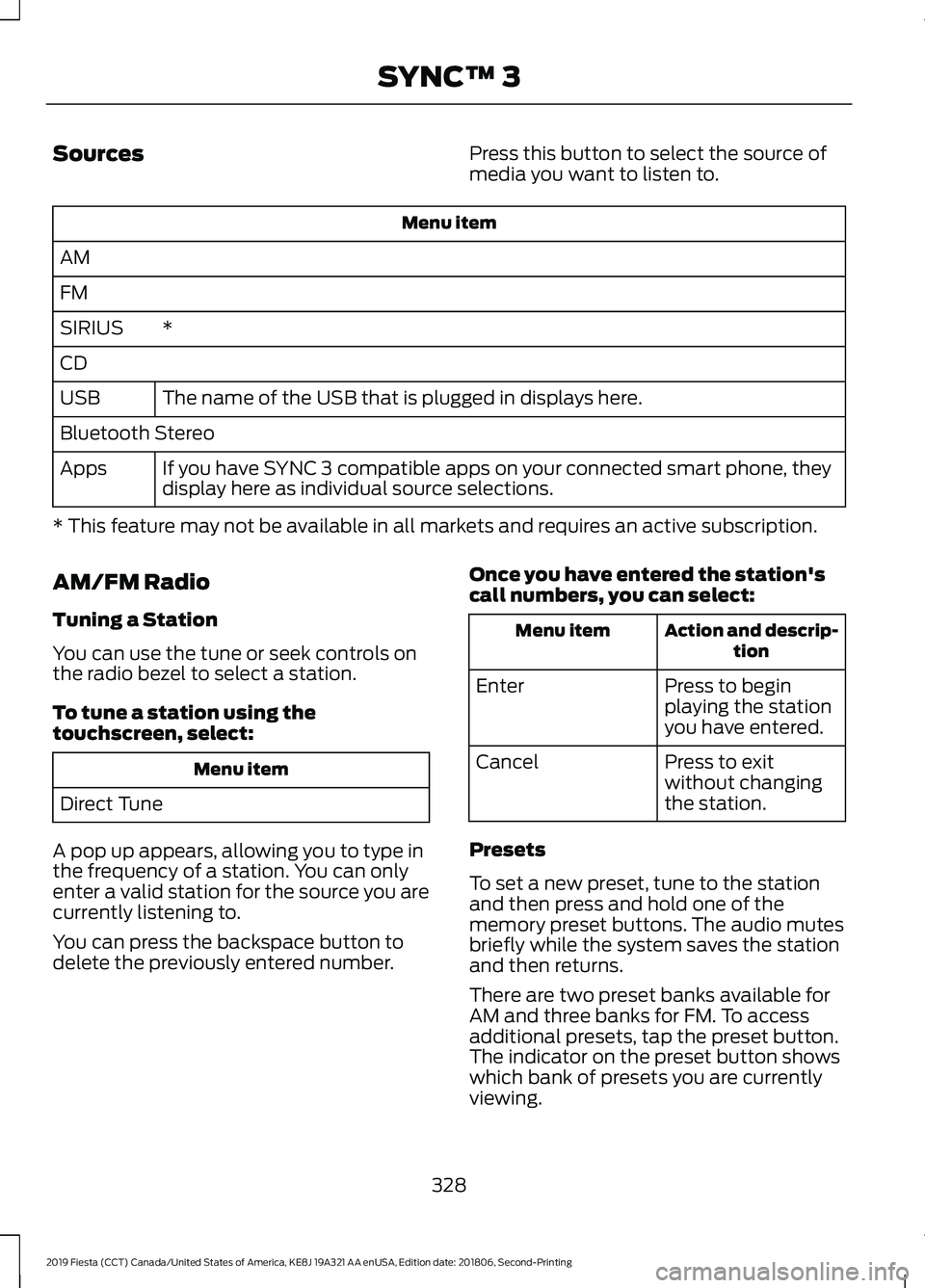
Sources
Press this button to select the source of
media you want to listen to.Menu item
AM
FM *
SIRIUS
CD
The name of the USB that is plugged in displays here.
USB
Bluetooth Stereo
If you have SYNC 3 compatible apps on your connected smart phone, they
display here as individual source selections.
Apps
* This feature may not be available in all markets and requires an active subscription.
AM/FM Radio
Tuning a Station
You can use the tune or seek controls on
the radio bezel to select a station.
To tune a station using the
touchscreen, select: Menu item
Direct Tune
A pop up appears, allowing you to type in
the frequency of a station. You can only
enter a valid station for the source you are
currently listening to.
You can press the backspace button to
delete the previously entered number. Once you have entered the station's
call numbers, you can select: Action and descrip-
tion
Menu item
Press to begin
playing the station
you have entered.
Enter
Press to exit
without changing
the station.
Cancel
Presets
To set a new preset, tune to the station
and then press and hold one of the
memory preset buttons. The audio mutes
briefly while the system saves the station
and then returns.
There are two preset banks available for
AM and three banks for FM. To access
additional presets, tap the preset button.
The indicator on the preset button shows
which bank of presets you are currently
viewing.
328
2019 Fiesta (CCT) Canada/United States of America, KE8J 19A321 AA enUSA, Edition date: 201806, Second-Printing SYNC™ 3
Page 332 of 443
SiriusXM® Satellite Radio (If
Activated)
Note:
This feature may not be available in
all markets and requires an active
subscription. SiriusXM satellite radio is a
subscription-based satellite radio service
that broadcasts a variety of music, sports,
news, weather, traffic and entertainment
programming. Your factory-installed
SiriusXM satellite radio system includes
hardware and a limited subscription term
that begins on the date of sale or lease of
your vehicle. See an authorized dealer for
availability.
For more information on extended
subscription terms (a service fee is
required), the online media player and a
list of SiriusXM satellite radio channels,
and other features, please visit
www.siriusxm.com in the United States,
www.siriusxm.ca in Canada, or call
SiriusXM at 1-888-539-7474.
Note:
SiriusXM reserves the unrestricted
right to change, rearrange, add or delete
programming. This includes canceling,
moving or adding particular channels, and
its prices, at any time, with or without notice
to you. Ford Motor Company shall not be
responsible for any such programming
changes.
Note: This receiver includes the eCos
real-time operating system. eCos is
published under the eCos License.
The following buttons are available for SiriusXM: Action and description
Menu item
Touch this button to see a list of available stations.
Browse
A pop-up appears, allowing you to type in the call numbers of
a station.
Direct Tune
Once you enter the stations call numbers, you can select:The system tunes to the station you select.
Enter
You exit the pop-up and the current station
continues to play.
Cancel
You can press the backspace button to delete the previous
number.
329
2019 Fiesta (CCT) Canada/United States of America, KE8J 19A321 AA enUSA, Edition date: 201806, Second-Printing SYNC™ 3E234451