buttons FORD FIESTA 2019 Owner's Guide
[x] Cancel search | Manufacturer: FORD, Model Year: 2019, Model line: FIESTA, Model: FORD FIESTA 2019Pages: 443, PDF Size: 31.51 MB
Page 356 of 443
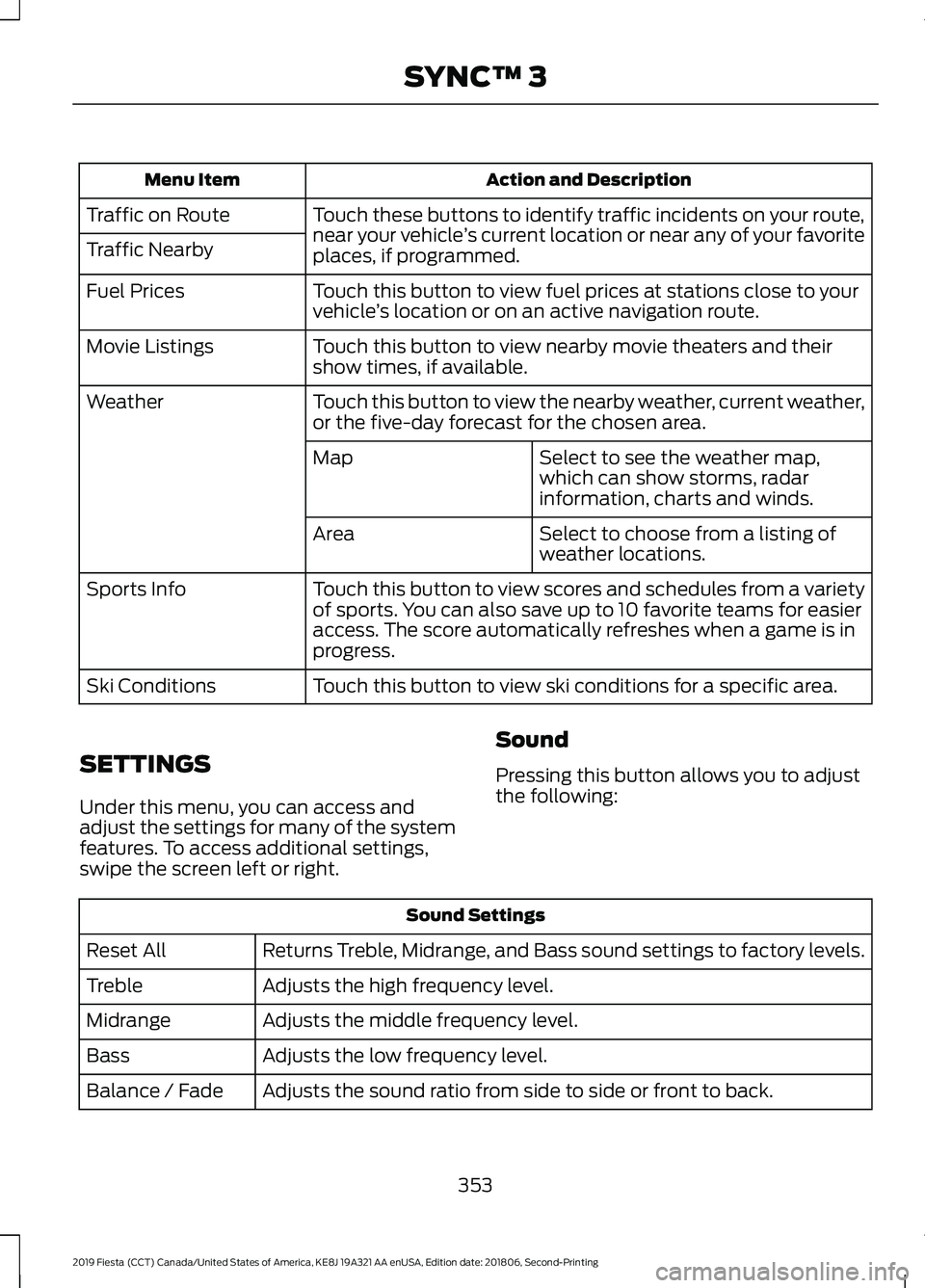
Action and Description
Menu Item
Touch these buttons to identify traffic incidents on your route,
near your vehicle’s current location or near any of your favorite
places, if programmed.
Traffic on Route
Traffic Nearby
Touch this button to view fuel prices at stations close to your
vehicle’s location or on an active navigation route.
Fuel Prices
Touch this button to view nearby movie theaters and their
show times, if available.
Movie Listings
Touch this button to view the nearby weather, current weather,
or the five-day forecast for the chosen area.
Weather
Select to see the weather map,
which can show storms, radar
information, charts and winds.
Map
Select to choose from a listing of
weather locations.
Area
Touch this button to view scores and schedules from a variety
of sports. You can also save up to 10 favorite teams for easier
access. The score automatically refreshes when a game is in
progress.
Sports Info
Touch this button to view ski conditions for a specific area.
Ski Conditions
SETTINGS
Under this menu, you can access and
adjust the settings for many of the system
features. To access additional settings,
swipe the screen left or right. Sound
Pressing this button allows you to adjust
the following:Sound Settings
Returns Treble, Midrange, and Bass sound settings to factory levels.
Reset All
Adjusts the high frequency level.
Treble
Adjusts the middle frequency level.
Midrange
Adjusts the low frequency level.
Bass
Adjusts the sound ratio from side to side or front to back.
Balance / Fade
353
2019 Fiesta (CCT) Canada/United States of America, KE8J 19A321 AA enUSA, Edition date: 201806, Second-Printing SYNC™ 3
Page 379 of 443
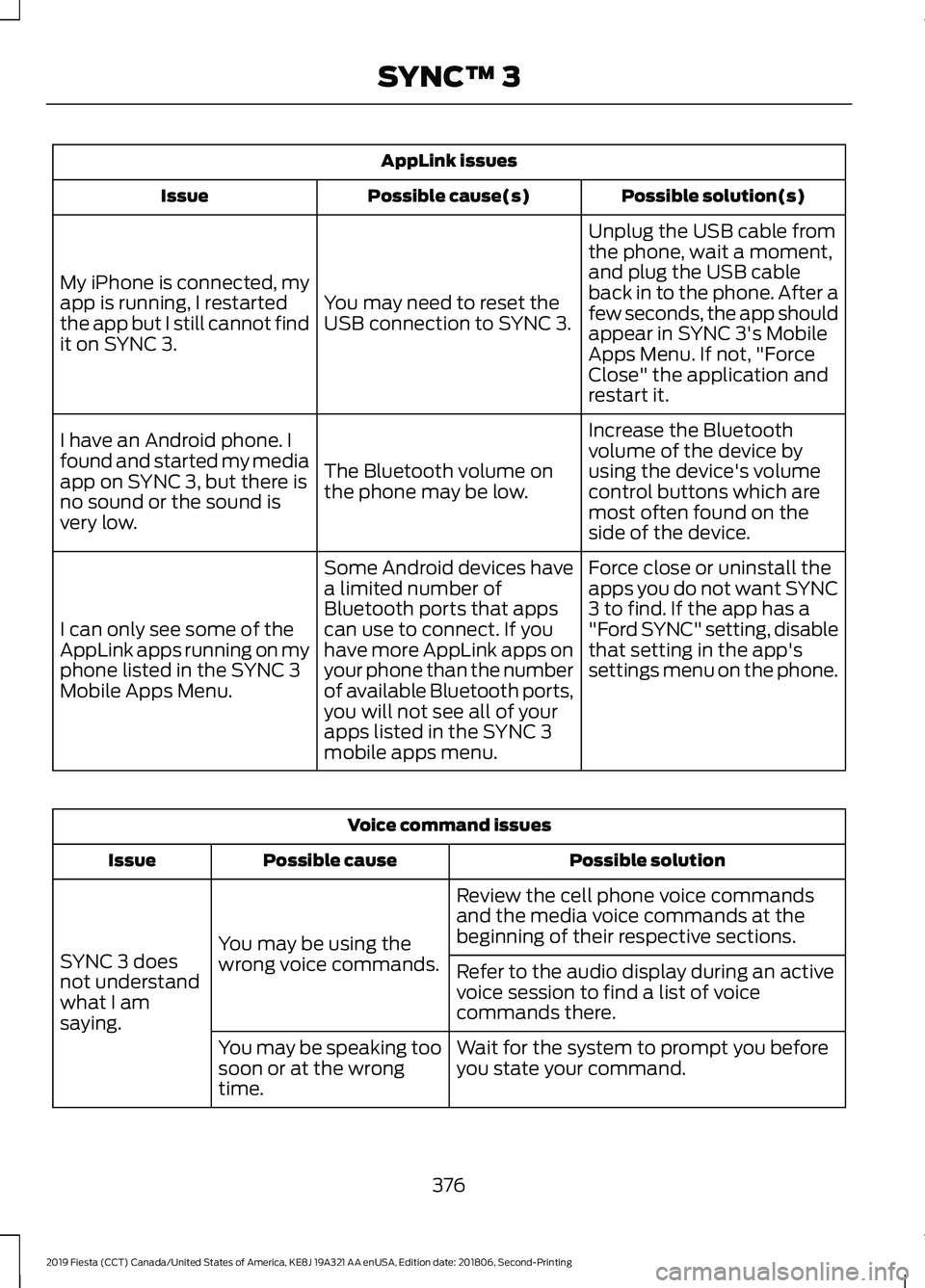
AppLink issues
Possible solution(s)
Possible cause(s)
Issue
Unplug the USB cable from
the phone, wait a moment,
and plug the USB cable
back in to the phone. After a
few seconds, the app should
appear in SYNC 3's Mobile
Apps Menu. If not, "Force
Close" the application and
restart it.
You may need to reset the
USB connection to SYNC 3.
My iPhone is connected, my
app is running, I restarted
the app but I still cannot find
it on SYNC 3.
Increase the Bluetooth
volume of the device by
using the device's volume
control buttons which are
most often found on the
side of the device.
The Bluetooth volume on
the phone may be low.
I have an Android phone. I
found and started my media
app on SYNC 3, but there is
no sound or the sound is
very low.
Force close or uninstall the
apps you do not want SYNC
3 to find. If the app has a
"Ford SYNC" setting, disable
that setting in the app's
settings menu on the phone.
Some Android devices have
a limited number of
Bluetooth ports that apps
can use to connect. If you
have more AppLink apps on
your phone than the number
of available Bluetooth ports,
you will not see all of your
apps listed in the SYNC 3
mobile apps menu.
I can only see some of the
AppLink apps running on my
phone listed in the SYNC 3
Mobile Apps Menu. Voice command issues
Possible solution
Possible cause
Issue
Review the cell phone voice commands
and the media voice commands at the
beginning of their respective sections.
You may be using the
wrong voice commands.
SYNC 3 does
not understand
what I am
saying. Refer to the audio display during an active
voice session to find a list of voice
commands there.
Wait for the system to prompt you before
you state your command.
You may be speaking too
soon or at the wrong
time.
376
2019 Fiesta (CCT) Canada/United States of America, KE8J 19A321 AA enUSA, Edition date: 201806, Second-Printing SYNC™ 3
Page 434 of 443
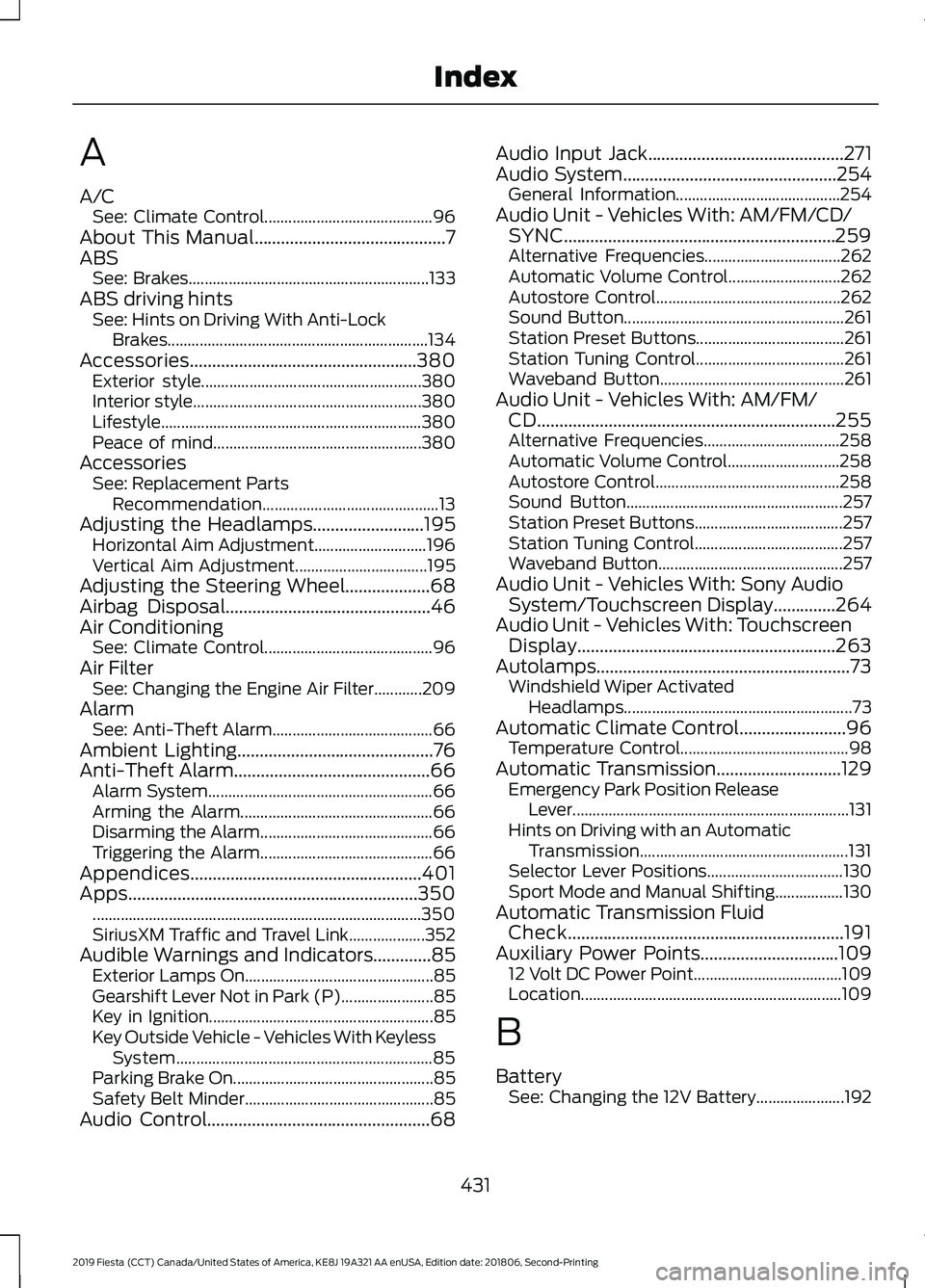
A
A/C
See: Climate Control.......................................... 96
About This Manual...........................................7
ABS See: Brakes............................................................ 133
ABS driving hints See: Hints on Driving With Anti-Lock
Brakes.................................................................134
Accessories...................................................380 Exterior style....................................................... 380
Interior style......................................................... 380
Lifestyle................................................................. 380
Peace of mind.................................................... 380
Accessories See: Replacement Parts
Recommendation............................................ 13
Adjusting the Headlamps.........................195 Horizontal Aim Adjustment............................ 196
Vertical Aim Adjustment................................. 195
Adjusting the Steering Wheel...................68
Airbag Disposal
..............................................46
Air Conditioning See: Climate Control.......................................... 96
Air Filter See: Changing the Engine Air Filter............209
Alarm See: Anti-Theft Alarm........................................ 66
Ambient Lighting............................................76
Anti-Theft Alarm............................................66 Alarm System........................................................ 66
Arming the Alarm................................................ 66
Disarming the Alarm........................................... 66
Triggering the Alarm........................................... 66
Appendices....................................................401
Apps.................................................................350 ........................................................................\
.......... 350
SiriusXM Traffic and Travel Link................... 352
Audible Warnings and Indicators.............85 Exterior Lamps On............................................... 85
Gearshift Lever Not in Park (P)....................... 85
Key in Ignition........................................................ 85
Key Outside Vehicle - Vehicles With Keyless System................................................................ 85
Parking Brake On.................................................. 85
Safety Belt Minder............................................... 85
Audio Control..................................................68 Audio Input Jack
............................................271
Audio System................................................254
General Information......................................... 254
Audio Unit - Vehicles With: AM/FM/CD/ SYNC.............................................................259
Alternative Frequencies.................................. 262
Automatic Volume Control............................ 262
Autostore Control.............................................. 262
Sound Button....................................................... 261
Station Preset Buttons..................................... 261
Station Tuning Control..................................... 261
Waveband Button.............................................. 261
Audio Unit - Vehicles With: AM/FM/ CD...................................................................255
Alternative Frequencies.................................. 258
Automatic Volume Control............................ 258
Autostore Control.............................................. 258
Sound Button...................................................... 257
Station Preset Buttons..................................... 257
Station Tuning Control..................................... 257
Waveband Button.............................................. 257
Audio Unit - Vehicles With: Sony Audio System/Touchscreen Display
..............264
Audio Unit - Vehicles With: Touchscreen Display..........................................................263
Autolamps.........................................................73 Windshield Wiper Activated
Headlamps......................................................... 73
Automatic Climate Control........................96 Temperature Control.......................................... 98
Automatic Transmission............................129 Emergency Park Position Release
Lever..................................................................... 131
Hints on Driving with an Automatic Transmission.................................................... 131
Selector Lever Positions.................................. 130
Sport Mode and Manual Shifting.................130
Automatic Transmission Fluid Check..............................................................191
Auxiliary Power Points
...............................109
12 Volt DC Power Point..................................... 109
Location................................................................. 109
B
Battery See: Changing the 12V Battery...................... 192
431
2019 Fiesta (CCT) Canada/United States of America, KE8J 19A321 AA enUSA, Edition date: 201806, Second-Printing Index