AUX FORD FIESTA 2019 Owners Manual
[x] Cancel search | Manufacturer: FORD, Model Year: 2019, Model line: FIESTA, Model: FORD FIESTA 2019Pages: 443, PDF Size: 31.51 MB
Page 5 of 443
Wipers and Washers
Windshield Wipers
........................................70
Windshield Washers ....................................
70
Rear Window Wiper and Washers ...........
71
Lighting
General Information .....................................
72
Lighting Control ..............................................
72
Autolamps ........................................................
73
Instrument Lighting Dimmer .....................
74
Headlamp Exit Delay ...................................
74
Front Fog Lamps ...........................................
74
Direction Indicators .......................................
74
Interior Lamps .................................................
75
Ambient Lighting ...........................................
76
Windows and Mirrors
Power Windows ..............................................
77
Exterior Mirrors ...............................................
78
Interior Mirror ...................................................
79
Moonroof .........................................................
80
Instrument Cluster
Gauges ...............................................................
81
Warning Lamps and Indicators ................
82
Audible Warnings and Indicators ............
85
Information Displays
General Information ....................................
86
Clock ..................................................................
87
Trip Computer .................................................
87
Personalized Settings .................................
88
Information Messages ................................
88
Climate Control
Manual Climate Control .............................
96
Automatic Climate Control .......................
96
Hints on Controlling the Interior Climate ........................................................................\
..
98 Heated Windows and Mirrors
..................
101
Cabin Air Filter ..............................................
102
Remote Start ................................................
102
Seats
Sitting in the Correct Position .................
103
Head Restraints ...........................................
103
Manual Seats ................................................
105
Rear Seats ......................................................
106
Heated Seats .................................................
107
Auxiliary Power Points
Auxiliary Power Points ..............................
109
Cigar Lighter ..................................................
109
Storage Compartments
Center Console ...............................................
111
Overhead Console .........................................
111
Starting and Stopping the Engine
General Information ....................................
112
Ignition Switch ...............................................
112
Keyless Starting .............................................
113
Starting a Gasoline Engine ........................
114
Switching Off the Engine ...........................
115
Engine Block Heater ....................................
115
Fuel and Refueling
Safety Precautions .......................................
117
Fuel Quality .....................................................
117
Fuel Filler Funnel Location ........................
118
Running Out of Fuel ....................................
118
Refueling .........................................................
120
Fuel Consumption .......................................
122
Engine Emission Control
Emission Law ................................................
124
Catalytic Converter .....................................
125
2
2019 Fiesta (CCT) Canada/United States of America, KE8J 19A321 AA enUSA, Edition date: 201806, Second-Printing Table of Contents
Page 112 of 443
12 Volt DC Power Point
WARNING: Do not plug optional
electrical accessories into the cigar
lighter socket. Incorrect use of the cigar
lighter can cause damage not covered
by the vehicle warranty, and can result
in fire or serious injury. WARNING:
Incorrect use of the
power points can cause damage not
covered by the vehicle warranty, and can
result in fire or serious injury.
Note: When you switch the ignition on, you
can use the socket to power 12 volt
appliances with a maximum current rating
of 15 amps.
If the power supply does not work after you
switch the ignition off, switch the ignition
on.
Note: Do not insert objects other than an
accessory plug into the power point. This
will damage the outlet and blow the fuse.
Note: Do not hang any accessory from the
accessory plug.
Note: Do not use the power point over the
vehicle capacity of 12 volt DC 180 watts or
a fuse may blow.
Note: Do not use a power point for
operating a cigar lighter.
Note: Always keep the power point caps
closed when not in use.
Note: Using the auxiliary power point to
charge a USB device could result in audio
system interference.
Run the vehicle for full capacity use of the
power point. To prevent the battery from running out of
charge:
•
Do not use the power point longer than
necessary when the vehicle is not
running.
• Do not leave devices plugged in
overnight or when you park your vehicle
for extended periods.
Location
Power points may be in the following
locations:
• On the center console.
• On the rear of the center console.
CIGAR LIGHTER
(IF EQUIPPED) WARNING:
Do not plug optional
electrical accessories into the cigar
lighter socket. Incorrect use of the cigar
lighter can cause damage not covered
by the vehicle warranty, and can result
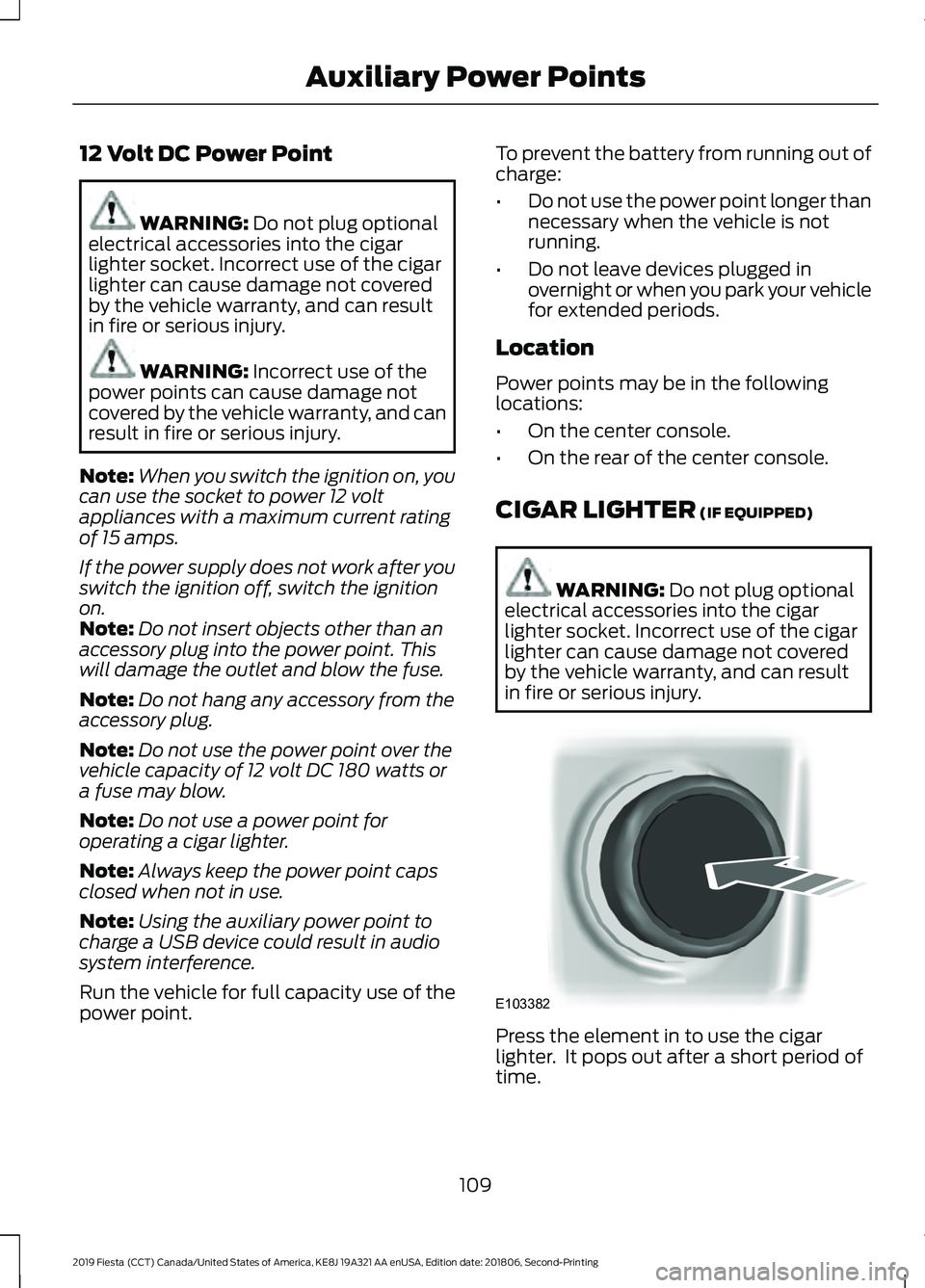
in fire or serious injury. Press the element in to use the cigar
lighter. It pops out after a short period of
time.
109
2019 Fiesta (CCT) Canada/United States of America, KE8J 19A321 AA enUSA, Edition date: 201806, Second-Printing Auxiliary Power PointsE103382
Page 113 of 443
Do not hold the cigar lighter element
pressed in.
Note:
If the power supply does not work
after you switch the ignition off, switch the
ignition on.
Note: If you use the socket when the engine
is not running, the battery may run out of
charge.
Note: When you switch the ignition on, you
can use the socket to power 12 volt
appliances with a maximum current rating
of 15 amps.
110
2019 Fiesta (CCT) Canada/United States of America, KE8J 19A321 AA enUSA, Edition date: 201806, Second-Printing Auxiliary Power Points
Page 114 of 443
CENTER CONSOLE
Stow items in the cup holder carefully as
items may become loose during hard
braking, acceleration or crashes, including
hot drinks which may spill.
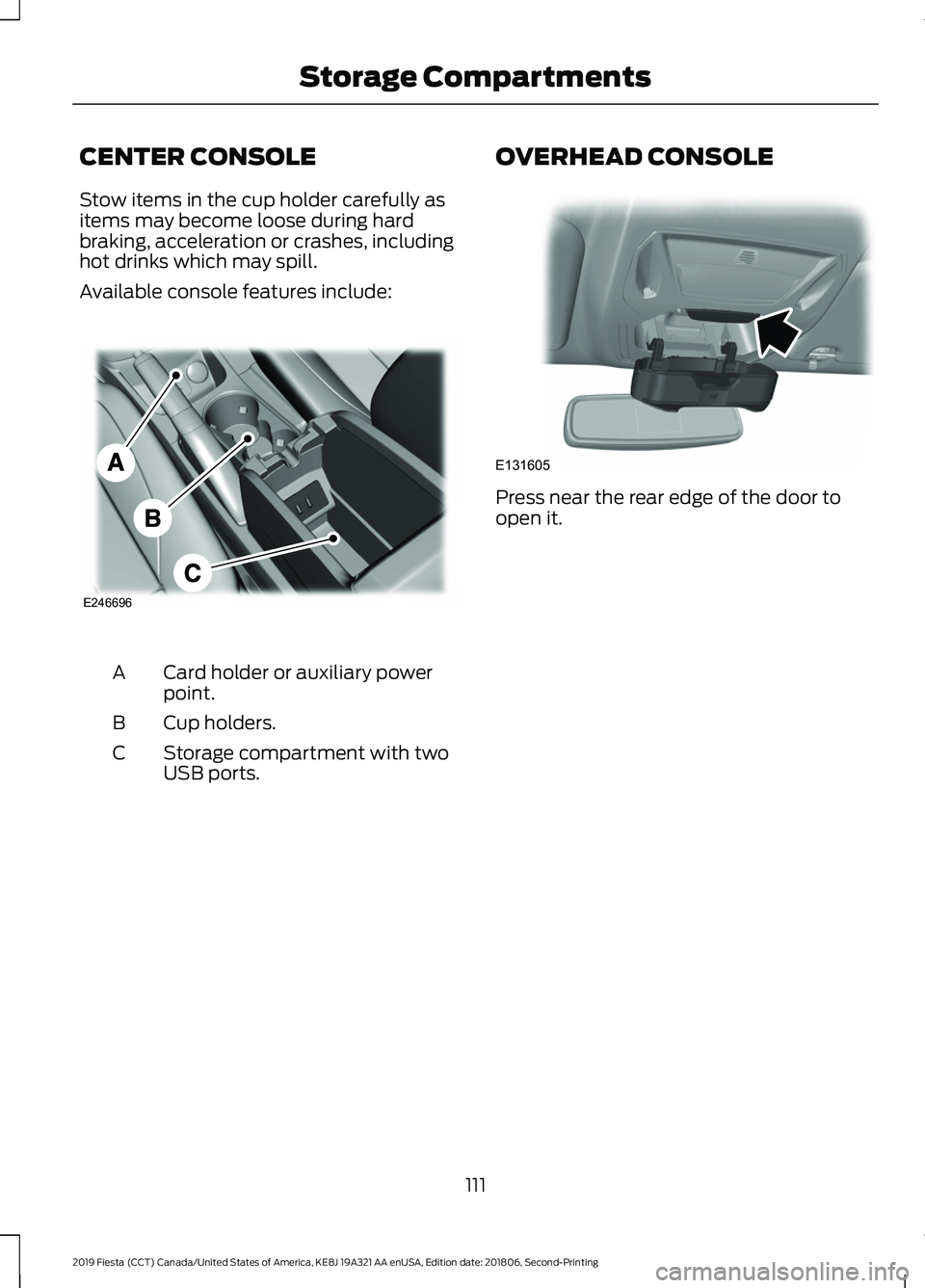
Available console features include:
Card holder or auxiliary power
point.
A
Cup holders.
B
Storage compartment with two
USB ports.
C OVERHEAD CONSOLE Press near the rear edge of the door to
open it.
111
2019 Fiesta (CCT) Canada/United States of America, KE8J 19A321 AA enUSA, Edition date: 201806, Second-Printing Storage CompartmentsE246696 E131605
Page 182 of 443
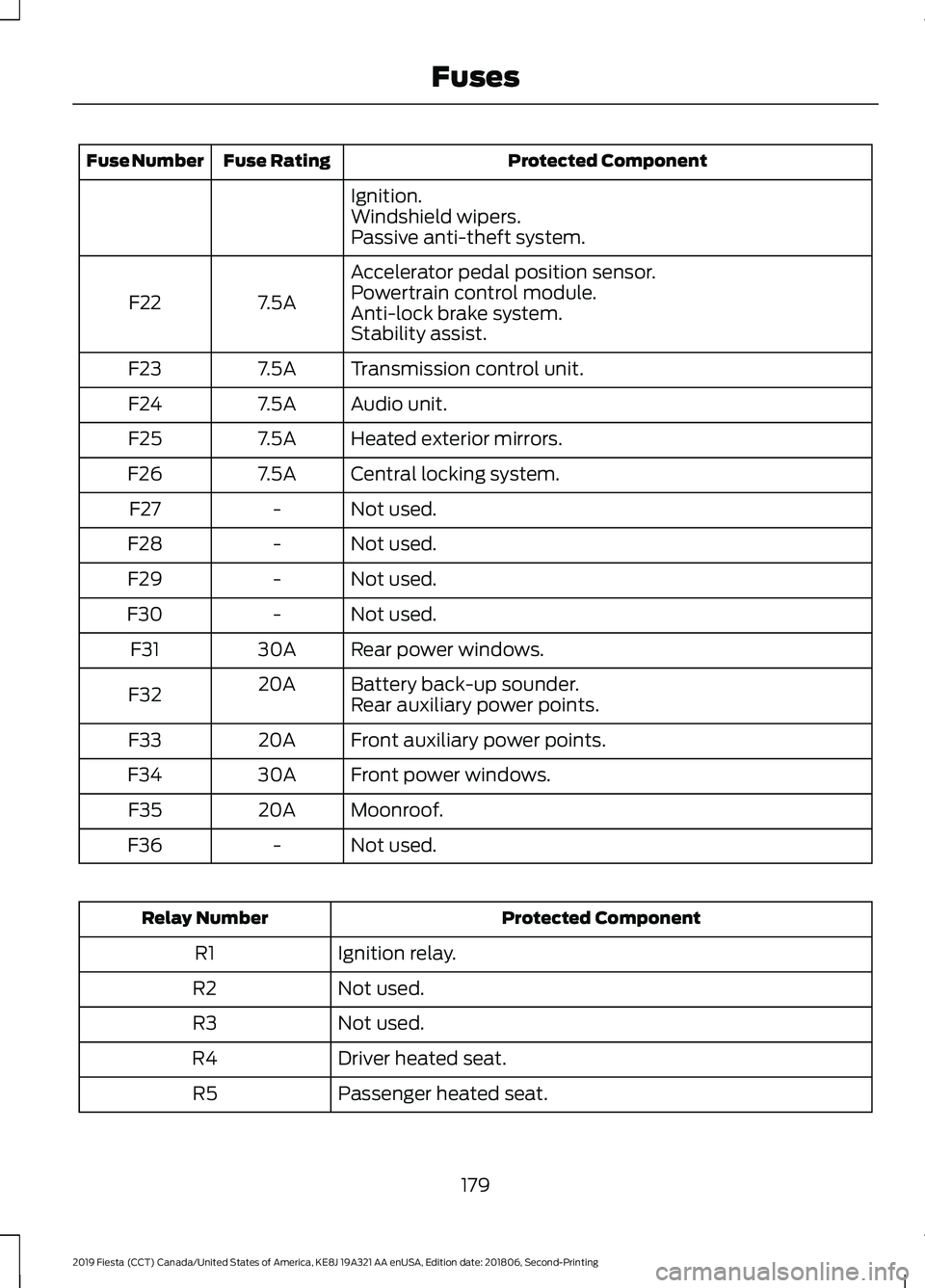
Protected Component
Fuse Rating
Fuse Number
Ignition.
Windshield wipers.
Passive anti-theft system.
Accelerator pedal position sensor.
7.5A
F22 Powertrain control module.
Anti-lock brake system.
Stability assist.
Transmission control unit.
7.5A
F23
Audio unit.
7.5A
F24
Heated exterior mirrors.
7.5A
F25
Central locking system.
7.5A
F26
Not used.
-
F27
Not used.
-
F28
Not used.
-
F29
Not used.
-
F30
Rear power windows.
30A
F31
Battery back-up sounder.
20A
F32 Rear auxiliary power points.
Front auxiliary power points.
20A
F33
Front power windows.
30A
F34
Moonroof.
20A
F35
Not used.
-
F36 Protected Component
Relay Number
Ignition relay.
R1
Not used.
R2
Not used.
R3
Driver heated seat.
R4
Passenger heated seat.
R5
179
2019 Fiesta (CCT) Canada/United States of America, KE8J 19A321 AA enUSA, Edition date: 201806, Second-Printing Fuses
Page 260 of 443
Seek down: Press the button to
go to the next station down the
radio frequency band or the
previous track on a CD.
J
MENU: Press the button to
access different audio system
features.
K
INFO:
Press the button to
access radio or CD information.
L
SOUND:
Press the button to
adjust the sound settings for
bass, treble, middle, balance and
fade.
M
MEDIA:
Press the button to
access the AUX and SYNC
features, it will also cancel the
menu or list browsing.
N
RADIO:
Press the button to
select different radio bands, it
will also cancel the menu or list
browsing.
O
Sound Button
This will allow you to adjust the sound
settings (for example bass, middle and
treble).
1. Press the
SOUND button.
2. Use the up and down arrow buttons to
select the required setting.
3. Use the left and right arrow buttons to
make the necessary adjustment. The
display indicates the level selected.
4. Press the
OK button to confirm the
new settings.
Waveband Button
Press the
RADIO button to select from the
wavebands available.
You can use the selector to return to radio
reception when you have been listening to
another source. Alternatively, press the left arrow button
to display the available wavebands. Scroll
to the required waveband and press
OK.
Station Tuning Control
Seek Tuning
Select a waveband and briefly press one
of the seek buttons. The unit will stop at
the first station it finds in the direction you
have chosen.
Manual Tuning
1. Press the
MENU button.
2. Select RADIO mode and then Manual.
3. Use the left and right arrow buttons to
tune down or up the waveband in small
increments or press and hold to
increment quickly, until you find a
station you want to listen to.
4. Press
OK to continue listening to a
station.
Scan Tuning
Scan allows you to listen to a few seconds
of each station detected.
1. Press the
MENU button.
2. Select
RADIO mode and then Scan.
3. Use the seek buttons to scan up or down the selected waveband.
4. Press
OK to continue listening to a
station.
Station Preset Buttons
This feature allows you to store your
favorite stations, they can be recalled by
selecting the appropriate waveband and
pressing one of the preset buttons.
1. Select a waveband.
2. Tune to the station required.
257
2019 Fiesta (CCT) Canada/United States of America, KE8J 19A321 AA enUSA, Edition date: 201806, Second-Printing Audio System
Page 262 of 443
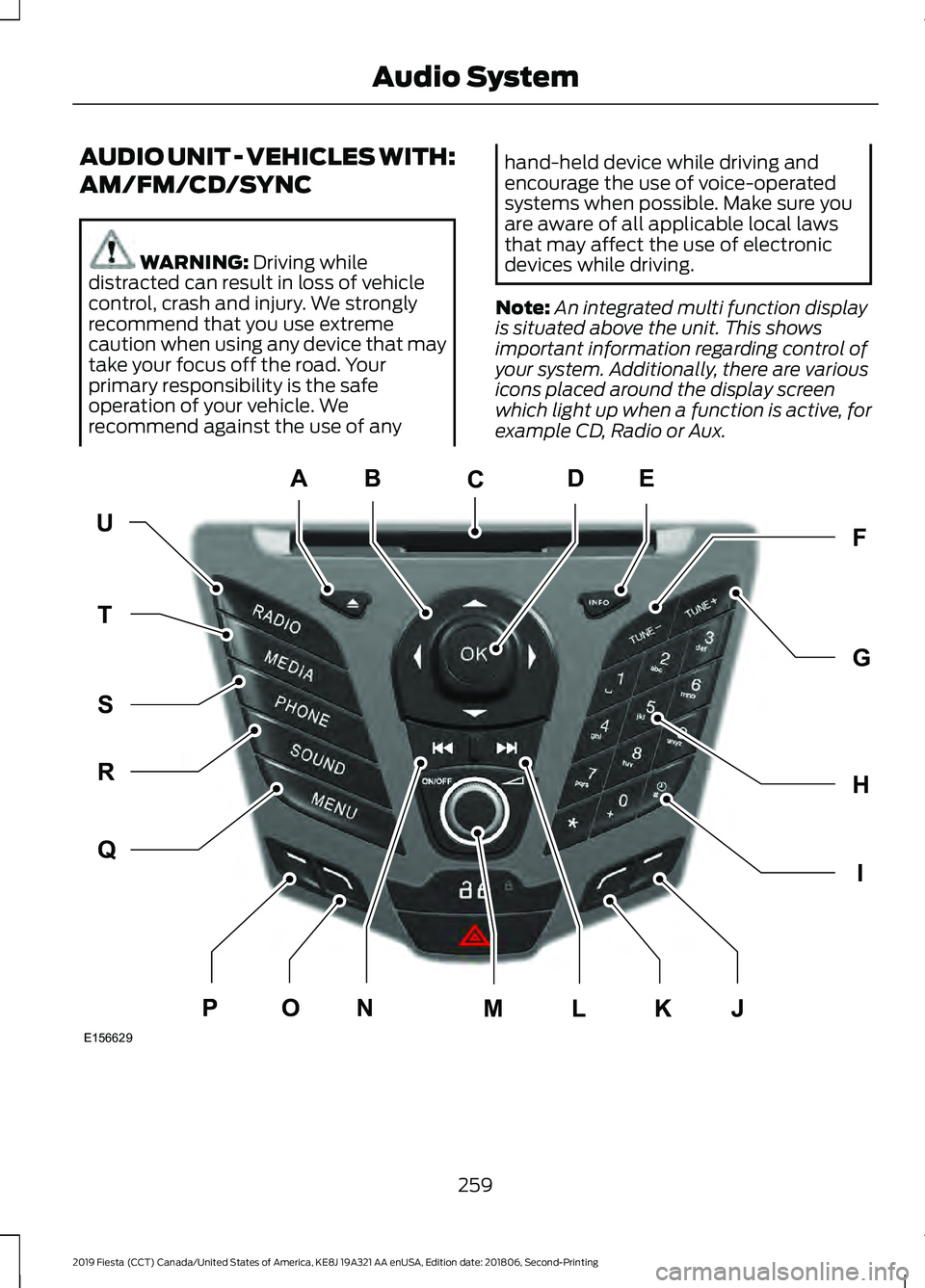
AUDIO UNIT - VEHICLES WITH:
AM/FM/CD/SYNC
WARNING: Driving while
distracted can result in loss of vehicle
control, crash and injury. We strongly
recommend that you use extreme
caution when using any device that may
take your focus off the road. Your
primary responsibility is the safe
operation of your vehicle. We
recommend against the use of any hand-held device while driving and
encourage the use of voice-operated
systems when possible. Make sure you
are aware of all applicable local laws
that may affect the use of electronic
devices while driving.
Note: An integrated multi function display
is situated above the unit. This shows
important information regarding control of
your system. Additionally, there are various
icons placed around the display screen
which light up when a function is active, for
example CD, Radio or Aux. 259
2019 Fiesta (CCT) Canada/United States of America, KE8J 19A321 AA enUSA, Edition date: 201806, Second-Printing Audio SystemE156629
KJ
ED
UF
H
I
G
Q
R
S
T
NOPLM
C
A
B
Page 263 of 443
Eject: Press the button to eject
a CD.
A
Cursor arrows:
Press a button
to scroll through on-screen
choices.
B
CD slot:
Where you insert a CD.
C
OK:
Press the button to confirm
on-screen selections.
D
INFO:
Press the button to
access radio, CD, USB and IPod
information.
E
TUNE -:
Press the button to
manual tune down the
waveband.
F
TUNE +:
Press the button to
manual tune up the waveband.
G
Numeric keypad:
Press the
button to recall a previously
stored station. To store a
favorite station press and hold
until the sound returns.
H
Clock:
Press the button to set
the clock, except when in phone
mode.
I
Function button 4:
Press the
button to select different
functions of the audio system
depending on which mode (i.e.
radio or CD) you are in.
J
Function button 3:
Press the
button to select different
functions of the audio system
depending on which mode (i.e.
radio or CD) you are in.
K
Seek up:
Press the button to go
to the next station up the radio
frequency band or the next track
on a CD.
L
On, Off and Volume:
Press the
button to switch the audio
system on or off. Turn the dial to
adjust the volume.
M Seek down: Press the button to
go to the next station down the
radio frequency band or the
previous track on a CD.
N
Function button 2:
Press the
button to select different
functions of the audio system
depending on which mode (i.e.
radio or CD) you are in.
O
Function button 1:
Press the
button to select different
functions of the audio system
depending on which mode (i.e.
radio or CD) you are in.
P
MENU:
Press the button to
access different audio system
features.
Q
SOUND:
Press the button to
adjust the sound settings for
bass, treble, middle, balance and
fade.
R
PHONE:
Press the button to
access the phone feature of the
SYNC system by pressing
PHONE
then MENU. See
separate manual.
S
MEDIA:
Press the button to
access the AUX and SYNC
features, it will also cancel the
menu or list browsing.
T
RADIO:
Press the button to
select different radio bands, it
will also cancel the menu or list
browsing.
U
260
2019 Fiesta (CCT) Canada/United States of America, KE8J 19A321 AA enUSA, Edition date: 201806, Second-Printing Audio System
Page 274 of 443
AUDIO INPUT JACK
WARNING: Driving while
distracted can result in loss of vehicle
control, crash and injury. We strongly
recommend that you use extreme
caution when using any device that may
take your focus off the road. Your
primary responsibility is the safe
operation of your vehicle. We
recommend against the use of any
hand-held device while driving and
encourage the use of voice-operated
systems when possible. Make sure you
are aware of all applicable local laws
that may affect the use of electronic
devices while driving. WARNING:
Do not connect or
adjust the settings on your portable
music player when your vehicle is
moving. WARNING:
Always place your
device in a secure location in your vehicle
so it does not become a projectile in a
sudden stop or crash. Failure to follow
this instruction could result in personal
injury.
Note: For optimum performance when
using any auxiliary device set the volume on
the device high. This reduces audio
interference when charging the device using
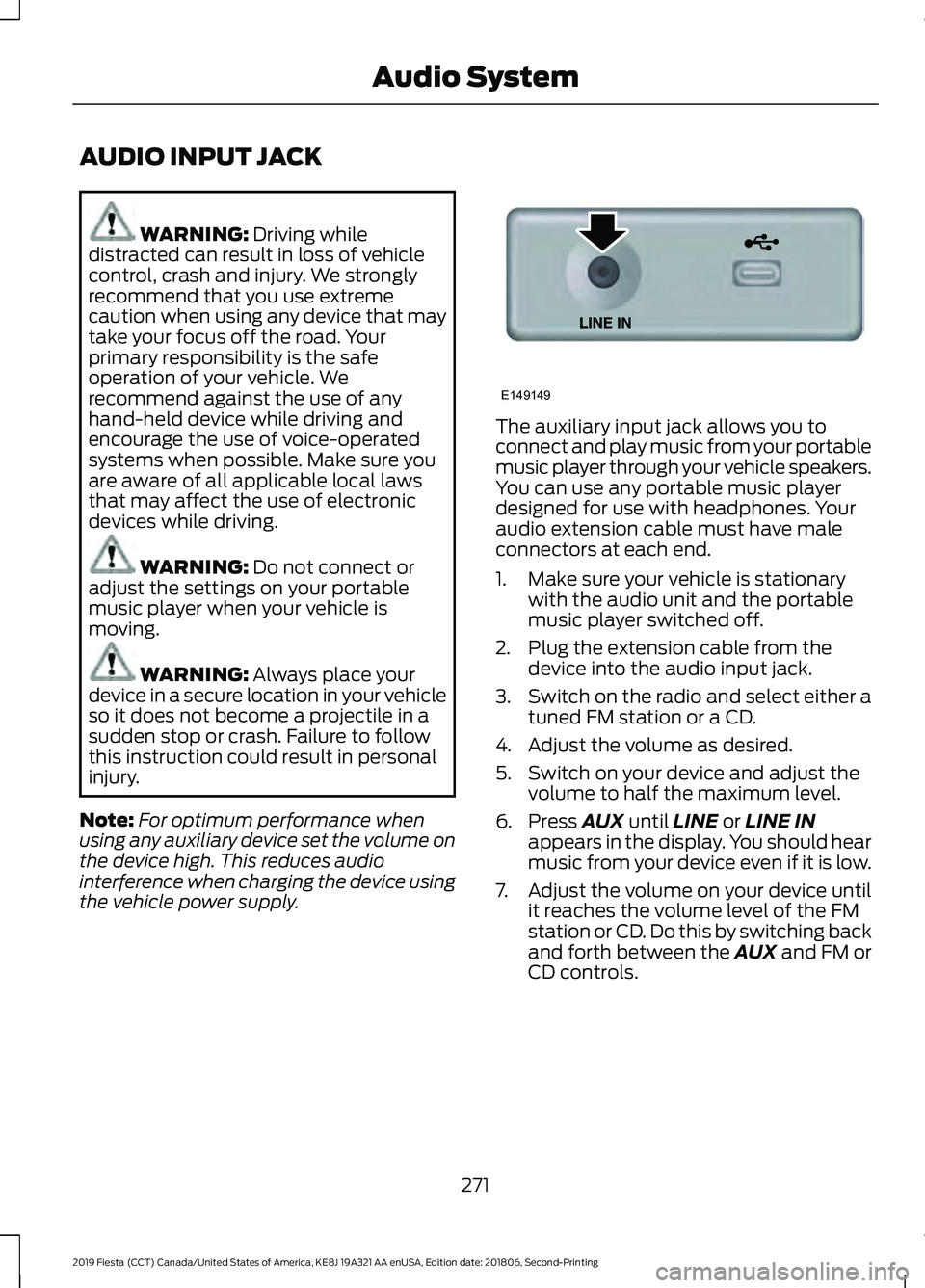
the vehicle power supply. The auxiliary input jack allows you to
connect and play music from your portable
music player through your vehicle speakers.
You can use any portable music player
designed for use with headphones. Your
audio extension cable must have male
connectors at each end.
1. Make sure your vehicle is stationary
with the audio unit and the portable
music player switched off.
2. Plug the extension cable from the device into the audio input jack.
3. Switch on the radio and select either a
tuned FM station or a CD.
4. Adjust the volume as desired.
5. Switch on your device and adjust the volume to half the maximum level.
6. Press
AUX until LINE or LINE IN
appears in the display. You should hear
music from your device even if it is low.
7. Adjust the volume on your device until
it reaches the volume level of the FM
station or CD. Do this by switching back
and forth between the AUX and FM or
CD controls.
271
2019 Fiesta (CCT) Canada/United States of America, KE8J 19A321 AA enUSA, Edition date: 201806, Second-Printing Audio SystemE149149
Page 434 of 443
A
A/C
See: Climate Control.......................................... 96
About This Manual...........................................7
ABS See: Brakes............................................................ 133
ABS driving hints See: Hints on Driving With Anti-Lock
Brakes.................................................................134
Accessories...................................................380 Exterior style....................................................... 380
Interior style......................................................... 380
Lifestyle................................................................. 380
Peace of mind.................................................... 380
Accessories See: Replacement Parts
Recommendation............................................ 13
Adjusting the Headlamps.........................195 Horizontal Aim Adjustment............................ 196
Vertical Aim Adjustment................................. 195
Adjusting the Steering Wheel...................68
Airbag Disposal
..............................................46
Air Conditioning See: Climate Control.......................................... 96
Air Filter See: Changing the Engine Air Filter............209
Alarm See: Anti-Theft Alarm........................................ 66
Ambient Lighting............................................76
Anti-Theft Alarm............................................66 Alarm System........................................................ 66
Arming the Alarm................................................ 66
Disarming the Alarm........................................... 66
Triggering the Alarm........................................... 66
Appendices....................................................401
Apps.................................................................350 ........................................................................\
.......... 350
SiriusXM Traffic and Travel Link................... 352
Audible Warnings and Indicators.............85 Exterior Lamps On............................................... 85
Gearshift Lever Not in Park (P)....................... 85
Key in Ignition........................................................ 85
Key Outside Vehicle - Vehicles With Keyless System................................................................ 85
Parking Brake On.................................................. 85
Safety Belt Minder............................................... 85
Audio Control..................................................68 Audio Input Jack
............................................271
Audio System................................................254
General Information......................................... 254
Audio Unit - Vehicles With: AM/FM/CD/ SYNC.............................................................259
Alternative Frequencies.................................. 262
Automatic Volume Control............................ 262
Autostore Control.............................................. 262
Sound Button....................................................... 261
Station Preset Buttons..................................... 261
Station Tuning Control..................................... 261
Waveband Button.............................................. 261
Audio Unit - Vehicles With: AM/FM/ CD...................................................................255
Alternative Frequencies.................................. 258
Automatic Volume Control............................ 258
Autostore Control.............................................. 258
Sound Button...................................................... 257
Station Preset Buttons..................................... 257
Station Tuning Control..................................... 257
Waveband Button.............................................. 257
Audio Unit - Vehicles With: Sony Audio System/Touchscreen Display
..............264
Audio Unit - Vehicles With: Touchscreen Display..........................................................263
Autolamps.........................................................73 Windshield Wiper Activated
Headlamps......................................................... 73
Automatic Climate Control........................96 Temperature Control.......................................... 98
Automatic Transmission............................129 Emergency Park Position Release
Lever..................................................................... 131
Hints on Driving with an Automatic Transmission.................................................... 131
Selector Lever Positions.................................. 130
Sport Mode and Manual Shifting.................130
Automatic Transmission Fluid Check..............................................................191
Auxiliary Power Points
...............................109
12 Volt DC Power Point..................................... 109
Location................................................................. 109
B
Battery See: Changing the 12V Battery...................... 192
431
2019 Fiesta (CCT) Canada/United States of America, KE8J 19A321 AA enUSA, Edition date: 201806, Second-Printing Index