AUX FORD FIVE HUNDRED 2006 D258 / 1.G Owners Manual
[x] Cancel search | Manufacturer: FORD, Model Year: 2006, Model line: FIVE HUNDRED, Model: FORD FIVE HUNDRED 2006 D258 / 1.GPages: 280, PDF Size: 2.43 MB
Page 18 of 280
Autoset:Allows you to set the strongest local radio stations without
losing your original manually set preset stations for AM/FM1/FM2 . Press
MENU to access. Use
//SEEKto set.
When the six strongest stations are filled, the station stored in preset 1
will begin playing. If there are less than six strong stations, the system
will store the last one in the remaining presets.
Bass:Press to adjust the bass setting. Use
//SEEK.
Treble:Press to adjust the treble setting. Use
//SEEK.
Balance:Press to adjust the audio between the left and right speakers.
Use
//SEEK.
Fade:Press to adjust the audio between the front and rear speakers.
Use
//SEEK.
Speed sensitive volume (if equipped):Radio volume automatically
changes slightly with vehicle speed to compensate for road and wind
noise. Press MENU to access and use
//SEEKto adjust.
Recommended level is 1–3. Level 0 turns the feature off and level 7 is
the maximum setting.
4.Aux:Press to toggle between
FES/DVD and AUX modes. If no
auxiliary sources are available, NO
AUX AUDIO will be displayed.
5.Seek:Press to access the next
strong station or track.
6.Text:This control is not
operational.
7.Shuffle:Press to play tracks in
random order.
8.Comp (Compression):In CD
mode, brings soft and loud CD
passages together for a more
consistent listening level.
2006 Five Hundred(500)
Owners Guide (post-2002-fmt)
USA(fus)
Entertainment Systems
18
Page 22 of 280
To activate, press and hold MENU until RDS (ON/OFF) appears in the
display. Press MENU repeatedly to scroll through Find, Show and RDS.
Use
//SEEKto toggle RDS ON/OFF. When RDS is Off, you
will not be able to access Find and Show functions.
Find:Allows you to search RDS-equipped stations for the desired music
category. Use
/to find the desired program type, then use
SEEKor SCAN to begin the search.
Show:Allows you to display the name of the radio station or program
type. Use
//SEEKto show type, name or none.
4.Aux:Press to toggle between
FES/DVD and AUX modes. If no
auxiliary sources are available, NO
AUX AUDIO will be displayed.
5.Seek:Press to access the next
strong station or track.
6.Text:In CD mode, this feature
reads and displays track song title,
artist name and album title.
7.Shuffle:Press to play the tracks
in random order.
8.FOLDER:Press to access next
folder on MP3 discs, if folders are
available.
9.FOLDER:press to access the
previous folder on MP3 discs, if
folders are available.
10.Fast forward:Press to
manually advance in a CD track.
11.Rewind:Press to manually
reverse in a CD track.
2006 Five Hundred(500)
Owners Guide (post-2002-fmt)
USA(fus)
Entertainment Systems
22
Page 25 of 280
Audio system warranty and service
Refer to theWarranty Guidefor audio system warranty information. If
service is necessary, see your dealer or qualified technician.
Navigation system (if equipped)
Your vehicle may be equipped with a Navigation System. Refer to the
Navigation supplementfor further information.
FAMILY ENTERTAINMENT DVD SYSTEM (IF EQUIPPED)
Your vehicle may be equipped with a Family Entertainment DVD System
which allows you to play commercial DVDs, CDs and also most CD R/W,
DVD R/W, VCD, and MP3 media. You can also plug in and play auxiliary
media devices such as video game systems and MP3 players. Please
review this material to become familiar with the Family Entertainment
System (FES) features and safety information.
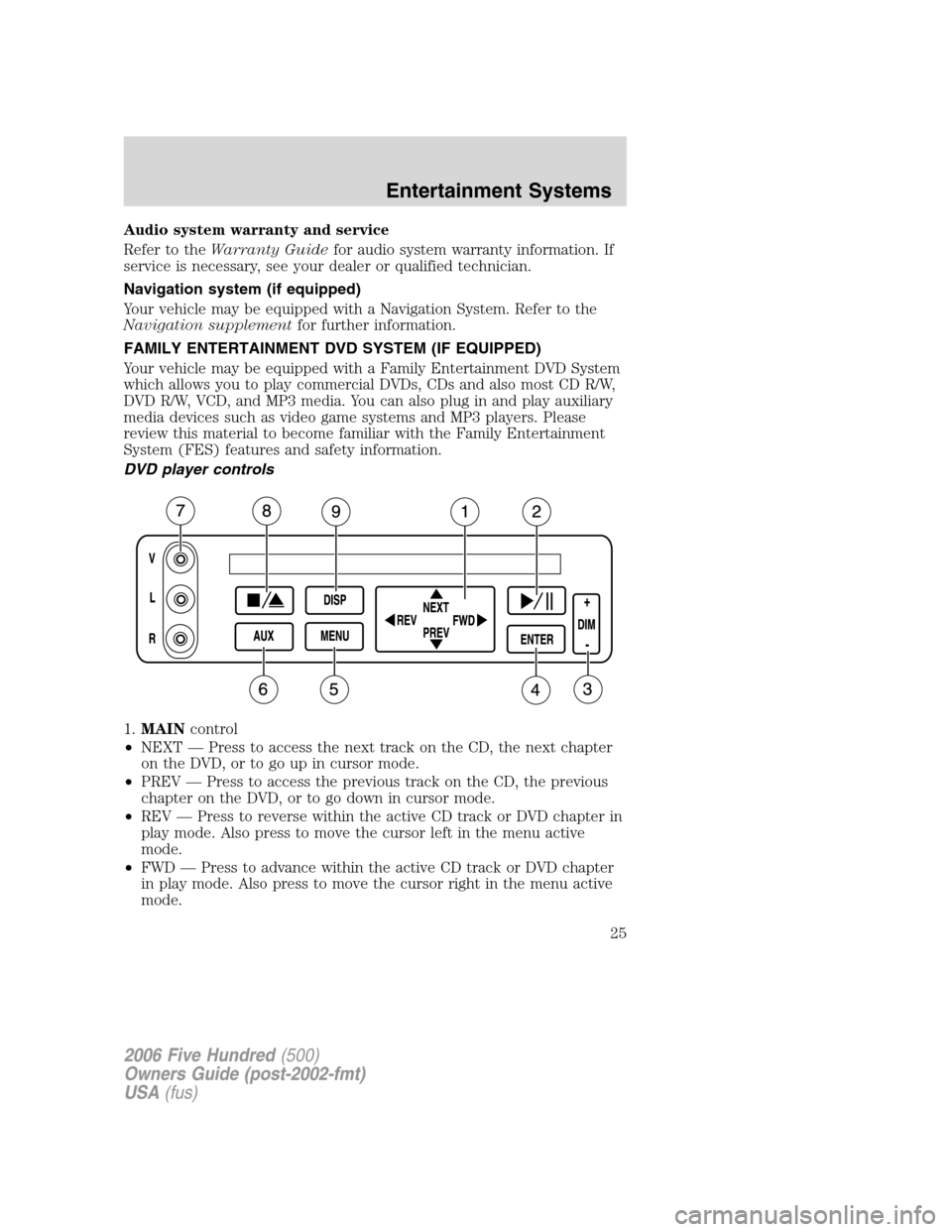
DVD player controls
1.MAINcontrol
•NEXT — Press to access the next track on the CD, the next chapter
on the DVD, or to go up in cursor mode.
•PREV — Press to access the previous track on the CD, the previous
chapter on the DVD, or to go down in cursor mode.
•REV — Press to reverse within the active CD track or DVD chapter in
play mode. Also press to move the cursor left in the menu active
mode.
•FWD — Press to advance within the active CD track or DVD chapter
in play mode. Also press to move the cursor right in the menu active
mode.
2006 Five Hundred(500)
Owners Guide (post-2002-fmt)
USA(fus)
Entertainment Systems
25
Page 26 of 280
2.PLAY/PAUSEcontrol
Press to playback or pause the DVD.
3.DIMcontrol
Press (+) to increase or (-) to decrease the brightness on the screen.
4.ENTERcontrol
Press to select the function highlighted on the active menu. ENTER may
also be used by some user interactive discs during movie play.
5.MENUcontrol
Press to bring up the disc menu.
6.AUXcontrol
Press to switch DVD player from play mode to auxiliary mode.
7.Auxiliary jacks
Input jacks for standard video/audio media device.
8.STOP/EJECTcontrol
Press once to stop a disc from playing. Press a second time to eject the
disc. (If a disc is not playing, but is present in the system, pressing eject
will eject the disc).
9.DISPLAY (DISP)control
Press to enable the on screen display of the player’s menu and user’s
display adjustments. Double click the DISP button to change the format
of the display. If the DVD disc format is NORMAL, it can be changed to
full screen by selecting WIDE SCREEN. Use the NEXT and PREV button
to scroll through the different format of the display. Please note that the
screen quality will degrade if the display mode is changed to “Zoom.”
DVD control features
Menu control
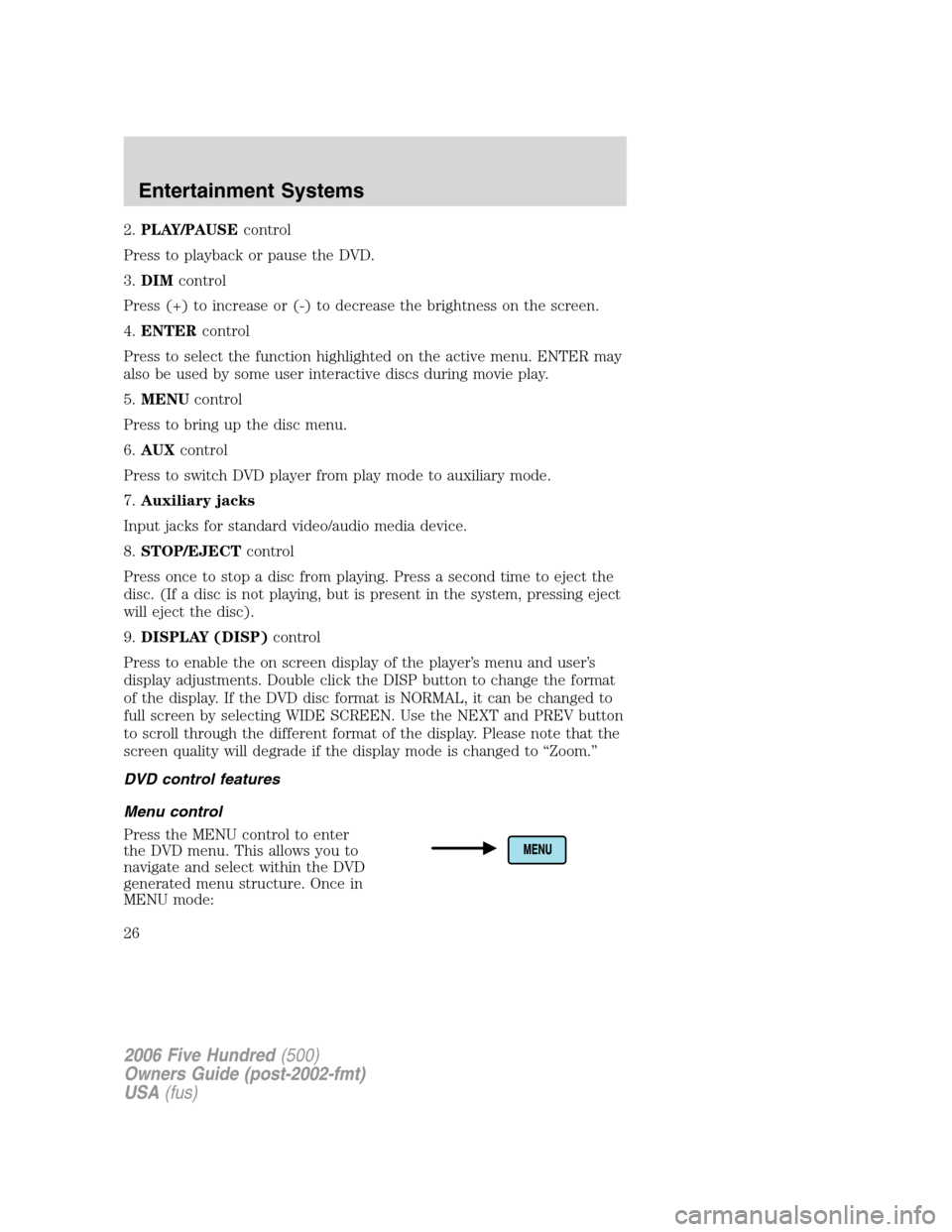
Press the MENU control to enter
the DVD menu. This allows you to
navigate and select within the DVD
generated menu structure. Once in
MENU mode:
2006 Five Hundred(500)
Owners Guide (post-2002-fmt)
USA(fus)
Entertainment Systems
26
Page 30 of 280
In DVD playback mode, press to access the disc menu.
In stop mode, press to change media types (e.g. AM, FM, CD...)
8.VOL (VOLUME)control
Press (+) to increase or (-) to decrease the volume level.
Dual play mode
Press the radio preset controls 2
and 4 at the same time to enable or
disable dual play.
During dual play, the rear vehicle speakers will be deactivated and the
wireless headphones will become active. Please note that the infrared
headphones are active only when the Family Entertainment System is
playing a movie.
During dual play mode, two different medias can be played in the
vehicle:
1. The driver can choose, and control, a source on the main radio face
(radio, CD or DVD) and listen to it using the front speakers.
2. Passengers in the rear can listen to the DVD player or AUX input via
the wireless headphones.
Single play mode
When the ignition is turned on, the radio will be in Single Play Mode.
Single play mode allows one media selection (FM/AM, CD, DVD or AUX)
to be heard on all the vehicle speakers.
If radio is in Dual Play Mode, with a DVD playing in the rear, and
another media (FM/AM, CD) playing on front speakers, changing to
single play will turn the DVD player off.
When radio is powered off and back on, it will be in Single Play mode,
even if upon power off the radio was in Dual play mode.
123456
2006 Five Hundred(500)
Owners Guide (post-2002-fmt)
USA(fus)
Entertainment Systems
30
Page 31 of 280
Battery replacement
Batteries are provided with the remote control unit. Since all batteries
have a limited shelf life, replace them when the remote control fails to
control the DVD player. There is a LED indicator light on the remote
control that will illuminate when any control is pressed.
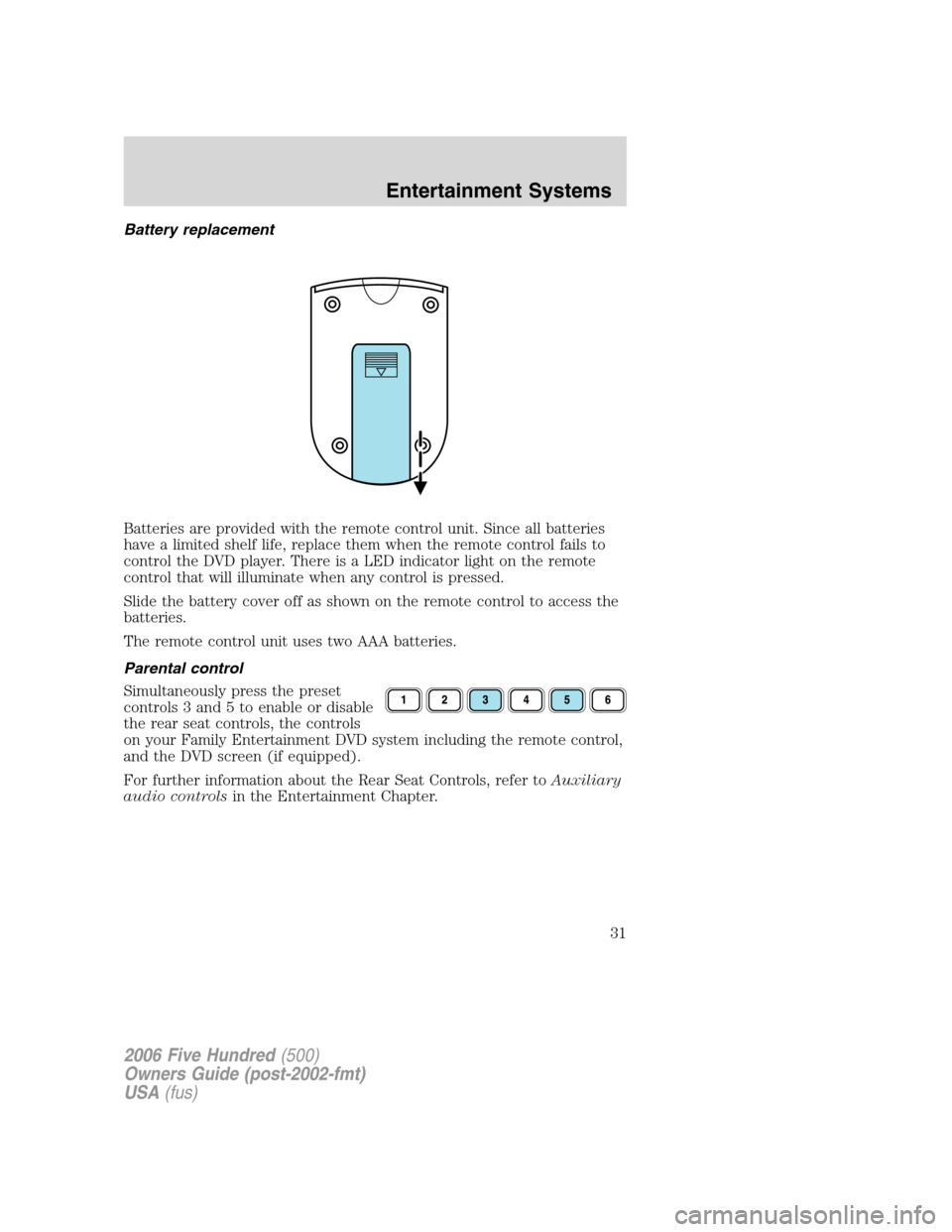
Slide the battery cover off as shown on the remote control to access the
batteries.
The remote control unit uses two AAA batteries.
Parental control
Simultaneously press the preset
controls 3 and 5 to enable or disable
the rear seat controls, the controls
on your Family Entertainment DVD system including the remote control,
and the DVD screen (if equipped).
For further information about the Rear Seat Controls, refer toAuxiliary
audio controlsin the Entertainment Chapter.
2006 Five Hundred(500)
Owners Guide (post-2002-fmt)
USA(fus)
Entertainment Systems
31
Page 35 of 280
•If the Family Entertainment System (FES) is playing and the ignition
is turned OFF, the system will turn off, and suspend playback. When
the ignition is turned on again, playback will begin from the last
selected media source when the play control is pressed.
•To disable the DVD player rear controls, simultaneously press the 3
and 5 memory presets on the radio face. To enable the DVD player
rear controls again, press the 3 and 5 presets simultaneously.
•The DVD player is only capable of reading the bottom side of a disc.
When inserting a single sided disc, the label should be up. For a
multi-sided disc, the desired play side should be down when the disc
is inserted into the player.
•DVDs are formatted by regions. This DVD system can only play region
1 DVDs (DVDs manufactured for U.S. and Canada).
This unit is designed to play commercially pressed 4.75 (12 cm)
audio compact discs and DVDs only. Due to technical
incompatibility, certain recordable and re-recordable compact
discs may not function correctly when used in Ford DVD/CD
players. Irregular shaped discs, discs with a scratch protection
film attached, and discs with homemade paper (adhesive) labels
should not be inserted into the player. The label may peel and
cause the disc to become jammed. It is recommended that
homemade discs be identified with permanent felt tip marker
rather than adhesive labels. Ball point pens may damage discs.
Please contact your dealer for further information.
Inserting a CD/DVD
With the ignition ON, inserting a CD/DVD into the DVD player
automatically turns ON the FES and playback should begin immediately.
The counter is automatically reset to 0:00:00 when any disc is inserted
into the FES.
Removing a CD/DVD (while playing)
1. Press the STOP/EJECT control to stop playback if a disc is playing.
2. Press the STOP/EJECT control again to eject the CD/DVD.
If the CD/DVD is not removed within the allotted time, the system will
pull the CD/DVD back into the system for safety purposes.
If the CD/DVD will not eject from the system, press and hold the EJECT
control for approximately 2 seconds. The disc should eject whether the
vehicle ignition is ON or OFF.
Playing an auxiliary device
1. Connect the video line from your video device to the YELLOW
auxiliary input jack.
2006 Five Hundred(500)
Owners Guide (post-2002-fmt)
USA(fus)
Entertainment Systems
35
Page 36 of 280
2. Connect the left and right audio lines to the WHITE (left) and RED
(right) auxiliary input jacks respectively.
3. Press the MODE control repeatedly until DVD/CD AUX (no disc in
player) or DVD/CD play (disc in player) illuminates in the radio display.
If a disc is in the system, playback should begin. To enable the aux
inputs, press the STOP control or press the AUX control on the DVD
player.
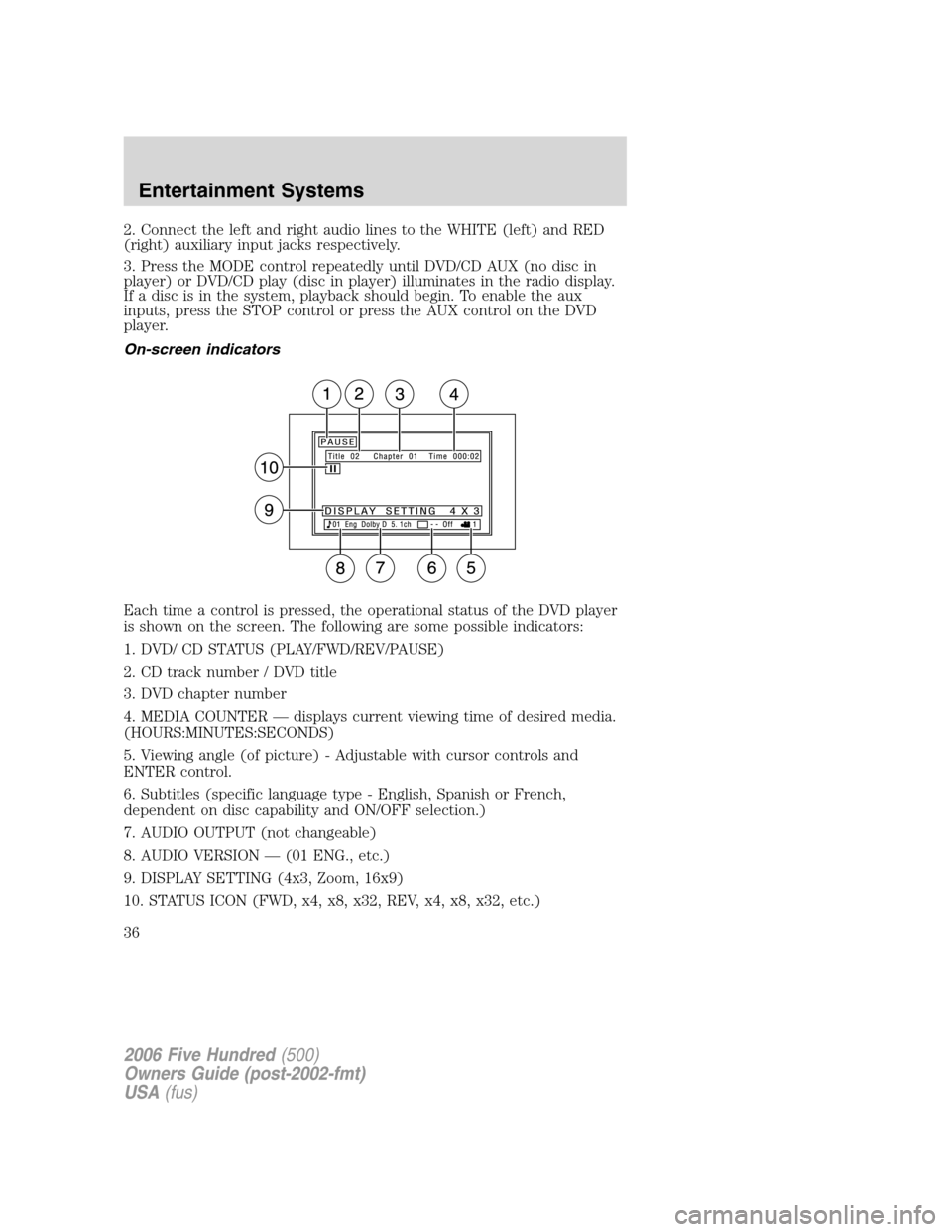
On-screen indicators
Each time a control is pressed, the operational status of the DVD player
is shown on the screen. The following are some possible indicators:
1. DVD/ CD STATUS (PLAY/FWD/REV/PAUSE)
2. CD track number / DVD title
3. DVD chapter number
4. MEDIA COUNTER — displays current viewing time of desired media.
(HOURS:MINUTES:SECONDS)
5. Viewing angle (of picture) - Adjustable with cursor controls and
ENTER control.
6. Subtitles (specific language type - English, Spanish or French,
dependent on disc capability and ON/OFF selection.)
7. AUDIO OUTPUT (not changeable)
8. AUDIO VERSION — (01 ENG., etc.)
9. DISPLAY SETTING (4x3, Zoom, 16x9)
10. STATUS ICON (FWD, x4, x8, x32, REV, x4, x8, x32, etc.)
2006 Five Hundred(500)
Owners Guide (post-2002-fmt)
USA(fus)
Entertainment Systems
36
Page 37 of 280
Safety information
Read all the safety and operating instructions before operating the
system and retain for future reference.
•Do not attempt to service, repair or modify the Family Entertainment
DVD System. See your Ford or Lincoln Mercury dealer.
•Do not insert foreign objects into the DVD compartment.
The front glass on the flip-down liquid crystal display (LCD) may
break when hit with a hard surface. If the glass breaks, do not
touch the liquid crystalline material. In case of contact with skin, wash
immediately with soap and water.
Do not expose the flip-down liquid crystal display (LCD) to direct
sunlight or intensive ultraviolet rays for extensive periods of
time. Ultraviolet rays deteriorate the liquid crystal.
•Ensure that you review User Manuals for video games and video game
equipment when used as auxiliary inputs for your Family
Entertainment DVD System.
•Do not operate video games or video equipment if the power cords
and/or cables are broken, split or damaged. Carefully place cords
and/or cables where they will not be stepped on or interfere with the
operation of seats and/or compartments.
•Disconnect video games and video equipment power cords and/or
cables when not in use.
•Avoid touching auxiliary input jacks with your fingers. Do not blow on
them or allow them to get wet or dirty.
•Do not clean any part of the DVD player with benzene, paint thinner
or any other solvent.
Whenever a warning notice is received, the radio volume will be
lowered to a volume that will allow the tones to be heard. The
radio volume will return to the previous level after the warning
notice is complete.
2006 Five Hundred(500)
Owners Guide (post-2002-fmt)
USA(fus)
Entertainment Systems
37
Page 41 of 280
6.Fan speed adjustment:Controls the volume of air circulated in the
vehicle.
Operating tips
•To reduce fog build up on the windshield during humid weather, place
the air flow selector in the
position.
•To reduce humidity build up inside the vehicle: do not drive with the
airflow selector in the O (OFF) or with recirculated air engaged.
•Do not put objects under the front seats that will interfere with the
airflow to the back seats.
•Remove any snow, ice or leaves from the air intake area at the base of
the windshield.
•For maximum cooling performance (MAX A/C):
In the MAX A/C mode:
•Move the temperature control selector to the coldest setting.
•Set the fan to the highest speed initially, then adjust to maintain
passenger comfort.
In the
andmodes:
•Move the temperature control selector to the coldest setting.
•Select A/C and recirculated air
. Usewith A/C to provide
colder airflow.
•Set the fan to the highest speed initially, then adjust to maintain
passenger comfort.
In extremely cold temperatures, to maximize overall heater performance
it is suggested to not operate the auxiliary system (if so equipped) until
the engine temperature gauge crosses into the normal operating range.
To aid in side window defogging/demisting in cold weather:
1. Select
.
2. Select A/C.
3. Set the temperature control to full heat.
4. Set the fan speed to the highest setting.
5. Direct the outer instrument panel vents towards the side windows.
Do not place objects on top of the instrument panel as these
objects may become projectiles in a collision or sudden stop.
2006 Five Hundred(500)
Owners Guide (post-2002-fmt)
USA(fus)
Climate Controls
41