cooling FORD FLEX 2010 1.G Owners Manual
[x] Cancel search | Manufacturer: FORD, Model Year: 2010, Model line: FLEX, Model: FORD FLEX 2010 1.GPages: 397
Page 17 of 397
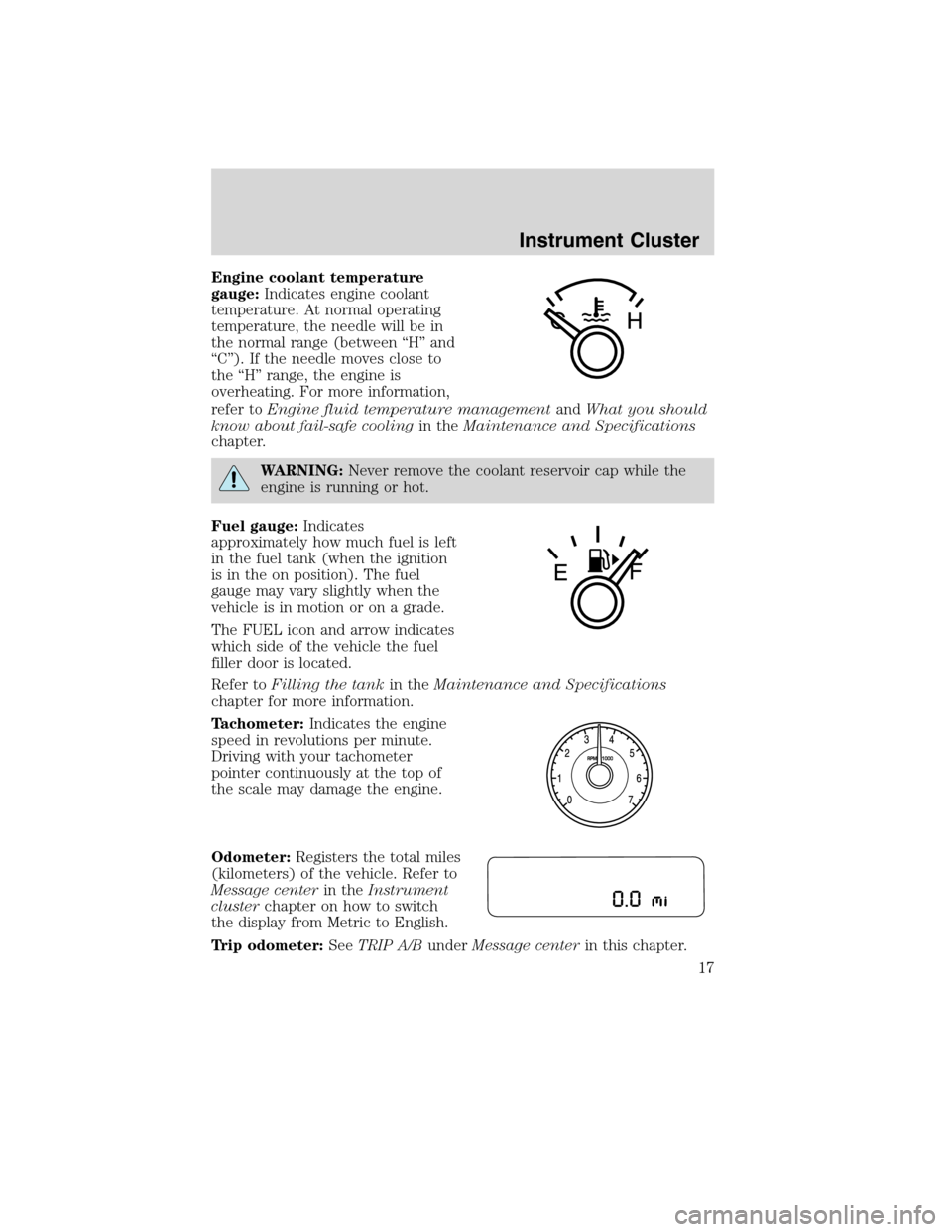
Engine coolant temperature
gauge:Indicates engine coolant
temperature. At normal operating
temperature, the needle will be in
the normal range (between “H” and
“C”). If the needle moves close to
the “H” range, the engine is
overheating. For more information,
refer toEngine fluid temperature managementandWhat you should
know about fail-safe coolingin theMaintenance and Specifications
chapter.
WARNING:Never remove the coolant reservoir cap while the
engine is running or hot.
Fuel gauge:Indicates
approximately how much fuel is left
in the fuel tank (when the ignition
is in the on position). The fuel
gauge may vary slightly when the
vehicle is in motion or on a grade.
The FUEL icon and arrow indicates
which side of the vehicle the fuel
filler door is located.
Refer toFilling the tankin theMaintenance and Specifications
chapter for more information.
Tachometer:Indicates the engine
speed in revolutions per minute.
Driving with your tachometer
pointer continuously at the top of
the scale may damage the engine.
Odometer:Registers the total miles
(kilometers) of the vehicle. Refer to
Message centerin theInstrument
clusterchapter on how to switch
the display from Metric to English.
Trip odometer:SeeTRIP A/BunderMessage centerin this chapter.
Instrument Cluster
17
2010 Flex(471)
Owners Guide, 1st Printing
USA(fus)
Page 27 of 397
TO STOP ALARM START VEHICLE— Displayed when the perimeter
alarm system is armed and the vehicle is entered using the key on the
driver’s side door. In order to prevent the perimeter alarm system from
triggering, the ignition must be turned to start or on before the
12 second chime expires. SeePerimeter alarm systemin theLocks and
Securitychapter.
POWER REDUCED TO LOWER TEMP— Displayed when vehicle
performance is reduced due to high engine fluid temperatures. See
Engine fluid temperature managementandWhat you should know
about fail-safe coolingin theMaintenance and Specificationschapter.
SERVICE TIRE MOBILITY KIT (if equipped)— Displayed when the
tire mobility kit requires service. See your authorized dealer for more
information.
Instrument Cluster
27
2010 Flex(471)
Owners Guide, 1st Printing
USA(fus)
Page 69 of 397
4.A/C:Press to activate/deactivate air conditioning. Use with
recirculated air to improve cooling performance and efficiency. A/C
engages automatically in MAX A/C,
(defrost) and
(floor/defrost).
5.
Recirculated air:Press to activate/deactivate air recirculation in
the vehicle. Recirculated air may reduce the amount of time needed to
cool down the interior of the vehicle and may also help reduce undesired
odors from reaching the interior of the vehicle. Recirculated air engages
automatically when MAX A/C is selected or can be engaged manually in
any airflow mode except
(defrost). When the ignition switch is
turned off and back on, the climate system will return to the recirculated
air mode only if the A/C button LED is illuminated and the air
distribution selection is either
(panel) or(panel/floor).
6.MAX A/C:Distributes recirculated air through the instrument panel
vents to cool the vehicle. This re-cooling of the interior air is more
economical and efficient. Recirculated air may also help reduce
undesirable odors from entering the vehicle. Press the MAX A/C button
again for normal A/C operation.
7.Temperature control:Controls the temperature of the airflow in the
vehicle.
8.
Fan speed adjustment:Controls the volume of air circulated in
the vehicle.
9.
Power:Press to activate/deactivate the climate control system.
When the system is off, outside air is prevented from entering the
vehicle.
10.
Power:Press to activate/deactivate the rear climate control
system.
11.REAR CTRL:Press to change control of the rear climate system
from the front to the rear controls.
12.Temp–:Press to lower the temperature for the rear climate area.
13.Temp+:Press to increase the temperature for the rear climate area.
14.
–Rear fan speed control:Press to decrease the fan speed for
the rear climate area.
15.
+Rear fan speed control:Press to increase the fan speed for
the rear climate area.
Climate Controls
69
2010 Flex(471)
Owners Guide, 1st Printing
USA(fus)
Page 70 of 397
Operating tips
•To reduce fog build up on the windshield during humid weather, place
the air flow selector in the
position.
•To reduce humidity build up inside the vehicle: do not drive with the
system off or with recirculated air engaged.
•Do not put objects under the front seats that will interfere with the
airflow to the back seats.
•Remove any snow, ice or leaves from the air intake area at the base of
the windshield.
During extreme high ambient temperatures when idling stationary for
extended periods of time in gear, it is recommended to run the A/C in
the MAX A/C position, turn off the rear A/C unit (if equipped), reduce
blower fan speed from the highest setting and put the vehicle’s
transmission into the P (Park) gear position to continue to receive cool
air from your A/C system.
For maximum cooling performance in the MAX A/C mode:
•Press MAX A/C.
•Adjust the temperature to the coldest setting.
•Set the fan to the highest speed initially, then adjust to maintain
passenger comfort.
For maximum cooling performance in the
andmodes:
•Adjust the temperature to the coldest setting.
•Press A/C and recirculated air
to provide colder airflow.
•Set the fan to the highest speed initially, then adjust to maintain
passenger comfort.
To aid in side window defogging/demisting in cold weather:
1. Select
.
2. Press A/C.
3. Adjust the temperature to the warmest setting.
4. Set the fan speed to the highest setting.
5. Direct the outer instrument panel vents toward the side windows.
Climate Controls
70
2010 Flex(471)
Owners Guide, 1st Printing
USA(fus)
Page 72 of 397
•:Distributes air through the instrument panel vents.
•
:Distributes air through the instrument panel vents, floor vents
and rear seat floor vents.
•
:Distributes air through the floor vents and rear seat floor vents.
4.A/C:Press to activate/deactivate air conditioning. Use with
recirculated air to improve cooling performance and efficiency. A/C
engages automatically in MAX A/C,
(defrost) and
(floor/defrost).
5.AUTO:Press to engage automatic temperature control. Select the
desired temperature using the temperature control. The system will
automatically determine fan speed, airflow location, A/C on or off, and
outside or recirculated air, to heat or cool the vehicle to reach the
desired temperature.
6.MAX A/C:Distributes recirculated air through the instrument panel
vents to cool the vehicle. This re-cooling of the interior air is more
economical and efficient. Recirculated air may also help reduce
undesirable odors from entering the vehicle. Press the MAX A/C button
again for normal A/C operation.
7.
Recirculated air:Press to activate/deactivate air recirculation in
the vehicle. Recirculated air may reduce the amount of time needed to
cool down the interior of the vehicle and may also help reduce undesired
odors from reaching the interior of the vehicle. Recirculated air engages
automatically when MAX A/C is selected or can be engaged manually in
any airflow mode except
(defrost). When the ignition switch is
turned off and back on, the climate system will return to the recirculated
air mode only if the A/C button LED is illuminated and the air
distribution selection is either
(panel) or(panel/floor).
Recirculation may turn off automatically in all airflow modes, except
MAX A/C.
8.
Passenger heated seat control:Press once to activate high heat
setting (two indicator lights), press again to activate low heat setting
(one indicator light), and press again to deactivate the passenger heated
seat. Refer toHeated seatsin theSeating and Safety Restraints
chapter for more information.
9.PASS TEMP:Press to activate separate passenger temperature
control and turn the dial to increase/decrease the airflow temperature for
the passenger side of the vehicle.
Climate Controls
72
2010 Flex(471)
Owners Guide, 1st Printing
USA(fus)
Page 74 of 397
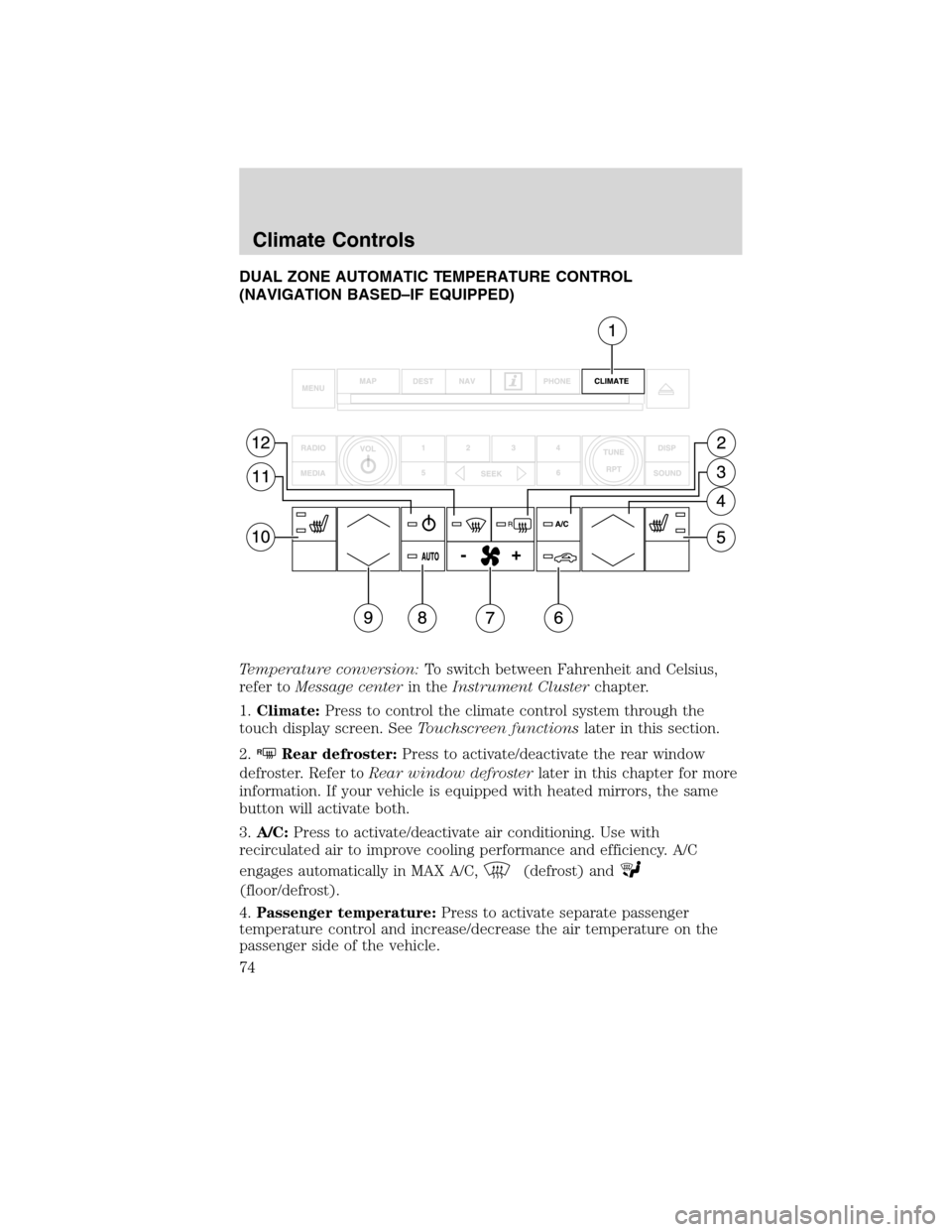
DUAL ZONE AUTOMATIC TEMPERATURE CONTROL
(NAVIGATION BASED–IF EQUIPPED)
Temperature conversion:To switch between Fahrenheit and Celsius,
refer toMessage centerin theInstrument Clusterchapter.
1.Climate:Press to control the climate control system through the
touch display screen. SeeTouchscreen functionslater in this section.
2.
RRear defroster:Press to activate/deactivate the rear window
defroster. Refer toRear window defrosterlater in this chapter for more
information. If your vehicle is equipped with heated mirrors, the same
button will activate both.
3.A/C:Press to activate/deactivate air conditioning. Use with
recirculated air to improve cooling performance and efficiency. A/C
engages automatically in MAX A/C,
(defrost) and
(floor/defrost).
4.Passenger temperature:Press to activate separate passenger
temperature control and increase/decrease the air temperature on the
passenger side of the vehicle.
Climate Controls
74
2010 Flex(471)
Owners Guide, 1st Printing
USA(fus)
Page 77 of 397
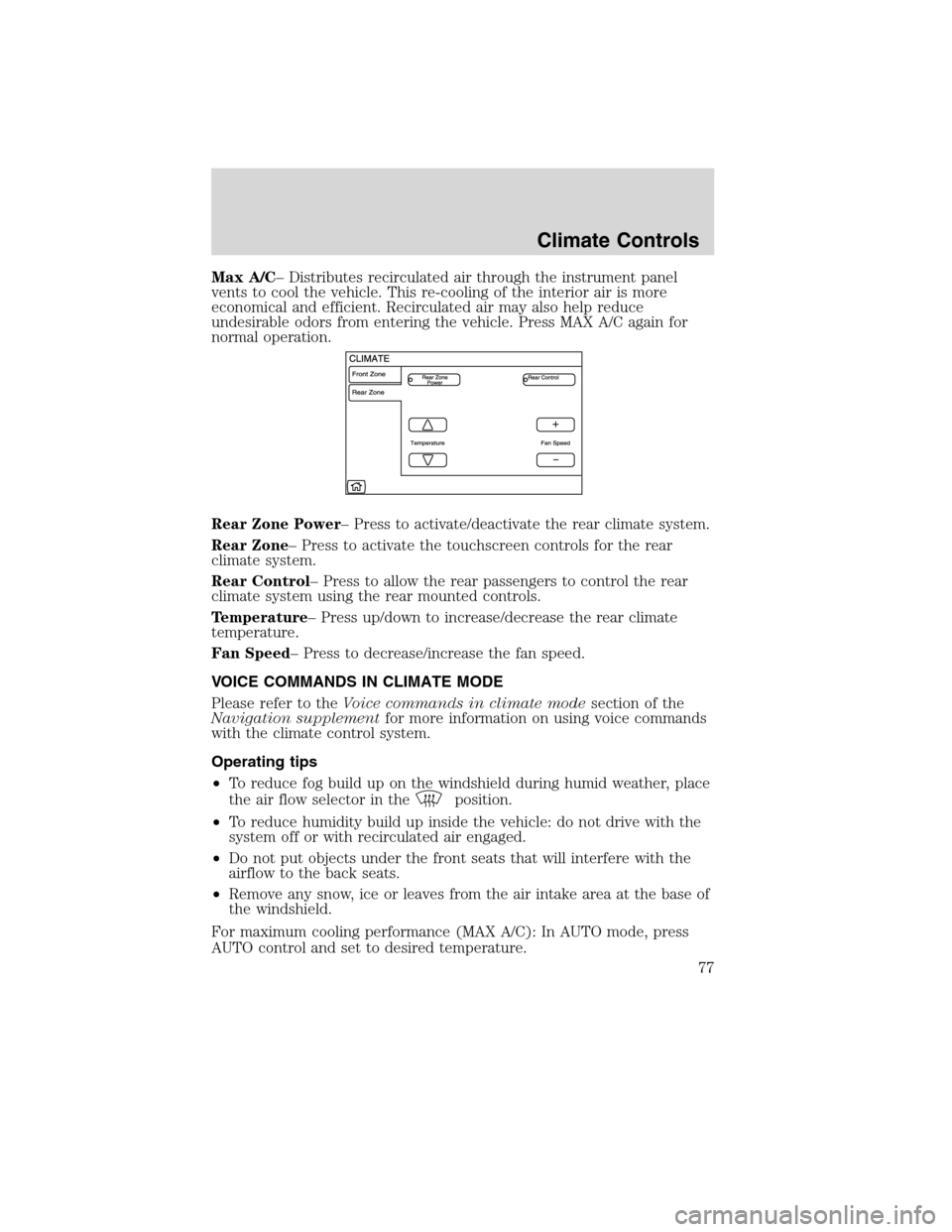
Max A/C– Distributes recirculated air through the instrument panel
vents to cool the vehicle. This re-cooling of the interior air is more
economical and efficient. Recirculated air may also help reduce
undesirable odors from entering the vehicle. Press MAX A/C again for
normal operation.
Rear Zone Power– Press to activate/deactivate the rear climate system.
Rear Zone– Press to activate the touchscreen controls for the rear
climate system.
Rear Control– Press to allow the rear passengers to control the rear
climate system using the rear mounted controls.
Temperature– Press up/down to increase/decrease the rear climate
temperature.
Fan Speed– Press to decrease/increase the fan speed.
VOICE COMMANDS IN CLIMATE MODE
Please refer to theVoice commands in climate modesection of the
Navigation supplementfor more information on using voice commands
with the climate control system.
Operating tips
•To reduce fog build up on the windshield during humid weather, place
the air flow selector in the
position.
•To reduce humidity build up inside the vehicle: do not drive with the
system off or with recirculated air engaged.
•Do not put objects under the front seats that will interfere with the
airflow to the back seats.
•Remove any snow, ice or leaves from the air intake area at the base of
the windshield.
For maximum cooling performance (MAX A/C): In AUTO mode, press
AUTO control and set to desired temperature.
Climate Controls
77
2010 Flex(471)
Owners Guide, 1st Printing
USA(fus)
Page 97 of 397
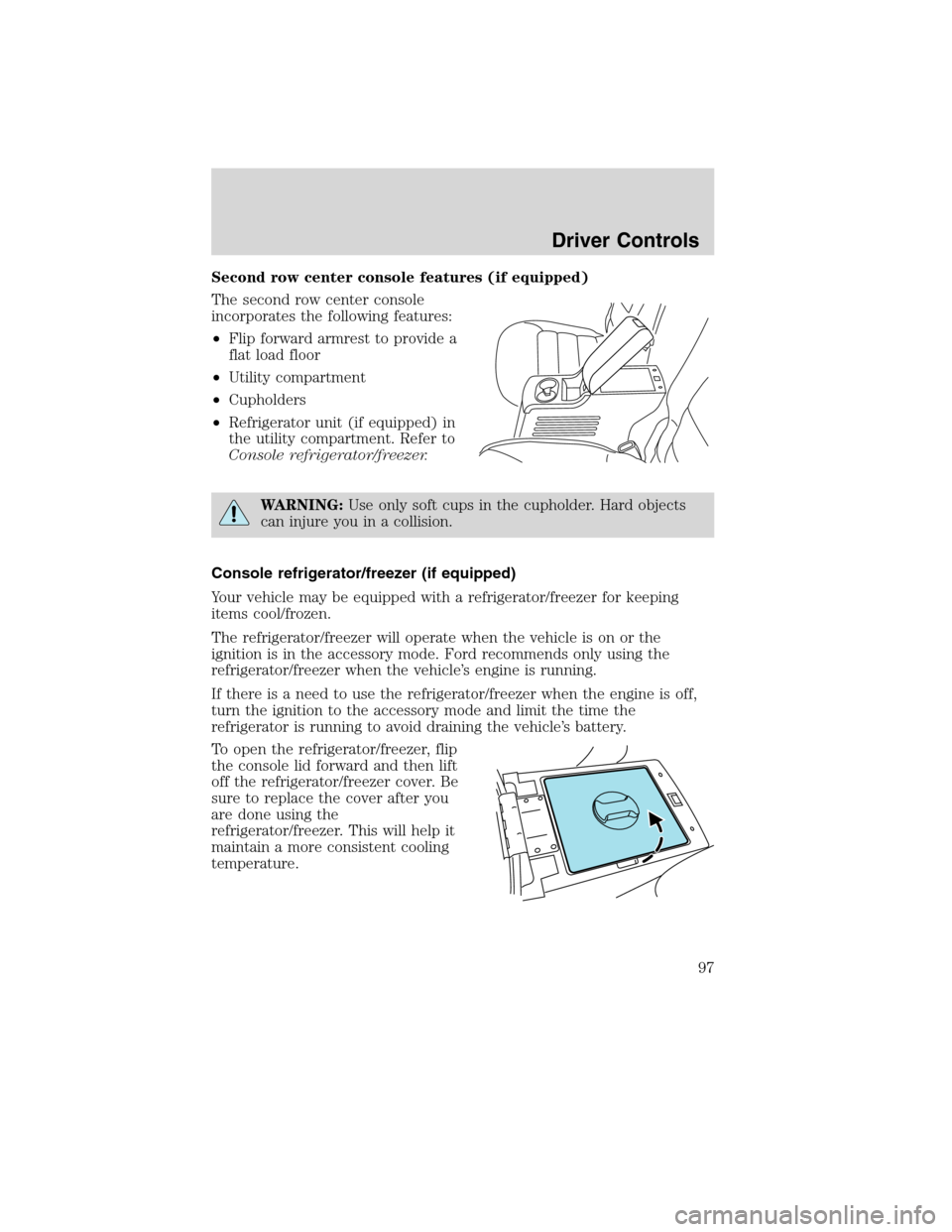
Second row center console features (if equipped)
The second row center console
incorporates the following features:
•Flip forward armrest to provide a
flat load floor
•Utility compartment
•Cupholders
•Refrigerator unit (if equipped) in
the utility compartment. Refer to
Console refrigerator/freezer.
WARNING:Use only soft cups in the cupholder. Hard objects
can injure you in a collision.
Console refrigerator/freezer (if equipped)
Your vehicle may be equipped with a refrigerator/freezer for keeping
items cool/frozen.
The refrigerator/freezer will operate when the vehicle is on or the
ignition is in the accessory mode. Ford recommends only using the
refrigerator/freezer when the vehicle’s engine is running.
If there is a need to use the refrigerator/freezer when the engine is off,
turn the ignition to the accessory mode and limit the time the
refrigerator is running to avoid draining the vehicle’s battery.
To open the refrigerator/freezer, flip
the console lid forward and then lift
off the refrigerator/freezer cover. Be
sure to replace the cover after you
are done using the
refrigerator/freezer. This will help it
maintain a more consistent cooling
temperature.
Driver Controls
97
2010 Flex(471)
Owners Guide, 1st Printing
USA(fus)
Page 253 of 397
Trailer towing tips
•Practice turning, stopping and backing up before starting on a trip to
get the feel of the vehicle trailer combination. When turning, make
wider turns so the trailer wheels will clear curbs and other obstacles.
•Allow more distance for stopping with a trailer attached.
•If you are driving down a long or steep hill, shift into the lowest gear
position. Do not apply the brakes continuously, as they may overheat
and become less effective.
•The trailer tongue weight should be 10–15% of the loaded trailer
weight.
•After you have traveled 50 miles (80 km), thoroughly check your
hitch, electrical connections and trailer wheel lug nuts.
•To aid in engine/transmission cooling and A/C efficiency during hot
weather while stopped in traffic, place the gearshift lever in P (Park).
•Vehicles with trailers should not be parked on a grade. If you must
park on a grade, place wheel chocks under the trailer’s wheels.
RECREATIONAL TOWING
Follow these guidelines for your specific powertrain combination to tow
your vehicle for personal travel (such as behind a motor home or a
truck).
Note:Put your climate control system in recirculated air mode to
prevent exhaust fumes from entering the vehicle. Refer to theClimate
Controlschapter for more information.
In case of roadside emergency with a disabled vehicle, please refer to
Wrecker towingin theRoadside Emergencieschapter.
These guidelines are designed to prevent damage to your vehicle.
Front Wheel Drive (FWD) vehicles:
Tow your Front Wheel Drive vehicle with all four wheels on the ground
or with the front wheels off the ground by using a tow dolly. If you are
using a tow dolly follow the instructions specified by the equipment
provider.
Tires, Wheels and Loading
253
2010 Flex(471)
Owners Guide, 1st Printing
USA(fus)
Page 286 of 397
Note:TheAWD OFFmessage may also be displayed in the message
center if the AWD system has overheated and defaulted to front wheel
drive. This condition may occur if the vehicle was operated in extreme
conditions with excessive wheel slip, such as deep sand. To resume
normal AWD function as soon as possible, stop the vehicle in a safe
location and allow it to idle. TheAWD OFFmessage will turn off when
the system cools and normal AWD function returns.
Note:Your AWD vehicle is not intended for off-road use. The AWD
feature gives your vehicle some limited off-road capabilities in which
driving surfaces are relatively level, obstruction-free and otherwise
similar to normal on-road driving conditions. Operating your vehicle
under other than those conditions could subject the vehicle to excessive
stress which might result in damage which is not covered under your
warranty.
Driving on slippery surfaces with AWD vehicles
AWD vehicles are specially equipped for driving on sand, snow, mud and
rough roads and have operating characteristics that are somewhat
different from conventional vehicles, both on and off the highway.
When driving at slow speeds off-highway under high outside
temperatures, use a low gear when possible. A lower gear operation will
maximize the engine and transmission cooling capability.
Under severe operating conditions, the A/C may cycle on and off to
protect overheating of the engine.
Basic operating principles
•Drive slower in strong crosswinds which can affect the normal steering
characteristics of your vehicle.
•Be extremely careful when driving on pavement made slippery by
loose sand, water, gravel, snow or ice.
If your vehicle goes off the edge of the pavement
•If your vehicle goes off the edge of the pavement, slow down, but
avoid severe brake application, ease the vehicle back onto the
pavement only after reducing your speed. Do not turn the steering
wheel too sharply while returning to the road surface.
•It may be safer to stay on the apron or shoulder of the road and slow
down gradually before returning to the pavement. You may lose
control if you do not slow down or if you turn the steering wheel too
sharply or abruptly.
•It often may be less risky to strike small objects, such as highway
reflectors, with minor damage to your vehicle rather than attempt a
Driving
286
2010 Flex(471)
Owners Guide, 1st Printing
USA(fus)