clock FORD FLEX 2012 1.G Owners Manual
[x] Cancel search | Manufacturer: FORD, Model Year: 2012, Model line: FLEX, Model: FORD FLEX 2012 1.GPages: 405, PDF Size: 2.75 MB
Page 28 of 405
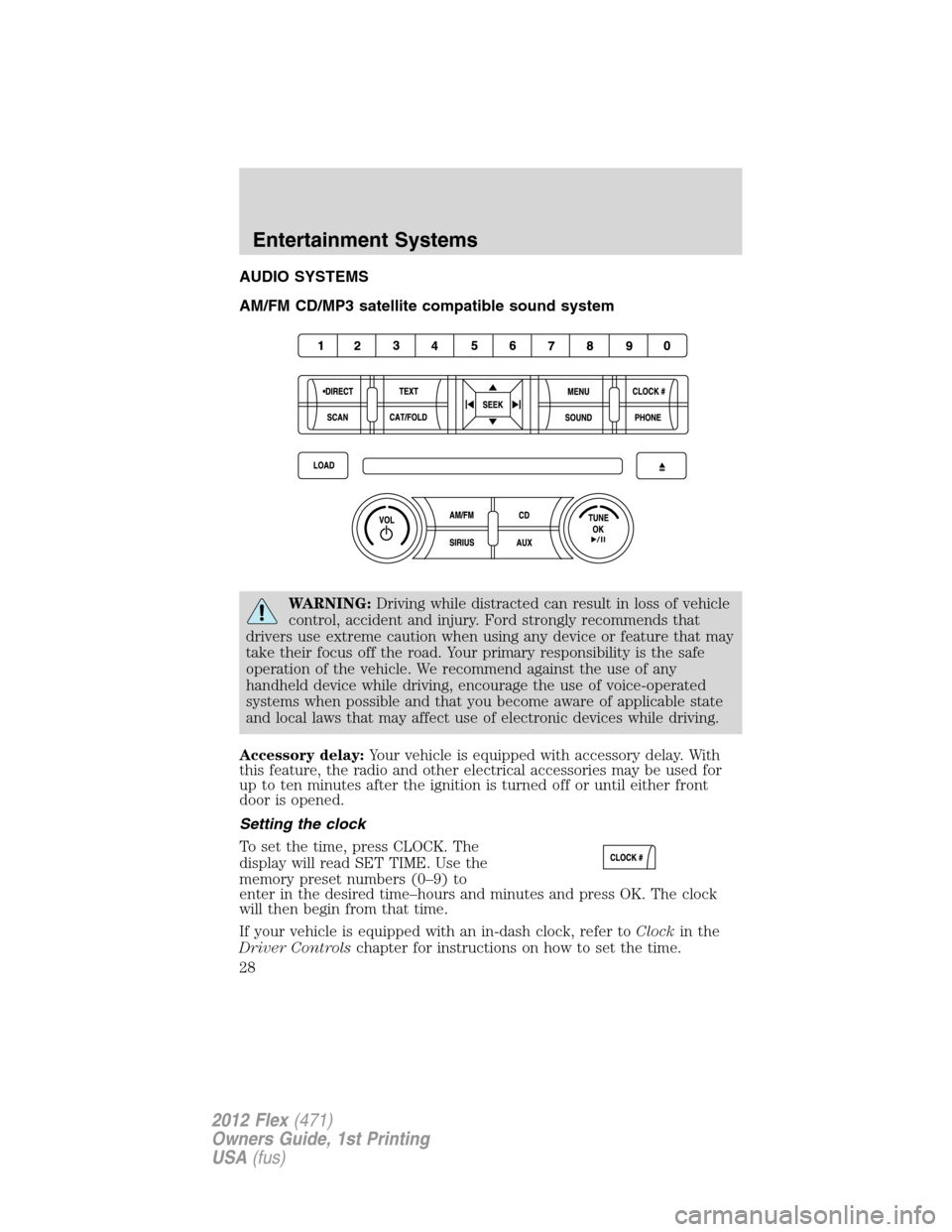
AUDIO SYSTEMS
AM/FM CD/MP3 satellite compatible sound system
WARNING:Driving while distracted can result in loss of vehicle
control, accident and injury. Ford strongly recommends that
drivers use extreme caution when using any device or feature that may
take their focus off the road. Your primary responsibility is the safe
operation of the vehicle. We recommend against the use of any
handheld device while driving, encourage the use of voice-operated
systems when possible and that you become aware of applicable state
and local laws that may affect use of electronic devices while driving.
Accessory delay:Your vehicle is equipped with accessory delay. With
this feature, the radio and other electrical accessories may be used for
up to ten minutes after the ignition is turned off or until either front
door is opened.
Setting the clock
To set the time, press CLOCK. The
display will read SET TIME. Use the
memory preset numbers (0–9) to
enter in the desired time–hours and minutes and press OK. The clock
will then begin from that time.
If your vehicle is equipped with an in-dash clock, refer toClockin the
Driver Controlschapter for instructions on how to set the time.
Entertainment Systems
28
2012 Flex(471)
Owners Guide, 1st Printing
USA(fus)
Page 29 of 405
Note:If your vehicle is equipped with a navigation system, refer to
Setting the clockin yourNavigation supplement.
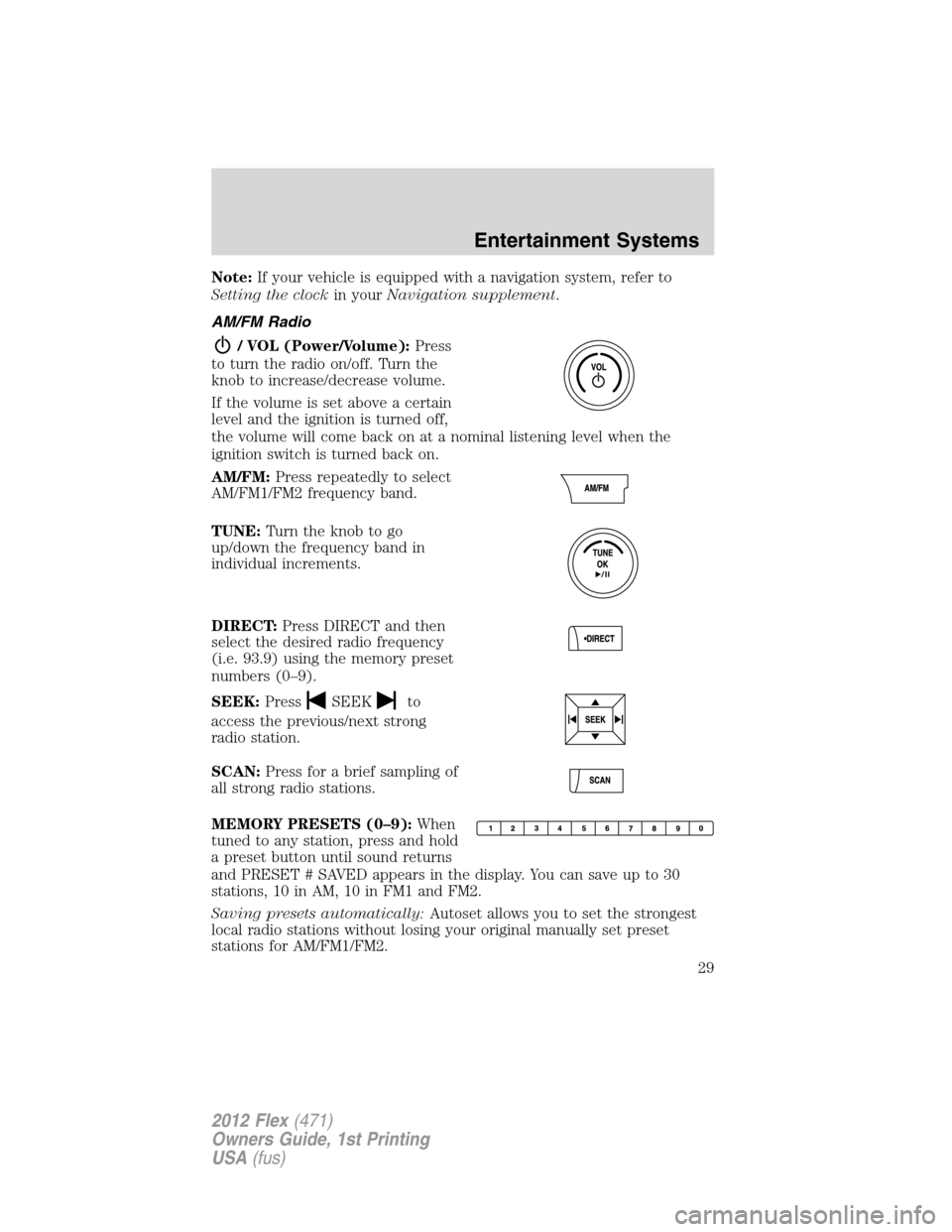
AM/FM Radio
/ VOL (Power/Volume):Press
to turn the radio on/off. Turn the
knob to increase/decrease volume.
If the volume is set above a certain
level and the ignition is turned off,
the volume will come back on at a nominal listening level when the
ignition switch is turned back on.
AM/FM:Press repeatedly to select
AM/FM1/FM2 frequency band.
TUNE:Turn the knob to go
up/down the frequency band in
individual increments.
DIRECT:Press DIRECT and then
select the desired radio frequency
(i.e. 93.9) using the memory preset
numbers (0–9).
SEEK:Press
SEEKto
access the previous/next strong
radio station.
SCAN:Press for a brief sampling of
all strong radio stations.
MEMORY PRESETS (0–9):When
tuned to any station, press and hold
a preset button until sound returns
and PRESET # SAVED appears in the display. You can save up to 30
stations, 10 in AM, 10 in FM1 and FM2.
Saving presets automatically:Autoset allows you to set the strongest
local radio stations without losing your original manually set preset
stations for AM/FM1/FM2.
Entertainment Systems
29
2012 Flex(471)
Owners Guide, 1st Printing
USA(fus)
Page 80 of 405
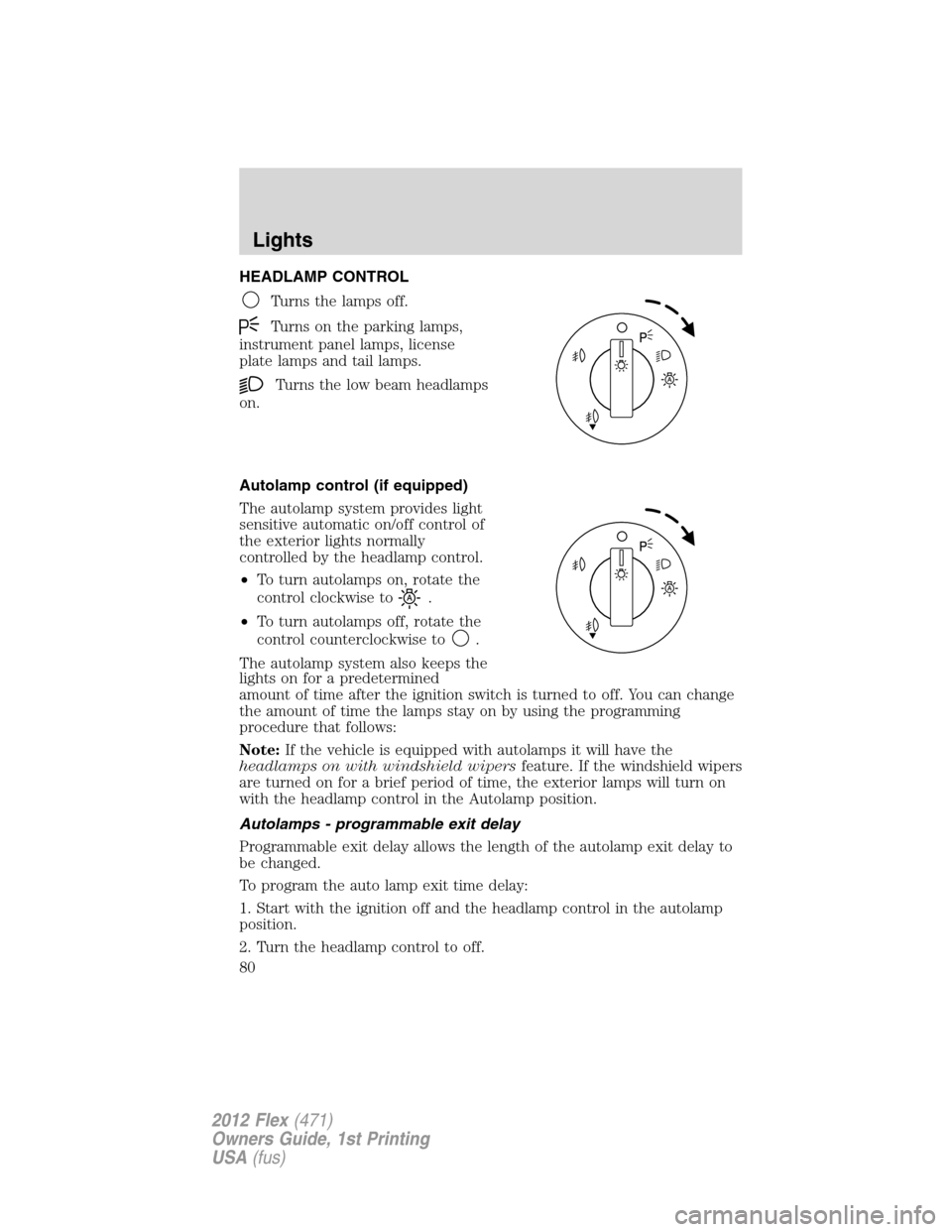
HEADLAMP CONTROL
Turns the lamps off.
Turns on the parking lamps,
instrument panel lamps, license
plate lamps and tail lamps.
Turns the low beam headlamps
on.
Autolamp control (if equipped)
The autolamp system provides light
sensitive automatic on/off control of
the exterior lights normally
controlled by the headlamp control.
•To turn autolamps on, rotate the
control clockwise to
.
•To turn autolamps off, rotate the
control counterclockwise to
.
The autolamp system also keeps the
lights on for a predetermined
amount of time after the ignition switch is turned to off. You can change
the amount of time the lamps stay on by using the programming
procedure that follows:
Note:If the vehicle is equipped with autolamps it will have the
headlamps on with windshield wipersfeature. If the windshield wipers
are turned on for a brief period of time, the exterior lamps will turn on
with the headlamp control in the Autolamp position.
Autolamps - programmable exit delay
Programmable exit delay allows the length of the autolamp exit delay to
be changed.
To program the auto lamp exit time delay:
1. Start with the ignition off and the headlamp control in the autolamp
position.
2. Turn the headlamp control to off.
Lights
80
2012 Flex(471)
Owners Guide, 1st Printing
USA(fus)
Page 83 of 405
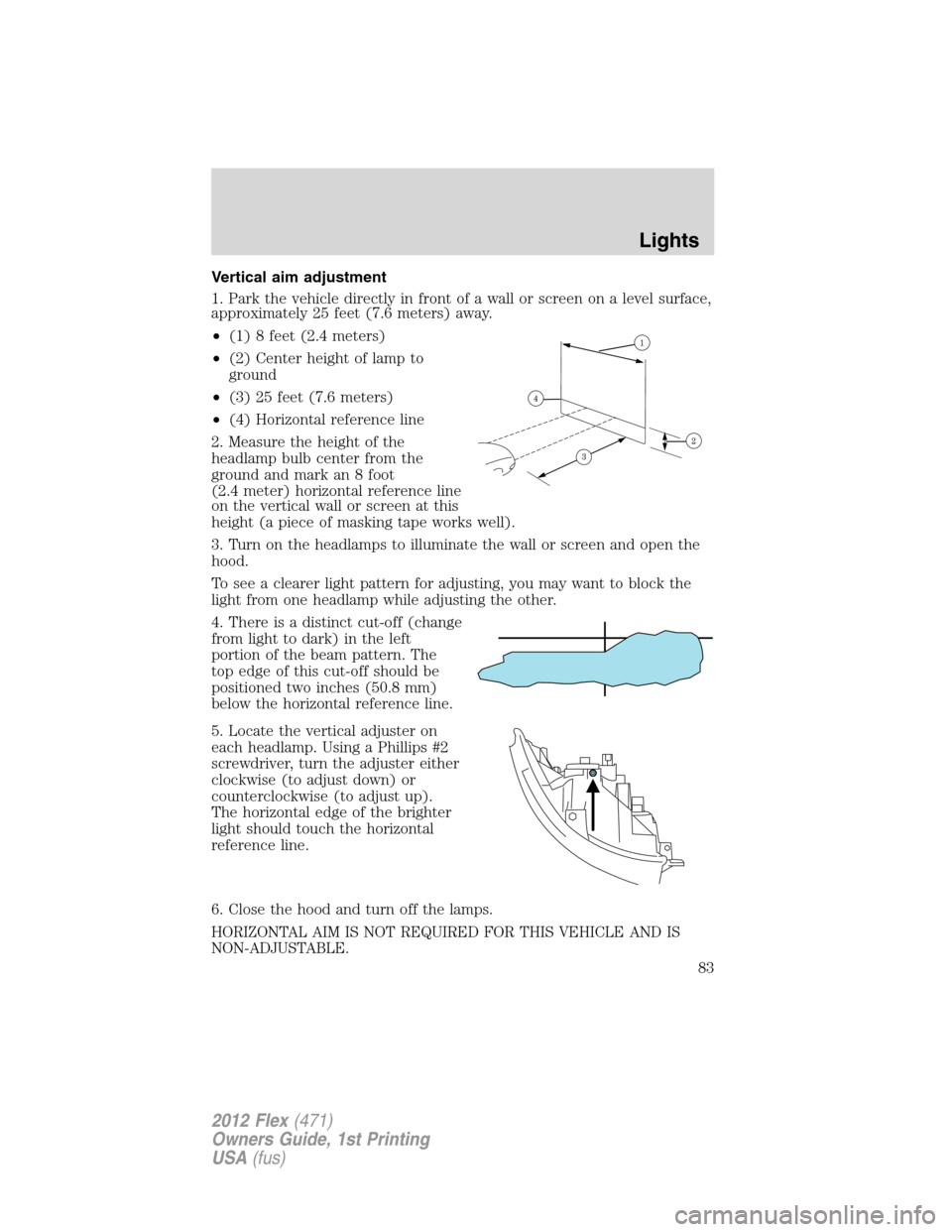
Vertical aim adjustment
1. Park the vehicle directly in front of a wall or screen on a level surface,
approximately 25 feet (7.6 meters) away.
•(1) 8 feet (2.4 meters)
•(2) Center height of lamp to
ground
•(3) 25 feet (7.6 meters)
•(4) Horizontal reference line
2. Measure the height of the
headlamp bulb center from the
ground and mark an 8 foot
(2.4 meter) horizontal reference line
on the vertical wall or screen at this
height (a piece of masking tape works well).
3. Turn on the headlamps to illuminate the wall or screen and open the
hood.
To see a clearer light pattern for adjusting, you may want to block the
light from one headlamp while adjusting the other.
4. There is a distinct cut-off (change
from light to dark) in the left
portion of the beam pattern. The
top edge of this cut-off should be
positioned two inches (50.8 mm)
below the horizontal reference line.
5. Locate the vertical adjuster on
each headlamp. Using a Phillips #2
screwdriver, turn the adjuster either
clockwise (to adjust down) or
counterclockwise (to adjust up).
The horizontal edge of the brighter
light should touch the horizontal
reference line.
6. Close the hood and turn off the lamps.
HORIZONTAL AIM IS NOT REQUIRED FOR THIS VEHICLE AND IS
NON-ADJUSTABLE.
Lights
83
2012 Flex(471)
Owners Guide, 1st Printing
USA(fus)
Page 87 of 405
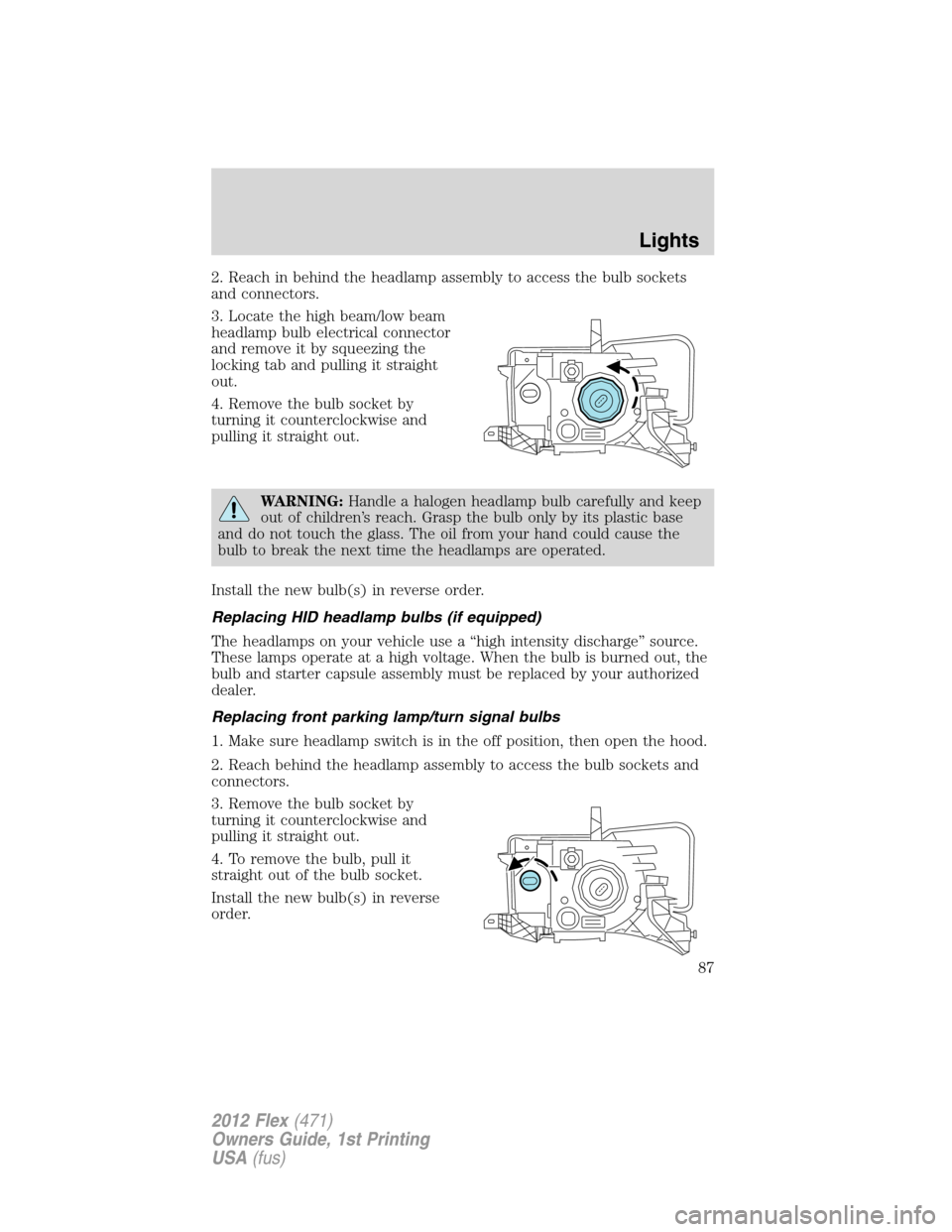
2. Reach in behind the headlamp assembly to access the bulb sockets
and connectors.
3. Locate the high beam/low beam
headlamp bulb electrical connector
and remove it by squeezing the
locking tab and pulling it straight
out.
4. Remove the bulb socket by
turning it counterclockwise and
pulling it straight out.
WARNING:Handle a halogen headlamp bulb carefully and keep
out of children’s reach. Grasp the bulb only by its plastic base
and do not touch the glass. The oil from your hand could cause the
bulb to break the next time the headlamps are operated.
Install the new bulb(s) in reverse order.
Replacing HID headlamp bulbs (if equipped)
The headlamps on your vehicle use a “high intensity discharge” source.
These lamps operate at a high voltage. When the bulb is burned out, the
bulb and starter capsule assembly must be replaced by your authorized
dealer.
Replacing front parking lamp/turn signal bulbs
1. Make sure headlamp switch is in the off position, then open the hood.
2. Reach behind the headlamp assembly to access the bulb sockets and
connectors.
3. Remove the bulb socket by
turning it counterclockwise and
pulling it straight out.
4. To remove the bulb, pull it
straight out of the bulb socket.
Install the new bulb(s) in reverse
order.
Lights
87
2012 Flex(471)
Owners Guide, 1st Printing
USA(fus)
Page 88 of 405
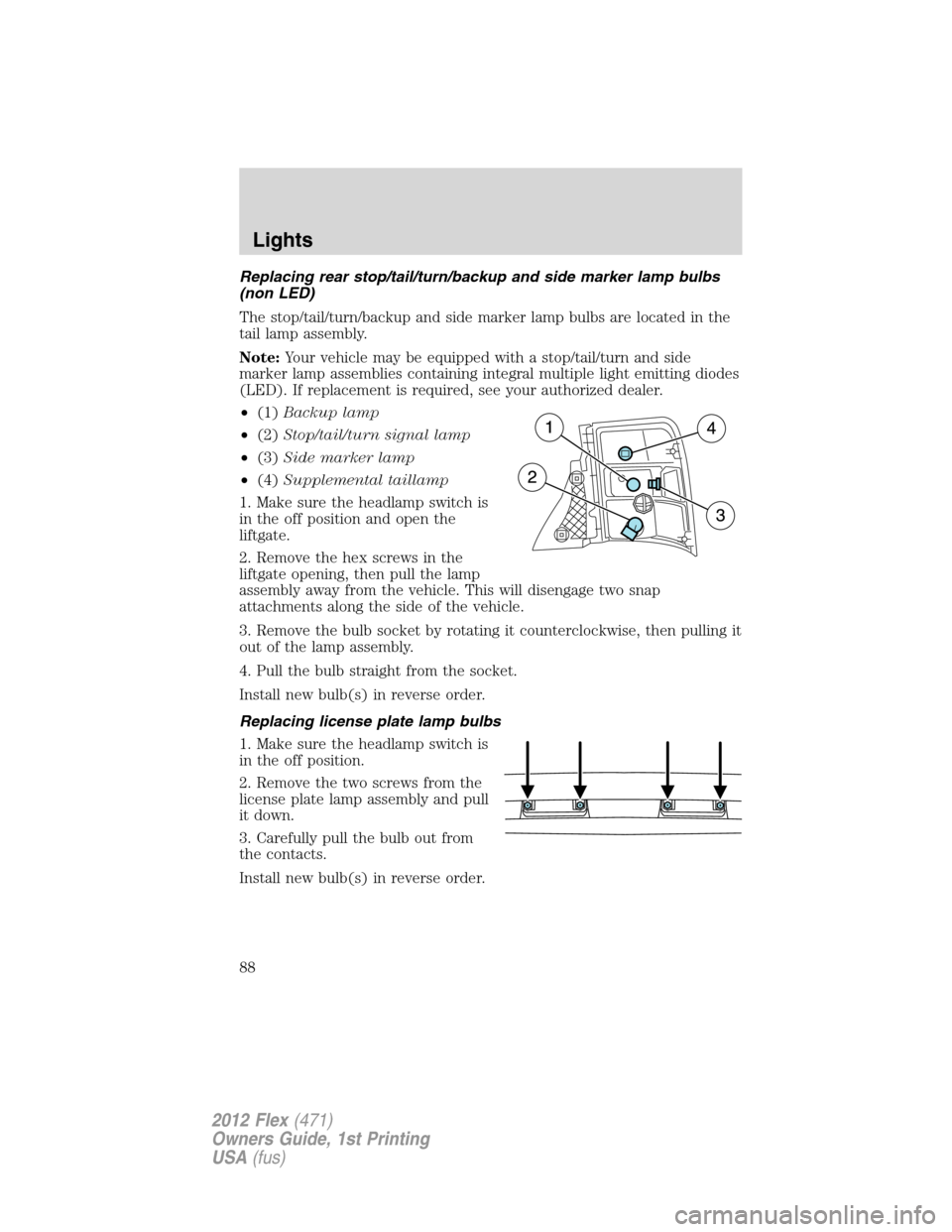
Replacing rear stop/tail/turn/backup and side marker lamp bulbs
(non LED)
The stop/tail/turn/backup and side marker lamp bulbs are located in the
tail lamp assembly.
Note:Your vehicle may be equipped with a stop/tail/turn and side
marker lamp assemblies containing integral multiple light emitting diodes
(LED). If replacement is required, see your authorized dealer.
•(1)Backup lamp
•(2)Stop/tail/turn signal lamp
•(3)Side marker lamp
•(4)Supplemental taillamp
1. Make sure the headlamp switch is
in the off position and open the
liftgate.
2. Remove the hex screws in the
liftgate opening, then pull the lamp
assembly away from the vehicle. This will disengage two snap
attachments along the side of the vehicle.
3. Remove the bulb socket by rotating it counterclockwise, then pulling it
out of the lamp assembly.
4. Pull the bulb straight from the socket.
Install new bulb(s) in reverse order.
Replacing license plate lamp bulbs
1. Make sure the headlamp switch is
in the off position.
2. Remove the two screws from the
license plate lamp assembly and pull
it down.
3. Carefully pull the bulb out from
the contacts.
Install new bulb(s) in reverse order.
Lights
88
2012 Flex(471)
Owners Guide, 1st Printing
USA(fus)
Page 89 of 405
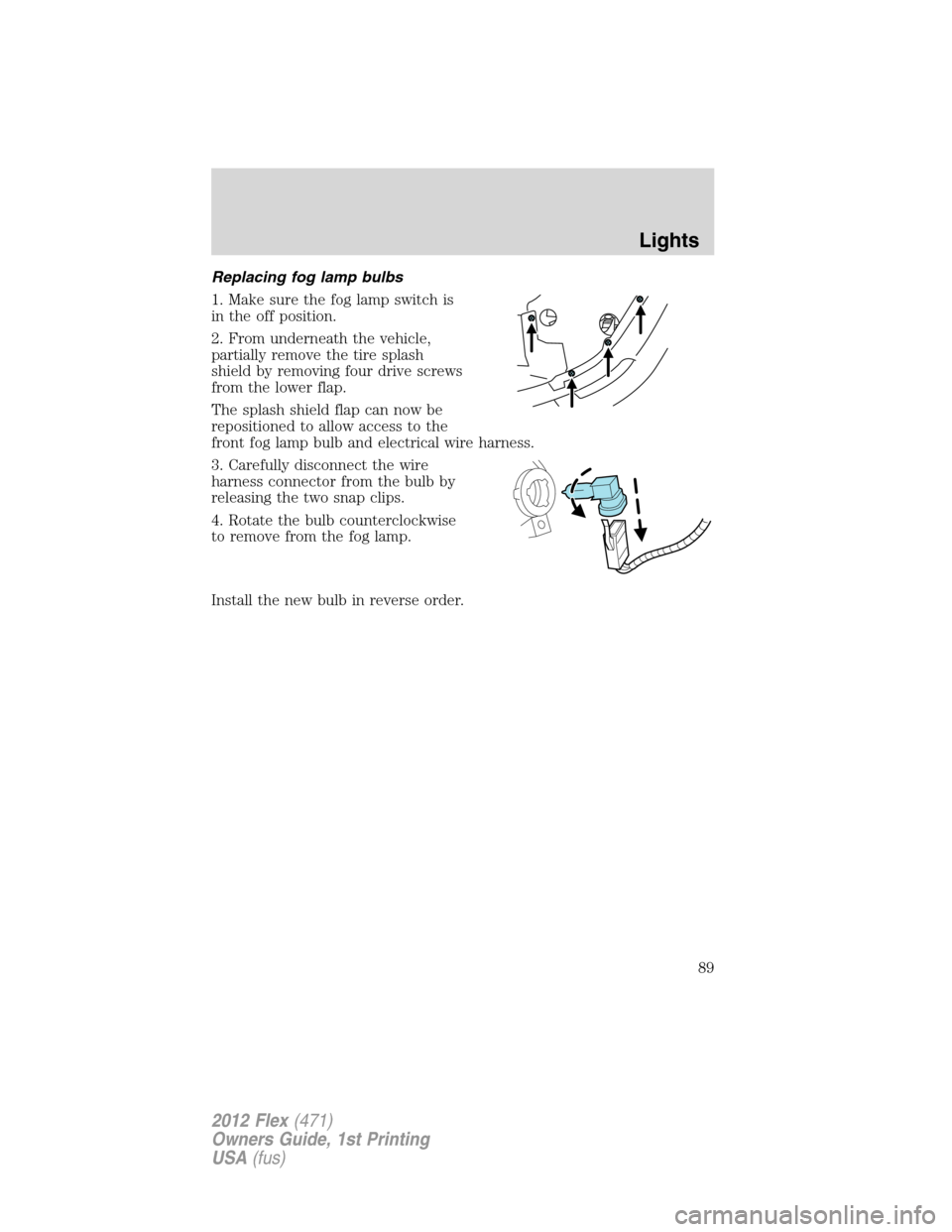
Replacing fog lamp bulbs
1. Make sure the fog lamp switch is
in the off position.
2. From underneath the vehicle,
partially remove the tire splash
shield by removing four drive screws
from the lower flap.
The splash shield flap can now be
repositioned to allow access to the
front fog lamp bulb and electrical wire harness.
3. Carefully disconnect the wire
harness connector from the bulb by
releasing the two snap clips.
4. Rotate the bulb counterclockwise
to remove from the fog lamp.
Install the new bulb in reverse order.
Lights
89
2012 Flex(471)
Owners Guide, 1st Printing
USA(fus)
Page 93 of 405
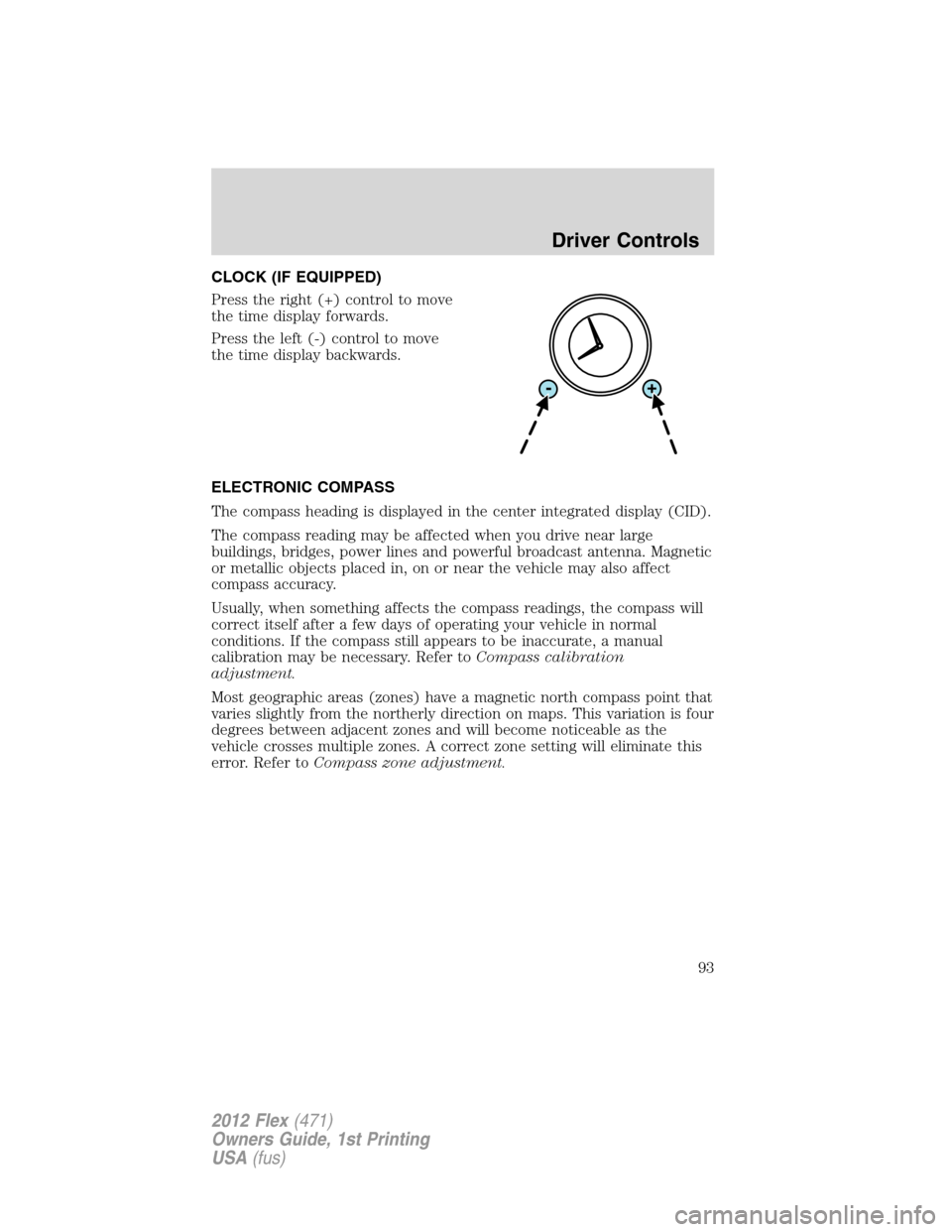
CLOCK (IF EQUIPPED)
Press the right (+) control to move
the time display forwards.
Press the left (-) control to move
the time display backwards.
ELECTRONIC COMPASS
The compass heading is displayed in the center integrated display (CID).
The compass reading may be affected when you drive near large
buildings, bridges, power lines and powerful broadcast antenna. Magnetic
or metallic objects placed in, on or near the vehicle may also affect
compass accuracy.
Usually, when something affects the compass readings, the compass will
correct itself after a few days of operating your vehicle in normal
conditions. If the compass still appears to be inaccurate, a manual
calibration may be necessary. Refer toCompass calibration
adjustment.
Most geographic areas (zones) have a magnetic north compass point that
varies slightly from the northerly direction on maps. This variation is four
degrees between adjacent zones and will become noticeable as the
vehicle crosses multiple zones. A correct zone setting will eliminate this
error. Refer toCompass zone adjustment.
Driver Controls
93
2012 Flex(471)
Owners Guide, 1st Printing
USA(fus)
Page 102 of 405
Note:A rear center passenger and/or raised rear center headrest (if
equipped) may also block the light from reaching the sensor.
Do not clean the housing or glass of any mirror with harsh
abrasives, fuel or other petroleum-based cleaning products.
EXTERIOR MIRRORS
Power side view mirrors
WARNING:Do not adjust the mirror while the vehicle is in
motion.
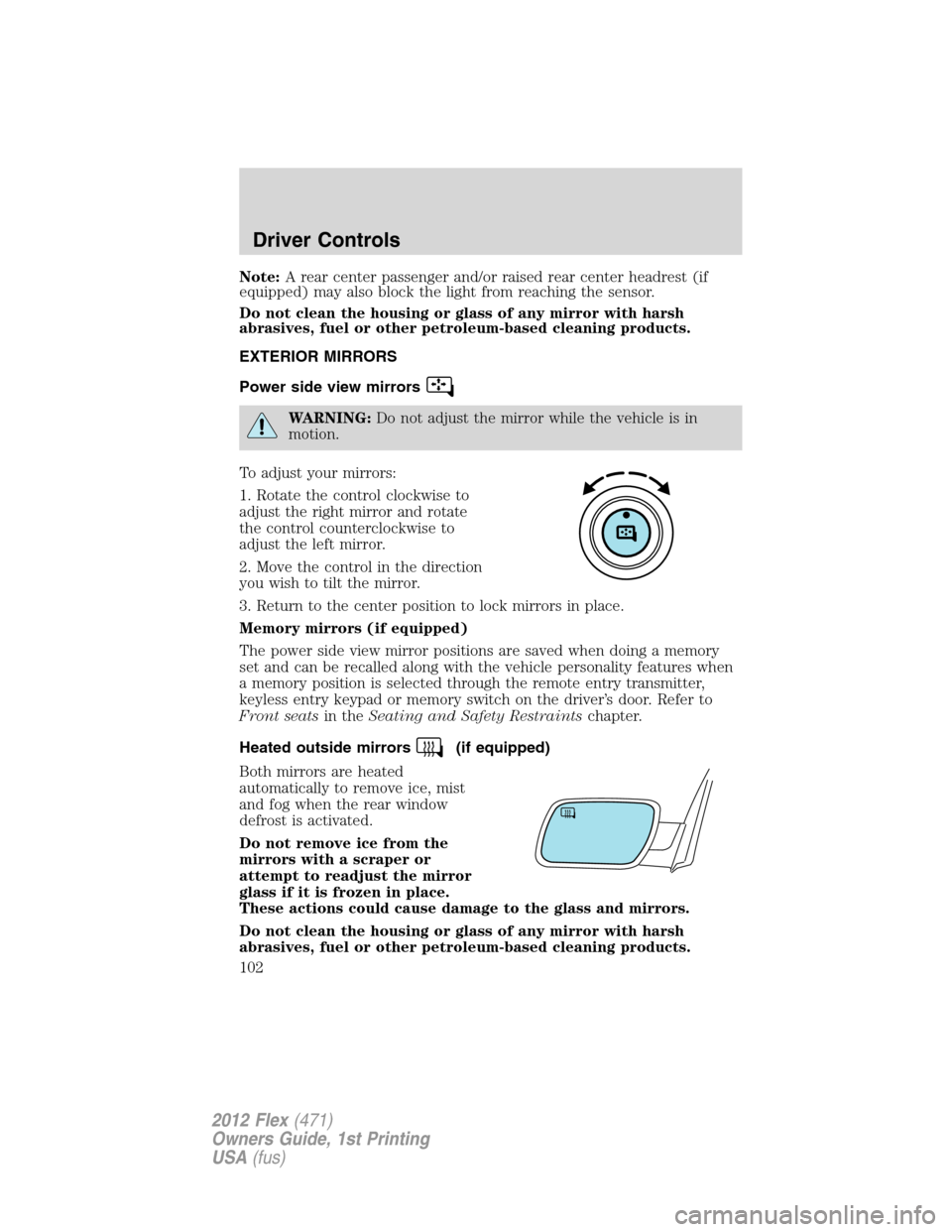
To adjust your mirrors:
1. Rotate the control clockwise to
adjust the right mirror and rotate
the control counterclockwise to
adjust the left mirror.
2. Move the control in the direction
you wish to tilt the mirror.
3. Return to the center position to lock mirrors in place.
Memory mirrors (if equipped)
The power side view mirror positions are saved when doing a memory
set and can be recalled along with the vehicle personality features when
a memory position is selected through the remote entry transmitter,
keyless entry keypad or memory switch on the driver’s door. Refer to
Front seatsin theSeating and Safety Restraintschapter.
Heated outside mirrors
(if equipped)
Both mirrors are heated
automatically to remove ice, mist
and fog when the rear window
defrost is activated.
Do not remove ice from the
mirrors with a scraper or
attempt to readjust the mirror
glass if it is frozen in place.
These actions could cause damage to the glass and mirrors.
Do not clean the housing or glass of any mirror with harsh
abrasives, fuel or other petroleum-based cleaning products.
Driver Controls
102
2012 Flex(471)
Owners Guide, 1st Printing
USA(fus)
Page 298 of 405
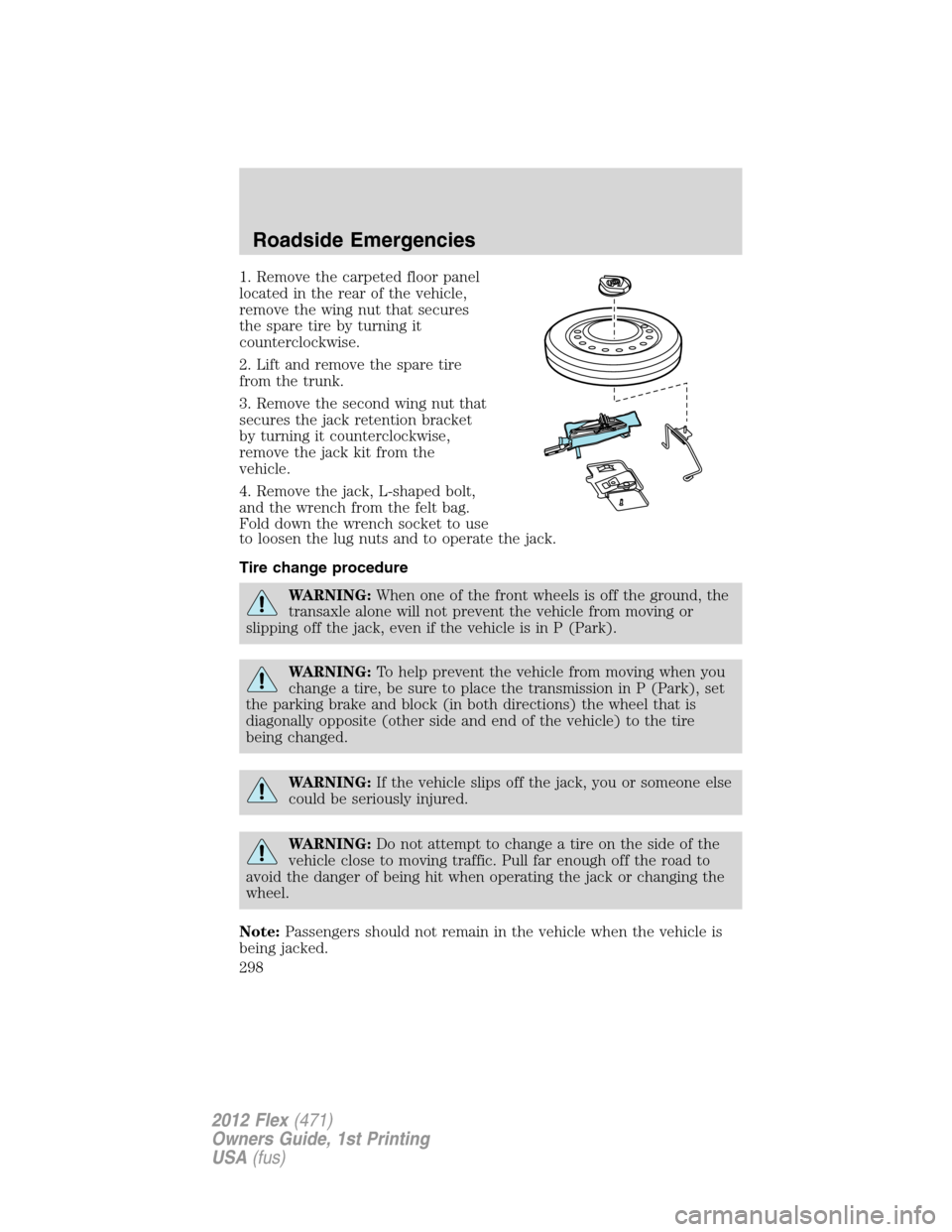
1. Remove the carpeted floor panel
located in the rear of the vehicle,
remove the wing nut that secures
the spare tire by turning it
counterclockwise.
2. Lift and remove the spare tire
from the trunk.
3. Remove the second wing nut that
secures the jack retention bracket
by turning it counterclockwise,
remove the jack kit from the
vehicle.
4. Remove the jack, L-shaped bolt,
and the wrench from the felt bag.
Fold down the wrench socket to use
to loosen the lug nuts and to operate the jack.
Tire change procedure
WARNING:When one of the front wheels is off the ground, the
transaxle alone will not prevent the vehicle from moving or
slipping off the jack, even if the vehicle is in P (Park).
WARNING:To help prevent the vehicle from moving when you
change a tire, be sure to place the transmission in P (Park), set
the parking brake and block (in both directions) the wheel that is
diagonally opposite (other side and end of the vehicle) to the tire
being changed.
WARNING:If the vehicle slips off the jack, you or someone else
could be seriously injured.
WARNING:Do not attempt to change a tire on the side of the
vehicle close to moving traffic. Pull far enough off the road to
avoid the danger of being hit when operating the jack or changing the
wheel.
Note:Passengers should not remain in the vehicle when the vehicle is
being jacked.
Roadside Emergencies
298
2012 Flex(471)
Owners Guide, 1st Printing
USA(fus)