ECU FORD FLEX 2014 1.G User Guide
[x] Cancel search | Manufacturer: FORD, Model Year: 2014, Model line: FLEX, Model: FORD FLEX 2014 1.GPages: 554, PDF Size: 8.04 MB
Page 65 of 554
REMOTE CONTROL
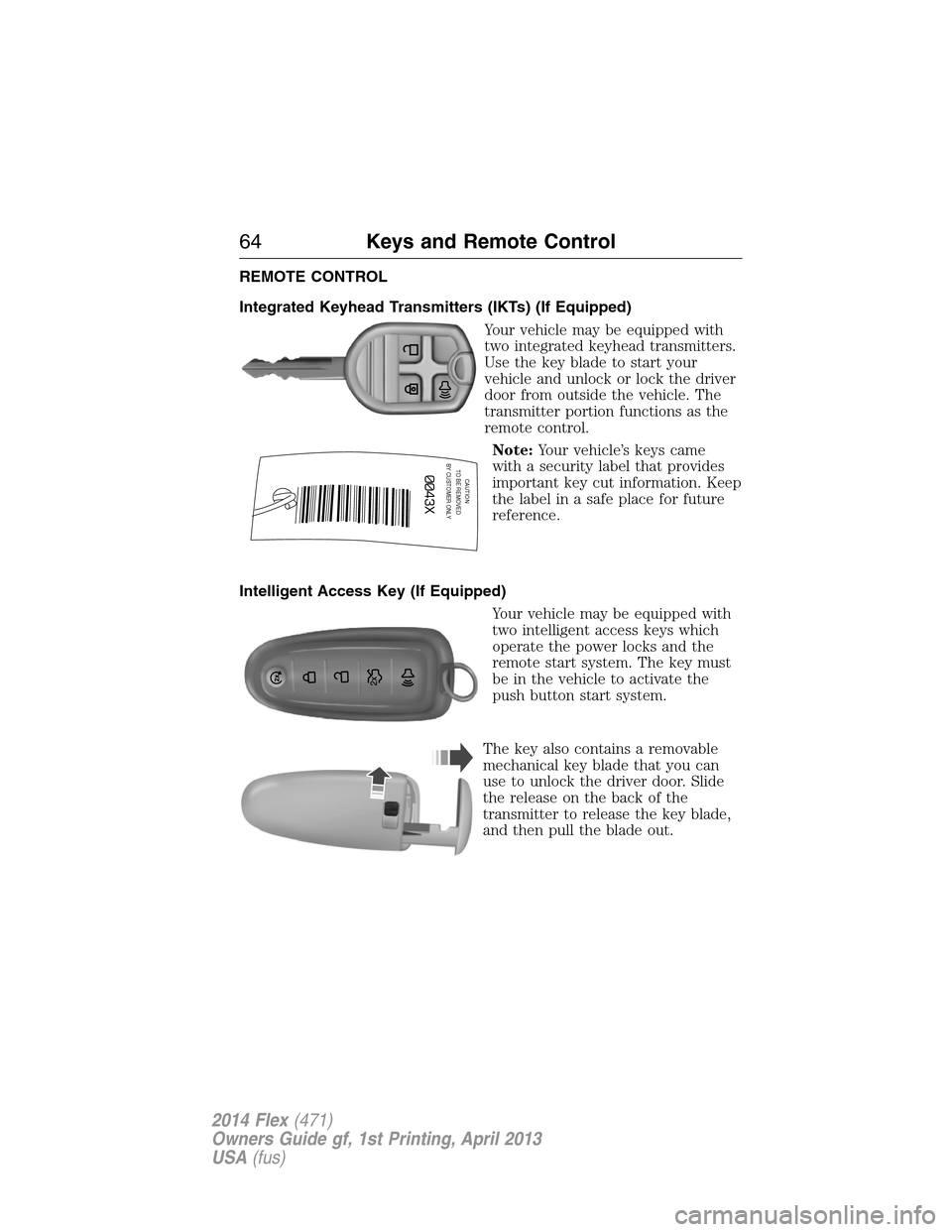
Integrated Keyhead Transmitters (IKTs) (If Equipped)
Your vehicle may be equipped with
two integrated keyhead transmitters.
Use the key blade to start your
vehicle and unlock or lock the driver
door from outside the vehicle. The
transmitter portion functions as the
remote control.
Note:Your vehicle’s keys came
with a security label that provides
important key cut information. Keep
the label in a safe place for future
reference.
Intelligent Access Key (If Equipped)
Your vehicle may be equipped with
two intelligent access keys which
operate the power locks and the
remote start system. The key must
be in the vehicle to activate the
push button start system.
The key also contains a removable
mechanical key blade that you can
use to unlock the driver door. Slide
the release on the back of the
transmitter to release the key blade,
and then pull the blade out.
CAUTIONTO BE REMOVED
BY CUSTOMER ONLY
64Keys and Remote Control
2014 Flex(471)
Owners Guide gf, 1st Printing, April 2013
USA(fus)
Page 66 of 554
Note:Your vehicle’s back-up keys
came with a security tag that
provides important key cut
information. Keep the tag in a safe
place for future reference.
Replacing the Battery
Note:Refer to local regulations when disposing of transmitter batteries.
Note:Do not wipe off any grease on the battery terminals or on the
back surface of the circuit board.
Note:Replacing the battery will not delete the transmitter from the
vehicle. The transmitter should operate normally.
The remote control uses one coin-type three-volt lithium battery CR2032
or equivalent.
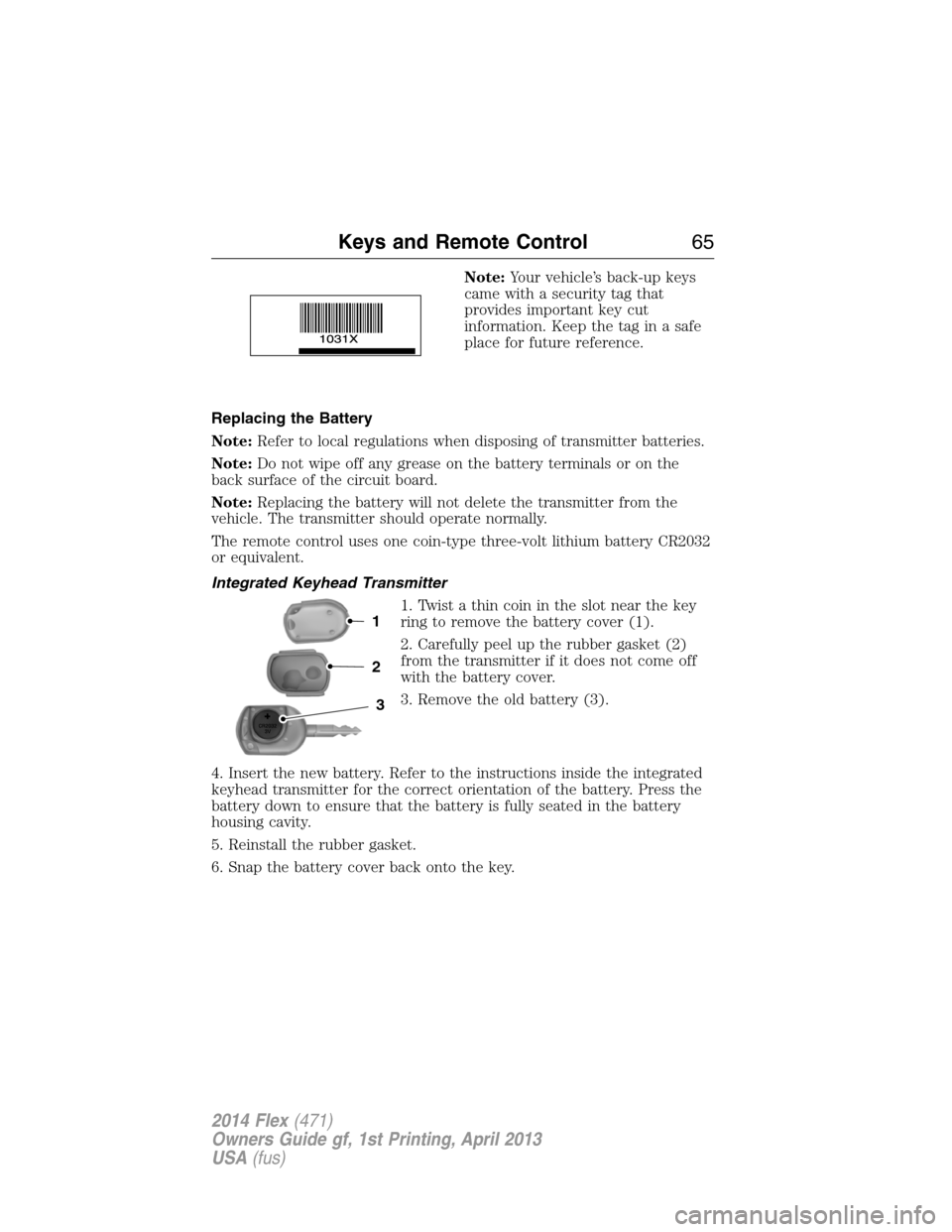
Integrated Keyhead Transmitter
1. Twist a thin coin in the slot near the key
ring to remove the battery cover (1).
2. Carefully peel up the rubber gasket (2)
from the transmitter if it does not come off
with the battery cover.
3. Remove the old battery (3).
4. Insert the new battery. Refer to the instructions inside the integrated
keyhead transmitter for the correct orientation of the battery. Press the
battery down to ensure that the battery is fully seated in the battery
housing cavity.
5. Reinstall the rubber gasket.
6. Snap the battery cover back onto the key.
3
2
1
Keys and Remote Control65
2014 Flex(471)
Owners Guide gf, 1st Printing, April 2013
USA(fus)
Page 71 of 554
Turning the Vehicle Off After Remote Starting
Press the button once. The parking lamps will turn off.
You may have to be closer to your vehicle than when starting due to
ground reflection and the added noise of the running vehicle.
You can disable or enable the remote start system through the
information display. See theInformation Displaychapter.
REPLACING A LOST KEY OR REMOTE CONTROL
You can purchase replacement or additional keys or remote controls from
an authorized dealer. A dealer can program the transmitters to your
vehicle or you may be able to program them yourself. See theSecurity
chapter for information on programming your transmitters.
70Keys and Remote Control
2014 Flex(471)
Owners Guide gf, 1st Printing, April 2013
USA(fus)
Page 75 of 554

MYKEY TROUBLESHOOTING
Condition Potential causes
I cannot create a
MyKey.•The key or fob used to start the vehicle
does not have admin privileges.
•The key or fob used to start the vehicle is
the only admin key (there always has to be at
least one admin key).
•Vehicles with push-button start: The
intelligent access key is not in the backup slot.
The backup slot location information is in
another chapter. SeeStarting and Stopping
the Vehicle.
•SecuriLock passive anti-theft system is
disabled or in unlimited mode.
I cannot program the
configurable settings.•The key or fob used to start the vehicle
does not have admin privileges.
•No MyKeys are created. SeeCreating a
MyKey.
I cannot clear the
MyKeys.•The key or fob used to start the vehicle
does not have admin privileges.
•No MyKeys are created. Refer toCreating a
MyKey.
I lost the only admin
key.•Purchase a new key from your authorized
dealer.
I lost a key.•Program a spare key. SeeSecuriLockin the
Security.
No MyKey functions
with intelligent access
key (push- button
start).•An admin fob is present at engine start.
•No MyKey has been created. SeeCreating a
MyKey.
MyKey distances do
not accumulate.•The MyKey user is not using the MyKey.
•An admin key holder cleared the MyKeys
and created new MyKeys.
•The key system has been reset.
74MyKey
2014 Flex(471)
Owners Guide gf, 1st Printing, April 2013
USA(fus)
Page 81 of 554
WARNING:Keep keys out of the reach of children. Do not allow
children to operate the power liftgate, or to play near to an open
or moving power liftgate.
Note:Cycling the ignition while the liftgate is power closing and is near
the latch may cause the liftgate to reverse to full open position. Make
sure that the liftgate is closed before operating or moving the vehicle,
especially in an enclosure, like a garage or a parking structure. The
liftgate or its components could be damaged.
Note:Do not drive with the liftgate open without first disabling the
power function and securing the liftgate to the vehicle.
Note:In case of operation in extreme cold -40°F (-40°C), or on extreme
inclines, manual operation of the liftgate is suggested.
You can enable or disable the power liftgate using the information
display. The remote control and instrument panel button will still operate
the liftgate regardless of the setting.
Opening and Closing the Power Liftgate
Note:The liftgate movement direction can be reversed with a second
press of the instrument panel, or the control button on the liftgate, or a
second double press of the transmitter button.
The liftgate will only operate with the vehicle inP.
A chime will sound three times as the liftgate begins to power close.
A single chime indicates a problem with the close request, caused by:
•the ignition is on and the transmission is not inP;
•or the battery voltage is below the minimum operating voltage;
•or the vehicle speed is at or above 3 mph (5 km/h).
If the liftgate reverses and starts to close after an open request, a fast
continuous chime indicates excessive load on the gate or a possible strut
failure. See your authorized dealer if you still have a fast chime after the
load is removed.
To open or close from the instrument panel:Press the
instrument panel button.
To open or close with the remote control:Press the remote
control button twice within three seconds.
80Locks
2014 Flex(471)
Owners Guide gf, 1st Printing, April 2013
USA(fus)
Page 83 of 554
To reset the power liftgate:
1. Disconnect the battery for 20 seconds then, reconnect the battery.
2. Manually close and fully latch the liftgate.
3. Power open the liftgate by using the transmitter, or the instrument
panel control button.
SECURICODE™ KEYLESS ENTRY KEYPAD (IF EQUIPPED)
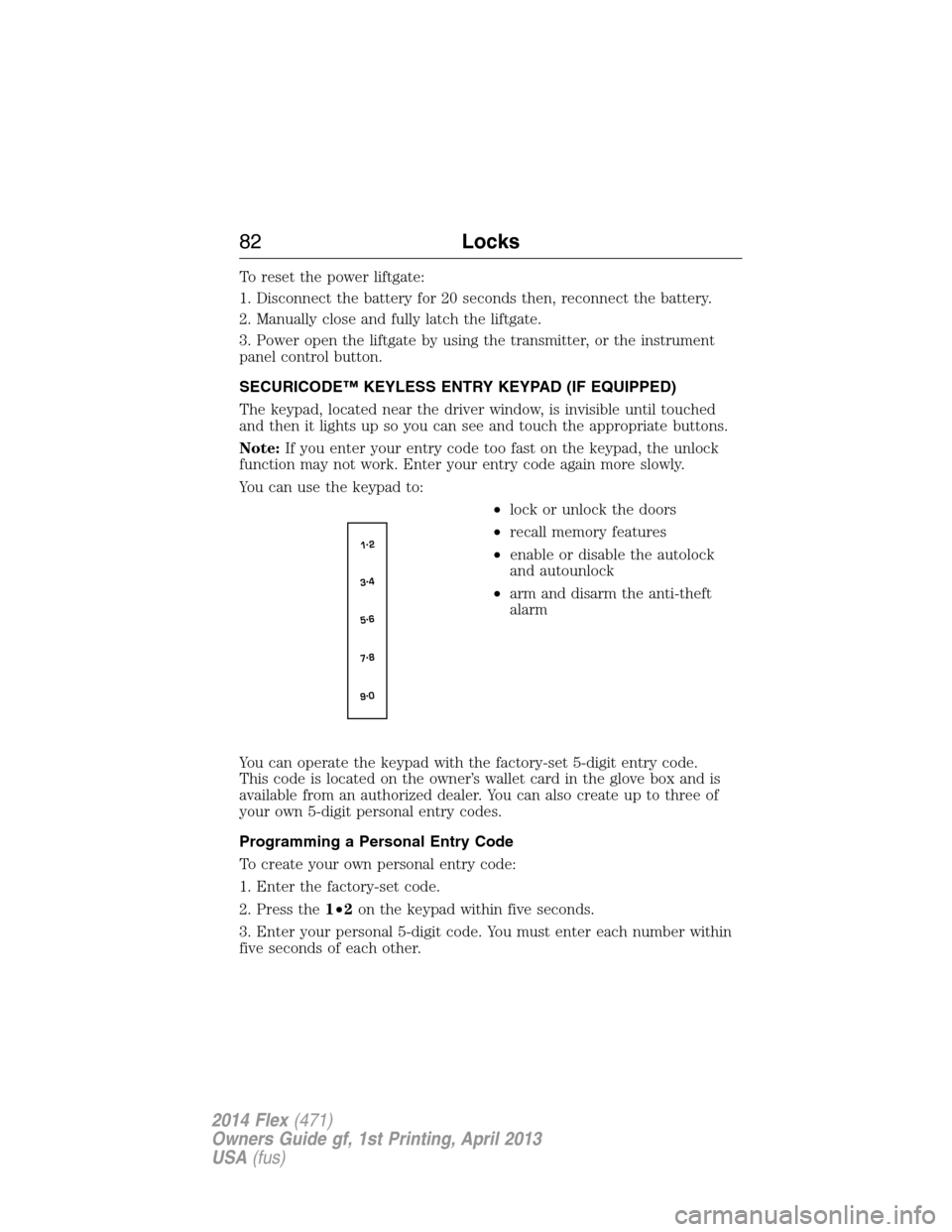
The keypad, located near the driver window, is invisible until touched
and then it lights up so you can see and touch the appropriate buttons.
Note:If you enter your entry code too fast on the keypad, the unlock
function may not work. Enter your entry code again more slowly.
You can use the keypad to:
•lock or unlock the doors
•recall memory features
•enable or disable the autolock
and autounlock
•arm and disarm the anti-theft
alarm
You can operate the keypad with the factory-set 5-digit entry code.
This code is located on the owner’s wallet card in the glove box and is
available from an authorized dealer. You can also create up to three of
your own 5-digit personal entry codes.
Programming a Personal Entry Code
To create your own personal entry code:
1. Enter the factory-set code.
2. Press the1•2on the keypad within five seconds.
3. Enter your personal 5-digit code. You must enter each number within
five seconds of each other.
82Locks
2014 Flex(471)
Owners Guide gf, 1st Printing, April 2013
USA(fus)
Page 84 of 554
4. For memory recall feature, enter the sixth digit1•2to store driver 1
settings or3•4to store driver 2 settings.
Note:Pressing5•6,7•8,or9•0keypad numbers as a sixth digit will
not recall a driver memory setting.
Note:The factory-set code cannot be associated with a memory setting.
5. The doors will lock and then unlock to confirm that programming is
complete.
You may also program a personal entry code through the MyFord Touch
system. Refer to theMyFord Touchchapter.
Tips:
•Do not set a code that uses five of the same number.
•Do not use five numbers in sequential order.
•The factory-set code will work even if you have set your own personal
code.
Erasing a Personal Code
1. Enter the factory-set 5-digit code.
2. Press and release the1•2on the keypad within five seconds.
3. Press and hold the1•2for two seconds. This must be done within
five seconds of completing Step 2.
All personal codes are now erased and only the factory-set 5-digit code
will work.
Anti-Scan Feature
The keypad will go into an anti-scan mode if you enter the wrong code
seven times (35 consecutive button presses). This mode disables the
keypad for one minute and the keypad lamp will flash.
The anti-scan feature will turn off after:
•one minute of keypad inactivity
•pressing the unlock button on the remote control
•switching the ignition on
•unlocking the vehicle using intelligent access.
Locks83
2014 Flex(471)
Owners Guide gf, 1st Printing, April 2013
USA(fus)
Page 87 of 554
SECURILOCK® PASSIVE ANTI-THEFT SYSTEM
Note:The system is not compatible with non-Ford aftermarket remote
start systems. Use of these systems may result in vehicle starting
problems and a loss of security protection.
Note:Metallic objects, electronic devices or a second coded key on the
same key chain may cause vehicle starting issues if they are too close to
the key when starting the engine. Prevent these objects from touching
the coded key while starting the engine. Switch the ignition off, move all
objects on the key chain away from the coded key and restart the engine
if a problem occurs.
Note:Do not leave a duplicate coded key in the vehicle. Always take
your keys and lock all doors when leaving the vehicle.
The system is an engine immobilization system. It helps prevent the
engine from starting unless a coded key programmed to your vehicle is
used. Using the wrong key may prevent the engine from starting.
A message may appear in the information display.
If you are unable to start the engine with a correctly coded key, a
malfunction has happened and a message may appear in the information
display.
Automatic Arming
Your vehicle arms immediately after you switch the ignition off.
Automatic Disarming
Your vehicle disarms when you switch the ignition on with a coded key.
Replacement Keys
Note:Your vehicle comes with two integrated keyhead transmitters or
two intelligent access keys.
The integrated keyhead transmitter functions as a programmed ignition
key that operates all the locks and starts the vehicle, as well as a remote
control.
The intelligent access key functions as a programmed key that operates
the driver door lock and activates the intelligent access with push button
start systems, as well as a remote control.
86Security
2014 Flex(471)
Owners Guide gf, 1st Printing, April 2013
USA(fus)
Page 88 of 554
If your programmed transmitters or standard SecuriLock coded keys
(integrated keyhead transmitters only) are lost or stolen and you do not
have an extra coded key, you will need to have your vehicle towed to an
authorized dealer. The key codes need to be erased from your vehicle
and new coded keys will need to be programmed.
Store an extra programmed key away from the vehicle in a safe place to
help prevent any inconveniences. See an authorized dealer to purchase
additional spare or replacement keys.
Programming a Spare Integrated Keyhead Transmitter
Note:A maximum of eight coded keys can be programmed to your
vehicle. Only four of these eight can be integrated keyhead transmitters.
You can program your own integrated keyhead transmitters or standard
SecuriLock® coded keys to your vehicle. This procedure will program
both the engine immobilizer key code and the remote entry portion of
the remote control to your vehicle.
Only use integrated keyhead transmitters or standard SecuriLock® keys.
You must have two previously programmed coded keys and the new
unprogrammed key readily accessible. See your authorized dealer to have
the spare key programmed if two previously programmed coded keys are
not available.
Read and understand the entire procedure before you begin.
1. Insert the first previously programmed coded key into the ignition.
2. Turn the ignition from off to on. Keep the ignition on for at least three
seconds, but no more than 10 seconds.
3. Turn the ignition off and remove the first coded key from the ignition.
4. After three seconds but within 10 seconds of turning the ignition off,
insert the second previously coded key into the ignition.
5. Turn the ignition from off to on. Keep the ignition on for at least three
seconds, but no more than 10 seconds.
6. Turn the ignition off and remove the second previously programmed
coded key from the ignition.
7. After three seconds but within 20 seconds of turning the ignition off
and removing the previously programmed coded key, insert the new
unprogrammed key into the ignition.
8. Turn the ignition from off to on. Keep the ignition on for at least six
seconds.
9. Remove the newly programmed coded key from the ignition.
Security87
2014 Flex(471)
Owners Guide gf, 1st Printing, April 2013
USA(fus)
Page 89 of 554
The key will start your vehicle’s engine and will operate the remote entry
system (if the new key is an integrated keyhead transmitter) if it has
been successfully programmed.
Wait 20 seconds and repeat Steps 1 through 8 if the key was not
successfully programmed. Take your vehicle to your authorized dealer to
have the new key programmed if you are still unsuccessful.
Wait 20 seconds and then repeat this procedure from Step 1 to program
an additional key.
Programming a Spare Intelligent Access Key (If Equipped)
Note:A maximum of four intelligent access keys can be programmed to
your vehicle. You must take your vehicle and all access keys to your
authorized dealer to be erased and reprogrammed if you would like to
replace a previously programmed access key with a new access key, or if
you already have four access keys programmed to your vehicle.
You must have two previously programmed intelligent access keys inside
your vehicle and the new unprogrammed intelligent access keys readily
accessible. See your authorized dealer to have the spare key
programmed if two previously programmed keys are not available.
Make sure that your vehicle is off before beginning this procedure. Make
sure that all doors are closed before beginning and that they remain
closed throughout the procedure. Perform all steps within 30 seconds of
starting the sequence. Stop and wait for at least one minute before
starting again if any steps are performed out of sequence.
Read and understand the entire procedure before you begin.
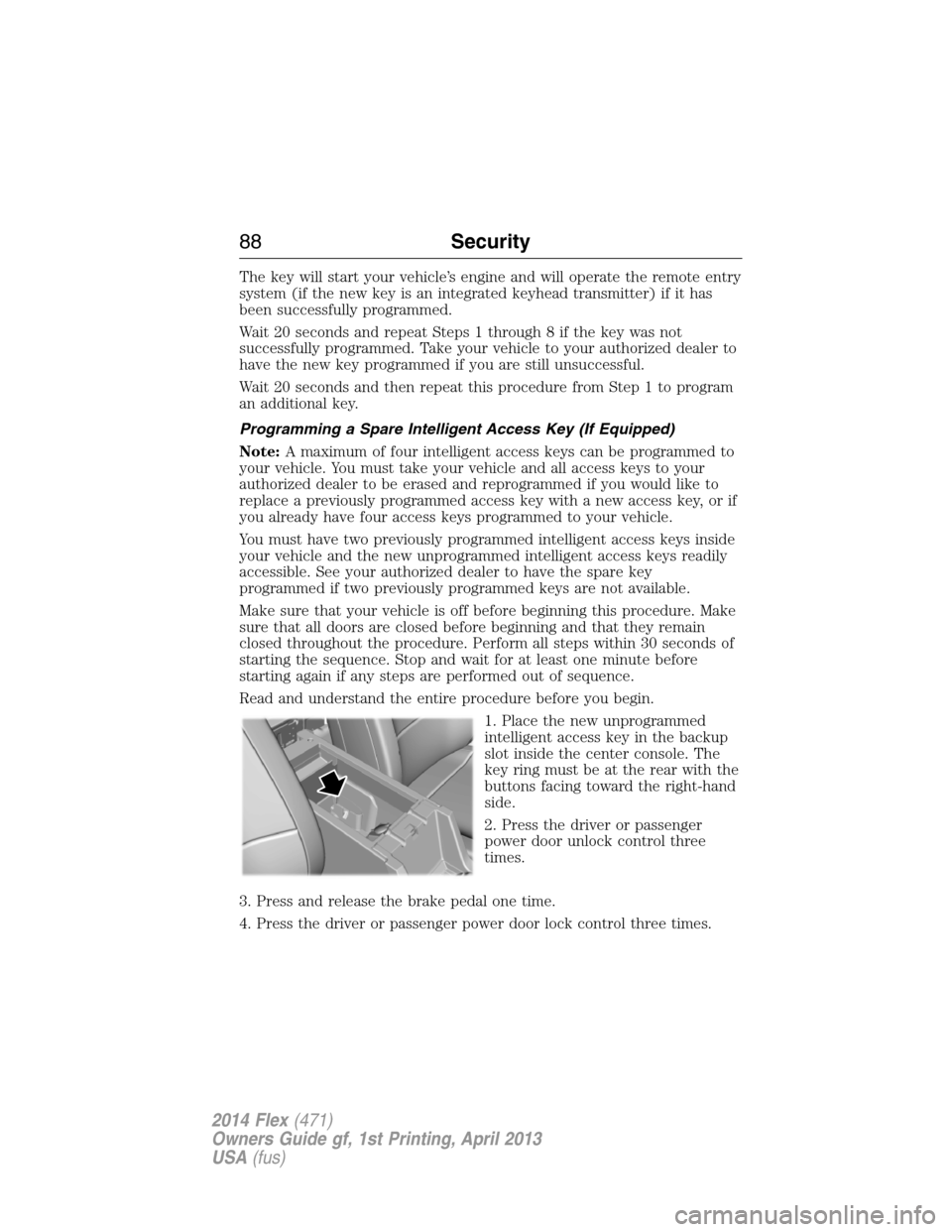
1. Place the new unprogrammed
intelligent access key in the backup
slot inside the center console. The
key ring must be at the rear with the
buttons facing toward the right-hand
side.
2. Press the driver or passenger
power door unlock control three
times.
3. Press and release the brake pedal one time.
4. Press the driver or passenger power door lock control three times.
88Security
2014 Flex(471)
Owners Guide gf, 1st Printing, April 2013
USA(fus)