mirror FORD FLEX 2014 1.G Owner's Manual
[x] Cancel search | Manufacturer: FORD, Model Year: 2014, Model line: FLEX, Model: FORD FLEX 2014 1.GPages: 554, PDF Size: 8.04 MB
Page 236 of 554
System Sensors
WARNING:Just prior to the system recognizing a blocked
condition and alerting the driver, the number of missed objects
will increase. To help avoid injuries, NEVER use the BLIS® as a
replacement for using the side and rear view mirrors and looking over
your shoulder before changing lanes. BLIS® is not a replacement for
careful driving and only an assist.
Note:It is possible to get a blockage warning with no blockage present;
this is rare and known as a false blockage warning. A false blocked
condition either self-corrects or clears after a key cycle.
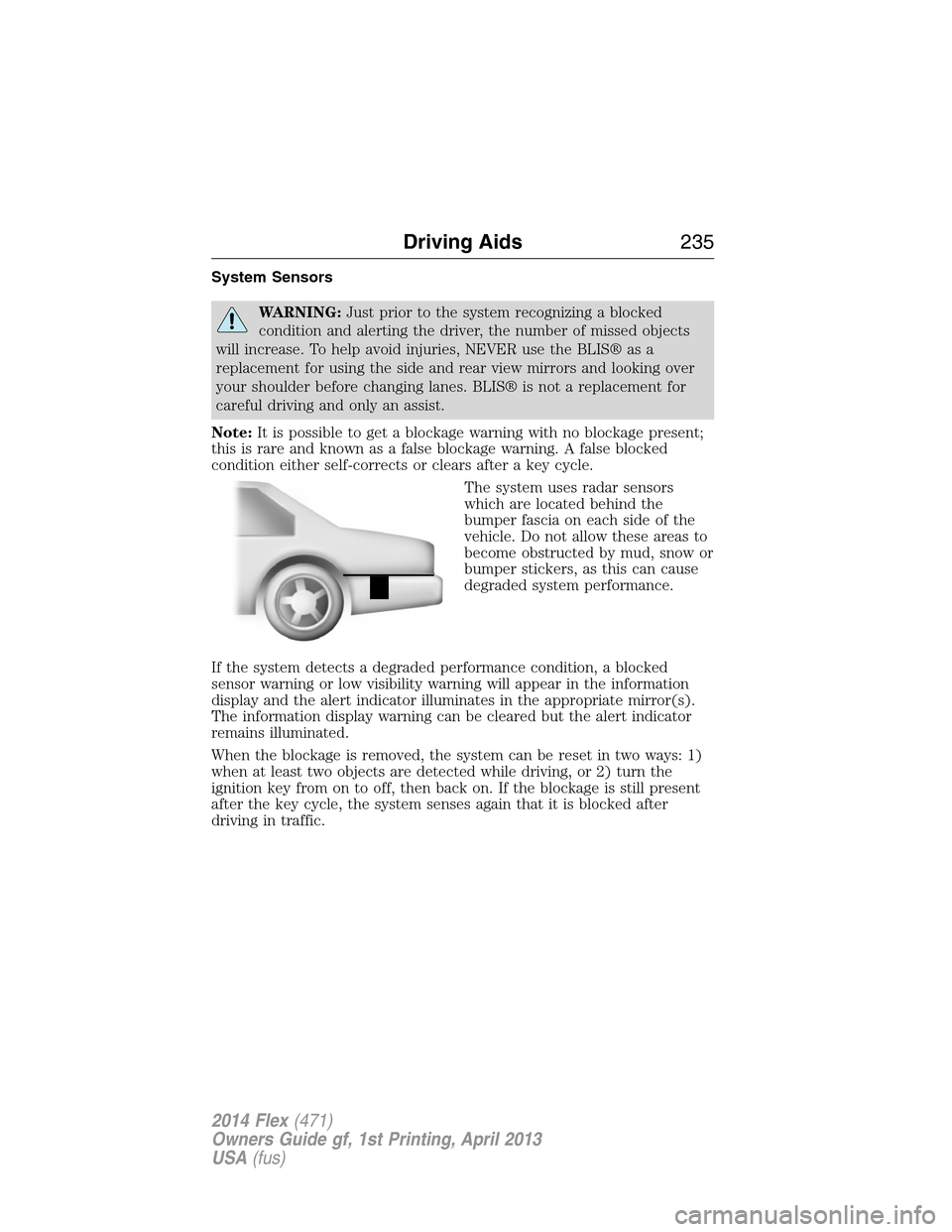
The system uses radar sensors
which are located behind the
bumper fascia on each side of the
vehicle. Do not allow these areas to
become obstructed by mud, snow or
bumper stickers, as this can cause
degraded system performance.
If the system detects a degraded performance condition, a blocked
sensor warning or low visibility warning will appear in the information
display and the alert indicator illuminates in the appropriate mirror(s).
The information display warning can be cleared but the alert indicator
remains illuminated.
When the blockage is removed, the system can be reset in two ways: 1)
when at least two objects are detected while driving, or 2) turn the
ignition key from on to off, then back on. If the blockage is still present
after the key cycle, the system senses again that it is blocked after
driving in traffic.
Driving Aids235
2014 Flex(471)
Owners Guide gf, 1st Printing, April 2013
USA(fus)
Page 281 of 554
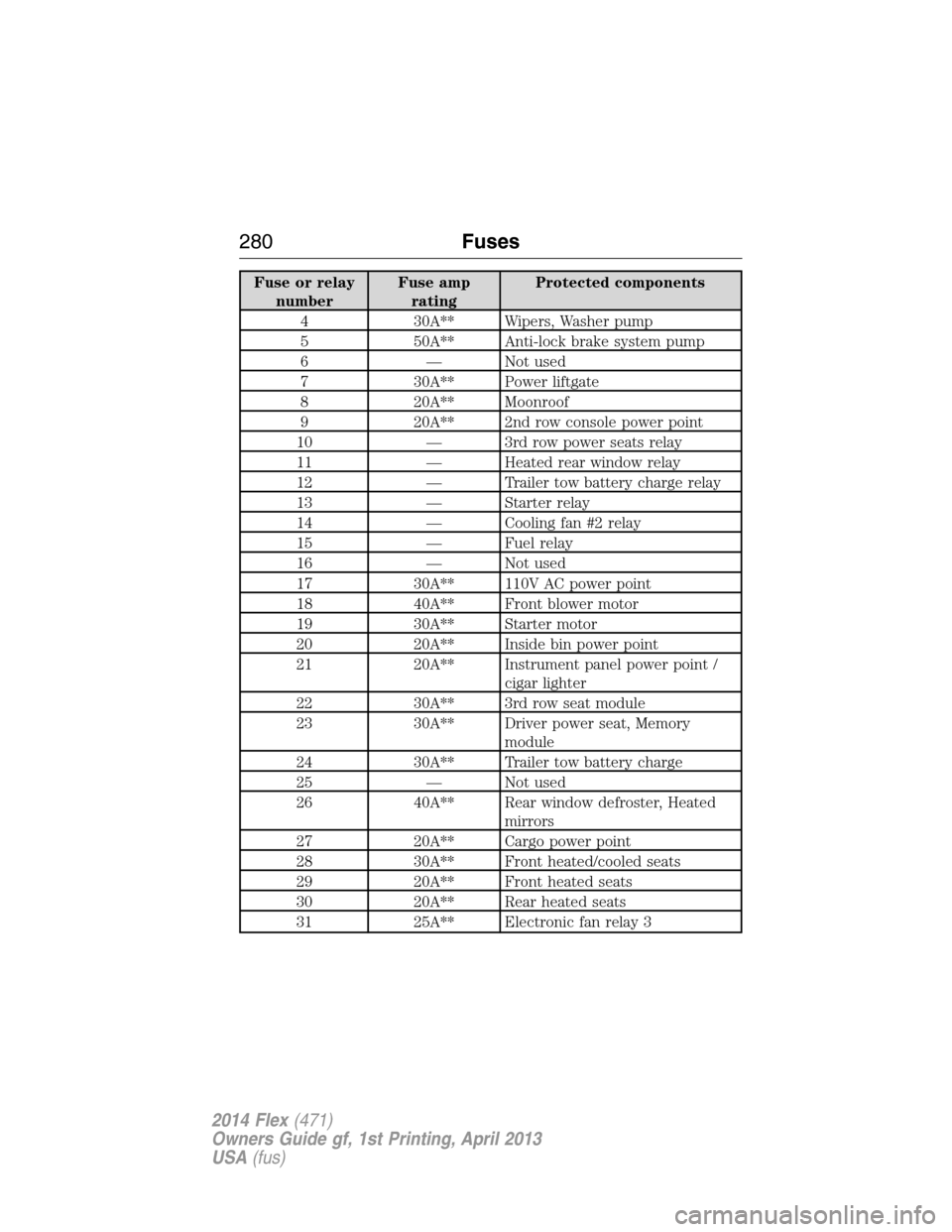
Fuse or relay
numberFuse amp
ratingProtected components
4 30A** Wipers, Washer pump
5 50A** Anti-lock brake system pump
6 — Not used
7 30A** Power liftgate
8 20A** Moonroof
9 20A** 2nd row console power point
10 — 3rd row power seats relay
11 — Heated rear window relay
12 — Trailer tow battery charge relay
13 — Starter relay
14 — Cooling fan #2 relay
15 — Fuel relay
16 — Not used
17 30A** 110V AC power point
18 40A** Front blower motor
19 30A** Starter motor
20 20A** Inside bin power point
21 20A** Instrument panel power point /
cigar lighter
22 30A** 3rd row seat module
23 30A** Driver power seat, Memory
module
24 30A** Trailer tow battery charge
25 — Not used
26 40A** Rear window defroster, Heated
mirrors
27 20A** Cargo power point
28 30A** Front heated/cooled seats
29 20A** Front heated seats
30 20A** Rear heated seats
31 25A** Electronic fan relay 3
280Fuses
2014 Flex(471)
Owners Guide gf, 1st Printing, April 2013
USA(fus)
Page 282 of 554
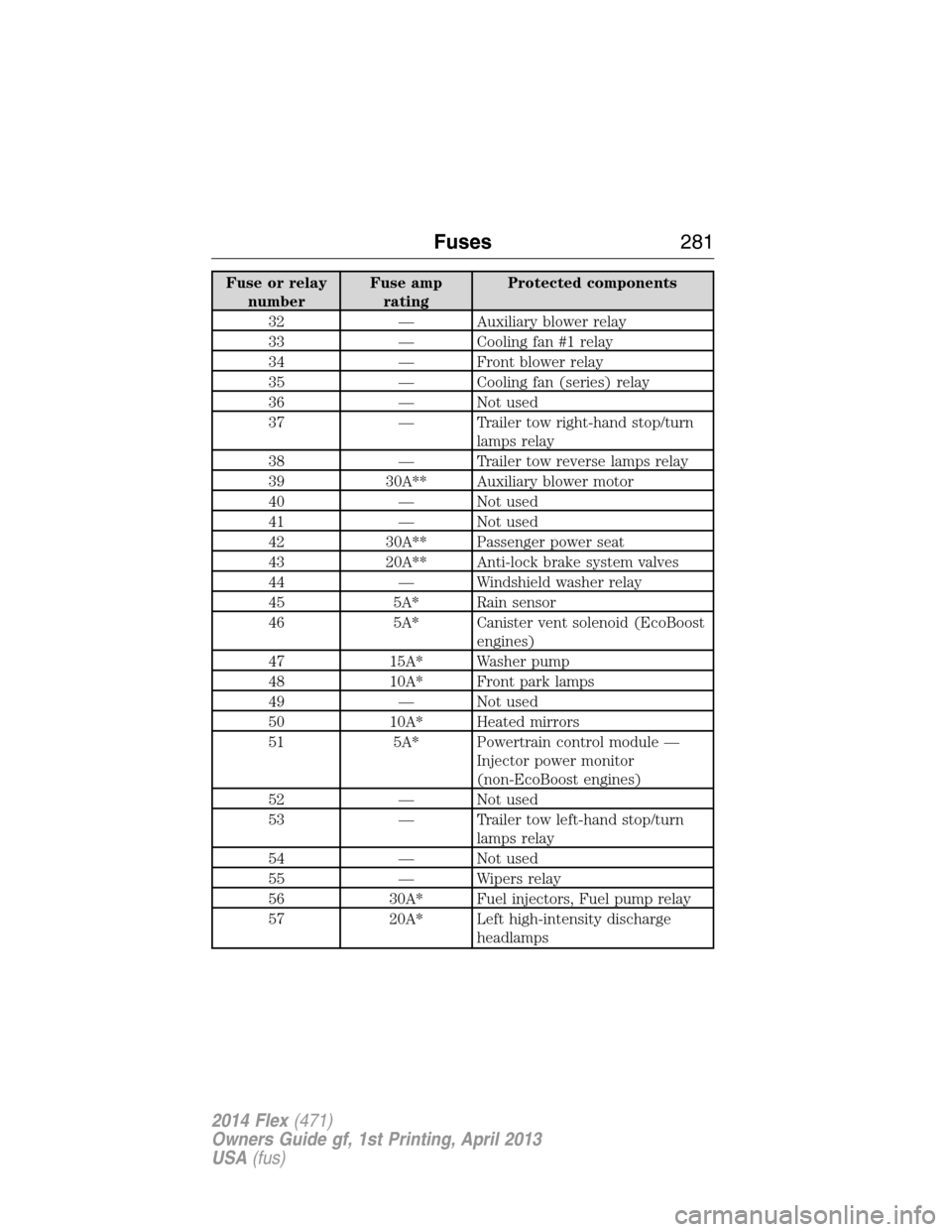
Fuse or relay
numberFuse amp
ratingProtected components
32 — Auxiliary blower relay
33 — Cooling fan #1 relay
34 — Front blower relay
35 — Cooling fan (series) relay
36 — Not used
37 — Trailer tow right-hand stop/turn
lamps relay
38 — Trailer tow reverse lamps relay
39 30A** Auxiliary blower motor
40 — Not used
41 — Not used
42 30A** Passenger power seat
43 20A** Anti-lock brake system valves
44 — Windshield washer relay
45 5A* Rain sensor
46 5A* Canister vent solenoid (EcoBoost
engines)
47 15A* Washer pump
48 10A* Front park lamps
49 — Not used
50 10A* Heated mirrors
51 5A* Powertrain control module —
Injector power monitor
(non-EcoBoost engines)
52 — Not used
53 — Trailer tow left-hand stop/turn
lamps relay
54 — Not used
55 — Wipers relay
56 30A* Fuel injectors, Fuel pump relay
57 20A* Left high-intensity discharge
headlamps
Fuses281
2014 Flex(471)
Owners Guide gf, 1st Printing, April 2013
USA(fus)
Page 285 of 554
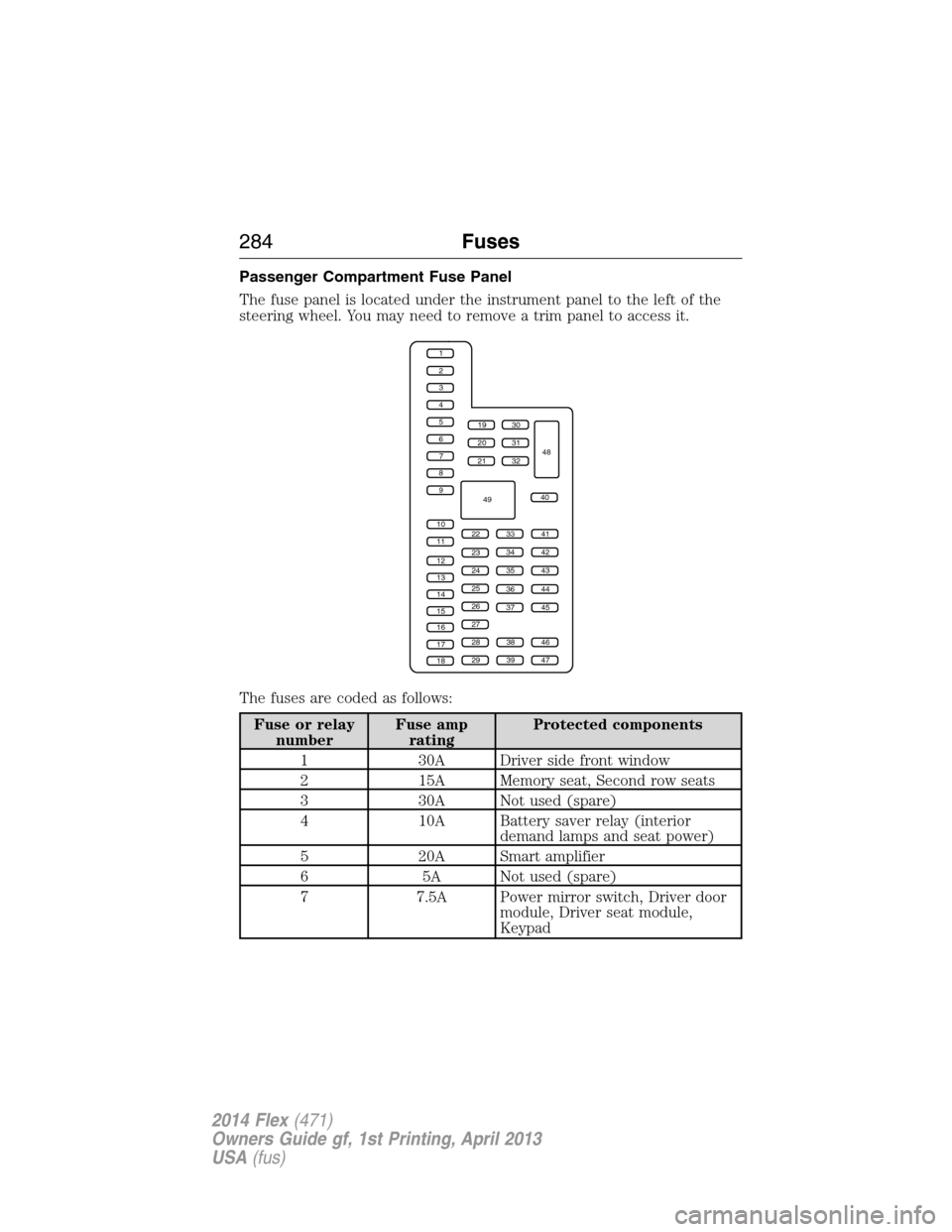
Passenger Compartment Fuse Panel
The fuse panel is located under the instrument panel to the left of the
steering wheel. You may need to remove a trim panel to access it.
The fuses are coded as follows:
Fuse or relay
numberFuse amp
ratingProtected components
1 30A Driver side front window
2 15A Memory seat, Second row seats
3 30A Not used (spare)
4 10A Battery saver relay (interior
demand lamps and seat power)
5 20A Smart amplifier
6 5A Not used (spare)
7 7.5A Power mirror switch, Driver door
module, Driver seat module,
Keypad
1
2
3
4
5
6
7
8
9
10
11
12
13
14
15
16
17
18
19
20
21
223341
42
43
44
45
34
35
36
37
23
24
25
26
27
283846
394729
32
40
31
30
48
49
284Fuses
2014 Flex(471)
Owners Guide gf, 1st Printing, April 2013
USA(fus)
Page 287 of 554
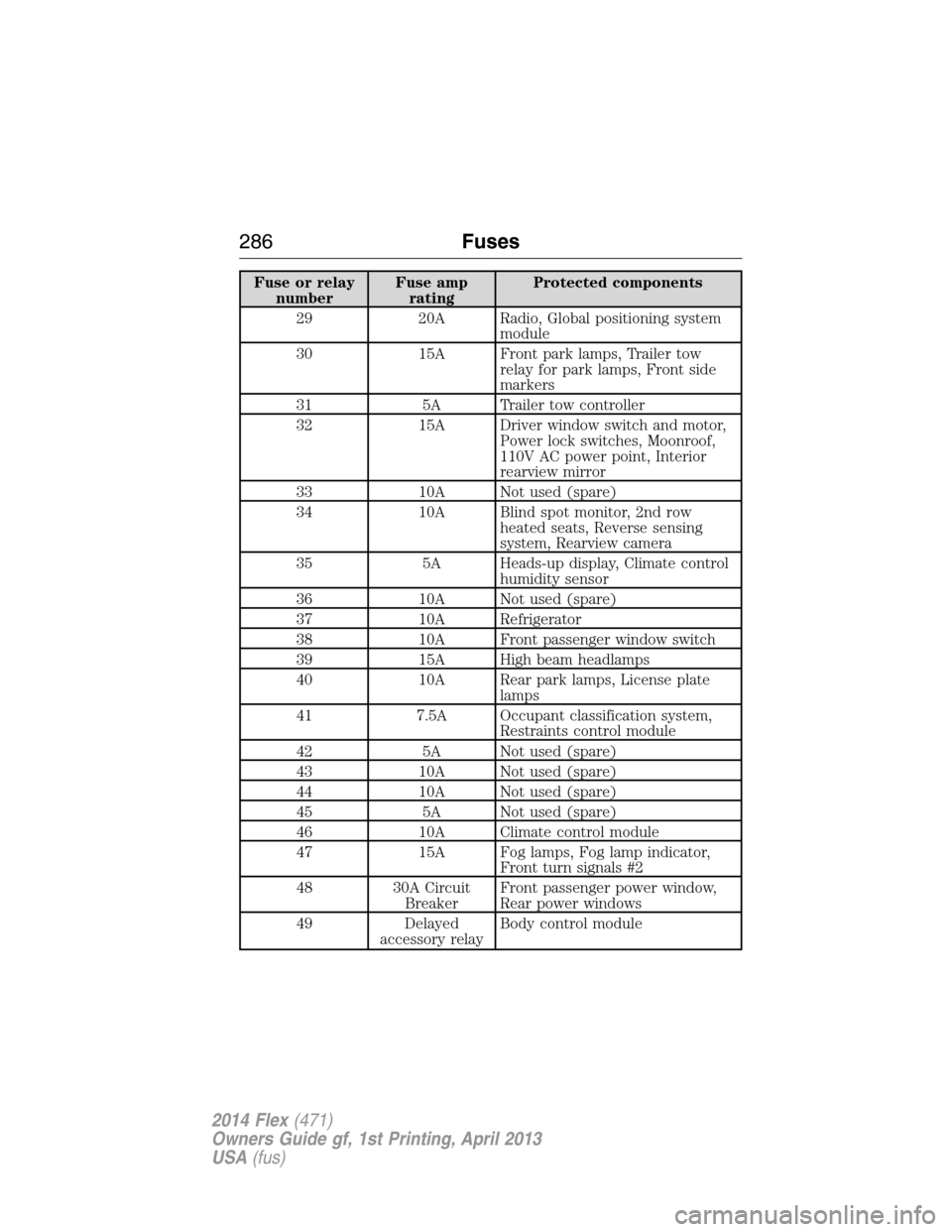
Fuse or relay
numberFuse amp
ratingProtected components
29 20A Radio, Global positioning system
module
30 15A Front park lamps, Trailer tow
relay for park lamps, Front side
markers
31 5A Trailer tow controller
32 15A Driver window switch and motor,
Power lock switches, Moonroof,
110V AC power point, Interior
rearview mirror
33 10A Not used (spare)
34 10A Blind spot monitor, 2nd row
heated seats, Reverse sensing
system, Rearview camera
35 5A Heads-up display, Climate control
humidity sensor
36 10A Not used (spare)
37 10A Refrigerator
38 10A Front passenger window switch
39 15A High beam headlamps
40 10A Rear park lamps, License plate
lamps
41 7.5A Occupant classification system,
Restraints control module
42 5A Not used (spare)
43 10A Not used (spare)
44 10A Not used (spare)
45 5A Not used (spare)
46 10A Climate control module
47 15A Fog lamps, Fog lamp indicator,
Front turn signals #2
48 30A Circuit
BreakerFront passenger power window,
Rear power windows
49 Delayed
accessory relayBody control module
286Fuses
2014 Flex(471)
Owners Guide gf, 1st Printing, April 2013
USA(fus)
Page 318 of 554
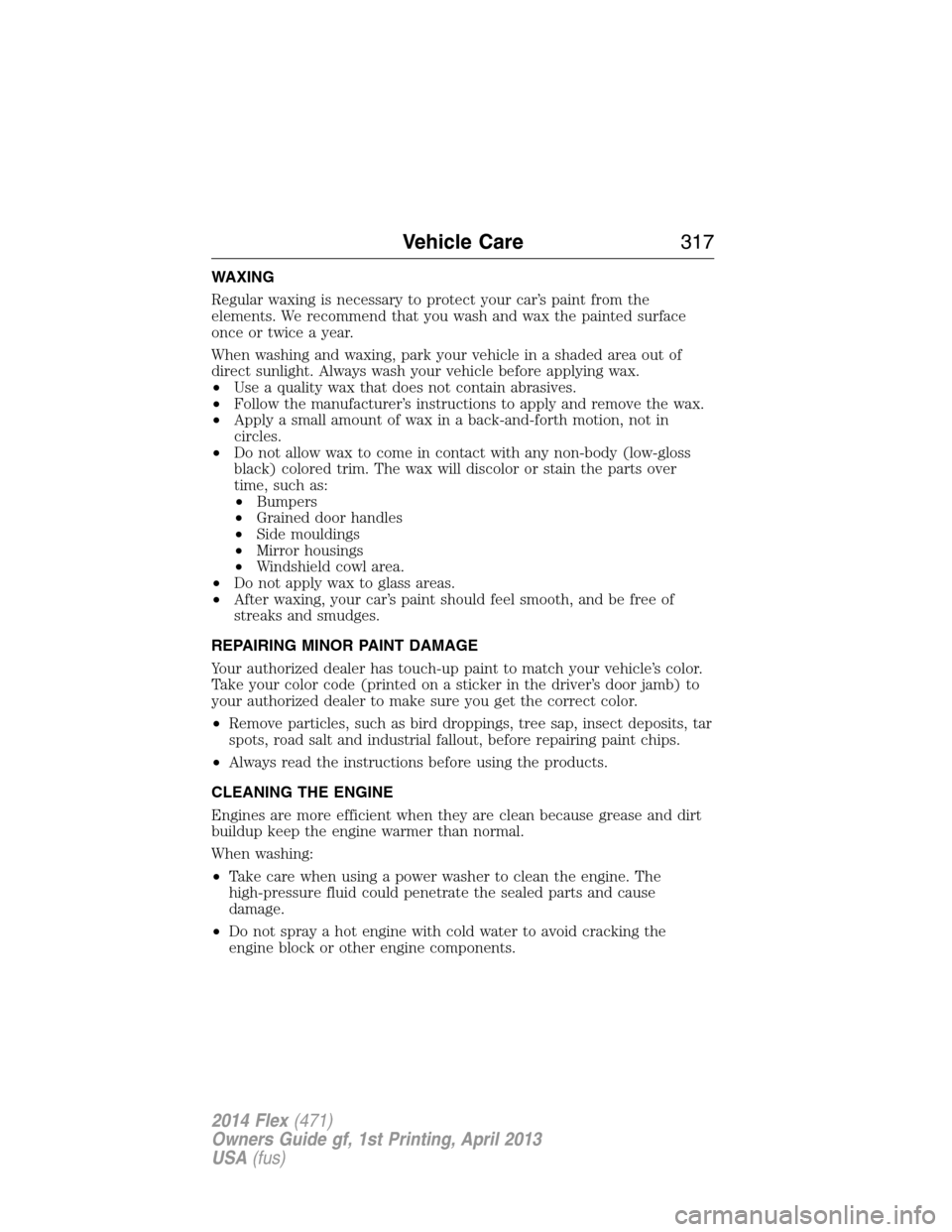
WAXING
Regular waxing is necessary to protect your car’s paint from the
elements. We recommend that you wash and wax the painted surface
once or twice a year.
When washing and waxing, park your vehicle in a shaded area out of
direct sunlight. Always wash your vehicle before applying wax.
•Use a quality wax that does not contain abrasives.
•Follow the manufacturer’s instructions to apply and remove the wax.
•Apply a small amount of wax in a back-and-forth motion, not in
circles.
•Do not allow wax to come in contact with any non-body (low-gloss
black) colored trim. The wax will discolor or stain the parts over
time, such as:
•Bumpers
•Grained door handles
•Side mouldings
•Mirror housings
•Windshield cowl area.
•Do not apply wax to glass areas.
•After waxing, your car’s paint should feel smooth, and be free of
streaks and smudges.
REPAIRING MINOR PAINT DAMAGE
Your authorized dealer has touch-up paint to match your vehicle’s color.
Take your color code (printed on a sticker in the driver’s door jamb) to
your authorized dealer to make sure you get the correct color.
•Remove particles, such as bird droppings, tree sap, insect deposits, tar
spots, road salt and industrial fallout, before repairing paint chips.
•Always read the instructions before using the products.
CLEANING THE ENGINE
Engines are more efficient when they are clean because grease and dirt
buildup keep the engine warmer than normal.
When washing:
•Take care when using a power washer to clean the engine. The
high-pressure fluid could penetrate the sealed parts and cause
damage.
•Do not spray a hot engine with cold water to avoid cracking the
engine block or other engine components.
Vehicle Care317
2014 Flex(471)
Owners Guide gf, 1st Printing, April 2013
USA(fus)
Page 363 of 554
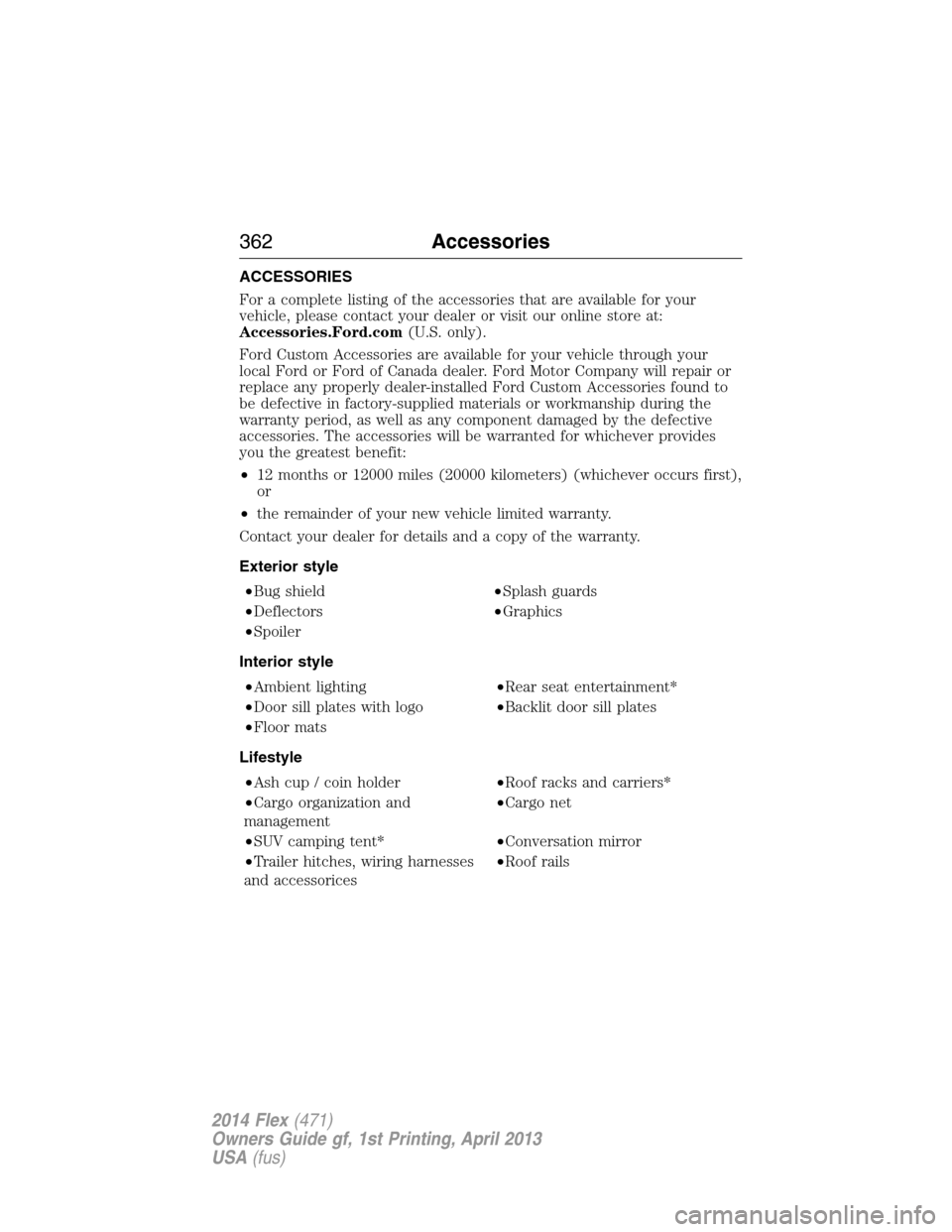
ACCESSORIES
For a complete listing of the accessories that are available for your
vehicle, please contact your dealer or visit our online store at:
Accessories.Ford.com(U.S. only).
Ford Custom Accessories are available for your vehicle through your
local Ford or Ford of Canada dealer. Ford Motor Company will repair or
replace any properly dealer-installed Ford Custom Accessories found to
be defective in factory-supplied materials or workmanship during the
warranty period, as well as any component damaged by the defective
accessories. The accessories will be warranted for whichever provides
you the greatest benefit:
•12 months or 12000 miles (20000 kilometers) (whichever occurs first),
or
•the remainder of your new vehicle limited warranty.
Contact your dealer for details and a copy of the warranty.
Exterior style
•Bug shield•Splash guards
•Deflectors•Graphics
•Spoiler
Interior style
•Ambient lighting•Rear seat entertainment*
•Door sill plates with logo•Backlit door sill plates
•Floor mats
Lifestyle
•Ash cup / coin holder•Roof racks and carriers*
•Cargo organization and
management•Cargo net
•SUV camping tent*•Conversation mirror
•Trailer hitches, wiring harnesses
and accessorices•Roof rails
362Accessories
2014 Flex(471)
Owners Guide gf, 1st Printing, April 2013
USA(fus)
Page 431 of 554
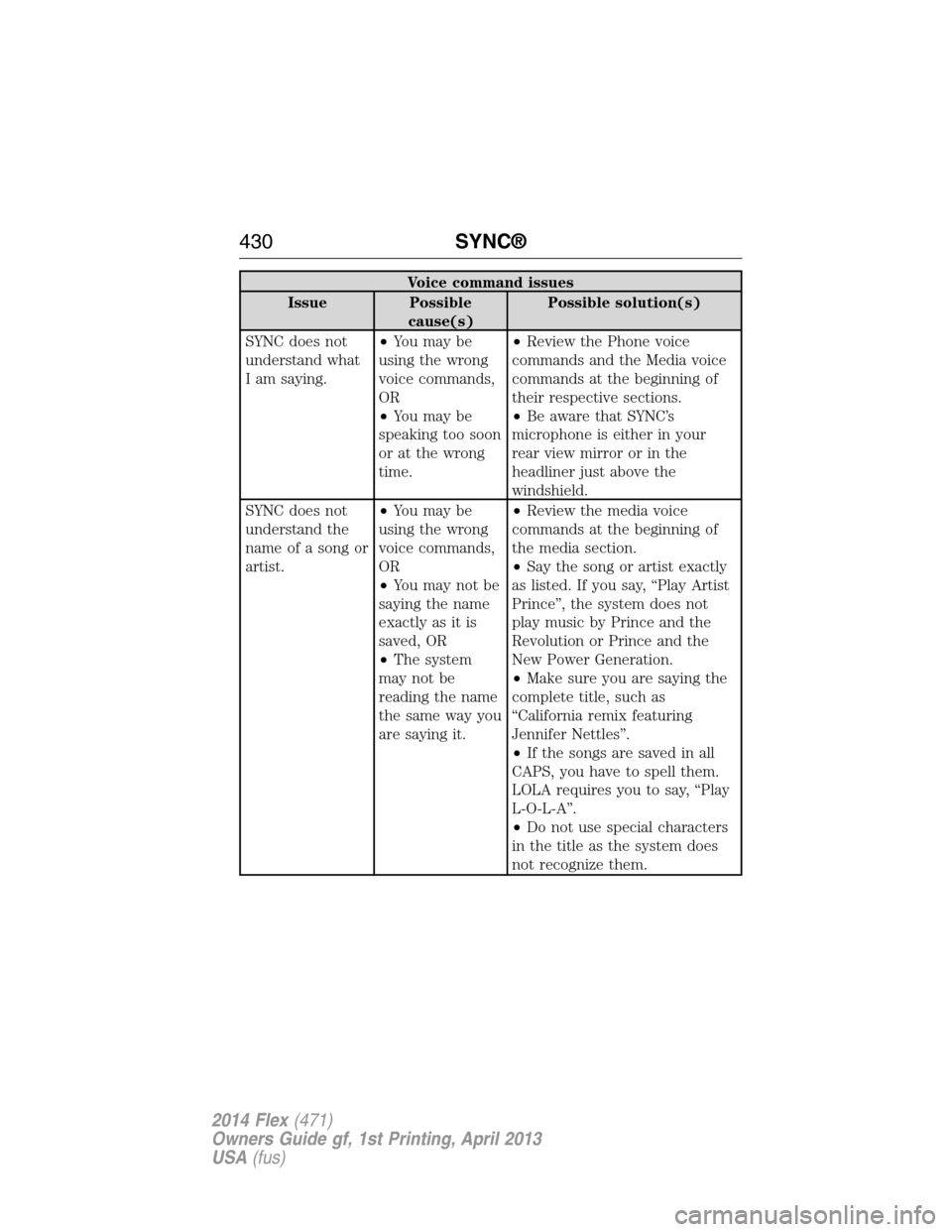
Voice command issues
Issue Possible
cause(s)Possible solution(s)
SYNC does not
understand what
I am saying.•You may be
using the wrong
voice commands,
OR
•You may be
speaking too soon
or at the wrong
time.•Review the Phone voice
commands and the Media voice
commands at the beginning of
their respective sections.
•Be aware that SYNC’s
microphone is either in your
rear view mirror or in the
headliner just above the
windshield.
SYNC does not
understand the
name of a song or
artist.•You may be
using the wrong
voice commands,
OR
•You may not be
saying the name
exactly as it is
saved, OR
•The system
may not be
reading the name
the same way you
are saying it.•Review the media voice
commands at the beginning of
the media section.
•Say the song or artist exactly
as listed. If you say, “Play Artist
Prince”, the system does not
play music by Prince and the
Revolution or Prince and the
New Power Generation.
•Make sure you are saying the
complete title, such as
“California remix featuring
Jennifer Nettles”.
•If the songs are saved in all
CAPS, you have to spell them.
LOLA requires you to say, “Play
L-O-L-A”.
•Do not use special characters
in the title as the system does
not recognize them.
430SYNC®
2014 Flex(471)
Owners Guide gf, 1st Printing, April 2013
USA(fus)
Page 497 of 554
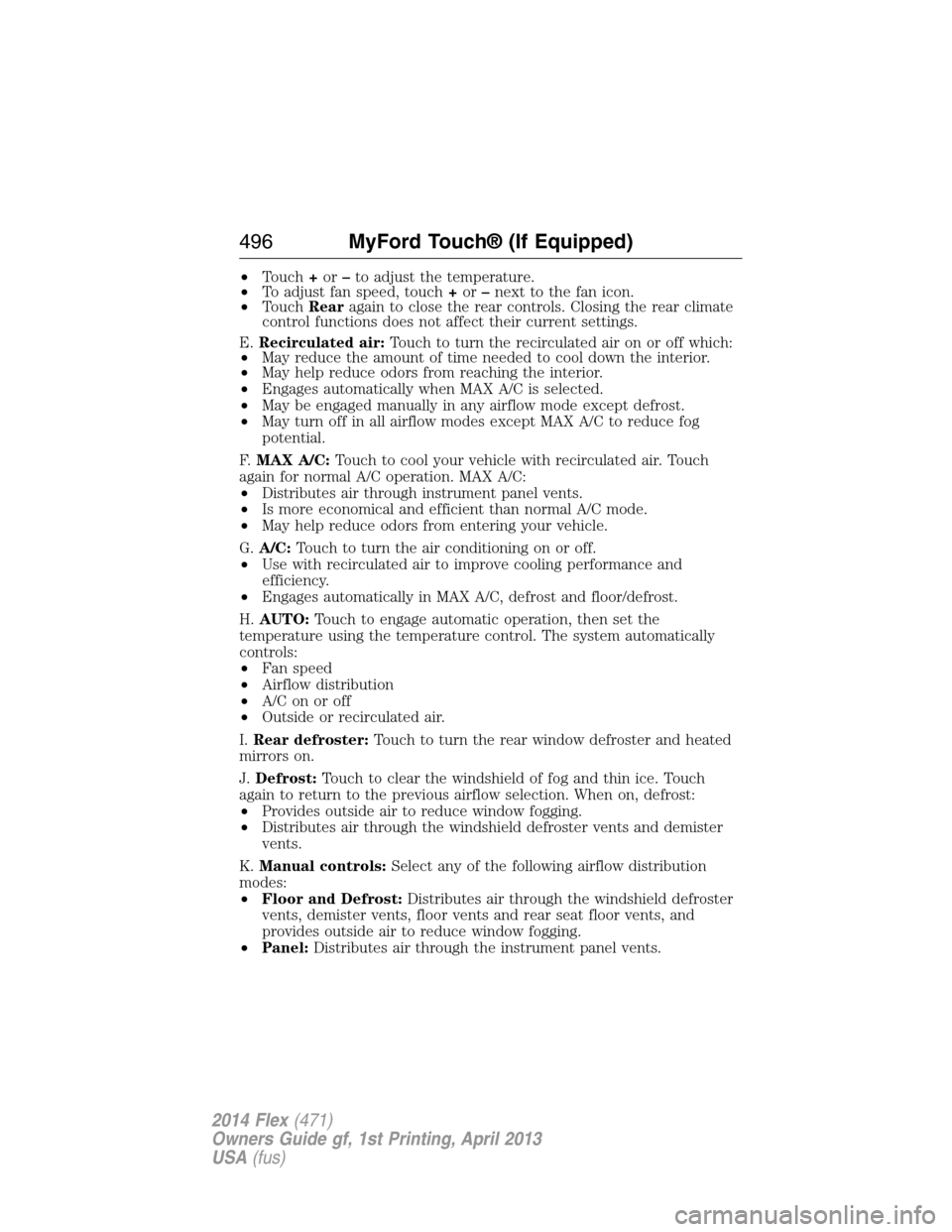
•Touch+or–to adjust the temperature.
•To adjust fan speed, touch+or–next to the fan icon.
•TouchRearagain to close the rear controls. Closing the rear climate
control functions does not affect their current settings.
E.Recirculated air:Touch to turn the recirculated air on or off which:
•May reduce the amount of time needed to cool down the interior.
•May help reduce odors from reaching the interior.
•Engages automatically when MAX A/C is selected.
•May be engaged manually in any airflow mode except defrost.
•May turn off in all airflow modes except MAX A/C to reduce fog
potential.
F.MAX A/C:Touch to cool your vehicle with recirculated air. Touch
again for normal A/C operation. MAX A/C:
•Distributes air through instrument panel vents.
•Is more economical and efficient than normal A/C mode.
•May help reduce odors from entering your vehicle.
G.A/C:Touch to turn the air conditioning on or off.
•Use with recirculated air to improve cooling performance and
efficiency.
•Engages automatically in MAX A/C, defrost and floor/defrost.
H.AUTO:Touch to engage automatic operation, then set the
temperature using the temperature control. The system automatically
controls:
•Fan speed
•Airflow distribution
•A/Conoroff
•Outside or recirculated air.
I.Rear defroster:Touch to turn the rear window defroster and heated
mirrors on.
J.Defrost:Touch to clear the windshield of fog and thin ice. Touch
again to return to the previous airflow selection. When on, defrost:
•Provides outside air to reduce window fogging.
•Distributes air through the windshield defroster vents and demister
vents.
K.Manual controls:Select any of the following airflow distribution
modes:
•Floor and Defrost:Distributes air through the windshield defroster
vents, demister vents, floor vents and rear seat floor vents, and
provides outside air to reduce window fogging.
•Panel:Distributes air through the instrument panel vents.
496MyFord Touch® (If Equipped)
2014 Flex(471)
Owners Guide gf, 1st Printing, April 2013
USA(fus)
Page 550 of 554
HD Radio™ ...............................447
Headlamps
aiming ......................................308
bulb specifications ..................314
flash to pass ..............................99
high beam .................................99
replacing bulbs .......................310
Head restraints .........................146
Heated steering wheel ..............495
Heating ......................135, 137–138
Help ............................................494
Homelink wireless control
system ........................................167
Hood ..........................................288
How to use voice commands ...441
I
Ignition ...............................179, 355
Illuminated visor mirror ...........108
Information displays .................117
Inspection/maintenance (I/M)
testing ........................................194
Instrument panel
cleaning ...................................319
cluster ......................................111
Intelligent Access Key ................64
J
Jack ............................................347
positioning ...............................347
storage .....................................347
Joining two calls
(multiparty/conference call) ....394
Jump-starting your vehicle ......267K
Keyless entry system
autolock .....................................77
keypad .......................................82
locking and unlocking doors ....84
programming entry code .........82
Keys .......................................64, 86
positions of the ignition .........179
L
Lamps
bulb replacement
specifications chart ................314
headlamps, flash to pass ..........99
interior lamps .........................103
replacing bulbs .......................310
LATCH anchors ...........................30
Liftgate ........................................79
Lights, warning and indicator ..111
Listening to music ....................444
Load limits .................................243
Locks
autolock .....................................77
childproof ..................................36
doors ..........................................75
Lubricant specifications ...........356
Lug nuts ....................................353
M
Making and receiving calls .......467
MAP DVD - Loading and
Unloading ..................................467
Map icons ..................................505
Map mode ..................................504
Map preferences .......................502
Index549
2014 Flex(471)
Owners Guide gf, 1st Printing, April 2013
USA(fus)