roof FORD FLEX 2014 1.G Owners Manual
[x] Cancel search | Manufacturer: FORD, Model Year: 2014, Model line: FLEX, Model: FORD FLEX 2014 1.GPages: 554, PDF Size: 8.04 MB
Page 4 of 554
Lighting 99
Lighting control.......................................99
Autolamps..........................................100
Instrument lighting dimmer..............................100
Headlamp exit delay...................................100
Daytime running lamps.................................101
Front fog lamps......................................102
Turn signal control....................................102
Interior lamps........................................103
Windows and Mirrors 104
Power windows......................................104
Exteriormirrors......................................105
Interior mirrors......................................107
Sun visors..........................................108
Moonroof...........................................109
Instrument Cluster 110
Gauges.............................................110
Warning lamps and indicators............................111
Audible warnings and indicators..........................116
Information Displays 117
Controls............................................117
Trip computer.......................................120
Information messages..................................127
Climate Control 135
Manual heating and air conditioning........................135
Dual automatic temperature control........................137
Auxiliary passenger climate control........................140
Rear window defroster.................................143
Cabin air filter.......................................143
Table of Contents3
2014 Flex(471)
Owners Guide gf, 1st Printing, April 2013
USA(fus)
Page 6 of 554
Hints on driving with anti-lock brakes......................208
Parking brake........................................208
Traction Control 209
TractionControl™ ....................................209
Stability Control 210
AdvanceTrac®.......................................211
Parking Aids 212
Sensing system.......................................212
Active park assist.....................................213
Rear-view camera system...............................218
Cruise Control 223
Using cruise control...................................223
Using Adaptive Cruise Control............................224
Driving Aids 232
Blind Spot Information System (BLIS) with Cross Traffic Alert
(CTA) .............................................232
Collision warning system................................237
Steering............................................240
Load Carrying 242
Cargo net...........................................242
Roof racks and load carriers.............................242
Vehicle loading.......................................243
Towing 251
Trailertowing........................................251
Wrecker towing......................................258
Recreational towing...................................259
Driving Hints 261
Economical driving....................................261
Driving through water..................................262
Floormats..........................................263
Table of Contents5
2014 Flex(471)
Owners Guide gf, 1st Printing, April 2013
USA(fus)
Page 37 of 554
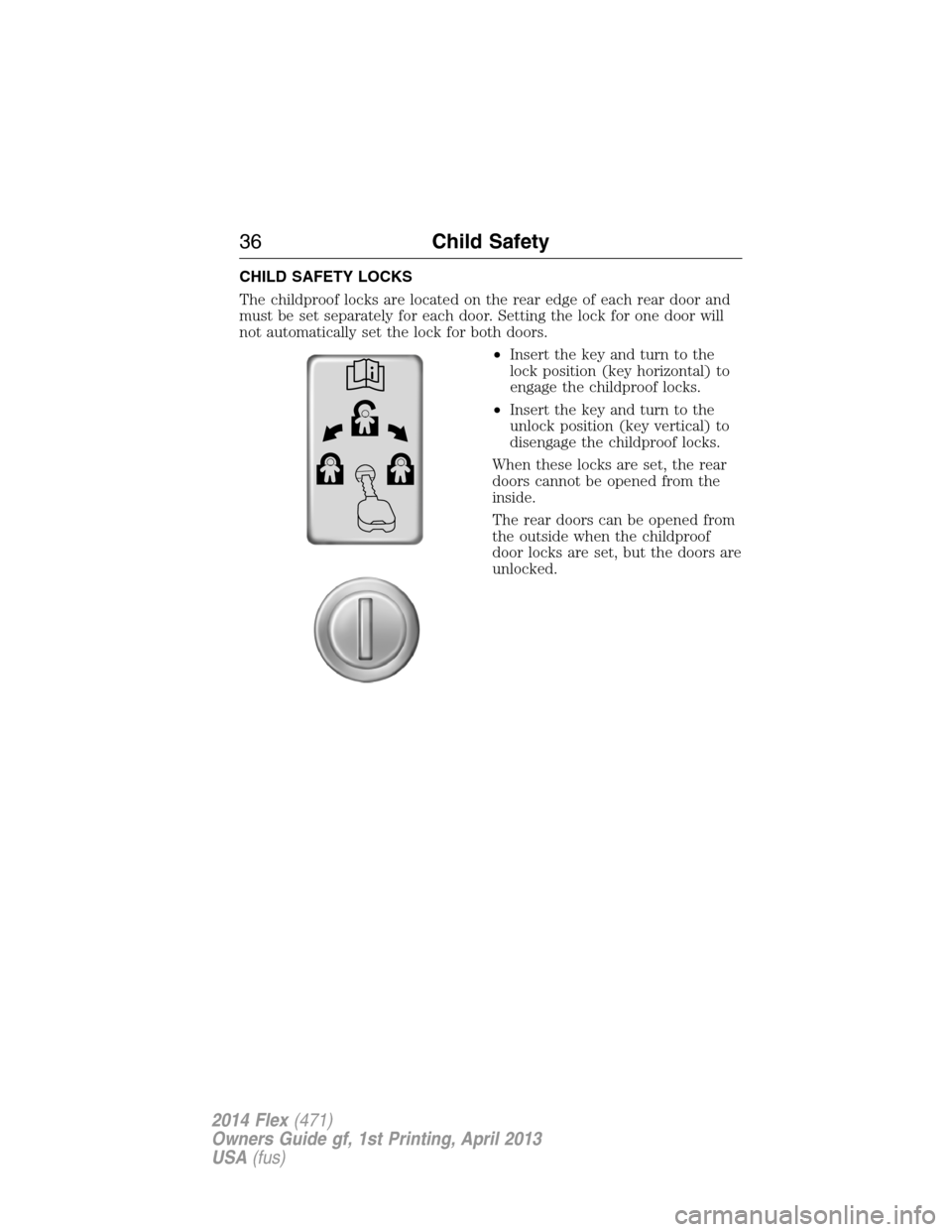
CHILD SAFETY LOCKS
The childproof locks are located on the rear edge of each rear door and
must be set separately for each door. Setting the lock for one door will
not automatically set the lock for both doors.
•Insert the key and turn to the
lock position (key horizontal) to
engage the childproof locks.
•Insert the key and turn to the
unlock position (key vertical) to
disengage the childproof locks.
When these locks are set, the rear
doors cannot be opened from the
inside.
The rear doors can be opened from
the outside when the childproof
door locks are set, but the doors are
unlocked.
36Child Safety
2014 Flex(471)
Owners Guide gf, 1st Printing, April 2013
USA(fus)
Page 61 of 554
The Safety Canopy will deploy during significant side crashes or when a
certain likelihood of a rollover event is detected by the rollover sensor.
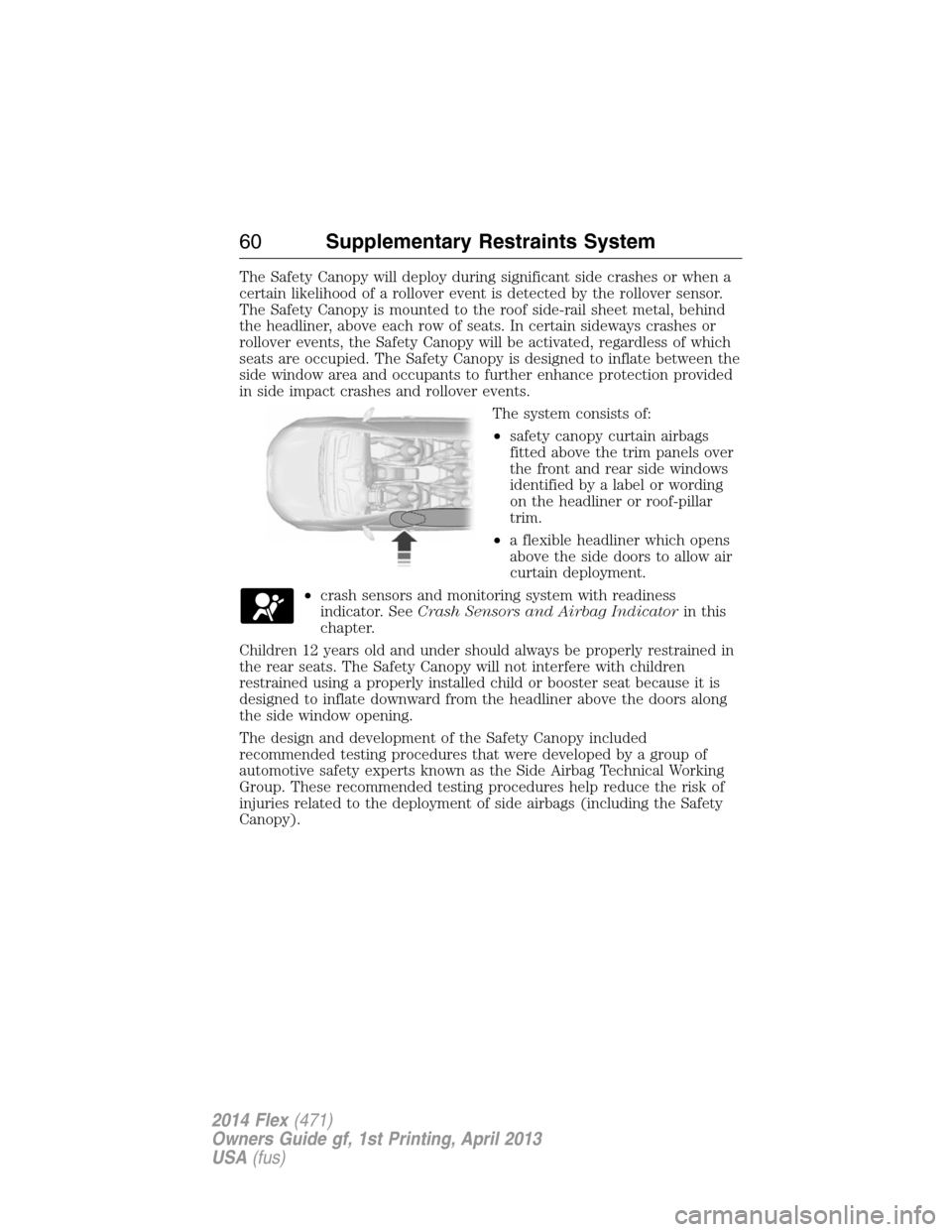
The Safety Canopy is mounted to the roof side-rail sheet metal, behind
the headliner, above each row of seats. In certain sideways crashes or
rollover events, the Safety Canopy will be activated, regardless of which
seats are occupied. The Safety Canopy is designed to inflate between the
side window area and occupants to further enhance protection provided
in side impact crashes and rollover events.
The system consists of:
•safety canopy curtain airbags
fitted above the trim panels over
the front and rear side windows
identified by a label or wording
on the headliner or roof-pillar
trim.
•a flexible headliner which opens
above the side doors to allow air
curtain deployment.
•crash sensors and monitoring system with readiness
indicator. SeeCrash Sensors and Airbag Indicatorin this
chapter.
Children 12 years old and under should always be properly restrained in
the rear seats. The Safety Canopy will not interfere with children
restrained using a properly installed child or booster seat because it is
designed to inflate downward from the headliner above the doors along
the side window opening.
The design and development of the Safety Canopy included
recommended testing procedures that were developed by a group of
automotive safety experts known as the Side Airbag Technical Working
Group. These recommended testing procedures help reduce the risk of
injuries related to the deployment of side airbags (including the Safety
Canopy).
60Supplementary Restraints System
2014 Flex(471)
Owners Guide gf, 1st Printing, April 2013
USA(fus)
Page 110 of 554
MULTI–PANEL VISTA ROOF® (IF EQUIPPED)
WARNING:Do not let children play with the moonroof or leave
children unattended in the vehicle. They may seriously hurt
themselves.
WARNING:When closing the moonroof, you should verify that it
is free of obstructions and make sure that children and pets are
not in the proximity of the moonroof opening.
You can manually open or close the sliding shade when the moonroof is
closed. Pull the shade toward the front of the vehicle to close it.
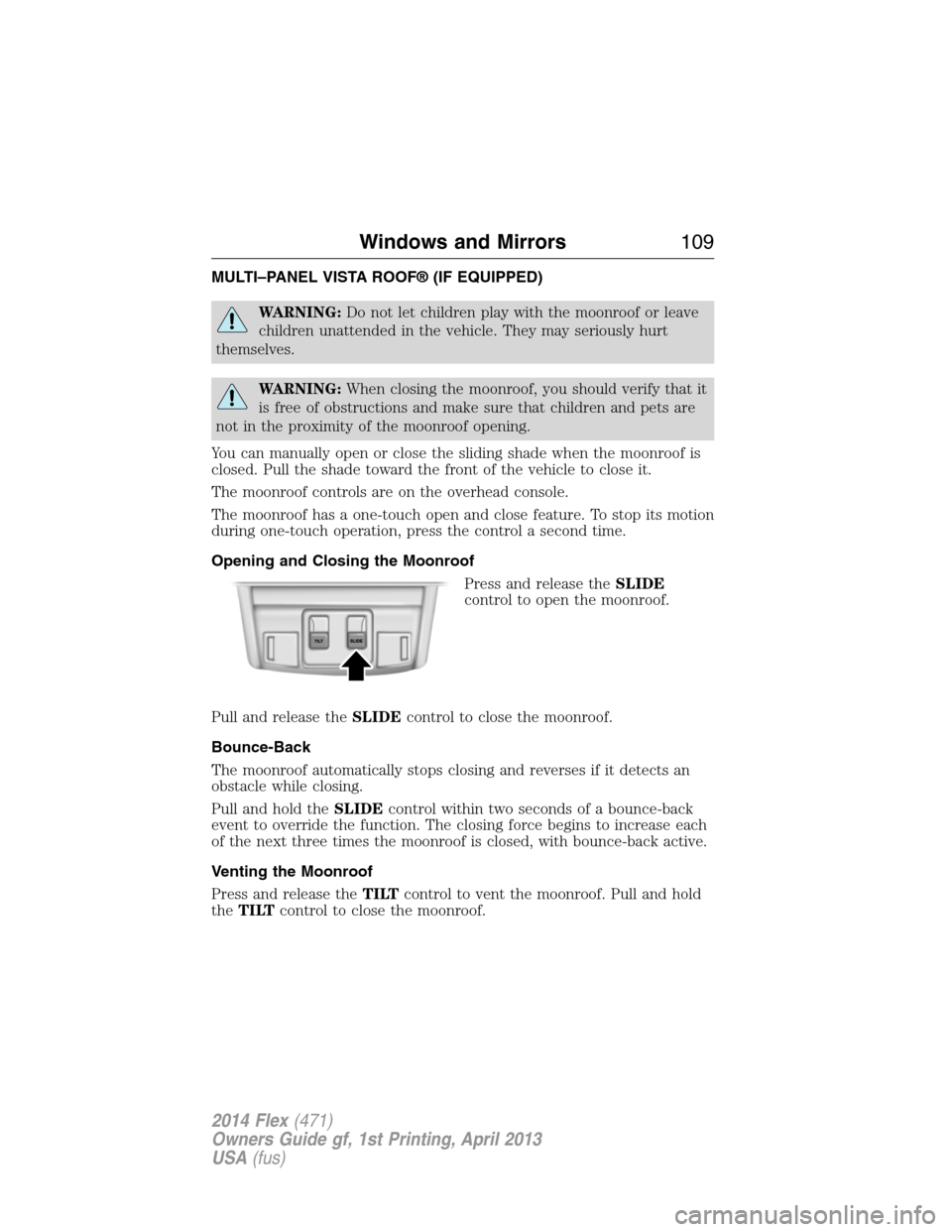
The moonroof controls are on the overhead console.
The moonroof has a one-touch open and close feature. To stop its motion
during one-touch operation, press the control a second time.
Opening and Closing the Moonroof
Press and release theSLIDE
control to open the moonroof.
Pull and release theSLIDEcontrol to close the moonroof.
Bounce-Back
The moonroof automatically stops closing and reverses if it detects an
obstacle while closing.
Pull and hold theSLIDEcontrol within two seconds of a bounce-back
event to override the function. The closing force begins to increase each
of the next three times the moonroof is closed, with bounce-back active.
Venting the Moonroof
Press and release theTILTcontrol to vent the moonroof. Pull and hold
theTILTcontrol to close the moonroof.
Windows and Mirrors109
2014 Flex(471)
Owners Guide gf, 1st Printing, April 2013
USA(fus)
Page 211 of 554
PRINCIPLES OF OPERATION
WARNING:Vehicle modifications involving braking system,
aftermarket roof racks, suspension, steering system, tire
construction and wheel or tire size may change the handling
characteristics of the vehicle and may adversely affect the performance
of the AdvanceTrac® system. In addition, installing any stereo
loudspeakers may interfere with and adversely affect the AdvanceTrac®
system. Install any aftermarket stereo loudspeaker as far as possible
from the front center console, the tunnel, and the front seats in order
to minimize the risk of interfering with the AdvanceTrac® sensors.
Reducing the effectiveness of the AdvanceTrac® system could lead to
an increased risk of loss of vehicle control, vehicle rollover, personal
injury and death.
WARNING:Remember that even advanced technology cannot
defy the laws of physics. It is always possible to lose control of a
vehicle due to inappropriate driver input for the conditions. Aggressive
driving on any road condition can cause you to lose control of your
vehicle increasing the risk of personal injury or property damage.
Activation of the AdvanceTrac® system is an indication that at least
some of the tires have exceeded their ability to grip the road; this could
reduce the operator’s ability to control the vehicle potentially resulting
in a loss of vehicle control, vehicle rollover, personal injury and death.
If your AdvanceTrac® system activates, SLOW DOWN.
The AdvanceTrac® system helps you keep control of your vehicle when
on a slippery surface. The electronic stability control portion of the
system helps avoid skids and lateral slides and the traction control
system helps avoid drive wheel spin and loss of traction. See the
Traction Controlchapter for details on traction control system
operation.
210Stability Control
2014 Flex(471)
Owners Guide gf, 1st Printing, April 2013
USA(fus)
Page 215 of 554
The system detects an available parallel parking space and automatically
steers the vehicle into the space (hands-free) while you control the
accelerator, gearshift and brakes. The system visually and/or audibly
instructs the driver to park the vehicle.
The system may not function correctly if something passes between the
front bumper and the parking space (i.e. a pedestrian or cyclist) or if the
edge of the neighboring parked vehicle is high from the ground (i.e. a
bus, tow truck or flatbed truck).
Note:The sensors may not detect objects in heavy rain or other
conditions that cause disruptive reflections.
Note:The sensors may not detect objects with surfaces that absorb
ultrasonic waves.
Note:After a tire change the system will go through a relearning
procedure. During this time the system performance may deteriorate.
The system should not be used if:
•a foreign object (i.e. bike rack or trailer) is attached to the front or
rear of the vehicle or at another location close to the sensors.
•an overhanging object (i.e. surfboard) is attached to the roof.
•the front bumper or side sensors are damaged (i.e. in a collision) or
obstructed by a foreign object (i.e. front bumper cover).
•a mini-spare tire is in use.
Using Active Park Assist
Press the button; the touch screen
displays a message and a
corresponding graphic to indicate
it’s searching for a parking space.
Use the turn signal to indicate
which side of the vehicle you want
the system to search on.
Note:If the turn signal is not on, the system automatically searches on
the vehicle’s passenger side.
AUTO
P
214Parking Aids
2014 Flex(471)
Owners Guide gf, 1st Printing, April 2013
USA(fus)
Page 243 of 554
CARGO NET (IF EQUIPPED)
WARNING:The cargo net is not designed to restrain objects
during a collision or heavy braking.
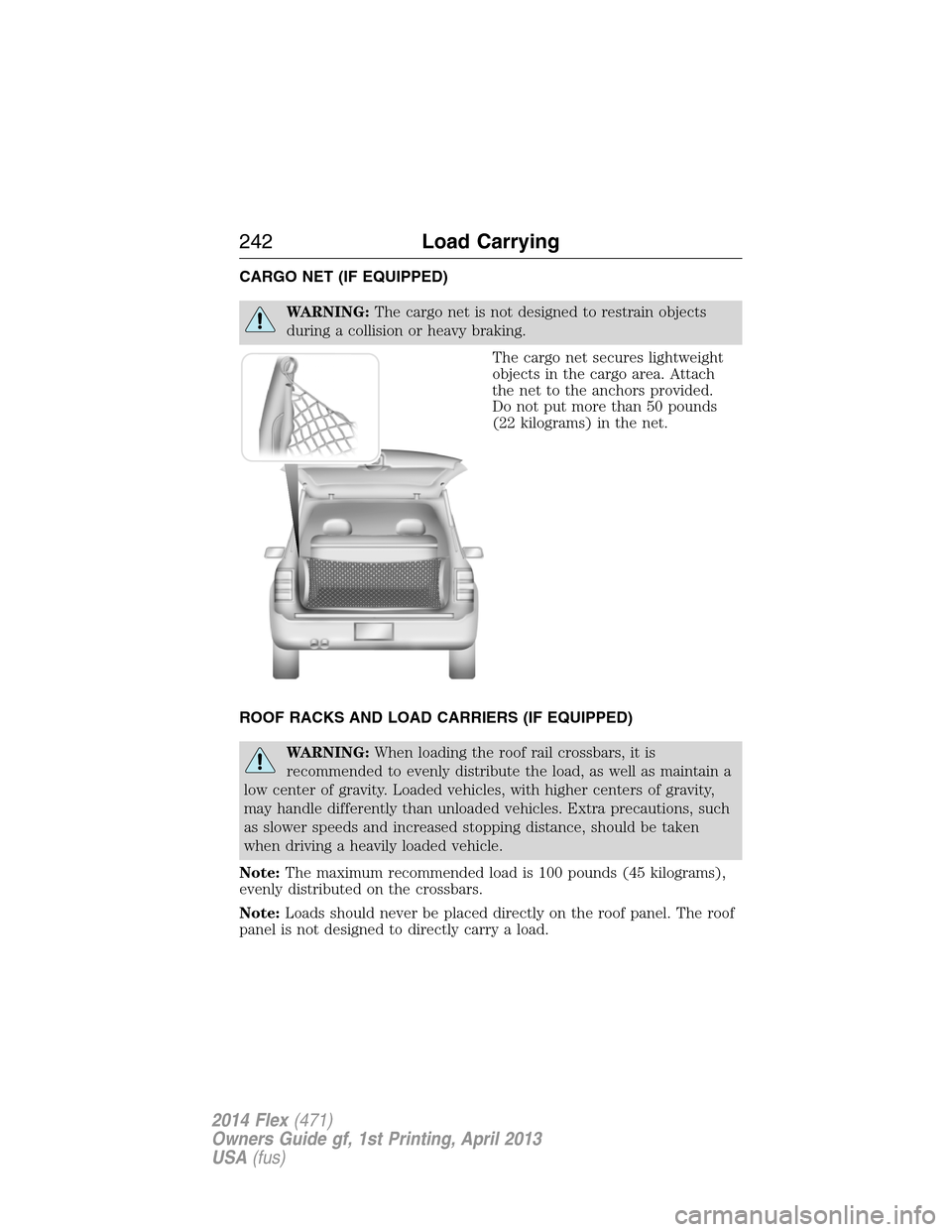
The cargo net secures lightweight
objects in the cargo area. Attach
the net to the anchors provided.
Do not put more than 50 pounds
(22 kilograms) in the net.
ROOF RACKS AND LOAD CARRIERS (IF EQUIPPED)
WARNING:When loading the roof rail crossbars, it is
recommended to evenly distribute the load, as well as maintain a
low center of gravity. Loaded vehicles, with higher centers of gravity,
may handle differently than unloaded vehicles. Extra precautions, such
as slower speeds and increased stopping distance, should be taken
when driving a heavily loaded vehicle.
Note:The maximum recommended load is 100 pounds (45 kilograms),
evenly distributed on the crossbars.
Note:Loads should never be placed directly on the roof panel. The roof
panel is not designed to directly carry a load.
242Load Carrying
2014 Flex(471)
Owners Guide gf, 1st Printing, April 2013
USA(fus)
Page 244 of 554
For proper function of the roof rack system, loads must be placed
directly on crossbars affixed to the roof rack side rails. Your vehicle may
be equipped with factory-installed crossbars. Ford Genuine Accessory
crossbars, designed specifically for your vehicle, are also recommended
for use with your roof rack system.
Make sure that the load is securely fastened. Check the tightness of the
load before driving and at each fuel stop.
LOAD LIMIT
Vehicle Loading – With and Without a Trailer
This section will guide you in the proper loading of your vehicle and/or
trailer, to keep your loaded vehicle weight within its design rating
capability, with or without a trailer. Properly loading your vehicle will
provide maximum return of vehicle design performance. Before loading
your vehicle, familiarize yourself with the following terms for determining
your vehicle’s weight ratings, with or without a trailer, from the vehicle’s
Tire Label or Safety Compliance Certification Label:
Base Curb Weight– is the weight of the vehicle including a full tank of
fuel and all standard equipment. It does not include passengers, cargo, or
optional equipment.
Vehicle Curb Weight– is the weight of your new vehicle when you
picked it up from your authorized dealer plus any aftermarket
equipment.
Load Carrying243
2014 Flex(471)
Owners Guide gf, 1st Printing, April 2013
USA(fus)
Page 274 of 554
THE BETTER BUSINESS BUREAU (BBB) AUTO LINE PROGRAM
(U.S. ONLY)
Your satisfaction is important to Ford Motor Company and to your dealer.
If a warranty concern has not been resolved using the three-step
procedure outlined earlier in this chapter in theGetting the Services
You Needsection, you may be eligible to participate in the BBB AUTO
LINE program.
The BBB AUTO LINE program consists of two parts – mediation and
arbitration. During mediation, a representative of the BBB will contact
both you and Ford Motor Company to explore options for settlement of
the claim. If an agreement is not reached during mediation or you do not
want to participate in mediation, and if your claim is eligible, you may
participate in the arbitration process. An arbitration hearing will be
scheduled so that you can present your case in an informal setting
before an impartial person. The arbitrator will consider the testimony
provided and make a decision after the hearing.
Disputes submitted to the BBB AUTO LINE program are usually decided
within 40 days after you file your claim with the BBB. You are not bound
by the decision, and may reject the decision and proceed to court where
all findings of the BBB Auto Line dispute, and decision, are admissible in
the court action. Should you choose to accept the BBB AUTO LINE
decision, Ford is then bound by the decision, and must comply with the
decision within 30 days of receipt of your acceptance letter.
BBB AUTO LINE Application: Using the information provided below,
please call or write to request a program application. You will be asked
for your name and address, general information about your new vehicle,
information about your warranty concerns, and any steps you have
already taken to try to resolve them. A Customer Claim Form will be
mailed that will need to be completed, signed and returned to the BBB
along with proof of ownership. Upon receipt, the BBB will review the
claim for eligibility under the Program Summary Guidelines.
You can get more information by calling BBB AUTO LINE at
1-800-955-5100, or writing to:
BBB AUTO LINE
3033 Wilson Boulevard, Suite 600
Arlington, Virginia 22201
BBB AUTO LINE applications can also be requested by calling the Ford
Motor Company Customer Relationship Center at 1-800-392-3673.
Note:Ford Motor Company reserves the right to change eligibility
limitations, modify procedures, or to discontinue this process at any time
without notice and without obligation.
Customer Assistance273
2014 Flex(471)
Owners Guide gf, 1st Printing, April 2013
USA(fus)