radio FORD FLEX 2016 1.G Owner's Manual
[x] Cancel search | Manufacturer: FORD, Model Year: 2016, Model line: FLEX, Model: FORD FLEX 2016 1.GPages: 417, PDF Size: 4.52 MB
Page 326 of 417
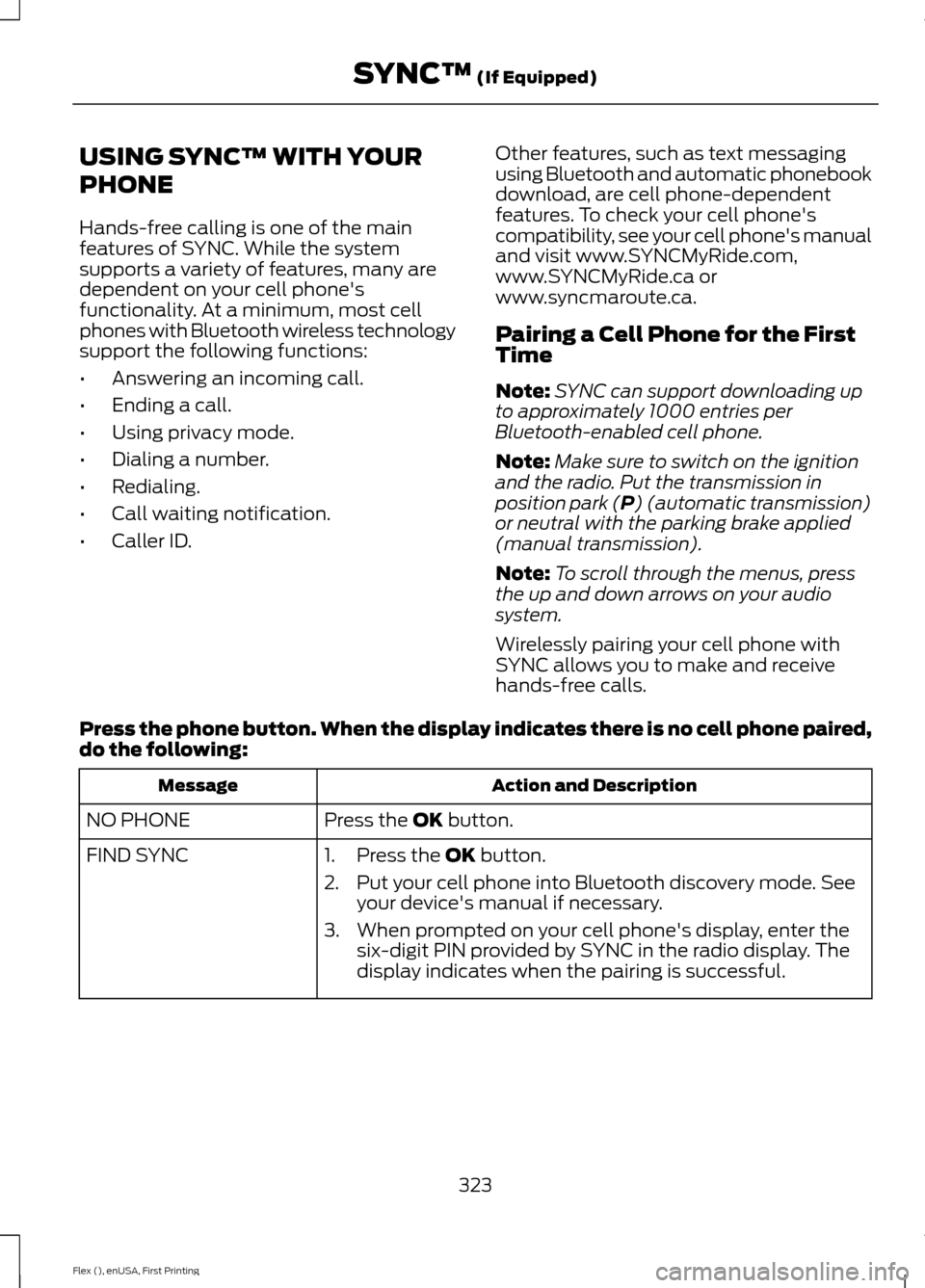
USING SYNC™ WITH YOUR
PHONE
Hands-free calling is one of the main
features of SYNC. While the system
supports a variety of features, many are
dependent on your cell phone's
functionality. At a minimum, most cell
phones with Bluetooth wireless technology
support the following functions:
•
Answering an incoming call.
• Ending a call.
• Using privacy mode.
• Dialing a number.
• Redialing.
• Call waiting notification.
• Caller ID. Other features, such as text messaging
using Bluetooth and automatic phonebook
download, are cell phone-dependent
features. To check your cell phone's
compatibility, see your cell phone's manual
and visit www.SYNCMyRide.com,
www.SYNCMyRide.ca or
www.syncmaroute.ca.
Pairing a Cell Phone for the First
Time
Note:
SYNC can support downloading up
to approximately 1000 entries per
Bluetooth-enabled cell phone.
Note: Make sure to switch on the ignition
and the radio. Put the transmission in
position park (P) (automatic transmission)
or neutral with the parking brake applied
(manual transmission).
Note: To scroll through the menus, press
the up and down arrows on your audio
system.
Wirelessly pairing your cell phone with
SYNC allows you to make and receive
hands-free calls.
Press the phone button. When the display indicates there is no cell phone paired,
do the following: Action and Description
Message
Press the
OK button.
NO PHONE
FIND SYNC 1. Press the
OK button.
2. Put your cell phone into Bluetooth discovery mode. See your device's manual if necessary.
3. When prompted on your cell phone's display, enter the six-digit PIN provided by SYNC in the radio display. The
display indicates when the pairing is successful.
323
Flex (), enUSA, First Printing SYNC™
(If Equipped)
Page 327 of 417
Depending on your cell phone's capability
and your market, the system may prompt
you with questions, such as setting the
current cell phone as the primary cell
phone (the cell phone SYNC automatically
tries to connect with first upon vehicle
start-up) and downloading your
phonebook.
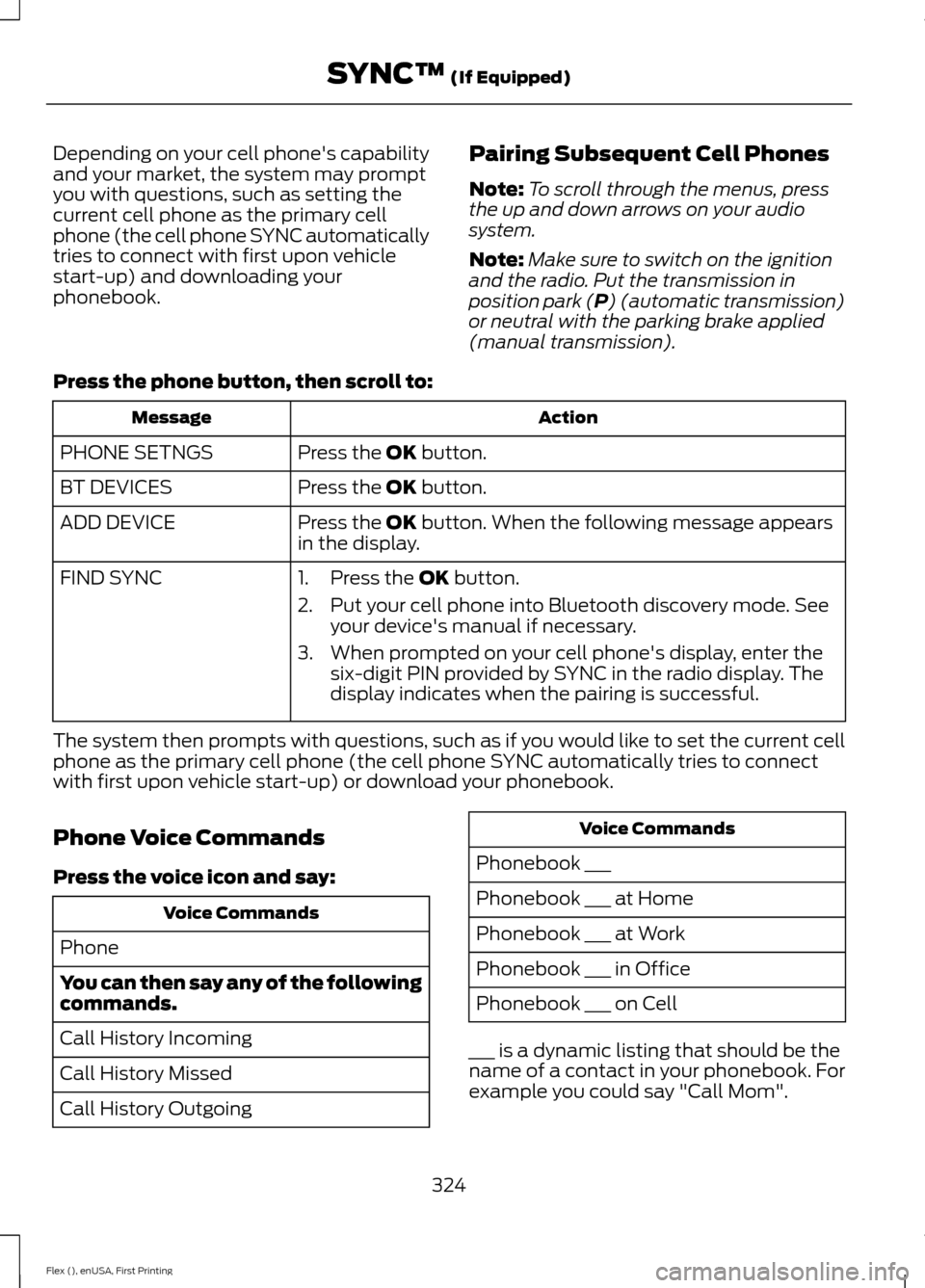
Pairing Subsequent Cell Phones
Note:
To scroll through the menus, press
the up and down arrows on your audio
system.
Note: Make sure to switch on the ignition
and the radio. Put the transmission in
position park (P) (automatic transmission)
or neutral with the parking brake applied
(manual transmission).
Press the phone button, then scroll to: Action
Message
Press the
OK button.
PHONE SETNGS
Press the
OK button.
BT DEVICES
Press the
OK button. When the following message appears
in the display.
ADD DEVICE
FIND SYNC
1. Press the
OK button.
2. Put your cell phone into Bluetooth discovery mode. See your device's manual if necessary.
3. When prompted on your cell phone's display, enter the six-digit PIN provided by SYNC in the radio display. The
display indicates when the pairing is successful.
The system then prompts with questions, such as if you would like to set the current cell
phone as the primary cell phone (the cell phone SYNC automatically tries to connect
with first upon vehicle start-up) or download your phonebook.
Phone Voice Commands
Press the voice icon and say: Voice Commands
Phone
You can then say any of the following
commands.
Call History Incoming
Call History Missed
Call History Outgoing Voice Commands
Phonebook ___
Phonebook ___ at Home
Phonebook ___ at Work
Phonebook ___ in Office
Phonebook ___ on Cell
___ is a dynamic listing that should be the
name of a contact in your phonebook. For
example you could say "Call Mom".
324
Flex (), enUSA, First Printing SYNC™
(If Equipped)
Page 338 of 417
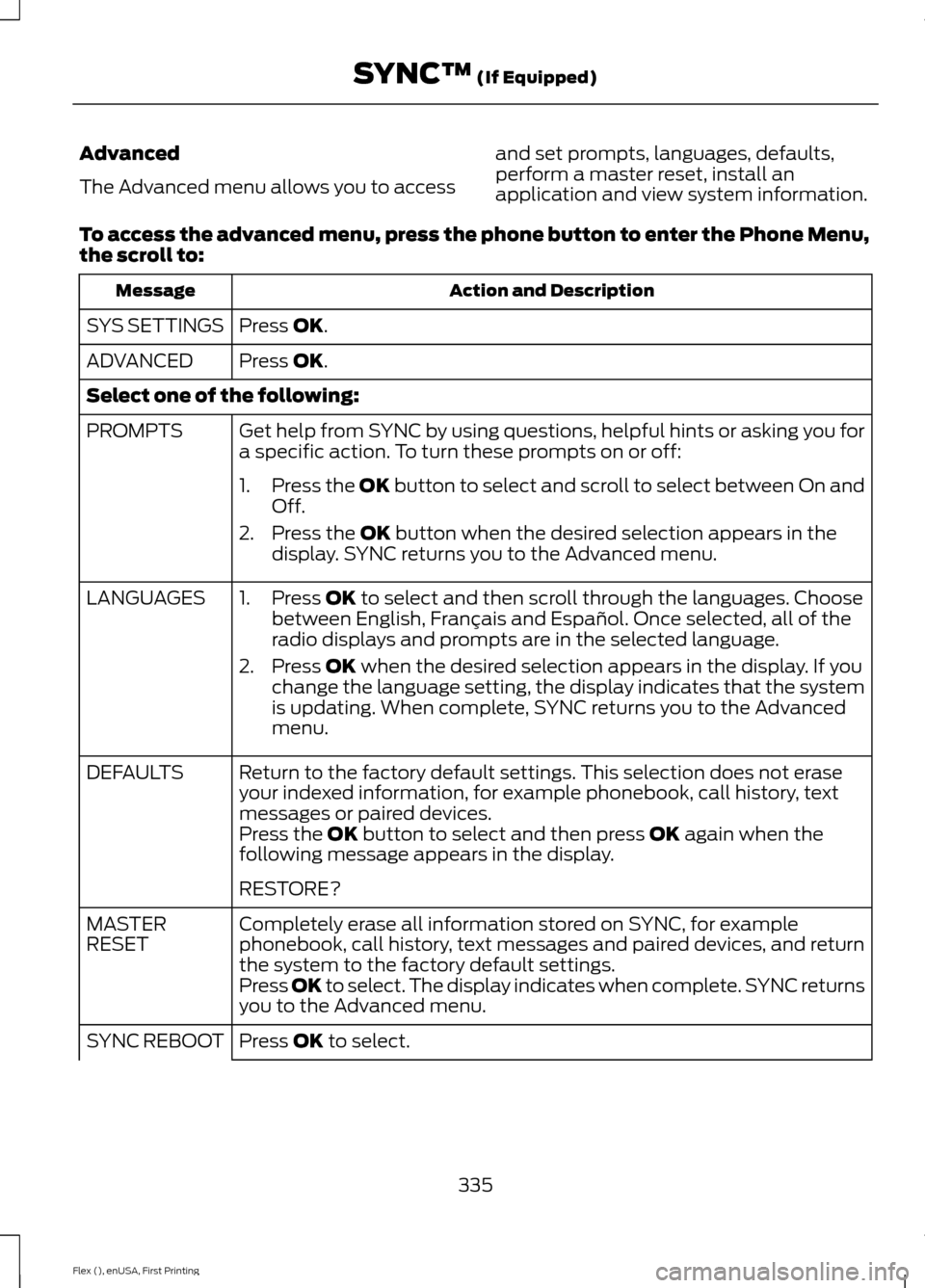
Advanced
The Advanced menu allows you to access
and set prompts, languages, defaults,
perform a master reset, install an
application and view system information.
To access the advanced menu, press the phone button to enter the Phone Menu,
the scroll to: Action and Description
Message
Press OK.
SYS SETTINGS
Press
OK.
ADVANCED
Select one of the following:
Get help from SYNC by using questions, helpful hints or asking you for
a specific action. To turn these prompts on or off:
PROMPTS
1.Press the
OK button to select and scroll to select between On and
Off.
2. Press the
OK button when the desired selection appears in the
display. SYNC returns you to the Advanced menu.
1. Press
OK to select and then scroll through the languages. Choose
between English, Français and Español. Once selected, all of the
radio displays and prompts are in the selected language.
2. Press
OK when the desired selection appears in the display. If you
change the language setting, the display indicates that the system
is updating. When complete, SYNC returns you to the Advanced
menu.
LANGUAGES
Return to the factory default settings. This selection does not erase
your indexed information, for example phonebook, call history, text
messages or paired devices.
DEFAULTS
Press the
OK button to select and then press OK again when the
following message appears in the display.
RESTORE?
Completely erase all information stored on SYNC, for example
phonebook, call history, text messages and paired devices, and return
the system to the factory default settings.
MASTER
RESET
Press OK to select. The display indicates when complete. SYNC returns
you to the Advanced menu.
Press
OK to select.
SYNC REBOOT
335
Flex (), enUSA, First Printing SYNC™
(If Equipped)
Page 340 of 417
Note:
Before setting this feature on, make
sure that you read the 911 Assist Privacy
Notice later in this section for important
information.
Note: If any user turns 911 Assist on or off,
that setting applies for all paired phones. If
911 Assist is turned off, either a voice
message plays or a display message (or
icon) comes on (or both) when your vehicle
is started after a previously paired phone
connects.
Note: Every phone operates differently.
While SYNC 911 Assist works with most
cellular phones, some may have trouble
using this feature. If a crash deploys an airbag (excluding
knee airbags and rear inflatable safety
belts [if equipped]) or activates the fuel
pump shut-off, your SYNC-equipped
vehicle may be able to contact emergency
services by dialing 911 through a paired and
connected Bluetooth-enabled phone. You
can learn more about the 911 Assist
feature, visit www.SYNCMyRide.com,
www.SYNCMyRide.ca or
www.syncmaroute.ca.
See Supplementary Restraints System
(page 41). Important information about
airbag deployment is in this chapter.
See
Roadside Emergencies (page 221).
Important information about the fuel pump
shut-off is in this chapter.
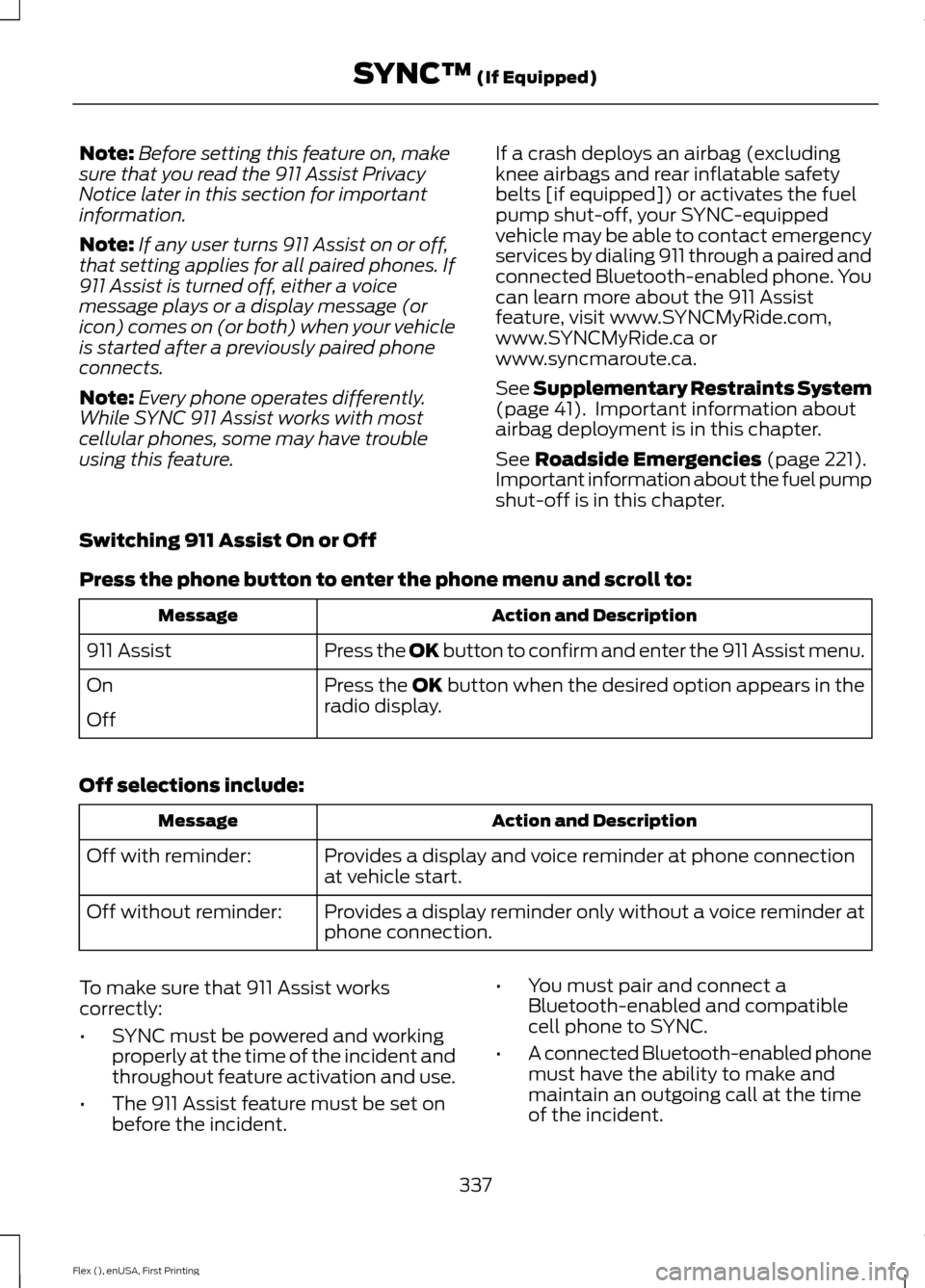
Switching 911 Assist On or Off
Press the phone button to enter the phone menu and scroll to: Action and Description
Message
Press the OK button to confirm and enter the 911 Assist menu.
911 Assist
Press the OK button when the desired option appears in the
radio display.
On
Off
Off selections include: Action and Description
Message
Provides a display and voice reminder at phone connection
at vehicle start.
Off with reminder:
Provides a display reminder only without a voice reminder at
phone connection.
Off without reminder:
To make sure that 911 Assist works
correctly:
• SYNC must be powered and working
properly at the time of the incident and
throughout feature activation and use.
• The 911 Assist feature must be set on
before the incident. •
You must pair and connect a
Bluetooth-enabled and compatible
cell phone to SYNC.
• A connected Bluetooth-enabled phone
must have the ability to make and
maintain an outgoing call at the time
of the incident.
337
Flex (), enUSA, First Printing SYNC™
(If Equipped)
Page 350 of 417
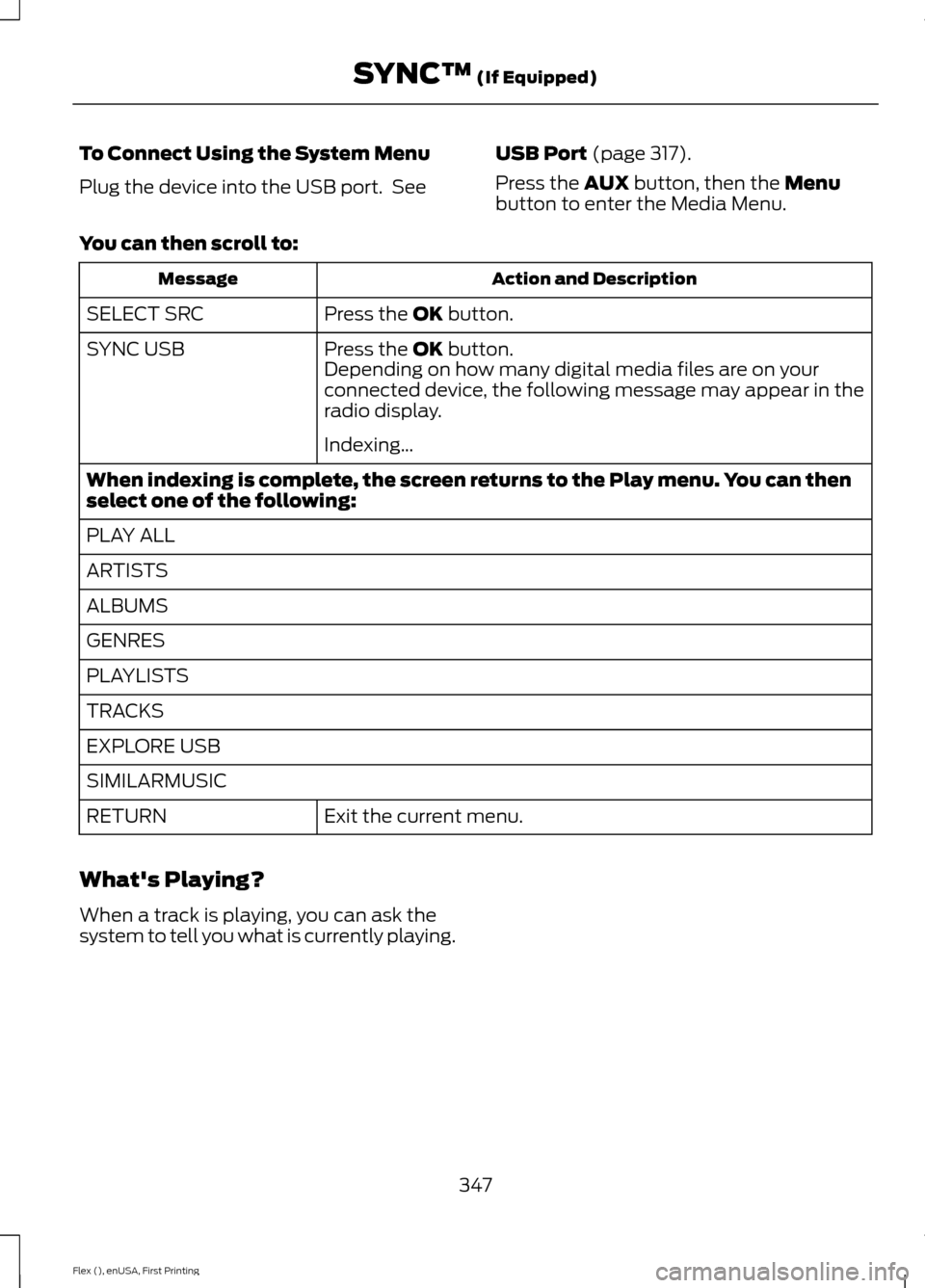
To Connect Using the System Menu
Plug the device into the USB port. See
USB Port (page 317).
Press the
AUX button, then the Menu
button to enter the Media Menu.
You can then scroll to: Action and Description
Message
Press the
OK button.
SELECT SRC
Press the
OK button.
SYNC USB
Depending on how many digital media files are on your
connected device, the following message may appear in the
radio display.
Indexing\b
When indexing is complete, the screen returns to the Play menu. You can then
select one of the following:
PLAY ALL
ARTISTS
ALBUMS
GENRES
PLAYLISTS
TRACKS
EXPLORE USB
SIMILARMUSIC Exit the current menu.
RETURN
What's Playing?
When a track is playing, you can ask the
system to tell you what is currently playing.
347
Flex (), enUSA, First Printing SYNC™
(If Equipped)
Page 369 of 417
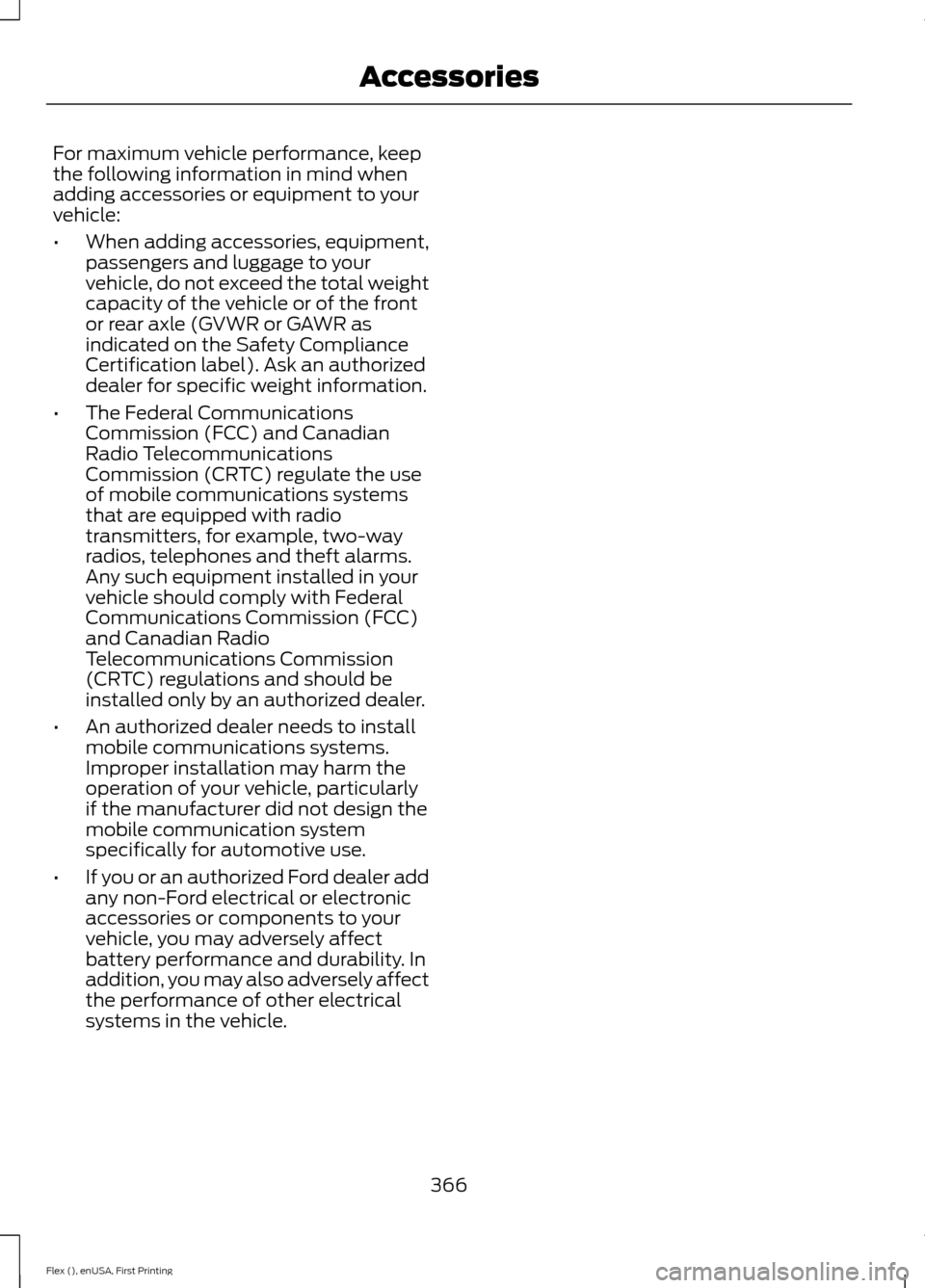
For maximum vehicle performance, keep
the following information in mind when
adding accessories or equipment to your
vehicle:
•
When adding accessories, equipment,
passengers and luggage to your
vehicle, do not exceed the total weight
capacity of the vehicle or of the front
or rear axle (GVWR or GAWR as
indicated on the Safety Compliance
Certification label). Ask an authorized
dealer for specific weight information.
• The Federal Communications
Commission (FCC) and Canadian
Radio Telecommunications
Commission (CRTC) regulate the use
of mobile communications systems
that are equipped with radio
transmitters, for example, two-way
radios, telephones and theft alarms.
Any such equipment installed in your
vehicle should comply with Federal
Communications Commission (FCC)
and Canadian Radio
Telecommunications Commission
(CRTC) regulations and should be
installed only by an authorized dealer.
• An authorized dealer needs to install
mobile communications systems.
Improper installation may harm the
operation of your vehicle, particularly
if the manufacturer did not design the
mobile communication system
specifically for automotive use.
• If you or an authorized Ford dealer add
any non-Ford electrical or electronic
accessories or components to your
vehicle, you may adversely affect
battery performance and durability. In
addition, you may also adversely affect
the performance of other electrical
systems in the vehicle.
366
Flex (), enUSA, First Printing Accessories
Page 406 of 417
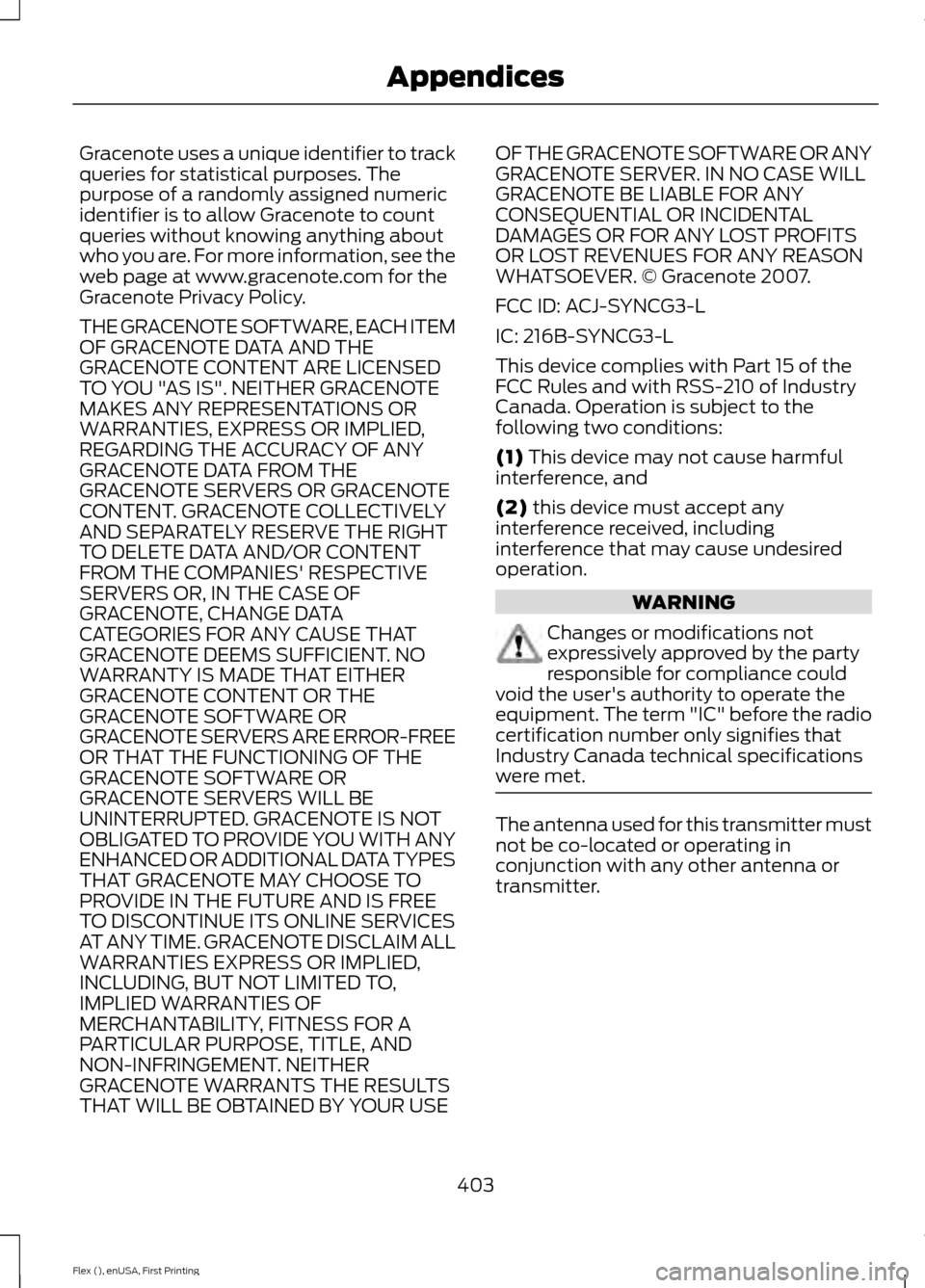
Gracenote uses a unique identifier to track
queries for statistical purposes. The
purpose of a randomly assigned numeric
identifier is to allow Gracenote to count
queries without knowing anything about
who you are. For more information, see the
web page at www.gracenote.com for the
Gracenote Privacy Policy.
THE GRACENOTE SOFTWARE, EACH ITEM
OF GRACENOTE DATA AND THE
GRACENOTE CONTENT ARE LICENSED
TO YOU "AS IS". NEITHER GRACENOTE
MAKES ANY REPRESENTATIONS OR
WARRANTIES, EXPRESS OR IMPLIED,
REGARDING THE ACCURACY OF ANY
GRACENOTE DATA FROM THE
GRACENOTE SERVERS OR GRACENOTE
CONTENT. GRACENOTE COLLECTIVELY
AND SEPARATELY RESERVE THE RIGHT
TO DELETE DATA AND/OR CONTENT
FROM THE COMPANIES' RESPECTIVE
SERVERS OR, IN THE CASE OF
GRACENOTE, CHANGE DATA
CATEGORIES FOR ANY CAUSE THAT
GRACENOTE DEEMS SUFFICIENT. NO
WARRANTY IS MADE THAT EITHER
GRACENOTE CONTENT OR THE
GRACENOTE SOFTWARE OR
GRACENOTE SERVERS ARE ERROR-FREE
OR THAT THE FUNCTIONING OF THE
GRACENOTE SOFTWARE OR
GRACENOTE SERVERS WILL BE
UNINTERRUPTED. GRACENOTE IS NOT
OBLIGATED TO PROVIDE YOU WITH ANY
ENHANCED OR ADDITIONAL DATA TYPES
THAT GRACENOTE MAY CHOOSE TO
PROVIDE IN THE FUTURE AND IS FREE
TO DISCONTINUE ITS ONLINE SERVICES
AT ANY TIME. GRACENOTE DISCLAIM ALL
WARRANTIES EXPRESS OR IMPLIED,
INCLUDING, BUT NOT LIMITED TO,
IMPLIED WARRANTIES OF
MERCHANTABILITY, FITNESS FOR A
PARTICULAR PURPOSE, TITLE, AND
NON-INFRINGEMENT. NEITHER
GRACENOTE WARRANTS THE RESULTS
THAT WILL BE OBTAINED BY YOUR USE
OF THE GRACENOTE SOFTWARE OR ANY
GRACENOTE SERVER. IN NO CASE WILL
GRACENOTE BE LIABLE FOR ANY
CONSEQUENTIAL OR INCIDENTAL
DAMAGES OR FOR ANY LOST PROFITS
OR LOST REVENUES FOR ANY REASON
WHATSOEVER. © Gracenote 2007.
FCC ID: ACJ-SYNCG3-L
IC: 216B-SYNCG3-L
This device complies with Part 15 of the
FCC Rules and with RSS-210 of Industry
Canada. Operation is subject to the
following two conditions:
(1) This device may not cause harmful
interference, and
(2)
this device must accept any
interference received, including
interference that may cause undesired
operation. WARNING
Changes or modifications not
expressively approved by the party
responsible for compliance could
void the user's authority to operate the
equipment. The term "IC" before the radio
certification number only signifies that
Industry Canada technical specifications
were met. The antenna used for this transmitter must
not be co-located or operating in
conjunction with any other antenna or
transmitter.
403
Flex (), enUSA, First Printing Appendices
Page 408 of 417
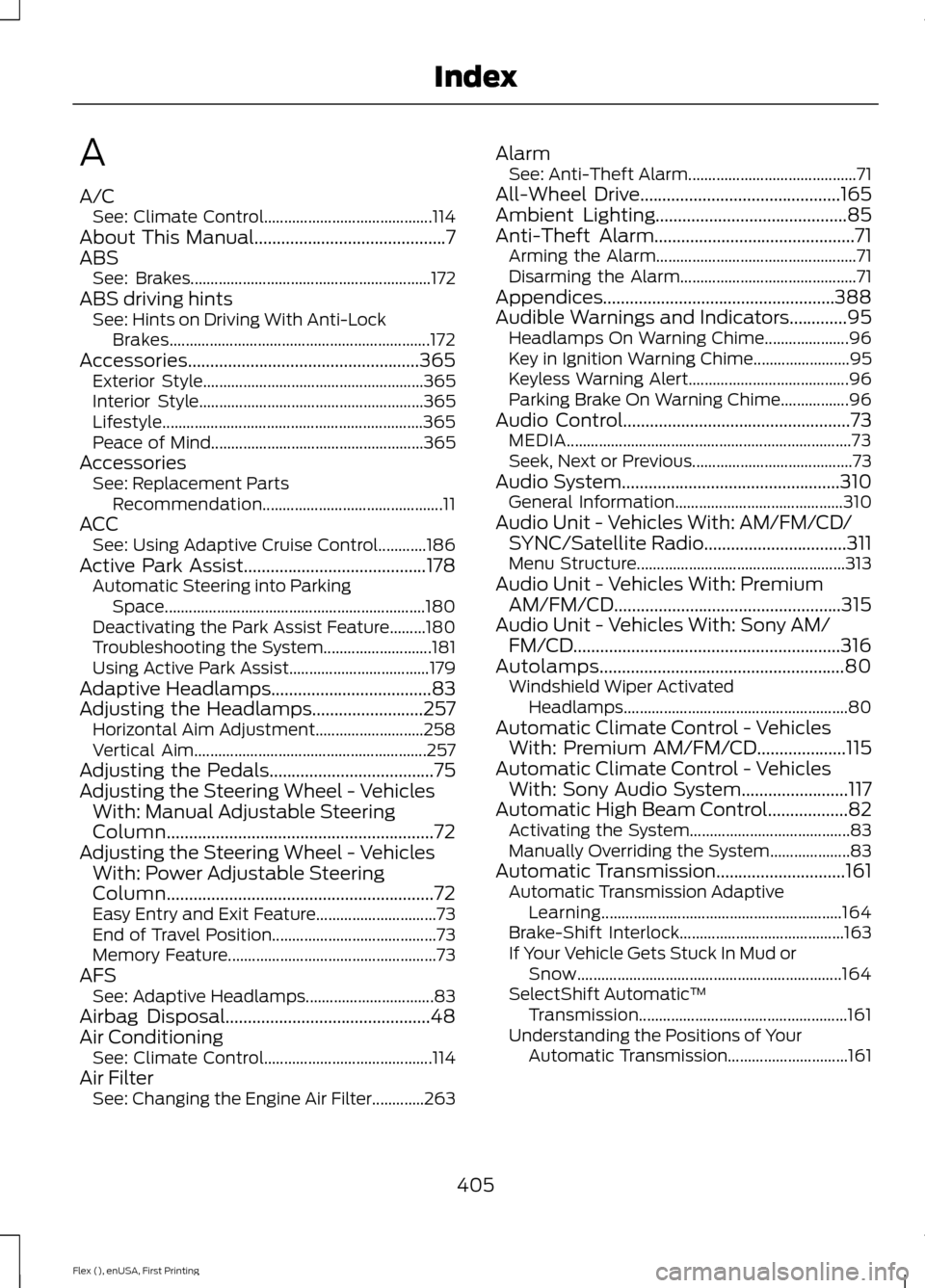
A
A/C
See: Climate Control.......................................... 114
About This Manual...........................................7
ABS See: Brakes............................................................ 172
ABS driving hints See: Hints on Driving With Anti-Lock
Brakes................................................................. 172
Accessories....................................................365 Exterior Style....................................................... 365
Interior Style........................................................ 365
Lifestyle................................................................. 365
Peace of Mind..................................................... 365
Accessories See: Replacement Parts
Recommendation............................................. 11
ACC See: Using Adaptive Cruise Control............186
Active Park Assist
.........................................178
Automatic Steering into Parking
Space................................................................. 180
Deactivating the Park Assist Feature.........180
Troubleshooting the System........................... 181
Using Active Park Assist................................... 179
Adaptive Headlamps
....................................83
Adjusting the Headlamps.........................257
Horizontal Aim Adjustment........................... 258
Vertical Aim.......................................................... 257
Adjusting the Pedals
.....................................75
Adjusting the Steering Wheel - Vehicles With: Manual Adjustable Steering
Column
............................................................72
Adjusting the Steering Wheel - Vehicles With: Power Adjustable Steering
Column
............................................................72
Easy Entry and Exit Feature.............................. 73
End of Travel Position......................................... 73
Memory Feature.................................................... 73
AFS See: Adaptive Headlamps................................ 83
Airbag Disposal..............................................48
Air Conditioning See: Climate Control.......................................... 114
Air Filter See: Changing the Engine Air Filter.............263 Alarm
See: Anti-Theft Alarm.......................................... 71
All-Wheel Drive.............................................165
Ambient Lighting...........................................85
Anti-Theft Alarm.............................................71 Arming the Alarm.................................................. 71
Disarming the Alarm............................................ 71
Appendices....................................................388
Audible Warnings and Indicators.............95 Headlamps On Warning Chime..................... 96
Key in Ignition Warning Chime........................ 95
Keyless Warning Alert........................................ 96
Parking Brake On Warning Chime.................96
Audio Control
...................................................73
MEDIA....................................................................... 73
Seek, Next or Previous........................................ 73
Audio System.................................................310 General Information.......................................... 310
Audio Unit - Vehicles With: AM/FM/CD/ SYNC/Satellite Radio
................................311
Menu Structure.................................................... 313
Audio Unit - Vehicles With: Premium AM/FM/CD...................................................315
Audio Unit - Vehicles With: Sony AM/ FM/CD............................................................316
Autolamps.......................................................80 Windshield Wiper Activated
Headlamps........................................................80
Automatic Climate Control - Vehicles With: Premium AM/FM/CD....................115
Automatic Climate Control - Vehicles With: Sony Audio System........................117
Automatic High Beam Control..................82 Activating the System........................................ 83
Manually Overriding the System.................... 83
Automatic Transmission
.............................161
Automatic Transmission Adaptive
Learning............................................................ 164
Brake-Shift Interlock......................................... 163
If Your Vehicle Gets Stuck In Mud or Snow.................................................................. 164
SelectShift Automatic ™
Transmission.................................................... 161
Understanding the Positions of Your Automatic Transmission.............................. 161
405
Flex (), enUSA, First Printing Index
Page 411 of 417
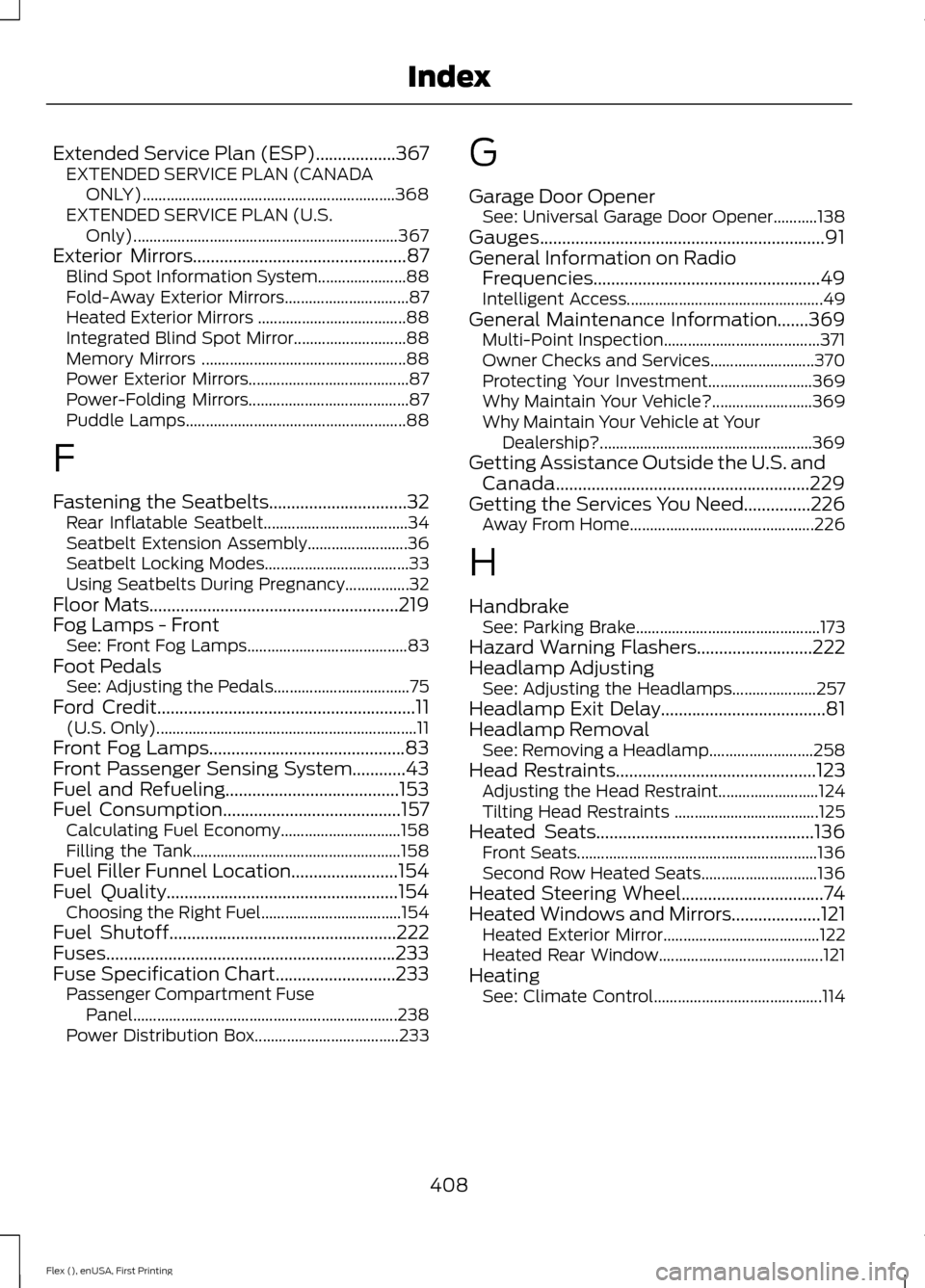
Extended Service Plan (ESP)..................367
EXTENDED SERVICE PLAN (CANADA
ONLY)............................................................... 368
EXTENDED SERVICE PLAN (U.S. Only).................................................................. 367
Exterior Mirrors................................................87
Blind Spot Information System...................... 88
Fold-Away Exterior Mirrors............................... 87
Heated Exterior Mirrors ..................................... 88
Integrated Blind Spot Mirror............................ 88
Memory Mirrors ................................................... 88
Power Exterior Mirrors........................................ 87
Power-Folding Mirrors........................................ 87
Puddle Lamps....................................................... 88
F
Fastening the Seatbelts...............................32 Rear Inflatable Seatbelt.................................... 34
Seatbelt Extension Assembly......................... 36
Seatbelt Locking Modes.................................... 33
Using Seatbelts During Pregnancy................32
Floor Mats
........................................................219
Fog Lamps - Front See: Front Fog Lamps........................................ 83
Foot Pedals See: Adjusting the Pedals.................................. 75
Ford Credit
..........................................................11
(U.S. Only)................................................................. 11
Front Fog Lamps............................................83
Front Passenger Sensing System............43
Fuel and Refueling.......................................153
Fuel Consumption
........................................157
Calculating Fuel Economy.............................. 158
Filling the Tank.................................................... 158
Fuel Filler Funnel Location........................154
Fuel Quality....................................................154 Choosing the Right Fuel................................... 154
Fuel Shutoff
...................................................222
Fuses.................................................................233
Fuse Specification Chart...........................233 Passenger Compartment Fuse
Panel.................................................................. 238
Power Distribution Box.................................... 233G
Garage Door Opener
See: Universal Garage Door Opener...........138
Gauges................................................................91
General Information on Radio Frequencies...................................................49
Intelligent Access................................................. 49
General Maintenance Information.......369 Multi-Point Inspection....................................... 371
Owner Checks and Services.......................... 370
Protecting Your Investment.......................... 369
Why Maintain Your Vehicle?......................... 369
Why Maintain Your Vehicle at Your Dealership?..................................................... 369
Getting Assistance Outside the U.S. and Canada.........................................................229
Getting the Services You Need...............226 Away From Home.............................................. 226
H
Handbrake See: Parking Brake.............................................. 173
Hazard Warning Flashers..........................222
Headlamp Adjusting See: Adjusting the Headlamps..................... 257
Headlamp Exit Delay.....................................81
Headlamp Removal See: Removing a Headlamp.......................... 258
Head Restraints
.............................................123
Adjusting the Head Restraint......................... 124
Tilting Head Restraints .................................... 125
Heated Seats.................................................136 Front Seats............................................................ 136
Second Row Heated Seats............................. 136
Heated Steering Wheel................................74
Heated Windows and Mirrors
....................121
Heated Exterior Mirror....................................... 122
Heated Rear Window......................................... 121
Heating See: Climate Control.......................................... 114
408
Flex (), enUSA, First Printing Index