clock FORD FLEX 2017 1.G User Guide
[x] Cancel search | Manufacturer: FORD, Model Year: 2017, Model line: FLEX, Model: FORD FLEX 2017 1.GPages: 496, PDF Size: 5.92 MB
Page 298 of 496
WARNINGS
Never get underneath a vehicle that
is supported only by a jack. If the
vehicle slips off the jack, you or
someone else could be seriously injured. Do not attempt to change a tire on
the side of the vehicle close to
moving traffic. Pull far enough off the
road to avoid the danger of being hit when
operating the jack or changing the wheel. Always use the jack provided as
original equipment with your vehicle.
If using a jack other than the one
provided as original equipment with your
vehicle, make sure the jack capacity is
adequate for the vehicle weight, including
any vehicle cargo or modifications. Note:
Passengers should not remain in your
vehicle when the vehicle is being jacked.
Note: Jack at the specified locations to
avoid damage to the vehicle.
Note: If the third row seat is stowed in the
floor, you will need to unstow it to access
the spare tire.
1. Park on a level surface, set the parking
brake and activate the hazard flashers.
2. Place the transmission in park (P) and
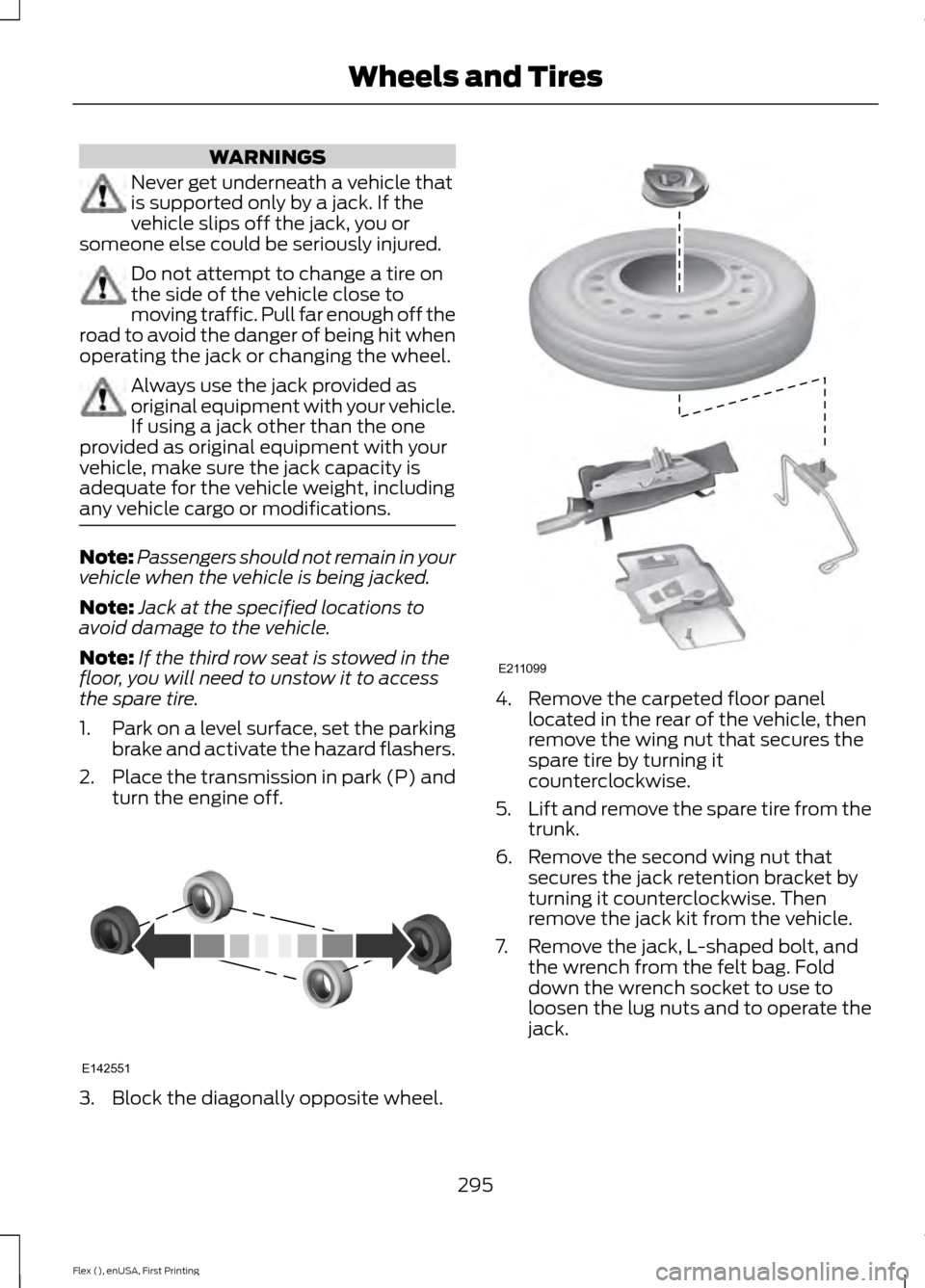
turn the engine off. 3. Block the diagonally opposite wheel. 4. Remove the carpeted floor panel
located in the rear of the vehicle, then
remove the wing nut that secures the
spare tire by turning it
counterclockwise.
5. Lift and remove the spare tire from the
trunk.
6. Remove the second wing nut that secures the jack retention bracket by
turning it counterclockwise. Then
remove the jack kit from the vehicle.
7. Remove the jack, L-shaped bolt, and the wrench from the felt bag. Fold
down the wrench socket to use to
loosen the lug nuts and to operate the
jack.
295
Flex (), enUSA, First Printing Wheels and TiresE142551 E211099
Page 299 of 496
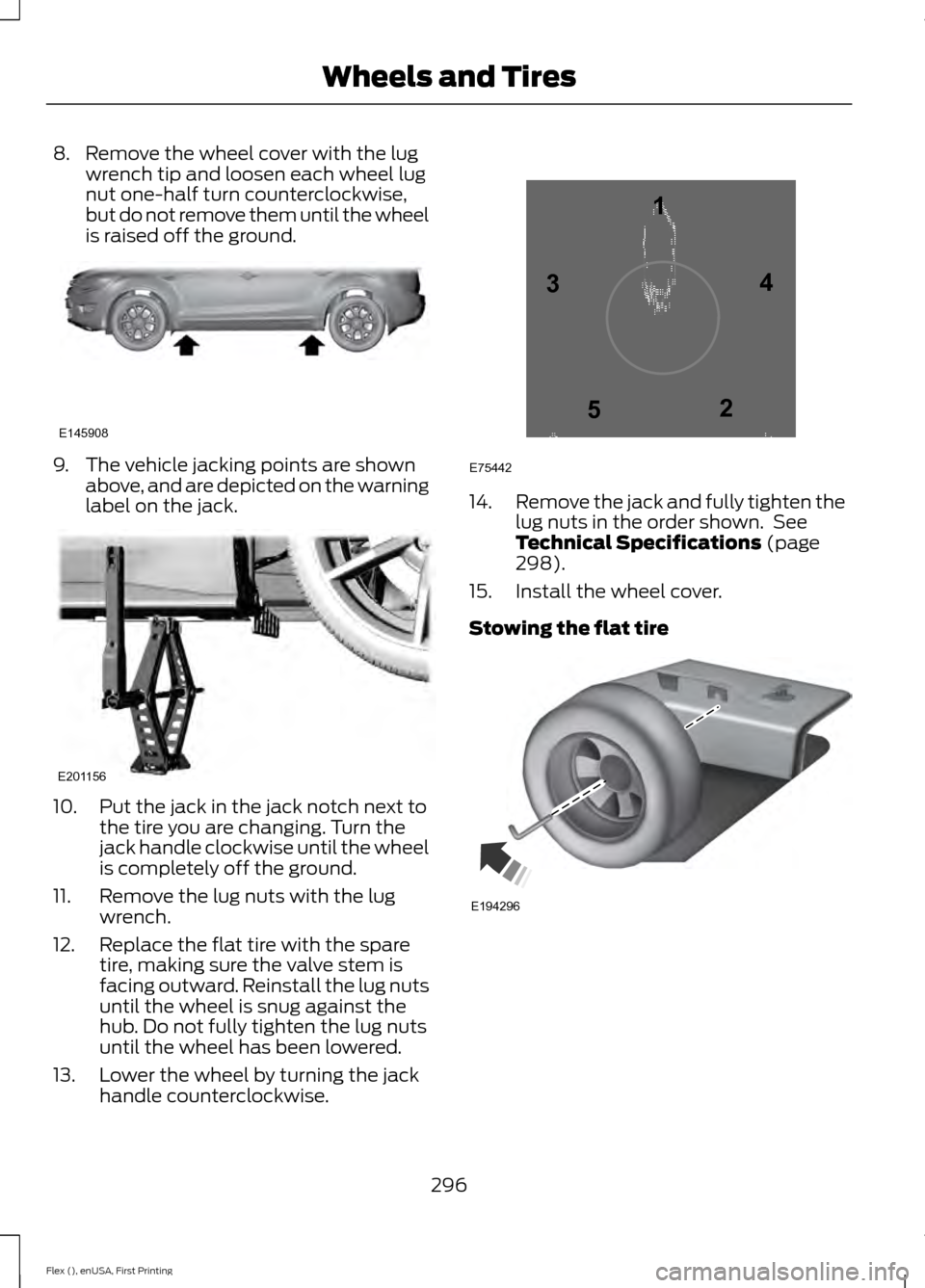
8. Remove the wheel cover with the lug
wrench tip and loosen each wheel lug
nut one-half turn counterclockwise,
but do not remove them until the wheel
is raised off the ground. 9. The vehicle jacking points are shown
above, and are depicted on the warning
label on the jack. 10. Put the jack in the jack notch next to
the tire you are changing. Turn the
jack handle clockwise until the wheel
is completely off the ground.
11. Remove the lug nuts with the lug wrench.
12. Replace the flat tire with the spare tire, making sure the valve stem is
facing outward. Reinstall the lug nuts
until the wheel is snug against the
hub. Do not fully tighten the lug nuts
until the wheel has been lowered.
13. Lower the wheel by turning the jack handle counterclockwise. 14.
Remove the jack and fully tighten the
lug nuts in the order shown. See
Technical Specifications (page
298).
15. Install the wheel cover.
Stowing the flat tire 296
Flex (), enUSA, First Printing Wheels and TiresE145908 E201156 12
3
4
5
E75442 E194296
Page 300 of 496
If you are stowing the flat tire, remove the
L-shaped bolt from the external pocket of
the felt bag. With the third row seat in the
raised position, stand the flat tire in the
rear of the vehicle with the tire
’s valve stem
facing the rear of the vehicle. Fasten the
flat tire to the vehicle by inserting the
L-shaped bolt through one of the lug bolt
holes in the wheel. Turn it clockwise into
the threaded hole in the vehicle until the
tire is secured.
If you are stowing the temporary spare tire,
place the tire over the jack and secure it
with the large wing nut.
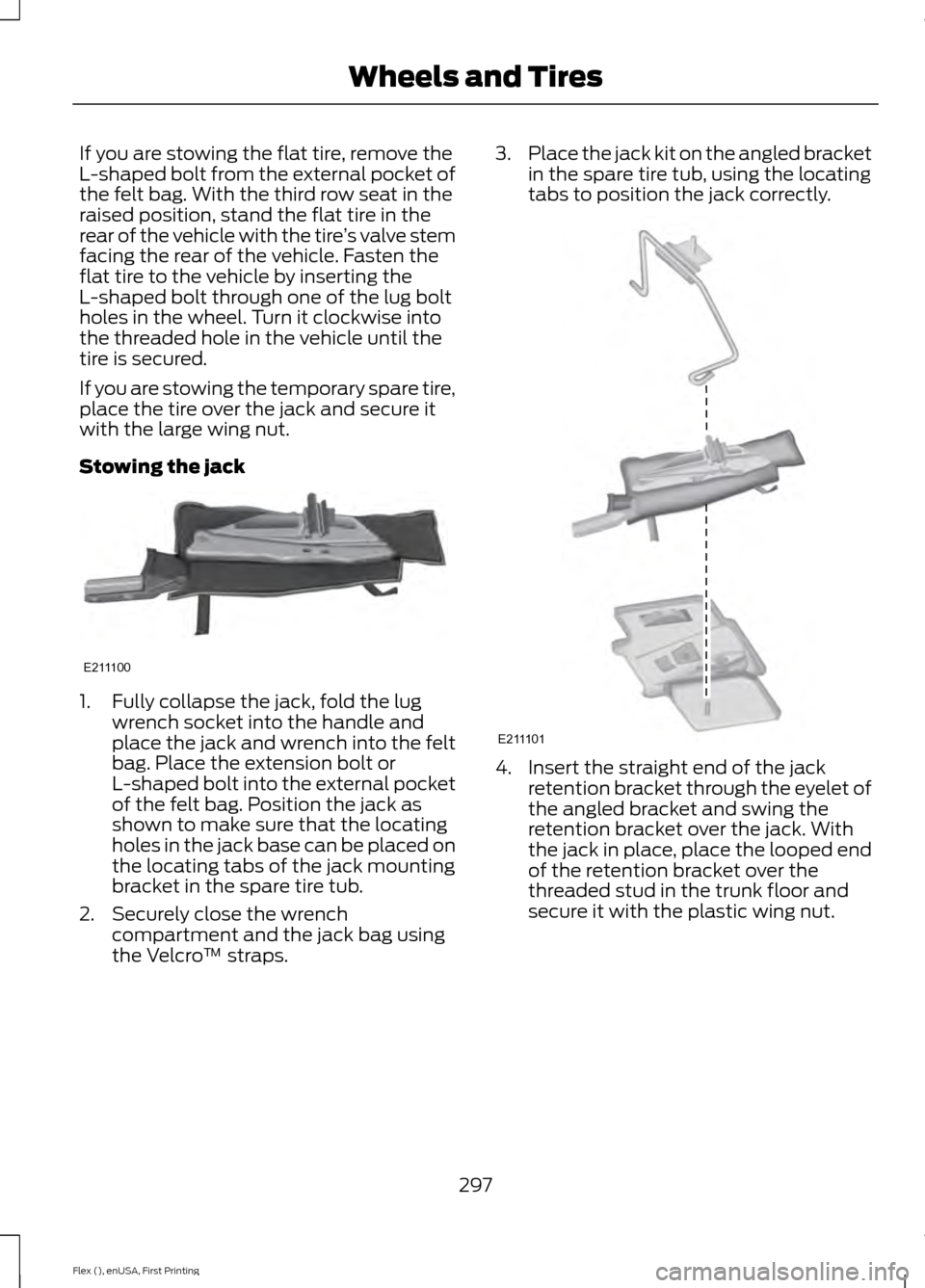
Stowing the jack 1. Fully collapse the jack, fold the lug
wrench socket into the handle and
place the jack and wrench into the felt
bag. Place the extension bolt or
L-shaped bolt into the external pocket
of the felt bag. Position the jack as
shown to make sure that the locating
holes in the jack base can be placed on
the locating tabs of the jack mounting
bracket in the spare tire tub.
2. Securely close the wrench compartment and the jack bag using
the Velcro ™ straps. 3.
Place the jack kit on the angled bracket
in the spare tire tub, using the locating
tabs to position the jack correctly. 4. Insert the straight end of the jack
retention bracket through the eyelet of
the angled bracket and swing the
retention bracket over the jack. With
the jack in place, place the looped end
of the retention bracket over the
threaded stud in the trunk floor and
secure it with the plastic wing nut.
297
Flex (), enUSA, First Printing Wheels and TiresE211100 E211101
Page 319 of 496
Seek, Fast Forward and Reverse: In radio mode, select a frequency band
and press this button. The system stops at the first station it finds in that
direction. In SIRIUS mode, press to select the next or previous satellite radio
station. If a specific category is selected (such as jazz, rock or news), press to
find the next or previous in the selected category. In CD mode, press to select
the previous or next track. Press and hold to move quickly forward through the
current track.
F
OK and Arrow buttons:
Press OK to confirm menu selections. Press to scroll
through the menu choices.
G
Eject:
Press to eject a CD.
H
VOL and Power:
Press to switch the system on and off. Turn to adjust the
volume.
I
CLOCK:
If not in phone mode, press to display the clock.
J
SOUND:
Press to access settings for Treble, Midrange, Bass, Fade or Balance.
Use the up and down arrow buttons to select the various settings. When you
make your selection, press the left and right arrow buttons to change the
settings. Press
OK to set or press MENU to exit. Sound settings can be set for
each audio source independently.
K
MENU:
Press to access different audio system features.
L
PHONE:
Press to access the phone features of the SYNC system. See your
SYNC information.
M
AUX:
Press to access or switch between devices you plug into your vehicle.
N
SIRIUS:
Press to listen to Sirius satellite radio.
O
Menu Structure
Note: Depending on your system, some
options may appear slightly different.
Press
MENU. Press the up and down arrow buttons to
scroll through the options.
Press the right arrow to enter a menu.
Press the left arrow to exit a menu.
Press OK to confirm a selection. Radio
Select for a brief sampling of all available channels.
Scan
Select to store the six strongest local stations on the AM-
AST and FM-AST frequency bands.
AST
Select to display extra information such as artist name.
Radio Text *
* Extra information may not always be available.
316
Flex (), enUSA, First Printing Audio System
Page 320 of 496
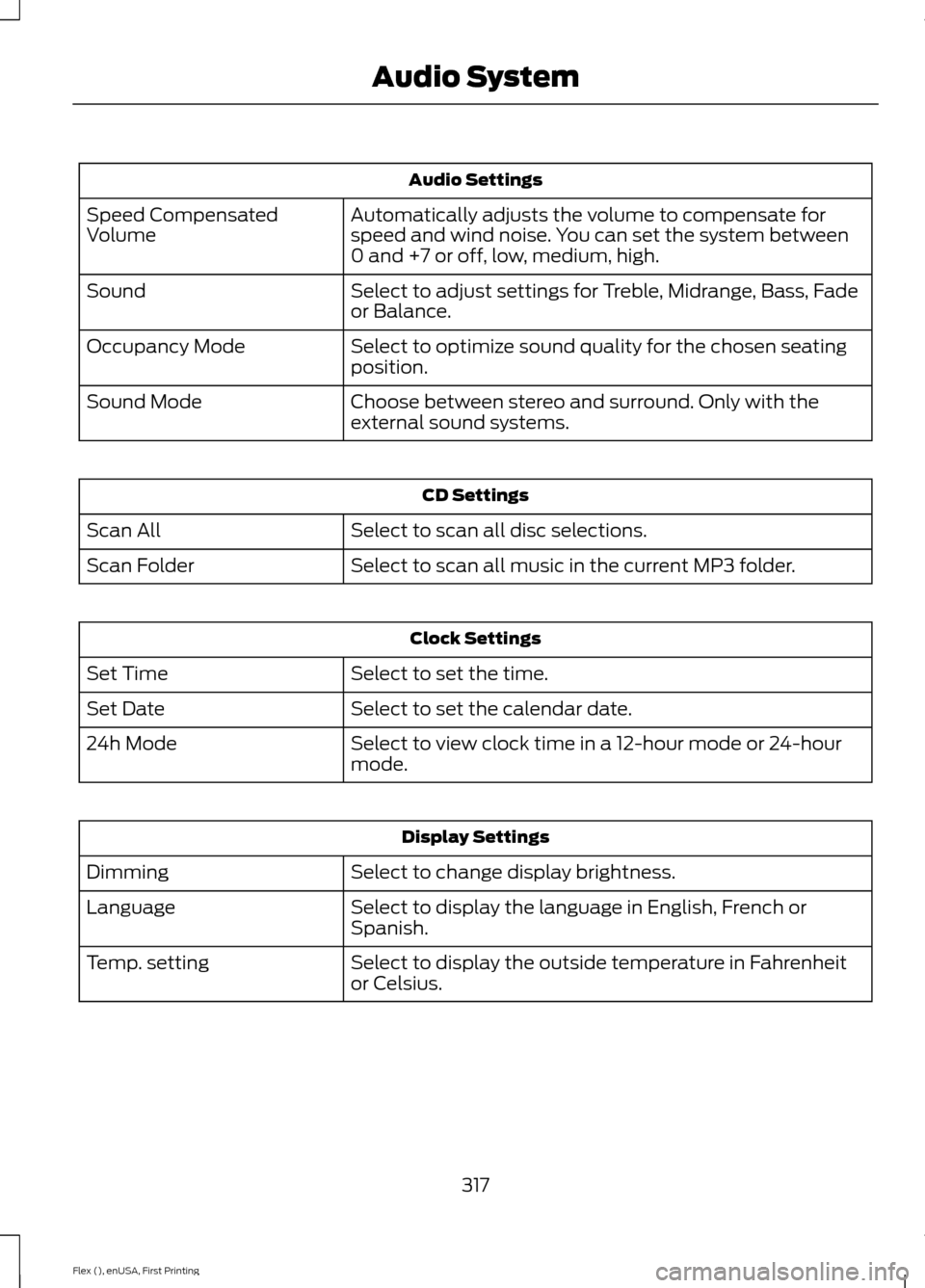
Audio Settings
Automatically adjusts the volume to compensate for
speed and wind noise. You can set the system between
0 and +7 or off, low, medium, high.
Speed Compensated
Volume
Select to adjust settings for Treble, Midrange, Bass, Fade
or Balance.
Sound
Select to optimize sound quality for the chosen seating
position.
Occupancy Mode
Choose between stereo and surround. Only with the
external sound systems.
Sound Mode CD Settings
Select to scan all disc selections.
Scan All
Select to scan all music in the current MP3 folder.
Scan Folder Clock Settings
Select to set the time.
Set Time
Select to set the calendar date.
Set Date
Select to view clock time in a 12-hour mode or 24-hour
mode.
24h Mode Display Settings
Select to change display brightness.
Dimming
Select to display the language in English, French or
Spanish.
Language
Select to display the outside temperature in Fahrenheit
or Celsius.
Temp. setting
317
Flex (), enUSA, First Printing Audio System
Page 364 of 496
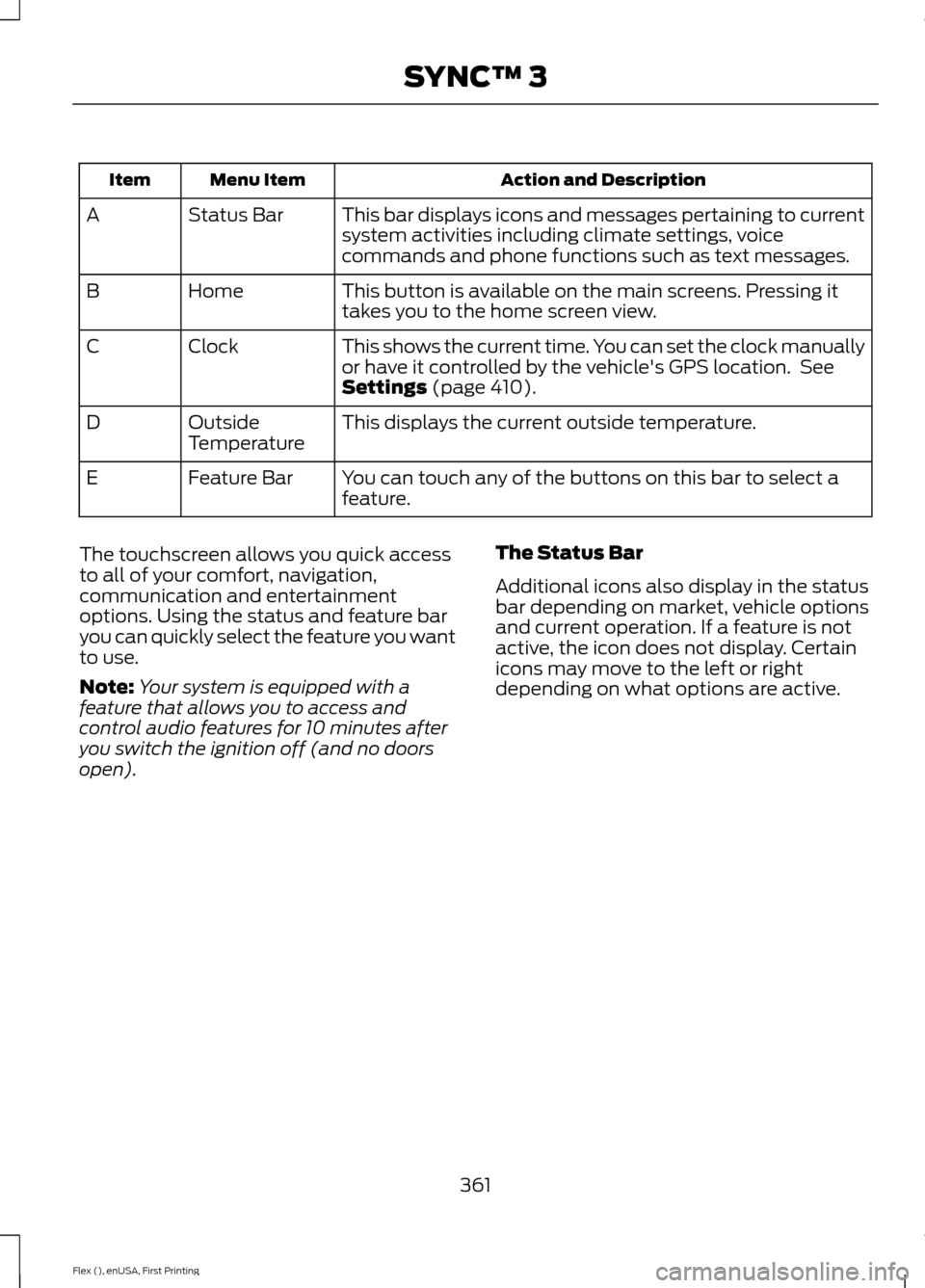
Action and Description
Menu Item
Item
This bar displays icons and messages pertaining to current
system activities including climate settings, voice
commands and phone functions such as text messages.
Status Bar
A
This button is available on the main screens. Pressing it
takes you to the home screen view.
Home
B
This shows the current time. You can set the clock manually
or have it controlled by the vehicle's GPS location. See
Settings (page 410).
Clock
C
This displays the current outside temperature.
Outside
Temperature
D
You can touch any of the buttons on this bar to select a
feature.
Feature Bar
E
The touchscreen allows you quick access
to all of your comfort, navigation,
communication and entertainment
options. Using the status and feature bar
you can quickly select the feature you want
to use.
Note: Your system is equipped with a
feature that allows you to access and
control audio features for 10 minutes after
you switch the ignition off (and no doors
open). The Status Bar
Additional icons also display in the status
bar depending on market, vehicle options
and current operation. If a feature is not
active, the icon does not display. Certain
icons may move to the left or right
depending on what options are active.
361
Flex (), enUSA, First Printing SYNC™ 3
Page 414 of 496
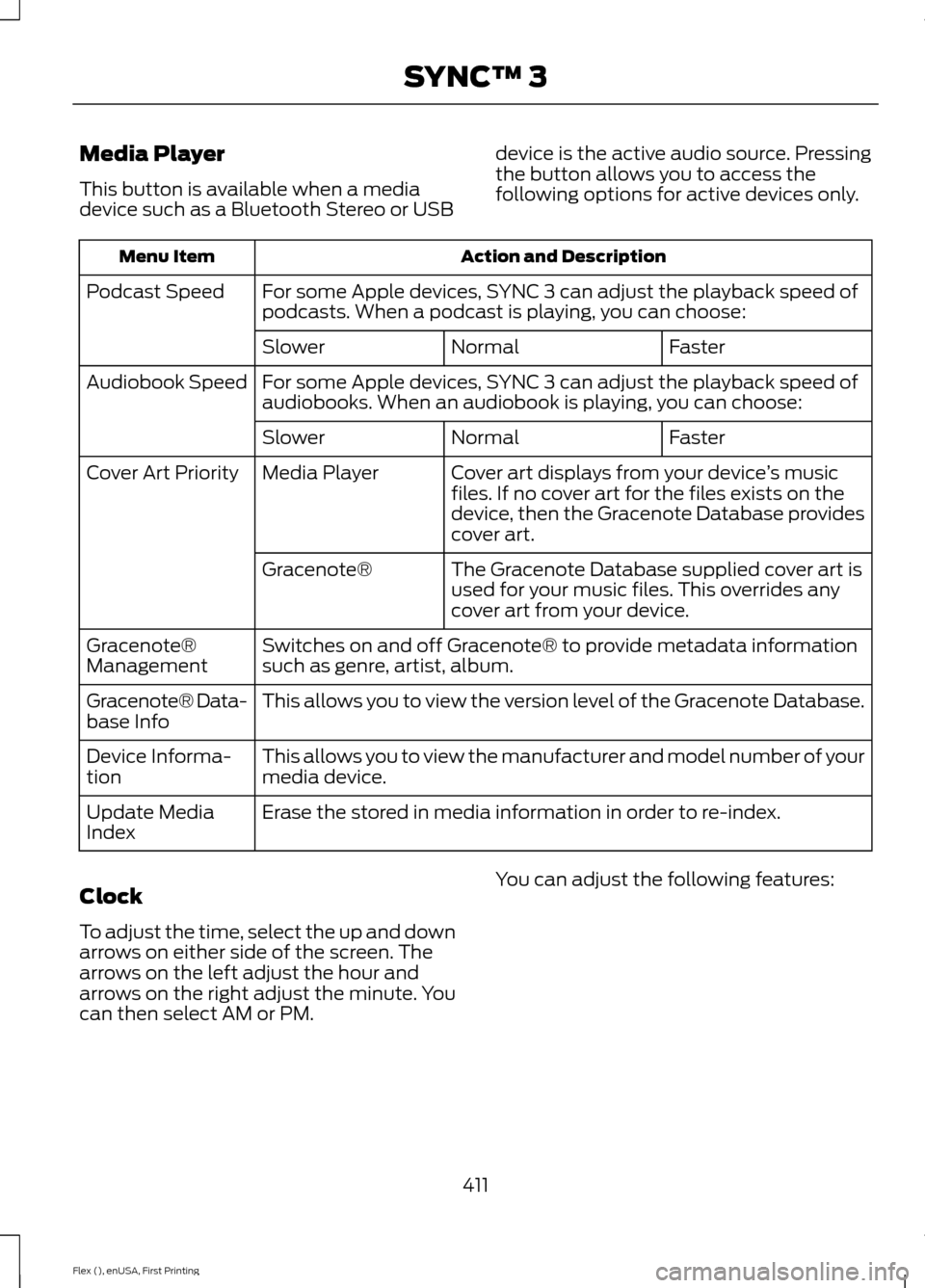
Media Player
This button is available when a media
device such as a Bluetooth Stereo or USB
device is the active audio source. Pressing
the button allows you to access the
following options for active devices only. Action and Description
Menu Item
For some Apple devices, SYNC 3 can adjust the playback speed of
podcasts. When a podcast is playing, you can choose:
Podcast Speed
Faster
Normal
Slower
For some Apple devices, SYNC 3 can adjust the playback speed of
audiobooks. When an audiobook is playing, you can choose:
Audiobook Speed
Faster
Normal
Slower
Cover art displays from your device ’s music
files. If no cover art for the files exists on the
device, then the Gracenote Database provides
cover art.
Media Player
Cover Art Priority
The Gracenote Database supplied cover art is
used for your music files. This overrides any
cover art from your device.
Gracenote®
Switches on and off Gracenote® to provide metadata information
such as genre, artist, album.
Gracenote®
Management
This allows you to view the version level of the Gracenote Database.
Gracenote® Data-
base Info
This allows you to view the manufacturer and model number of your
media device.
Device Informa-
tion
Erase the stored in media information in order to re-index.
Update Media
Index
Clock
To adjust the time, select the up and down
arrows on either side of the screen. The
arrows on the left adjust the hour and
arrows on the right adjust the minute. You
can then select AM or PM. You can adjust the following features:
411
Flex (), enUSA, First Printing SYNC™ 3
Page 415 of 496
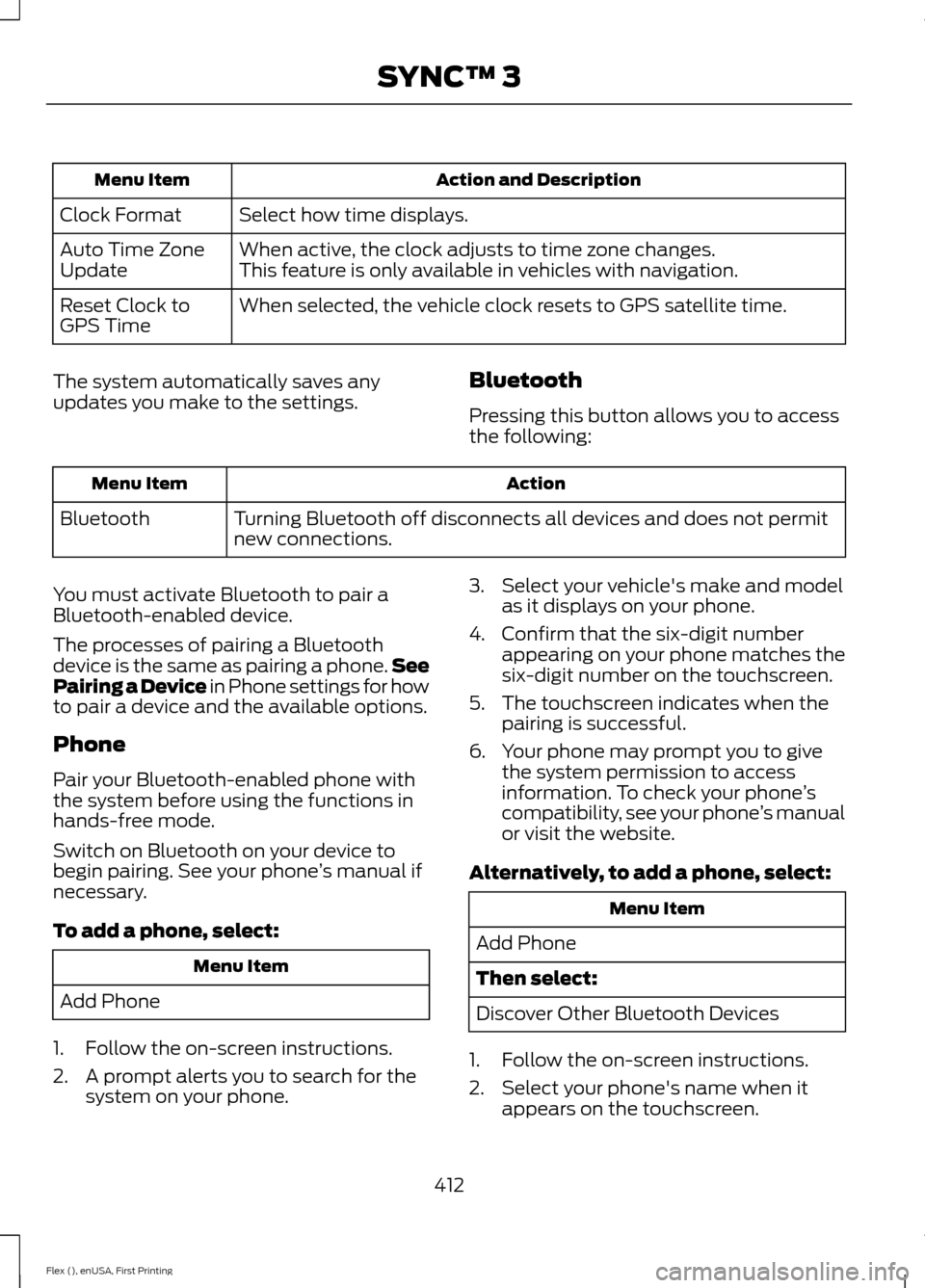
Action and Description
Menu Item
Select how time displays.
Clock Format
When active, the clock adjusts to time zone changes.
Auto Time Zone
Update This feature is only available in vehicles with navigation.
When selected, the vehicle clock resets to GPS satellite time.
Reset Clock to
GPS Time
The system automatically saves any
updates you make to the settings. Bluetooth
Pressing this button allows you to access
the following: Action
Menu Item
Turning Bluetooth off disconnects all devices and does not permit
new connections.
Bluetooth
You must activate Bluetooth to pair a
Bluetooth-enabled device.
The processes of pairing a Bluetooth
device is the same as pairing a phone. See
Pairing a Device in Phone settings for how
to pair a device and the available options.
Phone
Pair your Bluetooth-enabled phone with
the system before using the functions in
hands-free mode.
Switch on Bluetooth on your device to
begin pairing. See your phone ’s manual if
necessary.
To add a phone, select: Menu Item
Add Phone
1. Follow the on-screen instructions.
2. A prompt alerts you to search for the system on your phone. 3. Select your vehicle's make and model
as it displays on your phone.
4. Confirm that the six-digit number appearing on your phone matches the
six-digit number on the touchscreen.
5. The touchscreen indicates when the pairing is successful.
6. Your phone may prompt you to give the system permission to access
information. To check your phone ’s
compatibility, see your phone ’s manual
or visit the website.
Alternatively, to add a phone, select: Menu Item
Add Phone
Then select:
Discover Other Bluetooth Devices
1. Follow the on-screen instructions.
2. Select your phone's name when it appears on the touchscreen.
412
Flex (), enUSA, First Printing SYNC™ 3
Page 493 of 496
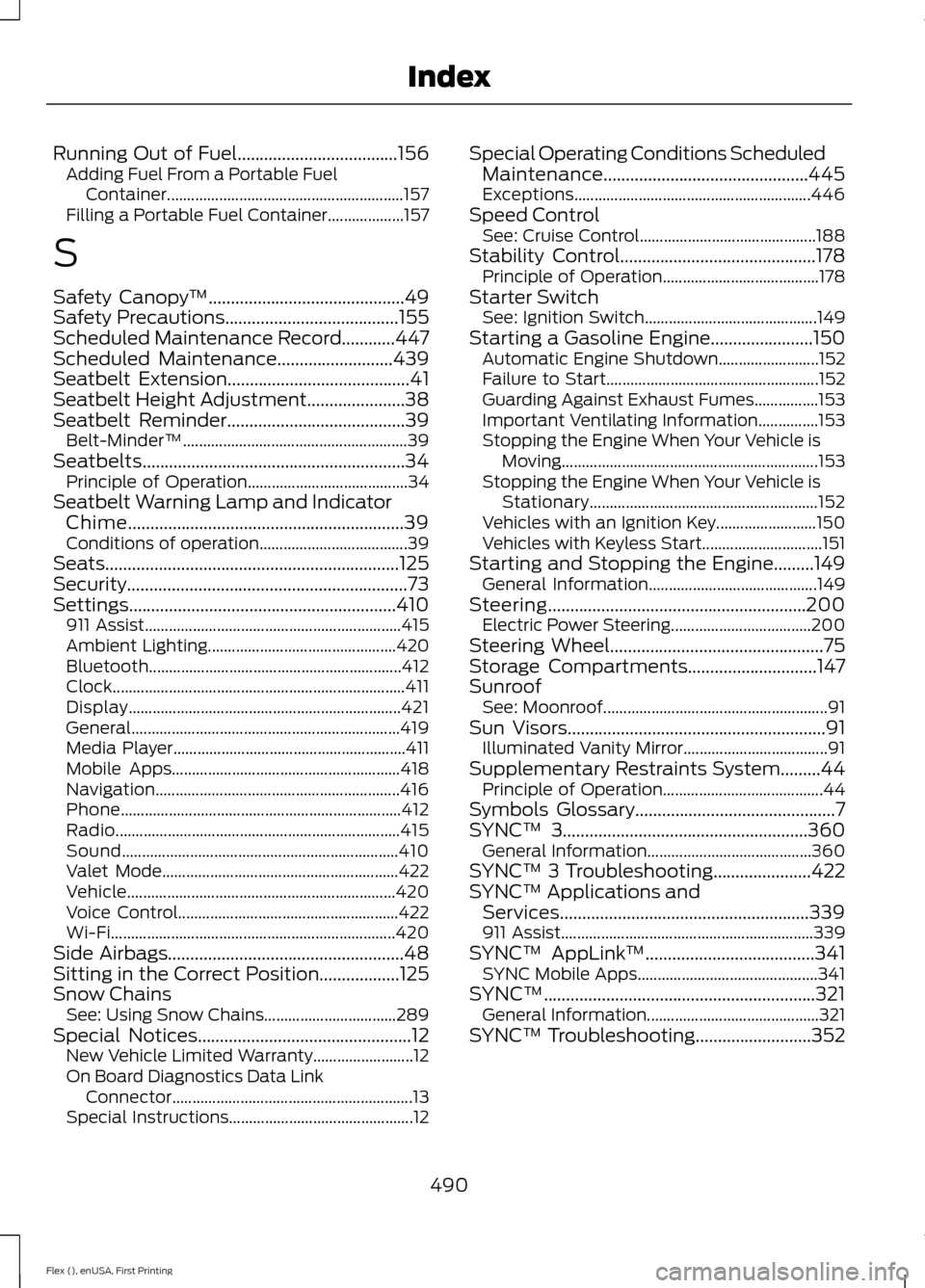
Running Out of Fuel....................................156
Adding Fuel From a Portable Fuel
Container........................................................... 157
Filling a Portable Fuel Container................... 157
S
Safety Canopy ™............................................49
Safety Precautions.......................................155
Scheduled Maintenance Record............447
Scheduled Maintenance..........................439
Seatbelt Extension.........................................41
Seatbelt Height Adjustment
......................38
Seatbelt Reminder........................................39 Belt-Minder™........................................................ 39
Seatbelts...........................................................34 Principle of Operation........................................ 34
Seatbelt Warning Lamp and Indicator Chime
..............................................................39
Conditions of operation..................................... 39
Seats..................................................................125
Security...............................................................73
Settings............................................................410 911 Assist................................................................ 415
Ambient Lighting............................................... 420
Bluetooth............................................................... 412
Clock........................................................................\
. 411
Display.................................................................... 421
General................................................................... 419
Media Player.......................................................... 411
Mobile Apps......................................................... 418
Navigation............................................................. 416
Phone...................................................................... 412
Radio....................................................................... 415
Sound..................................................................... 410
Valet Mode........................................................... 422
Vehicle................................................................... 420
Voice Control....................................................... 422
Wi-Fi....................................................................... 420
Side Airbags
.....................................................48
Sitting in the Correct Position..................125
Snow Chains See: Using Snow Chains................................. 289
Special Notices................................................12 New Vehicle Limited Warranty......................... 12
On Board Diagnostics Data Link Connector............................................................ 13
Special Instructions.............................................. 12Special Operating Conditions Scheduled
Maintenance..............................................445
Exceptions........................................................... 446
Speed Control See: Cruise Control............................................ 188
Stability Control
............................................178
Principle of Operation....................................... 178
Starter Switch See: Ignition Switch........................................... 149
Starting a Gasoline Engine.......................150 Automatic Engine Shutdown......................... 152
Failure to Start..................................................... 152
Guarding Against Exhaust Fumes................153
Important Ventilating Information...............153
Stopping the Engine When Your Vehicle is Moving................................................................ 153
Stopping the Engine When Your Vehicle is Stationary......................................................... 152
Vehicles with an Ignition Key......................... 150
Vehicles with Keyless Start.............................. 151
Starting and Stopping the Engine
.........149
General Information.......................................... 149
Steering..........................................................200 Electric Power Steering................................... 200
Steering Wheel................................................75
Storage Compartments
.............................147
Sunroof See: Moonroof........................................................ 91
Sun Visors
..........................................................91
Illuminated Vanity Mirror.................................... 91
Supplementary Restraints System.........44 Principle of Operation........................................ 44
Symbols Glossary
.............................................7
SYNC™ 3.......................................................360
General Information......................................... 360
SYNC™ 3 Troubleshooting......................422
SYNC™ Applications and Services........................................................339
911 Assist............................................................... 339
SYNC™ AppLink ™
......................................341
SYNC Mobile Apps............................................. 341
SYNC™.............................................................321 General Information........................................... 321
SYNC™ Troubleshooting
..........................352
490
Flex (), enUSA, First Printing Index