four wheel drive FORD FLEX 2017 1.G User Guide
[x] Cancel search | Manufacturer: FORD, Model Year: 2017, Model line: FLEX, Model: FORD FLEX 2017 1.GPages: 496, PDF Size: 5.92 MB
Page 288 of 496
Age
WARNING
Tires degrade over time
depending on many factors
such as weather, storage
conditions, and conditions of use
(load, speed, inflation pressure)
the tires experience throughout
their lives.
In general, tires should be
replaced after six years regardless
of tread wear. However, heat
caused by hot climates or
frequent high loading conditions
can accelerate the aging process
and may require tires to be
replaced more frequently.
You should replace your spare tire
when you replace the road tires or
after six years due to aging even if
it has not been used. U.S. DOT Tire Identification
Number
Both United States and Canada
Federal regulations require tire
manufacturers to place
standardized information on the
sidewall of all tires. This
information identifies and
describes the fundamental
characteristics of the tire and also
provides a U.S. DOT Tire
Identification Number for safety
standard certification and in case
of a recall. This begins with the letters DOT
and indicates that the tire meets
all federal standards. The next
two numbers or letters are the
plant code designating where it
was manufactured, the next two
are the tire size code and the last
four numbers represent the week
and year the tire was built. For
example, the numbers 317 mean
the 31st week of 1997. After 2000,
the numbers go to four digits. For
example, 2501 means the 25th
week of 2001. The numbers in
between are identification codes
used for traceability. This
information is used to contact
customers if a tire defect requires
a recall.
Tire Replacement
Requirements
Your vehicle is equipped with tires
designed to provide a safe ride
and handling capability.
WARNINGS
Only use replacement tires
and wheels that are the same
size, load index, speed rating and
type (such as P-metric versus
LT-metric or all-season versus
all-terrain) as those originally
provided by Ford. The
recommended tire and wheel size
may be found on either the Safety
Compliance Certification Label
(affixed to either the door hinge
pillar, door-latch post, or the door
edge that meets the door-latch
post, next to the driver ’s seating
position), or the Tire Label which
285
Flex (), enUSA, First Printing Wheels and Tires
Page 291 of 496
Wheel misalignment in the front
or the rear can cause uneven and
rapid treadwear of your tires and
should be corrected by an
authorized dealer. Front-wheel
drive vehicles and those with an
independent rear suspension (if
equipped) may require alignment
of all four wheels.
The tires should also be balanced
periodically. An unbalanced tire
and wheel assembly may result in
irregular tire wear.
Tire Rotation
Note:
If your tires show uneven
wear, ask an authorized dealer to
check for and correct any wheel
misalignment, tire imbalance or
mechanical problem involved
before tire rotation.
Note: Your vehicle may be
equipped with a dissimilar spare
wheel and tire assembly. A
dissimilar spare wheel and tire
assembly is defined as a spare
wheel and tire assembly that is
different in brand, size or
appearance from the road tires and
wheels. If you have a dissimilar
spare wheel and tire assembly, it is
intended for temporary use only
and should not be used in a tire
rotation.
Note: After having your tires
rotated, inflation pressure must be
checked and adjusted to the
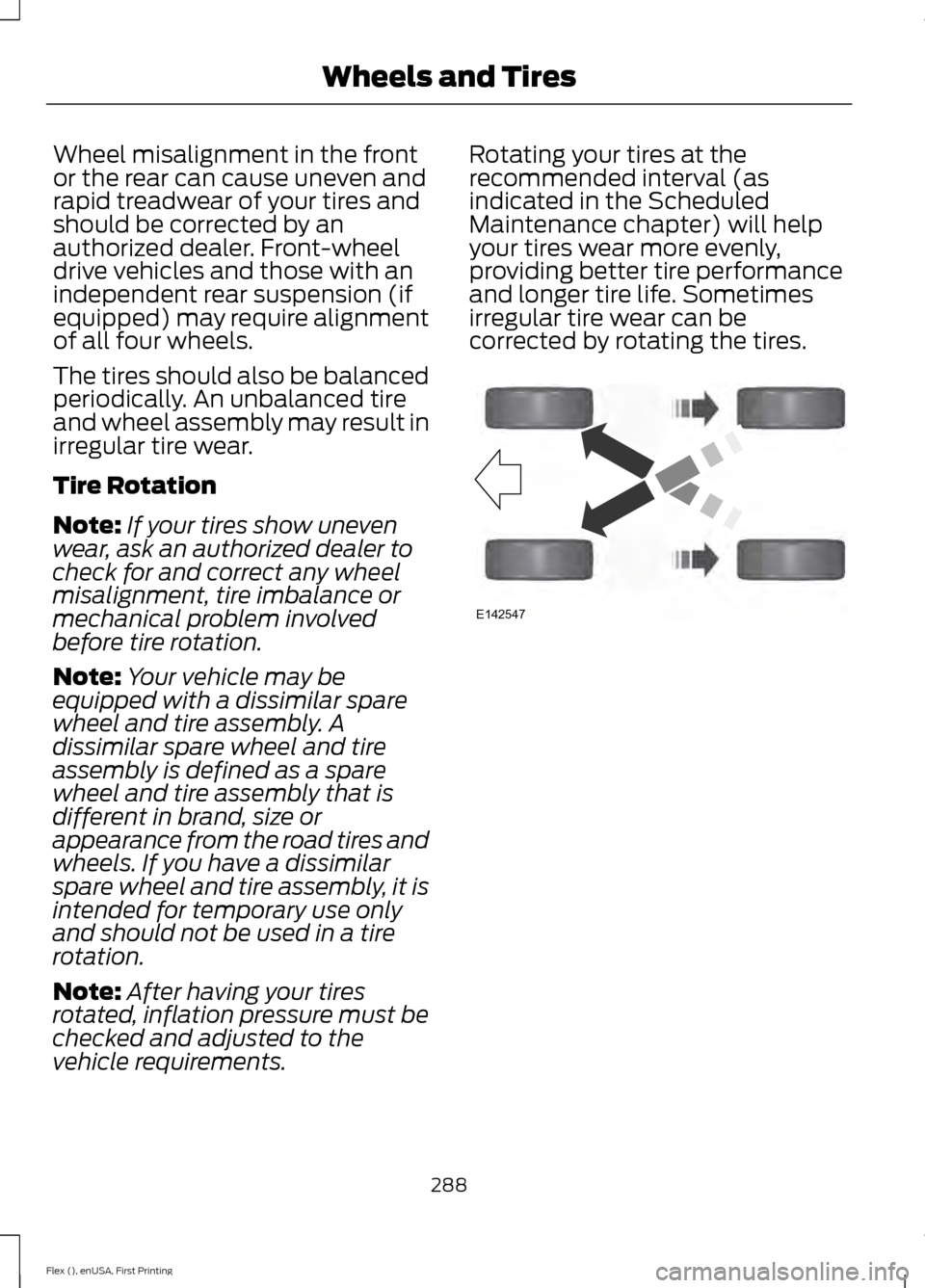
vehicle requirements. Rotating your tires at the
recommended interval (as
indicated in the Scheduled
Maintenance chapter) will help
your tires wear more evenly,
providing better tire performance
and longer tire life. Sometimes
irregular tire wear can be
corrected by rotating the tires.
288
Flex (), enUSA, First Printing Wheels and TiresE142547
Page 494 of 496
T
Tailgate
See: Manual Liftgate.......................................... 66
See: Power Liftgate.............................................. 67
Technical Specifications See: Capacities and Specifications............299
The Better Business Bureau (BBB) Auto Line Program (U.S. Only).......................228
Tire Care...........................................................275 Glossary of Tire Terminology.......................... 277
Information About Uniform Tire Quality Grading.............................................................. 275
Information Contained on the Tire Sidewall............................................................ 278
Temperature A B C............................................ 276
Traction AA A B C............................................... 276
Treadwear............................................................. 276
Tire Pressure Monitoring System..........290 Changing Tires With a Tire Pressure
Monitoring System........................................ 291
Understanding Your Tire Pressure Monitoring System ....................................... 291
Tires See: Wheels and Tires...................................... 273
Towing a Trailer
............................................209
Load Placement................................................ 209
Towing the Vehicle on Four Wheels...........................................................215
Emergency Towing............................................. 215
Recreational Towing.......................................... 215
Towing.............................................................209
Traction Control
.............................................177
Principle of Operation........................................ 177
Trailer Sway Control
....................................210
Transmission Code Designation............303
Transmission..................................................164
Transmission See: Transmission.............................................. 164
Transporting the Vehicle...........................224
U
Under Hood Overview - 3.5L Duratec.........................................................246
Under Hood Overview - 3.5L Ecoboost™..................................................247 Universal Garage Door Opener
...............140
HomeLink Wireless Control System...........140
USB Port.........................................................320
Using Adaptive Cruise Control................189 Automatic Cancellation................................... 192
Blocked Sensor................................................... 193
Canceling the Set Speed.................................. 191
Changing the Set Speed.................................. 192
Detection Issues.................................................. 193
Following a Vehicle............................................ 190
Hilly Condition Usage........................................ 192
Overriding the System...................................... 192
Resuming the Set Speed................................. 192
Setting the Adaptive Cruise Speed.............190
Setting the Gap Distance................................. 191
Switching Adaptive Cruise Control Off........................................................................\
192
Switching Adaptive Cruise Control On........................................................................\
189
Switching to Normal Cruise Control...........194
System Not Available....................................... 193
Using All-Wheel Drive................................168 Driving In Special Conditions With
All-Wheel Drive (AWD)............................... 170
Operating AWD Vehicles With Mismatched Tires.................................................................... 169
Operating AWD Vehicles With Spare Tires.................................................................... 169
Using Cruise Control...................................188 Switching Cruise Control Off......................... 189
Switching Cruise Control On.......................... 188
Using MyKey With Remote Start Systems...........................................................61
Using Snow Chains.....................................289
Using Stability Control
................................179
Using SYNC™ With Your Media Player.............................................................342
Accessing Your Play Menu.............................. 347
Connecting Your Digital Media Player to the USB Port........................................................... 342
Media Menu Features...................................... 345
Media Voice Commands................................ 344
System Settings................................................. 349
What's Playing?................................................. 344
Using SYNC™ With Your Phone............326 Accessing Features Through the Phone
Menu.................................................................. 330
Accessing Your Phone Settings.................... 334
491
Flex (), enUSA, First Printing Index