height FORD FLEX 2017 1.G User Guide
[x] Cancel search | Manufacturer: FORD, Model Year: 2017, Model line: FLEX, Model: FORD FLEX 2017 1.GPages: 496, PDF Size: 5.92 MB
Page 216 of 496
Hitches
Do not use a hitch that either clamps onto
the bumper or attaches to the axle.
Distribute the trailer load so 10-15% of the
total trailer weight is on the tongue.
Weight-Distributing Hitch
WARNING
Do not adjust a weight-distributing
hitch to any position where the rear
bumper of the vehicle is higher than
it was before attaching the trailer. Doing
so will defeat the function of the
weight-distributing hitch, which may cause
unpredictable handling, and could result
in serious personal injury. When hooking-up a trailer using a
weight-distributing hitch, always use the
following procedure:
1. Park your vehicle, without the trailer,
on a level surface.
2. Measure the height of the top of your vehicle ’s front wheel opening on the
fender. This is H1.
3. Attach the trailer to your vehicle without the weight-distributing bars
connected.
4. Measure the height of the top of your vehicle ’s front wheel opening on the
fender a second time. This is H2.
5. Install and adjust the tension in the weight distributing bars so that the
height of the front fender is
approximately halfway between H1 and
H2.
6. Check that the trailer is level. If not level, adjust the ball height accordingly
and repeat Steps 3–6.
Safety Chains
Note: Never attach safety chains to the
bumper. Always connect the safety chains to the
hook retainers of your vehicle hitch.
To connect the safety chains, cross them
under the trailer tongue and allow enough
slack for turning tight corners. Do not allow
the chains to drag on the ground.
Trailer Brakes
WARNING
Do not connect a trailer's hydraulic
brake system directly to your
vehicle's brake system. Your vehicle
may not have enough braking power and
your chances of having a collision greatly
increase. Electric brakes and manual, automatic or
surge-type trailer brakes are safe if you
install them properly and adjust them to
the manufacturer's specifications. The
trailer brakes must meet local and federal
regulations.
The rating for the tow vehicle's braking
system operation is at the gross vehicle
weight rating, not the gross combined
weight rating.
Separate functioning brake systems
are required for safe control of towed
vehicles and trailers weighing more
than 1500 pounds (680 kilograms)
when loaded.
Trailer Brake Controller Connector
(If Equipped)
The connector is located under the
instrument panel above the brake pedal.
213
Flex (), enUSA, First Printing Towing
Page 262 of 496
Rear Window Wiper Blade
1. Lift the wiper arm.
Note:
Do not hold the wiper blade when
lifting the wiper arm.
Note: Make sure that the wiper arm does
not spring back against the glass when the
wiper blade is not attached.
2. Remove the wiper blade.
Note: Make sure that the wiper blade locks
into place. ADJUSTING THE HEADLAMPS
Vertical Aim
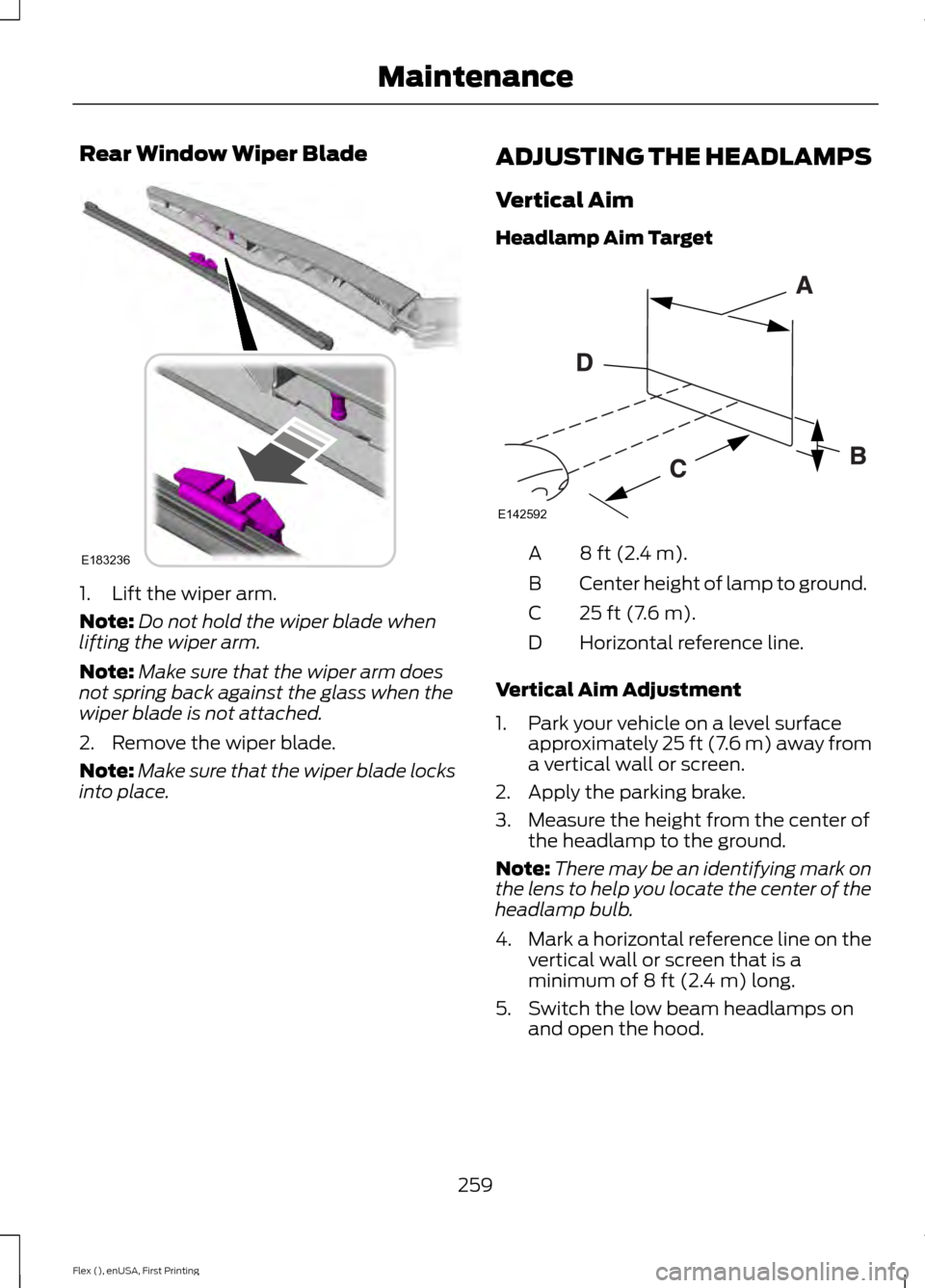
Headlamp Aim Target 8 ft (2.4 m).
A
Center height of lamp to ground.
B
25 ft (7.6 m).
C
Horizontal reference line.
D
Vertical Aim Adjustment
1. Park your vehicle on a level surface approximately 25 ft (7.6 m) away from
a vertical wall or screen.
2. Apply the parking brake.
3. Measure the height from the center of the headlamp to the ground.
Note: There may be an identifying mark on
the lens to help you locate the center of the
headlamp bulb.
4. Mark a horizontal reference line on the
vertical wall or screen that is a
minimum of
8 ft (2.4 m) long.
5. Switch the low beam headlamps on and open the hood.
259
Flex (), enUSA, First Printing MaintenanceE183236 E142592
Page 281 of 496
Information Contained on the
Tire Sidewall
Both United States and Canada
Federal regulations require tire
manufacturers to place
standardized information on the
sidewall of all tires. This
information identifies and
describes the fundamental
characteristics of the tire and also
provides a U.S. DOT Tire
Identification Number for safety
standard certification and in case
of a recall.
Information on P Type Tires
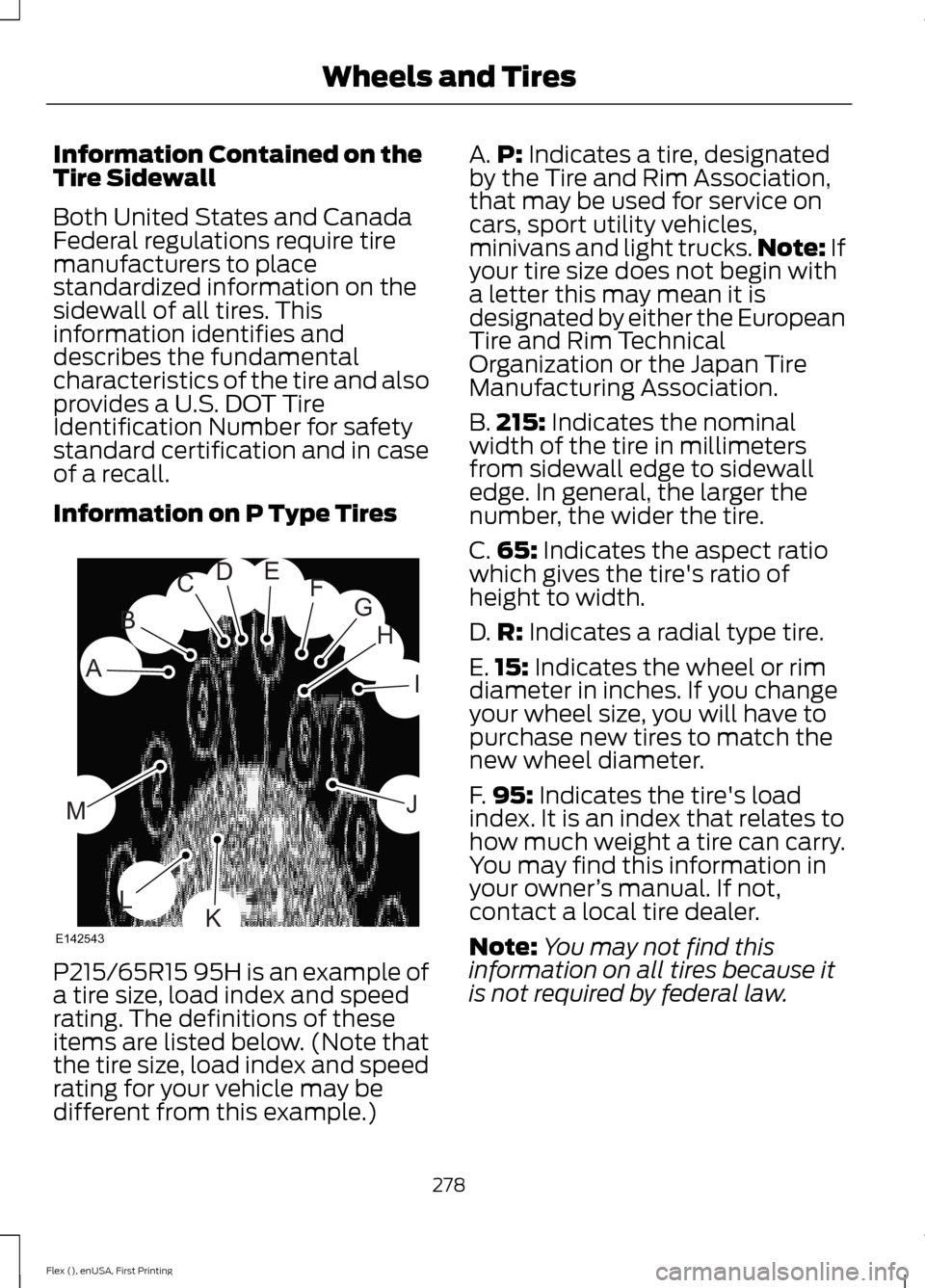
P215/65R15 95H is an example of
a tire size, load index and speed
rating. The definitions of these
items are listed below. (Note that
the tire size, load index and speed
rating for your vehicle may be
different from this example.) A.
P: Indicates a tire, designated
by the Tire and Rim Association,
that may be used for service on
cars, sport utility vehicles,
minivans and light trucks. Note:
If
your tire size does not begin with
a letter this may mean it is
designated by either the European
Tire and Rim Technical
Organization or the Japan Tire
Manufacturing Association.
B. 215:
Indicates the nominal
width of the tire in millimeters
from sidewall edge to sidewall
edge. In general, the larger the
number, the wider the tire.
C. 65:
Indicates the aspect ratio
which gives the tire's ratio of
height to width.
D. R:
Indicates a radial type tire.
E. 15:
Indicates the wheel or rim
diameter in inches. If you change
your wheel size, you will have to
purchase new tires to match the
new wheel diameter.
F. 95:
Indicates the tire's load
index. It is an index that relates to
how much weight a tire can carry.
You may find this information in
your owner ’s manual. If not,
contact a local tire dealer.
Note: You may not find this
information on all tires because it
is not required by federal law.
278
Flex (), enUSA, First Printing Wheels and TiresH
I
J
KL
M
A
B
CDEFG
E142543
Page 285 of 496
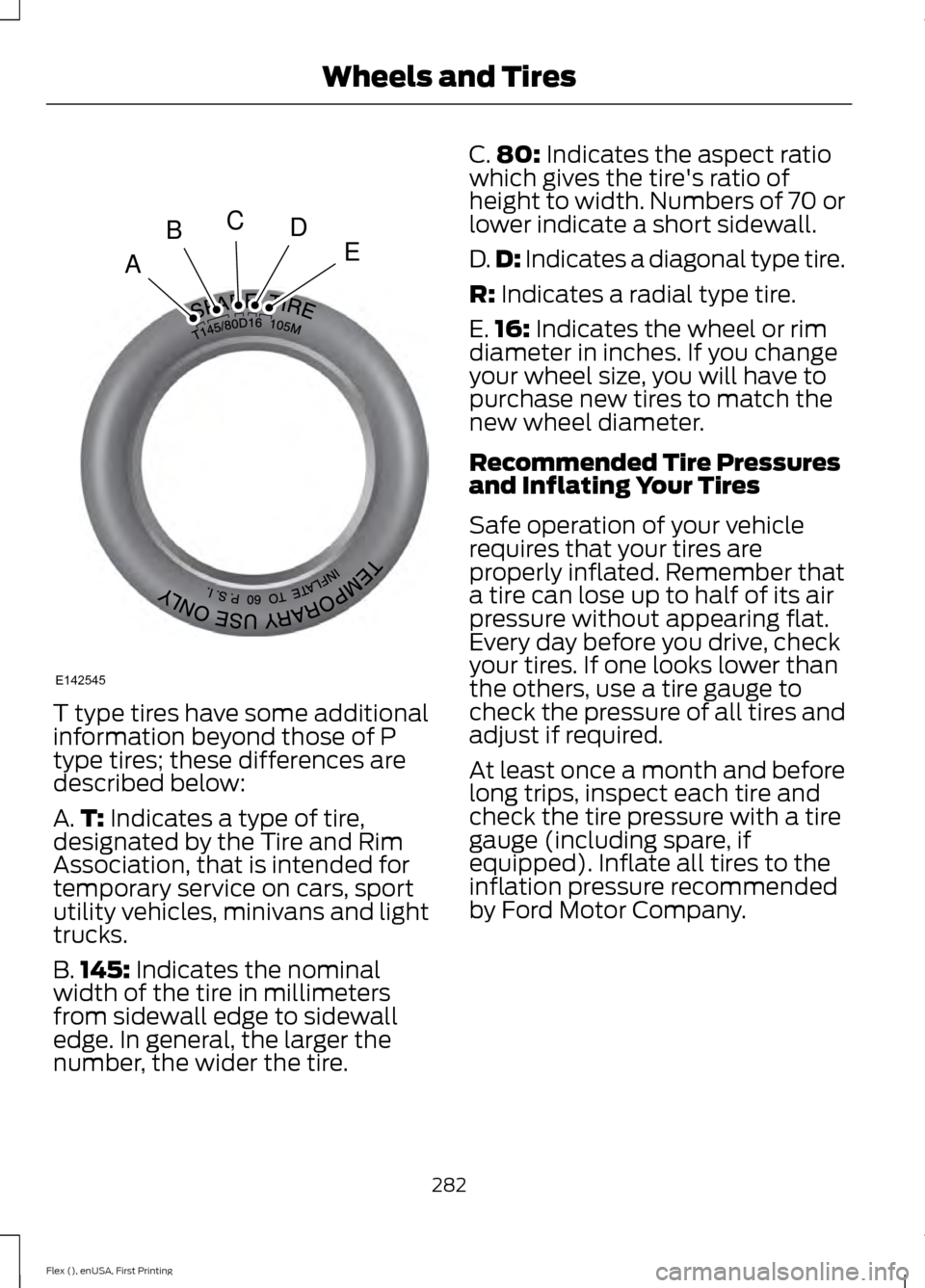
T type tires have some additional
information beyond those of P
type tires; these differences are
described below:
A.
T: Indicates a type of tire,
designated by the Tire and Rim
Association, that is intended for
temporary service on cars, sport
utility vehicles, minivans and light
trucks.
B. 145:
Indicates the nominal
width of the tire in millimeters
from sidewall edge to sidewall
edge. In general, the larger the
number, the wider the tire. C.
80:
Indicates the aspect ratio
which gives the tire's ratio of
height to width. Numbers of 70 or
lower indicate a short sidewall.
D. D:
Indicates a diagonal type tire.
R:
Indicates a radial type tire.
E. 16:
Indicates the wheel or rim
diameter in inches. If you change
your wheel size, you will have to
purchase new tires to match the
new wheel diameter.
Recommended Tire Pressures
and Inflating Your Tires
Safe operation of your vehicle
requires that your tires are
properly inflated. Remember that
a tire can lose up to half of its air
pressure without appearing flat.
Every day before you drive, check
your tires. If one looks lower than
the others, use a tire gauge to
check the pressure of all tires and
adjust if required.
At least once a month and before
long trips, inspect each tire and
check the tire pressure with a tire
gauge (including spare, if
equipped). Inflate all tires to the
inflation pressure recommended
by Ford Motor Company.
282
Flex (), enUSA, First Printing Wheels and TiresA
BCDE
E142545
Page 287 of 496
is suspected, have the tire
demounted and inspected in case
it needs to be repaired or replaced.
For your safety, tires that are
damaged or show signs of
excessive wear should not be used
because they are more likely to
blow out or fail.
Improper or inadequate vehicle
maintenance can cause tires to
wear abnormally. Inspect all your
tires, including the spare,
frequently, and replace them if
one or more of the following
conditions exist:
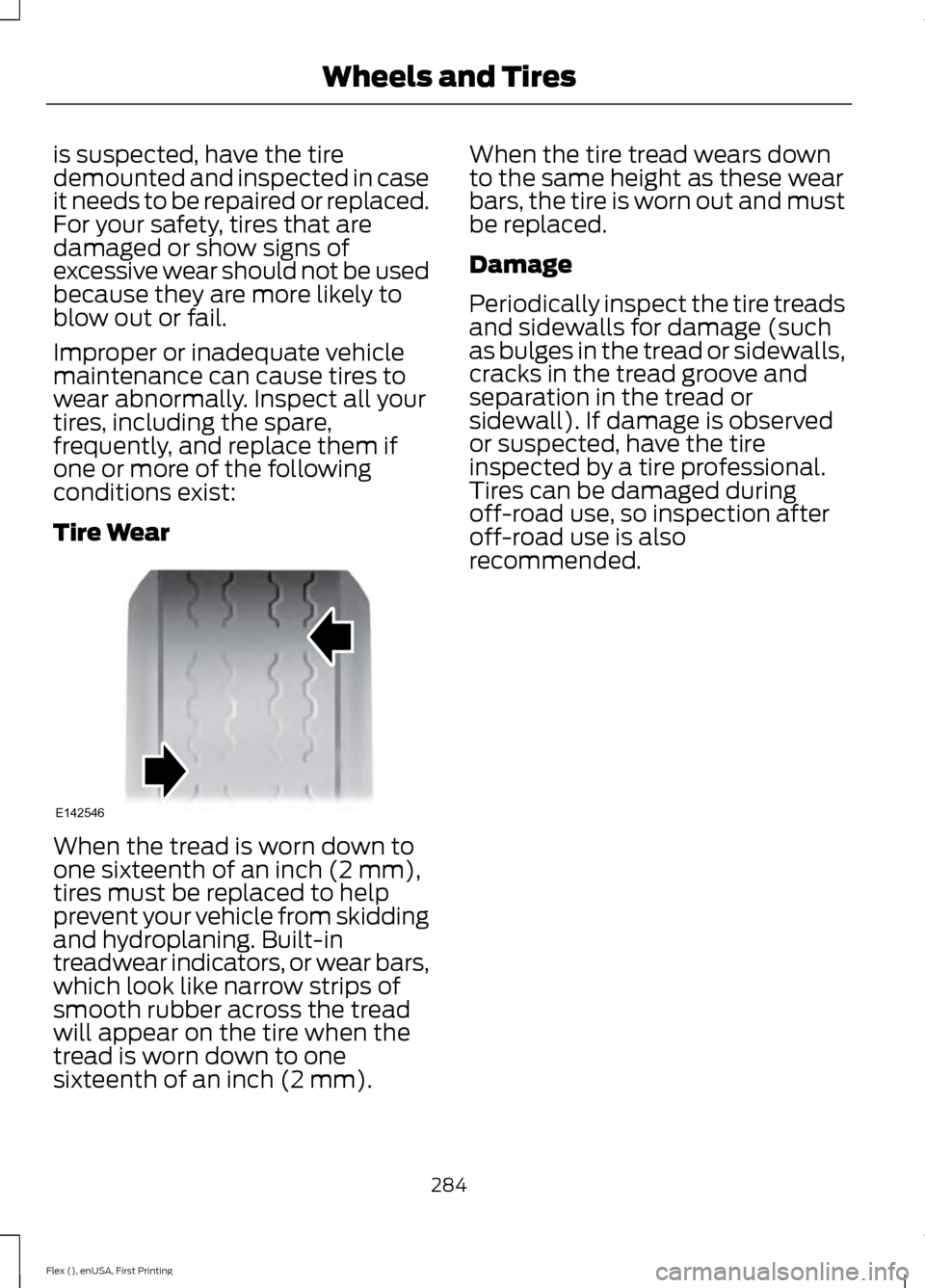
Tire Wear
When the tread is worn down to
one sixteenth of an inch (2 mm),
tires must be replaced to help
prevent your vehicle from skidding
and hydroplaning. Built-in
treadwear indicators, or wear bars,
which look like narrow strips of
smooth rubber across the tread
will appear on the tire when the
tread is worn down to one
sixteenth of an inch (2 mm). When the tire tread wears down
to the same height as these wear
bars, the tire is worn out and must
be replaced.
Damage
Periodically inspect the tire treads
and sidewalls for damage (such
as bulges in the tread or sidewalls,
cracks in the tread groove and
separation in the tread or
sidewall). If damage is observed
or suspected, have the tire
inspected by a tire professional.
Tires can be damaged during
off-road use, so inspection after
off-road use is also
recommended.
284
Flex (), enUSA, First Printing Wheels and TiresE142546
Page 492 of 496
Parking Brake..................................................176
Passive Anti-Theft System.........................73
SecuriLock®........................................................... 73
PATS See: Passive Anti-Theft System..................... 73
Pedals.................................................................78
Perchlorate.........................................................11
Personal Safety System ™..........................43
How Does the Personal Safety System
Work?.................................................................. 43
Phone...............................................................393 During a Phone Call.......................................... 397
Making Calls........................................................ 396
Pairing Your Cell Phone for the First Time................................................................... 393
Phone Menu........................................................ 394
Receiving Calls.................................................... 397
Smartphone Connectivity.............................. 398
Text Messaging.................................................. 398
Post-Crash Alert System..........................224
Power Door Locks See: Locking and Unlocking............................. 63
Power Liftgate.................................................67 Hands-Free Feature............................................ 70
Obstacle Detection............................................. 69
Opening and Closing the Liftgate.................. 68
Setting the Liftgate Open Height.................. 69
Stopping the Liftgate Movement.................. 69
Power Seats....................................................129 Power Lumbar..................................................... 130
Power Steering Fluid Check.....................256
Power Windows.............................................88 Accessory Delay................................................... 88
Bounce-Back......................................................... 88
One-Touch Down................................................ 88
One-Touch Up...................................................... 88
Window Lock......................................................... 88
Protecting the Environment........................15
R
Rear Parking Aid...........................................180
Rear Passenger Climate Controls...........123
Rear Seats
........................................................131
Adjusting the Rear Seats................................... 131
Rear View Camera
.......................................185
Using the Rear View Camera System.........185 Rear View Camera
See: Rear View Camera.................................... 185
Rear Window Wiper and Washers..........80 Rear Camera Washer........................................... 81
Rear Window Washer.......................................... 81
Rear Window Wiper............................................ 80
Recommended Towing Weights............210
Refueling..........................................................157 System Warnings................................................ 159
Remote Control..............................................53 Car Finder................................................................ 55
Integrated Keyhead Transmitter..................... 53
Intelligent Access Key......................................... 53
Memory Feature................................................... 56
Remote Start......................................................... 55
Replacing the Battery......................................... 54
Sounding the Panic Alarm................................ 55
Remote Start
..................................................124
Automatic Settings............................................ 124
Removing a Headlamp.............................260
Repairing Minor Paint Damage...............270
Replacement Parts Recommendation........................................12
Collision Repairs.................................................... 12
Scheduled Maintenance and Mechanical Repairs.................................................................. 12
Warranty on Replacement Parts..................... 12
Replacing a Lost Key or Remote Control............................................................56
Reporting Safety Defects (Canada Only)...............................................................231
Reporting Safety Defects (U.S. Only)...............................................................231
Roadside Assistance..................................220 Vehicles Sold in Canada: Getting Roadside
Assistance....................................................... 220
Vehicles Sold in Canada: Roadside Assistance Program Coverage.................. 221
Vehicles Sold in Canada: Using Roadside Assistance......................................................... 221
Vehicles Sold in the United States: Getting Roadside Assistance................................... 220
Vehicles Sold in the United States: Using Roadside Assistance................................... 220
Roadside Emergencies
..............................220
Roof Racks and Load Carriers................203
Running-In See: Breaking-In................................................... 217
489
Flex (), enUSA, First Printing Index
Page 493 of 496
Running Out of Fuel....................................156
Adding Fuel From a Portable Fuel
Container........................................................... 157
Filling a Portable Fuel Container................... 157
S
Safety Canopy ™............................................49
Safety Precautions.......................................155
Scheduled Maintenance Record............447
Scheduled Maintenance..........................439
Seatbelt Extension.........................................41
Seatbelt Height Adjustment
......................38
Seatbelt Reminder........................................39 Belt-Minder™........................................................ 39
Seatbelts...........................................................34 Principle of Operation........................................ 34
Seatbelt Warning Lamp and Indicator Chime
..............................................................39
Conditions of operation..................................... 39
Seats..................................................................125
Security...............................................................73
Settings............................................................410 911 Assist................................................................ 415
Ambient Lighting............................................... 420
Bluetooth............................................................... 412
Clock........................................................................\
. 411
Display.................................................................... 421
General................................................................... 419
Media Player.......................................................... 411
Mobile Apps......................................................... 418
Navigation............................................................. 416
Phone...................................................................... 412
Radio....................................................................... 415
Sound..................................................................... 410
Valet Mode........................................................... 422
Vehicle................................................................... 420
Voice Control....................................................... 422
Wi-Fi....................................................................... 420
Side Airbags
.....................................................48
Sitting in the Correct Position..................125
Snow Chains See: Using Snow Chains................................. 289
Special Notices................................................12 New Vehicle Limited Warranty......................... 12
On Board Diagnostics Data Link Connector............................................................ 13
Special Instructions.............................................. 12Special Operating Conditions Scheduled
Maintenance..............................................445
Exceptions........................................................... 446
Speed Control See: Cruise Control............................................ 188
Stability Control
............................................178
Principle of Operation....................................... 178
Starter Switch See: Ignition Switch........................................... 149
Starting a Gasoline Engine.......................150 Automatic Engine Shutdown......................... 152
Failure to Start..................................................... 152
Guarding Against Exhaust Fumes................153
Important Ventilating Information...............153
Stopping the Engine When Your Vehicle is Moving................................................................ 153
Stopping the Engine When Your Vehicle is Stationary......................................................... 152
Vehicles with an Ignition Key......................... 150
Vehicles with Keyless Start.............................. 151
Starting and Stopping the Engine
.........149
General Information.......................................... 149
Steering..........................................................200 Electric Power Steering................................... 200
Steering Wheel................................................75
Storage Compartments
.............................147
Sunroof See: Moonroof........................................................ 91
Sun Visors
..........................................................91
Illuminated Vanity Mirror.................................... 91
Supplementary Restraints System.........44 Principle of Operation........................................ 44
Symbols Glossary
.............................................7
SYNC™ 3.......................................................360
General Information......................................... 360
SYNC™ 3 Troubleshooting......................422
SYNC™ Applications and Services........................................................339
911 Assist............................................................... 339
SYNC™ AppLink ™
......................................341
SYNC Mobile Apps............................................. 341
SYNC™.............................................................321 General Information........................................... 321
SYNC™ Troubleshooting
..........................352
490
Flex (), enUSA, First Printing Index