steering wheel FORD FLEX 2018 Workshop Manual
[x] Cancel search | Manufacturer: FORD, Model Year: 2018, Model line: FLEX, Model: FORD FLEX 2018Pages: 508, PDF Size: 6.31 MB
Page 382 of 508
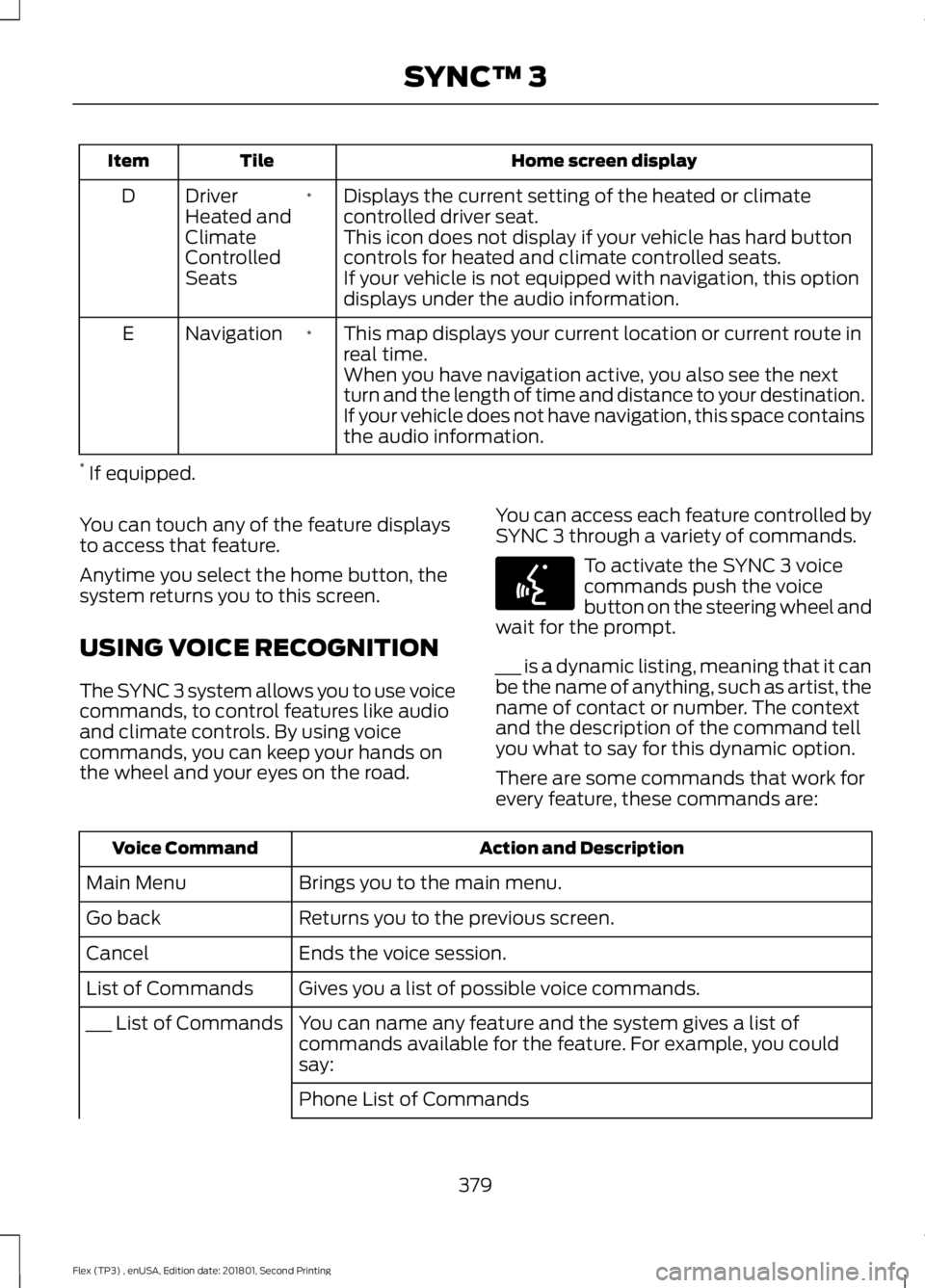
Home screen display
Tile
Item
Displays the current setting of the heated or climate
controlled driver seat.
*
Driver
Heated and
Climate
Controlled
Seats
D
This icon does not display if your vehicle has hard button
controls for heated and climate controlled seats.
If your vehicle is not equipped with navigation, this option
displays under the audio information.
This map displays your current location or current route in
real time.
*
Navigation
E
When you have navigation active, you also see the next
turn and the length of time and distance to your destination.
If your vehicle does not have navigation, this space contains
the audio information.
* If equipped.
You can touch any of the feature displays
to access that feature.
Anytime you select the home button, the
system returns you to this screen.
USING VOICE RECOGNITION
The SYNC 3 system allows you to use voice
commands, to control features like audio
and climate controls. By using voice
commands, you can keep your hands on
the wheel and your eyes on the road. You can access each feature controlled by
SYNC 3 through a variety of commands. To activate the SYNC 3 voice
commands push the voice
button on the steering wheel and
wait for the prompt.
___ is a dynamic listing, meaning that it can
be the name of anything, such as artist, the
name of contact or number. The context
and the description of the command tell
you what to say for this dynamic option.
There are some commands that work for
every feature, these commands are: Action and Description
Voice Command
Brings you to the main menu.
Main Menu
Returns you to the previous screen.
Go back
Ends the voice session.
Cancel
Gives you a list of possible voice commands.
List of Commands
You can name any feature and the system gives a list of
commands available for the feature. For example, you could
say:
___ List of Commands
Phone List of Commands
379
Flex (TP3) , enUSA, Edition date: 201801, Second Printing SYNC™ 3E142599
Page 400 of 508
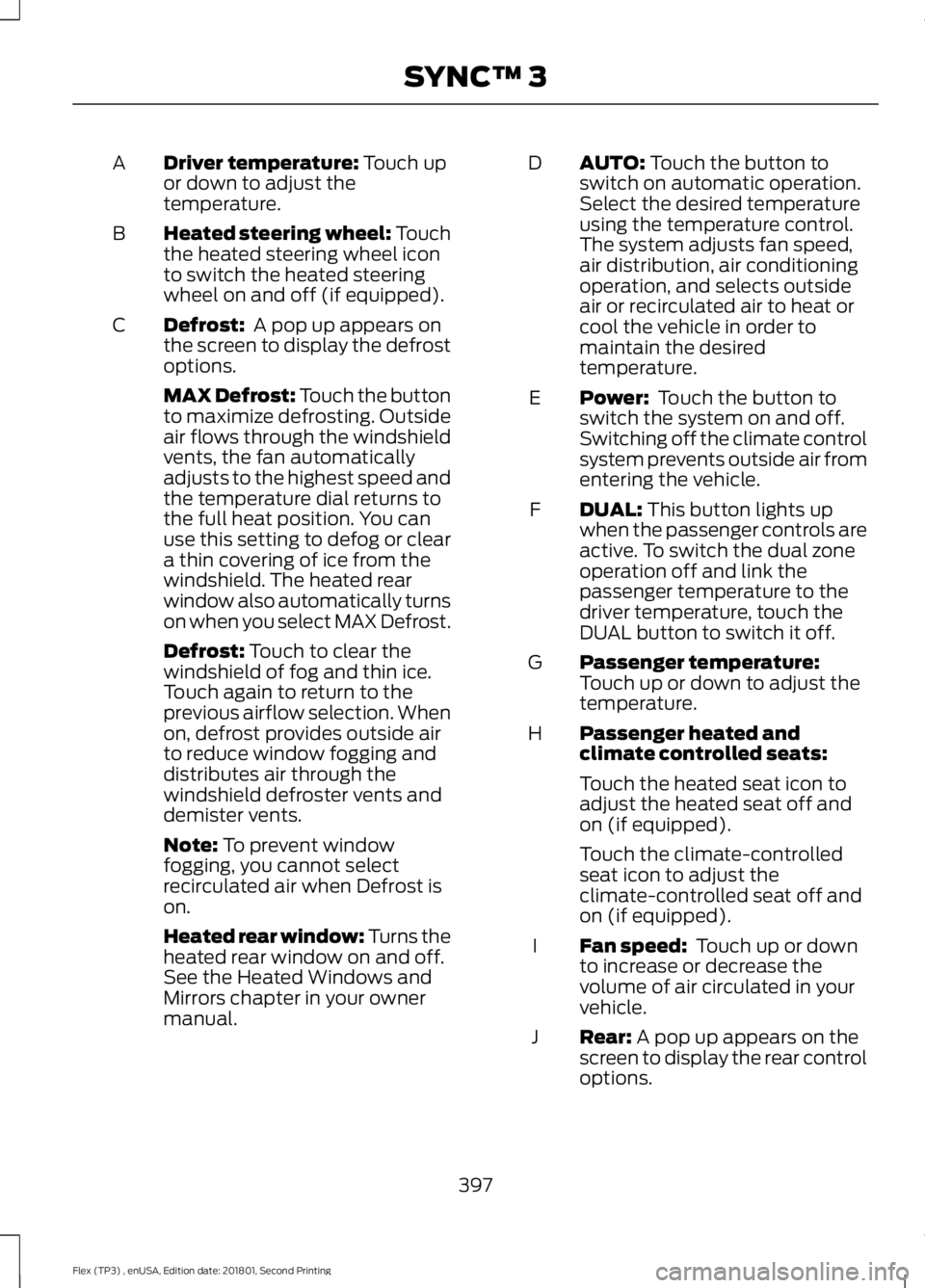
Driver temperature: Touch up
or down to adjust the
temperature.
A
Heated steering wheel: Touch
the heated steering wheel icon
to switch the heated steering
wheel on and off (if equipped).
B
Defrost:
A pop up appears on
the screen to display the defrost
options.
C
MAX Defrost: Touch the button
to maximize defrosting. Outside
air flows through the windshield
vents, the fan automatically
adjusts to the highest speed and
the temperature dial returns to
the full heat position. You can
use this setting to defog or clear
a thin covering of ice from the
windshield. The heated rear
window also automatically turns
on when you select MAX Defrost.
Defrost:
Touch to clear the
windshield of fog and thin ice.
Touch again to return to the
previous airflow selection. When
on, defrost provides outside air
to reduce window fogging and
distributes air through the
windshield defroster vents and
demister vents.
Note:
To prevent window
fogging, you cannot select
recirculated air when Defrost is
on.
Heated rear window: Turns the
heated rear window on and off.
See the Heated Windows and
Mirrors chapter in your owner
manual. AUTO:
Touch the button to
switch on automatic operation.
Select the desired temperature
using the temperature control.
The system adjusts fan speed,
air distribution, air conditioning
operation, and selects outside
air or recirculated air to heat or
cool the vehicle in order to
maintain the desired
temperature.
D
Power:
Touch the button to
switch the system on and off.
Switching off the climate control
system prevents outside air from
entering the vehicle.
E
DUAL:
This button lights up
when the passenger controls are
active. To switch the dual zone
operation off and link the
passenger temperature to the
driver temperature, touch the
DUAL button to switch it off.
F
Passenger temperature:
Touch up or down to adjust the
temperature.
G
Passenger heated and
climate controlled seats:
H
Touch the heated seat icon to
adjust the heated seat off and
on (if equipped).
Touch the climate-controlled
seat icon to adjust the
climate-controlled seat off and
on (if equipped).
Fan speed:
Touch up or down
to increase or decrease the
volume of air circulated in your
vehicle.
I
Rear:
A pop up appears on the
screen to display the rear control
options.
J
397
Flex (TP3) , enUSA, Edition date: 201801, Second Printing SYNC™ 3
Page 404 of 508
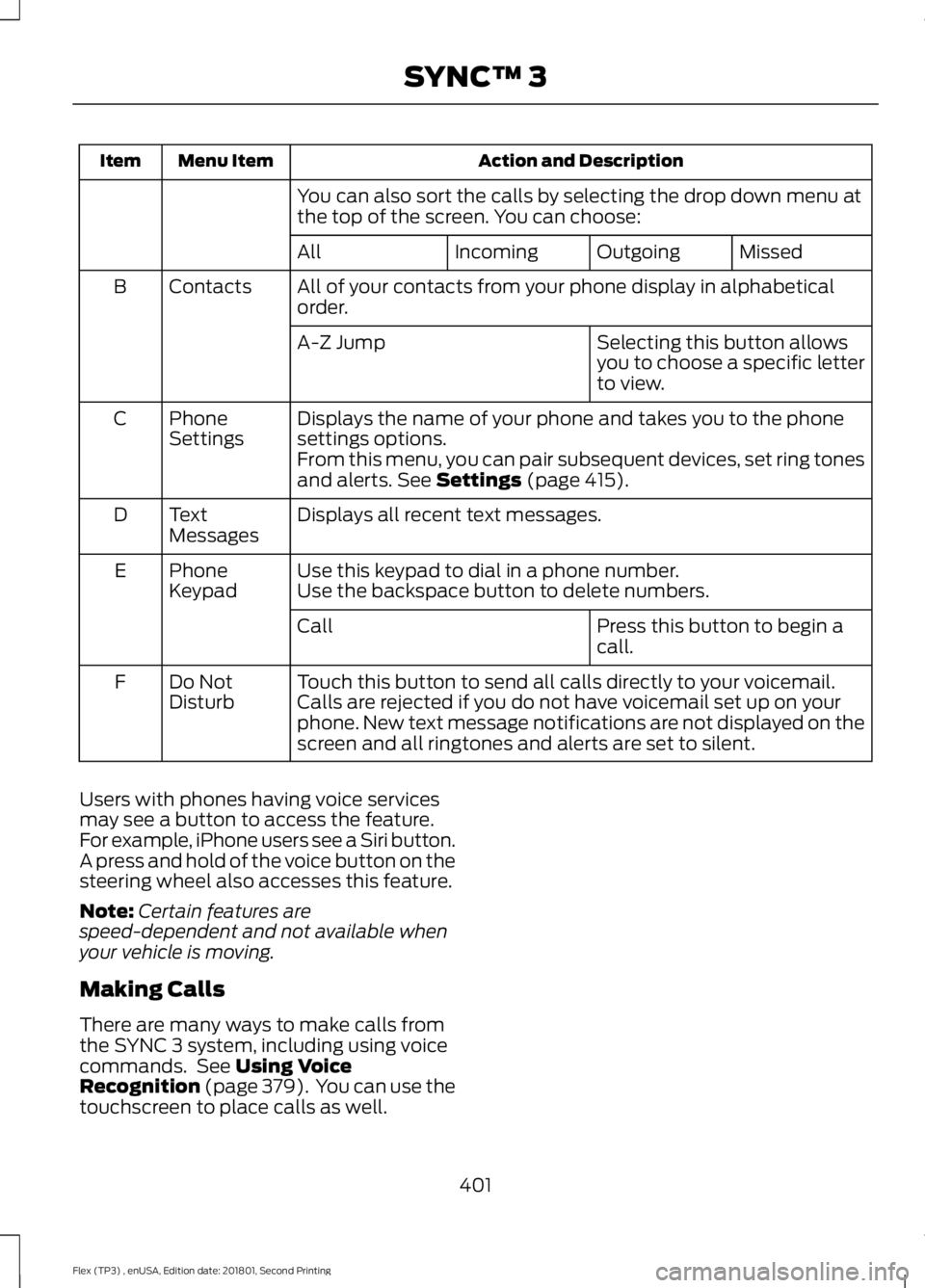
Action and Description
Menu Item
Item
You can also sort the calls by selecting the drop down menu at
the top of the screen. You can choose: Missed
Outgoing
Incoming
All
All of your contacts from your phone display in alphabetical
order.
Contacts
B
Selecting this button allows
you to choose a specific letter
to view.
A-Z Jump
Displays the name of your phone and takes you to the phone
settings options.
Phone
Settings
C
From this menu, you can pair subsequent devices, set ring tones
and alerts. See Settings (page 415).
Displays all recent text messages.
Text
Messages
D
Use this keypad to dial in a phone number.
Phone
Keypad
E
Use the backspace button to delete numbers.
Press this button to begin a
call.
Call
Touch this button to send all calls directly to your voicemail.
Calls are rejected if you do not have voicemail set up on your
phone. New text message notifications are not displayed on the
screen and all ringtones and alerts are set to silent.
Do Not
Disturb
F
Users with phones having voice services
may see a button to access the feature.
For example, iPhone users see a Siri button.
A press and hold of the voice button on the
steering wheel also accesses this feature.
Note: Certain features are
speed-dependent and not available when
your vehicle is moving.
Making Calls
There are many ways to make calls from
the SYNC 3 system, including using voice
commands. See
Using Voice
Recognition (page 379). You can use the
touchscreen to place calls as well.
401
Flex (TP3) , enUSA, Edition date: 201801, Second Printing SYNC™ 3
Page 405 of 508
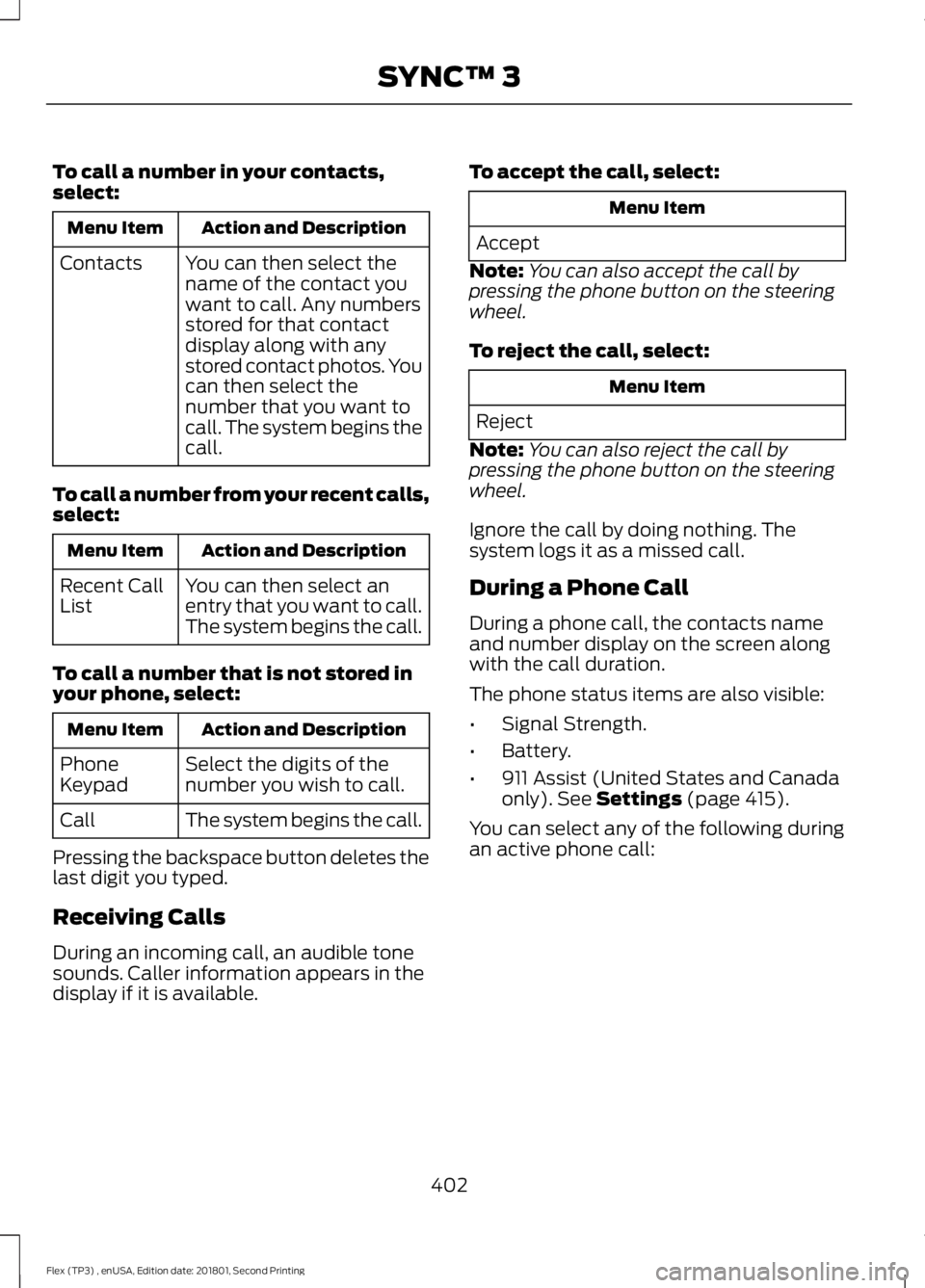
To call a number in your contacts,
select:
Action and Description
Menu Item
You can then select the
name of the contact you
want to call. Any numbers
stored for that contact
display along with any
stored contact photos. You
can then select the
number that you want to
call. The system begins the
call.
Contacts
To call a number from your recent calls,
select: Action and Description
Menu Item
You can then select an
entry that you want to call.
The system begins the call.
Recent Call
List
To call a number that is not stored in
your phone, select: Action and Description
Menu Item
Select the digits of the
number you wish to call.
Phone
Keypad
The system begins the call.
Call
Pressing the backspace button deletes the
last digit you typed.
Receiving Calls
During an incoming call, an audible tone
sounds. Caller information appears in the
display if it is available. To accept the call, select: Menu Item
Accept
Note: You can also accept the call by
pressing the phone button on the steering
wheel.
To reject the call, select: Menu Item
Reject
Note: You can also reject the call by
pressing the phone button on the steering
wheel.
Ignore the call by doing nothing. The
system logs it as a missed call.
During a Phone Call
During a phone call, the contacts name
and number display on the screen along
with the call duration.
The phone status items are also visible:
• Signal Strength.
• Battery.
• 911 Assist (United States and Canada
only). See Settings (page 415).
You can select any of the following during
an active phone call:
402
Flex (TP3) , enUSA, Edition date: 201801, Second Printing SYNC™ 3
Page 406 of 508
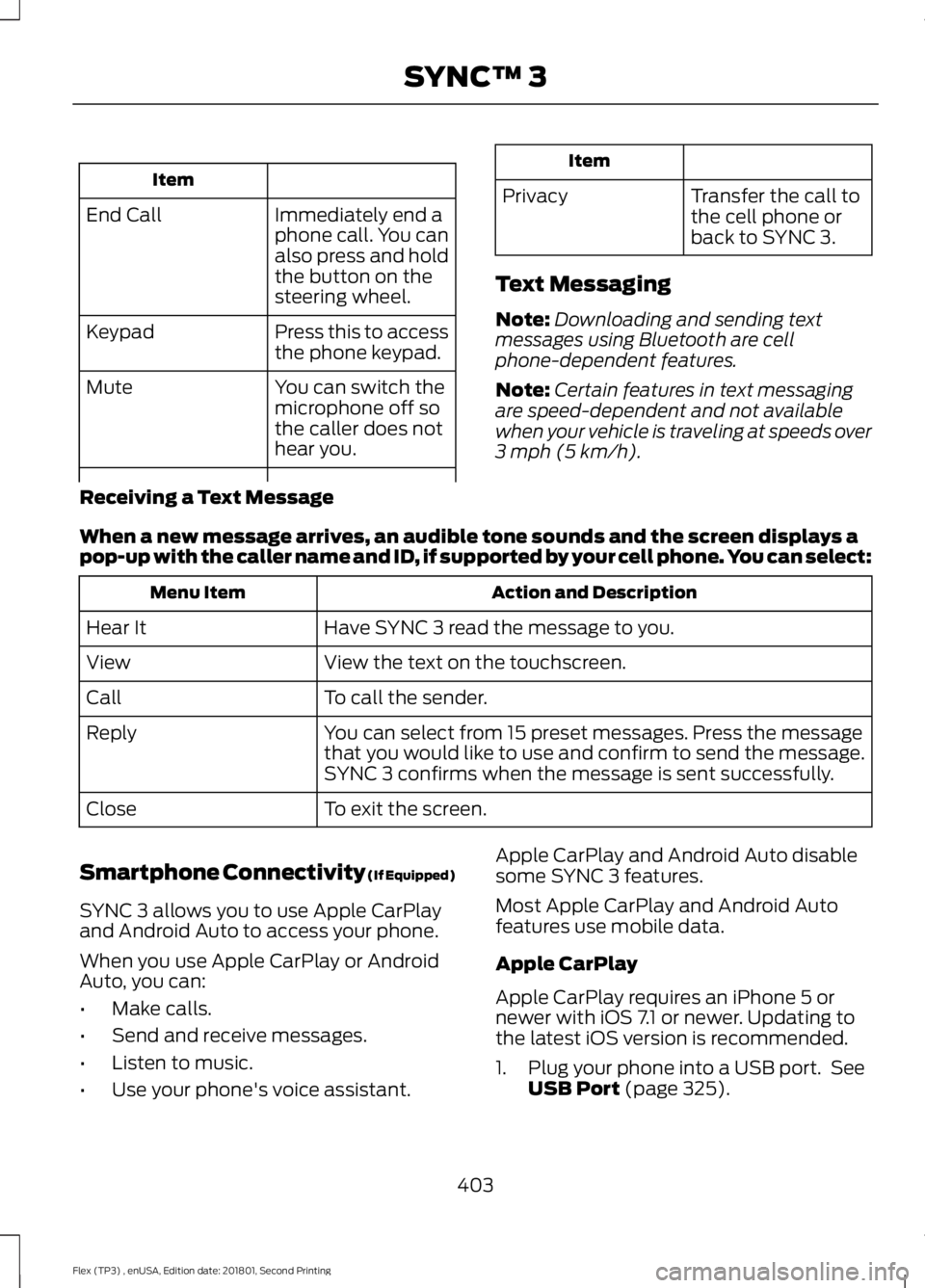
Item
Immediately end a
phone call. You can
also press and hold
the button on the
steering wheel.
End Call
Press this to access
the phone keypad.
Keypad
You can switch the
microphone off so
the caller does not
hear you.
Mute Item
Privacy Transfer the call to
the cell phone or
back to SYNC 3.
Text Messaging
Note: Downloading and sending text
messages using Bluetooth are cell
phone-dependent features.
Note: Certain features in text messaging
are speed-dependent and not available
when your vehicle is traveling at speeds over
3 mph (5 km/h).
Receiving a Text Message
When a new message arrives, an audible tone sounds and the screen displays a
pop-up with the caller name and ID, if supported by your cell phone. You can select: Action and Description
Menu Item
Have SYNC 3 read the message to you.
Hear It
View the text on the touchscreen.
View
To call the sender.
Call
You can select from 15 preset messages. Press the message
that you would like to use and confirm to send the message.
SYNC 3 confirms when the message is sent successfully.
Reply
To exit the screen.
Close
Smartphone Connectivity (If Equipped)
SYNC 3 allows you to use Apple CarPlay
and Android Auto to access your phone.
When you use Apple CarPlay or Android
Auto, you can:
• Make calls.
• Send and receive messages.
• Listen to music.
• Use your phone's voice assistant. Apple CarPlay and Android Auto disable
some SYNC 3 features.
Most Apple CarPlay and Android Auto
features use mobile data.
Apple CarPlay
Apple CarPlay requires an iPhone 5 or
newer with iOS 7.1 or newer. Updating to
the latest iOS version is recommended.
1. Plug your phone into a USB port. See
USB Port
(page 325).
403
Flex (TP3) , enUSA, Edition date: 201801, Second Printing SYNC™ 3
Page 415 of 508
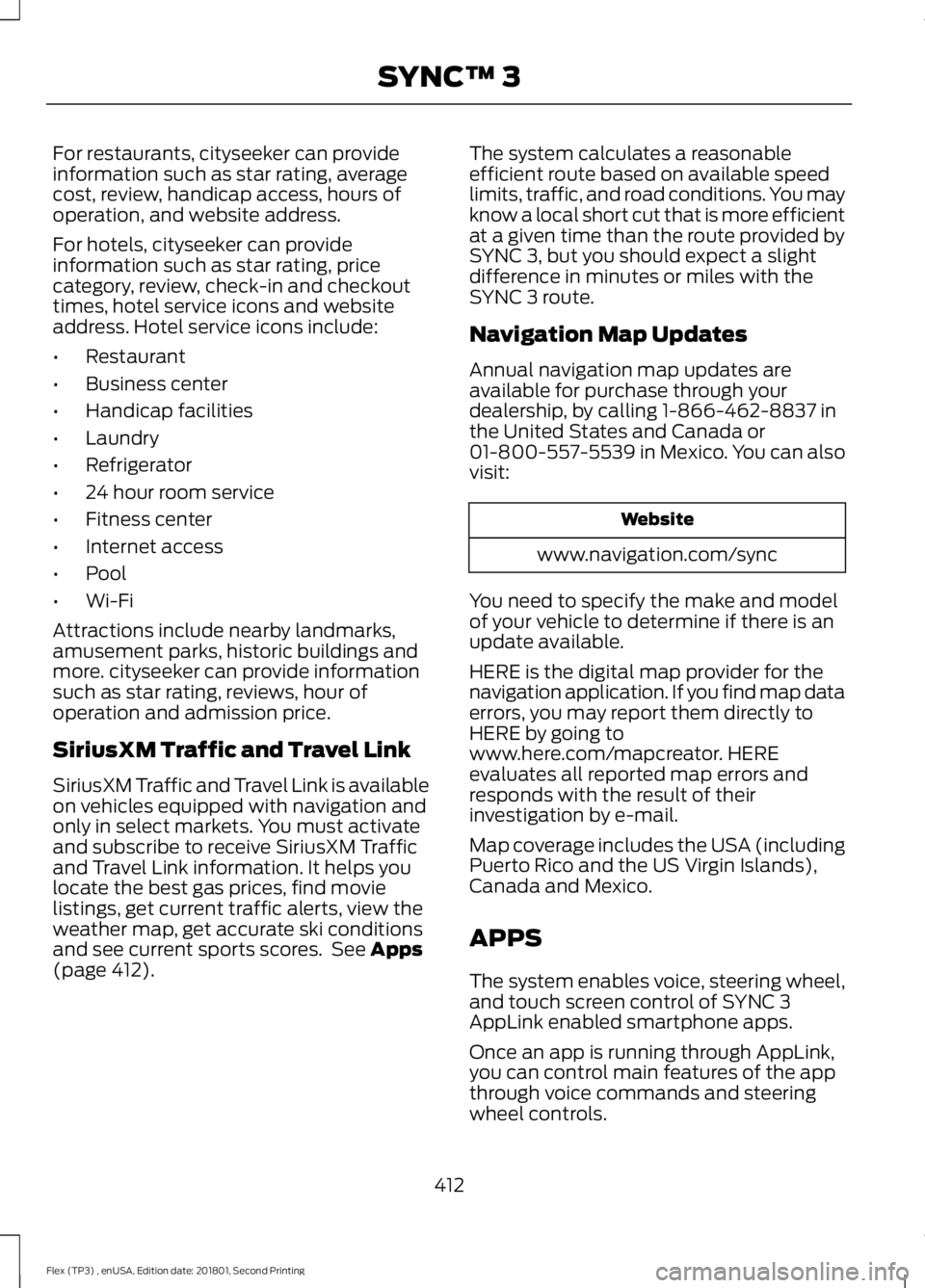
For restaurants, cityseeker can provide
information such as star rating, average
cost, review, handicap access, hours of
operation, and website address.
For hotels, cityseeker can provide
information such as star rating, price
category, review, check-in and checkout
times, hotel service icons and website
address. Hotel service icons include:
•
Restaurant
• Business center
• Handicap facilities
• Laundry
• Refrigerator
• 24 hour room service
• Fitness center
• Internet access
• Pool
• Wi-Fi
Attractions include nearby landmarks,
amusement parks, historic buildings and
more. cityseeker can provide information
such as star rating, reviews, hour of
operation and admission price.
SiriusXM Traffic and Travel Link
SiriusXM Traffic and Travel Link is available
on vehicles equipped with navigation and
only in select markets. You must activate
and subscribe to receive SiriusXM Traffic
and Travel Link information. It helps you
locate the best gas prices, find movie
listings, get current traffic alerts, view the
weather map, get accurate ski conditions
and see current sports scores. See Apps
(page 412). The system calculates a reasonable
efficient route based on available speed
limits, traffic, and road conditions. You may
know a local short cut that is more efficient
at a given time than the route provided by
SYNC 3, but you should expect a slight
difference in minutes or miles with the
SYNC 3 route.
Navigation Map Updates
Annual navigation map updates are
available for purchase through your
dealership, by calling 1-866-462-8837 in
the United States and Canada or
01-800-557-5539 in Mexico. You can also
visit:
Website
www.navigation.com/sync
You need to specify the make and model
of your vehicle to determine if there is an
update available.
HERE is the digital map provider for the
navigation application. If you find map data
errors, you may report them directly to
HERE by going to
www.here.com/mapcreator. HERE
evaluates all reported map errors and
responds with the result of their
investigation by e-mail.
Map coverage includes the USA (including
Puerto Rico and the US Virgin Islands),
Canada and Mexico.
APPS
The system enables voice, steering wheel,
and touch screen control of SYNC 3
AppLink enabled smartphone apps.
Once an app is running through AppLink,
you can control main features of the app
through voice commands and steering
wheel controls.
412
Flex (TP3) , enUSA, Edition date: 201801, Second Printing SYNC™ 3
Page 454 of 508
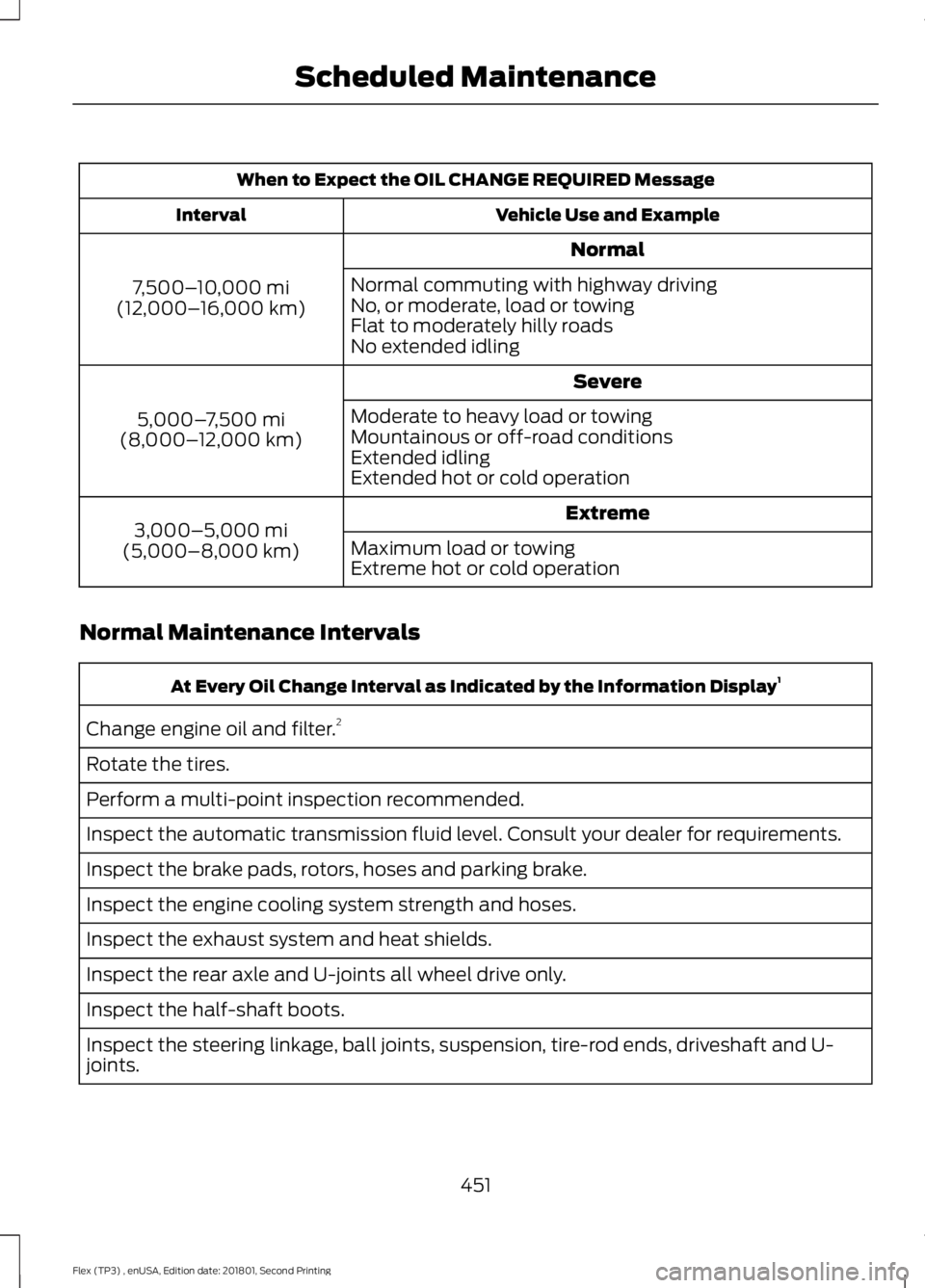
When to Expect the OIL CHANGE REQUIRED Message
Vehicle Use and Example
Interval
Normal
7,500– 10,000 mi
(12,000– 16,000 km) Normal commuting with highway driving
No, or moderate, load or towing
Flat to moderately hilly roads
No extended idling
Severe
5,000– 7,500 mi
(8,000– 12,000 km) Moderate to heavy load or towing
Mountainous or off-road conditions
Extended idling
Extended hot or cold operation
Extreme
3,000–5,000 mi
(5,000–8,000 km) Maximum load or towing
Extreme hot or cold operation
Normal Maintenance Intervals At Every Oil Change Interval as Indicated by the Information Display
1
Change engine oil and filter. 2
Rotate the tires.
Perform a multi-point inspection recommended.
Inspect the automatic transmission fluid level. Consult your dealer for requirements.
Inspect the brake pads, rotors, hoses and parking brake.
Inspect the engine cooling system strength and hoses.
Inspect the exhaust system and heat shields.
Inspect the rear axle and U-joints all wheel drive only.
Inspect the half-shaft boots.
Inspect the steering linkage, ball joints, suspension, tire-rod ends, driveshaft and U-
joints.
451
Flex (TP3) , enUSA, Edition date: 201801, Second Printing Scheduled Maintenance
Page 498 of 508
A
A/C
See: Climate Control.......................................... 114
About This Manual...........................................7
ABS See: Brakes............................................................ 175
ABS driving hints See: Hints on Driving With Anti-Lock
Brakes................................................................. 176
Accessories....................................................443 Exterior Style....................................................... 443
Interior Style........................................................ 443
Lifestyle................................................................. 443
Peace of Mind..................................................... 443
Accessories See: Replacement Parts
Recommendation............................................ 12
ACC See: Using Adaptive Cruise Control............190
Active Park Assist..........................................181 Automatic Steering into Parking
Space................................................................. 183
Deactivating the Park Assist Feature..........184
Troubleshooting the System.......................... 184
Using Active Park Assist................................... 182
Adjusting the Headlamps........................260 Horizontal Aim Adjustment............................ 261
Vertical Aim......................................................... 260
Adjusting the Pedals.....................................79
Adjusting the Steering Wheel - Vehicles With: Manual Adjustable Steering
Column............................................................76
Adjusting the Steering Wheel - Vehicles With: Power Adjustable Steering
Column............................................................75
End of Travel Position......................................... 75
Airbag Disposal................................................51
Air Conditioning See: Climate Control.......................................... 114
Air Filter See: Changing the Engine Air Filter.............267
Alarm See: Anti-Theft Alarm......................................... 74
All-Wheel Drive.............................................168
Ambient Lighting
...........................................86
Anti-Theft Alarm............................................74
Arming the Alarm................................................. 74Disarming the Alarm...........................................
74
Appendices....................................................465
Apps...................................................................412 ........................................................................\
........... 412
SiriusXM Traffic and Travel Link.................... 414
At a Glance........................................................16
Audible Warnings and Indicators.............96 Headlamps On Warning Chime..................... 96
Key in Ignition Warning Chime........................ 96
Keyless Warning Alert........................................ 96
Parking Brake On Warning Chime.................96
Audio Control
...................................................76
MEDIA....................................................................... 76
Seek, Next or Previous......................................... 77
Audio System.................................................317 General Information........................................... 317
Audio Unit - Vehicles With: AM/FM/CD/ SYNC/Satellite Radio
..............................318
Menu Structure.................................................. 320
Audio Unit - Vehicles With: Premium AM/FM/CD..................................................323
Audio Unit - Vehicles With: Sony AM/ FM/CD...........................................................324
Autolamps
........................................................83
Windshield Wiper Activated
Headlamps........................................................ 83
Automatic Climate Control - Vehicles With: Premium AM/FM/CD....................115
Automatic Climate Control - Vehicles With: Sony Audio System........................116
Automatic Transmission
...........................164
Automatic Transmission Adaptive
Learning............................................................. 167
Brake-Shift Interlock......................................... 166
If Your Vehicle Gets Stuck In Mud or Snow................................................................... 167
SelectShift Automatic ™
Transmission................................................... 164
Understanding the Positions of Your Automatic Transmission............................ 164
Automatic Transmission Fluid Check
............................................................254
Adding Transmission Fluid ............................ 255
Checking the Transmission Fluid Level................................................................... 255
Autowipers.......................................................80
Auxiliary Power Points................................143 110 Volt AC Power Point................................... 143
495
Flex (TP3) , enUSA, Edition date: 201801, Second Printing Index
Page 502 of 508
Headlamp Adjusting
See: Adjusting the Headlamps.................... 260
Headlamp Exit Delay....................................84
Headlamp Removal See: Removing a Headlamp........................... 261
Headrest See: Head Restraints......................................... 123
Head Restraints.............................................123
Adjusting the Head Restraint......................... 124
Tilting Head Restraints .................................... 125
Heated Seats.................................................136 Front Seats............................................................ 136
Second Row Heated Seats............................. 136
Heated Steering Wheel
................................77
Heated Windows and Mirrors....................121
Heated Exterior Mirrors...................................... 121
Heated Rear Window......................................... 121
Heating See: Climate Control.......................................... 114
Hints on Controlling the Interior Climate...........................................................118
Defogging the Side Windows in Cold Weather............................................................. 120
General Hints........................................................ 118
Quickly Cooling the Interior............................. 119
Quickly Heating the Interior............................. 119
Recommended Settings for Cooling...........120
Recommended Settings for Heating...........119
Hints on Driving With Anti-Lock Brakes.............................................................176
Home Screen
.................................................377
Hood Lock See: Opening and Closing the Hood..........245
I
Ignition Switch...............................................147
In California (U.S. Only).............................228
Information Display Control........................77
Information Displays.....................................97 General Information............................................ 97
Information Messages
................................105
Adaptive Cruise Control.................................. 106
AdvanceTrac ™.................................................... 106
Alarm...................................................................... 106
Automatic Engine Shutdown........................ 106
AWD........................................................................\
. 107
Battery and Charging System........................ 107Blind Spot Information and Cross Traffic
Alert System................................................... 108
Brake System....................................................... 108
Collision Warning System............................... 109
Doors and Locks................................................. 109
Fuel........................................................................\
.. 109
Keys and Intelligent Access............................. 110
Maintenance......................................................... 110
MyKey........................................................................\
111
Park Aid..................................................................... 111
Power Steering...................................................... 112
Seats........................................................................\
. 112
Tire Pressure Monitoring System................... 112
Towing...................................................................... 113
Traction Control.................................................... 113
Transmission......................................................... 113
Installing Child Restraints............................19 Child Seats............................................................... 19
Using Lap and Shoulder Belts......................... 20
Using Lower Anchors and Tethers for CHildren (LATCH)............................................ 25
Using Tether Straps............................................. 27
Instrument Cluster
.........................................92
Instrument Lighting Dimmer.....................84
Instrument Panel Overview........................16
Interior Lamps
.................................................85
Second Row Reading Lamps.......................... 85
Third Row Dome Lamps................................... 86
Interior Mirror...................................................90 Auto-Dimming Mirror......................................... 90
Introduction.........................................................7
J
Jump Starting the Vehicle.........................223 Connecting the Jumper Cables.................... 223
Jump Starting...................................................... 224
Preparing Your Vehicle..................................... 223
Removing the Jumper Cables....................... 224
K
Keyless Entry...................................................66 SECURICODE™ Keyless Entry
Keypad................................................................ 66
Keyless Starting
.............................................147
Ignition Modes..................................................... 148
Keys and Remote Controls.........................52
499
Flex (TP3) , enUSA, Edition date: 201801, Second Printing Index
Page 504 of 508
Opening the Hood.............................................
245
Ordering Additional Owner's Literature......................................................232
Obtaining a French Owner ’s Manual..........232
Overhead Console.......................................146
P
Parking Aids...................................................180
Principle of Operation...................................... 180
Parking Brake..................................................176
Passive Anti-Theft System.........................73 SecuriLock®........................................................... 73
PATS See: Passive Anti-Theft System..................... 73
Pedals.................................................................79
Perchlorate.........................................................11
Personal Safety System ™
..........................43
How Does the Personal Safety System
Work?.................................................................. 43
Phone
..............................................................399
During a Phone Call.......................................... 402
Making Calls......................................................... 401
Pairing Your Cell Phone for the First Time.................................................................. 399
Phone Menu....................................................... 400
Receiving Calls................................................... 402
Smartphone Connectivity............................. 403
Text Messaging.................................................. 403
Post-Crash Alert System..........................225
Power Door Locks See: Locking and Unlocking............................. 63
Power Liftgate.................................................70 Obstacle Detection............................................... 71
Opening and Closing the Liftgate.................. 70
Stopping the Liftgate Movement.................... 71
Power Seats....................................................126 Power Lumbar..................................................... 128
Power Steering Fluid Check.....................257
Power Windows
..............................................87
Accessory Delay.................................................... 87
Bounce-Back......................................................... 87
One-Touch Down................................................. 87
One-Touch Up....................................................... 87
Window Lock......................................................... 87
Protecting the Environment........................15
Puncture See: Changing a Road Wheel....................... 296R
Rear Parking Aid...........................................180
Rear Passenger Climate Controls..........120
Rear Seats
.......................................................129
Adjusting the Rear Seats................................. 129
Rear View Camera
.......................................185
Using the Rear View Camera System.........186
Rear View Camera See: Rear View Camera.................................... 185
Rear Window Wiper and Washers............81 Rear Camera Washer........................................... 81
Rear Window Washer.......................................... 81
Rear Window Wiper Blade................................ 81
Recommended Towing Weights
..............211
Refueling..........................................................156 Refueling System Overview........................... 156
Refueling System Warning............................. 158
Refueling Your Vehicle...................................... 156
Remote Control..............................................53 Car Finder................................................................ 55
Integrated Keyhead Transmitter..................... 53
Intelligent Access Key......................................... 53
Memory Feature................................................... 56
Remote Start......................................................... 55
Replacing the Battery......................................... 54
Sounding the Panic Alarm................................ 55
Remote Start
..................................................122
Automatic Settings............................................ 122
Removing a Headlamp...............................261
Repairing Minor Paint Damage...............273
Replacement Parts Recommendation........................................12
Collision Repairs.................................................... 12
Scheduled Maintenance and Mechanical Repairs.................................................................. 12
Warranty on Replacement Parts..................... 12
Replacing a Lost Key or Remote Control............................................................56
Reporting Safety Defects (Canada Only)
..............................................................232
Reporting Safety Defects (U.S. Only)
..............................................................232
Roadside Assistance...................................221
Vehicles Sold in Canada: Getting Roadside
Assistance........................................................ 222
Vehicles Sold in Canada: Roadside Assistance Program Coverage.................222
501
Flex (TP3) , enUSA, Edition date: 201801, Second Printing Index