warning light FORD FLEX 2018 Workshop Manual
[x] Cancel search | Manufacturer: FORD, Model Year: 2018, Model line: FLEX, Model: FORD FLEX 2018Pages: 508, PDF Size: 6.31 MB
Page 260 of 508
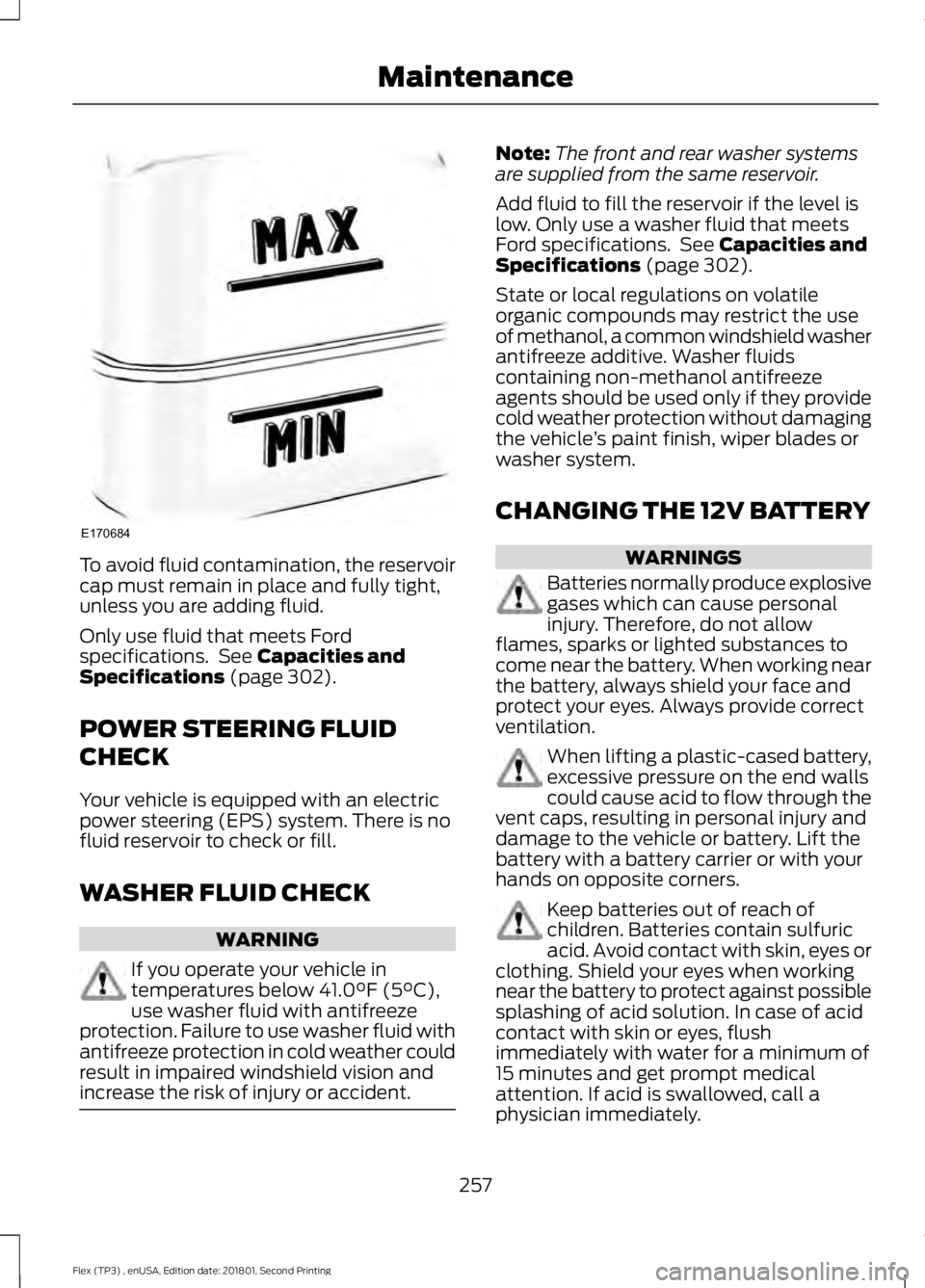
To avoid fluid contamination, the reservoir
cap must remain in place and fully tight,
unless you are adding fluid.
Only use fluid that meets Ford
specifications. See Capacities and
Specifications (page 302).
POWER STEERING FLUID
CHECK
Your vehicle is equipped with an electric
power steering (EPS) system. There is no
fluid reservoir to check or fill.
WASHER FLUID CHECK WARNING
If you operate your vehicle in
temperatures below
41.0°F (5°C),
use washer fluid with antifreeze
protection. Failure to use washer fluid with
antifreeze protection in cold weather could
result in impaired windshield vision and
increase the risk of injury or accident. Note:
The front and rear washer systems
are supplied from the same reservoir.
Add fluid to fill the reservoir if the level is
low. Only use a washer fluid that meets
Ford specifications. See
Capacities and
Specifications (page 302).
State or local regulations on volatile
organic compounds may restrict the use
of methanol, a common windshield washer
antifreeze additive. Washer fluids
containing non-methanol antifreeze
agents should be used only if they provide
cold weather protection without damaging
the vehicle ’s paint finish, wiper blades or
washer system.
CHANGING THE 12V BATTERY WARNINGS
Batteries normally produce explosive
gases which can cause personal
injury. Therefore, do not allow
flames, sparks or lighted substances to
come near the battery. When working near
the battery, always shield your face and
protect your eyes. Always provide correct
ventilation. When lifting a plastic-cased battery,
excessive pressure on the end walls
could cause acid to flow through the
vent caps, resulting in personal injury and
damage to the vehicle or battery. Lift the
battery with a battery carrier or with your
hands on opposite corners. Keep batteries out of reach of
children. Batteries contain sulfuric
acid. Avoid contact with skin, eyes or
clothing. Shield your eyes when working
near the battery to protect against possible
splashing of acid solution. In case of acid
contact with skin or eyes, flush
immediately with water for a minimum of
15 minutes and get prompt medical
attention. If acid is swallowed, call a
physician immediately.
257
Flex (TP3) , enUSA, Edition date: 201801, Second Printing MaintenanceE170684
Page 264 of 508
3. Measure the height from the center of
the headlamp to the ground.
Note: There may be an identifying mark on
the lens to help you locate the center of the
headlamp bulb.
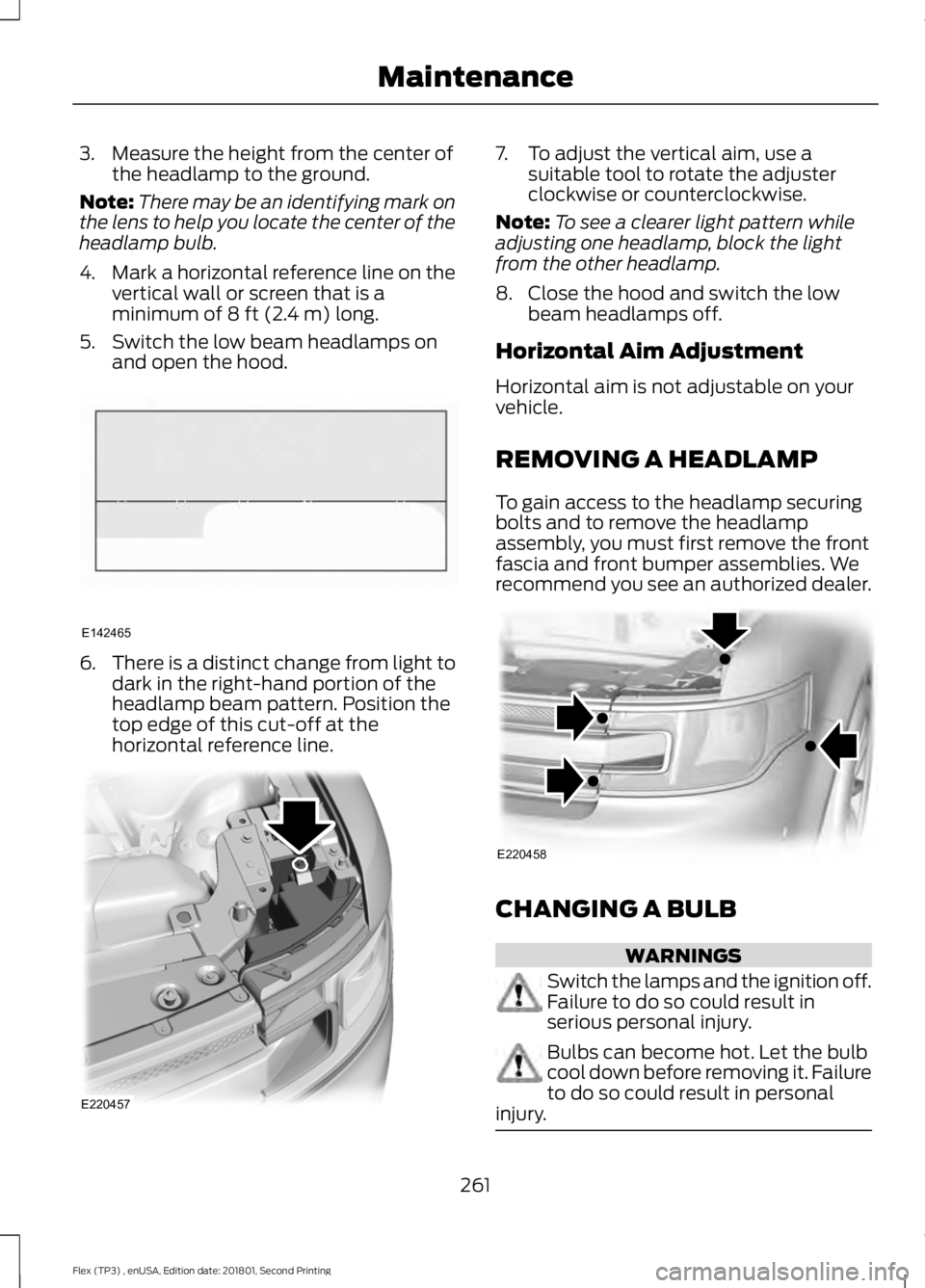
4. Mark a horizontal reference line on the
vertical wall or screen that is a
minimum of 8 ft (2.4 m) long.
5. Switch the low beam headlamps on and open the hood. 6.
There is a distinct change from light to
dark in the right-hand portion of the
headlamp beam pattern. Position the
top edge of this cut-off at the
horizontal reference line. 7. To adjust the vertical aim, use a
suitable tool to rotate the adjuster
clockwise or counterclockwise.
Note: To see a clearer light pattern while
adjusting one headlamp, block the light
from the other headlamp.
8. Close the hood and switch the low beam headlamps off.
Horizontal Aim Adjustment
Horizontal aim is not adjustable on your
vehicle.
REMOVING A HEADLAMP
To gain access to the headlamp securing
bolts and to remove the headlamp
assembly, you must first remove the front
fascia and front bumper assemblies. We
recommend you see an authorized dealer. CHANGING A BULB
WARNINGS
Switch the lamps and the ignition off.
Failure to do so could result in
serious personal injury.
Bulbs can become hot. Let the bulb
cool down before removing it. Failure
to do so could result in personal
injury. 261
Flex (TP3) , enUSA, Edition date: 201801, Second Printing MaintenanceE142465 E220457 E220458
Page 274 of 508
To clean the windshield and wiper blades:
•
Clean the windshield with a
non-abrasive glass cleaner. When
cleaning the interior of the windshield,
avoid getting any glass cleaner on the
instrument panel or door panels. Wipe
any glass cleaner off these surfaces
immediately.
• For windshields contaminated with
tree sap, chemicals, wax or bugs, clean
the entire windshield using steel wool
(no greater than 0000 grade) in a
circular motion and rinse with water.
• Clean the wiper blades with isopropyl
rubbing alcohol or windshield washer
concentrate.
Note: Do not use razor blades or other
sharp objects to clean or remove decals
from the inside of the heated rear window.
The vehicle warranty does not cover
damage caused to the heated rear window
grid lines.
CLEANING THE INTERIOR WARNINGS
Do not use cleaning solvents, bleach
or dye on the vehicle's seatbelts, as
these actions may weaken the belt
webbing. On vehicles equipped with
seat-mounted airbags, do not use
chemical solvents or strong
detergents. Such products could
contaminate the side airbag system and
affect performance of the side airbag in a
crash. For fabric, carpets, cloth seats and seats
equipped with side airbags:
•
Remove dust and loose dirt with a
vacuum cleaner.
• Remove light stains and soil with
Motorcraft Professional Strength
Carpet & Upholstery Cleaner.
• If grease or tar is present on the
material, spot-clean the area first with
Motorcraft Spot and Stain Remover. In
Canada, use Motorcraft Multi-Purpose
Cleaner.
• If a ring forms on the fabric after spot
cleaning, clean the entire area
immediately (but do not oversaturate)
or the ring will set.
• Do not use household cleaning
products or glass cleaners, which can
stain and discolor the fabric and affect
the flame retardant abilities of the seat
materials.
CLEANING THE INSTRUMENT
PANEL AND INSTRUMENT
CLUSTER LENS WARNING
Do not use chemical solvents or
strong detergents when cleaning the
steering wheel or instrument panel
to avoid contamination of the airbag
system. Note:
Follow the same procedure as
cleaning leather seats for cleaning leather
instrument panels and leather interior trim
surfaces. See Cleaning Leather Seats
(page 272).
Clean the instrument panel and cluster
lens with a clean, damp and soft cloth,
then use a clean, dry and soft cloth to dry
these areas.
271
Flex (TP3) , enUSA, Edition date: 201801, Second Printing Vehicle Care
Page 287 of 508
The tire suppliers may have
additional markings, notes or
warnings such as standard load
or radial tubeless.
Additional Information
Contained on the Tire Sidewall
for LT Type Tires
Note:
Tire Quality Grades do not
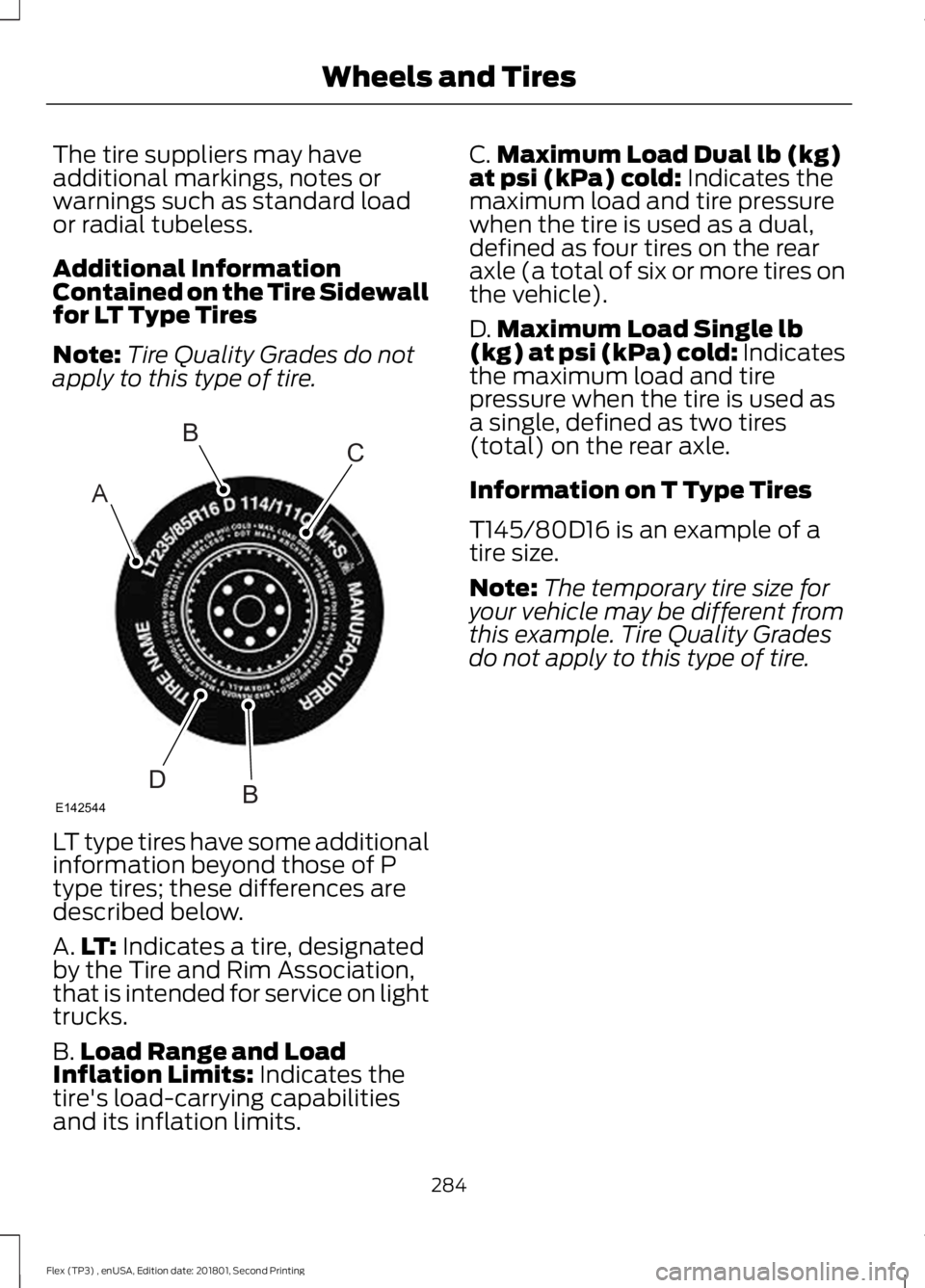
apply to this type of tire. LT type tires have some additional
information beyond those of P
type tires; these differences are
described below.
A.
LT: Indicates a tire, designated
by the Tire and Rim Association,
that is intended for service on light
trucks.
B. Load Range and Load
Inflation Limits:
Indicates the
tire's load-carrying capabilities
and its inflation limits. C.
Maximum Load Dual lb (kg)
at psi (kPa) cold:
Indicates the
maximum load and tire pressure
when the tire is used as a dual,
defined as four tires on the rear
axle (a total of six or more tires on
the vehicle).
D. Maximum Load Single lb
(kg) at psi (kPa) cold:
Indicates
the maximum load and tire
pressure when the tire is used as
a single, defined as two tires
(total) on the rear axle.
Information on T Type Tires
T145/80D16 is an example of a
tire size.
Note: The temporary tire size for
your vehicle may be different from
this example. Tire Quality Grades
do not apply to this type of tire.
284
Flex (TP3) , enUSA, Edition date: 201801, Second Printing Wheels and TiresA
BC
BDE142544
Page 297 of 508
2. This device must accept any
interference received, including
interference that may cause undesired
operation.
Note: Changes or modifications not
expressively approved by the party
responsible for compliance could void the
user's authority to operate the equipment.
The term "IC:" before the radio certification
number only signifies that Industry Canada
technical specifications were met.
Changing Tires With a Tire
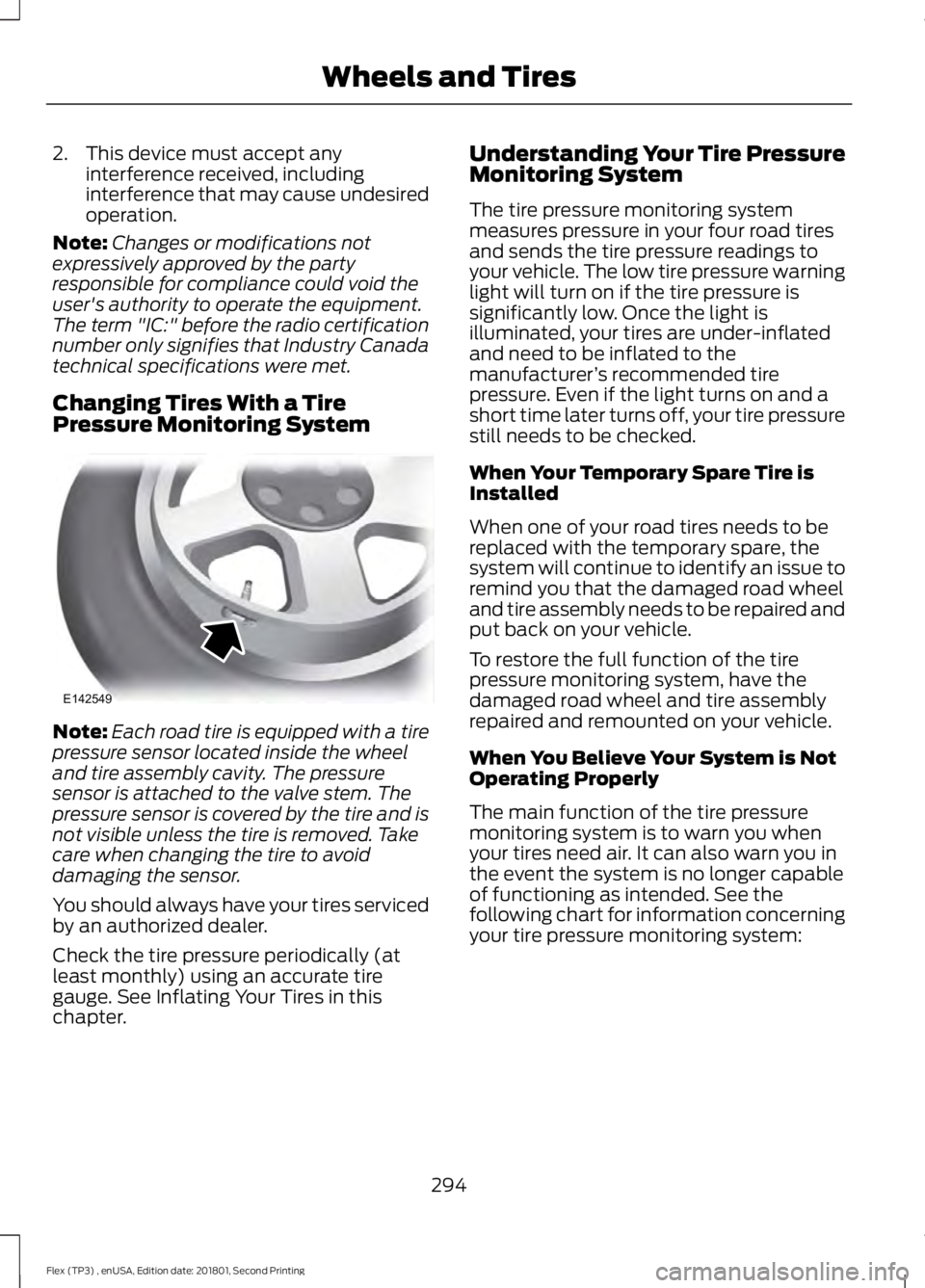
Pressure Monitoring System Note:
Each road tire is equipped with a tire
pressure sensor located inside the wheel
and tire assembly cavity. The pressure
sensor is attached to the valve stem. The
pressure sensor is covered by the tire and is
not visible unless the tire is removed. Take
care when changing the tire to avoid
damaging the sensor.
You should always have your tires serviced
by an authorized dealer.
Check the tire pressure periodically (at
least monthly) using an accurate tire
gauge. See Inflating Your Tires in this
chapter. Understanding Your Tire Pressure
Monitoring System
The tire pressure monitoring system
measures pressure in your four road tires
and sends the tire pressure readings to
your vehicle. The low tire pressure warning
light will turn on if the tire pressure is
significantly low. Once the light is
illuminated, your tires are under-inflated
and need to be inflated to the
manufacturer
’s recommended tire
pressure. Even if the light turns on and a
short time later turns off, your tire pressure
still needs to be checked.
When Your Temporary Spare Tire is
Installed
When one of your road tires needs to be
replaced with the temporary spare, the
system will continue to identify an issue to
remind you that the damaged road wheel
and tire assembly needs to be repaired and
put back on your vehicle.
To restore the full function of the tire
pressure monitoring system, have the
damaged road wheel and tire assembly
repaired and remounted on your vehicle.
When You Believe Your System is Not
Operating Properly
The main function of the tire pressure
monitoring system is to warn you when
your tires need air. It can also warn you in
the event the system is no longer capable
of functioning as intended. See the
following chart for information concerning
your tire pressure monitoring system:
294
Flex (TP3) , enUSA, Edition date: 201801, Second Printing Wheels and TiresE142549
Page 298 of 508
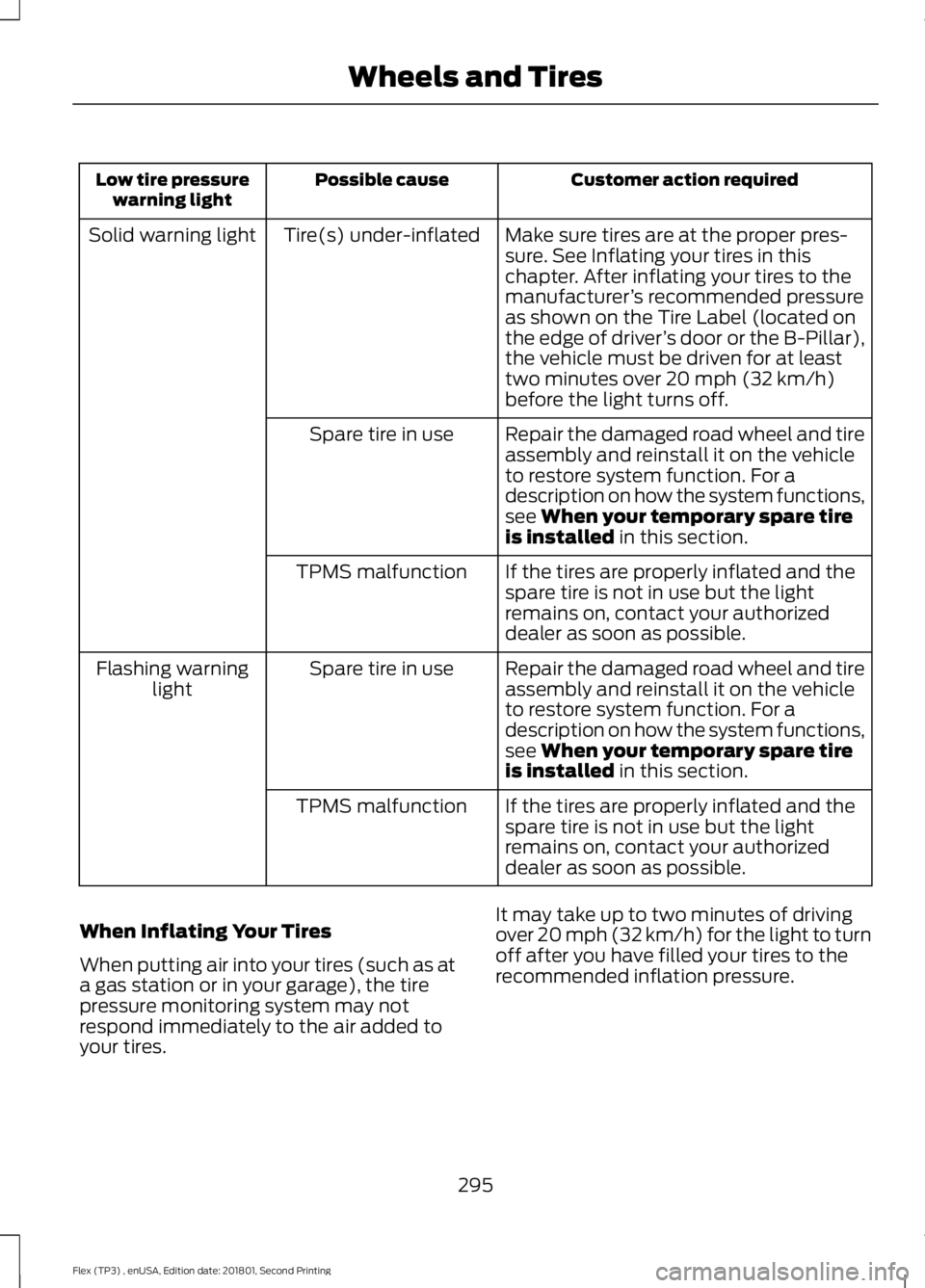
Customer action required
Possible cause
Low tire pressure
warning light
Make sure tires are at the proper pres-
sure. See Inflating your tires in this
chapter. After inflating your tires to the
manufacturer’s recommended pressure
as shown on the Tire Label (located on
the edge of driver ’s door or the B-Pillar),
the vehicle must be driven for at least
two minutes over 20 mph (32 km/h)
before the light turns off.
Tire(s) under-inflated
Solid warning light
Repair the damaged road wheel and tire
assembly and reinstall it on the vehicle
to restore system function. For a
description on how the system functions,
see
When your temporary spare tire
is installed in this section.
Spare tire in use
If the tires are properly inflated and the
spare tire is not in use but the light
remains on, contact your authorized
dealer as soon as possible.
TPMS malfunction
Repair the damaged road wheel and tire
assembly and reinstall it on the vehicle
to restore system function. For a
description on how the system functions,
see
When your temporary spare tire
is installed in this section.
Spare tire in use
Flashing warning
light
If the tires are properly inflated and the
spare tire is not in use but the light
remains on, contact your authorized
dealer as soon as possible.
TPMS malfunction
When Inflating Your Tires
When putting air into your tires (such as at
a gas station or in your garage), the tire
pressure monitoring system may not
respond immediately to the air added to
your tires. It may take up to two minutes of driving
over 20 mph (32 km/h) for the light to turn
off after you have filled your tires to the
recommended inflation pressure.
295
Flex (TP3) , enUSA, Edition date: 201801, Second Printing Wheels and Tires
Page 299 of 508
How Temperature Affects Your Tire
Pressure
The tire pressure monitoring system
monitors tire pressure in each pneumatic
tire. While driving in a normal manner, a
typical passenger tire inflation pressure
may increase about 2
–4 psi (14– 28 kPa)
from a cold start situation. If the vehicle is
stationary overnight with the outside
temperature significantly lower than the
daytime temperature, the tire pressure may
decrease about 3 psi (21 kPa) for a drop of
30°F (17°C) in ambient temperature. This
lower pressure value may be detected by
the tire pressure monitoring system as
being significantly lower than the
recommended inflation pressure and
activate the system warning light for low
tire pressure. If the low tire pressure
warning light is on, visually check each tire
to verify that no tire is flat. If one or more
tires are flat, repair as necessary. Check
the air pressure in the road tires. If any tire
is under-inflated, carefully drive the vehicle
to the nearest location where air can be
added to the tires. Inflate all the tires to
the recommended inflation pressure.
CHANGING A ROAD WHEEL WARNINGS
The use of tire sealant may damage
your tire pressure monitoring system
and should only be used in roadside
emergencies. If you must use a sealant, the
Ford Tire Mobility Kit sealant should be
used. The tire pressure monitoring system
sensor and valve stem on the wheel must
be replaced by an authorized dealer after
use of the sealant. See
Tire Pressure Monitoring
System (page 293). If the tire
pressure monitor sensor becomes
damaged, it will no longer function. Note:
The tire pressure monitoring system
indicator light will illuminate when the spare
tire is in use. To restore the full function of
the monitoring system, all road wheels
equipped with tire pressure monitoring
sensors must be mounted on the vehicle.
If you get a flat tire while driving, do not
apply the brake heavily. Instead, gradually
decrease your speed. Hold the steering
wheel firmly and slowly move to a safe
place on the side of the road.
Have a flat serviced by an authorized
dealer in order to prevent damage to the
tire pressure monitoring system sensors.
See
Tire Pressure Monitoring System
(page 293). Replace the spare tire with a
road tire as soon as possible. During
repairing or replacing of the flat tire, have
the authorized dealer inspect the tire
pressure monitoring system sensor for
damage.
Dissimilar Spare Wheel and Tire
Assembly Information WARNING
Failure to follow these guidelines
could result in an increased risk of
loss of vehicle control, injury or death.
If you have a dissimilar spare wheel and
tire, then it is intended for temporary use
only. This means that if you need to use it,
you should replace it as soon as possible
with a road wheel and tire assembly that
is the same size and type as the road tires
and wheels that were originally provided
by Ford. If the dissimilar spare tire or wheel
is damaged, it should be replaced rather
than repaired.
A dissimilar spare wheel and tire assembly
is defined as a spare wheel and tire
assembly that is different in brand, size or
appearance from the road tires and wheels
and can be one of three types:
296
Flex (TP3) , enUSA, Edition date: 201801, Second Printing Wheels and Tires
Page 452 of 508
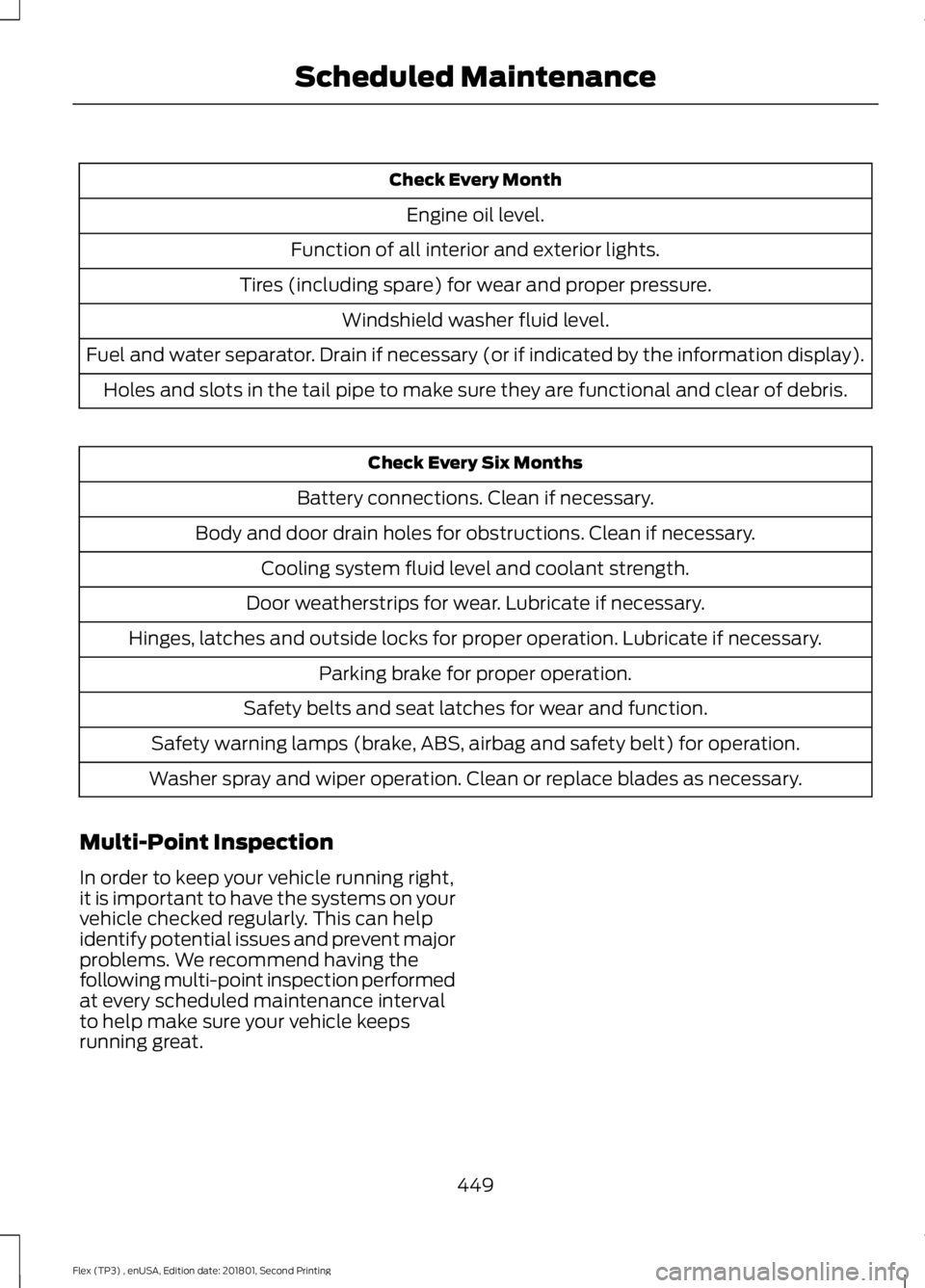
Check Every Month
Engine oil level.
Function of all interior and exterior lights.
Tires (including spare) for wear and proper pressure. Windshield washer fluid level.
Fuel and water separator. Drain if necessary (or if indicated by the information display). Holes and slots in the tail pipe to make sure they are functional and clear of debris. Check Every Six Months
Battery connections. Clean if necessary.
Body and door drain holes for obstructions. Clean if necessary. Cooling system fluid level and coolant strength.
Door weatherstrips for wear. Lubricate if necessary.
Hinges, latches and outside locks for proper operation. Lubricate if necessary. Parking brake for proper operation.
Safety belts and seat latches for wear and function.
Safety warning lamps (brake, ABS, airbag and safety belt) for operation.
Washer spray and wiper operation. Clean or replace blades as necessary.
Multi-Point Inspection
In order to keep your vehicle running right,
it is important to have the systems on your
vehicle checked regularly. This can help
identify potential issues and prevent major
problems. We recommend having the
following multi-point inspection performed
at every scheduled maintenance interval
to help make sure your vehicle keeps
running great.
449
Flex (TP3) , enUSA, Edition date: 201801, Second Printing Scheduled Maintenance
Page 498 of 508
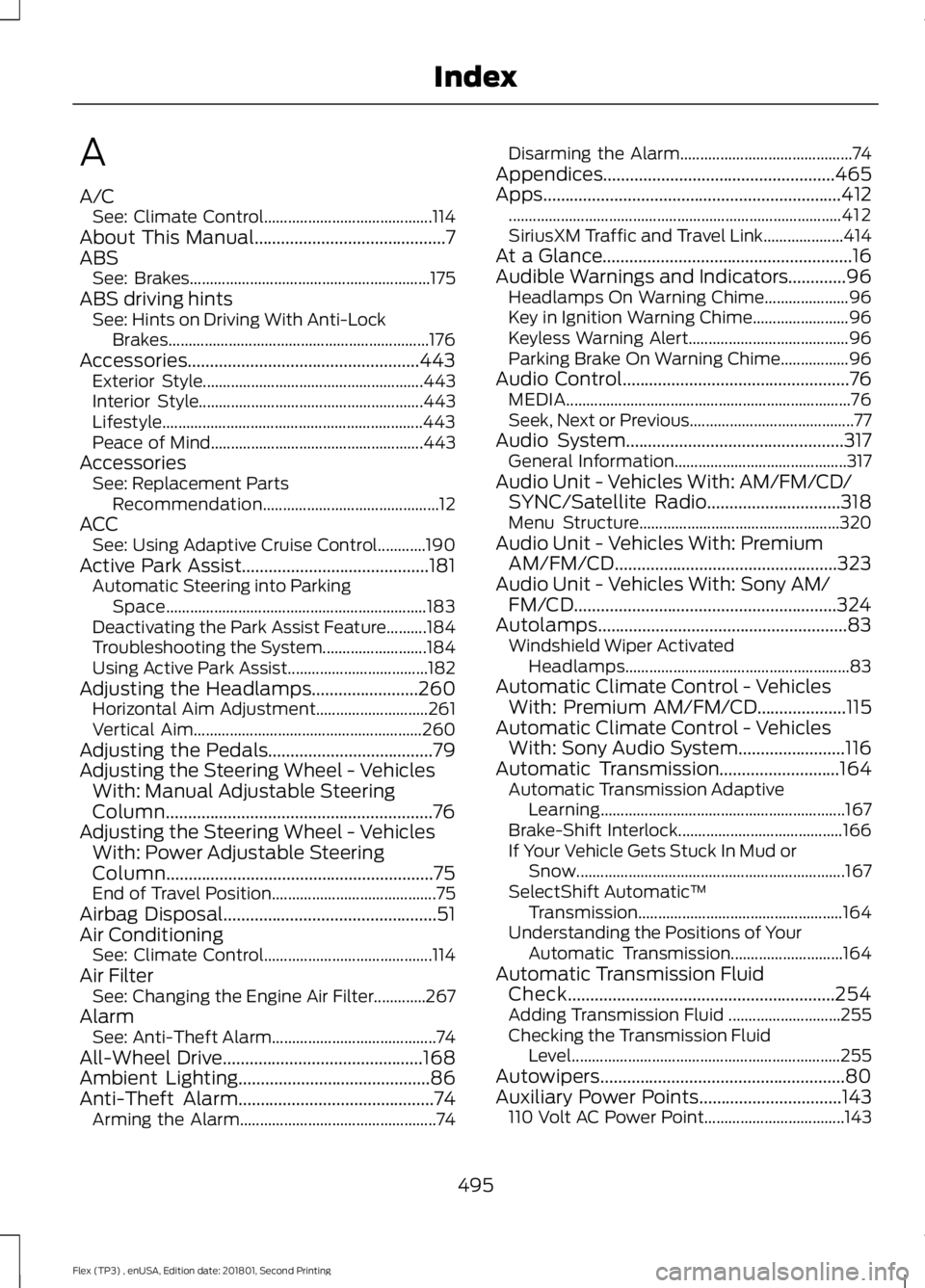
A
A/C
See: Climate Control.......................................... 114
About This Manual...........................................7
ABS See: Brakes............................................................ 175
ABS driving hints See: Hints on Driving With Anti-Lock
Brakes................................................................. 176
Accessories....................................................443 Exterior Style....................................................... 443
Interior Style........................................................ 443
Lifestyle................................................................. 443
Peace of Mind..................................................... 443
Accessories See: Replacement Parts
Recommendation............................................ 12
ACC See: Using Adaptive Cruise Control............190
Active Park Assist..........................................181 Automatic Steering into Parking
Space................................................................. 183
Deactivating the Park Assist Feature..........184
Troubleshooting the System.......................... 184
Using Active Park Assist................................... 182
Adjusting the Headlamps........................260 Horizontal Aim Adjustment............................ 261
Vertical Aim......................................................... 260
Adjusting the Pedals.....................................79
Adjusting the Steering Wheel - Vehicles With: Manual Adjustable Steering
Column............................................................76
Adjusting the Steering Wheel - Vehicles With: Power Adjustable Steering
Column............................................................75
End of Travel Position......................................... 75
Airbag Disposal................................................51
Air Conditioning See: Climate Control.......................................... 114
Air Filter See: Changing the Engine Air Filter.............267
Alarm See: Anti-Theft Alarm......................................... 74
All-Wheel Drive.............................................168
Ambient Lighting
...........................................86
Anti-Theft Alarm............................................74
Arming the Alarm................................................. 74Disarming the Alarm...........................................
74
Appendices....................................................465
Apps...................................................................412 ........................................................................\
........... 412
SiriusXM Traffic and Travel Link.................... 414
At a Glance........................................................16
Audible Warnings and Indicators.............96 Headlamps On Warning Chime..................... 96
Key in Ignition Warning Chime........................ 96
Keyless Warning Alert........................................ 96
Parking Brake On Warning Chime.................96
Audio Control
...................................................76
MEDIA....................................................................... 76
Seek, Next or Previous......................................... 77
Audio System.................................................317 General Information........................................... 317
Audio Unit - Vehicles With: AM/FM/CD/ SYNC/Satellite Radio
..............................318
Menu Structure.................................................. 320
Audio Unit - Vehicles With: Premium AM/FM/CD..................................................323
Audio Unit - Vehicles With: Sony AM/ FM/CD...........................................................324
Autolamps
........................................................83
Windshield Wiper Activated
Headlamps........................................................ 83
Automatic Climate Control - Vehicles With: Premium AM/FM/CD....................115
Automatic Climate Control - Vehicles With: Sony Audio System........................116
Automatic Transmission
...........................164
Automatic Transmission Adaptive
Learning............................................................. 167
Brake-Shift Interlock......................................... 166
If Your Vehicle Gets Stuck In Mud or Snow................................................................... 167
SelectShift Automatic ™
Transmission................................................... 164
Understanding the Positions of Your Automatic Transmission............................ 164
Automatic Transmission Fluid Check
............................................................254
Adding Transmission Fluid ............................ 255
Checking the Transmission Fluid Level................................................................... 255
Autowipers.......................................................80
Auxiliary Power Points................................143 110 Volt AC Power Point................................... 143
495
Flex (TP3) , enUSA, Edition date: 201801, Second Printing Index
Page 500 of 508
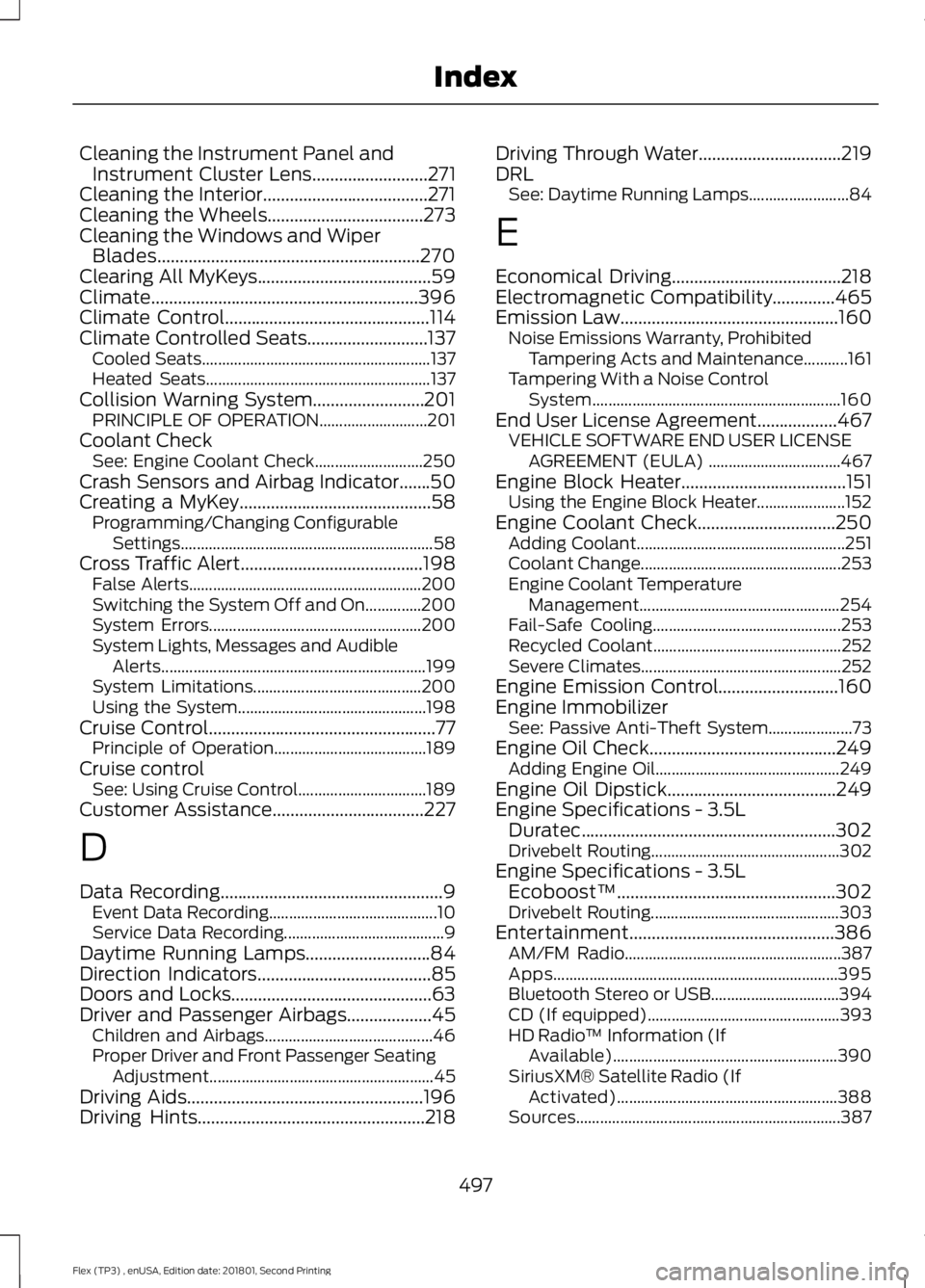
Cleaning the Instrument Panel and
Instrument Cluster Lens..........................271
Cleaning the Interior.....................................271
Cleaning the Wheels
...................................273
Cleaning the Windows and Wiper Blades...........................................................270
Clearing All MyKeys
.......................................59
Climate............................................................396
Climate Control
..............................................114
Climate Controlled Seats...........................137 Cooled Seats......................................................... 137
Heated Seats........................................................ 137
Collision Warning System.........................201 PRINCIPLE OF OPERATION........................... 201
Coolant Check See: Engine Coolant Check........................... 250
Crash Sensors and Airbag Indicator
.......50
Creating a MyKey...........................................58
Programming/Changing Configurable
Settings............................................................... 58
Cross Traffic Alert.........................................198 False Alerts.......................................................... 200
Switching the System Off and On..............200
System Errors..................................................... 200
System Lights, Messages and Audible Alerts.................................................................. 199
System Limitations.......................................... 200
Using the System............................................... 198
Cruise Control
...................................................77
Principle of Operation...................................... 189
Cruise control See: Using Cruise Control................................ 189
Customer Assistance
..................................227
D
Data Recording
..................................................9
Event Data Recording.......................................... 10
Service Data Recording........................................ 9
Daytime Running Lamps............................84
Direction Indicators
.......................................85
Doors and Locks.............................................63
Driver and Passenger Airbags...................45 Children and Airbags.......................................... 46
Proper Driver and Front Passenger Seating Adjustment........................................................ 45
Driving Aids
.....................................................196
Driving Hints...................................................218 Driving Through Water
................................219
DRL See: Daytime Running Lamps......................... 84
E
Economical Driving
......................................218
Electromagnetic Compatibility..............465
Emission Law.................................................160 Noise Emissions Warranty, Prohibited
Tampering Acts and Maintenance...........161
Tampering With a Noise Control System.............................................................. 160
End User License Agreement..................467 VEHICLE SOFTWARE END USER LICENSE
AGREEMENT (EULA) ................................. 467
Engine Block Heater
.....................................151
Using the Engine Block Heater...................... 152
Engine Coolant Check...............................250 Adding Coolant.................................................... 251
Coolant Change.................................................. 253
Engine Coolant Temperature Management.................................................. 254
Fail-Safe Cooling............................................... 253
Recycled Coolant............................................... 252
Severe Climates.................................................. 252
Engine Emission Control...........................160
Engine Immobilizer See: Passive Anti-Theft System..................... 73
Engine Oil Check..........................................249 Adding Engine Oil.............................................. 249
Engine Oil Dipstick
......................................249
Engine Specifications - 3.5L Duratec
.........................................................302
Drivebelt Routing............................................... 302
Engine Specifications - 3.5L Ecoboost™.................................................302
Drivebelt Routing............................................... 303
Entertainment..............................................386 AM/FM Radio...................................................... 387
Apps....................................................................... 395
Bluetooth Stereo or USB................................ 394
CD (If equipped)................................................ 393
HD Radio ™ Information (If
Available)........................................................ 390
SiriusXM® Satellite Radio (If Activated)....................................................... 388
Sources.................................................................. 387
497
Flex (TP3) , enUSA, Edition date: 201801, Second Printing Index