Brake FORD FOCUS 2016 3.G User Guide
[x] Cancel search | Manufacturer: FORD, Model Year: 2016, Model line: FOCUS, Model: FORD FOCUS 2016 3.GPages: 385, PDF Size: 5.23 MB
Page 91 of 385
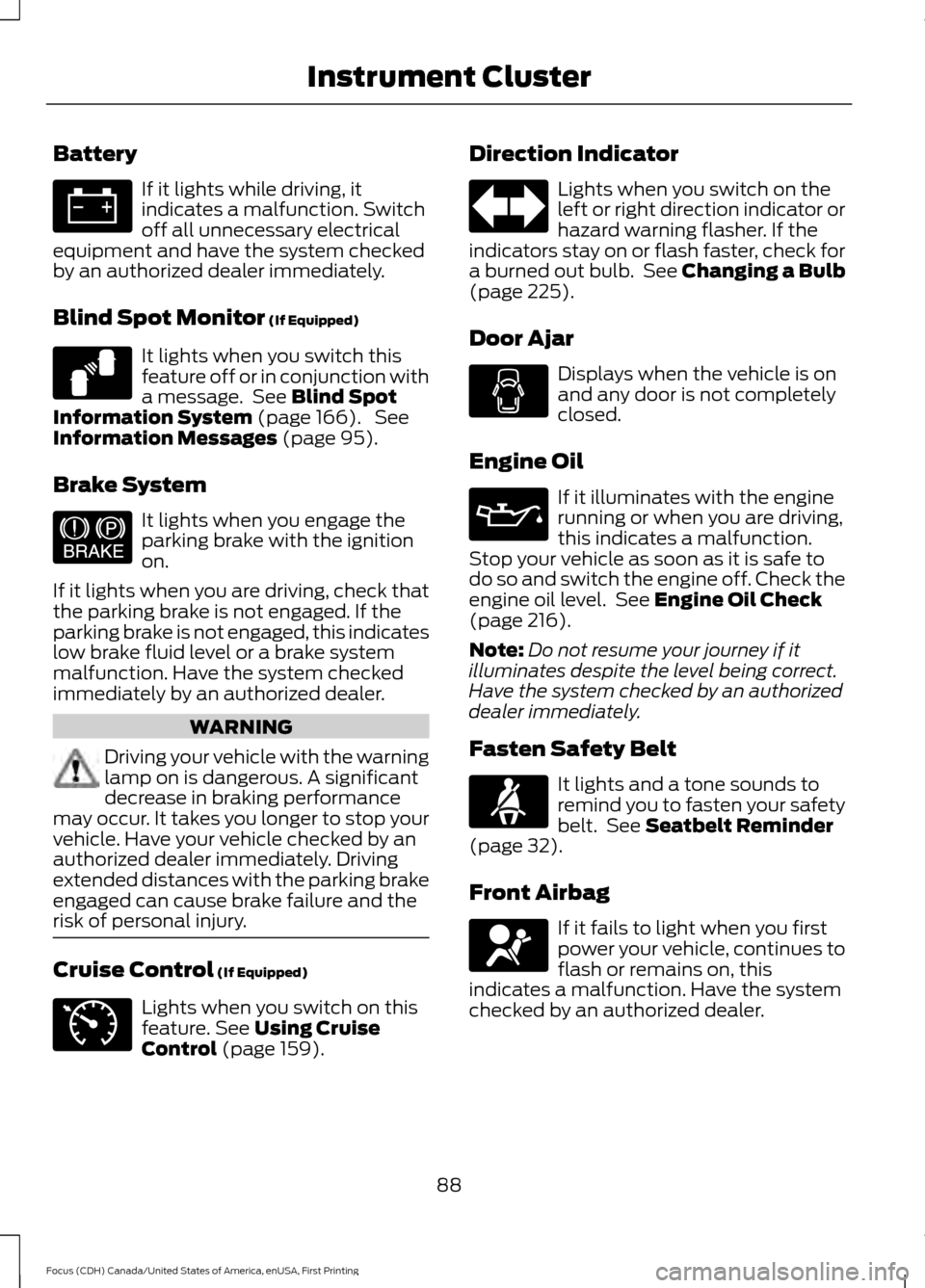
Battery
If it lights while driving, it
indicates a malfunction. Switch
off all unnecessary electrical
equipment and have the system checked
by an authorized dealer immediately.
Blind Spot Monitor (If Equipped) It lights when you switch this
feature off or in conjunction with
a message. See
Blind Spot
Information System (page 166). See
Information Messages (page 95).
Brake System It lights when you engage the
parking brake with the ignition
on.
If it lights when you are driving, check that
the parking brake is not engaged. If the
parking brake is not engaged, this indicates
low brake fluid level or a brake system
malfunction. Have the system checked
immediately by an authorized dealer. WARNING
Driving your vehicle with the warning
lamp on is dangerous. A significant
decrease in braking performance
may occur. It takes you longer to stop your
vehicle. Have your vehicle checked by an
authorized dealer immediately. Driving
extended distances with the parking brake
engaged can cause brake failure and the
risk of personal injury. Cruise Control
(If Equipped)
Lights when you switch on this
feature.
See Using Cruise
Control (page 159). Direction Indicator Lights when you switch on the
left or right direction indicator or
hazard warning flasher. If the
indicators stay on or flash faster, check for
a burned out bulb. See
Changing a Bulb
(page 225).
Door Ajar Displays when the vehicle is on
and any door is not completely
closed.
Engine Oil If it illuminates with the engine
running or when you are driving,
this indicates a malfunction.
Stop your vehicle as soon as it is safe to
do so and switch the engine off. Check the
engine oil level. See
Engine Oil Check
(page 216).
Note: Do not resume your journey if it
illuminates despite the level being correct.
Have the system checked by an authorized
dealer immediately.
Fasten Safety Belt It lights and a tone sounds to
remind you to fasten your safety
belt. See
Seatbelt Reminder
(page 32).
Front Airbag If it fails to light when you first
power your vehicle, continues to
flash or remains on, this
indicates a malfunction. Have the system
checked by an authorized dealer.
88
Focus (CDH) Canada/United States of America, enUSA, First Printing Instrument Cluster E124823 E144522 E71340
Page 93 of 385
The service engine soon indicator light
illuminates when you first switch the
ignition on before engine start to check the
bulb and to indicate whether the vehicle
is ready for Inspection/Maintenance (I/M)
testing.
Normally, the service engine soon light
stays on until you crank the engine, then
turns itself off if no malfunctions are
present. However, if after 15 seconds the
service engine soon light blinks eight times,
it means that the vehicle is not ready for
I/M testing. See Emission Control
System (page 134).
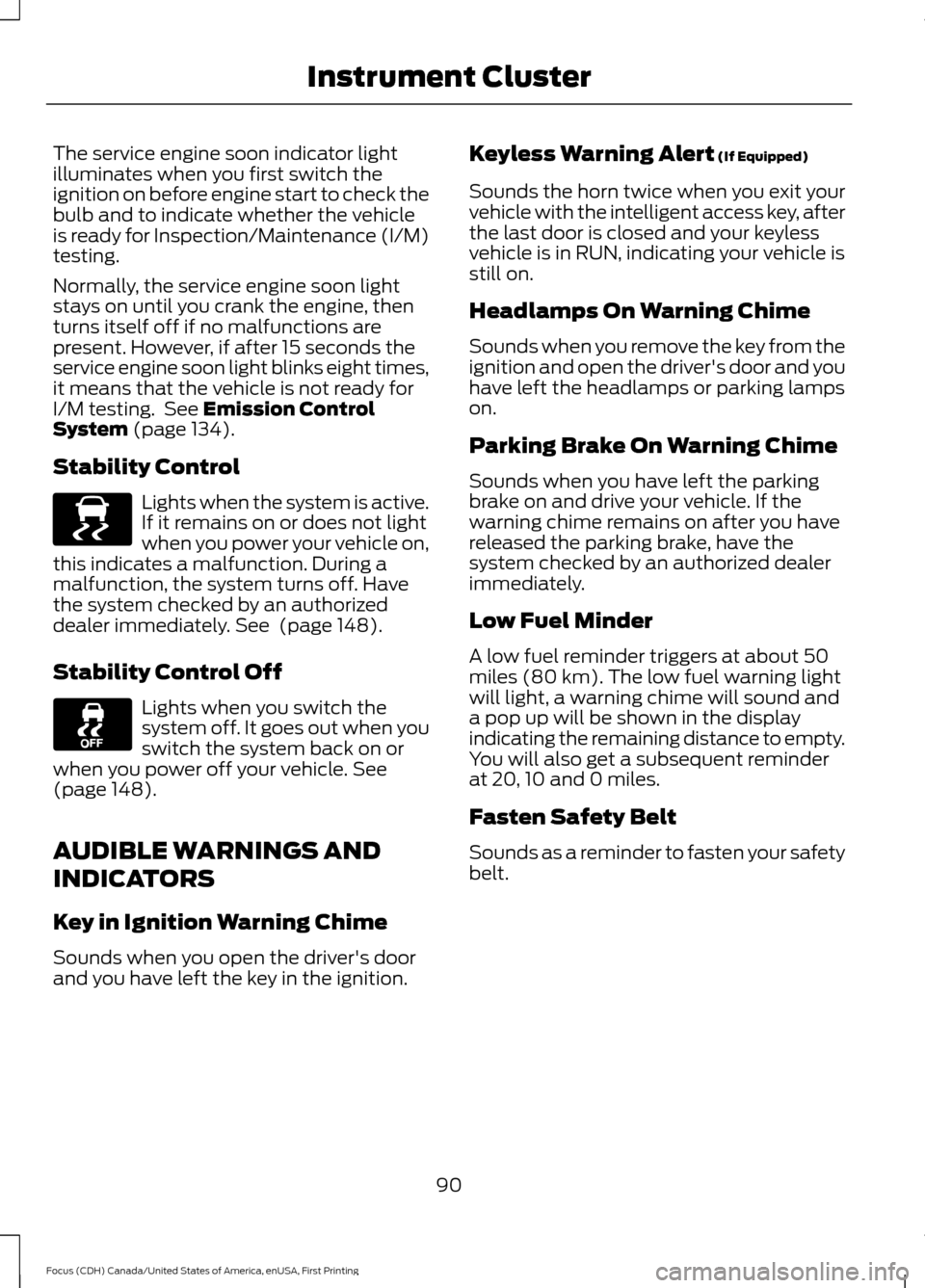
Stability Control Lights when the system is active.
If it remains on or does not light
when you power your vehicle on,
this indicates a malfunction. During a
malfunction, the system turns off. Have
the system checked by an authorized
dealer immediately.
See (page 148).
Stability Control Off Lights when you switch the
system off. It goes out when you
switch the system back on or
when you power off your vehicle.
See
(page 148).
AUDIBLE WARNINGS AND
INDICATORS
Key in Ignition Warning Chime
Sounds when you open the driver's door
and you have left the key in the ignition. Keyless Warning Alert
(If Equipped)
Sounds the horn twice when you exit your
vehicle with the intelligent access key, after
the last door is closed and your keyless
vehicle is in RUN, indicating your vehicle is
still on.
Headlamps On Warning Chime
Sounds when you remove the key from the
ignition and open the driver's door and you
have left the headlamps or parking lamps
on.
Parking Brake On Warning Chime
Sounds when you have left the parking
brake on and drive your vehicle. If the
warning chime remains on after you have
released the parking brake, have the
system checked by an authorized dealer
immediately.
Low Fuel Minder
A low fuel reminder triggers at about 50
miles (80 km). The low fuel warning light
will light, a warning chime will sound and
a pop up will be shown in the display
indicating the remaining distance to empty.
You will also get a subsequent reminder
at 20, 10 and 0 miles.
Fasten Safety Belt
Sounds as a reminder to fasten your safety
belt.
90
Focus (CDH) Canada/United States of America, enUSA, First Printing Instrument ClusterE138639
Page 101 of 385
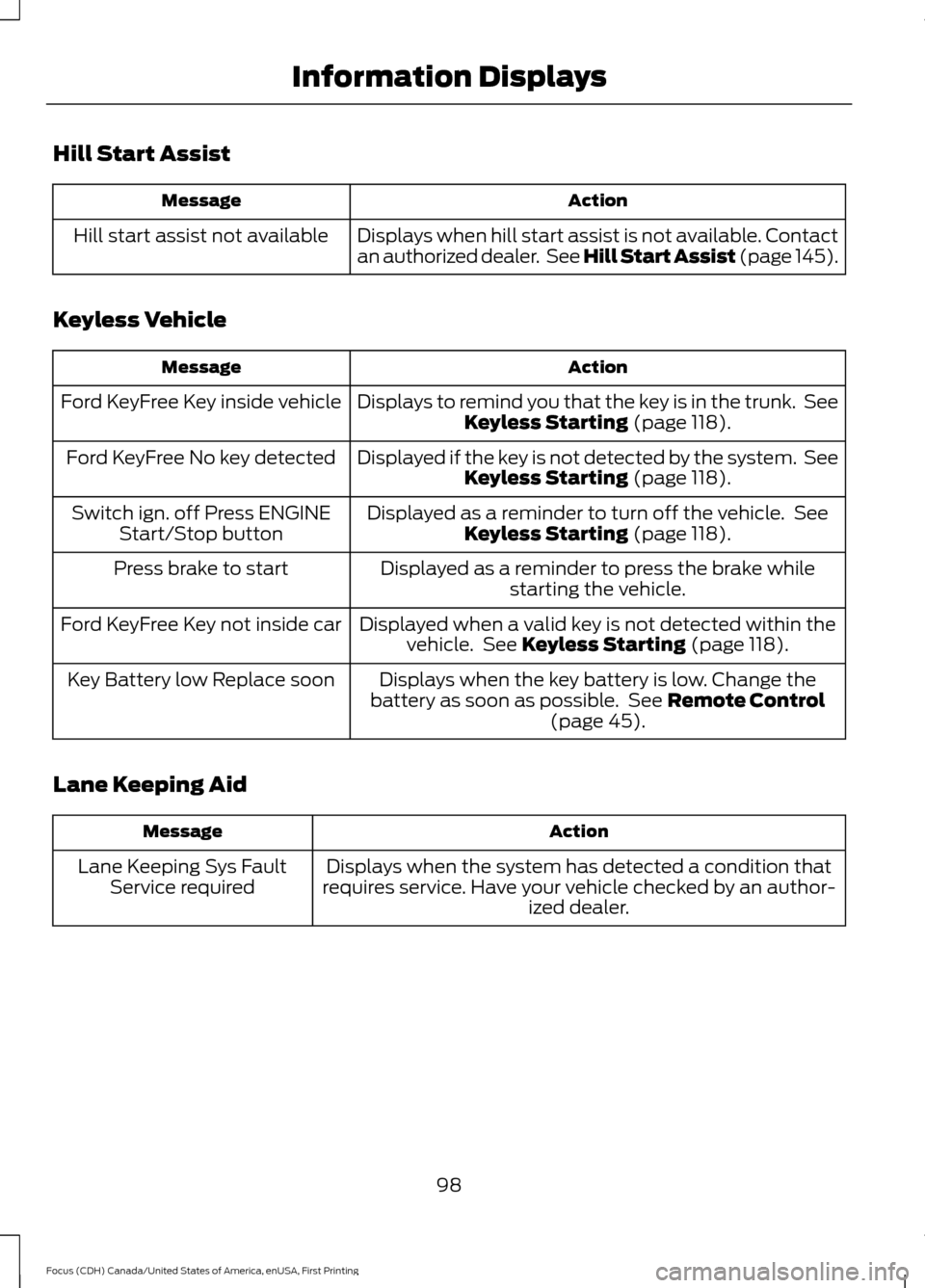
Hill Start Assist
Action
Message
Displays when hill start assist is not available. Contact
an authorized dealer. See Hill Start Assist (page 145).
Hill start assist not available
Keyless Vehicle Action
Message
Displays to remind you that the key is in the trunk. SeeKeyless Starting (page 118).
Ford KeyFree Key inside vehicle
Displayed if the key is not detected by the system. SeeKeyless Starting
(page 118).
Ford KeyFree No key detected
Displayed as a reminder to turn off the vehicle. SeeKeyless Starting
(page 118).
Switch ign. off Press ENGINE
Start/Stop button
Displayed as a reminder to press the brake whilestarting the vehicle.
Press brake to start
Displayed when a valid key is not detected within thevehicle. See
Keyless Starting (page 118).
Ford KeyFree Key not inside car
Displays when the key battery is low. Change the
battery as soon as possible. See
Remote Control
(page 45).
Key Battery low Replace soon
Lane Keeping Aid Action
Message
Displays when the system has detected a condition that
requires service. Have your vehicle checked by an author- ized dealer.
Lane Keeping Sys Fault
Service required
98
Focus (CDH) Canada/United States of America, enUSA, First Printing Information Displays
Page 102 of 385
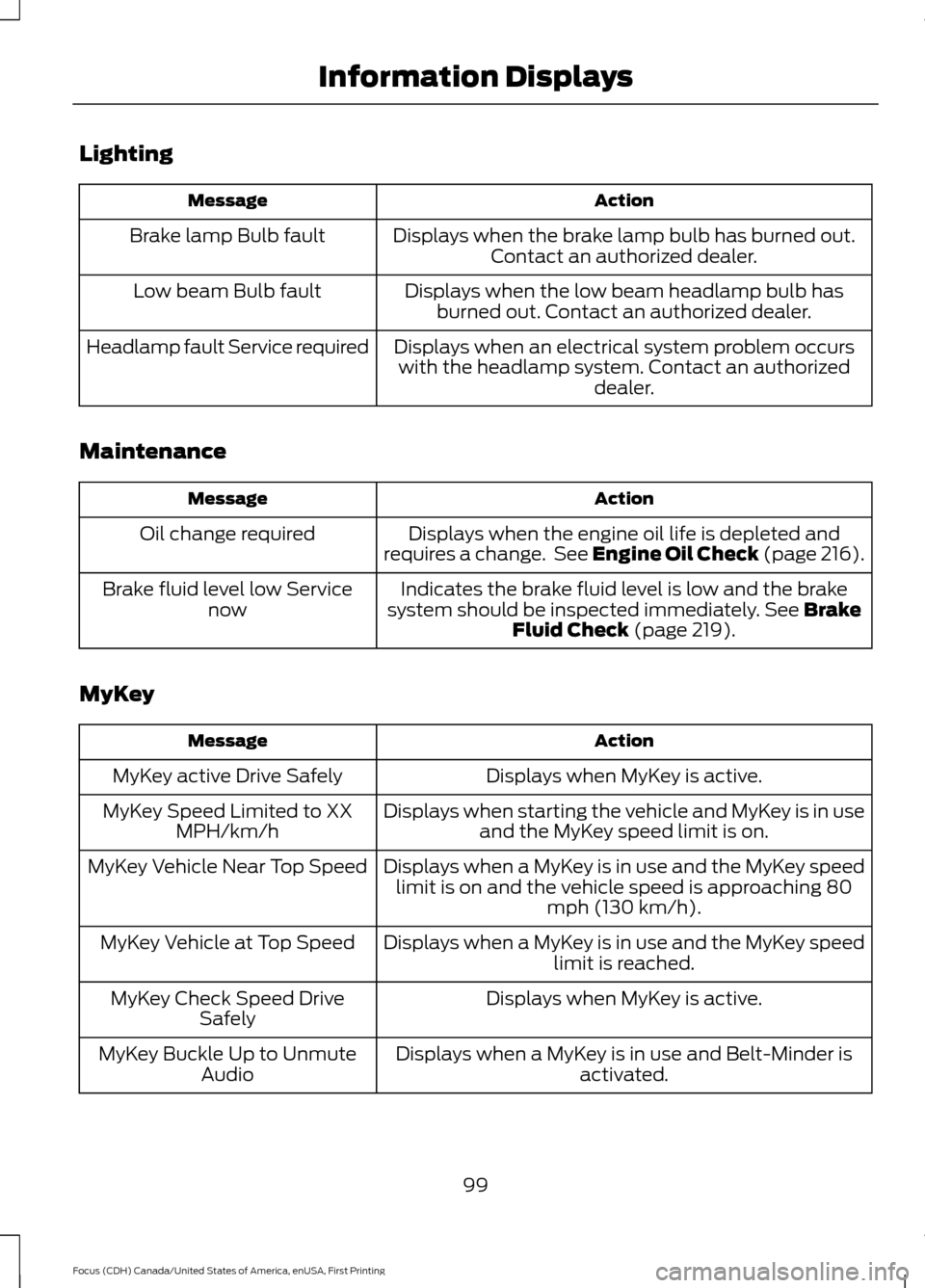
Lighting
Action
Message
Displays when the brake lamp bulb has burned out.Contact an authorized dealer.
Brake lamp Bulb fault
Displays when the low beam headlamp bulb hasburned out. Contact an authorized dealer.
Low beam Bulb fault
Displays when an electrical system problem occurswith the headlamp system. Contact an authorized dealer.
Headlamp fault Service required
Maintenance Action
Message
Displays when the engine oil life is depleted and
requires a change. See Engine Oil Check (page 216).
Oil change required
Indicates the brake fluid level is low and the brake
system should be inspected immediately. See Brake
Fluid Check (page 219).
Brake fluid level low Service
now
MyKey Action
Message
Displays when MyKey is active.
MyKey active Drive Safely
Displays when starting the vehicle and MyKey is in useand the MyKey speed limit is on.
MyKey Speed Limited to XX
MPH/km/h
Displays when a MyKey is in use and the MyKey speedlimit is on and the vehicle speed is approaching 80 mph (130 km/h).
MyKey Vehicle Near Top Speed
Displays when a MyKey is in use and the MyKey speedlimit is reached.
MyKey Vehicle at Top Speed
Displays when MyKey is active.
MyKey Check Speed Drive
Safely
Displays when a MyKey is in use and Belt-Minder isactivated.
MyKey Buckle Up to Unmute
Audio
99
Focus (CDH) Canada/United States of America, enUSA, First Printing Information Displays
Page 103 of 385
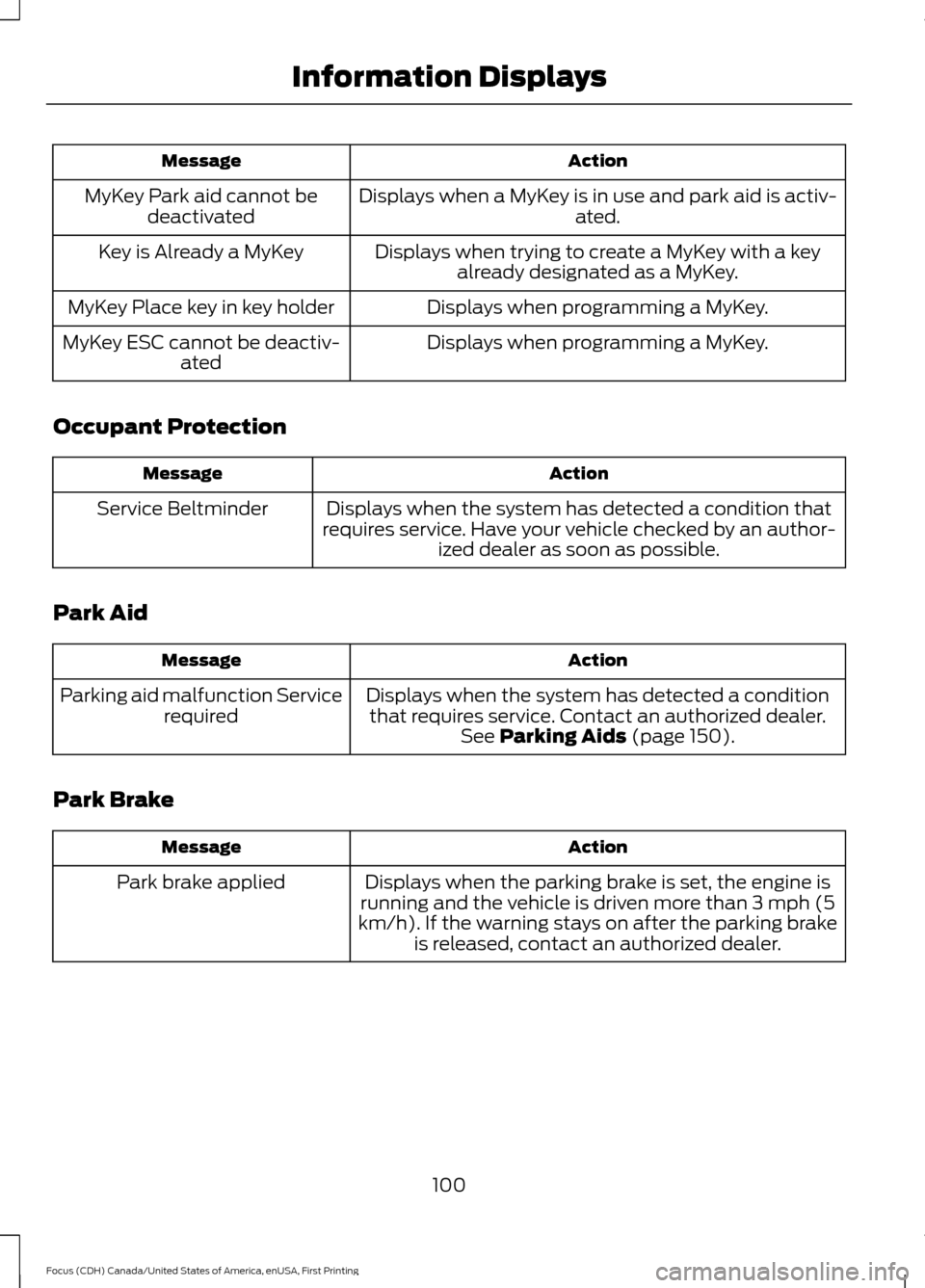
Action
Message
Displays when a MyKey is in use and park aid is activ- ated.
MyKey Park aid cannot be
deactivated
Displays when trying to create a MyKey with a keyalready designated as a MyKey.
Key is Already a MyKey
Displays when programming a MyKey.
MyKey Place key in key holder
Displays when programming a MyKey.
MyKey ESC cannot be deactiv-
ated
Occupant Protection Action
Message
Displays when the system has detected a condition that
requires service. Have your vehicle checked by an author- ized dealer as soon as possible.
Service Beltminder
Park Aid Action
Message
Displays when the system has detected a conditionthat requires service. Contact an authorized dealer. See Parking Aids (page 150).
Parking aid malfunction Service
required
Park Brake Action
Message
Displays when the parking brake is set, the engine is
running and the vehicle is driven more than 3 mph (5
km/h). If the warning stays on after the parking brake is released, contact an authorized dealer.
Park brake applied
100
Focus (CDH) Canada/United States of America, enUSA, First Printing Information Displays
Page 104 of 385
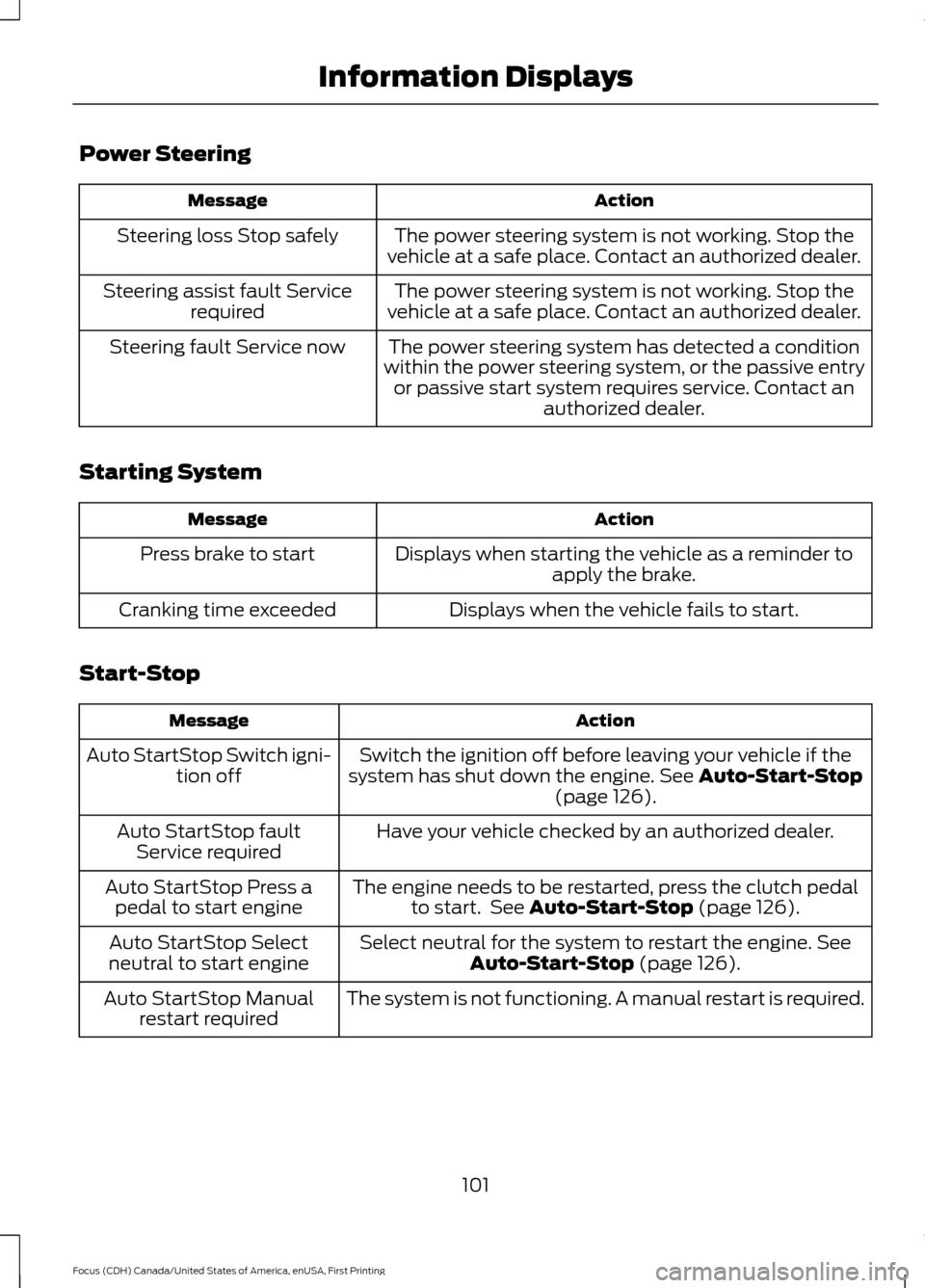
Power Steering
Action
Message
The power steering system is not working. Stop the
vehicle at a safe place. Contact an authorized dealer.
Steering loss Stop safely
The power steering system is not working. Stop the
vehicle at a safe place. Contact an authorized dealer.
Steering assist fault Service
required
The power steering system has detected a condition
within the power steering system, or the passive entry or passive start system requires service. Contact an authorized dealer.
Steering fault Service now
Starting System Action
Message
Displays when starting the vehicle as a reminder toapply the brake.
Press brake to start
Displays when the vehicle fails to start.
Cranking time exceeded
Start-Stop Action
Message
Switch the ignition off before leaving your vehicle if the
system has shut down the engine. See Auto-Start-Stop
(page 126).
Auto StartStop Switch igni-
tion off
Have your vehicle checked by an authorized dealer.
Auto StartStop fault
Service required
The engine needs to be restarted, press the clutch pedalto start. See
Auto-Start-Stop (page 126).
Auto StartStop Press a
pedal to start engine
Select neutral for the system to restart the engine.
See
Auto-Start-Stop (page 126).
Auto StartStop Select
neutral to start engine
The system is not functioning. A manual restart is required.
Auto StartStop Manual
restart required
101
Focus (CDH) Canada/United States of America, enUSA, First Printing Information Displays
Page 105 of 385
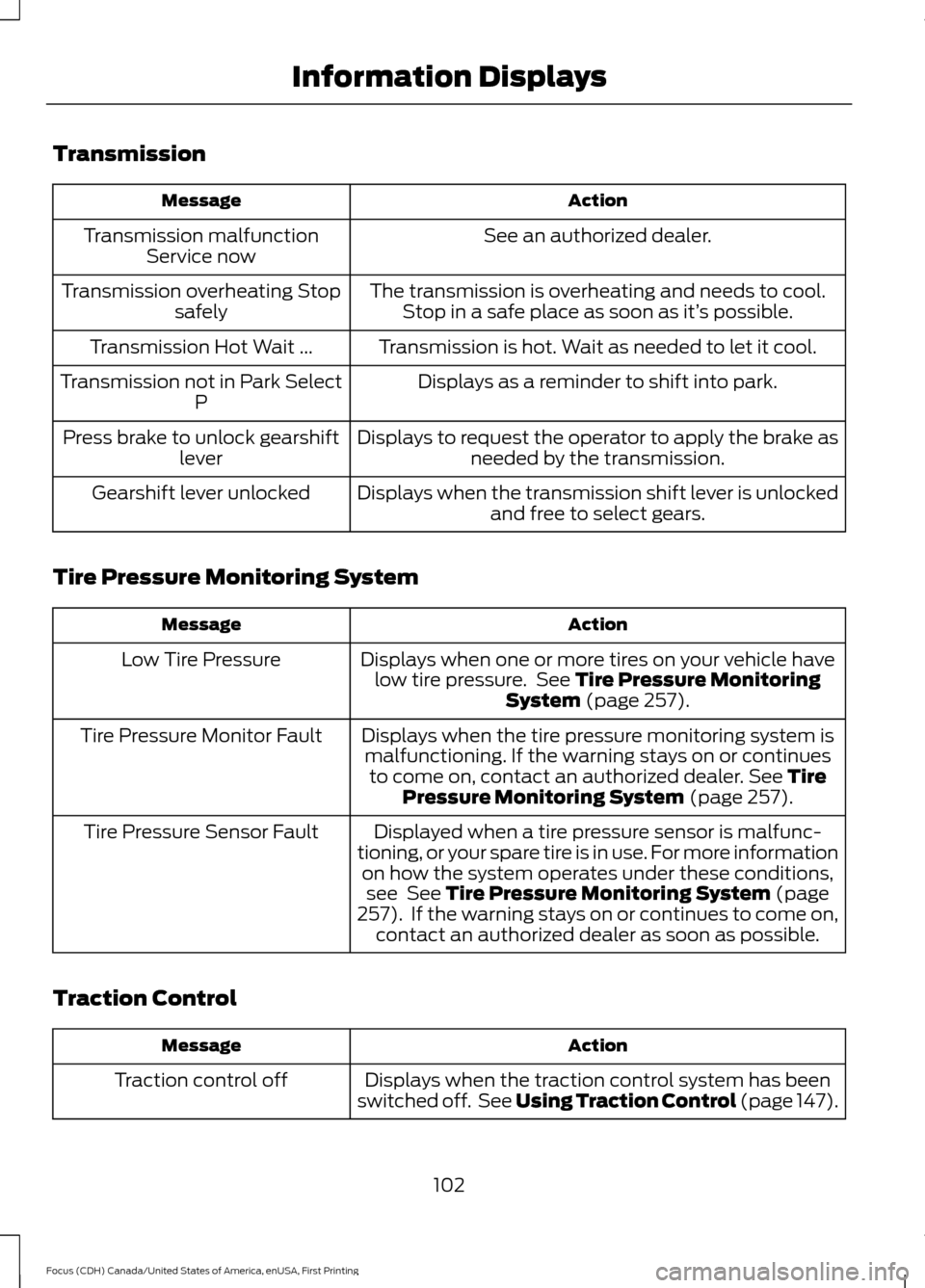
Transmission
Action
Message
See an authorized dealer.
Transmission malfunction
Service now
The transmission is overheating and needs to cool.Stop in a safe place as soon as it’ s possible.
Transmission overheating Stop
safely
Transmission is hot. Wait as needed to let it cool.
Transmission Hot Wait ...
Displays as a reminder to shift into park.
Transmission not in Park Select
P
Displays to request the operator to apply the brake asneeded by the transmission.
Press brake to unlock gearshift
lever
Displays when the transmission shift lever is unlockedand free to select gears.
Gearshift lever unlocked
Tire Pressure Monitoring System Action
Message
Displays when one or more tires on your vehicle havelow tire pressure. See Tire Pressure Monitoring
System (page 257).
Low Tire Pressure
Displays when the tire pressure monitoring system ismalfunctioning. If the warning stays on or continues to come on, contact an authorized dealer.
See Tire
Pressure Monitoring System (page 257).
Tire Pressure Monitor Fault
Displayed when a tire pressure sensor is malfunc-
tioning, or your spare tire is in use. For more information on how the system operates under these conditions,see
See Tire Pressure Monitoring System (page
257). If the warning stays on or continues to come on,
contact an authorized dealer as soon as possible.
Tire Pressure Sensor Fault
Traction Control Action
Message
Displays when the traction control system has been
switched off. See Using Traction Control (page 147).
Traction control off
102
Focus (CDH) Canada/United States of America, enUSA, First Printing Information Displays
Page 122 of 385
Switching the Ignition On to
Accessory Mode
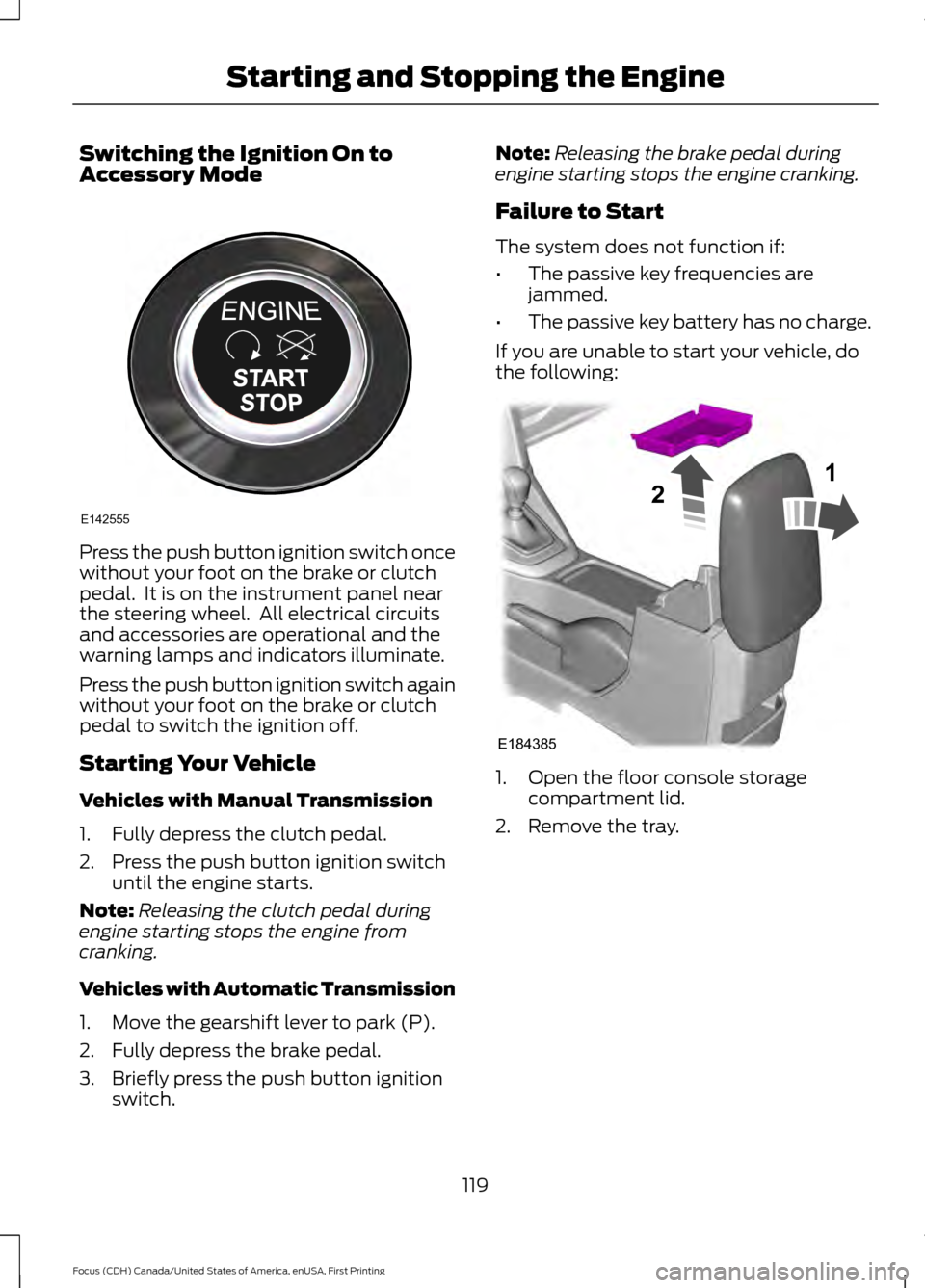
Press the push button ignition switch once
without your foot on the brake or clutch
pedal. It is on the instrument panel near
the steering wheel. All electrical circuits
and accessories are operational and the
warning lamps and indicators illuminate.
Press the push button ignition switch again
without your foot on the brake or clutch
pedal to switch the ignition off.
Starting Your Vehicle
Vehicles with Manual Transmission
1. Fully depress the clutch pedal.
2. Press the push button ignition switch
until the engine starts.
Note: Releasing the clutch pedal during
engine starting stops the engine from
cranking.
Vehicles with Automatic Transmission
1. Move the gearshift lever to park (P).
2. Fully depress the brake pedal.
3. Briefly press the push button ignition switch. Note:
Releasing the brake pedal during
engine starting stops the engine cranking.
Failure to Start
The system does not function if:
• The passive key frequencies are
jammed.
• The passive key battery has no charge.
If you are unable to start your vehicle, do
the following: 1. Open the floor console storage
compartment lid.
2. Remove the tray.
119
Focus (CDH) Canada/United States of America, enUSA, First Printing Starting and Stopping the EngineE142555 E184385
21
Page 123 of 385
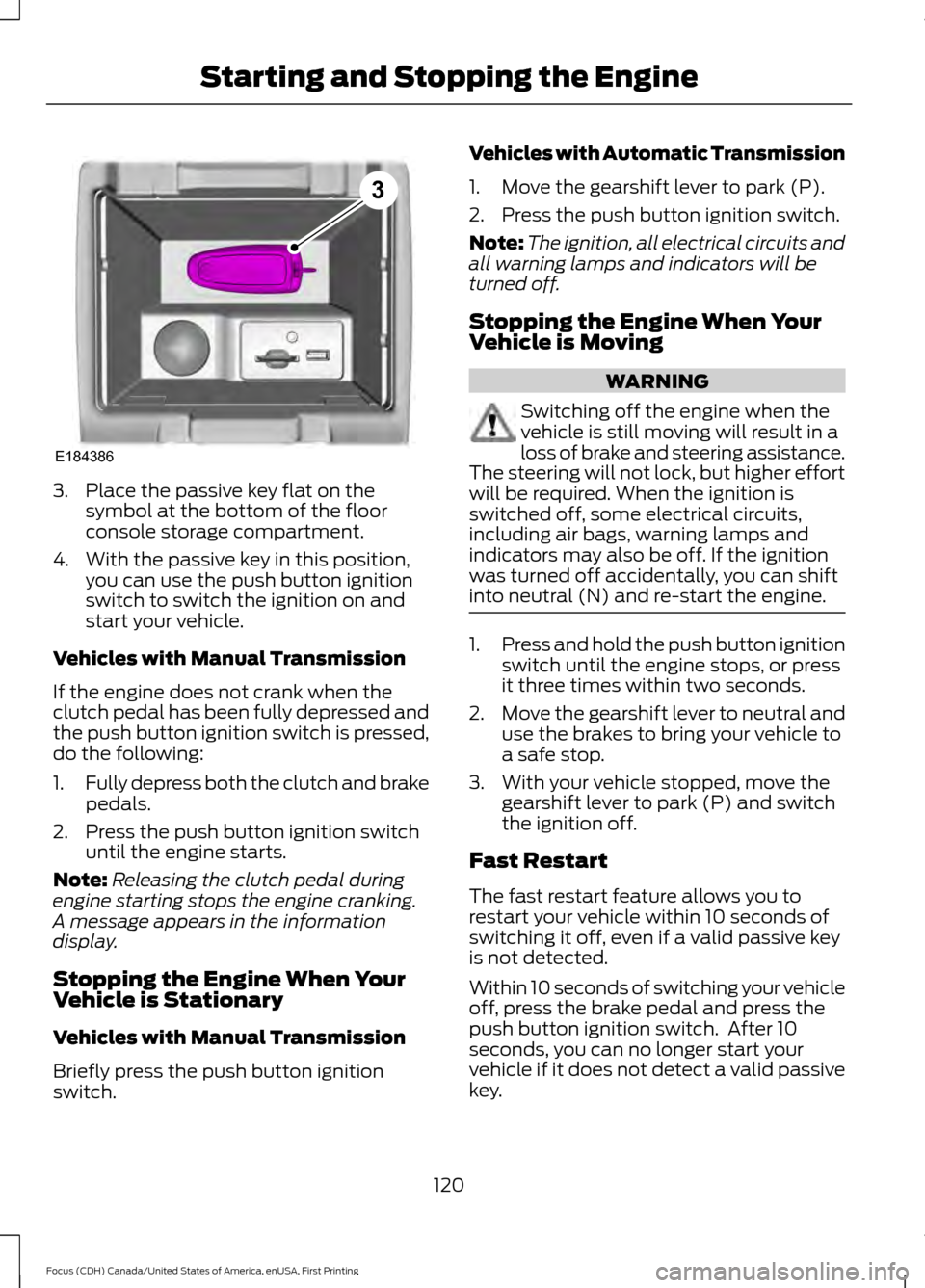
3. Place the passive key flat on the
symbol at the bottom of the floor
console storage compartment.
4. With the passive key in this position, you can use the push button ignition
switch to switch the ignition on and
start your vehicle.
Vehicles with Manual Transmission
If the engine does not crank when the
clutch pedal has been fully depressed and
the push button ignition switch is pressed,
do the following:
1. Fully depress both the clutch and brake
pedals.
2. Press the push button ignition switch until the engine starts.
Note: Releasing the clutch pedal during
engine starting stops the engine cranking.
A message appears in the information
display.
Stopping the Engine When Your
Vehicle is Stationary
Vehicles with Manual Transmission
Briefly press the push button ignition
switch. Vehicles with Automatic Transmission
1. Move the gearshift lever to park (P).
2. Press the push button ignition switch.
Note:
The ignition, all electrical circuits and
all warning lamps and indicators will be
turned off.
Stopping the Engine When Your
Vehicle is Moving WARNING
Switching off the engine when the
vehicle is still moving will result in a
loss of brake and steering assistance.
The steering will not lock, but higher effort
will be required. When the ignition is
switched off, some electrical circuits,
including air bags, warning lamps and
indicators may also be off. If the ignition
was turned off accidentally, you can shift
into neutral (N) and re-start the engine. 1.
Press and hold the push button ignition
switch until the engine stops, or press
it three times within two seconds.
2. Move the gearshift lever to neutral and
use the brakes to bring your vehicle to
a safe stop.
3. With your vehicle stopped, move the gearshift lever to park (P) and switch
the ignition off.
Fast Restart
The fast restart feature allows you to
restart your vehicle within 10 seconds of
switching it off, even if a valid passive key
is not detected.
Within 10 seconds of switching your vehicle
off, press the brake pedal and press the
push button ignition switch. After 10
seconds, you can no longer start your
vehicle if it does not detect a valid passive
key.
120
Focus (CDH) Canada/United States of America, enUSA, First Printing Starting and Stopping the EngineE184386
3
Page 124 of 385
Once your vehicle starts, it remains running
until you press the push button ignition
switch, even if your vehicle does not detect
a valid passive key. If you open and close
a door while your vehicle is running, the
system searches for a valid passive key.
You cannot start your vehicle if you open
the driver door and the system does not
detect a valid passive key.
STARTING A GASOLINE
ENGINE
When you start the engine, the idle speed
increases. This helps to warm up the
engine. If the engine idle speed does not
slow down automatically, have your
vehicle checked by an authorized dealer.
Note:
You can crank the engine for a total
of 60 seconds without the engine starting
before the starting system temporarily
disables. The 60 seconds does not have to
be all at once. For example, if you crank the
engine three times for 20 seconds each
time, without the engine starting, you
reached the 60-second time limit. A
message appears in the information display
alerting you that you exceeded the cranking
time. You cannot attempt to start the engine
for at least 15 minutes. After 15 minutes, you
are limited to a 15-second engine cranking
time. You need to wait 60 minutes before
you can crank the engine for 60 seconds
again.
Before starting your vehicle, check the
following:
• Make sure all occupants have fastened
their safety belts.
• Make sure the headlamps and
electrical accessories are off.
• Make sure the parking brake is on. •
Make sure the transmission is in park
(P).
• Switch the ignition key to position II. If
your vehicle is equipped with a keyless
ignition, see the following instructions.
Vehicles with an Ignition Key
Note: Do not touch the accelerator pedal.
1. Fully press the brake pedal. If your vehicle is equipped with a manual
transmission, fully press the clutch
pedal.
2. Turn the key to position
III to start the
engine.
Note: The engine may continue cranking
for up to 15 seconds or until it starts.
Note: If you cannot start the engine on the
first try, wait for a short period and try again.
Vehicles with Keyless Start
Note: Do not touch the accelerator pedal.
Note: You must have your intelligent access
key in your vehicle in order to shift the
transmission out of park (P).
1. Fully depress the brake pedal.
2. Press the push button ignition switch.
The system does not function if:
• The passive key frequencies are
jammed.
• The key battery has no charge.
If you are unable to start your vehicle, do
the following:
121
Focus (CDH) Canada/United States of America, enUSA, First Printing Starting and Stopping the Engine