ECU FORD FOCUS 2016 3.G User Guide
[x] Cancel search | Manufacturer: FORD, Model Year: 2016, Model line: FOCUS, Model: FORD FOCUS 2016 3.GPages: 385, PDF Size: 5.23 MB
Page 50 of 385
Sounding the Panic Alarm (If Equipped)
Press the button to sound the
panic alarm. Press the button
again or switch the ignition on to
silence it.
Note: The panic alarm only operates when
the ignition is off.
REMOTE CONTROL - VEHICLES
WITH: KEYLESS ENTRY (If
Equipped)
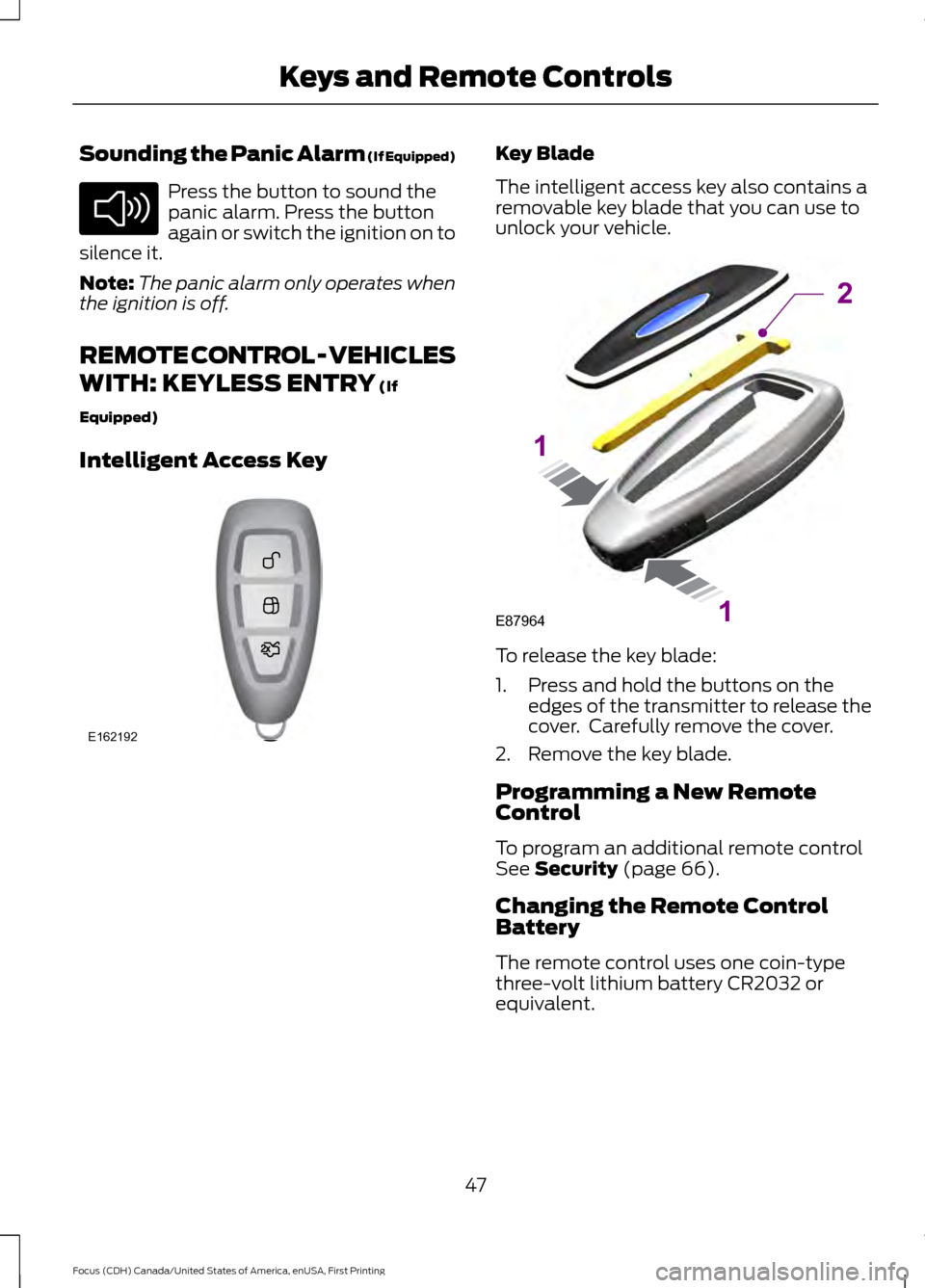
Intelligent Access Key Key Blade
The intelligent access key also contains a
removable key blade that you can use to
unlock your vehicle.
To release the key blade:
1. Press and hold the buttons on the
edges of the transmitter to release the
cover. Carefully remove the cover.
2. Remove the key blade.
Programming a New Remote
Control
To program an additional remote control
See
Security (page 66).
Changing the Remote Control
Battery
The remote control uses one coin-type
three-volt lithium battery CR2032 or
equivalent.
47
Focus (CDH) Canada/United States of America, enUSA, First Printing Keys and Remote ControlsE138624 E162192 E87964
2
1
1
Page 52 of 385
Note:
Replacing the battery does not delete
the transmitter from the vehicle. The
transmitter should operate normally.
Locating Your Vehicle
Press the lock button on the key twice
within three seconds. The horn may sound
and the direction indicators flash.
The horn may sound twice and the
direction indicators do not flash if:
• Locking was not successful.
• Any door or the liftgate is open.
• The hood is open on vehicles with an
anti-theft alarm or remote start.
REMOTE CONTROL - VEHICLES
WITH: KEYLESS ENTRY WITH
REMOTE START (If Equipped)
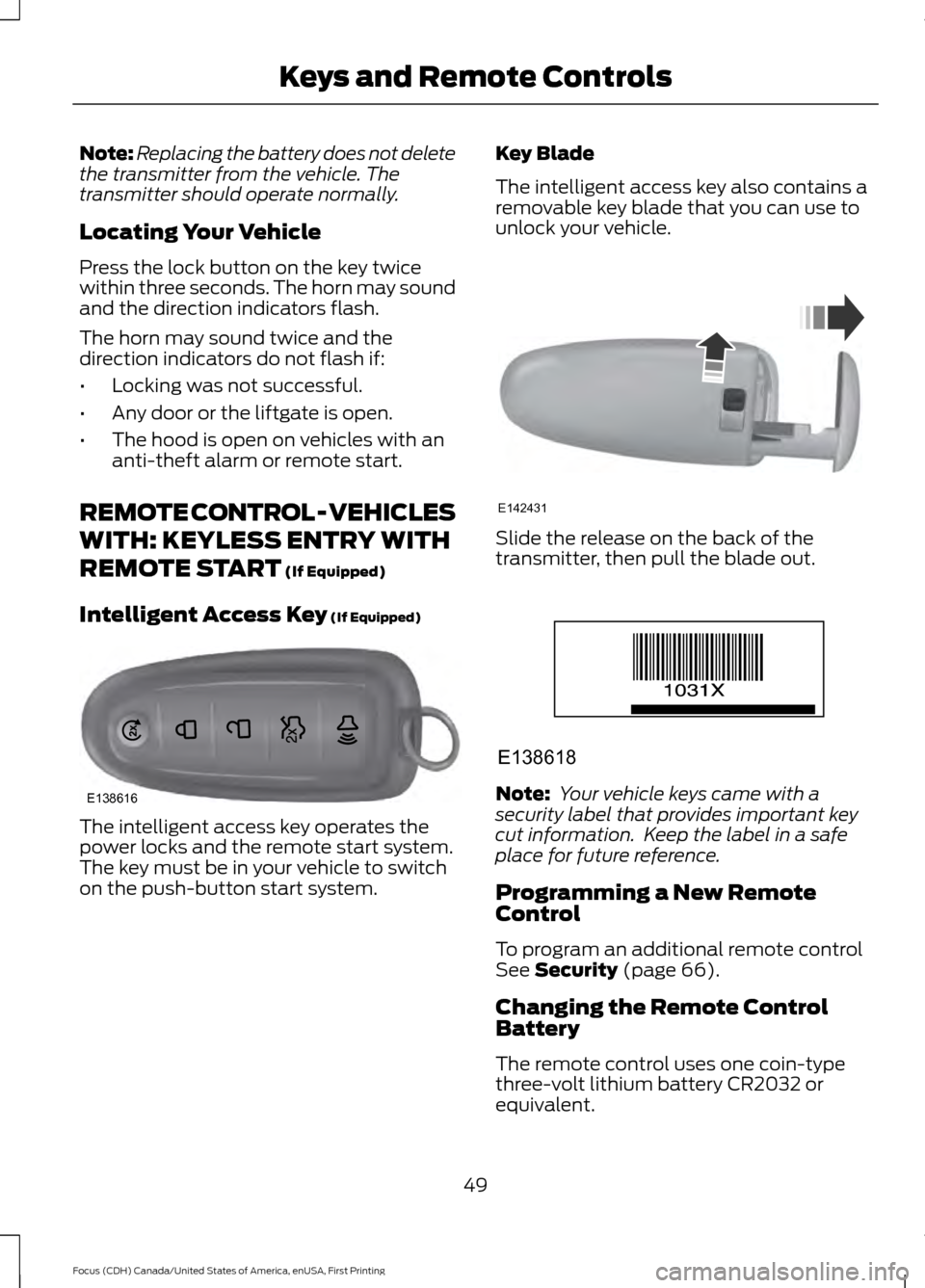
Intelligent Access Key
(If Equipped) The intelligent access key operates the
power locks and the remote start system.
The key must be in your vehicle to switch
on the push-button start system. Key Blade
The intelligent access key also contains a
removable key blade that you can use to
unlock your vehicle.
Slide the release on the back of the
transmitter, then pull the blade out.
Note:
Your vehicle keys came with a
security label that provides important key
cut information. Keep the label in a safe
place for future reference.
Programming a New Remote
Control
To program an additional remote control
See
Security (page 66).
Changing the Remote Control
Battery
The remote control uses one coin-type
three-volt lithium battery CR2032 or
equivalent.
49
Focus (CDH) Canada/United States of America, enUSA, First Printing Keys and Remote ControlsE138616 E142431 E138618
Page 66 of 385
Note:
Be careful when opening or closing
the liftgate in a garage or other enclosed
area to avoid damaging the liftgate.
Note: Do not hang anything, for example a
bike rack, from the glass or liftgate. This
could damage the liftgate and its
components.
Note: Do not leave the liftgate open while
driving. This could damage the liftgate and
its components.
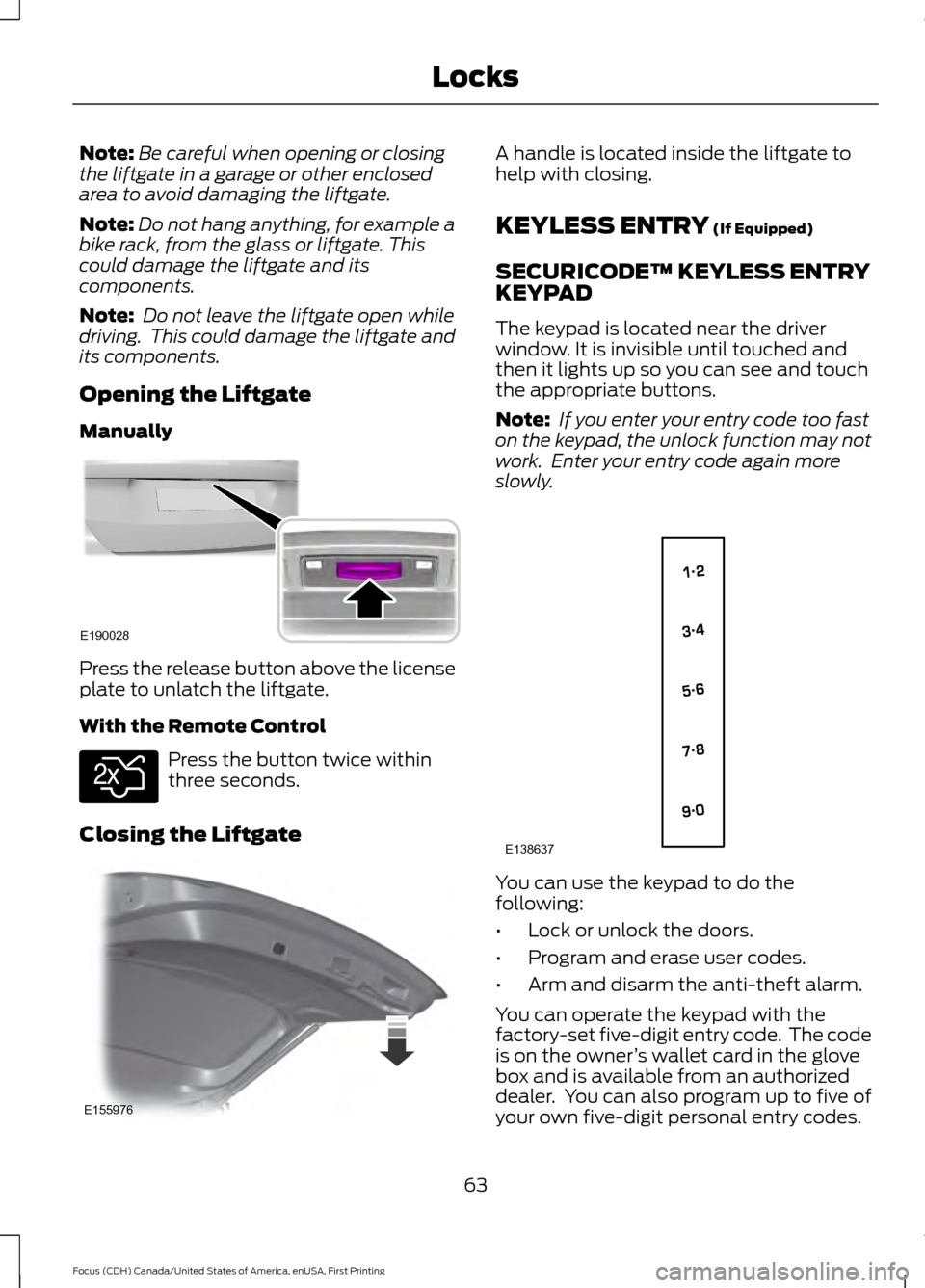
Opening the Liftgate
Manually Press the release button above the license
plate to unlatch the liftgate.
With the Remote Control
Press the button twice within
three seconds.
Closing the Liftgate A handle is located inside the liftgate to
help with closing.
KEYLESS ENTRY (If Equipped)
SECURICODE™ KEYLESS ENTRY
KEYPAD
The keypad is located near the driver
window. It is invisible until touched and
then it lights up so you can see and touch
the appropriate buttons.
Note: If you enter your entry code too fast
on the keypad, the unlock function may not
work. Enter your entry code again more
slowly. You can use the keypad to do the
following:
•
Lock or unlock the doors.
• Program and erase user codes.
• Arm and disarm the anti-theft alarm.
You can operate the keypad with the
factory-set five-digit entry code. The code
is on the owner ’s wallet card in the glove
box and is available from an authorized
dealer. You can also program up to five of
your own five-digit personal entry codes.
63
Focus (CDH) Canada/United States of America, enUSA, First Printing LocksE190028 E138630 E155976 E138637
Page 69 of 385
PASSIVE ANTI-THEFT
SYSTEM
Note:
The system is not compatible with
non-Ford aftermarket remote start systems.
Use of these systems may result in engine
starting problems and a loss of security
protection.
Note: Metallic objects, electronic devices
or a second coded key on the same key
chain may result in vehicle starting
problems, especially if they are too close to
the key when starting your vehicle. Prevent
these objects from touching the coded key
when starting your vehicle. If your vehicle
fails to start, switch the ignition off, move
all objects on the key chain away from the
key and start your vehicle.
Note: Do not leave a duplicate coded key
in your vehicle. Always take your keys and
lock all doors when leaving your vehicle.
SecuriLock
The system helps prevent the engine from
starting unless you use a coded key
programmed to your vehicle. A message
may appear in the information display.
If your vehicle fails to start, the system may
have a fault. Contact an authorized dealer.
A message may appear in the information
display.
Automatic Arming
The system arms when you switch the
ignition off.
Automatic Disarming
The system disarms when you switch the
ignition on with a coded key.
Replacement Keys
Note: Your vehicle comes with two keys. The intelligent access key functions as a
programmed key that operates the driver
door lock and turns on the intelligent
access with push button start system, as
well as a remote control.
If your intelligent access keys are lost or
stolen and you do not have an extra coded
key, you need to have your vehicle towed
to an authorized dealer. You need to erase
the key codes from your vehicle and
program new coded keys.
Store a spare intelligent access key away
from your vehicle in a safe place. Contact
an authorized dealer to purchase
additional spare or replacement keys.
Programming a Spare Integrated
Keyhead Transmitter
You can program your own integrated
keyhead transmitter or standard
SecuriLock coded keys to your vehicle. This
procedure will program both the vehicle
immobilizer keycode and the remote entry
portion of the remote control to your
vehicle.
Only use integrated keyhead transmitters
or standard SecuriLock keys.
You must have two previously
programmed coded keys and the new
unprogrammed key readily accessible.
Contact an authorized dealer to have the
spare key programmed if two previously
programmed keys are not available.
Make sure that the ignition is switched off
before beginning this procedure. Carry out
all steps within 30 seconds of starting the
sequence. Stop and wait for at least one
minute before starting again if you carry
out any steps out of sequence.
Note:
You can program a maximum of eight
coded keys to your vehicle. All eight can be
integrated keyhead transmitters.
Read and understand the entire procedure
before you begin.
66
Focus (CDH) Canada/United States of America, enUSA, First Printing Security
Page 70 of 385
1.
Insert the first previously programmed
coded key into the ignition.
2. Switch the ignition from off to on. Keep
the ignition on for at least 3 seconds,
but no more than 10 seconds.
3. Switch the ignition off and remove the
first coded key from the ignition.
4. After at least 3 seconds but within 10 seconds of switching the ignition off,
insert the second previously coded key
into the ignition.
5. Switch the ignition from off to on. Keep
the ignition on for at least 3 seconds,
but no more than 10 seconds.
6. Switch the ignition off and remove the
second previously programmed coded
key from the ignition.
7. After at least 3 seconds but within 10 seconds of switching the ignition off
and removing the previously
programmed coded key, insert the new
unprogrammed key into the ignition.
8. Switch the ignition from off to on. Keep
the ignition on for at least six seconds.
9. Remove the newly programmed coded
key from the ignition.
If you have successfully programmed the
coded key, it will start your vehicle and
operate the remote entry system.
If programming was unsuccessful, wait 10
seconds and repeat Steps 1 through 8. If
programming remains unsuccessful, have
your vehicle checked by an authorized
dealer.
Wait 20 seconds and repeat Steps 1
through 9 to program an additional key. Programming a Spare Intelligent
Access Key
You must have two previously
programmed coded keys and the new
unprogrammed key readily accessible.
Contact an authorized dealer to have the
spare key programmed if two previously
programmed keys are not available.
Make sure that the ignition is switched off
before beginning this procedure. Make sure
that you close all the doors before
beginning and that they remain closed
throughout the procedure. Carry out all
steps within 30 seconds of starting the
sequence. Stop and wait for at least one
minute before starting again if you carry
out any steps out of sequence.
Note:
You can program a maximum of eight
intelligent access keys to your vehicle.
Read and understand the entire procedure
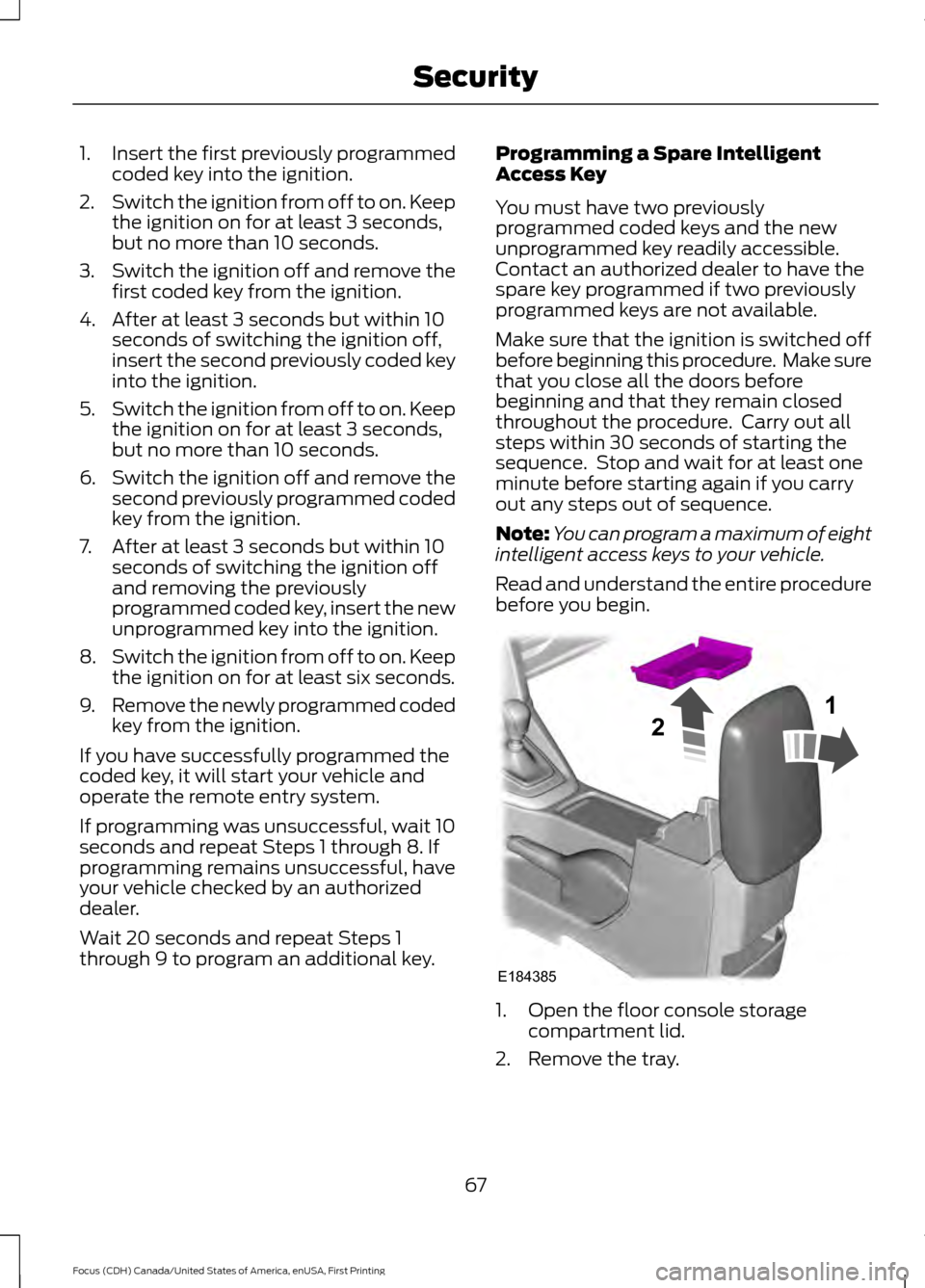
before you begin. 1. Open the floor console storage
compartment lid.
2. Remove the tray.
67
Focus (CDH) Canada/United States of America, enUSA, First Printing SecurityE184385
21
Page 71 of 385
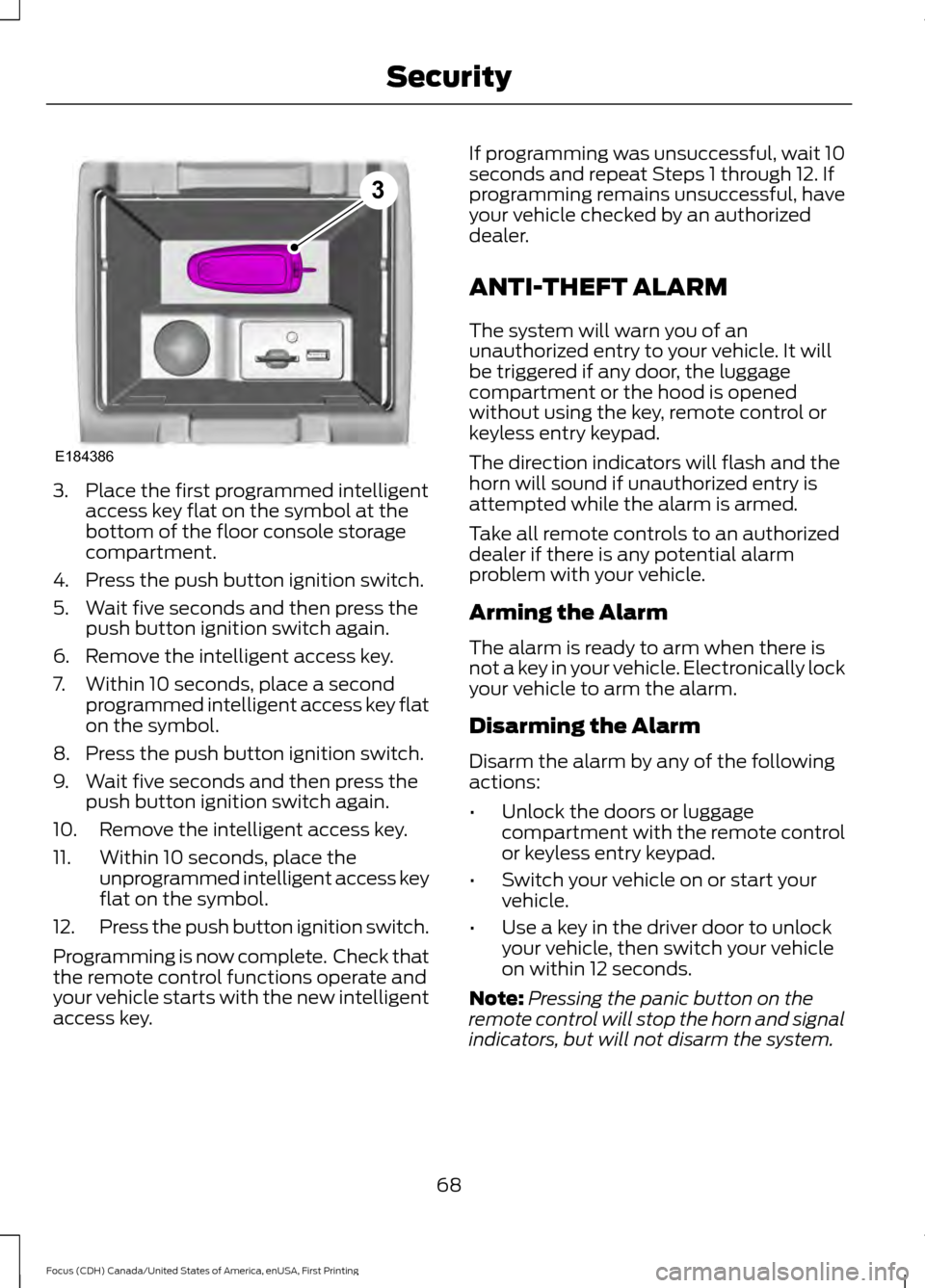
3. Place the first programmed intelligent
access key flat on the symbol at the
bottom of the floor console storage
compartment.
4. Press the push button ignition switch.
5. Wait five seconds and then press the push button ignition switch again.
6. Remove the intelligent access key.
7. Within 10 seconds, place a second programmed intelligent access key flat
on the symbol.
8. Press the push button ignition switch.
9. Wait five seconds and then press the push button ignition switch again.
10. Remove the intelligent access key.
11. Within 10 seconds, place the unprogrammed intelligent access key
flat on the symbol.
12. Press the push button ignition switch.
Programming is now complete. Check that
the remote control functions operate and
your vehicle starts with the new intelligent
access key. If programming was unsuccessful, wait 10
seconds and repeat Steps 1 through 12. If
programming remains unsuccessful, have
your vehicle checked by an authorized
dealer.
ANTI-THEFT ALARM
The system will warn you of an
unauthorized entry to your vehicle. It will
be triggered if any door, the luggage
compartment or the hood is opened
without using the key, remote control or
keyless entry keypad.
The direction indicators will flash and the
horn will sound if unauthorized entry is
attempted while the alarm is armed.
Take all remote controls to an authorized
dealer if there is any potential alarm
problem with your vehicle.
Arming the Alarm
The alarm is ready to arm when there is
not a key in your vehicle. Electronically lock
your vehicle to arm the alarm.
Disarming the Alarm
Disarm the alarm by any of the following
actions:
•
Unlock the doors or luggage
compartment with the remote control
or keyless entry keypad.
• Switch your vehicle on or start your
vehicle.
• Use a key in the driver door to unlock
your vehicle, then switch your vehicle
on within 12 seconds.
Note: Pressing the panic button on the
remote control will stop the horn and signal
indicators, but will not disarm the system.
68
Focus (CDH) Canada/United States of America, enUSA, First Printing SecurityE184386
3
Page 143 of 385
WARNINGS
Do not apply the brake pedal and
accelerator pedal simultaneously.
Applying both pedals simultaneously
for more than three seconds will limit
engine rpm, which may result in difficulty
maintaining speed in traffic and could lead
to serious injury. The PowerShift™ 6-speed, dual-clutch
automatic transmission is designed to offer
drivers both enhanced fuel efficiency and
fun to drive performance. This
transmission
’s dual-clutch technology uses
electronically shifted clutches to operate
two separate transmissions all in a small
lightweight package.
Since the clutch and gear operation is
derived from a manual transmission, the
PowerShift automatic transmission will
drive, sound, and feel similar to manual
transmission minus the required
user-inputs. For example, the transmission
may exhibit mechanical noises, firm gear
shifts and/or light clutch vibrations when
accelerating slowly as the clutches
automatically engage. These are all
considered to be normal and expected
driving characteristics.
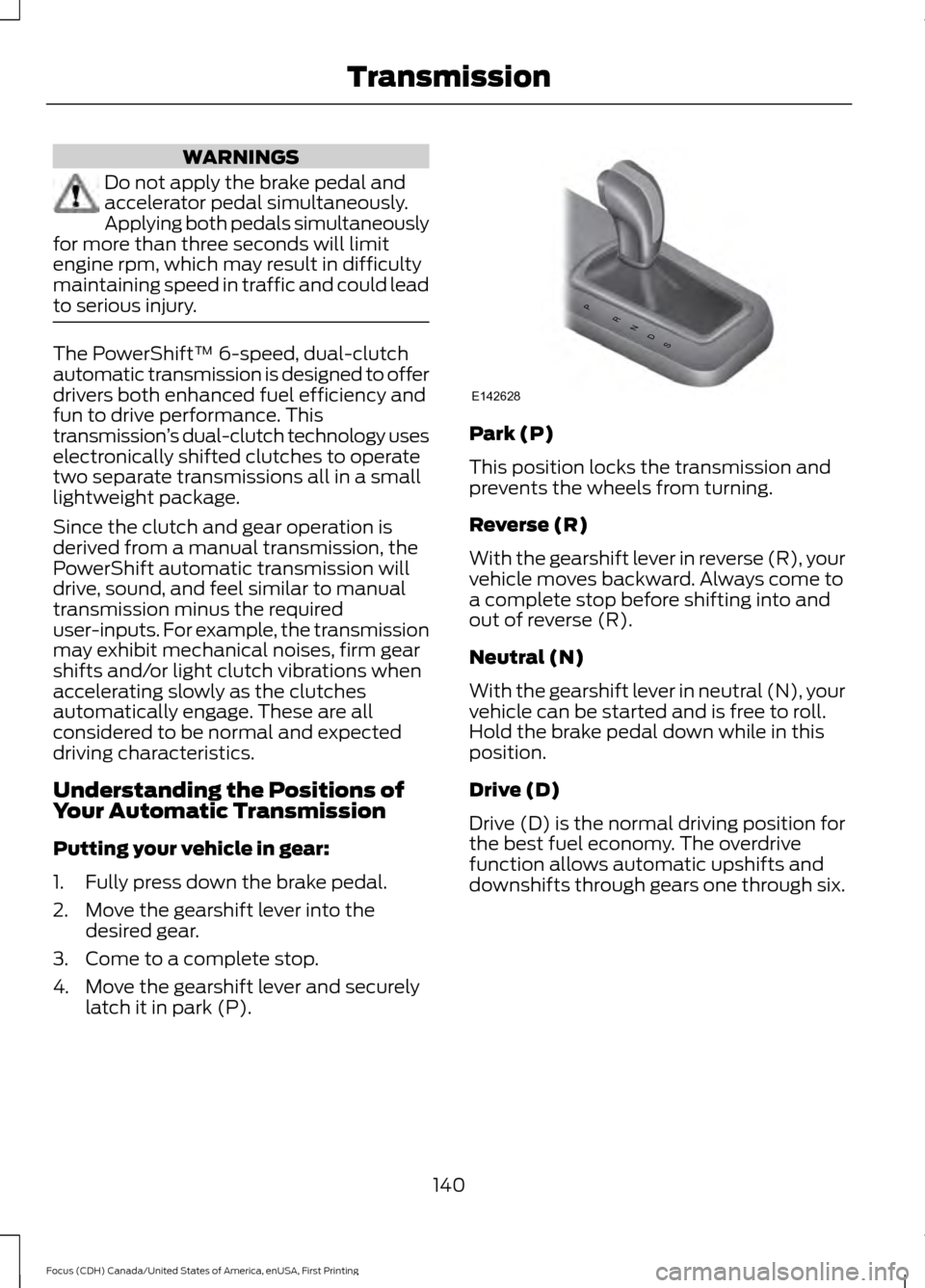
Understanding the Positions of
Your Automatic Transmission
Putting your vehicle in gear:
1. Fully press down the brake pedal.
2. Move the gearshift lever into the desired gear.
3. Come to a complete stop.
4. Move the gearshift lever and securely latch it in park (P). Park (P)
This position locks the transmission and
prevents the wheels from turning.
Reverse (R)
With the gearshift lever in reverse (R), your
vehicle moves backward. Always come to
a complete stop before shifting into and
out of reverse (R).
Neutral (N)
With the gearshift lever in neutral (N), your
vehicle can be started and is free to roll.
Hold the brake pedal down while in this
position.
Drive (D)
Drive (D) is the normal driving position for
the best fuel economy. The overdrive
function allows automatic upshifts and
downshifts through gears one through six.
140
Focus (CDH) Canada/United States of America, enUSA, First Printing TransmissionPRNDS
E142628
Page 157 of 385
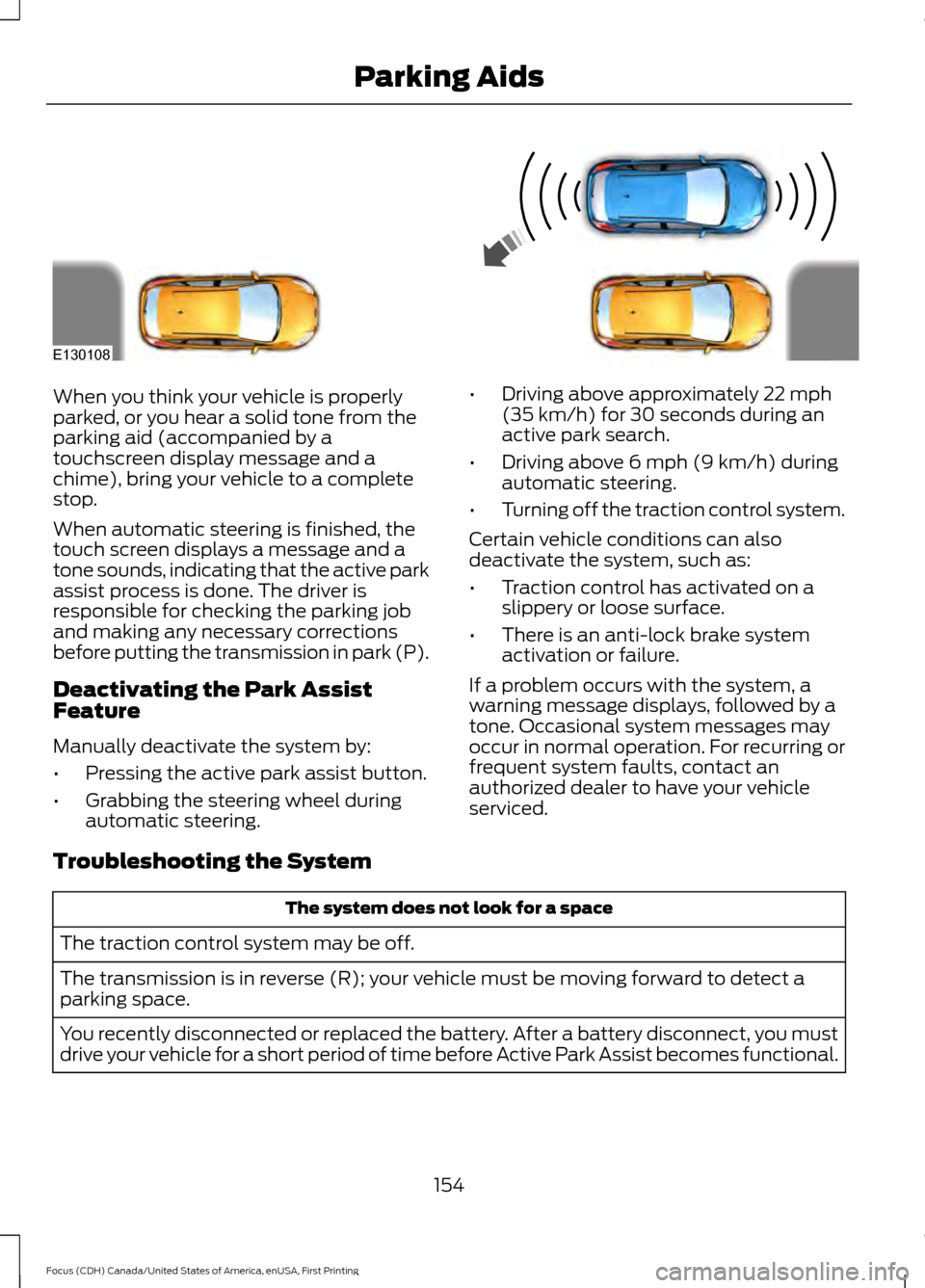
When you think your vehicle is properly
parked, or you hear a solid tone from the
parking aid (accompanied by a
touchscreen display message and a
chime), bring your vehicle to a complete
stop.
When automatic steering is finished, the
touch screen displays a message and a
tone sounds, indicating that the active park
assist process is done. The driver is
responsible for checking the parking job
and making any necessary corrections
before putting the transmission in park (P).
Deactivating the Park Assist
Feature
Manually deactivate the system by:
•
Pressing the active park assist button.
• Grabbing the steering wheel during
automatic steering. •
Driving above approximately 22 mph
(35 km/h) for 30 seconds during an
active park search.
• Driving above
6 mph (9 km/h) during
automatic steering.
• Turning off the traction control system.
Certain vehicle conditions can also
deactivate the system, such as:
• Traction control has activated on a
slippery or loose surface.
• There is an anti-lock brake system
activation or failure.
If a problem occurs with the system, a
warning message displays, followed by a
tone. Occasional system messages may
occur in normal operation. For recurring or
frequent system faults, contact an
authorized dealer to have your vehicle
serviced.
Troubleshooting the System The system does not look for a space
The traction control system may be off.
The transmission is in reverse (R); your vehicle must be moving forward to detect a
parking space.
You recently disconnected or replaced the battery. After a battery disconnect, you must
drive your vehicle for a short period of time before Active Park Assist becomes functional.
154
Focus (CDH) Canada/United States of America, enUSA, First Printing Parking AidsE130108
Page 177 of 385
REAR UNDER FLOOR
STORAGE
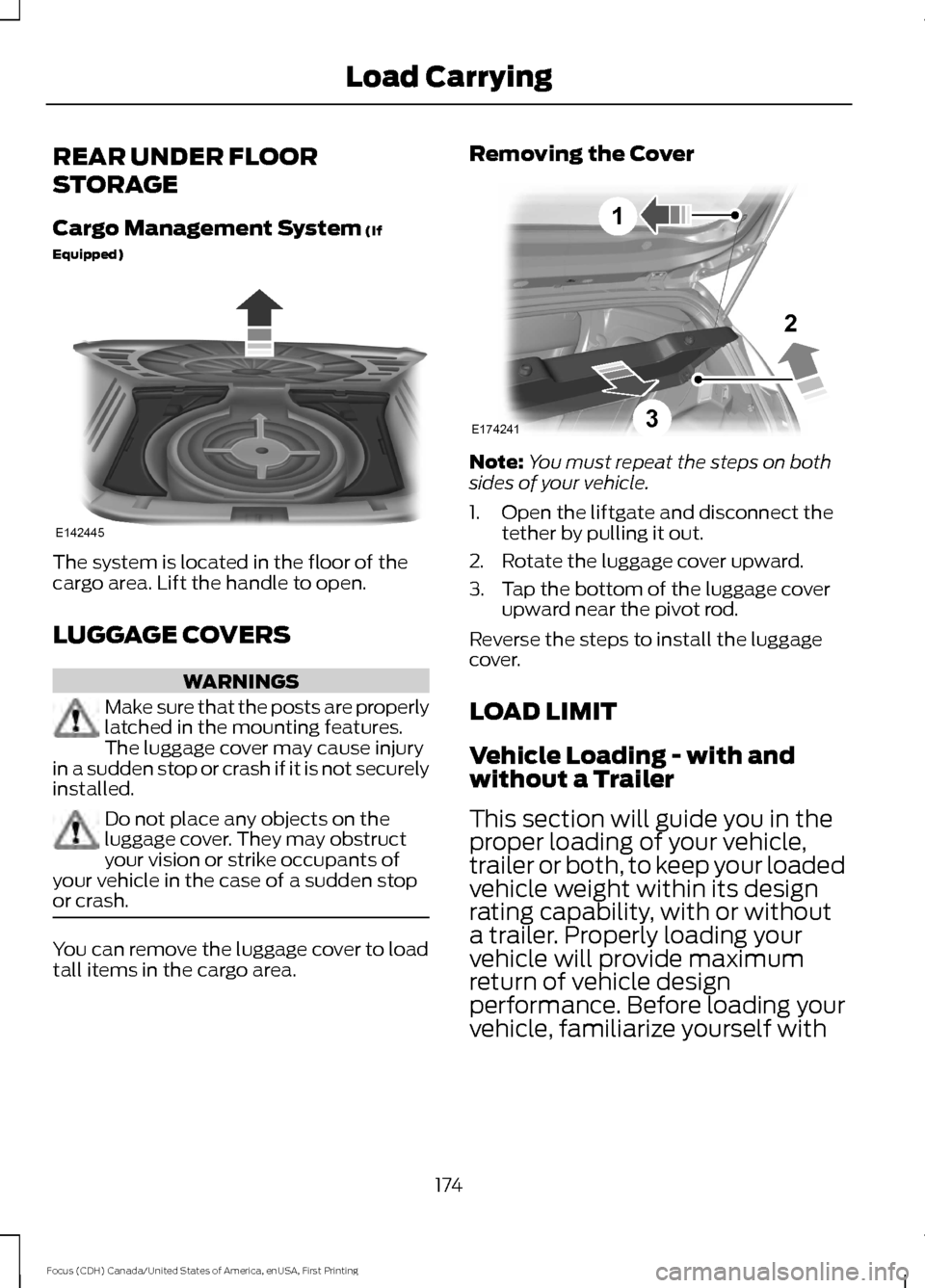
Cargo Management System (If
Equipped) The system is located in the floor of the
cargo area. Lift the handle to open.
LUGGAGE COVERS
WARNINGS
Make sure that the posts are properly
latched in the mounting features.
The luggage cover may cause injury
in a sudden stop or crash if it is not securely
installed. Do not place any objects on the
luggage cover. They may obstruct
your vision or strike occupants of
your vehicle in the case of a sudden stop
or crash. You can remove the luggage cover to load
tall items in the cargo area. Removing the Cover
Note:
You must repeat the steps on both
sides of your vehicle.
1. Open the liftgate and disconnect the tether by pulling it out.
2. Rotate the luggage cover upward.
3. Tap the bottom of the luggage cover upward near the pivot rod.
Reverse the steps to install the luggage
cover.
LOAD LIMIT
Vehicle Loading - with and
without a Trailer
This section will guide you in the
proper loading of your vehicle,
trailer or both, to keep your loaded
vehicle weight within its design
rating capability, with or without
a trailer. Properly loading your
vehicle will provide maximum
return of vehicle design
performance. Before loading your
vehicle, familiarize yourself with
174
Focus (CDH) Canada/United States of America, enUSA, First Printing Load CarryingE142445 E174241
1
3
2
Page 190 of 385
Before driving through standing water,
check the depth. Never drive through water
that is higher than the bottom of the front
rocker area of your vehicle.
When driving through standing water, drive
very slowly and do not stop your vehicle.
Your brake performance and traction may
be limited. After driving through water and
as soon as it is safe to do so:
•
Lightly press the brake pedal to dry the
brakes and to check that they work.
• Check that the horn works.
• Check that the exterior lights work.
• Turn the steering wheel to check that
the steering power assist works.
FLOOR MATS WARNINGS
Always use floor mats that are
designed to fit the foot well of your
vehicle. Only use floor mats that
leave the pedal area unobstructed. Only
use floor mats that are firmly secured to
retention posts so that they cannot slip out
of position and interfere with the pedals
or impair safe operation of your vehicle in
other ways. WARNINGS
Pedals that cannot move freely can
cause loss of vehicle control and
increase the risk of serious personal
injury. Always make sure that the floor
mats are properly attached to the
retention posts in the carpet that are
supplied with your vehicle. Floor mats must
be properly secured to both retention posts
to make sure mats do not shift out of
position. Never place floor mats or any other
covering in the vehicle foot well that
cannot be properly secured to
prevent them from moving and interfering
with the pedals or the ability to control the
vehicle. Never place floor mats or any other
covering on top of already installed
floor mats. Floor mats should always
rest on top of vehicle carpeting surface and
not another floor mat or other covering.
Additional floor mats or any other covering
will reduce the pedal clearance and
potentially interfere with pedal operation. Check attachment of floor mats on
a regular basis. Always properly
reinstall and secure floor mats that
have been removed for cleaning or
replacement. Always make sure that objects
cannot fall into the driver foot well
while the vehicle is moving. Objects
that are loose can become trapped under
the pedals causing a loss of vehicle control. Failure to properly follow floor mat
installation or attachment
instructions can potentially cause
interference with pedal operation causing
a loss of vehicle control. 187
Focus (CDH) Canada/United States of America, enUSA, First Printing Driving HintsE176360