battery FORD FOCUS 2016 3.G User Guide
[x] Cancel search | Manufacturer: FORD, Model Year: 2016, Model line: FOCUS, Model: FORD FOCUS 2016 3.GPages: 385, PDF Size: 5.23 MB
Page 65 of 385
The lamps will not turn off if:
•
You switch them on with the lighting
control.
• Any door is open.
Illuminated Exit
For vehicles with an integrated keyhead
transmitter, the interior lamps and select
exterior lamps illuminate when you close
all the doors, you switch the ignition off
and you remove the key from the ignition.
The lamps will turn off if all the doors
remain closed and:
• 25 seconds have elapsed.
• You insert the key in the ignition
(integrated keyhead transmitter only).
• You press the START/STOP button
(intelligent access key only).
Battery Saver
If you leave the courtesy lamps, dome
lamps or headlamps on, the battery saver
will turn them off 10 minutes after you
switch the ignition off.
Accessory Mode Battery Saver for
Intelligent Access Keys (If Equipped)
If you leave the ignition switched on and
the engine is not running, the battery saver
will turn the ignition off when it detects a
certain amount of battery drain, or after
45 minutes have elapsed.
Opening the Liftgate or Luggage
Compartment
With the Remote Control Press twice within three seconds
to unlatch the liftgate or luggage
compartment. From Inside Your Vehicle Press the button on the lighting
control panel.
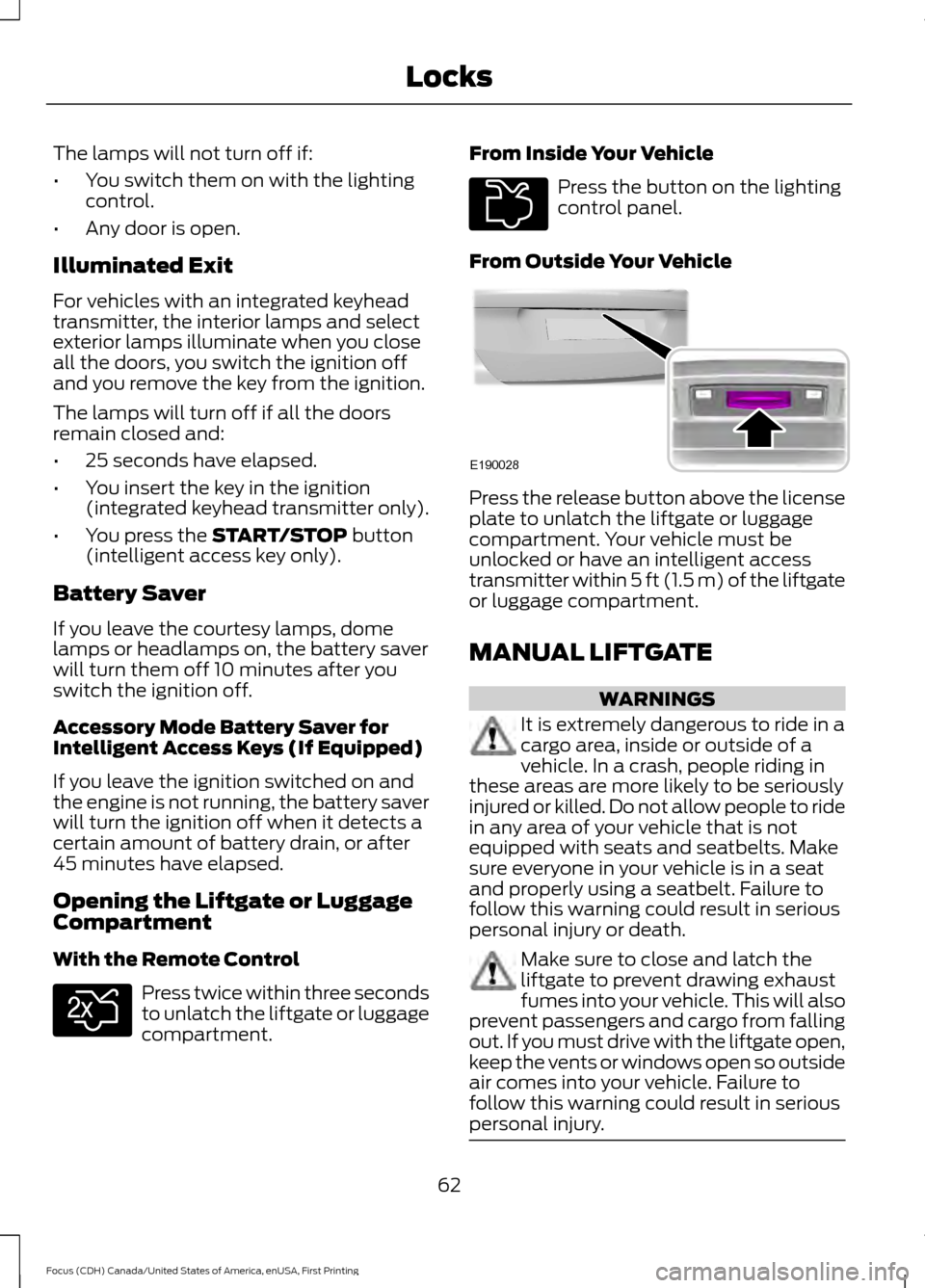
From Outside Your Vehicle Press the release button above the license
plate to unlatch the liftgate or luggage
compartment. Your vehicle must be
unlocked or have an intelligent access
transmitter within 5 ft (1.5 m) of the liftgate
or luggage compartment.
MANUAL LIFTGATE
WARNINGS
It is extremely dangerous to ride in a
cargo area, inside or outside of a
vehicle. In a crash, people riding in
these areas are more likely to be seriously
injured or killed. Do not allow people to ride
in any area of your vehicle that is not
equipped with seats and seatbelts. Make
sure everyone in your vehicle is in a seat
and properly using a seatbelt. Failure to
follow this warning could result in serious
personal injury or death. Make sure to close and latch the
liftgate to prevent drawing exhaust
fumes into your vehicle. This will also
prevent passengers and cargo from falling
out. If you must drive with the liftgate open,
keep the vents or windows open so outside
air comes into your vehicle. Failure to
follow this warning could result in serious
personal injury. 62
Focus (CDH) Canada/United States of America, enUSA, First Printing LocksE138630 E211694 E190028
Page 79 of 385
INSTRUMENT LIGHTING
DIMMER
Note:
You disable the manual dimmer
when you adjust the setting to Auto
Dimming in the information display. See
Information Displays (page 91).
Note: If you disconnect the battery or it
becomes discharged, the illuminated
components will switch to the maximum
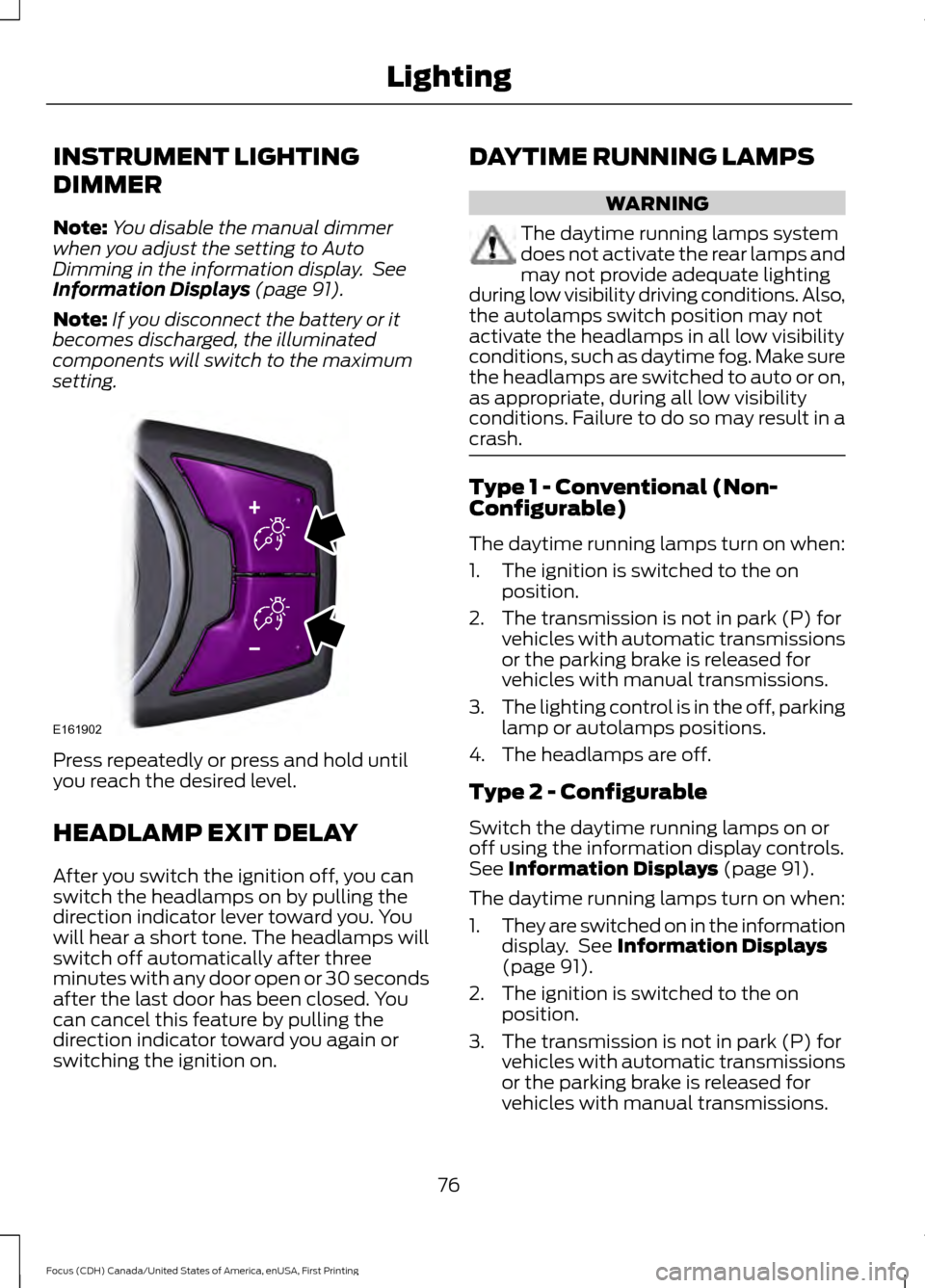
setting. Press repeatedly or press and hold until
you reach the desired level.
HEADLAMP EXIT DELAY
After you switch the ignition off, you can
switch the headlamps on by pulling the
direction indicator lever toward you. You
will hear a short tone. The headlamps will
switch off automatically after three
minutes with any door open or 30 seconds
after the last door has been closed. You
can cancel this feature by pulling the
direction indicator toward you again or
switching the ignition on. DAYTIME RUNNING LAMPS WARNING
The daytime running lamps system
does not activate the rear lamps and
may not provide adequate lighting
during low visibility driving conditions. Also,
the autolamps switch position may not
activate the headlamps in all low visibility
conditions, such as daytime fog. Make sure
the headlamps are switched to auto or on,
as appropriate, during all low visibility
conditions. Failure to do so may result in a
crash. Type 1 - Conventional (Non-
Configurable)
The daytime running lamps turn on when:
1. The ignition is switched to the on
position.
2. The transmission is not in park (P) for vehicles with automatic transmissions
or the parking brake is released for
vehicles with manual transmissions.
3. The lighting control is in the off, parking
lamp or autolamps positions.
4. The headlamps are off.
Type 2 - Configurable
Switch the daytime running lamps on or
off using the information display controls.
See
Information Displays (page 91).
The daytime running lamps turn on when:
1. They are switched on in the information
display. See
Information Displays
(page 91).
2. The ignition is switched to the on position.
3. The transmission is not in park (P) for vehicles with automatic transmissions
or the parking brake is released for
vehicles with manual transmissions.
76
Focus (CDH) Canada/United States of America, enUSA, First Printing LightingE161902
Page 85 of 385
1.
Close the window twice until it reaches
the point of resistance and let it
reverse.
2. Close the window a third time to the point of resistance. You disabled the
bounce-back feature and you can now
close the window manually. The
window travels past the point of
resistance and you can close it fully.
Contact an authorized dealer as soon as
possible if the window does not close after
the third attempt.
Resetting the Bounce-Back Feature WARNING
The bounce-back feature remains
turned off until you reset the
memory.
If you have disconnected the battery, you
must reset the bounce-back memory
separately for each window.
1. Lift and hold the control until the
window is fully closed.
2. Release the control.
3. Lift and hold the control again for a few
seconds.
4. Release the control.
5. Lift and hold the control again for a few
seconds.
6. Release the control.
7. Press and hold the control until the window is fully open.
8. Lift and hold the control until the window is fully closed.
9. Release the control.
10. Open the window and then try to close it automatically.
11. Repeat the procedure if the window does not close automatically. Accessory Delay (If Equipped)
You can use the window controls for
several minutes after switching off the
ignition or until opening either front door.
EXTERIOR MIRRORS
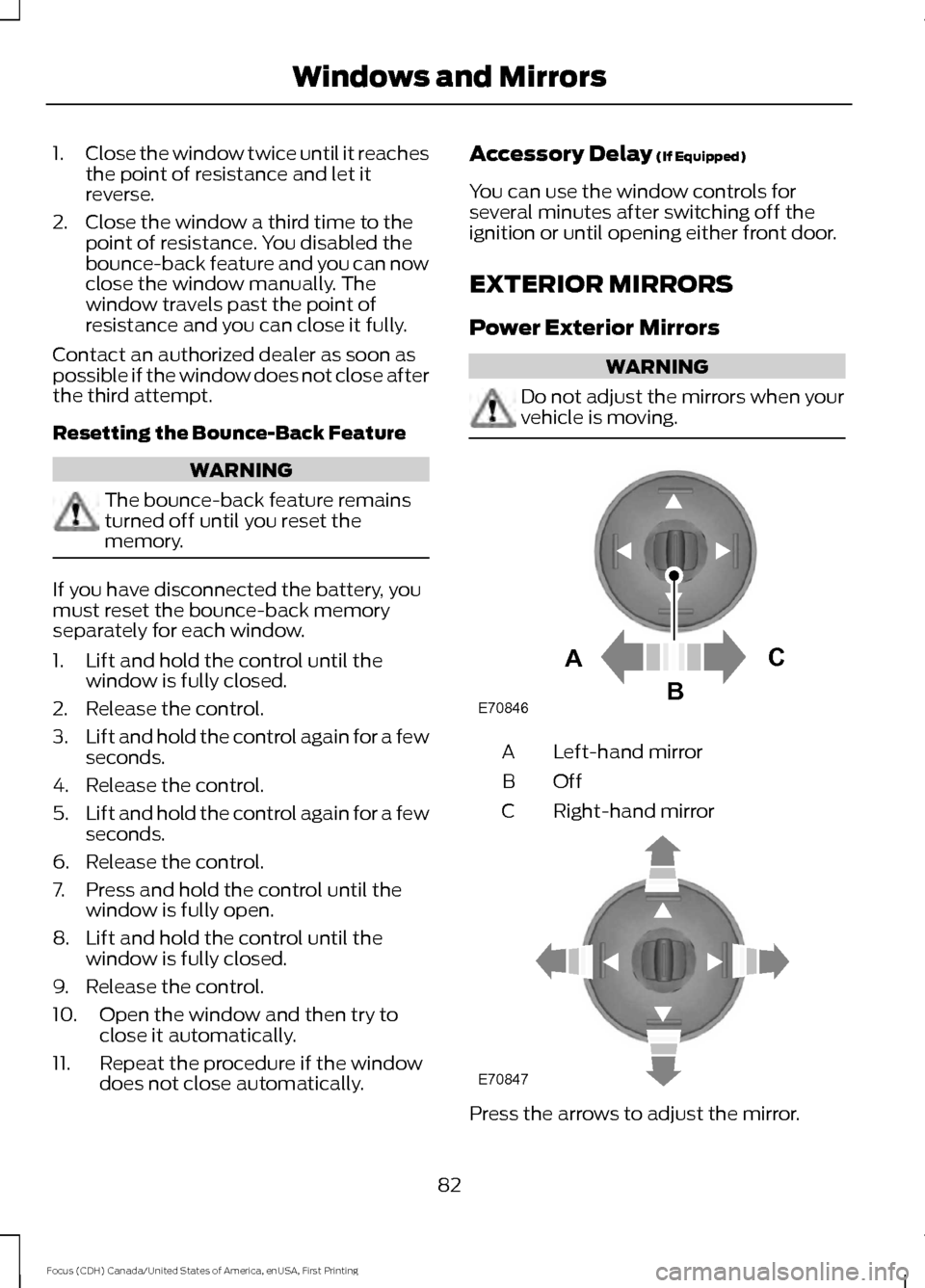
Power Exterior Mirrors WARNING
Do not adjust the mirrors when your
vehicle is moving.
Left-hand mirror
A
OffB
Right-hand mirror
C Press the arrows to adjust the mirror.
82
Focus (CDH) Canada/United States of America, enUSA, First Printing Windows and MirrorsE70846A
C
B E70847
Page 91 of 385
Battery
If it lights while driving, it
indicates a malfunction. Switch
off all unnecessary electrical
equipment and have the system checked
by an authorized dealer immediately.
Blind Spot Monitor (If Equipped) It lights when you switch this
feature off or in conjunction with
a message. See
Blind Spot
Information System (page 166). See
Information Messages (page 95).
Brake System It lights when you engage the
parking brake with the ignition
on.
If it lights when you are driving, check that
the parking brake is not engaged. If the
parking brake is not engaged, this indicates
low brake fluid level or a brake system
malfunction. Have the system checked
immediately by an authorized dealer. WARNING
Driving your vehicle with the warning
lamp on is dangerous. A significant
decrease in braking performance
may occur. It takes you longer to stop your
vehicle. Have your vehicle checked by an
authorized dealer immediately. Driving
extended distances with the parking brake
engaged can cause brake failure and the
risk of personal injury. Cruise Control
(If Equipped)
Lights when you switch on this
feature.
See Using Cruise
Control (page 159). Direction Indicator Lights when you switch on the
left or right direction indicator or
hazard warning flasher. If the
indicators stay on or flash faster, check for
a burned out bulb. See
Changing a Bulb
(page 225).
Door Ajar Displays when the vehicle is on
and any door is not completely
closed.
Engine Oil If it illuminates with the engine
running or when you are driving,
this indicates a malfunction.
Stop your vehicle as soon as it is safe to
do so and switch the engine off. Check the
engine oil level. See
Engine Oil Check
(page 216).
Note: Do not resume your journey if it
illuminates despite the level being correct.
Have the system checked by an authorized
dealer immediately.
Fasten Safety Belt It lights and a tone sounds to
remind you to fasten your safety
belt. See
Seatbelt Reminder
(page 32).
Front Airbag If it fails to light when you first
power your vehicle, continues to
flash or remains on, this
indicates a malfunction. Have the system
checked by an authorized dealer.
88
Focus (CDH) Canada/United States of America, enUSA, First Printing Instrument Cluster E124823 E144522 E71340
Page 99 of 385
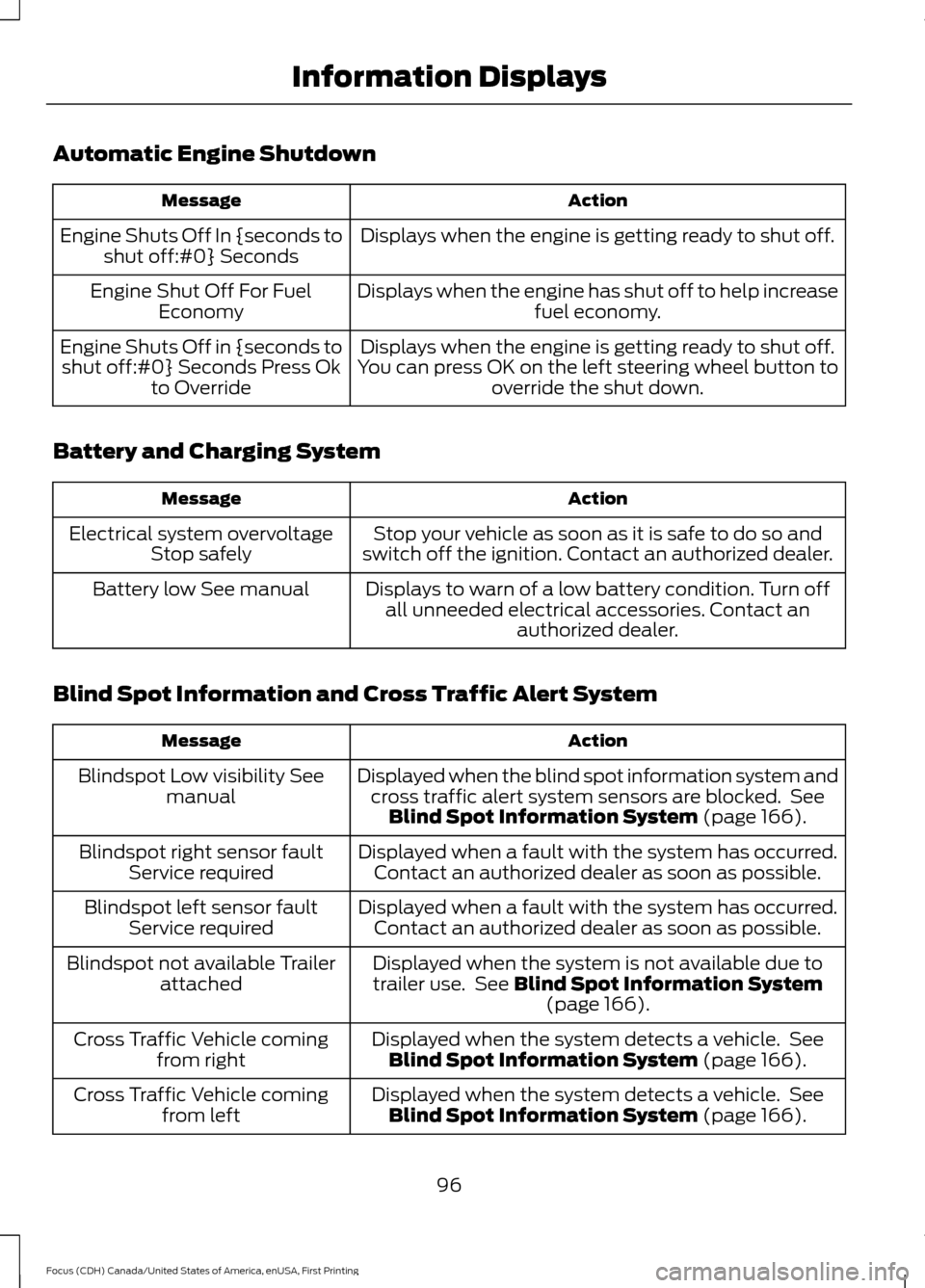
Automatic Engine Shutdown
Action
Message
Displays when the engine is getting ready to shut off.
Engine Shuts Off In {seconds to
shut off:#0} Seconds
Displays when the engine has shut off to help increasefuel economy.
Engine Shut Off For Fuel
Economy
Displays when the engine is getting ready to shut off.
You can press OK on the left steering wheel button to override the shut down.
Engine Shuts Off in {seconds to
shut off:#0} Seconds Press Ok to Override
Battery and Charging System Action
Message
Stop your vehicle as soon as it is safe to do so and
switch off the ignition. Contact an authorized dealer.
Electrical system overvoltage
Stop safely
Displays to warn of a low battery condition. Turn offall unneeded electrical accessories. Contact an authorized dealer.
Battery low See manual
Blind Spot Information and Cross Traffic Alert System Action
Message
Displayed when the blind spot information system andcross traffic alert system sensors are blocked. See Blind Spot Information System (page 166).
Blindspot Low visibility See
manual
Displayed when a fault with the system has occurred.Contact an authorized dealer as soon as possible.
Blindspot right sensor fault
Service required
Displayed when a fault with the system has occurred.Contact an authorized dealer as soon as possible.
Blindspot left sensor fault
Service required
Displayed when the system is not available due to
trailer use. See
Blind Spot Information System (page 166).
Blindspot not available Trailer
attached
Displayed when the system detects a vehicle. SeeBlind Spot Information System
(page 166).
Cross Traffic Vehicle coming
from right
Displayed when the system detects a vehicle. SeeBlind Spot Information System
(page 166).
Cross Traffic Vehicle coming
from left
96
Focus (CDH) Canada/United States of America, enUSA, First Printing Information Displays
Page 101 of 385
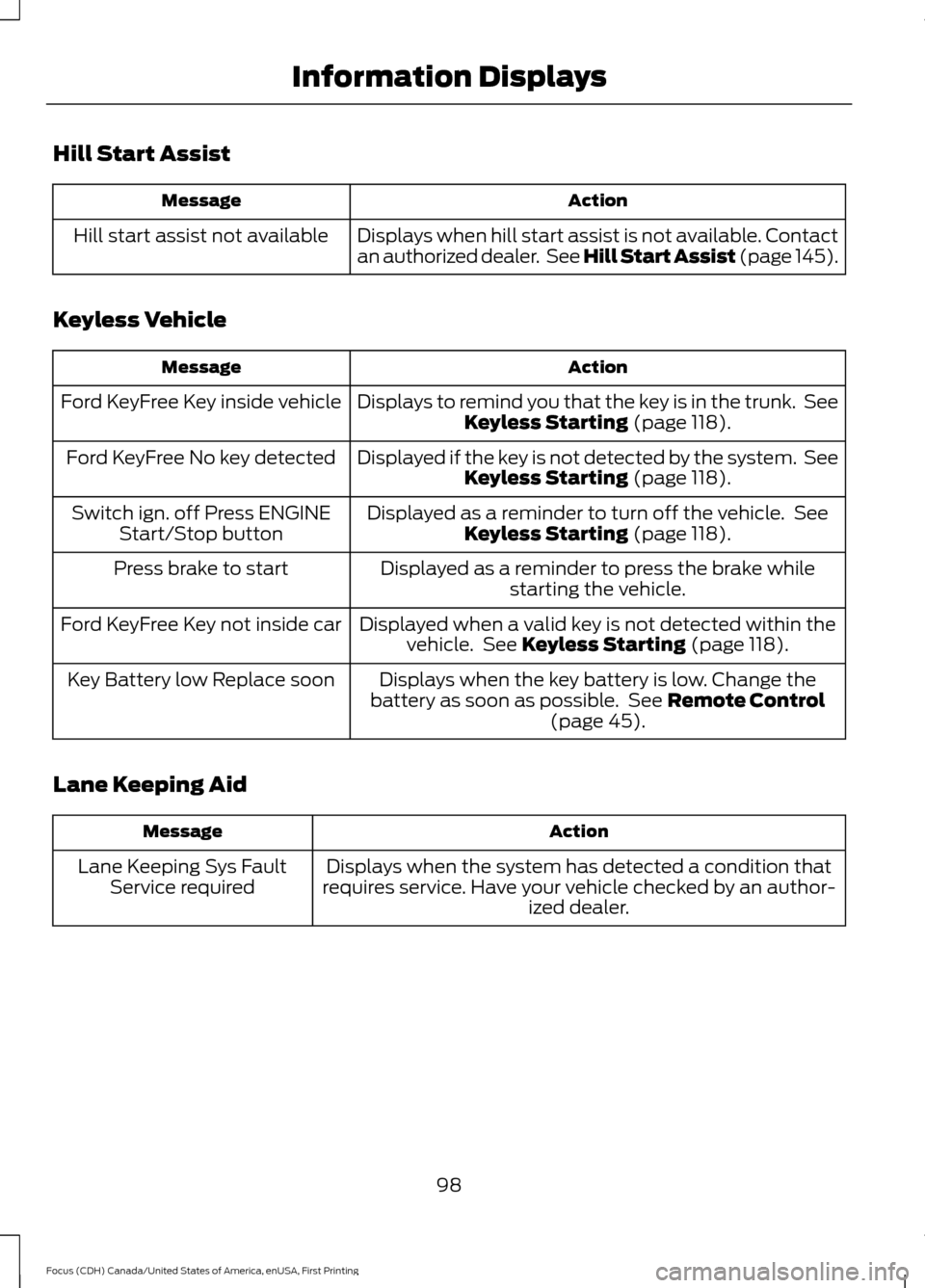
Hill Start Assist
Action
Message
Displays when hill start assist is not available. Contact
an authorized dealer. See Hill Start Assist (page 145).
Hill start assist not available
Keyless Vehicle Action
Message
Displays to remind you that the key is in the trunk. SeeKeyless Starting (page 118).
Ford KeyFree Key inside vehicle
Displayed if the key is not detected by the system. SeeKeyless Starting
(page 118).
Ford KeyFree No key detected
Displayed as a reminder to turn off the vehicle. SeeKeyless Starting
(page 118).
Switch ign. off Press ENGINE
Start/Stop button
Displayed as a reminder to press the brake whilestarting the vehicle.
Press brake to start
Displayed when a valid key is not detected within thevehicle. See
Keyless Starting (page 118).
Ford KeyFree Key not inside car
Displays when the key battery is low. Change the
battery as soon as possible. See
Remote Control
(page 45).
Key Battery low Replace soon
Lane Keeping Aid Action
Message
Displays when the system has detected a condition that
requires service. Have your vehicle checked by an author- ized dealer.
Lane Keeping Sys Fault
Service required
98
Focus (CDH) Canada/United States of America, enUSA, First Printing Information Displays
Page 118 of 385
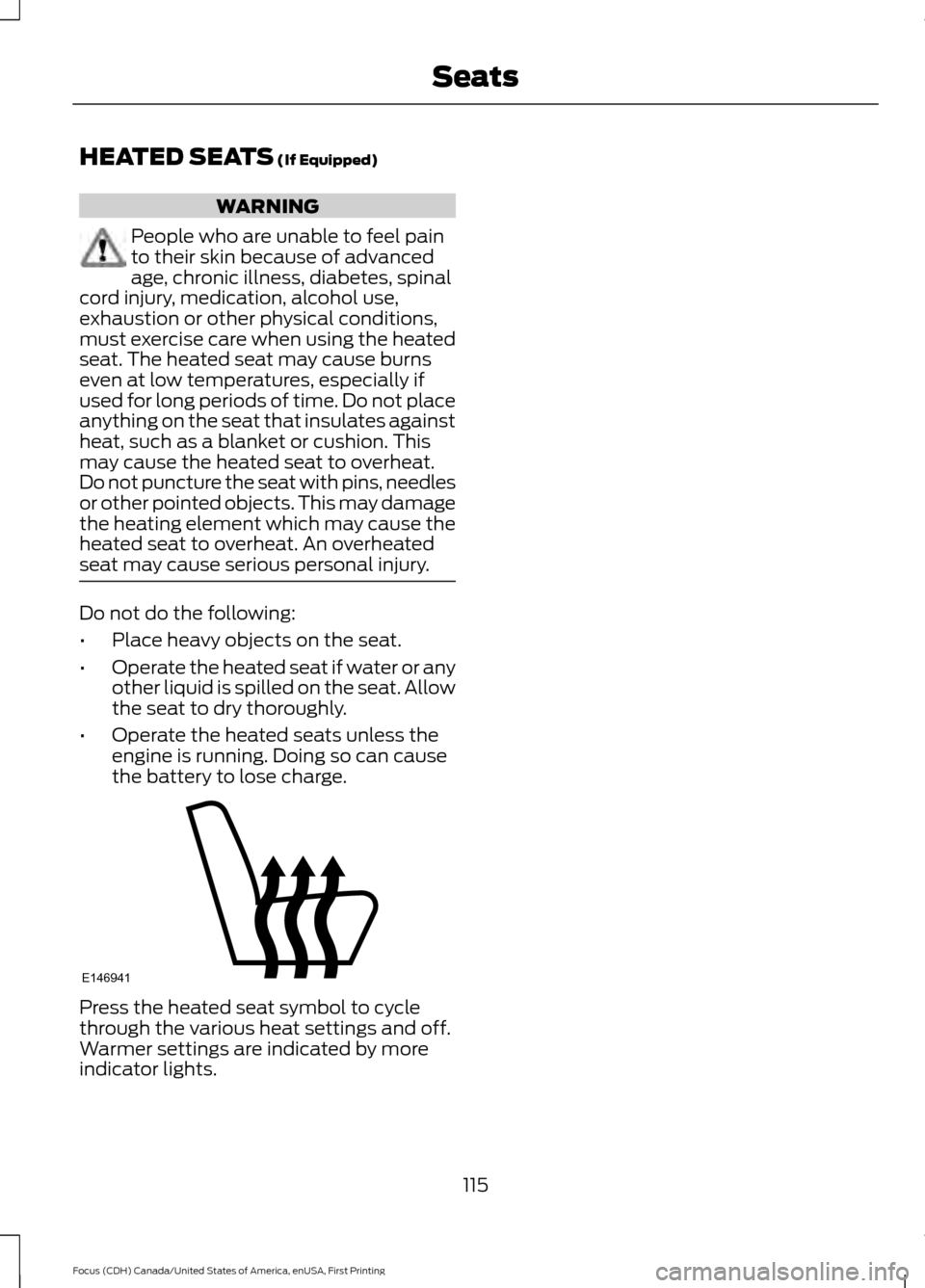
HEATED SEATS (If Equipped)
WARNING
People who are unable to feel pain
to their skin because of advanced
age, chronic illness, diabetes, spinal
cord injury, medication, alcohol use,
exhaustion or other physical conditions,
must exercise care when using the heated
seat. The heated seat may cause burns
even at low temperatures, especially if
used for long periods of time. Do not place
anything on the seat that insulates against
heat, such as a blanket or cushion. This
may cause the heated seat to overheat.
Do not puncture the seat with pins, needles
or other pointed objects. This may damage
the heating element which may cause the
heated seat to overheat. An overheated
seat may cause serious personal injury. Do not do the following:
•
Place heavy objects on the seat.
• Operate the heated seat if water or any
other liquid is spilled on the seat. Allow
the seat to dry thoroughly.
• Operate the heated seats unless the
engine is running. Doing so can cause
the battery to lose charge. Press the heated seat symbol to cycle
through the various heat settings and off.
Warmer settings are indicated by more
indicator lights.
115
Focus (CDH) Canada/United States of America, enUSA, First Printing SeatsE146941
Page 119 of 385
12 Volt DC Power Point
WARNING
Do not plug optional electrical
accessories into the cigar lighter
socket. Incorrect use of the lighter
can cause damage not covered by your
warranty, and can result in fire or serious
injury. Note:
After starting your vehicle, you can
use the socket to power 12-volt appliances
with a maximum current rating of 20 amps.
After you switch your vehicle off, the power
supply works only for a maximum of 30
minutes.
Note: Do not insert objects other than an
accessory plug into the power point. This
damages the outlet and can blow the fuse.
Note: Do not hang any type of accessory or
accessory bracket from the plug.
Note: Do not use the power point over the
vehicle capacity of 12 volt DC 180 watt or a
fuse may blow.
Note: Do not use the power point for
operating a cigar lighter element.
Note: Incorrect use of the power point can
cause damage not covered by your
warranty.
Note: Always keep the power point caps
closed when not in use.
Run the vehicle for full capacity use of the
power point.
To prevent the battery from running out of
charge:
• Do not use the power point longer than
necessary after switching the vehicle
off.
• Do not leave devices plugged in
overnight or when your vehicle is in park
(P) for extended periods. Location
You may find power points in the following
locations:
•
On the center console
• In the center console.
116
Focus (CDH) Canada/United States of America, enUSA, First Printing Auxiliary Power Points
Page 121 of 385
GENERAL INFORMATION
WARNINGS
Extended idling at high engine
speeds can produce very high
temperatures in the engine and
exhaust system, creating the risk of fire or
other damage. Do not park, idle or drive your vehicle
on dry grass or other dry ground
cover. The emission system heats up
the engine compartment and exhaust
system, creating the risk of fire. Do not start the engine in a closed
garage or in other enclosed areas.
Exhaust fumes can be toxic. Always
open the garage door before you start the
engine. If you smell exhaust fumes inside
your vehicle, have your vehicle
checked by an authorized dealer
immediately. Do not drive your vehicle if
you smell exhaust fumes. If you disconnect the battery, your vehicle
may exhibit some unusual driving
characteristics for approximately 5 miles
(8 kilometers) after you reconnect it. This
is because the engine management system
must realign itself with the engine. You can
disregard any unusual driving
characteristics during this period.
The powertrain control system meets all
Canadian interference-causing equipment
standard requirements regulating the
impulse electrical field or radio noise.
When you start the engine, avoid pressing
the accelerator pedal before and during
operation. Only use the accelerator pedal
when you have difficulty starting the
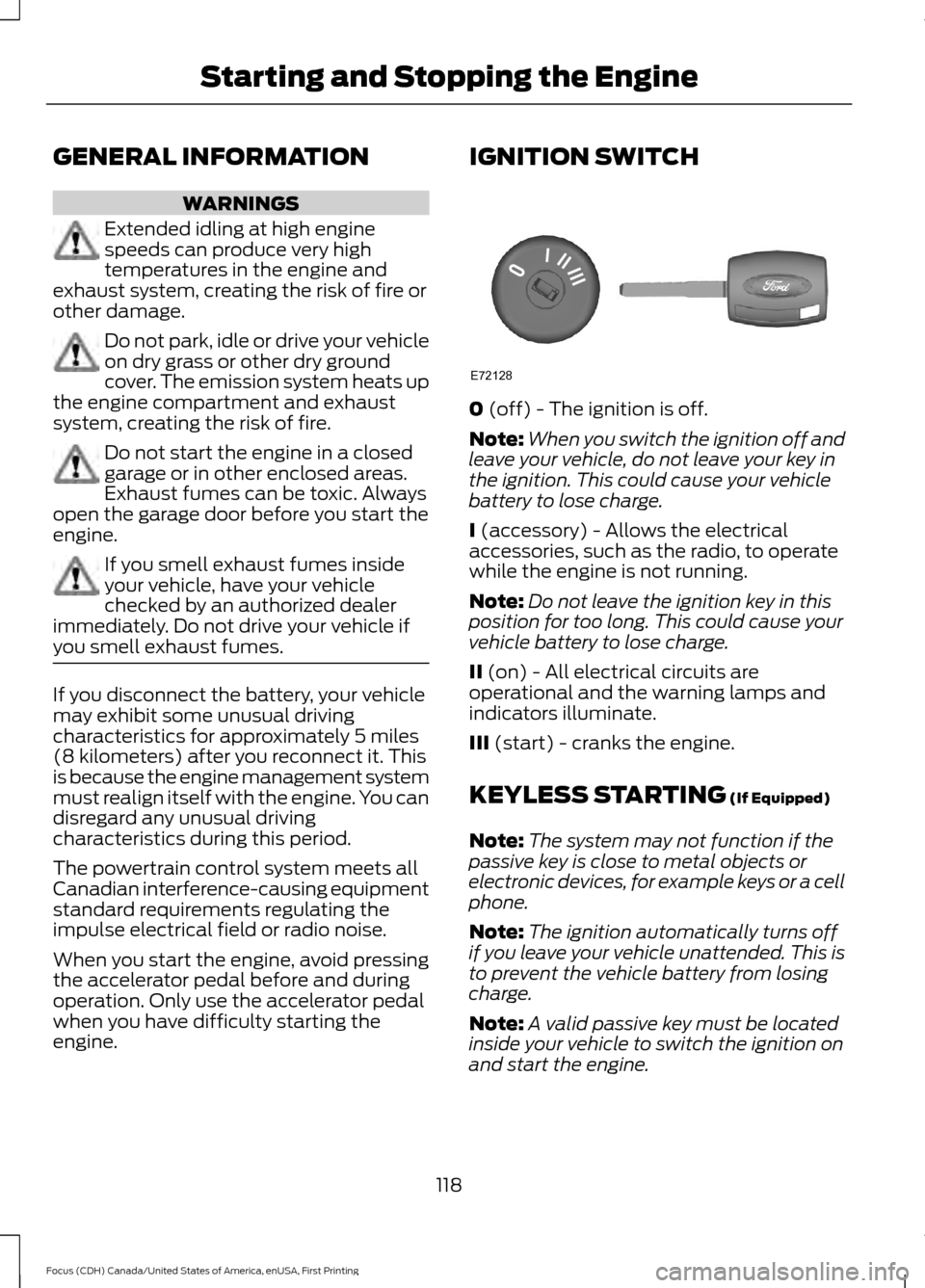
engine. IGNITION SWITCH
0 (off) - The ignition is off.
Note: When you switch the ignition off and
leave your vehicle, do not leave your key in
the ignition. This could cause your vehicle
battery to lose charge.
I
(accessory) - Allows the electrical
accessories, such as the radio, to operate
while the engine is not running.
Note: Do not leave the ignition key in this
position for too long. This could cause your
vehicle battery to lose charge.
II
(on) - All electrical circuits are
operational and the warning lamps and
indicators illuminate.
III
(start) - cranks the engine.
KEYLESS STARTING
(If Equipped)
Note: The system may not function if the
passive key is close to metal objects or
electronic devices, for example keys or a cell
phone.
Note: The ignition automatically turns off
if you leave your vehicle unattended. This is
to prevent the vehicle battery from losing
charge.
Note: A valid passive key must be located
inside your vehicle to switch the ignition on
and start the engine.
118
Focus (CDH) Canada/United States of America, enUSA, First Printing Starting and Stopping the EngineE72128
Page 122 of 385
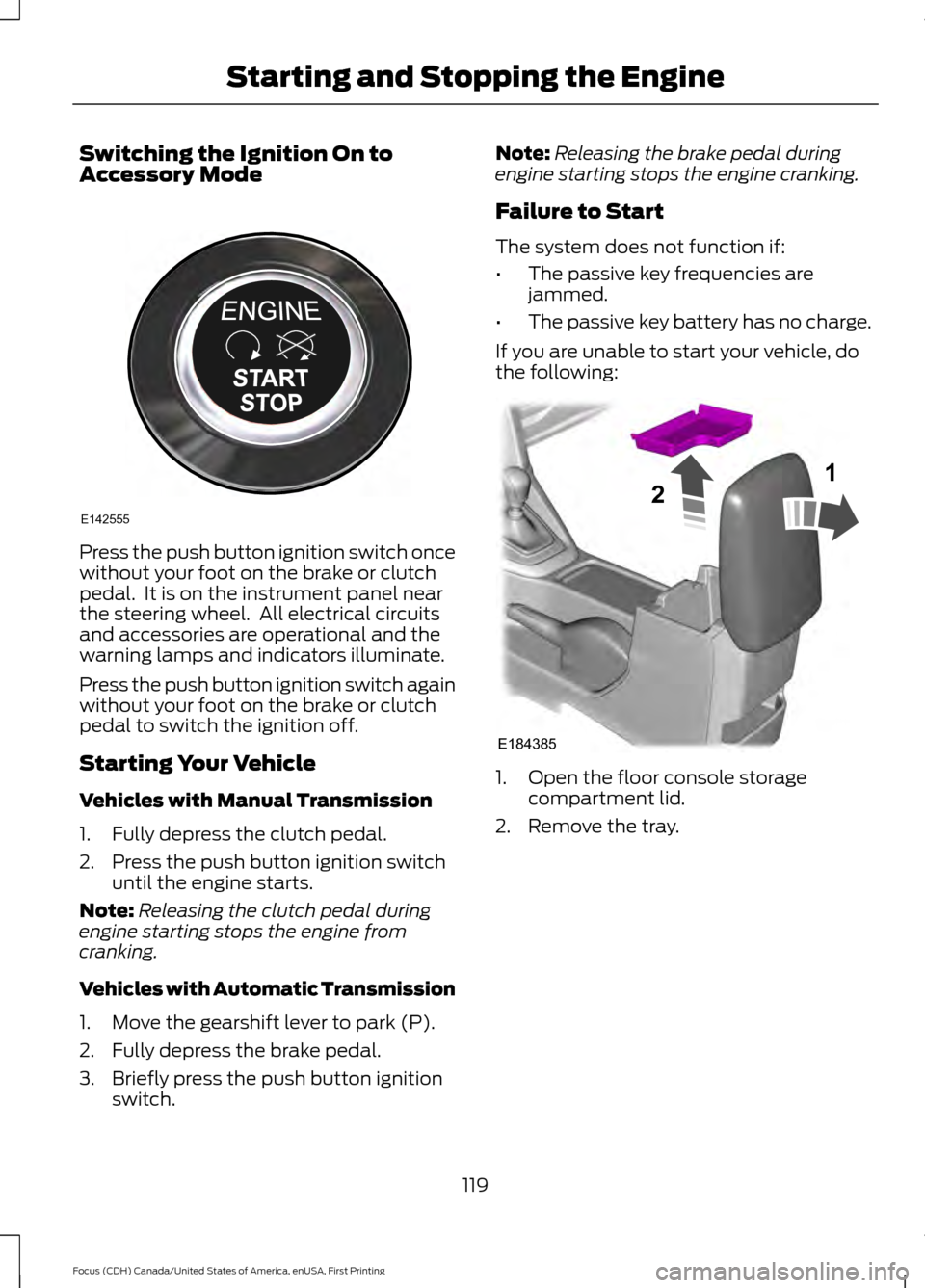
Switching the Ignition On to
Accessory Mode
Press the push button ignition switch once
without your foot on the brake or clutch
pedal. It is on the instrument panel near
the steering wheel. All electrical circuits
and accessories are operational and the
warning lamps and indicators illuminate.
Press the push button ignition switch again
without your foot on the brake or clutch
pedal to switch the ignition off.
Starting Your Vehicle
Vehicles with Manual Transmission
1. Fully depress the clutch pedal.
2. Press the push button ignition switch
until the engine starts.
Note: Releasing the clutch pedal during
engine starting stops the engine from
cranking.
Vehicles with Automatic Transmission
1. Move the gearshift lever to park (P).
2. Fully depress the brake pedal.
3. Briefly press the push button ignition switch. Note:
Releasing the brake pedal during
engine starting stops the engine cranking.
Failure to Start
The system does not function if:
• The passive key frequencies are
jammed.
• The passive key battery has no charge.
If you are unable to start your vehicle, do
the following: 1. Open the floor console storage
compartment lid.
2. Remove the tray.
119
Focus (CDH) Canada/United States of America, enUSA, First Printing Starting and Stopping the EngineE142555 E184385
21