trans FORD FOCUS 2016 3.G User Guide
[x] Cancel search | Manufacturer: FORD, Model Year: 2016, Model line: FOCUS, Model: FORD FOCUS 2016 3.GPages: 385, PDF Size: 5.23 MB
Page 50 of 385
Sounding the Panic Alarm (If Equipped)
Press the button to sound the
panic alarm. Press the button
again or switch the ignition on to
silence it.
Note: The panic alarm only operates when
the ignition is off.
REMOTE CONTROL - VEHICLES
WITH: KEYLESS ENTRY (If
Equipped)
Intelligent Access Key Key Blade
The intelligent access key also contains a
removable key blade that you can use to
unlock your vehicle.
To release the key blade:
1. Press and hold the buttons on the
edges of the transmitter to release the
cover. Carefully remove the cover.
2. Remove the key blade.
Programming a New Remote
Control
To program an additional remote control
See
Security (page 66).
Changing the Remote Control
Battery
The remote control uses one coin-type
three-volt lithium battery CR2032 or
equivalent.
47
Focus (CDH) Canada/United States of America, enUSA, First Printing Keys and Remote ControlsE138624 E162192 E87964
2
1
1
Page 51 of 385
Make sure that you dispose of
old batteries in an
environmentally friendly way.
Seek advice from your local authority
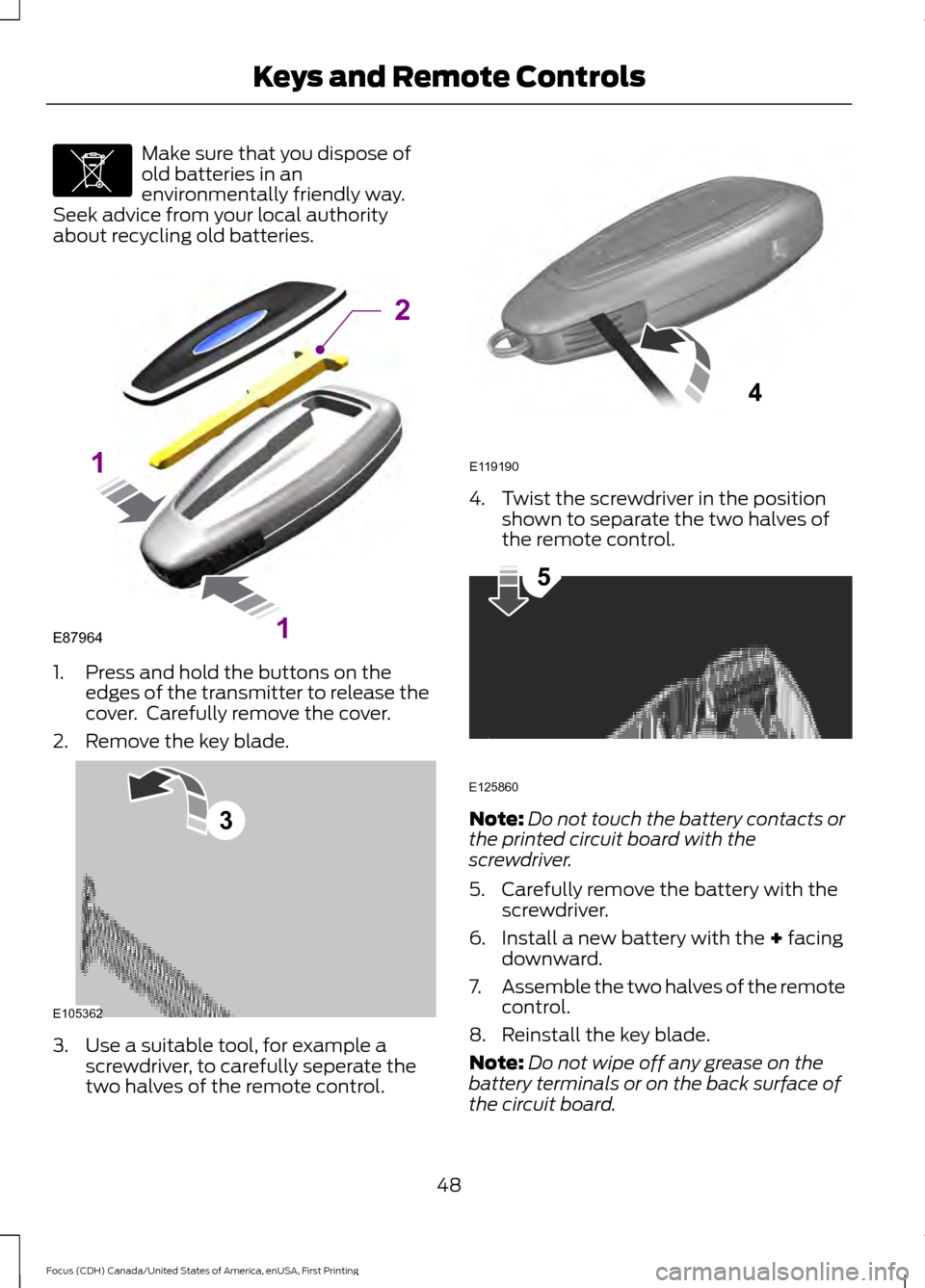
about recycling old batteries. 1. Press and hold the buttons on the
edges of the transmitter to release the
cover. Carefully remove the cover.
2. Remove the key blade. 3. Use a suitable tool, for example a
screwdriver, to carefully seperate the
two halves of the remote control. 4. Twist the screwdriver in the position
shown to separate the two halves of
the remote control. Note:
Do not touch the battery contacts or
the printed circuit board with the
screwdriver.
5. Carefully remove the battery with the screwdriver.
6. Install a new battery with the + facing
downward.
7. Assemble the two halves of the remote
control.
8. Reinstall the key blade.
Note: Do not wipe off any grease on the
battery terminals or on the back surface of
the circuit board.
48
Focus (CDH) Canada/United States of America, enUSA, First Printing Keys and Remote ControlsE107998 E87964
2
1
1 E105362
3 E119190
4 E125860
5
Page 52 of 385
Note:
Replacing the battery does not delete
the transmitter from the vehicle. The
transmitter should operate normally.
Locating Your Vehicle
Press the lock button on the key twice
within three seconds. The horn may sound
and the direction indicators flash.
The horn may sound twice and the
direction indicators do not flash if:
• Locking was not successful.
• Any door or the liftgate is open.
• The hood is open on vehicles with an
anti-theft alarm or remote start.
REMOTE CONTROL - VEHICLES
WITH: KEYLESS ENTRY WITH
REMOTE START (If Equipped)
Intelligent Access Key
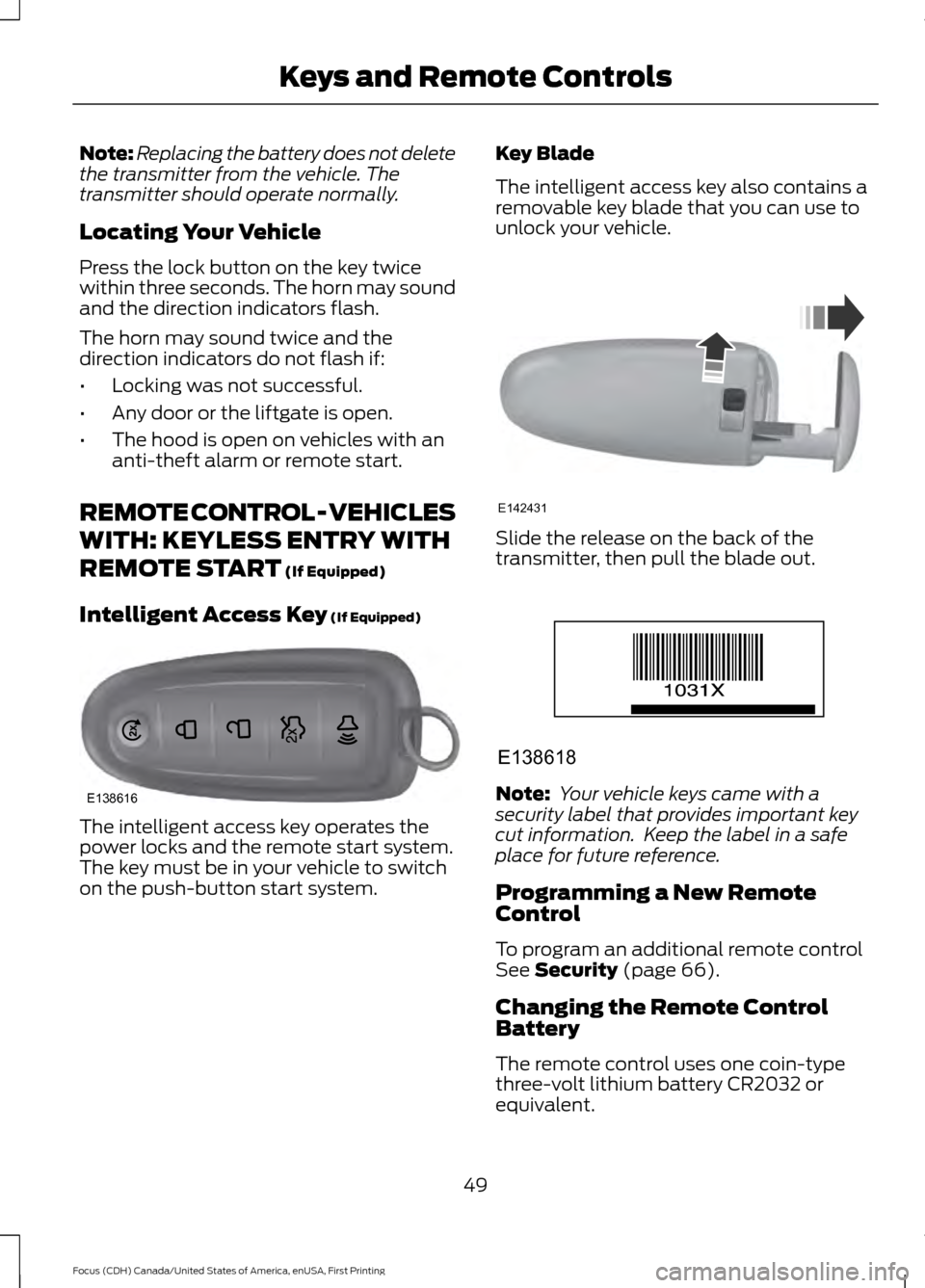
(If Equipped) The intelligent access key operates the
power locks and the remote start system.
The key must be in your vehicle to switch
on the push-button start system. Key Blade
The intelligent access key also contains a
removable key blade that you can use to
unlock your vehicle.
Slide the release on the back of the
transmitter, then pull the blade out.
Note:
Your vehicle keys came with a
security label that provides important key
cut information. Keep the label in a safe
place for future reference.
Programming a New Remote
Control
To program an additional remote control
See
Security (page 66).
Changing the Remote Control
Battery
The remote control uses one coin-type
three-volt lithium battery CR2032 or
equivalent.
49
Focus (CDH) Canada/United States of America, enUSA, First Printing Keys and Remote ControlsE138616 E142431 E138618
Page 53 of 385
Make sure that you dispose of
old batteries in an
environmentally friendly way.
Seek advice from your local authority
about recycling old batteries.
1. Remove the key blade from the transmitter. 2. Twist a thin coin under the tab hidden
behind the key blade head to remove
the battery cover. 3. Remove the old battery.
4. Insert a new battery with the + facing
downward. Press the battery down to
make sure it is fully in the housing.
5. Reinstall the battery housing cover onto the transmitter and install the key
blade. Note:
Do not wipe off any grease on the
battery terminals or on the back surface of
the circuit board.
Note: Replacing the battery does not delete
the transmitter from your vehicle. The
transmitter should operate normally.
Locating Your Vehicle
Press the lock button on the key twice
within three seconds. The horn sounds and
the direction indicators flash. We
recommend you use this method to locate
your vehicle, rather than using the panic
alarm.
The horn sounds twice and the direction
indicators do not flash if:
• Locking was not successful.
• Any door or the liftgate is open.
• The hood is open on vehicles with an
anti-theft alarm or remote start.
Sounding the Panic Alarm (If Equipped) Press the button to activate the
alarm. Press the button again or
switch the ignition on to
deactivate it.
Note: The panic alarm only operates when
the ignition is off.
Remote Start WARNING
To prevent drawing exhaust fumes
into your vehicle, do not use remote
start if your vehicle is parked indoors
or areas that are not well ventilated. The remote start button is on the
transmitter.
This feature allows you to start your
vehicle from the outside. The transmitter
has an extended operating range.
50
Focus (CDH) Canada/United States of America, enUSA, First Printing Keys and Remote ControlsE107998 E142432 E138622 E138624 E138625
Page 54 of 385
Vehicles with automatic climate control
can be configured to operate when your
vehicle is remote started. See Automatic
Climate Control (page 104).
Many states and provinces have
restrictions for the use of remote start.
Check your local and state or provincial
laws for specific requirements regarding
remote start systems.
Note: Do not use remote start if your vehicle
is low on fuel.
The remote start system does not work if
any of the following occur:
• The ignition is on.
• The alarm system activates.
• You turn off the feature.
• The hood is open.
• The transmission is not in park (P).
• Your vehicle battery has no charge.
• The powertrain fault indicator was on
the last time you drove your vehicle.
Remote Starting your Vehicle
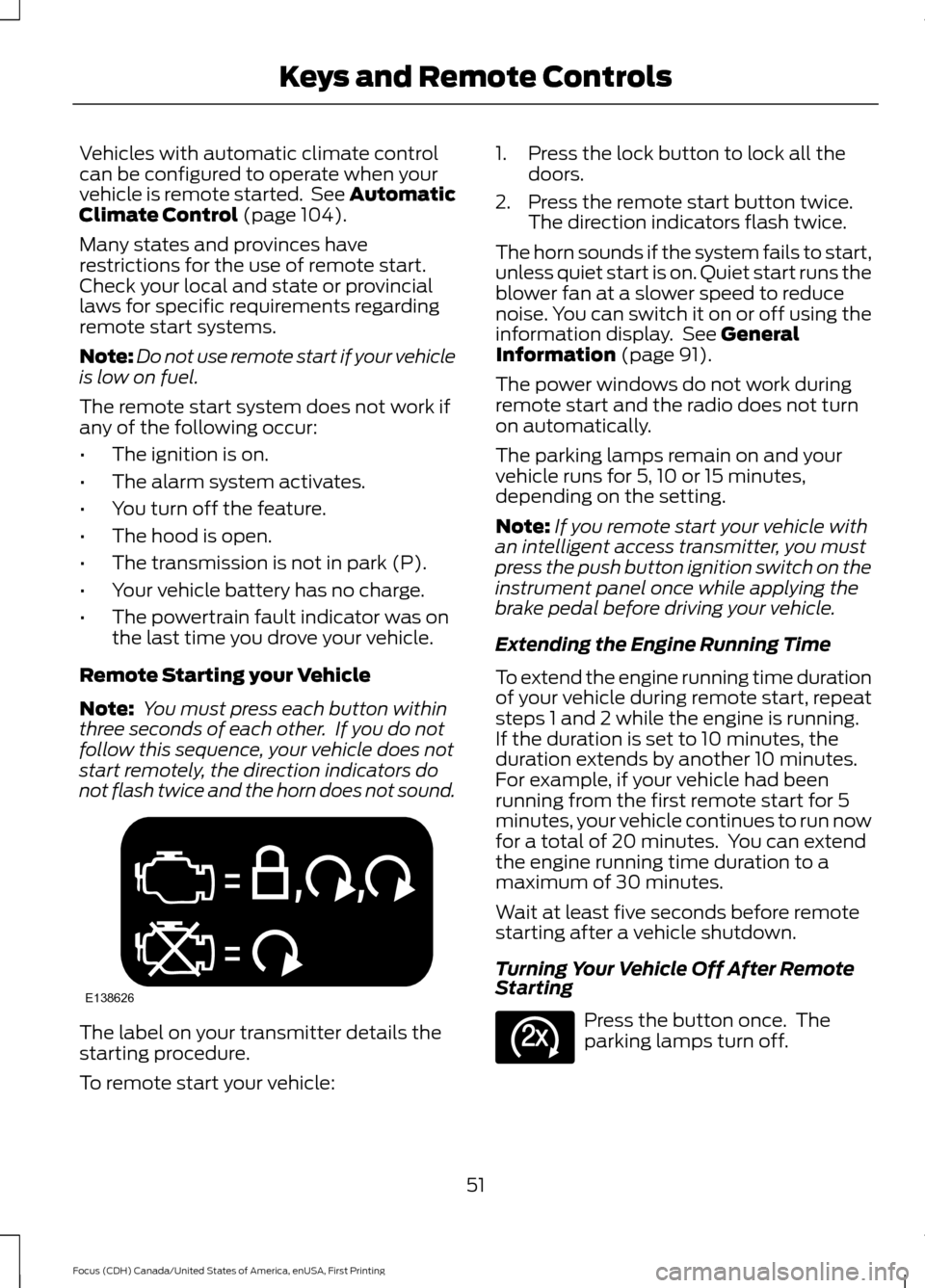
Note: You must press each button within
three seconds of each other. If you do not
follow this sequence, your vehicle does not
start remotely, the direction indicators do
not flash twice and the horn does not sound. The label on your transmitter details the
starting procedure.
To remote start your vehicle: 1. Press the lock button to lock all the
doors.
2. Press the remote start button twice. The direction indicators flash twice.
The horn sounds if the system fails to start,
unless quiet start is on. Quiet start runs the
blower fan at a slower speed to reduce
noise. You can switch it on or off using the
information display. See
General
Information (page 91).
The power windows do not work during
remote start and the radio does not turn
on automatically.
The parking lamps remain on and your
vehicle runs for 5, 10 or 15 minutes,
depending on the setting.
Note: If you remote start your vehicle with
an intelligent access transmitter, you must
press the push button ignition switch on the
instrument panel once while applying the
brake pedal before driving your vehicle.
Extending the Engine Running Time
To extend the engine running time duration
of your vehicle during remote start, repeat
steps 1 and 2 while the engine is running.
If the duration is set to 10 minutes, the
duration extends by another 10 minutes.
For example, if your vehicle had been
running from the first remote start for 5
minutes, your vehicle continues to run now
for a total of 20 minutes. You can extend
the engine running time duration to a
maximum of 30 minutes.
Wait at least five seconds before remote
starting after a vehicle shutdown.
Turning Your Vehicle Off After Remote
Starting Press the button once. The
parking lamps turn off.
51
Focus (CDH) Canada/United States of America, enUSA, First Printing Keys and Remote ControlsE138626 E138625
Page 57 of 385
•
Various vehicle speed minders can be
set. Once you select a speed, it will be
shown in the display, followed by an
audible tone when the preselected
vehicle speed is exceeded.
• Audio system maximum volume of
45%. A message will be shown in the
display when you attempt to exceed
the limited volume. Also, the
speed-sensitive or compensated
automatic volume control will be
disabled.
• Always on setting. When this is
selected, you will not be able to turn
off AdvanceTrac or traction control,
E911 or Emergency Assist, or the Do Not
Disturb feature (if your vehicle is
equipped with these features). CREATING A MYKEY
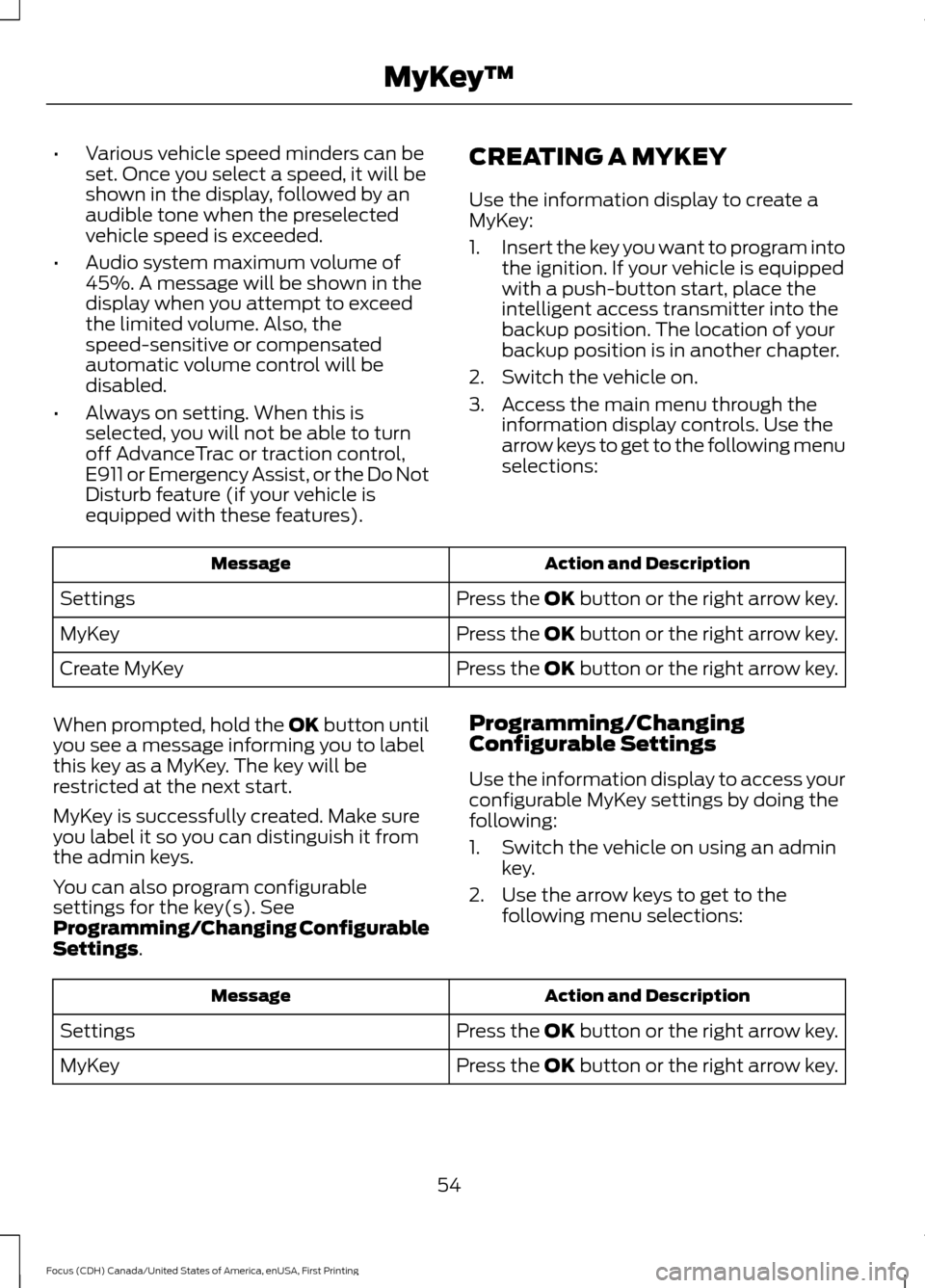
Use the information display to create a
MyKey:
1.
Insert the key you want to program into
the ignition. If your vehicle is equipped
with a push-button start, place the
intelligent access transmitter into the
backup position. The location of your
backup position is in another chapter.
2. Switch the vehicle on.
3. Access the main menu through the information display controls. Use the
arrow keys to get to the following menu
selections: Action and Description
Message
Press the OK button or the right arrow key.
Settings
Press the OK button or the right arrow key.
MyKey
Press the OK button or the right arrow key.
Create MyKey
When prompted, hold the OK button until
you see a message informing you to label
this key as a MyKey. The key will be
restricted at the next start.
MyKey is successfully created. Make sure
you label it so you can distinguish it from
the admin keys.
You can also program configurable
settings for the key(s). See
Programming/Changing Configurable
Settings. Programming/Changing
Configurable Settings
Use the information display to access your
configurable MyKey settings by doing the
following:
1. Switch the vehicle on using an admin
key.
2. Use the arrow keys to get to the following menu selections: Action and Description
Message
Press the OK button or the right arrow key.
Settings
Press the OK button or the right arrow key.
MyKey
54
Focus (CDH) Canada/United States of America, enUSA, First Printing MyKey
™
Page 60 of 385
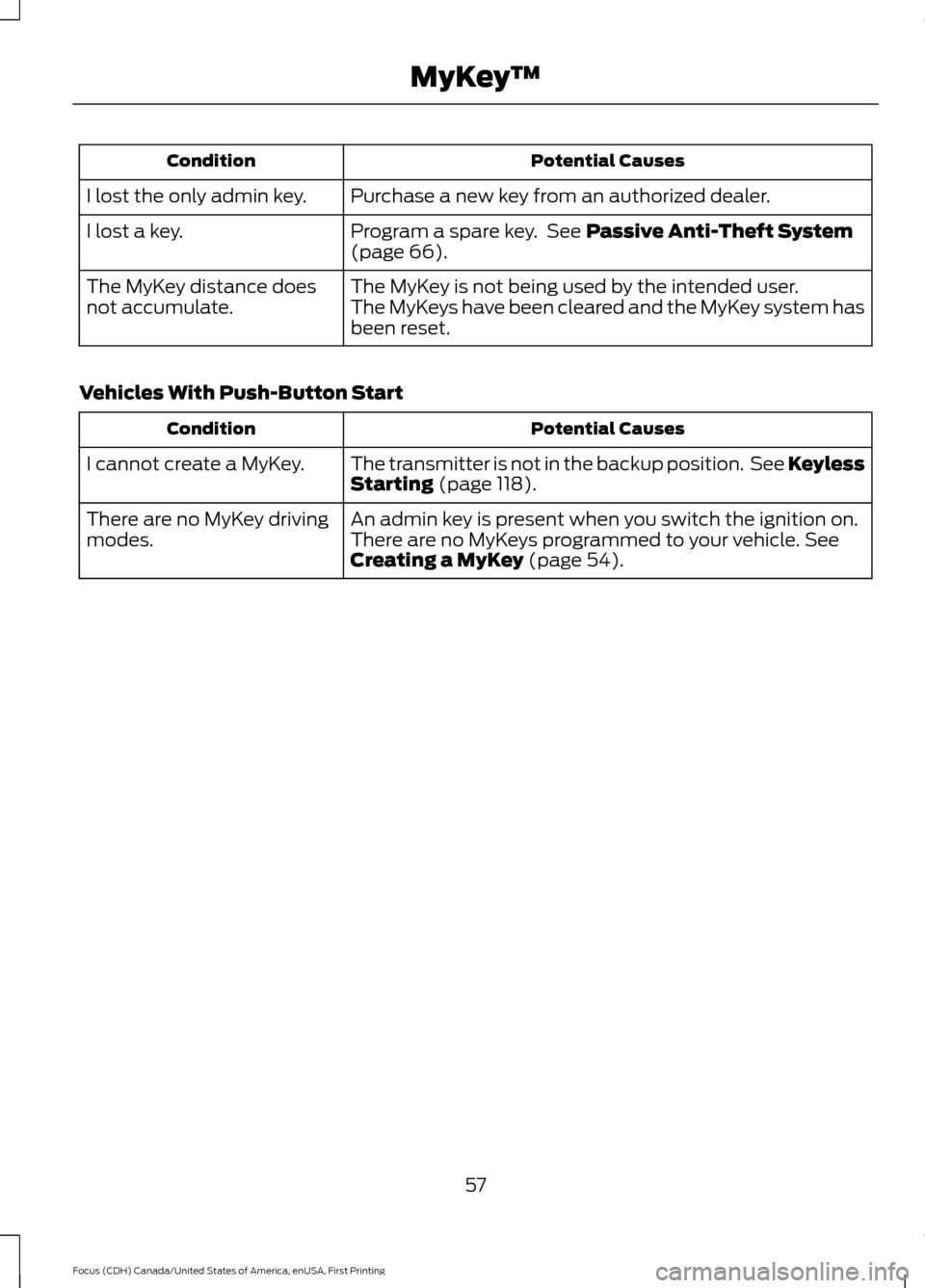
Potential Causes
Condition
Purchase a new key from an authorized dealer.
I lost the only admin key.
Program a spare key. See Passive Anti-Theft System
(page 66).
I lost a key.
The MyKey is not being used by the intended user.
The MyKey distance does
not accumulate. The MyKeys have been cleared and the MyKey system has
been reset.
Vehicles With Push-Button Start Potential Causes
Condition
The transmitter is not in the backup position. See Keyless
Starting
(page 118).
I cannot create a MyKey.
An admin key is present when you switch the ignition on.
There are no MyKey driving
modes. There are no MyKeys programmed to your vehicle.
See
Creating a MyKey (page 54).
57
Focus (CDH) Canada/United States of America, enUSA, First Printing MyKey
™
Page 63 of 385
The locking sensors are on the front door
handles.
Touch the locking area on the front of the
door handle to lock your vehicle. There will
be a brief delay before you can unlock your
vehicle again.
Note:
Keep the door handle clean to make
sure the system operates correctly.
Note: Your vehicle does not automatically
lock. If you do not touch a locking sensor
your vehicle will remain unlocked.
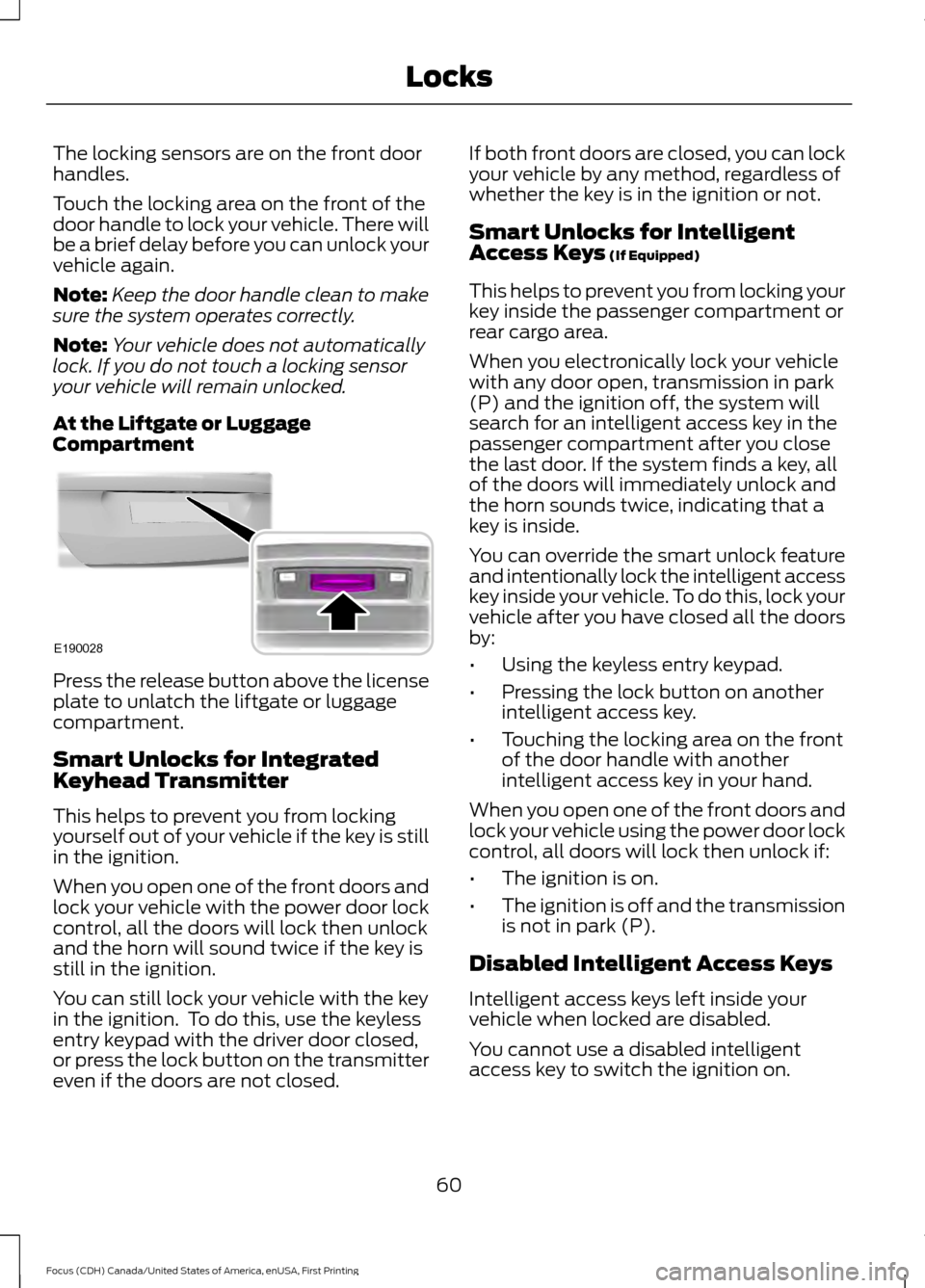
At the Liftgate or Luggage
Compartment Press the release button above the license
plate to unlatch the liftgate or luggage
compartment.
Smart Unlocks for Integrated
Keyhead Transmitter
This helps to prevent you from locking
yourself out of your vehicle if the key is still
in the ignition.
When you open one of the front doors and
lock your vehicle with the power door lock
control, all the doors will lock then unlock
and the horn will sound twice if the key is
still in the ignition.
You can still lock your vehicle with the key
in the ignition. To do this, use the keyless
entry keypad with the driver door closed,
or press the lock button on the transmitter
even if the doors are not closed. If both front doors are closed, you can lock
your vehicle by any method, regardless of
whether the key is in the ignition or not.
Smart Unlocks for Intelligent
Access Keys (If Equipped)
This helps to prevent you from locking your
key inside the passenger compartment or
rear cargo area.
When you electronically lock your vehicle
with any door open, transmission in park
(P) and the ignition off, the system will
search for an intelligent access key in the
passenger compartment after you close
the last door. If the system finds a key, all
of the doors will immediately unlock and
the horn sounds twice, indicating that a
key is inside.
You can override the smart unlock feature
and intentionally lock the intelligent access
key inside your vehicle. To do this, lock your
vehicle after you have closed all the doors
by:
• Using the keyless entry keypad.
• Pressing the lock button on another
intelligent access key.
• Touching the locking area on the front
of the door handle with another
intelligent access key in your hand.
When you open one of the front doors and
lock your vehicle using the power door lock
control, all doors will lock then unlock if:
• The ignition is on.
• The ignition is off and the transmission
is not in park (P).
Disabled Intelligent Access Keys
Intelligent access keys left inside your
vehicle when locked are disabled.
You cannot use a disabled intelligent
access key to switch the ignition on.
60
Focus (CDH) Canada/United States of America, enUSA, First Printing LocksE190028
Page 65 of 385
The lamps will not turn off if:
•
You switch them on with the lighting
control.
• Any door is open.
Illuminated Exit
For vehicles with an integrated keyhead
transmitter, the interior lamps and select
exterior lamps illuminate when you close
all the doors, you switch the ignition off
and you remove the key from the ignition.
The lamps will turn off if all the doors
remain closed and:
• 25 seconds have elapsed.
• You insert the key in the ignition
(integrated keyhead transmitter only).
• You press the START/STOP button
(intelligent access key only).
Battery Saver
If you leave the courtesy lamps, dome
lamps or headlamps on, the battery saver
will turn them off 10 minutes after you
switch the ignition off.
Accessory Mode Battery Saver for
Intelligent Access Keys (If Equipped)
If you leave the ignition switched on and
the engine is not running, the battery saver
will turn the ignition off when it detects a
certain amount of battery drain, or after
45 minutes have elapsed.
Opening the Liftgate or Luggage
Compartment
With the Remote Control Press twice within three seconds
to unlatch the liftgate or luggage
compartment. From Inside Your Vehicle Press the button on the lighting
control panel.
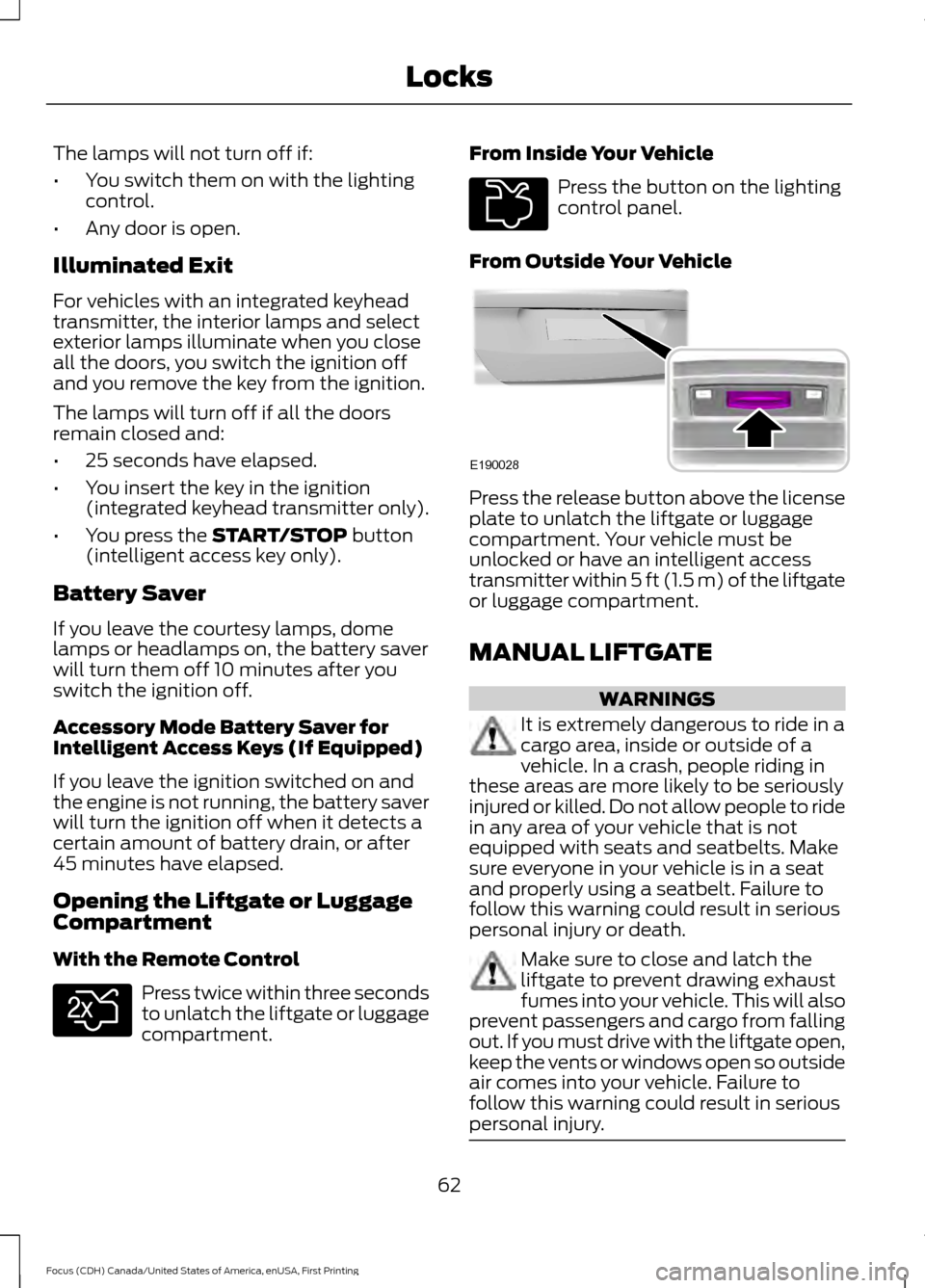
From Outside Your Vehicle Press the release button above the license
plate to unlatch the liftgate or luggage
compartment. Your vehicle must be
unlocked or have an intelligent access
transmitter within 5 ft (1.5 m) of the liftgate
or luggage compartment.
MANUAL LIFTGATE
WARNINGS
It is extremely dangerous to ride in a
cargo area, inside or outside of a
vehicle. In a crash, people riding in
these areas are more likely to be seriously
injured or killed. Do not allow people to ride
in any area of your vehicle that is not
equipped with seats and seatbelts. Make
sure everyone in your vehicle is in a seat
and properly using a seatbelt. Failure to
follow this warning could result in serious
personal injury or death. Make sure to close and latch the
liftgate to prevent drawing exhaust
fumes into your vehicle. This will also
prevent passengers and cargo from falling
out. If you must drive with the liftgate open,
keep the vents or windows open so outside
air comes into your vehicle. Failure to
follow this warning could result in serious
personal injury. 62
Focus (CDH) Canada/United States of America, enUSA, First Printing LocksE138630 E211694 E190028
Page 67 of 385
Programming a Personal Entry Code
1. Enter the factory-set five-digit code.
2. Press 1·2 on the keypad within five
seconds.
3. Enter your personal five-digit code. You
must enter each number within five
seconds of each other.
4. Press
1·2 on the keypad to save
personal code 1.
The doors lock then unlock to confirm that
programming was successful.
To program additional personal entry
codes, repeat Steps 1-3, then for Step 4:
• Press
3·4 to save personal code 2.
• Press
5·6 to save personal code 3.
• Press
7·8 to save personal code 4.
• Press
9·0 to save personal code 5.
Hints:
• Do not set a code that uses five of the
same number.
• Do not use five numbers in sequential
order.
• The factory-set code works even if you
have set your own personal code.
Erasing a Personal Code
1. Enter the factory-set five-digit code.
2. Press and release
1·2 on the keypad
within five seconds.
3. Press and hold
1·2 for two seconds.
You must do this within five seconds
of completing step 2.
All personal codes erase and only the
factory-set five-digit code works.
Anti-Scan Feature
The keypad goes into an anti-scan mode
if you enter the wrong code seven times.
This mode turns off the keypad for one
minute and the keypad lamp flashes. The anti-scan feature turns off after any
of the following occur:
•
One minute of keypad inactivity.
• You press the unlock button on the
remote control.
• You switch your vehicle on.
• You unlock the vehicle using intelligent
access.
Locking and Unlocking the Doors
Locking All Doors
Press and hold 7·8 and 9·0 on the keypad
simultaneously with the driver door closed.
You do not need to enter a code first.
Unlocking All Doors
Enter the factory-set code or your personal
code, then press 3·4 on the keypad within
five seconds.
Unlocking Only the Driver Door
Enter the factory-set or your personal
five-digit code. You must press each
number within five seconds of each other.
The interior lamps illuminate.
Note: All doors unlock if the two-stage
unlocking feature is turned off. See Locking
and Unlocking
(page 58).
INTERIOR LUGGAGE
COMPARTMENT RELEASE - 4-
DOOR WARNINGS
Keep vehicle doors and luggage
compartment locked and keep keys
and remote transmitters out of a
child ’s reach. Unsupervised children could
lock themselves in the trunk and risk injury.
Children should be taught not to play in
vehicles.
64
Focus (CDH) Canada/United States of America, enUSA, First Printing Locks