remote control FORD FOCUS 2016 3.G Owner's Manual
[x] Cancel search | Manufacturer: FORD, Model Year: 2016, Model line: FOCUS, Model: FORD FOCUS 2016 3.GPages: 385, PDF Size: 5.23 MB
Page 71 of 385
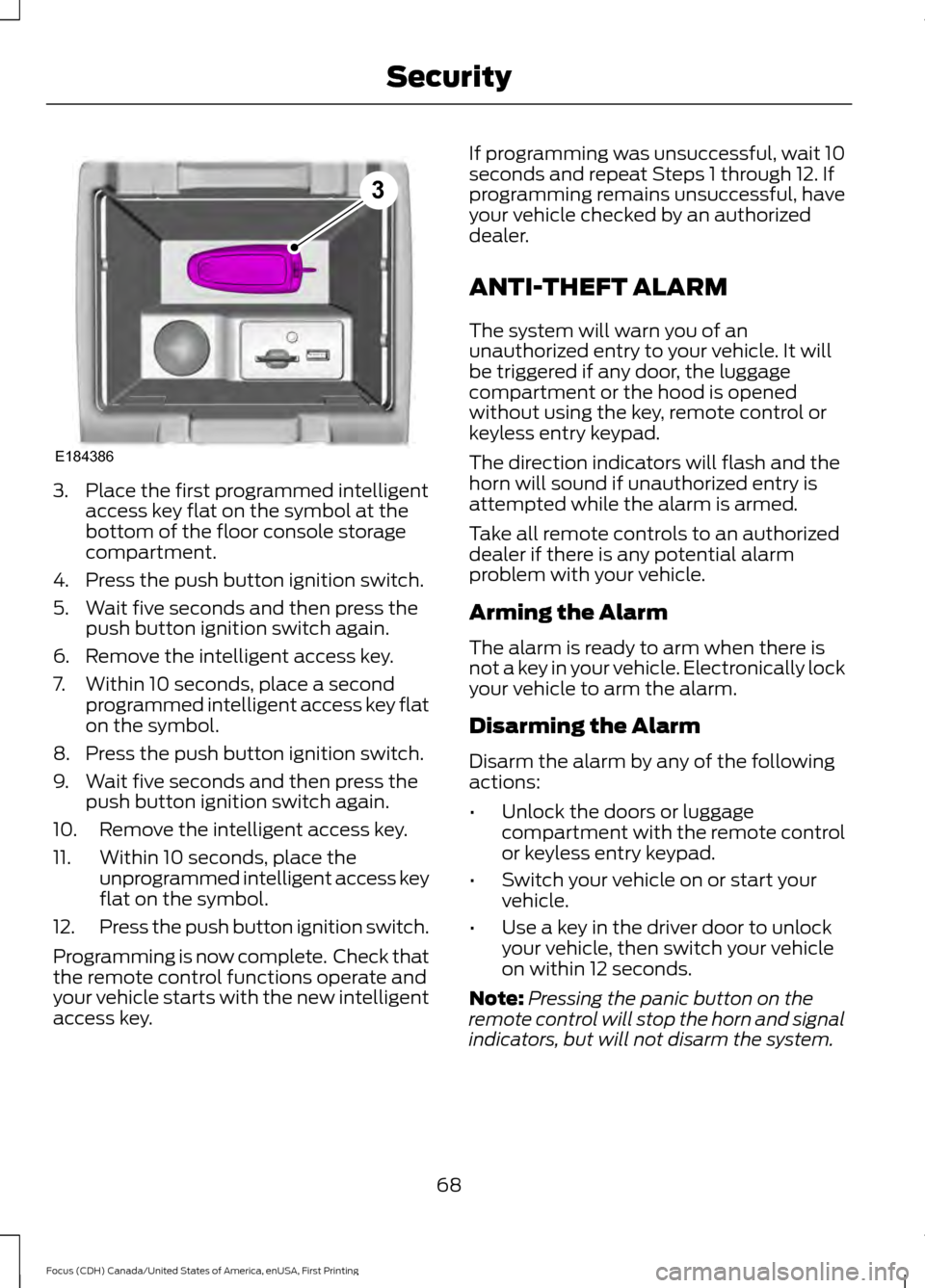
3. Place the first programmed intelligent
access key flat on the symbol at the
bottom of the floor console storage
compartment.
4. Press the push button ignition switch.
5. Wait five seconds and then press the push button ignition switch again.
6. Remove the intelligent access key.
7. Within 10 seconds, place a second programmed intelligent access key flat
on the symbol.
8. Press the push button ignition switch.
9. Wait five seconds and then press the push button ignition switch again.
10. Remove the intelligent access key.
11. Within 10 seconds, place the unprogrammed intelligent access key
flat on the symbol.
12. Press the push button ignition switch.
Programming is now complete. Check that
the remote control functions operate and
your vehicle starts with the new intelligent
access key. If programming was unsuccessful, wait 10
seconds and repeat Steps 1 through 12. If
programming remains unsuccessful, have
your vehicle checked by an authorized
dealer.
ANTI-THEFT ALARM
The system will warn you of an
unauthorized entry to your vehicle. It will
be triggered if any door, the luggage
compartment or the hood is opened
without using the key, remote control or
keyless entry keypad.
The direction indicators will flash and the
horn will sound if unauthorized entry is
attempted while the alarm is armed.
Take all remote controls to an authorized
dealer if there is any potential alarm
problem with your vehicle.
Arming the Alarm
The alarm is ready to arm when there is
not a key in your vehicle. Electronically lock
your vehicle to arm the alarm.
Disarming the Alarm
Disarm the alarm by any of the following
actions:
•
Unlock the doors or luggage
compartment with the remote control
or keyless entry keypad.
• Switch your vehicle on or start your
vehicle.
• Use a key in the driver door to unlock
your vehicle, then switch your vehicle
on within 12 seconds.
Note: Pressing the panic button on the
remote control will stop the horn and signal
indicators, but will not disarm the system.
68
Focus (CDH) Canada/United States of America, enUSA, First Printing SecurityE184386
3
Page 82 of 385
INTERIOR LAMPS
The lamps turn on when:
•
You open any door.
• You press a remote control button.
• You press the buttons on the map
lamps.
Front Interior Lamps (If Equipped)
Note: Press the door function switch to
switch off interior lights when you open any
door. The indicator lamp illuminates amber
when the door function is off. When the door
function is off and you open a door, the
courtesy and door lamps stay off. Press the
switch again to switch the door function
back on. The indicator lamp illuminates
white when the door function is on. When
the door function is on and you open a door,
the courtesy and door lamps switch on.
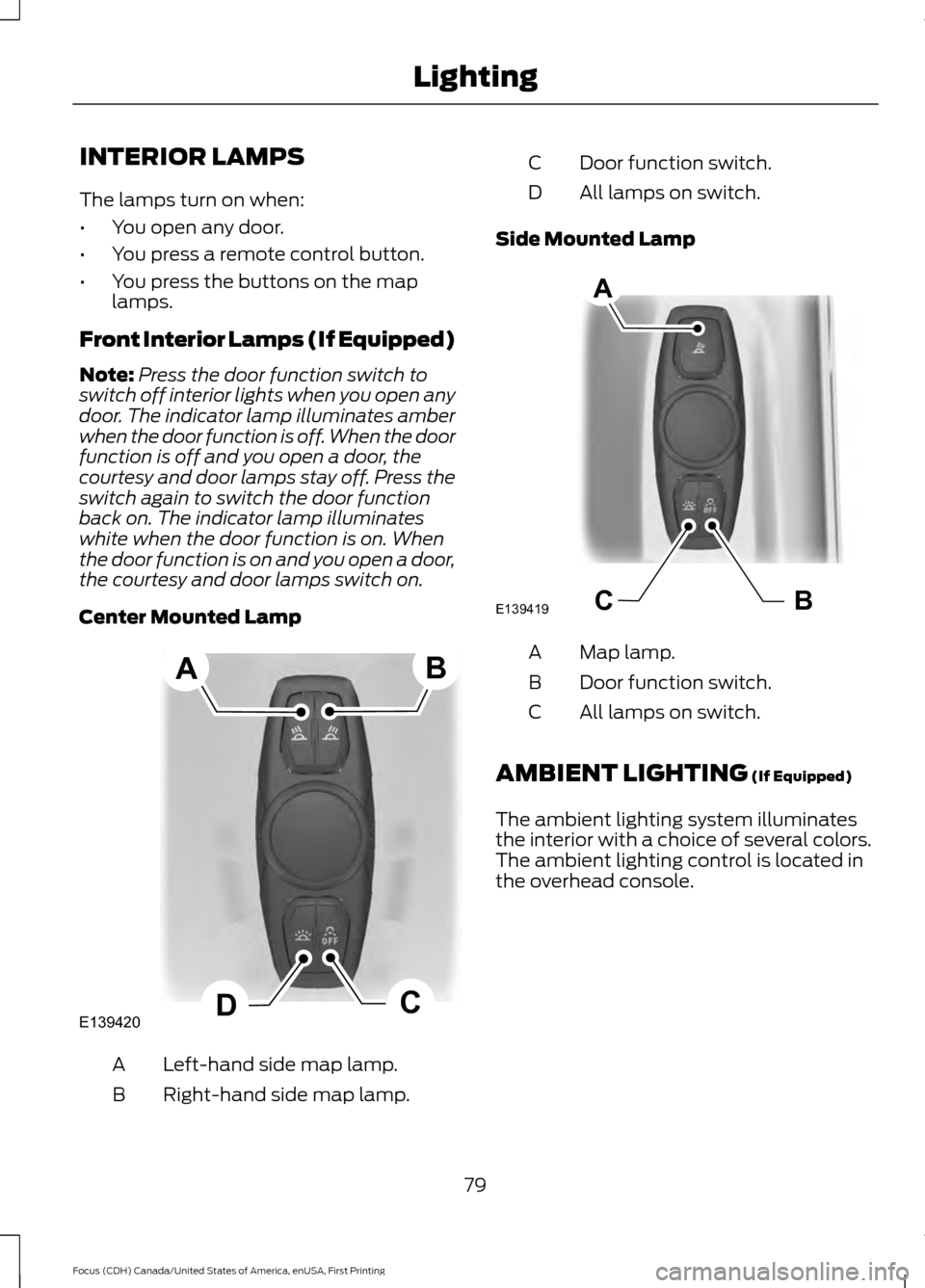
Center Mounted Lamp Left-hand side map lamp.
A
Right-hand side map lamp.
B Door function switch.
C
All lamps on switch.
D
Side Mounted Lamp Map lamp.
A
Door function switch.
B
All lamps on switch.
C
AMBIENT LIGHTING (If Equipped)
The ambient lighting system illuminates
the interior with a choice of several colors.
The ambient lighting control is located in
the overhead console.
79
Focus (CDH) Canada/United States of America, enUSA, First Printing LightingE139420C
D
AB BCE139419
A
Page 96 of 385
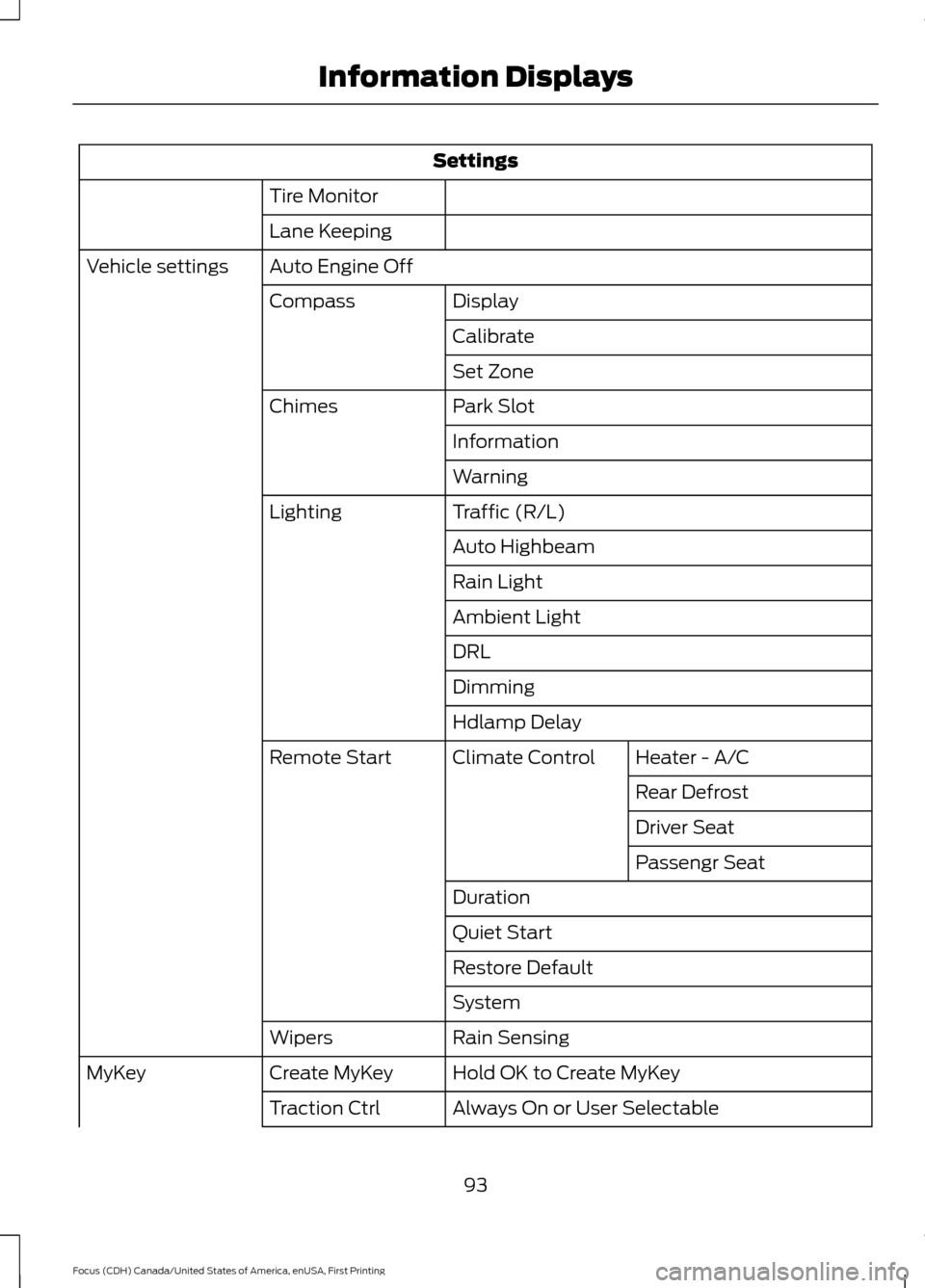
Settings
Tire Monitor
Lane Keeping
Auto Engine Off
Vehicle settings
Display
Compass
Calibrate
Set Zone
Park Slot
Chimes
Information
Warning
Traffic (R/L)
Lighting
Auto Highbeam
Rain Light
Ambient Light
DRL
Dimming
Hdlamp DelayHeater - A/C
Climate Control
Remote Start
Rear Defrost
Driver Seat
Passengr Seat
Duration
Quiet Start
Restore Default
System
Rain Sensing
Wipers
Hold OK to Create MyKey
Create MyKey
MyKey
Always On or User Selectable
Traction Ctrl
93
Focus (CDH) Canada/United States of America, enUSA, First Printing Information Displays
Page 101 of 385
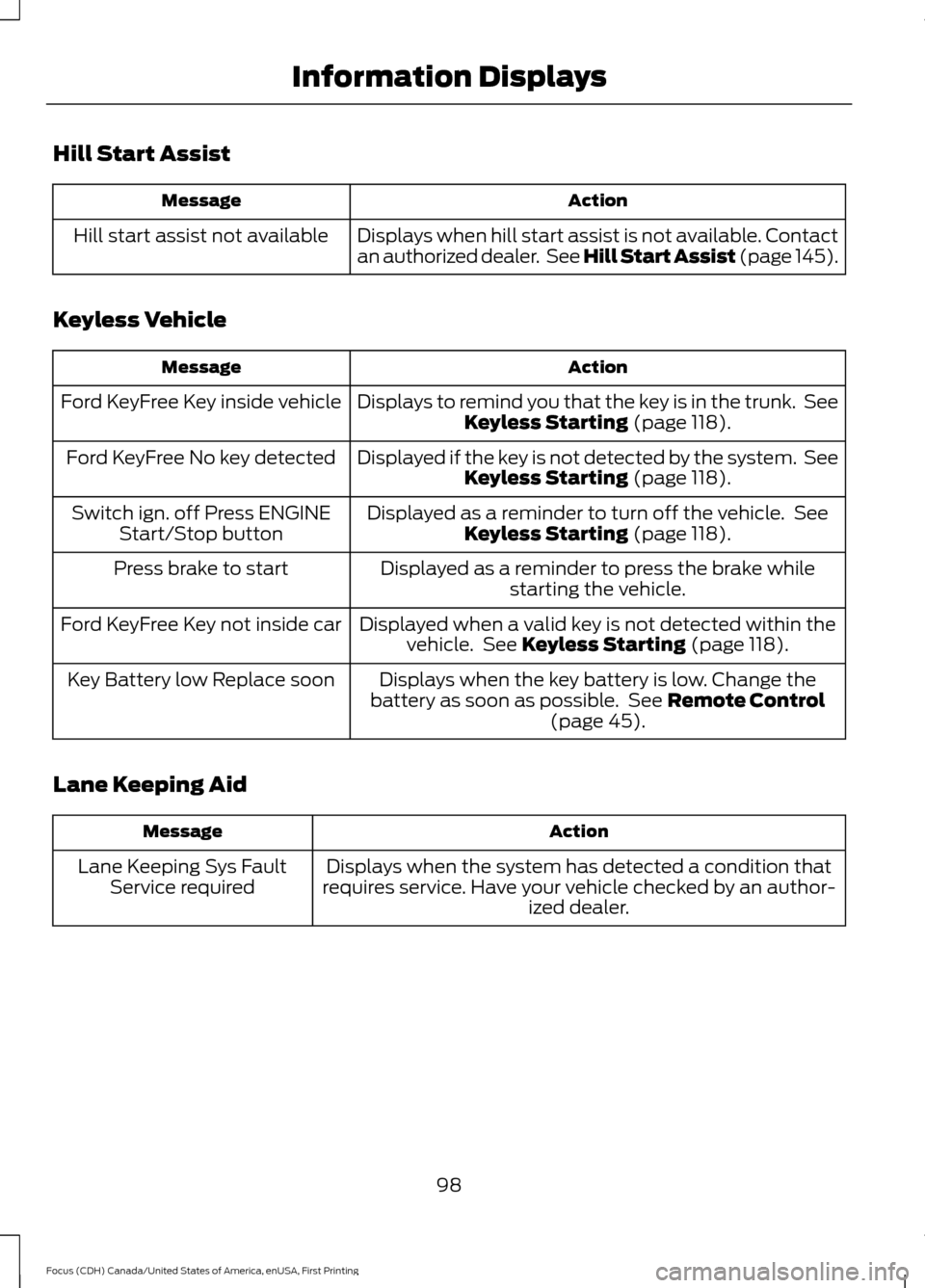
Hill Start Assist
Action
Message
Displays when hill start assist is not available. Contact
an authorized dealer. See Hill Start Assist (page 145).
Hill start assist not available
Keyless Vehicle Action
Message
Displays to remind you that the key is in the trunk. SeeKeyless Starting (page 118).
Ford KeyFree Key inside vehicle
Displayed if the key is not detected by the system. SeeKeyless Starting
(page 118).
Ford KeyFree No key detected
Displayed as a reminder to turn off the vehicle. SeeKeyless Starting
(page 118).
Switch ign. off Press ENGINE
Start/Stop button
Displayed as a reminder to press the brake whilestarting the vehicle.
Press brake to start
Displayed when a valid key is not detected within thevehicle. See
Keyless Starting (page 118).
Ford KeyFree Key not inside car
Displays when the key battery is low. Change the
battery as soon as possible. See
Remote Control
(page 45).
Key Battery low Replace soon
Lane Keeping Aid Action
Message
Displays when the system has detected a condition that
requires service. Have your vehicle checked by an author- ized dealer.
Lane Keeping Sys Fault
Service required
98
Focus (CDH) Canada/United States of America, enUSA, First Printing Information Displays
Page 112 of 385
For additional cabin air filter information,
or to replace the filter, see an authorized
dealer.
REMOTE START
The climate control system adjusts the
cabin temperature during remote start.
You cannot adjust the system during
remote start operation. Switch on the
ignition to return the system to its previous
settings. You can now make adjustments.
You need to switch on certain
vehicle-dependent features, such as:
•
Heated seats.
• Heated mirrors.
• Heated rear window.
• Heated steering wheel.
You can adjust the settings using the
information display controls. See
Information Displays (page 91).
Automatic Settings
You can set the climate control to operate
in AUTO mode through the information
display setting: Remote Start > Climate
Control > Heater-A/C > Auto. The climate
control system automatically sets the
interior temperature to 72°F (22°C).
In hot weather, the system is set to 72°F
(22°C). Cooled seats are set to high (if
available, and selected to AUTO in the
information display).
In cold weather, the system is set to 72°F
(22°C). The rear defroster and heated
mirrors automatically turn on. Last Settings
You can set the climate control to operate
using the last climate control settings
through the information display setting:
Remote Start > Climate Control >
Heater
–A/C > Last Settings. The climate
control system automatically uses the
settings last selected before you turned
off the vehicle.
Heated and Cooled Devices
Heated devices typically switch on during
cold weather, and cooled devices during
hot weather.
109
Focus (CDH) Canada/United States of America, enUSA, First Printing Climate Control
Page 196 of 385
POST-CRASH ALERT SYSTEM
The system flashes the direction indicators
and sounds the horn (intermittently) in the
event of a serious impact that deploys an
airbag (front, side, side curtain or Safety
Canopy) or the safety belt pretensioners.
The horn and indicators will turn off when:
•
You press the hazard control button.
• You press the panic button on the
remote entry transmitter (if equipped).
• Your vehicle runs out of power.
193
Focus (CDH) Canada/United States of America, enUSA, First Printing Roadside Emergencies
Page 256 of 385
WARNINGS
may be found on either the Safety
Compliance Certification Label
(affixed to either the door hinge
pillar, door-latch post, or the door
edge that meets the door-latch
post, next to the driver's seating
position), or the Tire Label which
is located on the B-Pillar or edge
of the driver ’s door. If this
information is not found on these
labels, then you should contact
your authorized dealer as soon as
possible. Use of any tire or wheel
not recommended by Ford can
affect the safety and performance
of your vehicle, which could result
in an increased risk of loss of
vehicle control, vehicle rollover,
personal injury and death.
Additionally the use of
non-recommended tires and
wheels could cause steering,
suspension, axle, transfer case or
power transfer unit failure. If you
have questions regarding tire
replacement, contact your
authorized dealer as soon as
possible. When mounting replacement
tires and wheels, you should
not exceed the maximum pressure
indicated on the sidewall of the
tire to set the beads without
additional precautions listed
below. If the beads do not seat at
the maximum pressure indicated,
re-lubricate and try again. WARNINGS
When inflating the tire for
mounting pressures up to 20 psi
(1.38 bar) greater than the
maximum pressure on the tire
sidewall, the following
precautions must be taken to
protect the person mounting the
tire:
1. Make sure that you have the
correct tire and wheel size.
2. Lubricate the tire bead and
wheel bead seat area again.
3. Stand at a minimum of
12 ft
(3.66 m) away from the wheel
and tire assembly.
4. Use both eye and ear
protection.
For a mounting pressure more
than 20 psi (1.38 bar) greater than
the maximum pressure, a Ford
dealer or other tire service
professional should do the
mounting.
Always inflate steel carcass tires
with a remote air fill with the
person inflating standing at a
minimum of 12 ft (3.66 m) away
from the wheel and tire assembly. Important: Remember to replace
the wheel valve stems when the
road tires are replaced on your
vehicle.
253
Focus (CDH) Canada/United States of America, enUSA, First Printing Wheels and Tires
Page 380 of 385
Information Messages.................................95
Airbag....................................................................... 95
Alarm........................................................................\
95
Automatic Engine Shutdown ......................... 96
Battery and Charging System......................... 96
Blind Spot Information and Cross Traffic Alert System..................................................... 96
Doors........................................................................\
. 97
Engine....................................................................... 97
Hill Start Assist..................................................... 98
Keyless Vehicle..................................................... 98
Lane Keeping Aid................................................. 98
Lighting.................................................................... 99
Maintenance.......................................................... 99
Message Indicator................................................ 95
MyKey....................................................................... 99
Occupant Protection........................................ 100
Park Aid.................................................................. 100
Park Brake............................................................. 100
Power Steering..................................................... 101
Starting System .................................................. 101
Start-Stop.............................................................. 101
Tire Pressure Monitoring System.................. 102
Traction Control.................................................. 102
Transmission........................................................ 102
Installing Child Restraints
............................16
Child Seats............................................................... 16
Using Lap and Shoulder Belts.......................... 17
Using Lower Anchors and Tethers for Children (LATCH)............................................. 19
Using Tether Straps.............................................. 21
Instrument Cluster
........................................86
Instrument Lighting Dimmer......................76
Interior Lamps.................................................79
Front Interior Lamps (If Equipped)...............79
Interior Luggage Compartment Release - 4-Door
..........................................................64
Interior Mirror...................................................84
Introduction.........................................................7
J
Jump Starting the Vehicle..........................191 Connecting the Jumper Cables...................... 191
Jump Starting....................................................... 192
Preparing Your Vehicle....................................... 191
Removing the Jumper Cables........................ 192K
Keyless Entry
....................................................63
SECURICODE™ KEYLESS ENTRY
KEYPAD.............................................................. 63
Keyless Starting.............................................118 Failure to Start...................................................... 119
Fast Restart.......................................................... 120
Starting Your Vehicle.......................................... 119
Stopping the Engine When Your Vehicle is Moving............................................................... 120
Stopping the Engine When Your Vehicle is Stationary......................................................... 120
Switching the Ignition On to Accessory Mode.................................................................... 119
Keys and Remote Controls.........................45
L
Lane Keeping System.................................162 Switching the System On and Off...............163
Lighting Control
...............................................74
Headlamp Flasher................................................ 75
High Beams............................................................. 74
Lighting...............................................................74 General Information............................................ 74
Load Carrying
..................................................174
Load Limit........................................................174
Vehicle Loading - with and without a
Trailer.................................................................. 174
Locking and Unlocking
.................................58
Activating Intelligent Access............................ 59
Autolock Feature................................................... 61
Autounlock Feature.............................................. 61
Battery Saver......................................................... 62
Disabled Intelligent Access Keys................... 60
Enabling or Disabling Autolock and Autounlock......................................................... 61
Illuminated Entry................................................... 61
Illuminated Exit..................................................... 62
Opening the Liftgate or Luggage Compartment................................................... 62
Power Door Locks................................................ 58
Remote Control.................................................... 58
Smart Unlocks for Integrated Keyhead Transmitter........................................................ 60
Smart Unlocks for Intelligent Access Keys...................................................................... 60
377
Focus (CDH) Canada/United States of America, enUSA, First Printing Index
Page 382 of 385
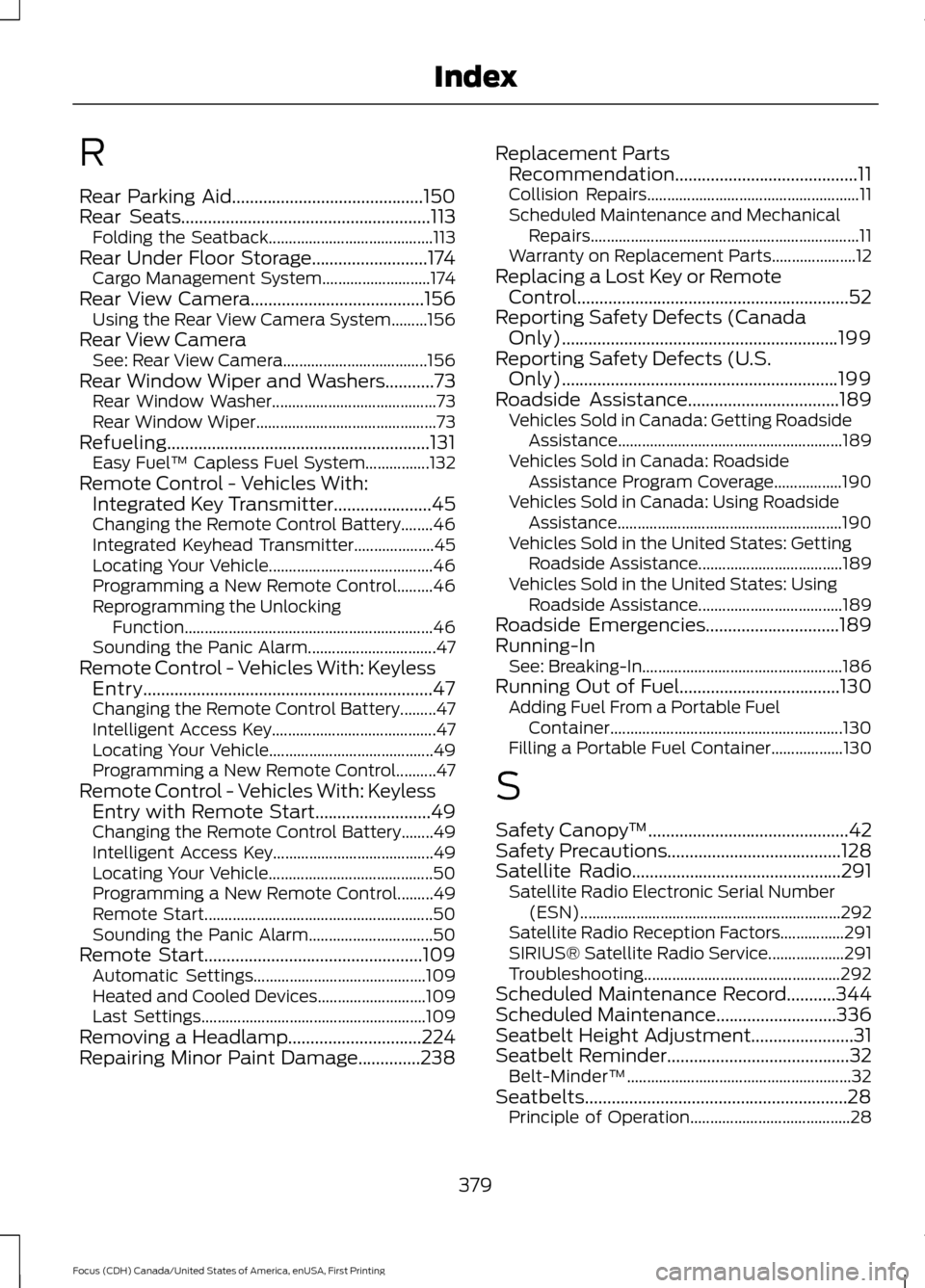
R
Rear Parking Aid...........................................150
Rear Seats........................................................113
Folding the Seatback......................................... 113
Rear Under Floor Storage..........................174 Cargo Management System........................... 174
Rear View Camera
.......................................156
Using the Rear View Camera System.........156
Rear View Camera See: Rear View Camera.................................... 156
Rear Window Wiper and Washers
...........73
Rear Window Washer......................................... 73
Rear Window Wiper............................................. 73
Refueling...........................................................131 Easy Fuel ™ Capless Fuel System................132
Remote Control - Vehicles With: Integrated Key Transmitter
......................45
Changing the Remote Control Battery........46
Integrated Keyhead Transmitter.................... 45
Locating Your Vehicle......................................... 46
Programming a New Remote Control.........46
Reprogramming the Unlocking Function .............................................................. 46
Sounding the Panic Alarm................................ 47
Remote Control - Vehicles With: Keyless Entry.................................................................47
Changing the Remote Control Battery.........47
Intelligent Access Key......................................... 47
Locating Your Vehicle......................................... 49
Programming a New Remote Control..........47
Remote Control - Vehicles With: Keyless Entry with Remote Start..........................49
Changing the Remote Control Battery........49
Intelligent Access Key........................................ 49
Locating Your Vehicle......................................... 50
Programming a New Remote Control.........49
Remote Start......................................................... 50
Sounding the Panic Alarm............................... 50
Remote Start.................................................109 Automatic Settings........................................... 109
Heated and Cooled Devices........................... 109
Last Settings........................................................ 109
Removing a Headlamp
..............................224
Repairing Minor Paint Damage..............238 Replacement Parts
Recommendation.........................................11
Collision Repairs..................................................... 11
Scheduled Maintenance and Mechanical Repairs................................................................... 11
Warranty on Replacement Parts..................... 12
Replacing a Lost Key or Remote Control.............................................................52
Reporting Safety Defects (Canada Only)
..............................................................199
Reporting Safety Defects (U.S. Only)
..............................................................199
Roadside Assistance..................................189
Vehicles Sold in Canada: Getting Roadside
Assistance........................................................ 189
Vehicles Sold in Canada: Roadside Assistance Program Coverage.................190
Vehicles Sold in Canada: Using Roadside Assistance........................................................ 190
Vehicles Sold in the United States: Getting Roadside Assistance.................................... 189
Vehicles Sold in the United States: Using Roadside Assistance.................................... 189
Roadside Emergencies
..............................189
Running-In See: Breaking-In.................................................. 186
Running Out of Fuel....................................130 Adding Fuel From a Portable Fuel
Container.......................................................... 130
Filling a Portable Fuel Container.................. 130
S
Safety Canopy ™
.............................................42
Safety Precautions.......................................128
Satellite Radio...............................................291 Satellite Radio Electronic Serial Number
(ESN)................................................................. 292
Satellite Radio Reception Factors................291
SIRIUS® Satellite Radio Service................... 291
Troubleshooting................................................. 292
Scheduled Maintenance Record
...........344
Scheduled Maintenance...........................336
Seatbelt Height Adjustment.......................31
Seatbelt Reminder.........................................32 Belt-Minder™........................................................ 32
Seatbelts...........................................................28 Principle of Operation........................................ 28
379
Focus (CDH) Canada/United States of America, enUSA, First Printing Index
Page 384 of 385
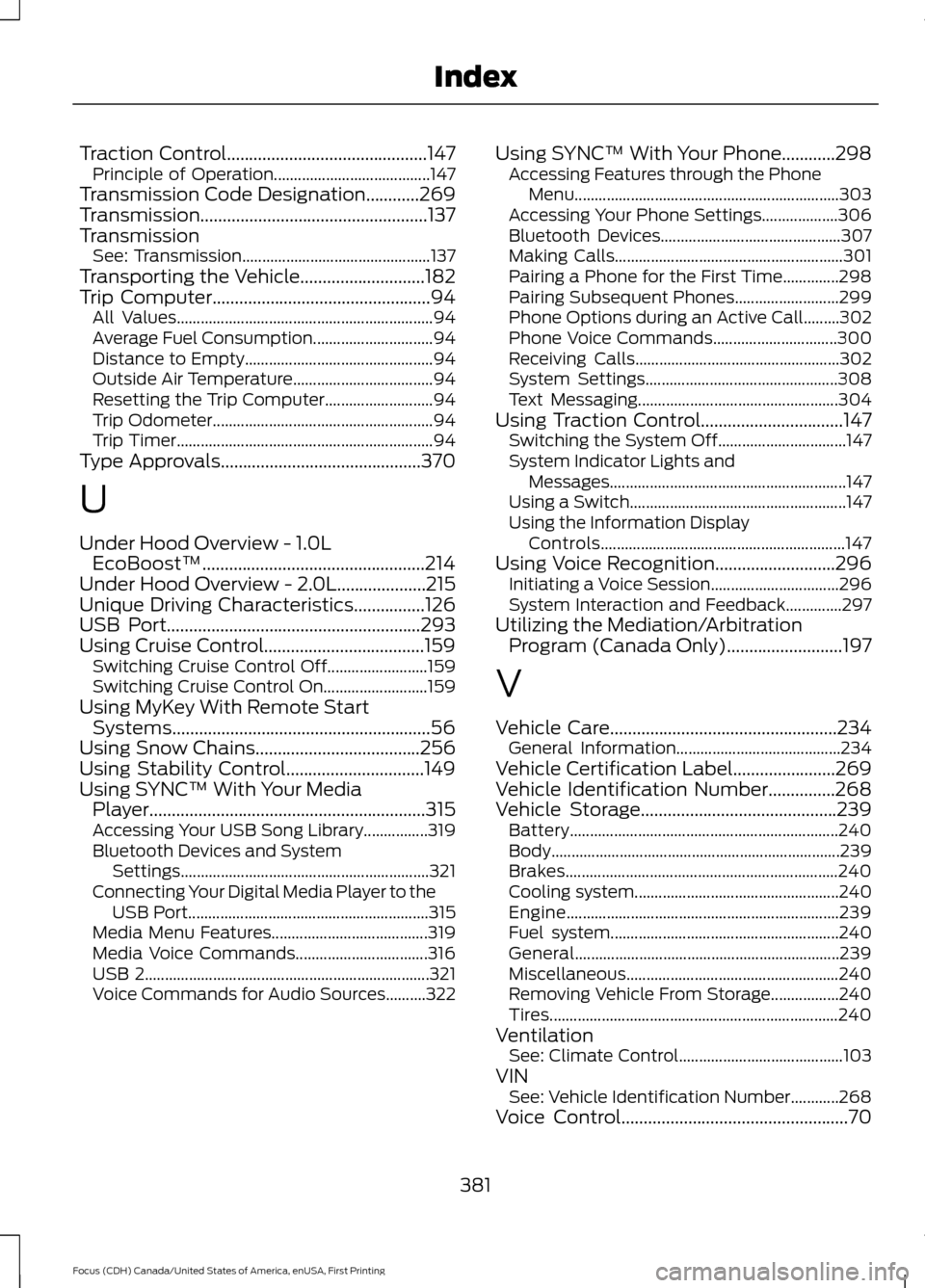
Traction Control.............................................147
Principle of Operation....................................... 147
Transmission Code Designation............269
Transmission...................................................137
Transmission See: Transmission............................................... 137
Transporting the Vehicle............................182
Trip Computer
.................................................94
All Values................................................................ 94
Average Fuel Consumption.............................. 94
Distance to Empty............................................... 94
Outside Air Temperature................................... 94
Resetting the Trip Computer........................... 94
Trip Odometer....................................................... 94
Trip Timer................................................................ 94
Type Approvals
.............................................370
U
Under Hood Overview - 1.0L EcoBoost™..................................................214
Under Hood Overview - 2.0L....................215
Unique Driving Characteristics................126
USB Port
.........................................................293
Using Cruise Control....................................159 Switching Cruise Control Off......................... 159
Switching Cruise Control On.......................... 159
Using MyKey With Remote Start Systems
..........................................................56
Using Snow Chains.....................................256
Using Stability Control...............................149
Using SYNC™ With Your Media Player
..............................................................315
Accessing Your USB Song Library................319
Bluetooth Devices and System
Settings.............................................................. 321
Connecting Your Digital Media Player to the USB Port............................................................ 315
Media Menu Features....................................... 319
Media Voice Commands................................. 316
USB 2....................................................................... 321
Voice Commands for Audio Sources..........322 Using SYNC™ With Your Phone
............298
Accessing Features through the Phone
Menu.................................................................. 303
Accessing Your Phone Settings................... 306
Bluetooth Devices............................................. 307
Making Calls......................................................... 301
Pairing a Phone for the First Time..............298
Pairing Subsequent Phones.......................... 299
Phone Options during an Active Call.........302
Phone Voice Commands............................... 300
Receiving Calls................................................... 302
System Settings................................................ 308
Text Messaging.................................................. 304
Using Traction Control
................................147
Switching the System Off................................ 147
System Indicator Lights and Messages........................................................... 147
Using a Switch...................................................... 147
Using the Information Display Controls............................................................. 147
Using Voice Recognition
...........................296
Initiating a Voice Session................................ 296
System Interaction and Feedback..............297
Utilizing the Mediation/Arbitration Program (Canada Only)
..........................197
V
Vehicle Care
...................................................234
General Information......................................... 234
Vehicle Certification Label.......................269
Vehicle Identification Number
...............268
Vehicle Storage............................................239 Battery................................................................... 240
Body........................................................................\
239
Brakes.................................................................... 240
Cooling system................................................... 240
Engine.................................................................... 239
Fuel system......................................................... 240
General.................................................................. 239
Miscellaneous..................................................... 240
Removing Vehicle From Storage.................240
Tires........................................................................\
240
Ventilation See: Climate Control......................................... 103
VIN See: Vehicle Identification Number............268
Voice Control...................................................70
381
Focus (CDH) Canada/United States of America, enUSA, First Printing Index