buttons FORD FOCUS 2016 3.G Owners Manual
[x] Cancel search | Manufacturer: FORD, Model Year: 2016, Model line: FOCUS, Model: FORD FOCUS 2016 3.GPages: 385, PDF Size: 5.23 MB
Page 48 of 385
GENERAL INFORMATION ON
RADIO FREQUENCIES
This device complies with Part 15 of the
FCC Rules and with Industry Canada
license-exempt RSS standard(s).
Operation is subject to the following two
conditions: (1) This device may not cause
harmful interference, and (2) This device
must accept any interference received,
including interference that may cause
undesired operation.
Note:
Changes or modifications not
expressively approved by the party
responsible for compliance could void the
user's authority to operate the equipment.
The term IC before the radio certification
number only signifies that Industry Canada
technical specifications were met.
The typical operating range for your
transmitter is approximately 33 feet (10
meters). Vehicles with the remote start
feature will have a greater range. One of
the following could cause a decrease in
operating range:
• weather conditions
• nearby radio towers
• structures around the vehicle
• other vehicles parked next to your
vehicle
The radio frequency used by your remote
control can also be used by other short
distance radio transmissions, for example
amateur radios, medical equipment,
wireless headphones, remote controls and
alarm systems. If the frequencies are
jammed, you will not be able to use your
remote control. You can lock and unlock
the doors with the key.
Note: Make sure to lock your vehicle before
leaving it unattended.
Note: If you are in range, the remote control
will operate if you press any button
unintentionally. Note:
The remote control contains sensitive
electrical components. Exposure to moisture
or impact may cause permanent damage.
REMOTE CONTROL - VEHICLES
WITH: INTEGRATED KEY
TRANSMITTER
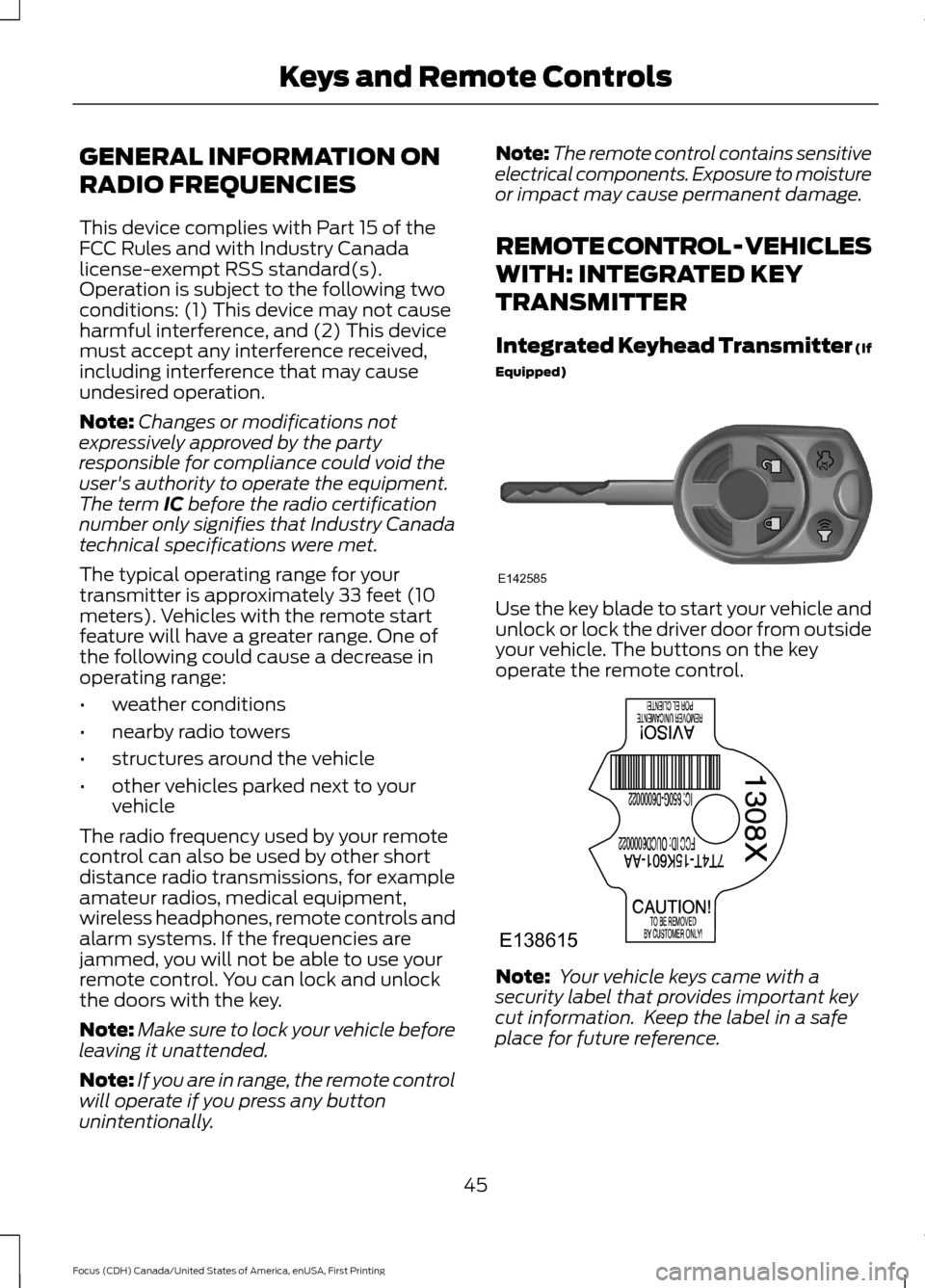
Integrated Keyhead Transmitter (If
Equipped) Use the key blade to start your vehicle and
unlock or lock the driver door from outside
your vehicle. The buttons on the key
operate the remote control.
Note:
Your vehicle keys came with a
security label that provides important key
cut information. Keep the label in a safe
place for future reference.
45
Focus (CDH) Canada/United States of America, enUSA, First Printing Keys and Remote ControlsE142585 E138615
Page 49 of 385
Programming a New Remote
Control
To program an additional remote control
See Security (page 66).
Reprogramming the Unlocking
Function
Note: When you press the unlock button,
either all the doors are unlocked or only the
driver door is unlocked. Pressing the unlock
button again unlocks all the doors.
Press and hold the unlock and lock buttons
on the remote control simultaneously for
at least four seconds with the ignition off.
The direction indicators flash twice to
confirm the change.
To return to the original unlocking function,
repeat the process.
Changing the Remote Control
Battery
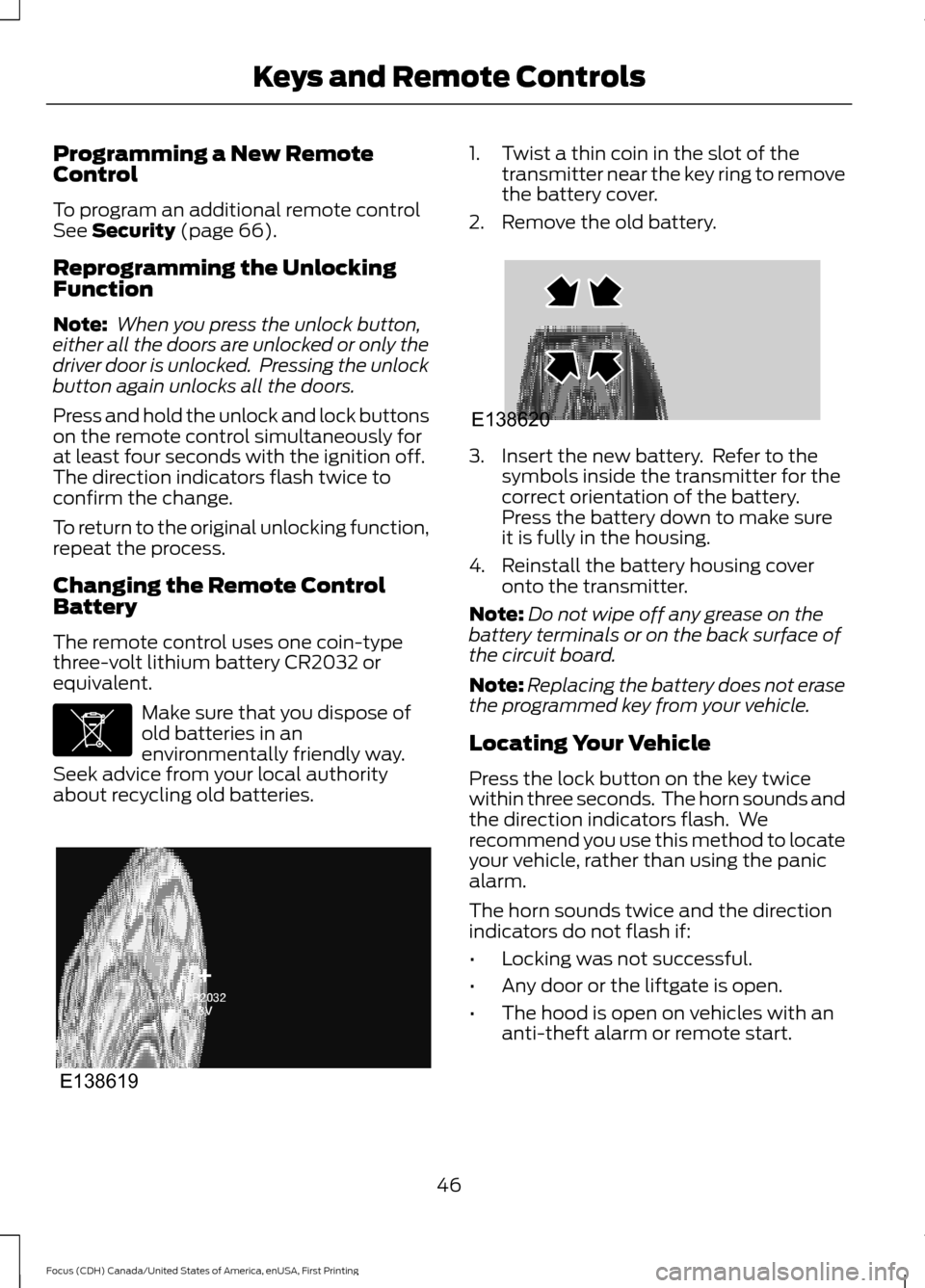
The remote control uses one coin-type
three-volt lithium battery CR2032 or
equivalent. Make sure that you dispose of
old batteries in an
environmentally friendly way.
Seek advice from your local authority
about recycling old batteries. 1. Twist a thin coin in the slot of the
transmitter near the key ring to remove
the battery cover.
2. Remove the old battery. 3. Insert the new battery. Refer to the
symbols inside the transmitter for the
correct orientation of the battery.
Press the battery down to make sure
it is fully in the housing.
4. Reinstall the battery housing cover onto the transmitter.
Note: Do not wipe off any grease on the
battery terminals or on the back surface of
the circuit board.
Note: Replacing the battery does not erase
the programmed key from your vehicle.
Locating Your Vehicle
Press the lock button on the key twice
within three seconds. The horn sounds and
the direction indicators flash. We
recommend you use this method to locate
your vehicle, rather than using the panic
alarm.
The horn sounds twice and the direction
indicators do not flash if:
• Locking was not successful.
• Any door or the liftgate is open.
• The hood is open on vehicles with an
anti-theft alarm or remote start.
46
Focus (CDH) Canada/United States of America, enUSA, First Printing Keys and Remote ControlsE107998 E138619 E138620
Page 50 of 385
Sounding the Panic Alarm (If Equipped)
Press the button to sound the
panic alarm. Press the button
again or switch the ignition on to
silence it.
Note: The panic alarm only operates when
the ignition is off.
REMOTE CONTROL - VEHICLES
WITH: KEYLESS ENTRY (If
Equipped)
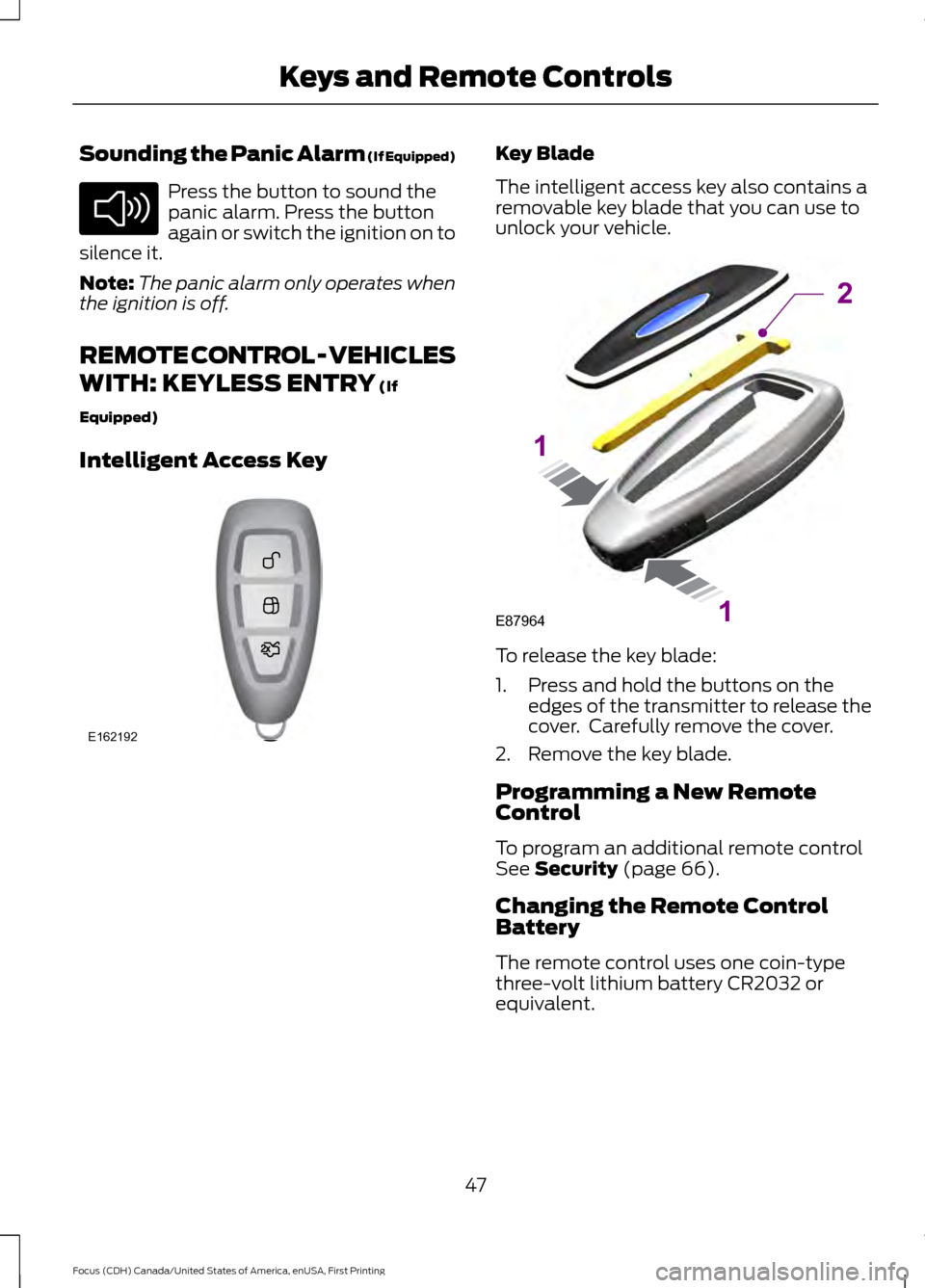
Intelligent Access Key Key Blade
The intelligent access key also contains a
removable key blade that you can use to
unlock your vehicle.
To release the key blade:
1. Press and hold the buttons on the
edges of the transmitter to release the
cover. Carefully remove the cover.
2. Remove the key blade.
Programming a New Remote
Control
To program an additional remote control
See
Security (page 66).
Changing the Remote Control
Battery
The remote control uses one coin-type
three-volt lithium battery CR2032 or
equivalent.
47
Focus (CDH) Canada/United States of America, enUSA, First Printing Keys and Remote ControlsE138624 E162192 E87964
2
1
1
Page 51 of 385
Make sure that you dispose of
old batteries in an
environmentally friendly way.
Seek advice from your local authority
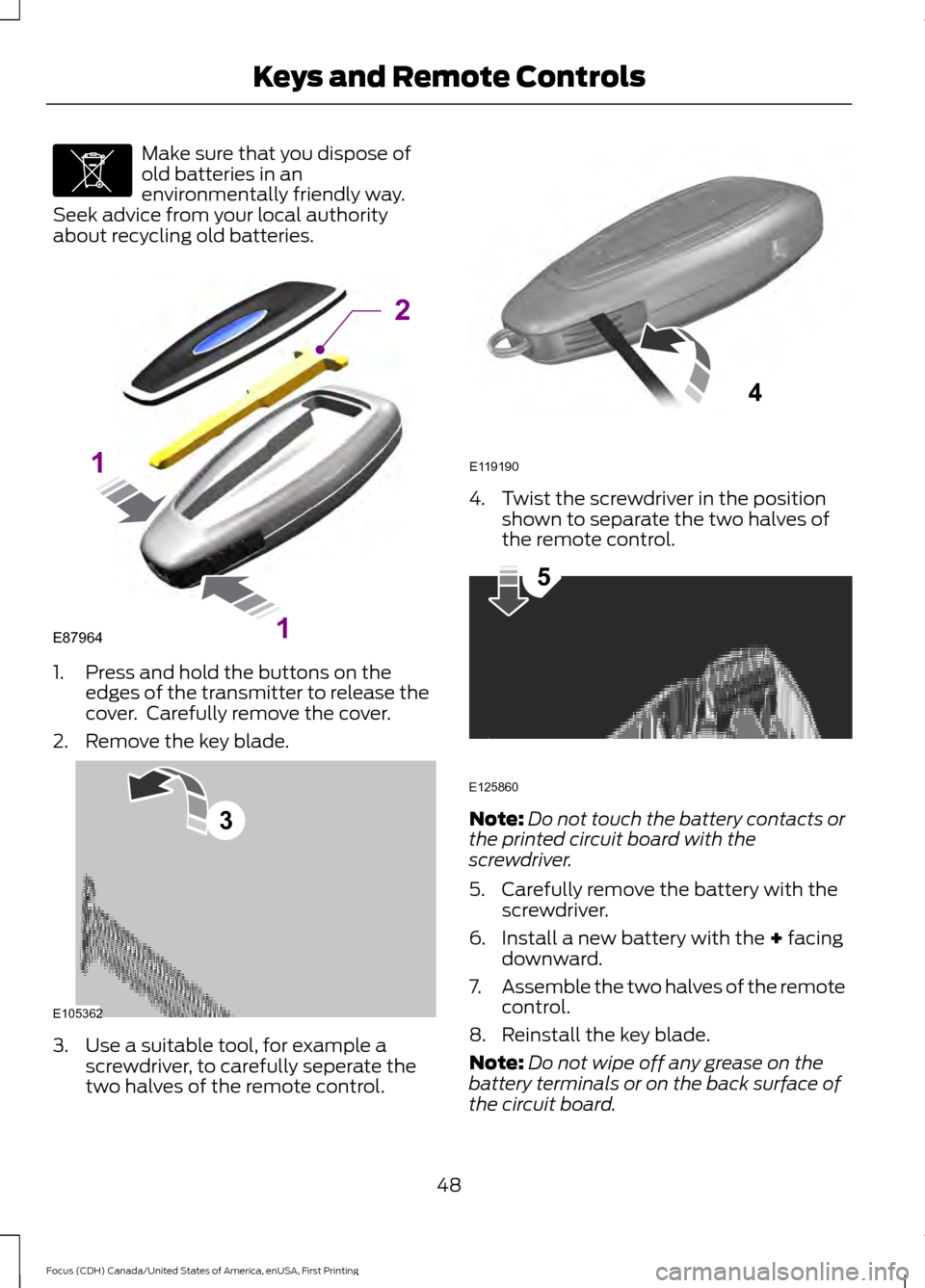
about recycling old batteries. 1. Press and hold the buttons on the
edges of the transmitter to release the
cover. Carefully remove the cover.
2. Remove the key blade. 3. Use a suitable tool, for example a
screwdriver, to carefully seperate the
two halves of the remote control. 4. Twist the screwdriver in the position
shown to separate the two halves of
the remote control. Note:
Do not touch the battery contacts or
the printed circuit board with the
screwdriver.
5. Carefully remove the battery with the screwdriver.
6. Install a new battery with the + facing
downward.
7. Assemble the two halves of the remote
control.
8. Reinstall the key blade.
Note: Do not wipe off any grease on the
battery terminals or on the back surface of
the circuit board.
48
Focus (CDH) Canada/United States of America, enUSA, First Printing Keys and Remote ControlsE107998 E87964
2
1
1 E105362
3 E119190
4 E125860
5
Page 61 of 385
LOCKING AND UNLOCKING
You can use the power door lock control
or the remote control to lock and unlock
your vehicle.
Power Door Locks
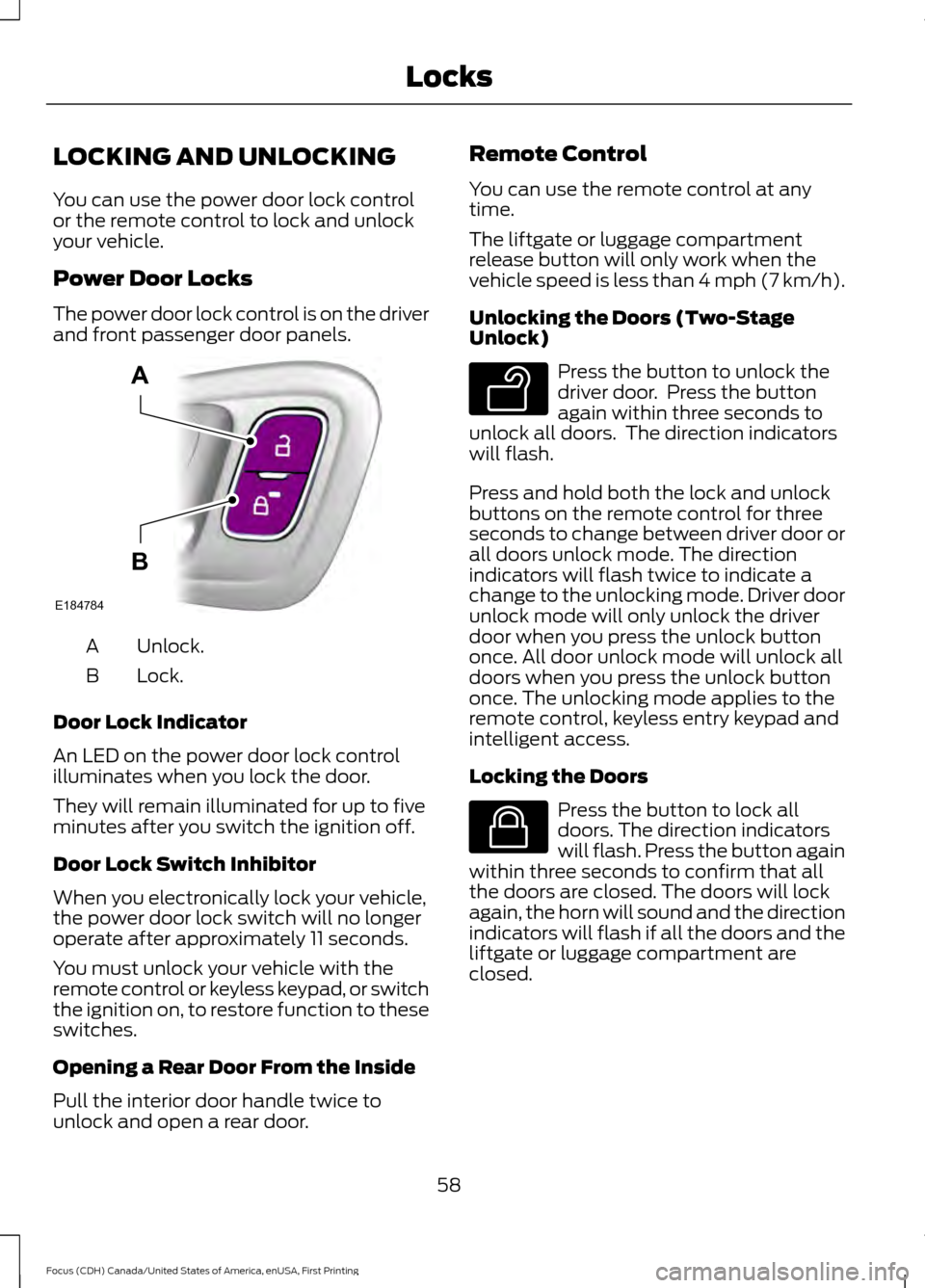
The power door lock control is on the driver
and front passenger door panels.
Unlock.
A
Lock.
B
Door Lock Indicator
An LED on the power door lock control
illuminates when you lock the door.
They will remain illuminated for up to five
minutes after you switch the ignition off.
Door Lock Switch Inhibitor
When you electronically lock your vehicle,
the power door lock switch will no longer
operate after approximately 11 seconds.
You must unlock your vehicle with the
remote control or keyless keypad, or switch
the ignition on, to restore function to these
switches.
Opening a Rear Door From the Inside
Pull the interior door handle twice to
unlock and open a rear door. Remote Control
You can use the remote control at any
time.
The liftgate or luggage compartment
release button will only work when the
vehicle speed is less than 4 mph (7 km/h).
Unlocking the Doors (Two-Stage
Unlock)
Press the button to unlock the
driver door. Press the button
again within three seconds to
unlock all doors. The direction indicators
will flash.
Press and hold both the lock and unlock
buttons on the remote control for three
seconds to change between driver door or
all doors unlock mode. The direction
indicators will flash twice to indicate a
change to the unlocking mode. Driver door
unlock mode will only unlock the driver
door when you press the unlock button
once. All door unlock mode will unlock all
doors when you press the unlock button
once. The unlocking mode applies to the
remote control, keyless entry keypad and
intelligent access.
Locking the Doors Press the button to lock all
doors. The direction indicators
will flash. Press the button again
within three seconds to confirm that all
the doors are closed. The doors will lock
again, the horn will sound and the direction
indicators will flash if all the doors and the
liftgate or luggage compartment are
closed.
58
Focus (CDH) Canada/United States of America, enUSA, First Printing LocksE184784
A
B E138629 E138623
Page 66 of 385
Note:
Be careful when opening or closing
the liftgate in a garage or other enclosed
area to avoid damaging the liftgate.
Note: Do not hang anything, for example a
bike rack, from the glass or liftgate. This
could damage the liftgate and its
components.
Note: Do not leave the liftgate open while
driving. This could damage the liftgate and
its components.
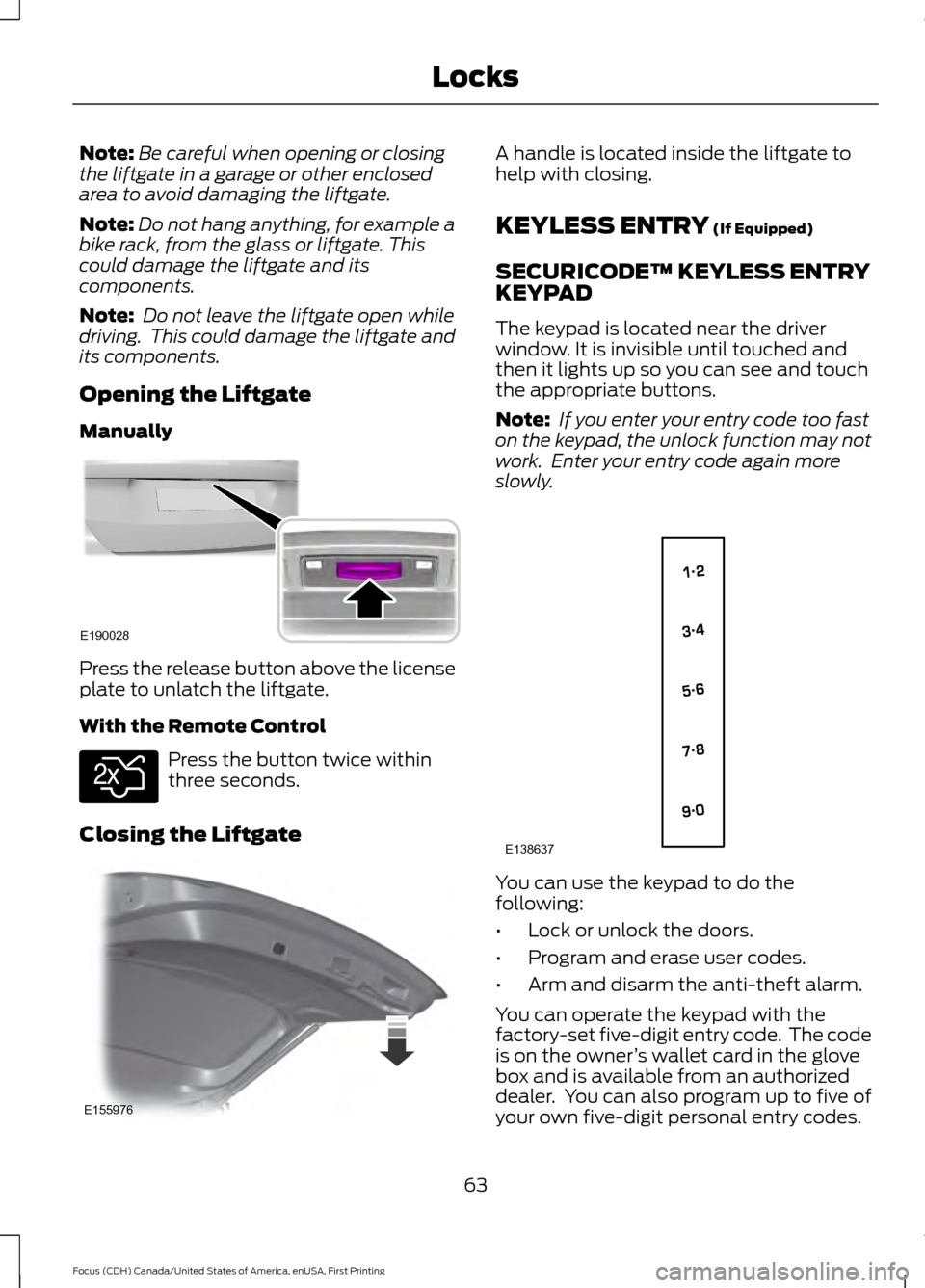
Opening the Liftgate
Manually Press the release button above the license
plate to unlatch the liftgate.
With the Remote Control
Press the button twice within
three seconds.
Closing the Liftgate A handle is located inside the liftgate to
help with closing.
KEYLESS ENTRY (If Equipped)
SECURICODE™ KEYLESS ENTRY
KEYPAD
The keypad is located near the driver
window. It is invisible until touched and
then it lights up so you can see and touch
the appropriate buttons.
Note: If you enter your entry code too fast
on the keypad, the unlock function may not
work. Enter your entry code again more
slowly. You can use the keypad to do the
following:
•
Lock or unlock the doors.
• Program and erase user codes.
• Arm and disarm the anti-theft alarm.
You can operate the keypad with the
factory-set five-digit entry code. The code
is on the owner ’s wallet card in the glove
box and is available from an authorized
dealer. You can also program up to five of
your own five-digit personal entry codes.
63
Focus (CDH) Canada/United States of America, enUSA, First Printing LocksE190028 E138630 E155976 E138637
Page 82 of 385
INTERIOR LAMPS
The lamps turn on when:
•
You open any door.
• You press a remote control button.
• You press the buttons on the map
lamps.
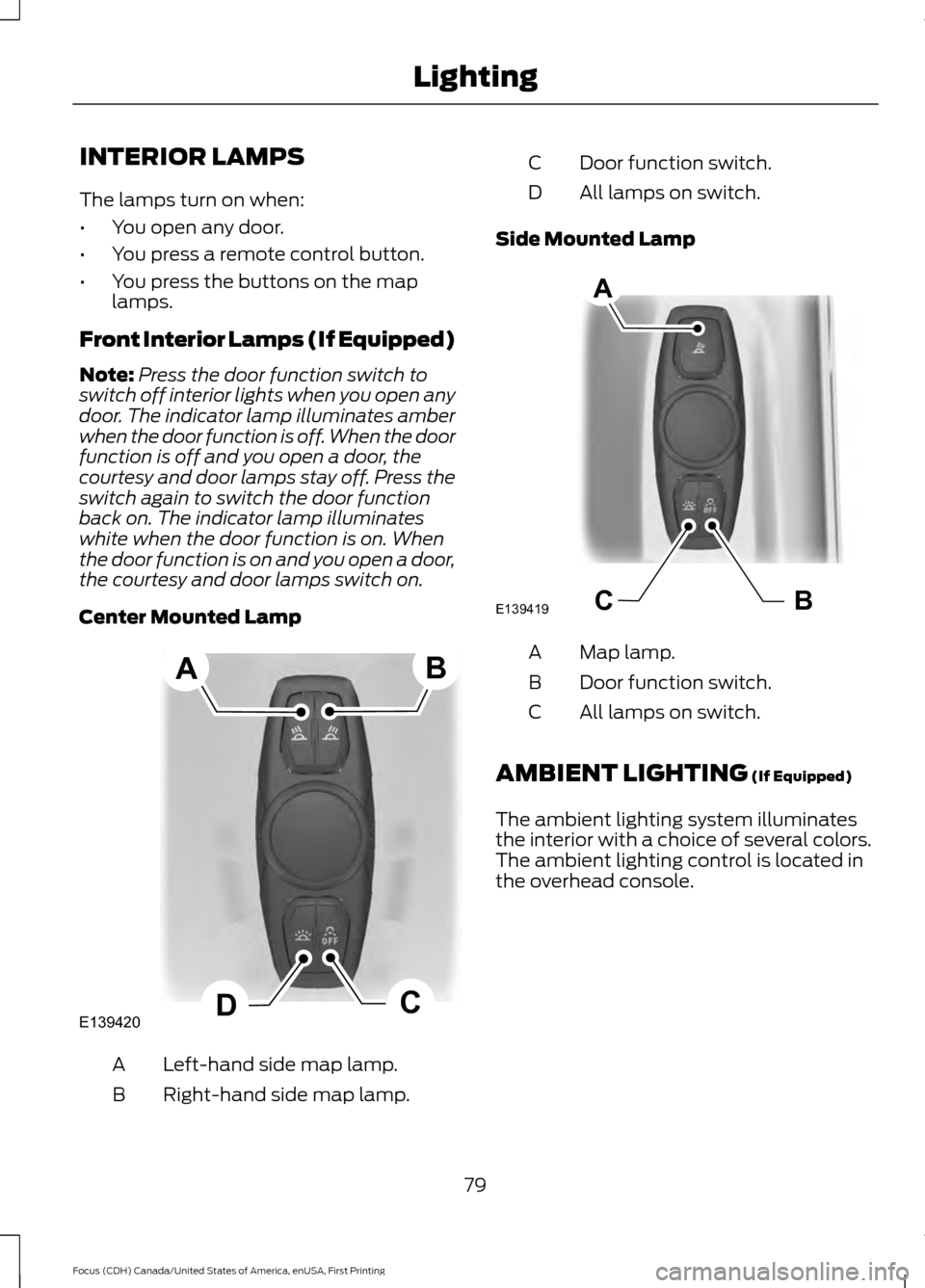
Front Interior Lamps (If Equipped)
Note: Press the door function switch to
switch off interior lights when you open any
door. The indicator lamp illuminates amber
when the door function is off. When the door
function is off and you open a door, the
courtesy and door lamps stay off. Press the
switch again to switch the door function
back on. The indicator lamp illuminates
white when the door function is on. When
the door function is on and you open a door,
the courtesy and door lamps switch on.
Center Mounted Lamp Left-hand side map lamp.
A
Right-hand side map lamp.
B Door function switch.
C
All lamps on switch.
D
Side Mounted Lamp Map lamp.
A
Door function switch.
B
All lamps on switch.
C
AMBIENT LIGHTING (If Equipped)
The ambient lighting system illuminates
the interior with a choice of several colors.
The ambient lighting control is located in
the overhead console.
79
Focus (CDH) Canada/United States of America, enUSA, First Printing LightingE139420C
D
AB BCE139419
A
Page 94 of 385
GENERAL INFORMATION
WARNING
Driving while distracted can result in
loss of vehicle control, crash and
injury. We strongly recommend that
you use extreme caution when using any
device that may take your focus off the
road. Your primary responsibility is the safe
operation of your vehicle. We recommend
against the use of any hand-held device
while driving and encourage the use of
voice-operated systems when possible.
Make sure you are aware of all applicable
local laws that may affect the use of
electronic devices while driving. You can control various systems on your
vehicle using the information display
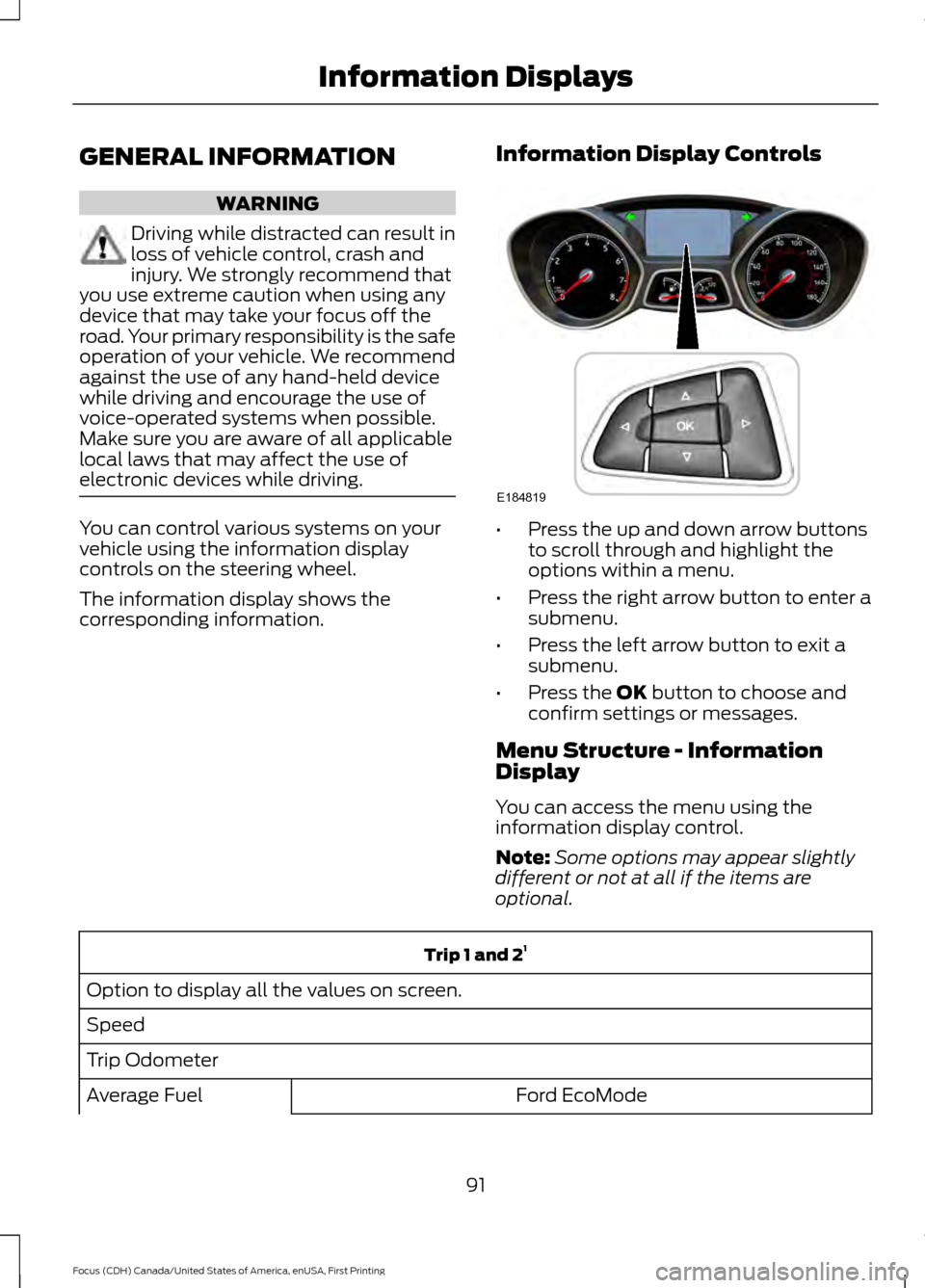
controls on the steering wheel.
The information display shows the
corresponding information.
Information Display Controls •
Press the up and down arrow buttons
to scroll through and highlight the
options within a menu.
• Press the right arrow button to enter a
submenu.
• Press the left arrow button to exit a
submenu.
• Press the OK button to choose and
confirm settings or messages.
Menu Structure - Information
Display
You can access the menu using the
information display control.
Note: Some options may appear slightly
different or not at all if the items are
optional. Trip 1 and 2
1
Option to display all the values on screen.
Speed
Trip Odometer Ford EcoMode
Average Fuel
91
Focus (CDH) Canada/United States of America, enUSA, First Printing Information DisplaysE184819
Page 97 of 385
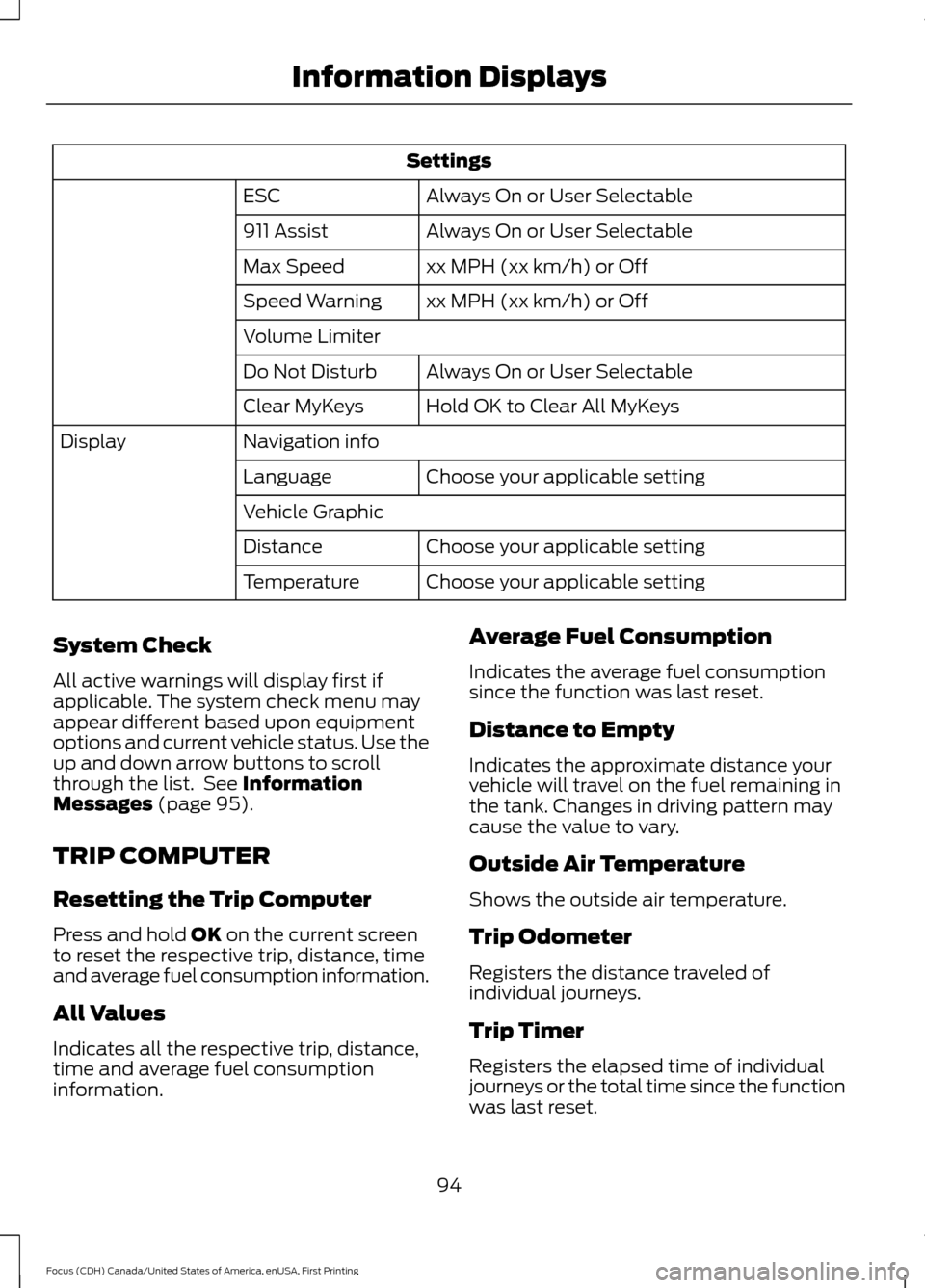
Settings
Always On or User Selectable
ESC
Always On or User Selectable
911 Assist
xx MPH (xx km/h) or Off
Max Speed
xx MPH (xx km/h) or Off
Speed Warning
Volume Limiter
Always On or User Selectable
Do Not Disturb
Hold OK to Clear All MyKeys
Clear MyKeys
Navigation info
Display
Choose your applicable setting
Language
Vehicle Graphic
Choose your applicable setting
Distance
Choose your applicable setting
Temperature
System Check
All active warnings will display first if
applicable. The system check menu may
appear different based upon equipment
options and current vehicle status. Use the
up and down arrow buttons to scroll
through the list. See Information
Messages (page 95).
TRIP COMPUTER
Resetting the Trip Computer
Press and hold
OK on the current screen
to reset the respective trip, distance, time
and average fuel consumption information.
All Values
Indicates all the respective trip, distance,
time and average fuel consumption
information. Average Fuel Consumption
Indicates the average fuel consumption
since the function was last reset.
Distance to Empty
Indicates the approximate distance your
vehicle will travel on the fuel remaining in
the tank. Changes in driving pattern may
cause the value to vary.
Outside Air Temperature
Shows the outside air temperature.
Trip Odometer
Registers the distance traveled of
individual journeys.
Trip Timer
Registers the elapsed time of individual
journeys or the total time since the function
was last reset.
94
Focus (CDH) Canada/United States of America, enUSA, First Printing Information Displays
Page 106 of 385
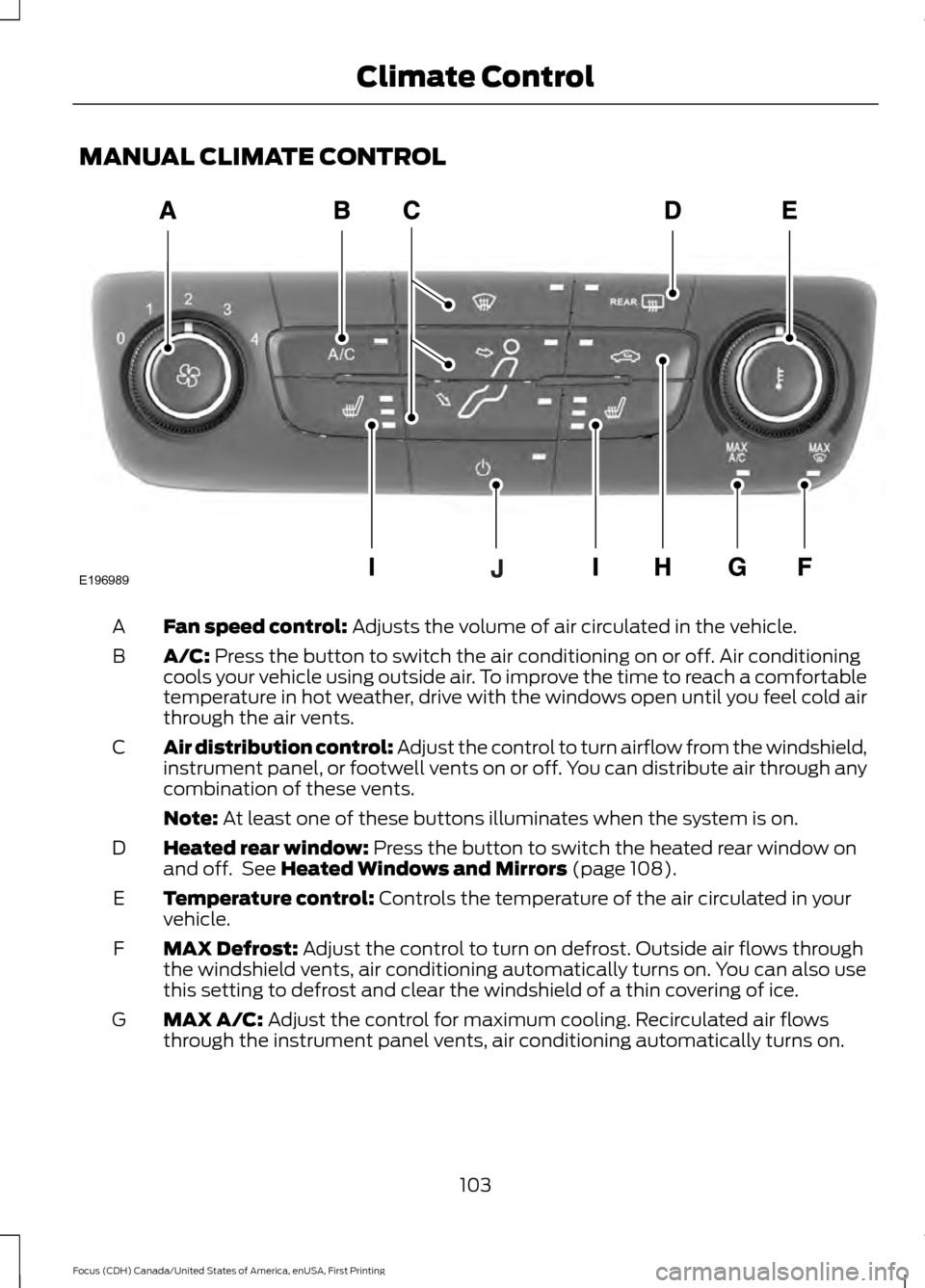
MANUAL CLIMATE CONTROL
Fan speed control: Adjusts the volume of air circulated in the vehicle.
A
A/C:
Press the button to switch the air conditioning on or off. Air conditioning
cools your vehicle using outside air. To improve the time to reach a comfortable
temperature in hot weather, drive with the windows open until you feel cold air
through the air vents.
B
Air distribution control: Adjust the control to turn airflow from the windshield,
instrument panel, or footwell vents on or off. You can distribute air through any
combination of these vents.
C
Note:
At least one of these buttons illuminates when the system is on.
Heated rear window:
Press the button to switch the heated rear window on
and off. See Heated Windows and Mirrors (page 108).
D
Temperature control:
Controls the temperature of the air circulated in your
vehicle.
E
MAX Defrost:
Adjust the control to turn on defrost. Outside air flows through
the windshield vents, air conditioning automatically turns on. You can also use
this setting to defrost and clear the windshield of a thin covering of ice.
F
MAX A/C:
Adjust the control for maximum cooling. Recirculated air flows
through the instrument panel vents, air conditioning automatically turns on.
G
103
Focus (CDH) Canada/United States of America, enUSA, First Printing Climate ControlE196989