fuel cap FORD FOCUS 2017 3.G User Guide
[x] Cancel search | Manufacturer: FORD, Model Year: 2017, Model line: FOCUS, Model: FORD FOCUS 2017 3.GPages: 467, PDF Size: 5.34 MB
Page 273 of 467
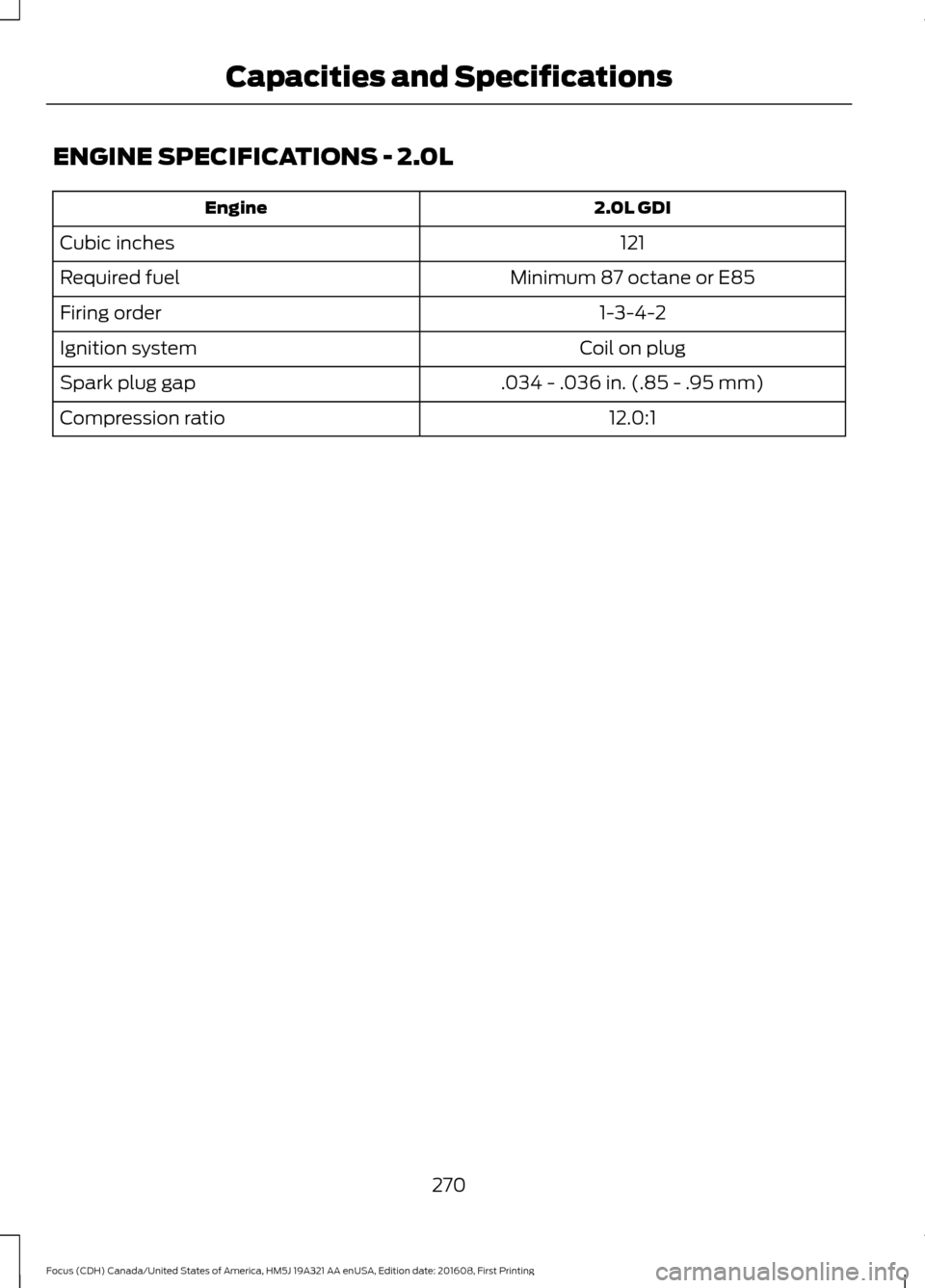
ENGINE SPECIFICATIONS - 2.0L
2.0L GDI
Engine
121
Cubic inches
Minimum 87 octane or E85
Required fuel
1-3-4-2
Firing order
Coil on plug
Ignition system
.034 - .036 in. (.85 - .95 mm)
Spark plug gap
12.0:1
Compression ratio
270
Focus (CDH) Canada/United States of America, HM5J 19A321 AA enUSA, Edition date: 201608, First Printing Capacities and Specifications
Page 278 of 467
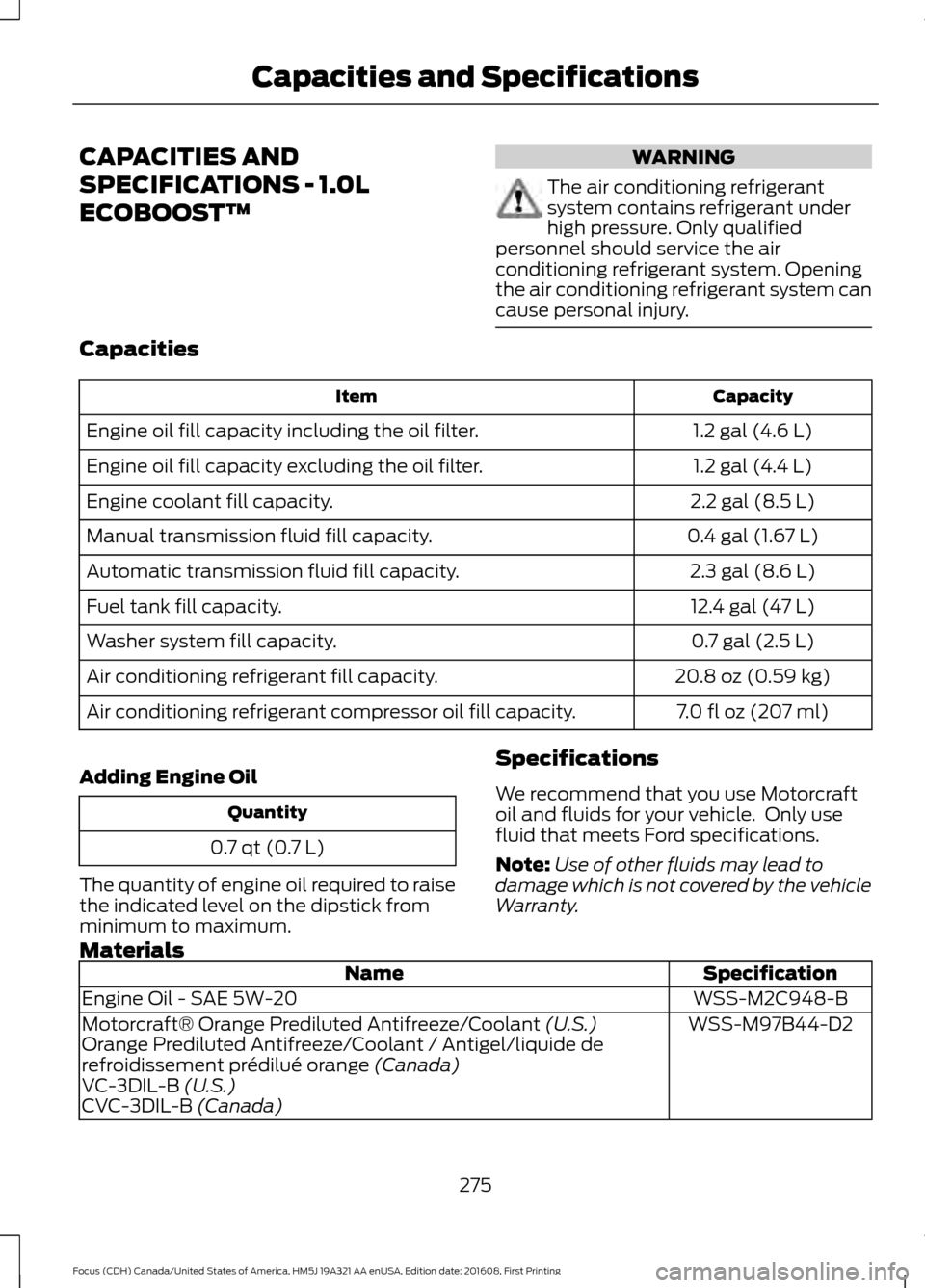
CAPACITIES AND
SPECIFICATIONS - 1.0L
ECOBOOST™ WARNING
The air conditioning refrigerant
system contains refrigerant under
high pressure. Only qualified
personnel should service the air
conditioning refrigerant system. Opening
the air conditioning refrigerant system can
cause personal injury. Capacities
Capacity
Item
1.2 gal (4.6 L)
Engine oil fill capacity including the oil filter.
1.2 gal (4.4 L)
Engine oil fill capacity excluding the oil filter.
2.2 gal (8.5 L)
Engine coolant fill capacity.
0.4 gal (1.67 L)
Manual transmission fluid fill capacity.
2.3 gal (8.6 L)
Automatic transmission fluid fill capacity.
12.4 gal (47 L)
Fuel tank fill capacity.
0.7 gal (2.5 L)
Washer system fill capacity.
20.8 oz (0.59 kg)
Air conditioning refrigerant fill capacity.
7.0 fl oz (207 ml)
Air conditioning refrigerant compressor oil fill capacity.
Adding Engine Oil Quantity
0.7 qt (0.7 L)
The quantity of engine oil required to raise
the indicated level on the dipstick from
minimum to maximum. Specifications
We recommend that you use Motorcraft
oil and fluids for your vehicle. Only use
fluid that meets Ford specifications.
Note:
Use of other fluids may lead to
damage which is not covered by the vehicle
Warranty.
Materials Specification
Name
WSS-M2C948-B
Engine Oil - SAE 5W-20
WSS-M97B44-D2
Motorcraft® Orange Prediluted Antifreeze/Coolant (U.S.)
Orange Prediluted Antifreeze/Coolant / Antigel/liquide de
refroidissement prédilué orange
(Canada)
VC-3DIL-B (U.S.)
CVC-3DIL-B (Canada)
275
Focus (CDH) Canada/United States of America, HM5J 19A321 AA enUSA, Edition date: 201608, First Printing Capacities and Specifications
Page 280 of 467
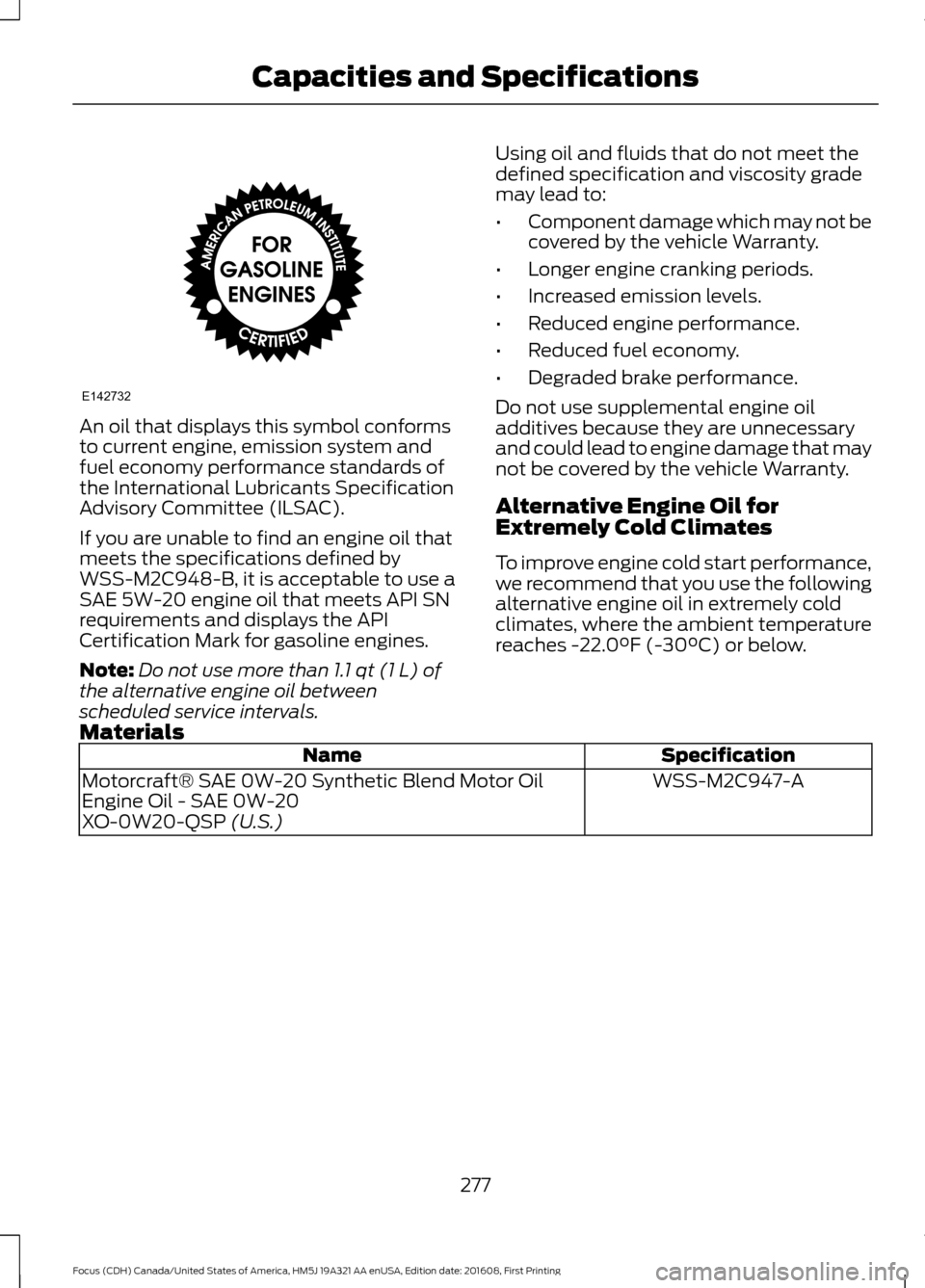
An oil that displays this symbol conforms
to current engine, emission system and
fuel economy performance standards of
the International Lubricants Specification
Advisory Committee (ILSAC).
If you are unable to find an engine oil that
meets the specifications defined by
WSS-M2C948-B, it is acceptable to use a
SAE 5W-20 engine oil that meets API SN
requirements and displays the API
Certification Mark for gasoline engines.
Note:
Do not use more than 1.1 qt (1 L) of
the alternative engine oil between
scheduled service intervals. Using oil and fluids that do not meet the
defined specification and viscosity grade
may lead to:
•
Component damage which may not be
covered by the vehicle Warranty.
• Longer engine cranking periods.
• Increased emission levels.
• Reduced engine performance.
• Reduced fuel economy.
• Degraded brake performance.
Do not use supplemental engine oil
additives because they are unnecessary
and could lead to engine damage that may
not be covered by the vehicle Warranty.
Alternative Engine Oil for
Extremely Cold Climates
To improve engine cold start performance,
we recommend that you use the following
alternative engine oil in extremely cold
climates, where the ambient temperature
reaches
-22.0°F (-30°C) or below.
Materials Specification
Name
WSS-M2C947-A
Motorcraft® SAE 0W-20 Synthetic Blend Motor Oil
Engine Oil - SAE 0W-20
XO-0W20-QSP
(U.S.)
277
Focus (CDH) Canada/United States of America, HM5J 19A321 AA enUSA, Edition date: 201608, First Printing Capacities and SpecificationsE142732
Page 281 of 467
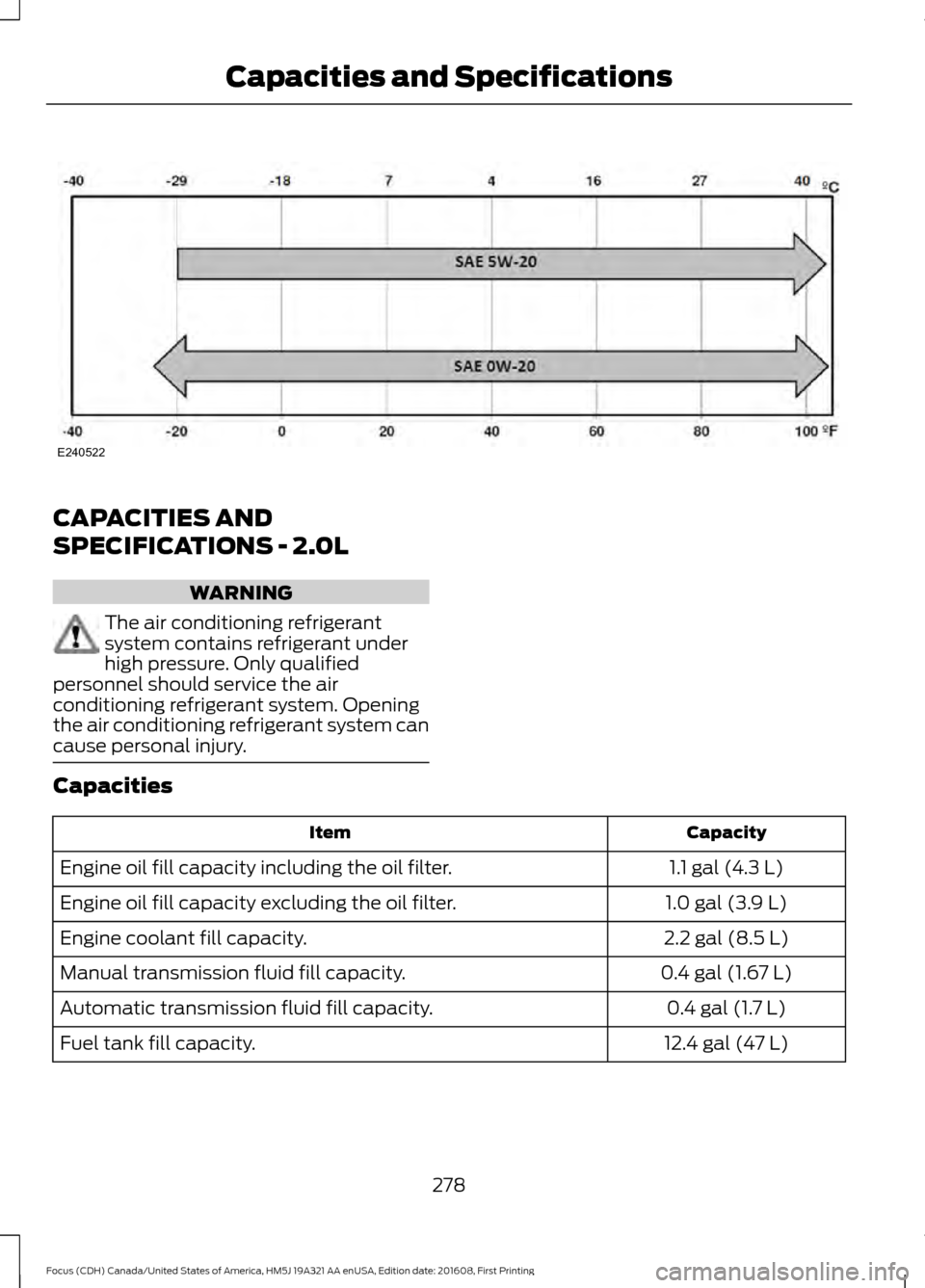
CAPACITIES AND
SPECIFICATIONS - 2.0L
WARNING
The air conditioning refrigerant
system contains refrigerant under
high pressure. Only qualified
personnel should service the air
conditioning refrigerant system. Opening
the air conditioning refrigerant system can
cause personal injury. Capacities
Capacity
Item
1.1 gal (4.3 L)
Engine oil fill capacity including the oil filter.
1.0 gal (3.9 L)
Engine oil fill capacity excluding the oil filter.
2.2 gal (8.5 L)
Engine coolant fill capacity.
0.4 gal (1.67 L)
Manual transmission fluid fill capacity.
0.4 gal (1.7 L)
Automatic transmission fluid fill capacity.
12.4 gal (47 L)
Fuel tank fill capacity.
278
Focus (CDH) Canada/United States of America, HM5J 19A321 AA enUSA, Edition date: 201608, First Printing Capacities and SpecificationsE240522
Page 283 of 467
Specification
Name
R-1234yf Refrigerant PAG Oil / Huile PAG pour frigorigène R-1234yf
(Canada)
YN-35 (U.S. & Canada) ESB-M1C93-B
Motorcraft® Multi-Purpose Grease Spray
(U.S.)
Motorcraft® Multi-Purpose Grease Spray / Graisse multiusage
(Canada)
XL-5-A
(U.S. & Canada)
-
Penetrating and Lock Lubricant
(U.S.)
Penetrating Fluid / Liquide dégrippant (Canada)
XL-1 (U.S.)
CXC-51-A (Canada)
Motor oils of the recommended viscosity
grade that meet API SN requirements and
display the API Certification Mark for
gasoline engines are also acceptable. Do
not use oil labeled with API SN service
category unless the label also displays the
API certification mark.
Note: Automatic transmissions that require
MERCON® LV transmission fluid should
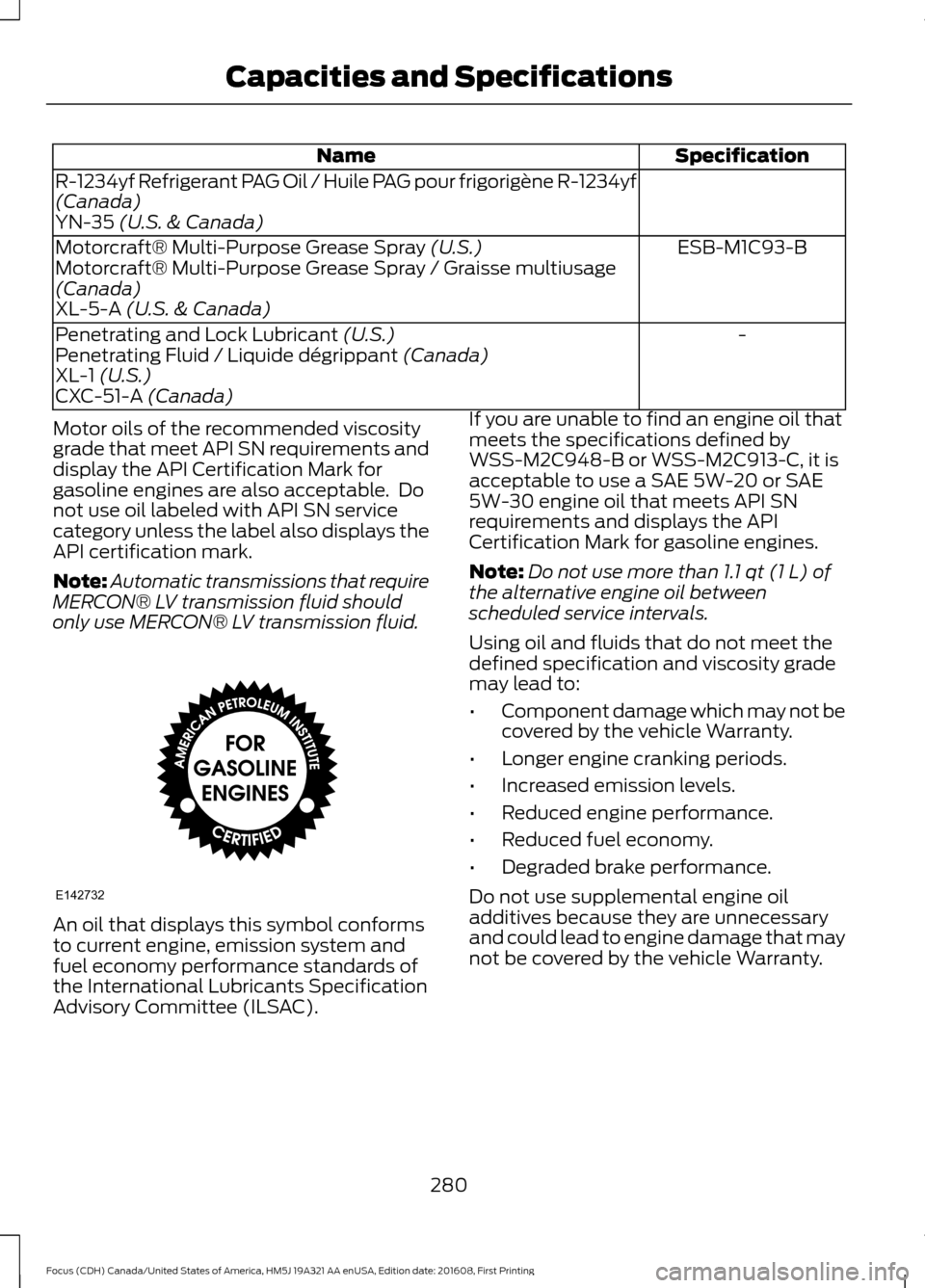
only use MERCON® LV transmission fluid. An oil that displays this symbol conforms
to current engine, emission system and
fuel economy performance standards of
the International Lubricants Specification
Advisory Committee (ILSAC). If you are unable to find an engine oil that
meets the specifications defined by
WSS-M2C948-B or WSS-M2C913-C, it is
acceptable to use a SAE 5W-20 or SAE
5W-30 engine oil that meets API SN
requirements and displays the API
Certification Mark for gasoline engines.
Note:
Do not use more than
1.1 qt (1 L) of
the alternative engine oil between
scheduled service intervals.
Using oil and fluids that do not meet the
defined specification and viscosity grade
may lead to:
• Component damage which may not be
covered by the vehicle Warranty.
• Longer engine cranking periods.
• Increased emission levels.
• Reduced engine performance.
• Reduced fuel economy.
• Degraded brake performance.
Do not use supplemental engine oil
additives because they are unnecessary
and could lead to engine damage that may
not be covered by the vehicle Warranty.
280
Focus (CDH) Canada/United States of America, HM5J 19A321 AA enUSA, Edition date: 201608, First Printing Capacities and SpecificationsE142732
Page 318 of 467
Setting 911 Assist On or Off
Press Menu then select
Action and Description
Menu
Item
SYNC-Applications Select desired option, on or
off.
911 Assist
If you choose not to activate this
feature you will have the following
options: Action and Description
Menu
Item
Provides a display and voice
reminder at phone connection
at vehicle start.
Voice
Reminder
ON
Provides a display reminder
only without a voice reminder
at phone connection.
Voice
Reminder
OFF
To make sure that 911 Assist works
properly:
• SYNC must be powered and working
properly at the time of the incident and
throughout feature activation and use.
• The 911 Assist feature must be set on
before the incident.
• You must pair and connect a
Bluetooth-enabled and compatible
cell phone to SYNC.
• A connected Bluetooth-enabled phone
must have the ability to make and
maintain an outgoing call at the time
of the incident. •
A connected Bluetooth-enabled phone
must have adequate network coverage,
battery power and signal strength.
• The vehicle must have battery power
and be located in the U.S., Canada or
in a territory in which 911 is the
emergency number.
In the Event of a Crash
Not all crashes deploy an airbag or activate
the fuel pump shut-off (the triggers for 911
Assist). If a connected cell phone sustains
damage or loses its connection to SYNC
during a crash, SYNC searches for and tries
to connect to a previously paired cell
phone; SYNC then attempts to call the
emergency services.
Before making the call:
• SYNC provides a short window of time
(about 10 seconds) to cancel the call.
If you fail to cancel the call, SYNC
attempts to dial 911.
• SYNC says the following, or a similar
message: "SYNC will attempt to call
911, to cancel the call, press Cancel on
your screen or press and hold the
phone button on your steering wheel".
If you do not cancel the call, and SYNC
makes a successful call, a pre-recorded
message plays for the 911 operator, and
then the occupant(s) in your vehicle is able
to talk with the operator. Be prepared to
provide your name, phone number and
location immediately, because not all 911
systems are capable of receiving this
information electronically.
911 Assist May Not Work If
• Your cellular phone or 911 Assist
hardware sustains damage in a crash.
• The vehicle's battery or the SYNC
system has no power.
• The phone(s) thrown from your vehicle
are the ones paired and connected to
the system.
315
Focus (CDH) Canada/United States of America, HM5J 19A321 AA enUSA, Edition date: 201608, First Printing SYNC™
Page 319 of 467
911 Assist Privacy Notice
When you switch on 911 Assist, it may
disclose to emergency services that your
vehicle has been in a crash involving the
deployment of an airbag or activation of
the fuel pump shut-off. Certain versions or
updates to 911 Assist may also be capable
of electronically or verbally disclosing to
911 operators your vehicle location or other
details about your vehicle or crash to assist
911 operators to provide the most
appropriate emergency services. If you do
not want to disclose this information, do
not switch the feature on.
SYNC Mobile Apps
The system enables voice and steering
wheel control of SYNC AppLink enabled
smartphone apps. When an app is running
through AppLink, you can control main
features of the app through voice
commands and steering wheel controls.
Note:
You must pair and connect your
smartphone to SYNC to access AppLink.
Note: iPhone users need to connect the
phone to the USB port.
Note: Android users need to connect the
phone to SYNC using Bluetooth.
Note: For information on available apps,
supported smartphone devices and
troubleshooting tips please visit the Ford
website.
Availability of SYNC AppLink enabled Apps
will vary by region. Note:
Make sure you have an active account
for the app that you have downloaded.
Some apps work automatically with no
setup. Other apps want you to configure
your personal settings and personalize your
experience by creating stations or favorites.
We recommend you do this at home or
outside of your vehicle.
Note: AppLink is not available if your
vehicle is equipped with the MyFordTouch
system.
To Access Using the SYNC Menu
Press the MENU button to access the
menu on-screen. Then select: Action and Description
Menu
Item
SYNC-Apps Scroll through the list of
available applications and
select a particular app or
select:
Mobile
Apps
Find New Apps
Note: If you cannot find a compatible SYNC
AppLink app, make sure the required app is
running on the mobile device.
Accessing an App's Menu
When an app is running through SYNC,
press the right arrow button on the steering
wheel control to access the app menu.
You can access various app features from
here, for example thumbs up and thumbs
down.
Press the left arrow button on the steering
wheel control to exit the app menu.
316
Focus (CDH) Canada/United States of America, HM5J 19A321 AA enUSA, Edition date: 201608, First Printing SYNC™
Page 345 of 467
To make sure that 911 Assist works
correctly:
•
SYNC must be powered and working
properly at the time of the incident and
throughout feature activation and use.
• The 911 Assist feature must be set on
before the incident.
• You must pair and connect a
Bluetooth-enabled and compatible
cell phone to SYNC.
• A connected Bluetooth-enabled phone
must have the ability to make and
maintain an outgoing call at the time
of the incident.
• A connected Bluetooth-enabled phone
must have adequate network coverage,
battery power and signal strength.
• The vehicle must have battery power
and be located in the U.S., Canada or
in a territory in which 911 is the
emergency number.
In the Event of a Crash
Not all crashes will deploy an airbag or
activate the fuel pump shut-off (the
triggers for 911 Assist). If a connected cell
phone sustains damage or loses its
connection to SYNC during a crash, SYNC
will search for and try to connect to a
previously paired cell phone; SYNC will
then attempt to call the emergency
services.
Before making the call:
• SYNC provides a short window of time
(about 10 seconds) to cancel the call.
If you fail to cancel the call, SYNC
attempts to dial 911.
• SYNC says the following, or a similar
message: "SYNC will attempt to call
911, to cancel the call, press Cancel on
your screen or press and hold the
phone button on your steering wheel." If you do not cancel the call, and SYNC
makes a successful call, a pre-recorded
message plays for the 911 operator, and
then the occupant(s) in your vehicle is able
to talk with the operator. Be prepared to
provide your name, phone number and
location immediately, because not all 911
systems are capable of receiving this
information electronically.
911 Assist May Not Work If
•
Your cellular phone or 911 Assist
hardware sustains damage in a crash.
• The vehicle's battery or the SYNC
system has no power.
• The phone(s) thrown from your vehicle
are the ones paired and connected to
the system.
911 Assist Privacy Notice
When you switch on 911 Assist, it may
disclose to emergency services that your
vehicle has been in a crash involving the
deployment of an airbag or activation of
the fuel pump shut-off. Certain versions or
updates to 911 Assist may also be capable
of electronically or verbally disclosing to
911 operators your vehicle location or other
details about your vehicle or crash to assist
911 operators to provide the most
appropriate emergency services. If you do
not want to disclose this information, do
not switch the feature on.
342
Focus (CDH) Canada/United States of America, HM5J 19A321 AA enUSA, Edition date: 201608, First Printing SYNC™ 3
Page 466 of 467
SYNC™ Troubleshooting.........................328
T
Tailgate See: Manual Liftgate........................................... 63
Technical Specifications See: Capacities and Specifications............269
The Better Business Bureau (BBB) Auto Line Program (U.S. Only).......................196
Tire Care
..........................................................245
Glossary of Tire Terminology......................... 247
Important Information for 235/40R18 Low-Profile Tires and Wheels.................. 245
Information About Uniform Tire Quality Grading............................................................. 245
Information Contained on the Tire Sidewall........................................................... 248
Temperature A B C............................................ 246
Traction AA A B C.............................................. 246
Treadwear............................................................ 246
Tire Pressure Monitoring System............261 Changing Tires With a Tire Pressure
Monitoring System....................................... 262
Understanding Your Tire Pressure Monitoring System ...................................... 262
Tires See: Wheels and Tires..................................... 245
Towing a Trailer.............................................182
Towing the Vehicle on Four Wheels - 1.0L EcoBoost™, Automatic
Transmission...............................................183
Emergency Towing............................................. 183
Recreational Towing.......................................... 183
Towing the Vehicle on Four Wheels - 2.0L, Automatic Transmission
..............183
Emergency Towing............................................. 183
Recreational Towing......................................... 184
Towing the Vehicle on Four Wheels - Manual Transmission...............................182
Recreational Towing.......................................... 182
Towing
..............................................................182
Traction Control............................................148
Principle of Operation....................................... 148
Transmission Code Designation
.............274
Transmission..................................................138
Transmission See: Transmission.............................................. 138Transporting the Vehicle............................182
Trip Computer
.................................................94
All Values................................................................ 94
Average Fuel Consumption.............................. 94
Distance to Empty............................................... 94
Outside Air Temperature................................... 94
Resetting the Trip Computer........................... 94
Trip Odometer....................................................... 94
Trip Timer................................................................ 94
Type Approvals
..............................................451
U
Under Hood Overview - 1.0L EcoBoost™..................................................214
Under Hood Overview - 2.0L....................215
Unique Driving Characteristics................126
USB Port
..........................................................297
Using Cruise Control....................................162
Switching Cruise Control Off.......................... 162
Switching Cruise Control On.......................... 162
Using MyKey With Remote Start Systems
...........................................................57
Using Snow Chains....................................260
Using Stability Control...............................150
Using SYNC™ With Your Media Player
.............................................................319
Accessing Your USB Song Library...............323
Bluetooth Devices and System
Settings............................................................. 325
Connecting Your Digital Media Player to the USB Port........................................................... 319
Media Menu Features....................................... 322
Media Voice Commands................................ 320
USB 2
...................................................................... 325
Voice Commands for Audio Sources.........326
Using SYNC™ With Your Phone
............302
Accessing Features through the Phone
Menu.................................................................. 307
Accessing Your Phone Settings.................... 310
Bluetooth Devices............................................... 311
Making Calls........................................................ 306
Pairing a Phone for the First Time...............303
Pairing Subsequent Phones......................... 304
Phone Options during an Active Call........306
Phone Voice Commands............................... 304
Receiving Calls................................................... 306
System Settings.................................................. 312
463
Focus (CDH) Canada/United States of America, HM5J 19A321 AA enUSA, Edition date: 201608, First Printing Index