sensor FORD FOCUS 2017 3.G User Guide
[x] Cancel search | Manufacturer: FORD, Model Year: 2017, Model line: FOCUS, Model: FORD FOCUS 2017 3.GPages: 467, PDF Size: 5.34 MB
Page 48 of 467
Properly restrain children 12 years old and
under in the rear seats. The Safety Canopy
will not interfere with children restrained
using a properly installed child or booster
seat because it is designed to inflate
downward from the headliner above the
doors along the side window opening.
The design and development of the Safety
Canopy included recommended testing
procedures that were developed by a
group of automotive safety experts known
as the Side Airbag Technical Working
Group. These recommended testing
procedures help reduce the risk of injuries
related to the deployment of side airbags
(including the Safety Canopy).
CRASH SENSORS AND
AIRBAG INDICATOR
WARNING
Modifying or adding equipment to
the front end of your vehicle
(including hood, bumper system,
frame, front end body structure, tow hooks
and hood pins) may affect the
performance of the airbag system,
increasing the risk of injury. Do not modify
or add equipment to the front end of your
vehicle. Your vehicle has a collection of crash and
occupant sensors which provide
information to the restraints control
module which deploys (activates) the
front seatbelt pretensioners, driver airbag,
passenger airbag, knee airbag(s), seat
mounted side airbags, and the Safety
Canopy. Based on the type of accident
(frontal impact, side impact or rollover)
the restraints control module will deploy
the appropriate safety devices. The restraints control module also
monitors the readiness of the above safety
devices plus the crash and occupant
sensors. A warning indicator light in the
instrument cluster indicates the readiness
of the safety system. If this warning
indicator light is not functioning and there
is another fault within the system, the
message cluster could display an airbag
failure warning. You could hear five tones
that repeat periodically until you repair the
problem, the warning indicator light could
illuminate or both. Routine maintenance
of the airbag is not required.
A difficulty with the system is indicated by
one or more of the following:
The indicator light will not
illuminate immediately after the
ignition is turned on.
• The indicator light either flashes or
stays illuminated.
• You could hear five tones that repeat
periodically until you repair the
problem.
If any of these things happen, even
intermittently, have the supplemental
restraint system serviced at an authorized
dealer immediately. Unless serviced, the
system may not function properly in the
event of a crash.
The seatbelt pretensioners and the airbag
supplemental restraint system are
designed to activate when your vehicle
sustains frontal or sideways deceleration
sufficient to cause the restraints control
module to deploy a safety device or when
a certain likelihood of a rollover event is
detected by the rollover sensor.
45
Focus (CDH) Canada/United States of America, HM5J 19A321 AA enUSA, Edition date: 201608, First Printing Supplementary Restraints SystemE67017
Page 49 of 467
The fact that the seatbelt pretensioners
or airbags did not activate for both front
seat occupants in a crash does not mean
that something is wrong with the system.
Rather, it means the restraints control
module determined the accident
conditions (for example, crash severity,
belt usage) were not appropriate to
activate these safety devices.
•
The design of the front airbags is to
activate only in frontal and near-frontal
crashes (not rollovers, side impacts or
rear impacts) unless the crash causes
sufficient frontal deceleration.
• The seatbelt pretensioners are
designed to activate in frontal,
near-frontal, side and rollover crashes.
• The design of the side airbags is to
inflate in certain side crashes. Side
airbags could activate in other types of
crashes if the vehicle experiences
sufficient sideways motion or
deformation.
• The knee airbag(s) could deploy based
on crash severity and occupant
conditions.
• The design of the Safety Canopy is to
inflate in certain side impact crashes
and when a certain likelihood of
rollover is detected by the rollover
sensor. The Safety Canopy could
activate in other types of crashes if the
vehicle experiences sufficient sideways
motion or deformation, or a certain
likelihood of rollover.
AIRBAG DISPOSAL
Contact your authorized dealer as soon as
possible. Airbags must be disposed of by
qualified personnel.
46
Focus (CDH) Canada/United States of America, HM5J 19A321 AA enUSA, Edition date: 201608, First Printing Supplementary Restraints System
Page 63 of 467
Mislock
If any door or the liftgate or luggage
compartment is open, or if the hood is
open on vehicles with an anti-theft alarm
or remote start, the horn will sound twice
and the direction indicators will not flash.
Opening the Liftgate or Luggage
Compartment
Press twice within three seconds
to unlatch the liftgate or luggage
compartment.
Make sure to close and latch the liftgate
or luggage compartment before driving
your vehicle. An unlatched liftgate or
luggage compartment may cause objects
to fall out or block your view.
Closing the Liftgate or Luggage
Compartment
The liftgate or luggage compartment will
not fully close if an intelligent access key
is located inside the luggage compartment
with the doors locked.
Note: If a second intelligent access key is
located within the liftgate or luggage
compartment detection range, the liftgate
or luggage compartment can be fully closed.
Activating Intelligent Access (If
Equipped)
The system will not function if:
• Your vehicle battery has no charge.
• The intelligent access key battery has
no charge.
• The intelligent access key frequencies
are jammed.
Note: If the system does not function, use
the key blade to lock and unlock your
vehicle.
See Keys and Remote Controls
(page 47). The system allows you to unlock, operate
and lock your vehicle without using a key
or remote control.
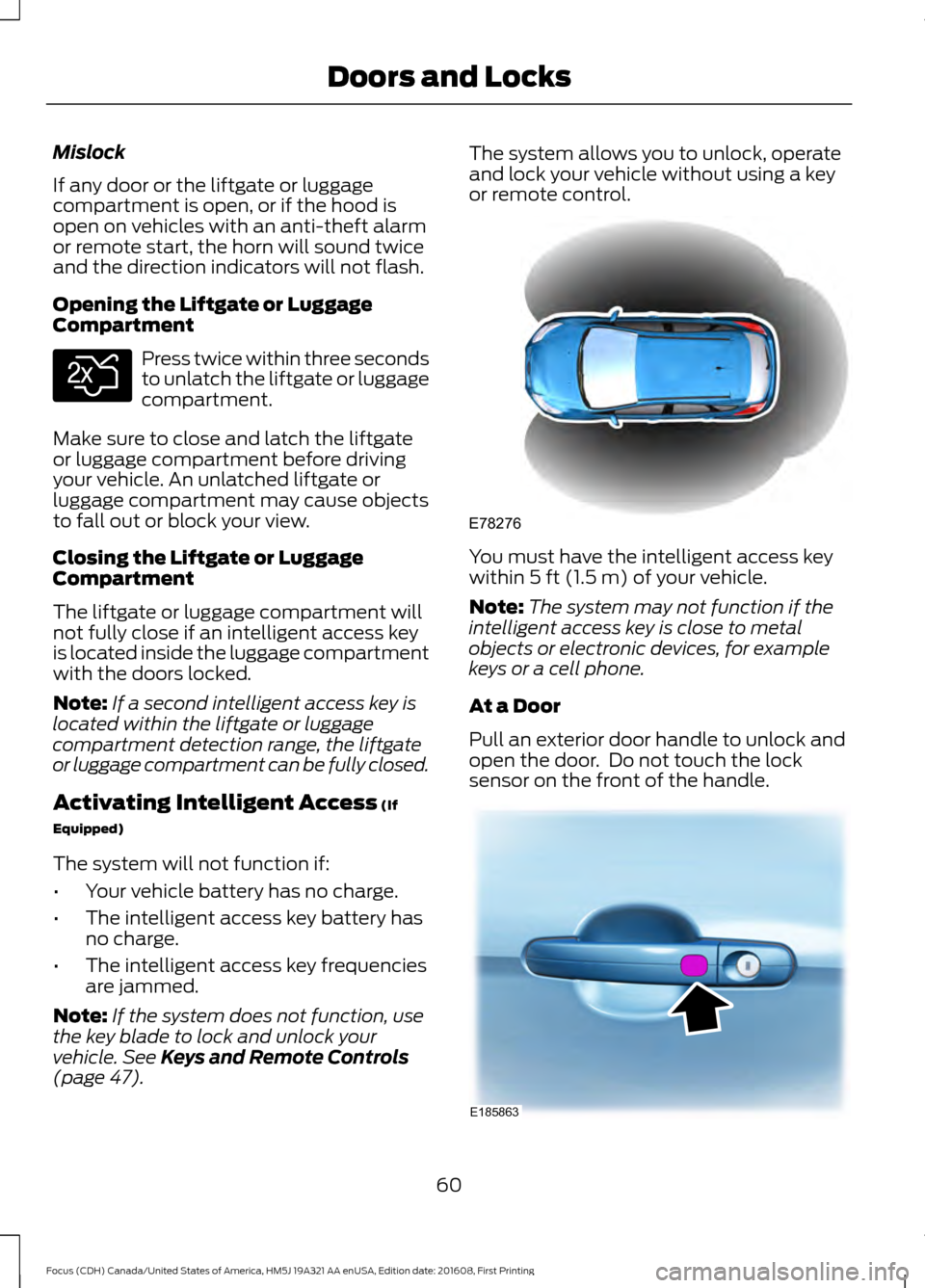
You must have the intelligent access key
within
5 ft (1.5 m) of your vehicle.
Note: The system may not function if the
intelligent access key is close to metal
objects or electronic devices, for example
keys or a cell phone.
At a Door
Pull an exterior door handle to unlock and
open the door. Do not touch the lock
sensor on the front of the handle. 60
Focus (CDH) Canada/United States of America, HM5J 19A321 AA enUSA, Edition date: 201608, First Printing Doors and LocksE138630 E78276 E185863
Page 64 of 467
The locking sensors are on the front door
handles.
Touch a locking sensor once to lock your
vehicle and arm the alarm. There is a brief
delay before you can unlock your vehicle
again.
Note:
Keep the door handle clean to make
sure the system operates correctly.
Note: Your vehicle does not automatically
lock. If you do not touch a locking sensor
your vehicle will remain unlocked.
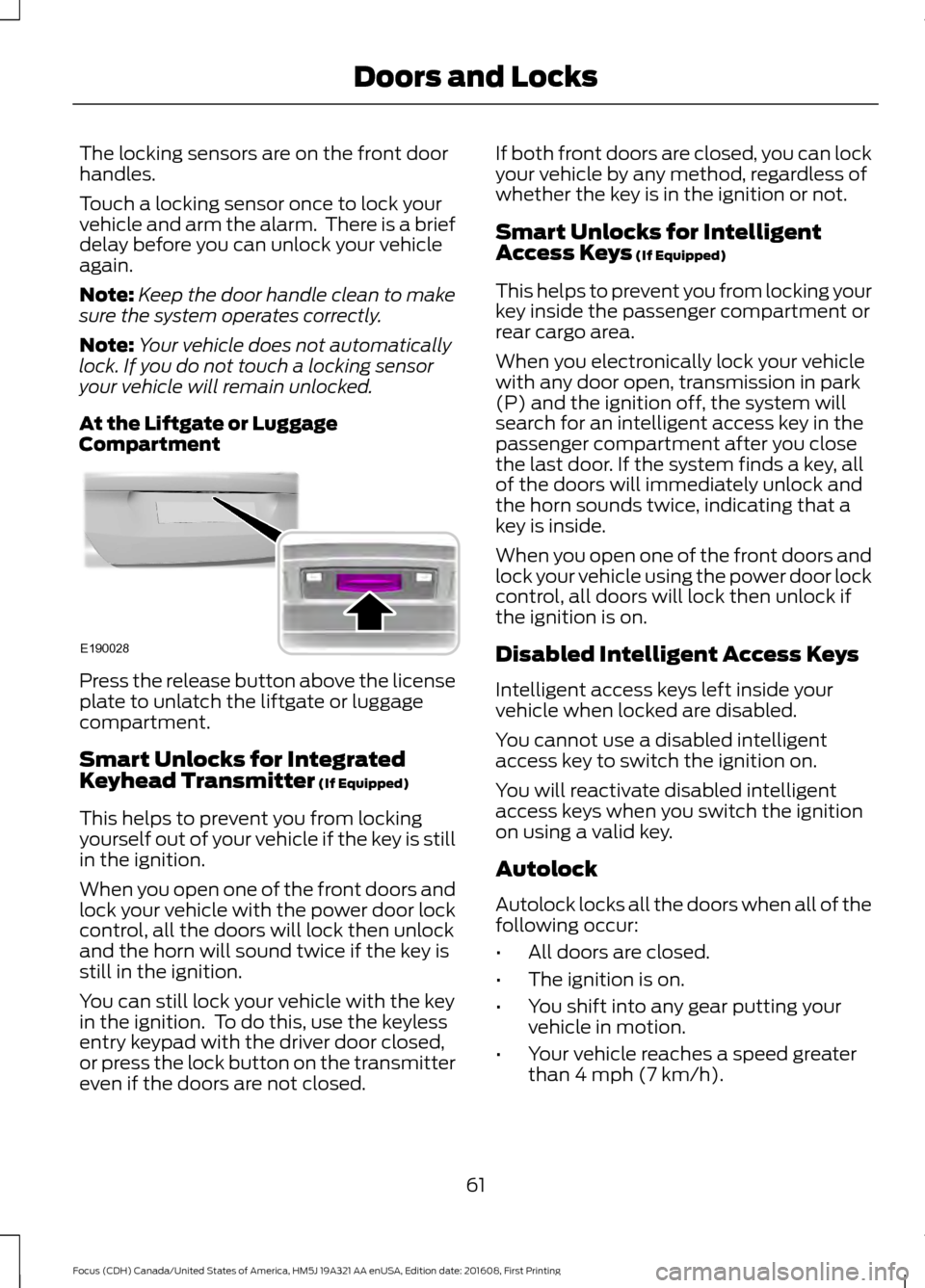
At the Liftgate or Luggage
Compartment Press the release button above the license
plate to unlatch the liftgate or luggage
compartment.
Smart Unlocks for Integrated
Keyhead Transmitter (If Equipped)
This helps to prevent you from locking
yourself out of your vehicle if the key is still
in the ignition.
When you open one of the front doors and
lock your vehicle with the power door lock
control, all the doors will lock then unlock
and the horn will sound twice if the key is
still in the ignition.
You can still lock your vehicle with the key
in the ignition. To do this, use the keyless
entry keypad with the driver door closed,
or press the lock button on the transmitter
even if the doors are not closed. If both front doors are closed, you can lock
your vehicle by any method, regardless of
whether the key is in the ignition or not.
Smart Unlocks for Intelligent
Access Keys
(If Equipped)
This helps to prevent you from locking your
key inside the passenger compartment or
rear cargo area.
When you electronically lock your vehicle
with any door open, transmission in park
(P) and the ignition off, the system will
search for an intelligent access key in the
passenger compartment after you close
the last door. If the system finds a key, all
of the doors will immediately unlock and
the horn sounds twice, indicating that a
key is inside.
When you open one of the front doors and
lock your vehicle using the power door lock
control, all doors will lock then unlock if
the ignition is on.
Disabled Intelligent Access Keys
Intelligent access keys left inside your
vehicle when locked are disabled.
You cannot use a disabled intelligent
access key to switch the ignition on.
You will reactivate disabled intelligent
access keys when you switch the ignition
on using a valid key.
Autolock
Autolock locks all the doors when all of the
following occur:
• All doors are closed.
• The ignition is on.
• You shift into any gear putting your
vehicle in motion.
• Your vehicle reaches a speed greater
than
4 mph (7 km/h).
61
Focus (CDH) Canada/United States of America, HM5J 19A321 AA enUSA, Edition date: 201608, First Printing Doors and LocksE190028
Page 81 of 467
4.
The lighting control is in the autolamps
position.
5. The headlamps are off.
The other lighting control switch positions
do not activate the daytime running lamps,
and you can use them to temporarily
override autolamp control.
When switched off in the information
display, the daytime running lamps are off
in all lighting control switch positions.
AUTOMATIC HIGH BEAM
CONTROL
The system automatically turns on the high
beams if it is dark enough and no other
traffic is present. When it detects the
headlights of an approaching vehicle, the
rear lamps of the preceding vehicle or
street lighting, the system turns off the high
beams before they distract other drivers.
The low beams remain on.
Note: If it appears that automatic high
beam is not functioning properly, check the
windshield in front of the camera for a
blockage. A clear view of the road is required
for proper system operation. Make sure that
authorized personnel repair any windshield
damage in the area of the camera's field of
view.
Note: If the system detects a blockage such
as bird droppings, bug splatter, snow or ice,
and you do not observe changes, the system
may go into low beam mode until you clear
the blockage. A message may also appear
in the information display noting the front
camera is blocked. Note:
Typical road dust, dirt and water
spots do not affect the performance of the
automatic high beam control. However, in
cold or inclement weather conditions, you
may notice a decrease in the availability of
the automatic high beam control, especially
at start up. If you want to change the beam
state independently of the system, you may
switch the high beams on or off using the
lighting control switch. Automatic high
beam control resumes when conditions are
correct.
Note: Modification of your vehicle ride
height such as using much larger tires, may
degrade feature performance.
A camera sensor, centrally mounted
behind the windshield of your vehicle,
continuously monitors conditions to decide
when to switch the high beams off and on.
Once the system is active, the high beams
switch on if:
• The ambient light level is low enough.
• There is no traffic in front of the vehicle.
• The vehicle speed is greater than
approximately 32 mph (52 km/h).
The high beams turn off if:
• The system detects the headlamps of
an approaching vehicle or the rear
lamps of a preceding vehicle.
• Vehicle speed falls below
approximately
27 mph (44 km/h).
• The ambient light level is high enough
that high beams are not required.
• The system detects severe rain, snow
or fog.
• The camera is blocked.
Activating the System
Switch the system on using the information
display. See Information Displays (page
91
). Turn the switch to the autolamps
position. See Autolamps (page 76).
78
Focus (CDH) Canada/United States of America, HM5J 19A321 AA enUSA, Edition date: 201608, First Printing Lighting
Page 100 of 467
Blind Spot Information and Cross Traffic Alert System
Action
Message
Displays when the blind spot information system and cross
traffic alert system sensors are blocked.
Blindspot Low visibility
See manual
See Blind Spot Information System (page 169).
The system has detected a fault that requires service. Have
your vehicle checked as soon as possible.
Blindspot right sensor
fault Service required
Blindspot left sensor
fault Service required
Displays when you attach a trailer to your vehicle.
Blindspot not available
Trailer attached See
Blind Spot Information System (page 169).
Displays when the system detects a vehicle.
Cross Traffic Vehicle
coming from right See
Blind Spot Information System (page 169).
Cross Traffic Vehicle
coming from left Displays when the blind spot information system and cross
traffic alert system sensors are blocked.
Cross Traffic Sensor
blocked See manual
See
Blind Spot Information System (page 169).
The system has detected a fault that requires service. Have
your vehicle checked as soon as possible.
Cross Traffic fault
Service required
Displays when you attach a trailer to your vehicle.
Cross Traffic not avail-
able Trailer attached See
Blind Spot Information System (page 169).
Engine Action
Message
Have your vehicle checked as soon as possible.
Engine fault Service now
Displays when the engine temperature is too high.
High engine temperature
Stop safely Stop your vehicle as soon as it is safe to do so, switch the
engine off and allow it to cool.
If the problem persists, have your vehicle checked as soon
as possible.
See
Engine Coolant Check (page 218).
Displays when the engine has limited power to help reduce
coolant temperature.
Power reduced to lower
engine temperature
97
Focus (CDH) Canada/United States of America, HM5J 19A321 AA enUSA, Edition date: 201608, First Printing Information Displays
Page 104 of 467
Starting System
Action
Message
Displays when you start your vehicle as a reminder to fully
press the brake pedal.
Press brake to start
Displays if your vehicle fails to start.
Cranking time exceeded
See Starting and Stopping the Engine (page 118).
Steering System Action
Message
The system has detected a fault that requires service. Have
your vehicle checked immediately.
Steering loss Stop safely
You will continue to have full steering but will need to exert
greater force on the steering wheel. Have your vehicle
checked as soon as possible.
Steering assist fault
Service required
The system has detected a fault that requires service. Have
your vehicle checked immediately.
Steering fault Service
now
Tire Pressure Monitoring System Action
Message
Displays if the tire pressure in one or more tires is below the
correct pressure.
Low Tire Pressure
See
Tire Pressure Monitoring System (page 261).
The system has detected a fault that requires service. Have
your vehicle checked as soon as possible.
Tire Pressure Monitor
Fault
Displays if the system detects a fault with a tire pressure
sensor or the spare tire is in use.
Tire Pressure Sensor
Fault
If the warning message remains on after you have checked
the tire pressures, the system has detected a fault that
requires service. Have your vehicle checked as soon as
possible.
Traction Control Action
Message
Displays when you switch the system off.
Traction control off
101
Focus (CDH) Canada/United States of America, HM5J 19A321 AA enUSA, Edition date: 201608, First Printing Information Displays
Page 150 of 467
The system will activate automatically on
any slope that will cause significant vehicle
rollback. For vehicles with a manual
transmission, you can switch this feature
off using the information display. See
Information Displays (page 91). The
system will remain on or off depending on
how it was last set.
Note: There is no warning lamp to indicate
the system is either on or off.
Using Hill Start Assist
1. Press the brake pedal to bring your vehicle to a complete standstill. Keep
the brake pedal pressed and select an
uphill gear (for example, first (1) when
facing uphill or reverse (R) when facing
downhill).
2. If the sensors detect that your vehicle is on a slope, the system will activate
automatically.
3. When you remove your foot from the brake pedal, your vehicle will remain
on the slope without rolling away for
about two or three seconds. This hold
time will automatically be extended if
you are in the process of driving off.
4. Drive off in the normal manner. The brakes will release automatically.
Switching the System On and Off
Vehicles with Manual Transmission
You can switch this feature on or off in the
information display. The system
remembers the last setting when you start
your vehicle.
Vehicles with Automatic Transmission
You cannot turn the system on or off.
When you switch the ignition on, the
system automatically turns on.
147
Focus (CDH) Canada/United States of America, HM5J 19A321 AA enUSA, Edition date: 201608, First Printing Brakes
Page 152 of 467
PRINCIPLE OF OPERATION
WARNINGS
Vehicle modifications involving
braking system, aftermarket roof
racks, suspension, steering system,
tire construction and wheel and tire size
may change the handling characteristics
of your vehicle and may adversely affect
the performance of the electronic stability
control system. In addition, installing any
stereo loudspeakers may interfere with
and adversely affect the electronic stability
control system. Install any aftermarket
stereo loudspeaker as far as possible from
the front center console, the tunnel, and
the front seats in order to minimize the risk
of interfering with the electronic stability
control sensors. Reducing the
effectiveness of the electronic stability
control system could lead to an increased
risk of loss of vehicle control, vehicle
rollover, personal injury and death. Remember that even advanced
technology cannot defy the laws of
physics. It’
s always possible to lose
control of a vehicle due to inappropriate
driver input for the conditions. Aggressive
driving on any road condition can cause
you to lose control of your vehicle
increasing the risk of personal injury or
property damage. Activation of the
electronic stability control system is an
indication that at least some of the tires
have exceeded their ability to grip the road;
this could reduce the operator ’s ability to
control the vehicle potentially resulting in
a loss of vehicle control, vehicle rollover,
personal injury and death. If your electronic
stability control system activates, SLOW
DOWN. The system automatically turns on each
time you switch the ignition on. If a fault occurs in either the stability
control or the traction control system, you
may experience the following conditions:
•
The stability and traction control light
illuminates steadily.
• The stability control and traction
control systems do not enhance your
vehicle's ability to maintain traction of
the wheels.
If a driving condition activates either the
stability control or the traction control
system you may experience the following
conditions:
• The stability and traction control light
flashes.
• Your vehicle slows down.
• Reduced engine power.
• A vibration in the brake pedal.
• The brake pedal is stiffer than usual.
• If the driving condition is severe and
your foot is not on the brake, the brake
pedal may move as the system applies
higher brake force.
The stability control system has several
features built into it to help you maintain
control of your vehicle:
Electronic Stability Control
The system enhances your vehicle ’s ability
to prevent skids or lateral slides by
applying brakes to one or more of the
wheels individually and, if necessary,
reducing engine power.
Traction Control
The system enhances your vehicle ’s ability
to maintain traction of the wheels by
detecting and controlling wheel spin. See
Using Traction Control (page 148).
149
Focus (CDH) Canada/United States of America, HM5J 19A321 AA enUSA, Edition date: 201608, First Printing Stability Control
Page 154 of 467
PRINCIPLE OF OPERATION
WARNINGS
To help avoid personal injury, please
read and understand the limitations
of the system as contained in this
section. Sensing is only an aid for some
(generally large and fixed) objects when
moving on a flat surface at parking speeds.
Certain objects with surfaces that absorb
ultrasonic waves, surrounding vehicle's
parking aid systems, traffic control
systems, fluorescent lamps, inclement
weather, air brakes, and external motors
and fans may also affect the function of
the sensing system; this may include
reduced performance or a false activation. To help avoid personal injury, always
use caution when in reverse (R) and
when using the sensing system.
This system is not designed to
prevent contact with small or moving
objects. The system is designed to
provide a warning to assist the driver in
detecting large stationary objects to avoid
damaging your vehicle. The system may
not detect smaller objects, particularly
those close to the ground. Certain add-on devices such as large
trailer hitches, bike or surfboard racks
and any device that may block the
normal detection zone of the system, may
create false beeps. Note:
Keep the sensors, located on the
bumper or fascia, free from snow, ice and
large accumulations of dirt. If the sensors
are covered, the system ’s accuracy can be
affected. Do not clean the sensors with
sharp objects.
Note: If your vehicle sustains damage to
the bumper or fascia, leaving it misaligned
or bent, the sensing zone may be altered
causing inaccurate measurement of
obstacles or false alarms. Note:
The sensing system cannot be turned
off when a MyKey is present. See Principle
of Operation (page 54).
Note: If you attach certain add-on devices
such as a trailer or bike rack, the rear sensing
system may detect that add-on device and
therefore provide warnings. It is suggested
that you disable the rear sensing system
when you attach an add-on device to your
vehicle to prevent these warnings.
The sensing system warns the driver of
obstacles within a certain range of your
vehicle. The system turns on automatically
whenever you switch the ignition on. You can turn the system on or
off by pressing the parking aid
button. If your vehicle does not
have a parking aid button, the system can
be switched off through the information
display menu or from the pop-up message
that appears once you shift the
transmission into reverse (R). See General
Information
(page 91).
If a fault is present in the system, a warning
message appears in the information
display. See
Information Messages
(page 95).
REAR PARKING AID
The rear parking aid sensors automatically
turn on when you shift into reverse (R).
As your vehicle moves closer to the
obstacle, the rate of the audible warning
increases. When the obstacle is less than
12 in (30 cm)
away, the warning sounds
continuously. If the system detects an
object farther than
12 in (30 cm) from the
corners of the bumper, the tone sounds for
only three seconds. If the system detects
an approaching object the warning sounds
again.
151
Focus (CDH) Canada/United States of America, HM5J 19A321 AA enUSA, Edition date: 201608, First Printing Parking AidsE139213