tow FORD FOCUS 2017 3.G Workshop Manual
[x] Cancel search | Manufacturer: FORD, Model Year: 2017, Model line: FOCUS, Model: FORD FOCUS 2017 3.GPages: 467, PDF Size: 5.34 MB
Page 299 of 467
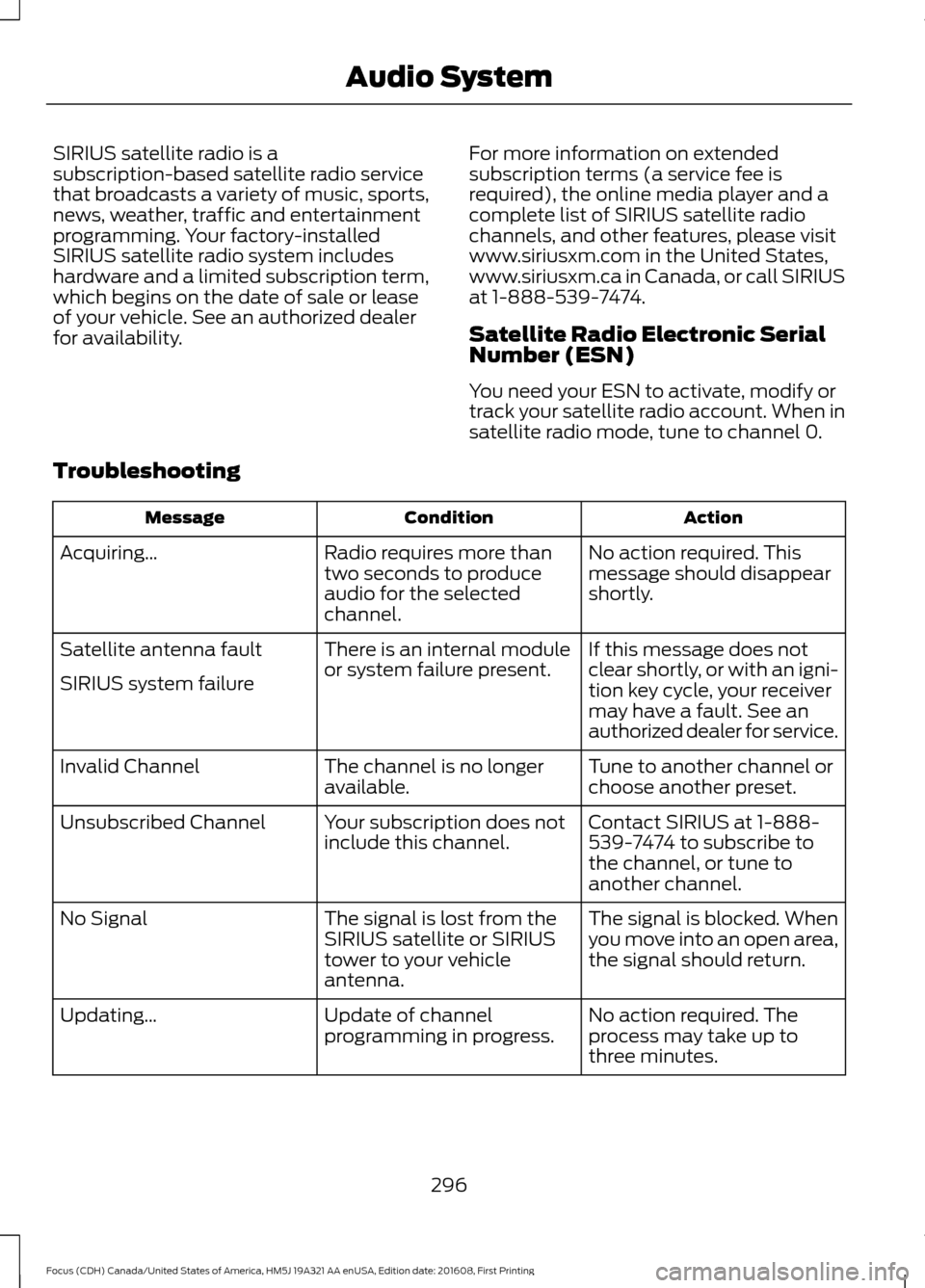
SIRIUS satellite radio is a
subscription-based satellite radio service
that broadcasts a variety of music, sports,
news, weather, traffic and entertainment
programming. Your factory-installed
SIRIUS satellite radio system includes
hardware and a limited subscription term,
which begins on the date of sale or lease
of your vehicle. See an authorized dealer
for availability.
For more information on extended
subscription terms (a service fee is
required), the online media player and a
complete list of SIRIUS satellite radio
channels, and other features, please visit
www.siriusxm.com in the United States,
www.siriusxm.ca in Canada, or call SIRIUS
at 1-888-539-7474.
Satellite Radio Electronic Serial
Number (ESN)
You need your ESN to activate, modify or
track your satellite radio account. When in
satellite radio mode, tune to channel 0.
Troubleshooting Action
Condition
Message
No action required. This
message should disappear
shortly.
Radio requires more than
two seconds to produce
audio for the selected
channel.
Acquiring\b
If this message does not
clear shortly, or with an igni-
tion key cycle, your receiver
may have a fault. See an
authorized dealer for service.
There is an internal module
or system failure present.
Satellite antenna fault
SIRIUS system failure
Tune to another channel or
choose another preset.
The channel is no longer
available.
Invalid Channel
Contact SIRIUS at 1-888-
539-7474 to subscribe to
the channel, or tune to
another channel.
Your subscription does not
include this channel.
Unsubscribed Channel
The signal is blocked. When
you move into an open area,
the signal should return.
The signal is lost from the
SIRIUS satellite or SIRIUS
tower to your vehicle
antenna.
No Signal
No action required. The
process may take up to
three minutes.
Update of channel
programming in progress.
Updating\b
296
Focus (CDH) Canada/United States of America, HM5J 19A321 AA enUSA, Edition date: 201608, First Printing Audio System
Page 360 of 467
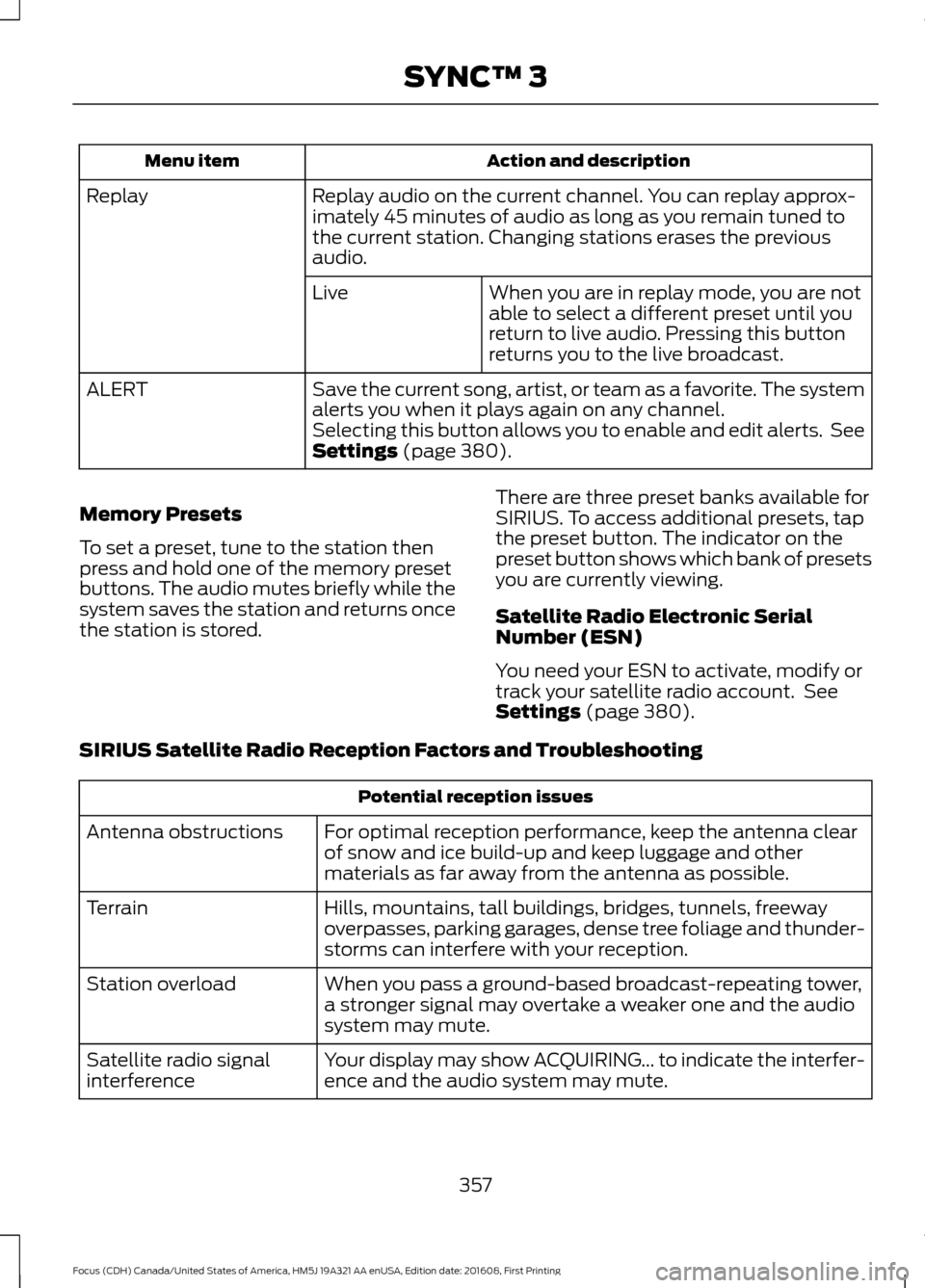
Action and description
Menu item
Replay audio on the current channel. You can replay approx-
imately 45 minutes of audio as long as you remain tuned to
the current station. Changing stations erases the previous
audio.
Replay
When you are in replay mode, you are not
able to select a different preset until you
return to live audio. Pressing this button
returns you to the live broadcast.
Live
Save the current song, artist, or team as a favorite. The system
alerts you when it plays again on any channel.
ALERT
Selecting this button allows you to enable and edit alerts. See
Settings (page 380).
Memory Presets
To set a preset, tune to the station then
press and hold one of the memory preset
buttons. The audio mutes briefly while the
system saves the station and returns once
the station is stored. There are three preset banks available for
SIRIUS. To access additional presets, tap
the preset button. The indicator on the
preset button shows which bank of presets
you are currently viewing.
Satellite Radio Electronic Serial
Number (ESN)
You need your ESN to activate, modify or
track your satellite radio account. See
Settings
(page 380).
SIRIUS Satellite Radio Reception Factors and Troubleshooting Potential reception issues
For optimal reception performance, keep the antenna clear
of snow and ice build-up and keep luggage and other
materials as far away from the antenna as possible.
Antenna obstructions
Hills, mountains, tall buildings, bridges, tunnels, freeway
overpasses, parking garages, dense tree foliage and thunder-
storms can interfere with your reception.
Terrain
When you pass a ground-based broadcast-repeating tower,
a stronger signal may overtake a weaker one and the audio
system may mute.
Station overload
Your display may show ACQUIRING... to indicate the interfer-
ence and the audio system may mute.
Satellite radio signal
interference
357
Focus (CDH) Canada/United States of America, HM5J 19A321 AA enUSA, Edition date: 201608, First Printing SYNC™ 3
Page 361 of 467
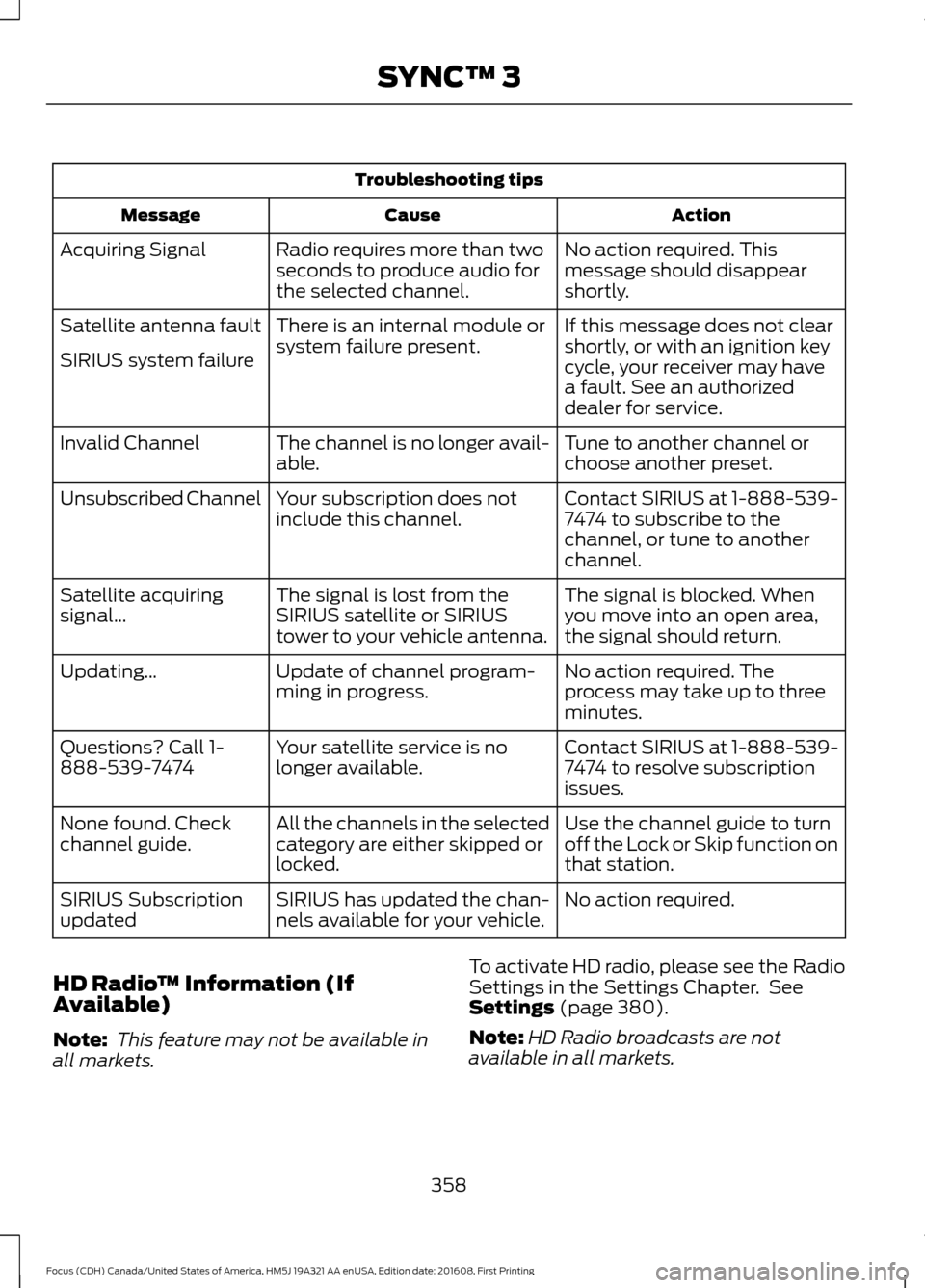
Troubleshooting tips
Action
Cause
Message
No action required. This
message should disappear
shortly.
Radio requires more than two
seconds to produce audio for
the selected channel.
Acquiring Signal
If this message does not clear
shortly, or with an ignition key
cycle, your receiver may have
a fault. See an authorized
dealer for service.
There is an internal module or
system failure present.
Satellite antenna fault
SIRIUS system failure
Tune to another channel or
choose another preset.
The channel is no longer avail-
able.
Invalid Channel
Contact SIRIUS at 1-888-539-
7474 to subscribe to the
channel, or tune to another
channel.
Your subscription does not
include this channel.
Unsubscribed Channel
The signal is blocked. When
you move into an open area,
the signal should return.
The signal is lost from the
SIRIUS satellite or SIRIUS
tower to your vehicle antenna.
Satellite acquiring
signal\b
No action required. The
process may take up to three
minutes.
Update of channel program-
ming in progress.
Updating\b
Contact SIRIUS at 1-888-539-
7474 to resolve subscription
issues.
Your satellite service is no
longer available.
Questions? Call 1-
888-539-7474
Use the channel guide to turn
off the Lock or Skip function on
that station.
All the channels in the selected
category are either skipped or
locked.
None found. Check
channel guide.
No action required.
SIRIUS has updated the chan-
nels available for your vehicle.
SIRIUS Subscription
updated
HD Radio ™ Information (If
Available)
Note: This feature may not be available in
all markets. To activate HD radio, please see the Radio
Settings in the Settings Chapter. See
Settings (page 380).
Note: HD Radio broadcasts are not
available in all markets.
358
Focus (CDH) Canada/United States of America, HM5J 19A321 AA enUSA, Edition date: 201608, First Printing SYNC™ 3
Page 410 of 467
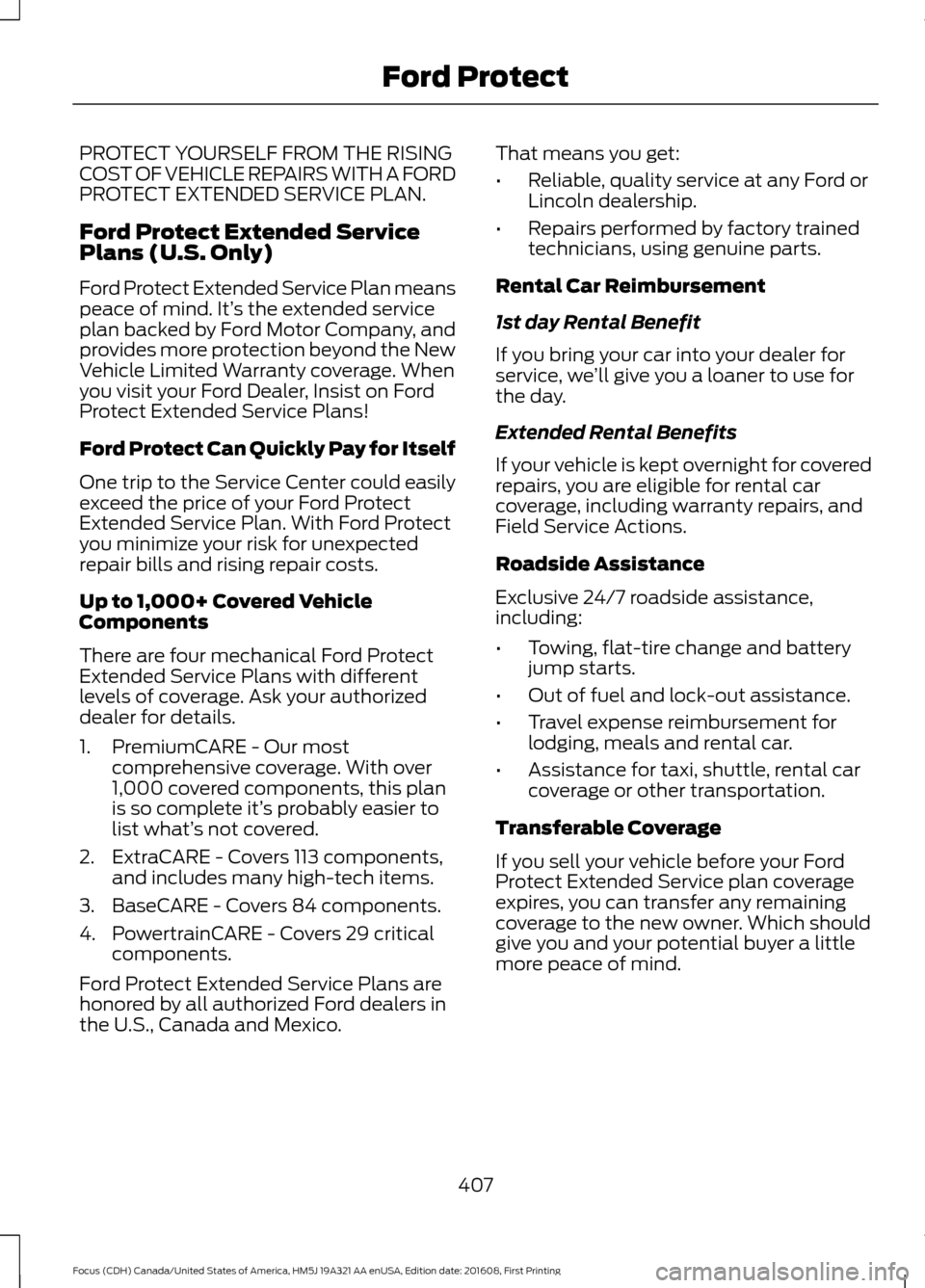
PROTECT YOURSELF FROM THE RISING
COST OF VEHICLE REPAIRS WITH A FORD
PROTECT EXTENDED SERVICE PLAN.
Ford Protect Extended Service
Plans (U.S. Only)
Ford Protect Extended Service Plan means
peace of mind. It’
s the extended service
plan backed by Ford Motor Company, and
provides more protection beyond the New
Vehicle Limited Warranty coverage. When
you visit your Ford Dealer, Insist on Ford
Protect Extended Service Plans!
Ford Protect Can Quickly Pay for Itself
One trip to the Service Center could easily
exceed the price of your Ford Protect
Extended Service Plan. With Ford Protect
you minimize your risk for unexpected
repair bills and rising repair costs.
Up to 1,000+ Covered Vehicle
Components
There are four mechanical Ford Protect
Extended Service Plans with different
levels of coverage. Ask your authorized
dealer for details.
1. PremiumCARE - Our most comprehensive coverage. With over
1,000 covered components, this plan
is so complete it’ s probably easier to
list what’ s not covered.
2. ExtraCARE - Covers 113 components, and includes many high-tech items.
3. BaseCARE - Covers 84 components.
4. PowertrainCARE - Covers 29 critical components.
Ford Protect Extended Service Plans are
honored by all authorized Ford dealers in
the U.S., Canada and Mexico. That means you get:
•
Reliable, quality service at any Ford or
Lincoln dealership.
• Repairs performed by factory trained
technicians, using genuine parts.
Rental Car Reimbursement
1st day Rental Benefit
If you bring your car into your dealer for
service, we ’ll give you a loaner to use for
the day.
Extended Rental Benefits
If your vehicle is kept overnight for covered
repairs, you are eligible for rental car
coverage, including warranty repairs, and
Field Service Actions.
Roadside Assistance
Exclusive 24/7 roadside assistance,
including:
• Towing, flat-tire change and battery
jump starts.
• Out of fuel and lock-out assistance.
• Travel expense reimbursement for
lodging, meals and rental car.
• Assistance for taxi, shuttle, rental car
coverage or other transportation.
Transferable Coverage
If you sell your vehicle before your Ford
Protect Extended Service plan coverage
expires, you can transfer any remaining
coverage to the new owner. Which should
give you and your potential buyer a little
more peace of mind.
407
Focus (CDH) Canada/United States of America, HM5J 19A321 AA enUSA, Edition date: 201608, First Printing Ford Protect
Page 411 of 467
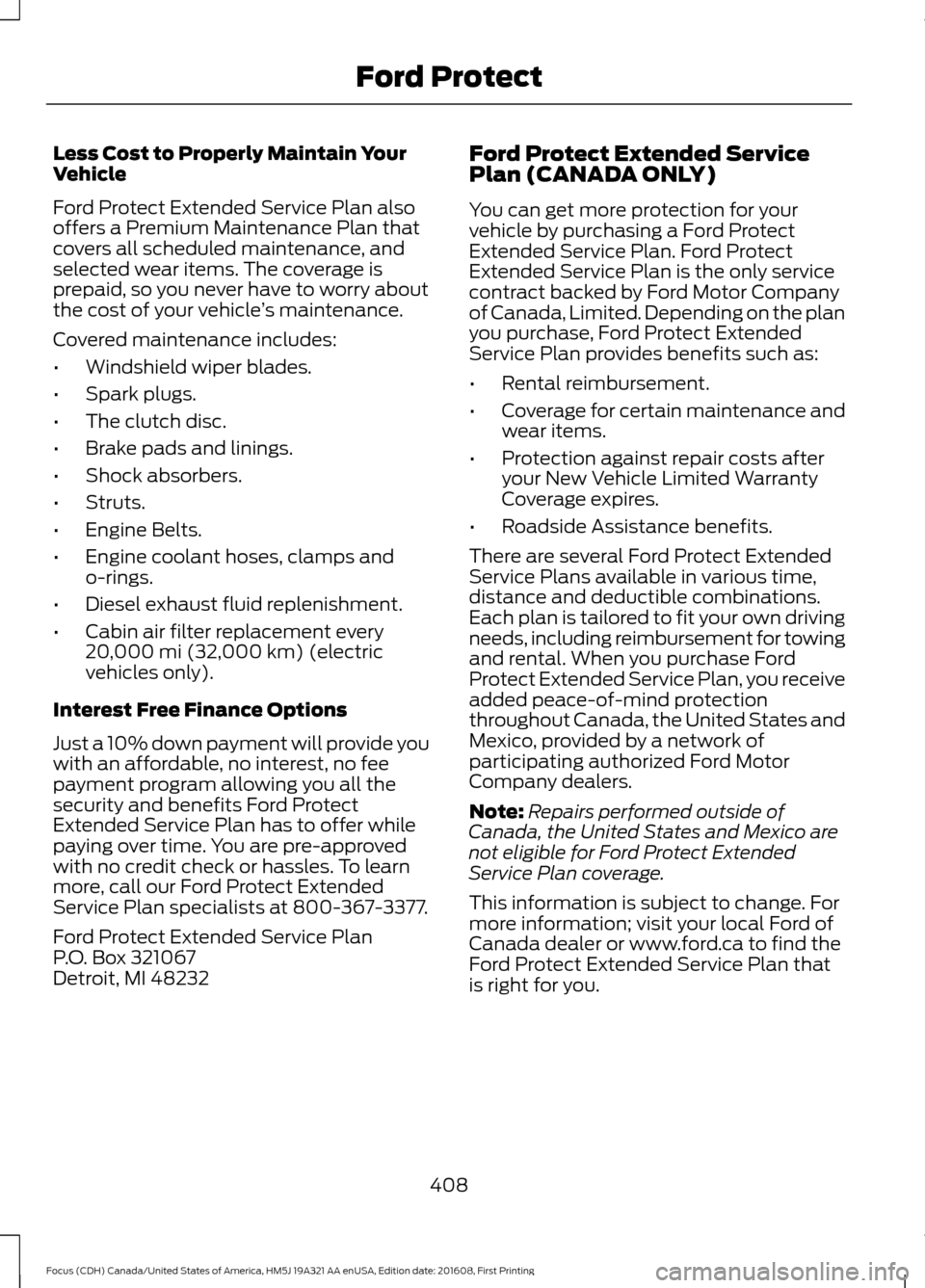
Less Cost to Properly Maintain Your
Vehicle
Ford Protect Extended Service Plan also
offers a Premium Maintenance Plan that
covers all scheduled maintenance, and
selected wear items. The coverage is
prepaid, so you never have to worry about
the cost of your vehicle
’s maintenance.
Covered maintenance includes:
• Windshield wiper blades.
• Spark plugs.
• The clutch disc.
• Brake pads and linings.
• Shock absorbers.
• Struts.
• Engine Belts.
• Engine coolant hoses, clamps and
o-rings.
• Diesel exhaust fluid replenishment.
• Cabin air filter replacement every
20,000 mi (32,000 km) (electric
vehicles only).
Interest Free Finance Options
Just a 10% down payment will provide you
with an affordable, no interest, no fee
payment program allowing you all the
security and benefits Ford Protect
Extended Service Plan has to offer while
paying over time. You are pre-approved
with no credit check or hassles. To learn
more, call our Ford Protect Extended
Service Plan specialists at 800-367-3377.
Ford Protect Extended Service Plan
P.O. Box 321067
Detroit, MI 48232 Ford Protect Extended Service
Plan (CANADA ONLY)
You can get more protection for your
vehicle by purchasing a Ford Protect
Extended Service Plan. Ford Protect
Extended Service Plan is the only service
contract backed by Ford Motor Company
of Canada, Limited. Depending on the plan
you purchase, Ford Protect Extended
Service Plan provides benefits such as:
•
Rental reimbursement.
• Coverage for certain maintenance and
wear items.
• Protection against repair costs after
your New Vehicle Limited Warranty
Coverage expires.
• Roadside Assistance benefits.
There are several Ford Protect Extended
Service Plans available in various time,
distance and deductible combinations.
Each plan is tailored to fit your own driving
needs, including reimbursement for towing
and rental. When you purchase Ford
Protect Extended Service Plan, you receive
added peace-of-mind protection
throughout Canada, the United States and
Mexico, provided by a network of
participating authorized Ford Motor
Company dealers.
Note: Repairs performed outside of
Canada, the United States and Mexico are
not eligible for Ford Protect Extended
Service Plan coverage.
This information is subject to change. For
more information; visit your local Ford of
Canada dealer or www.ford.ca to find the
Ford Protect Extended Service Plan that
is right for you.
408
Focus (CDH) Canada/United States of America, HM5J 19A321 AA enUSA, Edition date: 201608, First Printing Ford Protect
Page 416 of 467
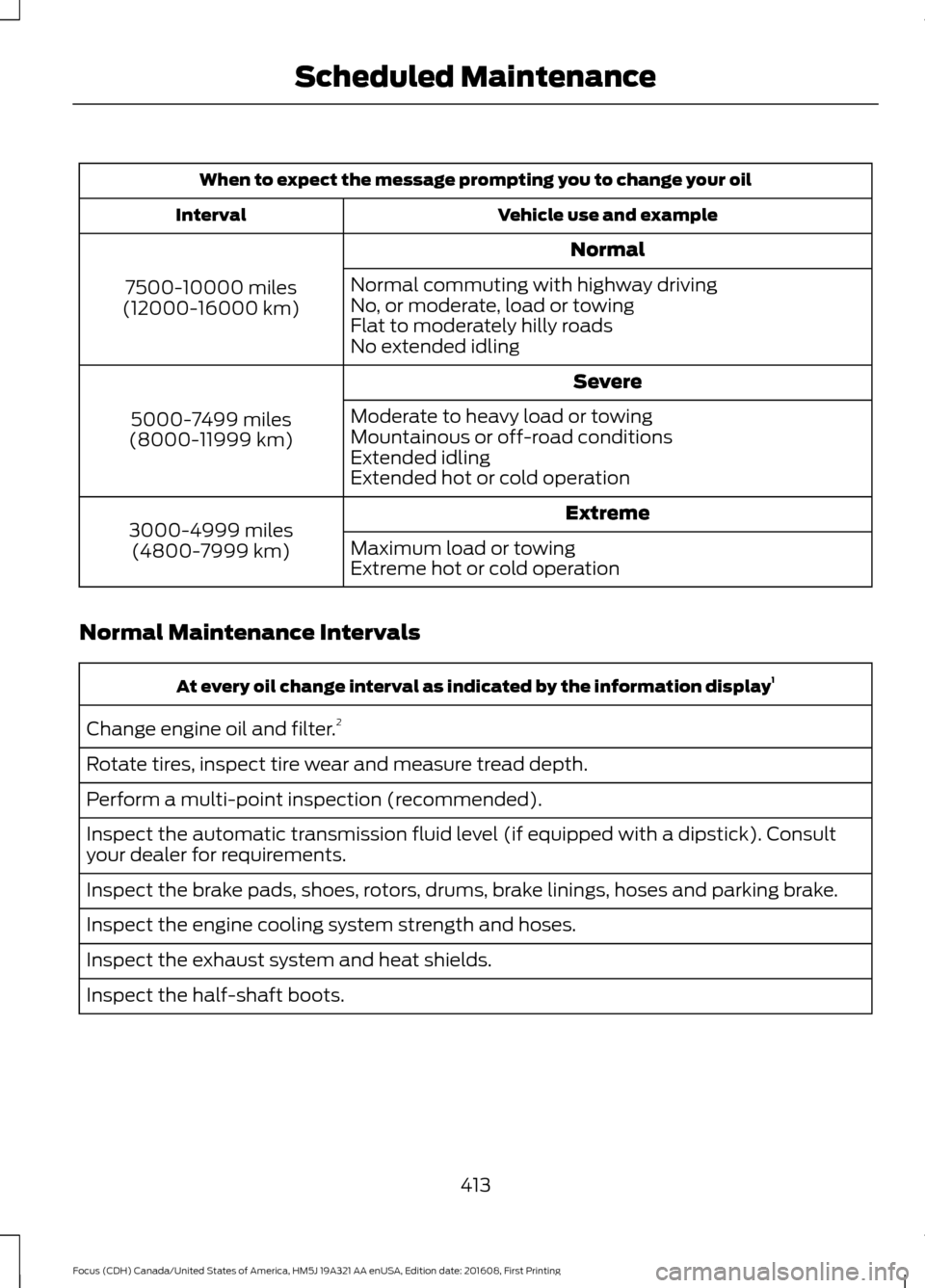
When to expect the message prompting you to change your oil
Vehicle use and example
Interval
Normal
7500-10000 miles
(12000-16000 km) Normal commuting with highway driving
No, or moderate, load or towing
Flat to moderately hilly roads
No extended idling
Severe
5000-7499 miles
(8000-11999 km) Moderate to heavy load or towing
Mountainous or off-road conditions
Extended idling
Extended hot or cold operation
Extreme
3000-4999 miles
(4800-7999 km) Maximum load or towing
Extreme hot or cold operation
Normal Maintenance Intervals At every oil change interval as indicated by the information display
1
Change engine oil and filter. 2
Rotate tires, inspect tire wear and measure tread depth.
Perform a multi-point inspection (recommended).
Inspect the automatic transmission fluid level (if equipped with a dipstick). Consult
your dealer for requirements.
Inspect the brake pads, shoes, rotors, drums, brake linings, hoses and parking brake.
Inspect the engine cooling system strength and hoses.
Inspect the exhaust system and heat shields.
Inspect the half-shaft boots.
413
Focus (CDH) Canada/United States of America, HM5J 19A321 AA enUSA, Edition date: 201608, First Printing Scheduled Maintenance
Page 466 of 467
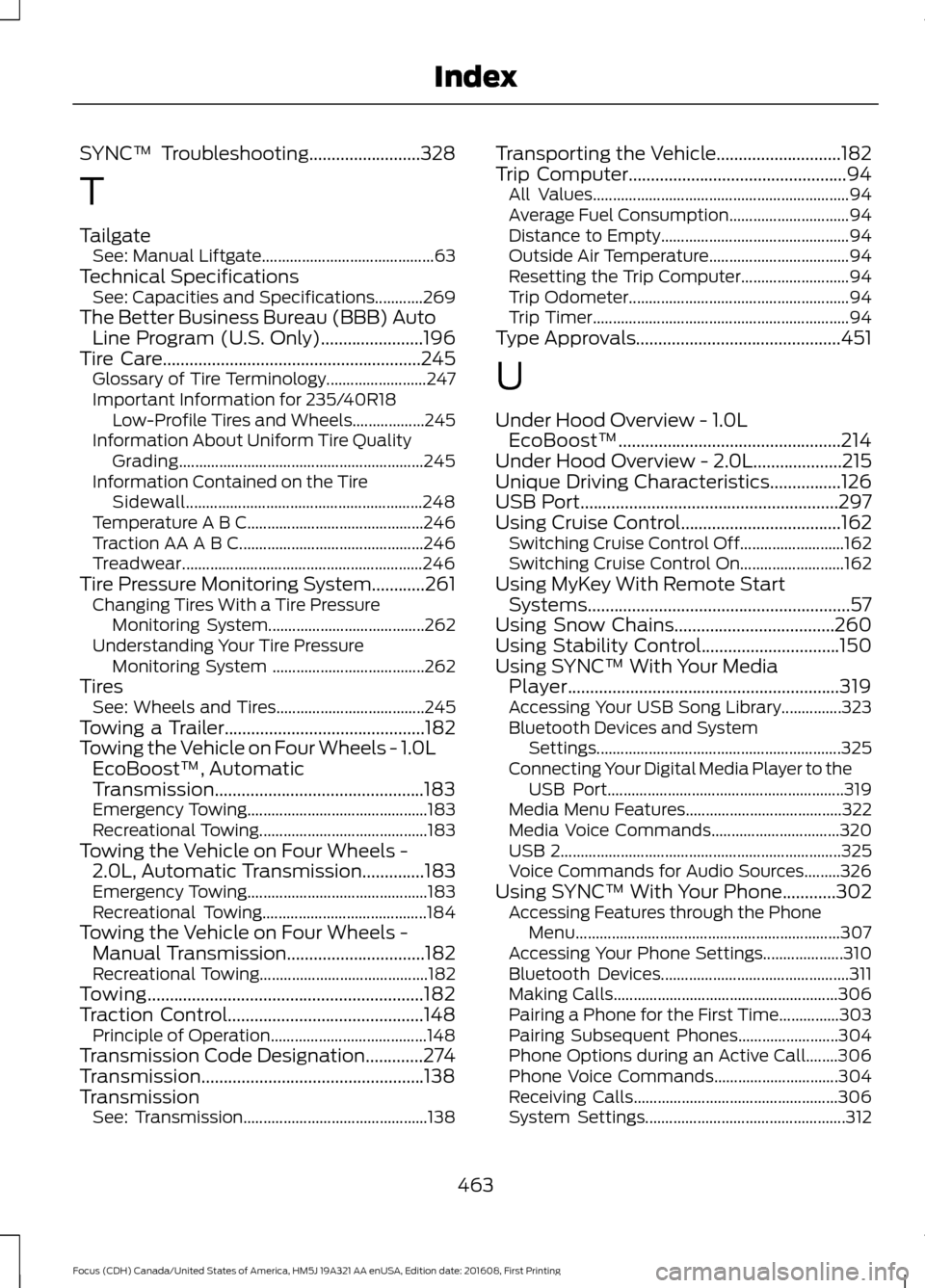
SYNC™ Troubleshooting.........................328
T
Tailgate See: Manual Liftgate........................................... 63
Technical Specifications See: Capacities and Specifications............269
The Better Business Bureau (BBB) Auto Line Program (U.S. Only).......................196
Tire Care
..........................................................245
Glossary of Tire Terminology......................... 247
Important Information for 235/40R18 Low-Profile Tires and Wheels.................. 245
Information About Uniform Tire Quality Grading............................................................. 245
Information Contained on the Tire Sidewall........................................................... 248
Temperature A B C............................................ 246
Traction AA A B C.............................................. 246
Treadwear............................................................ 246
Tire Pressure Monitoring System............261 Changing Tires With a Tire Pressure
Monitoring System....................................... 262
Understanding Your Tire Pressure Monitoring System ...................................... 262
Tires See: Wheels and Tires..................................... 245
Towing a Trailer.............................................182
Towing the Vehicle on Four Wheels - 1.0L EcoBoost™, Automatic
Transmission...............................................183
Emergency Towing............................................. 183
Recreational Towing.......................................... 183
Towing the Vehicle on Four Wheels - 2.0L, Automatic Transmission
..............183
Emergency Towing............................................. 183
Recreational Towing......................................... 184
Towing the Vehicle on Four Wheels - Manual Transmission...............................182
Recreational Towing.......................................... 182
Towing
..............................................................182
Traction Control............................................148
Principle of Operation....................................... 148
Transmission Code Designation
.............274
Transmission..................................................138
Transmission See: Transmission.............................................. 138Transporting the Vehicle............................182
Trip Computer
.................................................94
All Values................................................................ 94
Average Fuel Consumption.............................. 94
Distance to Empty............................................... 94
Outside Air Temperature................................... 94
Resetting the Trip Computer........................... 94
Trip Odometer....................................................... 94
Trip Timer................................................................ 94
Type Approvals
..............................................451
U
Under Hood Overview - 1.0L EcoBoost™..................................................214
Under Hood Overview - 2.0L....................215
Unique Driving Characteristics................126
USB Port
..........................................................297
Using Cruise Control....................................162
Switching Cruise Control Off.......................... 162
Switching Cruise Control On.......................... 162
Using MyKey With Remote Start Systems
...........................................................57
Using Snow Chains....................................260
Using Stability Control...............................150
Using SYNC™ With Your Media Player
.............................................................319
Accessing Your USB Song Library...............323
Bluetooth Devices and System
Settings............................................................. 325
Connecting Your Digital Media Player to the USB Port........................................................... 319
Media Menu Features....................................... 322
Media Voice Commands................................ 320
USB 2
...................................................................... 325
Voice Commands for Audio Sources.........326
Using SYNC™ With Your Phone
............302
Accessing Features through the Phone
Menu.................................................................. 307
Accessing Your Phone Settings.................... 310
Bluetooth Devices............................................... 311
Making Calls........................................................ 306
Pairing a Phone for the First Time...............303
Pairing Subsequent Phones......................... 304
Phone Options during an Active Call........306
Phone Voice Commands............................... 304
Receiving Calls................................................... 306
System Settings.................................................. 312
463
Focus (CDH) Canada/United States of America, HM5J 19A321 AA enUSA, Edition date: 201608, First Printing Index
Page 467 of 467
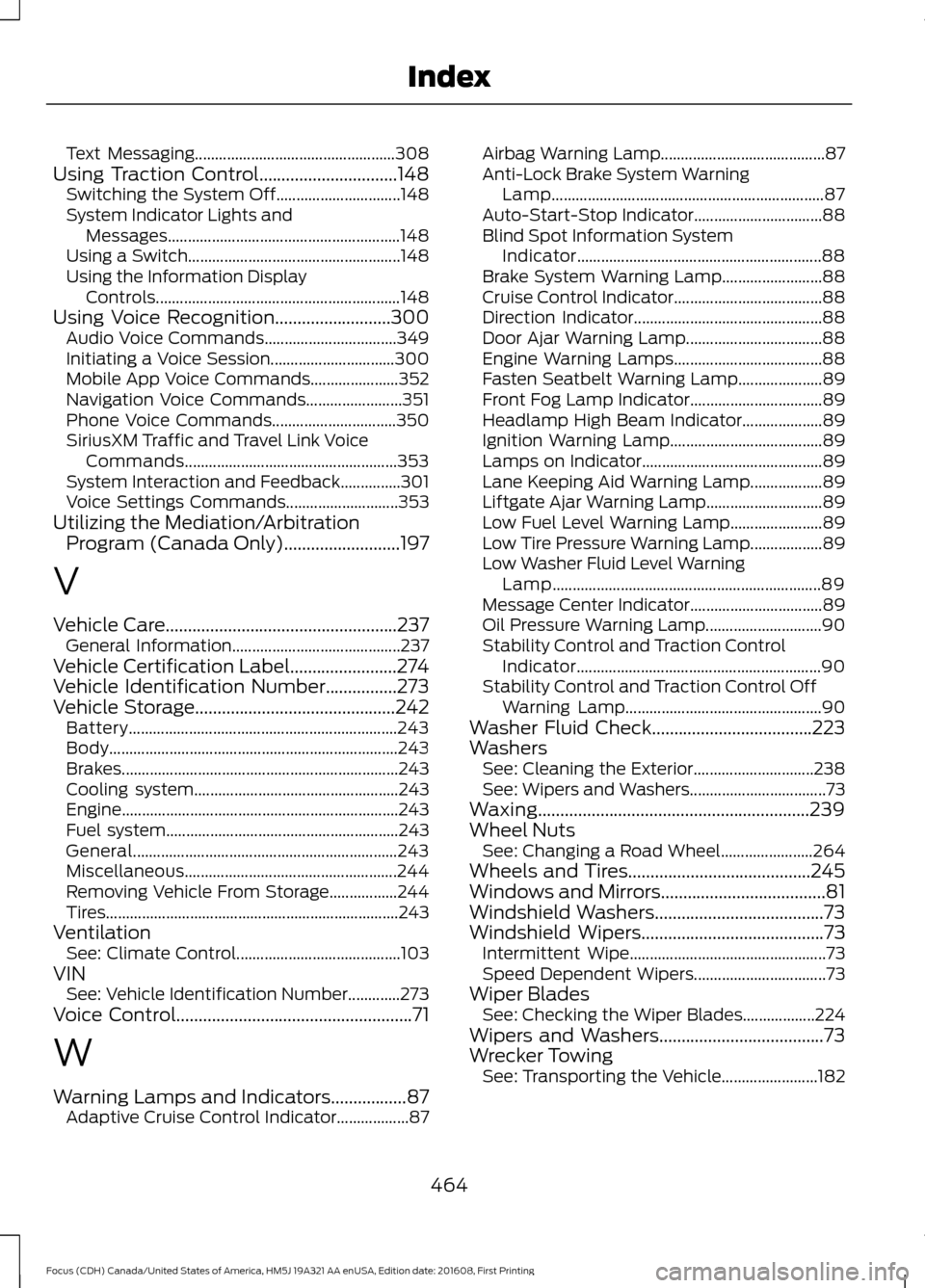
Text Messaging..................................................
308
Using Traction Control...............................148
Switching the System Off............................... 148
System Indicator Lights and Messages.......................................................... 148
Using a Switch..................................................... 148
Using the Information Display Controls............................................................. 148
Using Voice Recognition
..........................300
Audio Voice Commands................................. 349
Initiating a Voice Session............................... 300
Mobile App Voice Commands...................... 352
Navigation Voice Commands........................ 351
Phone Voice Commands............................... 350
SiriusXM Traffic and Travel Link Voice Commands..................................................... 353
System Interaction and Feedback...............301
Voice Settings Commands............................ 353
Utilizing the Mediation/Arbitration Program (Canada Only)
..........................197
V
Vehicle Care....................................................237 General Information.......................................... 237
Vehicle Certification Label........................274
Vehicle Identification Number
................273
Vehicle Storage.............................................242 Battery................................................................... 243
Body........................................................................\
243
Brakes..................................................................... 243
Cooling system................................................... 243
Engine ..................................................................... 243
Fuel system.......................................................... 243
General.................................................................. 243
Miscellaneous..................................................... 244
Removing Vehicle From Storage.................244
Tires........................................................................\
. 243
Ventilation See: Climate Control......................................... 103
VIN See: Vehicle Identification Number.............273
Voice Control
.....................................................71
W
Warning Lamps and Indicators.................87 Adaptive Cruise Control Indicator.................. 87Airbag Warning Lamp.........................................
87
Anti-Lock Brake System Warning Lamp.................................................................... 87
Auto-Start-Stop Indicator................................ 88
Blind Spot Information System Indicator............................................................. 88
Brake System Warning Lamp......................... 88
Cruise Control Indicator..................................... 88
Direction Indicator............................................... 88
Door Ajar Warning Lamp.................................. 88
Engine Warning Lamps..................................... 88
Fasten Seatbelt Warning Lamp..................... 89
Front Fog Lamp Indicator................................. 89
Headlamp High Beam Indicator.................... 89
Ignition Warning Lamp...................................... 89
Lamps on Indicator............................................. 89
Lane Keeping Aid Warning Lamp.................. 89
Liftgate Ajar Warning Lamp............................. 89
Low Fuel Level Warning Lamp....................... 89
Low Tire Pressure Warning Lamp.................. 89
Low Washer Fluid Level Warning Lamp................................................................... 89
Message Center Indicator................................. 89
Oil Pressure Warning Lamp............................. 90
Stability Control and Traction Control Indicator............................................................. 90
Stability Control and Traction Control Off Warning Lamp................................................. 90
Washer Fluid Check....................................223
Washers See: Cleaning the Exterior.............................. 238
See: Wipers and Washers.................................. 73
Waxing.............................................................239
Wheel Nuts See: Changing a Road Wheel....................... 264
Wheels and Tires.........................................245
Windows and Mirrors.....................................81
Windshield Washers......................................73
Windshield Wipers
.........................................73
Intermittent Wipe................................................. 73
Speed Dependent Wipers................................. 73
Wiper Blades See: Checking the Wiper Blades.................. 224
Wipers and Washers.....................................73
Wrecker Towing See: Transporting the Vehicle........................ 182
464
Focus (CDH) Canada/United States of America, HM5J 19A321 AA enUSA, Edition date: 201608, First Printing Index