page 39 FORD FOCUS 2018 User Guide
[x] Cancel search | Manufacturer: FORD, Model Year: 2018, Model line: FOCUS, Model: FORD FOCUS 2018Pages: 473, PDF Size: 39.91 MB
Page 46 of 473
•Wait at least two minutes and verifythat the airbag readiness lamp is nolonger illuminated
•If the airbag readiness lamp remainsilluminated, this may or may not be aproblem due to the front passengersensing system.
Do not attempt to repair or service thesystem. Take your vehicle immediately toan authorized dealer.
If it is necessary to modify an advancedfront airbag system to accommodate aperson with disabilities, contact the FordCustomer Relationship Center. SeeGetting the Services You Need (page193).
SIDE AIRBAGS
WARNINGS
Do not place objects or mountequipment on or near the airbagcover, on the side of the seatbacks(of the front seats), or in front seat areasthat may come into contact with adeploying airbag. Failure to follow theseinstructions may increase the risk ofpersonal injury in the event of a crash.
Do not use accessory seat covers.The use of accessory seat coversmay prevent the deployment of theside airbags and increase the risk of injuryin an accident.
Do not lean your head on the door.The side airbag could injure you as itdeploys from the side of theseatback.
Do not attempt to service, repair, ormodify the seat airbag supplementalrestraint systems, its fuses or theseat cover on a vehicle containing seatairbags as you could be seriously injuredor killed. Contact your authorized dealeras soon as possible.
WARNINGS
If the side airbag has deployed, theairbag will not function again. Theside airbag system (including theseat) must be inspected as soon aspossible. If the airbag is not replaced, theunrepaired area will increase the risk ofinjury in a crash.
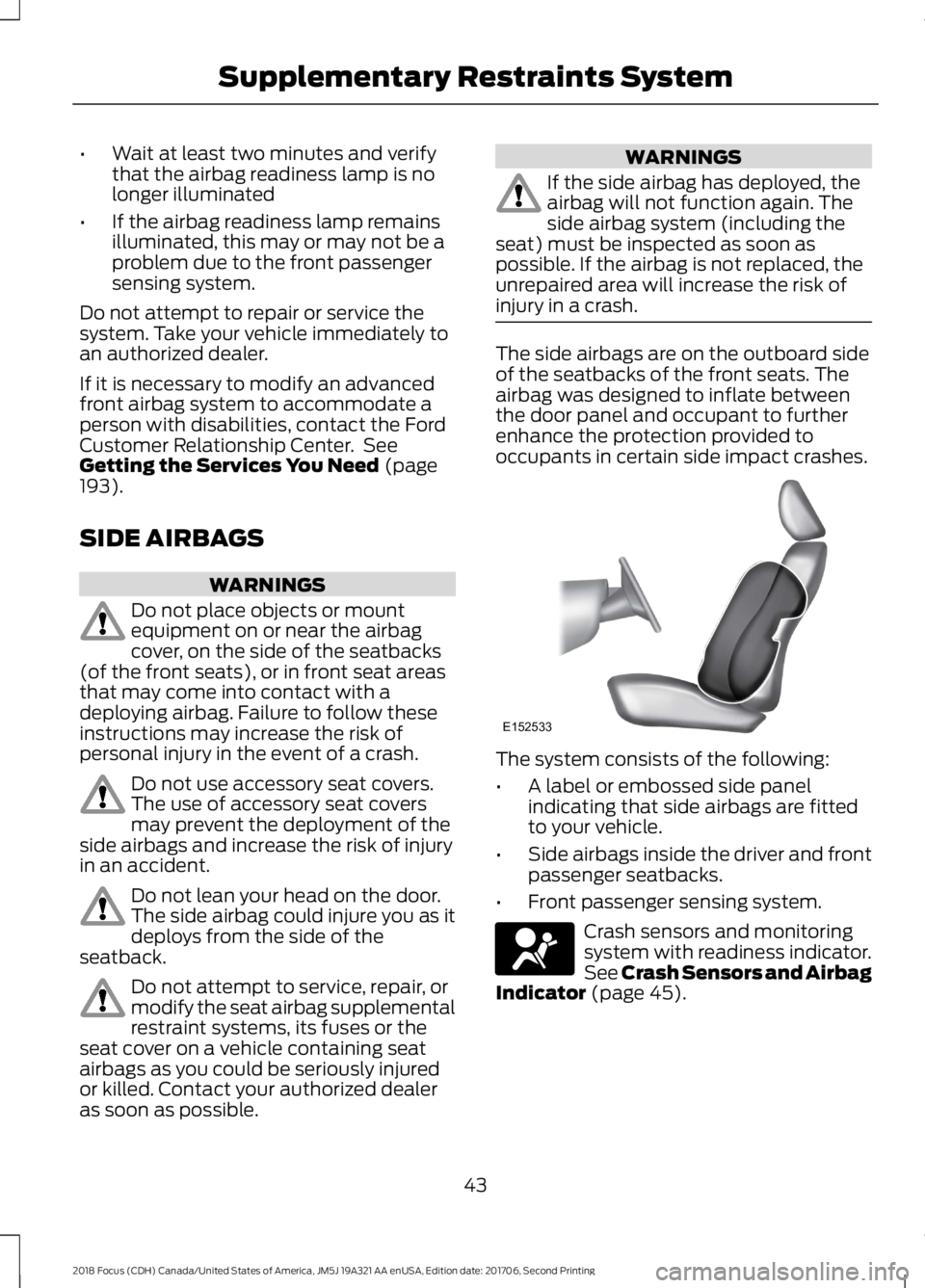
The side airbags are on the outboard sideof the seatbacks of the front seats. Theairbag was designed to inflate betweenthe door panel and occupant to furtherenhance the protection provided tooccupants in certain side impact crashes.
The system consists of the following:
•A label or embossed side panelindicating that side airbags are fittedto your vehicle.
•Side airbags inside the driver and frontpassenger seatbacks.
•Front passenger sensing system.
Crash sensors and monitoringsystem with readiness indicator.See Crash Sensors and AirbagIndicator (page 45).
432018 Focus (CDH) Canada/United States of America, JM5J 19A321 AA enUSA, Edition date: 201706, Second PrintingSupplementary Restraints SystemE152533 E67017
Page 47 of 473
The design and development of the sideairbag system included recommendedtesting procedures that were developedby a group of automotive safety expertsknown as the Side Airbag TechnicalWorking Group. These recommendedtesting procedures help reduce the risk ofinjuries related to the deployment of sideairbags.
DRIVER KNEE AIRBAG
A driver's knee airbag is located under theinstrument panel. During a crash, therestraints control module may activate thedriver's knee airbag based on crash severityand occupant conditions. Under certaincrash and occupant conditions, the driver’sknee airbag may deploy but the driver’sfront airbag may not activate. As with frontand side airbags, it is important to beproperly seated and restrained to reducethe risk of death or serious injury.
Make sure the knee airbag isoperating properly. See CrashSensors and Airbag Indicator(page 45).
SAFETY CANOPY™
WARNINGS
Do not place objects or mountequipment on or near the headlinerat the siderail that may come intocontact with a deploying curtain airbag.Failure to follow these instructions mayincrease the risk of personal injury in theevent of a crash.
Do not lean your head on the door.The curtain airbag could injure youas it deploys from the headliner.
WARNINGS
Do not attempt to service, repair, ormodify the supplementary restraintsystem or associated components.Failure to follow this instruction couldresult in personal injury or death.
All occupants of your vehicle,including the driver, should alwaysproperly wear their seatbelts, evenwhen an airbag supplemental restraintsystem is provided. Failure to properly wearyour seatbelt could seriously increase therisk of injury or death.
To reduce risk of injury, do notobstruct or place objects in thedeployment path of the airbag.
If a supplementary restraint systemcomponent has deployed, it will notfunction again. Have the system andassociated components inspected as soonas possible. Failure to follow thisinstruction could result in personal injuryor death.
The Safety Canopy deploys duringsignificant side crashes or when a certainlikelihood of a rollover event is detectedby the rollover sensor. The Safety Canopyis mounted to the roof side rail sheet metal,behind the headliner, above each row ofseats. In certain sideways crashes orrollover events, the Safety Canopy will beactivated, regardless of which seats areoccupied. The Safety Canopy is designedto inflate between the side window areaand occupants to further enhanceprotection provided in side impact crashesand rollover events.
442018 Focus (CDH) Canada/United States of America, JM5J 19A321 AA enUSA, Edition date: 201706, Second PrintingSupplementary Restraints SystemE67017
Page 48 of 473
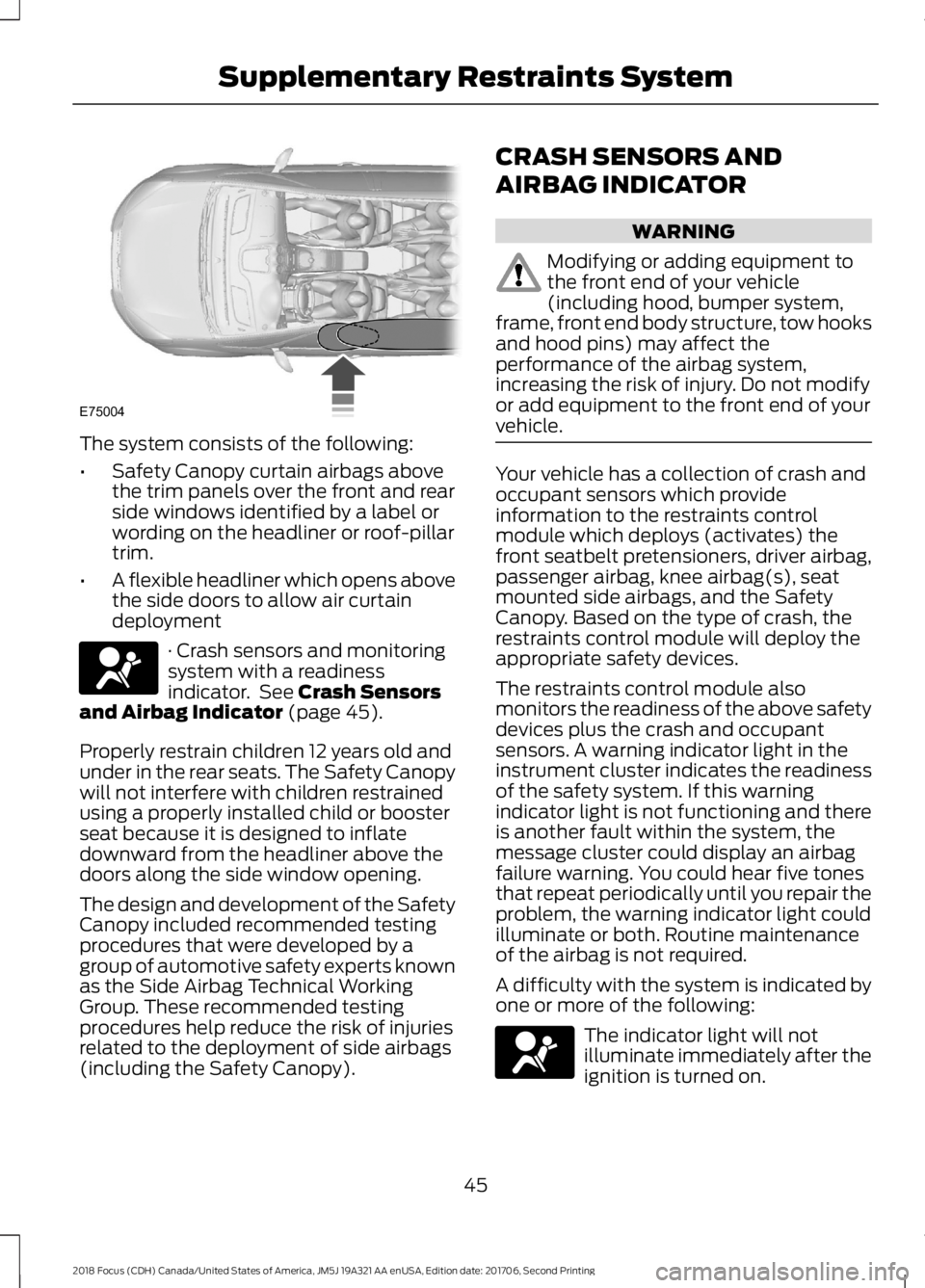
The system consists of the following:
•Safety Canopy curtain airbags abovethe trim panels over the front and rearside windows identified by a label orwording on the headliner or roof-pillartrim.
•A flexible headliner which opens abovethe side doors to allow air curtaindeployment
· Crash sensors and monitoringsystem with a readinessindicator. See Crash Sensorsand Airbag Indicator (page 45).
Properly restrain children 12 years old andunder in the rear seats. The Safety Canopywill not interfere with children restrainedusing a properly installed child or boosterseat because it is designed to inflatedownward from the headliner above thedoors along the side window opening.
The design and development of the SafetyCanopy included recommended testingprocedures that were developed by agroup of automotive safety experts knownas the Side Airbag Technical WorkingGroup. These recommended testingprocedures help reduce the risk of injuriesrelated to the deployment of side airbags(including the Safety Canopy).
CRASH SENSORS AND
AIRBAG INDICATOR
WARNING
Modifying or adding equipment tothe front end of your vehicle(including hood, bumper system,frame, front end body structure, tow hooksand hood pins) may affect theperformance of the airbag system,increasing the risk of injury. Do not modifyor add equipment to the front end of yourvehicle.
Your vehicle has a collection of crash andoccupant sensors which provideinformation to the restraints controlmodule which deploys (activates) thefront seatbelt pretensioners, driver airbag,passenger airbag, knee airbag(s), seatmounted side airbags, and the SafetyCanopy. Based on the type of crash, therestraints control module will deploy theappropriate safety devices.
The restraints control module alsomonitors the readiness of the above safetydevices plus the crash and occupantsensors. A warning indicator light in theinstrument cluster indicates the readinessof the safety system. If this warningindicator light is not functioning and thereis another fault within the system, themessage cluster could display an airbagfailure warning. You could hear five tonesthat repeat periodically until you repair theproblem, the warning indicator light couldilluminate or both. Routine maintenanceof the airbag is not required.
A difficulty with the system is indicated byone or more of the following:
The indicator light will notilluminate immediately after theignition is turned on.
452018 Focus (CDH) Canada/United States of America, JM5J 19A321 AA enUSA, Edition date: 201706, Second PrintingSupplementary Restraints SystemE75004 E67017 E67017
Page 51 of 473
Key Blade
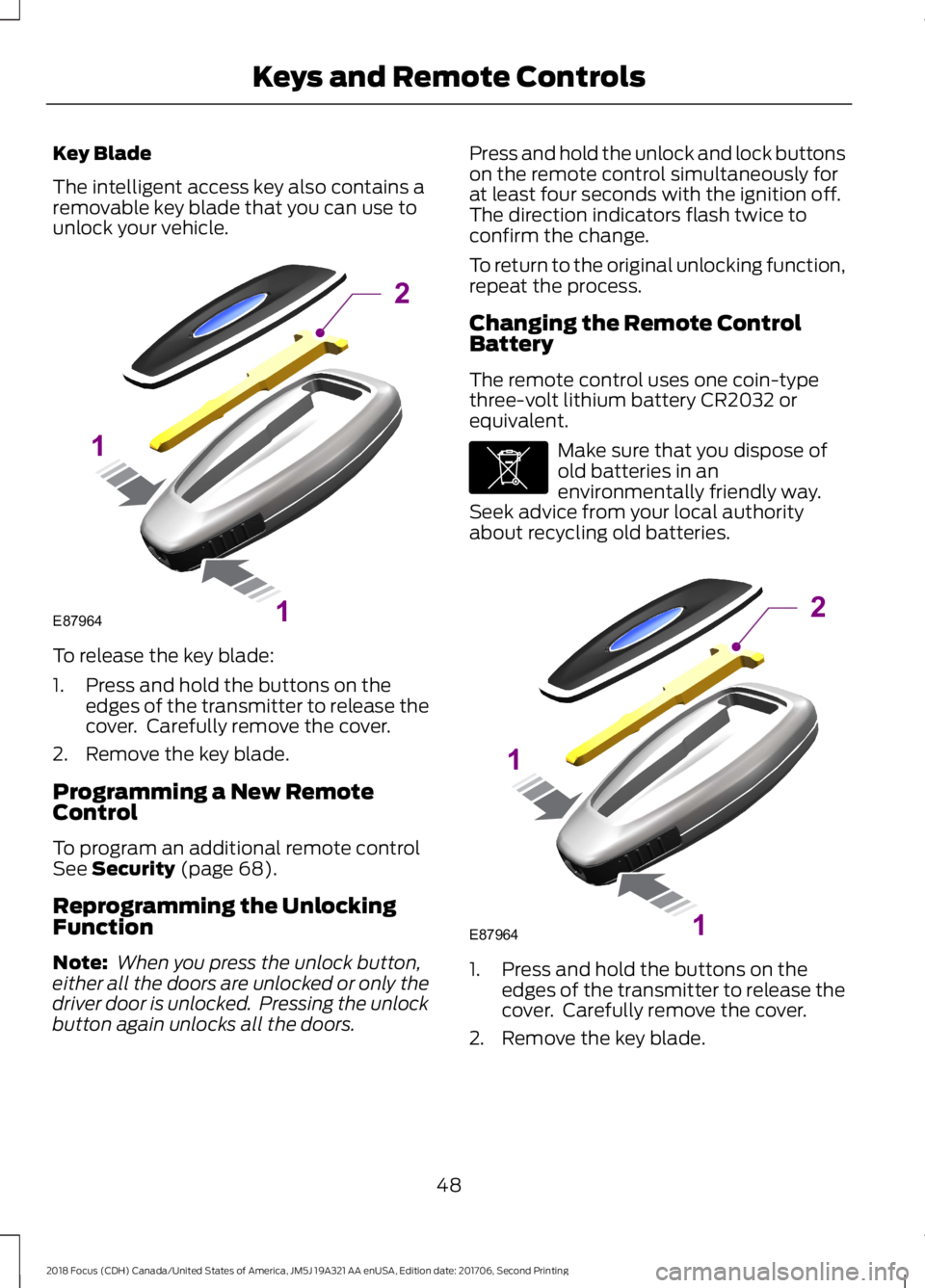
The intelligent access key also contains aremovable key blade that you can use tounlock your vehicle.
To release the key blade:
1.Press and hold the buttons on theedges of the transmitter to release thecover. Carefully remove the cover.
2.Remove the key blade.
Programming a New RemoteControl
To program an additional remote controlSee Security (page 68).
Reprogramming the UnlockingFunction
Note: When you press the unlock button,either all the doors are unlocked or only thedriver door is unlocked. Pressing the unlockbutton again unlocks all the doors.
Press and hold the unlock and lock buttonson the remote control simultaneously forat least four seconds with the ignition off.The direction indicators flash twice toconfirm the change.
To return to the original unlocking function,repeat the process.
Changing the Remote ControlBattery
The remote control uses one coin-typethree-volt lithium battery CR2032 orequivalent.
Make sure that you dispose ofold batteries in anenvironmentally friendly way.Seek advice from your local authorityabout recycling old batteries.
1.Press and hold the buttons on theedges of the transmitter to release thecover. Carefully remove the cover.
2.Remove the key blade.
482018 Focus (CDH) Canada/United States of America, JM5J 19A321 AA enUSA, Edition date: 201706, Second PrintingKeys and Remote ControlsE87964211 E107998 E87964211
Page 53 of 473
REMOTE CONTROL - VEHICLES
WITH: INTEGRATED KEY
TRANSMITTER
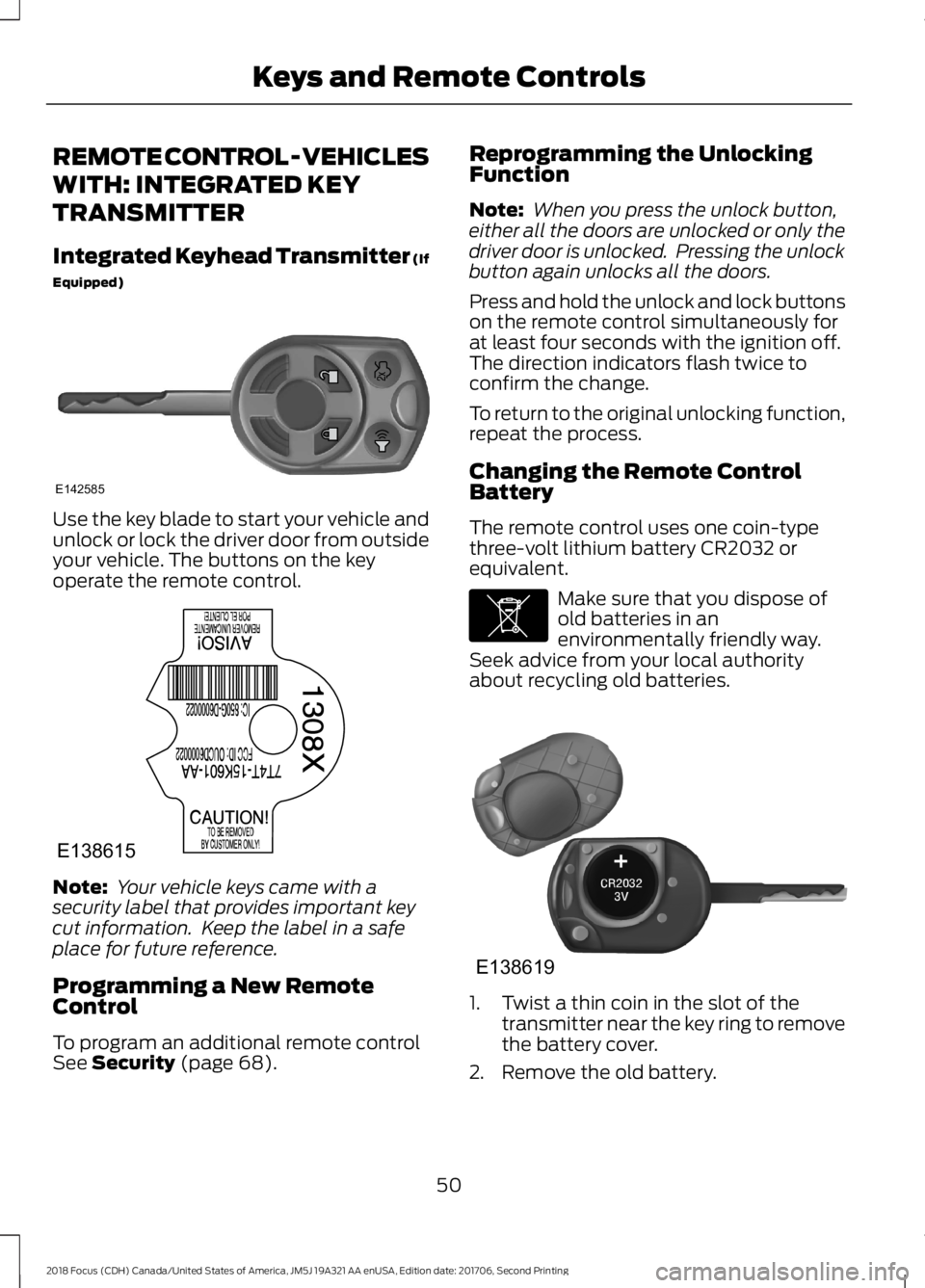
Integrated Keyhead Transmitter (If
Equipped)
Use the key blade to start your vehicle andunlock or lock the driver door from outsideyour vehicle. The buttons on the keyoperate the remote control.
Note: Your vehicle keys came with asecurity label that provides important keycut information. Keep the label in a safeplace for future reference.
Programming a New RemoteControl
To program an additional remote controlSee Security (page 68).
Reprogramming the UnlockingFunction
Note: When you press the unlock button,either all the doors are unlocked or only thedriver door is unlocked. Pressing the unlockbutton again unlocks all the doors.
Press and hold the unlock and lock buttonson the remote control simultaneously forat least four seconds with the ignition off.The direction indicators flash twice toconfirm the change.
To return to the original unlocking function,repeat the process.
Changing the Remote ControlBattery
The remote control uses one coin-typethree-volt lithium battery CR2032 orequivalent.
Make sure that you dispose ofold batteries in anenvironmentally friendly way.Seek advice from your local authorityabout recycling old batteries.
1.Twist a thin coin in the slot of thetransmitter near the key ring to removethe battery cover.
2.Remove the old battery.
502018 Focus (CDH) Canada/United States of America, JM5J 19A321 AA enUSA, Edition date: 201706, Second PrintingKeys and Remote ControlsE142585 E138615 E107998 E138619
Page 55 of 473
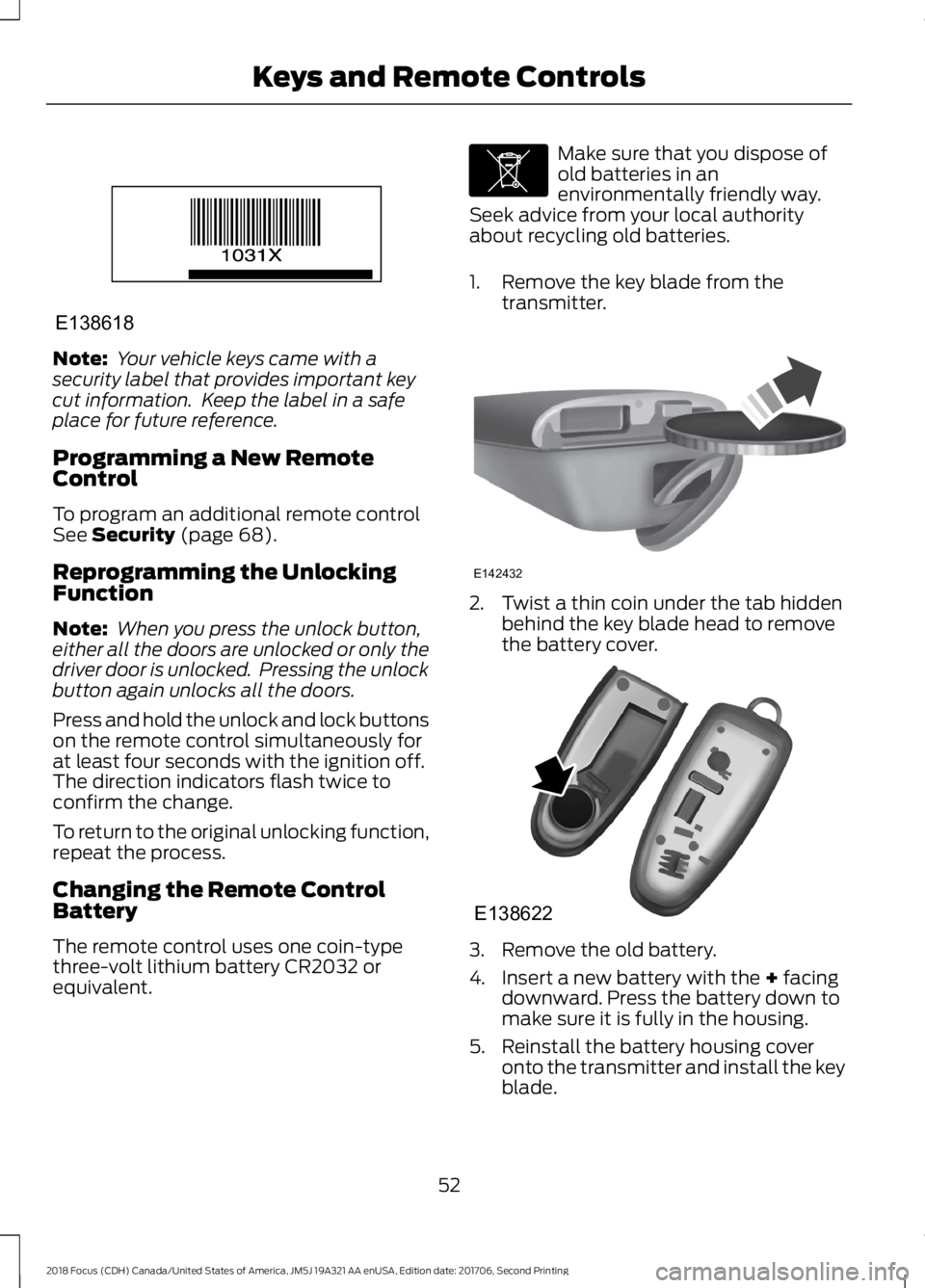
Note: Your vehicle keys came with asecurity label that provides important keycut information. Keep the label in a safeplace for future reference.
Programming a New RemoteControl
To program an additional remote controlSee Security (page 68).
Reprogramming the UnlockingFunction
Note: When you press the unlock button,either all the doors are unlocked or only thedriver door is unlocked. Pressing the unlockbutton again unlocks all the doors.
Press and hold the unlock and lock buttonson the remote control simultaneously forat least four seconds with the ignition off.The direction indicators flash twice toconfirm the change.
To return to the original unlocking function,repeat the process.
Changing the Remote ControlBattery
The remote control uses one coin-typethree-volt lithium battery CR2032 orequivalent.
Make sure that you dispose ofold batteries in anenvironmentally friendly way.Seek advice from your local authorityabout recycling old batteries.
1.Remove the key blade from thetransmitter.
2.Twist a thin coin under the tab hiddenbehind the key blade head to removethe battery cover.
3.Remove the old battery.
4.Insert a new battery with the + facingdownward. Press the battery down tomake sure it is fully in the housing.
5.Reinstall the battery housing coveronto the transmitter and install the keyblade.
522018 Focus (CDH) Canada/United States of America, JM5J 19A321 AA enUSA, Edition date: 201706, Second PrintingKeys and Remote ControlsE138618 E107998 E142432 E138622
Page 56 of 473
Note:Do not wipe off any grease on thebattery terminals or on the back surface ofthe circuit board.
Note: Replacing the battery does notdelete the transmitter from your vehicle.The transmitter should operate normally.
Locating Your Vehicle
Press the lock button on the key twicewithin three seconds. The horn sounds andthe direction indicators flash. Werecommend you use this method to locateyour vehicle, rather than using the panicalarm.
The horn sounds twice and the directionindicators do not flash if:
•Locking was not successful.
•Any door or the liftgate is open.
•The hood is open on vehicles with ananti-theft alarm or remote start.
Sounding the Panic Alarm (If Equipped)
Press the button to activate thealarm. Press the button again orswitch the ignition on todeactivate it.
Note:The panic alarm only operates whenthe ignition is off.
Remote Start
WARNING
To prevent drawing exhaust fumesinto your vehicle, do not use remotestart if your vehicle is parked indoorsor areas that are not well ventilated.
The remote start button is on thetransmitter.
This feature allows you to start yourvehicle from the outside. The transmitterhas an extended operating range.
Vehicles with automatic climate controlcan be configured to operate when yourvehicle is remote started. See AutomaticClimate Control (page 105).
Many states and provinces haverestrictions for the use of remote start.Check your local and state or provinciallaws for specific requirements regardingremote start systems.
Note:Do not use remote start if your vehicleis low on fuel.
The remote start system does not work ifany of the following occur:
•The ignition is on.
•The alarm system activates.
•You turn off the feature.
•The hood is open.
•The transmission is not in park (P).
•Your vehicle battery has no charge.
•The powertrain fault indicator was onthe last time you drove your vehicle.
Remote Starting your Vehicle
Note: You must press each button withinthree seconds of each other. If you do notfollow this sequence, your vehicle does notstart remotely, the direction indicators donot flash twice and the horn does not sound.
The label on your transmitter details thestarting procedure.
To remote start your vehicle:
532018 Focus (CDH) Canada/United States of America, JM5J 19A321 AA enUSA, Edition date: 201706, Second PrintingKeys and Remote ControlsE138624 E138625 E138626
Page 57 of 473
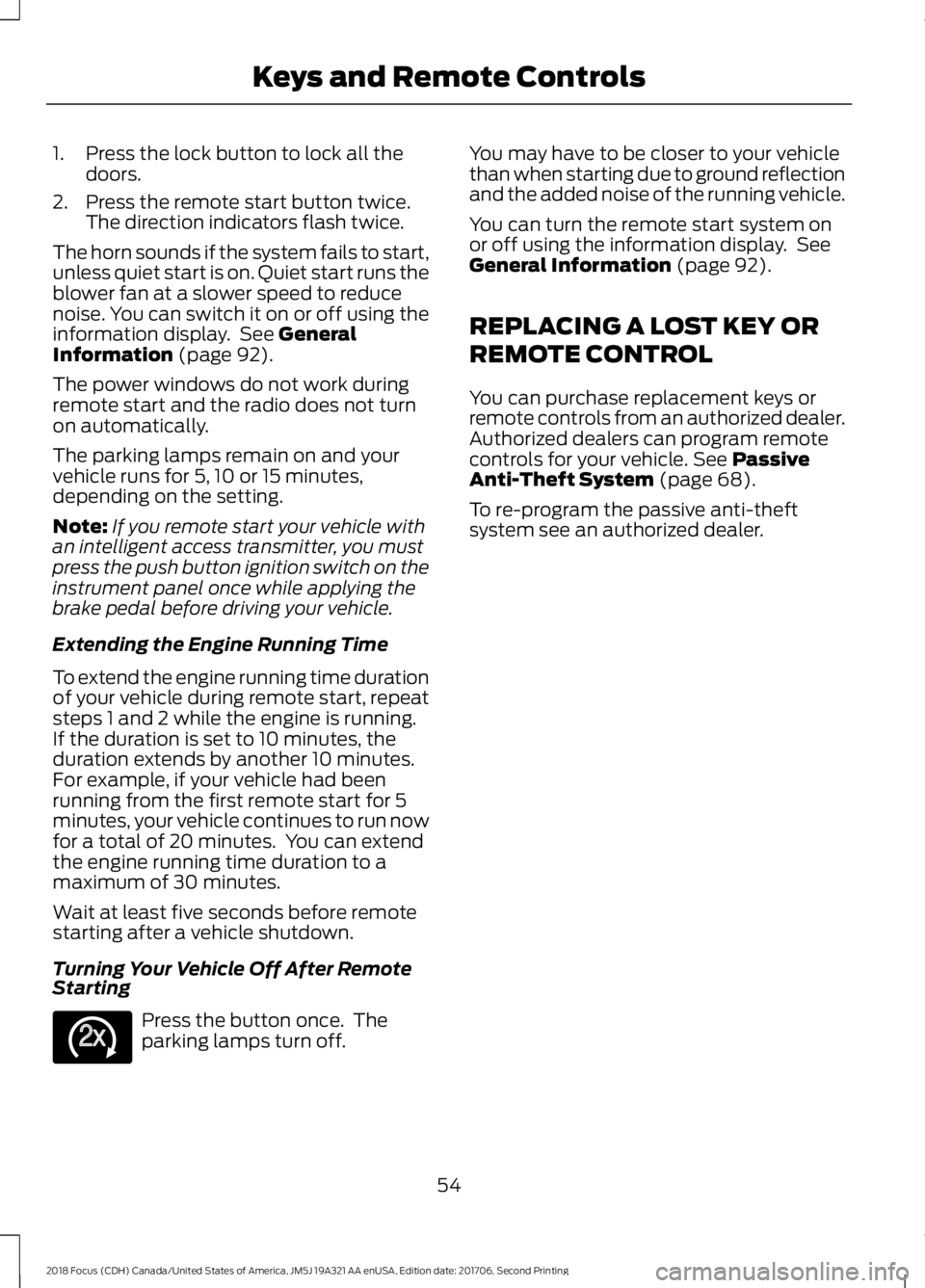
1.Press the lock button to lock all thedoors.
2.Press the remote start button twice.The direction indicators flash twice.
The horn sounds if the system fails to start,unless quiet start is on. Quiet start runs theblower fan at a slower speed to reducenoise. You can switch it on or off using theinformation display. See GeneralInformation (page 92).
The power windows do not work duringremote start and the radio does not turnon automatically.
The parking lamps remain on and yourvehicle runs for 5, 10 or 15 minutes,depending on the setting.
Note:If you remote start your vehicle withan intelligent access transmitter, you mustpress the push button ignition switch on theinstrument panel once while applying thebrake pedal before driving your vehicle.
Extending the Engine Running Time
To extend the engine running time durationof your vehicle during remote start, repeatsteps 1 and 2 while the engine is running.If the duration is set to 10 minutes, theduration extends by another 10 minutes.For example, if your vehicle had beenrunning from the first remote start for 5minutes, your vehicle continues to run nowfor a total of 20 minutes. You can extendthe engine running time duration to amaximum of 30 minutes.
Wait at least five seconds before remotestarting after a vehicle shutdown.
Turning Your Vehicle Off After RemoteStarting
Press the button once. Theparking lamps turn off.
You may have to be closer to your vehiclethan when starting due to ground reflectionand the added noise of the running vehicle.
You can turn the remote start system onor off using the information display. SeeGeneral Information (page 92).
REPLACING A LOST KEY OR
REMOTE CONTROL
You can purchase replacement keys orremote controls from an authorized dealer.Authorized dealers can program remotecontrols for your vehicle. See PassiveAnti-Theft System (page 68).
To re-program the passive anti-theftsystem see an authorized dealer.
542018 Focus (CDH) Canada/United States of America, JM5J 19A321 AA enUSA, Edition date: 201706, Second PrintingKeys and Remote ControlsE138625
Page 59 of 473
•Various vehicle speed minders can beset. Once you select a speed, it will beshown in the display, followed by anaudible tone when the preselectedvehicle speed is exceeded.
•Audio system maximum volume of45%. A message will be shown in thedisplay when you attempt to exceedthe limited volume. Also, thespeed-sensitive or compensatedautomatic volume control will bedisabled.
•Always on setting. When this isselected, you will not be able to turnoff AdvanceTrac or traction control,E911 or Emergency Assist, or the Do NotDisturb feature (if your vehicle isequipped with these features).
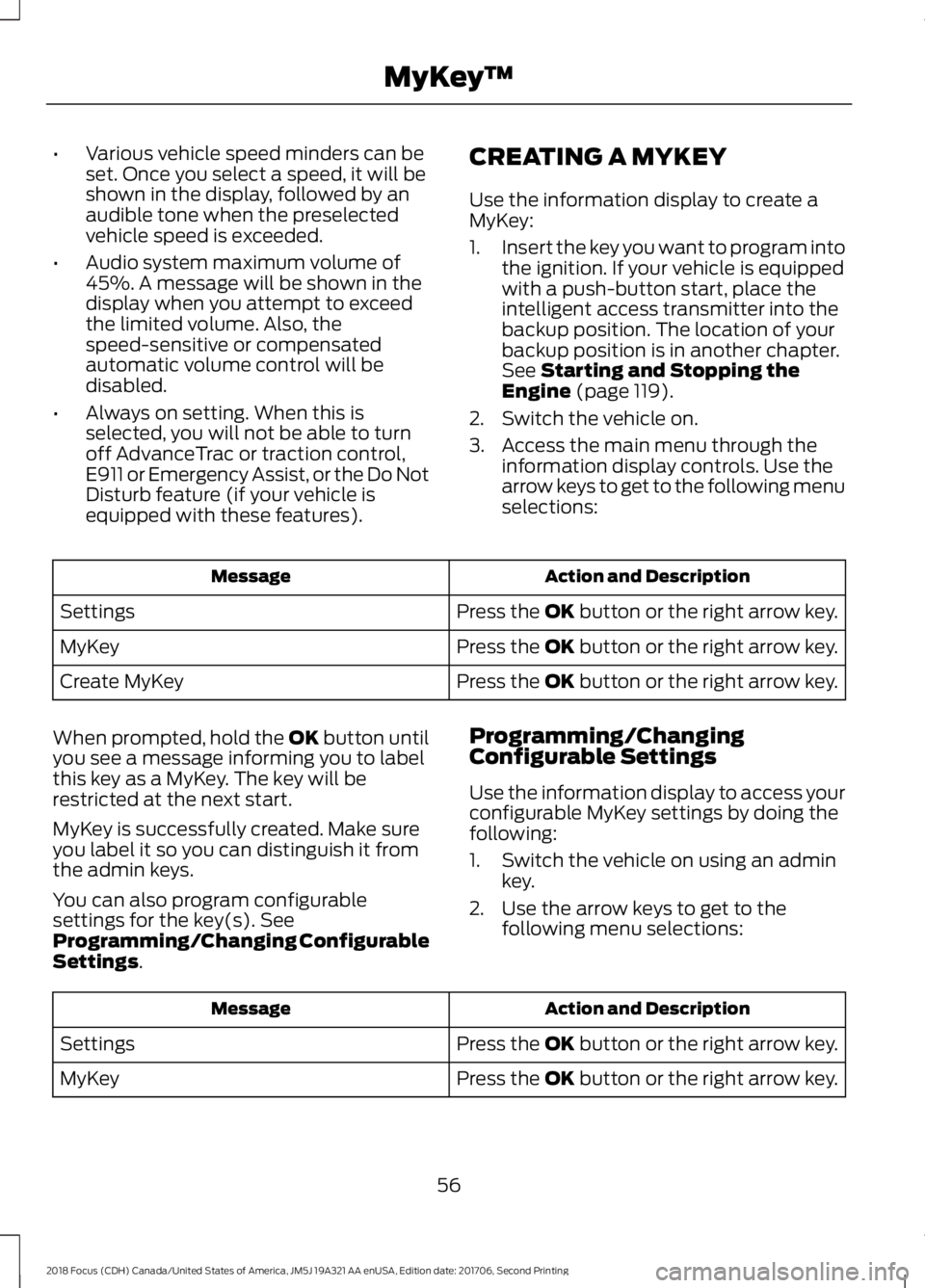
CREATING A MYKEY
Use the information display to create aMyKey:
1.Insert the key you want to program intothe ignition. If your vehicle is equippedwith a push-button start, place theintelligent access transmitter into thebackup position. The location of yourbackup position is in another chapter.See Starting and Stopping theEngine (page 119).
2.Switch the vehicle on.
3.Access the main menu through theinformation display controls. Use thearrow keys to get to the following menuselections:
Action and DescriptionMessage
Press the OK button or the right arrow key.Settings
Press the OK button or the right arrow key.MyKey
Press the OK button or the right arrow key.Create MyKey
When prompted, hold the OK button untilyou see a message informing you to labelthis key as a MyKey. The key will berestricted at the next start.
MyKey is successfully created. Make sureyou label it so you can distinguish it fromthe admin keys.
You can also program configurablesettings for the key(s). SeeProgramming/Changing ConfigurableSettings.
Programming/ChangingConfigurable Settings
Use the information display to access yourconfigurable MyKey settings by doing thefollowing:
1.Switch the vehicle on using an adminkey.
2.Use the arrow keys to get to thefollowing menu selections:
Action and DescriptionMessage
Press the OK button or the right arrow key.Settings
Press the OK button or the right arrow key.MyKey
562018 Focus (CDH) Canada/United States of America, JM5J 19A321 AA enUSA, Edition date: 201706, Second PrintingMyKey™
Page 60 of 473
Note:You can clear or change your MyKeysettings at any time during the same keycycle as you created the MyKey. Once youhave switched the vehicle off, however, youwill need an admin key to change or clearyour MyKey settings.
Note:When you make any changes to yourMyKey settings, you change the settings forevery MyKey. You cannot make individualchanges to apply to certain MyKeys.
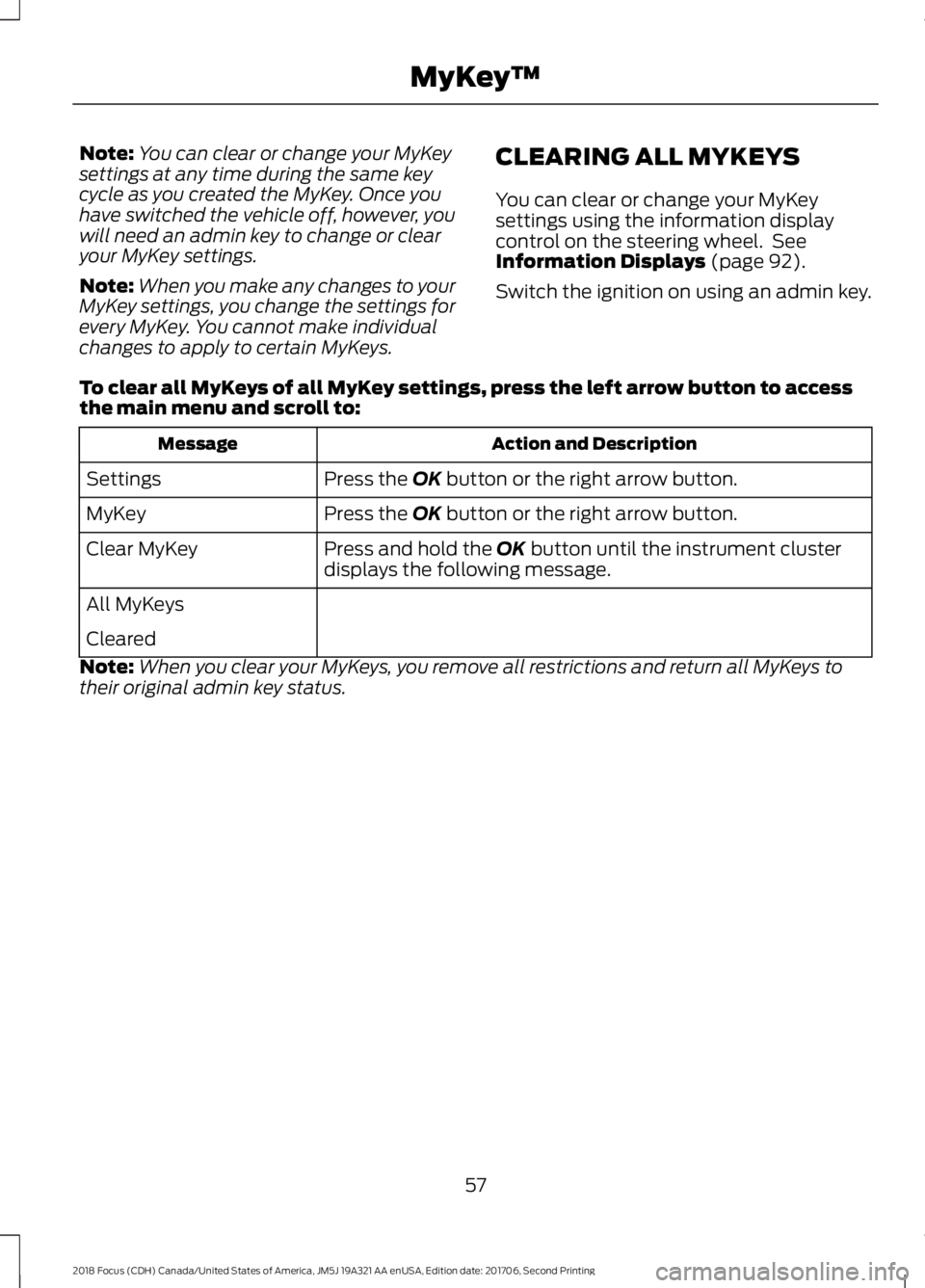
CLEARING ALL MYKEYS
You can clear or change your MyKeysettings using the information displaycontrol on the steering wheel. SeeInformation Displays (page 92).
Switch the ignition on using an admin key.
To clear all MyKeys of all MyKey settings, press the left arrow button to accessthe main menu and scroll to:
Action and DescriptionMessage
Press the OK button or the right arrow button.Settings
Press the OK button or the right arrow button.MyKey
Press and hold the OK button until the instrument clusterdisplays the following message.Clear MyKey
All MyKeys
Cleared
Note:When you clear your MyKeys, you remove all restrictions and return all MyKeys totheir original admin key status.
572018 Focus (CDH) Canada/United States of America, JM5J 19A321 AA enUSA, Edition date: 201706, Second PrintingMyKey™