remote start FORD FOCUS 2018 User Guide
[x] Cancel search | Manufacturer: FORD, Model Year: 2018, Model line: FOCUS, Model: FORD FOCUS 2018Pages: 473, PDF Size: 39.91 MB
Page 66 of 473
Autounlock
Autounlock unlocks all the doors when allof the following occur:
•The ignition is on, all the doors areclosed and your vehicle has been inmotion at a speed greater than 4 mph(7 km/h).
•Your vehicle comes to a stop and youswitch the ignition off or to accessory.
•You open the driver door within 10minutes of switching the ignition off orto accessory.
Note:If you electronically lock your vehicleafter you switch the ignition off with thedriver door closed, the doors will notautounlock.
To enable or disable autounlock, do thefollowing:
1.Switch the ignition on.
2.Press the power door unlock controlthree times.
3.Switch the ignition off.
4.Press the power door unlock controlthree times.
5.Switch the ignition on. The hornsounds indicating your vehicle is inprogramming mode.
6.Press the power door lock control andwithin five seconds, press the powerdoor unlock control. The horn soundsonce if disabled or twice if enabled.
7.Switch the ignition off. The horn soundsindicating programming is complete.
Illuminated Entry
The interior lamps and select exteriorlamps illuminate when you unlock thedoors with the remote entry system.
The lamps turn off if:
•The ignition is on.
•You press the remote control lockbutton.
•25 seconds have elapsed.
The lamps will not turn off if:
•You switch them on with the lightingcontrol.
•Any door is open.
Illuminated Exit
For vehicles with an integrated keyheadtransmitter, the interior lamps and selectexterior lamps illuminate when you closeall the doors, you switch the ignition offand you remove the key from the ignition.
The lamps turn off if all the doors remainclosed and:
•25 seconds have elapsed.
•You insert the key in the ignition(integrated keyhead transmitter only).
•You press the START/STOP button(intelligent access key only).
Battery Saver
If you leave the courtesy lamps, domelamps or headlamps on, the battery saverwill turn them off 10 minutes after youswitch the ignition off.
Accessory Mode Battery Saver forIntelligent Access Keys (If Equipped)
If you leave the ignition switched on andthe engine is not running, the battery saverwill turn the ignition off when it detects acertain amount of battery drain, or after45 minutes have elapsed.
632018 Focus (CDH) Canada/United States of America, JM5J 19A321 AA enUSA, Edition date: 201706, Second PrintingDoors and Locks
Page 71 of 473
PASSIVE ANTI-THEFT
SYSTEM
Note: The system is not compatible withnon-Ford aftermarket remote start systems.Use of these systems may result in enginestarting problems and a loss of securityprotection.
Note: Metallic objects, electronic devicesor a second coded key on the same keychain may result in vehicle startingproblems, especially if they are too close tothe key when starting your vehicle. Preventthese objects from touching the coded keywhen starting your vehicle. If your vehiclefails to start, switch the ignition off, moveall objects on the key chain away from thekey and start your vehicle.
Note: Do not leave a duplicate coded keyin your vehicle. Always take your keys andlock all doors when leaving your vehicle.
SecuriLock
The system helps prevent the engine fromstarting unless you use a coded keyprogrammed to your vehicle. A messagemay appear in the information display.
If your vehicle fails to start, the system mayhave a fault. Contact an authorized dealer.A message may appear in the informationdisplay.
Automatic Arming
The system arms when you switch theignition off.
Automatic Disarming
The system disarms when you switch theignition on with a coded key.
Replacement Keys
Note:Your vehicle comes with two keys.
The intelligent access key functions as aprogrammed key that operates the driverdoor lock and turns on the intelligentaccess with push button start system, aswell as a remote control.
If your intelligent access keys are lost orstolen and you do not have an extra codedkey, you need to have your vehicle towedto an authorized dealer. You need to erasethe key codes from your vehicle andprogram new coded keys.
Store a spare intelligent access key awayfrom your vehicle in a safe place. Contactan authorized dealer to purchaseadditional spare or replacement keys.
Programming a Spare IntegratedKeyhead Transmitter
You can program your own integratedkeyhead transmitter or standardSecuriLock coded keys to your vehicle. Thisprocedure will program both the vehicleimmobilizer keycode and the remote entryportion of the remote control to yourvehicle.
Only use integrated keyhead transmittersor standard SecuriLock keys.
You must have two previouslyprogrammed coded keys and the newunprogrammed key readily accessible.Contact an authorized dealer to have thespare key programmed if two previouslyprogrammed keys are not available.
Make sure that the ignition is switched offbefore beginning this procedure. Carry outall steps within 30 seconds of starting thesequence. Stop and wait for at least oneminute before starting again if you carryout any steps out of sequence.
Note:You can program a maximum of eightcoded keys to your vehicle. All eight can beintegrated keyhead transmitters.
Read and understand the entire procedurebefore you begin.
682018 Focus (CDH) Canada/United States of America, JM5J 19A321 AA enUSA, Edition date: 201706, Second PrintingSecurity
Page 72 of 473
1.Insert the first previously programmedcoded key into the ignition.
2.Switch the ignition from off to on. Keepthe ignition on for at least 3 seconds,but no more than 10 seconds.
3.Switch the ignition off and remove thefirst coded key from the ignition.
4.After at least 3 seconds but within 10seconds of switching the ignition off,insert the second previously coded keyinto the ignition.
5.Switch the ignition from off to on. Keepthe ignition on for at least 3 seconds,but no more than 10 seconds.
6.Switch the ignition off and remove thesecond previously programmed codedkey from the ignition.
7.After at least 3 seconds but within 10seconds of switching the ignition offand removing the previouslyprogrammed coded key, insert the newunprogrammed key into the ignition.
8.Switch the ignition from off to on. Keepthe ignition on for at least six seconds.
9.Remove the newly programmed codedkey from the ignition.
If you have successfully programmed thecoded key, it will start your vehicle andoperate the remote entry system.
If programming was unsuccessful, wait 10seconds and repeat Steps 1 through 8. Ifprogramming remains unsuccessful, haveyour vehicle checked by an authorizeddealer.
Wait 20 seconds and repeat Steps 1through 9 to program an additional key.
Programming a Spare IntelligentAccess Key
You must have two previouslyprogrammed coded keys and the newunprogrammed key readily accessible.Contact an authorized dealer to have thespare key programmed if two previouslyprogrammed keys are not available.
Make sure that the ignition is switched offbefore beginning this procedure. Make surethat you close all the doors beforebeginning and that they remain closedthroughout the procedure. Carry out allsteps within 30 seconds of starting thesequence. Stop and wait for at least oneminute before starting again if you carryout any steps out of sequence.
Note:You can program a maximum of eightintelligent access keys to your vehicle.
Read and understand the entire procedurebefore you begin.
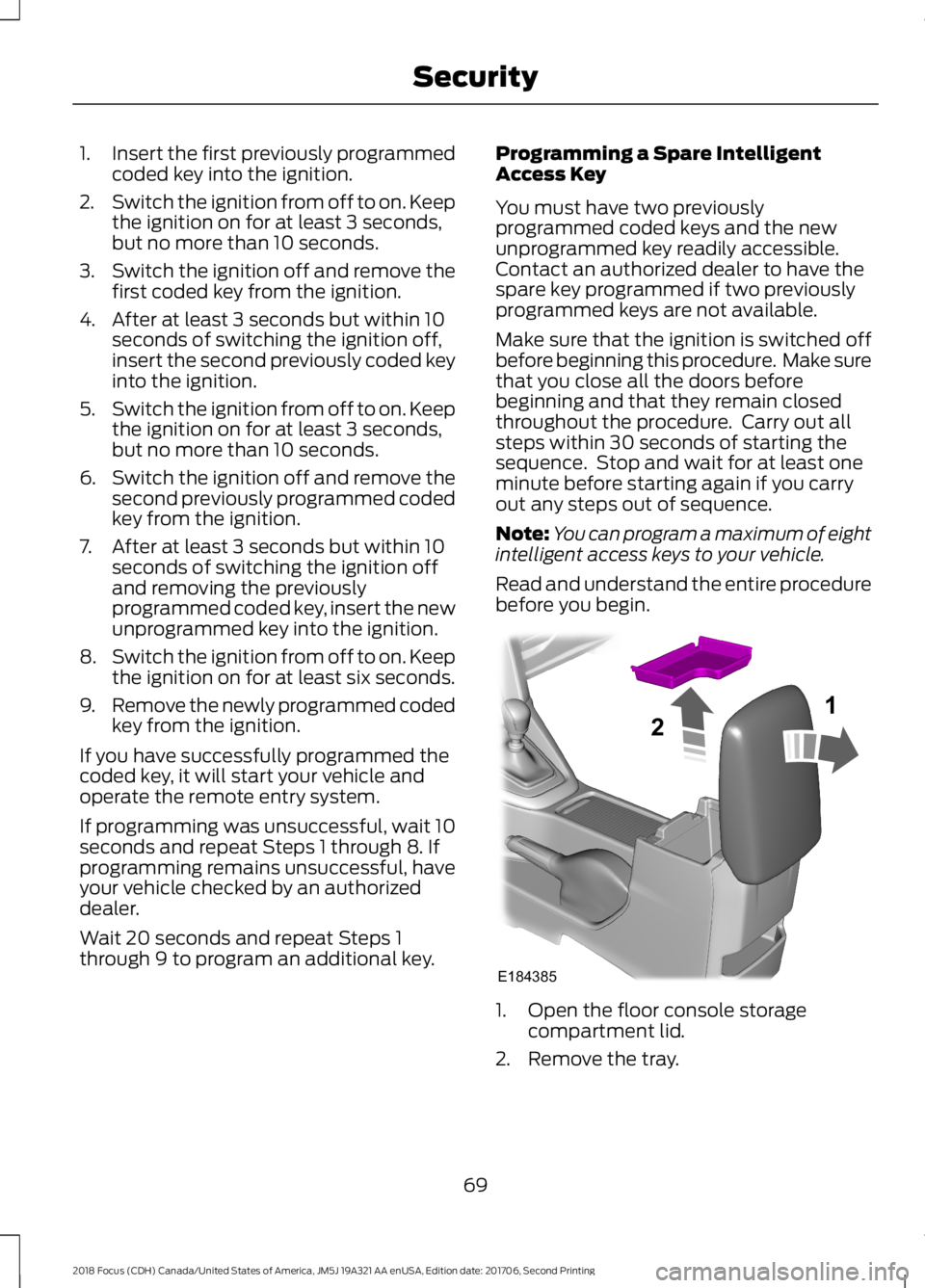
1.Open the floor console storagecompartment lid.
2.Remove the tray.
692018 Focus (CDH) Canada/United States of America, JM5J 19A321 AA enUSA, Edition date: 201706, Second PrintingSecurityE18438521
Page 73 of 473
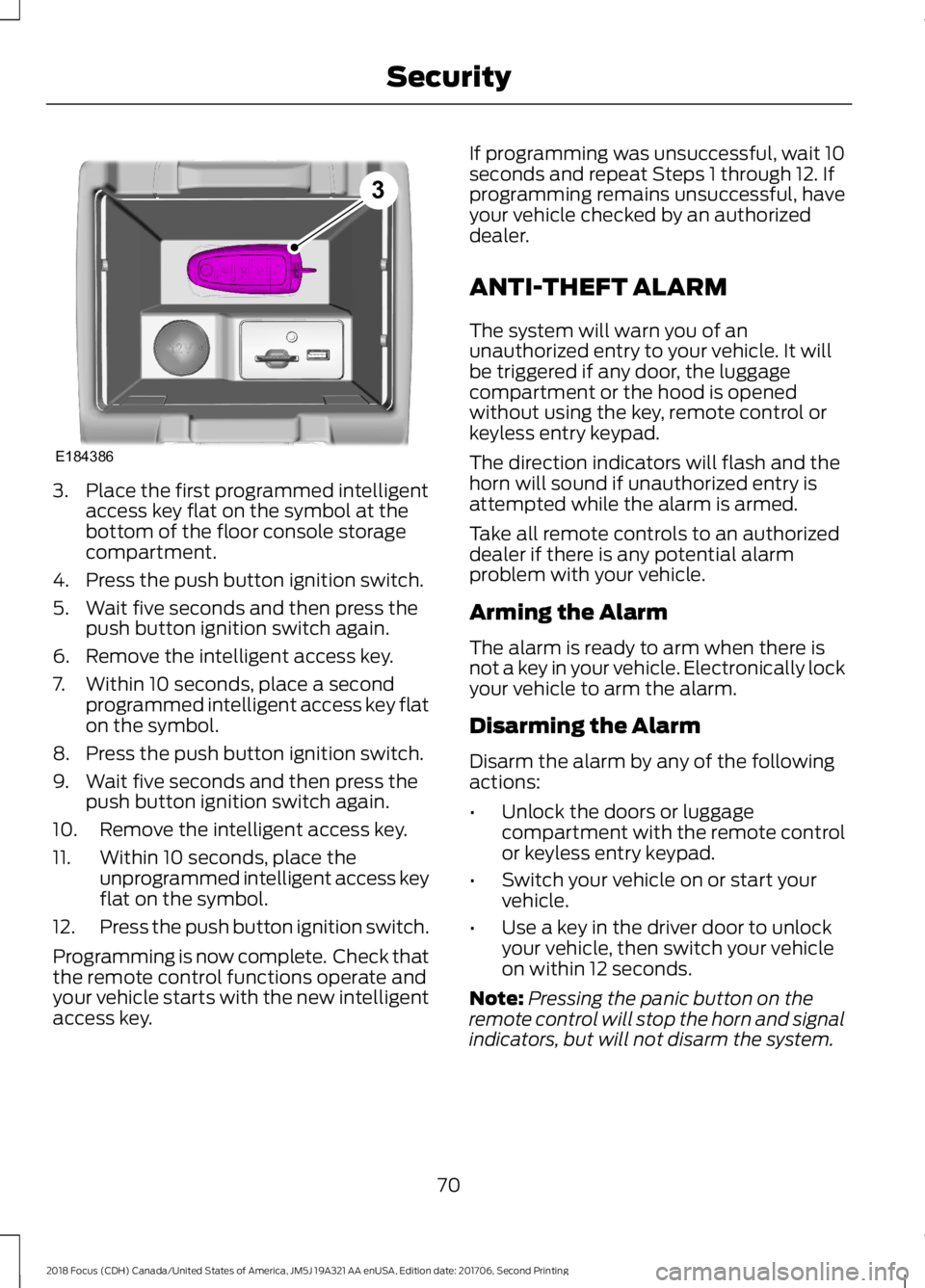
3.Place the first programmed intelligentaccess key flat on the symbol at thebottom of the floor console storagecompartment.
4.Press the push button ignition switch.
5.Wait five seconds and then press thepush button ignition switch again.
6.Remove the intelligent access key.
7.Within 10 seconds, place a secondprogrammed intelligent access key flaton the symbol.
8.Press the push button ignition switch.
9.Wait five seconds and then press thepush button ignition switch again.
10.Remove the intelligent access key.
11.Within 10 seconds, place theunprogrammed intelligent access keyflat on the symbol.
12.Press the push button ignition switch.
Programming is now complete. Check thatthe remote control functions operate andyour vehicle starts with the new intelligentaccess key.
If programming was unsuccessful, wait 10seconds and repeat Steps 1 through 12. Ifprogramming remains unsuccessful, haveyour vehicle checked by an authorizeddealer.
ANTI-THEFT ALARM
The system will warn you of anunauthorized entry to your vehicle. It willbe triggered if any door, the luggagecompartment or the hood is openedwithout using the key, remote control orkeyless entry keypad.
The direction indicators will flash and thehorn will sound if unauthorized entry isattempted while the alarm is armed.
Take all remote controls to an authorizeddealer if there is any potential alarmproblem with your vehicle.
Arming the Alarm
The alarm is ready to arm when there isnot a key in your vehicle. Electronically lockyour vehicle to arm the alarm.
Disarming the Alarm
Disarm the alarm by any of the followingactions:
•Unlock the doors or luggagecompartment with the remote controlor keyless entry keypad.
•Switch your vehicle on or start yourvehicle.
•Use a key in the driver door to unlockyour vehicle, then switch your vehicleon within 12 seconds.
Note:Pressing the panic button on theremote control will stop the horn and signalindicators, but will not disarm the system.
702018 Focus (CDH) Canada/United States of America, JM5J 19A321 AA enUSA, Edition date: 201706, Second PrintingSecurityE1843863
Page 97 of 473
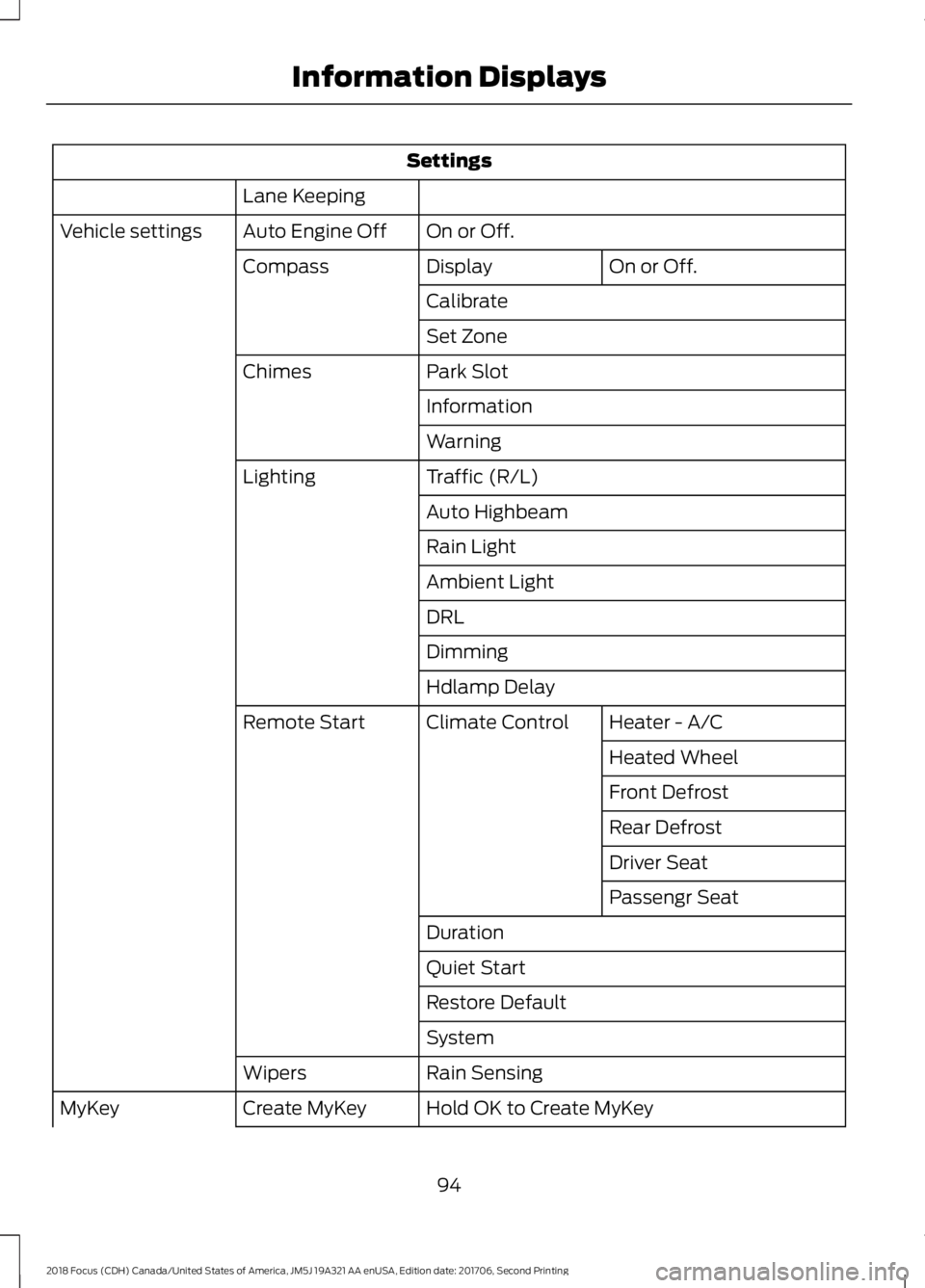
Settings
Lane Keeping
On or Off.Auto Engine OffVehicle settings
On or Off.DisplayCompass
Calibrate
Set Zone
Park SlotChimes
Information
Warning
Traffic (R/L)Lighting
Auto Highbeam
Rain Light
Ambient Light
DRL
Dimming
Hdlamp Delay
Heater - A/CClimate ControlRemote Start
Heated Wheel
Front Defrost
Rear Defrost
Driver Seat
Passengr Seat
Duration
Quiet Start
Restore Default
System
Rain SensingWipers
Hold OK to Create MyKeyCreate MyKeyMyKey
942018 Focus (CDH) Canada/United States of America, JM5J 19A321 AA enUSA, Edition date: 201706, Second PrintingInformation Displays
Page 102 of 473
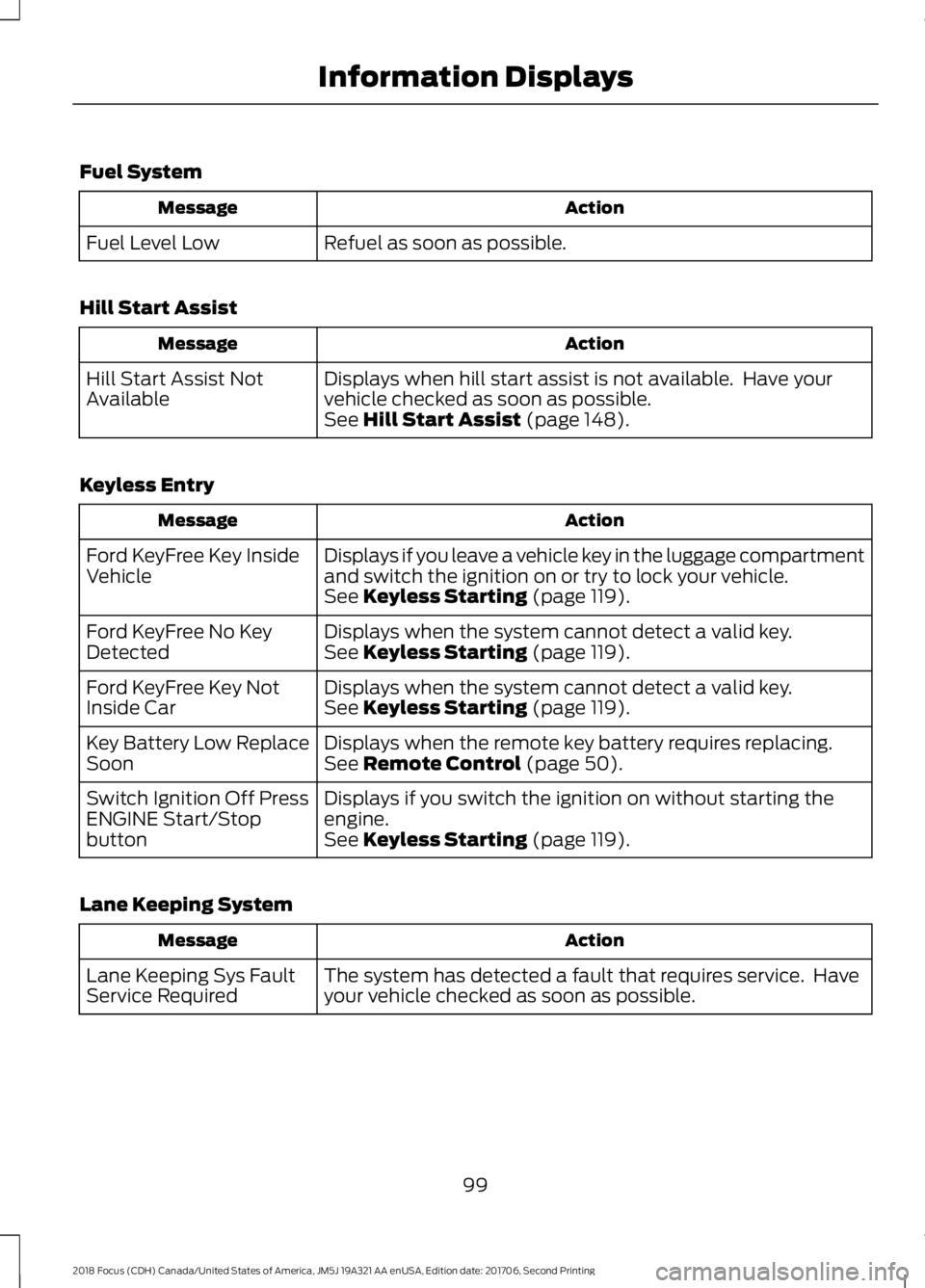
Fuel System
ActionMessage
Refuel as soon as possible.Fuel Level Low
Hill Start Assist
ActionMessage
Displays when hill start assist is not available. Have yourvehicle checked as soon as possible.Hill Start Assist NotAvailableSee Hill Start Assist (page 148).
Keyless Entry
ActionMessage
Displays if you leave a vehicle key in the luggage compartmentand switch the ignition on or try to lock your vehicle.Ford KeyFree Key InsideVehicleSee Keyless Starting (page 119).
Displays when the system cannot detect a valid key.Ford KeyFree No KeyDetectedSee Keyless Starting (page 119).
Displays when the system cannot detect a valid key.Ford KeyFree Key NotInside CarSee Keyless Starting (page 119).
Displays when the remote key battery requires replacing.Key Battery Low ReplaceSoonSee Remote Control (page 50).
Displays if you switch the ignition on without starting theengine.Switch Ignition Off PressENGINE Start/StopbuttonSee Keyless Starting (page 119).
Lane Keeping System
ActionMessage
The system has detected a fault that requires service. Haveyour vehicle checked as soon as possible.Lane Keeping Sys FaultService Required
992018 Focus (CDH) Canada/United States of America, JM5J 19A321 AA enUSA, Edition date: 201706, Second PrintingInformation Displays
Page 104 of 473
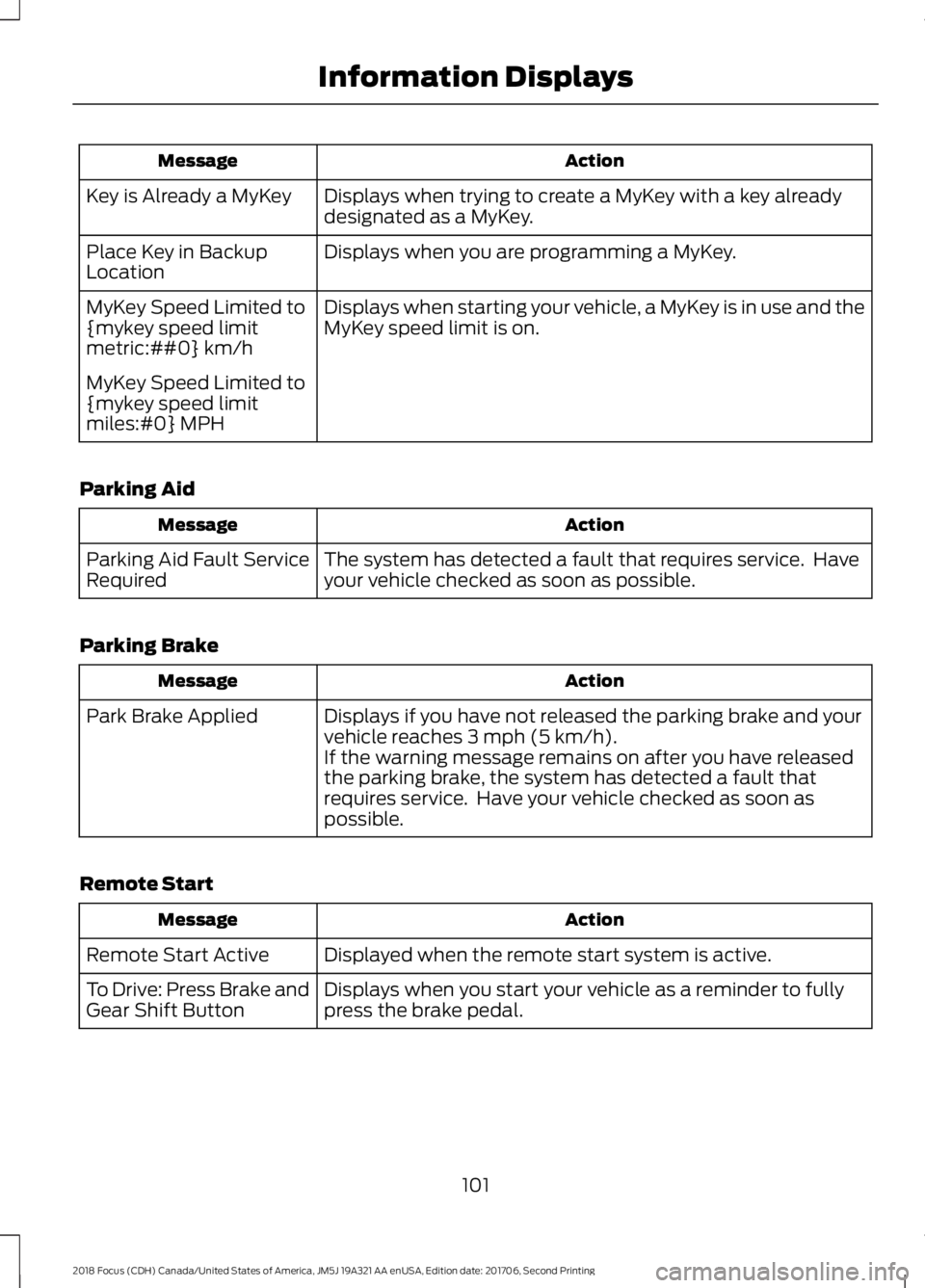
ActionMessage
Displays when trying to create a MyKey with a key alreadydesignated as a MyKey.Key is Already a MyKey
Displays when you are programming a MyKey.Place Key in BackupLocation
Displays when starting your vehicle, a MyKey is in use and theMyKey speed limit is on.MyKey Speed Limited to{mykey speed limitmetric:##0} km/h
MyKey Speed Limited to{mykey speed limitmiles:#0} MPH
Parking Aid
ActionMessage
The system has detected a fault that requires service. Haveyour vehicle checked as soon as possible.Parking Aid Fault ServiceRequired
Parking Brake
ActionMessage
Displays if you have not released the parking brake and yourvehicle reaches 3 mph (5 km/h).Park Brake Applied
If the warning message remains on after you have releasedthe parking brake, the system has detected a fault thatrequires service. Have your vehicle checked as soon aspossible.
Remote Start
ActionMessage
Displayed when the remote start system is active.Remote Start Active
Displays when you start your vehicle as a reminder to fullypress the brake pedal.To Drive: Press Brake andGear Shift Button
1012018 Focus (CDH) Canada/United States of America, JM5J 19A321 AA enUSA, Edition date: 201706, Second PrintingInformation Displays
Page 113 of 473
Replace the filter at regular intervals.
For additional cabin air filter information,or to replace the filter, see an authorizeddealer.
REMOTE START
The climate control system adjusts thecabin temperature during remote start.
You cannot adjust the system duringremote start operation. Switch on theignition to return the system to its previoussettings. You can now make adjustments.You need to switch on certainvehicle-dependent features, such as:
•Heated seats.
•Heated mirrors.
•Heated rear window.
•Heated steering wheel.
You can adjust the settings using theinformation display controls. SeeInformation Displays (page 92).
Automatic Settings
You can set the climate control to operatein AUTO mode through the informationdisplay setting: Remote Start > ClimateControl > Heater-A/C > Auto. The climatecontrol system automatically sets theinterior temperature to 72°F (22°C).
In hot weather, the system is set to 72°F(22°C). Cooled seats are set to high (ifavailable, and selected to AUTO in theinformation display).
In cold weather, the system is set to 72°F(22°C). The rear defroster and heatedmirrors automatically turn on.
Last Settings
You can set the climate control to operateusing the last climate control settingsthrough the information display setting:Remote Start > Climate Control >Heater–A/C > Last Settings. The climatecontrol system automatically uses thesettings last selected before you turnedoff the vehicle.
Heated and Cooled Devices
Heated devices typically switch on duringcold weather, and cooled devices duringhot weather.
1102018 Focus (CDH) Canada/United States of America, JM5J 19A321 AA enUSA, Edition date: 201706, Second PrintingClimate Control
Page 195 of 473
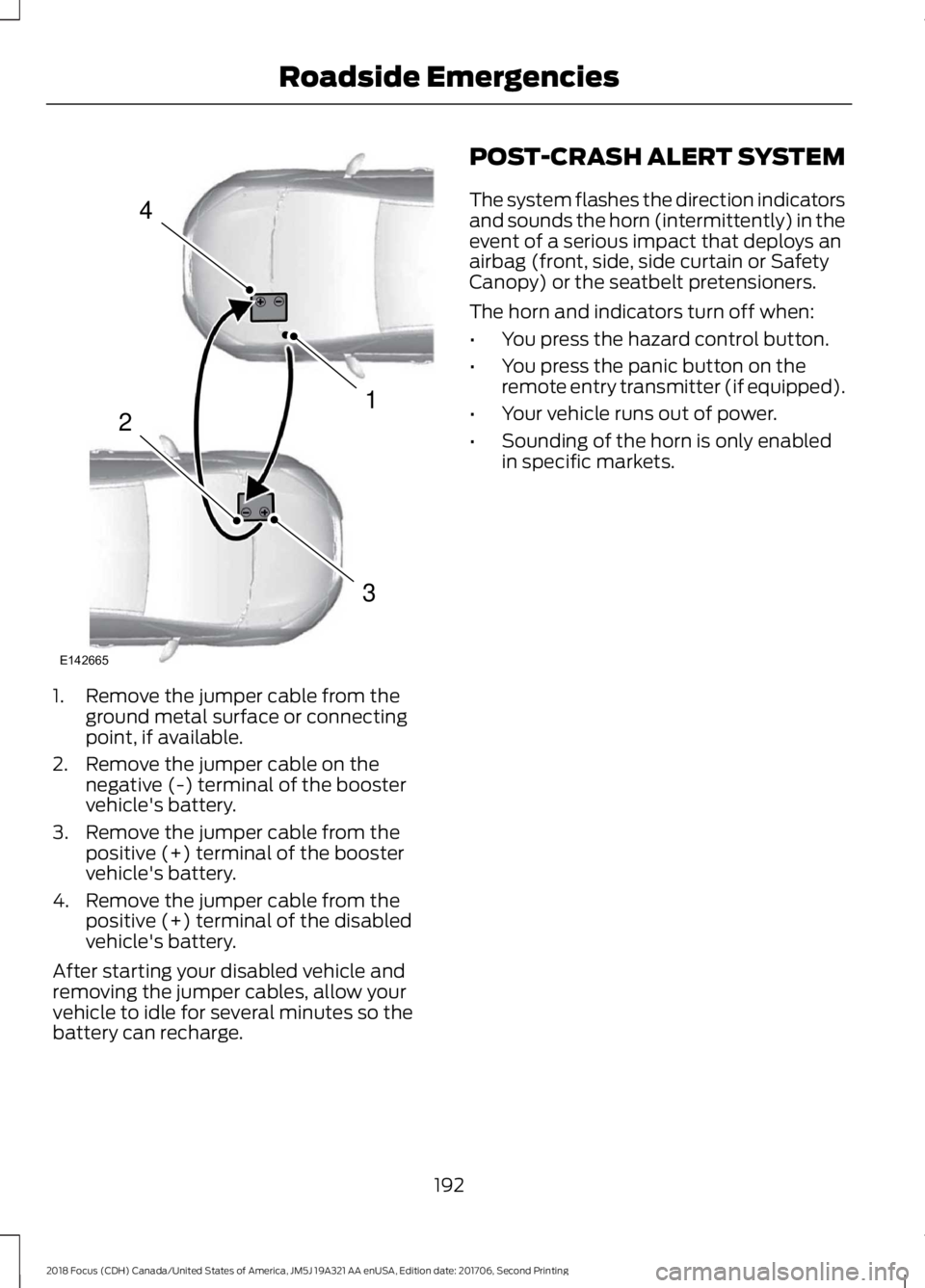
1.Remove the jumper cable from theground metal surface or connectingpoint, if available.
2.Remove the jumper cable on thenegative (-) terminal of the boostervehicle's battery.
3.Remove the jumper cable from thepositive (+) terminal of the boostervehicle's battery.
4.Remove the jumper cable from thepositive (+) terminal of the disabledvehicle's battery.
After starting your disabled vehicle andremoving the jumper cables, allow yourvehicle to idle for several minutes so thebattery can recharge.
POST-CRASH ALERT SYSTEM
The system flashes the direction indicatorsand sounds the horn (intermittently) in theevent of a serious impact that deploys anairbag (front, side, side curtain or SafetyCanopy) or the seatbelt pretensioners.
The horn and indicators turn off when:
•You press the hazard control button.
•You press the panic button on theremote entry transmitter (if equipped).
•Your vehicle runs out of power.
•Sounding of the horn is only enabledin specific markets.
1922018 Focus (CDH) Canada/United States of America, JM5J 19A321 AA enUSA, Edition date: 201706, Second PrintingRoadside Emergencies4132E142665
Page 346 of 473
Creating an Owner Account
Why do I need an owner account?
•Essential for keeping up with the latestsoftware and connected features.
•Access to customer support for anyquestions you may have.
•Maintain account permissions.
Visit the website to sign up and register.
Website
www.owner.ford.comwww.syncmyride.cawww.syncmaroute.ca
SYNC Connect (If Equipped)
With a SYNC® Connect-equipped vehicle,you can use FordPass® to track yourvehicle’s location and remotely accessvehicle features such as start, lock andunlock and vehicle status including fuellevel and approximate mileage. You canalso schedule specific times to remotelystart your vehicle so it’s ready to hit theroad as soon as you are. SYNC Connect isan optional feature on select 2017 MYvehicles. FordPass® is available througha free download via the Apple App Store®or Google Play™. Message and data ratesmay apply. Services may be limited bymobile phone network coverage area.
•FCC: LHJ-FAN
•IC: 2807E-FAN
Updating Your System
You can choose to download the updateonto a USB drive or use Wi-Fi to deliverautomatic updates.
USB Updates
To use the USB update you need to loginto your owner account and visit the SYNCsoftware update page.
Website
www.owner.ford.comwww.syncmyride.cawww.syncmaroute.ca
The website notifies you if an update isavailable. You can then select to downloadthe update.
You will need an empty USB drive. Pleasecheck the website for minimumrequirements. Once you have inserted theUSB drive into your computer, choose tostart the download. Follow the instructionsprovided to download the files to the USBdrive.
To install the update in your vehicle,remove anything that is plugged in the USBports on the media hub and plug in theUSB drive containing the update. Whenthe USB drive is plugged in, the installationshould begin immediately. After asuccessful installation, the update isavailable the next time the vehicle isstarted.
The installation of most files occurs in thebackground, and does not interrupt youruse of the system. Navigation updatescannot be installed in the background,because the files are too large.
Please refer to the website for any furtheractions.
Updating Over Wi-Fi
To update your System over Wi-Fi yourvehicle must be within the range of a Wi-Fiaccess point. Data rates may apply.
3432018 Focus (CDH) Canada/United States of America, JM5J 19A321 AA enUSA, Edition date: 201706, Second PrintingSYNC™ 3