traction control FORD FOCUS 2018 User Guide
[x] Cancel search | Manufacturer: FORD, Model Year: 2018, Model line: FOCUS, Model: FORD FOCUS 2018Pages: 473, PDF Size: 39.91 MB
Page 190 of 473

Before driving through standing water,check the depth. Never drive through waterthat is higher than the bottom of the frontrocker area of your vehicle.
When driving through standing water, drivevery slowly and do not stop your vehicle.Your brake performance and traction maybe limited. After driving through water andas soon as it is safe to do so:
•Lightly press the brake pedal to dry thebrakes and to check that they work.
•Check that the horn works.
•Check that the exterior lights work.
•Turn the steering wheel to check thatthe steering power assist works.
FLOOR MATS
WARNINGS
Use a floor mat designed to fit thefootwell of your vehicle that does notobstruct the pedal area. Failure tofollow this instruction could result in theloss of control of your vehicle, personalinjury or death.
Pedals that cannot move freely cancause loss of vehicle control andincrease the risk of serious personalinjury.
WARNINGS
Secure the floor mat to bothretention devices so that it cannotslip out of position and interfere withthe pedals. Failure to follow this instructioncould result in the loss of control of yourvehicle, personal injury or death.
Do not place additional floor matsor any other covering on top of theoriginal floor mats. This could resultin the floor mat interfering with theoperation of the pedals. Failure to followthis instruction could result in the loss ofcontrol of your vehicle, personal injury ordeath.
Always make sure that objectscannot fall into the driver foot wellwhile your vehicle is moving. Objectsthat are loose can become trapped underthe pedals causing a loss of vehicle control.
To install the floor mats, position the floormat eyelet over the retention post andpress down to lock in position.
To remove the floor mat, reverse theinstallation procedure.
Note:Regularly check the floor mats tomake sure they are secure.
1872018 Focus (CDH) Canada/United States of America, JM5J 19A321 AA enUSA, Edition date: 201706, Second PrintingDriving HintsE266447 E142666
Page 203 of 473
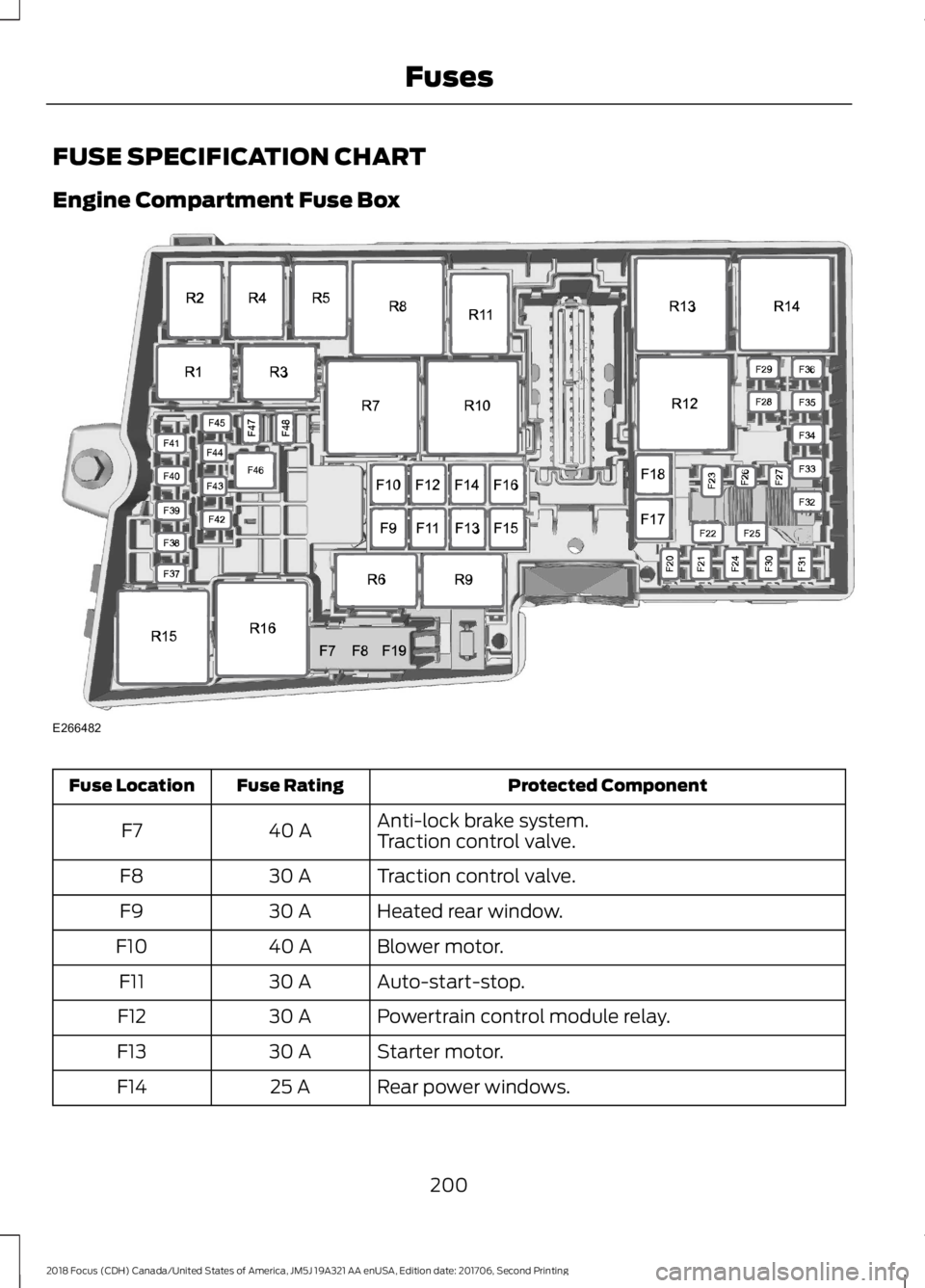
FUSE SPECIFICATION CHART
Engine Compartment Fuse Box
Protected ComponentFuse RatingFuse Location
Anti-lock brake system.40 AF7Traction control valve.
Traction control valve.30 AF8
Heated rear window.30 AF9
Blower motor.40 AF10
Auto-start-stop.30 AF11
Powertrain control module relay.30 AF12
Starter motor.30 AF13
Rear power windows.25 AF14
2002018 Focus (CDH) Canada/United States of America, JM5J 19A321 AA enUSA, Edition date: 201706, Second PrintingFusesE266482
Page 204 of 473
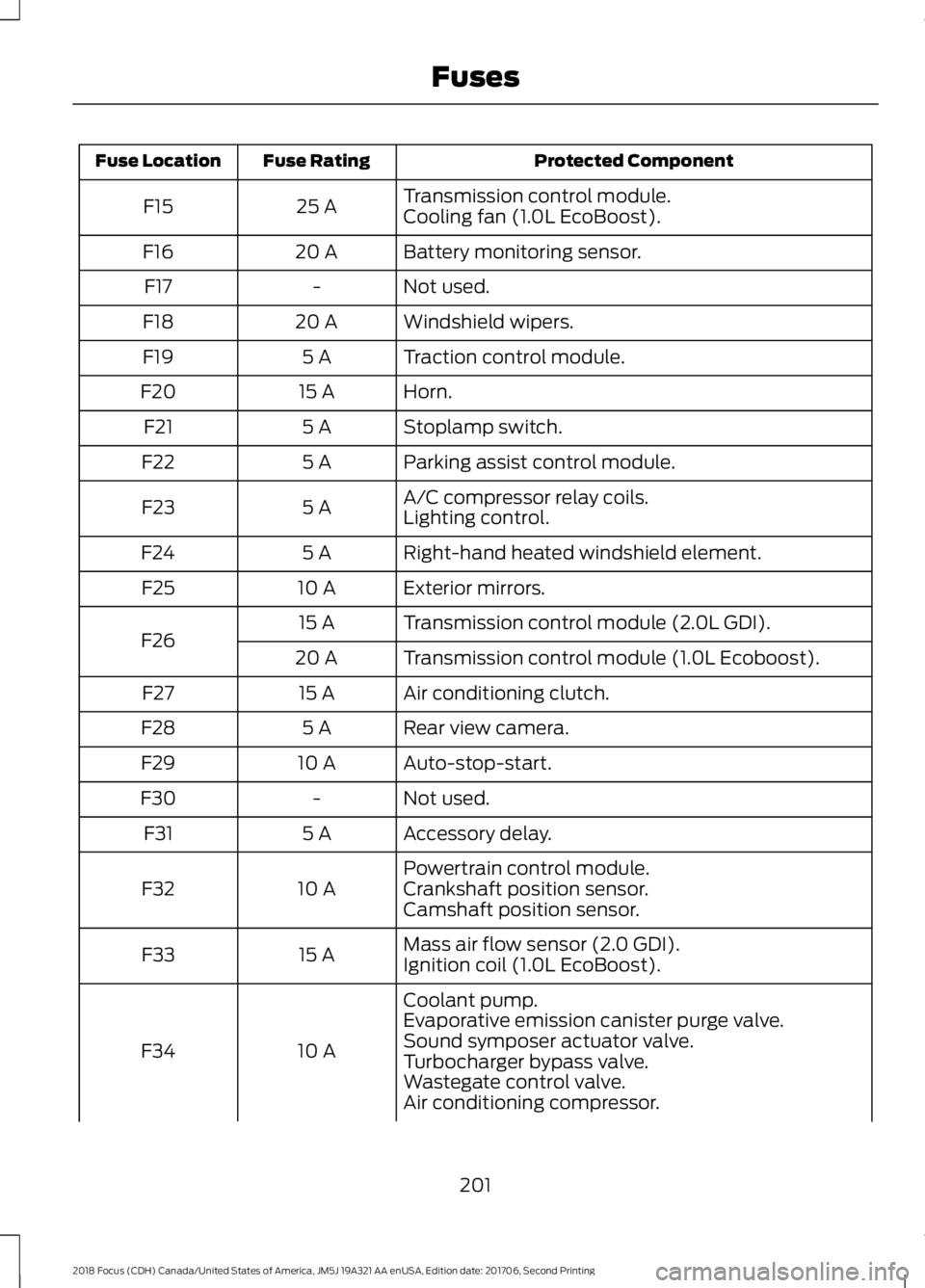
Protected ComponentFuse RatingFuse Location
Transmission control module.25 AF15Cooling fan (1.0L EcoBoost).
Battery monitoring sensor.20 AF16
Not used.-F17
Windshield wipers.20 AF18
Traction control module.5 AF19
Horn.15 AF20
Stoplamp switch.5 AF21
Parking assist control module.5 AF22
A/C compressor relay coils.5 AF23Lighting control.
Right-hand heated windshield element.5 AF24
Exterior mirrors.10 AF25
Transmission control module (2.0L GDI).15 AF26Transmission control module (1.0L Ecoboost).20 A
Air conditioning clutch.15 AF27
Rear view camera.5 AF28
Auto-stop-start.10 AF29
Not used.-F30
Accessory delay.5 AF31
Powertrain control module.10 AF32Crankshaft position sensor.Camshaft position sensor.
Mass air flow sensor (2.0 GDI).15 AF33Ignition coil (1.0L EcoBoost).
Coolant pump.
10 AF34
Evaporative emission canister purge valve.Sound symposer actuator valve.Turbocharger bypass valve.Wastegate control valve.Air conditioning compressor.
2012018 Focus (CDH) Canada/United States of America, JM5J 19A321 AA enUSA, Edition date: 201706, Second PrintingFuses
Page 248 of 473
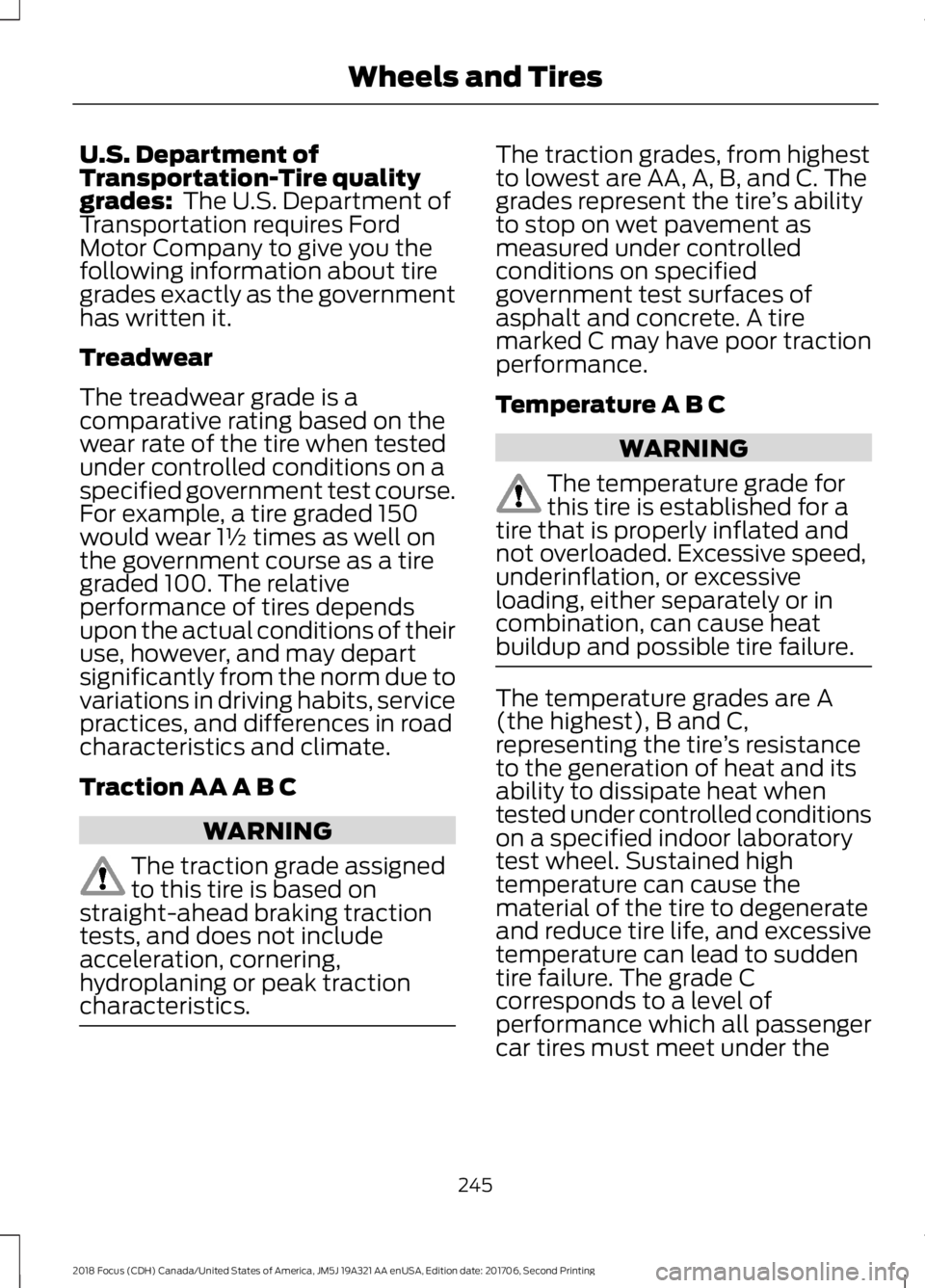
U.S. Department ofTransportation-Tire qualitygrades: The U.S. Department ofTransportation requires FordMotor Company to give you thefollowing information about tiregrades exactly as the governmenthas written it.
Treadwear
The treadwear grade is acomparative rating based on thewear rate of the tire when testedunder controlled conditions on aspecified government test course.For example, a tire graded 150would wear 1½ times as well onthe government course as a tiregraded 100. The relativeperformance of tires dependsupon the actual conditions of their
use, however, and may departsignificantly from the norm due tovariations in driving habits, servicepractices, and differences in roadcharacteristics and climate.
Traction AA A B C
WARNING
The traction grade assignedto this tire is based onstraight-ahead braking tractiontests, and does not includeacceleration, cornering,hydroplaning or peak tractioncharacteristics.
The traction grades, from highestto lowest are AA, A, B, and C. Thegrades represent the tire’s abilityto stop on wet pavement asmeasured under controlledconditions on specifiedgovernment test surfaces ofasphalt and concrete. A tiremarked C may have poor tractionperformance.
Temperature A B C
WARNING
The temperature grade forthis tire is established for atire that is properly inflated andnot overloaded. Excessive speed,underinflation, or excessiveloading, either separately or incombination, can cause heat
buildup and possible tire failure.
The temperature grades are A(the highest), B and C,representing the tire’s resistanceto the generation of heat and itsability to dissipate heat whentested under controlled conditionson a specified indoor laboratorytest wheel. Sustained hightemperature can cause thematerial of the tire to degenerateand reduce tire life, and excessivetemperature can lead to suddentire failure. The grade Ccorresponds to a level ofperformance which all passengercar tires must meet under the
2452018 Focus (CDH) Canada/United States of America, JM5J 19A321 AA enUSA, Edition date: 201706, Second PrintingWheels and Tires
Page 252 of 473
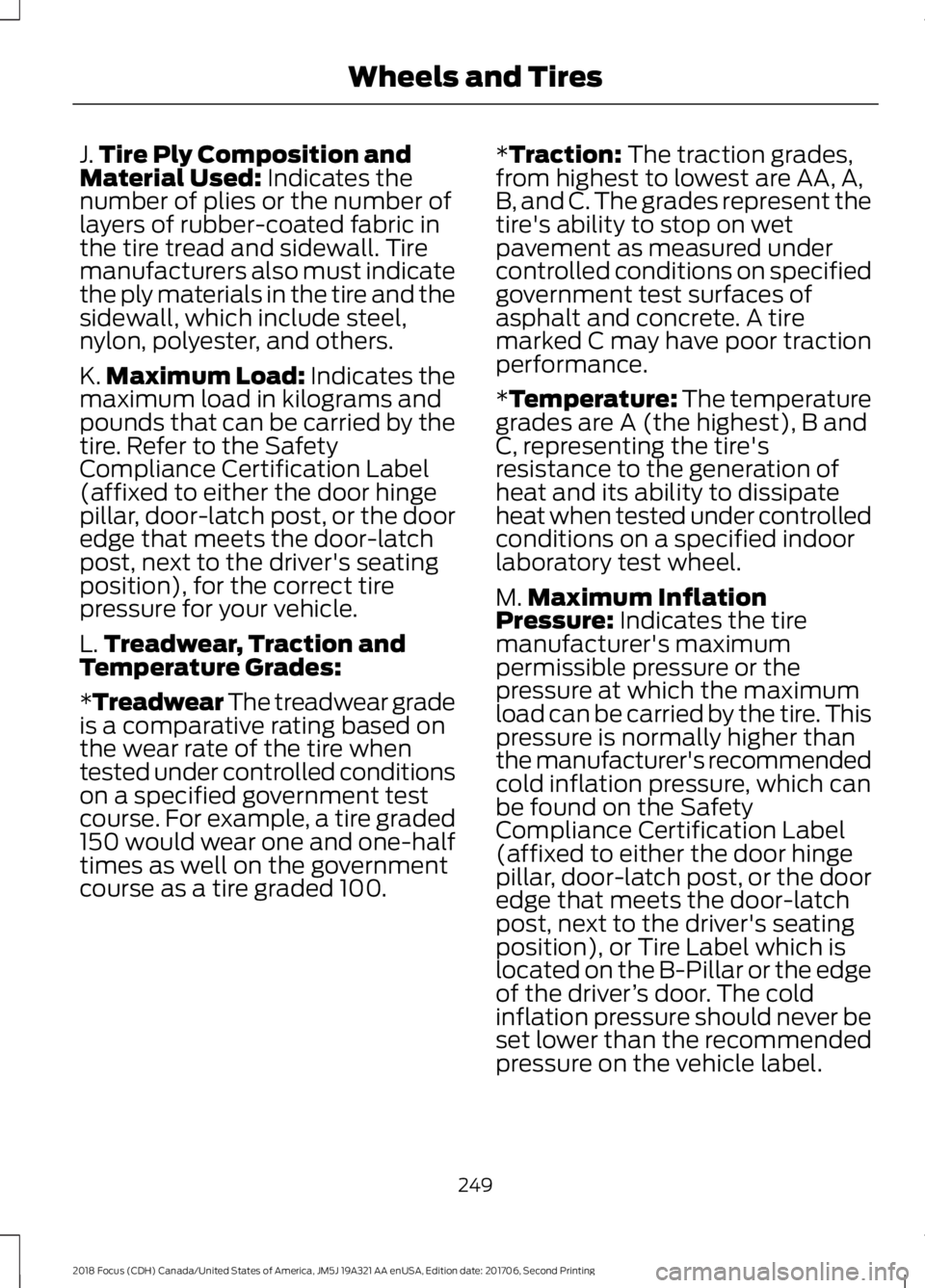
J.Tire Ply Composition andMaterial Used: Indicates thenumber of plies or the number oflayers of rubber-coated fabric inthe tire tread and sidewall. Tiremanufacturers also must indicatethe ply materials in the tire and thesidewall, which include steel,nylon, polyester, and others.
K.Maximum Load: Indicates themaximum load in kilograms andpounds that can be carried by thetire. Refer to the SafetyCompliance Certification Label(affixed to either the door hingepillar, door-latch post, or the dooredge that meets the door-latchpost, next to the driver's seatingposition), for the correct tirepressure for your vehicle.
L.Treadwear, Traction andTemperature Grades:
*Treadwear The treadwear gradeis a comparative rating based onthe wear rate of the tire whentested under controlled conditionson a specified government testcourse. For example, a tire graded150 would wear one and one-halftimes as well on the governmentcourse as a tire graded 100.
*Traction: The traction grades,from highest to lowest are AA, A,B, and C. The grades represent thetire's ability to stop on wetpavement as measured undercontrolled conditions on specifiedgovernment test surfaces ofasphalt and concrete. A tiremarked C may have poor tractionperformance.
*Temperature: The temperaturegrades are A (the highest), B andC, representing the tire'sresistance to the generation ofheat and its ability to dissipateheat when tested under controlledconditions on a specified indoorlaboratory test wheel.
M.Maximum InflationPressure: Indicates the tiremanufacturer's maximumpermissible pressure or thepressure at which the maximumload can be carried by the tire. Thispressure is normally higher thanthe manufacturer's recommendedcold inflation pressure, which canbe found on the SafetyCompliance Certification Label(affixed to either the door hingepillar, door-latch post, or the dooredge that meets the door-latchpost, next to the driver's seatingposition), or Tire Label which islocated on the B-Pillar or the edgeof the driver’s door. The coldinflation pressure should never beset lower than the recommendedpressure on the vehicle label.
2492018 Focus (CDH) Canada/United States of America, JM5J 19A321 AA enUSA, Edition date: 201706, Second PrintingWheels and Tires
Page 262 of 473
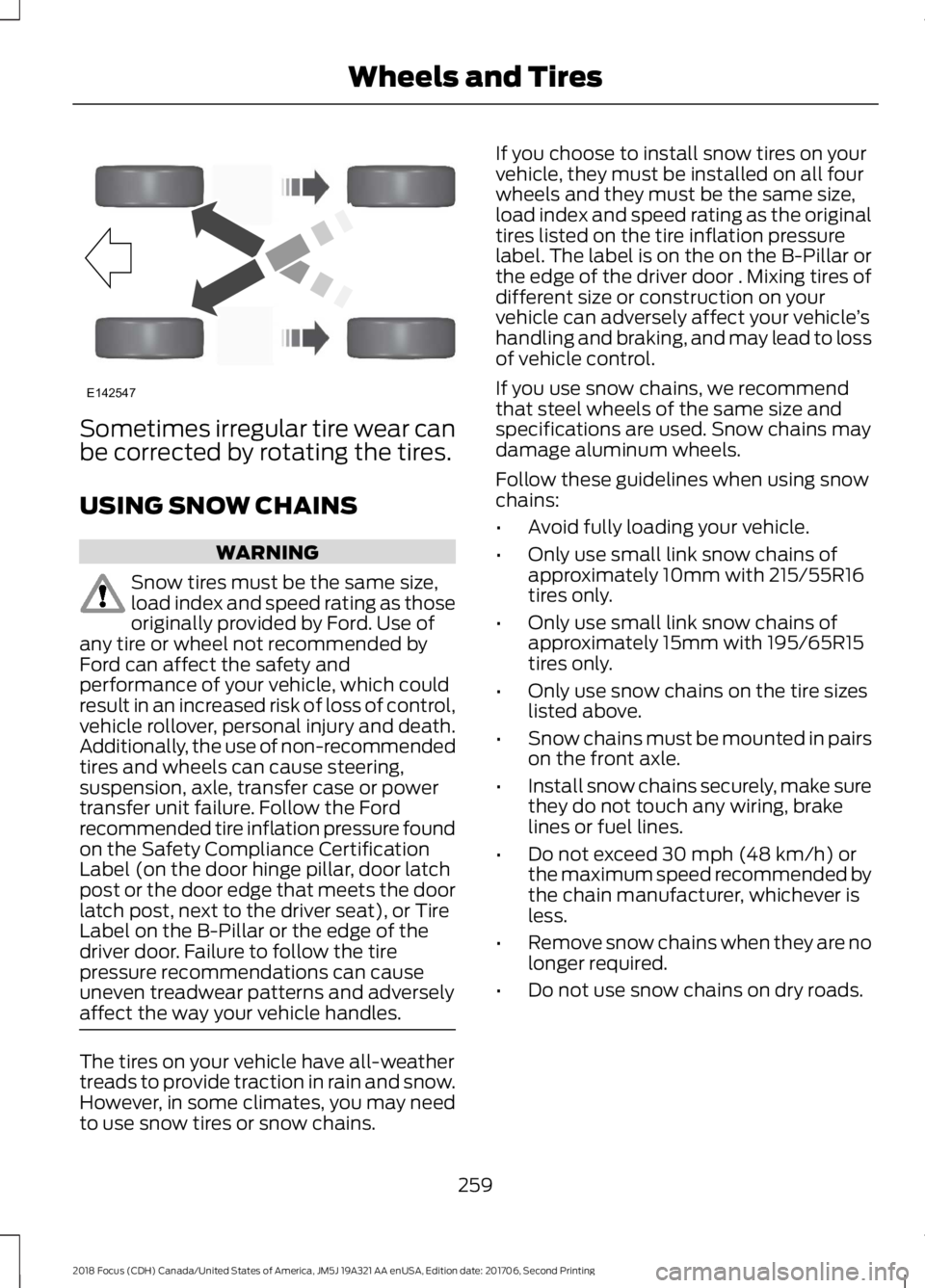
Sometimes irregular tire wear canbe corrected by rotating the tires.
USING SNOW CHAINS
WARNING
Snow tires must be the same size,load index and speed rating as thoseoriginally provided by Ford. Use ofany tire or wheel not recommended byFord can affect the safety andperformance of your vehicle, which couldresult in an increased risk of loss of control,vehicle rollover, personal injury and death.Additionally, the use of non-recommendedtires and wheels can cause steering,suspension, axle, transfer case or powertransfer unit failure. Follow the Fordrecommended tire inflation pressure foundon the Safety Compliance CertificationLabel (on the door hinge pillar, door latchpost or the door edge that meets the doorlatch post, next to the driver seat), or TireLabel on the B-Pillar or the edge of thedriver door. Failure to follow the tirepressure recommendations can causeuneven treadwear patterns and adverselyaffect the way your vehicle handles.
The tires on your vehicle have all-weathertreads to provide traction in rain and snow.However, in some climates, you may needto use snow tires or snow chains.
If you choose to install snow tires on yourvehicle, they must be installed on all fourwheels and they must be the same size,load index and speed rating as the originaltires listed on the tire inflation pressurelabel. The label is on the on the B-Pillar orthe edge of the driver door . Mixing tires ofdifferent size or construction on yourvehicle can adversely affect your vehicle’shandling and braking, and may lead to lossof vehicle control.
If you use snow chains, we recommendthat steel wheels of the same size andspecifications are used. Snow chains maydamage aluminum wheels.
Follow these guidelines when using snowchains:
•Avoid fully loading your vehicle.
•Only use small link snow chains ofapproximately 10mm with 215/55R16tires only.
•Only use small link snow chains ofapproximately 15mm with 195/65R15tires only.
•Only use snow chains on the tire sizeslisted above.
•Snow chains must be mounted in pairson the front axle.
•Install snow chains securely, make surethey do not touch any wiring, brakelines or fuel lines.
•Do not exceed 30 mph (48 km/h) orthe maximum speed recommended bythe chain manufacturer, whichever isless.
•Remove snow chains when they are nolonger required.
•Do not use snow chains on dry roads.
2592018 Focus (CDH) Canada/United States of America, JM5J 19A321 AA enUSA, Edition date: 201706, Second PrintingWheels and TiresE142547
Page 379 of 473
For restaurants, cityseeker can provideinformation such as star rating, averagecost, review, handicap access, hours ofoperation, and website address.
For hotels, cityseeker can provideinformation such as star rating, pricecategory, review, check-in and checkouttimes, hotel service icons and websiteaddress. Hotel service icons include:
•Restaurant
•Business center
•Handicap facilities
•Laundry
•Refrigerator
•24 hour room service
•Fitness center
•Internet access
•Pool
•Wi-Fi
Attractions include nearby landmarks,amusement parks, historic buildings andmore. cityseeker can provide informationsuch as star rating, reviews, hour ofoperation and admission price.
SiriusXM Traffic and Travel Link (If
Equipped)
SiriusXM Traffic and Travel Link is availableon vehicles equipped with navigation andonly in select markets. You must activateand subscribe to receive SiriusXM Trafficand Travel Link information. It helps youlocate the best gas prices, find movielistings, get current traffic alerts, view theweather map, get accurate ski conditionsand see current sports scores. See Apps(page 376).
The system calculates a reasonableefficient route based on available speedlimits, traffic, and road conditions. You mayknow a local short cut that is more efficientat a given time than the route provided bySYNC 3, but you should expect a slightdifference in minutes or miles with theSYNC 3 route.
Navigation Map Updates
Annual navigation map updates areavailable for purchase through yourdealership, by calling 1-866-462-8837 inthe United States and Canada or01-800-557-5539 in Mexico. You can alsovisit:
Website
www.navigation.com/sync
You need to specify the make and modelof your vehicle to determine if there is anupdate available.
HERE is the digital map provider for thenavigation application. If you find map dataerrors, you may report them directly toHERE by going towww.here.com/mapcreator. HEREevaluates all reported map errors andresponds with the result of theirinvestigation by e-mail.
Map coverage includes the USA (includingPuerto Rico and the US Virgin Islands),Canada and Mexico.
APPS
The system enables voice, steering wheel,and touch screen control of SYNC 3AppLink enabled smartphone apps.
Once an app is running through AppLink,you can control main features of the appthrough voice commands and steeringwheel controls.
3762018 Focus (CDH) Canada/United States of America, JM5J 19A321 AA enUSA, Edition date: 201706, Second PrintingSYNC™ 3
Page 436 of 473
SYNC® Automotive Important SafetyInformation Read and followinstructions:
•Before using your SYNC® system, readand follow all instructions and safetyinformation provided in this end usermanual ("Owner Guide".) Notfollowing precautions found in theOwner Guide can lead to an accidentor other serious injuries.
General Operation
•Voice Command Control: Certainfunctions within the SYNC® systemmay be accomplished using voicecommands. Using voice commandswhile driving helps you to operate thesystem without removing your handsfrom the wheel or eyes from the road.
•Prolonged Views of Screen: Do notaccess any function requiring aprolonged view of the screen while youare driving. Pull over in a safe and legalmanner before attempting to access afunction of the system requiringprolonged attention.
•Volume Setting: Do not raise thevolume excessively. Keep the volumeat a level where you can still hearoutside traffic and emergency signalswhile driving. Driving while unable tohear these sounds could cause anaccident.
•Navigation Features: Any navigationfeatures included in the system areintended to provide turn by turninstructions to get you to a desireddestination. Please make certain allpersons using this system carefullyread and follow instructions and safetyinformation fully.
•Distraction Hazard: Any navigationfeatures may require manual(non-verbal) setup. Attempting toperform such set-up or insert datawhile driving can distract your attentionand could cause an accident or otherserious injury. Stop the vehicle in a safeand legal manner before attemptingthese operations.
•Let Your Judgment Prevail: Anynavigation features are provided onlyas an aid. Make your driving decisionsbased on your observations of localconditions and existing trafficregulations. Any such feature is not asubstitute for your personal judgment.Any route suggestions made by thissystem should never replace any localtraffic regulations or your personaljudgment or knowledge of safe drivingpractices.
•Route Safety: Do not follow the routesuggestions if doing so would result inan unsafe or illegal maneuver, if youwould be placed in an unsafe situation,or if you would be directed into an areathat you consider unsafe. The driver isultimately responsible for the safeoperation of the vehicle and therefore,must evaluate whether it is safe tofollow the suggested directions.
•Potential Map Inaccuracy: Mapsused by this system may be inaccuratebecause of changes in roads, trafficcontrols or driving conditions. Alwaysuse good judgment and common sensewhen following the suggested routes.
•Emergency Services: Do not rely onany navigation features included in thesystem to route you to emergencyservices. Ask local authorities or anemergency services operator for theselocations. Not all emergency servicessuch as police, fire stations, hospitalsand clinics are likely to be contained inthe map database for such navigationfeatures.
4332018 Focus (CDH) Canada/United States of America, JM5J 19A321 AA enUSA, Edition date: 201706, Second PrintingAppendices
Page 470 of 473
Sun Visors.........................................................84Illuminated Vanity Mirror...................................84Supplementary Restraints System.........38Principle of Operation........................................38Symbols Glossary.............................................7SYNC™ 3........................................................335General Information.........................................335SYNC™ 3 Troubleshooting......................393SYNC™ Applications and Services.......313911 Assist................................................................313SYNC Mobile Apps.............................................315SYNC™............................................................297General Information..........................................297SYNC™ Troubleshooting..........................327
T
TailgateSee: Manual Liftgate...........................................64Technical SpecificationsSee: Capacities and Specifications............268The Better Business Bureau (BBB) AutoLine Program (U.S. Only).......................195Tire Care..........................................................244Glossary of Tire Terminology........................246Important Information for 235/40R18Low-Profile Tires and Wheels..................244Information About Uniform Tire QualityGrading.............................................................244Information Contained on the TireSidewall............................................................247Temperature A B C............................................245Traction AA A B C...............................................245Treadwear.............................................................245Tire Pressure Monitoring System..........260Changing Tires With a Tire PressureMonitoring System........................................261Understanding Your Tire PressureMonitoring System .......................................261TiresSee: Wheels and Tires.....................................244Towing a Trailer.............................................182Towing the Vehicle on Four Wheels - 1.0LEcoBoost™, AutomaticTransmission...............................................183Emergency Towing.............................................183Recreational Towing..........................................183
Towing the Vehicle on Four Wheels -2.0L, Automatic Transmission..............183Emergency Towing.............................................183Recreational Towing.........................................184Towing the Vehicle on Four Wheels -Manual Transmission...............................182Recreational Towing..........................................182Towing..............................................................182Traction Control............................................150Principle of Operation......................................150Transmission Code Designation.............273Transmission..................................................140Transporting the Vehicle............................182Trip Computer.................................................95All Values................................................................95Average Fuel Consumption..............................95Distance to Empty...............................................95Instantaneous Fuel.............................................95Outside Air Temperature...................................95Resetting the Trip Computer...........................95Trip Odometer.......................................................95Trip Timer................................................................96Type Approvals............................................455
U
Under Hood Overview - 1.0LEcoBoost™..................................................213Under Hood Overview - 2.0L....................214Unique Driving Characteristics.................127USB Port.........................................................296Using Cruise Control....................................162Switching Cruise Control Off..........................162Switching Cruise Control On..........................162Using MyKey With Remote StartSystems..........................................................58Using Snow Chains.....................................259Using Stability Control................................152Using SYNC™ With Your MediaPlayer.............................................................318Accessing Your USB Song Library................322Bluetooth Devices and SystemSettings.............................................................324Connecting Your Digital Media Player to theUSB Port...........................................................318Media Menu Features........................................321Media Voice Commands.................................319USB 2......................................................................324
4672018 Focus (CDH) Canada/United States of America, JM5J 19A321 AA enUSA, Edition date: 201706, Second PrintingIndex
Page 471 of 473
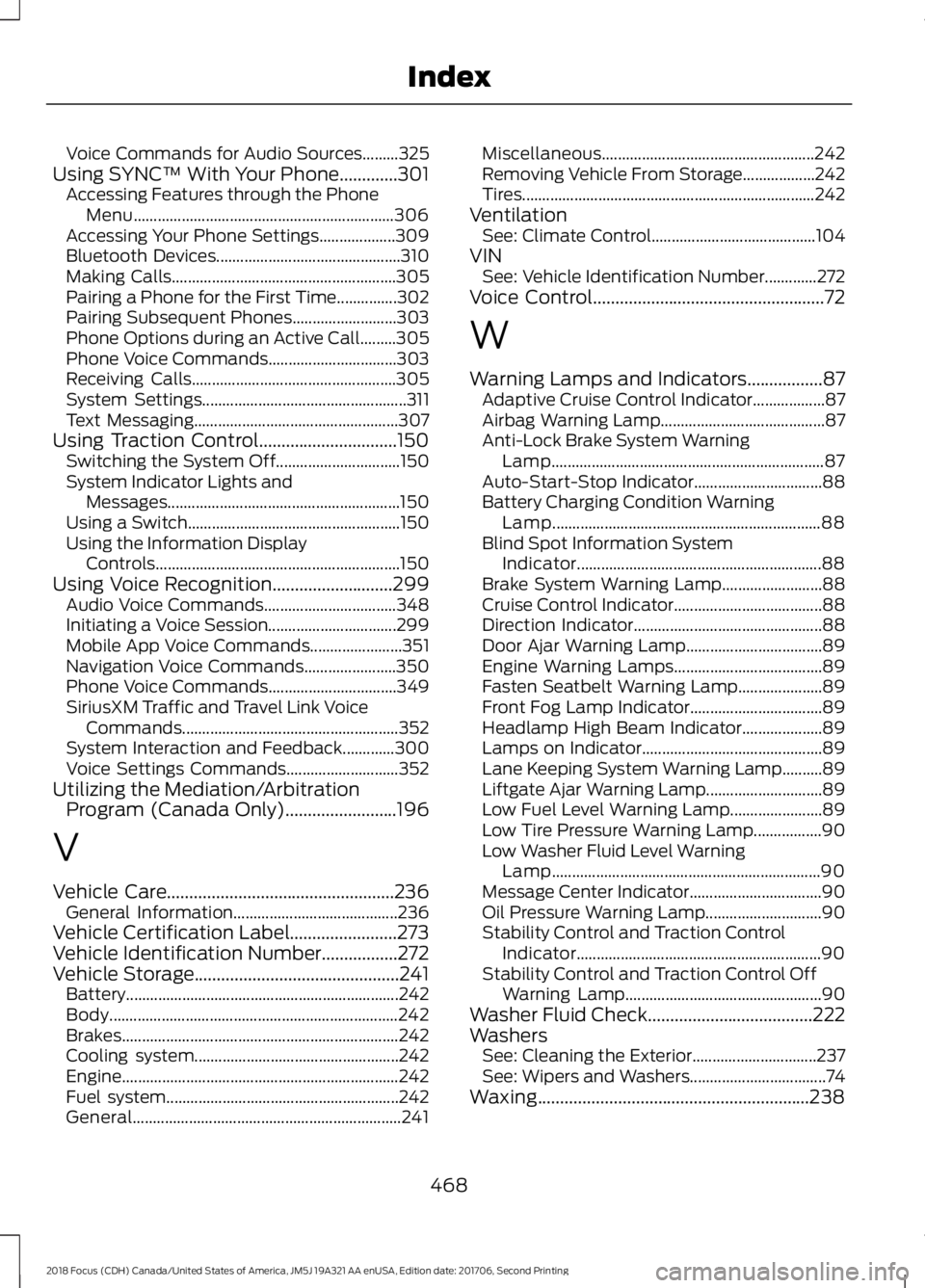
Voice Commands for Audio Sources.........325Using SYNC™ With Your Phone.............301Accessing Features through the PhoneMenu.................................................................306Accessing Your Phone Settings...................309Bluetooth Devices..............................................310Making Calls........................................................305Pairing a Phone for the First Time...............302Pairing Subsequent Phones..........................303Phone Options during an Active Call.........305Phone Voice Commands................................303Receiving Calls...................................................305System Settings...................................................311Text Messaging...................................................307Using Traction Control...............................150Switching the System Off...............................150System Indicator Lights andMessages..........................................................150Using a Switch.....................................................150Using the Information DisplayControls.............................................................150Using Voice Recognition...........................299Audio Voice Commands.................................348Initiating a Voice Session................................299Mobile App Voice Commands.......................351Navigation Voice Commands.......................350Phone Voice Commands................................349SiriusXM Traffic and Travel Link VoiceCommands......................................................352System Interaction and Feedback.............300Voice Settings Commands............................352Utilizing the Mediation/ArbitrationProgram (Canada Only).........................196
V
Vehicle Care...................................................236General Information.........................................236Vehicle Certification Label........................273Vehicle Identification Number.................272Vehicle Storage..............................................241Battery....................................................................242Body........................................................................242Brakes.....................................................................242Cooling system...................................................242Engine.....................................................................242Fuel system..........................................................242General...................................................................241
Miscellaneous.....................................................242Removing Vehicle From Storage..................242Tires.........................................................................242VentilationSee: Climate Control.........................................104VINSee: Vehicle Identification Number.............272Voice Control....................................................72
W
Warning Lamps and Indicators.................87Adaptive Cruise Control Indicator..................87Airbag Warning Lamp.........................................87Anti-Lock Brake System WarningLamp....................................................................87Auto-Start-Stop Indicator................................88Battery Charging Condition WarningLamp...................................................................88Blind Spot Information SystemIndicator.............................................................88Brake System Warning Lamp.........................88Cruise Control Indicator.....................................88Direction Indicator...............................................88Door Ajar Warning Lamp..................................89Engine Warning Lamps.....................................89Fasten Seatbelt Warning Lamp.....................89Front Fog Lamp Indicator.................................89Headlamp High Beam Indicator....................89Lamps on Indicator.............................................89Lane Keeping System Warning Lamp..........89Liftgate Ajar Warning Lamp.............................89Low Fuel Level Warning Lamp.......................89Low Tire Pressure Warning Lamp.................90Low Washer Fluid Level WarningLamp...................................................................90Message Center Indicator.................................90Oil Pressure Warning Lamp.............................90Stability Control and Traction ControlIndicator.............................................................90Stability Control and Traction Control OffWarning Lamp.................................................90Washer Fluid Check.....................................222WashersSee: Cleaning the Exterior...............................237See: Wipers and Washers..................................74Waxing.............................................................238
4682018 Focus (CDH) Canada/United States of America, JM5J 19A321 AA enUSA, Edition date: 201706, Second PrintingIndex