wheel FORD FOCUS 2018 User Guide
[x] Cancel search | Manufacturer: FORD, Model Year: 2018, Model line: FOCUS, Model: FORD FOCUS 2018Pages: 473, PDF Size: 39.91 MB
Page 76 of 473
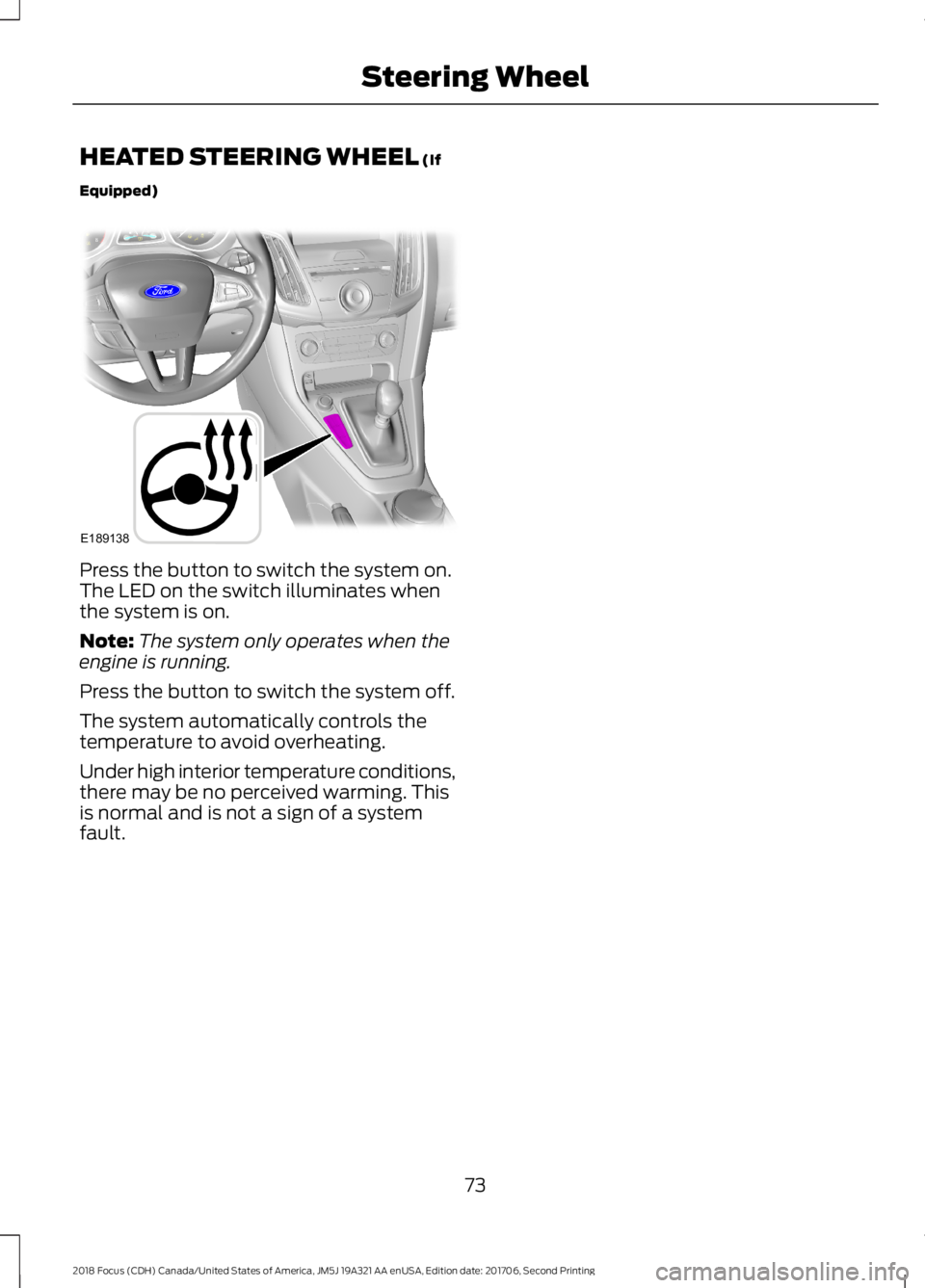
HEATED STEERING WHEEL (If
Equipped)
Press the button to switch the system on.The LED on the switch illuminates whenthe system is on.
Note:The system only operates when theengine is running.
Press the button to switch the system off.
The system automatically controls thetemperature to avoid overheating.
Under high interior temperature conditions,there may be no perceived warming. Thisis normal and is not a sign of a systemfault.
732018 Focus (CDH) Canada/United States of America, JM5J 19A321 AA enUSA, Edition date: 201706, Second PrintingSteering WheelE189138
Page 95 of 473
GENERAL INFORMATION
WARNING
Driving while distracted can result inloss of vehicle control, crash andinjury. We strongly recommend thatyou use extreme caution when using anydevice that may take your focus off theroad. Your primary responsibility is the safeoperation of your vehicle. We recommendagainst the use of any hand-held devicewhile driving and encourage the use ofvoice-operated systems when possible.Make sure you are aware of all applicablelocal laws that may affect the use ofelectronic devices while driving.
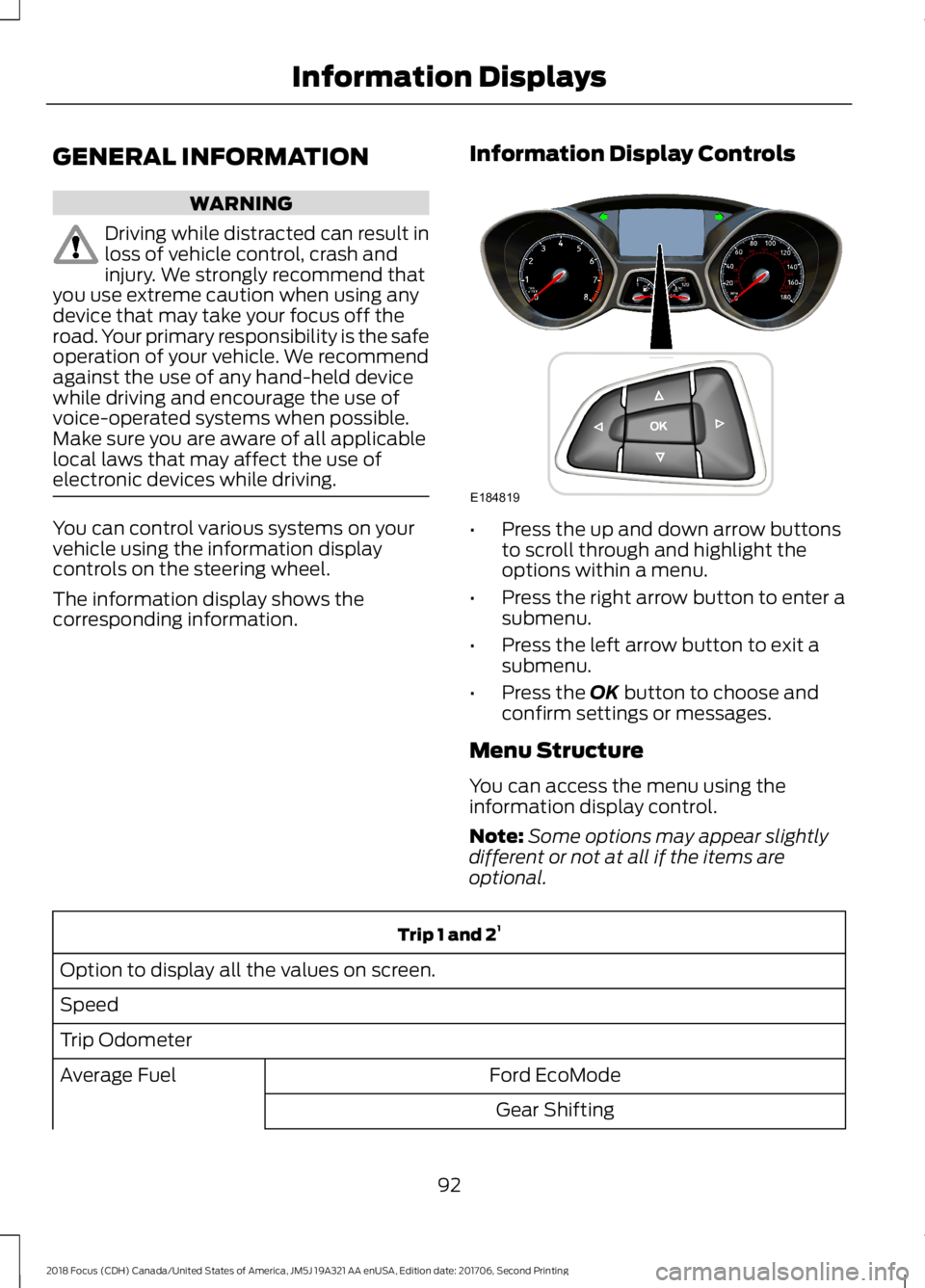
You can control various systems on yourvehicle using the information displaycontrols on the steering wheel.
The information display shows thecorresponding information.
Information Display Controls
•Press the up and down arrow buttonsto scroll through and highlight theoptions within a menu.
•Press the right arrow button to enter asubmenu.
•Press the left arrow button to exit asubmenu.
•Press the OK button to choose andconfirm settings or messages.
Menu Structure
You can access the menu using theinformation display control.
Note:Some options may appear slightlydifferent or not at all if the items areoptional.
Trip 1 and 21
Option to display all the values on screen.
Speed
Trip Odometer
Ford EcoModeAverage Fuel
Gear Shifting
922018 Focus (CDH) Canada/United States of America, JM5J 19A321 AA enUSA, Edition date: 201706, Second PrintingInformation DisplaysE184819
Page 97 of 473
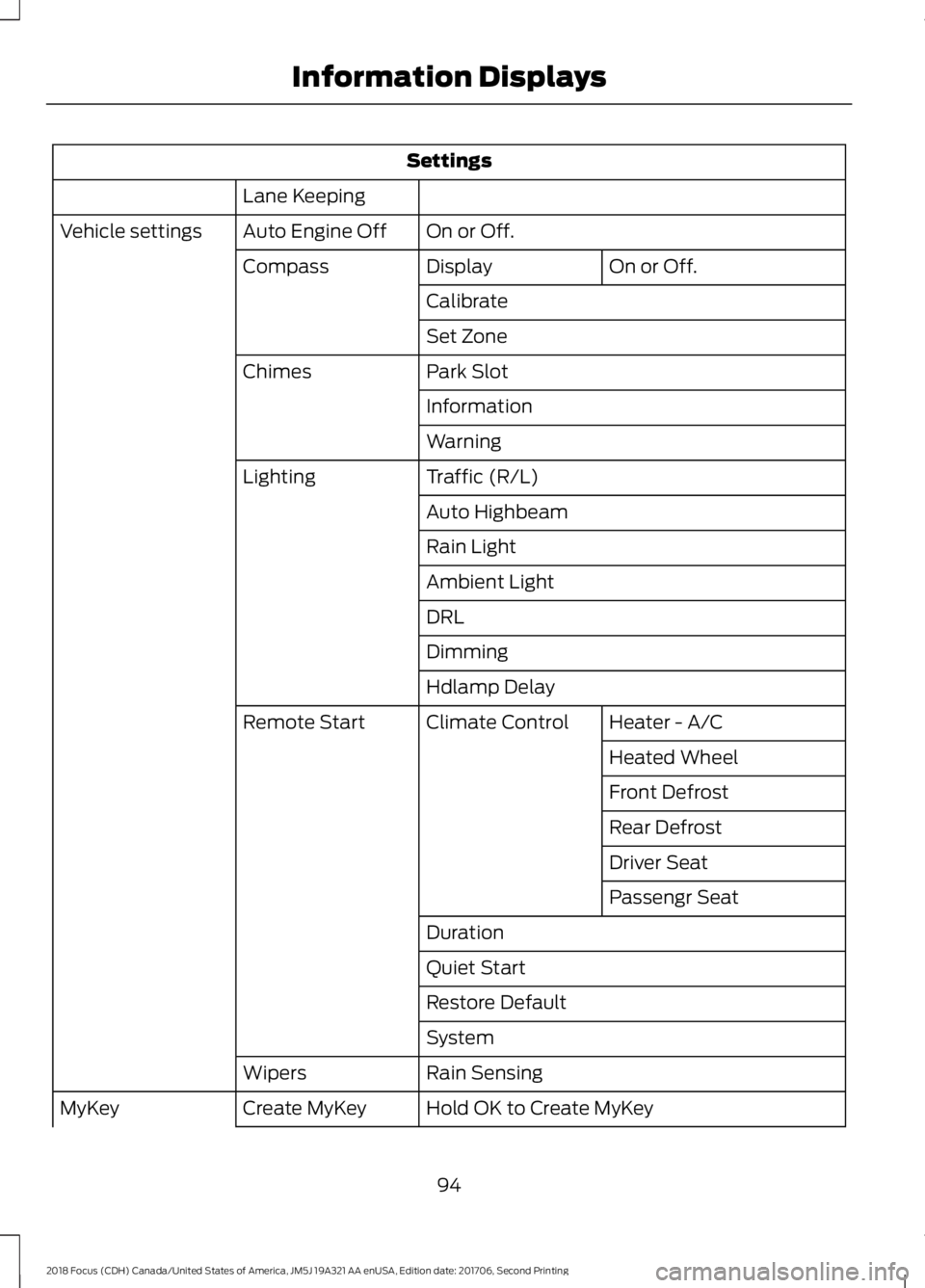
Settings
Lane Keeping
On or Off.Auto Engine OffVehicle settings
On or Off.DisplayCompass
Calibrate
Set Zone
Park SlotChimes
Information
Warning
Traffic (R/L)Lighting
Auto Highbeam
Rain Light
Ambient Light
DRL
Dimming
Hdlamp Delay
Heater - A/CClimate ControlRemote Start
Heated Wheel
Front Defrost
Rear Defrost
Driver Seat
Passengr Seat
Duration
Quiet Start
Restore Default
System
Rain SensingWipers
Hold OK to Create MyKeyCreate MyKeyMyKey
942018 Focus (CDH) Canada/United States of America, JM5J 19A321 AA enUSA, Edition date: 201706, Second PrintingInformation Displays
Page 105 of 473
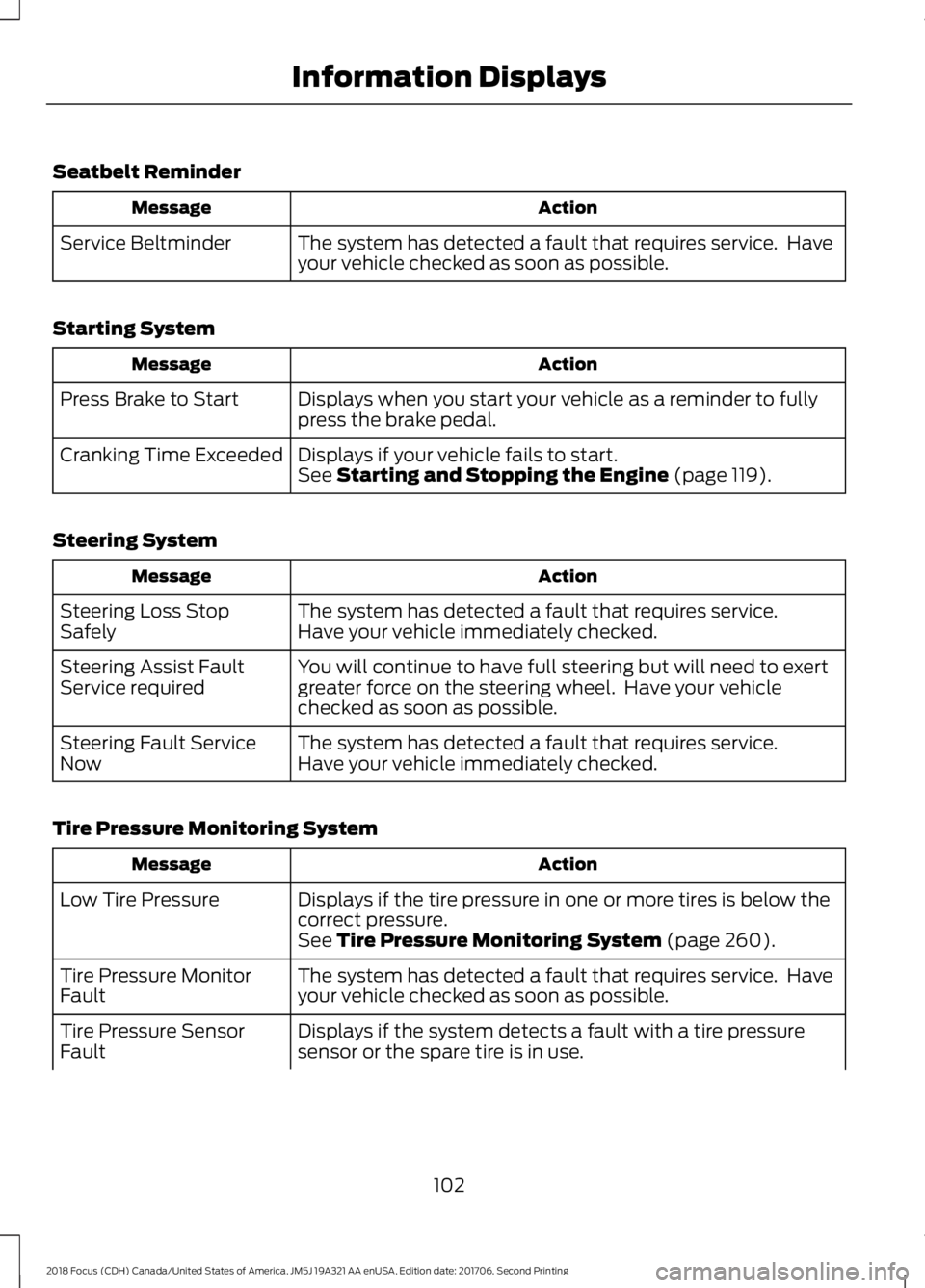
Seatbelt Reminder
ActionMessage
The system has detected a fault that requires service. Haveyour vehicle checked as soon as possible.Service Beltminder
Starting System
ActionMessage
Displays when you start your vehicle as a reminder to fullypress the brake pedal.Press Brake to Start
Displays if your vehicle fails to start.Cranking Time ExceededSee Starting and Stopping the Engine (page 119).
Steering System
ActionMessage
The system has detected a fault that requires service.Steering Loss StopSafelyHave your vehicle immediately checked.
You will continue to have full steering but will need to exertgreater force on the steering wheel. Have your vehiclechecked as soon as possible.
Steering Assist FaultService required
The system has detected a fault that requires service.Steering Fault ServiceNowHave your vehicle immediately checked.
Tire Pressure Monitoring System
ActionMessage
Displays if the tire pressure in one or more tires is below thecorrect pressure.Low Tire Pressure
See Tire Pressure Monitoring System (page 260).
The system has detected a fault that requires service. Haveyour vehicle checked as soon as possible.Tire Pressure MonitorFault
Displays if the system detects a fault with a tire pressuresensor or the spare tire is in use.Tire Pressure SensorFault
1022018 Focus (CDH) Canada/United States of America, JM5J 19A321 AA enUSA, Edition date: 201706, Second PrintingInformation Displays
Page 113 of 473
Replace the filter at regular intervals.
For additional cabin air filter information,or to replace the filter, see an authorizeddealer.
REMOTE START
The climate control system adjusts thecabin temperature during remote start.
You cannot adjust the system duringremote start operation. Switch on theignition to return the system to its previoussettings. You can now make adjustments.You need to switch on certainvehicle-dependent features, such as:
•Heated seats.
•Heated mirrors.
•Heated rear window.
•Heated steering wheel.
You can adjust the settings using theinformation display controls. SeeInformation Displays (page 92).
Automatic Settings
You can set the climate control to operatein AUTO mode through the informationdisplay setting: Remote Start > ClimateControl > Heater-A/C > Auto. The climatecontrol system automatically sets theinterior temperature to 72°F (22°C).
In hot weather, the system is set to 72°F(22°C). Cooled seats are set to high (ifavailable, and selected to AUTO in theinformation display).
In cold weather, the system is set to 72°F(22°C). The rear defroster and heatedmirrors automatically turn on.
Last Settings
You can set the climate control to operateusing the last climate control settingsthrough the information display setting:Remote Start > Climate Control >Heater–A/C > Last Settings. The climatecontrol system automatically uses thesettings last selected before you turnedoff the vehicle.
Heated and Cooled Devices
Heated devices typically switch on duringcold weather, and cooled devices duringhot weather.
1102018 Focus (CDH) Canada/United States of America, JM5J 19A321 AA enUSA, Edition date: 201706, Second PrintingClimate Control
Page 114 of 473
SITTING IN THE CORRECT
POSITION
WARNINGS
Do not recline the seatback too faras this can cause the occupant toslide under the seatbelt, resulting inserious injury in the event of a collision.
Always sit upright against yourseatback with your feet on the floor.
Do not place objects higher than thetop of the seat backrest. Failure tofollow this instruction could result inpersonal injury or death in the event of asudden stop or crash.
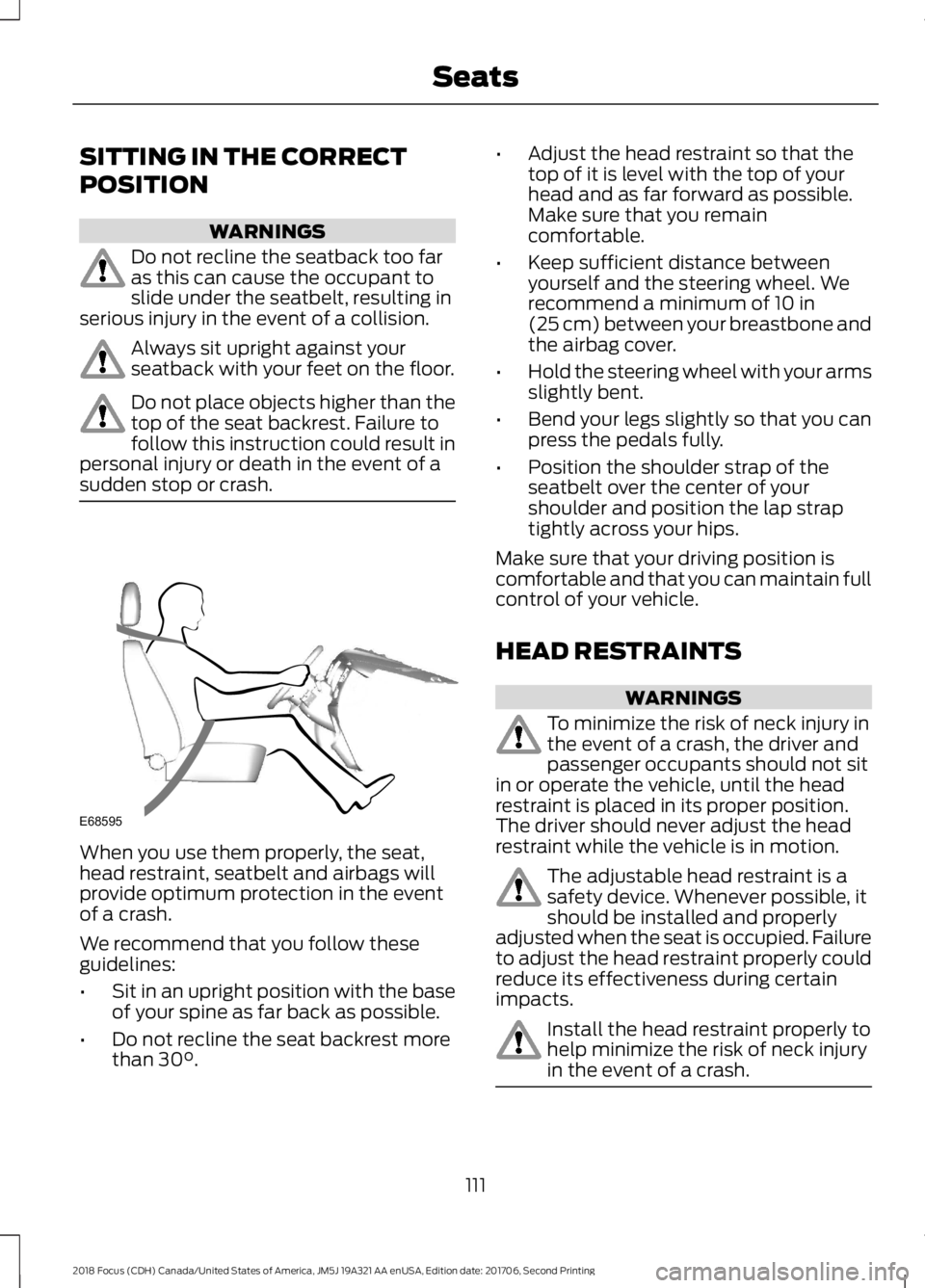
When you use them properly, the seat,head restraint, seatbelt and airbags willprovide optimum protection in the eventof a crash.
We recommend that you follow theseguidelines:
•Sit in an upright position with the baseof your spine as far back as possible.
•Do not recline the seat backrest morethan 30°.
•Adjust the head restraint so that thetop of it is level with the top of yourhead and as far forward as possible.Make sure that you remaincomfortable.
•Keep sufficient distance betweenyourself and the steering wheel. Werecommend a minimum of 10 in(25 cm) between your breastbone andthe airbag cover.
•Hold the steering wheel with your armsslightly bent.
•Bend your legs slightly so that you canpress the pedals fully.
•Position the shoulder strap of theseatbelt over the center of yourshoulder and position the lap straptightly across your hips.
Make sure that your driving position iscomfortable and that you can maintain fullcontrol of your vehicle.
HEAD RESTRAINTS
WARNINGS
To minimize the risk of neck injury inthe event of a crash, the driver andpassenger occupants should not sitin or operate the vehicle, until the headrestraint is placed in its proper position.The driver should never adjust the headrestraint while the vehicle is in motion.
The adjustable head restraint is asafety device. Whenever possible, itshould be installed and properlyadjusted when the seat is occupied. Failureto adjust the head restraint properly couldreduce its effectiveness during certainimpacts.
Install the head restraint properly tohelp minimize the risk of neck injuryin the event of a crash.
1112018 Focus (CDH) Canada/United States of America, JM5J 19A321 AA enUSA, Edition date: 201706, Second PrintingSeatsE68595
Page 121 of 473
CENTER CONSOLE
Stow items in the cupholder carefully asitems may become loose during hardbraking, acceleration or crashes, includinghot drinks which may spill.
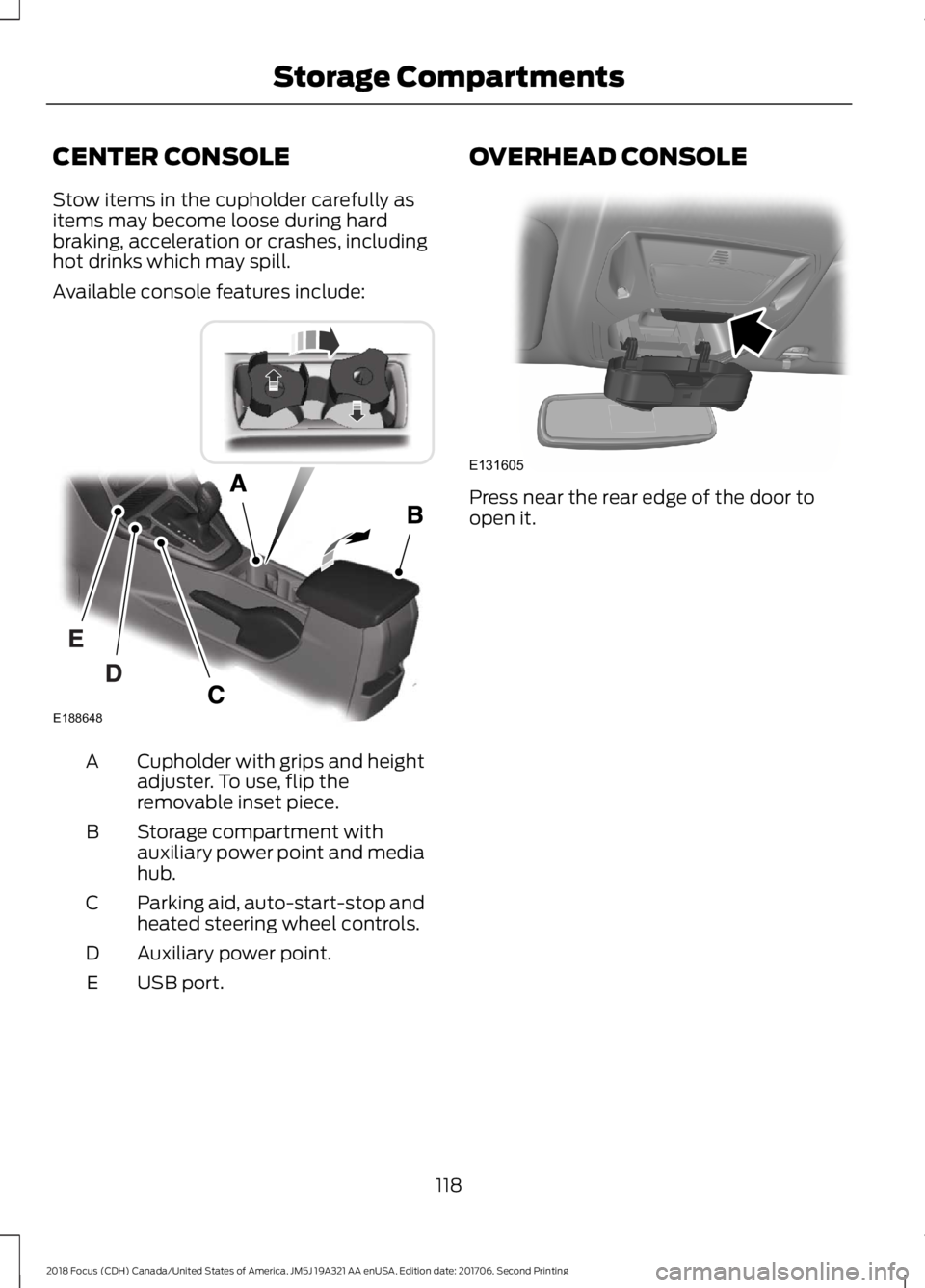
Available console features include:
Cupholder with grips and heightadjuster. To use, flip theremovable inset piece.
A
Storage compartment withauxiliary power point and mediahub.
B
Parking aid, auto-start-stop andheated steering wheel controls.C
Auxiliary power point.D
USB port.E
OVERHEAD CONSOLE
Press near the rear edge of the door toopen it.
1182018 Focus (CDH) Canada/United States of America, JM5J 19A321 AA enUSA, Edition date: 201706, Second PrintingStorage CompartmentsE188648 E131605
Page 123 of 473
Switching the Ignition On toAccessory Mode
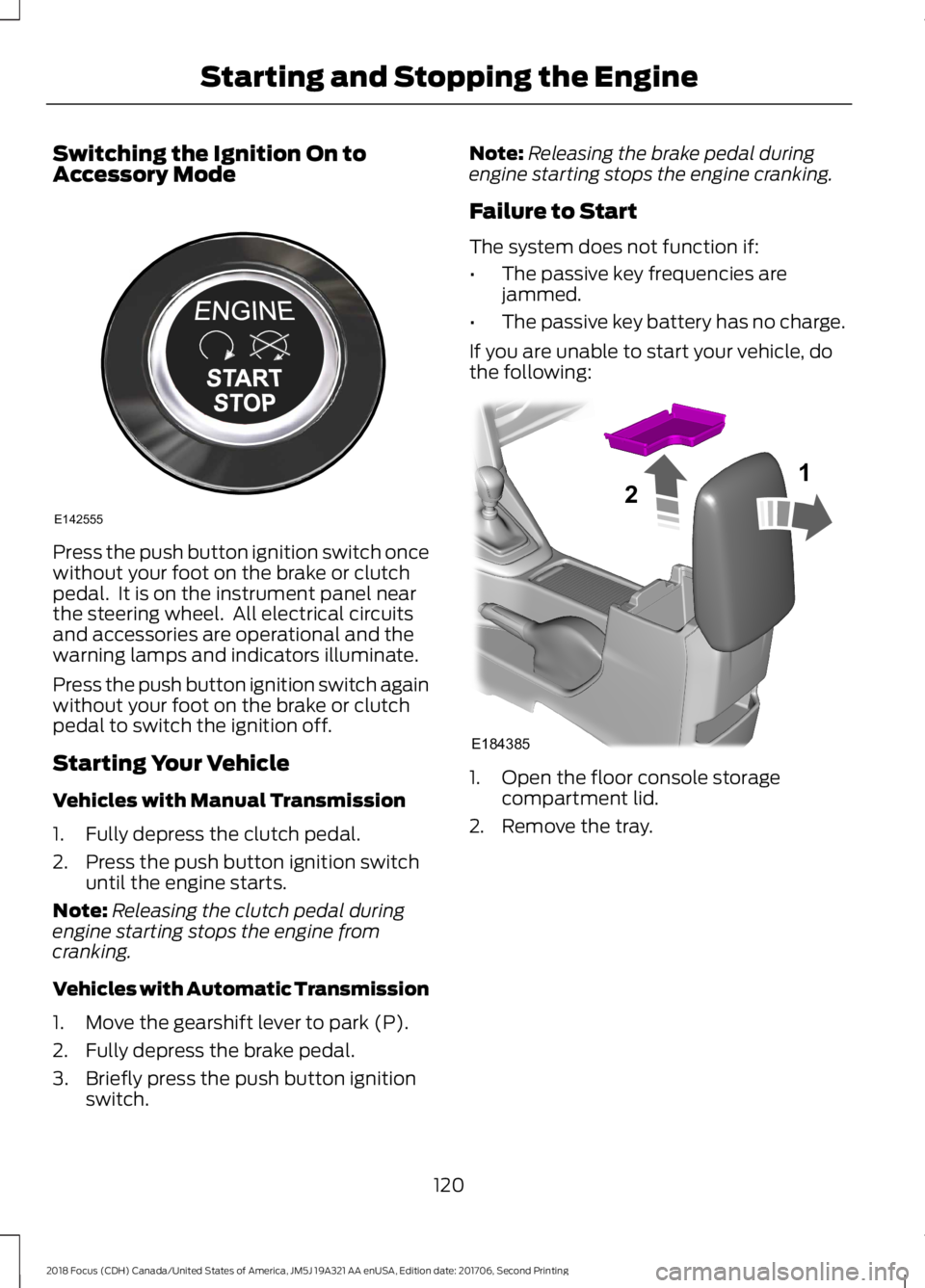
Press the push button ignition switch oncewithout your foot on the brake or clutchpedal. It is on the instrument panel nearthe steering wheel. All electrical circuitsand accessories are operational and thewarning lamps and indicators illuminate.
Press the push button ignition switch againwithout your foot on the brake or clutchpedal to switch the ignition off.
Starting Your Vehicle
Vehicles with Manual Transmission
1.Fully depress the clutch pedal.
2.Press the push button ignition switchuntil the engine starts.
Note:Releasing the clutch pedal duringengine starting stops the engine fromcranking.
Vehicles with Automatic Transmission
1.Move the gearshift lever to park (P).
2.Fully depress the brake pedal.
3.Briefly press the push button ignitionswitch.
Note:Releasing the brake pedal duringengine starting stops the engine cranking.
Failure to Start
The system does not function if:
•The passive key frequencies arejammed.
•The passive key battery has no charge.
If you are unable to start your vehicle, dothe following:
1.Open the floor console storagecompartment lid.
2.Remove the tray.
1202018 Focus (CDH) Canada/United States of America, JM5J 19A321 AA enUSA, Edition date: 201706, Second PrintingStarting and Stopping the EngineE142555 E18438521
Page 146 of 473
The PowerShift™ 6-speed, dual-clutchautomatic transmission is designed to offerdrivers both enhanced fuel efficiency andfun to drive performance. Thistransmission’s dual-clutch technology useselectronically shifted clutches to operatetwo separate transmissions all in a smalllightweight package.
Since the clutch and gear operation isderived from a manual transmission, thePowerShift automatic transmission willdrive, sound, and feel similar to manualtransmission minus the requireduser-inputs. For example, the transmissionmay exhibit mechanical noises, firm gearshifts and/or light clutch vibrations whenaccelerating slowly as the clutchesautomatically engage. These are allconsidered to be normal and expecteddriving characteristics.
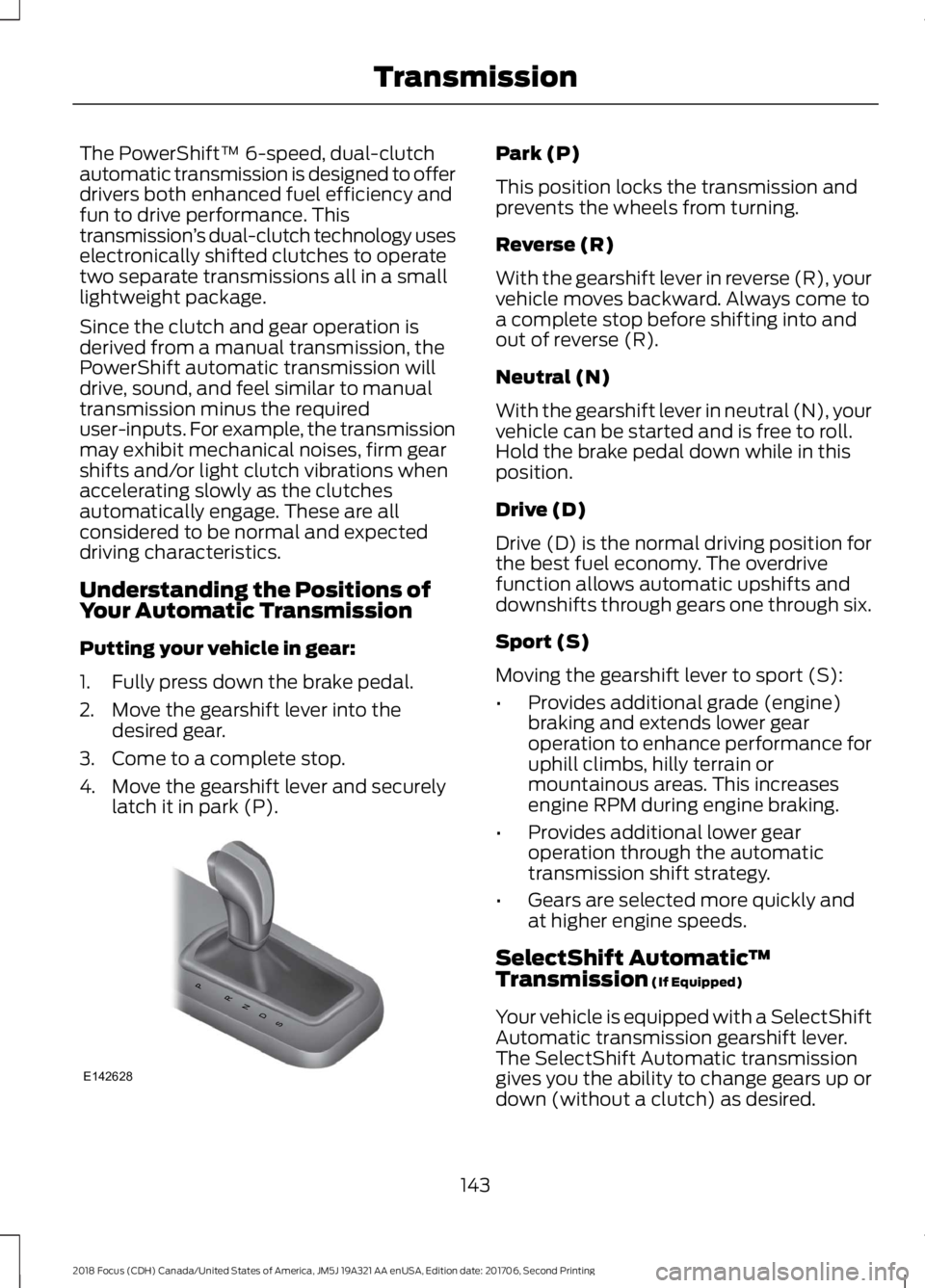
Understanding the Positions ofYour Automatic Transmission
Putting your vehicle in gear:
1.Fully press down the brake pedal.
2.Move the gearshift lever into thedesired gear.
3.Come to a complete stop.
4.Move the gearshift lever and securelylatch it in park (P).
Park (P)
This position locks the transmission andprevents the wheels from turning.
Reverse (R)
With the gearshift lever in reverse (R), yourvehicle moves backward. Always come toa complete stop before shifting into andout of reverse (R).
Neutral (N)
With the gearshift lever in neutral (N), yourvehicle can be started and is free to roll.Hold the brake pedal down while in thisposition.
Drive (D)
Drive (D) is the normal driving position forthe best fuel economy. The overdrivefunction allows automatic upshifts anddownshifts through gears one through six.
Sport (S)
Moving the gearshift lever to sport (S):
•Provides additional grade (engine)braking and extends lower gearoperation to enhance performance foruphill climbs, hilly terrain ormountainous areas. This increasesengine RPM during engine braking.
•Provides additional lower gearoperation through the automatictransmission shift strategy.
•Gears are selected more quickly andat higher engine speeds.
SelectShift Automatic™Transmission (If Equipped)
Your vehicle is equipped with a SelectShiftAutomatic transmission gearshift lever.The SelectShift Automatic transmissiongives you the ability to change gears up ordown (without a clutch) as desired.
1432018 Focus (CDH) Canada/United States of America, JM5J 19A321 AA enUSA, Edition date: 201706, Second PrintingTransmissionPRNDSE142628
Page 147 of 473
In order to prevent the engine from runningat too low an RPM, which may cause it tostall, SelectShift still automatically makessome downshifts if it has determined thatyou have not downshifted in time.Although SelectShift makes somedownshifts for you, it still allows you todownshift at any time as long as theSelectShift determines that damage willnot be caused to the engine fromover-revving.
Note:Engine damage may occur if youmaintain excessive engine revving withoutshifting.
SelectShift does not automatically upshift,even if the engine is approaching the RPMlimit. It must be shifted manually bypressing the + button.
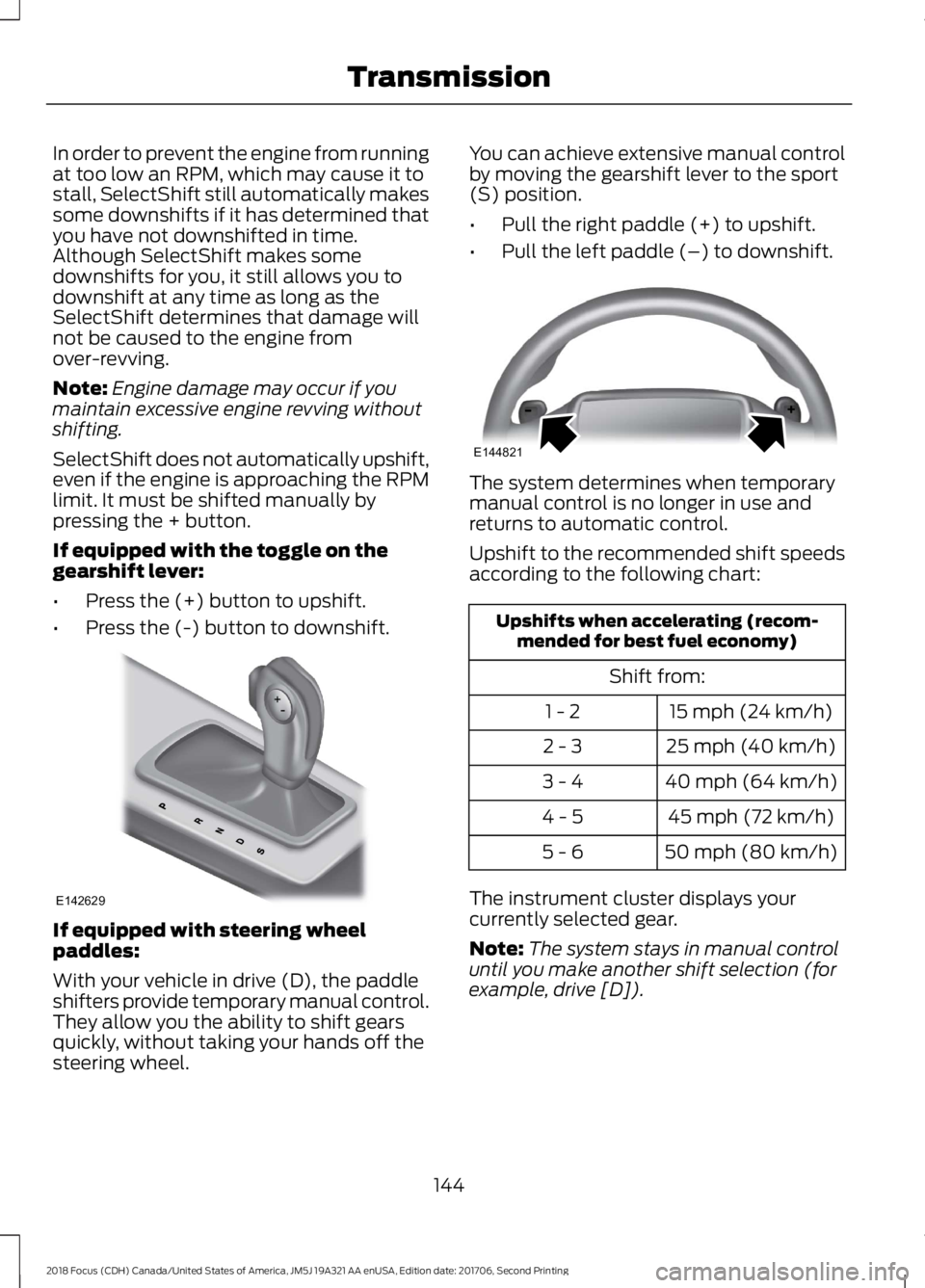
If equipped with the toggle on thegearshift lever:
•Press the (+) button to upshift.
•Press the (-) button to downshift.
If equipped with steering wheelpaddles:
With your vehicle in drive (D), the paddleshifters provide temporary manual control.They allow you the ability to shift gearsquickly, without taking your hands off thesteering wheel.
You can achieve extensive manual controlby moving the gearshift lever to the sport(S) position.
•Pull the right paddle (+) to upshift.
•Pull the left paddle (–) to downshift.
The system determines when temporarymanual control is no longer in use andreturns to automatic control.
Upshift to the recommended shift speedsaccording to the following chart:
Upshifts when accelerating (recom-mended for best fuel economy)
Shift from:
15 mph (24 km/h)1 - 2
25 mph (40 km/h)2 - 3
40 mph (64 km/h)3 - 4
45 mph (72 km/h)4 - 5
50 mph (80 km/h)5 - 6
The instrument cluster displays yourcurrently selected gear.
Note:The system stays in manual controluntil you make another shift selection (forexample, drive [D]).
1442018 Focus (CDH) Canada/United States of America, JM5J 19A321 AA enUSA, Edition date: 201706, Second PrintingTransmissionE142629 E144821