USB port FORD FOCUS 2018 Owner's Manual
[x] Cancel search | Manufacturer: FORD, Model Year: 2018, Model line: FOCUS, Model: FORD FOCUS 2018Pages: 473, PDF Size: 39.91 MB
Page 399 of 473
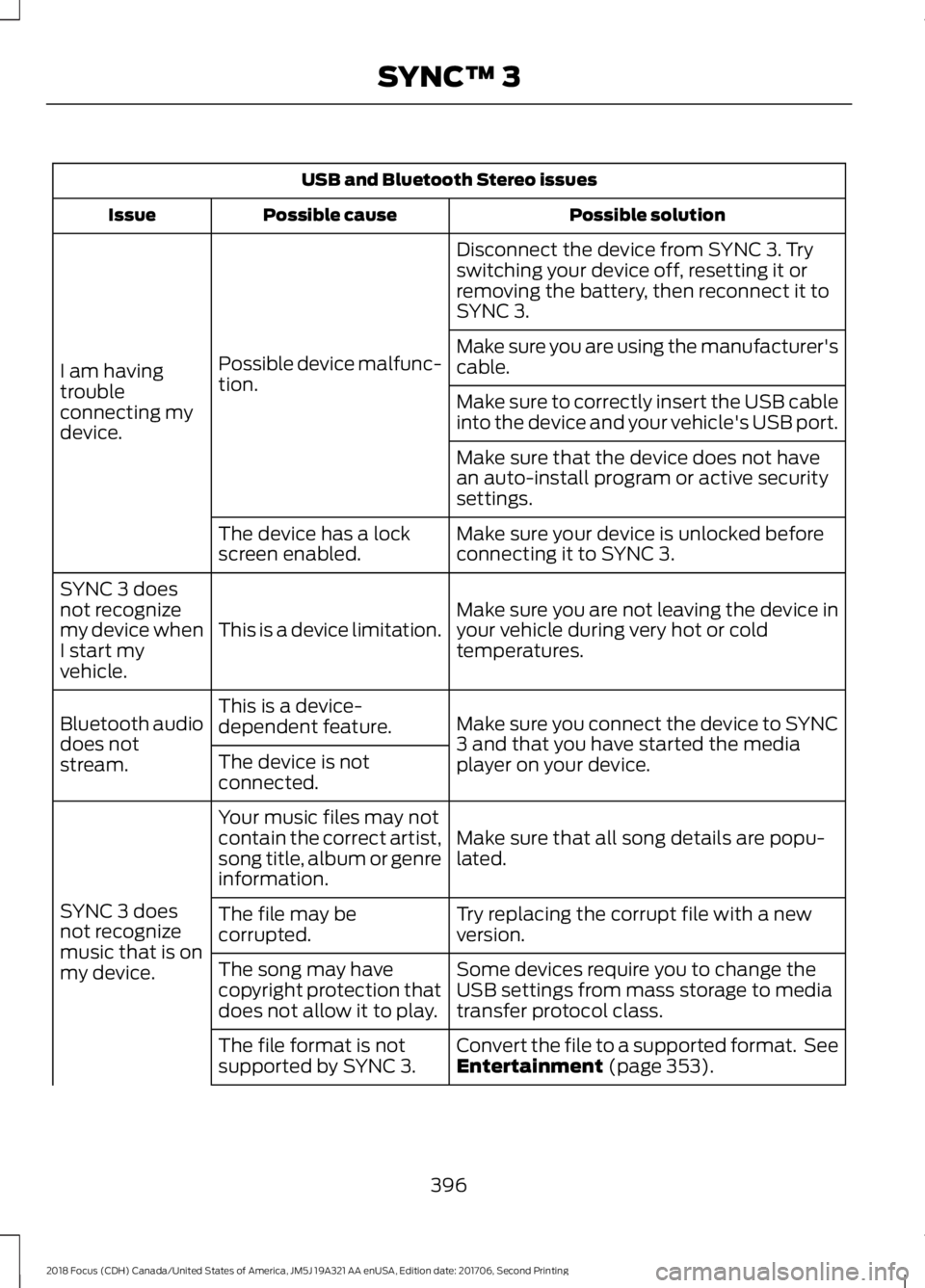
USB and Bluetooth Stereo issues
Possible solutionPossible causeIssue
Disconnect the device from SYNC 3. Tryswitching your device off, resetting it orremoving the battery, then reconnect it toSYNC 3.
Possible device malfunc-tion.I am havingtroubleconnecting mydevice.
Make sure you are using the manufacturer'scable.
Make sure to correctly insert the USB cableinto the device and your vehicle's USB port.
Make sure that the device does not havean auto-install program or active securitysettings.
Make sure your device is unlocked beforeconnecting it to SYNC 3.The device has a lockscreen enabled.
Make sure you are not leaving the device inyour vehicle during very hot or coldtemperatures.This is a device limitation.
SYNC 3 doesnot recognizemy device whenI start myvehicle.
Make sure you connect the device to SYNC3 and that you have started the mediaplayer on your device.
This is a device-dependent feature.Bluetooth audiodoes notstream.The device is notconnected.
Make sure that all song details are popu-lated.
Your music files may notcontain the correct artist,song title, album or genreinformation.
SYNC 3 doesnot recognizemusic that is onmy device.
Try replacing the corrupt file with a newversion.The file may becorrupted.
Some devices require you to change theUSB settings from mass storage to mediatransfer protocol class.
The song may havecopyright protection thatdoes not allow it to play.
Convert the file to a supported format. SeeEntertainment (page 353).The file format is notsupported by SYNC 3.
3962018 Focus (CDH) Canada/United States of America, JM5J 19A321 AA enUSA, Edition date: 201706, Second PrintingSYNC™ 3
Page 402 of 473
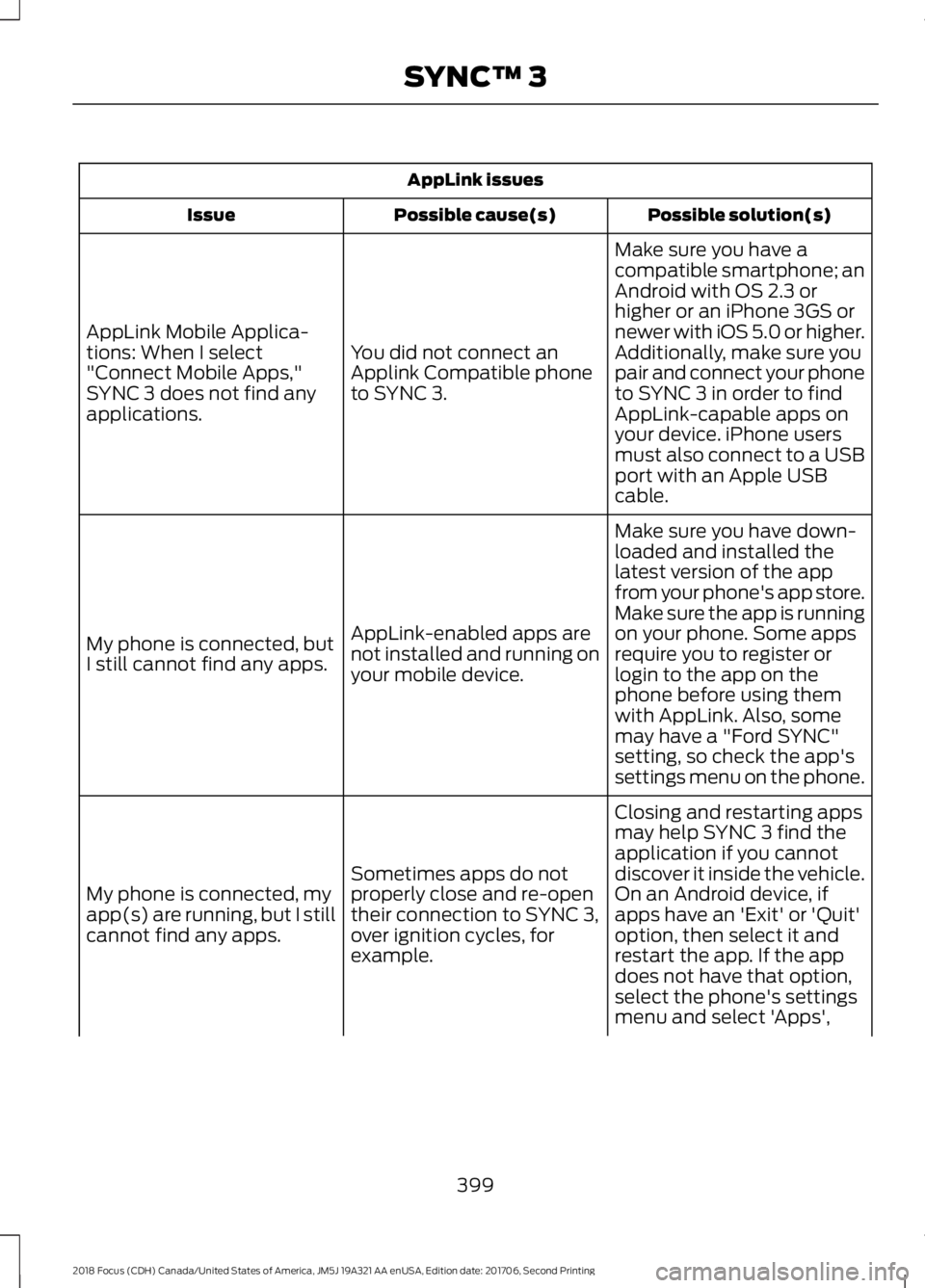
AppLink issues
Possible solution(s)Possible cause(s)Issue
Make sure you have acompatible smartphone; anAndroid with OS 2.3 orhigher or an iPhone 3GS ornewer with iOS 5.0 or higher.Additionally, make sure youYou did not connect anApplink Compatible phoneto SYNC 3.
AppLink Mobile Applica-tions: When I select"Connect Mobile Apps,"SYNC 3 does not find anyapplications.
pair and connect your phoneto SYNC 3 in order to findAppLink-capable apps onyour device. iPhone usersmust also connect to a USBport with an Apple USBcable.
Make sure you have down-loaded and installed thelatest version of the appfrom your phone's app store.Make sure the app is runningon your phone. Some appsAppLink-enabled apps arenot installed and running onyour mobile device.
My phone is connected, butI still cannot find any apps.require you to register orlogin to the app on thephone before using themwith AppLink. Also, somemay have a "Ford SYNC"setting, so check the app'ssettings menu on the phone.
Closing and restarting appsmay help SYNC 3 find theapplication if you cannotdiscover it inside the vehicle.On an Android device, ifapps have an 'Exit' or 'Quit'
Sometimes apps do notproperly close and re-opentheir connection to SYNC 3,over ignition cycles, forexample.
My phone is connected, myapp(s) are running, but I stillcannot find any apps.option, then select it andrestart the app. If the appdoes not have that option,select the phone's settingsmenu and select 'Apps',
3992018 Focus (CDH) Canada/United States of America, JM5J 19A321 AA enUSA, Edition date: 201706, Second PrintingSYNC™ 3
Page 404 of 473
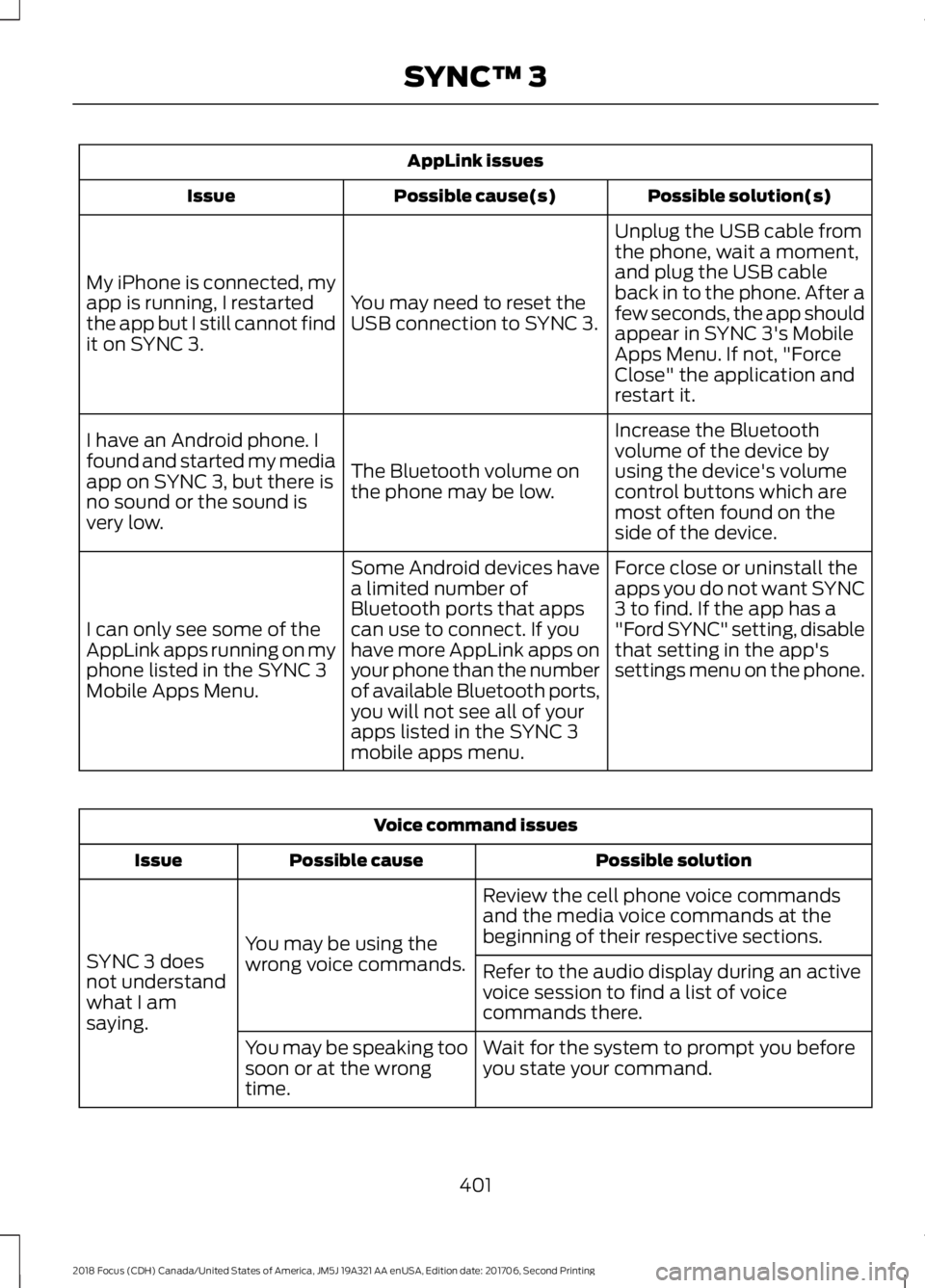
AppLink issues
Possible solution(s)Possible cause(s)Issue
Unplug the USB cable fromthe phone, wait a moment,and plug the USB cableback in to the phone. After afew seconds, the app shouldappear in SYNC 3's MobileApps Menu. If not, "ForceClose" the application andrestart it.
You may need to reset theUSB connection to SYNC 3.
My iPhone is connected, myapp is running, I restartedthe app but I still cannot findit on SYNC 3.
Increase the Bluetoothvolume of the device byusing the device's volumecontrol buttons which aremost often found on theside of the device.
The Bluetooth volume onthe phone may be low.
I have an Android phone. Ifound and started my mediaapp on SYNC 3, but there isno sound or the sound isvery low.
Force close or uninstall theapps you do not want SYNC3 to find. If the app has a"Ford SYNC" setting, disablethat setting in the app'ssettings menu on the phone.
Some Android devices havea limited number ofBluetooth ports that appscan use to connect. If youhave more AppLink apps onyour phone than the numberof available Bluetooth ports,you will not see all of yourapps listed in the SYNC 3mobile apps menu.
I can only see some of theAppLink apps running on myphone listed in the SYNC 3Mobile Apps Menu.
Voice command issues
Possible solutionPossible causeIssue
Review the cell phone voice commandsand the media voice commands at thebeginning of their respective sections.You may be using thewrong voice commands.SYNC 3 doesnot understandwhat I amsaying.
Refer to the audio display during an activevoice session to find a list of voicecommands there.
Wait for the system to prompt you beforeyou state your command.You may be speaking toosoon or at the wrongtime.
4012018 Focus (CDH) Canada/United States of America, JM5J 19A321 AA enUSA, Edition date: 201706, Second PrintingSYNC™ 3
Page 407 of 473
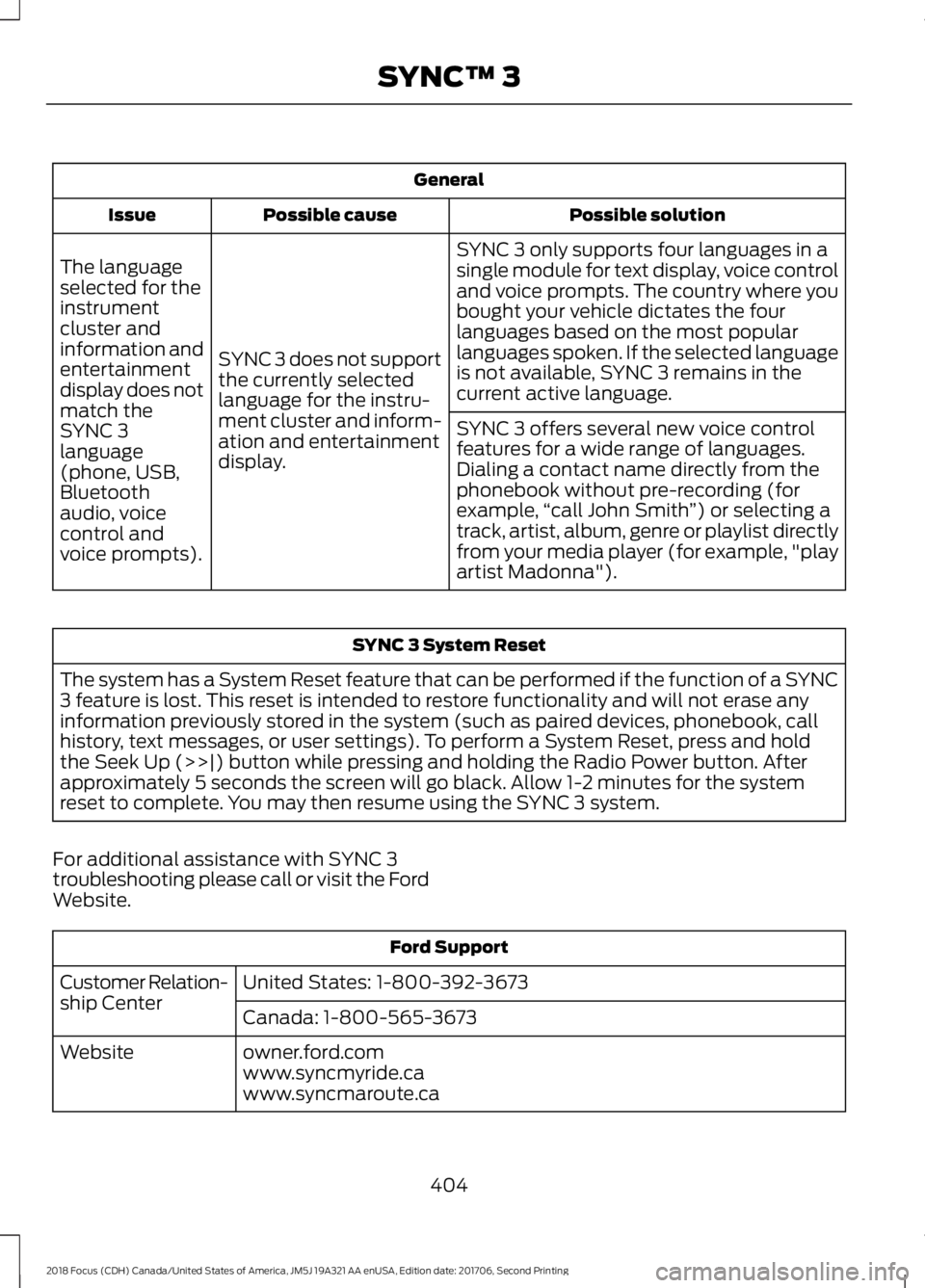
General
Possible solutionPossible causeIssue
SYNC 3 only supports four languages in asingle module for text display, voice controland voice prompts. The country where youbought your vehicle dictates the fourlanguages based on the most popularlanguages spoken. If the selected languageis not available, SYNC 3 remains in thecurrent active language.
SYNC 3 does not supportthe currently selectedlanguage for the instru-ment cluster and inform-ation and entertainmentdisplay.
The languageselected for theinstrumentcluster andinformation andentertainmentdisplay does notmatch theSYNC 3SYNC 3 offers several new voice controlfeatures for a wide range of languages.Dialing a contact name directly from thephonebook without pre-recording (forexample,“call John Smith”) or selecting atrack, artist, album, genre or playlist directlyfrom your media player (for example, "playartist Madonna").
language(phone, USB,Bluetoothaudio, voicecontrol andvoice prompts).
SYNC 3 System Reset
The system has a System Reset feature that can be performed if the function of a SYNC3 feature is lost. This reset is intended to restore functionality and will not erase anyinformation previously stored in the system (such as paired devices, phonebook, callhistory, text messages, or user settings). To perform a System Reset, press and holdthe Seek Up (>>|) button while pressing and holding the Radio Power button. Afterapproximately 5 seconds the screen will go black. Allow 1-2 minutes for the systemreset to complete. You may then resume using the SYNC 3 system.
For additional assistance with SYNC 3troubleshooting please call or visit the FordWebsite.
Ford Support
United States: 1-800-392-3673Customer Relation-ship CenterCanada: 1-800-565-3673
owner.ford.comWebsitewww.syncmyride.cawww.syncmaroute.ca
4042018 Focus (CDH) Canada/United States of America, JM5J 19A321 AA enUSA, Edition date: 201706, Second PrintingSYNC™ 3
Page 465 of 473
Entertainment...............................................353AM/FM Radio......................................................354Apps........................................................................362Bluetooth Stereo or USB.................................361CD...........................................................................360HD Radio™ Information (IfAvailable).........................................................357SiriusXM® Satellite Radio (IfActivated)........................................................355Sources..................................................................354Supported Media Players, Formats andMetadata Information................................362USB Ports.............................................................362Environment......................................................15Event Data RecordingSee: Data Recording..............................................9Export Unique Options..................................13Exterior Mirrors................................................83Blind Spot Monitor..............................................84Fold-Away Exterior Mirrors...............................83Heated Exterior Mirrors......................................83Integrated Blind Spot Mirrors..........................83Power Exterior Mirrors........................................83
F
FanSee: Engine Cooling Fan..................................216Fastening the Seatbelts..............................30Seatbelt Locking Modes.....................................31Using Seatbelts During Pregnancy...............30Floor Mats........................................................187Fog Lamps - FrontSee: Front Fog Lamps........................................80Ford Credit..........................................................11US Only......................................................................11Ford Protect...................................................407Ford Protect Extended Service Plan(CANADA ONLY).........................................408Ford Protect Extended Service Plans (U.S.Only)..................................................................407Front Fog Lamps............................................80Front Parking Aid..........................................154Front Passenger Sensing System............40Front Wiper BladesSee: Changing the Front Wiper Blades.......223Fuel and Refueling.......................................129
Fuel Consumption........................................134Fuel Economy......................................................134Fuel Filler Funnel Location........................130Fuel Quality - Gasoline...............................129Choosing the Right Fuel...................................129Fuel Shutoff...................................................189Fuses................................................................200Fuse Specification Chart..........................200Engine Compartment Fuse Box..................200Luggage Compartment Fuse Box...............206Passenger Compartment Fuse Box...........204
G
Gauges...............................................................86Engine Coolant Temperature Gauge............86Fuel Gauge..............................................................87Information Display.............................................86GearboxSee: Transmission..............................................140General Information on RadioFrequencies...................................................47General Maintenance Information.......409Multi-Point Inspection.......................................411Owner Checks and Services..........................410Protecting Your Investment..........................409Why Maintain Your Vehicle?.........................409Why Maintain Your Vehicle at YourDealership?....................................................409Getting Assistance Outside the U.S. andCanada..........................................................196Getting the Services You Need................193Away From Home...............................................193
H
HandbrakeSee: Parking Brake.............................................148Hazard Flashers............................................189Headlamp AdjustingSee: Adjusting the Headlamps.....................225Headlamp Exit Delay....................................78Headlamp RemovalSee: Removing a Headlamp..........................226HeadrestSee: Head Restraints...........................................111Head Restraints...............................................111Adjusting the Head Restraint..........................112
4622018 Focus (CDH) Canada/United States of America, JM5J 19A321 AA enUSA, Edition date: 201706, Second PrintingIndex
Page 470 of 473
Sun Visors.........................................................84Illuminated Vanity Mirror...................................84Supplementary Restraints System.........38Principle of Operation........................................38Symbols Glossary.............................................7SYNC™ 3........................................................335General Information.........................................335SYNC™ 3 Troubleshooting......................393SYNC™ Applications and Services.......313911 Assist................................................................313SYNC Mobile Apps.............................................315SYNC™............................................................297General Information..........................................297SYNC™ Troubleshooting..........................327
T
TailgateSee: Manual Liftgate...........................................64Technical SpecificationsSee: Capacities and Specifications............268The Better Business Bureau (BBB) AutoLine Program (U.S. Only).......................195Tire Care..........................................................244Glossary of Tire Terminology........................246Important Information for 235/40R18Low-Profile Tires and Wheels..................244Information About Uniform Tire QualityGrading.............................................................244Information Contained on the TireSidewall............................................................247Temperature A B C............................................245Traction AA A B C...............................................245Treadwear.............................................................245Tire Pressure Monitoring System..........260Changing Tires With a Tire PressureMonitoring System........................................261Understanding Your Tire PressureMonitoring System .......................................261TiresSee: Wheels and Tires.....................................244Towing a Trailer.............................................182Towing the Vehicle on Four Wheels - 1.0LEcoBoost™, AutomaticTransmission...............................................183Emergency Towing.............................................183Recreational Towing..........................................183
Towing the Vehicle on Four Wheels -2.0L, Automatic Transmission..............183Emergency Towing.............................................183Recreational Towing.........................................184Towing the Vehicle on Four Wheels -Manual Transmission...............................182Recreational Towing..........................................182Towing..............................................................182Traction Control............................................150Principle of Operation......................................150Transmission Code Designation.............273Transmission..................................................140Transporting the Vehicle............................182Trip Computer.................................................95All Values................................................................95Average Fuel Consumption..............................95Distance to Empty...............................................95Instantaneous Fuel.............................................95Outside Air Temperature...................................95Resetting the Trip Computer...........................95Trip Odometer.......................................................95Trip Timer................................................................96Type Approvals............................................455
U
Under Hood Overview - 1.0LEcoBoost™..................................................213Under Hood Overview - 2.0L....................214Unique Driving Characteristics.................127USB Port.........................................................296Using Cruise Control....................................162Switching Cruise Control Off..........................162Switching Cruise Control On..........................162Using MyKey With Remote StartSystems..........................................................58Using Snow Chains.....................................259Using Stability Control................................152Using SYNC™ With Your MediaPlayer.............................................................318Accessing Your USB Song Library................322Bluetooth Devices and SystemSettings.............................................................324Connecting Your Digital Media Player to theUSB Port...........................................................318Media Menu Features........................................321Media Voice Commands.................................319USB 2......................................................................324
4672018 Focus (CDH) Canada/United States of America, JM5J 19A321 AA enUSA, Edition date: 201706, Second PrintingIndex