light FORD FOCUS 2018 Owner's Manual
[x] Cancel search | Manufacturer: FORD, Model Year: 2018, Model line: FOCUS, Model: FORD FOCUS 2018Pages: 473, PDF Size: 39.91 MB
Page 82 of 473
4.The lighting control is in the autolampsposition.
5.The headlamps are off.
The other lighting control switch positionsdo not activate the daytime running lamps,and you can use them to temporarilyoverride autolamp control.
When switched off in the informationdisplay, the daytime running lamps are offin all lighting control switch positions.
AUTOMATIC HIGH BEAM
CONTROL
WARNING
The system does not relieve you ofyour responsibility to drive with duecare and attention. You may need tooverride the system if it does not turn thehigh beams on or off.
The system turns on high beams if it is darkenough and no other traffic is present. If itdetects an approaching vehicle’sheadlamps or tail lamps, or street lightingahead, the system turns off high beamsbefore they can distract other road users.Low beams remain on.
Note:The system may not operate properlyif the sensor is blocked. Keep the windshieldfree from obstruction or damage.
Note:The system may not operate properlyin cold or inclement conditions. You canswitch on the high beams by overriding thesystem.
Note:If the system detects a blockage, forexample bird droppings, bug splatter, snowor ice, the system goes into low beam modeuntil you clear the blockage. A message mayappear in the information display if thecamera is blocked.
Note:Using much larger tires or equippingvehicle accessories such as snowplows canmodify your vehicle's ride height anddegrade automatic high beam controlperformance.
A camera sensor, centrally mountedbehind the windshield of your vehicle,continuously monitors conditions to turnthe high beams on and off.
Once the system is active, the high beamsturn on if:
•The ambient light level is low enough.
•There is no traffic in front of yourvehicle.
•The vehicle speed is greater thanapproximately 32 mph (51 km/h).
The system turns the high beams off if:
•The ambient light level is high enoughthat high beams are not required.
•The system detects an approachingvehicle's headlamps or tail lamps.
•The vehicle speed falls belowapproximately 27 mph (44 km/h).
•The system detects severe rain, snowor fog.
•The camera is blocked.
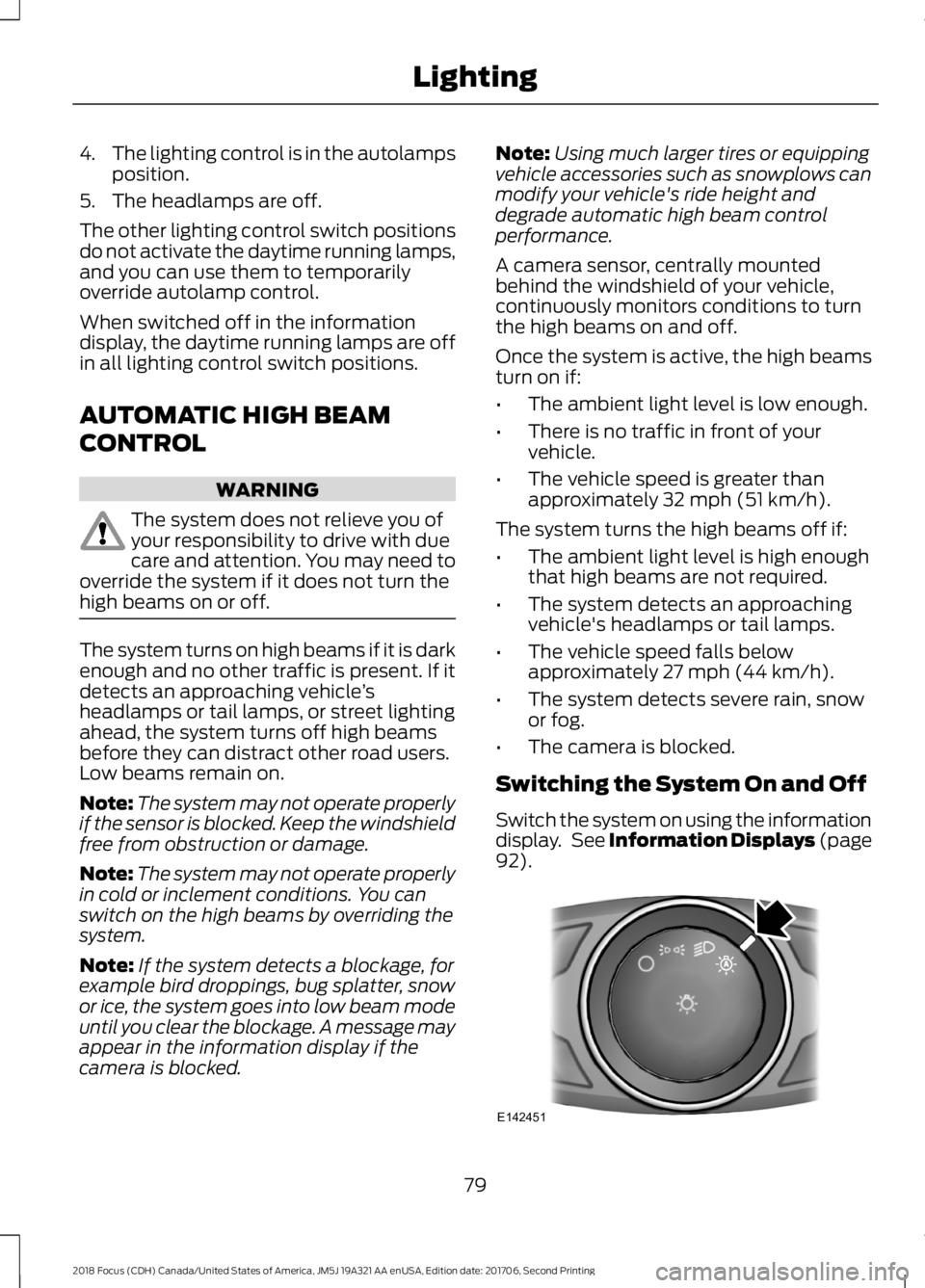
Switching the System On and Off
Switch the system on using the informationdisplay. See Information Displays (page92).
792018 Focus (CDH) Canada/United States of America, JM5J 19A321 AA enUSA, Edition date: 201706, Second PrintingLightingE142451
Page 83 of 473
Switch the lighting control to theautolamps position. See Autolamps(page 77).
Overriding the System
Push the lever away from you to switchbetween high beam and low beam.
Automatic High Beam Indicator (If
Equipped)
The indicator illuminates toconfirm when the system isready to assist.
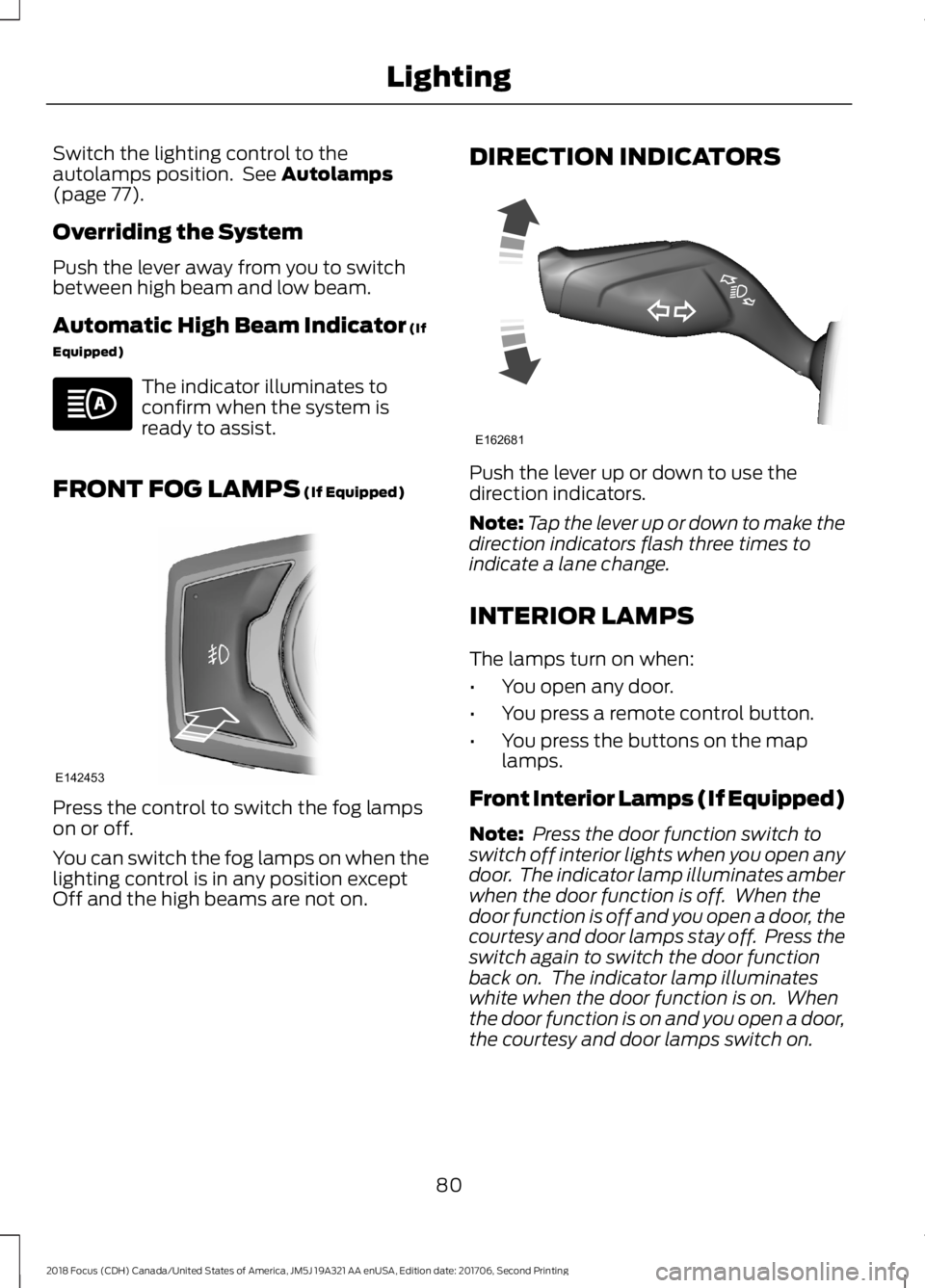
FRONT FOG LAMPS (If Equipped)
Press the control to switch the fog lampson or off.
You can switch the fog lamps on when thelighting control is in any position exceptOff and the high beams are not on.
DIRECTION INDICATORS
Push the lever up or down to use thedirection indicators.
Note:Tap the lever up or down to make thedirection indicators flash three times toindicate a lane change.
INTERIOR LAMPS
The lamps turn on when:
•You open any door.
•You press a remote control button.
•You press the buttons on the maplamps.
Front Interior Lamps (If Equipped)
Note: Press the door function switch toswitch off interior lights when you open anydoor. The indicator lamp illuminates amberwhen the door function is off. When thedoor function is off and you open a door, thecourtesy and door lamps stay off. Press theswitch again to switch the door functionback on. The indicator lamp illuminateswhite when the door function is on. Whenthe door function is on and you open a door,the courtesy and door lamps switch on.
802018 Focus (CDH) Canada/United States of America, JM5J 19A321 AA enUSA, Edition date: 201706, Second PrintingLighting E142453 E162681
Page 84 of 473
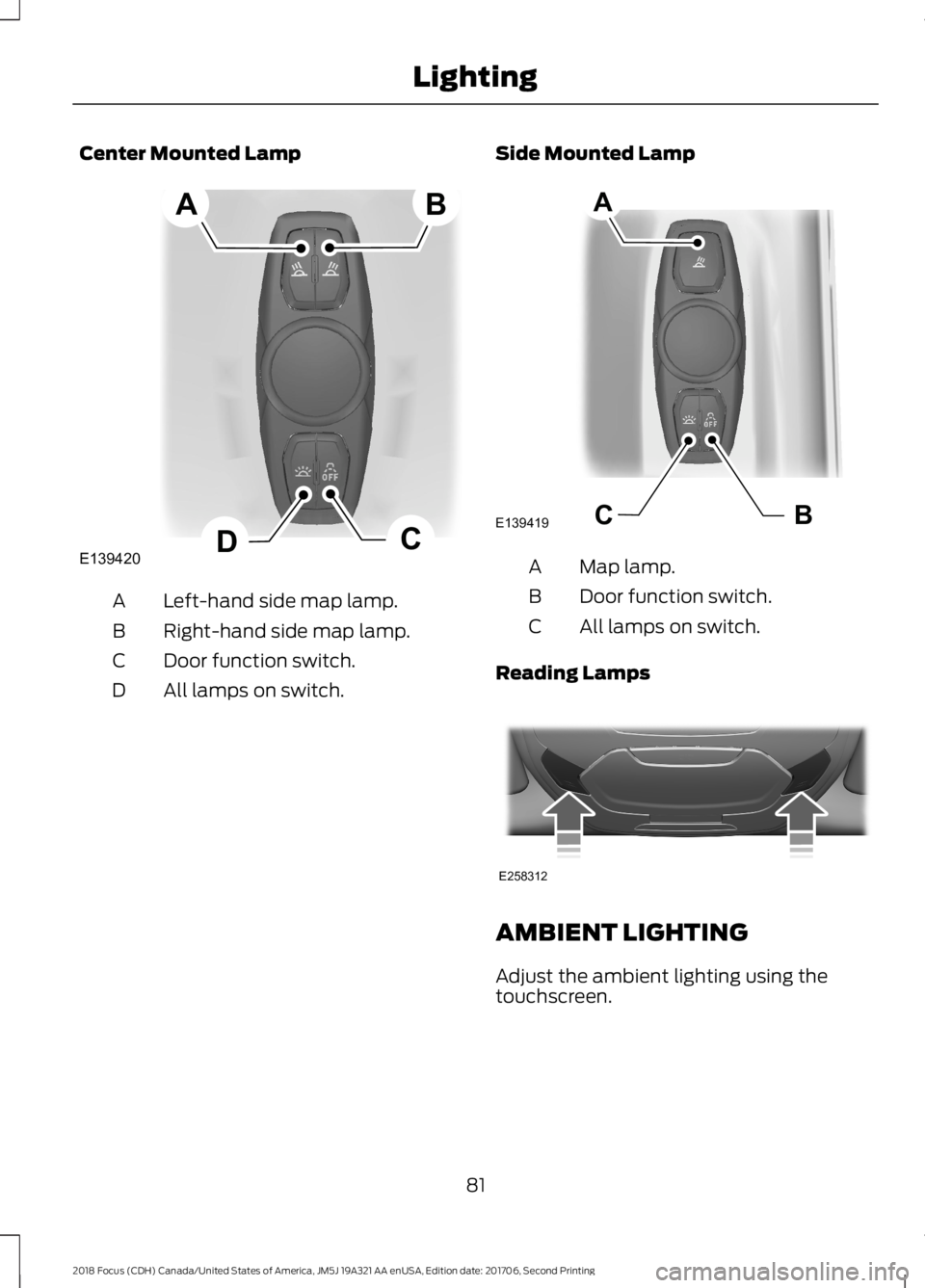
Center Mounted Lamp
Left-hand side map lamp.A
Right-hand side map lamp.B
Door function switch.C
All lamps on switch.D
Side Mounted Lamp
Map lamp.A
Door function switch.B
All lamps on switch.C
Reading Lamps
AMBIENT LIGHTING
Adjust the ambient lighting using thetouchscreen.
812018 Focus (CDH) Canada/United States of America, JM5J 19A321 AA enUSA, Edition date: 201706, Second PrintingLightingE139420CDAB BCE139419A E258312
Page 85 of 473
POWER WINDOWS
WARNINGS
Do not leave children unattended inyour vehicle and do not let them playwith the power windows. Failure tofollow this instruction could result inpersonal injury.
When closing the power windows,verify they are free of obstruction andmake sure that children and pets arenot in the proximity of the windowopenings.
Press the control to open thewindow. Lift the control to closethe window.
To reduce wind noise or pulsing noise whenjust one window is open, slightly open theopposite window.
One-Touch Open (If Equipped)
Fully press the control and release it. Pressagain or lift it to stop the window.
One-Touch Close (If Equipped)
Fully lift the control and release it. Pressagain or lift it to stop the window.
Rear Window Lock
Press the control to lock orunlock the rear window controls.It illuminates when you lock therear window controls.
Bounce-Back (If Equipped)
The window stops and reverses if it detectsan obstruction.
Overriding Bounce-Back
WARNING
If you override bounce-back, thewindow does not reverse if it detectsan obstacle. Take care when closingthe windows to avoid personal injury ordamage to your vehicle.
Proceed as follows to override thisprotection feature when there is aresistance, for example in winter:
1.Close the window twice until it reachesthe point of resistance and let itreverse.
2.Close the window a third time to thepoint of resistance. You disabled thebounce-back feature and you can nowclose the window manually. Thewindow goes past the point ofresistance and you can fully close it.
Note:If the window does not close, haveyour vehicle checked as soon as possible.
Resetting Bounce-Back
WARNING
Bounce-back is off until you reset thememory. Take care when closing thewindows to avoid personal injury ordamage to your vehicle.
If you have disconnected the battery, youmust reset the bounce-back memoryseparately for each window.
1.Lift and hold the switch until thewindow is fully closed.
2.Release the switch.
3.Lift and hold the switch again for a fewseconds.
4.Release the switch.
5.Lift and hold the switch again for a fewseconds.
822018 Focus (CDH) Canada/United States of America, JM5J 19A321 AA enUSA, Edition date: 201706, Second PrintingWindows and Mirrors
Page 87 of 473
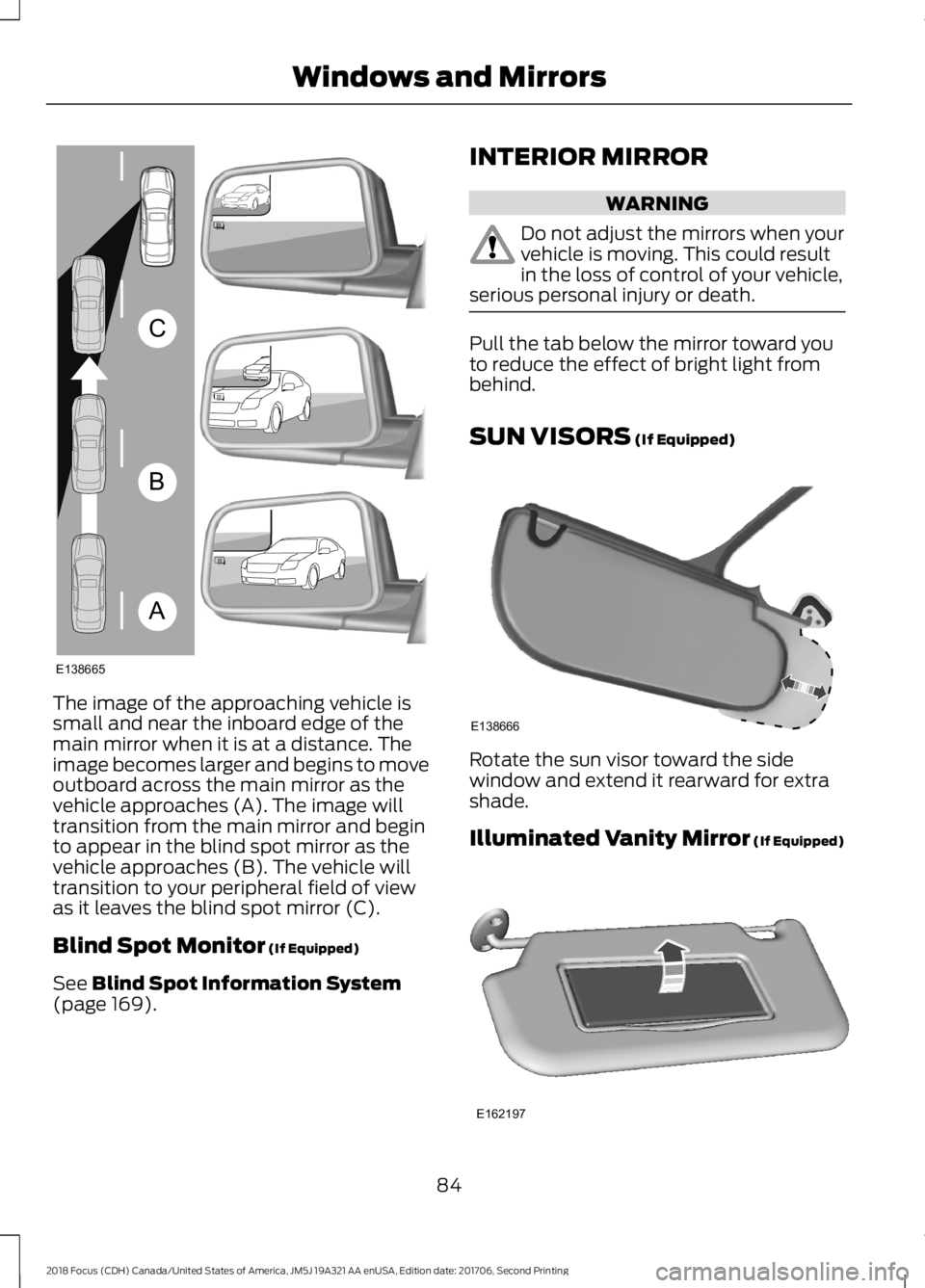
The image of the approaching vehicle issmall and near the inboard edge of themain mirror when it is at a distance. Theimage becomes larger and begins to moveoutboard across the main mirror as thevehicle approaches (A). The image willtransition from the main mirror and beginto appear in the blind spot mirror as thevehicle approaches (B). The vehicle willtransition to your peripheral field of viewas it leaves the blind spot mirror (C).
Blind Spot Monitor (If Equipped)
See Blind Spot Information System(page 169).
INTERIOR MIRROR
WARNING
Do not adjust the mirrors when yourvehicle is moving. This could resultin the loss of control of your vehicle,serious personal injury or death.
Pull the tab below the mirror toward youto reduce the effect of bright light frombehind.
SUN VISORS (If Equipped)
Rotate the sun visor toward the sidewindow and extend it rearward for extrashade.
Illuminated Vanity Mirror (If Equipped)
842018 Focus (CDH) Canada/United States of America, JM5J 19A321 AA enUSA, Edition date: 201706, Second PrintingWindows and MirrorsABCE138665 E138666 E162197
Page 90 of 473
If the needle enters the red section, theengine is overheating. Stop the engine,switch the ignition off and determine thecause once the engine has cooled down.See Engine Coolant Check (page 217).
Fuel Gauge
Note:: The fuel gauge may vary slightlywhen your vehicle is moving or on a gradient.
Switch the ignition on. The fuel gauge willindicate approximately how much fuel isleft in the fuel tank. The arrow adjacent tothe fuel pump symbol indicates on whichside of your vehicle the fuel filler door islocated.
The needle should move toward F whenyou refuel your vehicle. If the needle pointsto E after adding fuel, this indicates yourvehicle needs service soon.
After refueling some variability in needleposition is normal.
Note:It may take a short time for theneedle to reach F after leaving the gasstation. This is normal and depends uponthe slope of pavement at the gas station.
Note:The fuel amount dispensed into thetank is a little less or more than the gaugeindicated. This is normal and depends uponthe slope of pavement at the gas station.
Note:If the gas station nozzle shuts offbefore the tank is full, try a different gaspump nozzle.
Low Fuel Reminder
A low fuel reminder triggers at about 50miles (80 km). The low fuel warning lightwill light, a warning chime will sound anda pop up will be shown in the displayindicating the remaining distance to empty.You will also get a subsequent reminderat 20, 10 and 0 miles.
WARNING LAMPS AND
INDICATORS
The following warning lamps andindicators alert you to a vehicle conditionthat may become serious. Some lampsilluminate when you start your vehicle tomake sure they work. If any lamps remainon after starting your vehicle, refer to therespective system warning lamp for furtherinformation.
Note:Some warning indicators appear inthe information display and operate thesame as a warning lamp but do notilluminate when you start your vehicle.
Adaptive Cruise Control Indicator
(If Equipped)
It illuminates when you switchthe system on.
It illuminates white when the system is instandby mode. It illuminates green whenyou set the adaptive cruise speed.
Airbag Warning Lamp
If it does not illuminate when youswitch the ignition on, continuesto flash or remains on when theengine is running, this indicates amalfunction. Have your vehicle checkedas soon as possible.
Anti-Lock Brake System WarningLamp
If it illuminates when you aredriving, this indicates amalfunction. Your vehiclecontinues to have normal braking withoutthe anti-lock brake system function. Haveyour vehicle checked as soon as possible.
872018 Focus (CDH) Canada/United States of America, JM5J 19A321 AA enUSA, Edition date: 201706, Second PrintingInstrument ClusterE144524 E67017
Page 94 of 473
Parking Brake On Warning Chime
Sounds when you have left the parkingbrake on and drive your vehicle. If thewarning chime remains on after you havereleased the parking brake, have thesystem checked by an authorized dealerimmediately.
Low Fuel Minder
A low fuel reminder triggers at about 50miles (80 km). The low fuel warning lightwill light, a warning chime will sound anda pop up will be shown in the displayindicating the remaining distance to empty.You will also get a subsequent reminderat 20, 10 and 0 miles.
Fasten Safety Belt
Sounds as a reminder to fasten your safetybelt.
912018 Focus (CDH) Canada/United States of America, JM5J 19A321 AA enUSA, Edition date: 201706, Second PrintingInstrument Cluster
Page 95 of 473
GENERAL INFORMATION
WARNING
Driving while distracted can result inloss of vehicle control, crash andinjury. We strongly recommend thatyou use extreme caution when using anydevice that may take your focus off theroad. Your primary responsibility is the safeoperation of your vehicle. We recommendagainst the use of any hand-held devicewhile driving and encourage the use ofvoice-operated systems when possible.Make sure you are aware of all applicablelocal laws that may affect the use ofelectronic devices while driving.
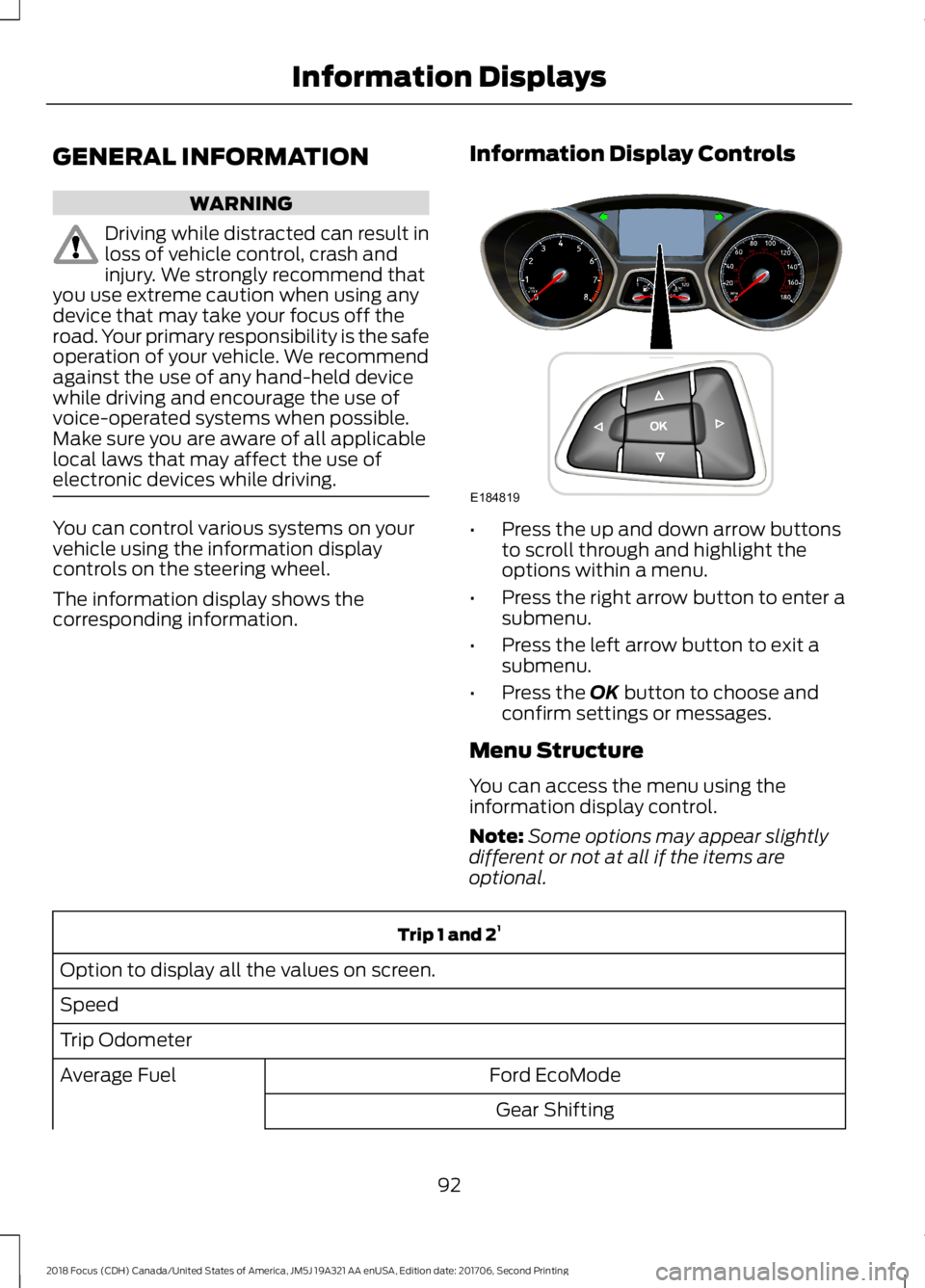
You can control various systems on yourvehicle using the information displaycontrols on the steering wheel.
The information display shows thecorresponding information.
Information Display Controls
•Press the up and down arrow buttonsto scroll through and highlight theoptions within a menu.
•Press the right arrow button to enter asubmenu.
•Press the left arrow button to exit asubmenu.
•Press the OK button to choose andconfirm settings or messages.
Menu Structure
You can access the menu using theinformation display control.
Note:Some options may appear slightlydifferent or not at all if the items areoptional.
Trip 1 and 21
Option to display all the values on screen.
Speed
Trip Odometer
Ford EcoModeAverage Fuel
Gear Shifting
922018 Focus (CDH) Canada/United States of America, JM5J 19A321 AA enUSA, Edition date: 201706, Second PrintingInformation DisplaysE184819
Page 97 of 473
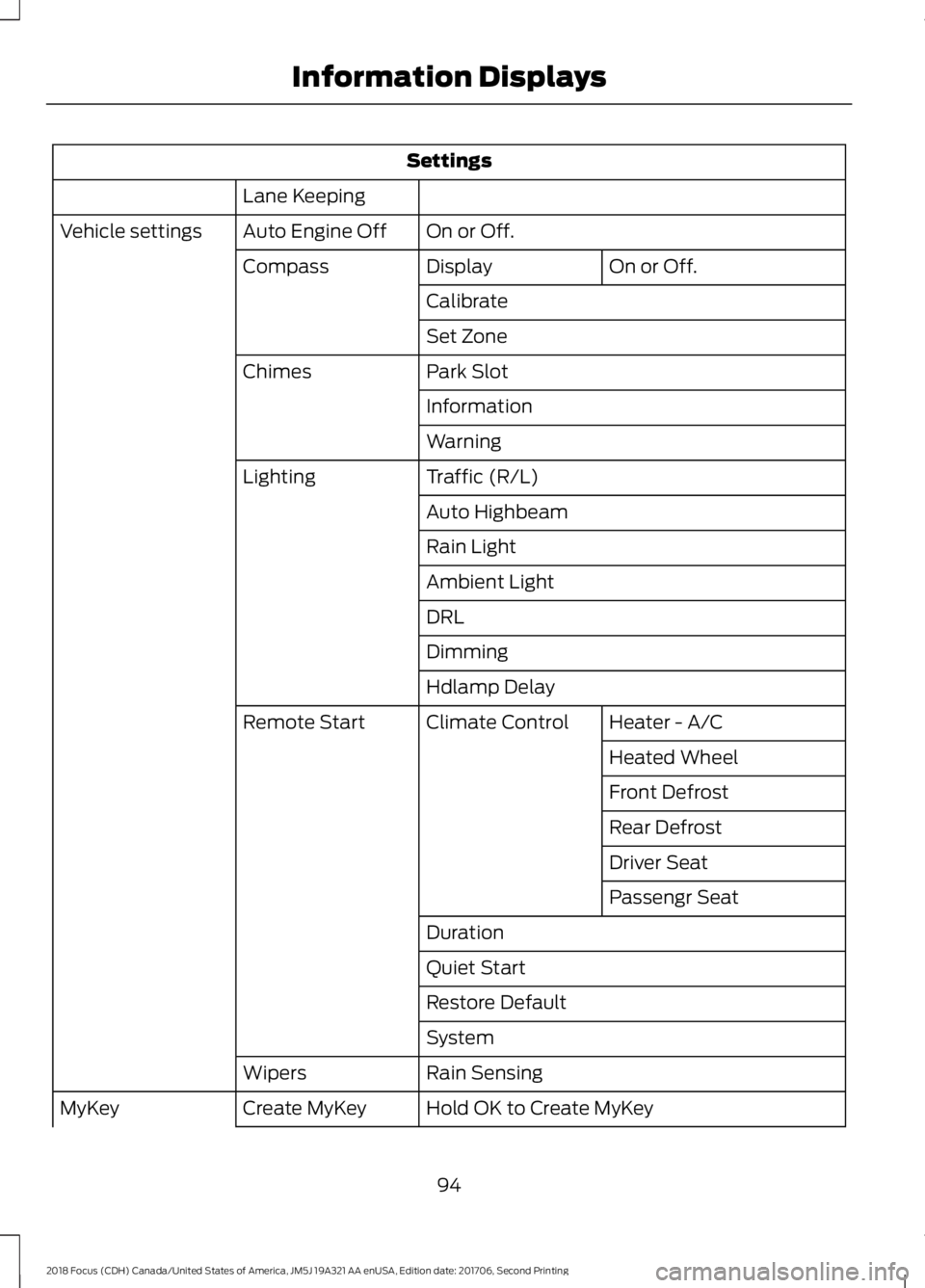
Settings
Lane Keeping
On or Off.Auto Engine OffVehicle settings
On or Off.DisplayCompass
Calibrate
Set Zone
Park SlotChimes
Information
Warning
Traffic (R/L)Lighting
Auto Highbeam
Rain Light
Ambient Light
DRL
Dimming
Hdlamp Delay
Heater - A/CClimate ControlRemote Start
Heated Wheel
Front Defrost
Rear Defrost
Driver Seat
Passengr Seat
Duration
Quiet Start
Restore Default
System
Rain SensingWipers
Hold OK to Create MyKeyCreate MyKeyMyKey
942018 Focus (CDH) Canada/United States of America, JM5J 19A321 AA enUSA, Edition date: 201706, Second PrintingInformation Displays
Page 103 of 473
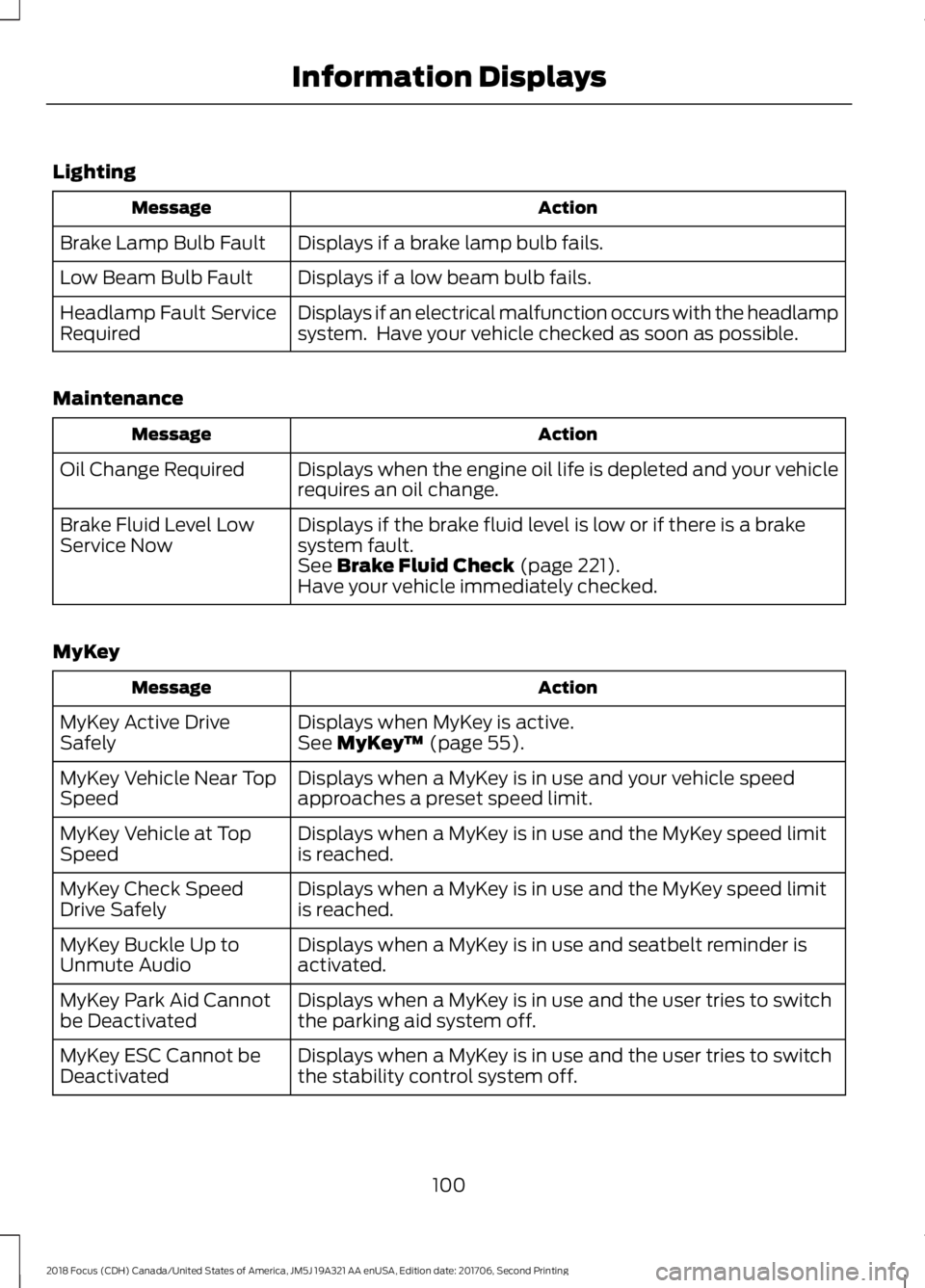
Lighting
ActionMessage
Displays if a brake lamp bulb fails.Brake Lamp Bulb Fault
Displays if a low beam bulb fails.Low Beam Bulb Fault
Displays if an electrical malfunction occurs with the headlampsystem. Have your vehicle checked as soon as possible.Headlamp Fault ServiceRequired
Maintenance
ActionMessage
Displays when the engine oil life is depleted and your vehiclerequires an oil change.Oil Change Required
Displays if the brake fluid level is low or if there is a brakesystem fault.Brake Fluid Level LowService NowSee Brake Fluid Check (page 221).Have your vehicle immediately checked.
MyKey
ActionMessage
Displays when MyKey is active.MyKey Active DriveSafelySee MyKey™ (page 55).
Displays when a MyKey is in use and your vehicle speedapproaches a preset speed limit.MyKey Vehicle Near TopSpeed
Displays when a MyKey is in use and the MyKey speed limitis reached.MyKey Vehicle at TopSpeed
Displays when a MyKey is in use and the MyKey speed limitis reached.MyKey Check SpeedDrive Safely
Displays when a MyKey is in use and seatbelt reminder isactivated.MyKey Buckle Up toUnmute Audio
Displays when a MyKey is in use and the user tries to switchthe parking aid system off.MyKey Park Aid Cannotbe Deactivated
Displays when a MyKey is in use and the user tries to switchthe stability control system off.MyKey ESC Cannot beDeactivated
1002018 Focus (CDH) Canada/United States of America, JM5J 19A321 AA enUSA, Edition date: 201706, Second PrintingInformation Displays