manual transmission FORD FOCUS 2018 Owner's Manual
[x] Cancel search | Manufacturer: FORD, Model Year: 2018, Model line: FOCUS, Model: FORD FOCUS 2018Pages: 473, PDF Size: 39.91 MB
Page 173 of 473
Using the Blind Spot InformationSystem
Vehicles with Automatic Transmission
The system turns on when all of thefollowing occur:
•You start your vehicle.
•You shift into drive (D).
•The vehicle speed is greater than6 mph (10 km/h).
Note:The system does not operate in park(P) or reverse (R).
Vehicles with Manual Transmission
The system turns on when all of thefollowing occur:
•You start your vehicle.
•The vehicle speed is greater than6 mph (10 km/h).
Note:The system does not operate inreverse (R).
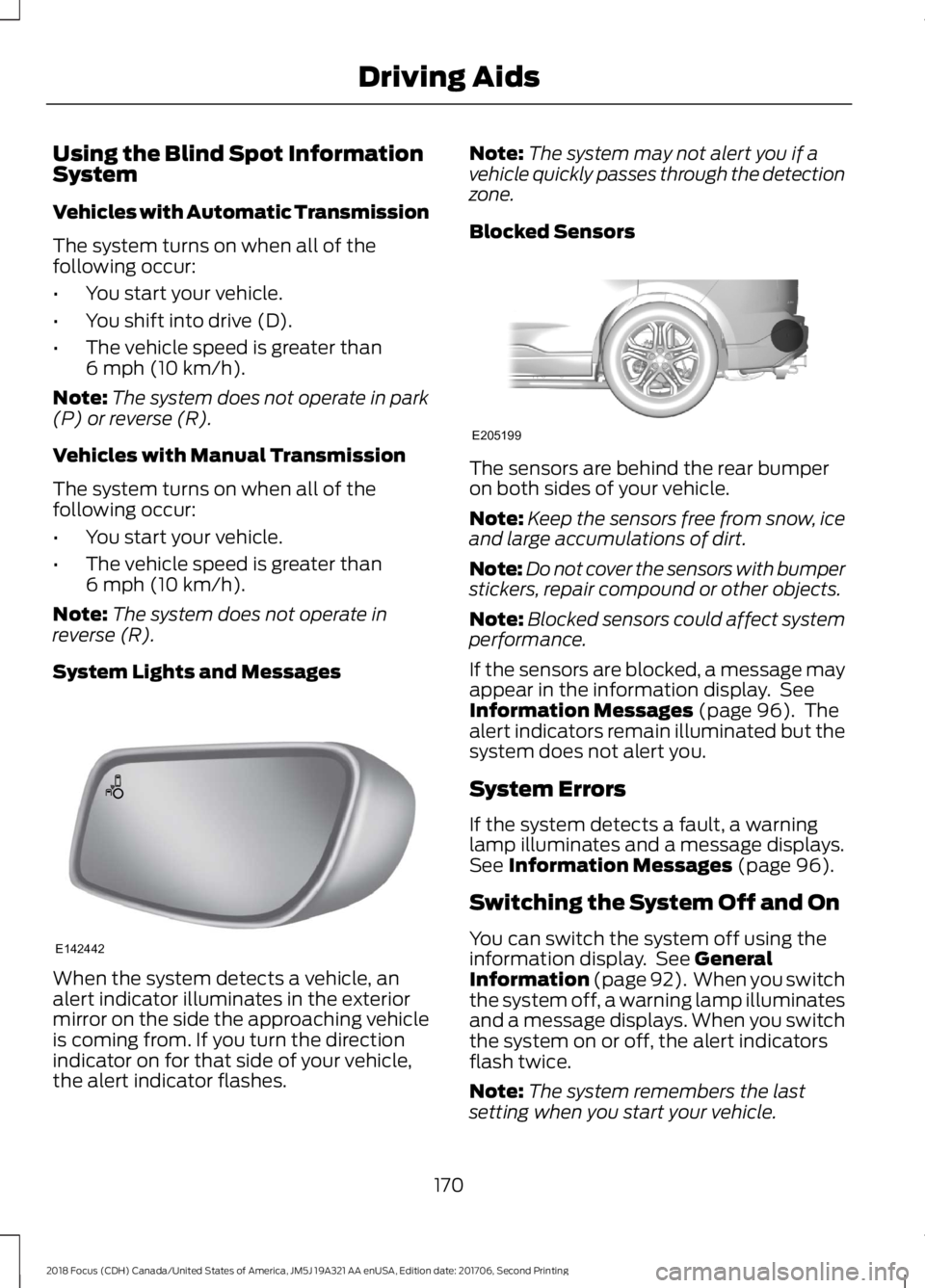
System Lights and Messages
When the system detects a vehicle, analert indicator illuminates in the exteriormirror on the side the approaching vehicleis coming from. If you turn the directionindicator on for that side of your vehicle,the alert indicator flashes.
Note:The system may not alert you if avehicle quickly passes through the detectionzone.
Blocked Sensors
The sensors are behind the rear bumperon both sides of your vehicle.
Note:Keep the sensors free from snow, iceand large accumulations of dirt.
Note:Do not cover the sensors with bumperstickers, repair compound or other objects.
Note:Blocked sensors could affect systemperformance.
If the sensors are blocked, a message mayappear in the information display. SeeInformation Messages (page 96). Thealert indicators remain illuminated but thesystem does not alert you.
System Errors
If the system detects a fault, a warninglamp illuminates and a message displays.See Information Messages (page 96).
Switching the System Off and On
You can switch the system off using theinformation display. See GeneralInformation (page 92). When you switchthe system off, a warning lamp illuminatesand a message displays. When you switchthe system on or off, the alert indicatorsflash twice.
Note:The system remembers the lastsetting when you start your vehicle.
1702018 Focus (CDH) Canada/United States of America, JM5J 19A321 AA enUSA, Edition date: 201706, Second PrintingDriving AidsE142442 E205199
Page 185 of 473
TOWING A TRAILER
WARNING
Your vehicle is not approvedfor trailer towing. Never towa trailer with your vehicle.
TRANSPORTING THE VEHICLE
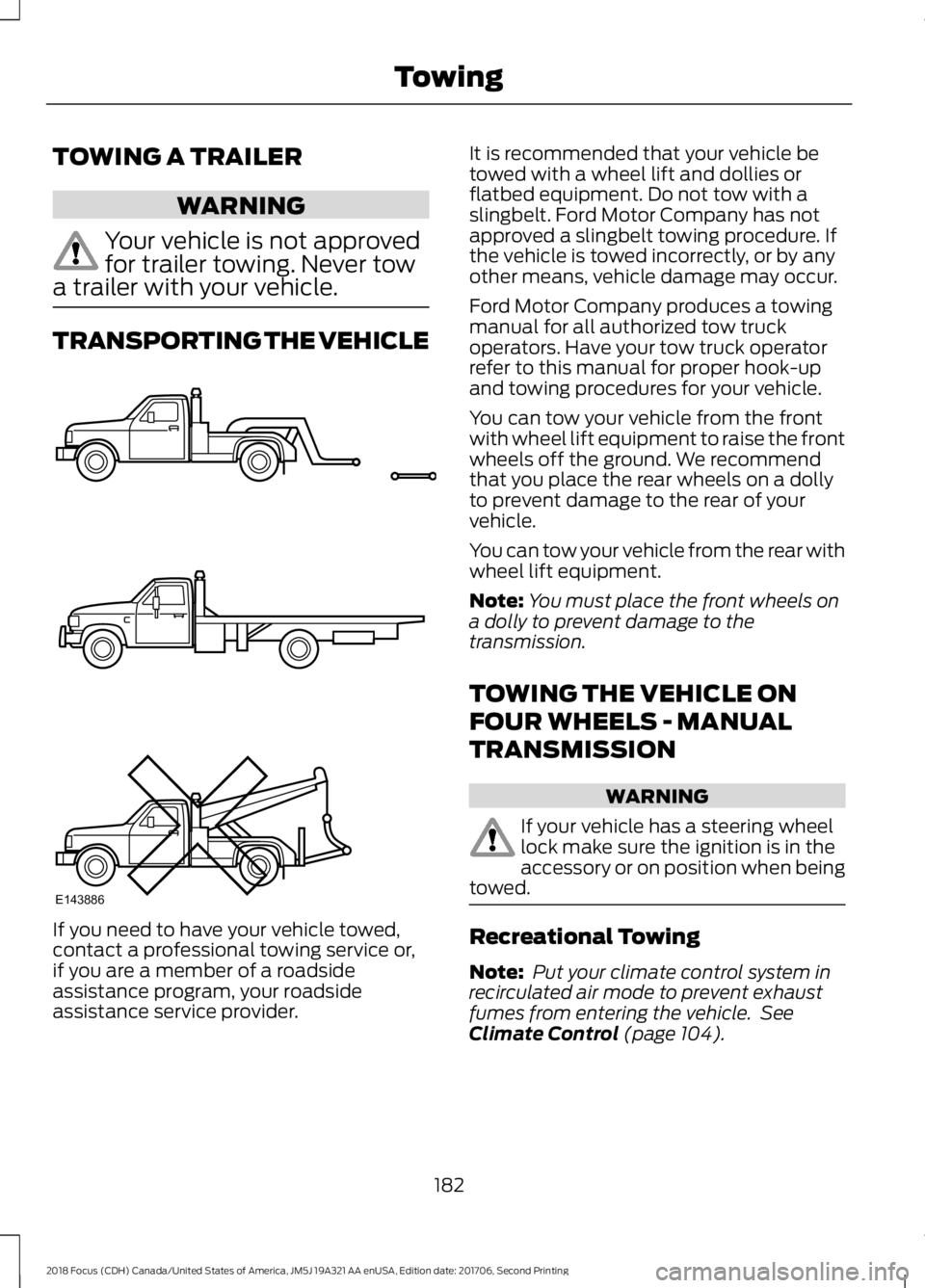
If you need to have your vehicle towed,contact a professional towing service or,if you are a member of a roadsideassistance program, your roadsideassistance service provider.
It is recommended that your vehicle betowed with a wheel lift and dollies orflatbed equipment. Do not tow with aslingbelt. Ford Motor Company has notapproved a slingbelt towing procedure. Ifthe vehicle is towed incorrectly, or by anyother means, vehicle damage may occur.
Ford Motor Company produces a towingmanual for all authorized tow truckoperators. Have your tow truck operatorrefer to this manual for proper hook-upand towing procedures for your vehicle.
You can tow your vehicle from the frontwith wheel lift equipment to raise the frontwheels off the ground. We recommendthat you place the rear wheels on a dollyto prevent damage to the rear of yourvehicle.
You can tow your vehicle from the rear withwheel lift equipment.
Note:You must place the front wheels ona dolly to prevent damage to thetransmission.
TOWING THE VEHICLE ON
FOUR WHEELS - MANUAL
TRANSMISSION
WARNING
If your vehicle has a steering wheellock make sure the ignition is in theaccessory or on position when beingtowed.
Recreational Towing
Note: Put your climate control system inrecirculated air mode to prevent exhaustfumes from entering the vehicle. SeeClimate Control (page 104).
1822018 Focus (CDH) Canada/United States of America, JM5J 19A321 AA enUSA, Edition date: 201706, Second PrintingTowingE143886
Page 224 of 473
AUTOMATIC TRANSMISSION
FLUID CHECK
The automatic transmission does not havea transmission fluid dipstick.
Have an authorized dealer check andchange the transmission fluid at thecorrect service interval. See ScheduledMaintenance (page 409). Yourtransmission does not consume fluid.However, if the transmission slips, shiftsslowly or if you notice a sign of leakingfluid, contact an authorized dealer.
Do not use supplemental transmissionfluid additives, treatments or cleaningagents. The use of these materials mayaffect transmission operation and resultin damage to internal transmissioncomponents.
BRAKE FLUID CHECK
WARNINGS
Do not use any fluid other than therecommended brake fluid as this willreduce brake efficiency. Use ofincorrect fluid could result in the loss ofvehicle control, serious personal injury ordeath.
Only use brake fluid from a sealedcontainer. Contamination with dirt,water, petroleum products or othermaterials may result in brake systemdamage or failure. Failure to adhere to thiswarning could result in the loss of vehiclecontrol, serious personal injury or death.
Do not allow the fluid to touch yourskin or eyes. If this happens, rinse theaffected areas immediately withplenty of water and contact your physician.
WARNINGS
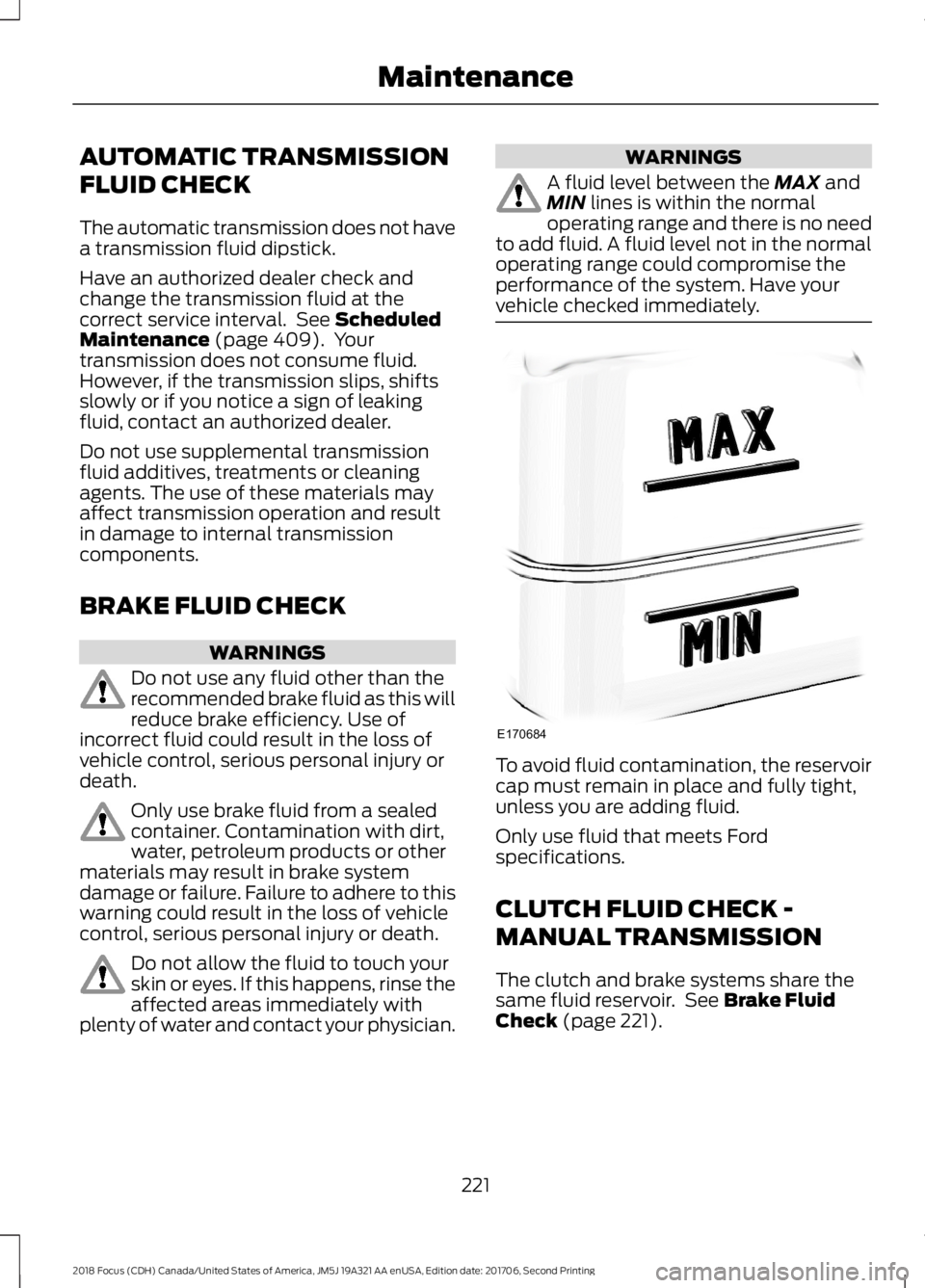
A fluid level between the MAX andMIN lines is within the normaloperating range and there is no needto add fluid. A fluid level not in the normaloperating range could compromise theperformance of the system. Have yourvehicle checked immediately.
To avoid fluid contamination, the reservoircap must remain in place and fully tight,unless you are adding fluid.
Only use fluid that meets Fordspecifications.
CLUTCH FLUID CHECK -
MANUAL TRANSMISSION
The clutch and brake systems share thesame fluid reservoir. See Brake FluidCheck (page 221).
2212018 Focus (CDH) Canada/United States of America, JM5J 19A321 AA enUSA, Edition date: 201706, Second PrintingMaintenanceE170684
Page 268 of 473
WARNINGS
Make sure there is no grease or oil onthe threads or the surface betweenthe wheel lugs and nuts. This cancause the lug nuts to loosen while driving.
When one of the front wheels is offthe ground, the transmission alonewill not prevent the vehicle frommoving or slipping off the jack, even if thetransmission is in park (P).
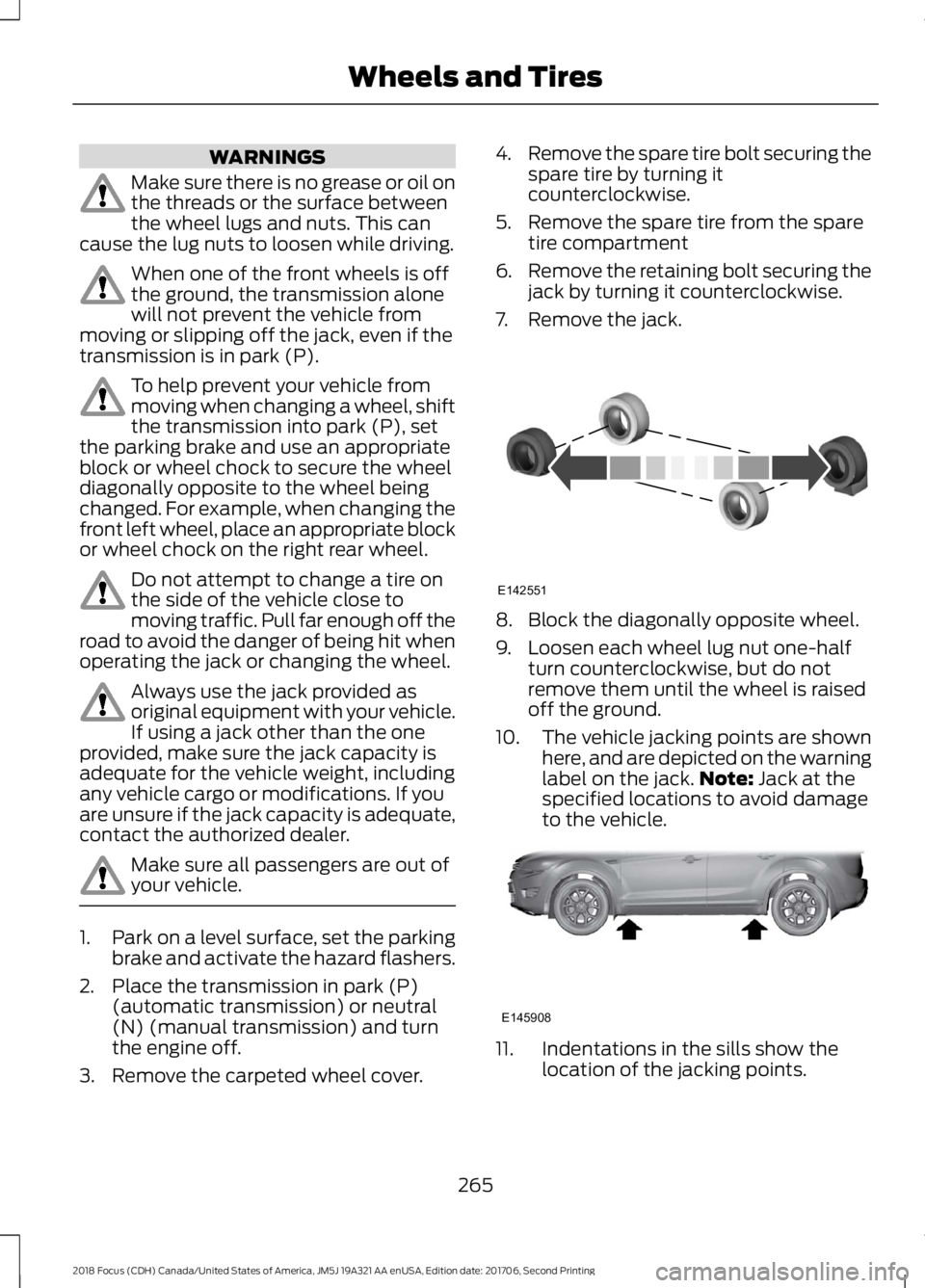
To help prevent your vehicle frommoving when changing a wheel, shiftthe transmission into park (P), setthe parking brake and use an appropriateblock or wheel chock to secure the wheeldiagonally opposite to the wheel beingchanged. For example, when changing thefront left wheel, place an appropriate blockor wheel chock on the right rear wheel.
Do not attempt to change a tire onthe side of the vehicle close tomoving traffic. Pull far enough off theroad to avoid the danger of being hit whenoperating the jack or changing the wheel.
Always use the jack provided asoriginal equipment with your vehicle.If using a jack other than the oneprovided, make sure the jack capacity isadequate for the vehicle weight, includingany vehicle cargo or modifications. If youare unsure if the jack capacity is adequate,contact the authorized dealer.
Make sure all passengers are out ofyour vehicle.
1.Park on a level surface, set the parkingbrake and activate the hazard flashers.
2.Place the transmission in park (P)(automatic transmission) or neutral(N) (manual transmission) and turnthe engine off.
3.Remove the carpeted wheel cover.
4.Remove the spare tire bolt securing thespare tire by turning itcounterclockwise.
5.Remove the spare tire from the sparetire compartment
6.Remove the retaining bolt securing thejack by turning it counterclockwise.
7.Remove the jack.
8.Block the diagonally opposite wheel.
9.Loosen each wheel lug nut one-halfturn counterclockwise, but do notremove them until the wheel is raisedoff the ground.
10.The vehicle jacking points are shownhere, and are depicted on the warninglabel on the jack.Note: Jack at thespecified locations to avoid damageto the vehicle.
11.Indentations in the sills show thelocation of the jacking points.
2652018 Focus (CDH) Canada/United States of America, JM5J 19A321 AA enUSA, Edition date: 201706, Second PrintingWheels and TiresE142551 E145908
Page 274 of 473
MOTORCRAFT PARTS - 2.0L
Part NumberComponent
FA-1908Air filter element
FL-910-SOil filter
BXT-96R-500Battery - vehicles with manualtransmissions
BXT-96R-590Battery - vehicles with automatictransmissions
SP-535Spark plugs
FP-70Cabin air filter
WW-2802 (driver side)Windshield wiper bladeWW-2803 (passenger side)
WW-1295Rear window wiper blade
We recommend Motorcraft replacement parts available at your Ford dealer or atfordparts.com for scheduled maintenance. These parts meet or exceed Ford MotorCompany’s specifications and are engineered for your vehicle. Use of other parts mayimpact vehicle performance, emissions and durability. Your warranty may be void for anydamage related to use of other parts.
If a Motorcraft oil filter is not available, use an oil filter that meets industry performancespecification SAE/USCAR-36.
For spark plug replacement, contact an authorized dealer. Replace the spark plugs at theappropriate intervals. See Scheduled Maintenance (page 409).
2712018 Focus (CDH) Canada/United States of America, JM5J 19A321 AA enUSA, Edition date: 201706, Second PrintingCapacities and Specifications
Page 276 of 473
VEHICLE CERTIFICATION
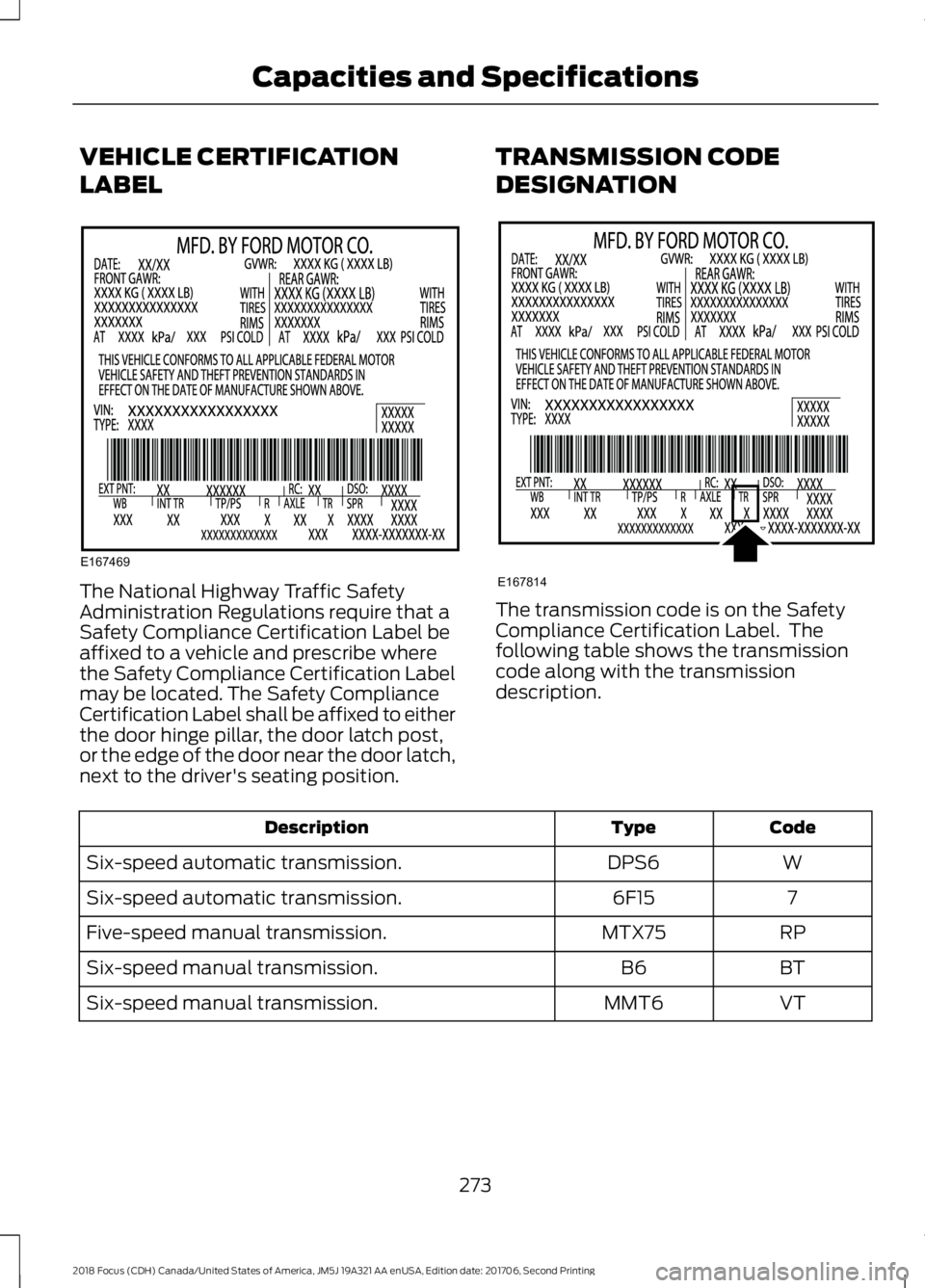
LABEL
The National Highway Traffic SafetyAdministration Regulations require that aSafety Compliance Certification Label beaffixed to a vehicle and prescribe wherethe Safety Compliance Certification Labelmay be located. The Safety ComplianceCertification Label shall be affixed to eitherthe door hinge pillar, the door latch post,or the edge of the door near the door latch,next to the driver's seating position.
TRANSMISSION CODE
DESIGNATION
The transmission code is on the SafetyCompliance Certification Label. Thefollowing table shows the transmissioncode along with the transmissiondescription.
CodeTypeDescription
WDPS6Six-speed automatic transmission.
76F15Six-speed automatic transmission.
RPMTX75Five-speed manual transmission.
BTB6Six-speed manual transmission.
VTMMT6Six-speed manual transmission.
2732018 Focus (CDH) Canada/United States of America, JM5J 19A321 AA enUSA, Edition date: 201706, Second PrintingCapacities and SpecificationsE167469 E167814
Page 277 of 473
CAPACITIES AND
SPECIFICATIONS - 1.0L
ECOBOOST™
WARNING
The air conditioning refrigerantsystem contains refrigerant underhigh pressure. Only qualifiedpersonnel should service the airconditioning refrigerant system. Openingthe air conditioning refrigerant system cancause personal injury.
Capacities
QuantityItem
1.2 gal (4.6 L)Engine oil fill capacity including the oil filter.
1.2 gal (4.4 L)Engine oil fill capacity excluding the oil filter.
2.2 gal (8.5 L)Engine coolant fill capacity.
0.4 gal (1.67 L)Manual transmission fluid fill capacity.
2.3 gal (8.6 L)Automatic transmission fluid fill capacity.
12.4 gal (47 L)Fuel tank fill capacity.
0.7 gal (2.5 L)Washer system fill capacity.
20.8 oz (0.59 kg)Air conditioning refrigerant fill capacity.
7.0 fl oz (207 ml)Air conditioning refrigerant compressor oil fill capacity.
Adding Engine Oil
Quantity
0.7 qt (0.7 L)
The quantity of engine oil required to raisethe indicated level on the dipstick fromminimum to maximum.
Specifications
We recommend that you use Motorcraftoil and fluids for your vehicle. Only usefluid that meets Ford specifications.
Using other fluids could result in damagenot covered by the vehicle Warranty.
MaterialsSpecificationName
WSS-M2C945-AMotorcraft® SAE 5W-20 Synthetic Blend Motor Oil (U.S.)Motorcraft® SAE 5W-20 Super Premium Motor Oil / Huile moteurde très haute qualité SAE 5W-20 Motorcraft® (Canada)XO-5W20-QSP (U.S.)CXO-5W20-LSP12 (Canada)
WSS-M2C945-AMotorcraft® SAE 5W-20 Full Synthetic Motor Oil (U.S.)
2742018 Focus (CDH) Canada/United States of America, JM5J 19A321 AA enUSA, Edition date: 201706, Second PrintingCapacities and Specifications
Page 280 of 473
CAPACITIES AND
SPECIFICATIONS - 2.0L
WARNING
The air conditioning refrigerantsystem contains refrigerant underhigh pressure. Only qualifiedpersonnel should service the airconditioning refrigerant system. Openingthe air conditioning refrigerant system cancause personal injury.
Capacities
QuantityItem
1.1 gal (4.3 L)Engine oil fill capacity including the oil filter.
1.0 gal (3.9 L)Engine oil fill capacity excluding the oil filter.
2.2 gal (8.5 L)Engine coolant fill capacity.
0.4 gal (1.67 L)Manual transmission fluid fill capacity.
0.4 gal (1.7 L)Automatic transmission fluid fill capacity.
12.4 gal (47 L)Fuel tank fill capacity.
2772018 Focus (CDH) Canada/United States of America, JM5J 19A321 AA enUSA, Edition date: 201706, Second PrintingCapacities and SpecificationsE240522
Page 305 of 473
Other features, such as text messagingusing Bluetooth and automatic phonebookdownload, are phone-dependent features.To check your phone's compatibility, seeyour phone's manual and visitwww.SYNCMyRide.com,www.SYNCMyRide.ca orwww.syncmaroute.ca.
Pairing a Phone for the First Time
Wirelessly pairing your phone with SYNCallows you to make and receive hands-freecalls.
Note:SYNC can support downloading upto approximately 4000 entries perBluetooth-enabled cellular phone.
Note:Make sure to switch on the ignitionand the radio. Shift the transmission intopark (P) for automatic transmission or firstgear for manual transmission.
Using the Audio System
Note:To scroll through the menus, pressthe up and down arrows on your audiosystem.
1.Make sure to switch on your phone'sBluetooth feature before starting thesearch. See your device's manual ifnecessary.
2.Press the PHONE button. When theaudio display indicates there is nopaired phone, select the option to add.
3.When a message to begin pairingappears in the audio display, search forSYNC on your phone to start the pairingprocess.
4.When prompted on your cell phone’sdisplay, confirm that the PIN providedby SYNC matches the PIN displayedon your cell phone. Your phone is nowpaired and the display indicates thatthe pairing was successful. If you areprompted to enter a PIN on your device,enter the PIN displayed on the screen.The display indicates when the pairingis successful.
Depending on your phone's capability andyour market, the system may prompt youwith questions, such as setting the currentphone as the primary phone (the phoneSYNC automatically tries to connect withfirst upon vehicle start-up) anddownloading your phonebook.
Using Voice Commands
Make sure to switch on yourphone's Bluetooth featurebefore starting the search. Seeyour device's manual if necessary.
Press the voice and when promptedsay:
Action and Descrip-tionVoice Command
Follow the instruc-tions on the audiodisplay.
(pair ([Bluetooth]device | phone |Bluetooth audio) |add phone)
You can say any of the voice commandsthat appear within open and close bracketsthat are separated by |. For example,where; (what's | what is) appears you say;what's or what is.
The commands that have [ ] around theword means that the word is optional.
3022018 Focus (CDH) Canada/United States of America, JM5J 19A321 AA enUSA, Edition date: 201706, Second PrintingSYNC™E142599
Page 306 of 473
Depending on your phone's capability andyour market, the system may prompt youwith questions, such as setting the currentphone as the primary phone (the phoneSYNC automatically tries to connect withfirst upon vehicle start-up) anddownloading your phonebook.
Pairing Subsequent Phones
Note:Make sure to switch on the ignitionand the radio. Shift the transmission intopark (P) for automatic transmission or firstgear for manual transmission.
Note:To scroll through the menus, pressthe up and down arrows on your audiosystem.
1.Make sure to switch on your phone'sBluetooth feature before starting thesearch. See your device's manual ifnecessary.
2.Press the PHONE button.
3.Select the option for BluetoothDevices.
4.Press the OK button.
5.Select the option to add. This startsthe pairing process.
6.When a message to begin pairingappears in the audio display, search forSYNC on your device.
7.When prompted on your cell phone’sdisplay, confirm that the PIN providedby SYNC matches the PIN displayedon your cell phone. Your phone is nowpaired and the display indicates thatthe pairing was successful. If you areprompted to enter a PIN on your device,enter the PIN displayed on the screen.The display indicates when the pairingis successful.
SYNC may prompt you with more cellphone options. Your cell phone may alsoprompt you to give SYNC permission toaccess information. For more informationon your cell phone’s capability, see yourcell phone’s manual and visit the website.
Phone Voice Commands
Press the voice button. Whenprompted, say any of thefollowing:
Voice Command
(phone | Blackberry | iPhone)
Then say any of the following:
call (___)
call ___ at home
call ___ ((in|at) [the] office | at work)
call ___ on (cell | mobile)
call ___ on other
1dial [[a] number]
2([go to] privacy | transfer to phone| privacy on)
2(hold call [on] | place call on hold)
2join (calls | call)
2mute call [on]
2(mute call off | un-mute call)
(turn ringer on | silent mode off)
(turn ringer off | silent mode [on])
3032018 Focus (CDH) Canada/United States of America, JM5J 19A321 AA enUSA, Edition date: 201706, Second PrintingSYNC™E142599