navigation system FORD FOCUS 2018 Owner's Manual
[x] Cancel search | Manufacturer: FORD, Model Year: 2018, Model line: FOCUS, Model: FORD FOCUS 2018Pages: 473, PDF Size: 39.91 MB
Page 388 of 473
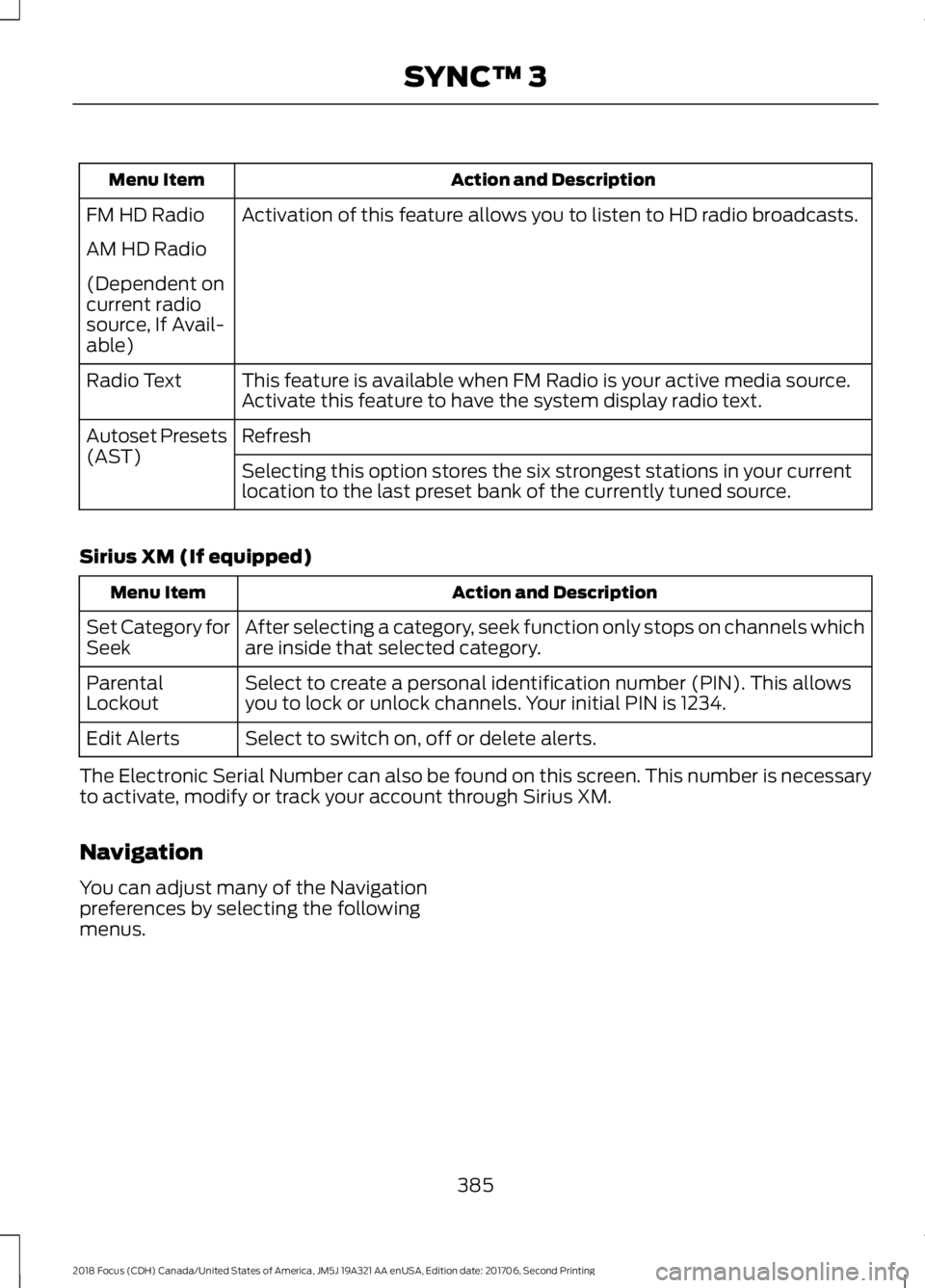
Action and DescriptionMenu Item
Activation of this feature allows you to listen to HD radio broadcasts.FM HD Radio
AM HD Radio
(Dependent oncurrent radiosource, If Avail-able)
This feature is available when FM Radio is your active media source.Activate this feature to have the system display radio text.Radio Text
RefreshAutoset Presets(AST)Selecting this option stores the six strongest stations in your currentlocation to the last preset bank of the currently tuned source.
Sirius XM (If equipped)
Action and DescriptionMenu Item
After selecting a category, seek function only stops on channels whichare inside that selected category.Set Category forSeek
Select to create a personal identification number (PIN). This allowsyou to lock or unlock channels. Your initial PIN is 1234.ParentalLockout
Select to switch on, off or delete alerts.Edit Alerts
The Electronic Serial Number can also be found on this screen. This number is necessaryto activate, modify or track your account through Sirius XM.
Navigation
You can adjust many of the Navigationpreferences by selecting the followingmenus.
3852018 Focus (CDH) Canada/United States of America, JM5J 19A321 AA enUSA, Edition date: 201706, Second PrintingSYNC™ 3
Page 389 of 473
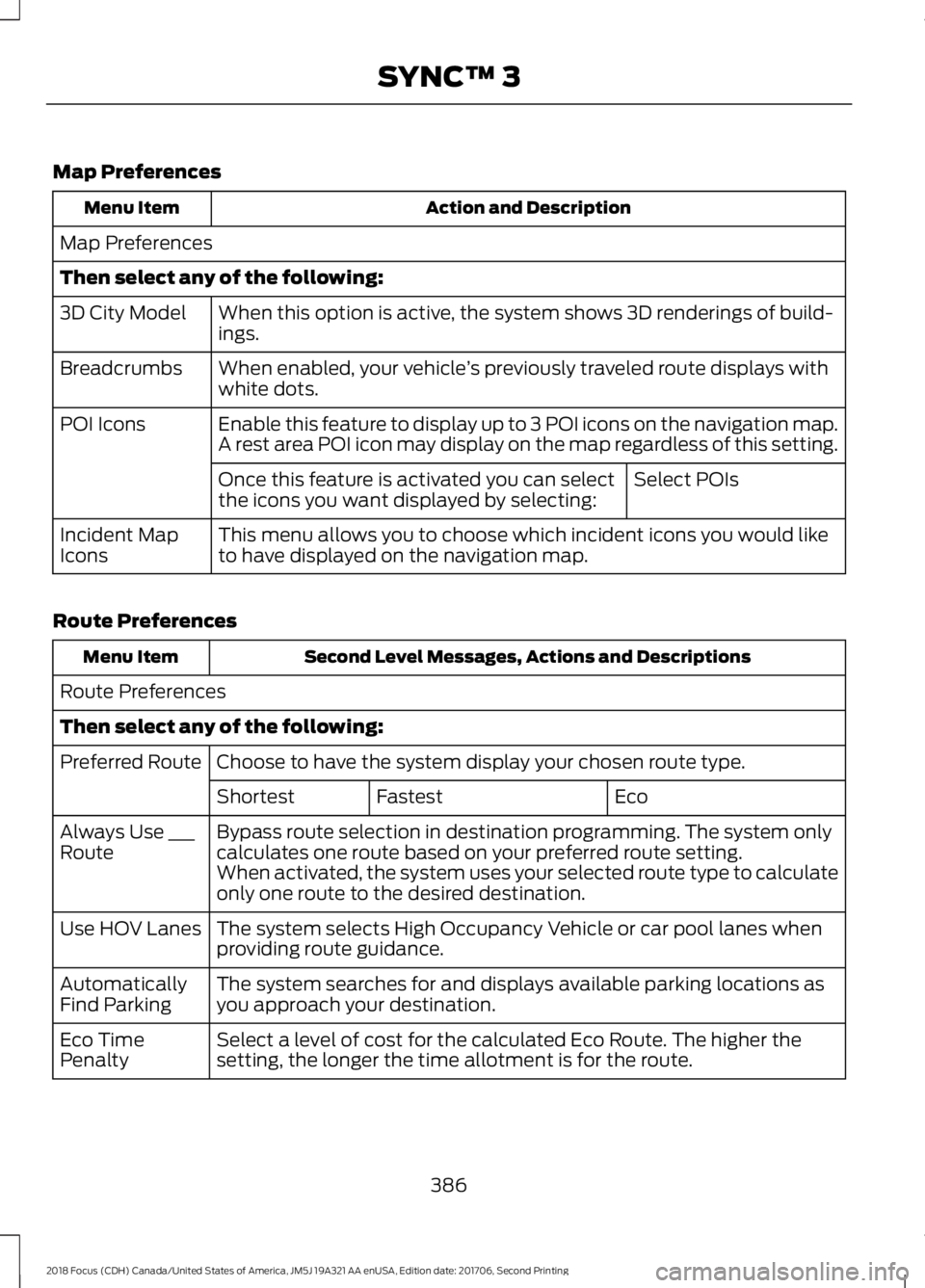
Map Preferences
Action and DescriptionMenu Item
Map Preferences
Then select any of the following:
When this option is active, the system shows 3D renderings of build-ings.3D City Model
When enabled, your vehicle’s previously traveled route displays withwhite dots.Breadcrumbs
Enable this feature to display up to 3 POI icons on the navigation map.POI IconsA rest area POI icon may display on the map regardless of this setting.
Select POIsOnce this feature is activated you can selectthe icons you want displayed by selecting:
This menu allows you to choose which incident icons you would liketo have displayed on the navigation map.Incident MapIcons
Route Preferences
Second Level Messages, Actions and DescriptionsMenu Item
Route Preferences
Then select any of the following:
Choose to have the system display your chosen route type.Preferred Route
EcoFastestShortest
Bypass route selection in destination programming. The system onlycalculates one route based on your preferred route setting.Always Use ___RouteWhen activated, the system uses your selected route type to calculateonly one route to the desired destination.
The system selects High Occupancy Vehicle or car pool lanes whenproviding route guidance.Use HOV Lanes
The system searches for and displays available parking locations asyou approach your destination.AutomaticallyFind Parking
Select a level of cost for the calculated Eco Route. The higher thesetting, the longer the time allotment is for the route.Eco TimePenalty
3862018 Focus (CDH) Canada/United States of America, JM5J 19A321 AA enUSA, Edition date: 201706, Second PrintingSYNC™ 3
Page 390 of 473
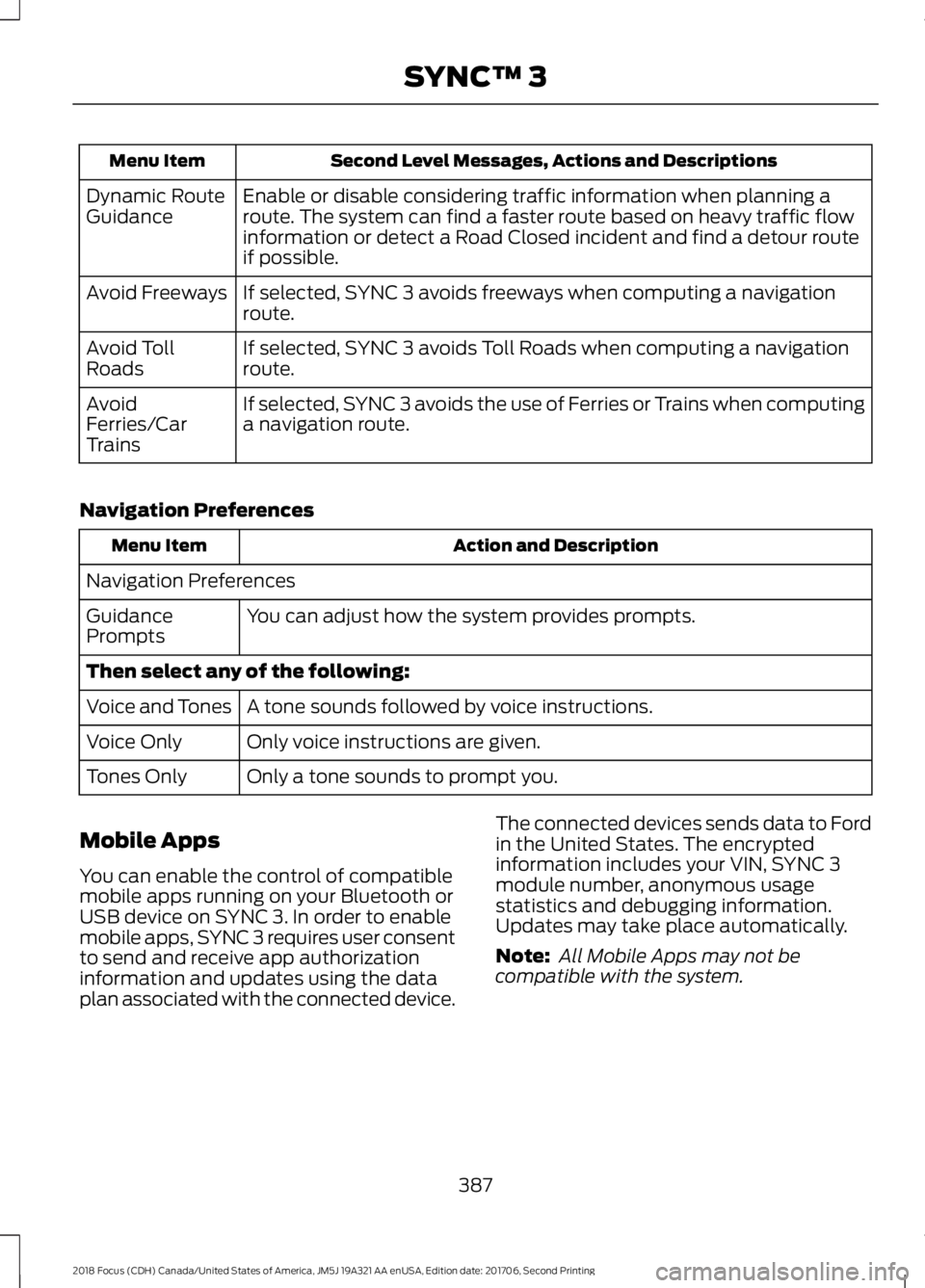
Second Level Messages, Actions and DescriptionsMenu Item
Enable or disable considering traffic information when planning aroute. The system can find a faster route based on heavy traffic flowinformation or detect a Road Closed incident and find a detour routeif possible.
Dynamic RouteGuidance
If selected, SYNC 3 avoids freeways when computing a navigationroute.Avoid Freeways
If selected, SYNC 3 avoids Toll Roads when computing a navigationroute.Avoid TollRoads
If selected, SYNC 3 avoids the use of Ferries or Trains when computinga navigation route.AvoidFerries/CarTrains
Navigation Preferences
Action and DescriptionMenu Item
Navigation Preferences
You can adjust how the system provides prompts.GuidancePrompts
Then select any of the following:
A tone sounds followed by voice instructions.Voice and Tones
Only voice instructions are given.Voice Only
Only a tone sounds to prompt you.Tones Only
Mobile Apps
You can enable the control of compatiblemobile apps running on your Bluetooth orUSB device on SYNC 3. In order to enablemobile apps, SYNC 3 requires user consentto send and receive app authorizationinformation and updates using the dataplan associated with the connected device.
The connected devices sends data to Fordin the United States. The encryptedinformation includes your VIN, SYNC 3module number, anonymous usagestatistics and debugging information.Updates may take place automatically.
Note: All Mobile Apps may not becompatible with the system.
3872018 Focus (CDH) Canada/United States of America, JM5J 19A321 AA enUSA, Edition date: 201706, Second PrintingSYNC™ 3
Page 392 of 473
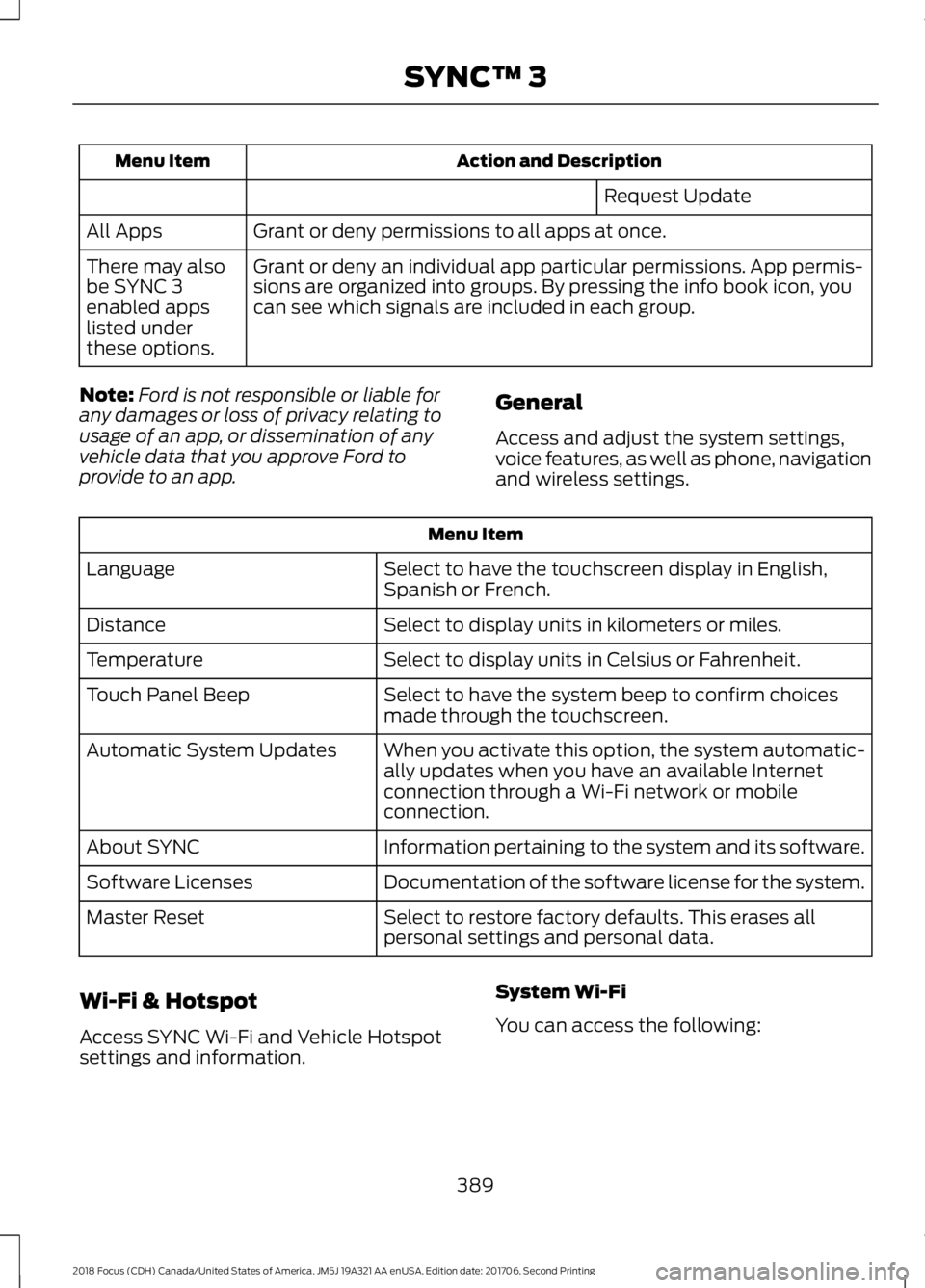
Action and DescriptionMenu Item
Request Update
Grant or deny permissions to all apps at once.All Apps
Grant or deny an individual app particular permissions. App permis-sions are organized into groups. By pressing the info book icon, youcan see which signals are included in each group.
There may alsobe SYNC 3enabled appslisted underthese options.
Note:Ford is not responsible or liable forany damages or loss of privacy relating tousage of an app, or dissemination of anyvehicle data that you approve Ford toprovide to an app.
General
Access and adjust the system settings,voice features, as well as phone, navigationand wireless settings.
Menu Item
Select to have the touchscreen display in English,Spanish or French.Language
Select to display units in kilometers or miles.Distance
Select to display units in Celsius or Fahrenheit.Temperature
Select to have the system beep to confirm choicesmade through the touchscreen.Touch Panel Beep
When you activate this option, the system automatic-ally updates when you have an available Internetconnection through a Wi-Fi network or mobileconnection.
Automatic System Updates
Information pertaining to the system and its software.About SYNC
Documentation of the software license for the system.Software Licenses
Select to restore factory defaults. This erases allpersonal settings and personal data.Master Reset
Wi-Fi & Hotspot
Access SYNC Wi-Fi and Vehicle Hotspotsettings and information.
System Wi-Fi
You can access the following:
3892018 Focus (CDH) Canada/United States of America, JM5J 19A321 AA enUSA, Edition date: 201706, Second PrintingSYNC™ 3
Page 436 of 473
SYNC® Automotive Important SafetyInformation Read and followinstructions:
•Before using your SYNC® system, readand follow all instructions and safetyinformation provided in this end usermanual ("Owner Guide".) Notfollowing precautions found in theOwner Guide can lead to an accidentor other serious injuries.
General Operation
•Voice Command Control: Certainfunctions within the SYNC® systemmay be accomplished using voicecommands. Using voice commandswhile driving helps you to operate thesystem without removing your handsfrom the wheel or eyes from the road.
•Prolonged Views of Screen: Do notaccess any function requiring aprolonged view of the screen while youare driving. Pull over in a safe and legalmanner before attempting to access afunction of the system requiringprolonged attention.
•Volume Setting: Do not raise thevolume excessively. Keep the volumeat a level where you can still hearoutside traffic and emergency signalswhile driving. Driving while unable tohear these sounds could cause anaccident.
•Navigation Features: Any navigationfeatures included in the system areintended to provide turn by turninstructions to get you to a desireddestination. Please make certain allpersons using this system carefullyread and follow instructions and safetyinformation fully.
•Distraction Hazard: Any navigationfeatures may require manual(non-verbal) setup. Attempting toperform such set-up or insert datawhile driving can distract your attentionand could cause an accident or otherserious injury. Stop the vehicle in a safeand legal manner before attemptingthese operations.
•Let Your Judgment Prevail: Anynavigation features are provided onlyas an aid. Make your driving decisionsbased on your observations of localconditions and existing trafficregulations. Any such feature is not asubstitute for your personal judgment.Any route suggestions made by thissystem should never replace any localtraffic regulations or your personaljudgment or knowledge of safe drivingpractices.
•Route Safety: Do not follow the routesuggestions if doing so would result inan unsafe or illegal maneuver, if youwould be placed in an unsafe situation,or if you would be directed into an areathat you consider unsafe. The driver isultimately responsible for the safeoperation of the vehicle and therefore,must evaluate whether it is safe tofollow the suggested directions.
•Potential Map Inaccuracy: Mapsused by this system may be inaccuratebecause of changes in roads, trafficcontrols or driving conditions. Alwaysuse good judgment and common sensewhen following the suggested routes.
•Emergency Services: Do not rely onany navigation features included in thesystem to route you to emergencyservices. Ask local authorities or anemergency services operator for theselocations. Not all emergency servicessuch as police, fire stations, hospitalsand clinics are likely to be contained inthe map database for such navigationfeatures.
4332018 Focus (CDH) Canada/United States of America, JM5J 19A321 AA enUSA, Edition date: 201706, Second PrintingAppendices
Page 445 of 473
Restrictions. Except where you have beenspecifically licensed to do so by Telenav,and without limiting the precedingparagraph, you may not use this Data (a)with any products, systems, or applicationsinstalled or otherwise connected to or incommunication with vehicles, capable ofvehicle navigation, positioning, dispatch,real time route guidance, fleetmanagement or similar applications; or (b)with or in communication with anypositioning devices or any mobile orwireless-connected electronic or computerdevices, including without limitationcellular phones, palmtop and handheldcomputers, pagers, and personal digitalassistants or PDAs.
Warning. The Data may containinaccurate or incomplete information dueto the passage of time, changingcircumstances, sources used and thenature of collecting comprehensivegeographic data, any of which may lead toincorrect results.
No Warranty. This Data is provided to you“as is,” and you agree to use it at your ownrisk. Telenav and its licensors (and theirlicensors and suppliers) make noguarantees, representations or warrantiesof any kind, express or implied, arising bylaw or otherwise, including but not limitedto, content, quality, accuracy,completeness, effectiveness, reliability,fitness for a particular purpose, usefulness,use or results to be obtained from thisData, or that the Data or server will beuninterrupted or error-free.
Disclaimer of Warranty: TELENAV ANDITS LICENSORS (INCLUDING THEIRLICENSORS AND SUPPLIERS) DISCLAIMANY WARRANTIES, EXPRESS OR IMPLIED,OF QUALITY, PERFORMANCE,MERCHANTABILITY, FITNESS FOR A
PARTICULAR PURPOSE ORNON-INFRINGEMENT. Some States,Territories and Countries do not allowcertain warranty exclusions, so to thatextent the above exclusion may not applyto you.
Disclaimer of Liability: TELENAV ANDITS LICENSORS (INCLUDING THEIRLICENSORS AND SUPPLIERS) SHALL NOTBE LIABLE TO YOU: IN RESPECT OF ANYCLAIM, DEMAND OR ACTION,IRRESPECTIVE OF THE NATURE OF THECAUSE OF THE CLAIM, DEMAND ORACTION ALLEGING ANY LOSS, INJURY ORDAMAGES, DIRECT OR INDIRECT, WHICHMAY RESULT FROM THE USE ORPOSSESSION OF THE INFORMATION; ORFOR ANY LOSS OF PROFIT, REVENUE,CONTRACTS OR SAVINGS, OR ANYOTHER DIRECT, INDIRECT, INCIDENTAL,SPECIAL OR CONSEQUENTIAL DAMAGESARISING OUT OF YOUR USE OF ORINABILITY TO USE THIS INFORMATION,ANY DEFECT IN THE INFORMATION, ORTHE BREACH OF THESE TERMS ORCONDITIONS, WHETHER IN AN ACTIONIN CONTRACT OR TORT OR BASED ON AWARRANTY, EVEN IF TELENAV OR ITSLICENSORS HAVE BEEN ADVISED OF THEPOSSIBILITY OF SUCH DAMAGES. SomeStates, Territories and Countries do notallow certain liability exclusions ordamages limitations, so to that extent theabove may not apply to you.
Export Control. You shall not export fromanywhere any part of the Data or any directproduct thereof except in compliance with,and with all licenses and approvalsrequired under, applicable export laws,rules and regulations, including but notlimited to the laws, rules and regulationsadministered by the Office of ForeignAssets Control of the U.S. Department ofCommerce and the Bureau of Industry andSecurity of the U.S. Department ofCommerce. To the extent that any such
4422018 Focus (CDH) Canada/United States of America, JM5J 19A321 AA enUSA, Edition date: 201706, Second PrintingAppendices
Page 453 of 473
view it, and (ii) save it, provided that youdo not remove any copyright notices thatappear and do not modify the Data in anyway. You agree not to otherwise reproduce,copy, modify, decompile, disassemble orreverse engineer any portion of this Data,and may not transfer or distribute it in anyform, for any purpose, except to the extentpermitted by mandatory laws.
Restrictions
Except where you have been specificallylicensed to do so by NAV2 , and withoutlimiting the preceding paragraph, you maynot (a) use this Data with any products,systems, or applications installed orotherwise connected to or incommunication with vehicles, capable ofvehicle navigation, positioning, dispatch,real time route guidance, fleetmanagement or similar applications; or (b)with or in communication with anypositioning devices or any mobile orwireless-connected electronic or computerdevices, including without limitationcellular phones, palmtop and handheldcomputers, pagers, and personal digitalassistants or PDAs. You agree to ceaseusing this Data if you fail to comply withthese terms and conditions.
Limited Warranty
NAV2 warrants that (a) the Data willperform substantially in accordance withthe accompanying written materials for aperiod of ninety (90) days from the dateof receipt, and (b) any support servicesprovided by NAV2 shall be substantially asdescribed in applicable written materialsprovided to you by NAV2, and NAV2’ssupport engineers will make commerciallyreasonable efforts to solve any problemissues.
rigCustomer Remedies
NAV2 and its suppliers’ entire liability andyour exclusive remedy shall be, at NAV2’ssole discretion, either (a) return of the pricepaid, if any, or (b) repair or replacement ofthe Data that do not meet NAV2’s LimitedWarranty and that are returned to NAV2with a copy of your receipt. This LimitedWarranty is void if failure of the Data hasresulted from accident, abuse, ormisapplication. Any replacement Data willbe warranted for the remainder of theoriginal warranty period or thirty (30) days,whichever is longer. Neither these remediesnor any product support services offeredby NAV2 are available without proof ofpurchase from an authorized internationalsource.
No Other Warranty:
EXCEPT FOR THE LMITED WARRANTYSET FORTH ABOVE AND TO THE EXTENTPERMITTED BY APPLICABLE LAW, NAV2AND ITS LICENSORS (INCLUDING THEIRLICENSORS AND SUPPLIERS) DISCLAIMANY WARRANTIES, EXPRESS OR IMPLIED,OF QUALITY, PERFORMANCE,MERCHANTABILITY, FITNESS FOR APARTICULAR PURPOSE, OWNERSHIP ORNON-INFRINGEMENT. Certain warrantyexclusions may not be permitted underapplicable law, so to that extent the aboveexclusion may not apply to you.
Limited Liability:
TO THE EXTENT PERMITTED BYAPPLICABLE LAW, NAV2 AND ITSLICENSORS (INCLUDING THEIRLICENSORS AND SUPPLIERS) SHALL NOTBE LIABLE TO YOU: IN RESPECT OF ANYCLAIM, DEMAND OR ACTION,IRRESPECTIVE OF THE NATURE OF THECAUSE OF THE CLAIM, DEMAND ORACTION ALLEGING ANY LOSS, INJURY ORDAMAGES, DIRECT OR INDIRECT, WHICHMAY RESULT FROM THE USE ORPOSSESSION OF THE INFORMATION; OR
4502018 Focus (CDH) Canada/United States of America, JM5J 19A321 AA enUSA, Edition date: 201706, Second PrintingAppendices
Page 467 of 473
Illuminated Entry..................................................63Illuminated Exit.....................................................63Opening the Liftgate or LuggageCompartment..................................................64Power Door Locks................................................60Remote Control....................................................60Smart Unlocks for Integrated KeyheadTransmitter........................................................62Smart Unlocks for Intelligent AccessKeys......................................................................62Luggage Covers.............................................176Removing the Cover...........................................176Lug NutsSee: Changing a Road Wheel.......................263Lug Nuts..........................................................267
M
Maintenance....................................................211General Information............................................211Manual Climate Control............................104Manual Liftgate..............................................64Closing the Liftgate.............................................65Opening the Liftgate...........................................65Manual Seats..................................................113Manual Transmission - 5-Speed ManualTransmission (MTX-75)...........................141Parking Your Vehicle..........................................142Recommended Shift Speeds.........................142Reverse...................................................................142Using the Clutch...................................................141Manual Transmission - 6-Speed ManualTransmission (MMT6)............................140Parking Your Vehicle...........................................141Recommended Shift Speeds........................140Reverse...................................................................140Using the Clutch.................................................140Media Hub......................................................296Message CenterSee: Information Displays.................................92MirrorsSee: Heated Windows and Mirrors..............109See: Windows and Mirrors................................82Mobile Communications Equipment.......13Moonroof..........................................................85Bounce-Back.........................................................85Opening and Closing the Moonroof..............85Venting the Moonroof........................................85
Motorcraft Parts - 1.0LEcoBoost™.................................................270Motorcraft Parts - 2.0L................................271MyKey Troubleshooting...............................58MyKey™.............................................................55Principle of Operation........................................55
N
Navigation......................................................368cityseeker..............................................................375Destination Mode..............................................370Map Mode............................................................369Navigation Map Updates................................376Navigation Menu................................................373SiriusXM Traffic and Travel Link...................376SYNC AppLink.....................................................375Waypoints.............................................................374Normal Scheduled Maintenance...........412Intelligent Oil-Life Monitor™..........................412Normal Maintenance Intervals......................413
O
Oil Change Indicator Reset.......................216Resetting the Oil Life MonitoringSystem...............................................................216Oil CheckSee: Engine Oil Check.......................................215Opening and Closing the Hood................211Ordering Additional Owner'sLiterature.......................................................197Obtaining a French Owner’s Manual..........198Overhead Console........................................118
P
Parking Aids....................................................153Principle of Operation.......................................153Parking Brake.................................................148All Vehicles............................................................148Vehicles With AutomaticTransmission...................................................148Vehicles With Manual Transmission...........148Passive Anti-Theft System........................68SecuriLock..............................................................68PATSSee: Passive Anti-Theft System....................68
4642018 Focus (CDH) Canada/United States of America, JM5J 19A321 AA enUSA, Edition date: 201706, Second PrintingIndex
Page 471 of 473
Voice Commands for Audio Sources.........325Using SYNC™ With Your Phone.............301Accessing Features through the PhoneMenu.................................................................306Accessing Your Phone Settings...................309Bluetooth Devices..............................................310Making Calls........................................................305Pairing a Phone for the First Time...............302Pairing Subsequent Phones..........................303Phone Options during an Active Call.........305Phone Voice Commands................................303Receiving Calls...................................................305System Settings...................................................311Text Messaging...................................................307Using Traction Control...............................150Switching the System Off...............................150System Indicator Lights andMessages..........................................................150Using a Switch.....................................................150Using the Information DisplayControls.............................................................150Using Voice Recognition...........................299Audio Voice Commands.................................348Initiating a Voice Session................................299Mobile App Voice Commands.......................351Navigation Voice Commands.......................350Phone Voice Commands................................349SiriusXM Traffic and Travel Link VoiceCommands......................................................352System Interaction and Feedback.............300Voice Settings Commands............................352Utilizing the Mediation/ArbitrationProgram (Canada Only).........................196
V
Vehicle Care...................................................236General Information.........................................236Vehicle Certification Label........................273Vehicle Identification Number.................272Vehicle Storage..............................................241Battery....................................................................242Body........................................................................242Brakes.....................................................................242Cooling system...................................................242Engine.....................................................................242Fuel system..........................................................242General...................................................................241
Miscellaneous.....................................................242Removing Vehicle From Storage..................242Tires.........................................................................242VentilationSee: Climate Control.........................................104VINSee: Vehicle Identification Number.............272Voice Control....................................................72
W
Warning Lamps and Indicators.................87Adaptive Cruise Control Indicator..................87Airbag Warning Lamp.........................................87Anti-Lock Brake System WarningLamp....................................................................87Auto-Start-Stop Indicator................................88Battery Charging Condition WarningLamp...................................................................88Blind Spot Information SystemIndicator.............................................................88Brake System Warning Lamp.........................88Cruise Control Indicator.....................................88Direction Indicator...............................................88Door Ajar Warning Lamp..................................89Engine Warning Lamps.....................................89Fasten Seatbelt Warning Lamp.....................89Front Fog Lamp Indicator.................................89Headlamp High Beam Indicator....................89Lamps on Indicator.............................................89Lane Keeping System Warning Lamp..........89Liftgate Ajar Warning Lamp.............................89Low Fuel Level Warning Lamp.......................89Low Tire Pressure Warning Lamp.................90Low Washer Fluid Level WarningLamp...................................................................90Message Center Indicator.................................90Oil Pressure Warning Lamp.............................90Stability Control and Traction ControlIndicator.............................................................90Stability Control and Traction Control OffWarning Lamp.................................................90Washer Fluid Check.....................................222WashersSee: Cleaning the Exterior...............................237See: Wipers and Washers..................................74Waxing.............................................................238
4682018 Focus (CDH) Canada/United States of America, JM5J 19A321 AA enUSA, Edition date: 201706, Second PrintingIndex