key FORD FOCUS 2018 Owner's Guide
[x] Cancel search | Manufacturer: FORD, Model Year: 2018, Model line: FOCUS, Model: FORD FOCUS 2018Pages: 473, PDF Size: 39.91 MB
Page 103 of 473
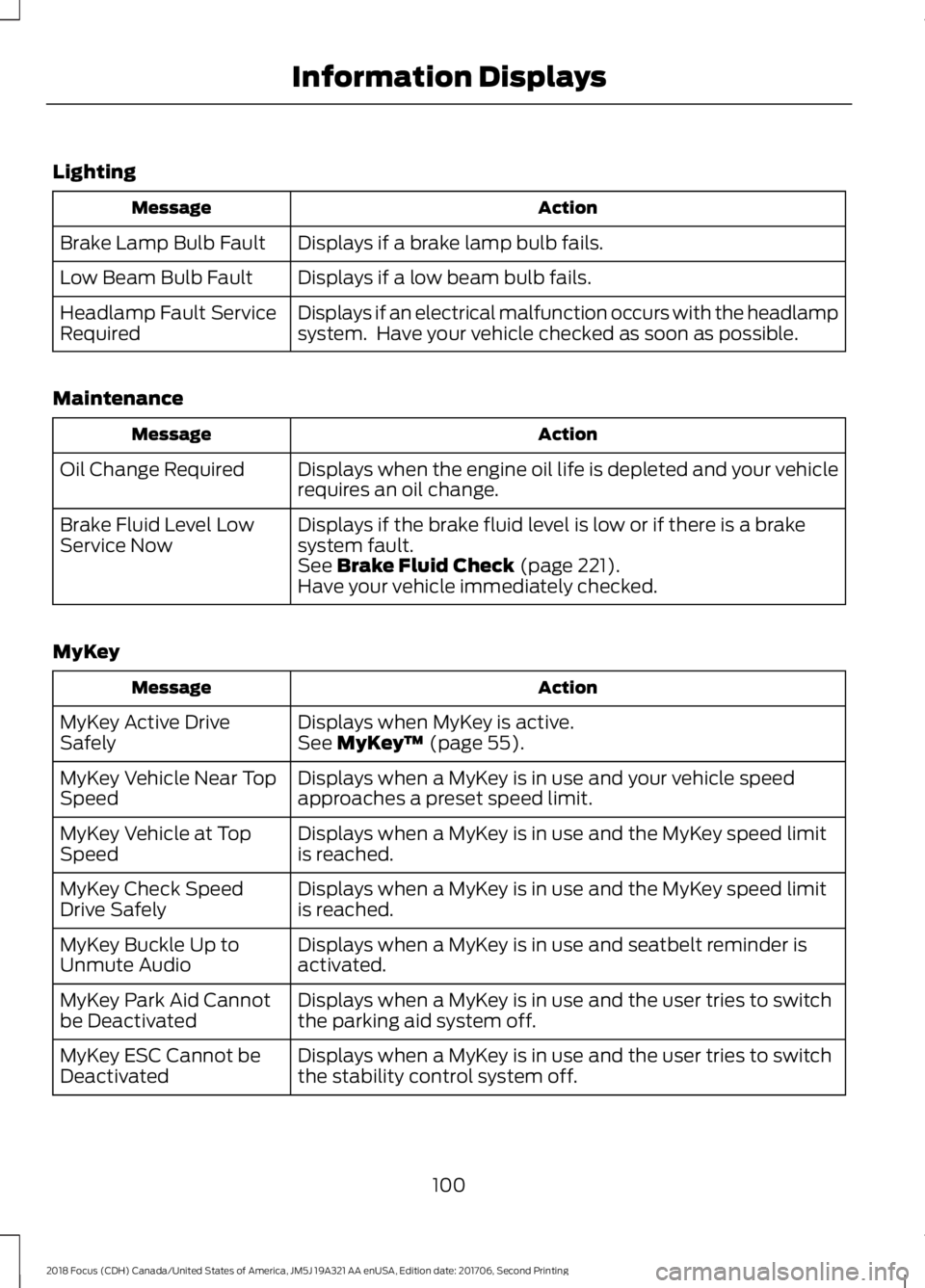
Lighting
ActionMessage
Displays if a brake lamp bulb fails.Brake Lamp Bulb Fault
Displays if a low beam bulb fails.Low Beam Bulb Fault
Displays if an electrical malfunction occurs with the headlampsystem. Have your vehicle checked as soon as possible.Headlamp Fault ServiceRequired
Maintenance
ActionMessage
Displays when the engine oil life is depleted and your vehiclerequires an oil change.Oil Change Required
Displays if the brake fluid level is low or if there is a brakesystem fault.Brake Fluid Level LowService NowSee Brake Fluid Check (page 221).Have your vehicle immediately checked.
MyKey
ActionMessage
Displays when MyKey is active.MyKey Active DriveSafelySee MyKey™ (page 55).
Displays when a MyKey is in use and your vehicle speedapproaches a preset speed limit.MyKey Vehicle Near TopSpeed
Displays when a MyKey is in use and the MyKey speed limitis reached.MyKey Vehicle at TopSpeed
Displays when a MyKey is in use and the MyKey speed limitis reached.MyKey Check SpeedDrive Safely
Displays when a MyKey is in use and seatbelt reminder isactivated.MyKey Buckle Up toUnmute Audio
Displays when a MyKey is in use and the user tries to switchthe parking aid system off.MyKey Park Aid Cannotbe Deactivated
Displays when a MyKey is in use and the user tries to switchthe stability control system off.MyKey ESC Cannot beDeactivated
1002018 Focus (CDH) Canada/United States of America, JM5J 19A321 AA enUSA, Edition date: 201706, Second PrintingInformation Displays
Page 104 of 473
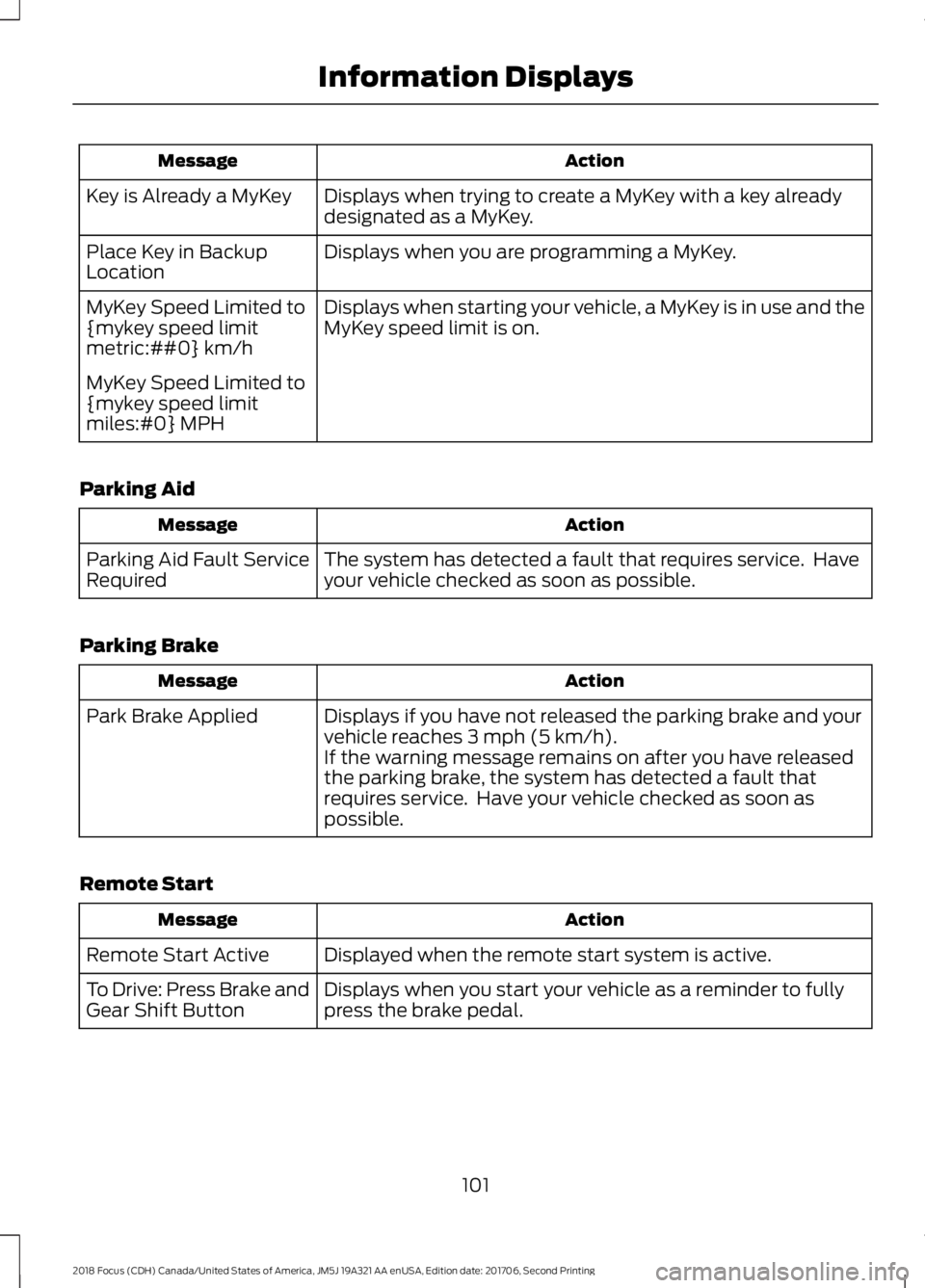
ActionMessage
Displays when trying to create a MyKey with a key alreadydesignated as a MyKey.Key is Already a MyKey
Displays when you are programming a MyKey.Place Key in BackupLocation
Displays when starting your vehicle, a MyKey is in use and theMyKey speed limit is on.MyKey Speed Limited to{mykey speed limitmetric:##0} km/h
MyKey Speed Limited to{mykey speed limitmiles:#0} MPH
Parking Aid
ActionMessage
The system has detected a fault that requires service. Haveyour vehicle checked as soon as possible.Parking Aid Fault ServiceRequired
Parking Brake
ActionMessage
Displays if you have not released the parking brake and yourvehicle reaches 3 mph (5 km/h).Park Brake Applied
If the warning message remains on after you have releasedthe parking brake, the system has detected a fault thatrequires service. Have your vehicle checked as soon aspossible.
Remote Start
ActionMessage
Displayed when the remote start system is active.Remote Start Active
Displays when you start your vehicle as a reminder to fullypress the brake pedal.To Drive: Press Brake andGear Shift Button
1012018 Focus (CDH) Canada/United States of America, JM5J 19A321 AA enUSA, Edition date: 201706, Second PrintingInformation Displays
Page 115 of 473
Note:Adjust the seatback to an uprightdriving position before adjusting the headrestraint. Adjust the head restraint so thatthe top of it is level with the top of your headand as far forward as possible. Make surethat you remain comfortable. If you areextremely tall, adjust the head restraint toits highest position.
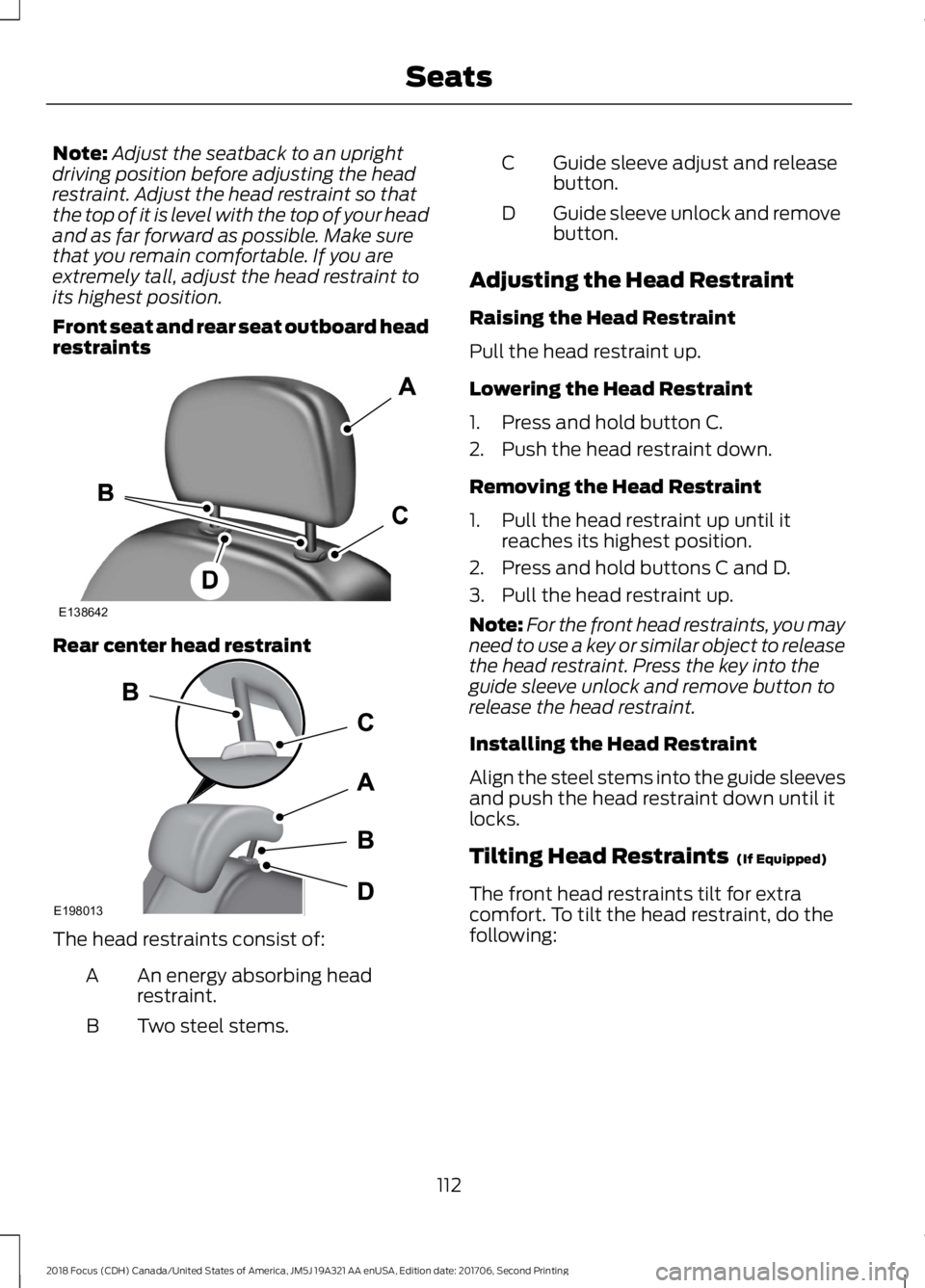
Front seat and rear seat outboard headrestraints
Rear center head restraint
The head restraints consist of:
An energy absorbing headrestraint.A
Two steel stems.B
Guide sleeve adjust and releasebutton.C
Guide sleeve unlock and removebutton.D
Adjusting the Head Restraint
Raising the Head Restraint
Pull the head restraint up.
Lowering the Head Restraint
1.Press and hold button C.
2.Push the head restraint down.
Removing the Head Restraint
1.Pull the head restraint up until itreaches its highest position.
2.Press and hold buttons C and D.
3.Pull the head restraint up.
Note:For the front head restraints, you mayneed to use a key or similar object to releasethe head restraint. Press the key into theguide sleeve unlock and remove button torelease the head restraint.
Installing the Head Restraint
Align the steel stems into the guide sleevesand push the head restraint down until itlocks.
Tilting Head Restraints (If Equipped)
The front head restraints tilt for extracomfort. To tilt the head restraint, do thefollowing:
1122018 Focus (CDH) Canada/United States of America, JM5J 19A321 AA enUSA, Edition date: 201706, Second PrintingSeatsE138642 E198013
Page 122 of 473
GENERAL INFORMATION
WARNINGS
Extended idling at high enginespeeds can produce very hightemperatures in the engine andexhaust system, creating the risk of fire orother damage.
Do not park, idle or drive your vehicleon dry grass or other dry groundcover. The emission system heats upthe engine compartment and exhaustsystem, creating the risk of fire.
Do not start the engine in a closedgarage or in other enclosed areas.Exhaust fumes can be toxic. Alwaysopen the garage door before you start theengine.
Exhaust leaks may result in entry ofharmful and potentially lethal fumesinto the passenger compartment. Ifyou smell exhaust fumes inside yourvehicle, have your vehicle inspectedimmediately. Do not drive if you smellexhaust fumes.
If you disconnect the battery, your vehiclemay exhibit some unusual drivingcharacteristics for approximately 5 mi(8 km) after you reconnect it. This isbecause the engine management systemmust realign itself with the engine. Youcan disregard any unusual drivingcharacteristics during this period.
The powertrain control system meets allCanadian interference-causing equipmentstandard requirements regulating theimpulse electrical field or radio noise.
When you start the engine, avoid pressingthe accelerator pedal before and duringoperation. Only use the accelerator pedalwhen you have difficulty starting theengine.
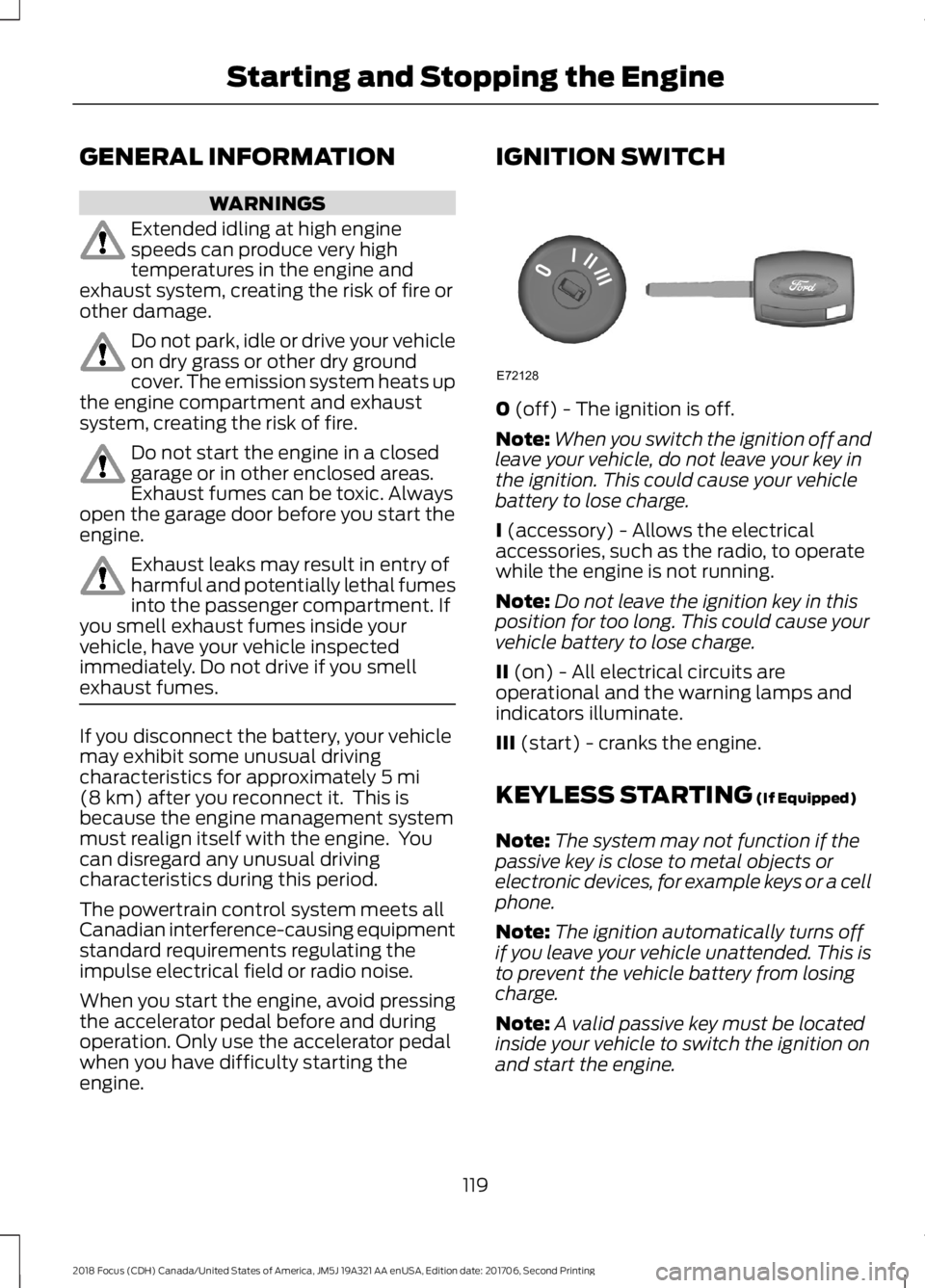
IGNITION SWITCH
0 (off) - The ignition is off.
Note:When you switch the ignition off andleave your vehicle, do not leave your key inthe ignition. This could cause your vehiclebattery to lose charge.
I (accessory) - Allows the electricalaccessories, such as the radio, to operatewhile the engine is not running.
Note:Do not leave the ignition key in thisposition for too long. This could cause yourvehicle battery to lose charge.
II (on) - All electrical circuits areoperational and the warning lamps andindicators illuminate.
III (start) - cranks the engine.
KEYLESS STARTING (If Equipped)
Note:The system may not function if thepassive key is close to metal objects orelectronic devices, for example keys or a cellphone.
Note:The ignition automatically turns offif you leave your vehicle unattended. This isto prevent the vehicle battery from losingcharge.
Note:A valid passive key must be locatedinside your vehicle to switch the ignition onand start the engine.
1192018 Focus (CDH) Canada/United States of America, JM5J 19A321 AA enUSA, Edition date: 201706, Second PrintingStarting and Stopping the EngineE72128
Page 123 of 473
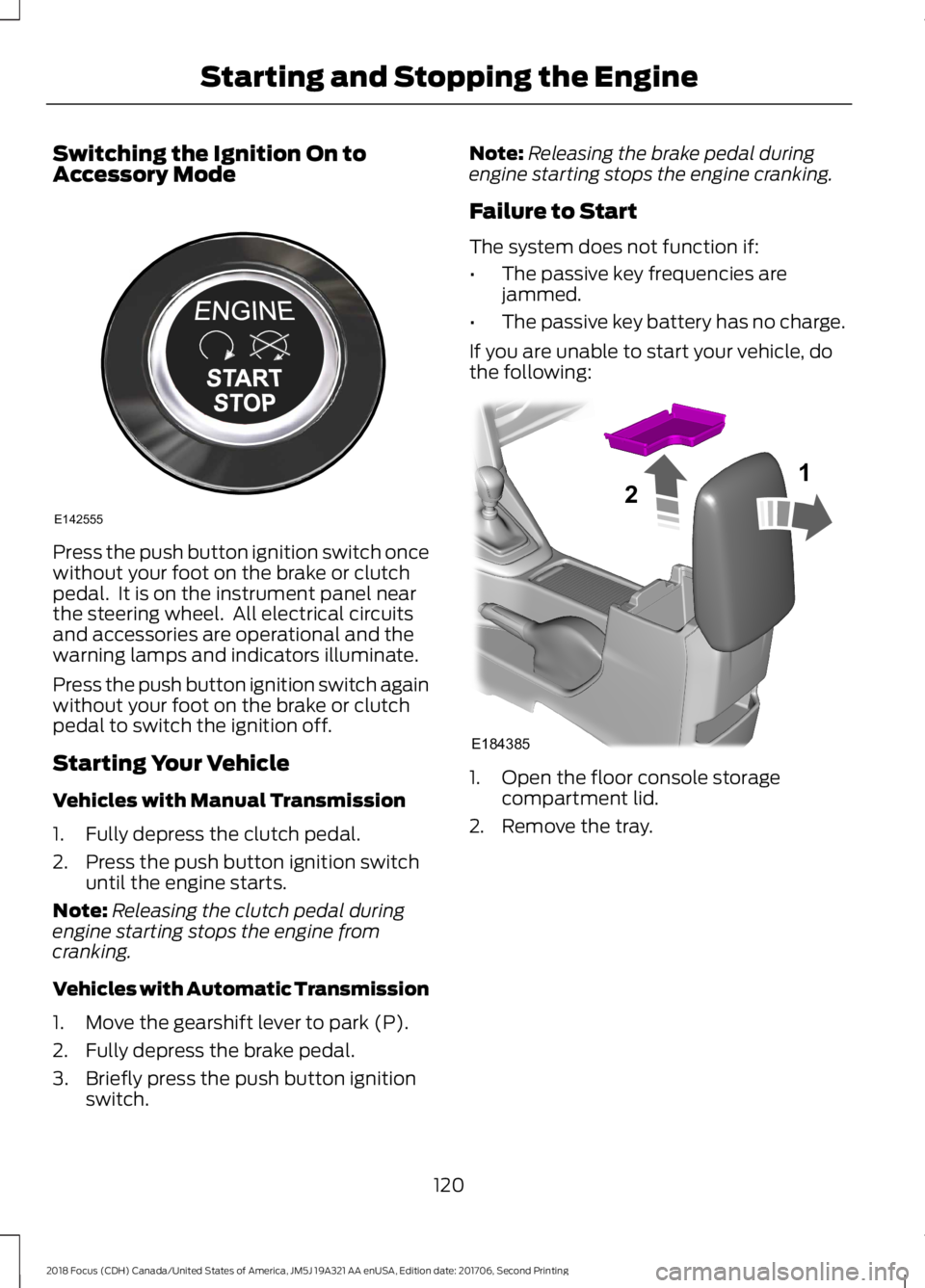
Switching the Ignition On toAccessory Mode
Press the push button ignition switch oncewithout your foot on the brake or clutchpedal. It is on the instrument panel nearthe steering wheel. All electrical circuitsand accessories are operational and thewarning lamps and indicators illuminate.
Press the push button ignition switch againwithout your foot on the brake or clutchpedal to switch the ignition off.
Starting Your Vehicle
Vehicles with Manual Transmission
1.Fully depress the clutch pedal.
2.Press the push button ignition switchuntil the engine starts.
Note:Releasing the clutch pedal duringengine starting stops the engine fromcranking.
Vehicles with Automatic Transmission
1.Move the gearshift lever to park (P).
2.Fully depress the brake pedal.
3.Briefly press the push button ignitionswitch.
Note:Releasing the brake pedal duringengine starting stops the engine cranking.
Failure to Start
The system does not function if:
•The passive key frequencies arejammed.
•The passive key battery has no charge.
If you are unable to start your vehicle, dothe following:
1.Open the floor console storagecompartment lid.
2.Remove the tray.
1202018 Focus (CDH) Canada/United States of America, JM5J 19A321 AA enUSA, Edition date: 201706, Second PrintingStarting and Stopping the EngineE142555 E18438521
Page 124 of 473
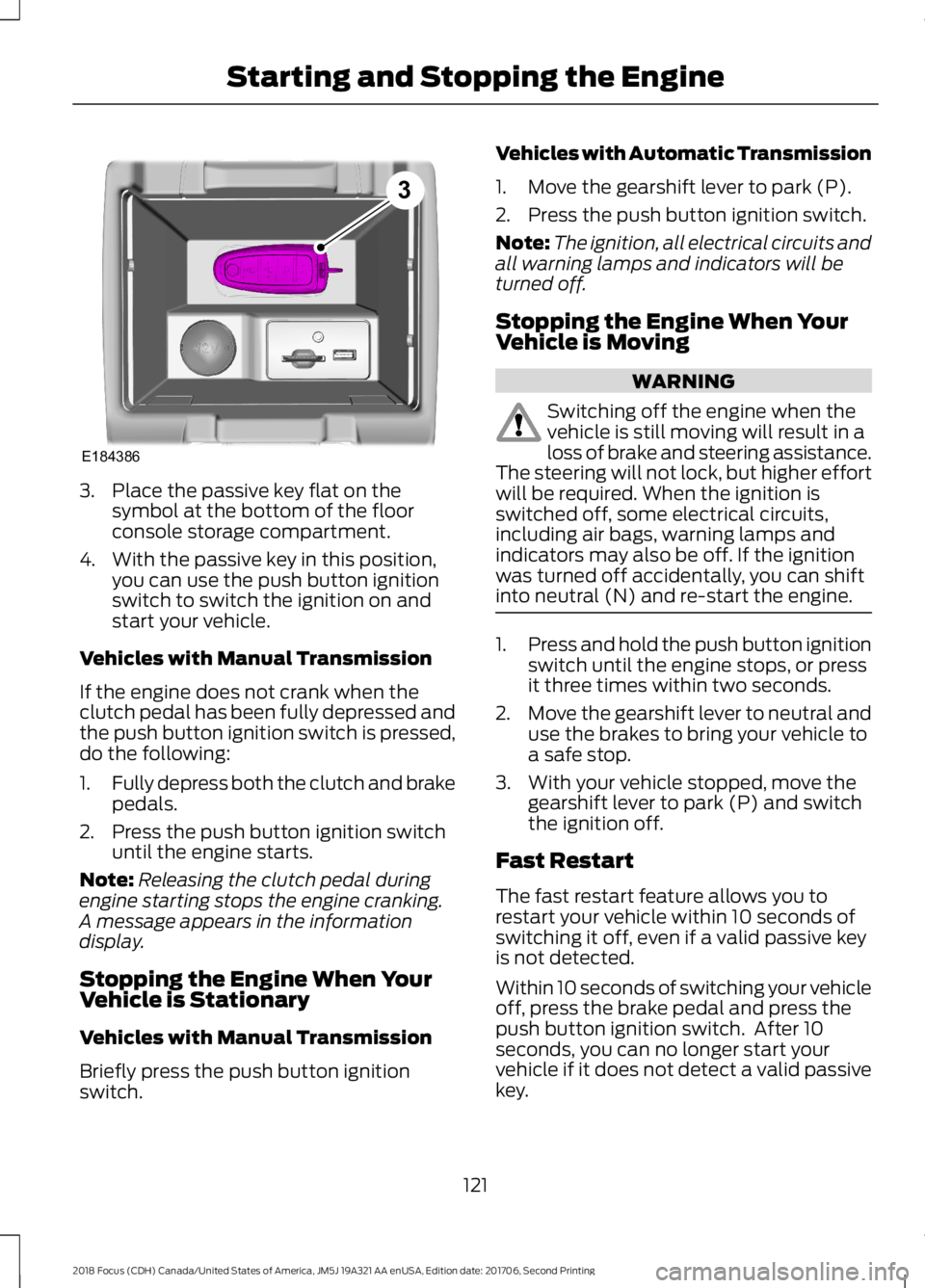
3.Place the passive key flat on thesymbol at the bottom of the floorconsole storage compartment.
4.With the passive key in this position,you can use the push button ignitionswitch to switch the ignition on andstart your vehicle.
Vehicles with Manual Transmission
If the engine does not crank when theclutch pedal has been fully depressed andthe push button ignition switch is pressed,do the following:
1.Fully depress both the clutch and brakepedals.
2.Press the push button ignition switchuntil the engine starts.
Note:Releasing the clutch pedal duringengine starting stops the engine cranking.A message appears in the informationdisplay.
Stopping the Engine When YourVehicle is Stationary
Vehicles with Manual Transmission
Briefly press the push button ignitionswitch.
Vehicles with Automatic Transmission
1.Move the gearshift lever to park (P).
2.Press the push button ignition switch.
Note:The ignition, all electrical circuits andall warning lamps and indicators will beturned off.
Stopping the Engine When YourVehicle is Moving
WARNING
Switching off the engine when thevehicle is still moving will result in aloss of brake and steering assistance.The steering will not lock, but higher effortwill be required. When the ignition isswitched off, some electrical circuits,including air bags, warning lamps andindicators may also be off. If the ignitionwas turned off accidentally, you can shiftinto neutral (N) and re-start the engine.
1.Press and hold the push button ignitionswitch until the engine stops, or pressit three times within two seconds.
2.Move the gearshift lever to neutral anduse the brakes to bring your vehicle toa safe stop.
3.With your vehicle stopped, move thegearshift lever to park (P) and switchthe ignition off.
Fast Restart
The fast restart feature allows you torestart your vehicle within 10 seconds ofswitching it off, even if a valid passive keyis not detected.
Within 10 seconds of switching your vehicleoff, press the brake pedal and press thepush button ignition switch. After 10seconds, you can no longer start yourvehicle if it does not detect a valid passivekey.
1212018 Focus (CDH) Canada/United States of America, JM5J 19A321 AA enUSA, Edition date: 201706, Second PrintingStarting and Stopping the EngineE1843863
Page 125 of 473
Once your vehicle starts, it remains runninguntil you press the push button ignitionswitch, even if your vehicle does not detecta valid passive key. If you open and closea door while your vehicle is running, thesystem searches for a valid passive key.
You cannot start your vehicle if you openthe driver door and the system does notdetect a valid passive key.
STARTING A GASOLINE
ENGINE
When you start the engine, the idle speedincreases. This helps to warm up theengine. If the engine idle speed does notslow down automatically, have yourvehicle checked by an authorized dealer.
Note:You can crank the engine for a totalof 60 seconds without the engine startingbefore the starting system temporarilydisables. The 60 seconds does not have tobe all at once. For example, if you crank theengine three times for 20 seconds eachtime, without the engine starting, youreached the 60-second time limit. Amessage appears in the information displayalerting you that you exceeded the crankingtime. You cannot attempt to start the enginefor at least 15 minutes. After 15 minutes, youare limited to a 15-second engine crankingtime. You need to wait 60 minutes beforeyou can crank the engine for 60 secondsagain.
Before starting your vehicle, check thefollowing:
•Make sure all occupants have fastenedtheir safety belts.
•Make sure the headlamps andelectrical accessories are off.
•Make sure the parking brake is on.
•Make sure the transmission is in park(P).
•Switch the ignition key to position II. Ifyour vehicle is equipped with a keylessignition, see the following instructions.
Vehicles with an Ignition Key
Note:Do not touch the accelerator pedal.
1.Fully press the brake pedal. If yourvehicle is equipped with a manualtransmission, fully press the clutchpedal.
2.Turn the key to position III to start theengine.
Note:The engine may continue crankingfor up to 15 seconds or until it starts.
Note:If you cannot start the engine on thefirst try, wait for a short period and try again.
Vehicles with Keyless Start
Note:Do not touch the accelerator pedal.
Note:You must have your intelligent accesskey in your vehicle in order to shift thetransmission out of park (P).
1.Fully depress the brake pedal.
2.Press the push button ignition switch.
The system does not function if:
•The passive key frequencies arejammed.
•The key battery has no charge.
If you are unable to start your vehicle, dothe following:
1222018 Focus (CDH) Canada/United States of America, JM5J 19A321 AA enUSA, Edition date: 201706, Second PrintingStarting and Stopping the Engine
Page 126 of 473
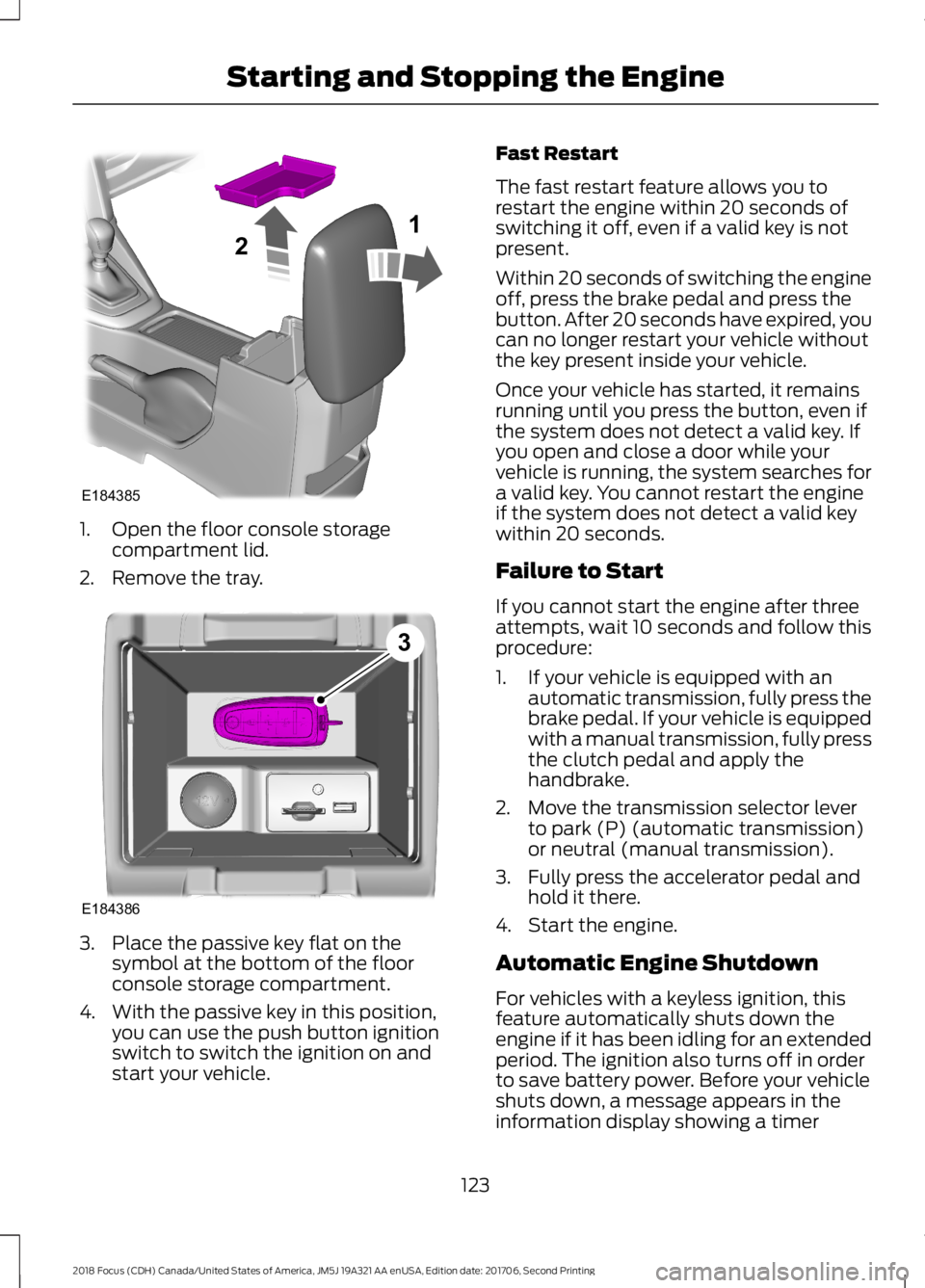
1.Open the floor console storagecompartment lid.
2.Remove the tray.
3.Place the passive key flat on thesymbol at the bottom of the floorconsole storage compartment.
4.With the passive key in this position,you can use the push button ignitionswitch to switch the ignition on andstart your vehicle.
Fast Restart
The fast restart feature allows you torestart the engine within 20 seconds ofswitching it off, even if a valid key is notpresent.
Within 20 seconds of switching the engineoff, press the brake pedal and press thebutton. After 20 seconds have expired, youcan no longer restart your vehicle withoutthe key present inside your vehicle.
Once your vehicle has started, it remainsrunning until you press the button, even ifthe system does not detect a valid key. Ifyou open and close a door while yourvehicle is running, the system searches fora valid key. You cannot restart the engineif the system does not detect a valid keywithin 20 seconds.
Failure to Start
If you cannot start the engine after threeattempts, wait 10 seconds and follow thisprocedure:
1.If your vehicle is equipped with anautomatic transmission, fully press thebrake pedal. If your vehicle is equippedwith a manual transmission, fully pressthe clutch pedal and apply thehandbrake.
2.Move the transmission selector leverto park (P) (automatic transmission)or neutral (manual transmission).
3.Fully press the accelerator pedal andhold it there.
4.Start the engine.
Automatic Engine Shutdown
For vehicles with a keyless ignition, thisfeature automatically shuts down theengine if it has been idling for an extendedperiod. The ignition also turns off in orderto save battery power. Before your vehicleshuts down, a message appears in theinformation display showing a timer
1232018 Focus (CDH) Canada/United States of America, JM5J 19A321 AA enUSA, Edition date: 201706, Second PrintingStarting and Stopping the EngineE18438521 E1843863
Page 127 of 473
counting down from 30 seconds. If you donot intervene within 30 seconds, yourvehicle shuts down. Another messageappears in the information display toinform you that your vehicle has shut downin order to save fuel. Start your vehicle asyou normally do.
Automatic Engine Shutdown Override
Note:You cannot permanently switch offthe automatic shutdown feature. When youswitch it off temporarily, it turns on at thenext ignition cycle.
You can stop the shutdown, or reset thetimer, at any point before the 30-secondcountdown has expired by doing any of thefollowing:
•You can reset the timer by interactingwith your vehicle (such as pressing thebrake pedal or accelerator pedal).
•You can temporarily switch off theshutdown feature any time the ignitionis on (for the current ignition cycleonly). Use the information display todo so. See Information Displays(page 92).
•During the countdown beforeshutdown, you are prompted to pressOK or RESET (depending on your typeof information display) to temporarilyswitch the feature off (for the currentignition cycle only).
Stopping the Engine When YourVehicle is Stationary
Vehicles with an Ignition Key
1.Shift into park (P).
2.Turn the key to position 0.
3.Apply the parking brake.
Vehicles with Keyless Start
1.Shift into park (P).
2.Press the button once.
3.Apply the parking brake.
Note:This switches off the ignition, allelectrical circuits, warning lamps andindicators.
Note:If the engine is idling for 30 minutes,the ignition and engine automatically shutdown.
Stopping the Engine When YourVehicle is Moving
WARNING
Switching off the engine when thevehicle is still moving will result in aloss of brake and steering assistance.The steering will not lock, but higher effortwill be required. When the ignition isswitched off, some electrical circuits,including air bags, warning lamps andindicators may also be off. If the ignitionwas turned off accidentally, you can shiftinto neutral (N) and re-start the engine.
Vehicles with an Ignition Key
1.Shift into neutral and use the brakes tobring your vehicle to a safe stop.
2.When your vehicle has stopped, shiftinto park (P) and turn the key toposition 0.
3.Apply the parking brake.
Vehicles with Keyless Start
1.Shift into neutral and use the brakes tobring your vehicle to a safe stop.
2.When your vehicle has stopped, shiftinto park (P).
3.Press and hold the button for onesecond, or press it three times withintwo seconds.
4.Apply the parking brake.
1242018 Focus (CDH) Canada/United States of America, JM5J 19A321 AA enUSA, Edition date: 201706, Second PrintingStarting and Stopping the Engine
Page 130 of 473
AUTO-START-STOP (If Equipped)
The system reduces fuel consumption andCO2 emissions by shutting down theengine when your vehicle is idling, forexample at traffic lights.
WARNINGS
Always fully apply the parking brake.Make sure you shift into park (P) forvehicles with an automatictransmission. Switch the ignition off andremove the key whenever you leave yourvehicle.
Before opening the hood orperforming any maintenance, fullyapply the parking brake, shift intopark (P) or neutral (N) and switch theignition off.
Always switch the ignition off beforeleaving the vehicle. If the ignition isswitched on an automatic restartmay occur at any time.
The system may require the engineto automatically restart when theauto-start-stop indicator illuminatesgreen or flashes amber. Failure to followthis instruction could result in personalinjury.
Note:The Auto-Start-Stop indicatorilluminates green when the engine shutsdown. See Warning Lamps and Indicators(page 87). It flashes amber with a messagewhen the driver needs to shift to neutral orpress a pedal. See Information Messages(page 96). If it illuminates grey, the systemis not available.
Using Auto-Start-Stop with aManual Transmission
To Stop the Engine
1.Stop your vehicle.
2.Shift into neutral.
3.Release the clutch and acceleratorpedal.
To Re-Start the Engine
Press the clutch pedal
Note:To obtain maximum benefit from thesystem, move the transmission selectorlever to neutral and release the clutch pedalduring any stop of longer than threeseconds.
Note:Auto-Start-Stop also comes withstall recovery. If you fully press the clutchpedal after stalling the engine, the engineautomatically restarts.
Using Auto-Start-Stop with anAutomatic Transmission
To Stop the Engine
1.Stop your vehicle in drive (D).
2.Release the accelerator pedal.
3.Maintain pressure on the brake pedal.
Note:If your vehicle is in an engine offAuto-Start-Stop state and you move thetransmission to reverse (R) while the brakepedal is not pressed, a message will appearon your instrument cluster. Press the brakepedal within 60 seconds or you will need toshift to park (P). A manual restart will berequired.
Note:If the Shift to P, Restart Enginemessage appears and the amberAuto-Start-Stop indicator flashes,automatic restart is not available. You mustrestart your vehicle manually.
1272018 Focus (CDH) Canada/United States of America, JM5J 19A321 AA enUSA, Edition date: 201706, Second PrintingUnique Driving Characteristics