lock FORD FOCUS 2018 Owner's Guide
[x] Cancel search | Manufacturer: FORD, Model Year: 2018, Model line: FOCUS, Model: FORD FOCUS 2018Pages: 473, PDF Size: 39.91 MB
Page 71 of 473
PASSIVE ANTI-THEFT
SYSTEM
Note: The system is not compatible withnon-Ford aftermarket remote start systems.Use of these systems may result in enginestarting problems and a loss of securityprotection.
Note: Metallic objects, electronic devicesor a second coded key on the same keychain may result in vehicle startingproblems, especially if they are too close tothe key when starting your vehicle. Preventthese objects from touching the coded keywhen starting your vehicle. If your vehiclefails to start, switch the ignition off, moveall objects on the key chain away from thekey and start your vehicle.
Note: Do not leave a duplicate coded keyin your vehicle. Always take your keys andlock all doors when leaving your vehicle.
SecuriLock
The system helps prevent the engine fromstarting unless you use a coded keyprogrammed to your vehicle. A messagemay appear in the information display.
If your vehicle fails to start, the system mayhave a fault. Contact an authorized dealer.A message may appear in the informationdisplay.
Automatic Arming
The system arms when you switch theignition off.
Automatic Disarming
The system disarms when you switch theignition on with a coded key.
Replacement Keys
Note:Your vehicle comes with two keys.
The intelligent access key functions as aprogrammed key that operates the driverdoor lock and turns on the intelligentaccess with push button start system, aswell as a remote control.
If your intelligent access keys are lost orstolen and you do not have an extra codedkey, you need to have your vehicle towedto an authorized dealer. You need to erasethe key codes from your vehicle andprogram new coded keys.
Store a spare intelligent access key awayfrom your vehicle in a safe place. Contactan authorized dealer to purchaseadditional spare or replacement keys.
Programming a Spare IntegratedKeyhead Transmitter
You can program your own integratedkeyhead transmitter or standardSecuriLock coded keys to your vehicle. Thisprocedure will program both the vehicleimmobilizer keycode and the remote entryportion of the remote control to yourvehicle.
Only use integrated keyhead transmittersor standard SecuriLock keys.
You must have two previouslyprogrammed coded keys and the newunprogrammed key readily accessible.Contact an authorized dealer to have thespare key programmed if two previouslyprogrammed keys are not available.
Make sure that the ignition is switched offbefore beginning this procedure. Carry outall steps within 30 seconds of starting thesequence. Stop and wait for at least oneminute before starting again if you carryout any steps out of sequence.
Note:You can program a maximum of eightcoded keys to your vehicle. All eight can beintegrated keyhead transmitters.
Read and understand the entire procedurebefore you begin.
682018 Focus (CDH) Canada/United States of America, JM5J 19A321 AA enUSA, Edition date: 201706, Second PrintingSecurity
Page 73 of 473
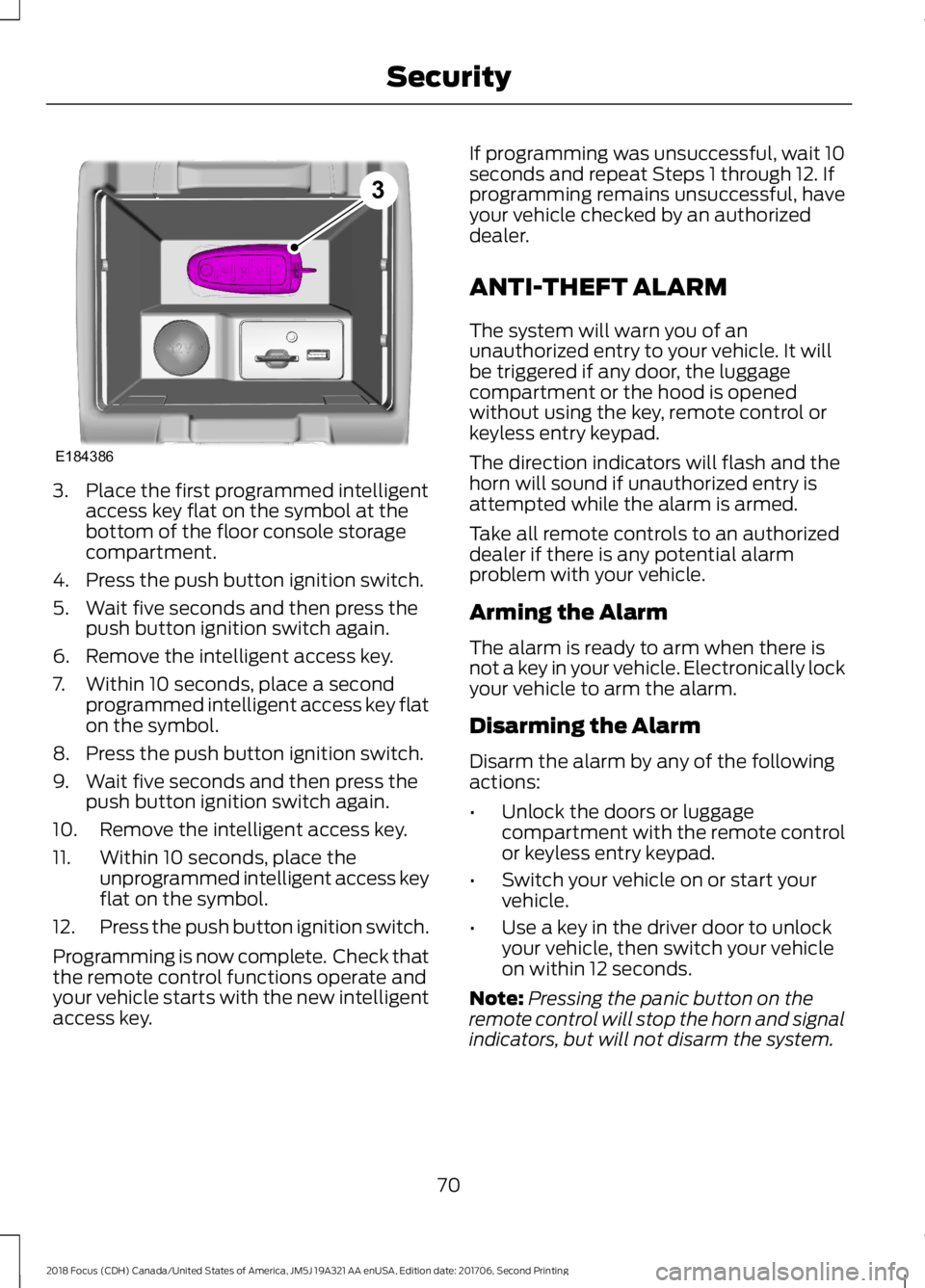
3.Place the first programmed intelligentaccess key flat on the symbol at thebottom of the floor console storagecompartment.
4.Press the push button ignition switch.
5.Wait five seconds and then press thepush button ignition switch again.
6.Remove the intelligent access key.
7.Within 10 seconds, place a secondprogrammed intelligent access key flaton the symbol.
8.Press the push button ignition switch.
9.Wait five seconds and then press thepush button ignition switch again.
10.Remove the intelligent access key.
11.Within 10 seconds, place theunprogrammed intelligent access keyflat on the symbol.
12.Press the push button ignition switch.
Programming is now complete. Check thatthe remote control functions operate andyour vehicle starts with the new intelligentaccess key.
If programming was unsuccessful, wait 10seconds and repeat Steps 1 through 12. Ifprogramming remains unsuccessful, haveyour vehicle checked by an authorizeddealer.
ANTI-THEFT ALARM
The system will warn you of anunauthorized entry to your vehicle. It willbe triggered if any door, the luggagecompartment or the hood is openedwithout using the key, remote control orkeyless entry keypad.
The direction indicators will flash and thehorn will sound if unauthorized entry isattempted while the alarm is armed.
Take all remote controls to an authorizeddealer if there is any potential alarmproblem with your vehicle.
Arming the Alarm
The alarm is ready to arm when there isnot a key in your vehicle. Electronically lockyour vehicle to arm the alarm.
Disarming the Alarm
Disarm the alarm by any of the followingactions:
•Unlock the doors or luggagecompartment with the remote controlor keyless entry keypad.
•Switch your vehicle on or start yourvehicle.
•Use a key in the driver door to unlockyour vehicle, then switch your vehicleon within 12 seconds.
Note:Pressing the panic button on theremote control will stop the horn and signalindicators, but will not disarm the system.
702018 Focus (CDH) Canada/United States of America, JM5J 19A321 AA enUSA, Edition date: 201706, Second PrintingSecurityE1843863
Page 74 of 473
ADJUSTING THE STEERING
WHEEL
WARNING
Do not adjust the steering wheelwhen your vehicle is moving.
Note:Make sure that you are sitting in thecorrect position. See Sitting in the CorrectPosition (page 111).
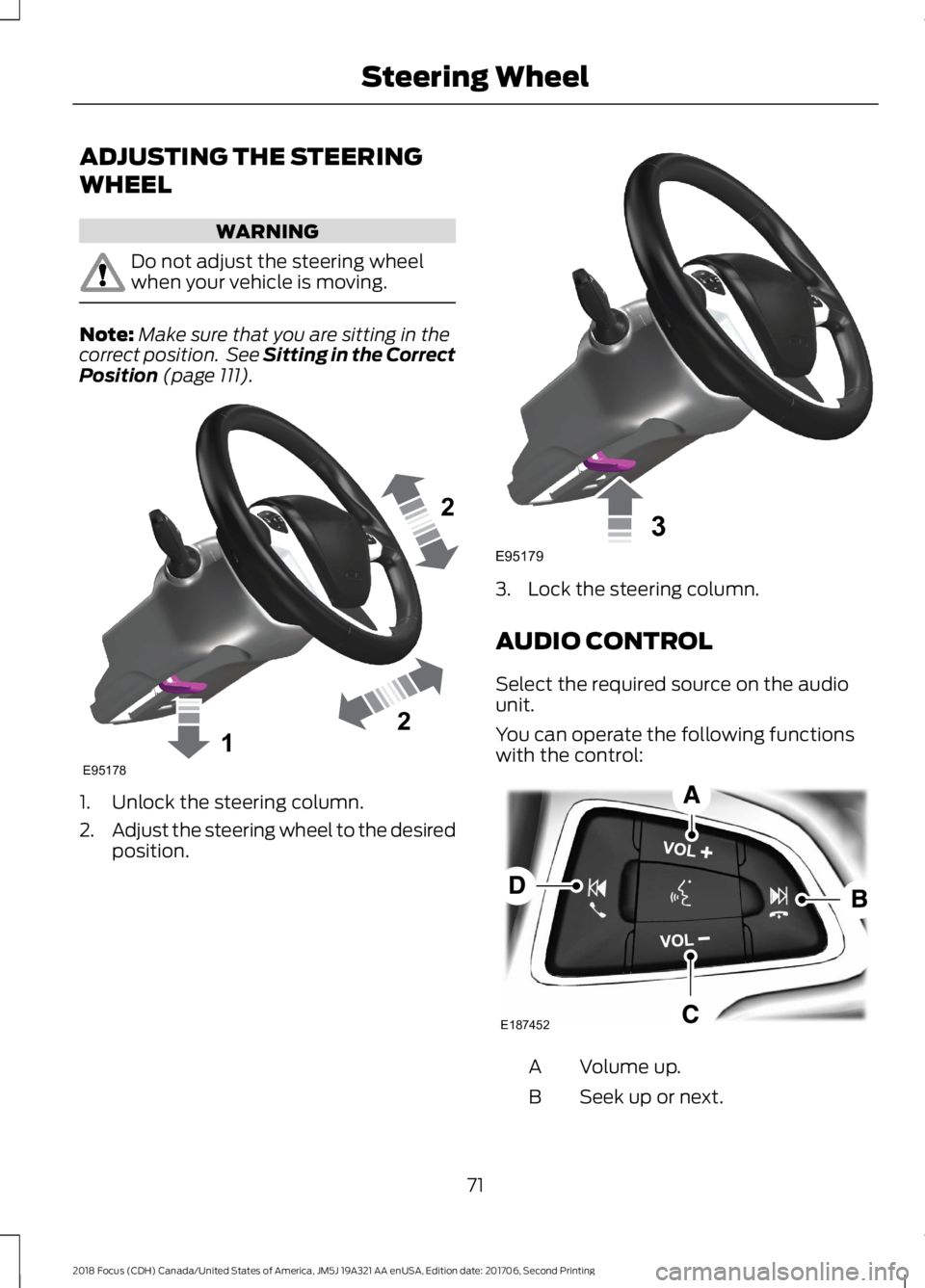
1.Unlock the steering column.
2.Adjust the steering wheel to the desiredposition.
3.Lock the steering column.
AUDIO CONTROL
Select the required source on the audiounit.
You can operate the following functionswith the control:
Volume up.A
Seek up or next.B
712018 Focus (CDH) Canada/United States of America, JM5J 19A321 AA enUSA, Edition date: 201706, Second PrintingSteering Wheel122E95178 3E95179 E187452
Page 82 of 473
4.The lighting control is in the autolampsposition.
5.The headlamps are off.
The other lighting control switch positionsdo not activate the daytime running lamps,and you can use them to temporarilyoverride autolamp control.
When switched off in the informationdisplay, the daytime running lamps are offin all lighting control switch positions.
AUTOMATIC HIGH BEAM
CONTROL
WARNING
The system does not relieve you ofyour responsibility to drive with duecare and attention. You may need tooverride the system if it does not turn thehigh beams on or off.
The system turns on high beams if it is darkenough and no other traffic is present. If itdetects an approaching vehicle’sheadlamps or tail lamps, or street lightingahead, the system turns off high beamsbefore they can distract other road users.Low beams remain on.
Note:The system may not operate properlyif the sensor is blocked. Keep the windshieldfree from obstruction or damage.
Note:The system may not operate properlyin cold or inclement conditions. You canswitch on the high beams by overriding thesystem.
Note:If the system detects a blockage, forexample bird droppings, bug splatter, snowor ice, the system goes into low beam modeuntil you clear the blockage. A message mayappear in the information display if thecamera is blocked.
Note:Using much larger tires or equippingvehicle accessories such as snowplows canmodify your vehicle's ride height anddegrade automatic high beam controlperformance.
A camera sensor, centrally mountedbehind the windshield of your vehicle,continuously monitors conditions to turnthe high beams on and off.
Once the system is active, the high beamsturn on if:
•The ambient light level is low enough.
•There is no traffic in front of yourvehicle.
•The vehicle speed is greater thanapproximately 32 mph (51 km/h).
The system turns the high beams off if:
•The ambient light level is high enoughthat high beams are not required.
•The system detects an approachingvehicle's headlamps or tail lamps.
•The vehicle speed falls belowapproximately 27 mph (44 km/h).
•The system detects severe rain, snowor fog.
•The camera is blocked.
Switching the System On and Off
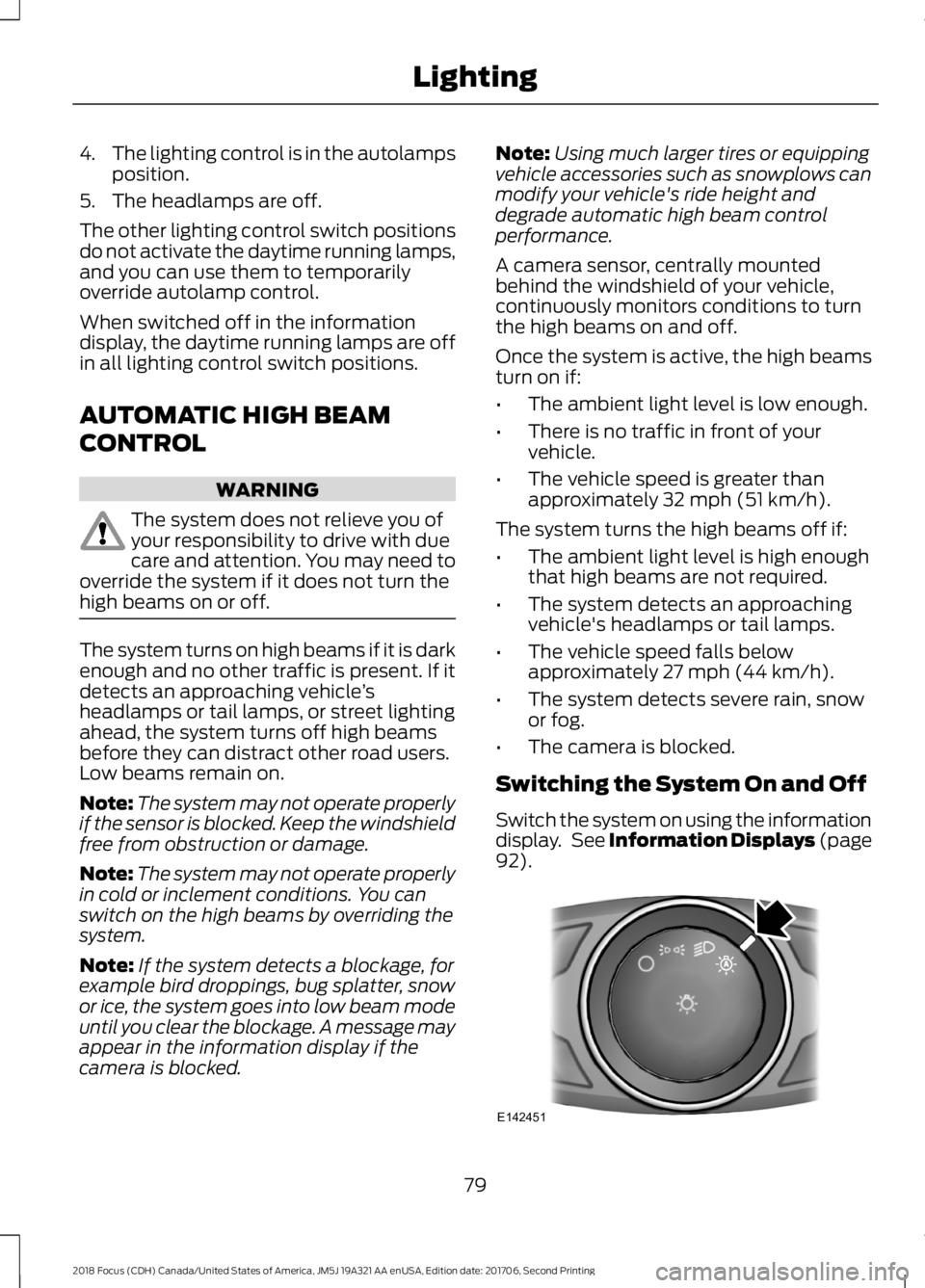
Switch the system on using the informationdisplay. See Information Displays (page92).
792018 Focus (CDH) Canada/United States of America, JM5J 19A321 AA enUSA, Edition date: 201706, Second PrintingLightingE142451
Page 85 of 473
POWER WINDOWS
WARNINGS
Do not leave children unattended inyour vehicle and do not let them playwith the power windows. Failure tofollow this instruction could result inpersonal injury.
When closing the power windows,verify they are free of obstruction andmake sure that children and pets arenot in the proximity of the windowopenings.
Press the control to open thewindow. Lift the control to closethe window.
To reduce wind noise or pulsing noise whenjust one window is open, slightly open theopposite window.
One-Touch Open (If Equipped)
Fully press the control and release it. Pressagain or lift it to stop the window.
One-Touch Close (If Equipped)
Fully lift the control and release it. Pressagain or lift it to stop the window.
Rear Window Lock
Press the control to lock orunlock the rear window controls.It illuminates when you lock therear window controls.
Bounce-Back (If Equipped)
The window stops and reverses if it detectsan obstruction.
Overriding Bounce-Back
WARNING
If you override bounce-back, thewindow does not reverse if it detectsan obstacle. Take care when closingthe windows to avoid personal injury ordamage to your vehicle.
Proceed as follows to override thisprotection feature when there is aresistance, for example in winter:
1.Close the window twice until it reachesthe point of resistance and let itreverse.
2.Close the window a third time to thepoint of resistance. You disabled thebounce-back feature and you can nowclose the window manually. Thewindow goes past the point ofresistance and you can fully close it.
Note:If the window does not close, haveyour vehicle checked as soon as possible.
Resetting Bounce-Back
WARNING
Bounce-back is off until you reset thememory. Take care when closing thewindows to avoid personal injury ordamage to your vehicle.
If you have disconnected the battery, youmust reset the bounce-back memoryseparately for each window.
1.Lift and hold the switch until thewindow is fully closed.
2.Release the switch.
3.Lift and hold the switch again for a fewseconds.
4.Release the switch.
5.Lift and hold the switch again for a fewseconds.
822018 Focus (CDH) Canada/United States of America, JM5J 19A321 AA enUSA, Edition date: 201706, Second PrintingWindows and Mirrors
Page 90 of 473
If the needle enters the red section, theengine is overheating. Stop the engine,switch the ignition off and determine thecause once the engine has cooled down.See Engine Coolant Check (page 217).
Fuel Gauge
Note:: The fuel gauge may vary slightlywhen your vehicle is moving or on a gradient.
Switch the ignition on. The fuel gauge willindicate approximately how much fuel isleft in the fuel tank. The arrow adjacent tothe fuel pump symbol indicates on whichside of your vehicle the fuel filler door islocated.
The needle should move toward F whenyou refuel your vehicle. If the needle pointsto E after adding fuel, this indicates yourvehicle needs service soon.
After refueling some variability in needleposition is normal.
Note:It may take a short time for theneedle to reach F after leaving the gasstation. This is normal and depends uponthe slope of pavement at the gas station.
Note:The fuel amount dispensed into thetank is a little less or more than the gaugeindicated. This is normal and depends uponthe slope of pavement at the gas station.
Note:If the gas station nozzle shuts offbefore the tank is full, try a different gaspump nozzle.
Low Fuel Reminder
A low fuel reminder triggers at about 50miles (80 km). The low fuel warning lightwill light, a warning chime will sound anda pop up will be shown in the displayindicating the remaining distance to empty.You will also get a subsequent reminderat 20, 10 and 0 miles.
WARNING LAMPS AND
INDICATORS
The following warning lamps andindicators alert you to a vehicle conditionthat may become serious. Some lampsilluminate when you start your vehicle tomake sure they work. If any lamps remainon after starting your vehicle, refer to therespective system warning lamp for furtherinformation.
Note:Some warning indicators appear inthe information display and operate thesame as a warning lamp but do notilluminate when you start your vehicle.
Adaptive Cruise Control Indicator
(If Equipped)
It illuminates when you switchthe system on.
It illuminates white when the system is instandby mode. It illuminates green whenyou set the adaptive cruise speed.
Airbag Warning Lamp
If it does not illuminate when youswitch the ignition on, continuesto flash or remains on when theengine is running, this indicates amalfunction. Have your vehicle checkedas soon as possible.
Anti-Lock Brake System WarningLamp
If it illuminates when you aredriving, this indicates amalfunction. Your vehiclecontinues to have normal braking withoutthe anti-lock brake system function. Haveyour vehicle checked as soon as possible.
872018 Focus (CDH) Canada/United States of America, JM5J 19A321 AA enUSA, Edition date: 201706, Second PrintingInstrument ClusterE144524 E67017
Page 101 of 473
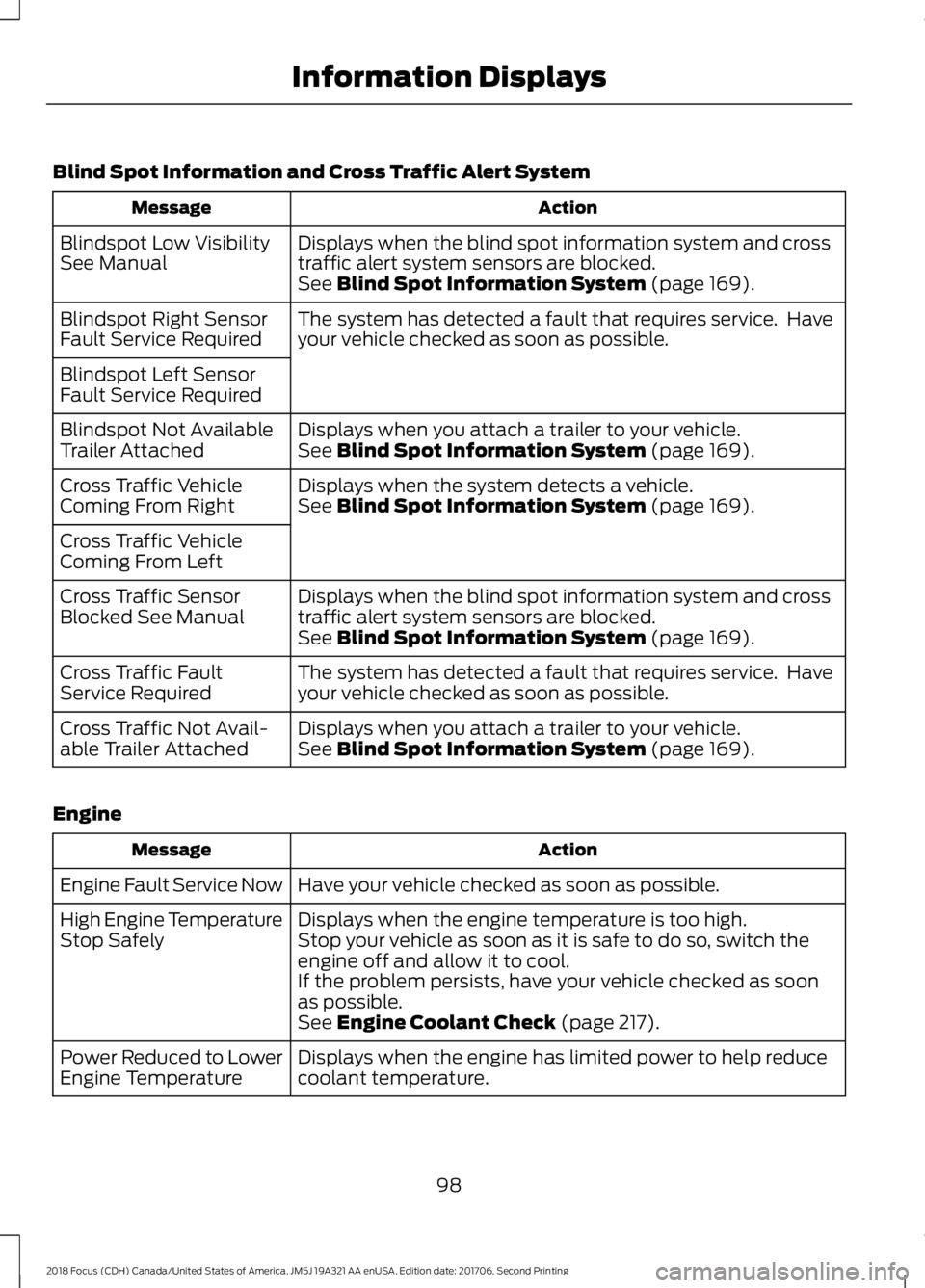
Blind Spot Information and Cross Traffic Alert System
ActionMessage
Displays when the blind spot information system and crosstraffic alert system sensors are blocked.Blindspot Low VisibilitySee ManualSee Blind Spot Information System (page 169).
The system has detected a fault that requires service. Haveyour vehicle checked as soon as possible.Blindspot Right SensorFault Service Required
Blindspot Left SensorFault Service Required
Displays when you attach a trailer to your vehicle.Blindspot Not AvailableTrailer AttachedSee Blind Spot Information System (page 169).
Displays when the system detects a vehicle.Cross Traffic VehicleComing From RightSee Blind Spot Information System (page 169).
Cross Traffic VehicleComing From Left
Displays when the blind spot information system and crosstraffic alert system sensors are blocked.Cross Traffic SensorBlocked See ManualSee Blind Spot Information System (page 169).
The system has detected a fault that requires service. Haveyour vehicle checked as soon as possible.Cross Traffic FaultService Required
Displays when you attach a trailer to your vehicle.Cross Traffic Not Avail-able Trailer AttachedSee Blind Spot Information System (page 169).
Engine
ActionMessage
Have your vehicle checked as soon as possible.Engine Fault Service Now
Displays when the engine temperature is too high.High Engine TemperatureStop SafelyStop your vehicle as soon as it is safe to do so, switch theengine off and allow it to cool.If the problem persists, have your vehicle checked as soonas possible.See Engine Coolant Check (page 217).
Displays when the engine has limited power to help reducecoolant temperature.Power Reduced to LowerEngine Temperature
982018 Focus (CDH) Canada/United States of America, JM5J 19A321 AA enUSA, Edition date: 201706, Second PrintingInformation Displays
Page 102 of 473
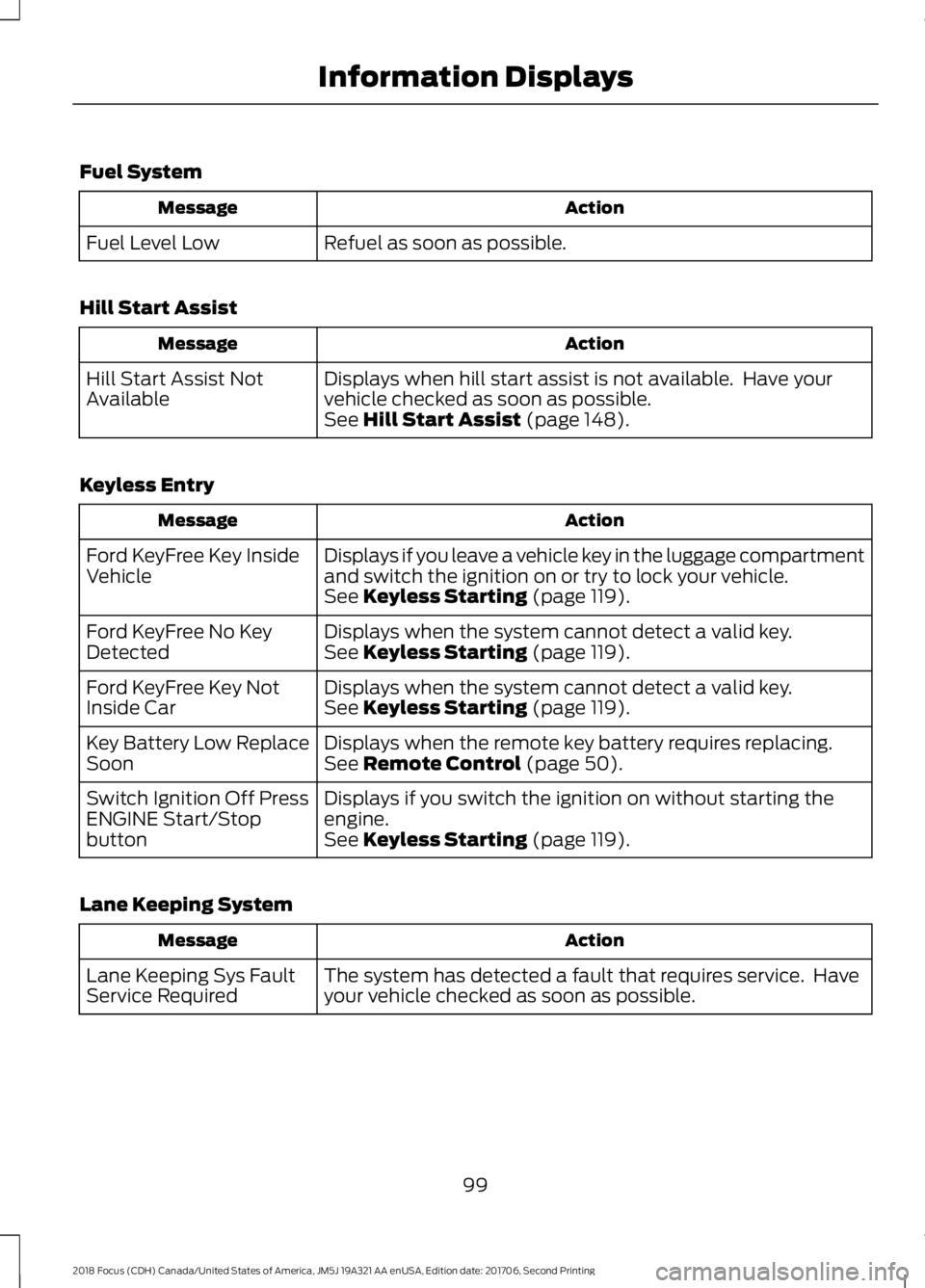
Fuel System
ActionMessage
Refuel as soon as possible.Fuel Level Low
Hill Start Assist
ActionMessage
Displays when hill start assist is not available. Have yourvehicle checked as soon as possible.Hill Start Assist NotAvailableSee Hill Start Assist (page 148).
Keyless Entry
ActionMessage
Displays if you leave a vehicle key in the luggage compartmentand switch the ignition on or try to lock your vehicle.Ford KeyFree Key InsideVehicleSee Keyless Starting (page 119).
Displays when the system cannot detect a valid key.Ford KeyFree No KeyDetectedSee Keyless Starting (page 119).
Displays when the system cannot detect a valid key.Ford KeyFree Key NotInside CarSee Keyless Starting (page 119).
Displays when the remote key battery requires replacing.Key Battery Low ReplaceSoonSee Remote Control (page 50).
Displays if you switch the ignition on without starting theengine.Switch Ignition Off PressENGINE Start/StopbuttonSee Keyless Starting (page 119).
Lane Keeping System
ActionMessage
The system has detected a fault that requires service. Haveyour vehicle checked as soon as possible.Lane Keeping Sys FaultService Required
992018 Focus (CDH) Canada/United States of America, JM5J 19A321 AA enUSA, Edition date: 201706, Second PrintingInformation Displays
Page 106 of 473
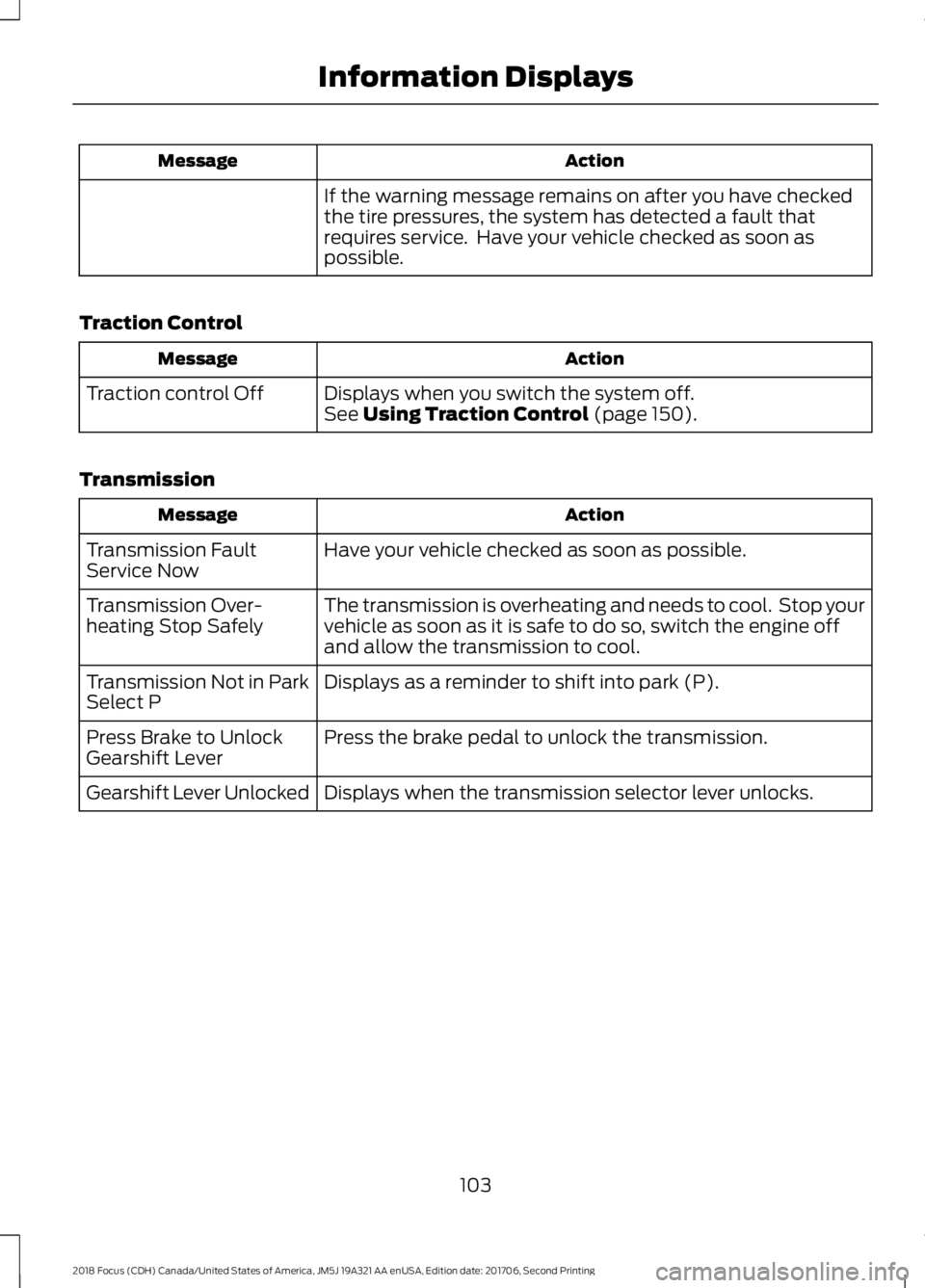
ActionMessage
If the warning message remains on after you have checkedthe tire pressures, the system has detected a fault thatrequires service. Have your vehicle checked as soon aspossible.
Traction Control
ActionMessage
Displays when you switch the system off.Traction control OffSee Using Traction Control (page 150).
Transmission
ActionMessage
Have your vehicle checked as soon as possible.Transmission FaultService Now
The transmission is overheating and needs to cool. Stop yourvehicle as soon as it is safe to do so, switch the engine offand allow the transmission to cool.
Transmission Over-heating Stop Safely
Displays as a reminder to shift into park (P).Transmission Not in ParkSelect P
Press the brake pedal to unlock the transmission.Press Brake to UnlockGearshift Lever
Displays when the transmission selector lever unlocks.Gearshift Lever Unlocked
1032018 Focus (CDH) Canada/United States of America, JM5J 19A321 AA enUSA, Edition date: 201706, Second PrintingInformation Displays
Page 115 of 473
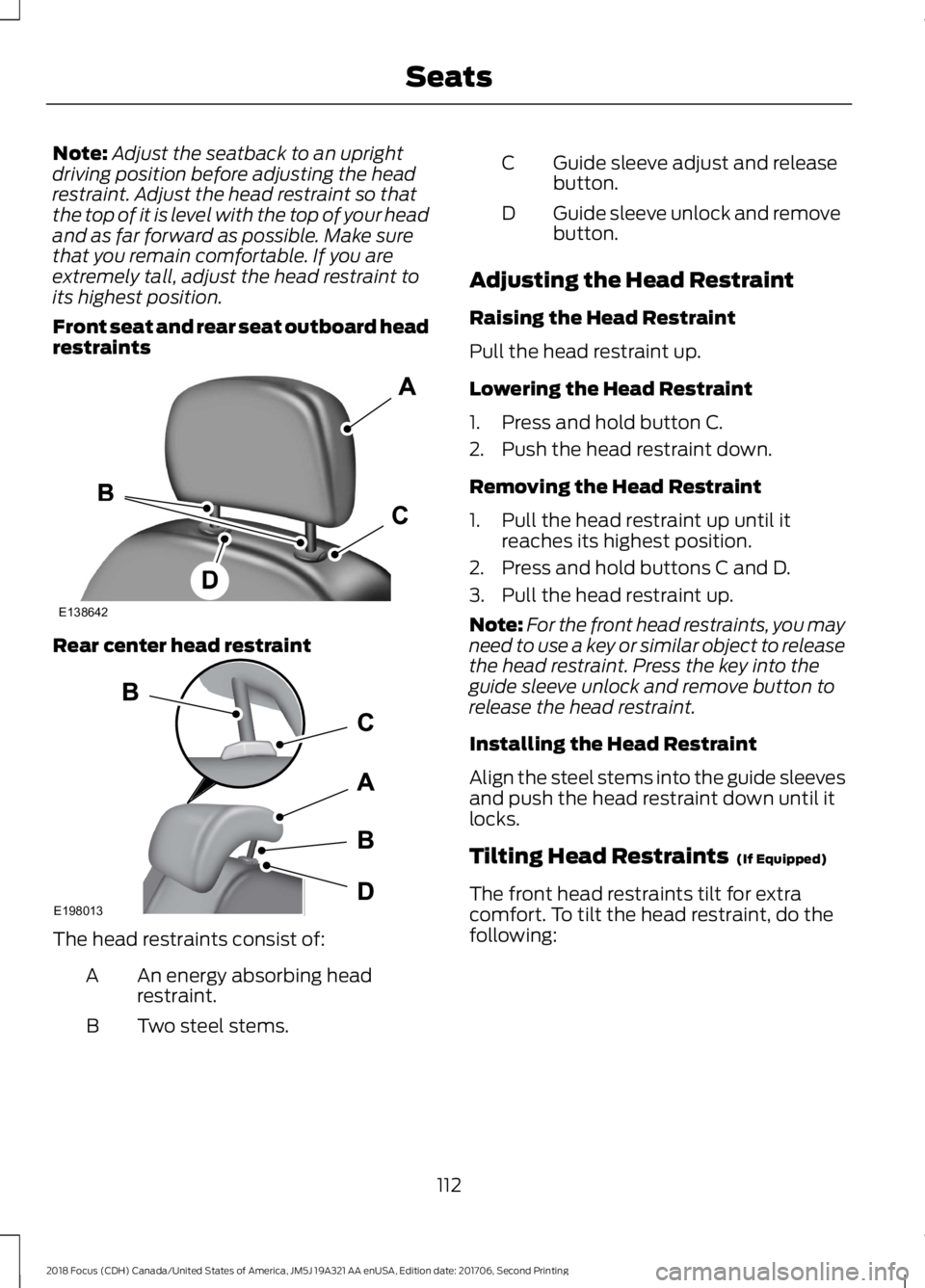
Note:Adjust the seatback to an uprightdriving position before adjusting the headrestraint. Adjust the head restraint so thatthe top of it is level with the top of your headand as far forward as possible. Make surethat you remain comfortable. If you areextremely tall, adjust the head restraint toits highest position.
Front seat and rear seat outboard headrestraints
Rear center head restraint
The head restraints consist of:
An energy absorbing headrestraint.A
Two steel stems.B
Guide sleeve adjust and releasebutton.C
Guide sleeve unlock and removebutton.D
Adjusting the Head Restraint
Raising the Head Restraint
Pull the head restraint up.
Lowering the Head Restraint
1.Press and hold button C.
2.Push the head restraint down.
Removing the Head Restraint
1.Pull the head restraint up until itreaches its highest position.
2.Press and hold buttons C and D.
3.Pull the head restraint up.
Note:For the front head restraints, you mayneed to use a key or similar object to releasethe head restraint. Press the key into theguide sleeve unlock and remove button torelease the head restraint.
Installing the Head Restraint
Align the steel stems into the guide sleevesand push the head restraint down until itlocks.
Tilting Head Restraints (If Equipped)
The front head restraints tilt for extracomfort. To tilt the head restraint, do thefollowing:
1122018 Focus (CDH) Canada/United States of America, JM5J 19A321 AA enUSA, Edition date: 201706, Second PrintingSeatsE138642 E198013