radio FORD FOCUS ELECTRIC 2014 3.G User Guide
[x] Cancel search | Manufacturer: FORD, Model Year: 2014, Model line: FOCUS ELECTRIC, Model: FORD FOCUS ELECTRIC 2014 3.GPages: 403, PDF Size: 6.42 MB
Page 205 of 403
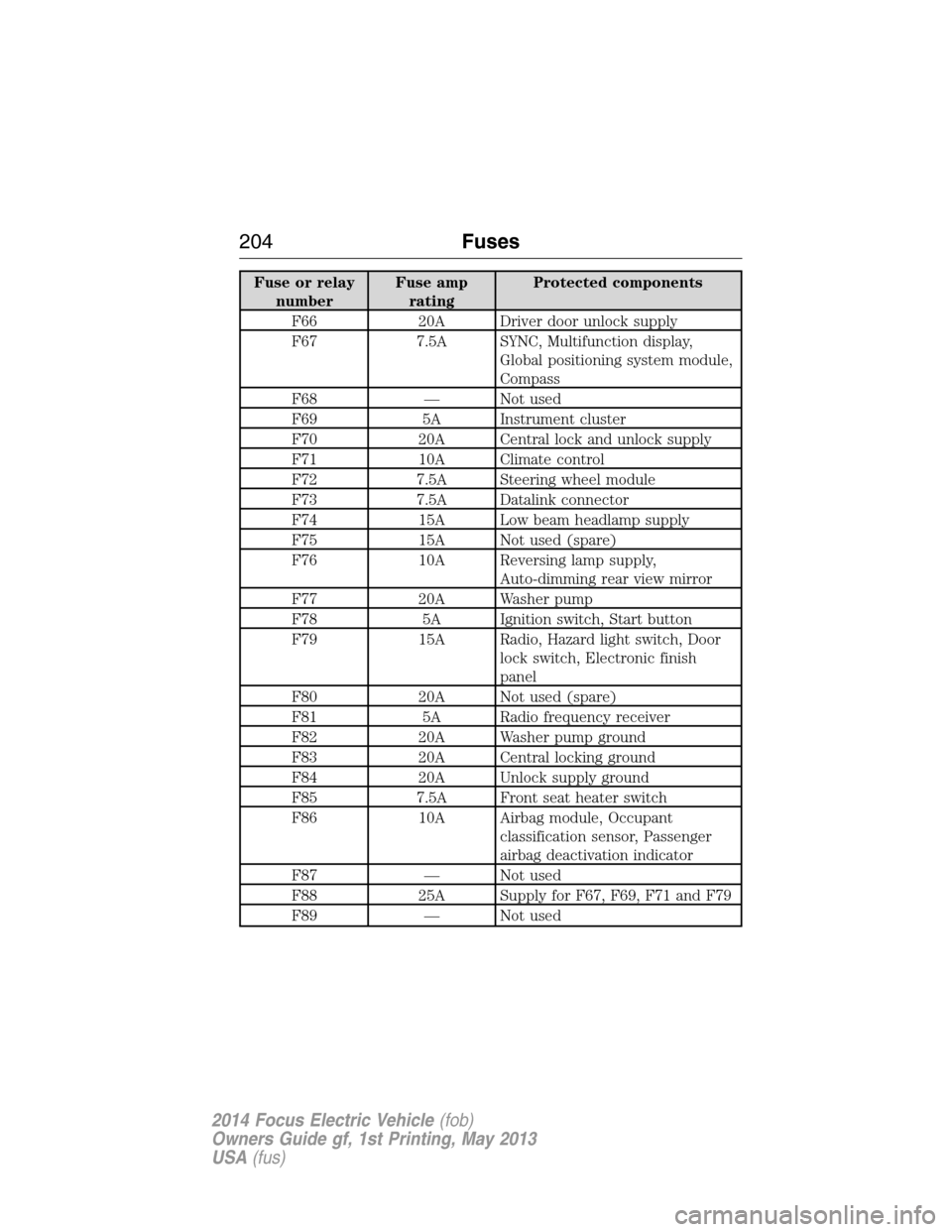
Fuse or relay
numberFuse amp
ratingProtected components
F66 20A Driver door unlock supply
F67 7.5A SYNC, Multifunction display,
Global positioning system module,
Compass
F68 — Not used
F69 5A Instrument cluster
F70 20A Central lock and unlock supply
F71 10A Climate control
F72 7.5A Steering wheel module
F73 7.5A Datalink connector
F74 15A Low beam headlamp supply
F75 15A Not used (spare)
F76 10A Reversing lamp supply,
Auto-dimming rear view mirror
F77 20A Washer pump
F78 5A Ignition switch, Start button
F79 15A Radio, Hazard light switch, Door
lock switch, Electronic finish
panel
F80 20A Not used (spare)
F81 5A Radio frequency receiver
F82 20A Washer pump ground
F83 20A Central locking ground
F84 20A Unlock supply ground
F85 7.5A Front seat heater switch
F86 10A Airbag module, Occupant
classification sensor, Passenger
airbag deactivation indicator
F87 — Not used
F88 25A Supply for F67, F69, F71 and F79
F89 — Not used
204Fuses
2014 Focus Electric Vehicle(fob)
Owners Guide gf, 1st Printing, May 2013
USA(fus)
Page 218 of 403
Note:If your battery has a cover/shield, make sure it is reinstalled after
the battery has been cleaned or replaced.
For longer, trouble-free operation, keep the top of the battery clean and
dry. Also, make certain the battery cables are always tightly fastened to
the battery terminals.
If you see any corrosion on the battery or terminals, remove the cables
from the terminals and clean with a wire brush. You can neutralize the
acid with a solution of baking soda and water.
It is recommended that the negative battery cable terminal be
disconnected from the battery if you plan to store your vehicle for an
extended period of time. This will minimize the discharge of your battery
during storage.
To ensure proper operation of the battery management system, any
electrical devices that are added to the vehicle should not have their
ground connection made directly at the negative battery post. A connection
at the negative battery post can cause inaccurate measurements of the
battery condition and potential incorrect system operation.
Note:Electrical or electronic accessories or components added to
the vehicle by the dealer or the owner may adversely affect battery
performance and durability and may also affect the performance of other
electrical systems in the vehicle.
When a battery replacement is required, the battery should only be
replaced with a Ford recommended replacement battery that matches
the electrical requirements of the vehicle.
Note:The clock and the preset radio stations must be reset once the
battery is reconnected.
Note:Always dispose of automotive batteries in a responsible manner.
Follow your local authorized standards for disposal. Call your local
authorized recycling center to find out more about recycling automotive
batteries.
Maintenance217
2014 Focus Electric Vehicle(fob)
Owners Guide gf, 1st Printing, May 2013
USA(fus)
Page 259 of 403
•Only use the sealing compound before the use by date. The use by
date is on the lower right hand corner of the label located on the
sealant canister.Note:Check the use by date regularly and replace
the canister after four years.
•Do not store the temporary mobility kit unsecured inside the
passenger compartment of the vehicle as it may cause injury during a
sudden stop or crash. Always store the kit in its original location.
•After sealant use, the tire pressure monitoring system sensor and
valve stem on the wheel must be replaced by an authorized Ford
dealer.
•When inflating a tire or other objects, use the black air hose only. Do
not use the transparent hose which is designed for sealant application
only.
•Operating the temporary mobility kit could cause an electrical
disturbance in radio, CD, and DVD player operation.
What to Do When a Tire Is Punctured
A tire puncture within the tire’s tread area can be repaired in two stages
with the temporary mobility kit:
•In the first stage, the tire will be reinflated with a sealing compound
and air. After the tire has been reinflated, you will need to drive the
vehicle a short distance (about 4 miles [6 kilometers]) to distribute the
sealant in the tire.
•In the second stage, check the tire pressure and adjust, if necessary,
to the vehicle’s tire inflation pressure.
First Stage: Reinflating the Tire with Sealing Compound and Air
WARNING:Do not stand directly over the temporary mobility
kit while inflating the tire. If you notice any unusual bulges or
deformations in the tire’s sidewall during inflation, stop and call
roadside assistance.
WARNING:If the tire does not inflate to the recommended tire
pressure within 15 minutes, stop and call roadside assistance.
Preparation
Park the vehicle in a safe, level and secure area, away from moving
traffic. Turn the hazard lights on. Apply the parking brake and turn the
motor off. Inspect the flat tire for visible damage.
258Wheels and Tires
2014 Focus Electric Vehicle(fob)
Owners Guide gf, 1st Printing, May 2013
USA(fus)
Page 271 of 403
and request a copy of the Ford Licensed Accessories product limited
warranty from the accessory manufacturer.
For maximum vehicle performance, keep the following information in
mind when adding accessories or equipment to your vehicle:
•When adding accessories, equipment, passengers and luggage to your
vehicle, do not exceed the total weight capacity of the vehicle or of
the front or rear axle (GVWR or GAWR as indicated on the Safety
Compliance Certification label). Ask an authorized dealer for specific
weight information.
•
The Federal Communications Commission (FCC) and Canadian Radio
Telecommunications Commission (CRTC) regulate the use of mobile
communications systems that are equipped with radio transmitters,
for example, two-way radios, telephones and theft alarms. Any such
equipment installed in your vehicle should comply with Federal
Communications Commission (FCC) and Canadian Radio
Telecommunications Commission (CRTC) regulations and
should be installed only by an authorized dealer.
•Mobile communications systems may harm the operation of your vehicle,
particularly if they are not properly designed for automotive use.
•To avoid interference with other vehicle functions, for example
anti-lock brake systems, do not locate amateur radio antennas in the
area of the driver side hood.
•If you or an authorized Ford dealer add any non-Ford custom
electrical or electronic accessories or components to your vehicle, you
may adversely affect battery performance and durability, and may
adversely affect the performance of other electrical systems in the
vehicle.
270Accessories
2014 Focus Electric Vehicle(fob)
Owners Guide gf, 1st Printing, May 2013
USA(fus)
Page 275 of 403
GENERAL INFORMATION
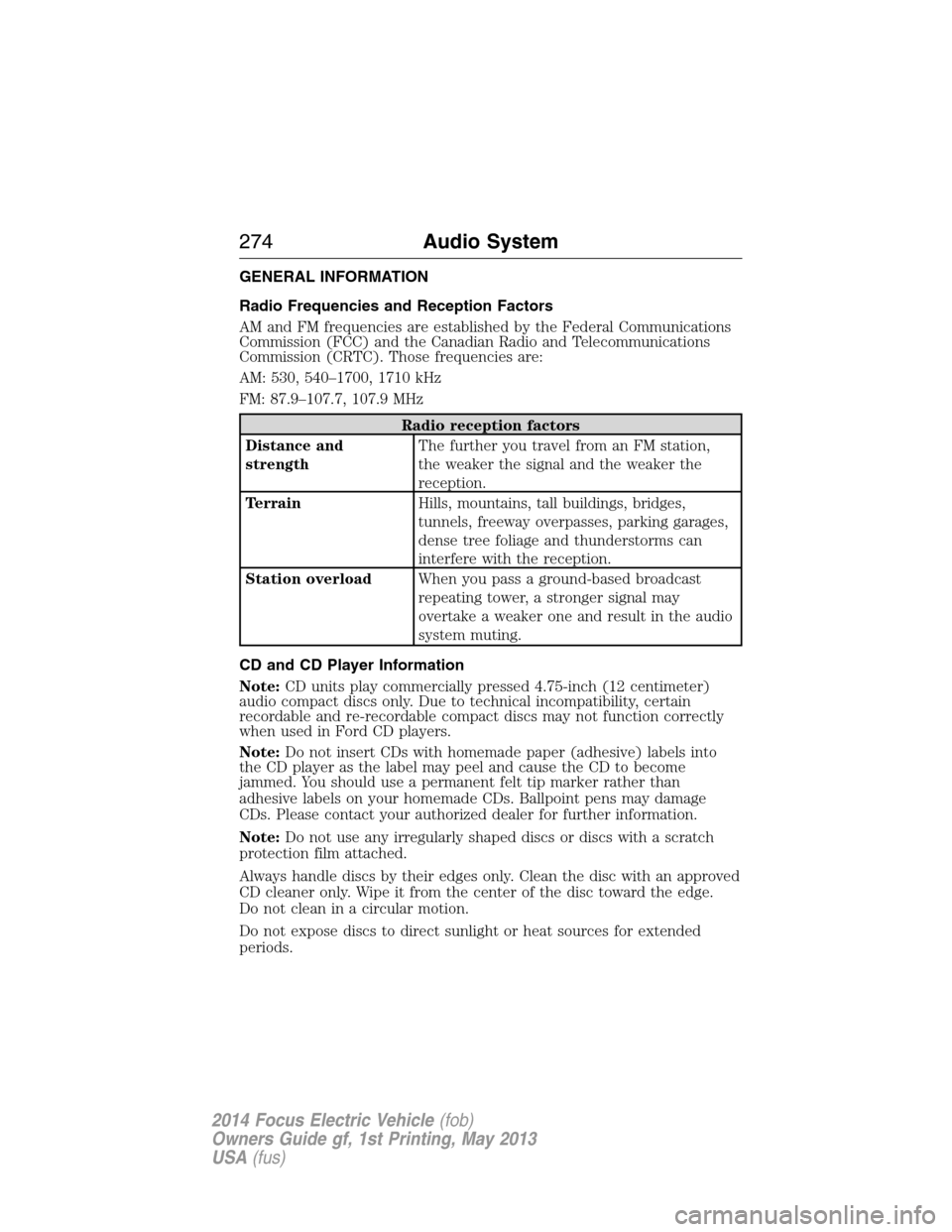
Radio Frequencies and Reception Factors
AM and FM frequencies are established by the Federal Communications
Commission (FCC) and the Canadian Radio and Telecommunications
Commission (CRTC). Those frequencies are:
AM: 530, 540–1700, 1710 kHz
FM: 87.9–107.7, 107.9 MHz
Radio reception factors
Distance and
strengthThe further you travel from an FM station,
the weaker the signal and the weaker the
reception.
TerrainHills, mountains, tall buildings, bridges,
tunnels, freeway overpasses, parking garages,
dense tree foliage and thunderstorms can
interfere with the reception.
Station overloadWhen you pass a ground-based broadcast
repeating tower, a stronger signal may
overtake a weaker one and result in the audio
system muting.
CD and CD Player Information
Note:CD units play commercially pressed 4.75-inch (12 centimeter)
audio compact discs only. Due to technical incompatibility, certain
recordable and re-recordable compact discs may not function correctly
when used in Ford CD players.
Note:Do not insert CDs with homemade paper (adhesive) labels into
the CD player as the label may peel and cause the CD to become
jammed. You should use a permanent felt tip marker rather than
adhesive labels on your homemade CDs. Ballpoint pens may damage
CDs. Please contact your authorized dealer for further information.
Note:Do not use any irregularly shaped discs or discs with a scratch
protection film attached.
Always handle discs by their edges only. Clean the disc with an approved
CD cleaner only. Wipe it from the center of the disc toward the edge.
Do not clean in a circular motion.
Do not expose discs to direct sunlight or heat sources for extended
periods.
274Audio System
2014 Focus Electric Vehicle(fob)
Owners Guide gf, 1st Printing, May 2013
USA(fus)
Page 276 of 403
MP3 Track and Folder Structure
Audio systems capable of recognizing and playing MP3 individual tracks
and folder structures work as follows:
•There are two different modes for MP3 disc playback: MP3 track
mode (system default) and MP3 folder mode.
•MP3 track mode ignores any folder structure on the MP3 disc. The
player numbers each MP3 track on the disc (noted by the .mp3 file
extension) from T001 to a maximum of T255.Note:The maximum
number of playable MP3 files may be less depending on the structure
of the CD and exact model of radio present.
•MP3 folder mode represents a folder structure consisting of one level
of folders. The CD player numbers all MP3 tracks on the disc (noted
by the .mp3 file extension) and all folders containing MP3 files, from
F001 (folder) T001 (track) to F253 T255.
•Creating discs with only one level of folders helps with navigation
through the disc files.
If you are burning your own MP3 discs, it is important to understand
how the system reads the structures you create. While various files may
be present, (files with extensions other than mp3), only files with the
.mp3 extension are played; other files are ignored by the system. This
enables you to use the same MP3 disc for a variety of tasks on your work
computer, home computer and your in-vehicle system.
In track mode, the system displays and plays the structure as if it were
only one level deep (all .mp3 files play, regardless of being in a specific
folder). In folder mode, the system only plays the .mp3 files in the
current folder.
Audio System275
2014 Focus Electric Vehicle(fob)
Owners Guide gf, 1st Printing, May 2013
USA(fus)
Page 277 of 403
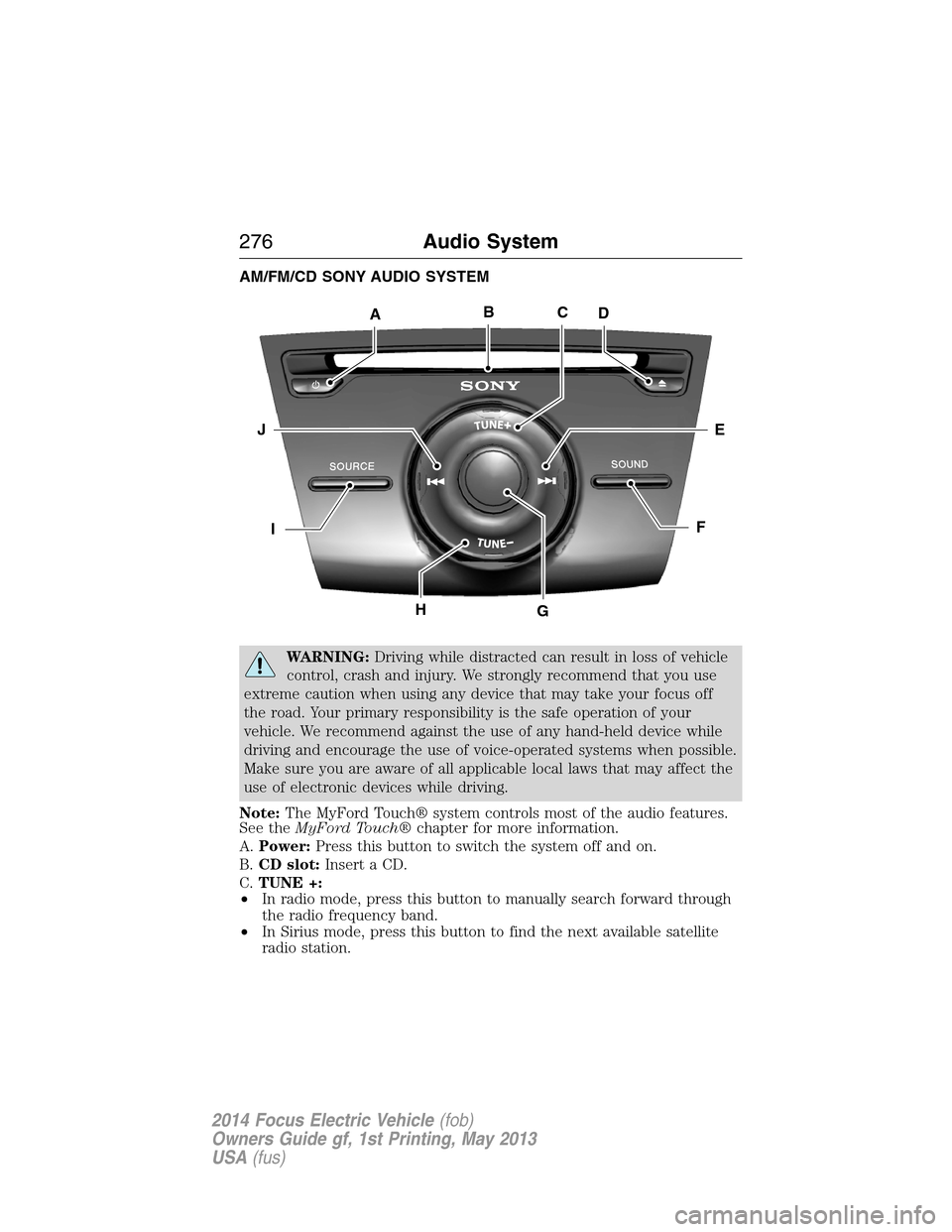
AM/FM/CD SONY AUDIO SYSTEM
WARNING:Driving while distracted can result in loss of vehicle
control, crash and injury. We strongly recommend that you use
extreme caution when using any device that may take your focus off
the road. Your primary responsibility is the safe operation of your
vehicle. We recommend against the use of any hand-held device while
driving and encourage the use of voice-operated systems when possible.
Make sure you are aware of all applicable local laws that may affect the
use of electronic devices while driving.
Note:The MyFord Touch® system controls most of the audio features.
See theMyFord Touch®chapter for more information.
A.Power:Press this button to switch the system off and on.
B.CD slot:Insert a CD.
C.TUNE +:
•In radio mode, press this button to manually search forward through
the radio frequency band.
•In Sirius mode, press this button to find the next available satellite
radio station.
ABCD
EJ
FI
HG
276Audio System
2014 Focus Electric Vehicle(fob)
Owners Guide gf, 1st Printing, May 2013
USA(fus)
Page 278 of 403
D.Eject:Press this button to eject a CD.
E.Seek (Forward):
•In radio mode, press this button to go to the next radio station up the
frequency band.
•In Sirius mode, press this button to select the next channel. If a
specific category is selected (such as Jazz, Rock or News), use this
button to find the next channel in the selected category.
•In CD mode, press this button to go to the next track.
F.SOUND:Press this button to access settings for Treble, Middle, Bass,
Balance and Fade.
G.Volume:Turn this control to adjust the volume.
H.TUNE -:
•In radio mode, press this button to manually search backward
through the radio frequency band.
•In Sirius mode, press this button to find the previous available
satellite radio station.
I.SOURCE:Press this button to access different audio modes, such as
AM, FM and A/V Input or SYNC sources such as USB, iPod and
Bluetooth audio.
J.Seek (Reverse):
•In radio mode, press this button to go to the previous radio station
down the frequency band.
•In Sirius mode, press this button to select the previous channel. If a
specific category is selected (such as Jazz, Rock or News), use this
button to find the previous channel in the selected category.
•In CD mode, press this button to go to the previous track.
Audio System277
2014 Focus Electric Vehicle(fob)
Owners Guide gf, 1st Printing, May 2013
USA(fus)
Page 290 of 403
•Speak naturally, without long pauses between words.
•At any time, you can interrupt the system while it is speaking by
pressing the voice icon.
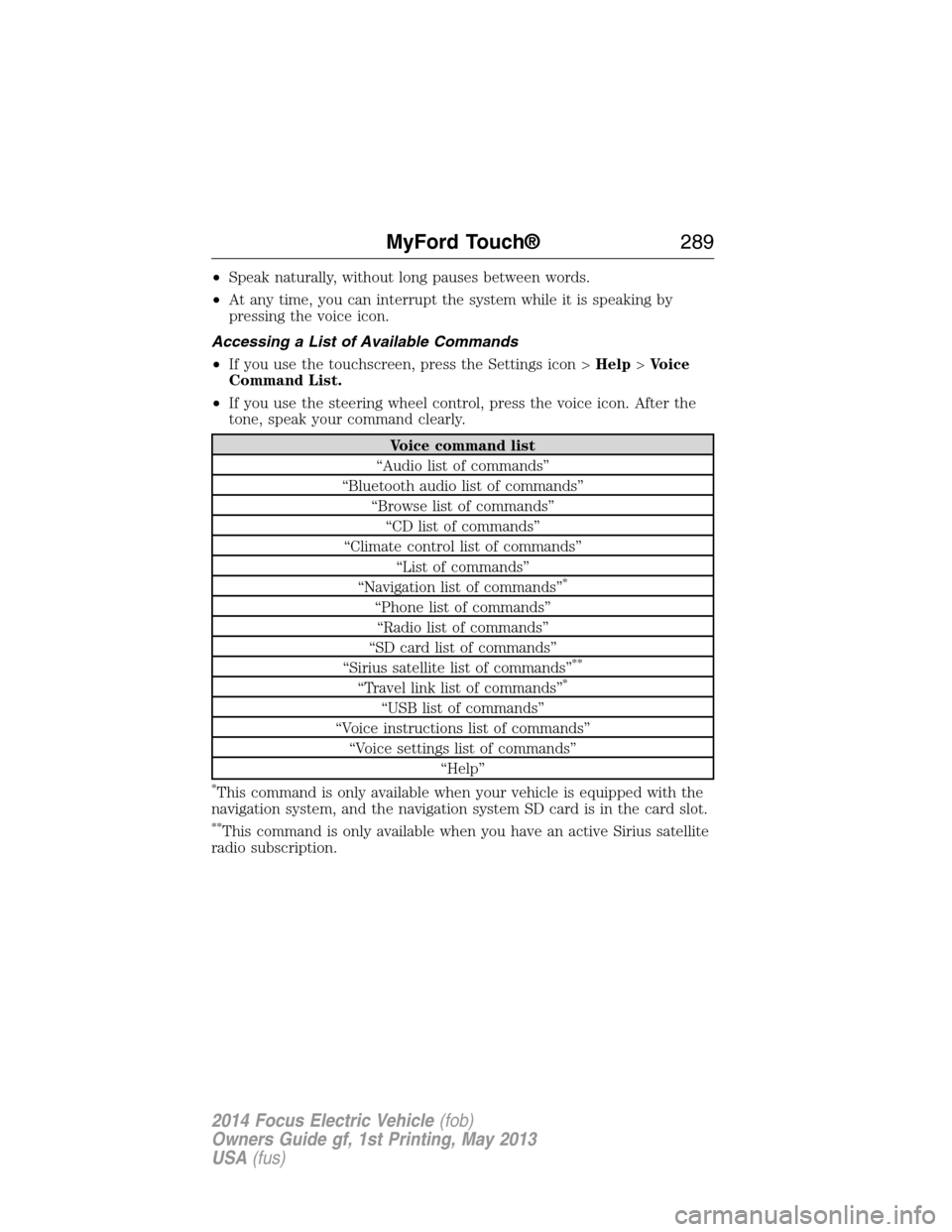
Accessing a List of Available Commands
•If you use the touchscreen, press the Settings icon >Help>Voice
Command List.
•If you use the steering wheel control, press the voice icon. After the
tone, speak your command clearly.
Voice command list
“Audio list of commands”
“Bluetooth audio list of commands”
“Browse list of commands”
“CD list of commands”
“Climate control list of commands”
“List of commands”
“Navigation list of commands”
*
“Phone list of commands”
“Radio list of commands”
“SD card list of commands”
“Sirius satellite list of commands”
**
“Travel link list of commands”*
“USB list of commands”
“Voice instructions list of commands”
“Voice settings list of commands”
“Help”
*This command is only available when your vehicle is equipped with the
navigation system, and the navigation system SD card is in the card slot.
**This command is only available when you have an active Sirius satellite
radio subscription.
MyFord Touch®289
2014 Focus Electric Vehicle(fob)
Owners Guide gf, 1st Printing, May 2013
USA(fus)
Page 292 of 403
Using Voice Commands with the Touchscreen Options
Your voice system has a dual mode feature which allows you to switch
between using voice commands and making on-screen selections. This is
available only when the system displays a list of candidates generated
during a voice session. For example, when entering in a street address
or trying to call a contact from the phone you paired to the system.
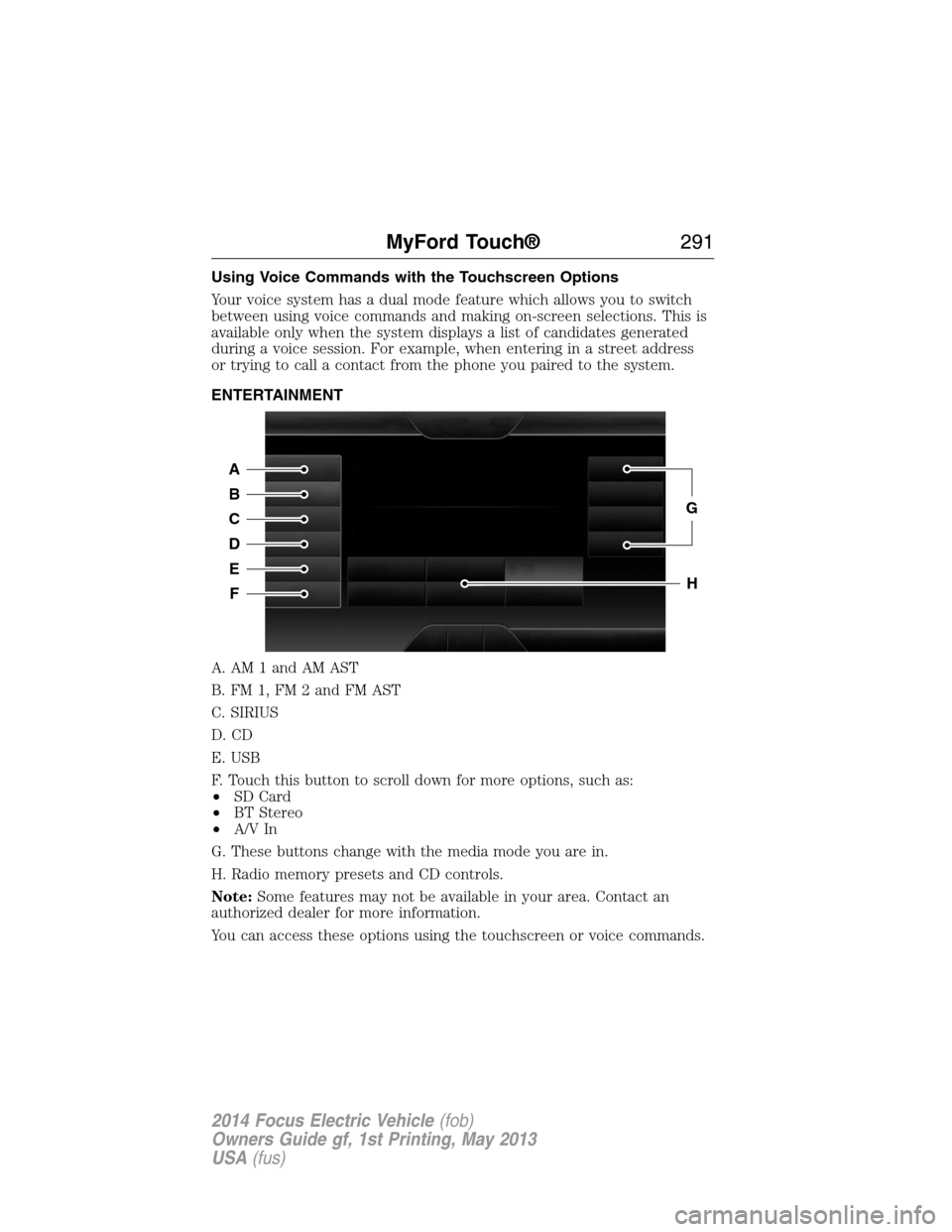
ENTERTAINMENT
A. AM 1 and AM AST
B. FM 1, FM 2 and FM AST
C. SIRIUS
D. CD
E. USB
F. Touch this button to scroll down for more options, such as:
•SD Card
•BT Stereo
•A/V In
G. These buttons change with the media mode you are in.
H. Radio memory presets and CD controls.
Note:Some features may not be available in your area. Contact an
authorized dealer for more information.
You can access these options using the touchscreen or voice commands.
A
B
C
D
E
F
G
H
MyFord Touch®291
2014 Focus Electric Vehicle(fob)
Owners Guide gf, 1st Printing, May 2013
USA(fus)