steering FORD FOCUS ELECTRIC 2014 3.G User Guide
[x] Cancel search | Manufacturer: FORD, Model Year: 2014, Model line: FOCUS ELECTRIC, Model: FORD FOCUS ELECTRIC 2014 3.GPages: 403, PDF Size: 6.42 MB
Page 97 of 403
•Regen Display-Acirculararrowsymbol appears in the center
of the Battery Gauge when energy is being recaptured through the
regenerative braking system.
Brake Coach Display:The Brake Coach appears after the vehicle has
come to a stop. It coaches you to brake in a manner which maximizes
the amount of energy returned through the regenerative braking system.
The percent displayed is an indication of the regenerative braking
efficiency with 100% representing the maximum amount of energy
recovery. If desired, this feature can be disabled in the Display section
of the Settings menu.
Trip Summary and Lifetime Summary:These will be displayed upon
shutting off the vehicle. Trip Summary will appear first, then Lifetime
Summary will be displayed. You can toggle between these displays using
the up and down arrow keys on the left hand steering wheel controls.
Trip Summary data is from the last power cycle, while Lifetime Summary
data is cumulative from the last Lifetime Summary reset done through
the Settings menu in the message center.
Trip Summary:
•Distance - The total distance travelled, and regen distance are
displayed. Regen distance is the estimated range gained from energy
recaptured through regenerative braking.
•Energy Used - The total kilowatt hours and average watt hours per
unit of distance are displayed. The average watt hours per mi (km)
will be shown in blue if less than (better than) the lifetime average
watt hours per mi (km).
•Brake Score - The percentage of braking energy recaptured and
returned to the high voltage battery through regenerative braking.
The brake score will be shown in blue if greater than (better than)
the lifetime brake score.
Lifetime Summary:
•Distance - The total regen distance, which is the estimated range
gained from energy recaptured through regenerative braking.
•Energy Used - The average watt hours per mi (km).
•Brake Score - The average percentage of braking energy recaptured
and returned to the high voltage battery through regenerative braking.
96Instrument Cluster
2014 Focus Electric Vehicle(fob)
Owners Guide gf, 1st Printing, May 2013
USA(fus)
Page 103 of 403
GENERAL INFORMATION
WARNING:Driving while distracted can result in loss of vehicle
control, crash and injury. We strongly recommend that you use
extreme caution when using any device that may take your focus off
the road. Your primary responsibility is the safe operation of your
vehicle. We recommend against the use of any handheld device while
driving and encourage the use of voice-operated systems when possible.
Make sure you are aware of all applicable local laws that may affect the
use of electronic devices while driving..
Various systems on your vehicle can be controlled using the information
display controls on the steering wheel. Corresponding information is
displayed in the information display.
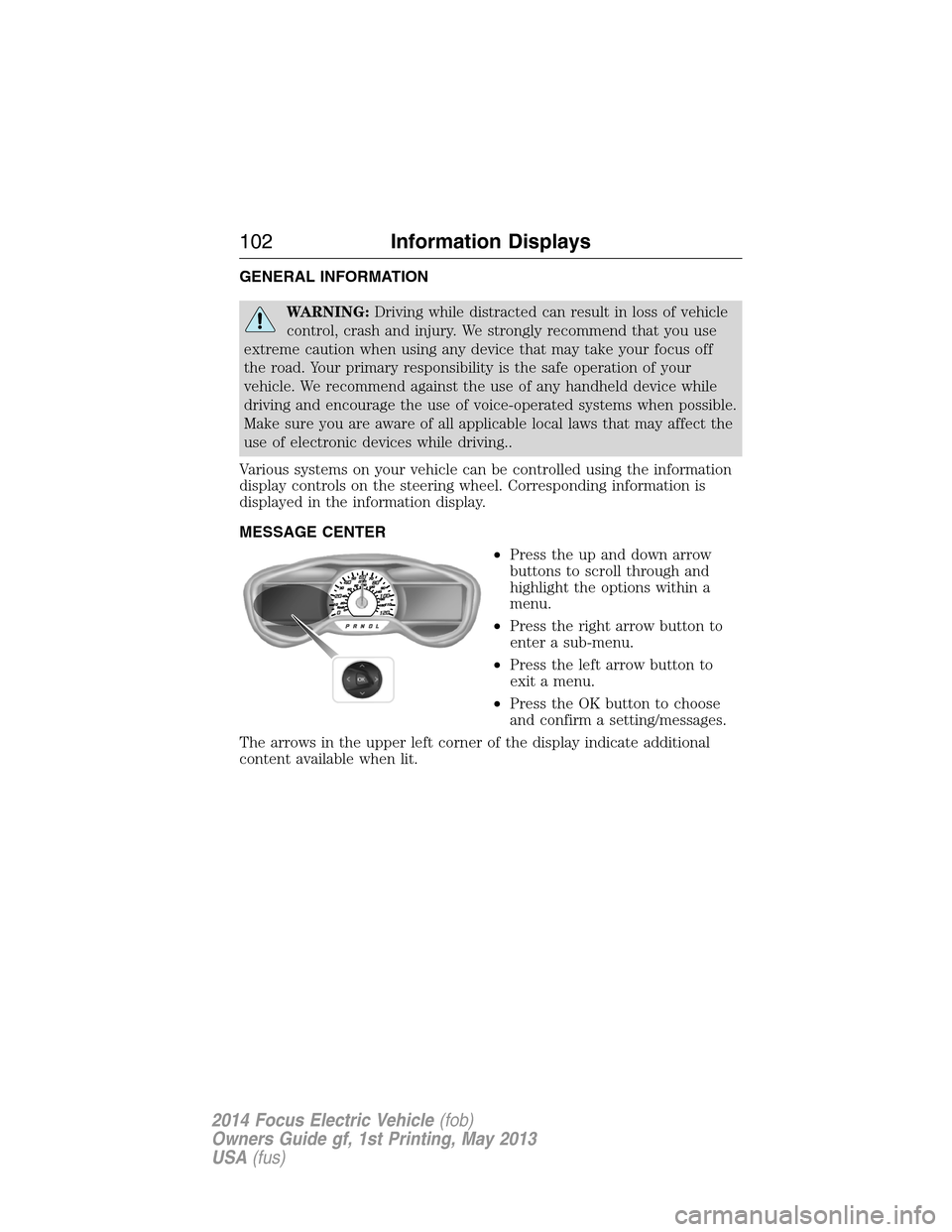
MESSAGE CENTER
•Press the up and down arrow
buttons to scroll through and
highlight the options within a
menu.
•Press the right arrow button to
enter a sub-menu.
•Press the left arrow button to
exit a menu.
•Press the OK button to choose
and confirm a setting/messages.
The arrows in the upper left corner of the display indicate additional
content available when lit.
102Information Displays
2014 Focus Electric Vehicle(fob)
Owners Guide gf, 1st Printing, May 2013
USA(fus)
Page 115 of 403
Charging and Electrical System
MessageAction / Description
Budget Set for xx mi (km) Displays when your budget is reset
because you have reached your
charge point destination, or you no
longer have a charge point
destination identified through your
vehicle navigation system. Your
budget is set for the current
vehicle range estimate.
Doors Message Action / Description
X Door Ajar Displays when the door listed is
not completely closed.
Liftgate Ajar Displays when the luggage
compartment is not completely
closed.
Hill Start Assist Message Action / Description
Hill start assist not available Displays when hill start assist is
not available. Contact your
authorized dealer.
Keyless Vehicle / Immobilizer
MessageAction / Description
Starting System Fault This message is displayed when
there is a problem with your
vehicle’s starting system. See your
authorized dealer for service.
Steering malfunction Service now Contact your authorized dealer.
Steering malfunction Stop safely Stop the vehicle in a safe place.
Contact your authorized dealer.
Key Inside Vehicle Displays to remind you that the
key is in the luggage compartment.
Refer toPush button start system
in theDrivingchapter for more
information.
11 4Information Displays
2014 Focus Electric Vehicle(fob)
Owners Guide gf, 1st Printing, May 2013
USA(fus)
Page 119 of 403
Power Steering Message Action / Description
Service Power Steering The power steering system has
detected a condition that requires
service. See your authorized
dealer.
Service Power Steering Now The power steering system has
detected a condition within the
power steering system that
requires service immediately. See
your authorized dealer.
Power Steering Assist Fault The power steering system has
disabled power steering assist due
to a system error. See your
authorized dealer.
Remote Start Message Action / Description
Remote Start Active Displayed when the remote start
system is active.
Transmission Message Action / Description
Transmission not in Park Select P Displays as a reminder to shift into
park.
Press brake pedal Displays to request the operator to
apply the brake as needed by the
transmission.
To start press brake Displays when starting the vehicle
as a reminder to apply the brake.
Shift to Park Displayed as a reminder to shift to
park.
11 8Information Displays
2014 Focus Electric Vehicle(fob)
Owners Guide gf, 1st Printing, May 2013
USA(fus)
Page 128 of 403
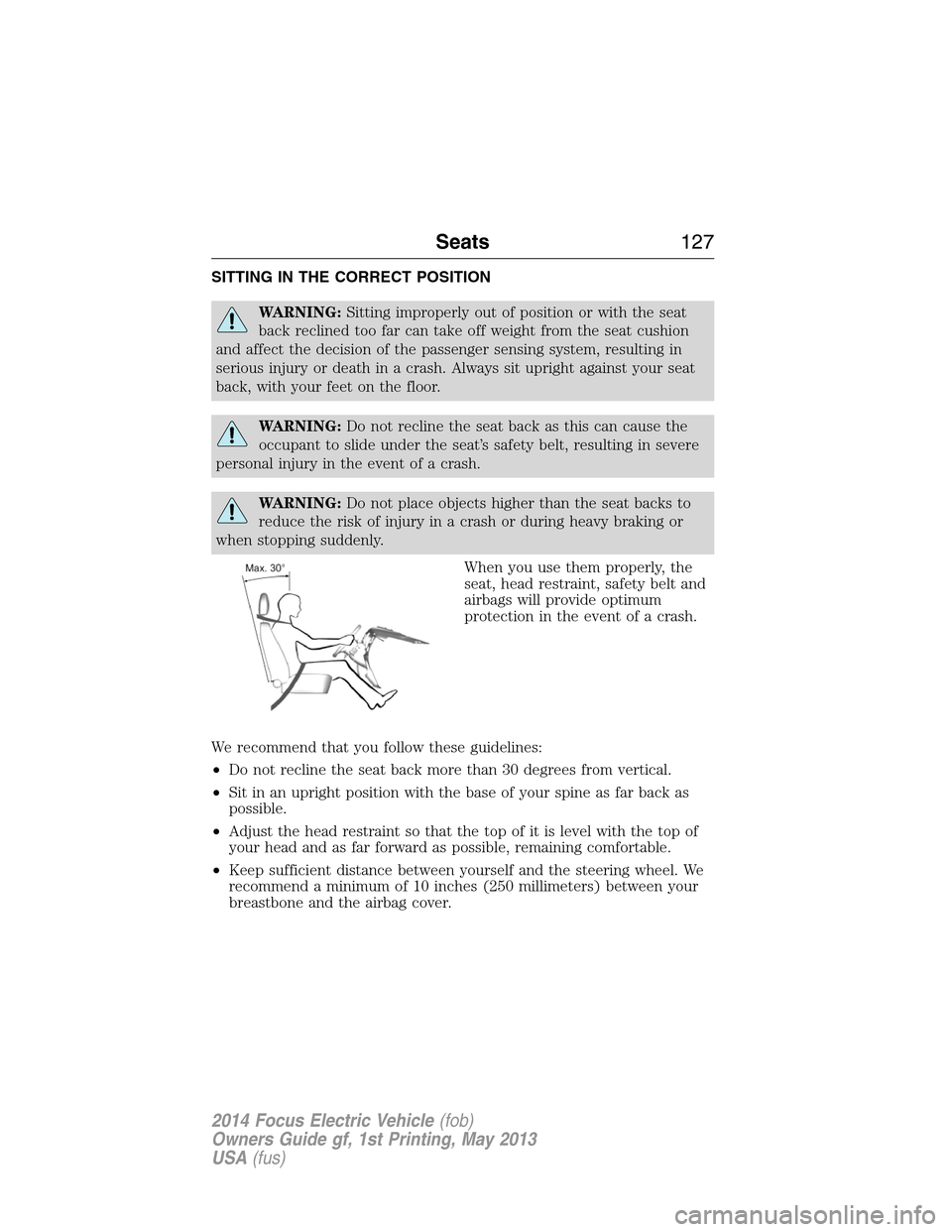
SITTING IN THE CORRECT POSITION
WARNING:Sitting improperly out of position or with the seat
back reclined too far can take off weight from the seat cushion
and affect the decision of the passenger sensing system, resulting in
serious injury or death in a crash. Always sit upright against your seat
back, with your feet on the floor.
WARNING:Do not recline the seat back as this can cause the
occupant to slide under the seat’s safety belt, resulting in severe
personal injury in the event of a crash.
WARNING:Do not place objects higher than the seat backs to
reduce the risk of injury in a crash or during heavy braking or
when stopping suddenly.
When you use them properly, the
seat, head restraint, safety belt and
airbags will provide optimum
protection in the event of a crash.
We recommend that you follow these guidelines:
•Do not recline the seat back more than 30 degrees from vertical.
•Sit in an upright position with the base of your spine as far back as
possible.
•Adjust the head restraint so that the top of it is level with the top of
your head and as far forward as possible, remaining comfortable.
•Keep sufficient distance between yourself and the steering wheel. We
recommend a minimum of 10 inches (250 millimeters) between your
breastbone and the airbag cover.
Seats127
2014 Focus Electric Vehicle(fob)
Owners Guide gf, 1st Printing, May 2013
USA(fus)
Page 129 of 403
•Hold the steering wheel with your arms slightly bent.
•Bend your legs slightly so that you can press the pedals fully.
•Position the shoulder strap of the safety belt over the center of your
shoulder and position the lap strap tightly across your hips.
Make sure that your driving position is comfortable and that you can
maintain full control of your vehicle.
HEAD RESTRAINTS
WARNING:To minimize the risk of neck injury in the event of a
crash, the driver and passenger occupants should not sit in or
operate the vehicle, until the head restraint is placed in its proper
position. The driver should never adjust the head restraint while the
vehicle is in motion.
WARNING:The adjustable head restraint is a safety device.
Whenever possible, it should be installed and properly adjusted
when the seat is occupied.
WARNING:Install the head restraint properly to minimize the
risk of neck injury in the event of a crash.
Note:Adjust the seat back to an upright driving position before
adjusting any head restraint. Adjust the head restraint so that the top of
it is level with the top of your head and as far forward as possible,
remaining comfortable. For occupants of extremely tall stature, adjust
the head restraint to its highest position.
128Seats
2014 Focus Electric Vehicle(fob)
Owners Guide gf, 1st Printing, May 2013
USA(fus)
Page 141 of 403
STARTING YOUR VEHICLE
Before starting the vehicle, check the following:
•Make sure all occupants have fastened their safety belts.
•Make sure the headlamps and electrical accessories are off.
•Make sure the parking brake is on.
•Move the transmission selector lever to positionP.
Note:Do not touch the accelerator pedal.
1. Fully press the brake pedal.
2. Press the button.
The system does not function if:
•The key frequencies are jammed.
•The key battery has no charge.
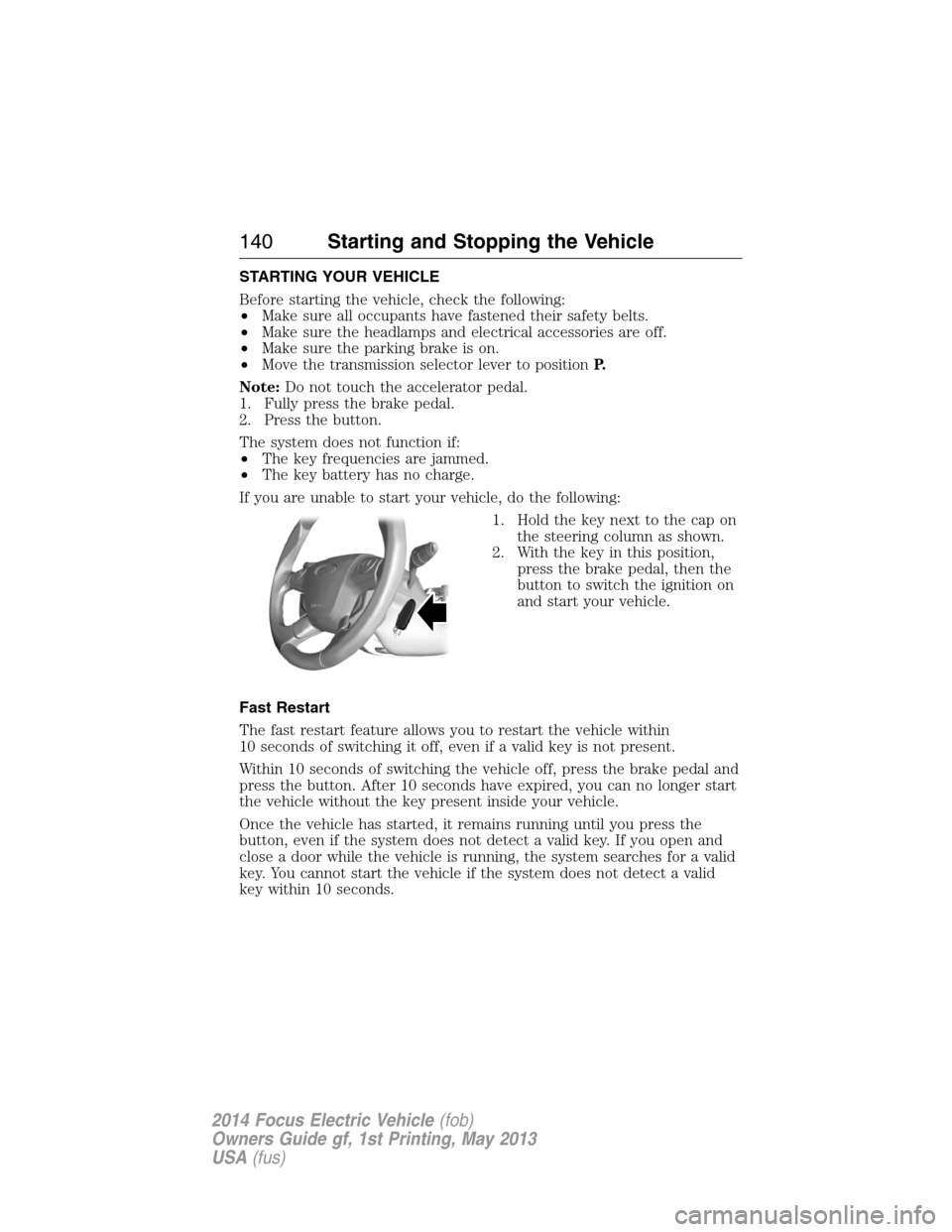
If you are unable to start your vehicle, do the following:
1. Hold the key next to the cap on
the steering column as shown.
2. With the key in this position,
press the brake pedal, then the
button to switch the ignition on
and start your vehicle.
Fast Restart
The fast restart feature allows you to restart the vehicle within
10 seconds of switching it off, even if a valid key is not present.
Within 10 seconds of switching the vehicle off, press the brake pedal and
press the button. After 10 seconds have expired, you can no longer start
the vehicle without the key present inside your vehicle.
Once the vehicle has started, it remains running until you press the
button, even if the system does not detect a valid key. If you open and
close a door while the vehicle is running, the system searches for a valid
key. You cannot start the vehicle if the system does not detect a valid
key within 10 seconds.
140Starting and Stopping the Vehicle
2014 Focus Electric Vehicle(fob)
Owners Guide gf, 1st Printing, May 2013
USA(fus)
Page 142 of 403
Stopping the Electric Vehicle’s Motor When the Vehicle Is
Stationary
1. Move the transmission selector lever to positionP.
2. Press the button once.
3. Apply the parking brake.
Note:This switches off the ignition, all electrical circuits, warning lamps
and indicators.
Stopping the Electric Vehicle’s Motor When the Vehicle Is Moving
WARNING:Switching off the vehicle when it is still moving will
result in a loss of brake and steering assistance. The steering
will not lock, but higher effort will be required. When the ignition is
switched off, some electrical circuits, warning lamps and indicators may
also be off.
1. Move the transmission selector lever to positionNand use the brakes
to bring your vehicle to a safe stop.
2. When your vehicle has stopped, move the transmission selector lever
to positionP.
3. Switch the ignition off by pressing and holding the button for one
second, or pressing it three times within two seconds.
4. Apply the parking brake.
Starting and Stopping the Vehicle141
2014 Focus Electric Vehicle(fob)
Owners Guide gf, 1st Printing, May 2013
USA(fus)
Page 154 of 403
GENERAL INFORMATION
Note:Occasional brake noise is normal. If a metal-to-metal, continuous
grinding or continuous squeal sound is present, the brake linings may be
worn out. Have them inspected by an authorized dealer. If your vehicle
has continuous vibration or shudder in the steering wheel while braking,
have your vehicle inspected by an authorized dealer.
Note:Brake dust may accumulate on the wheels, even under normal
driving conditions. Some dust is inevitable as the brakes wear and does
not contribute to brake noise. See theVehicle Carechapter for wheel
cleaning instructions.
See theInstrument Clusterchapter for information on the
brake system warning light.
Wet brakes result in reduced braking efficiency. Gently press the brake
pedal a few times when driving from a car wash or standing water to dry
the brakes.
Brake Over Accelerator
In the event the accelerator pedal becomes stuck or entrapped, apply
steady and firm pressure to the brake pedal to slow the vehicle and
reduce motor power. If you experience this condition, apply the brakes
and bring your vehicle to a safe stop. Turn the motor off, shift to position
Pand apply the parking brake, then inspect the accelerator pedal for any
interferences. If none are found and the condition persists, have your
vehicle towed to the nearest authorized dealer.
Brake Assist
Brake assist detects when you brake heavily by measuring the rate at
which you press the brake pedal. It provides maximum braking efficiency
as long as you press the pedal. Brake assist can reduce stopping
distances in critical situations.
Anti-Lock Brake System
This system helps you maintain steering control during emergency stops
by keeping the brakes from locking.
This lamp momentarily illuminates when you turn the ignition
on. If the light does not illuminate during start-up, remains on
or flashes, the anti-lock brake system may be disabled and may
need to be serviced.
Brakes153
2014 Focus Electric Vehicle(fob)
Owners Guide gf, 1st Printing, May 2013
USA(fus)
Page 158 of 403
PRINCIPLES OF OPERATION
WARNING:Vehicle modifications involving braking system,
aftermarket roof racks, suspension, steering system, tire
construction and wheel or tire size may change the handling
characteristics of your vehicle and may adversely affect the performance
of the AdvanceTrac® system. In addition, installing any stereo
loudspeakers may interfere with and adversely affect the AdvanceTrac®
system. Install any aftermarket stereo loudspeaker as far as possible from
the front center console, the tunnel, and the front seats in order to
minimize the risk of interfering with the AdvanceTrac® sensors. Reducing
the effectiveness of the AdvanceTrac® system could lead to an increased
risk of loss of vehicle control, vehicle rollover, personal injury and death.
WARNING:Remember that even advanced technology cannot
defy the laws of physics. It is always possible to lose control of a
vehicle due to inappropriate driver input for the conditions. Aggressive
driving on any road condition can cause you to lose control of your
vehicle increasing the risk of personal injury or property damage.
Activation of the AdvanceTrac® system is an indication that at least
some of the tires have exceeded their ability to grip the road; this could
reduce the operator’s ability to control the vehicle potentially resulting
in a loss of vehicle control, vehicle rollover, personal injury and death.
If your AdvanceTrac® system activates, SLOW DOWN.
The AdvanceTrac® system helps you keep control of your vehicle when
on a slippery surface. The electronic stability control portion of the
system helps avoid skids and lateral slides and the traction control
system helps avoid drive wheel spin and loss of traction. See the
Traction Controlchapter for details on traction control system
operation.
Stability Control157
2014 Focus Electric Vehicle(fob)
Owners Guide gf, 1st Printing, May 2013
USA(fus)